USB FORD FUSION HYBRID 2017 Service Manual
[x] Cancel search | Manufacturer: FORD, Model Year: 2017, Model line: FUSION HYBRID, Model: FORD FUSION HYBRID 2017Pages: 516, PDF Size: 7.53 MB
Page 463 of 516
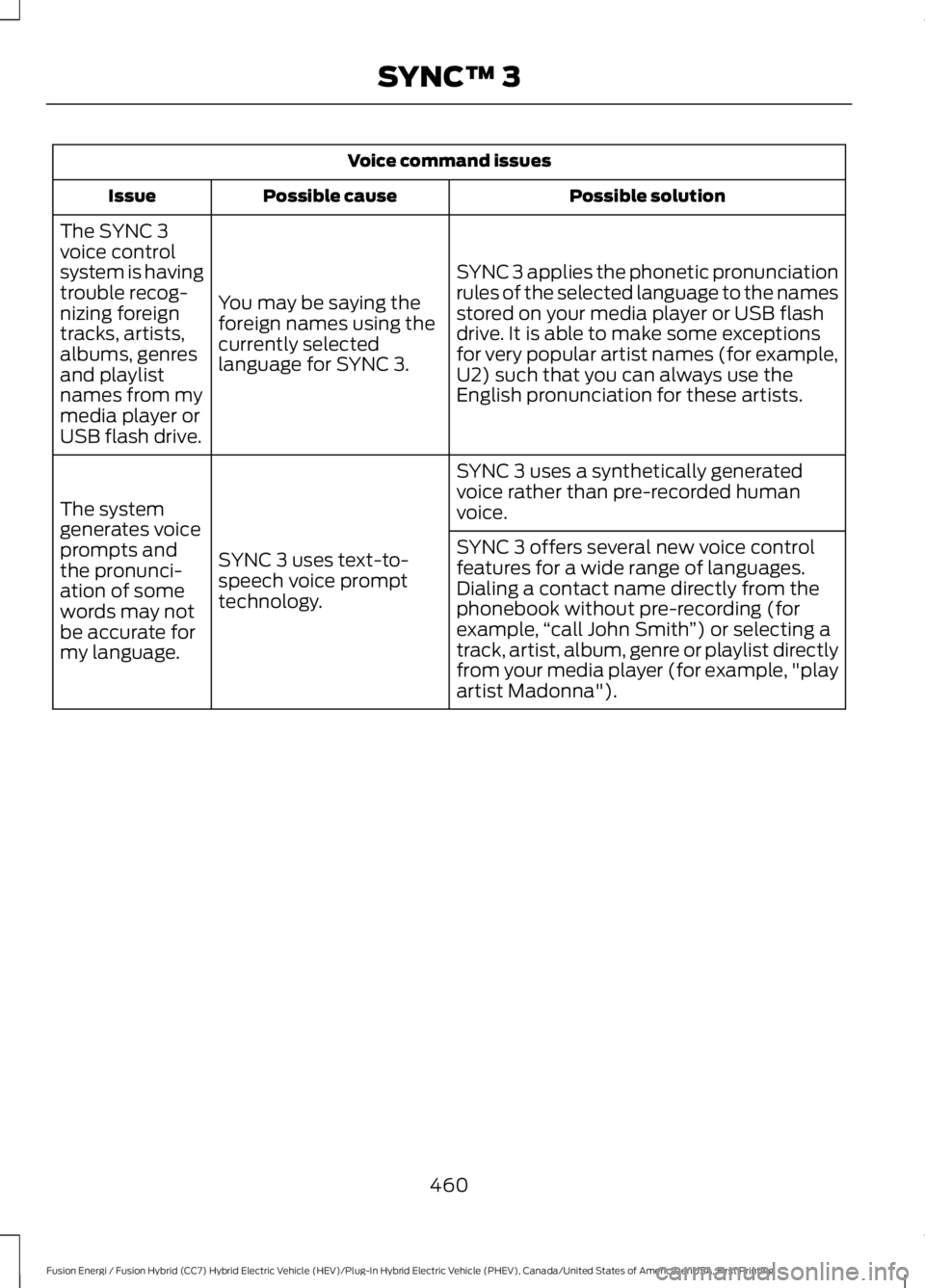
Voice command issues
Possible solutionPossible causeIssue
SYNC 3 applies the phonetic pronunciationrules of the selected language to the namesstored on your media player or USB flashdrive. It is able to make some exceptionsfor very popular artist names (for example,U2) such that you can always use theEnglish pronunciation for these artists.
You may be saying theforeign names using thecurrently selectedlanguage for SYNC 3.
The SYNC 3voice controlsystem is havingtrouble recog-nizing foreigntracks, artists,albums, genresand playlistnames from mymedia player orUSB flash drive.
SYNC 3 uses a synthetically generatedvoice rather than pre-recorded humanvoice.
SYNC 3 uses text-to-speech voice prompttechnology.
The systemgenerates voiceprompts andthe pronunci-ation of somewords may notbe accurate formy language.
SYNC 3 offers several new voice controlfeatures for a wide range of languages.Dialing a contact name directly from thephonebook without pre-recording (forexample,“call John Smith”) or selecting atrack, artist, album, genre or playlist directlyfrom your media player (for example, "playartist Madonna").
460
Fusion Energi / Fusion Hybrid (CC7) Hybrid Electric Vehicle (HEV)/Plug-In Hybrid Electric Vehicle (PHEV), Canada/United States of America, enUSA, First Printing
SYNC™ 3
Page 464 of 516
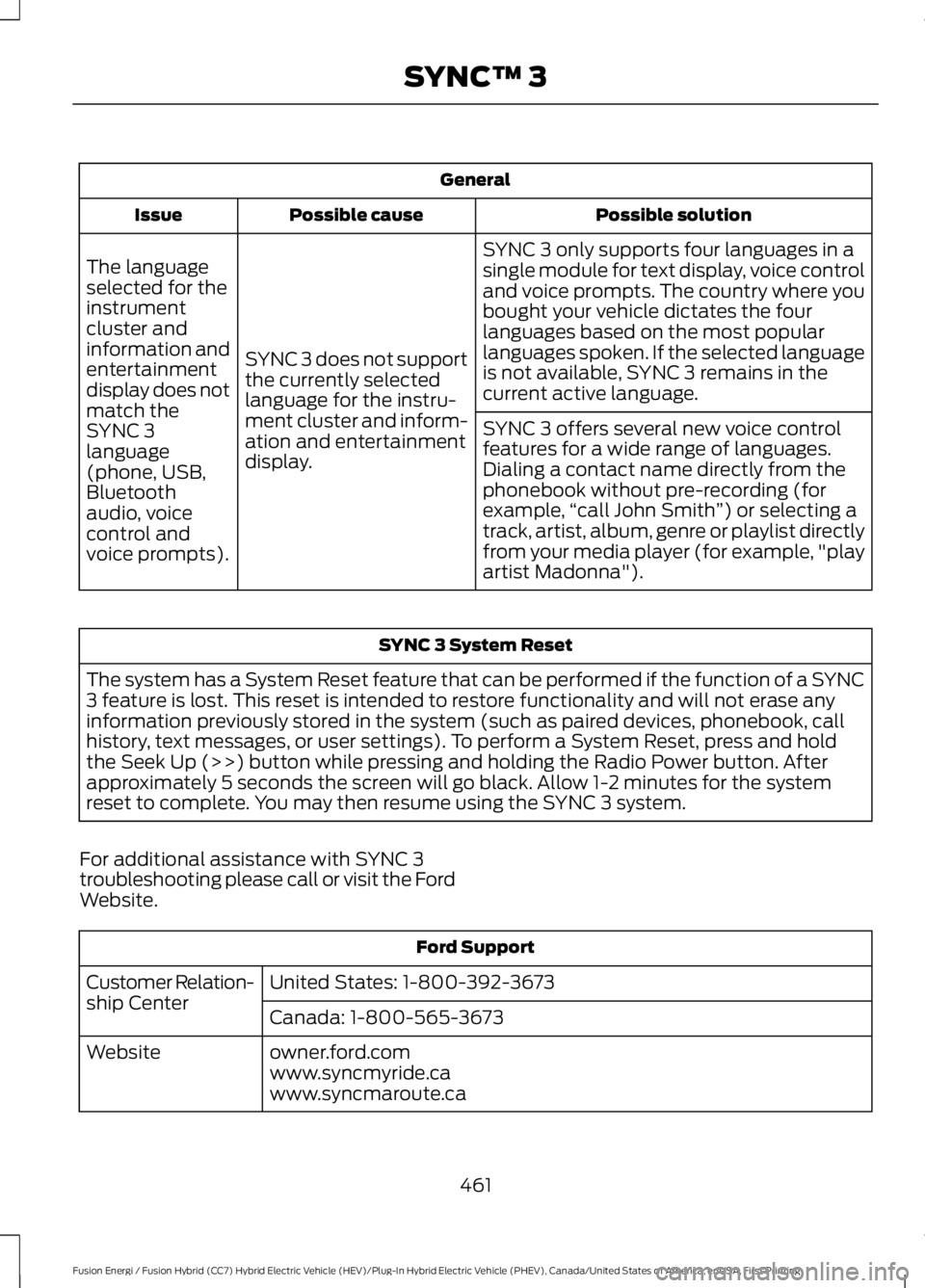
General
Possible solutionPossible causeIssue
SYNC 3 only supports four languages in asingle module for text display, voice controland voice prompts. The country where youbought your vehicle dictates the fourlanguages based on the most popularlanguages spoken. If the selected languageis not available, SYNC 3 remains in thecurrent active language.
SYNC 3 does not supportthe currently selectedlanguage for the instru-ment cluster and inform-ation and entertainmentdisplay.
The languageselected for theinstrumentcluster andinformation andentertainmentdisplay does notmatch theSYNC 3SYNC 3 offers several new voice controlfeatures for a wide range of languages.Dialing a contact name directly from thephonebook without pre-recording (forexample,“call John Smith”) or selecting atrack, artist, album, genre or playlist directlyfrom your media player (for example, "playartist Madonna").
language(phone, USB,Bluetoothaudio, voicecontrol andvoice prompts).
SYNC 3 System Reset
The system has a System Reset feature that can be performed if the function of a SYNC3 feature is lost. This reset is intended to restore functionality and will not erase anyinformation previously stored in the system (such as paired devices, phonebook, callhistory, text messages, or user settings). To perform a System Reset, press and holdthe Seek Up (>>) button while pressing and holding the Radio Power button. Afterapproximately 5 seconds the screen will go black. Allow 1-2 minutes for the systemreset to complete. You may then resume using the SYNC 3 system.
For additional assistance with SYNC 3troubleshooting please call or visit the FordWebsite.
Ford Support
United States: 1-800-392-3673Customer Relation-ship CenterCanada: 1-800-565-3673
owner.ford.comWebsitewww.syncmyride.cawww.syncmaroute.ca
461
Fusion Energi / Fusion Hybrid (CC7) Hybrid Electric Vehicle (HEV)/Plug-In Hybrid Electric Vehicle (PHEV), Canada/United States of America, enUSA, First Printing
SYNC™ 3
Page 508 of 516
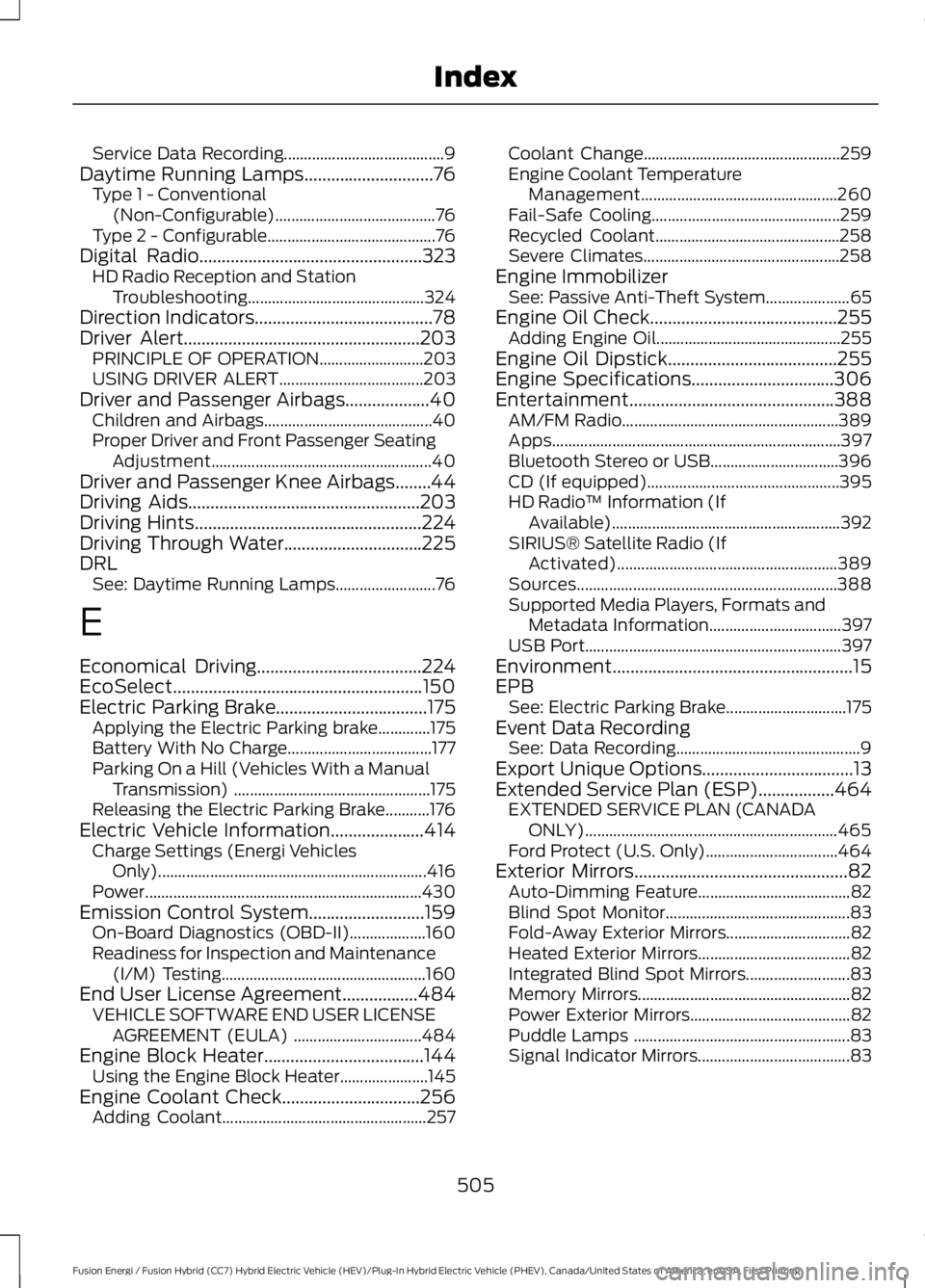
Service Data Recording........................................9Daytime Running Lamps.............................76Type 1 - Conventional(Non-Configurable)........................................76Type 2 - Configurable..........................................76Digital Radio..................................................323HD Radio Reception and StationTroubleshooting............................................324Direction Indicators........................................78Driver Alert.....................................................203PRINCIPLE OF OPERATION..........................203USING DRIVER ALERT....................................203Driver and Passenger Airbags...................40Children and Airbags..........................................40Proper Driver and Front Passenger SeatingAdjustment.......................................................40Driver and Passenger Knee Airbags........44Driving Aids....................................................203Driving Hints...................................................224Driving Through Water...............................225DRLSee: Daytime Running Lamps.........................76
E
Economical Driving.....................................224EcoSelect........................................................150Electric Parking Brake..................................175Applying the Electric Parking brake.............175Battery With No Charge....................................177Parking On a Hill (Vehicles With a ManualTransmission) .................................................175Releasing the Electric Parking Brake...........176Electric Vehicle Information.....................414Charge Settings (Energi VehiclesOnly)...................................................................416Power.....................................................................430Emission Control System..........................159On-Board Diagnostics (OBD-II)...................160Readiness for Inspection and Maintenance(I/M) Testing...................................................160End User License Agreement.................484VEHICLE SOFTWARE END USER LICENSEAGREEMENT (EULA) ................................484Engine Block Heater....................................144Using the Engine Block Heater......................145Engine Coolant Check...............................256Adding Coolant...................................................257
Coolant Change.................................................259Engine Coolant TemperatureManagement.................................................260Fail-Safe Cooling...............................................259Recycled Coolant..............................................258Severe Climates.................................................258Engine ImmobilizerSee: Passive Anti-Theft System.....................65Engine Oil Check..........................................255Adding Engine Oil..............................................255Engine Oil Dipstick......................................255Engine Specifications................................306Entertainment..............................................388AM/FM Radio......................................................389Apps........................................................................397Bluetooth Stereo or USB................................396CD (If equipped)................................................395HD Radio™ Information (IfAvailable).........................................................392SIRIUS® Satellite Radio (IfActivated).......................................................389Sources.................................................................388Supported Media Players, Formats andMetadata Information.................................397USB Port................................................................397Environment......................................................15EPBSee: Electric Parking Brake..............................175Event Data RecordingSee: Data Recording..............................................9Export Unique Options..................................13Extended Service Plan (ESP).................464EXTENDED SERVICE PLAN (CANADAONLY)...............................................................465Ford Protect (U.S. Only).................................464Exterior Mirrors................................................82Auto-Dimming Feature......................................82Blind Spot Monitor..............................................83Fold-Away Exterior Mirrors...............................82Heated Exterior Mirrors......................................82Integrated Blind Spot Mirrors..........................83Memory Mirrors.....................................................82Power Exterior Mirrors........................................82Puddle Lamps ......................................................83Signal Indicator Mirrors......................................83
505
Fusion Energi / Fusion Hybrid (CC7) Hybrid Electric Vehicle (HEV)/Plug-In Hybrid Electric Vehicle (PHEV), Canada/United States of America, enUSA, First Printing
Index
Page 514 of 516
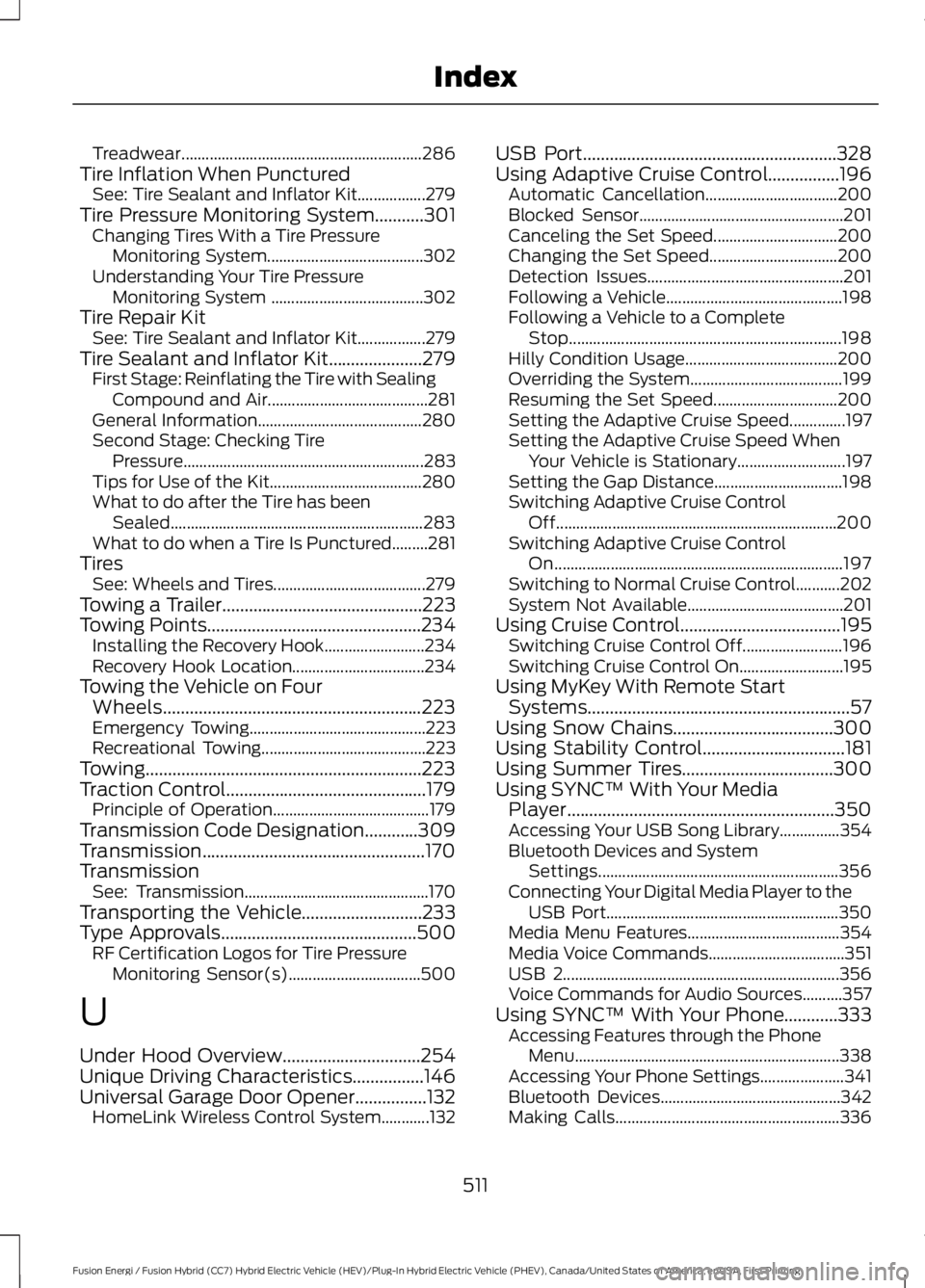
Treadwear............................................................286Tire Inflation When PuncturedSee: Tire Sealant and Inflator Kit.................279Tire Pressure Monitoring System...........301Changing Tires With a Tire PressureMonitoring System.......................................302Understanding Your Tire PressureMonitoring System ......................................302Tire Repair KitSee: Tire Sealant and Inflator Kit.................279Tire Sealant and Inflator Kit.....................279First Stage: Reinflating the Tire with SealingCompound and Air........................................281General Information.........................................280Second Stage: Checking TirePressure............................................................283Tips for Use of the Kit......................................280What to do after the Tire has beenSealed...............................................................283What to do when a Tire Is Punctured.........281TiresSee: Wheels and Tires......................................279Towing a Trailer.............................................223Towing Points................................................234Installing the Recovery Hook.........................234Recovery Hook Location.................................234Towing the Vehicle on FourWheels..........................................................223Emergency Towing............................................223Recreational Towing.........................................223Towing..............................................................223Traction Control.............................................179Principle of Operation.......................................179Transmission Code Designation............309Transmission..................................................170TransmissionSee: Transmission..............................................170Transporting the Vehicle...........................233Type Approvals............................................500RF Certification Logos for Tire PressureMonitoring Sensor(s).................................500
U
Under Hood Overview...............................254Unique Driving Characteristics................146Universal Garage Door Opener................132HomeLink Wireless Control System............132
USB Port.........................................................328Using Adaptive Cruise Control................196Automatic Cancellation.................................200Blocked Sensor...................................................201Canceling the Set Speed...............................200Changing the Set Speed................................200Detection Issues.................................................201Following a Vehicle............................................198Following a Vehicle to a CompleteStop....................................................................198Hilly Condition Usage......................................200Overriding the System......................................199Resuming the Set Speed...............................200Setting the Adaptive Cruise Speed..............197Setting the Adaptive Cruise Speed WhenYour Vehicle is Stationary...........................197Setting the Gap Distance................................198Switching Adaptive Cruise ControlOff......................................................................200Switching Adaptive Cruise ControlOn........................................................................197Switching to Normal Cruise Control...........202System Not Available.......................................201Using Cruise Control....................................195Switching Cruise Control Off.........................196Switching Cruise Control On..........................195Using MyKey With Remote StartSystems...........................................................57Using Snow Chains....................................300Using Stability Control................................181Using Summer Tires..................................300Using SYNC™ With Your MediaPlayer............................................................350Accessing Your USB Song Library...............354Bluetooth Devices and SystemSettings............................................................356Connecting Your Digital Media Player to theUSB Port..........................................................350Media Menu Features......................................354Media Voice Commands..................................351USB 2.....................................................................356Voice Commands for Audio Sources..........357Using SYNC™ With Your Phone............333Accessing Features through the PhoneMenu..................................................................338Accessing Your Phone Settings.....................341Bluetooth Devices.............................................342Making Calls........................................................336
511
Fusion Energi / Fusion Hybrid (CC7) Hybrid Electric Vehicle (HEV)/Plug-In Hybrid Electric Vehicle (PHEV), Canada/United States of America, enUSA, First Printing
Index