ESP FORD FUSION HYBRID 2017 Owners Manual
[x] Cancel search | Manufacturer: FORD, Model Year: 2017, Model line: FUSION HYBRID, Model: FORD FUSION HYBRID 2017Pages: 516, PDF Size: 7.53 MB
Page 8 of 516
Audio System
General Information....................................314
Audio Unit - Vehicles With: AM/FM/CD...................................................................315
Audio Unit - Vehicles With: AM/FM/CD/SYNC/Satellite Radio..............................317
Audio Unit - Vehicles With: Sony AM/FM/CD...................................................................319
Digital Radio..................................................323
Satellite Radio..............................................325
USB Port.........................................................328
Media Hub......................................................328
SYNC™
General Information...................................329
Using Voice Recognition............................331
Using SYNC™ With Your Phone............333
SYNC™ Applications and Services......345
Using SYNC™ With Your MediaPlayer...........................................................350
SYNC™ Troubleshooting.........................359
SYNC™ 3
General Information...................................367
Home Screen................................................380
Using Voice Recognition............................381
Entertainment..............................................388
Climate............................................................398
Phone..............................................................400
Navigation.....................................................406
Electric Vehicle Information.....................414
Apps.................................................................434
Settings............................................................437
SYNC™ 3 Troubleshooting.....................450
Accessories
Accessories....................................................462
Extended Service Plan(ESP)
Extended Service Plan (ESP).................464
Scheduled Maintenance
General Maintenance Information.......466
Normal Scheduled Maintenance..........469
Special Operating Conditions ScheduledMaintenance..............................................472
Scheduled Maintenance Record...........474
Appendices
End User License Agreement.................484
Type Approvals............................................500
5
Fusion Energi / Fusion Hybrid (CC7) Hybrid Electric Vehicle (HEV)/Plug-In Hybrid Electric Vehicle (PHEV), Canada/United States of America, enUSA, First Printing
Table of Contents
Page 10 of 516
ABOUT THIS MANUAL
Thank you for choosing Ford. Werecommend that you take some time toget to know your vehicle by reading thismanual. The more that you know aboutyour vehicle, the greater the safety andpleasure you will get from driving it.
WARNING
Driving while distracted can result inloss of vehicle control, crash andinjury. We strongly recommend thatyou use extreme caution when using anydevice that may take your focus off theroad. Your primary responsibility is the safeoperation of your vehicle. We recommendagainst the use of any hand-held devicewhile driving and encourage the use ofvoice-operated systems when possible.Make sure you are aware of all applicablelocal laws that may affect the use ofelectronic devices while driving.
Note: This manual describes productfeatures and options available throughoutthe range of available models, sometimeseven before they are generally available. Itmay describe options not fitted to thevehicle you have purchased.
Note: Some of the illustrations in thismanual may show features as used indifferent models, so may appear differentto you on your vehicle.
Note: Always use and operate your vehiclein line with all applicable laws andregulations.
Note: Pass on this manual when sellingyour vehicle. It is an integral part of yourvehicle.
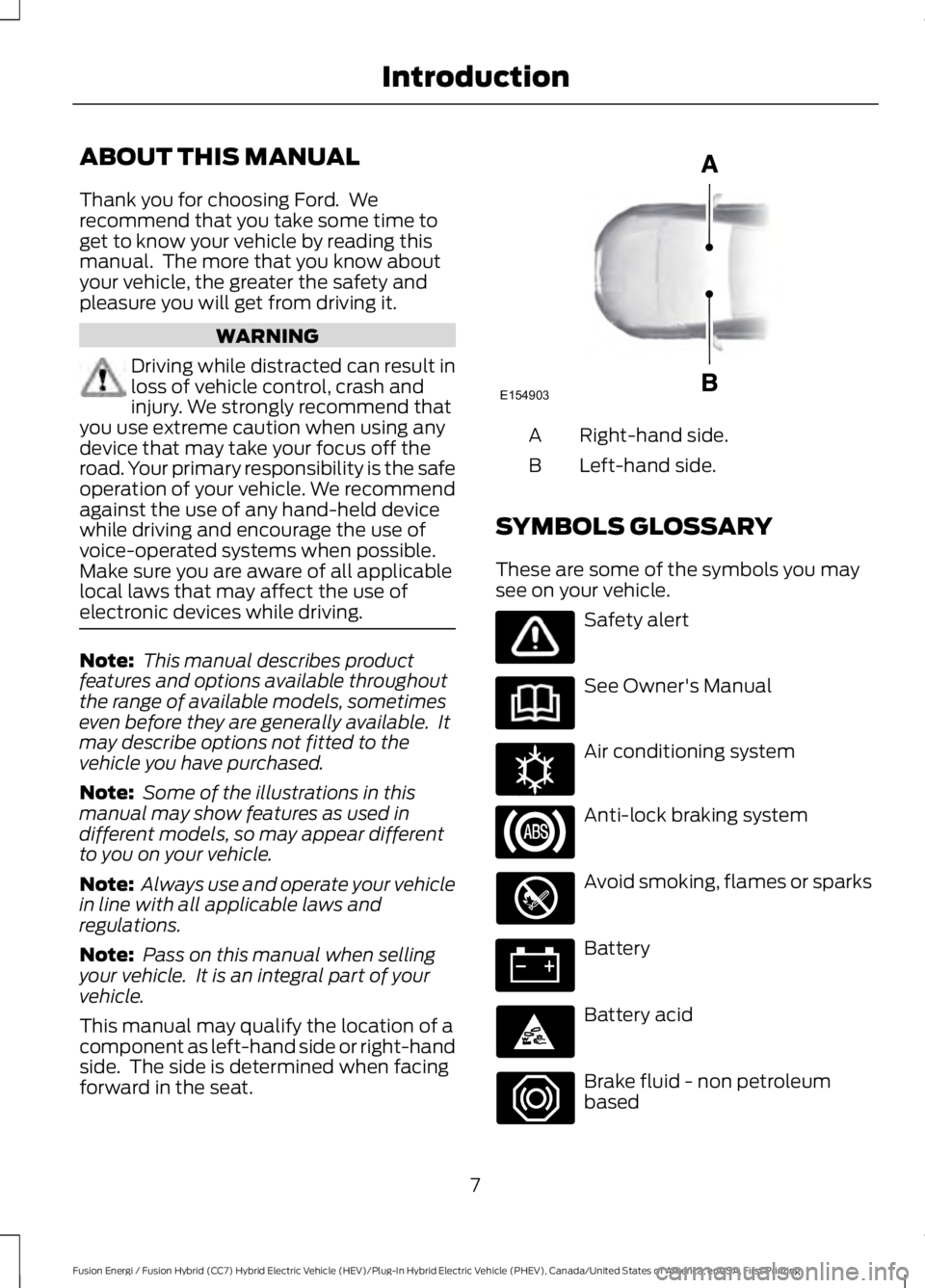
This manual may qualify the location of acomponent as left-hand side or right-handside. The side is determined when facingforward in the seat.
Right-hand side.A
Left-hand side.B
SYMBOLS GLOSSARY
These are some of the symbols you maysee on your vehicle.
Safety alert
See Owner's Manual
Air conditioning system
Anti-lock braking system
Avoid smoking, flames or sparks
Battery
Battery acid
Brake fluid - non petroleumbased
7
Fusion Energi / Fusion Hybrid (CC7) Hybrid Electric Vehicle (HEV)/Plug-In Hybrid Electric Vehicle (PHEV), Canada/United States of America, enUSA, First Printing
IntroductionE154903 E162384
Page 12 of 516
Parking aid
Parking brake
Power steering fluid
Power windows front/rear
Power window lockout
Service engine soon
Side airbag
Shield the eyes
Stability control
Windshield wash and wipe
DATA RECORDING
Service Data Recording
Service data recorders in your vehicle arecapable of collecting and storingdiagnostic information about your vehicle.This potentially includes information aboutthe performance or status of varioussystems and modules in the vehicle, suchas engine, throttle, steering or brakesystems. In order to properly diagnose andservice your vehicle, Ford Motor Company(Ford of Canada in Canada), and service
and repair facilities may access or shareamong them vehicle diagnosticinformation received through a directconnection to your vehicle whendiagnosing or servicing your vehicle.Additionally, Ford Motor Company (Fordof Canada, in Canada) may, wherepermitted by law, use vehicle diagnosticinformation for vehicle improvement orwith other information we may have aboutyou, (e.g., your contact information), tooffer you products or services that mayinterest you. Data may be provided to ourservice providers such as part suppliersthat may help diagnose malfunctions, andwho are similarly obligated to protect data.We retain this data only as long asnecessary to perform these functions or tocomply with law. We may provideinformation where required in response toofficial requests to law enforcement orother government authorities or thirdparties acting with lawful authority or courtorder, and such information may be usedin legal proceedings. For U.S. only (ifequipped), if you choose to use connectedapps and services, such as SYNC VehicleHealth Report or MyFord Mobile App, youconsent that certain diagnostic informationmay also be accessed electronically byFord Motor Company and Ford authorizedservice facilities, and that the diagnosticinformation may be used to provideservices to you, personalizing yourexperience, troubleshoot, and to improveproducts and services and offer youproducts and services that may interestyou, where permitted by law. For Canadaonly, for more information, please reviewthe Ford of Canada privacy policy atwww.ford.ca, including our U.S. datastorage and use of service providers inother jurisdictions who may be subject to
9
Fusion Energi / Fusion Hybrid (CC7) Hybrid Electric Vehicle (HEV)/Plug-In Hybrid Electric Vehicle (PHEV), Canada/United States of America, enUSA, First Printing
IntroductionE139213 E167012 E138639
Page 15 of 516
We offer a number of convenient ways foryou to contact us and help to manage youraccount.
Call 1-800-727-7000.
For more information about Ford Creditand access to the Account Manager, go towww.fordcredit.com.
REPLACEMENT PARTS
RECOMMENDATION
We have built your vehicle to the higheststandards using quality parts. Werecommend that you demand the use ofgenuine Ford and Motorcraft partswhenever your vehicle requires scheduledmaintenance or repair. You can clearlyidentify genuine Ford and Motorcraft partsby looking for the Ford, FoMoCo orMotorcraft branding on the parts or theirpackaging.
Scheduled Maintenance andMechanical Repairs
One of the best ways for you to make surethat your vehicle provides years of serviceis to have it maintained in line with ourrecommendations using parts thatconform to the specifications detailed inthis Owner’s Manual. Genuine Ford andMotorcraft parts meet or exceed thesespecifications.
Collision Repairs
We hope that you never experience acollision, but accidents do happen.Genuine Ford replacement collision partsmeet our stringent requirements for fit,finish, structural integrity, corrosionprotection and dent resistance. During
vehicle development we validate thatthese parts deliver the intended level ofprotection as a whole system. A great wayto know for sure you are getting this levelof protection is to use genuine Fordreplacement collision parts.
Warranty on Replacement Parts
Genuine Ford and Motorcraft replacementparts are the only replacement parts thatbenefit from a Ford Warranty. The FordWarranty may not cover damage causedto your vehicle as a result of failednon-Ford parts. For additional information,refer to the terms and conditions of theFord Warranty.
SPECIAL NOTICES
New Vehicle Limited Warranty
For a detailed description of what iscovered and what is not covered by yourvehicle’s New Vehicle Limited Warranty,refer to the Warranty Manual that isprovided to you along with your Owner’sManual.
Special Instructions
For your added safety, your vehicle is fittedwith sophisticated electronic controls.
WARNINGS
You risk death or serious injury toyourself and others if you do notfollow the instruction highlighted bythe warning symbol. Failure to follow thespecific warnings and instructions couldresult in personal injury.
Never place front seat mountedrear-facing child or infant seats infront of an active passenger airbag.
12
Fusion Energi / Fusion Hybrid (CC7) Hybrid Electric Vehicle (HEV)/Plug-In Hybrid Electric Vehicle (PHEV), Canada/United States of America, enUSA, First Printing
Introduction
Page 16 of 516
On Board Diagnostics Data LinkConnector
WARNING
Use of wireless plug-in devices in theOBD Data Link Connector (DLC) mayallow unauthorized third parties togain access to vehicle systems and datawhich could impair the function of variousvehicle systems, including safety-relatedsystems. The DLC should only be used bya repair facility that operates in accordancewith Ford’s service and repair instructions.
Your vehicle has an OBD Data LinkConnector (DLC) that is used inconjunction with a diagnostic scan tool forvehicle diagnostics, repairs andreprogramming services. Installing anaftermarket device that uses the DLCduring normal driving for purposes such asremote insurance company monitoring,transmission of vehicle data to otherdevices or entities, or altering theperformance of the vehicle, may causeinterference with or even damage tovehicle systems. We do not recommendor endorse the use of aftermarket plug-indevices unless approved by Ford. Thevehicle Warranty will not cover damagecaused by an aftermarket plug-in device.
MOBILE COMMUNICATIONS
EQUIPMENT
WARNING
Driving while distracted can result inloss of vehicle control, crash andinjury. We strongly recommend thatyou use extreme caution when using anydevice that may take your focus off theroad. Your primary responsibility is the safeoperation of your vehicle. We recommendagainst the use of any hand-held devicewhile driving and encourage the use ofvoice-operated systems when possible.Make sure you are aware of all applicablelocal laws that may affect the use ofelectronic devices while driving.
Using mobile communications equipmentis becoming increasingly important in theconduct of business and personal affairs.However, you must not compromise yourown or others’ safety when using suchequipment. Mobile communications canenhance personal safety and security whenappropriately used, particularly inemergency situations. Safety must beparamount when using mobilecommunications equipment to avoidnegating these benefits. Mobilecommunication equipment includes, butis not limited to, cellular phones, pagers,portable email devices, text messagingdevices and portable two-way radios.
EXPORT UNIQUE OPTIONS
For your particular global region, yourvehicle may be equipped with features andoptions that are different from the featuresand options that are described in thisOwner’s Manual. A market uniquesupplement may be supplied thatcomplements this book. By referring to themarket unique supplement, if provided,you can properly identify those features,
13
Fusion Energi / Fusion Hybrid (CC7) Hybrid Electric Vehicle (HEV)/Plug-In Hybrid Electric Vehicle (PHEV), Canada/United States of America, enUSA, First Printing
Introduction
Page 19 of 516
GENERAL INFORMATION
See the following sections for directionson how to properly use safety restraintsfor children.
WARNINGS
Always make sure your child issecured properly in a device that isappropriate for their height, age andweight. Child safety restraints must bebought separately from your vehicle.Failure to follow these instructions andguidelines may result in an increased riskof serious injury or death to your child.
All children are shaped differently.The recommendations for safetyrestraints are based on probablechild height, age and weight thresholdsfrom the National Highway Traffic SafetyAdministration and other safetyorganizations, or are the minimumrequirements of law. We recommendchecking with a NHTSA Certified ChildPassenger Safety Technician (CPST) and
WARNINGS
consult your pediatrician to make sure yourchild seat is appropriate for your child, andis compatible with and properly installedin your vehicle. To locate a child seat fittingstation and CPST, contact NHTSA toll freeat 1-888-327-4236 or go tohttp://www.nhtsa.dot.gov. In Canada,contact Transport Canada toll free at1-800-333-0371 or go to www.tc.gc.ca tofind a Child Car Seat Clinic in your area.Failure to properly restrain children insafety seats made especially for theirheight, age, and weight may result in anincreased risk of serious injury or death toyour child.
Do not leave children or animalsunattended in the vehicle. On hotdays, the temperature in the trunk orvehicle interior can rise very quickly.Exposure of people or animals to thesehigh temperatures for even a short timecan cause death or serious heat-relatedinjuries, including brain damage. Smallchildren are particularly at risk.
16
Fusion Energi / Fusion Hybrid (CC7) Hybrid Electric Vehicle (HEV)/Plug-In Hybrid Electric Vehicle (PHEV), Canada/United States of America, enUSA, First Printing
Child Safety
Page 35 of 516
Pregnant women should always wear theirseatbelt. The lap belt portion of acombination lap and shoulder belt shouldbe positioned low across the hips belowthe belly and worn as tight as comfort willallow. The shoulder belt should bepositioned to cross the middle of theshoulder and the center of the chest.
Seatbelt Locking Modes
WARNINGS
After any vehicle crash, the seatbeltsystem at all passenger seatingpositions must be checked by anauthorized dealer to verify that theautomatic locking retractor feature forchild seats is still functioning properly. Inaddition, all seatbelts should be checkedfor proper function.
The belt and retractor assemblymust be replaced if the seatbeltassembly automatic locking retractorfeature or any other seatbelt function isnot operating properly when checked byan authorized dealer. Failure to replace thebelt and retractor assembly could increasethe risk of injury in crashes.
All safety restraints in the vehicle arecombination lap and shoulder belts. Thedriver seatbelt has the vehicle sensitivelocking mode. The front outboardpassenger and rear seatbelts have boththe vehicle sensitive locking mode and theautomatic locking mode.
Vehicle Sensitive Mode
This is the normal retractor mode, whichallows free shoulder belt lengthadjustment to your movements andlocking in response to vehicle movement.For example, if the driver brakes suddenlyor turns a corner sharply, or the vehiclereceives an impact of about 5 mph(8 km/h) or more, the combinationseatbelts will lock to help reduce forwardmovement of the driver and passengers.
In addition, the retractor is designed to lockif the webbing is pulled out too quickly. Ifthis occurs, let the belt retract slightly andpull webbing out again in a slow andcontrolled manner.
Automatic Locking Mode
In this mode, the shoulder belt isautomatically pre-locked. The belt will stillretract to remove any slack in the shoulderbelt. The automatic locking mode is notavailable on the driver seatbelt.
When to Use the Automatic LockingMode
This mode should be used any time a childsafety seat, except a booster, is installedin passenger front or rear seating positions.Children 12 years old and under should beproperly restrained in a rear seatingposition whenever possible. See ChildSafety (page 16).
How to Use the Automatic LockingMode
Standard seatbelts
32
Fusion Energi / Fusion Hybrid (CC7) Hybrid Electric Vehicle (HEV)/Plug-In Hybrid Electric Vehicle (PHEV), Canada/United States of America, enUSA, First Printing
Seatbelts
Page 39 of 516
Then...If...
The Belt-Minder feature will not activate.You and the front seat passenger buckleyour safety belts before you switch theignition on or less than 1–2 minutes elapseafter you switch the ignition on...
The Belt-Minder feature activates, thesafety belt warning light illuminates and awarning tone sounds for 6 seconds every25 seconds, repeating for about 5 minutesor until you and the front seat passengerbuckle your safety belts.
You or the front seat passenger do notbuckle your safety belts before your vehiclereaches at least 6 mph (9.7 km/h) and 1–2minutes elapse after you switch the ignitionon...
The Belt-Minder feature activates, thesafety belt warning light illuminates and awarning tone sounds for 6 seconds every25 seconds, repeating for about 5 minutesor until you and the front seat passengerbuckle your safety belts.
The safety belt for the driver or frontpassenger is unbuckled for about 1 minutewhile the vehicle is traveling at least 6 mph(9.7 km/h) and more than 1–2 minuteselapse after you switch the ignition on...
Deactivating and Activating theBelt-Minder Feature
WARNING
While the system allows you toswitch this feature off, the intent ofthe system is to remind you to wearyour safety belt to improve your chance tosurvive an accident. We recommend youleave the system switched on for yourselfand others who may use the vehicle.
Note:The driver and front passengerwarnings switch on and off independently.When you perform this procedure for oneseating position, do not buckle the otherposition as this will terminate the process.
Read Steps 1–4 thoroughly beforeproceeding with the programmingprocedure.
Before following the procedure, make surethat:
•The parking brake is set.
•The transmission is in park (P) orneutral (N).
•The ignition is off.
•The driver and front passenger safetybelts are unbuckled.
1.Switch the ignition on. Do not start thevehicle.
2. Wait until the safety belt warning lightturns off (about 1 minute). After Step2, wait an additional 5 seconds beforeproceeding with Step 3. Once you startStep 3, you must complete theprocedure within 30 seconds.
3. For the seating position you areswitching off, buckle then unbuckle thesafety belt three times at a moderatespeed, ending in the unbuckled state.After Step 3, the safety belt warninglight turns on.
36
Fusion Energi / Fusion Hybrid (CC7) Hybrid Electric Vehicle (HEV)/Plug-In Hybrid Electric Vehicle (PHEV), Canada/United States of America, enUSA, First Printing
Seatbelts
Page 47 of 516
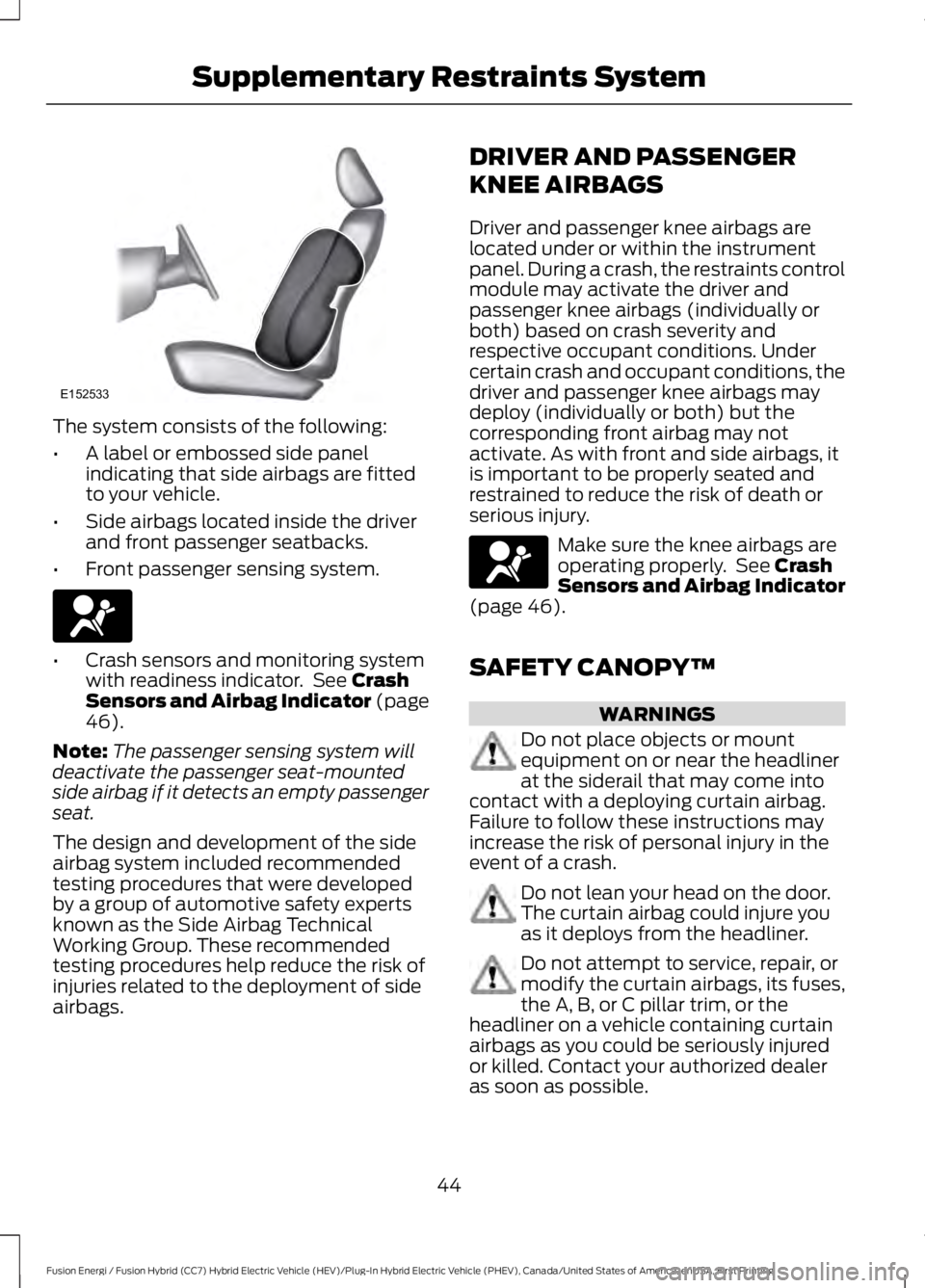
The system consists of the following:
•A label or embossed side panelindicating that side airbags are fittedto your vehicle.
•Side airbags located inside the driverand front passenger seatbacks.
•Front passenger sensing system.
•Crash sensors and monitoring systemwith readiness indicator. See CrashSensors and Airbag Indicator (page46).
Note:The passenger sensing system willdeactivate the passenger seat-mountedside airbag if it detects an empty passengerseat.
The design and development of the sideairbag system included recommendedtesting procedures that were developedby a group of automotive safety expertsknown as the Side Airbag TechnicalWorking Group. These recommendedtesting procedures help reduce the risk ofinjuries related to the deployment of sideairbags.
DRIVER AND PASSENGER
KNEE AIRBAGS
Driver and passenger knee airbags arelocated under or within the instrumentpanel. During a crash, the restraints controlmodule may activate the driver andpassenger knee airbags (individually orboth) based on crash severity andrespective occupant conditions. Undercertain crash and occupant conditions, thedriver and passenger knee airbags maydeploy (individually or both) but thecorresponding front airbag may notactivate. As with front and side airbags, itis important to be properly seated andrestrained to reduce the risk of death orserious injury.
Make sure the knee airbags areoperating properly. See CrashSensors and Airbag Indicator(page 46).
SAFETY CANOPY™
WARNINGS
Do not place objects or mountequipment on or near the headlinerat the siderail that may come intocontact with a deploying curtain airbag.Failure to follow these instructions mayincrease the risk of personal injury in theevent of a crash.
Do not lean your head on the door.The curtain airbag could injure youas it deploys from the headliner.
Do not attempt to service, repair, ormodify the curtain airbags, its fuses,the A, B, or C pillar trim, or theheadliner on a vehicle containing curtainairbags as you could be seriously injuredor killed. Contact your authorized dealeras soon as possible.
44
Fusion Energi / Fusion Hybrid (CC7) Hybrid Electric Vehicle (HEV)/Plug-In Hybrid Electric Vehicle (PHEV), Canada/United States of America, enUSA, First Printing
Supplementary Restraints SystemE152533
Page 51 of 516
GENERAL INFORMATION ON
RADIO FREQUENCIES
This device complies with Part 15 of theFCC Rules and with Industry Canadalicense-exempt RSS standard(s).Operation is subject to the following twoconditions: (1) This device may not causeharmful interference, and (2) This devicemust accept any interference received,including interference that may causeundesired operation.
Note:Changes or modifications notexpressively approved by the partyresponsible for compliance could void theuser's authority to operate the equipment.The term IC before the radio certificationnumber only signifies that Industry Canadatechnical specifications were met.
The typical operating range for yourtransmitter is approximately 33 feet (10meters). Vehicles with the remote startfeature will have a greater range. One ofthe following could cause a decrease inoperating range:
•Weather conditions.
•Nearby radio towers.
•Structures around the vehicle.
•Other vehicles parked next to yourvehicle.
The radio frequency used by your remotecontrol can also be used by other shortdistance radio transmissions, for exampleamateur radios, medical equipment,wireless headphones, remote controls andalarm systems. If the frequencies arejammed, you will not be able to use yourremote control. You can lock and unlockthe doors with the key.
Note:Make sure to lock your vehicle beforeleaving it unattended.
Note:If you are in range, the remote controlwill operate if you press any buttonunintentionally.
Intelligent Access (If Equipped)
The system uses a radio frequency signalto communicate with your vehicle andauthorize your vehicle to unlock when oneof the following conditions are met:
•You activate the front exterior doorhandle switch.
•You press the luggage compartmentbutton.
•You press a button on the transmitter.
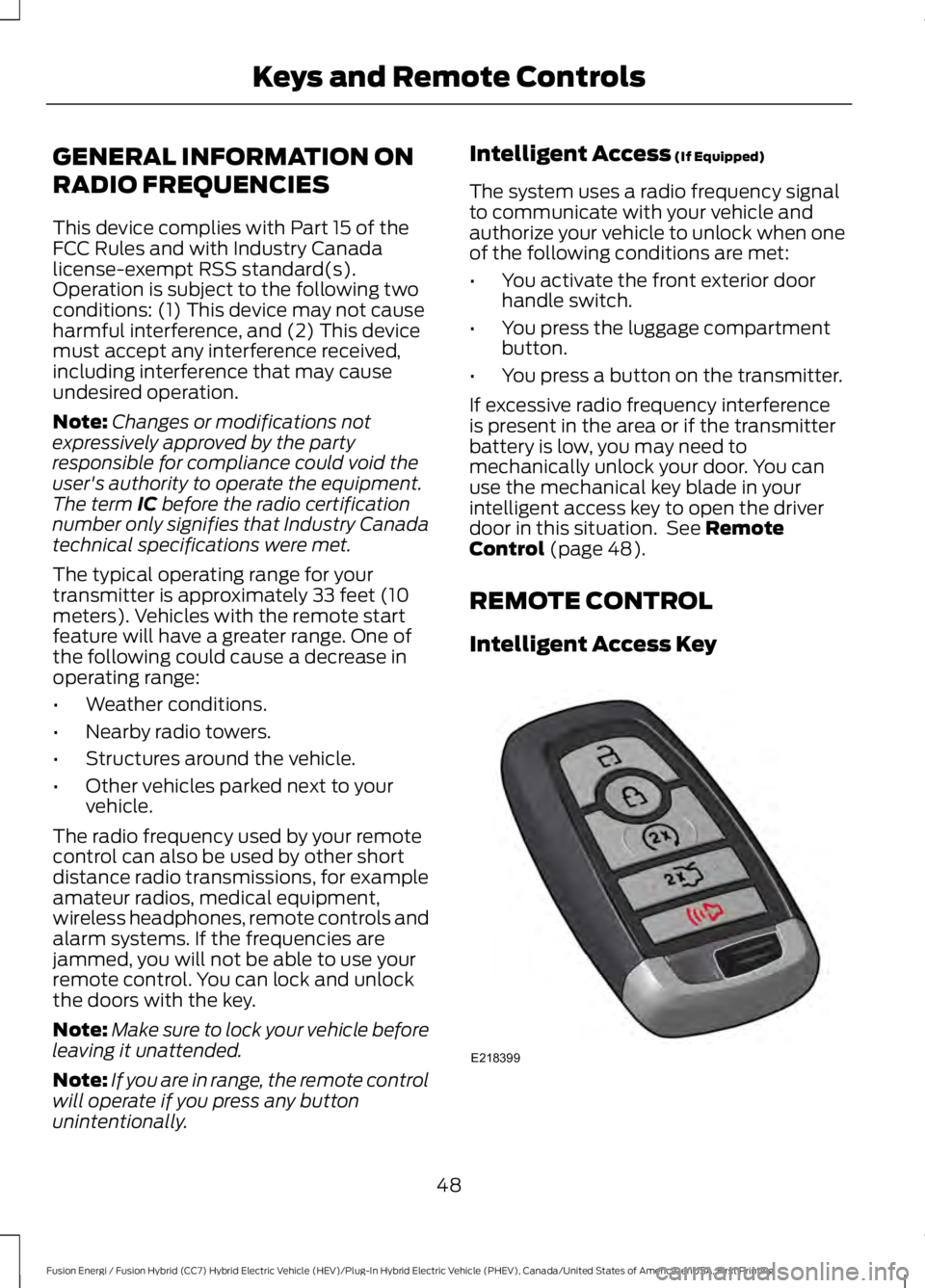
If excessive radio frequency interferenceis present in the area or if the transmitterbattery is low, you may need tomechanically unlock your door. You canuse the mechanical key blade in yourintelligent access key to open the driverdoor in this situation. See RemoteControl (page 48).
REMOTE CONTROL
Intelligent Access Key
48
Fusion Energi / Fusion Hybrid (CC7) Hybrid Electric Vehicle (HEV)/Plug-In Hybrid Electric Vehicle (PHEV), Canada/United States of America, enUSA, First Printing
Keys and Remote ControlsE218399