length FORD FUSION HYBRID 2017 Owners Manual
[x] Cancel search | Manufacturer: FORD, Model Year: 2017, Model line: FUSION HYBRID, Model: FORD FUSION HYBRID 2017Pages: 516, PDF Size: 7.53 MB
Page 35 of 516
Pregnant women should always wear theirseatbelt. The lap belt portion of acombination lap and shoulder belt shouldbe positioned low across the hips belowthe belly and worn as tight as comfort willallow. The shoulder belt should bepositioned to cross the middle of theshoulder and the center of the chest.
Seatbelt Locking Modes
WARNINGS
After any vehicle crash, the seatbeltsystem at all passenger seatingpositions must be checked by anauthorized dealer to verify that theautomatic locking retractor feature forchild seats is still functioning properly. Inaddition, all seatbelts should be checkedfor proper function.
The belt and retractor assemblymust be replaced if the seatbeltassembly automatic locking retractorfeature or any other seatbelt function isnot operating properly when checked byan authorized dealer. Failure to replace thebelt and retractor assembly could increasethe risk of injury in crashes.
All safety restraints in the vehicle arecombination lap and shoulder belts. Thedriver seatbelt has the vehicle sensitivelocking mode. The front outboardpassenger and rear seatbelts have boththe vehicle sensitive locking mode and theautomatic locking mode.
Vehicle Sensitive Mode
This is the normal retractor mode, whichallows free shoulder belt lengthadjustment to your movements andlocking in response to vehicle movement.For example, if the driver brakes suddenlyor turns a corner sharply, or the vehiclereceives an impact of about 5 mph(8 km/h) or more, the combinationseatbelts will lock to help reduce forwardmovement of the driver and passengers.
In addition, the retractor is designed to lockif the webbing is pulled out too quickly. Ifthis occurs, let the belt retract slightly andpull webbing out again in a slow andcontrolled manner.
Automatic Locking Mode
In this mode, the shoulder belt isautomatically pre-locked. The belt will stillretract to remove any slack in the shoulderbelt. The automatic locking mode is notavailable on the driver seatbelt.
When to Use the Automatic LockingMode
This mode should be used any time a childsafety seat, except a booster, is installedin passenger front or rear seating positions.Children 12 years old and under should beproperly restrained in a rear seatingposition whenever possible. See ChildSafety (page 16).
How to Use the Automatic LockingMode
Standard seatbelts
32
Fusion Energi / Fusion Hybrid (CC7) Hybrid Electric Vehicle (HEV)/Plug-In Hybrid Electric Vehicle (PHEV), Canada/United States of America, enUSA, First Printing
Seatbelts
Page 144 of 516
GENERAL INFORMATION
WARNINGS
Extended idling at high enginespeeds can produce very hightemperatures in the engine andexhaust system, creating the risk of fire orother damage.
Do not park, idle or drive your vehicleon dry grass or other dry groundcover. The emission system heats upthe engine compartment and exhaustsystem, creating the risk of fire.
Do not start the vehicle in a closedgarage or in other enclosed areas.Exhaust fumes can be toxic. Alwaysopen the garage door before you start thevehicle.
If you smell exhaust fumes insideyour vehicle, have your vehiclechecked by an authorized dealerimmediately. Do not drive your vehicle ifyou smell exhaust fumes.
If you disconnect the battery, your vehiclemay exhibit some unusual drivingcharacteristics for approximately 5 mi(8 km) after you reconnect it. This isbecause the engine management systemmust realign itself with the engine. You candisregard any unusual drivingcharacteristics during this period.
The powertrain control system meets allCanadian interference-causing equipmentstandard requirements regulating theimpulse electrical field or radio noise.
When you start your vehicle, avoid pressingthe accelerator pedal until the ready todrive indicator illuminates. Only use theaccelerator pedal when you have difficultystarting your vehicle.
KEYLESS STARTING
Note:The system may not function if thepassive key is close to metal objects orelectronic devices, for example keys or a cellphone.
Note:A valid passive key must be locatedinside your vehicle to switch the ignition onand start your vehicle.
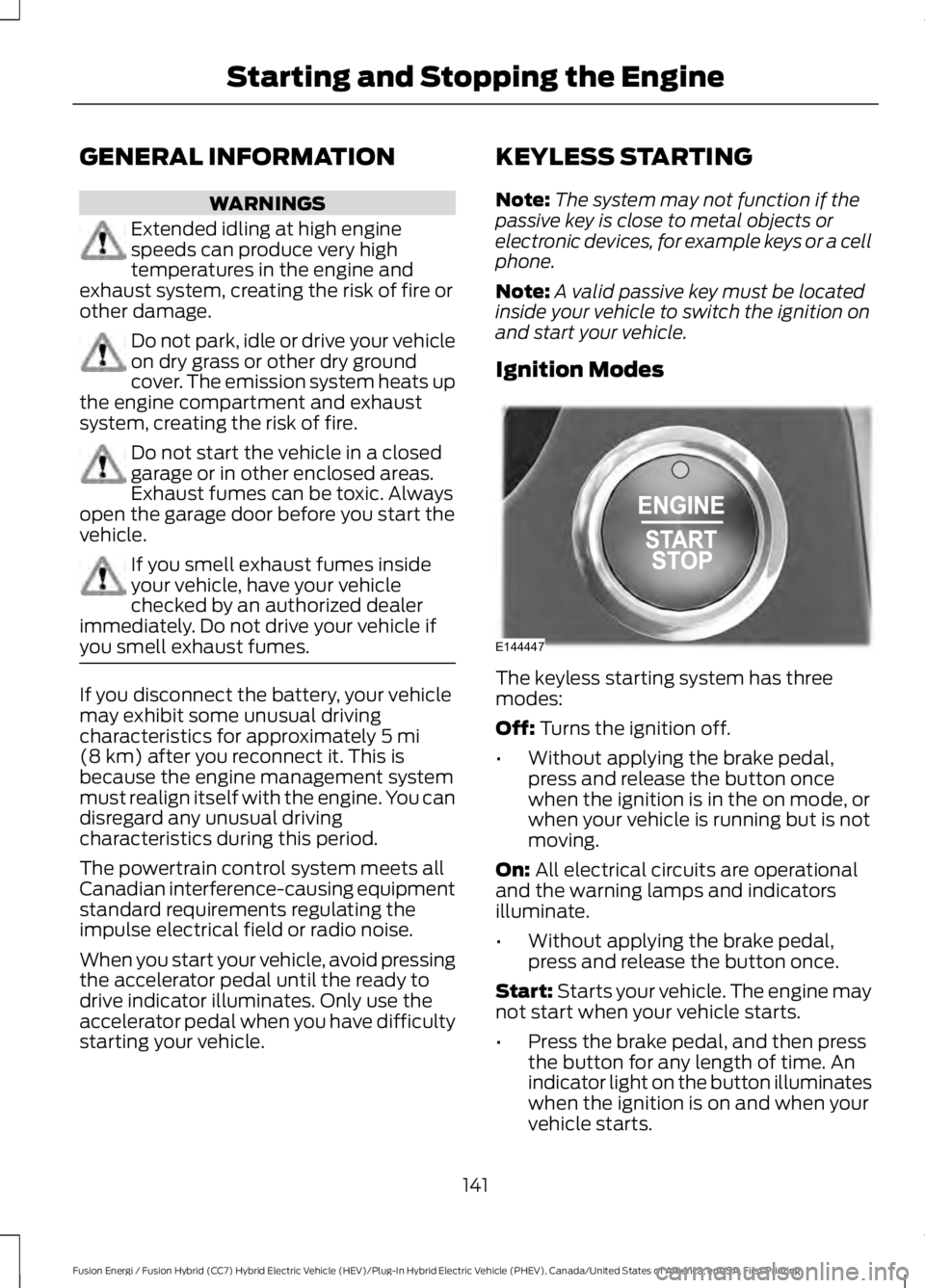
Ignition Modes
The keyless starting system has threemodes:
Off: Turns the ignition off.
•Without applying the brake pedal,press and release the button oncewhen the ignition is in the on mode, orwhen your vehicle is running but is notmoving.
On: All electrical circuits are operationaland the warning lamps and indicatorsilluminate.
•Without applying the brake pedal,press and release the button once.
Start: Starts your vehicle. The engine maynot start when your vehicle starts.
•Press the brake pedal, and then pressthe button for any length of time. Anindicator light on the button illuminateswhen the ignition is on and when yourvehicle starts.
141
Fusion Energi / Fusion Hybrid (CC7) Hybrid Electric Vehicle (HEV)/Plug-In Hybrid Electric Vehicle (PHEV), Canada/United States of America, enUSA, First Printing
Starting and Stopping the EngineE144447
Page 171 of 516
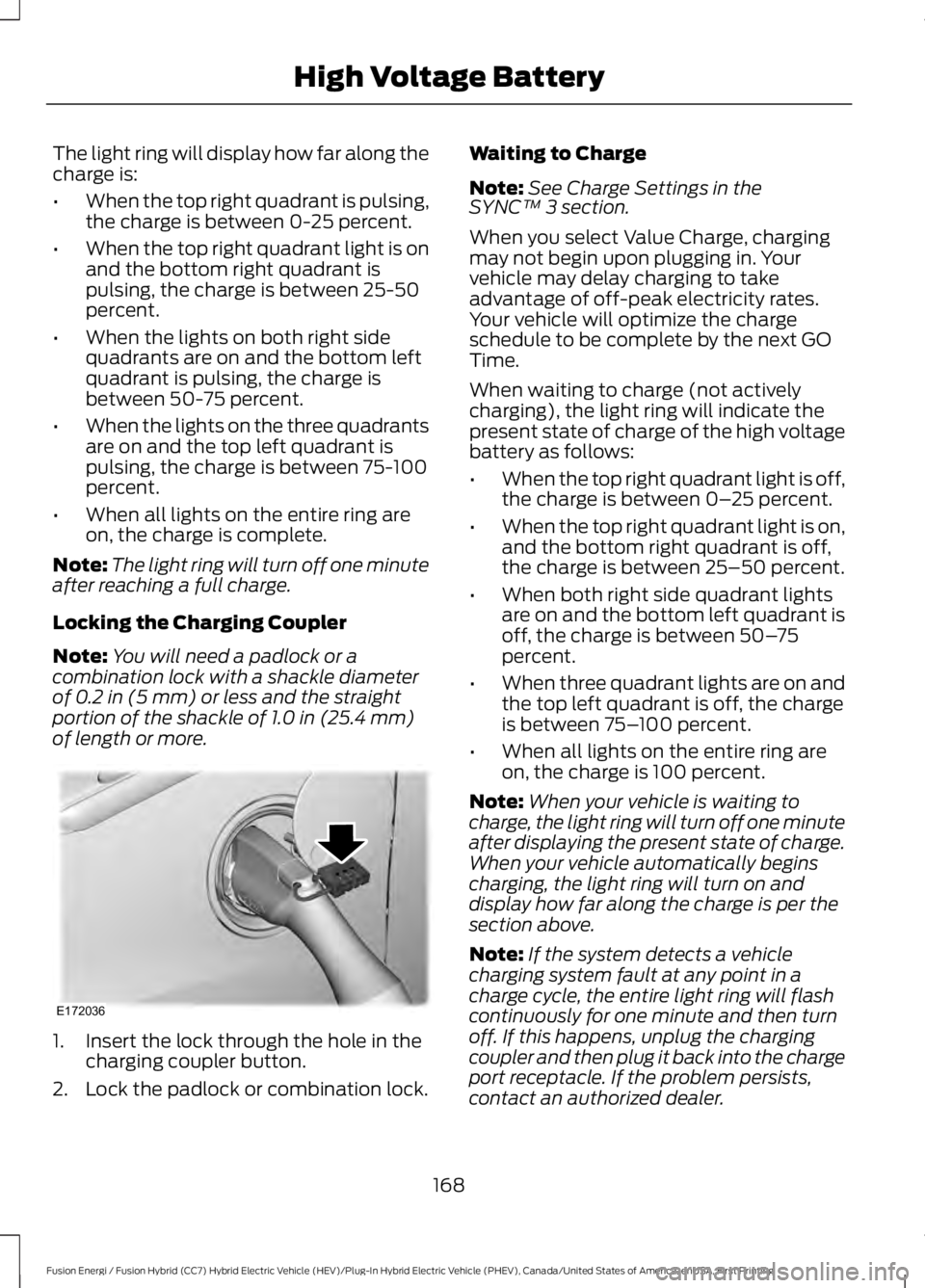
The light ring will display how far along thecharge is:
•When the top right quadrant is pulsing,the charge is between 0-25 percent.
•When the top right quadrant light is onand the bottom right quadrant ispulsing, the charge is between 25-50percent.
•When the lights on both right sidequadrants are on and the bottom leftquadrant is pulsing, the charge isbetween 50-75 percent.
•When the lights on the three quadrantsare on and the top left quadrant ispulsing, the charge is between 75-100percent.
•When all lights on the entire ring areon, the charge is complete.
Note:The light ring will turn off one minuteafter reaching a full charge.
Locking the Charging Coupler
Note:You will need a padlock or acombination lock with a shackle diameterof 0.2 in (5 mm) or less and the straightportion of the shackle of 1.0 in (25.4 mm)of length or more.
1. Insert the lock through the hole in thecharging coupler button.
2. Lock the padlock or combination lock.
Waiting to Charge
Note: See Charge Settings in the SYNC™ 3 section.
When you select Value Charge, chargingmay not begin upon plugging in. Yourvehicle may delay charging to takeadvantage of off-peak electricity rates.Your vehicle will optimize the chargeschedule to be complete by the next GOTime.
When waiting to charge (not activelycharging), the light ring will indicate thepresent state of charge of the high voltagebattery as follows:
•When the top right quadrant light is off,the charge is between 0–25 percent.
•When the top right quadrant light is on,and the bottom right quadrant is off,the charge is between 25–50 percent.
•When both right side quadrant lightsare on and the bottom left quadrant isoff, the charge is between 50–75percent.
•When three quadrant lights are on andthe top left quadrant is off, the chargeis between 75–100 percent.
•When all lights on the entire ring areon, the charge is 100 percent.
Note:When your vehicle is waiting tocharge, the light ring will turn off one minuteafter displaying the present state of charge.When your vehicle automatically beginscharging, the light ring will turn on anddisplay how far along the charge is per thesection above.
Note:If the system detects a vehiclecharging system fault at any point in acharge cycle, the entire light ring will flashcontinuously for one minute and then turnoff. If this happens, unplug the chargingcoupler and then plug it back into the chargeport receptacle. If the problem persists,contact an authorized dealer.
168
Fusion Energi / Fusion Hybrid (CC7) Hybrid Electric Vehicle (HEV)/Plug-In Hybrid Electric Vehicle (PHEV), Canada/United States of America, enUSA, First Printing
High Voltage BatteryE172036
Page 188 of 516
Obstacle Distance Indicator (If
Equipped)
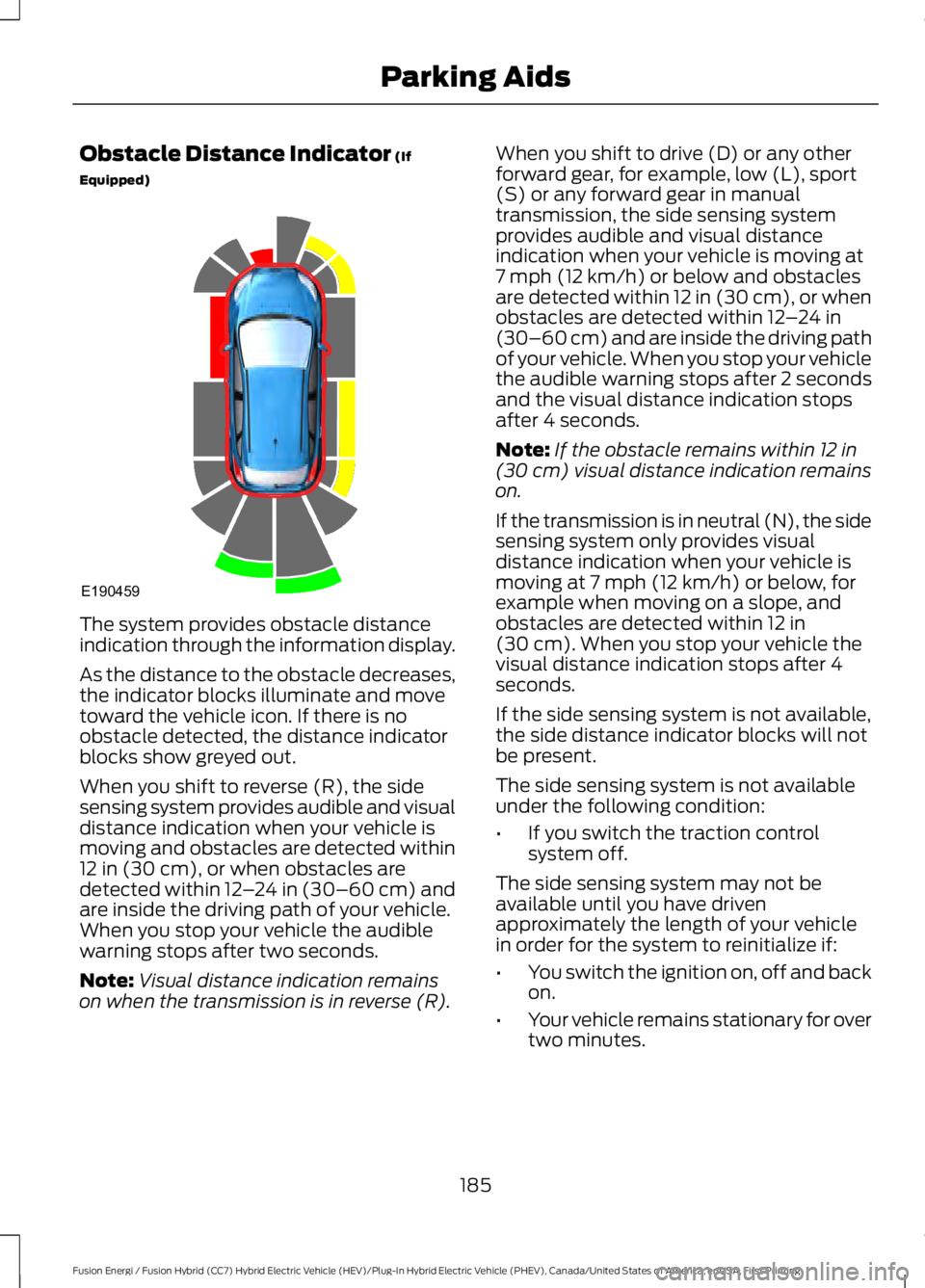
The system provides obstacle distanceindication through the information display.
As the distance to the obstacle decreases,the indicator blocks illuminate and movetoward the vehicle icon. If there is noobstacle detected, the distance indicatorblocks show greyed out.
When you shift to reverse (R), the sidesensing system provides audible and visualdistance indication when your vehicle ismoving and obstacles are detected within12 in (30 cm), or when obstacles aredetected within 12–24 in (30–60 cm) andare inside the driving path of your vehicle.When you stop your vehicle the audiblewarning stops after two seconds.
Note:Visual distance indication remainson when the transmission is in reverse (R).
When you shift to drive (D) or any otherforward gear, for example, low (L), sport(S) or any forward gear in manualtransmission, the side sensing systemprovides audible and visual distanceindication when your vehicle is moving at7 mph (12 km/h) or below and obstaclesare detected within 12 in (30 cm), or whenobstacles are detected within 12–24 in(30–60 cm) and are inside the driving pathof your vehicle. When you stop your vehiclethe audible warning stops after 2 secondsand the visual distance indication stopsafter 4 seconds.
Note:If the obstacle remains within 12 in(30 cm) visual distance indication remainson.
If the transmission is in neutral (N), the sidesensing system only provides visualdistance indication when your vehicle ismoving at 7 mph (12 km/h) or below, forexample when moving on a slope, andobstacles are detected within 12 in(30 cm). When you stop your vehicle thevisual distance indication stops after 4seconds.
If the side sensing system is not available,the side distance indicator blocks will notbe present.
The side sensing system is not availableunder the following condition:
•If you switch the traction controlsystem off.
The side sensing system may not beavailable until you have drivenapproximately the length of your vehiclein order for the system to reinitialize if:
•You switch the ignition on, off and backon.
•Your vehicle remains stationary for overtwo minutes.
185
Fusion Energi / Fusion Hybrid (CC7) Hybrid Electric Vehicle (HEV)/Plug-In Hybrid Electric Vehicle (PHEV), Canada/United States of America, enUSA, First Printing
Parking AidsE190459
Page 194 of 516
The system does not offer a particular space
The sensors may be covered (for example, snow, ice or dirt buildup). Covered sensorscan affect the system's functionality.
There is not enough room in the parking space for your vehicle to safely park.
There is not enough space for the parking maneuver on the opposite side of the parkingspace.
The parking space is farther than 5 ft (1.5 m) or closer than 16 in (0.4 m) away.
Your vehicle is going faster than 22 mph (35 km/h) for parallel and 19 mph (30 km/h)for perpendicular parking.
The system does not position the vehicle where I want in the space
Your vehicle is rolling in the opposite direction of the transmission (rolling forward withreverse [R] selected).
An irregular curb along the parking space prevents the system from aligning your vehicleproperly.
Vehicles or objects bordering the space may not be positioned correctly.
You pulled your vehicle too far past the parking space.
The tires may not be installed or maintained correctly (not inflated correctly, impropersize, or of different sizes).
A repair or alteration has changed detection capabilities.
A parked vehicle has a high attachment (salt sprayer, snowplow or moving truck bed).
The parking space length or position of parked objects changed after your vehicle passed.
The temperature around your vehicle changes quickly (driving from a heated garageinto the cold, or after leaving a car wash).
REAR VIEW CAMERA
WARNINGS
The rear view camera system is areverse aid supplement device thatstill requires the driver to use it inconjunction with the interior and exteriormirrors for maximum coverage.
WARNINGS
Objects that are close to eithercorner of the bumper or under thebumper, might not be seen on thescreen due to the limited coverage of thecamera system.
191
Fusion Energi / Fusion Hybrid (CC7) Hybrid Electric Vehicle (HEV)/Plug-In Hybrid Electric Vehicle (PHEV), Canada/United States of America, enUSA, First Printing
Parking Aids
Page 241 of 516

UTILIZING THE
MEDIATION/ARBITRATION
PROGRAM (CANADA ONLY)
For vehicles delivered to authorizedCanadian dealers. In those cases whereyou continue to feel that the efforts by Fordof Canada and the authorized dealer toresolve a factory-related vehicle serviceconcern have been unsatisfactory, Ford ofCanada participates in an impartial thirdparty mediation/arbitration programadministered by the Canadian MotorVehicle Arbitration Plan (CAMVAP).
The CAMVAP program is a straight forwardand relatively speedy alternative to resolvea disagreement when all other efforts toproduce a settlement have failed. Thisprocedure is without cost to you and isdesigned to eliminate the need for lengthyand expensive legal proceedings.
In the CAMVAP program, impartialthird-party arbitrators conduct hearings atmutually convenient times and places inan informal environment. These impartialarbitrators review the positions of theparties, make decisions and, whenappropriate, render awards to resolvedisputes. CAMVAP decisions are fast, fair,and final as the arbitrator’s award isbinding on both you and Ford of Canada.
CAMVAP services are available in allCanadian territories and provinces. Formore information, without charge orobligation, call your CAMVAP ProvincialAdministrator directly at 1-800-207-0685or visit www.camvap.ca.
GETTING ASSISTANCE
OUTSIDE THE U.S. AND
CANADA
Before exporting your vehicle to a foreigncountry, contact the appropriate foreignembassy or consulate. These officials caninform you of local vehicle registrationregulations and where to find unleadedfuel.
If you cannot find unleaded fuel or can onlyget fuel with an anti-knock index lowerthan is recommended for your vehicle,contact our Customer Relationship Center.
The use of leaded fuel in your vehiclewithout proper conversion may damagethe effectiveness of your emission controlsystem and may cause engine knocking orserious engine damage. Ford MotorCompany or Ford of Canada is notresponsible for any damage caused by useof improper fuel. Using leaded fuel mayalso result in difficulty importing yourvehicle back into the United States.
If your vehicle must be serviced while youare traveling or living in Asia-Pacific Region,Sub-Saharan Africa, U.S. Virgin Islands,Central America, the Caribbean, and Israel,contact the nearest authorized dealer. Ifthe authorized dealer cannot help you,contact:
FORD MOTOR COMPANYCustomer Relationship Center1555 Fairlane DriveFairlane Business Park #3Allen Park, Michigan 48101U.S.A.Telephone: (313) 594-4857Fax: (313) 390-0804Email: [email protected]
238
Fusion Energi / Fusion Hybrid (CC7) Hybrid Electric Vehicle (HEV)/Plug-In Hybrid Electric Vehicle (PHEV), Canada/United States of America, enUSA, First Printing
Customer Assistance
Page 384 of 516
Home screen displayTileItem
If your vehicle does not have navigation, this space contains thecompass.
The name of the connected phone appears on the screen. Thestatus of the phone features also appear. This includes signalstrength, battery charge, 911 assist setting state (On or Off),text messaging and roaming.
PhoneB
This map displays your current location or current route in realtime.*NavigationC
When you have navigation active, you also see the next turnand the length of time and distance to your destination.If your vehicle does not have navigation, this space contains theaudio information.
* If equipped.
You can touch any of the feature displaysto access that feature.
Anytime you select the home button, thesystem returns you to this screen.
USING VOICE RECOGNITION
The SYNC 3 system allows you to use voicecommands, to control features like audioand climate controls. By using voicecommands, you can keep your hands onthe wheel and your eyes on the road.
You can access each feature controlled bySYNC 3 through a variety of commands.
To activate the SYNC 3 voicecommands push the voicebutton on the steering wheel andwait for the prompt.
___ is a dynamic listing, meaning that it canbe the name of anything, such as artist, thename of contact or number. The contextand the description of the command tellyou what to say for this dynamic option.
There are some commands that work forevery feature, these commands are:
Action and DescriptionVoice Command
Brings you to the main menu.Main Menu
Returns you to the previous screen.Go back
Ends the voice session.Cancel
Gives you a list of possible voice commands.List of Commands
You can name any feature and the system gives a list ofcommands available for the feature. For example, you couldsay:
___ List of Commands
Phone List of Commands
381
Fusion Energi / Fusion Hybrid (CC7) Hybrid Electric Vehicle (HEV)/Plug-In Hybrid Electric Vehicle (PHEV), Canada/United States of America, enUSA, First Printing
SYNC™ 3E142599