display FORD FUSION/HYBRID 2018 Repair Manual
[x] Cancel search | Manufacturer: FORD, Model Year: 2018, Model line: FUSION/HYBRID, Model: FORD FUSION/HYBRID 2018Pages: 538, PDF Size: 6.06 MB
Page 175 of 538
Note:
If charging for your plug-in vehicle
fails, please call the Customer Relationship
Center, or click on Call for support or Live
chat at www.owner.ford.com.
Charge Port
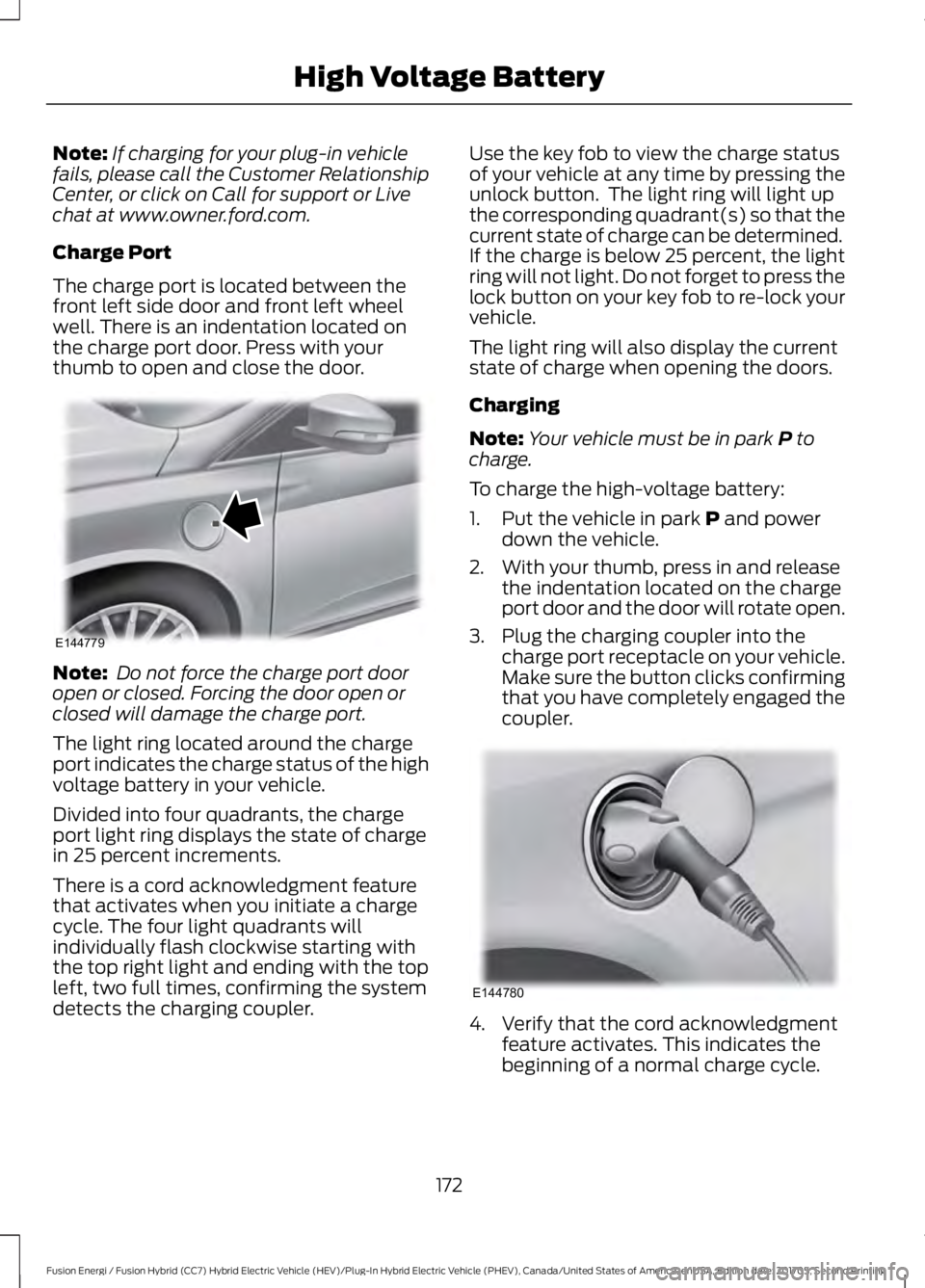
The charge port is located between the
front left side door and front left wheel
well. There is an indentation located on
the charge port door. Press with your
thumb to open and close the door. Note:
Do not force the charge port door
open or closed. Forcing the door open or
closed will damage the charge port.
The light ring located around the charge
port indicates the charge status of the high
voltage battery in your vehicle.
Divided into four quadrants, the charge
port light ring displays the state of charge
in 25 percent increments.
There is a cord acknowledgment feature
that activates when you initiate a charge
cycle. The four light quadrants will
individually flash clockwise starting with
the top right light and ending with the top
left, two full times, confirming the system
detects the charging coupler. Use the key fob to view the charge status
of your vehicle at any time by pressing the
unlock button. The light ring will light up
the corresponding quadrant(s) so that the
current state of charge can be determined.
If the charge is below 25 percent, the light
ring will not light. Do not forget to press the
lock button on your key fob to re-lock your
vehicle.
The light ring will also display the current
state of charge when opening the doors.
Charging
Note:
Your vehicle must be in park P to
charge.
To charge the high-voltage battery:
1. Put the vehicle in park
P and power
down the vehicle.
2. With your thumb, press in and release the indentation located on the charge
port door and the door will rotate open.
3. Plug the charging coupler into the charge port receptacle on your vehicle.
Make sure the button clicks confirming
that you have completely engaged the
coupler. 4. Verify that the cord acknowledgment
feature activates. This indicates the
beginning of a normal charge cycle.
172
Fusion Energi / Fusion Hybrid (CC7) Hybrid Electric Vehicle (HEV)/Plug-In Hybrid Electric Vehicle (PHEV), Canada/United States of America, enUSA, Edition date: 201705, Second Printing High Voltage BatteryE144779 E144780
Page 176 of 538
5. If using a 240–
volt charging station,
follow the instructions on the charge
station to begin the charging process.
The light ring will display how far along the
charge is:
• When the top right quadrant is pulsing,
the charge is between 0-25 percent.
• When the top right quadrant light is on
and the bottom right quadrant is
pulsing, the charge is between 25-50
percent.
• When the lights on both right side
quadrants are on and the bottom left
quadrant is pulsing, the charge is
between 50-75 percent.
• When the lights on the three quadrants
are on and the top left quadrant is
pulsing, the charge is between 75-100
percent.
• When all lights on the entire ring are
on, the charge is complete.
Note: The light ring will turn off one minute
after reaching a full charge.
Locking the Charging Coupler
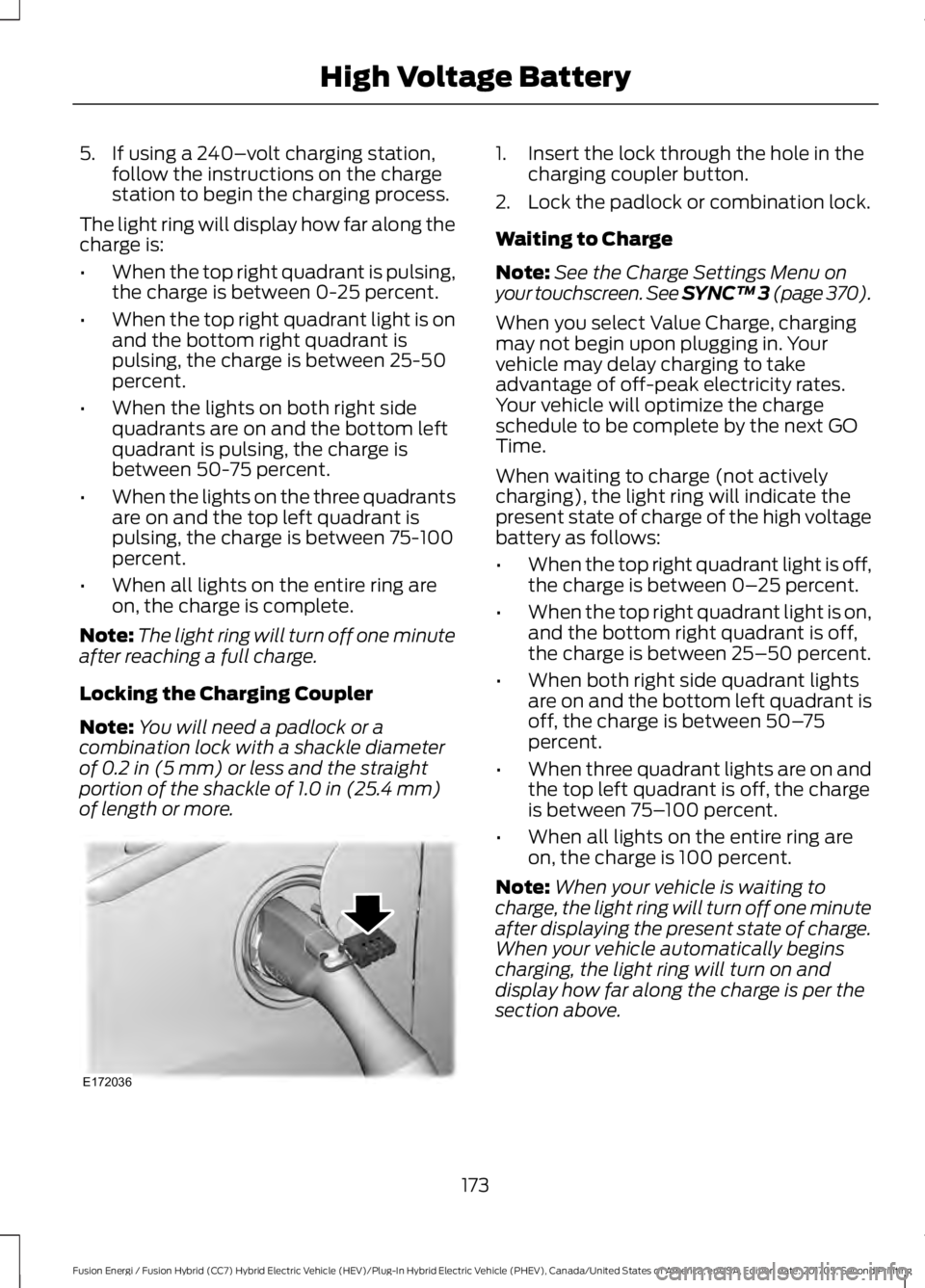
Note: You will need a padlock or a
combination lock with a shackle diameter
of 0.2 in (5 mm) or less and the straight
portion of the shackle of 1.0 in (25.4 mm)
of length or more. 1. Insert the lock through the hole in the
charging coupler button.
2. Lock the padlock or combination lock.
Waiting to Charge
Note: See the Charge Settings Menu on
your touchscreen. See SYNC™ 3 (page 370
).
When you select Value Charge, charging
may not begin upon plugging in. Your
vehicle may delay charging to take
advantage of off-peak electricity rates.
Your vehicle will optimize the charge
schedule to be complete by the next GO
Time.
When waiting to charge (not actively
charging), the light ring will indicate the
present state of charge of the high voltage
battery as follows:
• When the top right quadrant light is off,
the charge is between 0– 25 percent.
• When the top right quadrant light is on,
and the bottom right quadrant is off,
the charge is between 25–50 percent.
• When both right side quadrant lights
are on and the bottom left quadrant is
off, the charge is between 50– 75
percent.
• When three quadrant lights are on and
the top left quadrant is off, the charge
is between 75– 100 percent.
• When all lights on the entire ring are
on, the charge is 100 percent.
Note: When your vehicle is waiting to
charge, the light ring will turn off one minute
after displaying the present state of charge.
When your vehicle automatically begins
charging, the light ring will turn on and
display how far along the charge is per the
section above.
173
Fusion Energi / Fusion Hybrid (CC7) Hybrid Electric Vehicle (HEV)/Plug-In Hybrid Electric Vehicle (PHEV), Canada/United States of America, enUSA, Edition date: 201705, Second Printing High Voltage BatteryE172036
Page 178 of 538
AUTOMATIC TRANSMISSION
WARNINGS
Always fully apply the parking brake
and make sure you shift into park (P).
Failure to follow this instruction
could result in personal injury or death. Do not apply the brake pedal and
accelerator pedal simultaneously.
Applying both pedals simultaneously
for more than a few seconds will limit
engine performance, which may result in
difficulty maintaining speed in traffic and
could lead to serious injury. When your vehicle is stationary, keep
the brake pedal fully pressed when
shifting gears. Failure to follow this
instruction could result in personal injury,
death or property damage. Note:
The ready to drive indicator may be
off and you may not be able to shift out of
park (P) unless the intelligent access key is
inside your vehicle.
Understanding the Positions of
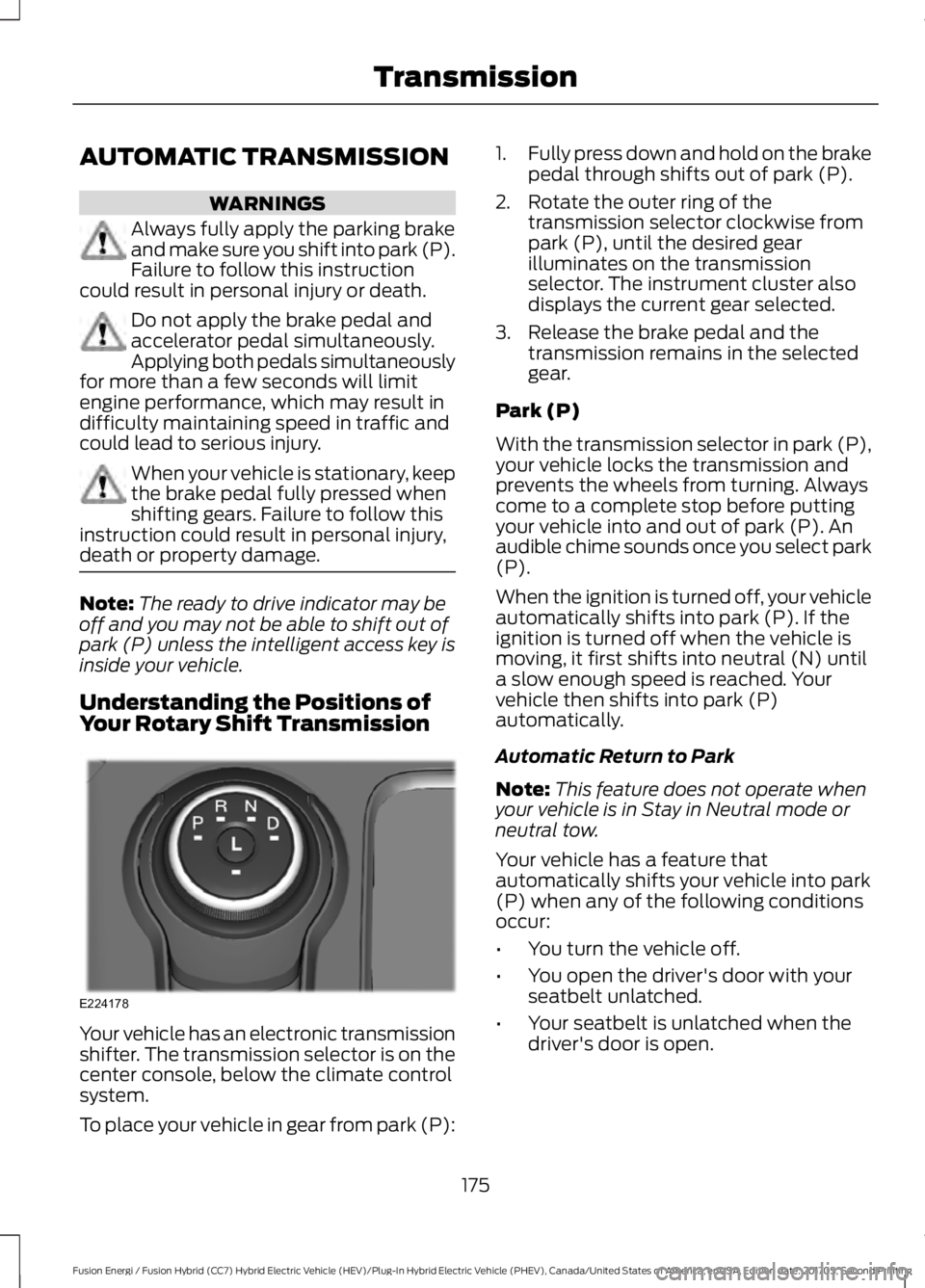
Your Rotary Shift Transmission Your vehicle has an electronic transmission
shifter. The transmission selector is on the
center console, below the climate control
system.
To place your vehicle in gear from park (P): 1.
Fully press down and hold on the brake
pedal through shifts out of park (P).
2. Rotate the outer ring of the transmission selector clockwise from
park (P), until the desired gear
illuminates on the transmission
selector. The instrument cluster also
displays the current gear selected.
3. Release the brake pedal and the transmission remains in the selected
gear.
Park (P)
With the transmission selector in park (P),
your vehicle locks the transmission and
prevents the wheels from turning. Always
come to a complete stop before putting
your vehicle into and out of park (P). An
audible chime sounds once you select park
(P).
When the ignition is turned off, your vehicle
automatically shifts into park (P). If the
ignition is turned off when the vehicle is
moving, it first shifts into neutral (N) until
a slow enough speed is reached. Your
vehicle then shifts into park (P)
automatically.
Automatic Return to Park
Note: This feature does not operate when
your vehicle is in Stay in Neutral mode or
neutral tow.
Your vehicle has a feature that
automatically shifts your vehicle into park
(P) when any of the following conditions
occur:
• You turn the vehicle off.
• You open the driver's door with your
seatbelt unlatched.
• Your seatbelt is unlatched when the
driver's door is open.
175
Fusion Energi / Fusion Hybrid (CC7) Hybrid Electric Vehicle (HEV)/Plug-In Hybrid Electric Vehicle (PHEV), Canada/United States of America, enUSA, Edition date: 201705, Second Printing TransmissionE224178
Page 179 of 538
If you turn your vehicle off when moving,
your vehicle first shifts into neutral (N) until
it slows down enough to shift into park (P)
automatically.
Note:
If you have waited an extended
period of time (2-15 minutes) before starting
your vehicle, unlatching your seatbelt causes
this feature to activate, even with the
driver's door closed.
Note: This feature may not work properly
if the door ajar switch is malfunctioning. If
your door ajar indicator does not illuminate
when you open the driver ’s door or the
indicator illuminates with the driver ’s door
closed, see your authorized dealer.
Reverse (R)
With the transmission selector in reverse
(R), your vehicle moves backward. Always
come to a complete stop before shifting
into and out of reverse (R).
Neutral (N)
With the transmission selector in neutral
(N), your vehicle can be started and is free
to roll. Hold the brake pedal down when in
this position.
Stay in Neutral Mode
Note: Always put your vehicle in Stay in
Neutral mode when entering an automatic
car wash. Failure to do this could result in
vehicle damage not covered by warranty.
Note: When entering an automatic car
wash, always shift to Neutral (N). If you are
exiting the vehicle before the car wash, Stay
in Neutral Mode is available.
Stay in Neutral mode allows your vehicle
to stay in neutral when you exit your
vehicle. Your vehicle must be stationary to
enter this mode. To enter Stay in Neutral mode:
1.
Switch your vehicle on but do not start
the engine. See Keyless Starting
(page 145).
2. Place your foot on the brake pedal and
rotate the transmission selector to
neutral (N).
Note: When in neutral (N), a message
appears in the display screen informing you
how to access Stay in Neutral mode.
3. Press either the low (L) or sport (S) button in the middle of the
transmission selector to enter Stay in
Neutral mode.
A message appears in the display screen
confirming your vehicle is in Stay in Neutral
mode. The neutral (N) indicator light on
the transmission selector also flashes.
To exit Stay in Neutral mode, place your
foot on the brake pedal and rotate the
transmission selector to park (P).
Drive (D)
Drive (D) is the normal driving position for
the best fuel economy.
Grade Assist Press the grade assist button to
activate grade assist. The grade
assist lamp appears in the
instrument cluster. Press the button again
to switch it off.
176
Fusion Energi / Fusion Hybrid (CC7) Hybrid Electric Vehicle (HEV)/Plug-In Hybrid Electric Vehicle (PHEV), Canada/United States of America, enUSA, Edition date: 201705, Second Printing TransmissionE144523
Page 184 of 538
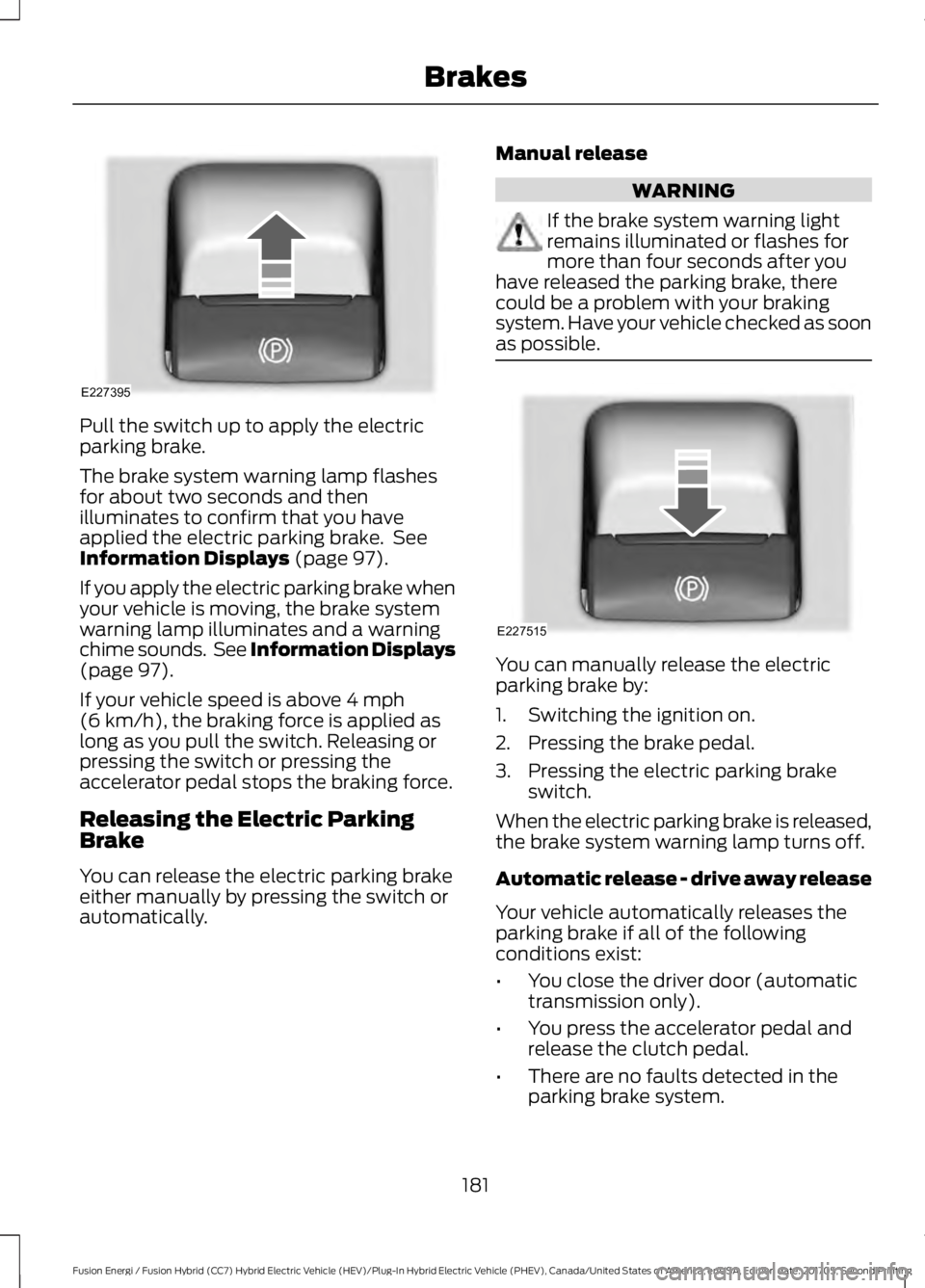
Pull the switch up to apply the electric
parking brake.
The brake system warning lamp flashes
for about two seconds and then
illuminates to confirm that you have
applied the electric parking brake. See
Information Displays (page 97).
If you apply the electric parking brake when
your vehicle is moving, the brake system
warning lamp illuminates and a warning
chime sounds. See Information Displays
(page
97).
If your vehicle speed is above
4 mph
(6 km/h), the braking force is applied as
long as you pull the switch. Releasing or
pressing the switch or pressing the
accelerator pedal stops the braking force.
Releasing the Electric Parking
Brake
You can release the electric parking brake
either manually by pressing the switch or
automatically. Manual release WARNING
If the brake system warning light
remains illuminated or flashes for
more than four seconds after you
have released the parking brake, there
could be a problem with your braking
system. Have your vehicle checked as soon
as possible. You can manually release the electric
parking brake by:
1. Switching the ignition on.
2. Pressing the brake pedal.
3. Pressing the electric parking brake
switch.
When the electric parking brake is released,
the brake system warning lamp turns off.
Automatic release - drive away release
Your vehicle automatically releases the
parking brake if all of the following
conditions exist:
• You close the driver door (automatic
transmission only).
• You press the accelerator pedal and
release the clutch pedal.
• There are no faults detected in the
parking brake system.
181
Fusion Energi / Fusion Hybrid (CC7) Hybrid Electric Vehicle (HEV)/Plug-In Hybrid Electric Vehicle (PHEV), Canada/United States of America, enUSA, Edition date: 201705, Second Printing BrakesE227395 E227515
Page 187 of 538
PRINCIPLE OF OPERATION
The traction control system helps avoid
drive wheel spin and loss of traction.
If your vehicle begins to slide, the system
applies the brakes to individual wheels
and, when needed, reduces engine power
at the same time. If the wheels spin when
accelerating on slippery or loose surfaces,
the system reduces engine power in order
to increase traction.
USING TRACTION CONTROL
WARNING
The stability and traction control
light illuminates steadily if the
system detects a failure. Make sure
you did not manually disable the traction
control system using the information
display controls or the switch. If the
stability control and traction control light
is still illuminating steadily, have the
system serviced by an authorized dealer
immediately. Operating your vehicle with
the traction control disabled could lead to
an increased risk of loss of vehicle control,
vehicle rollover, personal injury and death. The system automatically turns on each
time you switch the ignition on.
If your vehicle is stuck in mud or snow,
switching traction control off may be
beneficial as this allows the wheels to spin.
Note:
When you switch traction control off,
stability control remains fully active.
Switching the System Off
When you switch the system off or on, a
message appears in the information
display showing system status.
You can switch the system off by either
using the information display controls or
the switch. Using the Information Display
Controls
You can switch this feature off or on in the
information display. See General
Information (page 97).
Using a Switch
(If Equipped)
Use the traction control switch on the
instrument panel to switch the system off
or on.
System Indicator Lights and
Messages The stability and traction control
light:
• Temporarily illuminates on engine
start-up.
• Flashes when a driving condition
activates either of the systems.
• Illuminates if a problem occurs in either
of the systems. The stability and traction control
off light temporarily illuminates
on engine start-up and stays on
when you switch the traction control
system off.
184
Fusion Energi / Fusion Hybrid (CC7) Hybrid Electric Vehicle (HEV)/Plug-In Hybrid Electric Vehicle (PHEV), Canada/United States of America, enUSA, Edition date: 201705, Second Printing Traction ControlE138639 E130458
Page 190 of 538
PRINCIPLE OF OPERATION
WARNINGS
To help avoid personal injury, always
use caution when in reverse (R) and
when using the sensing system.
The system may not detect objects
with surfaces that absorb reflection.
Always drive with due care and
attention. Failure to take care may result
in a crash. Traffic control systems, inclement
weather, air brakes, external motors
and fans may affect the correct
operation of the sensing system.This may
cause reduced performance or false alerts. The system may not detect small or
moving objects, particularly those
close to the ground.
Note:
If your vehicle is equipped with
MyKey ™, the sensing system cannot be
turned off when a MyKey ™ is present. See
Principle of Operation (page 56).
Note: Keep the sensors, located on the
bumper or fascia, free from snow, ice and
large accumulations of dirt. If the sensors
are covered, the system ’s accuracy can be
affected. Do not clean the sensors with
sharp objects.
Note: If your vehicle sustains damage to
the bumper or fascia, leaving it misaligned
or bent, the sensing zone may be altered
causing inaccurate measurement of
obstacles or false alerts.
Note: Certain add-on devices installed
around the bumper or fascia may create
false alerts. For example, large trailer
hitches, bike or surfboard racks, license plate
brackets, bumper covers or any other device
that may block the normal detection zone
of the system. Remove the add-on device
to prevent false alerts. Note:
When a trailer is connected to your
vehicle, the rear parking aid may detect the
trailer and therefore provide an alert. Disable
the rear parking aid when a trailer is
connected to prevent the alert.
The sensing system warns the driver of
obstacles within a certain range of your
vehicle. The system turns on automatically
whenever you switch the ignition on.
The system can be switched off through
the information display menu or from the
pop-up message that appears once you
shift the transmission into reverse (R). See
General Information
(page 97).
If a fault is present in the system, a warning
message appears in the information
display. See
Information Messages
(page 106).
REAR PARKING AID
(If Equipped)
The rear sensors are only active when the
transmission is in reverse (R). As your
vehicle moves closer to the obstacle, the
rate of the audible warning increases.
When the obstacle is less than
12 in
(30 cm) away, the warning sounds
continuously. If the system detects a
stationary or receding object farther than
12 in (30 cm)
from the corners of the
bumper, the tone sounds for only three
seconds. Once the system detects an
object approaching, the warning sounds
again.
187
Fusion Energi / Fusion Hybrid (CC7) Hybrid Electric Vehicle (HEV)/Plug-In Hybrid Electric Vehicle (PHEV), Canada/United States of America, enUSA, Edition date: 201705, Second Printing Parking Aids
Page 191 of 538
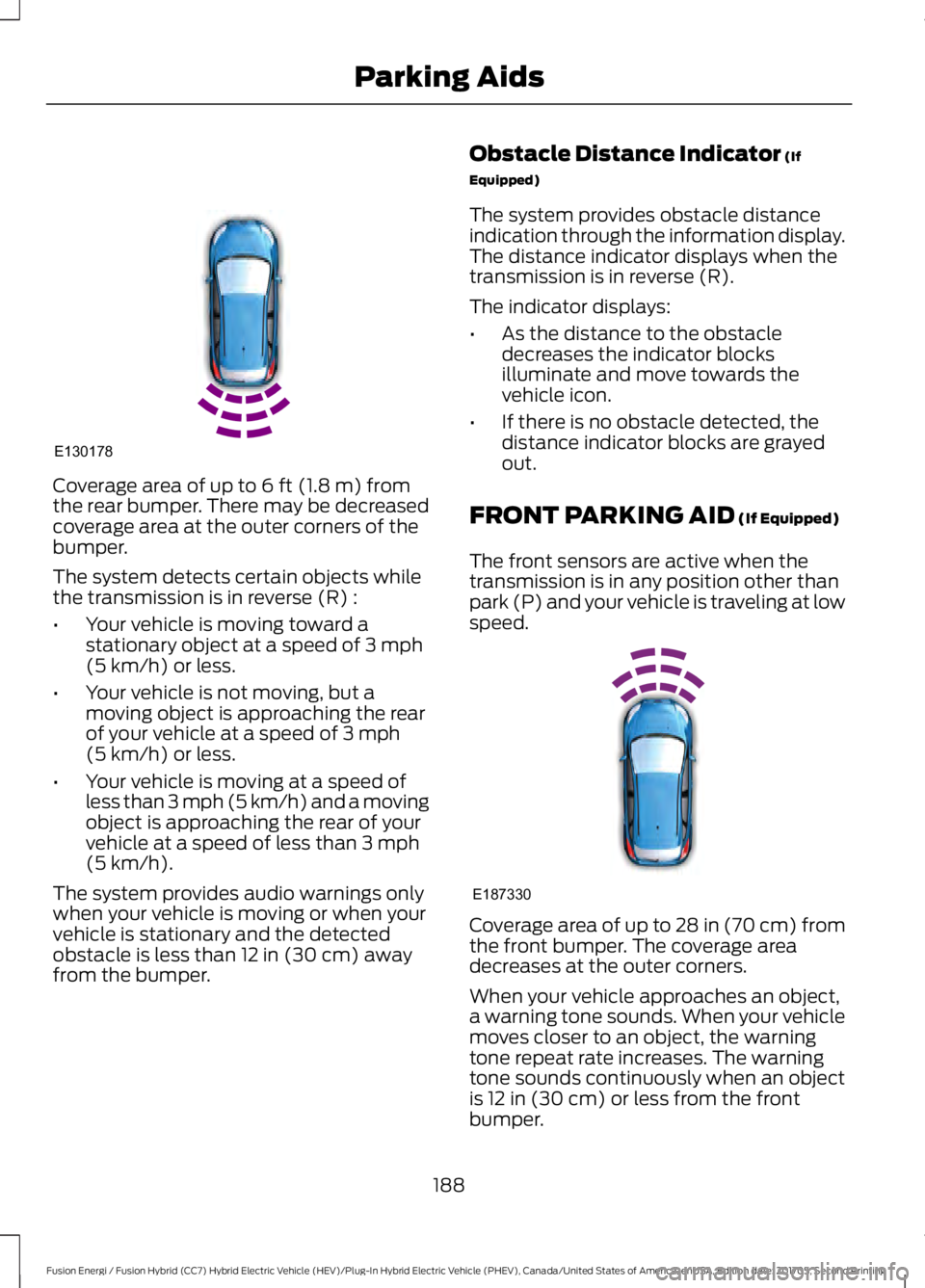
Coverage area of up to 6 ft (1.8 m) from
the rear bumper. There may be decreased
coverage area at the outer corners of the
bumper.
The system detects certain objects while
the transmission is in reverse (R) :
• Your vehicle is moving toward a
stationary object at a speed of
3 mph
(5 km/h) or less.
• Your vehicle is not moving, but a
moving object is approaching the rear
of your vehicle at a speed of
3 mph
(5 km/h) or less.
• Your vehicle is moving at a speed of
less than 3 mph (5 km/h) and a moving
object is approaching the rear of your
vehicle at a speed of less than
3 mph
(5 km/h).
The system provides audio warnings only
when your vehicle is moving or when your
vehicle is stationary and the detected
obstacle is less than
12 in (30 cm) away
from the bumper. Obstacle Distance Indicator
(If
Equipped)
The system provides obstacle distance
indication through the information display.
The distance indicator displays when the
transmission is in reverse (R).
The indicator displays:
• As the distance to the obstacle
decreases the indicator blocks
illuminate and move towards the
vehicle icon.
• If there is no obstacle detected, the
distance indicator blocks are grayed
out.
FRONT PARKING AID
(If Equipped)
The front sensors are active when the
transmission is in any position other than
park (P) and your vehicle is traveling at low
speed. Coverage area of up to
28 in (70 cm) from
the front bumper. The coverage area
decreases at the outer corners.
When your vehicle approaches an object,
a warning tone sounds. When your vehicle
moves closer to an object, the warning
tone repeat rate increases. The warning
tone sounds continuously when an object
is
12 in (30 cm) or less from the front
bumper.
188
Fusion Energi / Fusion Hybrid (CC7) Hybrid Electric Vehicle (HEV)/Plug-In Hybrid Electric Vehicle (PHEV), Canada/United States of America, enUSA, Edition date: 201705, Second Printing Parking AidsE130178 E187330
Page 192 of 538
You can switch the system off through the
information display menu or from the
pop-up message that appears once you
shift the transmission into reverse (R). See
General Information (page 97). If your
vehicle has a parking aid button, you can
switch the system off by pressing the
button.
Obstacle Distance Indicator
(If
Equipped)
The system provides obstacle distance
indication through the information display.
The indicator displays:
• As the distance to the obstacle
decreases the indicator blocks
illuminate and move towards the
vehicle icon.
• If there is no obstacle detected, the
distance indicator blocks are grayed
out.
If the transmission is in reverse (R), the
front sensing system provides audio
warnings when your vehicle is moving and
the detected obstacle is moving towards
your vehicle. Once the vehicle is stationary,
the audio warning will be stopped after 2
seconds. Visual indication is always
present in reverse (R).
If the transmission is in drive (D) or any
other forward gear (for example, low (L),
sport (S) or any forward gear in a manual
transmission), the front sensing system
provides audio and visual warnings when
your vehicle is moving below a speed of
5 mph (8 km/h) and an obstacle is located
inside the detection area. Once the vehicle
is stationary, the audio warning will be
stopped after 2 seconds and the visual
indication stops after 4 seconds. If the
obstacles detected are within
12 in
(30 cm), the visual indication remains on. If the transmission is in neutral (N), the
system provides visual indication only
when your vehicle is moving at
5 mph
(8 km/h) or below and an obstacle is
located inside the detection area. Once
your vehicle is stationary, the visual
indication will stop after 4 seconds.
SIDE SENSING SYSTEM
The side sensing system uses the front and
rear side sensors to detect and map
obstacles within the vehicle's driving path,
located near the sides of your vehicle. The
side sensors are active when the
transmission is in any position other than
park (P).
Note: Obstacles that enter the side
detection area without being detected and
mapped by the front or rear side sensors will
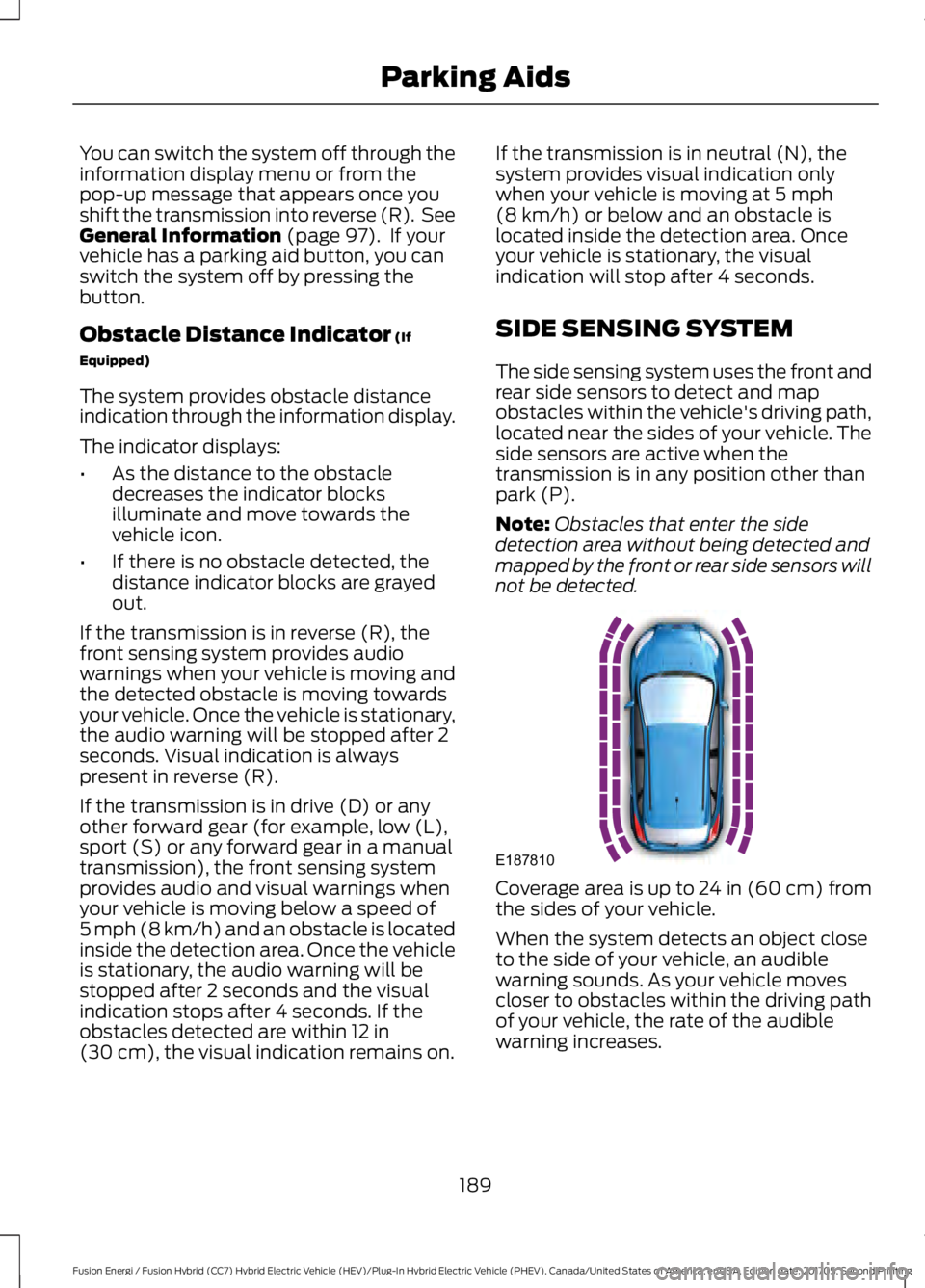
not be detected. Coverage area is up to 24 in (60 cm) from
the sides of your vehicle.
When the system detects an object close
to the side of your vehicle, an audible
warning sounds. As your vehicle moves
closer to obstacles within the driving path
of your vehicle, the rate of the audible
warning increases.
189
Fusion Energi / Fusion Hybrid (CC7) Hybrid Electric Vehicle (HEV)/Plug-In Hybrid Electric Vehicle (PHEV), Canada/United States of America, enUSA, Edition date: 201705, Second Printing Parking AidsE187810
Page 193 of 538
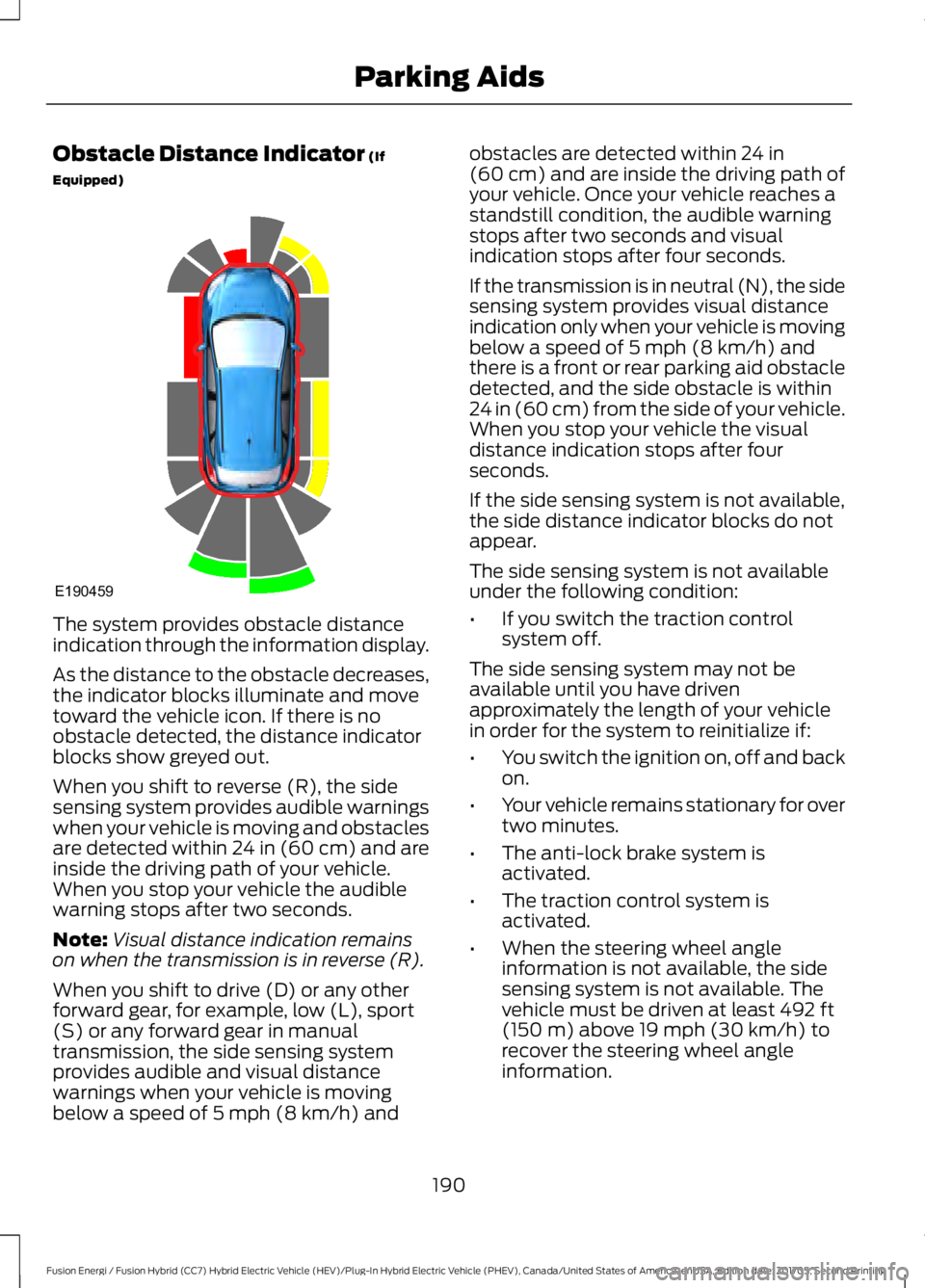
Obstacle Distance Indicator (If
Equipped) The system provides obstacle distance
indication through the information display.
As the distance to the obstacle decreases,
the indicator blocks illuminate and move
toward the vehicle icon. If there is no
obstacle detected, the distance indicator
blocks show greyed out.
When you shift to reverse (R), the side
sensing system provides audible warnings
when your vehicle is moving and obstacles
are detected within 24 in (60 cm) and are
inside the driving path of your vehicle.
When you stop your vehicle the audible
warning stops after two seconds.
Note:
Visual distance indication remains
on when the transmission is in reverse (R).
When you shift to drive (D) or any other
forward gear, for example, low (L), sport
(S) or any forward gear in manual
transmission, the side sensing system
provides audible and visual distance
warnings when your vehicle is moving
below a speed of
5 mph (8 km/h) and obstacles are detected within
24 in
(60 cm) and are inside the driving path of
your vehicle. Once your vehicle reaches a
standstill condition, the audible warning
stops after two seconds and visual
indication stops after four seconds.
If the transmission is in neutral (N), the side
sensing system provides visual distance
indication only when your vehicle is moving
below a speed of
5 mph (8 km/h) and
there is a front or rear parking aid obstacle
detected, and the side obstacle is within
24 in (60 cm) from the side of your vehicle.
When you stop your vehicle the visual
distance indication stops after four
seconds.
If the side sensing system is not available,
the side distance indicator blocks do not
appear.
The side sensing system is not available
under the following condition:
• If you switch the traction control
system off.
The side sensing system may not be
available until you have driven
approximately the length of your vehicle
in order for the system to reinitialize if:
• You switch the ignition on, off and back
on.
• Your vehicle remains stationary for over
two minutes.
• The anti-lock brake system is
activated.
• The traction control system is
activated.
• When the steering wheel angle
information is not available, the side
sensing system is not available. The
vehicle must be driven at least
492 ft
(150 m) above 19 mph (30 km/h) to
recover the steering wheel angle
information.
190
Fusion Energi / Fusion Hybrid (CC7) Hybrid Electric Vehicle (HEV)/Plug-In Hybrid Electric Vehicle (PHEV), Canada/United States of America, enUSA, Edition date: 201705, Second Printing Parking AidsE190459