touchscreen display FORD FUSION/HYBRID 2018 Owners Manual
[x] Cancel search | Manufacturer: FORD, Model Year: 2018, Model line: FUSION/HYBRID, Model: FORD FUSION/HYBRID 2018Pages: 538, PDF Size: 6.06 MB
Page 5 of 538
Adjusting the Steering Wheel - Vehicles
With: Manual Adjustable Steering
Column ...........................................................71
Audio Control ...................................................
71
Voice Control ...................................................
72
Cruise Control .................................................
72
Information Display Control ......................
73
Heated Steering Wheel ...............................
73
Wipers and Washers
Windshield Wipers ........................................
74
Autowipers .......................................................
74
Windshield Washers .....................................
75
Lighting
General Information .....................................
76
Lighting Control .............................................
76
Autolamps ........................................................
77
Instrument Lighting Dimmer .....................
77
Daytime Running Lamps ............................
78
Automatic High Beam Control .................
79
Front Fog Lamps ...........................................
80
Direction Indicators ......................................
80
Interior Lamps ................................................
80
Ambient Lighting ...........................................
82
Windows and Mirrors
Power Windows .............................................
83
Global Opening and Closing .....................
84
Exterior Mirrors ...............................................
84
Interior Mirror ..................................................
86
Sun Visors ........................................................
87
Moonroof ..........................................................
87
Instrument Cluster
Gauges ..............................................................
89
Warning Lamps and Indicators ................
92
Audible Warnings and Indicators ............
96Information Displays
General Information
.....................................
97
Information Messages ..............................
106
Climate Control
Automatic Climate Control - Vehicles With: SYNC 3/Sony Audio System
........................................................................\
..
119
Automatic Climate Control - Vehicles With: SYNC 3, Vehicles Without: Sony
Audio System .............................................
121
Automatic Climate Control - Vehicles With: SYNC, Vehicles Without:
Touchscreen Display ..............................
123
Hints on Controlling the Interior Climate ........................................................................\
.
125
Heated Windows and Mirrors .................
126
Cabin Air Filter ...............................................
126
Remote Start .................................................
127
Seats
Sitting in the Correct Position .................
128
Head Restraints ............................................
128
Manual Seats ................................................
130
Power Seats ..................................................
130
Memory Function .........................................
132
Rear Seats ......................................................
134
Heated Seats .................................................
135
Climate Controlled Seats .........................
135
Rear Seat Armrest .......................................
136
Universal Garage Door Opener
Universal Garage Door Opener ...............
137
Auxiliary Power Points
Auxiliary Power Points ...............................
142
Storage Compartments
Center Console .............................................
144
Overhead Console ......................................
144
2
Fusion Energi / Fusion Hybrid (CC7) Hybrid Electric Vehicle (HEV)/Plug-In Hybrid Electric Vehicle (PHEV), Canada/United States of America, enUSA, Edition date: 201705, Second Printing Table of Contents
Page 8 of 538
Capacities and Specifications
Engine Specifications
...............................308
Motorcraft Parts .........................................
309
Vehicle Identification Number ................
310
Vehicle Certification Label ........................
311
Transmission Code Designation .............
311
Capacities and Specifications ................
312
Bulb Specification Chart ...........................
315
Audio System
General Information ....................................
317
Audio Unit - Vehicles With: SYNC 3/Sony Audio System ............................................
318
Audio Unit - Vehicles With: SYNC, Vehicles Without: Touchscreen Display
........................................................................\
320
Audio Unit - Vehicles With: SYNC 3, Vehicles Without: Sony Audio System
........................................................................\
325
Digital Radio .................................................
326
Satellite Radio .............................................
328
USB Port ..........................................................
331
SYNC™
General Information ..................................
332
Using Voice Recognition ..........................
334
Using SYNC™ With Your Phone ...........
336
SYNC™ Applications and Services ......
348
Using SYNC™ With Your Media Player ........................................................................\
353
SYNC™ Troubleshooting ........................
362
SYNC™ 3
General Information ..................................
370
Home Screen ...............................................
383
Using Voice Recognition ..........................
384
Entertainment .............................................
390
Climate ............................................................
401
Phone .............................................................
404
Navigation ....................................................
409Electric Vehicle Information
....................
419
Apps ................................................................
439
Settings ..........................................................
442
SYNC™ 3 Troubleshooting ....................
456
Accessories
Accessories ..................................................
469
Ford Protect
Ford Protect ...................................................
471
Scheduled Maintenance
General Maintenance Information .......
473
Normal Scheduled Maintenance .........
476
Special Operating Conditions Scheduled Maintenance ...........................................
480
Scheduled Maintenance Record ..........
482
Appendices
Electromagnetic Compatibility .............
493
End User License Agreement ................
495
Type Approvals .............................................
521
5
Fusion Energi / Fusion Hybrid (CC7) Hybrid Electric Vehicle (HEV)/Plug-In Hybrid Electric Vehicle (PHEV), Canada/United States of America, enUSA, Edition date: 201705, Second Printing Table of Contents
Page 59 of 538
PRINCIPLE OF OPERATION
MyKey allows you to program keys with
restricted driving modes to promote good
driving habits. You can program the
restrictions to all keys but one. Any keys
that you did not program are administrator
keys or admin keys.
You can use admin keys to:
•
Create a MyKey with certain vehicle
restrictions.
• Program certain MyKey settings.
• Clear all MyKey restrictions.
After you program a MyKey, you can view
the following information through the
information display:
• The total number of admin keys and
MyKeys for your vehicle.
• The total distance a MyKey driver
traveled with your vehicle.
Note: Every MyKey receives the same
restrictions and settings. You cannot
program them individually.
Note: For vehicles equipped with a
push-button start switch: When both a
MyKey and an admin key are present when
you start your vehicle, the system recognizes
the admin key only. Standard Settings
Not every vehicle includes the features
listed below. If your vehicle has this
equipment, then you cannot change the
following settings when using a MyKey:
•
Seatbelt reminder or Belt-Minder™.
MyKey mutes the audio system until
drivers, and in some instances,
passengers, fasten their seatbelts.
Note: If your vehicle includes an
AM/FM radio or a very basic audio
system, then the radio may not mute.
• Earlier low-fuel warning. The low-fuel
warning activates earlier for MyKey
drivers, giving them more time to refuel.
• Certain driver alerts, stability systems
or parking aids turn on automatically
when you use the MyKey system. For
example, Blind Spot Information
System (BLIS), cross traffic alert, lane
departure warning or forward collision
warning. Note:
MyKey drivers may be
able to turn the lane departure warning
feature off, but this feature turns back
on automatically with every new key
cycle.
• Restricted touchscreen operation in
some markets. For example, MyKey
may prevent manual navigation
destination input while the vehicle is in
any gear other than park (P) or when
the vehicle reaches a certain rate of
speed.
• Satellite radio adult content
restrictions, if this feature is available
in your market.
Optional Settings
You can configure certain vehicle feature
settings when you first create a MyKey. You
can also change the settings afterward
with an admin key.
56
Fusion Energi / Fusion Hybrid (CC7) Hybrid Electric Vehicle (HEV)/Plug-In Hybrid Electric Vehicle (PHEV), Canada/United States of America, enUSA, Edition date: 201705, Second Printing MyKey
™
Page 76 of 538
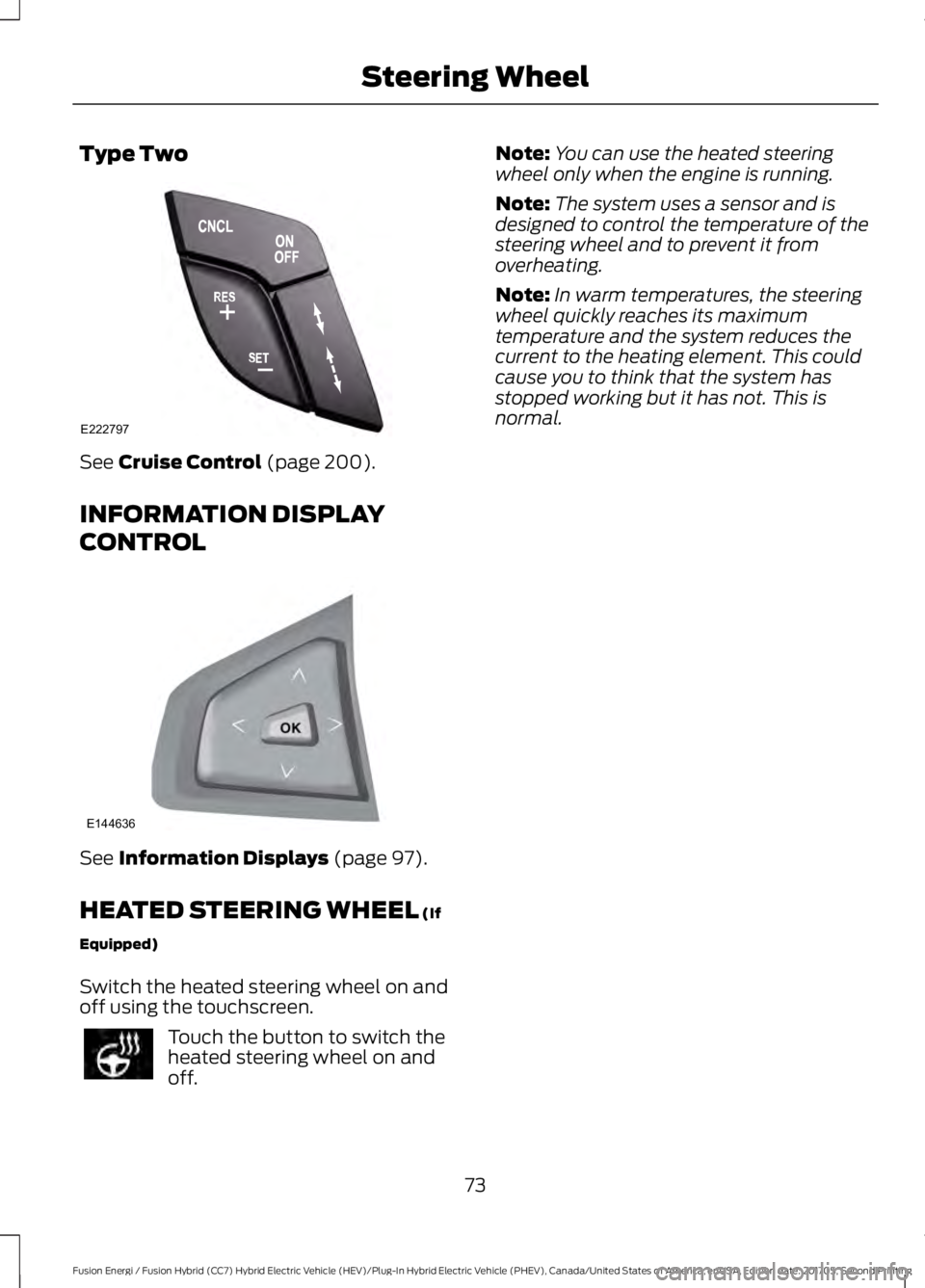
Type Two
See Cruise Control (page 200).
INFORMATION DISPLAY
CONTROL See
Information Displays (page 97).
HEATED STEERING WHEEL
(If
Equipped)
Switch the heated steering wheel on and
off using the touchscreen. Touch the button to switch the
heated steering wheel on and
off. Note:
You can use the heated steering
wheel only when the engine is running.
Note: The system uses a sensor and is
designed to control the temperature of the
steering wheel and to prevent it from
overheating.
Note: In warm temperatures, the steering
wheel quickly reaches its maximum
temperature and the system reduces the
current to the heating element. This could
cause you to think that the system has
stopped working but it has not. This is
normal.
73
Fusion Energi / Fusion Hybrid (CC7) Hybrid Electric Vehicle (HEV)/Plug-In Hybrid Electric Vehicle (PHEV), Canada/United States of America, enUSA, Edition date: 201705, Second Printing Steering WheelE222797 E144636
Page 126 of 538
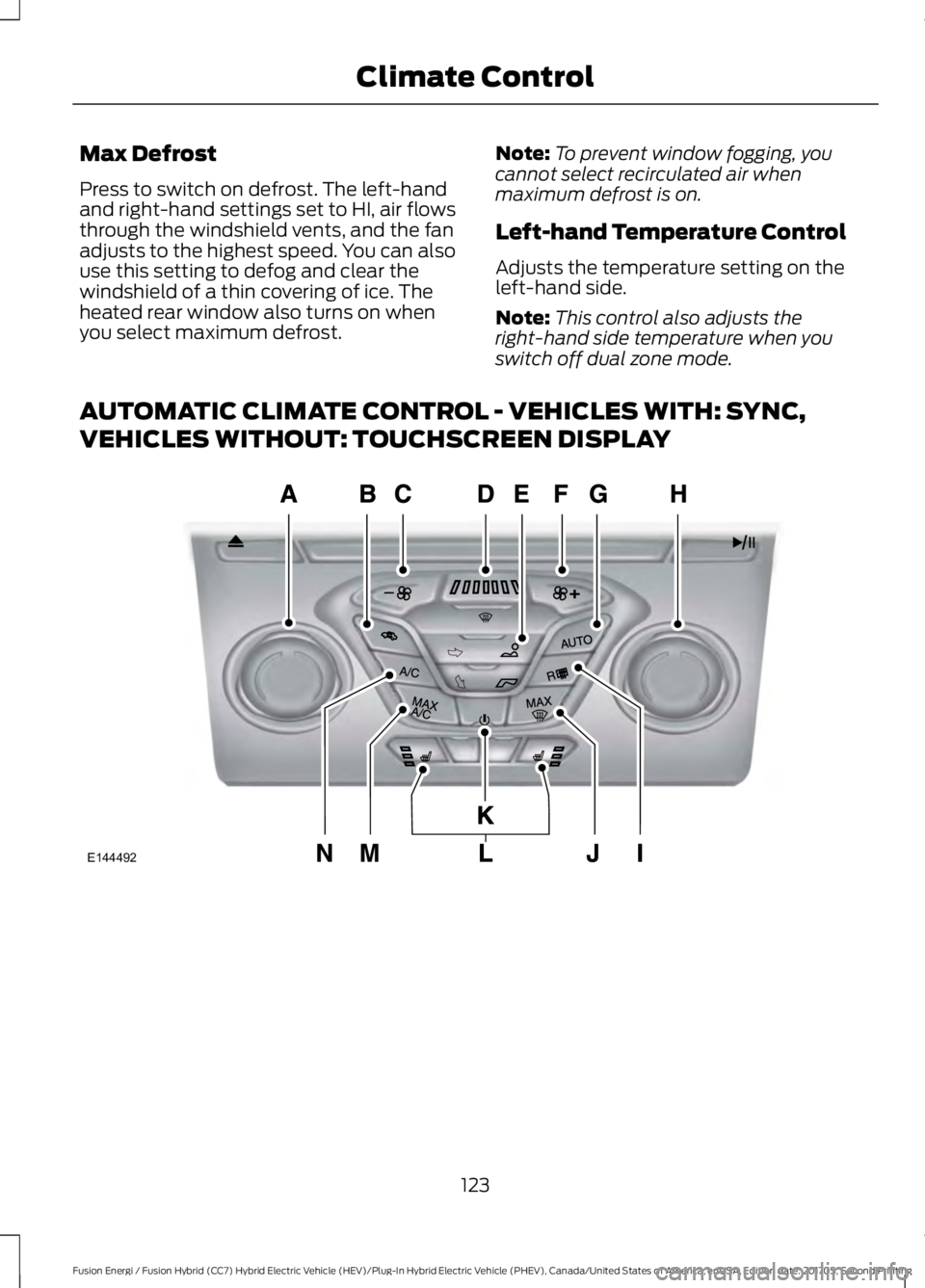
Max Defrost
Press to switch on defrost. The left-hand
and right-hand settings set to HI, air flows
through the windshield vents, and the fan
adjusts to the highest speed. You can also
use this setting to defog and clear the
windshield of a thin covering of ice. The
heated rear window also turns on when
you select maximum defrost.
Note:
To prevent window fogging, you
cannot select recirculated air when
maximum defrost is on.
Left-hand Temperature Control
Adjusts the temperature setting on the
left-hand side.
Note: This control also adjusts the
right-hand side temperature when you
switch off dual zone mode.
AUTOMATIC CLIMATE CONTROL - VEHICLES WITH: SYNC,
VEHICLES WITHOUT: TOUCHSCREEN DISPLAY 123
Fusion Energi / Fusion Hybrid (CC7) Hybrid Electric Vehicle (HEV)/Plug-In Hybrid Electric Vehicle (PHEV), Canada/United States of America, enUSA, Edition date: 201705, Second Printing Climate ControlE144492
Page 176 of 538
5. If using a 240–
volt charging station,
follow the instructions on the charge
station to begin the charging process.
The light ring will display how far along the
charge is:
• When the top right quadrant is pulsing,
the charge is between 0-25 percent.
• When the top right quadrant light is on
and the bottom right quadrant is
pulsing, the charge is between 25-50
percent.
• When the lights on both right side
quadrants are on and the bottom left
quadrant is pulsing, the charge is
between 50-75 percent.
• When the lights on the three quadrants
are on and the top left quadrant is
pulsing, the charge is between 75-100
percent.
• When all lights on the entire ring are
on, the charge is complete.
Note: The light ring will turn off one minute
after reaching a full charge.
Locking the Charging Coupler
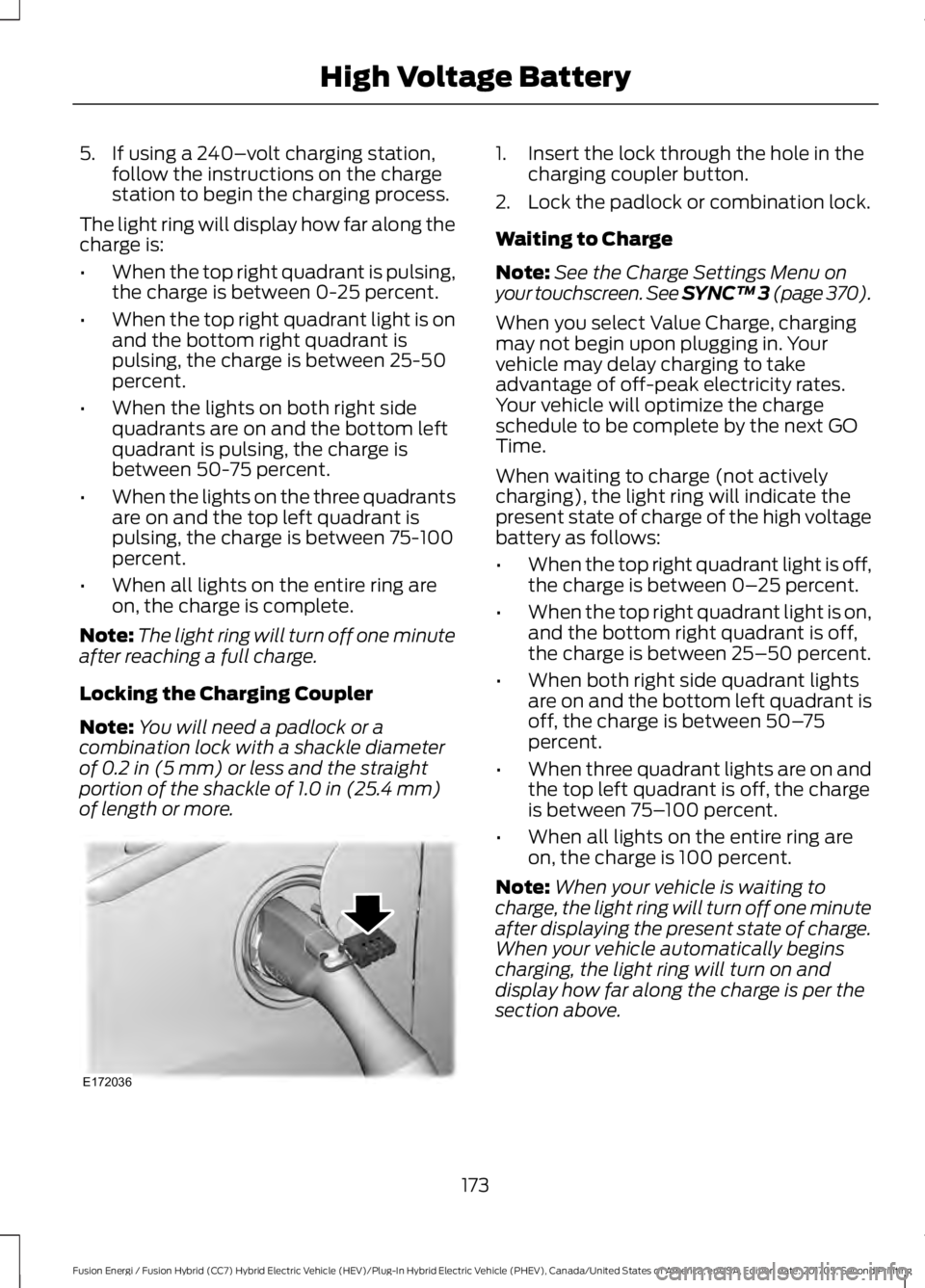
Note: You will need a padlock or a
combination lock with a shackle diameter
of 0.2 in (5 mm) or less and the straight
portion of the shackle of 1.0 in (25.4 mm)
of length or more. 1. Insert the lock through the hole in the
charging coupler button.
2. Lock the padlock or combination lock.
Waiting to Charge
Note: See the Charge Settings Menu on
your touchscreen. See SYNC™ 3 (page 370
).
When you select Value Charge, charging
may not begin upon plugging in. Your
vehicle may delay charging to take
advantage of off-peak electricity rates.
Your vehicle will optimize the charge
schedule to be complete by the next GO
Time.
When waiting to charge (not actively
charging), the light ring will indicate the
present state of charge of the high voltage
battery as follows:
• When the top right quadrant light is off,
the charge is between 0– 25 percent.
• When the top right quadrant light is on,
and the bottom right quadrant is off,
the charge is between 25–50 percent.
• When both right side quadrant lights
are on and the bottom left quadrant is
off, the charge is between 50– 75
percent.
• When three quadrant lights are on and
the top left quadrant is off, the charge
is between 75– 100 percent.
• When all lights on the entire ring are
on, the charge is 100 percent.
Note: When your vehicle is waiting to
charge, the light ring will turn off one minute
after displaying the present state of charge.
When your vehicle automatically begins
charging, the light ring will turn on and
display how far along the charge is per the
section above.
173
Fusion Energi / Fusion Hybrid (CC7) Hybrid Electric Vehicle (HEV)/Plug-In Hybrid Electric Vehicle (PHEV), Canada/United States of America, enUSA, Edition date: 201705, Second Printing High Voltage BatteryE172036
Page 321 of 538
•
MP3 and WMA folder mode represents
a folder structure consisting of one
level of folders. The CD player numbers
all MP3 and WMA tracks on the disc
(noted by the MP3 or WMA file
extension) and all folders containing
MP3 and WMA files, from F001 (folder)
T001 (track) to F253 T255.
• Creating discs with only one level of
folders helps with navigation through
the disc files.
If you are burning your own MP3 and WMA
discs, it is important to understand how
the system reads the structures you create.
While various files may be present (files
with extensions other than MP3 and
WMA), only files with the MP3 and WMA
extension are played; other files are
ignored by the system. This enables you to
use the same MP3 and WMA disc for a
variety of tasks on your work computer,
home computer and your in-vehicle
system.
In track mode, the system displays and
plays the structure as if it were only one
level deep (all MP3 and WMA files play,
regardless of being in a specific folder). In
folder mode, the system only plays the
MP3 and WMA files in the current folder. AUDIO UNIT - VEHICLES WITH:
SYNC 3/SONY AUDIO SYSTEM WARNING
Driving while distracted can result in
loss of vehicle control, crash and
injury. We strongly recommend that
you use extreme caution when using any
device that may take your focus off the
road. Your primary responsibility is the safe
operation of your vehicle. We recommend
against the use of any hand-held device
while driving and encourage the use of
voice-operated systems when possible.
Make sure you are aware of all applicable
local laws that may affect the use of
electronic devices while driving. Note:
Some features, such as SIRIUS
satellite radio, may not be available in your
location. Check with an authorized dealer.
Note: The touchscreen system controls
most of the audio features. See your SYNC
information.
318
Fusion Energi / Fusion Hybrid (CC7) Hybrid Electric Vehicle (HEV)/Plug-In Hybrid Electric Vehicle (PHEV), Canada/United States of America, enUSA, Edition date: 201705, Second Printing Audio System
Page 323 of 538
AUDIO UNIT - VEHICLES WITH:
SYNC, VEHICLES WITHOUT:
TOUCHSCREEN DISPLAY
WARNING
Driving while distracted can result in
loss of vehicle control, crash and
injury. We strongly recommend that
you use extreme caution when using any
device that may take your focus off the
road. Your primary responsibility is the safe
operation of your vehicle. We recommend
against the use of any hand-held device
while driving and encourage the use of
voice-operated systems when possible.
Make sure you are aware of all applicable
local laws that may affect the use of
electronic devices while driving. Note:
Depending on your vehicle option
package, your system may look different
from what you see here.
Note: Some features, such as SIRIUS
satellite radio, may not be available in your
location. Check with an authorized dealer. 320
Fusion Energi / Fusion Hybrid (CC7) Hybrid Electric Vehicle (HEV)/Plug-In Hybrid Electric Vehicle (PHEV), Canada/United States of America, enUSA, Edition date: 201705, Second Printing Audio SystemE248210
Page 374 of 538
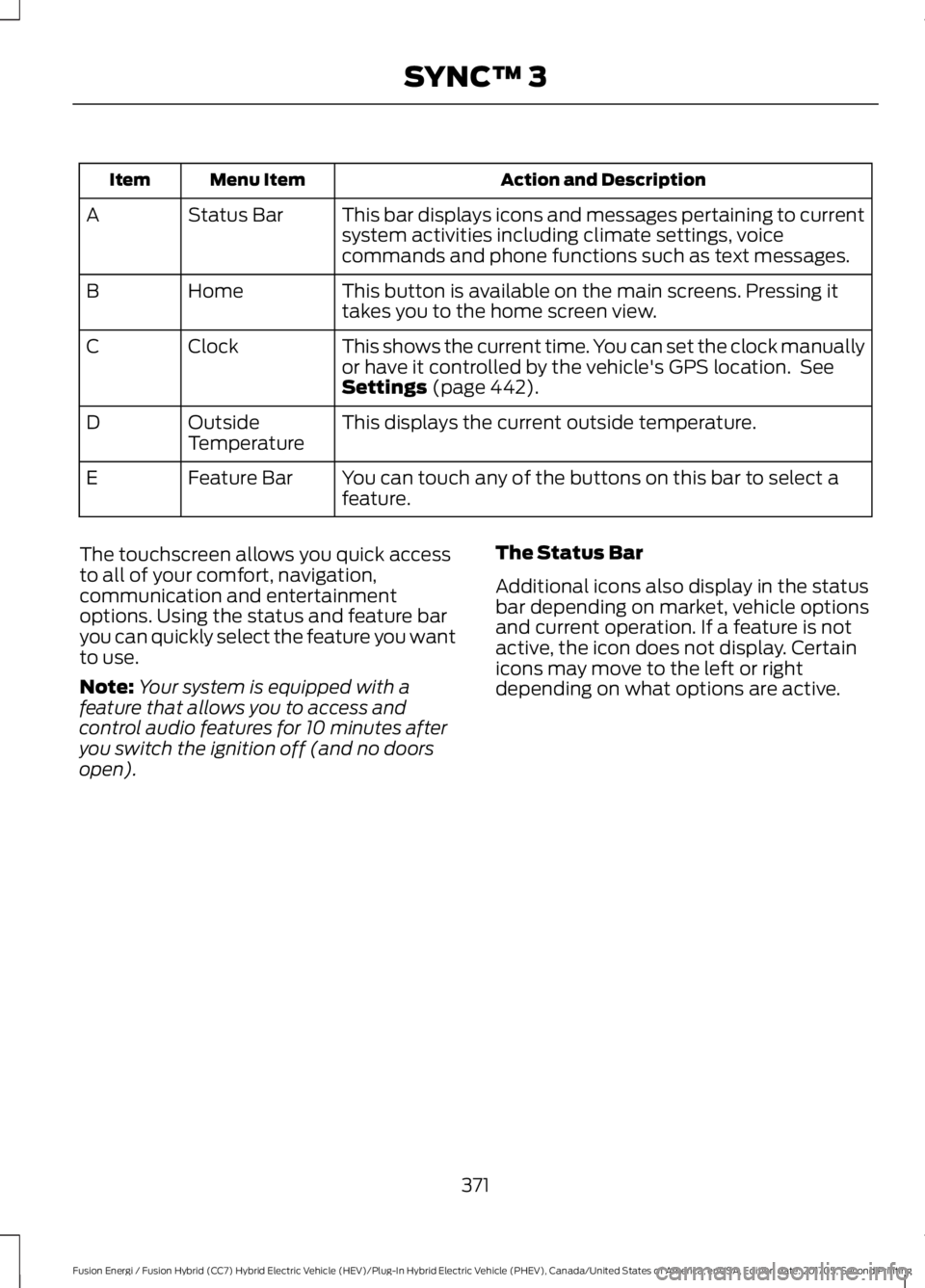
Action and Description
Menu Item
Item
This bar displays icons and messages pertaining to current
system activities including climate settings, voice
commands and phone functions such as text messages.
Status Bar
A
This button is available on the main screens. Pressing it
takes you to the home screen view.
Home
B
This shows the current time. You can set the clock manually
or have it controlled by the vehicle's GPS location. See
Settings (page 442).
Clock
C
This displays the current outside temperature.
Outside
Temperature
D
You can touch any of the buttons on this bar to select a
feature.
Feature Bar
E
The touchscreen allows you quick access
to all of your comfort, navigation,
communication and entertainment
options. Using the status and feature bar
you can quickly select the feature you want
to use.
Note: Your system is equipped with a
feature that allows you to access and
control audio features for 10 minutes after
you switch the ignition off (and no doors
open). The Status Bar
Additional icons also display in the status
bar depending on market, vehicle options
and current operation. If a feature is not
active, the icon does not display. Certain
icons may move to the left or right
depending on what options are active.
371
Fusion Energi / Fusion Hybrid (CC7) Hybrid Electric Vehicle (HEV)/Plug-In Hybrid Electric Vehicle (PHEV), Canada/United States of America, enUSA, Edition date: 201705, Second Printing SYNC™ 3
Page 375 of 538
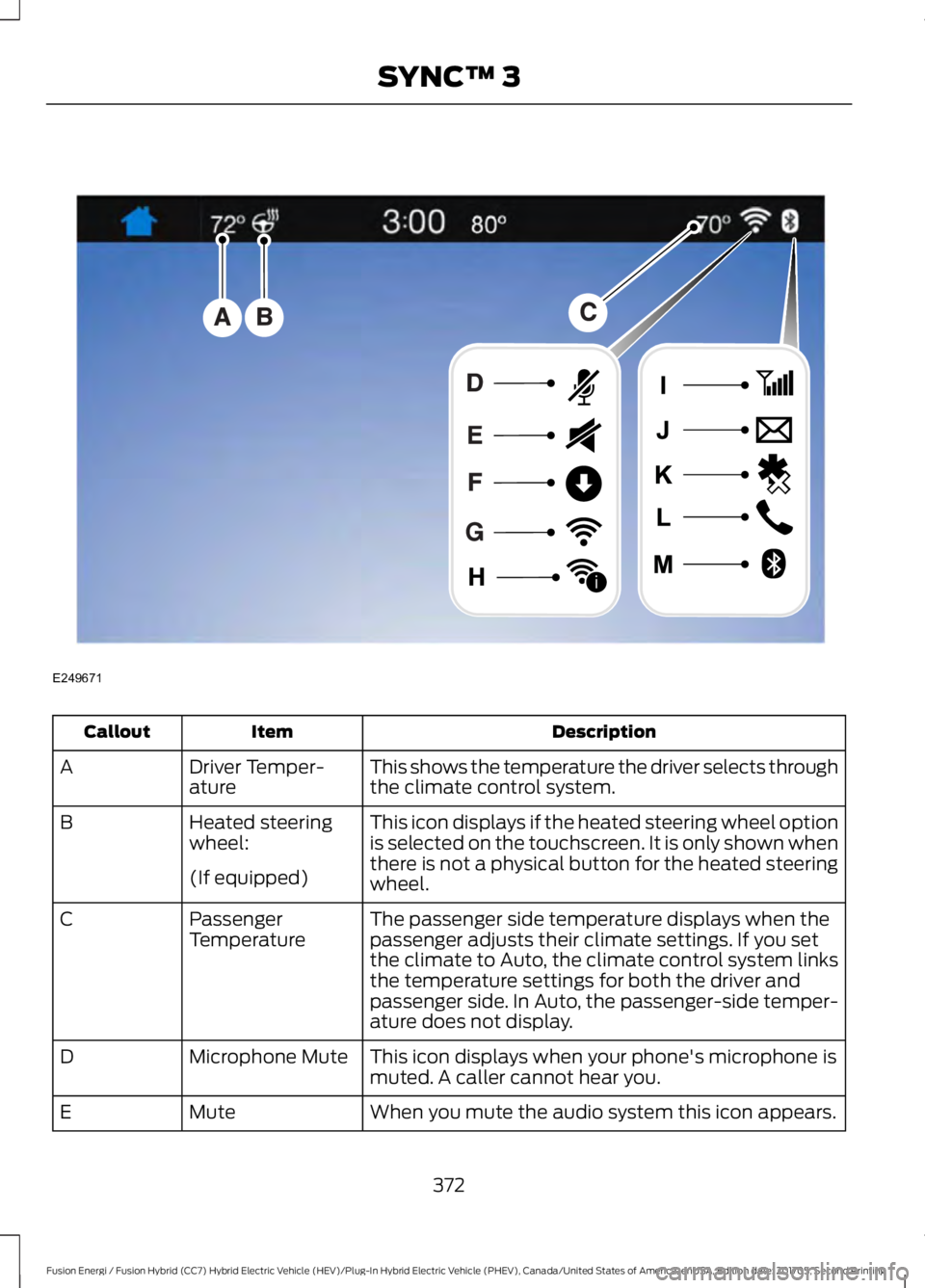
Description
Item
Callout
This shows the temperature the driver selects through
the climate control system.
Driver Temper-
ature
A
This icon displays if the heated steering wheel option
is selected on the touchscreen. It is only shown when
there is not a physical button for the heated steering
wheel.
Heated steering
wheel:
B
(If equipped) The passenger side temperature displays when the
passenger adjusts their climate settings. If you set
the climate to Auto, the climate control system links
the temperature settings for both the driver and
passenger side. In Auto, the passenger-side temper-
ature does not display.
Passenger
Temperature
C
This icon displays when your phone's microphone is
muted. A caller cannot hear you.
Microphone Mute
D
When you mute the audio system this icon appears.
Mute
E
372
Fusion Energi / Fusion Hybrid (CC7) Hybrid Electric Vehicle (HEV)/Plug-In Hybrid Electric Vehicle (PHEV), Canada/United States of America, enUSA, Edition date: 201705, Second Printing SYNC™ 3E249671
i