brake FORD FUSION HYBRID 2019 User Guide
[x] Cancel search | Manufacturer: FORD, Model Year: 2019, Model line: FUSION HYBRID, Model: FORD FUSION HYBRID 2019Pages: 541, PDF Size: 7.19 MB
Page 83 of 541
The daytime running lamps turn on when:
1. The lamps are on in the information
display.
2. Switching the ignition on.
3. The transmission is not in park (P) for vehicles with automatic transmissions,
or releasing the parking brake for
vehicles with manual transmissions.
4. The lighting control is in the autolamps
position.
5. The headlamps are off.
The other lighting control switch positions
do not turn on the daytime running lamps.
If the daytime running lamps are off in the
information display, the lamps stay off in
all switch positions.
AUTOMATIC HIGH BEAM
CONTROL (If Equipped) WARNING:
The system does not
relieve you of your responsibility to drive
with due care and attention. You may need
to override the system if it does not turn
the high beams on or off.
The system turns on high beams if it is dark
enough and no other traffic is present. If it
detects an approaching vehicle ’s
headlamps or tail lamps, or street lighting
ahead, the system turns off high beams
before they can distract other road users.
Low beams remain on.
Note: The system may not operate properly
if the sensor is blocked. Keep the windshield
free from obstruction or damage.
Note: The system may not operate properly
in cold or inclement conditions. You can
switch on the high beams by overriding the
system. Note:
If the system detects a blockage, for
example bird droppings, bug splatter, snow
or ice, the system goes into low beam mode
until you clear the blockage. A message may
appear in the information display if the
camera is blocked.
Note: Using much larger tires or equipping
vehicle accessories such as snowplows can
modify your vehicle's ride height and
degrade automatic high beam control
performance.
A camera sensor, centrally mounted
behind the windshield of your vehicle,
continuously monitors conditions to turn
the high beams on and off.
Once the system is active, the high beams
turn on if:
• The ambient light level is low enough.
• There is no traffic in front of your
vehicle.
• The vehicle speed is greater than
approximately
32 mph (51 km/h).
The system turns the high beams off if:
• The ambient light level is high enough
that high beams are not required.
• The system detects an approaching
vehicle's headlamps or tail lamps.
• The vehicle speed falls below
approximately
27 mph (44 km/h).
• The system detects severe rain, snow
or fog.
• The camera is blocked.
Switching the System On and Off
Switch the system on using the information
display. See Information Displays (page
98
).
80
Fusion Energi (CC7) Hybrid Electric Vehicle (HEV)/Plug-In Hybrid Electric Vehicle (PHEV), Canada/United States of America, enUSA, Edition date: 201805, First-Printing Lighting
Page 94 of 541
An optional small battery gauge is provided
for Hybrid vehicles and for Hybrid Mode
only in Energi vehicles. This can be enabled
in the Settings menu under Battery Display.
See General Information (page 98). The
fill level, or State of Charge, indicates the
amount of energy stored in the high
voltage battery as a percent of total energy
capacity. The level increases or decreases
as the battery charges and discharges
during normal operation.
Regen Display
A circular arrow symbol displays when
energy is being recaptured through the
regenerative braking system. Regen Display
can be disabled in the Settings menu. See
General Information (page 98).
Fuel Gauge:
The fuel gauge indicates about how much
fuel is in the fuel tank.
The arrow adjacent to the fuel pump
symbol indicates on which side of your
vehicle the fuel filler door is located.
Note: The fuel gauge may vary slightly
when your vehicle is moving or on a slope.
Low Fuel Reminder
A low fuel level reminder displays and
sounds when the distance to empty
reaches
75 mi (120 km) for MyKey, and at
50 mi (80 km), 25 mi (40 km), 12 mi
(20 km) and 0 mi (0 km) for all vehicle
keys.
Note: The low fuel reminder can appear at
different fuel gauge positions depending on
fuel economy conditions. This variation is
normal.
Vehicle Settings and Personalization
Display/Trip
See
General Information (page 98). Information
See
General Information (page 98).
Settings
See
General Information (page 98).
Brake Coach Display:
The Brake Coach appears after the vehicle
has come to a stop. It coaches you to brake
in a manner which maximizes the amount
of energy returned through the
regenerative braking system. The percent
displayed is an indication of the
regenerative braking efficiency with 100%
representing the maximum amount of
energy recovery.
You can switch this feature on or off in the
information displays settings menu. See
General Information
(page 98).
Trip Summary:
Trip Summary displays upon shutting off
your vehicle. The information is cumulative
over the last trip. A new trip begins each
time your start your vehicle (when the
Ready to Drive message comes on).
• Distance - Displays the total distance
traveled, distance traveled on battery
power only (EV distance) and Regen
distance. Regen distance is the
estimated range gained from energy
recaptured through regenerative
braking.
• Energy Use - Displays the average fuel
economy. In addition for Energi,
displays the total electrical energy used
while in Plug-in Power Mode in kilowatt
hours (kWh).
• Brake Score - The percent displayed is
an indication of the regenerative
braking efficiency for the trip.
91
Fusion Energi (CC7) Hybrid Electric Vehicle (HEV)/Plug-In Hybrid Electric Vehicle (PHEV), Canada/United States of America, enUSA, Edition date: 201805, First-Printing Instrument Cluster
Page 96 of 541
Energy usage effects (+/-)
A green bar indicates a positive effect on
your EV range per full charge estimate. An
amber bar indicates a negative effect. The
bigger the bar the bigger the effect on your
estimate.
•
Driving style/route – This includes
energy used to propel your vehicle
based on your driving style and route.
Your driving style includes how fast you
drive and whether your acceleration
and braking is mild or aggressive. Your
route includes factors such as the
amount of city or highway driving and
road grades.
• Climate control use – This includes
energy used by your vehicle ’s high
voltage climate control components
such as the electric A/C compressor
and the electric heater.
• Outside temp./other – This includes
energy losses due to outside
temperature and other conditions
which reduce vehicle system efficiency.
Energy used for low voltage
accessories such as cabin fans, heated
seats, headlights, etc. is also included.
WARNING LAMPS AND
INDICATORS
The following warning lamps and
indicators alert you to a vehicle condition
that may become serious. Some lamps
illuminate when you start your vehicle to
make sure they work. If any lamps remain
on after starting your vehicle, refer to the
respective system warning lamp for further
information.
Note: Some warning indicators appear in
the information display and operate the
same as a warning lamp but do not
illuminate when you start your vehicle. Adaptive Cruise Control (If Equipped) The speed control system
indicator light changes color to
indicate what mode the system
is in:
See Using Adaptive Cruise Control
(page 199).
On (white light): Lights when you turn the
adaptive cruise control system on. Turns
off when you turn the speed control
system off.
Engaged (green light): Lights when the
adaptive cruise control system engages.
Turns off when the speed control system
disengages.
Anti-Lock Braking System If it lights when you are driving,
this indicates a malfunction. You
will continue to have the normal
braking system (without Anti-lock braking
system) unless the brake system warning
lamp also lights. Have an authorized dealer
check the system.
Battery If it lights while driving, it
indicates a malfunction. Switch
off all unnecessary electrical
equipment and have an authorized dealer
check the system immediately.
Blind Spot Monitor
(If Equipped) Lights when you switch this
feature off or with a blind-spot
message. See
Blind Spot
Information System (page 212). See
Information Messages (page 107).
93
Fusion Energi (CC7) Hybrid Electric Vehicle (HEV)/Plug-In Hybrid Electric Vehicle (PHEV), Canada/United States of America, enUSA, Edition date: 201805, First-Printing Instrument ClusterE144524 E151262
Page 97 of 541
Brake System Warning Lamp
WARNING: Driving your vehicle with
the warning lamp on is dangerous. A
significant decrease in braking
performance may occur. It may take you
longer to stop your vehicle. Have your
vehicle checked as soon as possible.
Driving extended distances with the
parking brake engaged can cause brake
failure and the risk of personal injury.
Note: Indicators vary depending on region.
This lamp is a dual function lamp and will
illuminate when:
• You apply the parking brake with the
ignition on.
• Your vehicle has a brake fault or low
brake fluid level, regardless of parking
brake position. If the lamp illuminates while you
are moving, you may have the
parking brake applied. Be sure
that the parking brake is off.
Have your vehicle checked as
soon as possible if the lamp
continues to illuminate.
Cruise Control Lights when you switch on cruise
control.
Direction Indicator Lights when you switch on the
left or right indicator or the
hazard flasher. If the indicators
stay on or flash faster, check for a
burned-out bulb. See Changing a Bulb
(page 270). Door Ajar Lights when the ignition is on and
any door is not completely
closed.
EcoSelect
(If Equipped) Lights when you switch on this
feature. See
EcoSelect (page
152).
Electric Park Brake Lights when the electric parking
brake malfunctions.
Engine or Motor Coolant
Temperature Lights when the engine or motor
cooling system is overheating.
Stop your vehicle in a safe place
and have an authorized dealer check the
system.
Engine Oil If it lights with the engine running
or when you are driving, this
indicates a malfunction. Stop
your vehicle as soon as it is safe to do so
and switch the engine off. Check the
engine oil level.
See
Engine Oil Check (page 258).
Note: Do not resume your trip if it lights,
even if the oil level is correct. Have an
authorized dealer check the system
immediately.
EV Now Lights when you switch on this
feature. See
Plug-In Hybrid
Vehicle Operation (page 150).
94
Fusion Energi (CC7) Hybrid Electric Vehicle (HEV)/Plug-In Hybrid Electric Vehicle (PHEV), Canada/United States of America, enUSA, Edition date: 201805, First-Printing Instrument ClusterE270480 E71340 E194390 E146190 E144814
Page 99 of 541
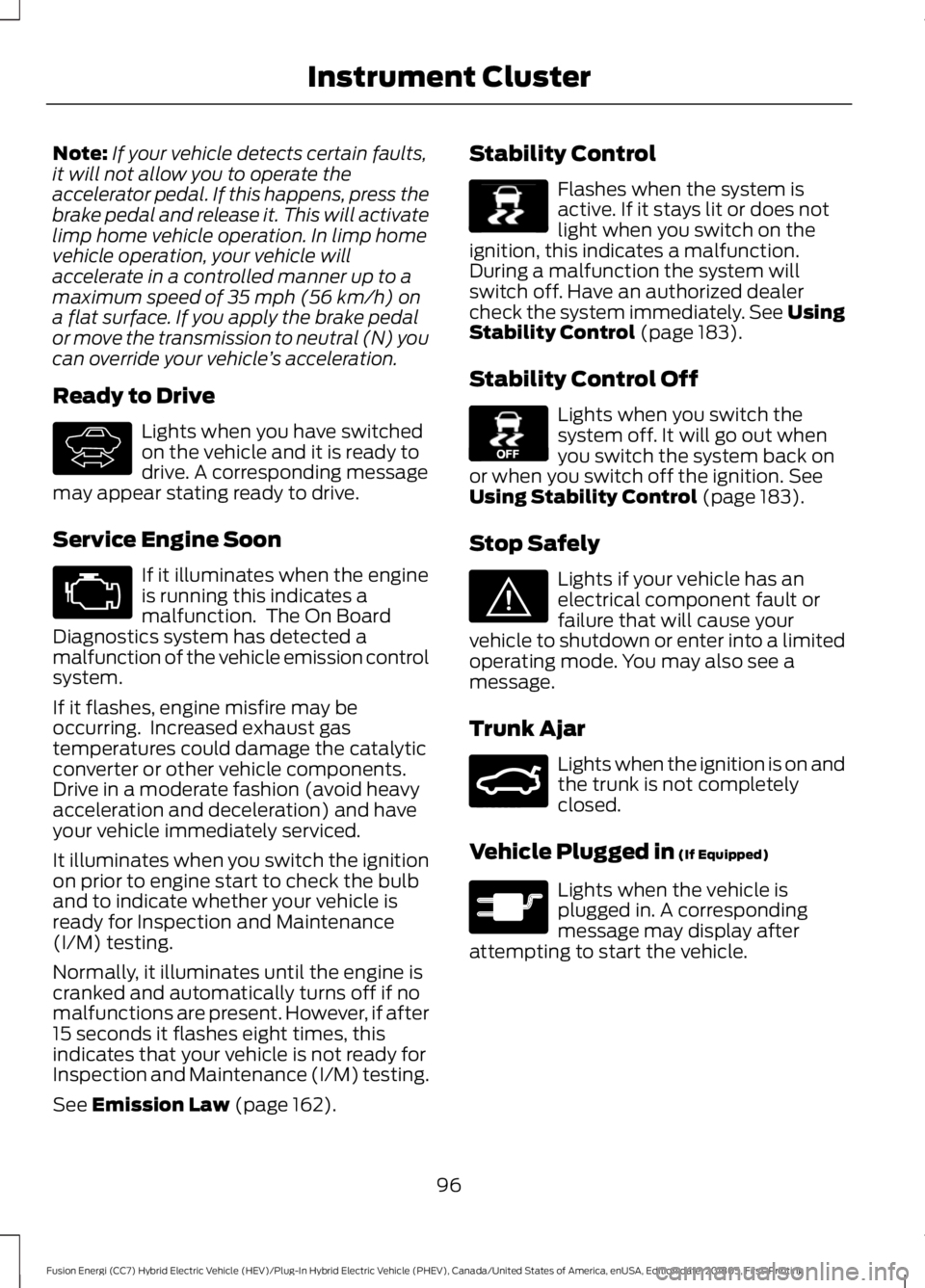
Note:
If your vehicle detects certain faults,
it will not allow you to operate the
accelerator pedal. If this happens, press the
brake pedal and release it. This will activate
limp home vehicle operation. In limp home
vehicle operation, your vehicle will
accelerate in a controlled manner up to a
maximum speed of 35 mph (56 km/h) on
a flat surface. If you apply the brake pedal
or move the transmission to neutral (N) you
can override your vehicle ’s acceleration.
Ready to Drive Lights when you have switched
on the vehicle and it is ready to
drive. A corresponding message
may appear stating ready to drive.
Service Engine Soon If it illuminates when the engine
is running this indicates a
malfunction. The On Board
Diagnostics system has detected a
malfunction of the vehicle emission control
system.
If it flashes, engine misfire may be
occurring. Increased exhaust gas
temperatures could damage the catalytic
converter or other vehicle components.
Drive in a moderate fashion (avoid heavy
acceleration and deceleration) and have
your vehicle immediately serviced.
It illuminates when you switch the ignition
on prior to engine start to check the bulb
and to indicate whether your vehicle is
ready for Inspection and Maintenance
(I/M) testing.
Normally, it illuminates until the engine is
cranked and automatically turns off if no
malfunctions are present. However, if after
15 seconds it flashes eight times, this
indicates that your vehicle is not ready for
Inspection and Maintenance (I/M) testing.
See
Emission Law (page 162). Stability Control Flashes when the system is
active. If it stays lit or does not
light when you switch on the
ignition, this indicates a malfunction.
During a malfunction the system will
switch off. Have an authorized dealer
check the system immediately. See Using
Stability Control
(page 183).
Stability Control Off Lights when you switch the
system off. It will go out when
you switch the system back on
or when you switch off the ignition.
See
Using Stability Control (page 183).
Stop Safely Lights if your vehicle has an
electrical component fault or
failure that will cause your
vehicle to shutdown or enter into a limited
operating mode. You may also see a
message.
Trunk Ajar Lights when the ignition is on and
the trunk is not completely
closed.
Vehicle Plugged in
(If Equipped) Lights when the vehicle is
plugged in. A corresponding
message may display after
attempting to start the vehicle.
96
Fusion Energi (CC7) Hybrid Electric Vehicle (HEV)/Plug-In Hybrid Electric Vehicle (PHEV), Canada/United States of America, enUSA, Edition date: 201805, First-Printing Instrument ClusterE144692 E138639 E130458 E144693 E159323 E144694
Page 100 of 541
AUDIBLE WARNINGS AND
INDICATORS
Keyless Warning Alert
The horn will sound twice when you exit
your vehicle with the intelligent access key
and your vehicle is in RUN, indicating your
vehicle is still on.
Headlamps On Warning Chime
Sounds when you remove the key from the
ignition and open the driver's door and you
have left the headlamps or parking lamps
on.
Parking Brake On Warning Chime
Sounds when you have left the parking
brake on and drive your vehicle. If the
warning chime remains on after you have
released the parking brake, have the
system checked by your authorized dealer
immediately.
97
Fusion Energi (CC7) Hybrid Electric Vehicle (HEV)/Plug-In Hybrid Electric Vehicle (PHEV), Canada/United States of America, enUSA, Edition date: 201805, First-Printing Instrument Cluster
Page 107 of 541
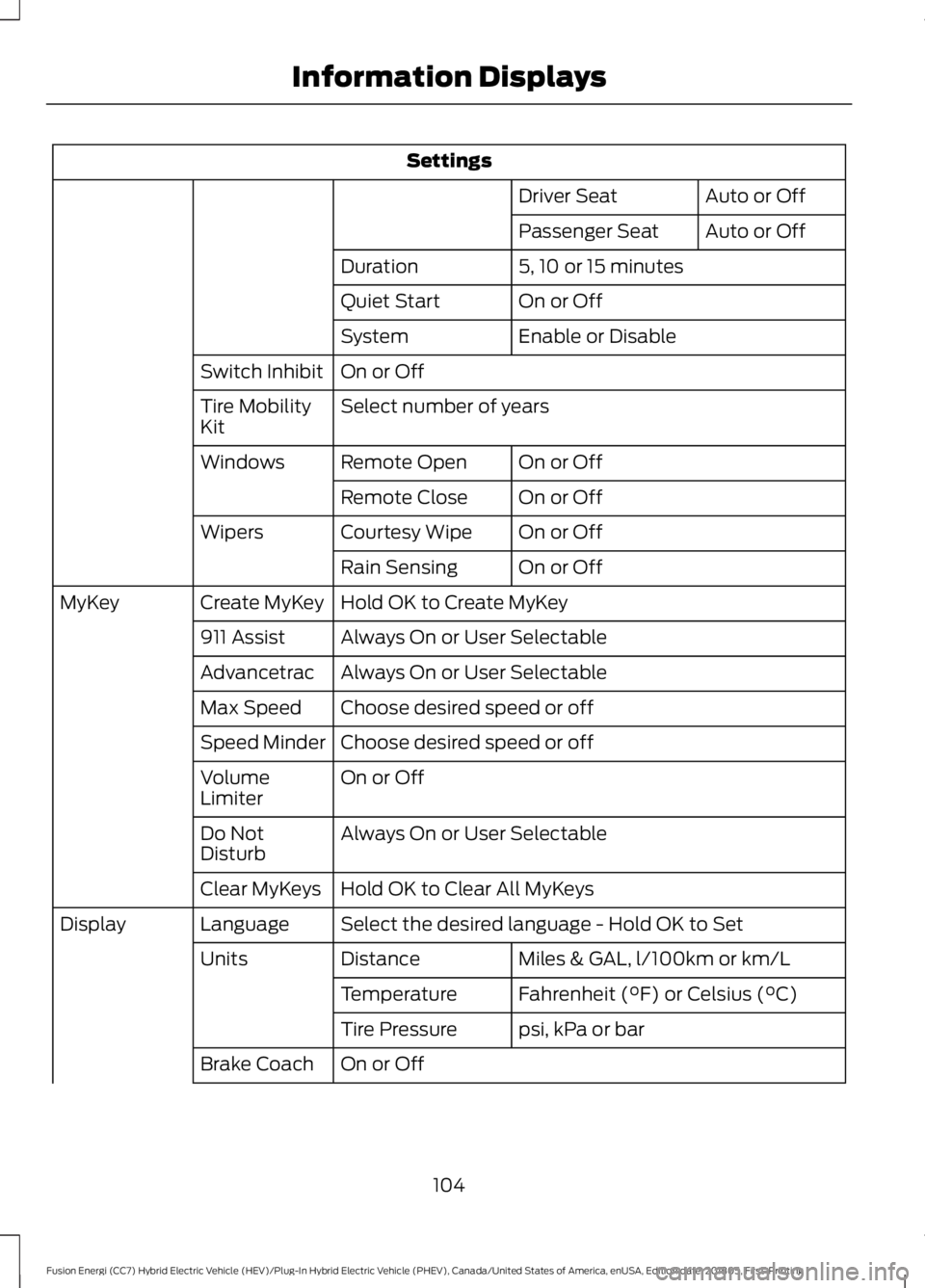
Settings
Auto or Off
Driver Seat
Auto or Off
Passenger Seat
5, 10 or 15 minutes
Duration
On or Off
Quiet Start
Enable or Disable
System
On or Off
Switch Inhibit
Select number of years
Tire Mobility
Kit
On or Off
Remote Open
Windows
On or Off
Remote Close
On or Off
Courtesy Wipe
Wipers
On or Off
Rain Sensing
Hold OK to Create MyKey
Create MyKey
MyKey
Always On or User Selectable
911 Assist
Always On or User Selectable
Advancetrac
Choose desired speed or off
Max Speed
Choose desired speed or off
Speed Minder
On or Off
Volume
Limiter
Always On or User Selectable
Do Not
Disturb
Hold OK to Clear All MyKeys
Clear MyKeys
Select the desired language - Hold OK to Set
Language
Display
Miles & GAL, l/100km or km/L
Distance
Units
Fahrenheit (°F) or Celsius (°C)
Temperature
psi, kPa or bar
Tire Pressure
On or Off
Brake Coach
104
Fusion Energi (CC7) Hybrid Electric Vehicle (HEV)/Plug-In Hybrid Electric Vehicle (PHEV), Canada/United States of America, enUSA, Edition date: 201805, First-Printing Information Displays
Page 109 of 541
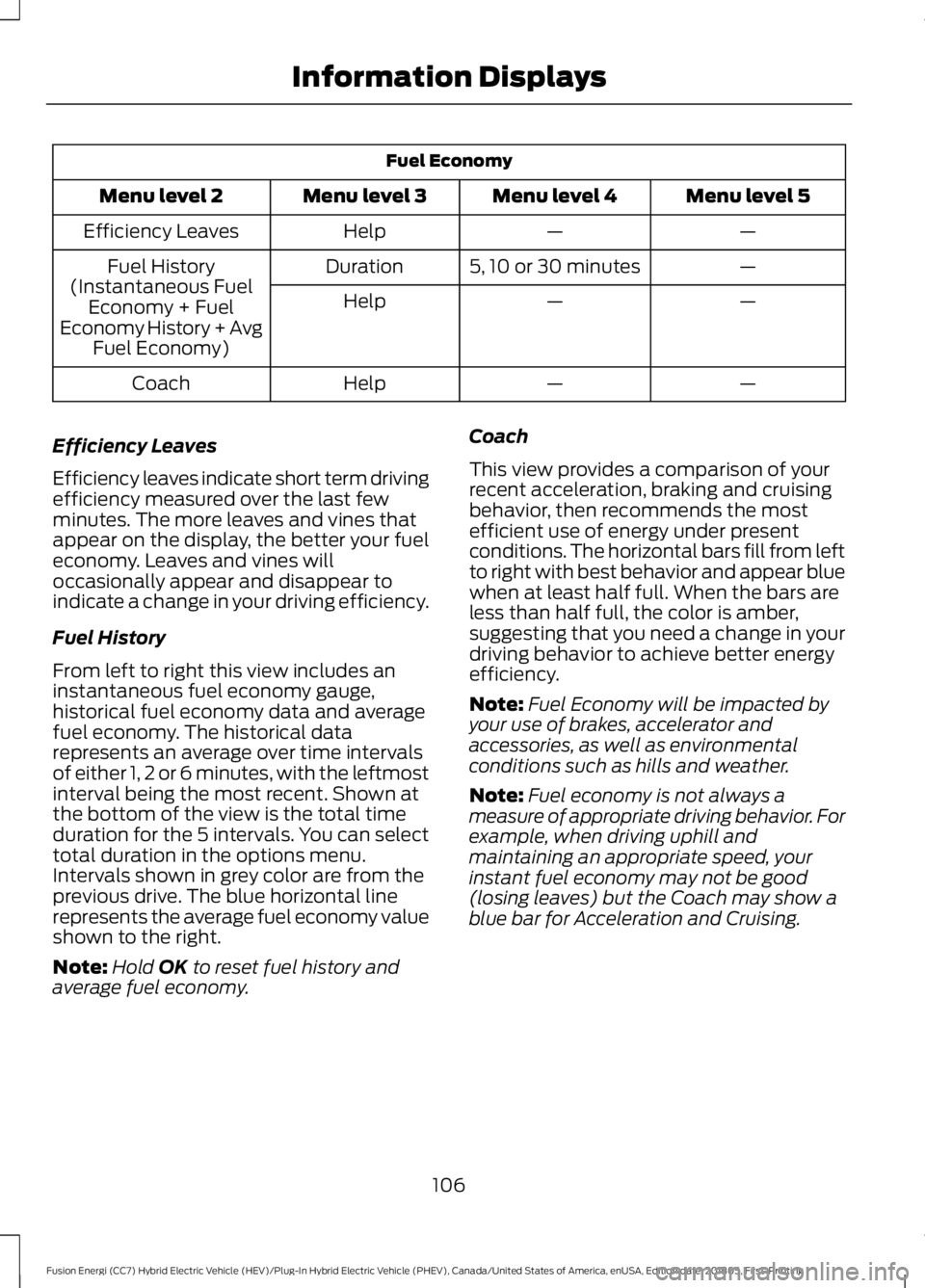
Fuel Economy
Menu level 5
Menu level 4
Menu level 3
Menu level 2
—
—
Help
Efficiency Leaves
—
5, 10 or 30 minutes
Duration
Fuel History
(Instantaneous Fuel Economy + Fuel
Economy History + Avg Fuel Economy) —
—
Help
—
—
Help
Coach
Efficiency Leaves
Efficiency leaves indicate short term driving
efficiency measured over the last few
minutes. The more leaves and vines that
appear on the display, the better your fuel
economy. Leaves and vines will
occasionally appear and disappear to
indicate a change in your driving efficiency.
Fuel History
From left to right this view includes an
instantaneous fuel economy gauge,
historical fuel economy data and average
fuel economy. The historical data
represents an average over time intervals
of either 1, 2 or 6 minutes, with the leftmost
interval being the most recent. Shown at
the bottom of the view is the total time
duration for the 5 intervals. You can select
total duration in the options menu.
Intervals shown in grey color are from the
previous drive. The blue horizontal line
represents the average fuel economy value
shown to the right.
Note: Hold OK to reset fuel history and
average fuel economy. Coach
This view provides a comparison of your
recent acceleration, braking and cruising
behavior, then recommends the most
efficient use of energy under present
conditions. The horizontal bars fill from left
to right with best behavior and appear blue
when at least half full. When the bars are
less than half full, the color is amber,
suggesting that you need a change in your
driving behavior to achieve better energy
efficiency.
Note:
Fuel Economy will be impacted by
your use of brakes, accelerator and
accessories, as well as environmental
conditions such as hills and weather.
Note: Fuel economy is not always a
measure of appropriate driving behavior. For
example, when driving uphill and
maintaining an appropriate speed, your
instant fuel economy may not be good
(losing leaves) but the Coach may show a
blue bar for Acceleration and Cruising.
106
Fusion Energi (CC7) Hybrid Electric Vehicle (HEV)/Plug-In Hybrid Electric Vehicle (PHEV), Canada/United States of America, enUSA, Edition date: 201805, First-Printing Information Displays
Page 116 of 541
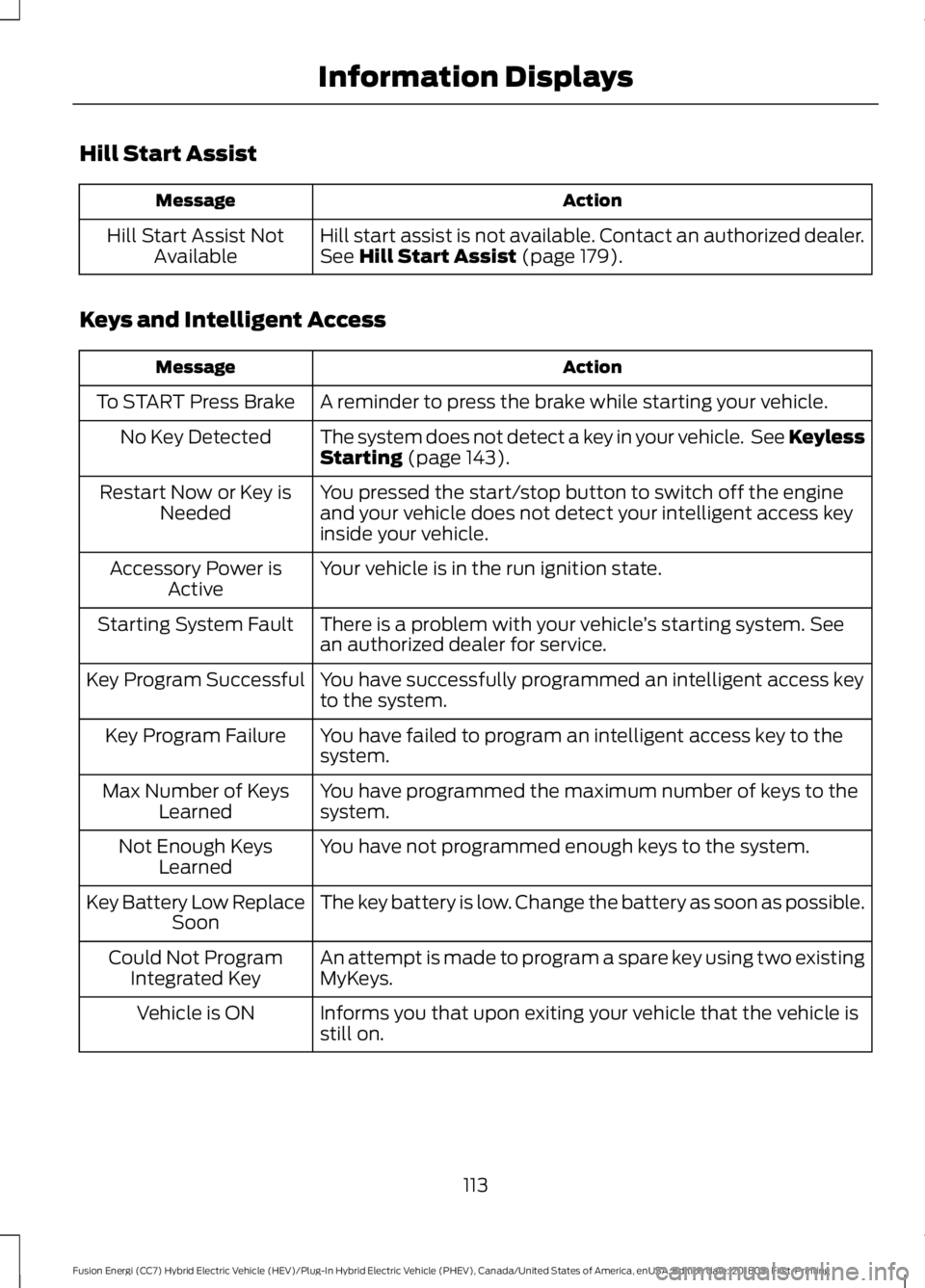
Hill Start Assist
Action
Message
Hill start assist is not available. Contact an authorized dealer.
See Hill Start Assist (page 179).
Hill Start Assist Not
Available
Keys and Intelligent Access Action
Message
A reminder to press the brake while starting your vehicle.
To START Press Brake
The system does not detect a key in your vehicle. See Keyless
Starting
(page 143).
No Key Detected
You pressed the start/stop button to switch off the engine
and your vehicle does not detect your intelligent access key
inside your vehicle.
Restart Now or Key is
Needed
Your vehicle is in the run ignition state.
Accessory Power is
Active
There is a problem with your vehicle ’s starting system. See
an authorized dealer for service.
Starting System Fault
You have successfully programmed an intelligent access key
to the system.
Key Program Successful
You have failed to program an intelligent access key to the
system.
Key Program Failure
You have programmed the maximum number of keys to the
system.
Max Number of Keys
Learned
You have not programmed enough keys to the system.
Not Enough Keys
Learned
The key battery is low. Change the battery as soon as possible.
Key Battery Low Replace
Soon
An attempt is made to program a spare key using two existing
MyKeys.
Could Not Program
Integrated Key
Informs you that upon exiting your vehicle that the vehicle is
still on.
Vehicle is ON
113
Fusion Energi (CC7) Hybrid Electric Vehicle (HEV)/Plug-In Hybrid Electric Vehicle (PHEV), Canada/United States of America, enUSA, Edition date: 201805, First-Printing Information Displays
Page 117 of 541
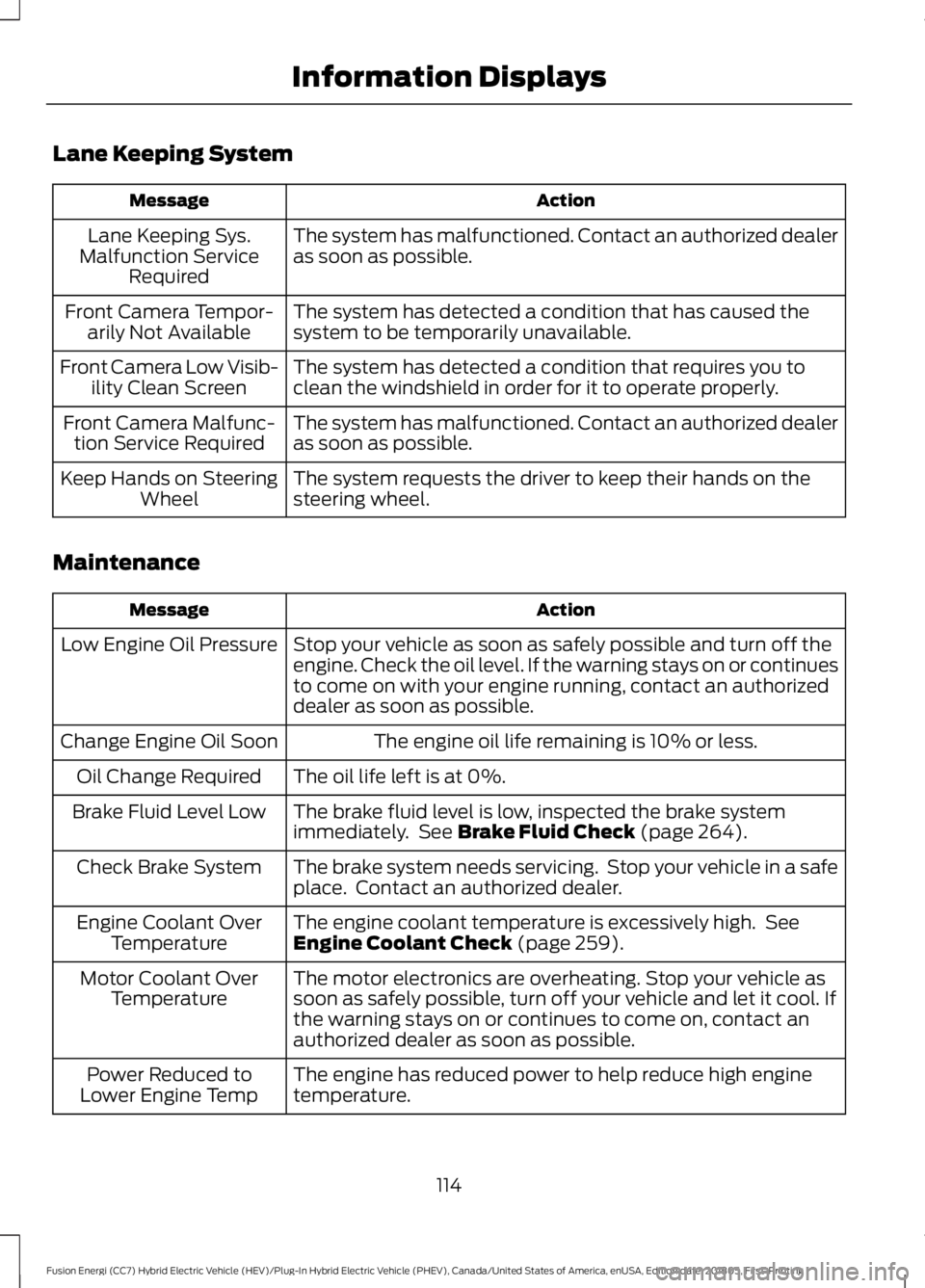
Lane Keeping System
Action
Message
The system has malfunctioned. Contact an authorized dealer
as soon as possible.
Lane Keeping Sys.
Malfunction Service Required
The system has detected a condition that has caused the
system to be temporarily unavailable.
Front Camera Tempor-
arily Not Available
The system has detected a condition that requires you to
clean the windshield in order for it to operate properly.
Front Camera Low Visib-
ility Clean Screen
The system has malfunctioned. Contact an authorized dealer
as soon as possible.
Front Camera Malfunc-
tion Service Required
The system requests the driver to keep their hands on the
steering wheel.
Keep Hands on Steering
Wheel
Maintenance Action
Message
Stop your vehicle as soon as safely possible and turn off the
engine. Check the oil level. If the warning stays on or continues
to come on with your engine running, contact an authorized
dealer as soon as possible.
Low Engine Oil Pressure
The engine oil life remaining is 10% or less.
Change Engine Oil Soon
The oil life left is at 0%.
Oil Change Required
The brake fluid level is low, inspected the brake system
immediately. See Brake Fluid Check (page 264).
Brake Fluid Level Low
The brake system needs servicing. Stop your vehicle in a safe
place. Contact an authorized dealer.
Check Brake System
The engine coolant temperature is excessively high. See
Engine Coolant Check
(page 259).
Engine Coolant Over
Temperature
The motor electronics are overheating. Stop your vehicle as
soon as safely possible, turn off your vehicle and let it cool. If
the warning stays on or continues to come on, contact an
authorized dealer as soon as possible.
Motor Coolant Over
Temperature
The engine has reduced power to help reduce high engine
temperature.
Power Reduced to
Lower Engine Temp
114
Fusion Energi (CC7) Hybrid Electric Vehicle (HEV)/Plug-In Hybrid Electric Vehicle (PHEV), Canada/United States of America, enUSA, Edition date: 201805, First-Printing Information Displays