operation FORD FUSION HYBRID 2019 User Guide
[x] Cancel search | Manufacturer: FORD, Model Year: 2019, Model line: FUSION HYBRID, Model: FORD FUSION HYBRID 2019Pages: 541, PDF Size: 7.19 MB
Page 60 of 541
PRINCIPLE OF OPERATION
MyKey allows you to program keys with
restricted driving modes to promote good
driving habits. You can program the
restrictions to all keys except one. Any keys
that you did not program are administrator
keys or admin keys.
You can use admin keys to:
•
Create a MyKey with certain vehicle
restrictions.
• Program certain MyKey settings.
• Clear all MyKey restrictions.
After you program a MyKey, you can view
the following information through the
information display:
• The total number of admin keys and
MyKeys for your vehicle.
• The total distance a MyKey driver
traveled with your vehicle.
Note: Every MyKey receives the same
restrictions and settings. You cannot
program them individually.
Note: For vehicles equipped with a
push-button start switch: When both a
MyKey and an admin key are present when
you start your vehicle, the system recognizes
the admin key only. Standard Settings
Not every vehicle includes the features
listed below. If your vehicle has this
equipment, then you cannot change the
following settings when using a MyKey:
•
Seatbelt reminder or Belt-Minder™.
MyKey mutes the audio system until
drivers, and in some instances,
passengers, fasten their seatbelts.
Note: If your vehicle includes an
AM/FM radio or a very basic audio
system, then the radio may not mute.
• Earlier low-fuel warning. The low-fuel
warning activates earlier for MyKey
drivers, giving them more time to refuel.
• Certain driver alerts, stability systems
or parking aids turn on automatically
when you use the MyKey system. For
example, Blind Spot Information
System (BLIS), cross traffic alert, lane
departure warning or forward collision
warning. Note:
MyKey drivers may be
able to turn the lane departure warning
feature off, but this feature turns back
on automatically with every new key
cycle.
• Restricted touchscreen operation in
some markets. For example, MyKey
may prevent manual navigation
destination input while the vehicle is in
any gear other than park (P) or when
the vehicle reaches a certain rate of
speed.
• Satellite radio adult content
restrictions, if this feature is available
in your market.
Optional Settings
You can configure certain vehicle feature
settings when you first create a MyKey. You
can also change the settings afterward
with an admin key.
57
Fusion Energi (CC7) Hybrid Electric Vehicle (HEV)/Plug-In Hybrid Electric Vehicle (PHEV), Canada/United States of America, enUSA, Edition date: 201805, First-Printing MyKey
™
Page 71 of 541
WARNING: Do not leave children or
animals unattended in the vehicle. On hot
days, the temperature in the trunk or
vehicle interior can rise very quickly.
Exposure of people or animals to these
high temperatures for even a short time
can cause death or serious heat-related
injuries, including brain damage. Small
children are particularly at risk.
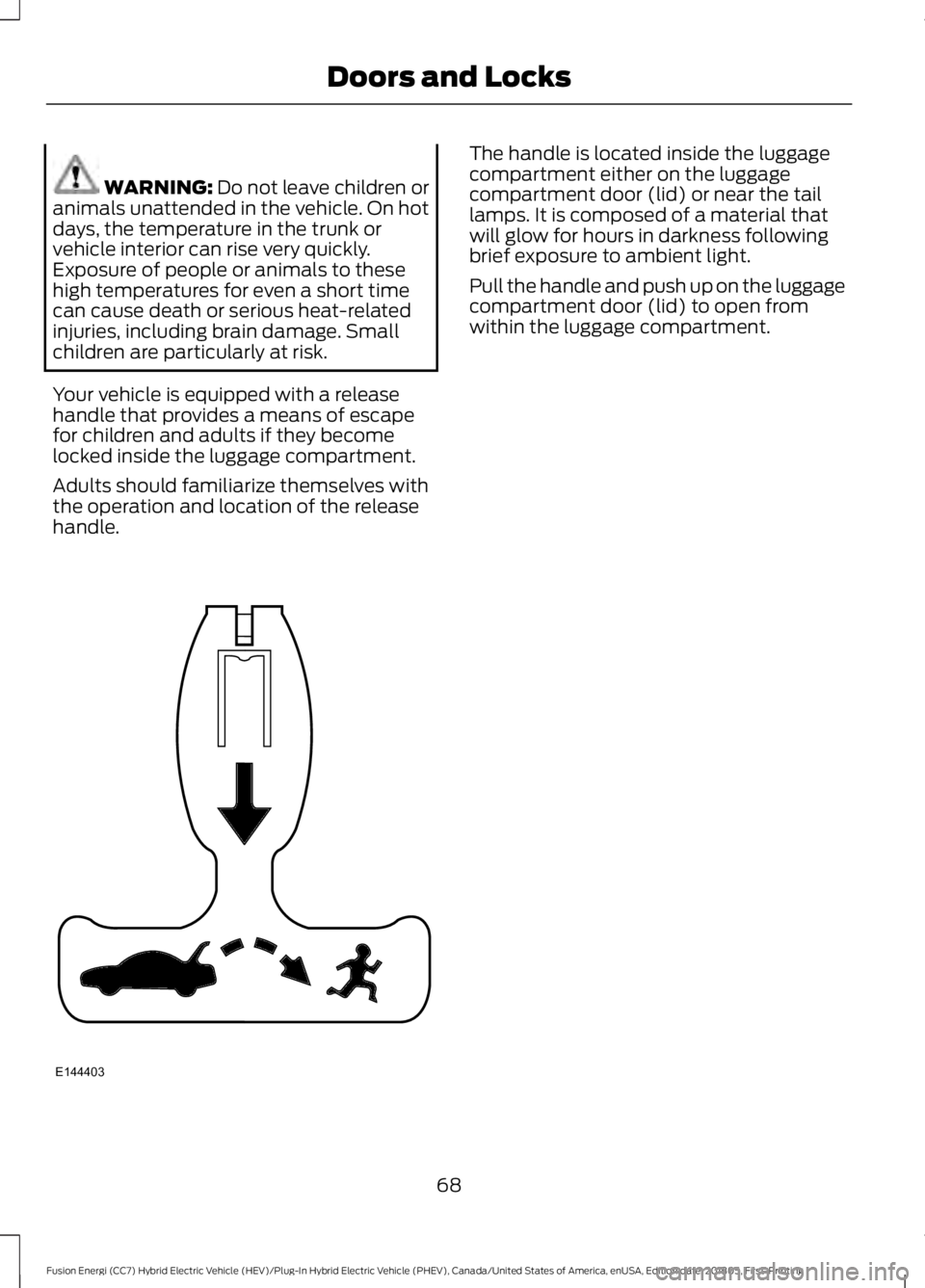
Your vehicle is equipped with a release
handle that provides a means of escape
for children and adults if they become
locked inside the luggage compartment.
Adults should familiarize themselves with
the operation and location of the release
handle. The handle is located inside the luggage
compartment either on the luggage
compartment door (lid) or near the tail
lamps. It is composed of a material that
will glow for hours in darkness following
brief exposure to ambient light.
Pull the handle and push up on the luggage
compartment door (lid) to open from
within the luggage compartment.
68
Fusion Energi (CC7) Hybrid Electric Vehicle (HEV)/Plug-In Hybrid Electric Vehicle (PHEV), Canada/United States of America, enUSA, Edition date: 201805, First-Printing Doors and LocksE144403
Page 74 of 541
ADJUSTING THE STEERING
WHEEL - VEHICLES WITH:
POWER ADJUSTABLE
STEERING COLUMN
WARNING: Do not adjust the
steering wheel when your vehicle is
moving.
Note: Make sure that you are sitting in the
correct position. See
Sitting in the Correct
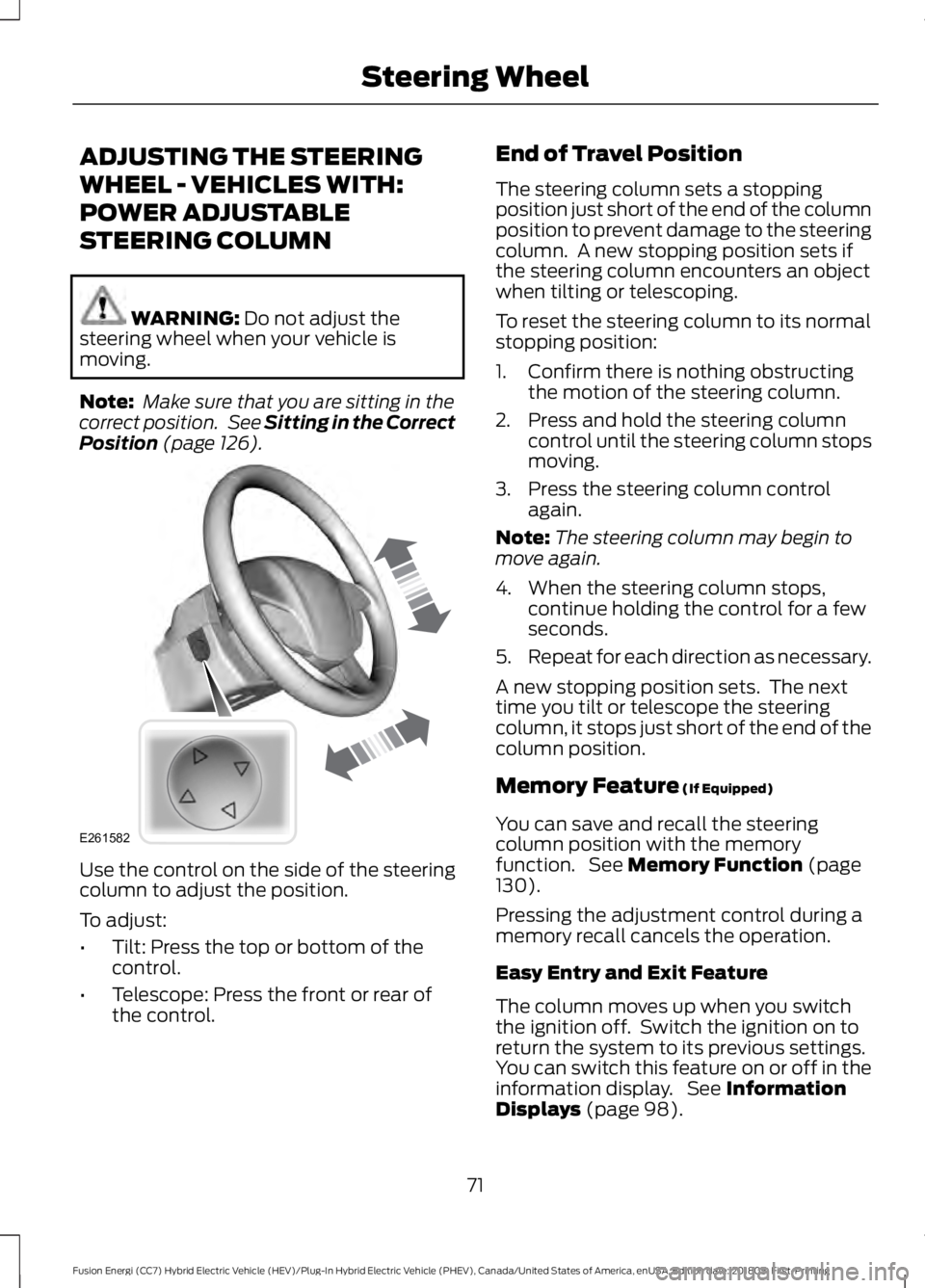
Position (page 126). Use the control on the side of the steering
column to adjust the position.
To adjust:
•
Tilt: Press the top or bottom of the
control.
• Telescope: Press the front or rear of
the control. End of Travel Position
The steering column sets a stopping
position just short of the end of the column
position to prevent damage to the steering
column. A new stopping position sets if
the steering column encounters an object
when tilting or telescoping.
To reset the steering column to its normal
stopping position:
1. Confirm there is nothing obstructing
the motion of the steering column.
2. Press and hold the steering column control until the steering column stops
moving.
3. Press the steering column control again.
Note: The steering column may begin to
move again.
4. When the steering column stops, continue holding the control for a few
seconds.
5. Repeat for each direction as necessary.
A new stopping position sets. The next
time you tilt or telescope the steering
column, it stops just short of the end of the
column position.
Memory Feature
(If Equipped)
You can save and recall the steering
column position with the memory
function. See
Memory Function (page
130).
Pressing the adjustment control during a
memory recall cancels the operation.
Easy Entry and Exit Feature
The column moves up when you switch
the ignition off. Switch the ignition on to
return the system to its previous settings.
You can switch this feature on or off in the
information display. See
Information
Displays (page 98).
71
Fusion Energi (CC7) Hybrid Electric Vehicle (HEV)/Plug-In Hybrid Electric Vehicle (PHEV), Canada/United States of America, enUSA, Edition date: 201805, First-Printing Steering WheelE261582
Page 75 of 541
Note:
If you press any adjustment or
memory button when in easy exit mode, the
system cancels the operation.
Note: Depending on your vehicle, the
column may move up and in.
ADJUSTING THE STEERING
WHEEL - VEHICLES WITH:
MANUAL ADJUSTABLE
STEERING COLUMN WARNING: Do not adjust the
steering wheel when your vehicle is
moving.
Note: Make sure that you are sitting in the
correct position. See Sitting in the Correct
Position
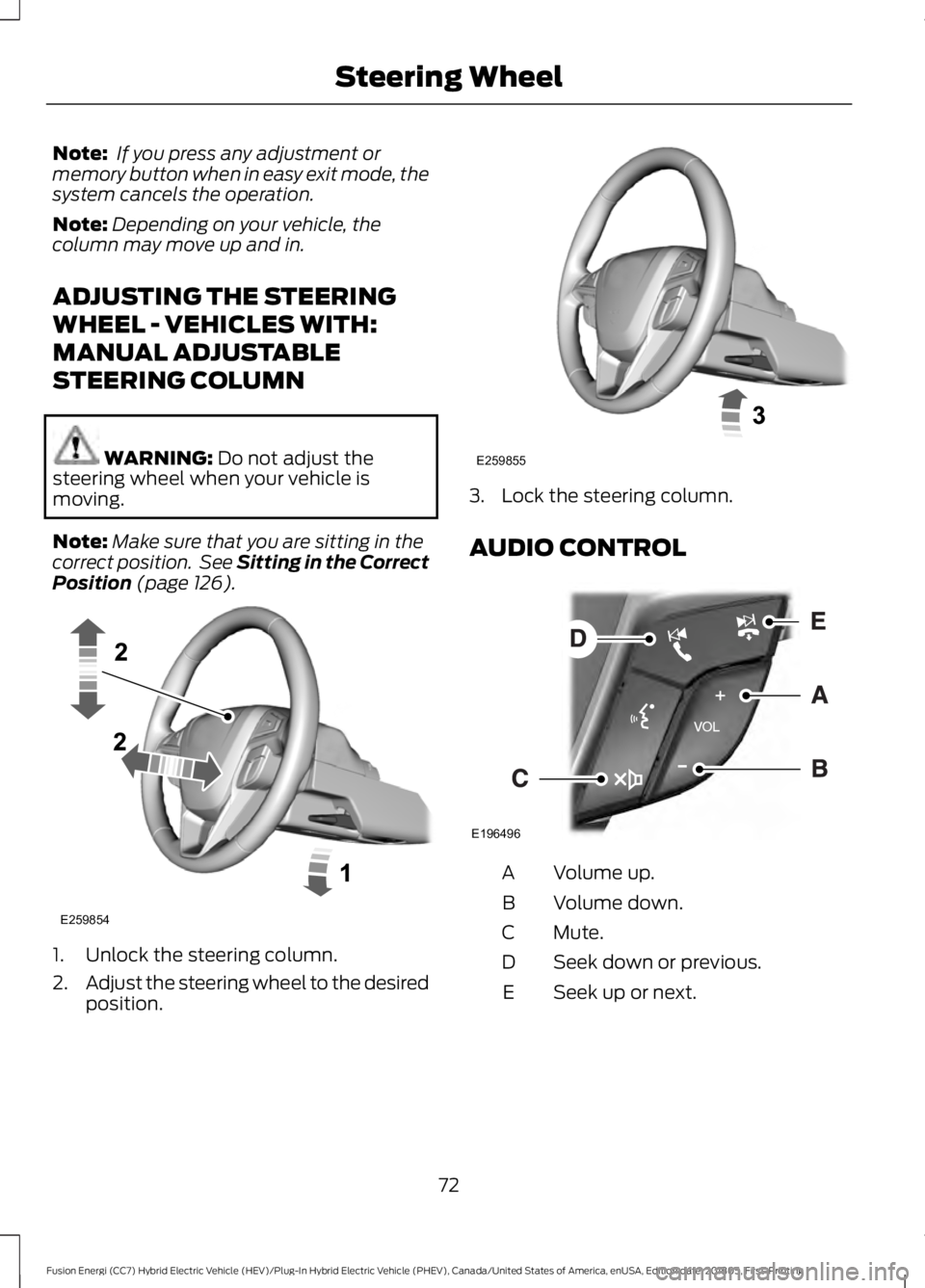
(page 126). 1. Unlock the steering column.
2.
Adjust the steering wheel to the desired
position. 3. Lock the steering column.
AUDIO CONTROL
Volume up.
A
Volume down.
B
Mute.
C
Seek down or previous.
D
Seek up or next.
E
72
Fusion Energi (CC7) Hybrid Electric Vehicle (HEV)/Plug-In Hybrid Electric Vehicle (PHEV), Canada/United States of America, enUSA, Edition date: 201805, First-Printing Steering WheelE259854 E259855 E196496
Page 80 of 541
GENERAL INFORMATION
Condensation in the Exterior Front
Lamps and Rear Lamps
Exterior front lamps and rear lamps have
vents to accommodate normal changes
in air pressure.
Condensation can be a natural by-product
of this design. When moist air enters the
lamp assembly through the vents, there is
a possibility that condensation can occur
when the temperature is cold. When
normal condensation occurs, a fine mist
can form on the interior of the lens. The
fine mist eventually clears and exits
through the vents during normal operation.
Clearing time may take as long as 48 hours
under dry weather conditions.
Examples of acceptable condensation are:
•
The presence of a fine mist (no streaks,
drip marks or large droplets).
• A fine mist covers less than 50% of the
lens.
Examples of unacceptable condensation
are:
• A water puddle inside the lamp.
• Streaks, drip marks or large droplets
present on the interior of the lens.
If you see any unacceptable condensation,
have your vehicle checked by an authorized
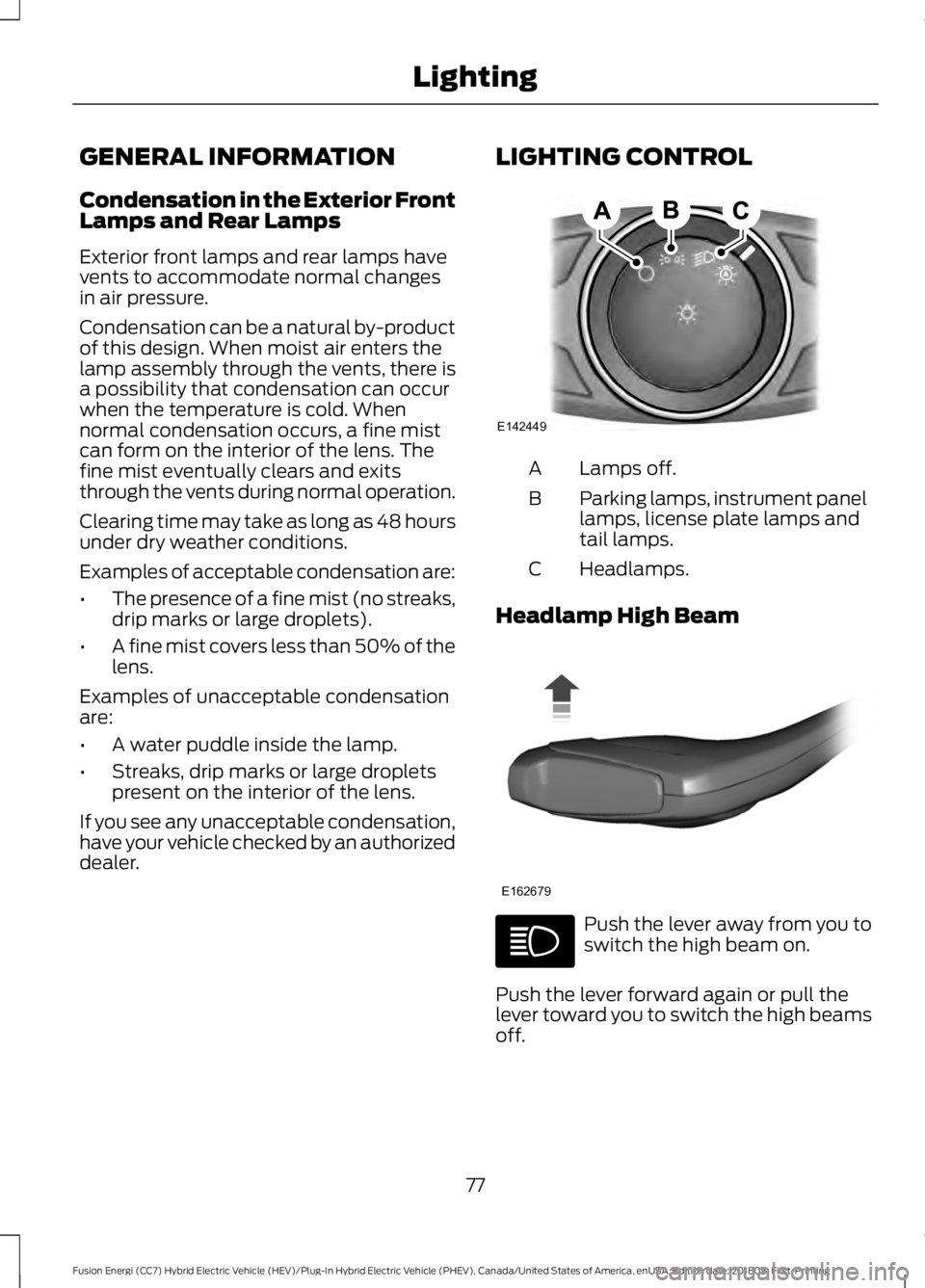
dealer. LIGHTING CONTROL Lamps off.
A
Parking lamps, instrument panel
lamps, license plate lamps and
tail lamps.
B
Headlamps.
C
Headlamp High Beam Push the lever away from you to
switch the high beam on.
Push the lever forward again or pull the
lever toward you to switch the high beams
off.
77
Fusion Energi (CC7) Hybrid Electric Vehicle (HEV)/Plug-In Hybrid Electric Vehicle (PHEV), Canada/United States of America, enUSA, Edition date: 201805, First-Printing LightingE142449 E162679
Page 87 of 541
POWER WINDOWS
WARNING: Do not leave children
unattended in your vehicle and do not let
them play with the power windows. Failure
to follow this instruction could result in
personal injury. WARNING: When closing the power
windows, verify they are free of obstruction
and make sure that children and pets are
not in the proximity of the window
openings. Note:
You may hear a pulsing noise when
only one of the windows is open. Lower the
opposite window slightly to reduce this
noise.
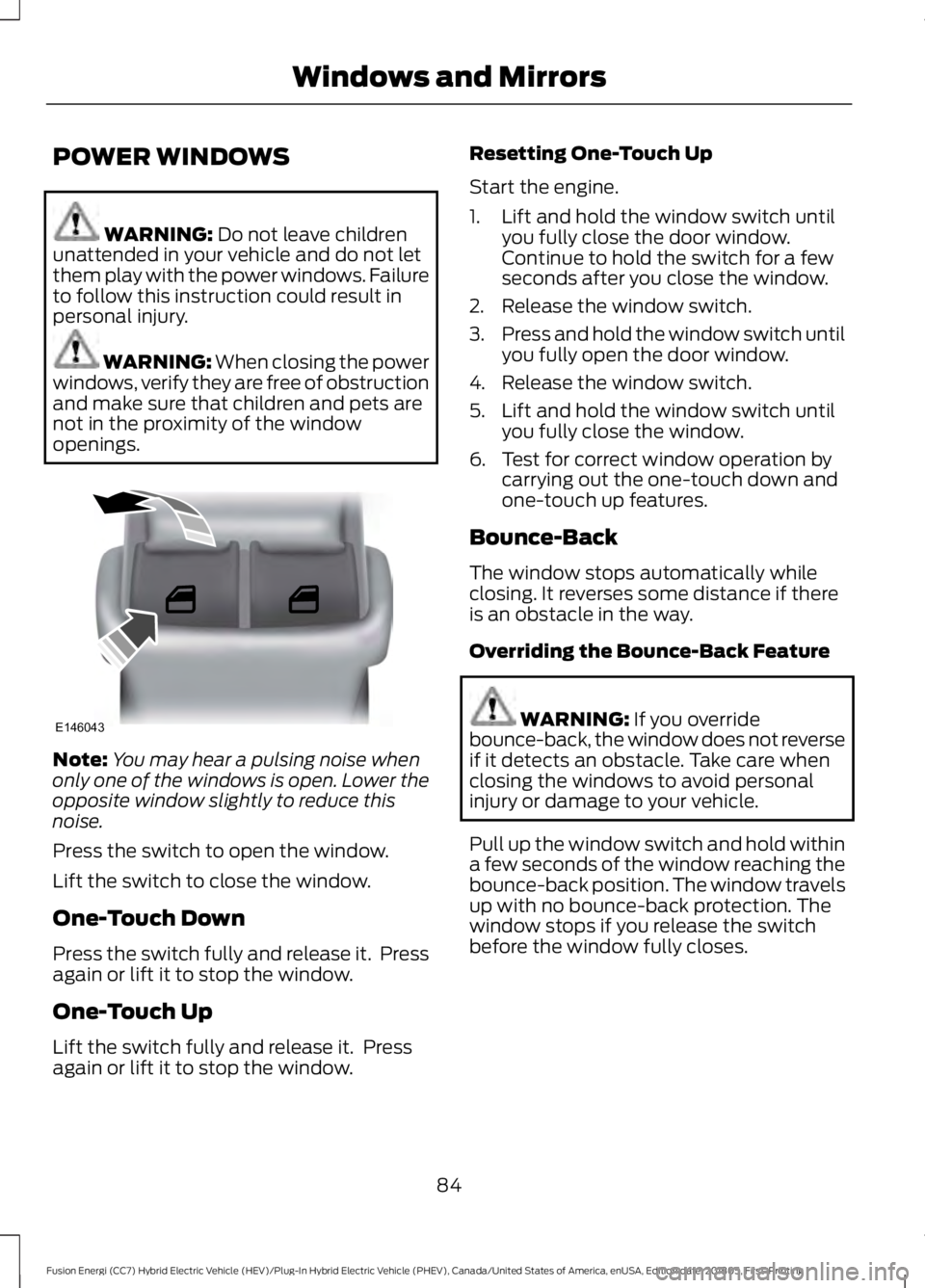
Press the switch to open the window.
Lift the switch to close the window.
One-Touch Down
Press the switch fully and release it. Press
again or lift it to stop the window.
One-Touch Up
Lift the switch fully and release it. Press
again or lift it to stop the window. Resetting One-Touch Up
Start the engine.
1. Lift and hold the window switch until
you fully close the door window.
Continue to hold the switch for a few
seconds after you close the window.
2. Release the window switch.
3. Press and hold the window switch until
you fully open the door window.
4. Release the window switch.
5. Lift and hold the window switch until you fully close the window.
6. Test for correct window operation by carrying out the one-touch down and
one-touch up features.
Bounce-Back
The window stops automatically while
closing. It reverses some distance if there
is an obstacle in the way.
Overriding the Bounce-Back Feature WARNING:
If you override
bounce-back, the window does not reverse
if it detects an obstacle. Take care when
closing the windows to avoid personal
injury or damage to your vehicle.
Pull up the window switch and hold within
a few seconds of the window reaching the
bounce-back position. The window travels
up with no bounce-back protection. The
window stops if you release the switch
before the window fully closes.
84
Fusion Energi (CC7) Hybrid Electric Vehicle (HEV)/Plug-In Hybrid Electric Vehicle (PHEV), Canada/United States of America, enUSA, Edition date: 201805, First-Printing Windows and MirrorsE146043
Page 91 of 541
The mirror dims to reduce glare when
bright lights are detected from behind your
vehicle. It automatically returns to normal
reflection when you shift the transmission
into reverse (R) to make sure you have a
clear view when backing up.
SUN VISORS
Rotate the sun visor toward the side
window and extend it rearward for extra
shade.
Illuminated Vanity Mirror
Lift the cover to switch the lamp on. MOONROOF (If Equipped) WARNING:
Do not let children play
with the moonroof or leave them
unattended in the vehicle. They may
seriously hurt themselves. WARNING:
When closing the
moonroof, you should verify that it is free
of obstructions and make sure that
children and pets are not in the proximity
of the roof opening.
The sliding shade can be manually opened
or closed when the moonroof is closed.
Pull the shade toward the front of the
vehicle to close it.
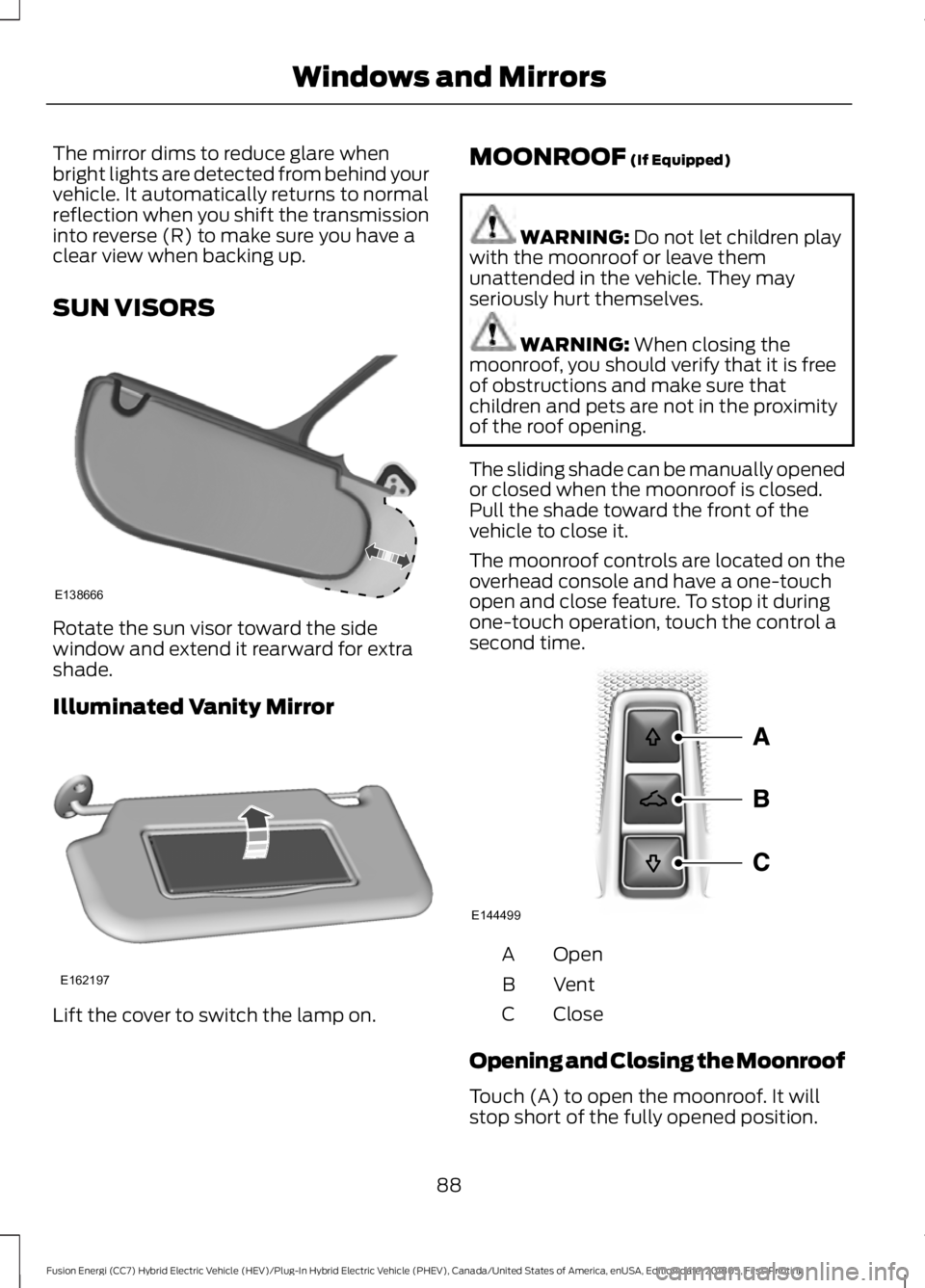
The moonroof controls are located on the
overhead console and have a one-touch
open and close feature. To stop it during
one-touch operation, touch the control a
second time. Open
A
Vent
B
Close
C
Opening and Closing the Moonroof
Touch (A) to open the moonroof. It will
stop short of the fully opened position.
88
Fusion Energi (CC7) Hybrid Electric Vehicle (HEV)/Plug-In Hybrid Electric Vehicle (PHEV), Canada/United States of America, enUSA, Edition date: 201805, First-Printing Windows and MirrorsE138666 E162197 E144499
Page 93 of 541
GAUGES
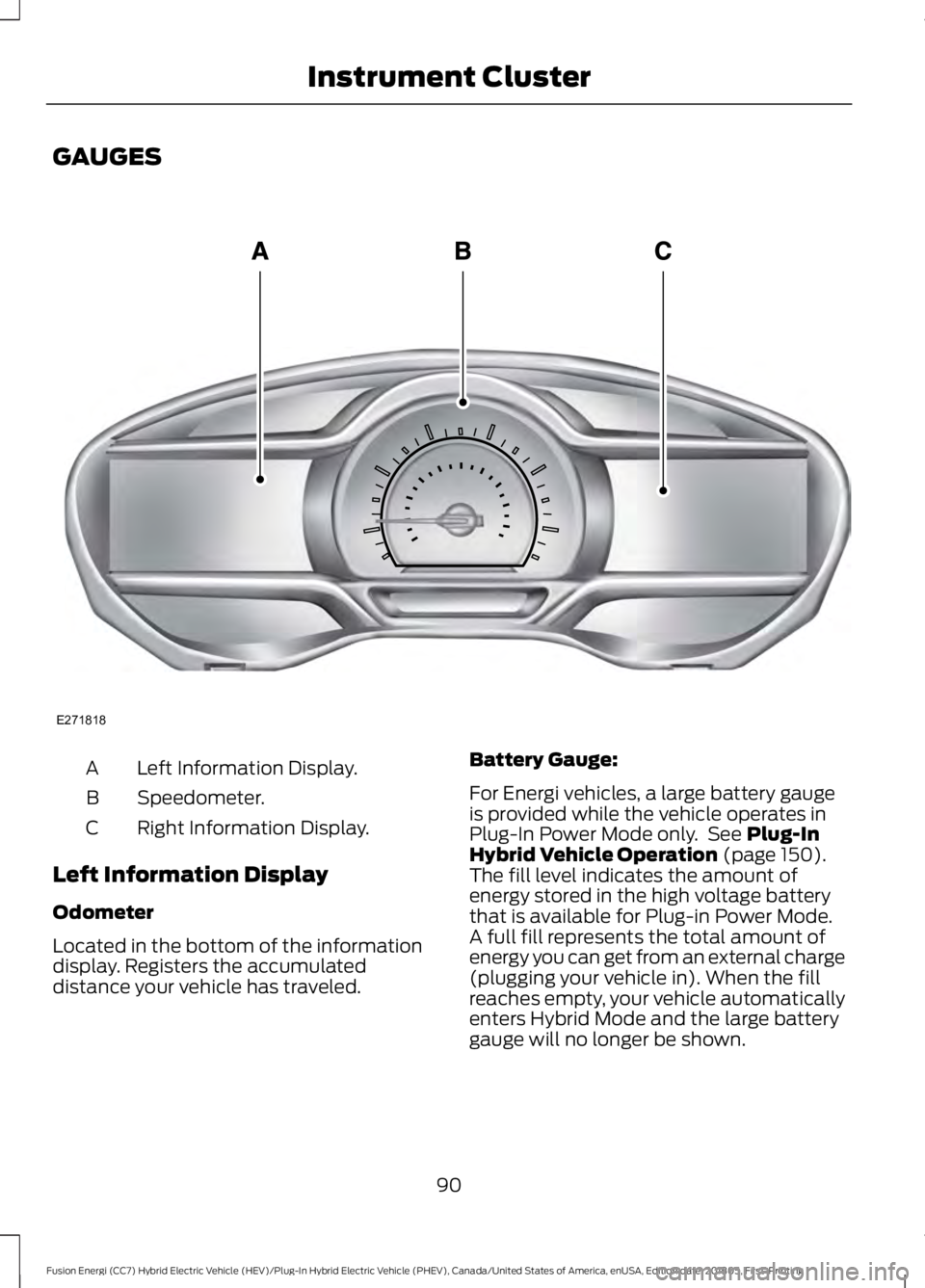
Left Information Display.
A
Speedometer.
B
Right Information Display.
C
Left Information Display
Odometer
Located in the bottom of the information
display. Registers the accumulated
distance your vehicle has traveled. Battery Gauge:
For Energi vehicles, a large battery gauge
is provided while the vehicle operates in
Plug-In Power Mode only. See Plug-In
Hybrid Vehicle Operation (page 150).
The fill level indicates the amount of
energy stored in the high voltage battery
that is available for Plug-in Power Mode.
A full fill represents the total amount of
energy you can get from an external charge
(plugging your vehicle in). When the fill
reaches empty, your vehicle automatically
enters Hybrid Mode and the large battery
gauge will no longer be shown.
90
Fusion Energi (CC7) Hybrid Electric Vehicle (HEV)/Plug-In Hybrid Electric Vehicle (PHEV), Canada/United States of America, enUSA, Edition date: 201805, First-Printing Instrument ClusterE271818
Page 94 of 541
An optional small battery gauge is provided
for Hybrid vehicles and for Hybrid Mode
only in Energi vehicles. This can be enabled
in the Settings menu under Battery Display.
See General Information (page 98). The
fill level, or State of Charge, indicates the
amount of energy stored in the high
voltage battery as a percent of total energy
capacity. The level increases or decreases
as the battery charges and discharges
during normal operation.
Regen Display
A circular arrow symbol displays when
energy is being recaptured through the
regenerative braking system. Regen Display
can be disabled in the Settings menu. See
General Information (page 98).
Fuel Gauge:
The fuel gauge indicates about how much
fuel is in the fuel tank.
The arrow adjacent to the fuel pump
symbol indicates on which side of your
vehicle the fuel filler door is located.
Note: The fuel gauge may vary slightly
when your vehicle is moving or on a slope.
Low Fuel Reminder
A low fuel level reminder displays and
sounds when the distance to empty
reaches
75 mi (120 km) for MyKey, and at
50 mi (80 km), 25 mi (40 km), 12 mi
(20 km) and 0 mi (0 km) for all vehicle
keys.
Note: The low fuel reminder can appear at
different fuel gauge positions depending on
fuel economy conditions. This variation is
normal.
Vehicle Settings and Personalization
Display/Trip
See
General Information (page 98). Information
See
General Information (page 98).
Settings
See
General Information (page 98).
Brake Coach Display:
The Brake Coach appears after the vehicle
has come to a stop. It coaches you to brake
in a manner which maximizes the amount
of energy returned through the
regenerative braking system. The percent
displayed is an indication of the
regenerative braking efficiency with 100%
representing the maximum amount of
energy recovery.
You can switch this feature on or off in the
information displays settings menu. See
General Information
(page 98).
Trip Summary:
Trip Summary displays upon shutting off
your vehicle. The information is cumulative
over the last trip. A new trip begins each
time your start your vehicle (when the
Ready to Drive message comes on).
• Distance - Displays the total distance
traveled, distance traveled on battery
power only (EV distance) and Regen
distance. Regen distance is the
estimated range gained from energy
recaptured through regenerative
braking.
• Energy Use - Displays the average fuel
economy. In addition for Energi,
displays the total electrical energy used
while in Plug-in Power Mode in kilowatt
hours (kWh).
• Brake Score - The percent displayed is
an indication of the regenerative
braking efficiency for the trip.
91
Fusion Energi (CC7) Hybrid Electric Vehicle (HEV)/Plug-In Hybrid Electric Vehicle (PHEV), Canada/United States of America, enUSA, Edition date: 201805, First-Printing Instrument Cluster
Page 95 of 541
Note:
Corresponding trip efficiency leaves
appear on the right information display upon
shutting off your Hybrid vehicle. On Energi
vehicles, the trip efficiency leaves are shown
on the right information display when the
vehicle operates in Hybrid Mode for the
entire trip. For trips with Plug-in Power Mode
operation, an estimate of your EV
Range/Full Charge is provided along with a
listing of factors and their contributions to
this estimate. See Next Full Charge under
Right Information Display in this chapter.
Right Information Display
Entertainment
See General Information (page 370).
Phone
See
General Information (page 370).
Navigation or Compass
See
General Information (page 370).
Fuel Economy
See
General Information (page 98).
Vehicle Range
Vehicle range indicates the estimated
distance your vehicle will travel with the
energy currently onboard. The range is
displayed at the bottom of the screen with
gasoline range shown in white and electric
range (Energi only) shown in blue.
• Gasoline Range: Is the estimated
distance to empty based on the fuel
remaining in the tank.
• Electric Range: Is the estimated
distance you can travel in Plug-In
Power Mode with the engine off. This
range is based on a calculation
determined by the amount of energy
stored in the high voltage battery as a
result of charging while plugged in and
the energy being used while driving. The amount of energy being used while
driving is affected by:
•
Mild or aggressive acceleration or
braking.
• Your vehicle speed.
• Your use of accessories such as climate
control.
• The ambient temperature and other
weather conditions.
• City or highway driving.
• Road grades.
Note: It is normal for vehicle range
estimates to vary due to changes in average
energy usage. This is why you typically see
different range estimates each time you fill
up your fuel tank or fully charge your battery.
Trip Efficiency Leaves
Trip Efficiency Leaves display upon
shutting off your Hybrid vehicle. For Energi
vehicles, the trip efficiency leaves display
only when the vehicle operates in Hybrid
Mode for the entire trip. The number of
leaves represent the average for the last
trip. A new trip begins each time you start
your vehicle (when the Ready to Drive
message comes on). Corresponding Trip
Summary data displays on the left
information display.
Next Full Charge
The Next Full Charge display is shown
upon shutting off your Energi vehicle
whenever your vehicle operates in Plug-in
Power Mode for a portion of your trip.
Miles or kilometers per full charge
This is an estimate of the EV Range you
would see if you plugged in and fully
charged your vehicle right now. The
estimate is based on your energy usage
while driving. Energy usage is affected by
your driving style and route, climate control
use, outside temperature and other factors.
92
Fusion Energi (CC7) Hybrid Electric Vehicle (HEV)/Plug-In Hybrid Electric Vehicle (PHEV), Canada/United States of America, enUSA, Edition date: 201805, First-Printing Instrument Cluster