lights FORD GRANADA 1985 Service User Guide
[x] Cancel search | Manufacturer: FORD, Model Year: 1985, Model line: GRANADA, Model: FORD GRANADA 1985Pages: 255, PDF Size: 14.98 MB
Page 182 of 255
12Connect the new bulb, fit it and secure it
with the spring clip.
13Check the light for correct operation, then
refit and secure the cover.
Front foglight (when fitted)
14Remove the lens and reflector together by
undoing the two retaining screws. Do not
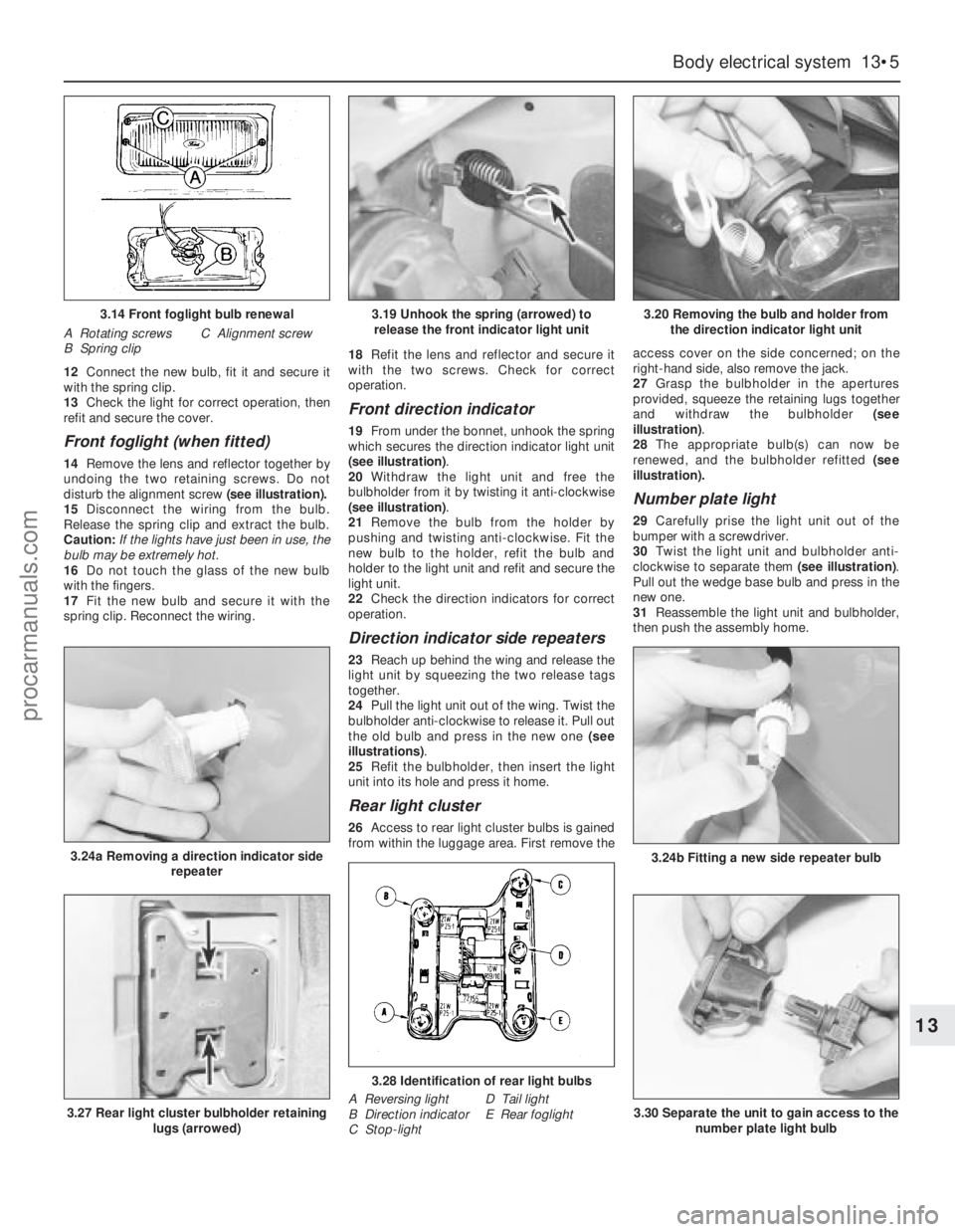
disturb the alignment screw (see illustration).
15Disconnect the wiring from the bulb.
Release the spring clip and extract the bulb.
Caution: If the lights have just been in use, the
bulb may be extremely hot.
16Do not touch the glass of the new bulb
with the fingers.
17Fit the new bulb and secure it with the
spring clip. Reconnect the wiring.18Refit the lens and reflector and secure it
with the two screws. Check for correct
operation.
Front direction indicator
19From under the bonnet, unhook the spring
which secures the direction indicator light unit
(see illustration).
20Withdraw the light unit and free the
bulbholder from it by twisting it anti-clockwise
(see illustration).
21Remove the bulb from the holder by
pushing and twisting anti-clockwise. Fit the
new bulb to the holder, refit the bulb and
holder to the light unit and refit and secure the
light unit.
22Check the direction indicators for correct
operation.
Direction indicator side repeaters
23Reach up behind the wing and release the
light unit by squeezing the two release tags
together.
24Pull the light unit out of the wing. Twist the
bulbholder anti-clockwise to release it. Pull out
the old bulb and press in the new one (see
illustrations).
25Refit the bulbholder, then insert the light
unit into its hole and press it home.
Rear light cluster
26Access to rear light cluster bulbs is gained
from within the luggage area. First remove theaccess cover on the side concerned; on the
right-hand side, also remove the jack.
27Grasp the bulbholder in the apertures
provided, squeeze the retaining lugs together
and withdraw the bulbholder (see
illustration).
28The appropriate bulb(s) can now be
renewed, and the bulbholder refitted (see
illustration).
Number plate light
29Carefully prise the light unit out of the
bumper with a screwdriver.
30Twist the light unit and bulbholder anti-
clockwise to separate them (see illustration).
Pull out the wedge base bulb and press in the
newone.
31Reassemble the light unit and bulbholder,
then push the assembly home.
Body electrical system 13•5
13
3.14 Front foglight bulb renewal
A Rotating screws
B Spring clipC Alignment screw
3.24a Removing a direction indicator side
repeater
3.19 Unhook the spring (arrowed) to
release the front indicator light unit3.20 Removing the bulb and holder from
the direction indicator light unit
3.24b Fitting a new side repeater bulb
3.27 Rear light cluster bulbholder retaining
lugs (arrowed)
3.28 Identification of rear light bulbs
A Reversing light
B Direction indicator
C Stop-lightD Tail light
E Rear foglight3.30 Separate the unit to gain access to the
number plate light bulb
procarmanuals.com
Page 183 of 255
1For removal and refitting of the front
foglights, front direction indicators, direction
indicator repeaters and the number plate
lights, refer to the previous Section.
Headlight
2Unhook the direction indicator light unit
retaining spring. Withdraw the direction
indicator unit and allow it to hang.
3Pull out the rubber moulding from between
the base of the headlight and the bumper.
(This moulding may in fact be stuck to the
headlight surround.)
4Release the headlight surround retaininglugs, prising them carefully with a screwdriver.
Work from the outside towards the centre of
the vehicle. Remove the surround by pulling it
forwards and then sideways.
5Remove the radiator grille, secured by two
screws.
6Disconnect the headlight wiring connector.
Remove the two retaining screws, and the nut
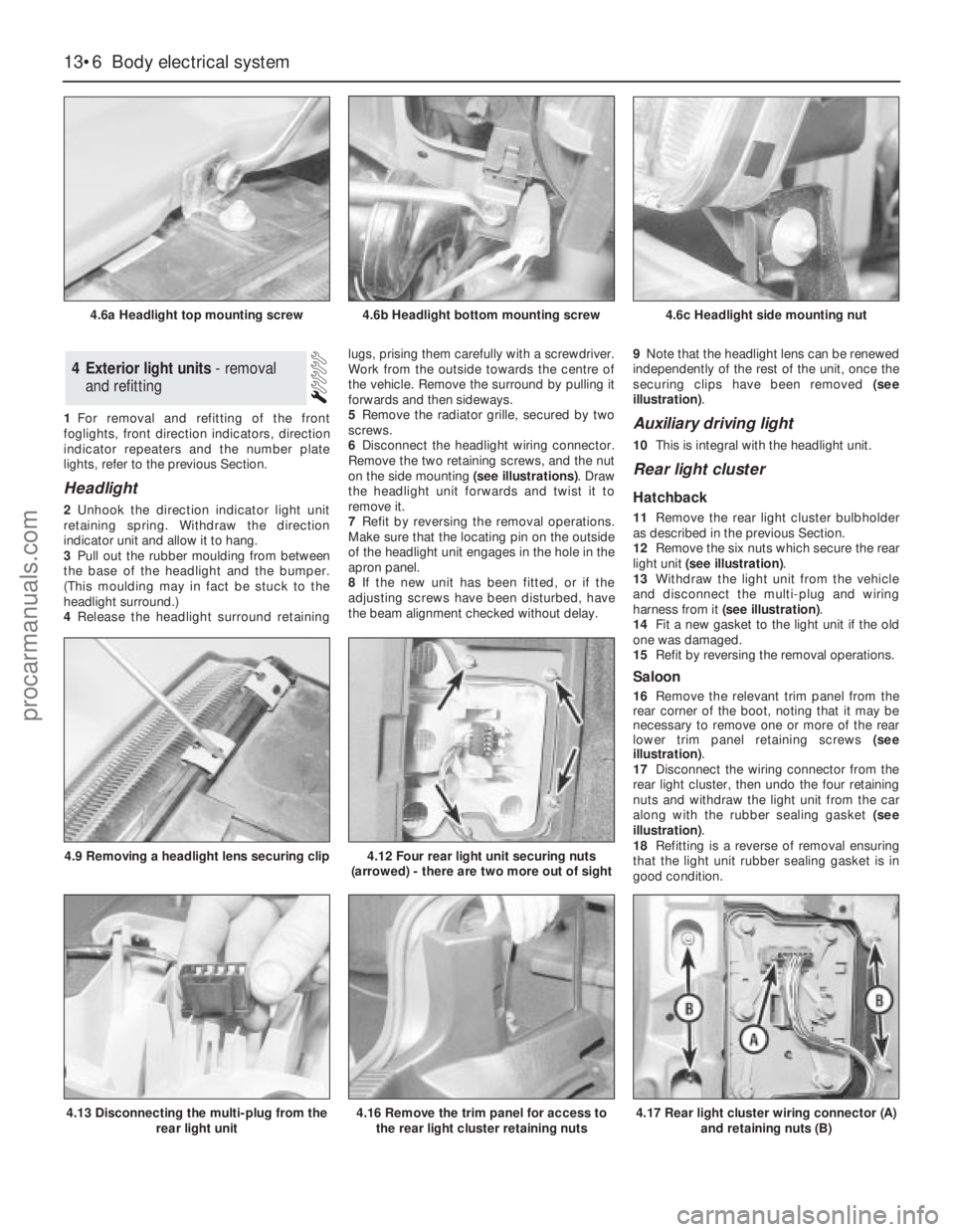
on the side mounting (see illustrations). Draw
the headlight unit forwards and twist it to
remove it.
7Refit by reversing the removal operations.
Make sure that the locating pin on the outside
of the headlight unit engages in the hole in the
apron panel.
8If the new unit has been fitted, or if the
adjusting screws have been disturbed, have
the beam alignment checked without delay.9Note that the headlight lens can be renewed
independently of the rest of the unit, once the
securing clips have been removed (see
illustration).
Auxiliary driving light
10This is integral with the headlight unit.
Rear light cluster
Hatchback
11Remove the rear light cluster bulbholder
as described in the previous Section.
12Remove the six nuts which secure the rear
light unit (see illustration).
13Withdraw the light unit from the vehicle
and disconnect the multi-plug and wiring
harness from it (see illustration).
14Fit a new gasket to the light unit if the old
one was damaged.
15Refit by reversing the removal operations.
Saloon
16Remove the relevant trim panel from the
rear corner of the boot, noting that it may be
necessary to remove one or more of the rear
lower trim panel retaining screws (see
illustration).
17Disconnect the wiring connector from the
rear light cluster, then undo the four retaining
nuts and withdraw the light unit from the car
along with the rubber sealing gasket (see
illustration).
18Refitting is a reverse of removal ensuring
that the light unit rubber sealing gasket is in
good condition.
4Exterior light units - removal
and refitting
13•6Body electrical system
4.6a Headlight top mounting screw
4.13 Disconnecting the multi-plug from the
rear light unit
4.9 Removing a headlight lens securing clip4.12 Four rear light unit securing nuts
(arrowed) - there are two more out of sight
4.16 Remove the trim panel for access to
the rear light cluster retaining nuts4.17 Rear light cluster wiring connector (A)
and retaining nuts (B)
4.6b Headlight bottom mounting screw4.6c Headlight side mounting nut
procarmanuals.com
Page 184 of 255
Estate
19This procedure is the same as described
above for the Saloon models noting that it is
necessary to remove the luggage
compartment side trim panel to gain access to
the light cluster retaining nuts.
1It is recommended that beam adjustment be
carried out by a Ford garage using optical
alignment equipment. In an emergency,
however, the following procedure will produce
acceptable results.
2The vehicle should be normally laden and the
tyre pressures must be correct. Park the vehicle
on level ground, approximately 10 metres (33
feet) in front of a flat wall or garage door.
3Draw a vertical line on the wall or door
corresponding to the centre-line of the vehicle.
(The position of this line can be determined by
marking the centres of the windscreen and
rear window with crayon, then viewing the wall
or door from the rear of the vehicle.)
4With the centre-line established, construct
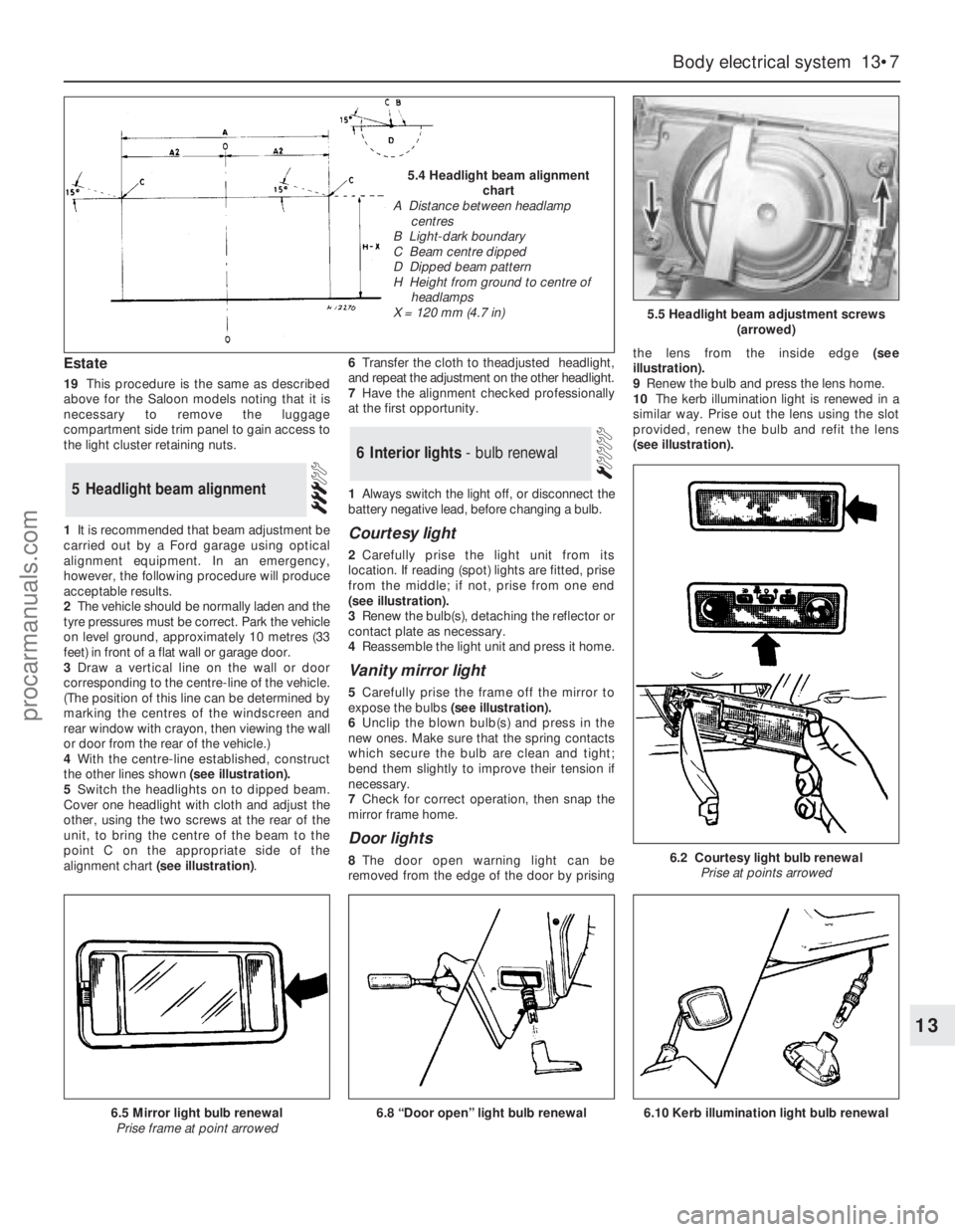
the other lines shown (see illustration).
5Switch the headlights on to dipped beam.
Cover one headlight with cloth and adjust the
other, using the two screws at the rear of the
unit, to bring the centre of the beam to the
point C on the appropriate side of the
alignment chart (see illustration).6Transfer the cloth to theadjusted headlight,
and repeat the adjustment on the other headlight.
7Have the alignment checked professionally
at the first opportunity.
1Always switch the light off, or disconnect the
battery negative lead, before changing a bulb.
Courtesy light
2Carefully prise the light unit from its
location. If reading (spot) lights are fitted, prise
from the middle; if not, prise from one end
(seeillustration).
3Renew the bulb(s), detaching the reflector or
contact plate as necessary.
4Reassemble the light unit and press it home.
Vanity mirror light
5Carefully prise the frame off the mirror to
expose the bulbs(see illustration).
6Unclip the blown bulb(s) and press in the
new ones. Make sure that the spring contacts
which secure the bulb are clean and tight;
bend them slightly to improve their tension if
necessary.
7Check for correct operation, then snap the
mirror frame home.
Door lights
8The door open warning light can be
removed from the edge of the door by prisingthe lens from the inside edge (see
illustration).
9Renew the bulb and press the lens home.
10The kerb illumination light is renewed in a
similar way. Prise out the lens using the slot
provided, renew the bulb and refit the lens
(seeillustration).
6Interior lights - bulb renewal
5Headlight beam alignment
Body electrical system 13•7
13
5.5 Headlight beam adjustment screws
(arrowed)
6.2 Courtesy light bulb renewal
Prise at points arrowed
6.8 “Door open” light bulb renewal6.5 Mirror light bulb renewal
Prise frame at point arrowed
5.4 Headlight beam alignment
chart
A Distance between headlamp
centres
B Light-dark boundary
C Beam centre dipped
D Dipped beam pattern
H Height from ground to centre of
headlamps
X = 120 mm (4.7 in)
6.10 Kerb illumination light bulb renewal
procarmanuals.com
Page 185 of 255
Footwell lights
11Free the light unit by carefully prising with
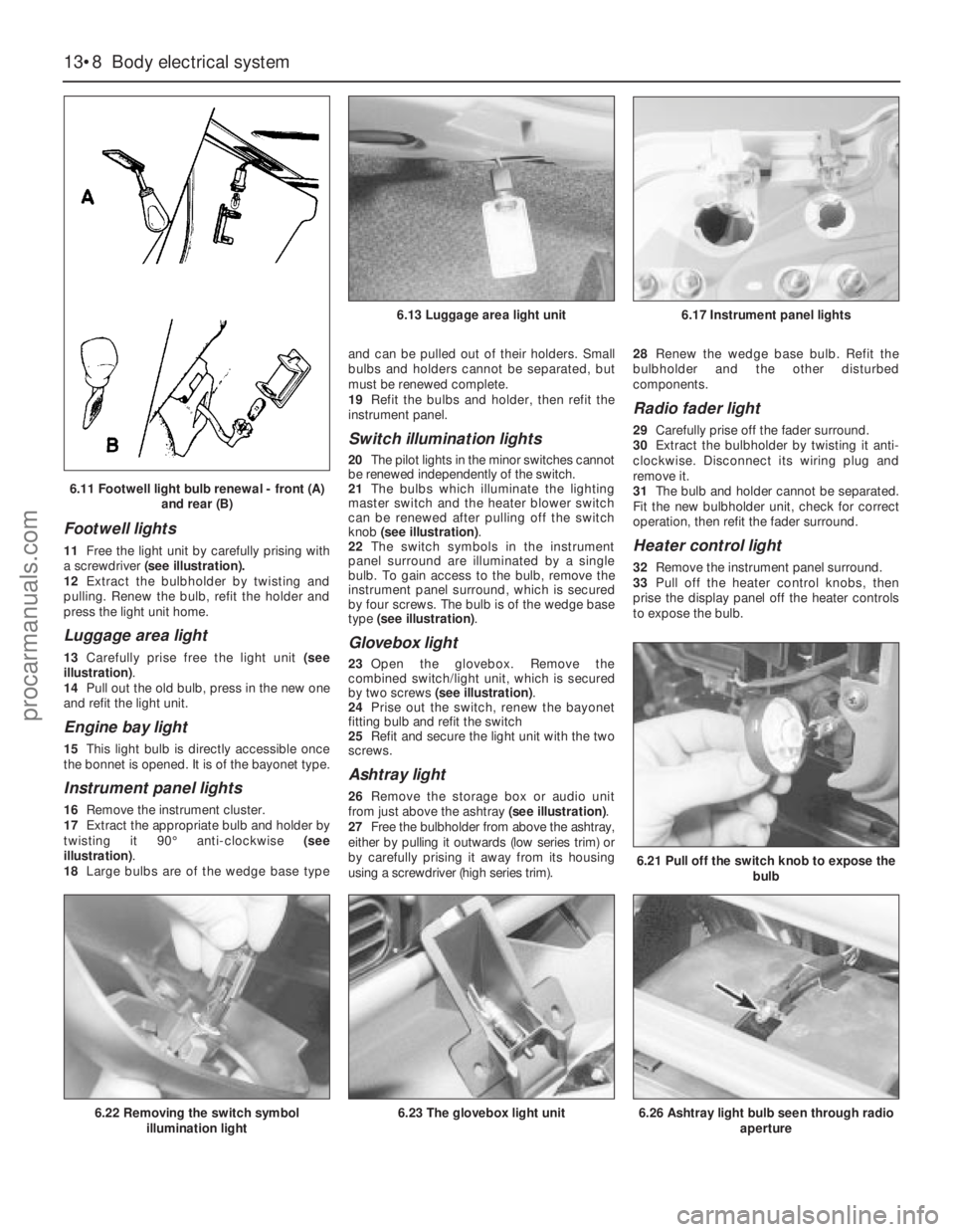
a screwdriver(see illustration).
12Extract the bulbholder by twisting and
pulling. Renew the bulb, refit the holder and
press the light unit home.
Luggage area light
13Carefully prise free the light unit (see
illustration).
14Pull out the old bulb, press in the new one
and refit the light unit.
Engine bay light
15This light bulb is directly accessible once
the bonnet is opened. It is of the bayonet type.
Instrument panel lights
16Remove the instrument cluster.
17Extract the appropriate bulb and holder by
twisting it 90°anti-clockwise (see
illustration).
18Large bulbs are of the wedge base typeand can be pulled out of their holders. Small
bulbs and holders cannot be separated, but
must be renewed complete.
19Refit the bulbs and holder, then refit the
instrument panel.
Switch illumination lights
20The pilot lights in the minor switches cannot
be renewed independently of the switch.
21The bulbs which illuminate the lighting
master switch and the heater blower switch
can be renewed after pulling off the switch
knob (see illustration).
22The switch symbols in the instrument
panel surround are illuminated by a single
bulb. To gain access to the bulb, remove the
instrument panel surround, which is secured
by four screws. The bulb is of the wedge base
type (see illustration).
Glovebox light
23Open the glovebox. Remove the
combined switch/light unit, which is secured
by two screws (see illustration).
24Prise out the switch, renew the bayonet
fitting bulb and refit the switch
25Refit and secure the light unit with the two
screws.
Ashtray light
26Remove the storage box or audio unit
from just above the ashtray (see illustration).
27Free the bulbholder from above the ashtray,
either by pulling it outwards (low series trim) or
by carefully prising it away from its housing
using a screwdriver (high series trim).28Renew the wedge base bulb. Refit the
bulbholder and the other disturbed
components.
Radio fader light
29Carefully prise off the fader surround.
30Extract the bulbholder by twisting it anti-
clockwise. Disconnect its wiring plug and
remove it.
31The bulb and holder cannot be separated.
Fit the new bulbholder unit, check for correct
operation, then refit the fader surround.
Heater control light
32Remove the instrument panel surround.
33Pull off the heater control knobs, then
prise the display panel off the heater controls
to expose the bulb.
13•8Body electrical system
6.21 Pull off the switch knob to expose the
bulb
6.26 Ashtray light bulb seen through radio
aperture6.22 Removing the switch symbol
illumination light6.23 The glovebox light unit
6.13 Luggage area light unit6.17 Instrument panel lights
6.11 Footwell light bulb renewal - front (A)
and rear (B)
procarmanuals.com
Page 186 of 255
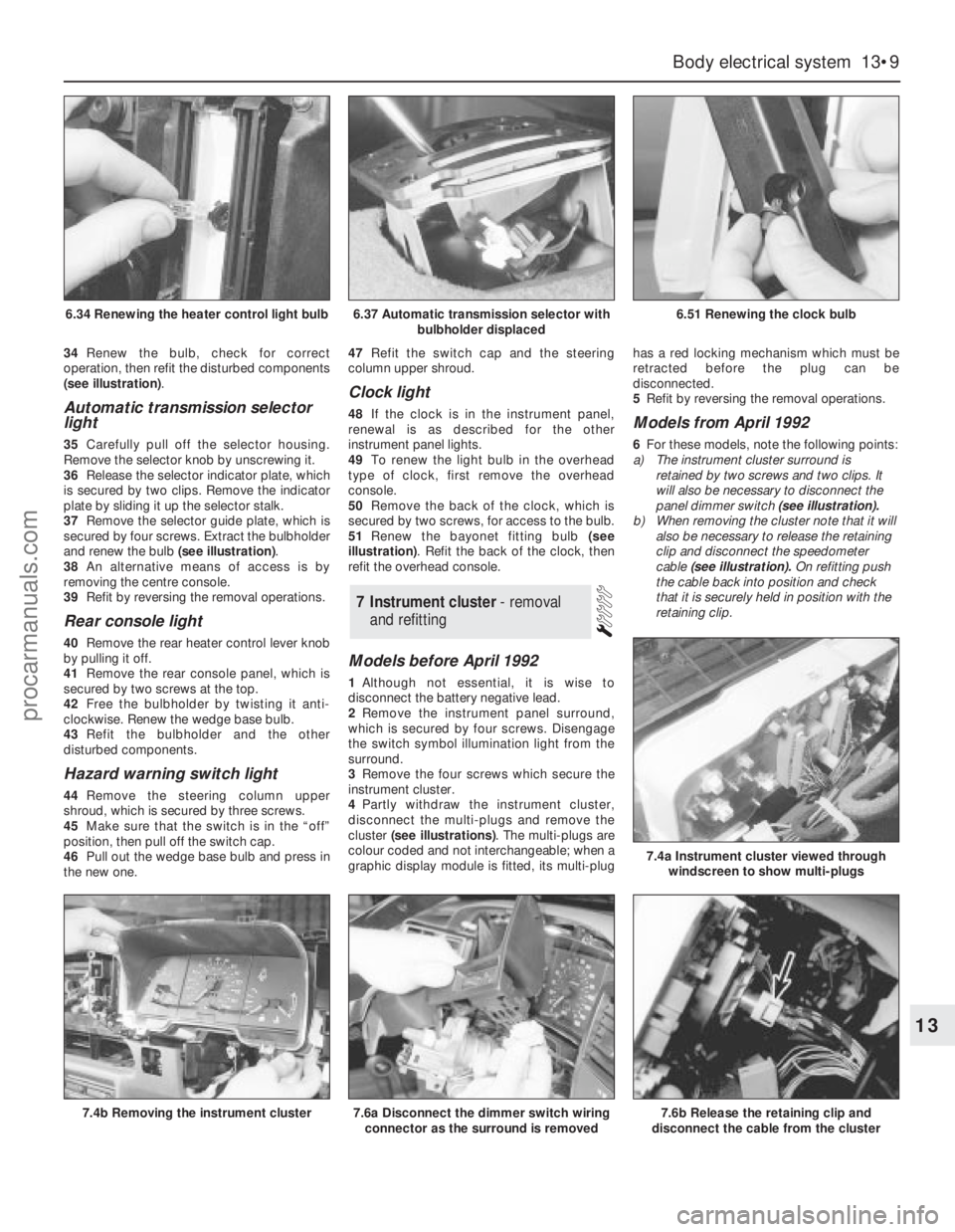
34Renew the bulb, check for correct
operation, then refit the disturbed components
(see illustration).
Automatic transmission selector
light
35Carefully pull off the selector housing.
Remove the selector knob by unscrewing it.
36Release the selector indicator plate, which
is secured by two clips. Remove the indicator
plate by sliding it up the selector stalk.
37Remove the selector guide plate, which is
secured by four screws. Extract the bulbholder
and renew the bulb (see illustration).
38An alternative means of access is by
removing the centre console.
39Refit by reversing the removal operations.
Rear console light
40Remove the rear heater control lever knob
by pulling it off.
41Remove the rear console panel, which is
secured by two screws at the top.
42Free the bulbholder by twisting it anti-
clockwise. Renew the wedge base bulb.
43Refit the bulbholder and the other
disturbed components.
Hazard warning switch light
44Remove the steering column upper
shroud, which is secured by three screws.
45Make sure that the switch is in the “off”
position, then pull off the switch cap.
46Pull out the wedge base bulb and press in
the new one.47Refit the switch cap and the steering
column upper shroud.
Clock light
48If the clock is in the instrument panel,
renewal is as described for the other
instrument panel lights.
49To renew the light bulb in the overhead
type of clock, first remove the overhead
console.
50Remove the back of the clock, which is
secured by two screws, for access to the bulb.
51Renew the bayonet fitting bulb (see
illustration). Refit the back of the clock, then
refit the overhead console.
Models before April 1992
1Although not essential, it is wise to
disconnect the battery negative lead.
2Remove the instrument panel surround,
which is secured by four screws. Disengage
the switch symbol illumination light from the
surround.
3Remove the four screws which secure the
instrument cluster.
4Partly withdraw the instrument cluster,
disconnect the multi-plugs and remove the
cluster (see illustrations). The multi-plugs are
colour coded and not interchangeable; when a
graphic display module is fitted, its multi-plughas a red locking mechanism which must be
retracted before the plug can be
disconnected.
5Refit by reversing the removal operations.
Models from April 1992
6For these models, note the following points:
a)The instrument cluster surround is
retained by two screws and two clips. It
will also be necessary to disconnect the
panel dimmer switch (see illustration).
b)When removing the cluster note that it will
also be necessary to release the retaining
clip and disconnect the speedometer
cable (see illustration).On refitting push
the cable back into position and check
that it is securely held in position with the
retaining clip.
7Instrument cluster - removal
and refitting
Body electrical system 13•9
13
6.37 Automatic transmission selector with
bulbholder displaced6.51 Renewing the clock bulb
7.4b Removing the instrument cluster7.6a Disconnect the dimmer switch wiring
connector as the surround is removed7.6b Release the retaining clip and
disconnect the cable from the cluster
7.4a Instrument cluster viewed through
windscreen to show multi-plugs
6.34 Renewing the heater control light bulb
procarmanuals.com
Page 189 of 255
20When refitting, check the switch for
correct operation before refitting the shrouds
and steering wheel centre cover. When fitting
the shrouds, be careful not to trap the switch
rubber gaiter.
Models from April 1992
21Note that if access to the switch retaining
screws cannot be gained with the steering
wheel in position, then the steering wheel
must first be removed.
Windscreen wipe/wash switch
Models before April 1992
22Proceed as described in the previous sub-
section for the direction indicator switch.
Depending on equipment, the wipe/wash
switch may have more than one multi-plug
connected to it.
Models from April 1992
23Note that if access to the switch retaining
screws cannot be gained with the steering
wheel in position, then the steering wheel
must first be removed.
Door pillar switch (for courtesy
light)
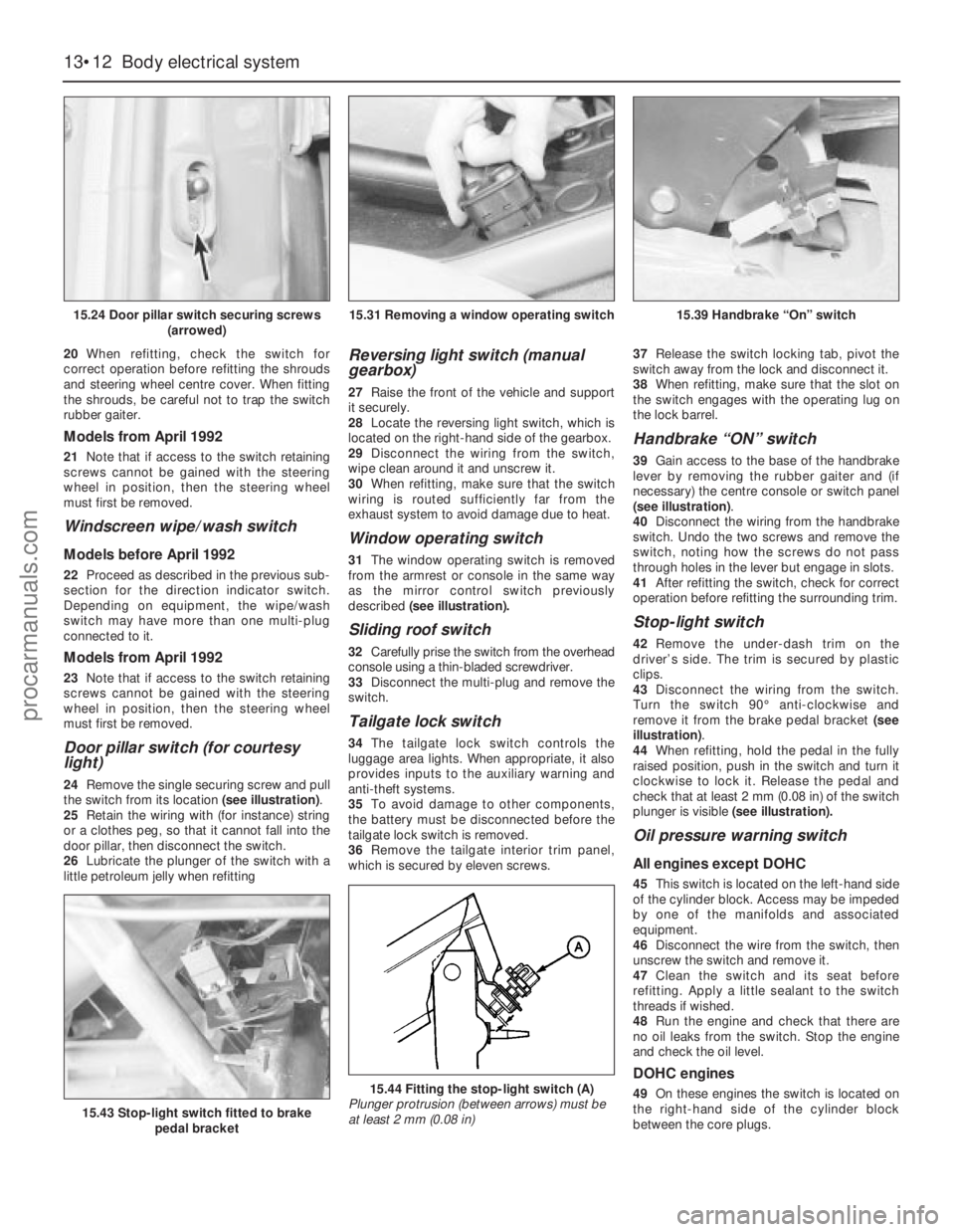
24Remove the single securing screw and pull
the switch from its location (see illustration).
25Retain the wiring with (for instance) string
or a clothes peg, so that it cannot fall into the
door pillar, then disconnect the switch.
26Lubricate the plunger of the switch with a
little petroleum jelly when refitting
Reversing light switch (manual
gearbox)
27Raise the front of the vehicle and support
it securely.
28Locate the reversing light switch, which is
located on the right-hand side of the gearbox.
29Disconnect the wiring from the switch,
wipe clean around it and unscrew it.
30When refitting, make sure that the switch
wiring is routed sufficiently far from the
exhaust system to avoid damage due to heat.
Window operating switch
31The window operating switch is removed
from the armrest or console in the same way
as the mirror control switch previously
described (see illustration).
Sliding roof switch
32Carefully prise the switch from the overhead
console using a thin-bladed screwdriver.
33Disconnect the multi-plug and remove the
switch.
Tailgate lock switch
34The tailgate lock switch controls the
luggage area lights. When appropriate, it also
provides inputs to the auxiliary warning and
anti-theft systems.
35To avoid damage to other components,
the battery must be disconnected before the
tailgate lock switch is removed.
36Remove the tailgate interior trim panel,
which is secured by eleven screws.37Release the switch locking tab, pivot the
switch away from the lock and disconnect it.
38When refitting, make sure that the slot on
the switch engages with the operating lug on
the lock barrel.
Handbrake “ON” switch
39Gain access to the base of the handbrake
lever by removing the rubber gaiter and (if
necessary) the centre console or switch panel
(see illustration).
40Disconnect the wiring from the handbrake
switch. Undo the two screws and remove the
switch, noting how the screws do not pass
through holes in the lever but engage in slots.
41After refitting the switch, check for correct
operation before refitting the surrounding trim.
Stop-light switch
42Remove the under-dash trim on the
driver’s side. The trim is secured by plastic
clips.
43Disconnect the wiring from the switch.
Turn the switch 90°anti-clockwise and
remove it from the brake pedal bracket (see
illustration).
44When refitting, hold the pedal in the fully
raised position, push in the switch and turn it
clockwise to lock it. Release the pedal and
check that at least 2 mm (0.08 in) of the switch
plunger is visible (see illustration).
Oil pressure warning switch
All engines except DOHC
45This switch is located on the left-hand side
of the cylinder block. Access may be impeded
by one of the manifolds and associated
equipment.
46Disconnect the wire from the switch, then
unscrew the switch and remove it.
47Clean the switch and its seat before
refitting. Apply a little sealant to the switch
threads if wished.
48Run the engine and check that there are
no oil leaks from the switch. Stop the engine
and check the oil level.
DOHC engines
49On these engines the switch is located on
the right-hand side of the cylinder block
between the core plugs.
13•12Body electrical system
15.24 Door pillar switch securing screws
(arrowed)
15.43 Stop-light switch fitted to brake
pedal bracket
15.44 Fitting the stop-light switch (A)
Plunger protrusion (between arrows) must be
at least 2 mm (0.08 in)
15.31 Removing a window operating switch15.39 Handbrake “On” switch
procarmanuals.com
Page 191 of 255
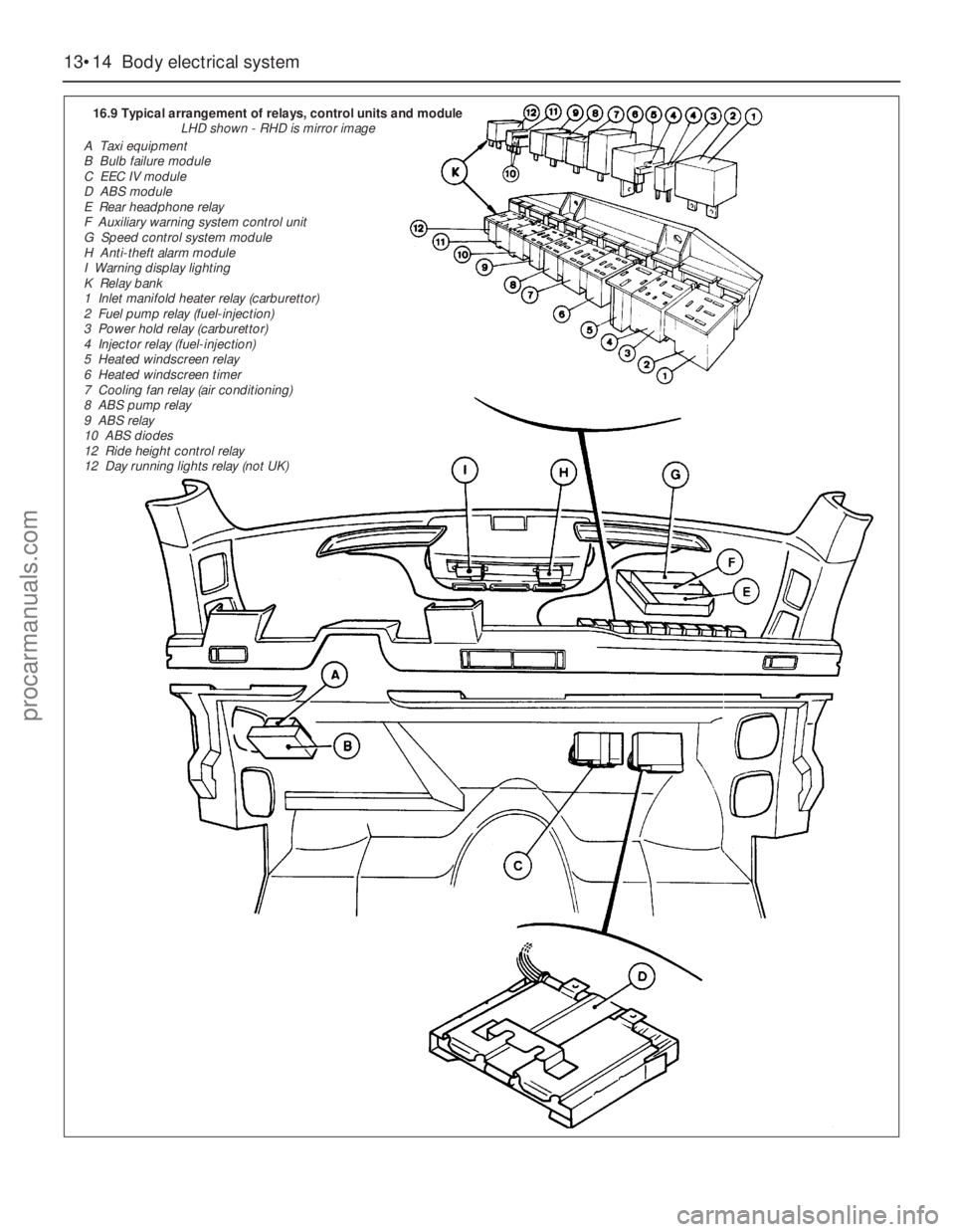
13•14Body electrical system
16.9 Typical arrangement of relays, control units and module
LHD shown - RHD is mirror image
A Taxi equipment
B Bulb failure module
C EEC IV module
D ABS module
E Rear headphone relay
F Auxiliary warning system control unit
G Speed control system module
H Anti-theft alarm module
I Warning display lighting
K Relay bank
1 Inlet manifold heater relay (carburettor)
2 Fuel pump relay (fuel-injection)
3 Power hold relay (carburettor)
4 Injector relay (fuel-injection)
5 Heated windscreen relay
6 Heated windscreen timer
7 Cooling fan relay (air conditioning)
8 ABS pump relay
9 ABS relay
10 ABS diodes
12 Ride height control relay
12 Day running lights relay (not UK)
procarmanuals.com
Page 240 of 255
The vehicle owner who does his or her own maintenance according
to the recommended service schedules should not have to use this
section of the manual very often. Modern component reliability is such
that, provided those items subject to wear or deterioration are
inspected or renewed at the specified intervals, sudden failure is
comparatively rare. Faults do not usually just happen as a result of
sudden failure, but develop over a period of time. Major mechanical
failures in particular are usually preceded by characteristic symptoms
over hundreds or even thousands of miles. Those components which
do occasionally fail without warning are often small and easily carried
in the vehicle.With any fault-finding, the first step is to decide where to begin
investigations. Sometimes this is obvious, but on other occasions, a
little detective work will be necessary. The owner who makes half a
dozen haphazard adjustments or replacements may be successful in
curing a fault (or its symptoms), but will be none the wiser if the fault
recurs, and ultimately may have spent more time and money than was
necessary. A calm and logical approach will be found to be more
satisfactory in the long run. Always take into account any warning
signs or abnormalities that may have been noticed in the period
preceding the fault - power loss, high or low gauge readings, unusual
smells, etc - and remember that failure of components such as fuses or
REF•5Fault Finding
Engine1
m mEngine fails to rotate when attempting to start
m mStarter motor turns engine slowly
m mEngine rotates, but will not start
m mEngine difficult to start when cold
m mEngine difficult to start when hot
m mStarter motor noisy or excessively-rough in engagement
m mEngine starts, but stops immediately
m mEngine idles erratically
m mEngine misfires at idle speed
m mEngine misfires throughout the driving speed range
m mEngine hesitates on acceleration
m mEngine stalls
m mEngine lacks power
m mEngine backfires
m mOil pressure warning light illuminated with engine running
m mEngine runs-on after switching off
m mEngine noises
Cooling system2
m
mOverheating
m mOvercooling
m mExternal coolant leakage
m mInternal coolant leakage
m mCorrosion
Fuel and exhaust systems3
m
mExcessive fuel consumption
m mFuel leakage and/or fuel odour
m mExcessive noise or fumes from exhaust system
Clutch4
m
mPedal travels to floor - no pressure or very little resistance
m mClutch fails to disengage (unable to select gears)
m mClutch slips (engine speed increases, with no increase in vehicle
speed)
m mJudder as clutch is engaged
m mNoise when depressing or releasing clutch pedal
Manual gearbox5
m
mNoisy in neutral with engine running
m mNoisy in one particular gear
m mDifficulty engaging gears
m mJumps out of gear
m mVibration
m mLubricant leaks
Automatic transmission6
m
mFluid leakage
m mTransmission fluid brown, or has burned smellm mGeneral gear selection problems
m mTransmission will not downshift (kickdown) with accelerator fully
depressed
m mEngine will not start in any gear, or starts in gears other than Park
or Neutral
m mTransmission slips, shifts roughly, is noisy, or has no drive in
forward or reverse gears
Propeller shaft7
m
mClicking or knocking noise on turns (at slow speed on full-lock)
m mVibration when accelerating or decelerating
Final drive and driveshafts8
m
mExcessive final drive noise
m mOil leakage from final drive
m mGrating, knocking or vibration from driveshafts
Braking system9
m
mVehicle pulls to one side under braking
m mNoise (grinding or high-pitched squeal) when brakes applied
m mExcessive brake pedal travel
m mBrake pedal feels spongy when depressed
m mExcessive brake pedal effort required to stop vehicle
m mJudder felt through brake pedal or steering wheel when braking
m mPedal pulsates when braking hard
m mBrakes binding
m mRear wheels locking under normal braking
Suspension and steering systems10
m
mVehicle pulls to one side
m mWheel wobble and vibration
m mExcessive pitching and/or rolling around corners, or during braking
m mWandering or general instability
m mExcessively-stiff steering
m mExcessive play in steering
m mLack of power assistance
m mTyre wear excessive
Electrical system11
m
mLights inoperative
m mIgnition/no-charge warning light remains illuminated with engine
running
m mIgnition/no-charge warning light fails to come on
m mBattery will not hold a charge for more than a few days
m mInstrument readings inaccurate or erratic
m mHorn inoperative, or unsatisfactory in operation
m mWindscreen/tailgate wipers inoperative, or unsatisfactory in
operation
m mWindscreen/tailgate washers inoperative, or unsatisfactory in
operation
m mElectric windows inoperative, or unsatisfactory in operation
m mCentral locking system inoperative, or unsatisfactory in operation
Introduction
procarmanuals.com
Page 245 of 255
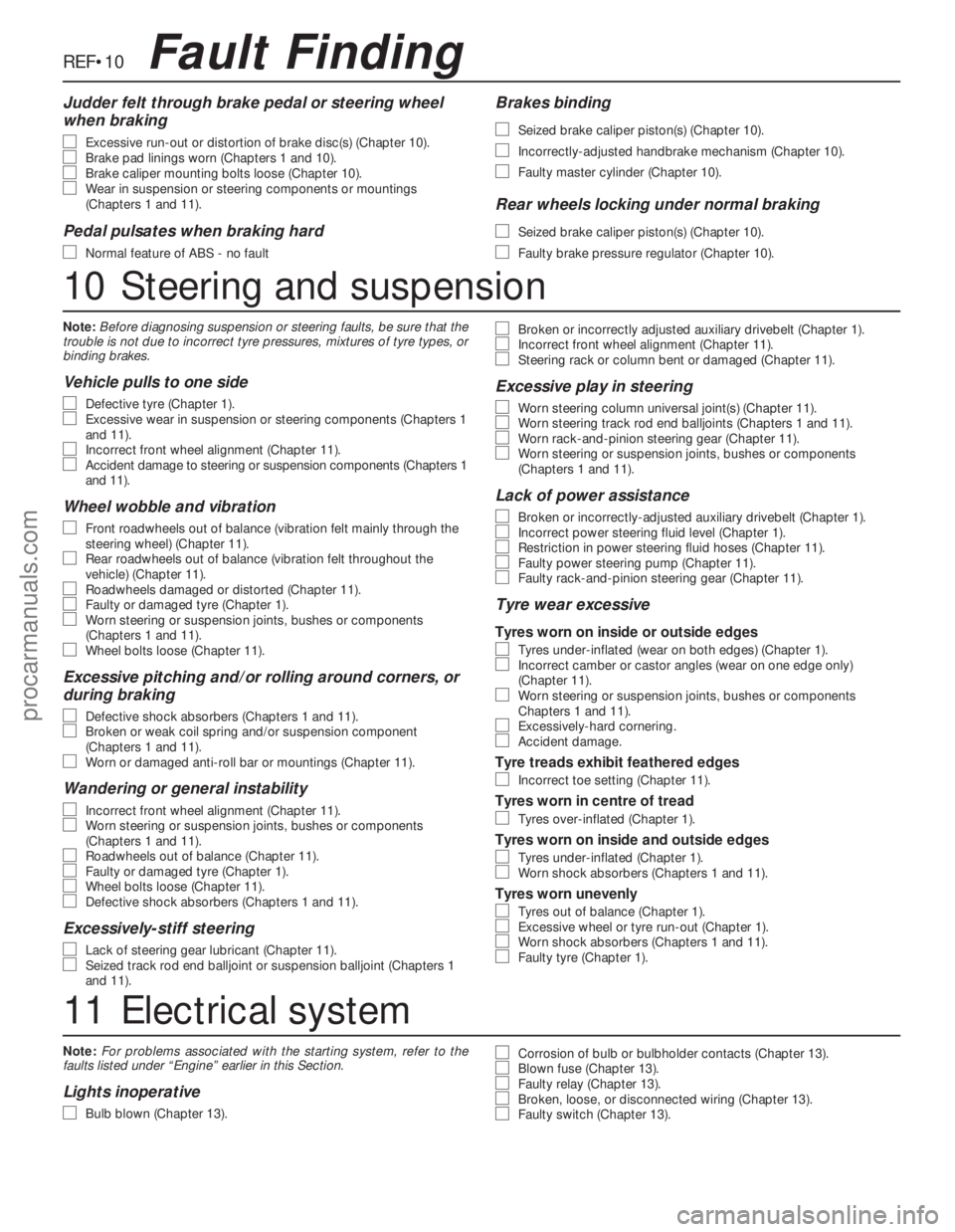
Note:For problems associated with the starting system, refer to the
faults listed under “Engine” earlier in this Section.
Lights inoperative
m m
Bulb blown (Chapter 13).
m
mCorrosion of bulb or bulbholder contacts (Chapter 13).m
mBlown fuse (Chapter 13).m
mFaulty relay (Chapter 13).m
mBroken, loose, or disconnected wiring (Chapter 13).m
mFaulty switch (Chapter 13).
REF•10Fault Finding
Judder felt through brake pedal or steering wheel
when braking
m m
Excessive run-out or distortion of brake disc(s) (Chapter 10).m
mBrake pad linings worn (Chapters 1 and 10).m
mBrake caliper mounting bolts loose (Chapter 10).m
mWear in suspension or steering components or mountings
(Chapters 1 and 11).
Pedal pulsates when braking hard
m m
Normal feature of ABS - no fault
Brakes binding
m m
Seized brake caliper piston(s) (Chapter 10).
m
mIncorrectly-adjusted handbrake mechanism (Chapter 10).
m
mFaulty master cylinder (Chapter 10).
Rear wheels locking under normal braking
m m
Seized brake caliper piston(s) (Chapter 10).
m
mFaulty brake pressure regulator (Chapter 10).
10Steering and suspension
Note:Before diagnosing suspension or steering faults, be sure that the
trouble is not due to incorrect tyre pressures, mixtures of tyre types, or
binding brakes.
Vehicle pulls to one side
m m
Defective tyre (Chapter 1).m
mExcessive wear in suspension or steering components (Chapters 1
and 11).
m mIncorrect front wheel alignment (Chapter 11).m
mAccident damage to steering or suspension components (Chapters 1
and 11).
Wheel wobble and vibration
m m
Front roadwheels out of balance (vibration felt mainly through the
steering wheel) (Chapter 11).
m mRear roadwheels out of balance (vibration felt throughout the
vehicle) (Chapter 11).
m mRoadwheels damaged or distorted (Chapter 11).m
mFaulty or damaged tyre (Chapter 1).m
mWorn steering or suspension joints, bushes or components
(Chapters 1 and 11).
m mWheel bolts loose (Chapter 11).
Excessive pitching and/or rolling around corners, or
during braking
m m
Defective shock absorbers (Chapters 1 and 11).m
mBroken or weak coil spring and/or suspension component
(Chapters 1 and 11).
m mWorn or damaged anti-roll bar or mountings (Chapter 11).
Wandering or general instability
m m
Incorrect front wheel alignment (Chapter 11).m
mWorn steering or suspension joints, bushes or components
(Chapters 1 and 11).
m mRoadwheels out of balance (Chapter 11).m
mFaulty or damaged tyre (Chapter 1).m
mWheel bolts loose (Chapter 11).m
mDefective shock absorbers (Chapters 1 and 11).
Excessively-stiff steering
m m
Lack of steering gear lubricant (Chapter 11).m
mSeized track rod end balljoint or suspension balljoint (Chapters 1
and 11).
m mBroken or incorrectly adjusted auxiliary drivebelt (Chapter 1).m
mIncorrect front wheel alignment (Chapter 11).m
mSteering rack or column bent or damaged (Chapter 11).
Excessive play in steering
m m
Worn steering column universal joint(s) (Chapter 11).m
mWorn steering track rod end balljoints (Chapters 1 and 11).m
mWorn rack-and-pinion steering gear (Chapter 11).m
mWorn steering or suspension joints, bushes or components
(Chapters 1 and 11).
Lack of power assistance
m m
Broken or incorrectly-adjusted auxiliary drivebelt (Chapter 1).m
mIncorrect power steering fluid level (Chapter 1).m
mRestriction in power steering fluid hoses (Chapter 11).m
mFaulty power steering pump (Chapter 11).m
mFaulty rack-and-pinion steering gear (Chapter 11).
Tyre wear excessive
Tyres worn on inside or outside edges
m
mTyres under-inflated (wear on both edges) (Chapter 1).m
mIncorrect camber or castor angles (wear on one edge only)
(Chapter 11).
m mWorn steering or suspension joints, bushes or components
Chapters 1 and 11).
m mExcessively-hard cornering.m
mAccident damage.
Tyre treads exhibit feathered edges
m
mIncorrect toe setting (Chapter 11).
Tyres worn in centre of tread
m
mTyres over-inflated (Chapter 1).
Tyres worn on inside and outside edges
m
mTyres under-inflated (Chapter 1).m
mWorn shock absorbers (Chapters 1 and 11).
Tyres worn unevenly
m
mTyres out of balance (Chapter 1).m
mExcessive wheel or tyre run-out (Chapter 1).m
mWorn shock absorbers (Chapters 1 and 11).m
mFaulty tyre (Chapter 1).
11Electrical system
procarmanuals.com
Page 252 of 255
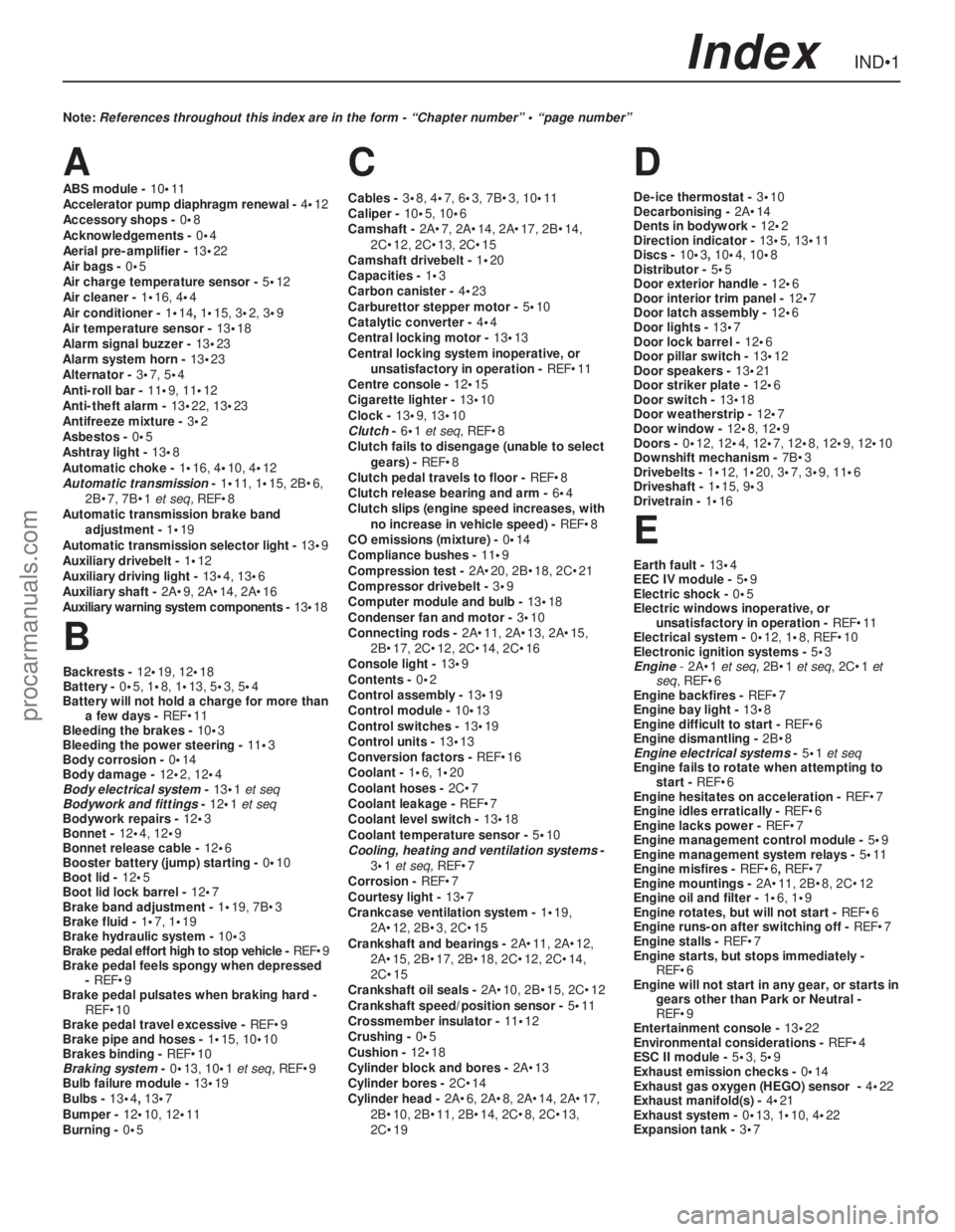
A
ABS module - 10•11
Accelerator pump diaphragm renewal - 4•12
Accessory shops - 0•8
Acknowledgements - 0•4
Aerial pre-amplifier - 13•22
Air bags - 0•5
Air charge temperature sensor - 5•12
Air cleaner - 1•16, 4•4
Air conditioner - 1•14, 1•15, 3•2, 3•9
Air temperature sensor - 13•18
Alarm signal buzzer - 13•23
Alarm system horn - 13•23
Alternator - 3•7, 5•4
Anti-roll bar - 11•9, 11•12
Anti-theft alarm - 13•22, 13•23
Antifreeze mixture - 3•2
Asbestos - 0•5
Ashtray light - 13•8
Automatic choke - 1•16, 4•10, 4•12
Automatic transmission- 1•11, 1•15, 2B•6,
2B•7, 7B•1et seq, REF•8
Automatic transmission brake band
adjustment - 1•19
Automatic transmission selector light - 13•9
Auxiliary drivebelt - 1•12
Auxiliary driving light - 13•4, 13•6
Auxiliary shaft - 2A•9, 2A•14, 2A•16
Auxiliary warning system components - 13•18
B
Backrests - 12•19, 12•18
Battery - 0•5, 1•8, 1•13, 5•3, 5•4
Battery will not hold a charge for more than
a few days - REF•11
Bleeding the brakes - 10•3
Bleeding the power steering - 11•3
Body corrosion - 0•14
Body damage - 12•2, 12•4
Body electrical system- 13•1et seq
Bodywork and fittings- 12•1et seq
Bodywork repairs - 12•3
Bonnet - 12•4, 12•9
Bonnet release cable - 12•6
Booster battery (jump) starting - 0•10
Boot lid - 12•5
Boot lid lock barrel - 12•7
Brake band adjustment - 1•19, 7B•3
Brake fluid - 1•7, 1•19
Brake hydraulic system - 10•3
Brake pedal effort high to stop vehicle - REF•9
Brake pedal feels spongy when depressed
- REF•9
Brake pedal pulsates when braking hard -
REF•10
Brake pedal travel excessive - REF•9
Brake pipe and hoses - 1•15, 10•10
Brakes binding - REF•10
Braking system- 0•13, 10•1et seq, REF•9
Bulb failure module - 13•19
Bulbs - 13•4, 13•7
Bumper - 12•10, 12•11
Burning - 0•5
C
Cables - 3•8, 4•7, 6•3, 7B•3, 10•11
Caliper - 10•5, 10•6
Camshaft - 2A•7, 2A•14, 2A•17, 2B•14,
2C•12, 2C•13, 2C•15
Camshaft drivebelt - 1•20
Capacities - 1•3
Carbon canister - 4•23
Carburettor stepper motor - 5•10
Catalytic converter - 4•4
Central locking motor - 13•13
Central locking system inoperative, or
unsatisfactory in operation - REF•11
Centre console - 12•15
Cigarette lighter - 13•10
Clock - 13•9, 13•10
Clutch- 6•1et seq, REF•8
Clutch fails to disengage (unable to select
gears) - REF•8
Clutch pedal travels to floor - REF•8
Clutch release bearing and arm - 6•4
Clutch slips (engine speed increases, with
no increase in vehicle speed) - REF•8
CO emissions (mixture) - 0•14
Compliance bushes - 11•9
Compression test - 2A•20, 2B•18, 2C•21
Compressor drivebelt - 3•9
Computer module and bulb - 13•18
Condenser fan and motor - 3•10
Connecting rods - 2A•11, 2A•13, 2A•15,
2B•17, 2C•12, 2C•14, 2C•16
Console light - 13•9
Contents - 0•2
Control assembly - 13•19
Control module - 10•13
Control switches - 13•19
Control units - 13•13
Conversion factors - REF•16
Coolant - 1•6, 1•20
Coolant hoses - 2C•7
Coolant leakage - REF•7
Coolant level switch - 13•18
Coolant temperature sensor - 5•10
Cooling, heating and ventilation systems-
3•1 et seq, REF•7
Corrosion - REF•7
Courtesy light - 13•7
Crankcase ventilation system - 1•19,
2A•12, 2B•3, 2C•15
Crankshaft and bearings - 2A•11, 2A•12,
2A•15, 2B•17, 2B•18, 2C•12, 2C•14,
2C•15
Crankshaft oil seals - 2A•10, 2B•15, 2C•12
Crankshaft speed/position sensor - 5•11
Crossmember insulator - 11•12
Crushing - 0•5
Cushion - 12•18
Cylinder block and bores - 2A•13
Cylinder bores - 2C•14
Cylinder head - 2A•6, 2A•8, 2A•14, 2A•17,
2B•10, 2B•11, 2B•14, 2C•8, 2C•13,
2C•19
D
De-ice thermostat - 3•10
Decarbonising - 2A•14
Dents in bodywork - 12•2
Direction indicator - 13•5, 13•11
Discs - 10•3, 10•4, 10•8
Distributor - 5•5
Door exterior handle - 12•6
Door interior trim panel - 12•7
Door latch assembly - 12•6
Door lights - 13•7
Door lock barrel - 12•6
Door pillar switch - 13•12
Door speakers - 13•21
Door striker plate - 12•6
Door switch - 13•18
Door weatherstrip - 12•7
Door window - 12•8, 12•9
Doors - 0•12, 12•4, 12•7, 12•8, 12•9, 12•10
Downshift mechanism - 7B•3
Drivebelts - 1•12, 1•20, 3•7, 3•9, 11•6
Driveshaft - 1•15, 9•3
Drivetrain - 1•16
E
Earth fault - 13•4
EEC IV module - 5•9
Electric shock - 0•5
Electric windows inoperative, or
unsatisfactory in operation - REF•11
Electrical system - 0•12, 1•8, REF•10
Electronic ignition systems - 5•3
Engine- 2A•1 et seq, 2B•1 et seq, 2C•1 et
seq, REF•6
Engine backfires - REF•7
Engine bay light - 13•8
Engine difficult to start - REF•6
Engine dismantling - 2B•8
Engine electrical systems- 5•1et seq
Engine fails to rotate when attempting to
start - REF•6
Engine hesitates on acceleration - REF•7
Engine idles erratically - REF•6
Engine lacks power - REF•7
Engine management control module - 5•9
Engine management system relays - 5•11
Engine misfires - REF•6, REF•7
Engine mountings - 2A•11, 2B•8, 2C•12
Engine oil and filter - 1•6, 1•9
Engine rotates, but will not start - REF•6
Engine runs-on after switching off - REF•7
Engine stalls - REF•7
Engine starts, but stops immediately -
REF•6
Engine will not start in any gear, or starts in
gears other than Park or Neutral -
REF•9
Entertainment console - 13•22
Environmental considerations - REF•4
ESC II module - 5•3, 5•9
Exhaust emission checks - 0•14
Exhaust gas oxygen (HEGO) sensor - 4•22
Exhaust manifold(s) - 4•21
Exhaust system - 0•13, 1•10, 4•22
Expansion tank - 3•7
IND•1Index
Note: References throughout this index are in the form - “Chapter number” • “page number”
procarmanuals.com