display FORD GT 2017 2.G User Guide
[x] Cancel search | Manufacturer: FORD, Model Year: 2017, Model line: GT, Model: FORD GT 2017 2.GPages: 313, PDF Size: 6.41 MB
Page 67 of 313
Engine Coolant Temperature
Gauge
WARNING
Never remove the coolant reservoir
cap when the engine is running or
hot.
At normal operating temperature, the
engine coolant temperature will be in the
middle range of the gauge. If the engine
coolant temperature exceeds the normal
range, the gauge will be highlighted. Stop
your vehicle as soon as safely possible,
switch off the engine and let it cool.
Engine Oil Temperature Gauge
If the engine oil temperature exceeds the
normal range, the engine is overheating.
Reduce engine speed as soon as safely
possible to allow the engine to cool. If you
continue to operate the engine at high
engine speeds, the engine speed reduces
automatically to prevent engine damage.
Engine Oil Pressure Gauge
Oil pressure varies with engine speed. The
pressure rises as engine speed rises and
drops as engine speed drops.
If the pressure drops below the normal
range of the gauge, a warning lamp
illuminates and a message appears in the
information display. Stop your vehicle as
soon as it is safe to do so and switch the
engine off. Check the engine oil level.
WARNING LAMPS AND
INDICATORS
The following warning lamps and
indicators alert you to a vehicle condition
that may become serious. Some lamps
illuminate when you start your vehicle to
make sure they work. If any lamps remain
on after starting your vehicle, refer to the
respective system warning lamp for further
information.
Note:
Some warning indicators appear in
the information display and operate the
same as a warning lamp but do not
illuminate when you start your vehicle.
Anti-Lock Braking System If it illuminates when you are
driving, this indicates a
malfunction. You will continue
to have the normal braking system
(without ABS) unless the brake system
warning lamp is also illuminated. Have the
system checked by your authorized dealer.
Battery If it illuminates while driving, it
indicates a malfunction. Switch
off all unnecessary electrical
equipment and have the system checked
by your authorized dealer immediately.
Brake System WARNING
Driving your vehicle with the warning
lamp on is dangerous. A significant
decrease in braking performance
may occur. It may take you longer to stop
your vehicle. Have your vehicle checked as
soon as possible. Driving extended
distances with the parking brake engaged
can cause brake failure and the risk of
personal injury. 64
Ford GT (CGX) Canada/United States of America, enUSA, First Printing Instrument Cluster
Page 68 of 313
It will illuminate when you
engage the parking brake with
the ignition on.
If it illuminates when you are driving, check
that the parking brake is not engaged. If
the parking brake is not engaged, this
indicates low brake fluid level or a brake
system malfunction. Have the system
checked immediately by your authorized
dealer.
Cruise Control It illuminates when you switch
the system on.
See Using Cruise Control
(page 113).
Damper Comfort Mode It illuminates when you switch
this feature on. See Drive Mode
Control
(page 114).
Direction Indicator Illuminates when the left or right
turn signal or the hazard warning
flasher is turned on. If the
indicators stay on or flash faster, check for
an inoperative bulb. See
Maintenance
(page 147).
Door Ajar Displays when the ignition is on
and any door is not completely
closed.
Electric Park Brake It illuminates or flashes when the
electric parking brake has a
malfunction. See
Electric
Parking Brake (page 104). Engine Coolant Temperature Illuminates when the engine
coolant temperature is high.
Stop the vehicle as soon as
possible, switch off the engine and let cool.
See
Engine Coolant Check (page 152).
Engine Oil If it illuminates with the engine
running or when you are driving,
this indicates a malfunction.
Stop your vehicle as soon as it is safe to
do so and switch the engine off. Check the
engine oil level.
See
Engine Oil Check (page 151).
Note: Do not resume your journey if it
illuminates despite the level being correct.
Have the system checked by your authorized
dealer immediately.
Fasten Seatbelt It illuminates and a chime
sounds until you fasten the
seatbelts.
Front Airbag If it fails to illuminate when you
start your vehicle, continues to
flash or remains on, it indicates
a malfunction. Have the system checked
by your authorized dealer.
Front Lift Mode Active Illuminates when you switch this
feature on. See
Drive Mode
Control (page 114).
65
Ford GT (CGX) Canada/United States of America, enUSA, First Printing Instrument ClusterE138644 E71340 E234586 E236449 E146190 E71880 E67017 E234582
Page 69 of 313
Frost Warning Lamp
WARNING
Even if the temperature rises to
above 39°F (4°C) there is no
guarantee that the road is free of
hazards caused by inclement weather. It illuminates when the outside
air temperature is 39°F (4°C) or
below.
Hatch Ajar Lights when the hatch is not
completely closed.
High Beam It illuminates when you switch
the high beam headlamps on or
use the headlamp flasher.
Hood Ajar Displays when the ignition is on
and the hood is not completely
closed.
Hydraulic System Fault Illuminates when there is an
issue with your vehicle's
hydraulic system. Have the
system checked by your authorized dealer
immediately.
Launch Control Illuminates when you switch this
feature on. See Using Stability
Control
(page 108). Low Beam Malfunction Warning
Lamp It illuminates when there is a
malfunction with a low beam
headlamp bulb.
Low Fuel Level It will illuminate when the fuel
level is low or the fuel tank is
nearly empty. Refuel as soon as
possible.
Low Tire Pressure Warning It will illuminate when your tire
pressure is low. If the lamp
remains on with the engine
running or when driving, check your tire
pressures as soon as possible.
It will also illuminate momentarily when
you switch the ignition on to confirm the
lamp is functional. If it does not illuminate
when you switch the ignition on, or begins
to flash at any time, have the system
checked by your authorized dealer.
Parking Lamps It will illuminate when you switch
the parking lamps on.
Powertrain Fault Illuminates when a powertrain
fault has been detected. Have
the system checked as soon as
possible.
Rear Fog Lamp (If Equipped) It illuminates when you switch
the rear fog lamps on.
66
Ford GT (CGX) Canada/United States of America, enUSA, First Printing Instrument Cluster E236451 E236450 E234584 E234583 E181350 E67040
Page 71 of 313
GENERAL INFORMATION
WARNING
Driving while distracted can result in
loss of vehicle control, crash and
injury. We strongly recommend that
you use extreme caution when using any
device that may take your focus off the
road. Your primary responsibility is the safe
operation of your vehicle. We recommend
against the use of any hand-held device
while driving and encourage the use of
voice-operated systems when possible.
Make sure you are aware of all applicable
local laws that may affect the use of
electronic devices while driving. Various systems on your vehicle can be
controlled using the information display
controls on the steering wheel.
Corresponding information is displayed in
the information display.
Note:
Some options may appear slightly
different or not at all if the items are
optional.
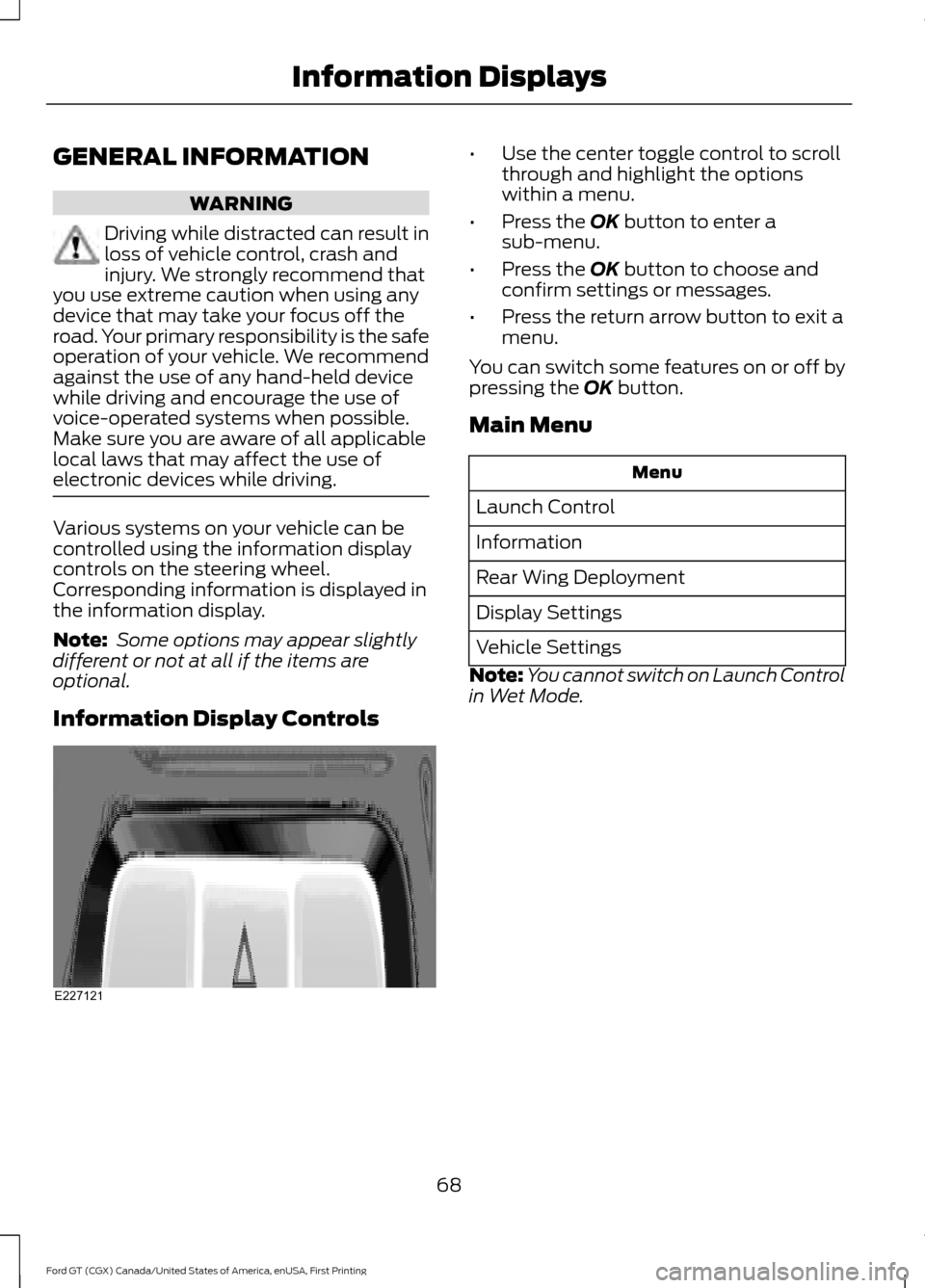
Information Display Controls •
Use the center toggle control to scroll
through and highlight the options
within a menu.
• Press the OK button to enter a
sub-menu.
• Press the
OK button to choose and
confirm settings or messages.
• Press the return arrow button to exit a
menu.
You can switch some features on or off by
pressing the
OK button.
Main Menu Menu
Launch Control
Information
Rear Wing Deployment
Display Settings
Vehicle Settings
Note: You cannot switch on Launch Control
in Wet Mode.
68
Ford GT (CGX) Canada/United States of America, enUSA, First Printing Information DisplaysE227121
Page 72 of 313
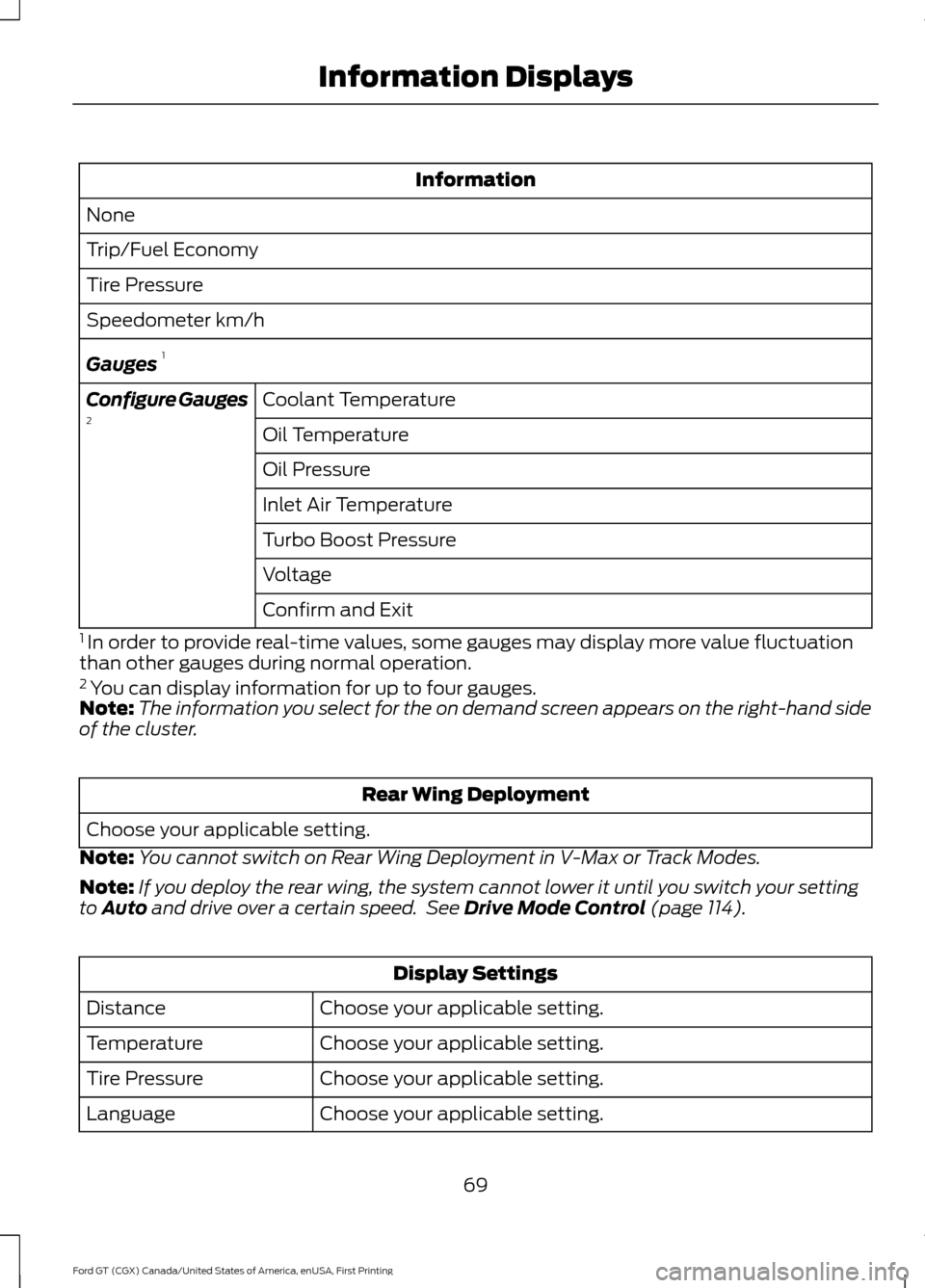
Information
None
Trip/Fuel Economy
Tire Pressure
Speedometer km/h
Gauges 1
Coolant Temperature
Configure Gauges
2
Oil Temperature
Oil Pressure
Inlet Air Temperature
Turbo Boost Pressure
Voltage
Confirm and Exit
1 In order to provide real-time values, some gauges may display more value fluctuation
than other gauges during normal operation.
2 You can display information for up to four gauges.
Note: The information you select for the on demand screen appears on the right-hand side
of the cluster. Rear Wing Deployment
Choose your applicable setting.
Note: You cannot switch on Rear Wing Deployment in V-Max or Track Modes.
Note: If you deploy the rear wing, the system cannot lower it until you switch your setting
to Auto and drive over a certain speed. See Drive Mode Control (page 114). Display Settings
Choose your applicable setting.
Distance
Choose your applicable setting.
Temperature
Choose your applicable setting.
Tire Pressure
Choose your applicable setting.
Language
69
Ford GT (CGX) Canada/United States of America, enUSA, First Printing Information Displays
Page 73 of 313
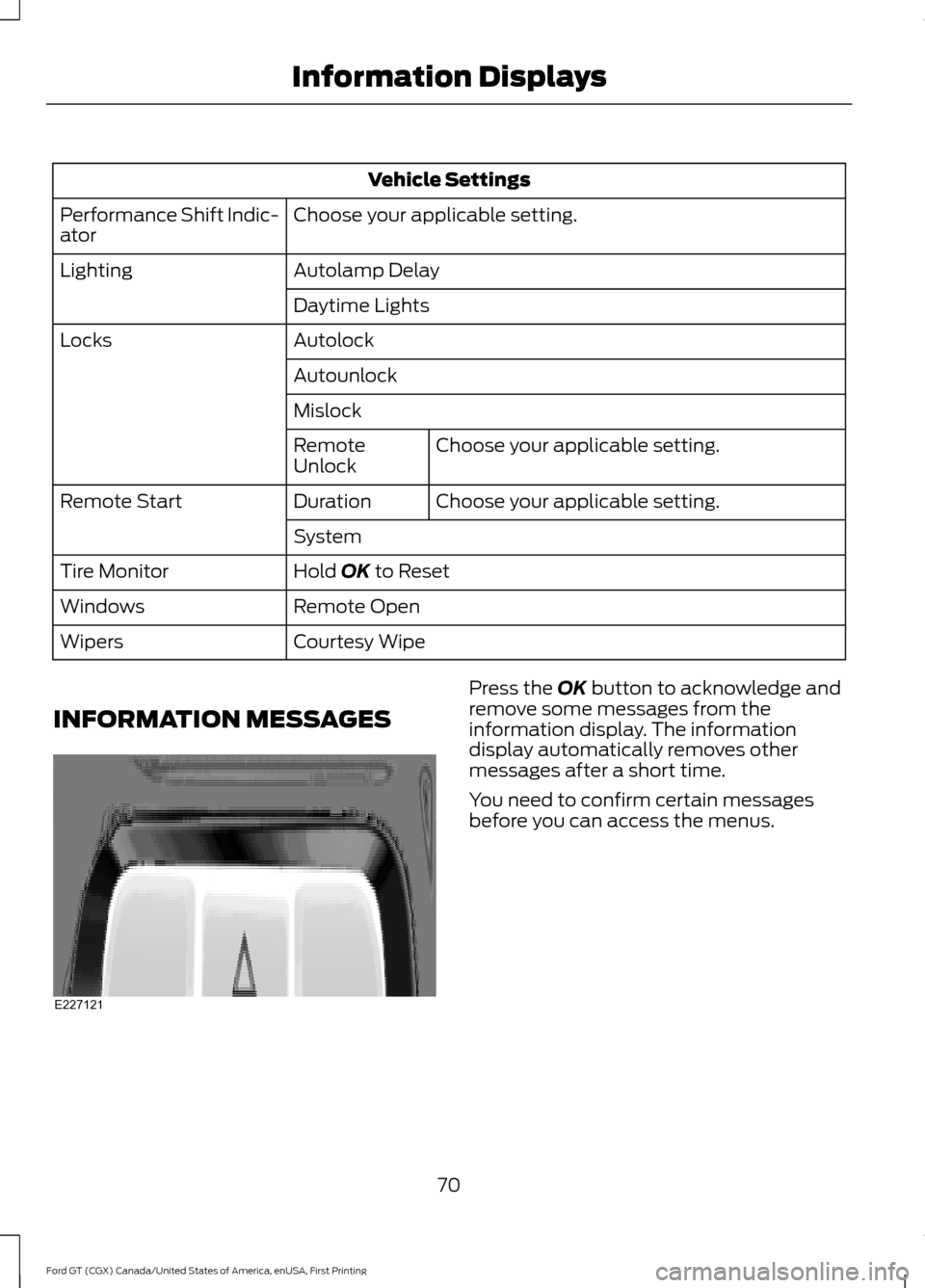
Vehicle Settings
Choose your applicable setting.
Performance Shift Indic-
ator
Autolamp Delay
Lighting
Daytime Lights
Autolock
Locks
Autounlock
MislockChoose your applicable setting.
Remote
Unlock
Choose your applicable setting.
Duration
Remote Start
System
Hold OK to Reset
Tire Monitor
Remote Open
Windows
Courtesy Wipe
Wipers
INFORMATION MESSAGES Press the
OK button to acknowledge and
remove some messages from the
information display. The information
display automatically removes other
messages after a short time.
You need to confirm certain messages
before you can access the menus.
70
Ford GT (CGX) Canada/United States of America, enUSA, First Printing Information DisplaysE227121
Page 74 of 313
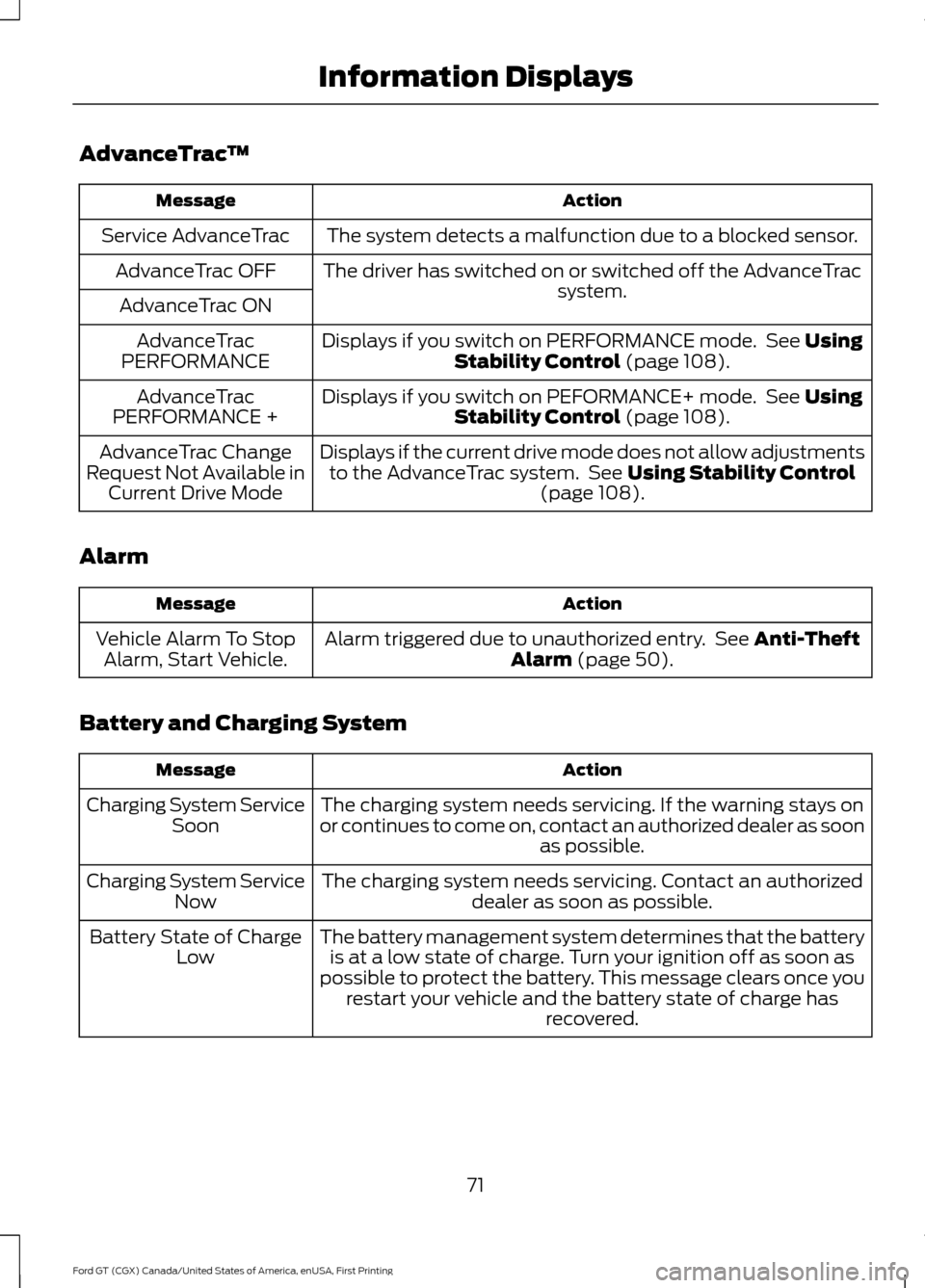
AdvanceTrac
™ Action
Message
The system detects a malfunction due to a blocked sensor.
Service AdvanceTrac
The driver has switched on or switched off the AdvanceTrac system.
AdvanceTrac OFF
AdvanceTrac ON Displays if you switch on PERFORMANCE mode. See Using
Stability Control (page 108).
AdvanceTrac
PERFORMANCE
Displays if you switch on PEFORMANCE+ mode. See
Using
Stability Control (page 108).
AdvanceTrac
PERFORMANCE +
Displays if the current drive mode does not allow adjustmentsto the AdvanceTrac system. See
Using Stability Control
(page 108).
AdvanceTrac Change
Request Not Available in Current Drive Mode
Alarm Action
Message
Alarm triggered due to unauthorized entry. See
Anti-Theft
Alarm (page 50).
Vehicle Alarm To Stop
Alarm, Start Vehicle.
Battery and Charging System Action
Message
The charging system needs servicing. If the warning stays on
or continues to come on, contact an authorized dealer as soon as possible.
Charging System Service
Soon
The charging system needs servicing. Contact an authorized dealer as soon as possible.
Charging System Service
Now
The battery management system determines that the batteryis at a low state of charge. Turn your ignition off as soon as
possible to protect the battery. This message clears once you restart your vehicle and the battery state of charge has recovered.
Battery State of Charge
Low
71
Ford GT (CGX) Canada/United States of America, enUSA, First Printing Information Displays
Page 75 of 313
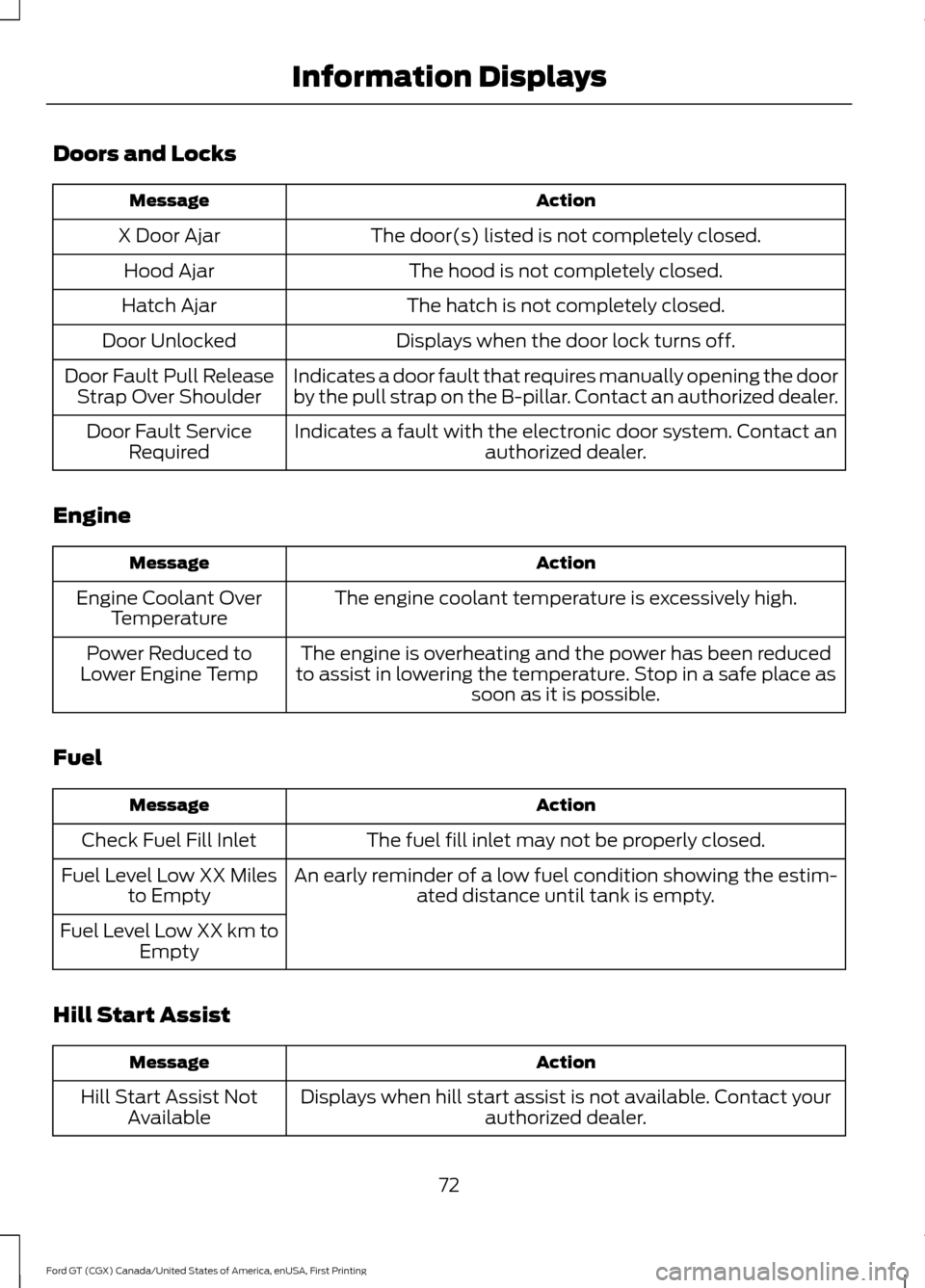
Doors and Locks
Action
Message
The door(s) listed is not completely closed.
X Door Ajar
The hood is not completely closed.
Hood Ajar
The hatch is not completely closed.
Hatch Ajar
Displays when the door lock turns off.
Door Unlocked
Indicates a door fault that requires manually opening the door
by the pull strap on the B-pillar. Contact an authorized dealer.
Door Fault Pull Release
Strap Over Shoulder
Indicates a fault with the electronic door system. Contact anauthorized dealer.
Door Fault Service
Required
Engine Action
Message
The engine coolant temperature is excessively high.
Engine Coolant Over
Temperature
The engine is overheating and the power has been reduced
to assist in lowering the temperature. Stop in a safe place as soon as it is possible.
Power Reduced to
Lower Engine Temp
Fuel Action
Message
The fuel fill inlet may not be properly closed.
Check Fuel Fill Inlet
An early reminder of a low fuel condition showing the estim-ated distance until tank is empty.
Fuel Level Low XX Miles
to Empty
Fuel Level Low XX km to Empty
Hill Start Assist Action
Message
Displays when hill start assist is not available. Contact your authorized dealer.
Hill Start Assist Not
Available
72
Ford GT (CGX) Canada/United States of America, enUSA, First Printing Information Displays
Page 76 of 313
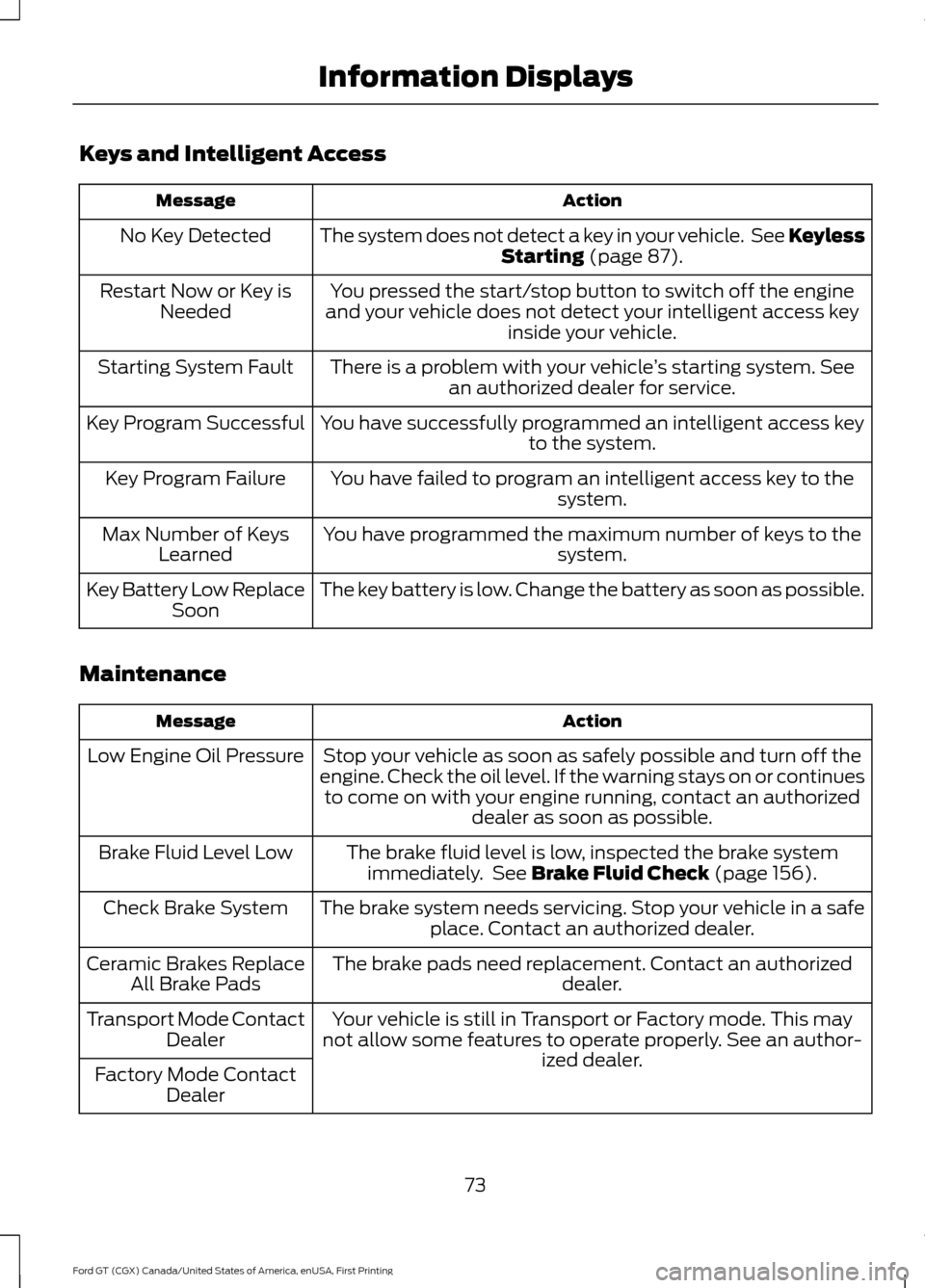
Keys and Intelligent Access
Action
Message
The system does not detect a key in your vehicle. See Keyless Starting (page 87).
No Key Detected
You pressed the start/stop button to switch off the engine
and your vehicle does not detect your intelligent access key inside your vehicle.
Restart Now or Key is
Needed
There is a problem with your vehicle ’s starting system. See
an authorized dealer for service.
Starting System Fault
You have successfully programmed an intelligent access keyto the system.
Key Program Successful
You have failed to program an intelligent access key to thesystem.
Key Program Failure
You have programmed the maximum number of keys to the system.
Max Number of Keys
Learned
The key battery is low. Change the battery as soon as possible.
Key Battery Low Replace
Soon
Maintenance Action
Message
Stop your vehicle as soon as safely possible and turn off the
engine. Check the oil level. If the warning stays on or continues to come on with your engine running, contact an authorized dealer as soon as possible.
Low Engine Oil Pressure
The brake fluid level is low, inspected the brake systemimmediately. See
Brake Fluid Check (page 156).
Brake Fluid Level Low
The brake system needs servicing. Stop your vehicle in a safeplace. Contact an authorized dealer.
Check Brake System
The brake pads need replacement. Contact an authorized dealer.
Ceramic Brakes Replace
All Brake Pads
Your vehicle is still in Transport or Factory mode. This may
not allow some features to operate properly. See an author- ized dealer.
Transport Mode Contact
Dealer
Factory Mode Contact Dealer
73
Ford GT (CGX) Canada/United States of America, enUSA, First Printing Information Displays
Page 77 of 313
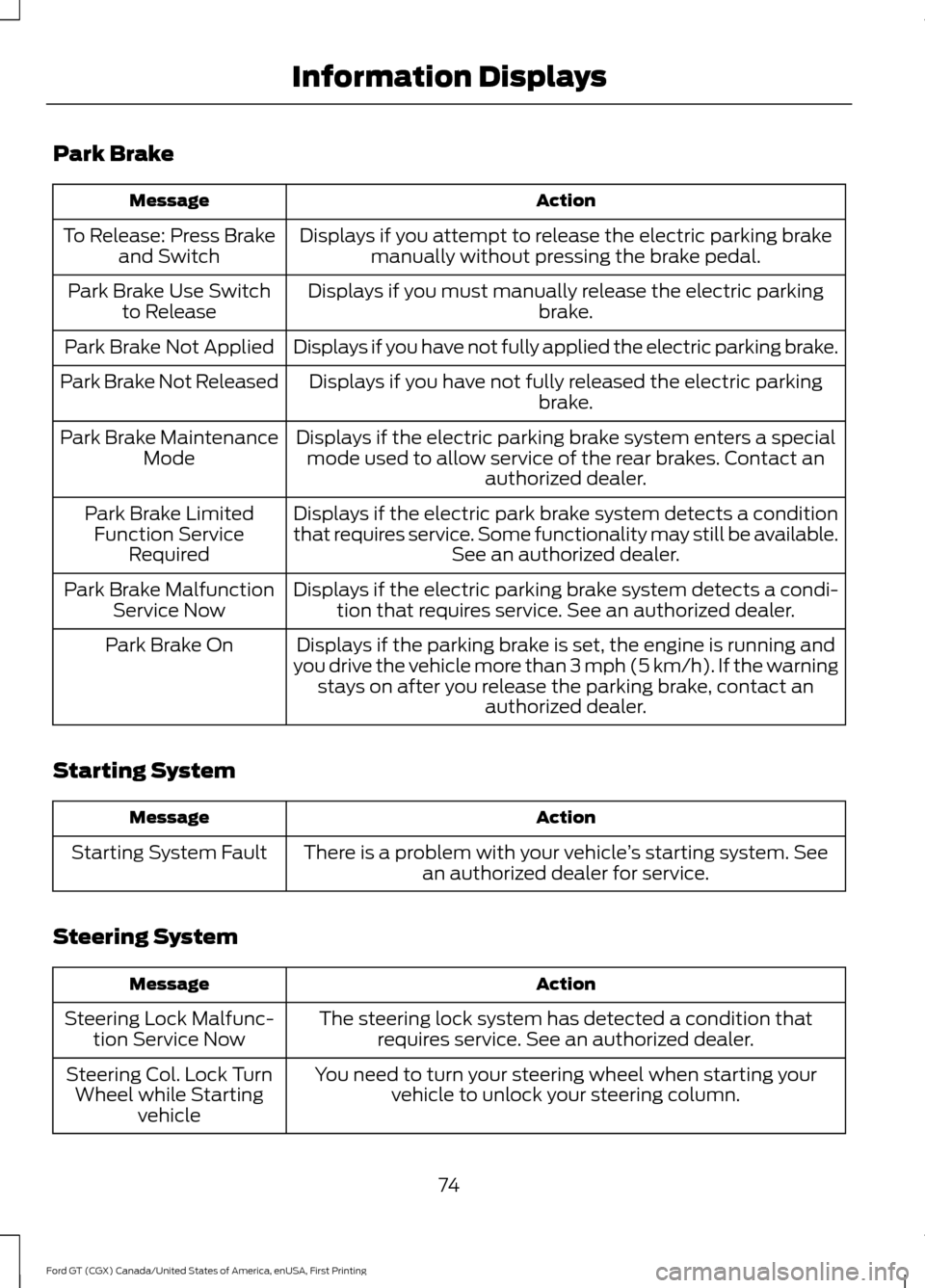
Park Brake
Action
Message
Displays if you attempt to release the electric parking brakemanually without pressing the brake pedal.
To Release: Press Brake
and Switch
Displays if you must manually release the electric parking brake.
Park Brake Use Switch
to Release
Displays if you have not fully applied the electric parking brake.
Park Brake Not Applied
Displays if you have not fully released the electric parkingbrake.
Park Brake Not Released
Displays if the electric parking brake system enters a specialmode used to allow service of the rear brakes. Contact an authorized dealer.
Park Brake Maintenance
Mode
Displays if the electric park brake system detects a condition
that requires service. Some functionality may still be available. See an authorized dealer.
Park Brake Limited
Function Service Required
Displays if the electric parking brake system detects a condi-tion that requires service. See an authorized dealer.
Park Brake Malfunction
Service Now
Displays if the parking brake is set, the engine is running and
you drive the vehicle more than 3 mph (5 km/h). If the warning stays on after you release the parking brake, contact an authorized dealer.
Park Brake On
Starting System Action
Message
There is a problem with your vehicle ’s starting system. See
an authorized dealer for service.
Starting System Fault
Steering System Action
Message
The steering lock system has detected a condition thatrequires service. See an authorized dealer.
Steering Lock Malfunc-
tion Service Now
You need to turn your steering wheel when starting yourvehicle to unlock your steering column.
Steering Col. Lock Turn
Wheel while Starting vehicle
74
Ford GT (CGX) Canada/United States of America, enUSA, First Printing Information Displays