transmission FORD GT 2017 2.G Owner's Manual
[x] Cancel search | Manufacturer: FORD, Model Year: 2017, Model line: GT, Model: FORD GT 2017 2.GPages: 313, PDF Size: 6.41 MB
Page 111 of 313
The stability and traction control systems
have several features built into it to help
you maintain control of your vehicle:
AdvanceTrac
™ Electronic
Stability Control
The system enhances your vehicle ’s ability
to prevent skids or lateral slides by
applying brakes to one or more of the
wheels individually and, if necessary,
reducing engine power.
Traction Control
The system enhances your vehicle ’s ability
to maintain traction of the wheels by
detecting and controlling wheel spin.
Traction control settings on your vehicle
are integrated into the AdvanceTrac
Stability Control system. USING STABILITY CONTROL
AdvanceTrac
™ Electronic
Stability Control
The system automatically turns on each
time you switch the ignition on.
AdvanceTrac electronic stability control is
disabled when the transmission is in
reverse (R). You can also use the stability
control button on the center console to
adjust the operation of the AdvanceTrac
stability control system. The amount of
change you can make to the AdvanceTrac
stability control system depends on the
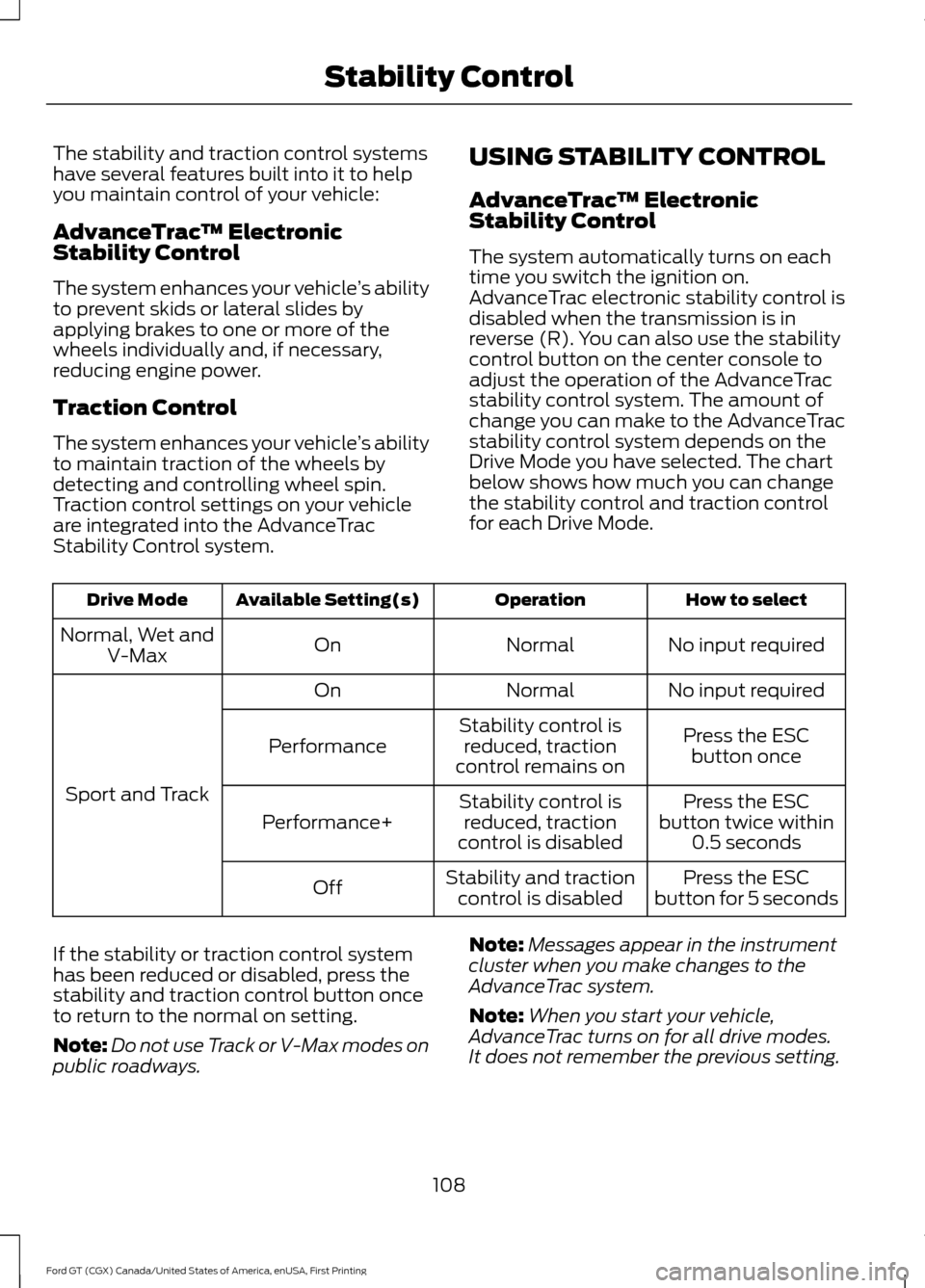
Drive Mode you have selected. The chart
below shows how much you can change
the stability control and traction control
for each Drive Mode. How to select
Operation
Available Setting(s)
Drive Mode
No input required
Normal
On
Normal, Wet and
V-Max
No input required
Normal
On
Sport and Track Press the ESC
button once
Stability control is
reduced, traction
control remains on
Performance
Press the ESC
button twice within 0.5 seconds
Stability control is
reduced, traction
control is disabled
Performance+
Press the ESC
button for 5 seconds
Stability and traction
control is disabled
Off
If the stability or traction control system
has been reduced or disabled, press the
stability and traction control button once
to return to the normal on setting.
Note: Do not use Track or V-Max modes on
public roadways. Note:
Messages appear in the instrument
cluster when you make changes to the
AdvanceTrac system.
Note: When you start your vehicle,
AdvanceTrac turns on for all drive modes.
It does not remember the previous setting.
108
Ford GT (CGX) Canada/United States of America, enUSA, First Printing Stability Control
Page 112 of 313
Traction Control
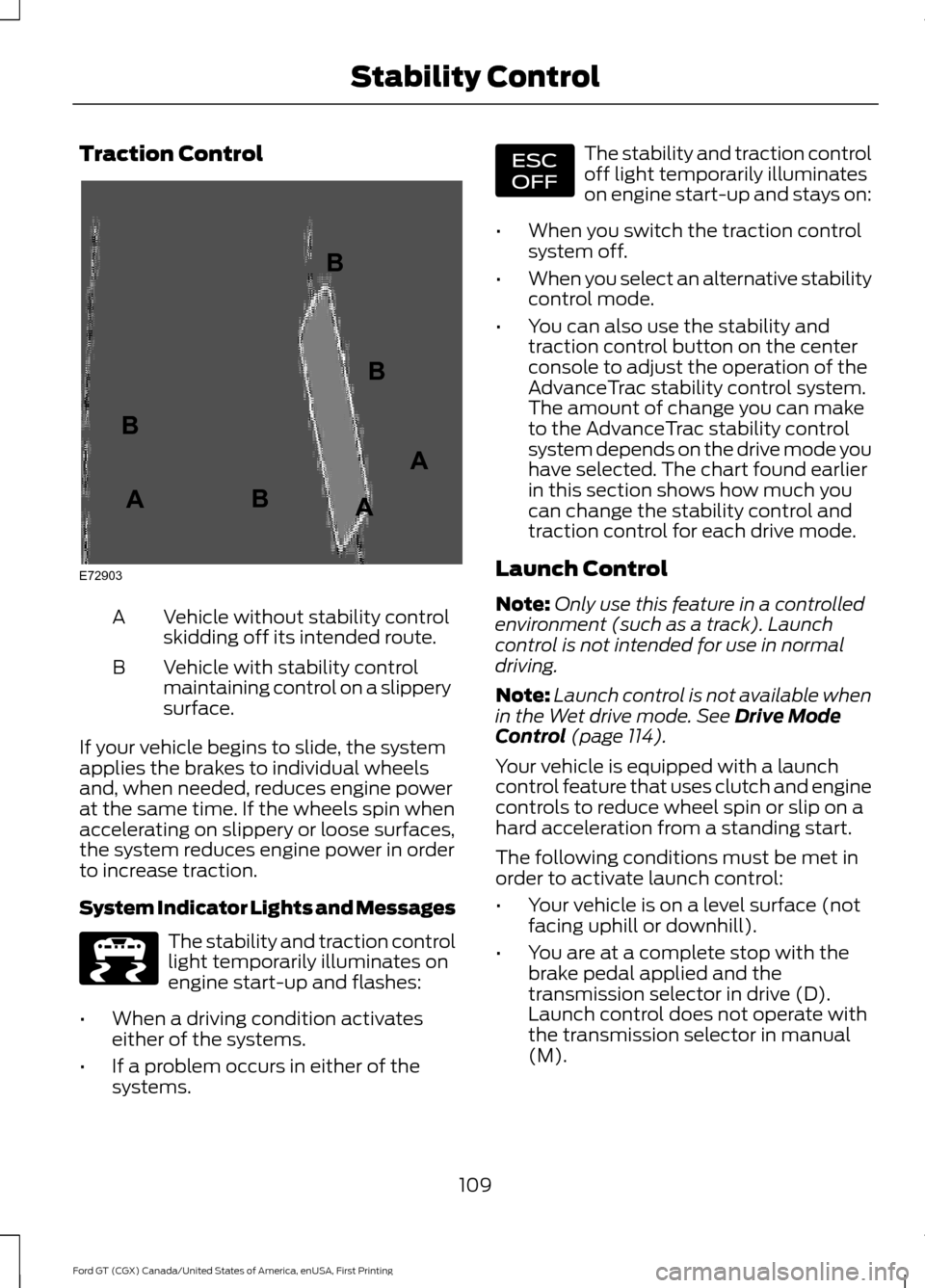
Vehicle without stability control
skidding off its intended route.
A
Vehicle with stability control
maintaining control on a slippery
surface.
B
If your vehicle begins to slide, the system
applies the brakes to individual wheels
and, when needed, reduces engine power
at the same time. If the wheels spin when
accelerating on slippery or loose surfaces,
the system reduces engine power in order
to increase traction.
System Indicator Lights and Messages The stability and traction control
light temporarily illuminates on
engine start-up and flashes:
• When a driving condition activates
either of the systems.
• If a problem occurs in either of the
systems. The stability and traction control
off light temporarily illuminates
on engine start-up and stays on:
• When you switch the traction control
system off.
• When you select an alternative stability
control mode.
• You can also use the stability and
traction control button on the center
console to adjust the operation of the
AdvanceTrac stability control system.
The amount of change you can make
to the AdvanceTrac stability control
system depends on the drive mode you
have selected. The chart found earlier
in this section shows how much you
can change the stability control and
traction control for each drive mode.
Launch Control
Note: Only use this feature in a controlled
environment (such as a track). Launch
control is not intended for use in normal
driving.
Note: Launch control is not available when
in the Wet drive mode. See Drive Mode
Control (page 114).
Your vehicle is equipped with a launch
control feature that uses clutch and engine
controls to reduce wheel spin or slip on a
hard acceleration from a standing start.
The following conditions must be met in
order to activate launch control:
• Your vehicle is on a level surface (not
facing uphill or downhill).
• You are at a complete stop with the
brake pedal applied and the
transmission selector in drive (D).
Launch control does not operate with
the transmission selector in manual
(M).
109
Ford GT (CGX) Canada/United States of America, enUSA, First Printing Stability ControlE72903A
AA
B
BB
B E236447 E236448
Page 113 of 313
When these conditions are met, you can
enable launch control from the display
screen. See General Information (page
68).
Launch control remains active until:
• You switch the system off through the
display screen.
• You switch your vehicle off. When you
restart your vehicle, launch control is
no longer activated.
• You turn the transmission selector to
manual (M).
• The transmission clutch fluid
temperature gets too high.
Using Launch Control
To use launch control:
• Activate the launch control setting
through the display screen once the
conditions are met.
See General
Information (page 68). When
activated, the LC icon appears in white
inside the information cluster.
• With your vehicle at a complete stop,
hold the brake pedal firmly and press
the accelerator pedal to open throttle.
The LC icon turns from white to green
when the system is ready to launch.
• Release the brake and carefully steer
your vehicle while it accelerates from
a stop. Launch control controls wheel
spin as you accelerate. After the
launch, the LC icon returns to white.
You can use the menu to turn off
launch control. Launch control also
turns off when you shut off your
vehicle.
110
Ford GT (CGX) Canada/United States of America, enUSA, First Printing Stability Control
Page 114 of 313
REAR VIEW CAMERA
WARNINGS
The rear view camera system is a
reverse aid supplement device that
still requires the driver to use it in
conjunction with the interior and exterior
mirrors for maximum coverage. Objects that are close to either
corner of the bumper or under the
bumper, might not be seen on the
screen due to the limited coverage of the
camera system. Use caution when turning camera
features on or off when the
transmission is not in park (P). Make
sure your vehicle is not moving. The rear view camera system provides a
video image of the area behind your
vehicle.
During operation, lines appear in the
display which represent your vehicle
’s
proximity to objects behind your vehicle. The camera is located below the license
plate. Using the Rear View Camera
System
The rear view camera system displays
what is behind your vehicle when you place
the transmission in reverse (R).
The system uses fixed guidelines to help
you see what is behind your vehicle. Fixed
guidelines show the path your vehicle is
moving while reversing in a straight line.
This can be helpful when backing into a
parking space.
The camera may not operate correctly
under the following conditions:
•
Nighttime or dark areas if the reverse
lamps are not operating.
• Mud, water or debris obstructs the
camera's view. Clean the lens with a
soft, lint-free cloth and non-abrasive
cleaner.
• The camera is misaligned due to
damage to the rear of your vehicle.
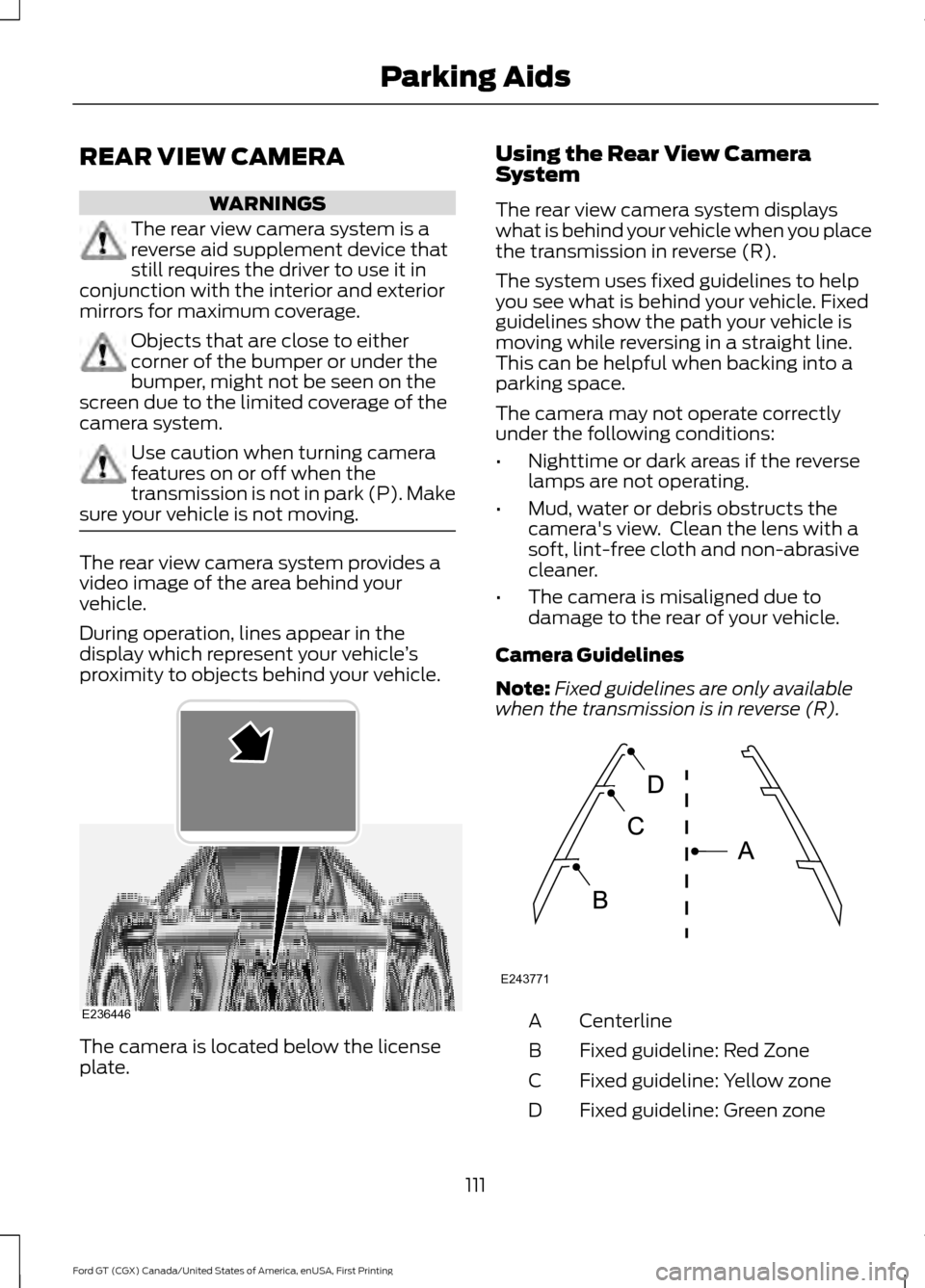
Camera Guidelines
Note: Fixed guidelines are only available
when the transmission is in reverse (R). Centerline
A
Fixed guideline: Red Zone
B
Fixed guideline: Yellow zone
C
Fixed guideline: Green zone
D
111
Ford GT (CGX) Canada/United States of America, enUSA, First Printing Parking AidsE236446 E243771
Page 115 of 313
Always use caution while reversing.
Objects in the red zone are closest to your
vehicle and objects in the green zone are
farther away. Objects are getting closer to
your vehicle as they move from the green
zone to the yellow or red zones. Use the
side view mirrors and rear view mirror to
get better coverage on both sides and rear
of the vehicle.
Manual Zoom
WARNING
When manual zoom is on, the full
area behind your vehicle may not
show. Be aware of your surroundings
when using the manual zoom feature. Note:
Manual zoom is only available when
the transmission is in reverse (R).
Selectable settings for this feature are
Zoom in (+) and Zoom out (-). Press the
symbol in the camera screen to change the
view. The default setting is Zoom OFF.
This feature allows you to get a closer view
of an object behind your vehicle. The zoom
is only active while the transmission is in
reverse (R). When the transmission shifts
out of reverse (R), the feature
automatically turns off and must be reset
when it is used again.
Rear Camera Delay
You can select to have the rear camera
continue to display after shifting from
reverse (R). See Settings (page 238).
112
Ford GT (CGX) Canada/United States of America, enUSA, First Printing Parking Aids
Page 118 of 313
Modes:
•
Normal (N) – Use for normal driving in
dry conditions.
•AdvanceTrac Stability Control is
active and cannot be adjusted.
• Ride height is set to High and
suspension damping is set to
Normal.
• Comfort damping can be selected
with the console switch.
• Launch control is available.
• Transmission automatic shift
calibration is set to Normal.
• Rear wing will deploy at speeds
above 90 mph (145 km/h) and
retract when the speed drops
below
81 mph (130 km/h).
• Air brake activates at speeds above
75 mph (121 km/h) when the brakes
are applied with moderate force.
• Sport (S) – Use for sport driving in dry
conditions.
•AdvanceTrac Stability Control is
active but can be adjusted by use
of the Stability Control button on
the console.
• Ride height is set to High and
suspension damping is set to Sport.
• Comfort damping cannot be
selected.
• Launch control is available.
• Transmission automatic shift
calibration is set to Sport.
• Turbocharger anti-lag calibration
is active.
• Rear wing will deploy at speeds
above
70 mph (113 km/h) and
retract when the speed drops
below
45 mph (72 km/h).
• Air brake activates at speeds above
75 mph (121 km/h) when the brakes
are applied with moderate force. •
Wet (W) – Use for driving in wet
conditions.
•AdvanceTrac Stability Control is
active and cannot be adjusted.
• Ride height is set to High and
suspension damping is set to
Normal.
• Comfort damping can be selected
with the console switch.
• Launch control is not available.
• Transmission automatic shift
calibration is set to Normal.
• Rear wing will deploy at speeds
above
90 mph (145 km/h) and
retract when the speed drops
below
81 mph (130 km/h).
• Air brake activates at speeds above
75 mph (121 km/h) when the brakes
are applied with moderate force.
115
Ford GT (CGX) Canada/United States of America, enUSA, First Printing Driving Aids
Page 119 of 313
•
Track (T) – Optimized settings for
track handling performance. The Track
drive mode should only be used in a
track environment, not on the street,
due to the low ride height. This setting
can only be selected while your vehicle
is in park (P) with the engine running,
and you will be asked to confirm the
selection.
•AdvanceTrac Stability Control is
active but can be adjusted by use
of the Stability Control button on
the console.
• Ride height is set to Low and
suspension damping is set to Track.
• Comfort damping cannot be
selected due to low ride height.
• Launch control is available.
• Transmission automatic shift
calibration is set to Sport.
• Turbocharger anti-lag calibration
is active.
• Rear wing deploys and remains
deployed while in Track mode.
When you change to another mode,
the wing lowers once you start to
drive your vehicle, not while it is
stopped.
• Air brake activates at speeds above
75 mph (121 km/h) when the brakes
are applied with moderate force. •
V-Max (V) – Optimized settings for
achieving maximum velocity (top
speed). The V-Max mode should only
be used in a controlled track
environment, not on the street, due to
the low ride height. This setting can
only be selected while your vehicle is
in park (P) with the engine running, and
you will be asked to confirm the
selection.
•AdvanceTrac Stability Control is
active and cannot be adjusted.
• Ride height is set to Low and
suspension damping is set to Track.
• Comfort damping cannot be
selected due to low ride height.
• Launch control is available.
• Transmission automatic shift
calibration is set to Sport.
• Rear wing does not deploy.
• Air brake activates at speeds above
75 mph (121 km/h) when the brakes
are applied with moderate force.
Note: When you shut down your vehicle in
V-Max or Track mode, the vehicle returns
to the Normal ride height. When you restart
your vehicle in V-Max or Track mode, you
need to re-acknowledge the drive mode
selection in the information display in order
for the drive mode to reactivate. If you do
not make a selection, the vehicle returns to
the previously selected drive mode.
116
Ford GT (CGX) Canada/United States of America, enUSA, First Printing Driving Aids
Page 132 of 313
1. Press START/STOP to switch off your
vehicle.
2. Press the brake pedal and START/STOP
to switch on your
vehicle.
3. Remove your foot from the brake pedal
and press
START/STOP to switch off
your vehicle.
4. You can attempt to start the vehicle by pressing the brake pedal and
START/STOP
, or press START/STOP
without pressing the brake pedal.
Note: Both methods re-enable the fuel
system.
JUMP STARTING THE VEHICLE WARNINGS
Do not use fuel lines, engine valve
covers, windshield wiper arms, the
intake manifold, or hood latch as
ground points. Use only adequately sized cables
with insulated clamps.
Preparing Your Vehicle
Note:
Attempting to push-start a vehicle
with an automatic transmission may cause
transmission damage.
Note: Use only a 12-volt supply to start your
vehicle.
Note: Do not disconnect the battery of the
disabled vehicle as this could damage the
vehicle's electrical system.
Park the booster vehicle close to the hood
of the disabled vehicle, making sure the
two vehicles do not touch. Connecting the Jumper Cables
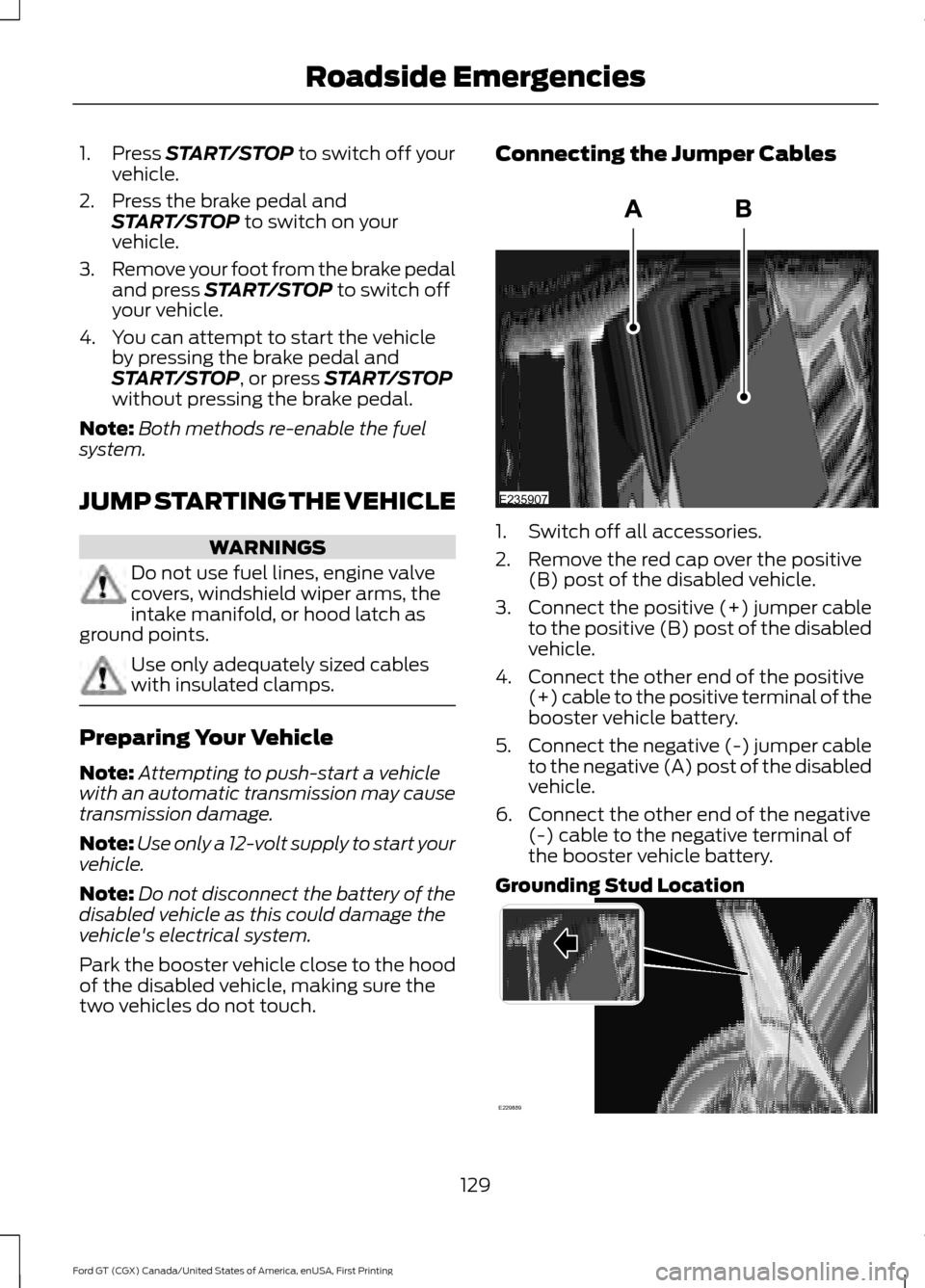
1. Switch off all accessories.
2. Remove the red cap over the positive
(B) post of the disabled vehicle.
3. Connect the positive (+) jumper cable
to the positive (B) post of the disabled
vehicle.
4. Connect the other end of the positive (+) cable to the positive terminal of the
booster vehicle battery.
5. Connect the negative (-) jumper cable
to the negative (A) post of the disabled
vehicle.
6. Connect the other end of the negative (-) cable to the negative terminal of
the booster vehicle battery.
Grounding Stud Location 129
Ford GT (CGX) Canada/United States of America, enUSA, First Printing Roadside EmergenciesE235907 E229889
Page 134 of 313
Getting the Transmission in
Neutral
If the battery loses charge, the
transmission will be in park (P). You can
use the transmission tool to place the car
into Neutral (N). See Automatic
Transmission (page 99).
TOWING POINTS
Tow Hook Location
Your vehicle is equipped with a screw-in
tow hook, it is in the storage compartment
under the rear hatch.
Installing the Tow Hook
Note: The screw-in tow hook has a
left-hand thread. Turn it counterclockwise
to install it. Make sure that the tow hook is
fully tightened.
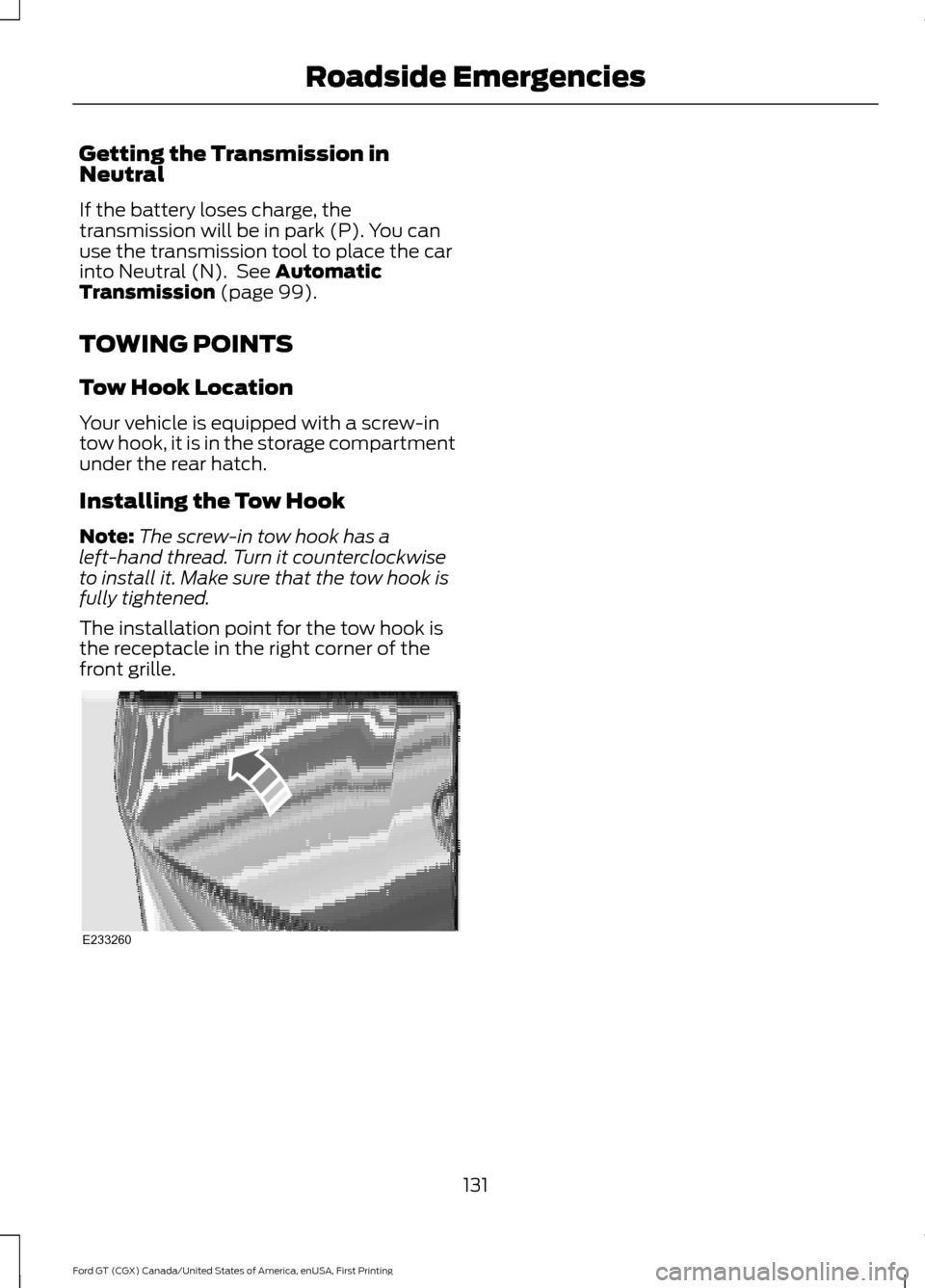
The installation point for the tow hook is
the receptacle in the right corner of the
front grille. 131
Ford GT (CGX) Canada/United States of America, enUSA, First Printing Roadside EmergenciesE233260
Page 144 of 313
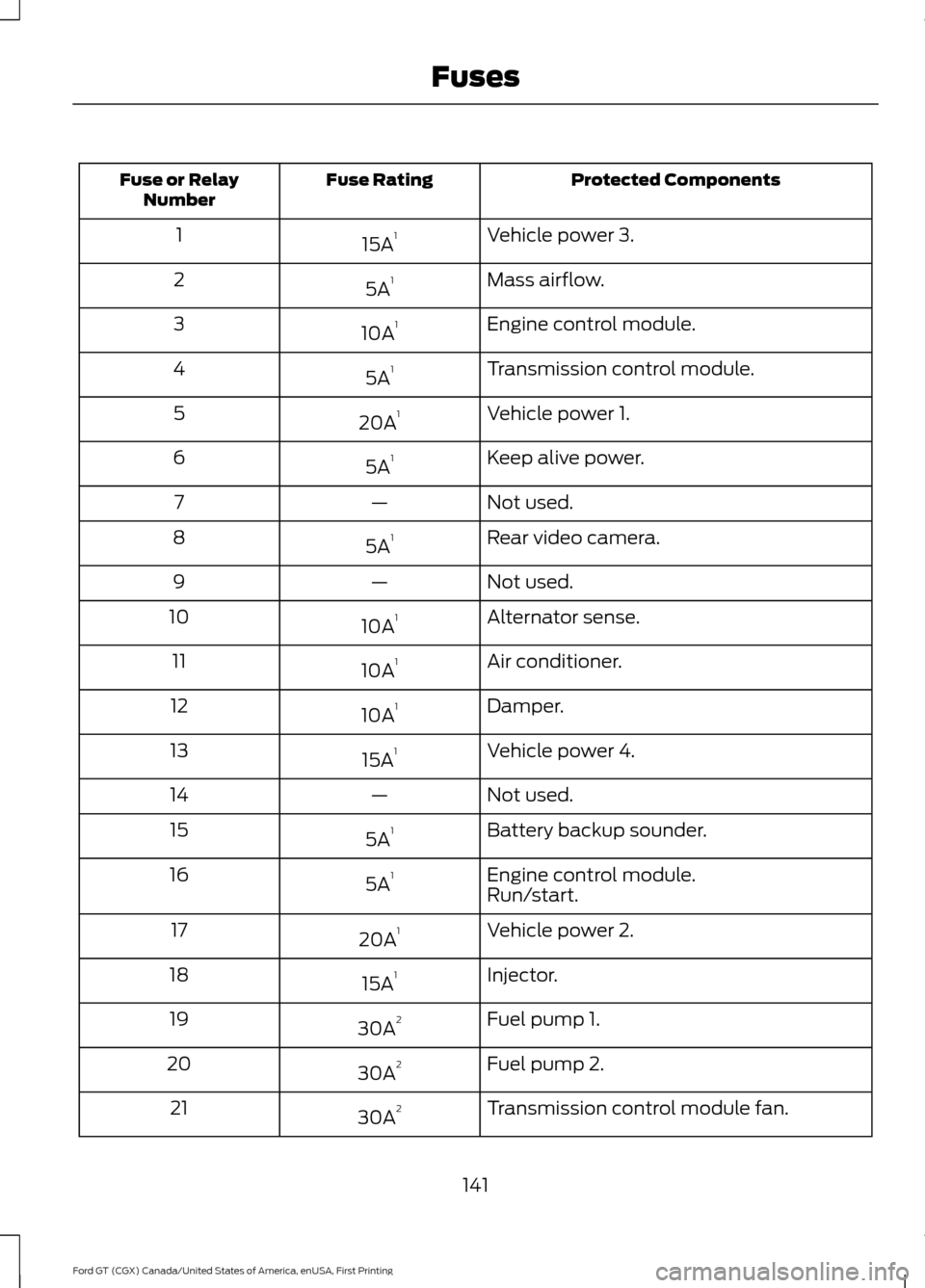
Protected Components
Fuse Rating
Fuse or Relay
Number
Vehicle power 3.
15A 1
1
Mass airflow.
5A 1
2
Engine control module.
10A 1
3
Transmission control module.
5A 1
4
Vehicle power 1.
20A 1
5
Keep alive power.
5A 1
6
Not used.
—
7
Rear video camera.
5A 1
8
Not used.
—
9
Alternator sense.
10A 1
10
Air conditioner.
10A 1
11
Damper.
10A 1
12
Vehicle power 4.
15A 1
13
Not used.
—
14
Battery backup sounder.
5A 1
15
Engine control module.
5A 1
16
Run/start.
Vehicle power 2.
20A 1
17
Injector.
15A 1
18
Fuel pump 1.
30A 2
19
Fuel pump 2.
30A 2
20
Transmission control module fan.
30A 2
21
141
Ford GT (CGX) Canada/United States of America, enUSA, First Printing Fuses