phone FORD GT 2017 2.G Workshop Manual
[x] Cancel search | Manufacturer: FORD, Model Year: 2017, Model line: GT, Model: FORD GT 2017 2.GPages: 313, PDF Size: 6.41 MB
Page 262 of 313
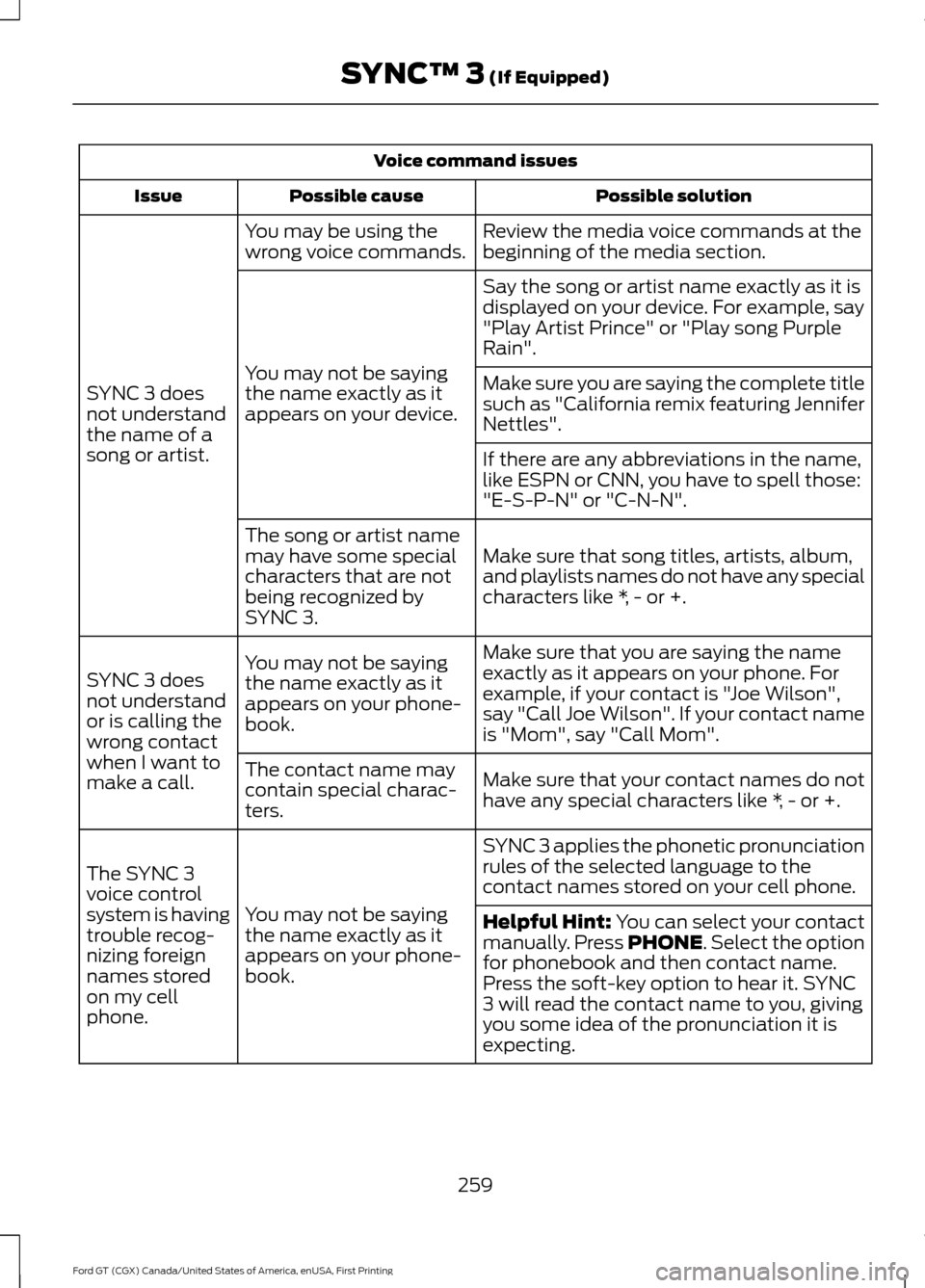
Voice command issues
Possible solution
Possible cause
Issue
Review the media voice commands at the
beginning of the media section.
You may be using the
wrong voice commands.
SYNC 3 does
not understand
the name of a
song or artist. Say the song or artist name exactly as it is
displayed on your device. For example, say
"Play Artist Prince" or "Play song Purple
Rain".
You may not be saying
the name exactly as it
appears on your device. Make sure you are saying the complete title
such as "California remix featuring Jennifer
Nettles".
If there are any abbreviations in the name,
like ESPN or CNN, you have to spell those:
"E-S-P-N" or "C-N-N".
Make sure that song titles, artists, album,
and playlists names do not have any special
characters like *, - or +.
The song or artist name
may have some special
characters that are not
being recognized by
SYNC 3.
Make sure that you are saying the name
exactly as it appears on your phone. For
example, if your contact is "Joe Wilson",
say "Call Joe Wilson". If your contact name
is "Mom", say "Call Mom".
You may not be saying
the name exactly as it
appears on your phone-
book.
SYNC 3 does
not understand
or is calling the
wrong contact
when I want to
make a call.
Make sure that your contact names do not
have any special characters like *, - or +.
The contact name may
contain special charac-
ters.
SYNC 3 applies the phonetic pronunciation
rules of the selected language to the
contact names stored on your cell phone.
You may not be saying
the name exactly as it
appears on your phone-
book.
The SYNC 3
voice control
system is having
trouble recog-
nizing foreign
names stored
on my cell
phone.
Helpful Hint: You can select your contact
manually. Press PHONE. Select the option
for phonebook and then contact name.
Press the soft-key option to hear it. SYNC
3 will read the contact name to you, giving
you some idea of the pronunciation it is
expecting.
259
Ford GT (CGX) Canada/United States of America, enUSA, First Printing SYNC™ 3
(If Equipped)
Page 263 of 313
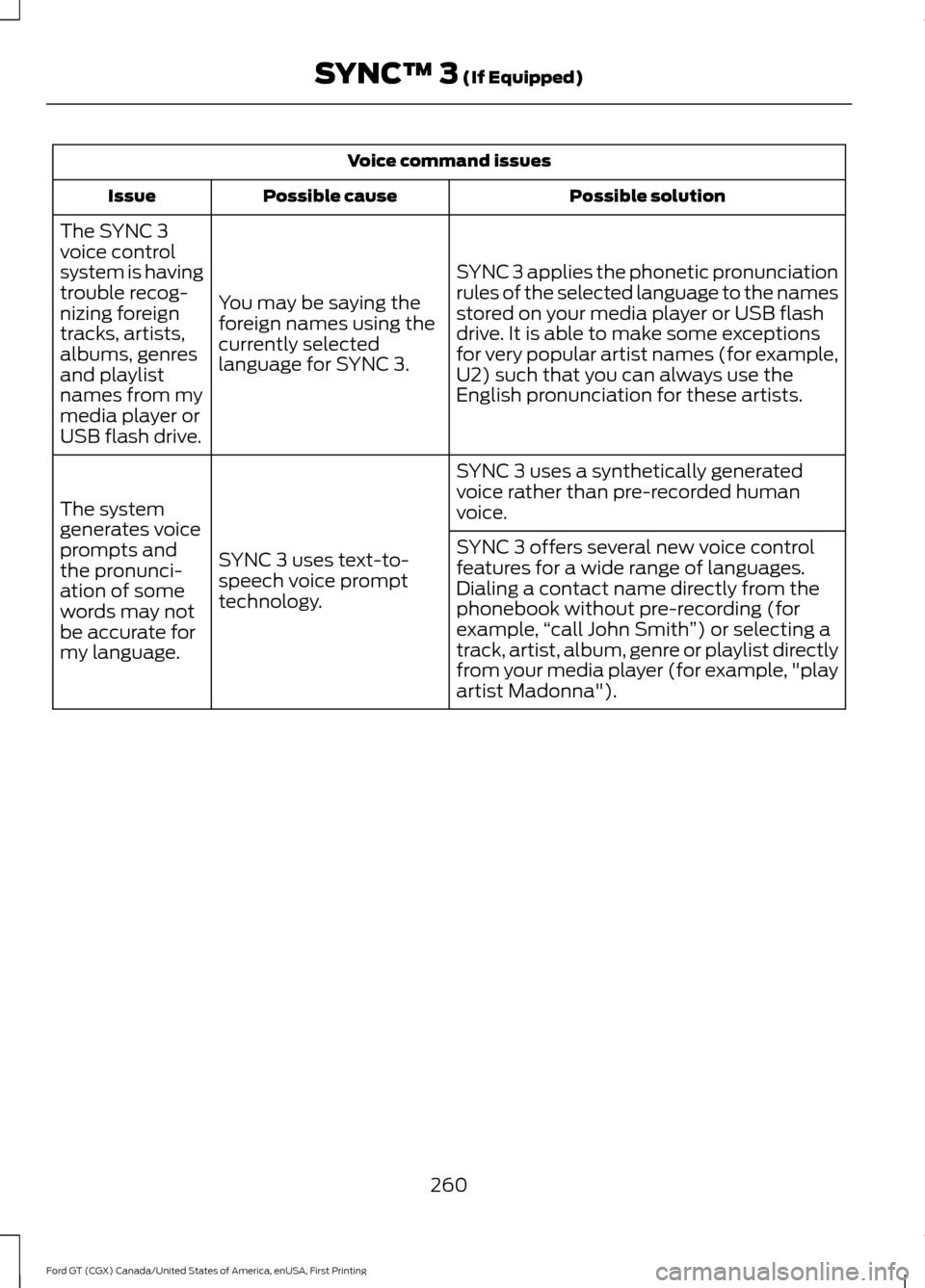
Voice command issues
Possible solution
Possible cause
Issue
SYNC 3 applies the phonetic pronunciation
rules of the selected language to the names
stored on your media player or USB flash
drive. It is able to make some exceptions
for very popular artist names (for example,
U2) such that you can always use the
English pronunciation for these artists.
You may be saying the
foreign names using the
currently selected
language for SYNC 3.
The SYNC 3
voice control
system is having
trouble recog-
nizing foreign
tracks, artists,
albums, genres
and playlist
names from my
media player or
USB flash drive.
SYNC 3 uses a synthetically generated
voice rather than pre-recorded human
voice.
SYNC 3 uses text-to-
speech voice prompt
technology.
The system
generates voice
prompts and
the pronunci-
ation of some
words may not
be accurate for
my language. SYNC 3 offers several new voice control
features for a wide range of languages.
Dialing a contact name directly from the
phonebook without pre-recording (for
example,
“call John Smith ”) or selecting a
track, artist, album, genre or playlist directly
from your media player (for example, "play
artist Madonna").
260
Ford GT (CGX) Canada/United States of America, enUSA, First Printing SYNC™ 3 (If Equipped)
Page 264 of 313
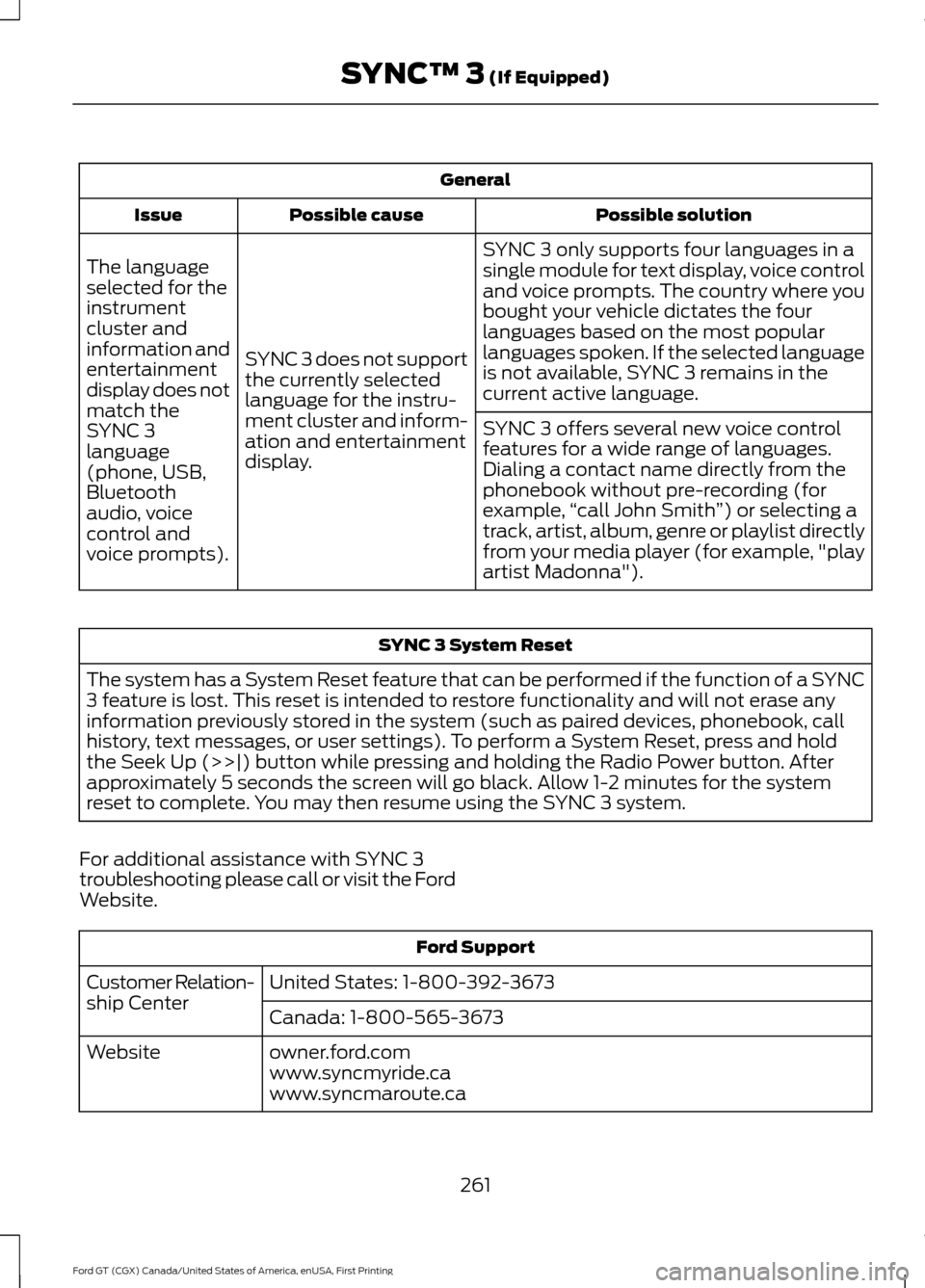
General
Possible solution
Possible cause
Issue
SYNC 3 only supports four languages in a
single module for text display, voice control
and voice prompts. The country where you
bought your vehicle dictates the four
languages based on the most popular
languages spoken. If the selected language
is not available, SYNC 3 remains in the
current active language.
SYNC 3 does not support
the currently selected
language for the instru-
ment cluster and inform-
ation and entertainment
display.
The language
selected for the
instrument
cluster and
information and
entertainment
display does not
match the
SYNC 3
SYNC 3 offers several new voice control
features for a wide range of languages.
Dialing a contact name directly from the
phonebook without pre-recording (for
example,
“call John Smith ”) or selecting a
track, artist, album, genre or playlist directly
from your media player (for example, "play
artist Madonna").
language
(phone, USB,
Bluetooth
audio, voice
control and
voice prompts). SYNC 3 System Reset
The system has a System Reset feature that can be performed if the function of a SYNC
3 feature is lost. This reset is intended to restore functionality and will not erase any
information previously stored in the system (such as paired devices, phonebook, call
history, text messages, or user settings). To perform a System Reset, press and hold
the Seek Up (>>|) button while pressing and holding the Radio Power button. After
approximately 5 seconds the screen will go black. Allow 1-2 minutes for the system
reset to complete. You may then resume using the SYNC 3 system.
For additional assistance with SYNC 3
troubleshooting please call or visit the Ford
Website. Ford Support
United States: 1-800-392-3673
Customer Relation-
ship Center
Canada: 1-800-565-3673
owner.ford.com
Website
www.syncmyride.ca
www.syncmaroute.ca
261
Ford GT (CGX) Canada/United States of America, enUSA, First Printing SYNC™ 3 (If Equipped)
Page 292 of 313
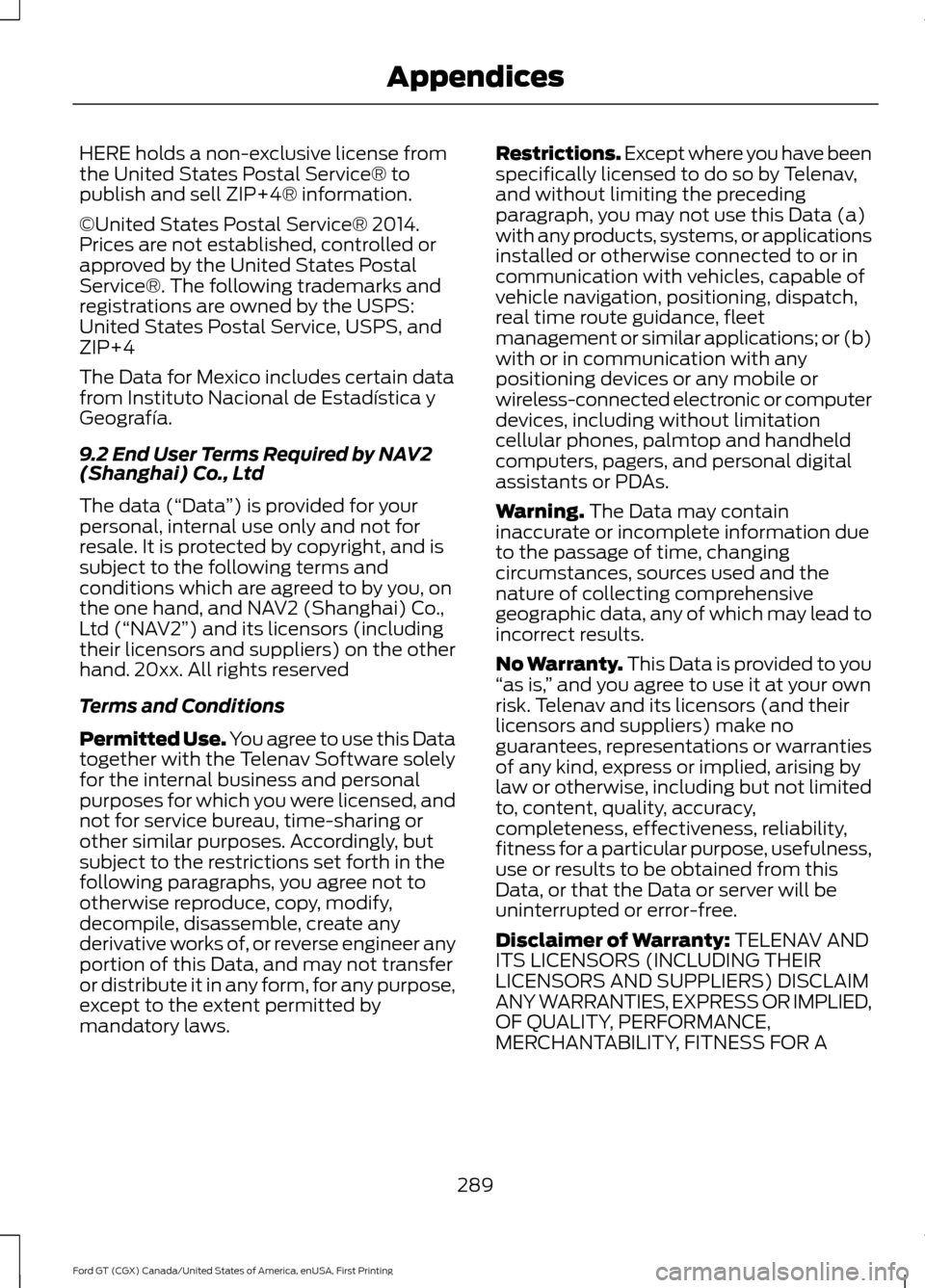
HERE holds a non-exclusive license from
the United States Postal Service® to
publish and sell ZIP+4® information.
©United States Postal Service® 2014.
Prices are not established, controlled or
approved by the United States Postal
Service®. The following trademarks and
registrations are owned by the USPS:
United States Postal Service, USPS, and
ZIP+4
The Data for Mexico includes certain data
from Instituto Nacional de Estadística y
Geografía.
9.2 End User Terms Required by NAV2
(Shanghai) Co., Ltd
The data (“Data
”) is provided for your
personal, internal use only and not for
resale. It is protected by copyright, and is
subject to the following terms and
conditions which are agreed to by you, on
the one hand, and NAV2 (Shanghai) Co.,
Ltd (“NAV2”) and its licensors (including
their licensors and suppliers) on the other
hand. 20xx. All rights reserved
Terms and Conditions
Permitted Use. You agree to use this Data
together with the Telenav Software solely
for the internal business and personal
purposes for which you were licensed, and
not for service bureau, time-sharing or
other similar purposes. Accordingly, but
subject to the restrictions set forth in the
following paragraphs, you agree not to
otherwise reproduce, copy, modify,
decompile, disassemble, create any
derivative works of, or reverse engineer any
portion of this Data, and may not transfer
or distribute it in any form, for any purpose,
except to the extent permitted by
mandatory laws. Restrictions. Except where you have been
specifically licensed to do so by Telenav,
and without limiting the preceding
paragraph, you may not use this Data (a)
with any products, systems, or applications
installed or otherwise connected to or in
communication with vehicles, capable of
vehicle navigation, positioning, dispatch,
real time route guidance, fleet
management or similar applications; or (b)
with or in communication with any
positioning devices or any mobile or
wireless-connected electronic or computer
devices, including without limitation
cellular phones, palmtop and handheld
computers, pagers, and personal digital
assistants or PDAs.
Warning. The Data may contain
inaccurate or incomplete information due
to the passage of time, changing
circumstances, sources used and the
nature of collecting comprehensive
geographic data, any of which may lead to
incorrect results.
No Warranty.
This Data is provided to you
“ as is, ” and you agree to use it at your own
risk. Telenav and its licensors (and their
licensors and suppliers) make no
guarantees, representations or warranties
of any kind, express or implied, arising by
law or otherwise, including but not limited
to, content, quality, accuracy,
completeness, effectiveness, reliability,
fitness for a particular purpose, usefulness,
use or results to be obtained from this
Data, or that the Data or server will be
uninterrupted or error-free.
Disclaimer of Warranty:
TELENAV AND
ITS LICENSORS (INCLUDING THEIR
LICENSORS AND SUPPLIERS) DISCLAIM
ANY WARRANTIES, EXPRESS OR IMPLIED,
OF QUALITY, PERFORMANCE,
MERCHANTABILITY, FITNESS FOR A
289
Ford GT (CGX) Canada/United States of America, enUSA, First Printing Appendices
Page 299 of 313
Product incorporates data which is ©
20XX Telstra Corporation Limited, GM
Holden Limited, Intelematics Australia
Pty Ltd and Continental Pty Ltd.
B. Third Party Notices for Australia. In
addition to the foregoing, the End-User
Terms for any Application containing
RDS-TMC Traffic Codes for Australia
shall contain the following notice:
“Product incorporates traffic location
codes which is © 20XX Telstra Corpora-
tion Limited and its licensors. ”
VII. China Territory
Personal Use Only
You agree to use this Data together with
[insert name of Client Application] for the
solely personal, non-commercial purposes
for which you were licensed, and not for
service bureau, time-sharing or other
similar purposes. Accordingly, but subject
to the restrictions set forth in the following
paragraphs, you may copy this Data only
as necessary for your personal use to (i)
view it, and (ii) save it, provided that you
do not remove any copyright notices that
appear and do not modify the Data in any
way. You agree not to otherwise reproduce,
copy, modify, decompile, disassemble or
reverse engineer any portion of this Data,
and may not transfer or distribute it in any
form, for any purpose, except to the extent
permitted by mandatory laws.
Restrictions
Except where you have been specifically
licensed to do so by NAV2 , and without
limiting the preceding paragraph, you may
not (a) use this Data with any products,
systems, or applications installed or
otherwise connected to or in
communication with vehicles, capable of
vehicle navigation, positioning, dispatch,
real time route guidance, fleet
management or similar applications; or (b) with or in communication with any
positioning devices or any mobile or
wireless-connected electronic or computer
devices, including without limitation
cellular phones, palmtop and handheld
computers, pagers, and personal digital
assistants or PDAs. You agree to cease
using this Data if you fail to comply with
these terms and conditions.
Limited Warranty
NAV2 warrants that (a) the Data will
perform substantially in accordance with
the accompanying written materials for a
period of ninety (90) days from the date
of receipt, and (b) any support services
provided by NAV2 shall be substantially as
described in applicable written materials
provided to you by NAV2, and NAV2’
s
support engineers will make commercially
reasonable efforts to solve any problem
issues.
rigCustomer Remedies
NAV2 and its suppliers’ entire liability and
your exclusive remedy shall be, at NAV2’ s
sole discretion, either (a) return of the price
paid, if any, or (b) repair or replacement of
the Data that do not meet NAV2’ s Limited
Warranty and that are returned to NAV2
with a copy of your receipt. This Limited
Warranty is void if failure of the Data has
resulted from accident, abuse, or
misapplication. Any replacement Data will
be warranted for the remainder of the
original warranty period or thirty (30) days,
whichever is longer. Neither these remedies
nor any product support services offered
by NAV2 are available without proof of
purchase from an authorized international
source.
296
Ford GT (CGX) Canada/United States of America, enUSA, First Printing Appendices
Page 306 of 313
A
A/C
See: Climate Control............................................ 77
About This Manual...........................................5 Ford GT Concierge Phone Numbers................5
ABS See: Brakes........................................................... 103
ABS driving hints See: Hints on Driving With Anti-Lock
Brakes................................................................ 103
Accessories....................................................262
Accessories See: Replacement Parts
Recommendation............................................ 10
Adjusting the Headlamps.........................160
Headlamp Aim Target...................................... 160
Adjusting the Pedals
.....................................55
Adjusting the Steering Wheel.....................51
Airbag Disposal...............................................39
Air Conditioning See: Climate Control............................................ 77
Air Filter See: Changing the Engine Air Filter...............161
Alarm See: Anti-Theft Alarm........................................ 50
Anti-Theft Alarm............................................50 Arming the Alarm................................................ 50
Disarming the Alarm........................................... 50
Appendices.....................................................277
Apps..................................................................237 ........................................................................\
........... 237
At a Glance........................................................14
Audible Warnings and Indicators.............67 Headlamps On Warning Chime...................... 67
Keyless Warning Alert......................................... 67
Audio Control...................................................52 Seek, Next or Previous........................................ 52
Audio System................................................202
Audio Unit
.......................................................202
Autolamps........................................................58
Automatic Climate Control........................78
Automatic Transmission.............................99 Brake-Shift Interlock.......................................... 101
If Your Vehicle Gets Stuck In Mud or Snow.................................................................. 102
SelectShift™ Automatic Transmission.................................................. 100Understanding the Positions of Your
Automatic Transmission.............................. 99
Automatic Transmission Fluid Check
.............................................................156
Auxiliary Power Points.................................85
12 Volt DC Power Point....................................... 85
Location................................................................... 85
B
Battery See: Changing the 12V Battery...................... 158
Bonnet Lock See: Opening and Closing the Hood............147
Booster Seats
..................................................22
Types of Booster Seats...................................... 23
Brake Fluid Check.........................................156
Brakes...............................................................103 General Information.......................................... 103
Breaking-In......................................................126 Cold Engine Operation..................................... 126
Hot Engine Shut down..................................... 126
C
Cabin Air Filter.................................................82
California Proposition 65...............................9
Capacities and Specifications................199 Specifications...................................................... 199
Car Wash See: Cleaning the Exterior............................... 162
Changing a Bulb
.............................................161
LED Lamps............................................................. 161
Changing a Fuse...........................................145 Fuses....................................................................... 145
Changing a Road Wheel............................192 Important Information for Lifting or
Jacking............................................................... 192
Changing the 12V Battery..........................158 Battery Charger and Maintainer................... 158
Battery Management System....................... 159
Changing the Engine Air Filter..................161
Changing the Wiper Blades......................159
Checking the Wiper Blades
......................159
Child Restraint and Seatbelt Maintenance..................................................31
Child Restraint Positioning.........................24
303
Ford GT (CGX) Canada/United States of America, enUSA, First Printing Index
Page 310 of 313
Ordering Additional Owner's
Literature......................................................136
Obtaining a French Owner ’s Manual..........136
P
Parking Aids......................................................111
Passive Anti-Theft System........................49 SecuriLock.............................................................. 49
PATS See: Passive Anti-Theft System..................... 49
Pedals.................................................................55
Perchlorate..........................................................9
Personal Safety System ™
..........................32
How Does the Personal Safety System
Work?................................................................... 32
Phone...............................................................224 During a Phone Call........................................... 227
Making Calls........................................................ 226
Pairing Your Cell Phone for the First Time................................................................... 224
Phone Menu......................................................... 225
Receiving Calls.................................................... 227
Smartphone Connectivity.............................. 228
Text Messaging................................................... 228
Post-Crash Alert System
...........................130
Power Door Locks See: Locking and Unlocking............................. 45
Power Steering Fluid Check......................157
Power Windows.............................................60 Accessory Delay................................................... 60
Bounce-Back......................................................... 60
One-Touch Down................................................ 60
One-Touch Up...................................................... 60
Protecting the Environment
........................13
R
Rear Under Hatch Storage
........................120
Rear View Camera..........................................111
Using the Rear View Camera System...........111
Rear View Camera See: Rear View Camera...................................... 111
Refueling
...........................................................93
Remote Control...............................................41 Car Finder................................................................ 44
Intelligent Access Key.......................................... 41
Replacing the Battery......................................... 42Sounding a Panic Alarm....................................
44
Using the Key Blade............................................ 42
Repairing Minor Paint Damage................167
Replacement Parts Recommendation........................................10
Collision Repairs.................................................... 10
Scheduled Maintenance and Mechanical Repairs................................................................. 10
Warranty on Replacement Parts.................... 10
Replacing a Lost Key or Remote Control............................................................44
Reporting Safety Defects (Canada Only)
...............................................................137
Reporting Safety Defects (U.S. Only)...............................................................136
Roadside Assistance...................................128 Vehicles Sold in the United States: Getting
Roadside Assistance.................................... 128
Vehicles Sold in the United States: Using Roadside Assistance.................................... 128
Roadside Emergencies
...............................128
Running-In See: Breaking-In.................................................. 126
Running Out of Fuel
......................................92
Adding Fuel From a Portable Fuel
Container............................................................ 93
Filling a Portable Fuel Container.................... 93
S
Safety Precautions
.........................................91
Scheduled Maintenance Record...........266
Scheduled Maintenance...........................263
Seatbelt Extension.........................................31
Seatbelt Reminder
........................................29
Belt-Minder™........................................................ 29
Seatbelts...........................................................26 Principle of Operation........................................ 26
Seatbelt Warning Lamp and Indicator Chime..............................................................28
Conditions of operation..................................... 29
Seats...................................................................83
Security..............................................................49
Settings...........................................................238 911 Assist............................................................... 243
Bluetooth.............................................................. 240
Camera Settings................................................ 248
Clock...................................................................... 240
307
Ford GT (CGX) Canada/United States of America, enUSA, First Printing Index
Page 311 of 313
Display...................................................................
248
General................................................................... 247
Media Player........................................................ 239
Mobile Apps......................................................... 245
Navigation............................................................. 243
Phone..................................................................... 240
Radio ....................................................................... 243
Sound..................................................................... 238
Valet Mode........................................................... 249
Voice Control....................................................... 249
Wi-Fi........................................................................\
247
Side Airbags......................................................37
Sitting in the Correct Position...................83
Snow Chains See: Using Snow Chains.................................. 188
Special Notices................................................10
Additional Warranty Information.................... 10
Certified Ford GT Service Dealer...................... 11
New Vehicle Limited Warranty........................ 10
On Board Diagnostics Data Link Connector
............................................................. 11
Special Instructions............................................. 10
Special Operating Conditions Scheduled Maintenance..............................................265
Engine Air Filter and Cabin Air Filter Replacement.................................................. 265
Hot Climate Oil Change Intervals................265
Operating at High Speeds and Track Days................................................................... 265
Speed Control See: Cruise Control.............................................. 113
Stability Control
............................................107
Principle of Operation....................................... 107
Starting and Stopping the Engine...........87 General Information............................................ 87
Starting the Engine.......................................88 Failure to Start...................................................... 89
Fast Restart............................................................ 89
Guarding Against Exhaust Fumes.................90
Important Ventilating Information................90
Stopping the Engine When Your Vehicle is Moving................................................................. 89
Stopping the Engine When Your Vehicle is Stationary.......................................................... 89
Steering
.............................................................114
Steering Wheel Lock....................................88
Steering Wheel.................................................51
Storage Compartments..............................86 Supplementary Restraints System.........33
Principle of Operation......................................... 33
Symbols Glossary.............................................5
SYNC™ 3
........................................................203
General Information......................................... 203
SYNC™ 3 Troubleshooting
......................249
T
Technical Specifications See: Capacities and Specifications.............195
The Better Business Bureau (BBB) Auto Line Program (U.S. Only)........................133
Tire Care...........................................................176 Glossary of Tire Terminology.......................... 178
Information About Uniform Tire Quality Grading............................................................... 176
Information Contained on the Tire Sidewall............................................................. 179
Temperature A B C.............................................. 177
Traction AA A B C................................................ 177
Treadwear.............................................................. 177
Tire Inflation When Punctured See: Tire Sealant and Inflator Kit.................. 170
Tire Pressure Monitoring System...........188 Changing Tires With a Tire Pressure
Monitoring System....................................... 190
Understanding Your Tire Pressure Monitoring System ...................................... 190
Tire Repair Kit See: Tire Sealant and Inflator Kit.................. 170
Tire Sealant and Inflator Kit......................170 First Stage: Inflating the Tire with Sealing
Compound and Air......................................... 172
General Information............................................ 171
Second Stage: Checking Tire Pressure............................................................. 174
Tips for Use of the Kit......................................... 171
What to Do After the Tire has Been Sealed................................................................. 174
What to do When a Tire Is Punctured.........172
Tires See: Wheels and Tires...................................... 170
Towing a Trailer..............................................125
Towing Points
..................................................131
Installing the Tow Hook..................................... 131
Tow Hook Location............................................. 131
308
Ford GT (CGX) Canada/United States of America, enUSA, First Printing Index
Page 312 of 313
Towing the Vehicle on Four
Wheels...........................................................125
Emergency Towing............................................. 125
Towing...............................................................125
Transmission Code Designation.............198
Transmission...................................................99
Transporting the Vehicle...........................130
Getting the Transmission in Neutral.............131
U
Under Hood Overview................................150
Under Seat Storage......................................86 Rear Hatch Storage............................................. 86
Seat Pockets.......................................................... 86
Unique Features
..............................................15
USB Port.........................................................202
Using Cruise Control.....................................113
Switching Cruise Control Off........................... 113
Switching Cruise Control On........................... 113
Using Snow Chains
.....................................188
Using Stability Control...............................108 AdvanceTrac ™ Electronic Stability Control
........................................................................\
...... 108
Launch Control................................................... 109
Traction Control.................................................. 109
Using Summer Tires....................................188
Using Voice Recognition
............................214
Audio Voice Commands.................................. 214
Mobile App Voice Commands....................... 218
Navigation Voice Commands......................... 217
Phone Voice Commands................................. 215
Voice Settings Commands............................. 219
Utilizing the Mediation/Arbitration Program (Canada Only).........................134
V
Vehicle Care....................................................162 General Information.......................................... 162
Vehicle Certification Label........................197
Vehicle Identification Number
................196
Vehicle Storage.............................................168
Battery.................................................................... 168
Body........................................................................\
168
Brakes..................................................................... 169
Cooling system.................................................... 168
Engine..................................................................... 168Fuel system..........................................................
168
General................................................................... 168
Miscellaneous...................................................... 169
Removing Vehicle From Storage.................. 169
Tires........................................................................\
. 169
Ventilation See: Climate Control............................................ 77
VIN See: Vehicle Identification Number.............196
Voice Control
....................................................52
W
Warning Lamps and Indicators................64 Anti-Lock Braking System................................ 64
Battery...................................................................... 64
Brake System........................................................ 64
Cruise Control........................................................ 65
Damper Comfort Mode..................................... 65
Direction Indicator............................................... 65
Door Ajar.................................................................. 65
Electric Park Brake............................................... 65
Engine Coolant Temperature.......................... 65
Engine Oil................................................................ 65
Fasten Seatbelt.................................................... 65
Front Airbag........................................................... 65
Front Lift Mode Active........................................ 65
Frost Warning Lamp........................................... 66
Hatch Ajar............................................................... 66
High Beam.............................................................. 66
Hood Ajar................................................................ 66
Hydraulic System Fault..................................... 66
Launch Control..................................................... 66
Low Beam Malfunction Warning Lamp.................................................................... 66
Low Fuel Level...................................................... 66
Low Tire Pressure Warning.............................. 66
Parking Lamps...................................................... 66
Powertrain Fault................................................... 66
Rear Fog Lamp..................................................... 66
Ride Height System Fault.................................. 67
Service Engine Soon............................................ 67
Stability Control.................................................... 67
Stability Control Off............................................ 67
Transmission Fault............................................... 67
Washer Fluid Check
......................................157
309
Ford GT (CGX) Canada/United States of America, enUSA, First Printing Index