brakes FORD GT 2018 User Guide
[x] Cancel search | Manufacturer: FORD, Model Year: 2018, Model line: GT, Model: FORD GT 2018Pages: 325, PDF Size: 6.61 MB
Page 117 of 325

HILL START ASSIST
WARNINGS
The system does not replace the
parking brake. When you leave your
vehicle, always apply the parking
brake. You must remain in your vehicle
when the system turns on. At all
times, you are responsible for
controlling your vehicle, supervising the
system and intervening, if required. Failure
to take care may result in the loss of
control of your vehicle, serious personal
injury or death. The system turns off if there is a
malfunction or if you excessively rev
the engine.
The system makes it easier to pull away
when your vehicle is on a slope without the
need to use the parking brake.
When the system is active, your vehicle
remains stationary on the slope for two to
three seconds after you release the brake
pedal. This allows you time to move your
foot from the brake to the accelerator
pedal. The brakes release automatically
once the engine develops sufficient torque
to prevent your vehicle from rolling down
the slope. The system activates
automatically on any slope that causes
significant vehicle rollback.
Note:
There is no warning lamp to indicate
the system is either on or off.
Using Hill Start Assist
1. Press the brake pedal to bring your vehicle to a complete standstill. Keep
the brake pedal pressed.
2. If the sensors detect that your vehicle is on a slope, the system activates
automatically. 3. When you remove your foot from the
brake pedal, your vehicle will remain
on the slope without rolling away for
about two or three seconds. This hold
time automatically extends if you are
in the process of driving off.
4. Drive off in the normal manner. The brakes release automatically.
114
Ford GT (CGX), enUSA, Edition date: 201711, First Printing Brakes
Page 119 of 325
The stability and traction control systems
have several features built into it to help
you maintain control of your vehicle:
AdvanceTrac
™ Electronic
Stability Control
The system enhances your vehicle ’s ability
to prevent skids or lateral slides by
applying brakes to one or more of the
wheels individually and, if necessary,
reducing engine power.
Traction Control
The system enhances your vehicle ’s ability
to maintain traction of the wheels by
detecting and controlling wheel spin.
Traction control settings on your vehicle
are integrated into the AdvanceTrac
Stability Control system. USING STABILITY CONTROL
AdvanceTrac
™ Electronic
Stability Control
The system automatically turns on each
time you switch the ignition on. You can
also use the stability control button on the
center console to adjust the operation of
the AdvanceTrac stability control system.
AdvanceTrac electronic stability control is
disabled when the transmission is in
reverse (R).
The amount of change you can make to
the AdvanceTrac stability control system
depends on the Drive Mode you have
selected.
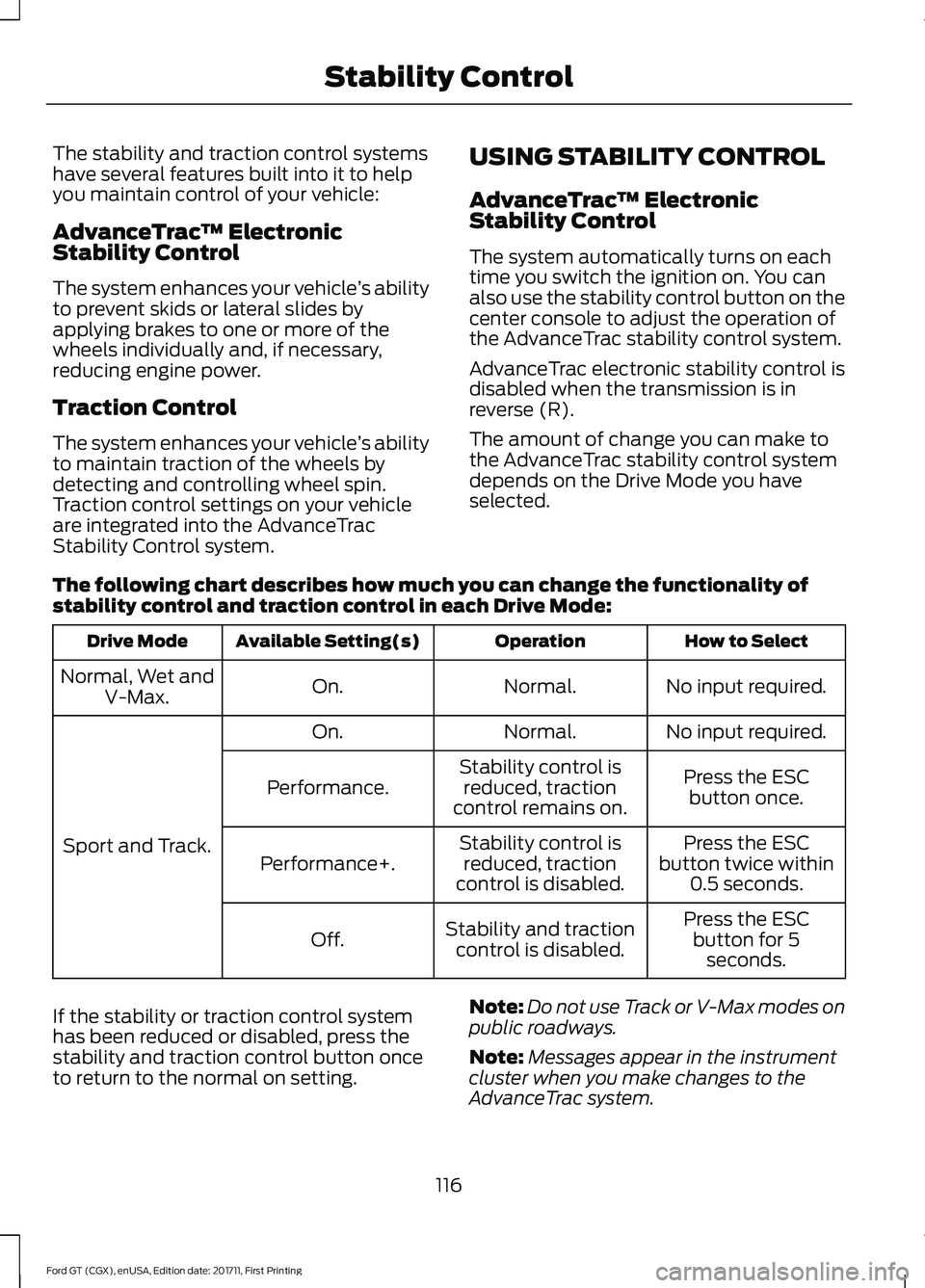
The following chart describes how much you can change the functionality of
stability control and traction control in each Drive Mode: How to Select
Operation
Available Setting(s)
Drive Mode
No input required.
Normal.
On.
Normal, Wet and
V-Max.
No input required.
Normal.
On.
Sport and Track. Press the ESC
button once.
Stability control is
reduced, traction
control remains on.
Performance.
Press the ESC
button twice within 0.5 seconds.
Stability control is
reduced, traction
control is disabled.
Performance+.
Press the ESCbutton for 5 seconds.
Stability and traction
control is disabled.
Off.
If the stability or traction control system
has been reduced or disabled, press the
stability and traction control button once
to return to the normal on setting. Note:
Do not use Track or V-Max modes on
public roadways.
Note: Messages appear in the instrument
cluster when you make changes to the
AdvanceTrac system.
116
Ford GT (CGX), enUSA, Edition date: 201711, First Printing Stability Control
Page 120 of 325
Note:
When you start your vehicle,
AdvanceTrac turns on for all drive modes.
It does not remember the previous setting.
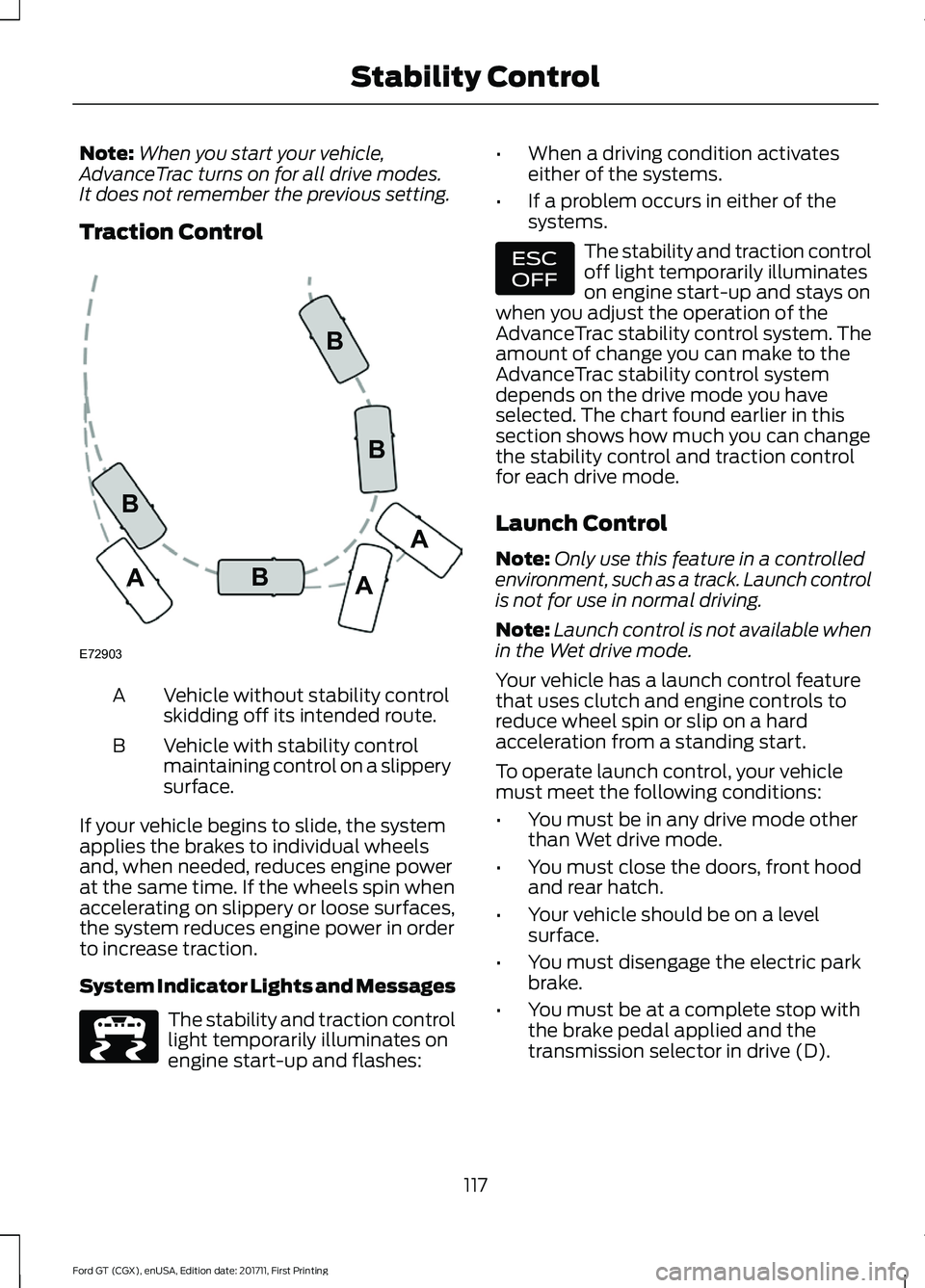
Traction Control Vehicle without stability control
skidding off its intended route.
A
Vehicle with stability control
maintaining control on a slippery
surface.
B
If your vehicle begins to slide, the system
applies the brakes to individual wheels
and, when needed, reduces engine power
at the same time. If the wheels spin when
accelerating on slippery or loose surfaces,
the system reduces engine power in order
to increase traction.
System Indicator Lights and Messages The stability and traction control
light temporarily illuminates on
engine start-up and flashes: •
When a driving condition activates
either of the systems.
• If a problem occurs in either of the
systems. The stability and traction control
off light temporarily illuminates
on engine start-up and stays on
when you adjust the operation of the
AdvanceTrac stability control system. The
amount of change you can make to the
AdvanceTrac stability control system
depends on the drive mode you have
selected. The chart found earlier in this
section shows how much you can change
the stability control and traction control
for each drive mode.
Launch Control
Note: Only use this feature in a controlled
environment, such as a track. Launch control
is not for use in normal driving.
Note: Launch control is not available when
in the Wet drive mode.
Your vehicle has a launch control feature
that uses clutch and engine controls to
reduce wheel spin or slip on a hard
acceleration from a standing start.
To operate launch control, your vehicle
must meet the following conditions:
• You must be in any drive mode other
than Wet drive mode.
• You must close the doors, front hood
and rear hatch.
• Your vehicle should be on a level
surface.
• You must disengage the electric park
brake.
• You must be at a complete stop with
the brake pedal applied and the
transmission selector in drive (D).
117
Ford GT (CGX), enUSA, Edition date: 201711, First Printing Stability ControlE72903A
AA
B
BB
B E236447 E236448
Page 124 of 325
PRINCIPLE OF OPERATION
Cruise control lets you maintain a set
speed without keeping your foot on the
accelerator pedal. You can use cruise
control when your vehicle speed is greater
than 20 mph (30 km/h).
USING CRUISE CONTROL WARNINGS
Do not use cruise control on winding
roads, in heavy traffic or when the
road surface is slippery. This could
result in loss of vehicle control, serious
injury or death. When you are going downhill, your
vehicle speed could increase above
the set speed. The system does not
apply the brakes. Note:
Cruise control disengages if the
vehicle speed decreases more than 10 mph
(16 km/h) below the set speed when driving
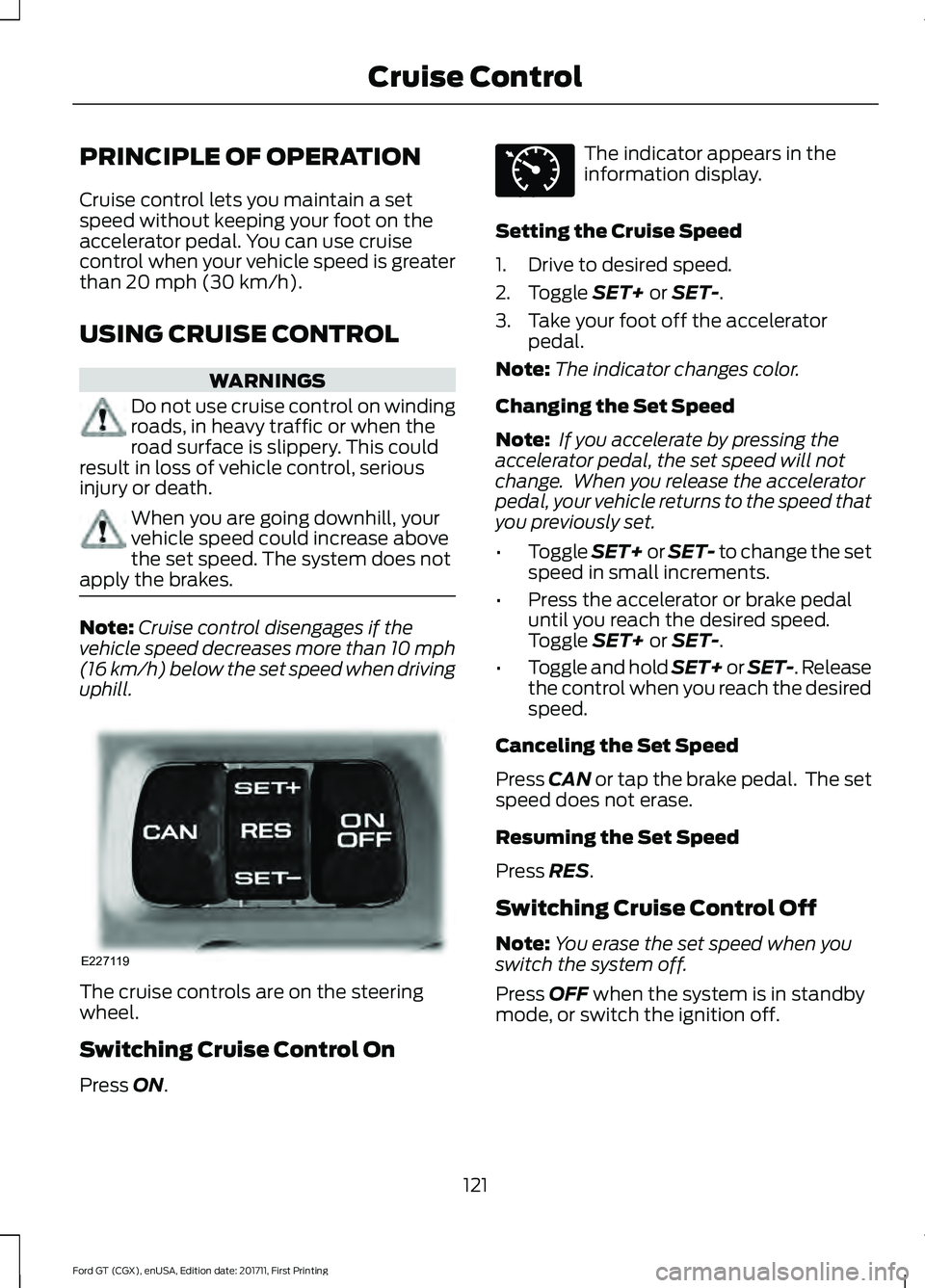
uphill. The cruise controls are on the steering
wheel.
Switching Cruise Control On
Press
ON. The indicator appears in the
information display.
Setting the Cruise Speed
1. Drive to desired speed.
2. Toggle
SET+ or SET-.
3. Take your foot off the accelerator pedal.
Note: The indicator changes color.
Changing the Set Speed
Note: If you accelerate by pressing the
accelerator pedal, the set speed will not
change. When you release the accelerator
pedal, your vehicle returns to the speed that
you previously set.
• Toggle
SET+ or SET- to change the set
speed in small increments.
• Press the accelerator or brake pedal
until you reach the desired speed.
Toggle
SET+ or SET-.
• Toggle and hold SET+ or SET-. Release
the control when you reach the desired
speed.
Canceling the Set Speed
Press
CAN or tap the brake pedal. The set
speed does not erase.
Resuming the Set Speed
Press
RES.
Switching Cruise Control Off
Note: You erase the set speed when you
switch the system off.
Press
OFF when the system is in standby
mode, or switch the ignition off.
121
Ford GT (CGX), enUSA, Edition date: 201711, First Printing Cruise ControlE227119 E71340
Page 126 of 325
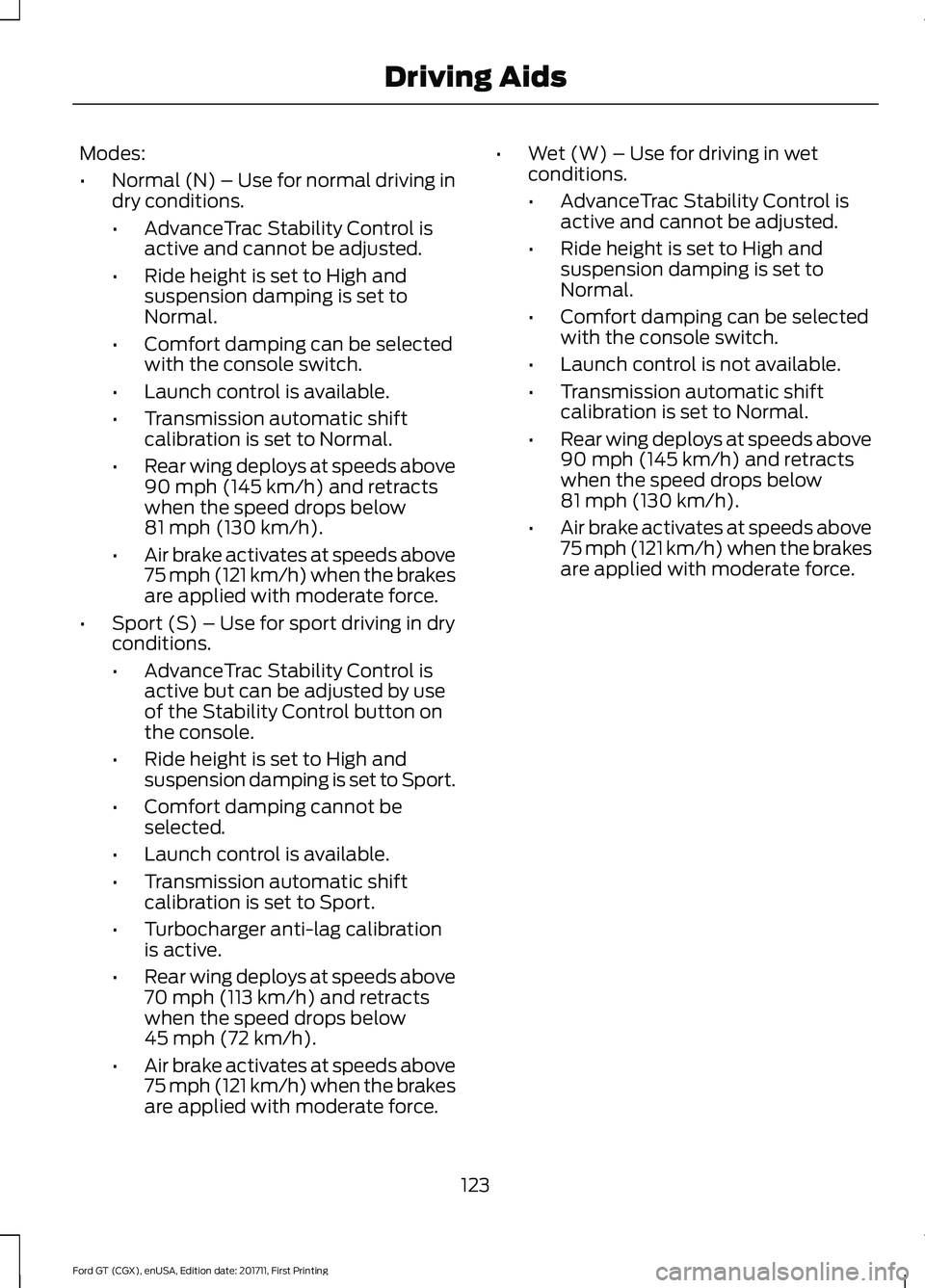
Modes:
•
Normal (N) – Use for normal driving in
dry conditions.
•AdvanceTrac Stability Control is
active and cannot be adjusted.
• Ride height is set to High and
suspension damping is set to
Normal.
• Comfort damping can be selected
with the console switch.
• Launch control is available.
• Transmission automatic shift
calibration is set to Normal.
• Rear wing deploys at speeds above
90 mph (145 km/h) and retracts
when the speed drops below
81 mph (130 km/h)
.
• Air brake activates at speeds above
75 mph (121 km/h) when the brakes
are applied with moderate force.
• Sport (S) – Use for sport driving in dry
conditions.
•AdvanceTrac Stability Control is
active but can be adjusted by use
of the Stability Control button on
the console.
• Ride height is set to High and
suspension damping is set to Sport.
• Comfort damping cannot be
selected.
• Launch control is available.
• Transmission automatic shift
calibration is set to Sport.
• Turbocharger anti-lag calibration
is active.
• Rear wing deploys at speeds above
70 mph (113 km/h)
and retracts
when the speed drops below
45 mph (72 km/h)
.
• Air brake activates at speeds above
75 mph (121 km/h) when the brakes
are applied with moderate force. •
Wet (W) – Use for driving in wet
conditions.
•AdvanceTrac Stability Control is
active and cannot be adjusted.
• Ride height is set to High and
suspension damping is set to
Normal.
• Comfort damping can be selected
with the console switch.
• Launch control is not available.
• Transmission automatic shift
calibration is set to Normal.
• Rear wing deploys at speeds above
90 mph (145 km/h)
and retracts
when the speed drops below
81 mph (130 km/h)
.
• Air brake activates at speeds above
75 mph (121 km/h) when the brakes
are applied with moderate force.
123
Ford GT (CGX), enUSA, Edition date: 201711, First Printing Driving Aids
Page 127 of 325
•
Track (T) – Optimized settings for
track handling performance. The Track
drive mode should only be used in a
track environment, not on the street,
due to the low ride height. This setting
can only be selected while your vehicle
is in park (P) with the engine running,
and you need to confirm the selection.
•AdvanceTrac Stability Control is
active but can be adjusted by use
of the Stability Control button on
the console.
• Ride height is set to Low and
suspension damping is set to Track.
• Comfort damping cannot be
selected due to low ride height.
• Launch control is available.
• Transmission automatic shift
calibration is set to Sport.
• Turbocharger anti-lag calibration
is active.
• Rear wing deploys and remains
deployed while in Track mode.
When you change to another mode,
the wing lowers once you start to
drive your vehicle, not while it is
stopped.
• Air brake activates at speeds above
75 mph (121 km/h) when the brakes
are applied with moderate force. •
V-Max (V) – Optimized settings for
achieving maximum velocity (top
speed). The V-Max mode should only
be used in a controlled track
environment, not on the street, due to
the low ride height. This setting can
only be selected while your vehicle is
in park (P) with the engine running, and
you need to confirm the selection.
•AdvanceTrac Stability Control is
active and cannot be adjusted.
• Ride height is set to Low and
suspension damping is set to Track.
• Comfort damping cannot be
selected due to low ride height.
• Launch control is available.
• Transmission automatic shift
calibration is set to Sport.
• Rear wing does not deploy.
• Air brake activates at speeds above
75 mph (121 km/h) when the brakes
are applied with moderate force.
Note: When you shut down your vehicle in
V-Max or Track mode, the vehicle returns
to the Normal ride height. When you restart
your vehicle in V-Max or Track mode, you
need to re-acknowledge the drive mode
selection in the information display in order
for the drive mode to reactivate. If you do
not make a selection, the vehicle returns to
the previously selected drive mode.
124
Ford GT (CGX), enUSA, Edition date: 201711, First Printing Driving Aids
Page 137 of 325
BREAKING-IN
You need to break in new tires for
approximately 300 mi (480 km). During
this time, your vehicle may exhibit some
unusual driving characteristics.
You should not drive your Ford GT
aggressively for the first
600 mi
(1,000 km) of vehicle operation. This will
allow for proper break in of the powertrain
and braking systems.
For the first 600 miles (1,000 km):
• Do not apply high load at low engine
speed.
• Do not drive the vehicle at a sustained
high-speed, high load.
• Avoid driving the vehicle at full throttle.
• Drive the vehicle at varying road and
engine speeds.
• Do not drive in competition and race
track conditions.
• Do not use launch control.
• If you are going to use the vehicle on
the race track right after break in,
change the oil after break in.
Cold Engine Operation
The design of your Ford GT restricts engine
power and RPM when the engine is cold.
The engine RPM and power output will be
reduced until the engine reaches full
operating temperature.
Hot Engine Shut down
You should allow your Ford GT engine to
cool down for a few minutes prior to shut
down after high speed or high performance
driving. Allowing the engine to run at light
loads and or idle for a few minutes will
reduce overall engine oil and coolant
temperatures. DRIVING THROUGH WATER WARNING
Do not drive through flowing or deep
water as you may lose control of your
vehicle.
Note:
Driving through standing water can
cause vehicle damage.
Note: Engine damage can occur if water
enters the air filter.
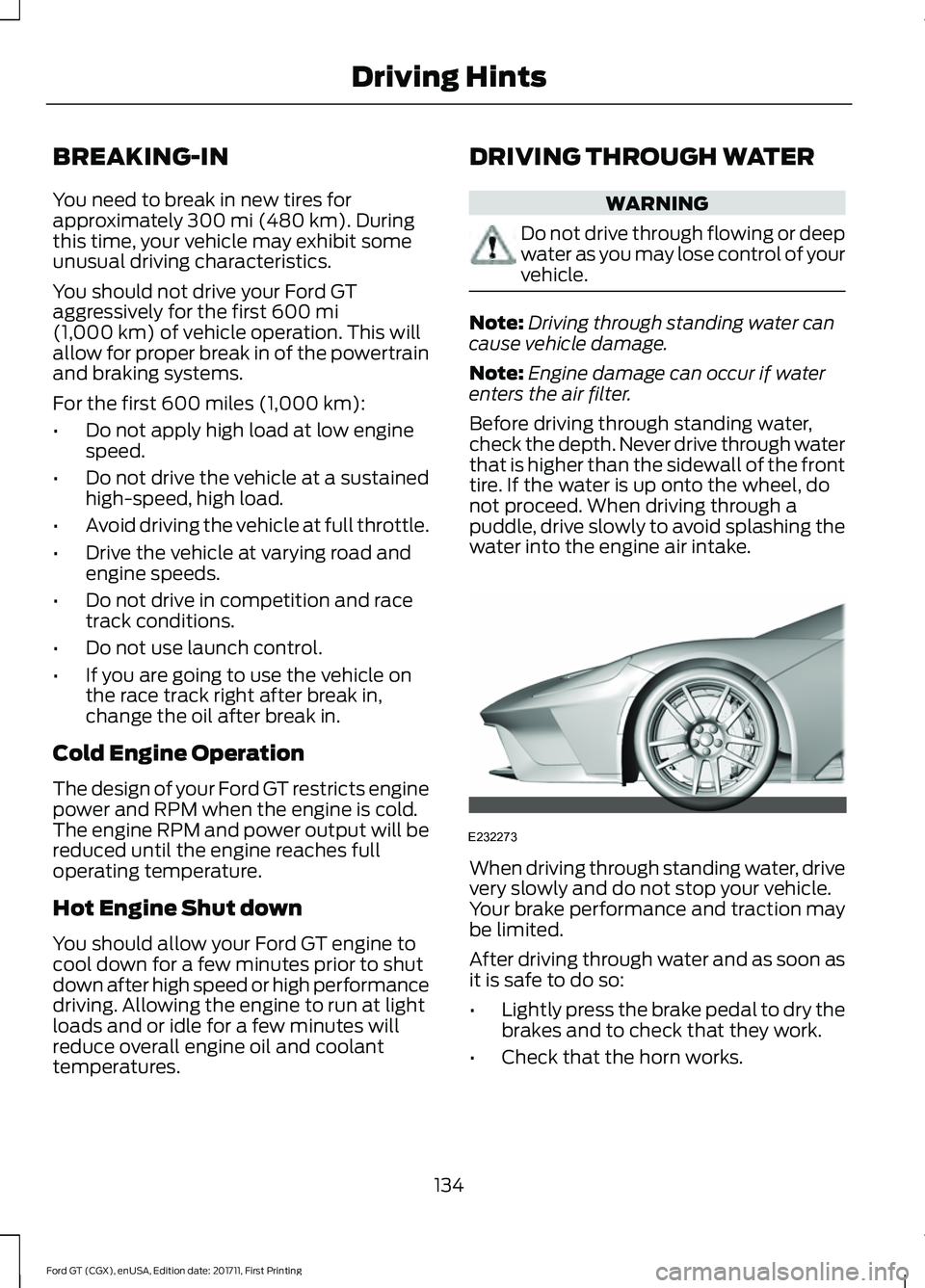
Before driving through standing water,
check the depth. Never drive through water
that is higher than the sidewall of the front
tire. If the water is up onto the wheel, do
not proceed. When driving through a
puddle, drive slowly to avoid splashing the
water into the engine air intake. When driving through standing water, drive
very slowly and do not stop your vehicle.
Your brake performance and traction may
be limited.
After driving through water and as soon as
it is safe to do so:
•
Lightly press the brake pedal to dry the
brakes and to check that they work.
• Check that the horn works.
134
Ford GT (CGX), enUSA, Edition date: 201711, First Printing Driving HintsE232273
Page 182 of 325
Brakes
•
Make sure the brakes and parking brake
release fully.
Tires
• To minimize flat spots on the tires,
inflate all four tires to the
recommended cold pressures listed on
the Safety Compliance Certification
label or Tire Label. When the vehicle is
taken out of storage, reset the tire
pressures as necessary to the
recommended levels listed on the
Safety Compliance Certification label
or Tire Label affixed to your vehicle.
Note: If you store your vehicle in a location
with low ambient temperatures, follow the
instructions for care of summer tires. See
Using Summer Tires (page 198).
Miscellaneous
• Move vehicles at least
25 ft (7.5 m)
every 15 days to lubricate working parts
and prevent flat spots in the tires.
Removing Vehicle From Storage
When your vehicle is ready to come out of
storage, do the following:
• Wash your vehicle to remove any dirt
or grease film build-up on window
surfaces.
• Check windshield wipers for any
deterioration.
• Check under the hood and engine cover
for any foreign material that may have
collected during storage such as mice
or squirrel nests.
• Check the exhaust for any foreign
material that may have collected
during storage.
• Check tire pressures and set tire
inflation per the Tire Label. •
Check brake pedal operation. Drive
your vehicle
15 ft (4.5 m) back and
forth with the brake lightly applied.
• Check fluid levels (including coolant,
oil and gas) to make sure there are no
leaks, and fluids are at recommended
levels.
See an authorized dealer if you have any
concerns or issues.
179
Ford GT (CGX), enUSA, Edition date: 201711, First Printing Vehicle Care
Page 318 of 325
A
A/C
See: Climate Control.......................................... 80
About This Manual...........................................5 Ford GT Concierge Phone Numbers................5
ABS See: Brakes.............................................................. 111
ABS driving hints See: Hints on Driving With Anti-Lock
Brakes................................................................... 111
Accessories.....................................................273
Accessories See: Replacement Parts
Recommendation............................................ 10
Adjusting the Headlamps..........................170 Headlamp Aim Target....................................... 170
Adjusting the Pedals.....................................56
Adjusting the Steering Wheel....................52
Airbag Disposal...............................................39
Air Conditioning See: Climate Control.......................................... 80
Air Filter See: Changing the Engine Air Filter...............171
Alarm See: Anti-Theft Alarm......................................... 51
Anti-Theft Alarm
.............................................51
Arming the Alarm.................................................. 51
Disarming the Alarm............................................ 51
Appendices....................................................288
Apps..................................................................247 ........................................................................\
........... 247
At a Glance........................................................14
Audible Warnings and Indicators.............69 Headlamps On Warning Chime..................... 69
Keyless Warning Alert........................................ 69
Audio Control
...................................................53
Seek, Next or Previous........................................ 53
Audio System
.................................................212
Audio Unit........................................................212
Autolamps........................................................59
Automatic Climate Control
.........................81
Automatic Transmission...........................106
Brake-Shift Interlock......................................... 108
If Your Vehicle Gets Stuck In Mud or Snow................................................................... 110
SelectShift™ Automatic Transmission................................................... 107Understanding the Positions of Your
Automatic Transmission............................ 106
Automatic Transmission Fluid Check.............................................................166
Auxiliary Power Points.................................88 12 Volt DC Power Point...................................... 88
Location................................................................... 88
B
Battery See: Changing the 12V Battery...................... 168
Bonnet Lock See: Opening and Closing the Hood............157
Booster Seats
..................................................22
Types of Booster Seats...................................... 23
Brake Fluid Check.........................................166
Brakes..................................................................111 General Information............................................ 111
Breaking-In......................................................134 Cold Engine Operation..................................... 134
Hot Engine Shut down..................................... 134
C
Cabin Air Filter.................................................85
California Proposition 65...............................9
Capacities and Specifications
...............209
Specifications...................................................... 210
Car Wash See: Cleaning the Exterior................................ 172
Catalytic Converter
......................................103
On-Board Diagnostics (OBD-II)................... 104
Readiness for Inspection and Maintenance (I/M) Testing................................................... 104
Changing a Bulb.............................................171 LED Lamps............................................................. 171
Changing a Fuse
...........................................155
Fuses....................................................................... 155
Changing a Road Wheel
...........................202
Important Information for Lifting or
Jacking.............................................................. 202
Changing the 12V Battery..........................168 Battery Charger and Maintainer................... 168
Battery Management System....................... 169
Changing the Engine Air Filter...................171
Changing the Wiper Blades......................169
Checking the Wiper Blades......................169
315
Ford GT (CGX), enUSA, Edition date: 201711, First Printing Index
Page 320 of 325

Apps........................................................................\
233
Bluetooth Stereo or USB.................................. 231
Sources.................................................................. 230
Supported Media Players, Formats and Metadata Information................................. 233
USB Ports.............................................................. 233
Environment......................................................13
EPB See: Electric Parking Brake............................... 112
Event Data Recording See: Data Recording............................................... 7
Exterior Mirrors................................................62
Fold-Away Exterior Mirrors............................... 62
Power Exterior Mirrors........................................ 62
F
Fastening the Seatbelts..............................26 Seatbelt Locking Modes.................................... 27
Using Seatbelts During Pregnancy................27
Flat Tire Inflation See: Tire Sealant and Inflator Kit.................180
Floor Mats
........................................................135
Foot Pedals See: Adjusting the Pedals................................. 56
Ford Performance...........................................12
Front Passenger Sensing System............35
Fuel and Refueling
........................................94
Fuel Consumption.........................................98 Calculating Fuel Economy............................... 98
Filling the Fuel Tank............................................ 98
Fuel Filler Funnel Location.........................95
Fuel Filter.........................................................167
Fuel Quality
......................................................94
Choosing the Right Fuel.................................... 94
Fuel Shutoff
....................................................136
Fuses.................................................................146
Fuse Specification Chart...........................146 Front Power Distribution Box......................... 146
Passenger Compartment Fuse Panel..........151
Rear Power Distribution Box 1........................ 148
Rear Power Distribution Box 2....................... 150
G
Gauges...............................................................63 Engine Coolant Temperature Gauge............65
Engine Oil Pressure Gauge............................... 65Engine Oil Temperature Gauge.......................
65
Fuel Gauge............................................................. 64
Gauge Mode........................................................... 65
Information Display............................................. 63
Trip Computer....................................................... 64
Gearbox See: Transmission.............................................. 106
General Information on Radio Frequencies..................................................40
Intelligent Access................................................. 40
General Maintenance Information........274 Protecting Your Investment........................... 274
Road Course Maintenance............................. 274
Why Maintain Your Vehicle?.......................... 274
Why Maintain Your Vehicle at Your Certified Ford GT Service Dealership?..................... 274
Getting Assistance Outside the U.S. and Canada..........................................................143
Getting the Services You Need...............140 Away From Home.............................................. 140
Global Opening................................................61 Remote Control Front Windows.................... 62
H
Hazard Flashers
............................................136
Headlamp Adjusting See: Adjusting the Headlamps...................... 170
Heating See: Climate Control.......................................... 80
Hill Start Assist...............................................114 Using Hill Start Assist......................................... 114
Hints on Controlling the Interior Climate............................................................83
Defogging the Side Windows in Cold Weather.............................................................. 84
General Hints......................................................... 83
Quickly Heating the Interior.............................. 83
Recommended Settings for Cooling............84
Recommended Settings for Heating...........84
Hints on Driving With Anti-Lock Brakes...............................................................111
Home Screen.................................................223
Hood Lock See: Opening and Closing the Hood............157
317
Ford GT (CGX), enUSA, Edition date: 201711, First Printing Index