instrument panel FORD GT 2018 User Guide
[x] Cancel search | Manufacturer: FORD, Model Year: 2018, Model line: GT, Model: FORD GT 2018Pages: 325, PDF Size: 6.61 MB
Page 161 of 325
1.
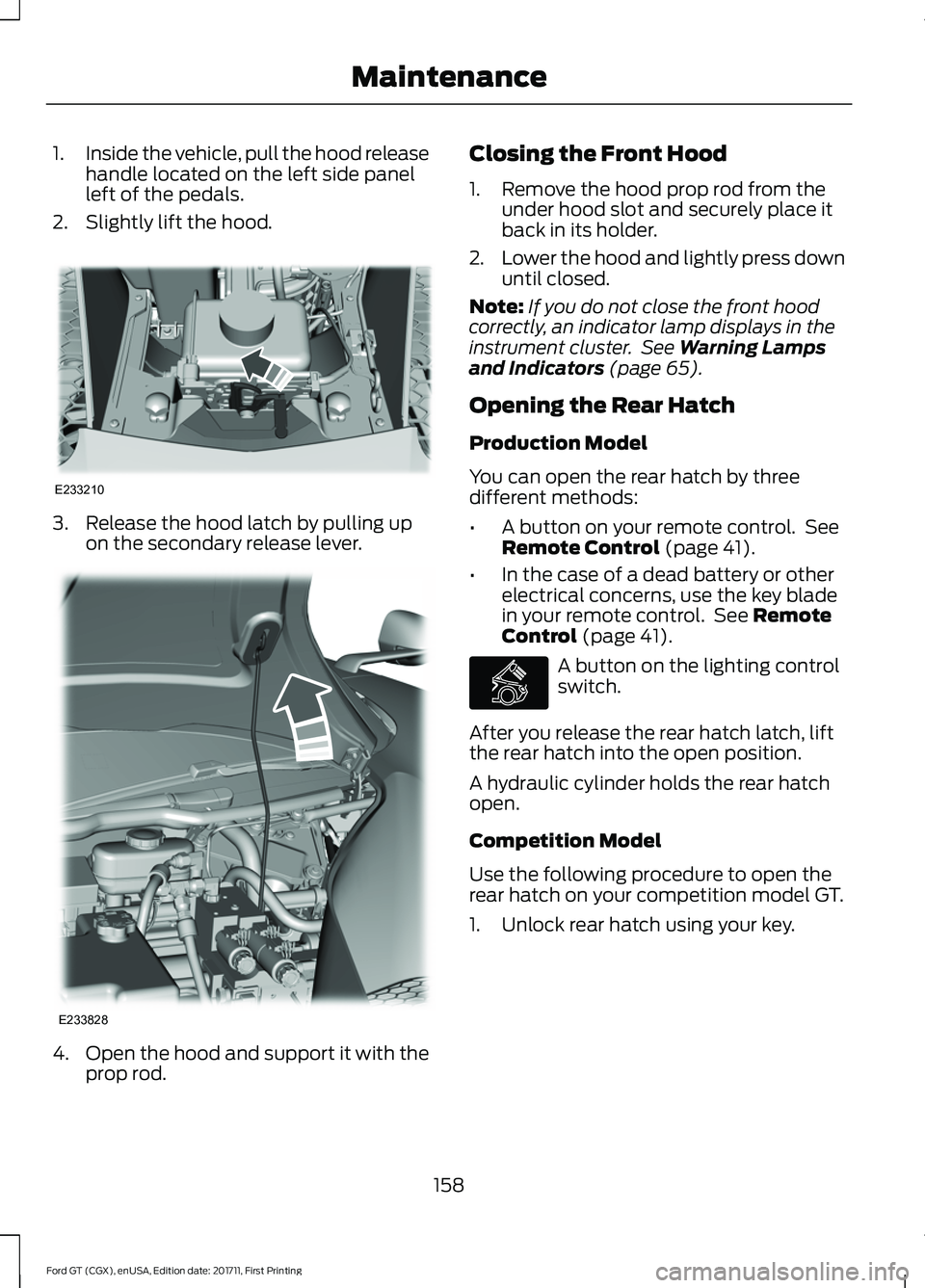
Inside the vehicle, pull the hood release
handle located on the left side panel
left of the pedals.
2. Slightly lift the hood. 3. Release the hood latch by pulling up
on the secondary release lever. 4.
Open the hood and support it with the
prop rod. Closing the Front Hood
1. Remove the hood prop rod from the
under hood slot and securely place it
back in its holder.
2. Lower the hood and lightly press down
until closed.
Note: If you do not close the front hood
correctly, an indicator lamp displays in the
instrument cluster. See Warning Lamps
and Indicators (page 65).
Opening the Rear Hatch
Production Model
You can open the rear hatch by three
different methods:
• A button on your remote control. See
Remote Control
(page 41).
• In the case of a dead battery or other
electrical concerns, use the key blade
in your remote control. See
Remote
Control (page 41). A button on the lighting control
switch.
After you release the rear hatch latch, lift
the rear hatch into the open position.
A hydraulic cylinder holds the rear hatch
open.
Competition Model
Use the following procedure to open the
rear hatch on your competition model GT.
1. Unlock rear hatch using your key.
158
Ford GT (CGX), enUSA, Edition date: 201711, First Printing MaintenanceE233210 E233828 E268917
Page 178 of 325
CLEANING THE WINDOWS AND
WIPER BLADES
Dirty windshield and wipers will result in
poor windshield wiper operation. Keep the
windshield and wiper blades clean to
maintain windshield wiper performance.
To clean exterior glass surfaces and wiper
blades:
•
Clean the exterior surface of the
windshield with a non-abrasive glass
cleaner.
• For windshields contaminated with
tree sap, chemicals, wax or bugs, clean
the outside surface of the windshield
with Motorcraft Bug and Tar Remover.
• Clean the wiper blades with isopropyl
rubbing alcohol or windshield washer
concentrate.
The interior glass surface of the windshield
and engine cover glass, and both the inner
and outer surface of the bulkhead glass,
have a laminate coating that requires
special care.
To clean interior glass surfaces:
• When cleaning the inside of the
windshield, avoid getting any glass
cleaner on the instrument panel or door
panels. Wipe any excess cleaner off
these surfaces immediately.
• Use a microfiber towel and plain water,
or a mixture of one-half water and
one-half white vinegar, to clean the
interior glass surfaces.
Note: Never use alcohol or ammonia based
cleaners, aerosol sprays or abrasive
compounds to clean the interior glass
surfaces of your vehicle. Using improper
cleaning products can cause damage to
your vehicle. CLEANING THE INTERIOR WARNING
Do not use cleaning solvents, bleach
or dye on the vehicle's seatbelts, as
these actions may weaken the belt
webbing. Clean safety belts with water applied with
a soft sponge. Let them dry naturally, away
from artificial heat.
Wipe carbon fiber surfaces with a clean,
damp and soft cloth to remove dust. Then
use a clean, dry and soft cloth to dry these
areas.
Cleaning Alcantara Microfiber
Cloth
Note:
Some models have Alcantara
microfiber cloth fabric on the seats,
headliner, instrument panel and door panels.
Use a soft brush, a clean, dry cloth or
vacuum cleaner to remove dust and loose
dirt from Alcantara cloth surfaces. Gently
wipe the cloth surfaces with a clean, damp
cotton cloth.
Note: Alcantara microfiber cloth fabric are
made of polyester microfiber with
micro-porous polyurethane. Using
commercially available fabric cleaners can
cause permanent damage.
Note: Do not use commercially available
leather and vinyl cleaning products on
Alcantara cloth fabric.
Depending on the type of stain, use water,
lemon juice or pure ethyl alcohol when
cleaning. For cleaning Alcantara microfiber
cloth, refer to the following chart:
175
Ford GT (CGX), enUSA, Edition date: 201711, First Printing Vehicle Care
Page 179 of 325
Cleaning Procedure
Type of Stain
Use lukewarm water and rinse by dabbing
with clean water.
Fruit juice, jam, jelly, syrup or ketchup.
Use cold water and rinse by dabbing with
clean water. Avoid warm water because it
makes these substances coagulate.
Blood, egg, excrement or urine.
Use lukewarm water. If the color remains,
treat with lemon juice and then rinse.
Liquor, alcoholic beverages, wine, beer, cola
and tea.
Use lukewarm water and rinse by dabbing
with clean water.
Indelible pencil, cocoa, chocolate, pastry
with cream or chocolate, ice cream or
mustard.
Use lemon juice, wipe with lukewarm water
and rinse by dabbing with clean water.
Vinegar, hair gel, tomato sauce or coffee
with sugar.
Use ethyl alcohol, then dab with water.
Dye transfer and all other stains.
CLEANING THE INSTRUMENT
PANEL AND INSTRUMENT
CLUSTER LENS WARNING
Do not use chemical solvents or
strong detergents when cleaning the
steering wheel or instrument panel
to avoid contamination of the airbag
system. Note:
Follow the same procedure as
cleaning leather seats for cleaning leather
interior trim surfaces. See Cleaning Leather
Seats (page 176).
Note: If your vehicle has Alcantara or Miko
microfiber cloth trim, follow the cleaning
instructions in this chapter. See
Cleaning
the Interior (page 175).
Clean the carbon fiber portions of the
instrument panel and cluster lens with a
clean, damp and soft cloth, then use a
clean, dry and soft cloth to dry these areas. •
Do not use any household cleaning
products or glass cleaners as these
may damage the finish of the
instrument panel, interior trim and
cluster lens.
• Wash or wipe your hands clean if you
have been in contact with certain
products such as insect repellent and
suntan lotion to avoid possible damage
to the interior painted surfaces.
• Do not allow air fresheners and hand
sanitizers to spill onto interior surfaces.
If a spill occurs, wipe off immediately.
Your warranty may not cover these
damages.
CLEANING LEATHER SEATS
(If
Equipped)
If your vehicle has Alcantara or Miko
microfiber cloth trim, follow the cleaning
instructions in this chapter. See Cleaning
the Interior
(page 175).
176
Ford GT (CGX), enUSA, Edition date: 201711, First Printing Vehicle Care
Page 185 of 325
* When inflation only is required
for a tire or other objects, the
selector must be in the Air
position.
What to do When a Tire Is
Punctured
You can repair a tire puncture within the
tire's tread area in two stages with the kit.
• In the first stage, inflate the tire with a
sealing compound and air. After you
inflate the tire, you will need to drive
the vehicle a short distance (about 4 mi
(6 km) to distribute the sealant in the
tire.
• In the second stage, check the tire
pressure and adjust, if necessary, to the
vehicle's specified tire inflation
pressure.
First Stage: Inflating the Tire with
Sealing Compound and Air WARNINGS
Do not stand directly over the kit
while inflating the tire. If you notice
any unusual bulges or deformations
in the tire's sidewall during inflation, stop
and call roadside assistance. If the tire does not inflate to the
recommended tire pressure within
15 minutes, stop and call roadside
assistance. Do not run the engine when
operating the air compressor unless
the vehicle is outdoors or in a
well-ventilated area. Preparation: Park the vehicle in a safe, level
and secure area, away from moving traffic.
Switch the hazard lights on. Apply the
parking brake and switch the engine off.
Inspect the flat tire for visible damage. Sealant compound contains latex. Use
appropriate precautions to avoid any
allergic reactions.
Do not remove any foreign object that has
pierced the tire. If a puncture is located in
the tire sidewall, stop and call roadside
assistance.
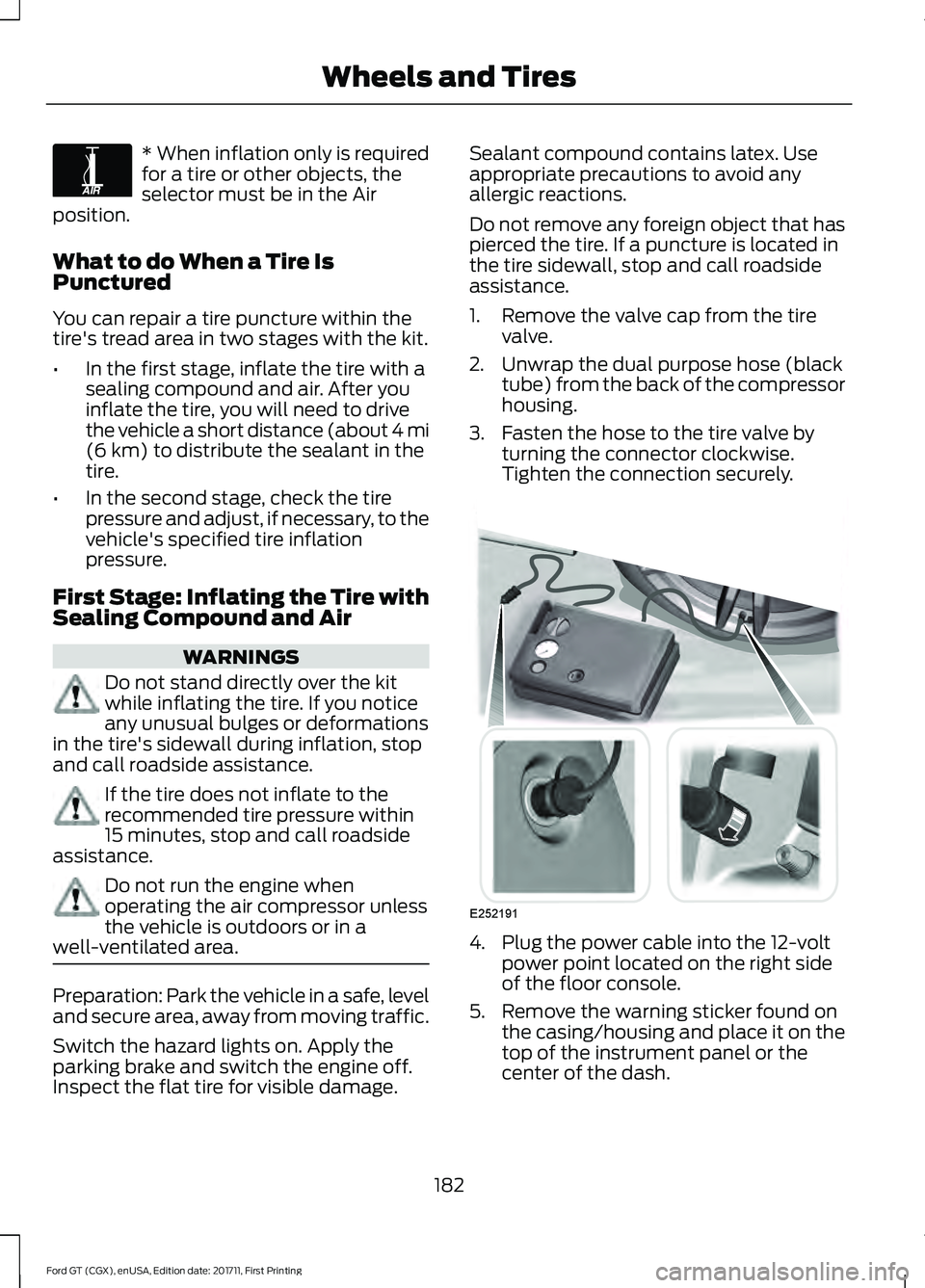
1. Remove the valve cap from the tire
valve.
2. Unwrap the dual purpose hose (black tube) from the back of the compressor
housing.
3. Fasten the hose to the tire valve by turning the connector clockwise.
Tighten the connection securely. 4. Plug the power cable into the 12-volt
power point located on the right side
of the floor console.
5. Remove the warning sticker found on the casing/housing and place it on the
top of the instrument panel or the
center of the dash.
182
Ford GT (CGX), enUSA, Edition date: 201711, First Printing Wheels and TiresE175978 E252191
Page 210 of 325
VEHICLE IDENTIFICATION
NUMBER
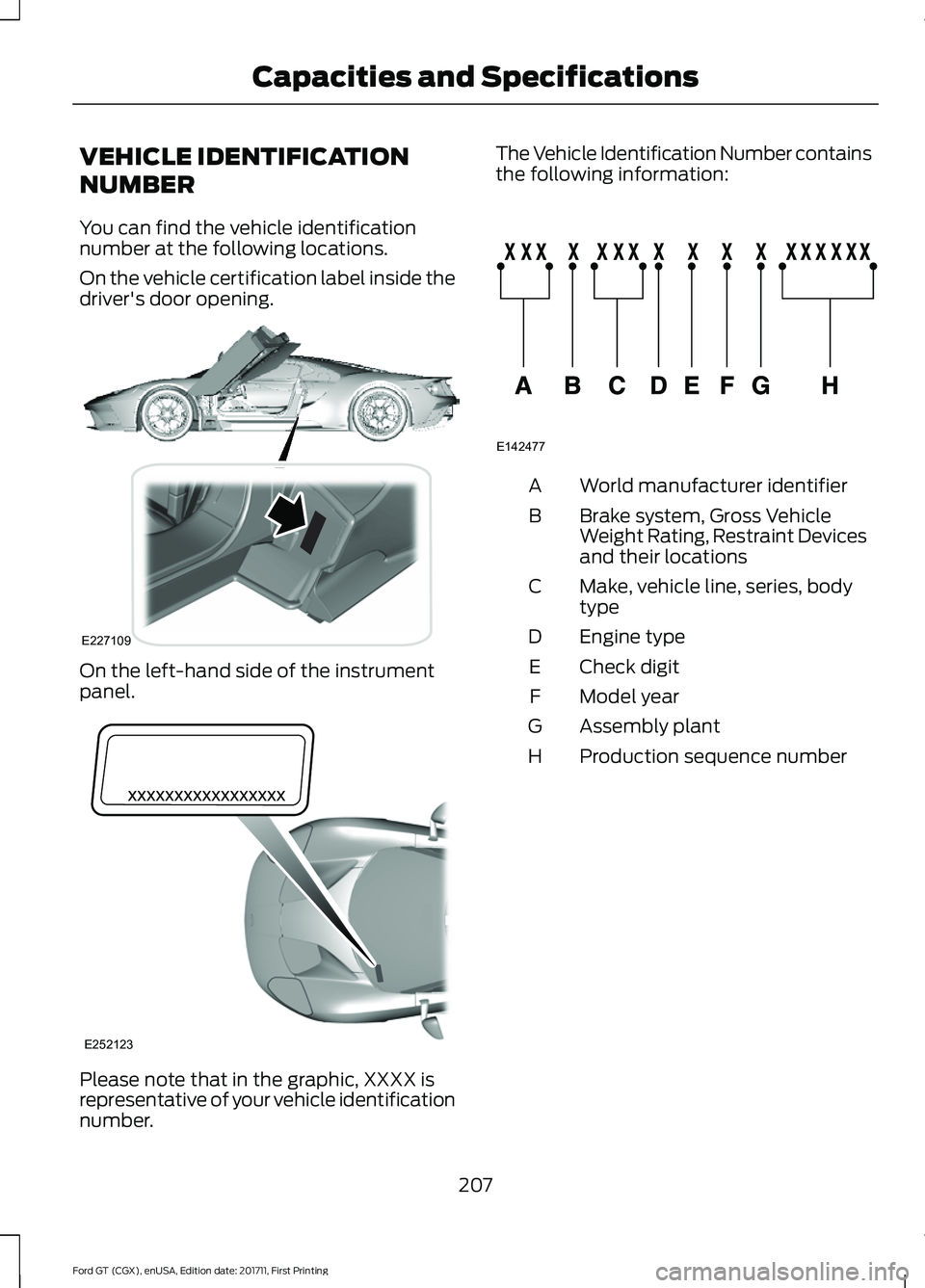
You can find the vehicle identification
number at the following locations.
On the vehicle certification label inside the
driver's door opening.
On the left-hand side of the instrument
panel.
Please note that in the graphic, XXXX is
representative of your vehicle identification
number. The Vehicle Identification Number contains
the following information:
World manufacturer identifier
A
Brake system, Gross Vehicle
Weight Rating, Restraint Devices
and their locations
B
Make, vehicle line, series, body
type
C
Engine type
D
Check digit
E
Model year
F
Assembly plant
G
Production sequence number
H
207
Ford GT (CGX), enUSA, Edition date: 201711, First Printing Capacities and SpecificationsE227109 E252123 E142477
Page 215 of 325
AUDIO UNIT
WARNING
Driving while distracted can result in
loss of vehicle control, crash and
injury. We strongly recommend that
you use extreme caution when using any
device that may take your focus off the
road. Your primary responsibility is the safe
operation of your vehicle. We recommend
against the use of any hand-held device
while driving and encourage the use of
voice-operated systems when possible.
Make sure you are aware of all applicable
local laws that may affect the use of
electronic devices while driving. You can access your audio features with
the touchscreen and steering wheel
controls. See your SYNC information.
The power button is to the left of the
display screen.
USB PORT (If Equipped)
The USB port is on the bottom of the
instrument panel.
The USB port allows you to plug in media
playing devices, memory sticks and charge
devices (if supported). See your SYNC
information.
212
Ford GT (CGX), enUSA, Edition date: 201711, First Printing Audio System
Page 236 of 325
Function
Button
Composers
This button allows you to choose a specific
letter to view within the category you are
browsing.
A-Z Jump
If available, this allows you to browse the
folders and files on your USB device.
Explore Device
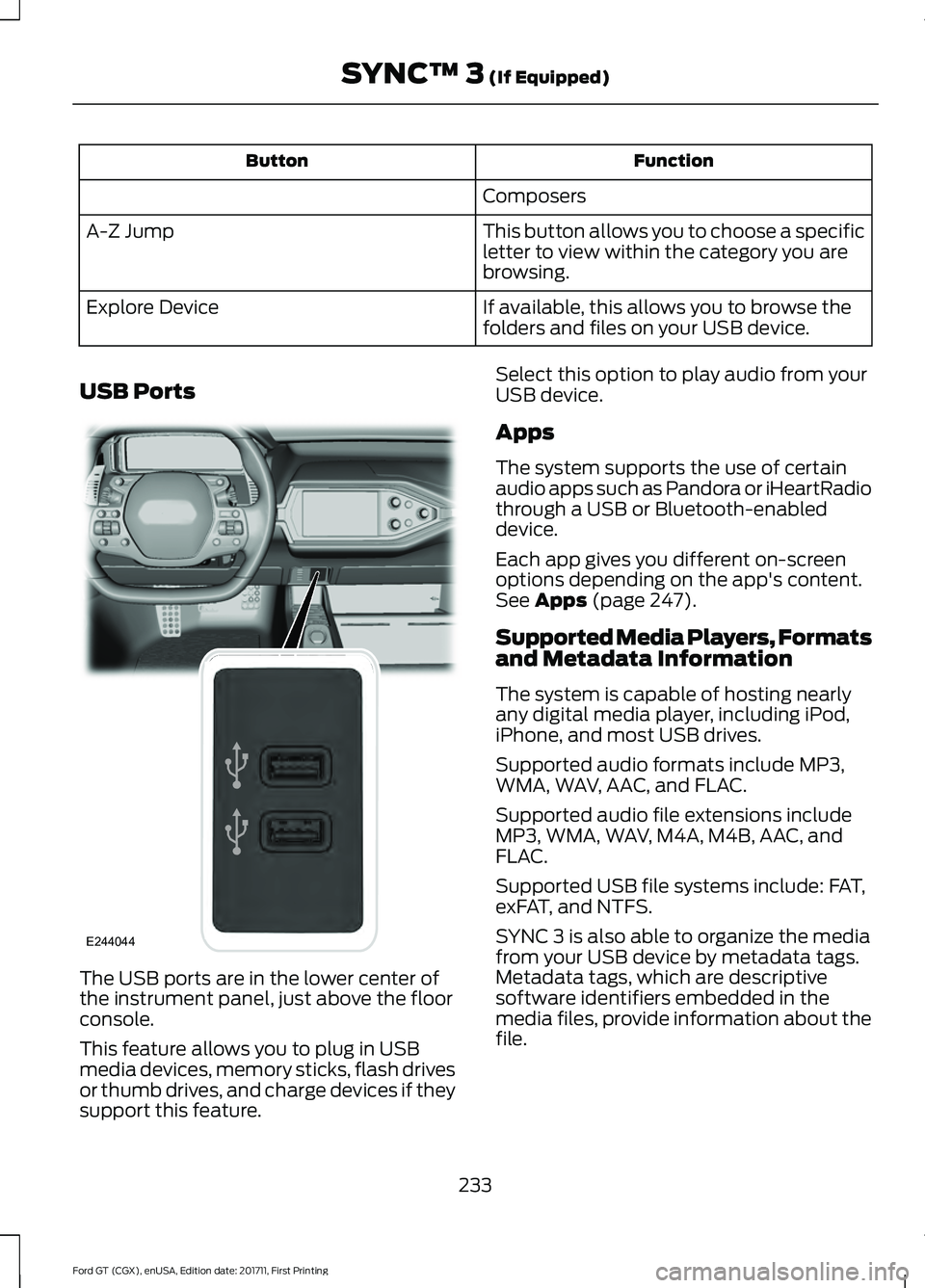
USB Ports The USB ports are in the lower center of
the instrument panel, just above the floor
console.
This feature allows you to plug in USB
media devices, memory sticks, flash drives
or thumb drives, and charge devices if they
support this feature. Select this option to play audio from your
USB device.
Apps
The system supports the use of certain
audio apps such as Pandora or iHeartRadio
through a USB or Bluetooth-enabled
device.
Each app gives you different on-screen
options depending on the app's content.
See Apps (page 247).
Supported Media Players, Formats
and Metadata Information
The system is capable of hosting nearly
any digital media player, including iPod,
iPhone, and most USB drives.
Supported audio formats include MP3,
WMA, WAV, AAC, and FLAC.
Supported audio file extensions include
MP3, WMA, WAV, M4A, M4B, AAC, and
FLAC.
Supported USB file systems include: FAT,
exFAT, and NTFS.
SYNC 3 is also able to organize the media
from your USB device by metadata tags.
Metadata tags, which are descriptive
software identifiers embedded in the
media files, provide information about the
file.
233
Ford GT (CGX), enUSA, Edition date: 201711, First Printing SYNC™ 3
(If Equipped)E244044
Page 319 of 325
Child Restraint and Seatbelt
Maintenance..................................................31
Child Restraint Positioning.........................24
Child Safety........................................................17
General Information............................................. 17
Cleaning Leather Seats
...............................176
Cleaning Products.........................................172
Materials................................................................. 172
Cleaning the Engine.....................................174
Cleaning the Exterior....................................172 Exterior Plastic Parts.......................................... 174
Matte Paint Finish............................................... 173
Raising the Rear Wing....................................... 174
Standard Paint Finish........................................ 173
Under Hood........................................................... 174
Cleaning the Instrument Panel and Instrument Cluster Lens..........................176
Cleaning the Interior.....................................175 Cleaning Alcantara Microfiber Cloth............175
Cleaning the Wheels....................................177
Cleaning the Windows and Wiper Blades
.............................................................175
Climate Control..............................................80
Coolant Check See: Engine Coolant Check............................. 162
Crash Sensors and Airbag Indicator.......38
Cruise Control
..................................................53
Principle of Operation........................................ 121
Cruise control See: Using Cruise Control................................. 121
Cup Holders
.....................................................89
Customer Assistance.................................140
D
Data Recording
..................................................7
Event Data Recording........................................... 8
Service Data Recording......................................... 7
Daytime Running Lamps
.............................59
Direction Indicators.......................................60
Doors and Locks.............................................46
Drive Mode Control.......................................54 Active Aerodynamics ....................................... 126
Damper Comfort Mode.................................... 126
Drive Mode Selection......................................... 122
Front Lift................................................................. 126
Driver and Passenger Airbags...................34 Children and Airbags........................................... 34Proper Driver and Front Passenger Seating
Adjustment........................................................ 34
Driver and Passenger Knee Airbags
.........37
Driving Aids......................................................122
Driving at High Speed................................202 Tire Pressure - Speeds Greater Than
........................................................................\
..... 202
Driving Hints
...................................................134
Driving Through Water................................134
DRL See: Daytime Running Lamps......................... 59
E
Electric Parking Brake
...................................112
Applying the Electric Parking brake..............112
Battery With No Charge.................................... 113
Releasing the Electric Parking Brake............113
Emergency Door Release............................49
Emission Control System...........................99 On-Board Diagnostics (OBD-II)................... 100
Readiness for Inspection and Maintenance (I/M) Testing................................................... 100
Emission Law
.................................................102
Noise Emissions Warranty, Prohibited
Tampering Acts and Maintenance..........103
Tampering With a Noise Control System............................................................... 102
End User License Agreement.................288 VEHICLE SOFTWARE END USER LICENSE
AGREEMENT (EULA) ................................ 288
Engine Coolant Check
................................162
Adding Coolant.................................................... 162
Coolant Change.................................................. 164
Engine Coolant Temperature Management................................................... 165
Fail-Safe Cooling................................................ 164
Recycled Coolant................................................ 163
Severe Climates.................................................. 164
Engine Emission Control
............................102
Engine Immobilizer See: Passive Anti-Theft System..................... 50
Engine Oil Check............................................161 Adding Engine Oil................................................ 161
Engine Oil Dipstick........................................161
Engine Specifications................................204
Entertainment..............................................230 AM/FM Radio....................................................... 231
316
Ford GT (CGX), enUSA, Edition date: 201711, First Printing Index
Page 321 of 325
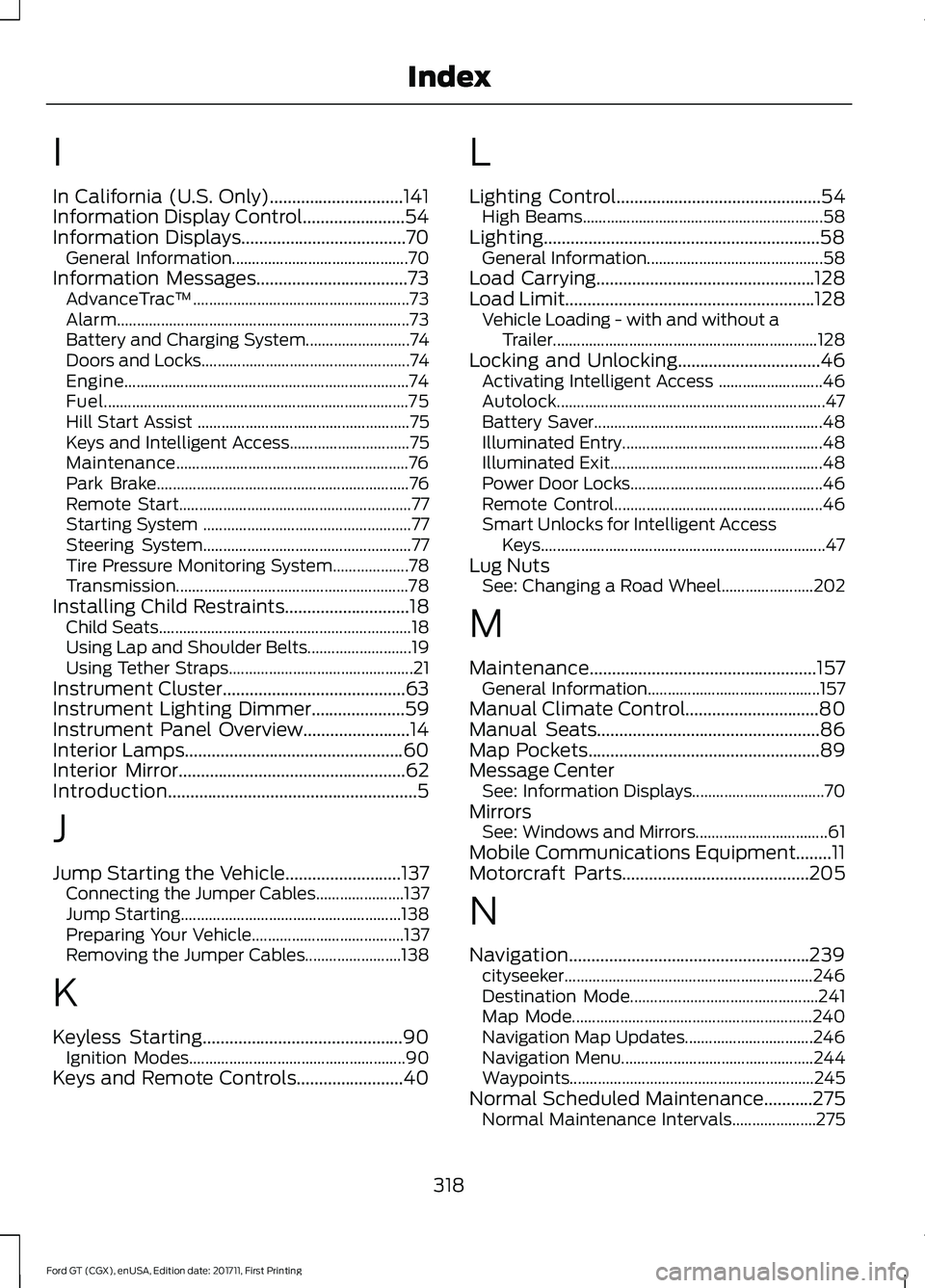
I
In California (U.S. Only)..............................141
Information Display Control.......................54
Information Displays.....................................70
General Information............................................ 70
Information Messages
..................................73
AdvanceTrac ™...................................................... 73
Alarm........................................................................\
. 73
Battery and Charging System.......................... 74
Doors and Locks.................................................... 74
Engine....................................................................... 74
Fuel........................................................................\
.... 75
Hill Start Assist ..................................................... 75
Keys and Intelligent Access.............................. 75
Maintenance.......................................................... 76
Park Brake............................................................... 76
Remote Start.......................................................... 77
Starting System .................................................... 77
Steering System.................................................... 77
Tire Pressure Monitoring System................... 78
Transmission.......................................................... 78
Installing Child Restraints
............................18
Child Seats............................................................... 18
Using Lap and Shoulder Belts.......................... 19
Using Tether Straps.............................................. 21
Instrument Cluster
.........................................63
Instrument Lighting Dimmer.....................59
Instrument Panel Overview........................14
Interior Lamps
.................................................60
Interior Mirror...................................................62
Introduction........................................................5
J
Jump Starting the Vehicle
..........................137
Connecting the Jumper Cables...................... 137
Jump Starting....................................................... 138
Preparing Your Vehicle...................................... 137
Removing the Jumper Cables........................ 138
K
Keyless Starting
.............................................90
Ignition Modes...................................................... 90
Keys and Remote Controls........................40 L
Lighting Control
..............................................54
High Beams............................................................ 58
Lighting..............................................................58 General Information............................................ 58
Load Carrying.................................................128
Load Limit........................................................128 Vehicle Loading - with and without a
Trailer.................................................................. 128
Locking and Unlocking
................................46
Activating Intelligent Access .......................... 46
Autolock................................................................... 47
Battery Saver......................................................... 48
Illuminated Entry.................................................. 48
Illuminated Exit..................................................... 48
Power Door Locks................................................ 46
Remote Control.................................................... 46
Smart Unlocks for Intelligent Access Keys....................................................................... 47
Lug Nuts See: Changing a Road Wheel....................... 202
M
Maintenance...................................................157 General Information........................................... 157
Manual Climate Control
..............................80
Manual Seats..................................................86
Map Pockets....................................................89
Message Center See: Information Displays................................. 70
Mirrors See: Windows and Mirrors................................. 61
Mobile Communications Equipment........11
Motorcraft Parts
..........................................205
N
Navigation......................................................239 cityseeker.............................................................. 246
Destination Mode............................................... 241
Map Mode............................................................ 240
Navigation Map Updates................................ 246
Navigation Menu................................................ 244
Waypoints............................................................. 245
Normal Scheduled Maintenance...........275 Normal Maintenance Intervals..................... 275
318
Ford GT (CGX), enUSA, Edition date: 201711, First Printing Index