remote control FORD GT 2018 User Guide
[x] Cancel search | Manufacturer: FORD, Model Year: 2018, Model line: GT, Model: FORD GT 2018Pages: 325, PDF Size: 6.61 MB
Page 51 of 325
Note:
The doors will not autounlock if you
electronically lock your vehicle after you
switch the ignition off and before you open
the driver door.
Enabling or Disabling Autolock and
Autounlock
Note: You can switch autounlock and
autolock on or off independently of each
other.
Autolock is not configurable in all markets.
If the autolock settings are not available
in your information display, then the
system is not configurable. See General
Information (page 70).
Illuminated Entry
(If Equipped)
The interior lamp illuminates when you
unlock the doors with the remote entry
system.
The illuminated entry system turns off the
lights if:
• The ignition is on.
• You press the remote control lock
button.
• After 25 seconds of illumination.
The light does not turn off if:
• You switch them on with the lamp
control.
• Any door is open.
Illuminated Exit
(If Equipped)
The interior lamp illuminates when all
doors are closed and you switch the
ignition off.
The lamp turns off if all the doors remain
closed and:
• 25 seconds elapse.
• You press the push button ignition
switch. Battery Saver
If you leave on the courtesy lamps, dome
lamps or headlamps, the battery saver
turns them off 10 minutes after you switch
the ignition off.
Accessory Mode Battery Saver for
Intelligent Access Keys
If you leave your vehicle switched on, it
shuts off when it detects a certain amount
of battery drain, or after 45 minutes.
OPENING THE DOORS
Note:
While your vehicle is in motion, the
door release buttons only function if you
press the interior unlock button and door
interior release button within two seconds.
Opening the Doors from Inside Press the door release button
located on the arm rest to
release the door. Push the door
out and up to open the door. The hydraulic
lift cylinder assists in the door movement
once you start to open the door.
48
Ford GT (CGX), enUSA, Edition date: 201711, First Printing Doors and LocksE232417
Page 53 of 325
PASSIVE ANTI-THEFT
SYSTEM
Note:
The system is not compatible with
non-Ford aftermarket remote start systems.
Use of these systems may result in vehicle
starting problems and a loss of security
protection.
Note: Metallic objects, electronic devices
or a second coded key on the same key
chain may cause vehicle starting problems
if they are too close to the key when starting
your vehicle. Prevent these objects from
touching the coded key while starting your
vehicle. Switch the ignition off, move all
objects on the key chain away from the
coded key and restart your vehicle if a
problem occurs.
Note: Do not leave a duplicate coded key
in your vehicle. Always take your keys and
lock all doors when leaving your vehicle.
SecuriLock
The system helps prevent your vehicle
from starting unless you use a coded key
programmed to your vehicle. Using the
wrong key may prevent your vehicle from
starting. A message may appear in the
information display.
If you are unable to start your vehicle with
a correctly coded key, it is not operating
properly. A message may appear in the
information display.
Automatic Arming
Your vehicle arms immediately after
switching the ignition off.
Automatic Disarming
Switching the ignition on with a coded key
disarms your vehicle. Replacement Keys
Note:
Your vehicle comes equipped with
two intelligent access keys.
The intelligent access key functions as a
programmed key that operates the driver
door lock and activates the intelligent
access with push button start system, as
well as a remote control.
If your programmed transmitters are lost
or stolen and you do not have an extra
coded key, contact the Ford GT concierge
to have your Ford GT transported to your
Certified Ford GT Service Dealership to
erase the key codes from your vehicle and
program new coded keys. See About This
Manual (page 5).
Store an extra programmed key away from
your vehicle in a safe place to help prevent
any inconveniences. See your authorized
dealer to purchase additional spare or
replacement keys.
Programming a Spare Intelligent
Access Key
Note: You can program a maximum of four
intelligent access keys to your vehicle.
You must have two previously
programmed intelligent access keys inside
your vehicle and the new unprogrammed
intelligent access keys readily accessible.
See an authorized dealer to have the spare
key programmed if two previously
programmed keys are not available.
Make sure that your vehicle is off before
beginning this procedure. Make sure that
you close all the doors before beginning
and that they remain closed throughout
the procedure. Perform all steps within 30
seconds of starting the sequence. Stop
and wait for at least one minute before
starting again if you perform any steps out
of sequence.
Read and understand the entire procedure
before you begin.
50
Ford GT (CGX), enUSA, Edition date: 201711, First Printing Security
Page 54 of 325
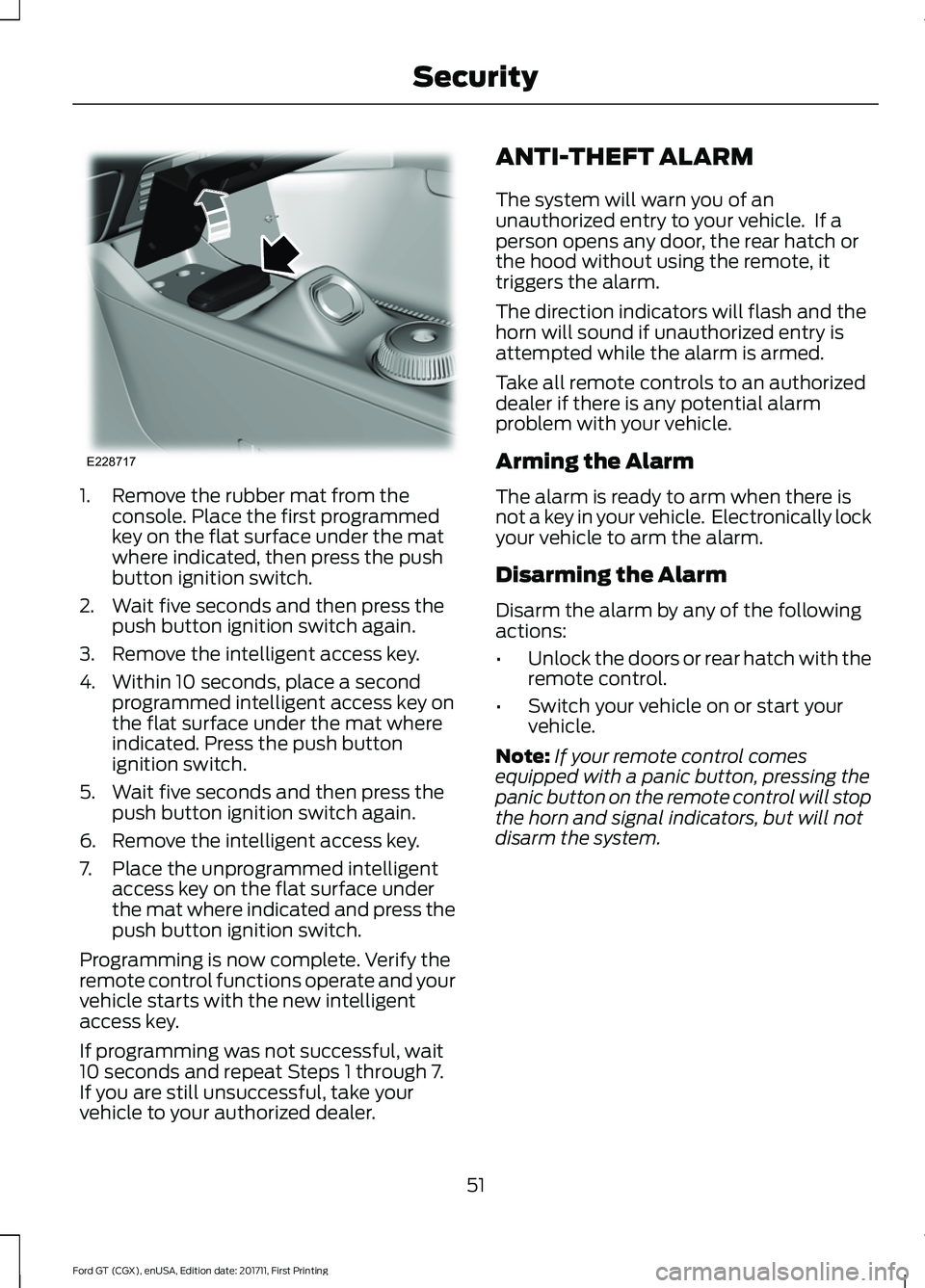
1. Remove the rubber mat from the
console. Place the first programmed
key on the flat surface under the mat
where indicated, then press the push
button ignition switch.
2. Wait five seconds and then press the push button ignition switch again.
3. Remove the intelligent access key.
4. Within 10 seconds, place a second programmed intelligent access key on
the flat surface under the mat where
indicated. Press the push button
ignition switch.
5. Wait five seconds and then press the push button ignition switch again.
6. Remove the intelligent access key.
7. Place the unprogrammed intelligent access key on the flat surface under
the mat where indicated and press the
push button ignition switch.
Programming is now complete. Verify the
remote control functions operate and your
vehicle starts with the new intelligent
access key.
If programming was not successful, wait
10 seconds and repeat Steps 1 through 7.
If you are still unsuccessful, take your
vehicle to your authorized dealer. ANTI-THEFT ALARM
The system will warn you of an
unauthorized entry to your vehicle. If a
person opens any door, the rear hatch or
the hood without using the remote, it
triggers the alarm.
The direction indicators will flash and the
horn will sound if unauthorized entry is
attempted while the alarm is armed.
Take all remote controls to an authorized
dealer if there is any potential alarm
problem with your vehicle.
Arming the Alarm
The alarm is ready to arm when there is
not a key in your vehicle. Electronically lock
your vehicle to arm the alarm.
Disarming the Alarm
Disarm the alarm by any of the following
actions:
•
Unlock the doors or rear hatch with the
remote control.
• Switch your vehicle on or start your
vehicle.
Note: If your remote control comes
equipped with a panic button, pressing the
panic button on the remote control will stop
the horn and signal indicators, but will not
disarm the system.
51
Ford GT (CGX), enUSA, Edition date: 201711, First Printing SecurityE228717
Page 63 of 325
To switch the system on:
•
For vehicles sold in the United States,
the lighting control must be in the
autolamps position. The lamps turn on
in daylight and turn the headlamps on
when ambient light is low. You can
enable this feature in the information
display. See Information Displays
(page 70).
• For vehicles sold in Canada, daytime
running lamps turn on in both off and
autolamps position. You cannot
disable this feature.
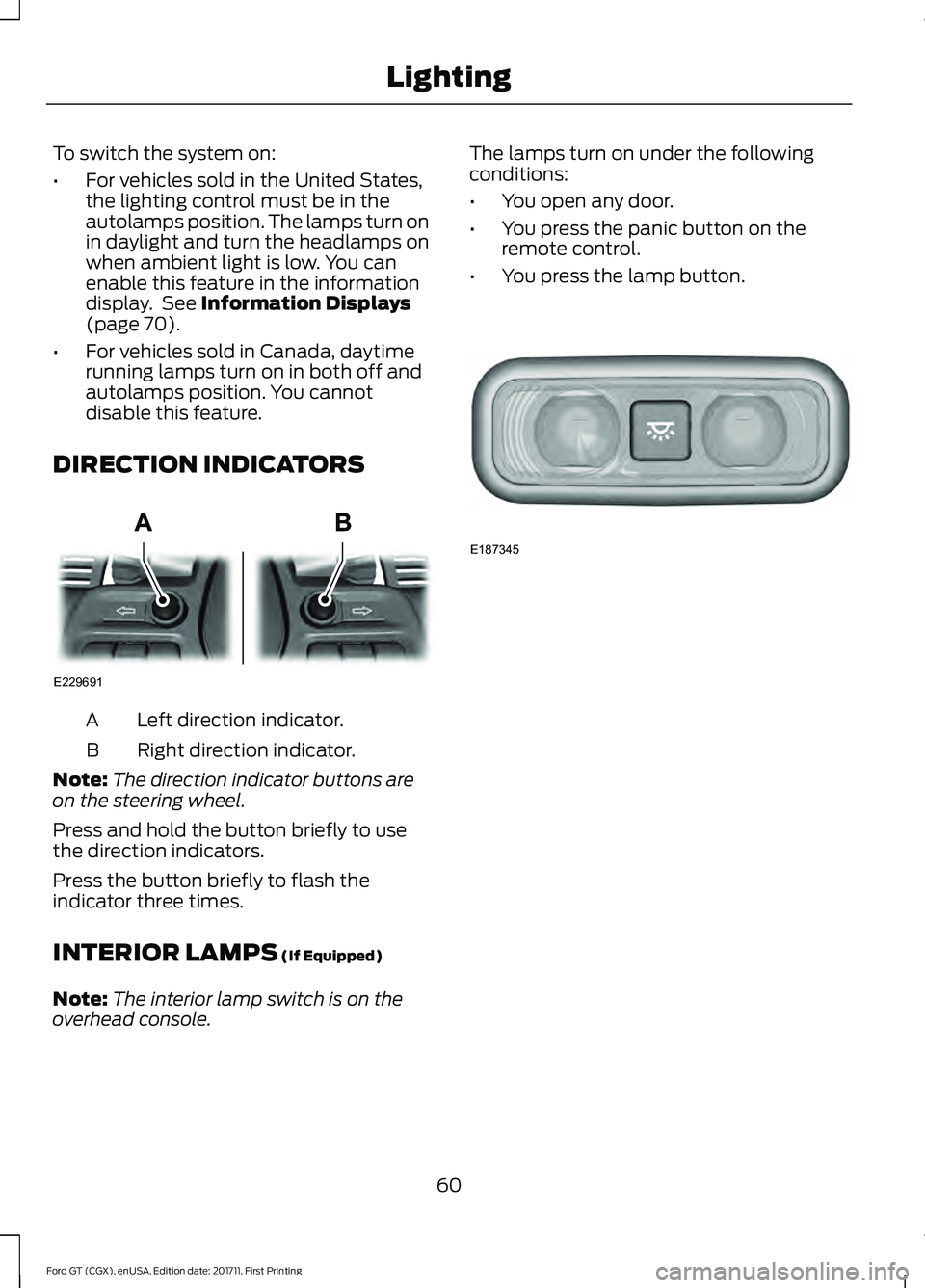
DIRECTION INDICATORS Left direction indicator.
A
Right direction indicator.
B
Note: The direction indicator buttons are
on the steering wheel.
Press and hold the button briefly to use
the direction indicators.
Press the button briefly to flash the
indicator three times.
INTERIOR LAMPS
(If Equipped)
Note: The interior lamp switch is on the
overhead console. The lamps turn on under the following
conditions:
•
You open any door.
• You press the panic button on the
remote control.
• You press the lamp button. 60
Ford GT (CGX), enUSA, Edition date: 201711, First Printing LightingE229691 E187345
Page 64 of 325
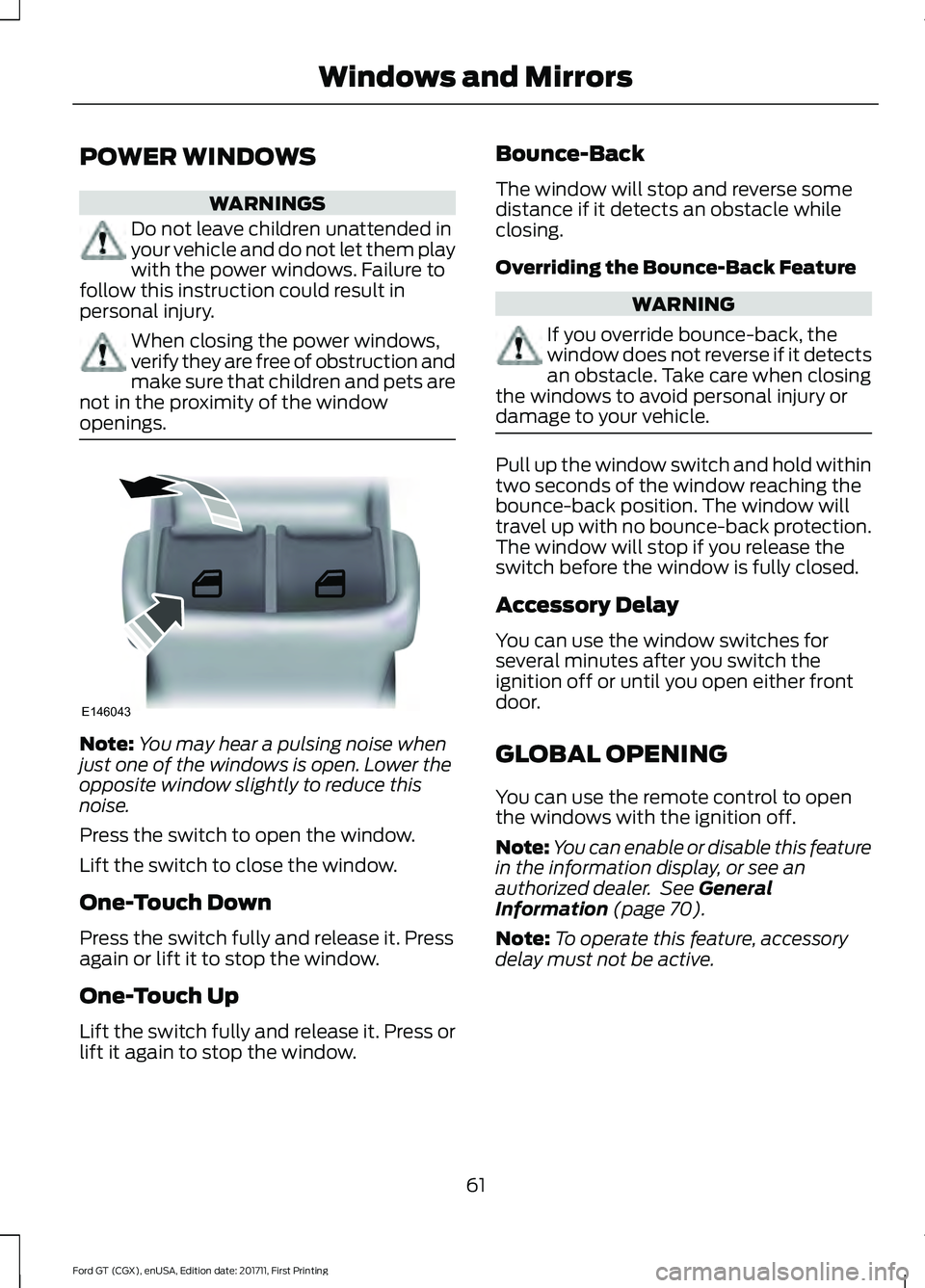
POWER WINDOWS
WARNINGS
Do not leave children unattended in
your vehicle and do not let them play
with the power windows. Failure to
follow this instruction could result in
personal injury. When closing the power windows,
verify they are free of obstruction and
make sure that children and pets are
not in the proximity of the window
openings. Note:
You may hear a pulsing noise when
just one of the windows is open. Lower the
opposite window slightly to reduce this
noise.
Press the switch to open the window.
Lift the switch to close the window.
One-Touch Down
Press the switch fully and release it. Press
again or lift it to stop the window.
One-Touch Up
Lift the switch fully and release it. Press or
lift it again to stop the window. Bounce-Back
The window will stop and reverse some
distance if it detects an obstacle while
closing.
Overriding the Bounce-Back Feature WARNING
If you override bounce-back, the
window does not reverse if it detects
an obstacle. Take care when closing
the windows to avoid personal injury or
damage to your vehicle. Pull up the window switch and hold within
two seconds of the window reaching the
bounce-back position. The window will
travel up with no bounce-back protection.
The window will stop if you release the
switch before the window is fully closed.
Accessory Delay
You can use the window switches for
several minutes after you switch the
ignition off or until you open either front
door.
GLOBAL OPENING
You can use the remote control to open
the windows with the ignition off.
Note:
You can enable or disable this feature
in the information display, or see an
authorized dealer. See General
Information (page 70).
Note: To operate this feature, accessory
delay must not be active.
61
Ford GT (CGX), enUSA, Edition date: 201711, First Printing Windows and MirrorsE146043
Page 65 of 325
Remote Control Front Windows
You can open the windows for a short time
after you unlock your vehicle with the
remote control. After you unlock your
vehicle, press and hold the remote control
unlock button to open the windows.
Release the button once movement starts.
Press the lock or unlock button to stop
movement.
EXTERIOR MIRRORS
Power Exterior Mirrors
WARNING
Do not adjust the mirrors when your
vehicle is moving. This could result
in the loss of control of your vehicle,
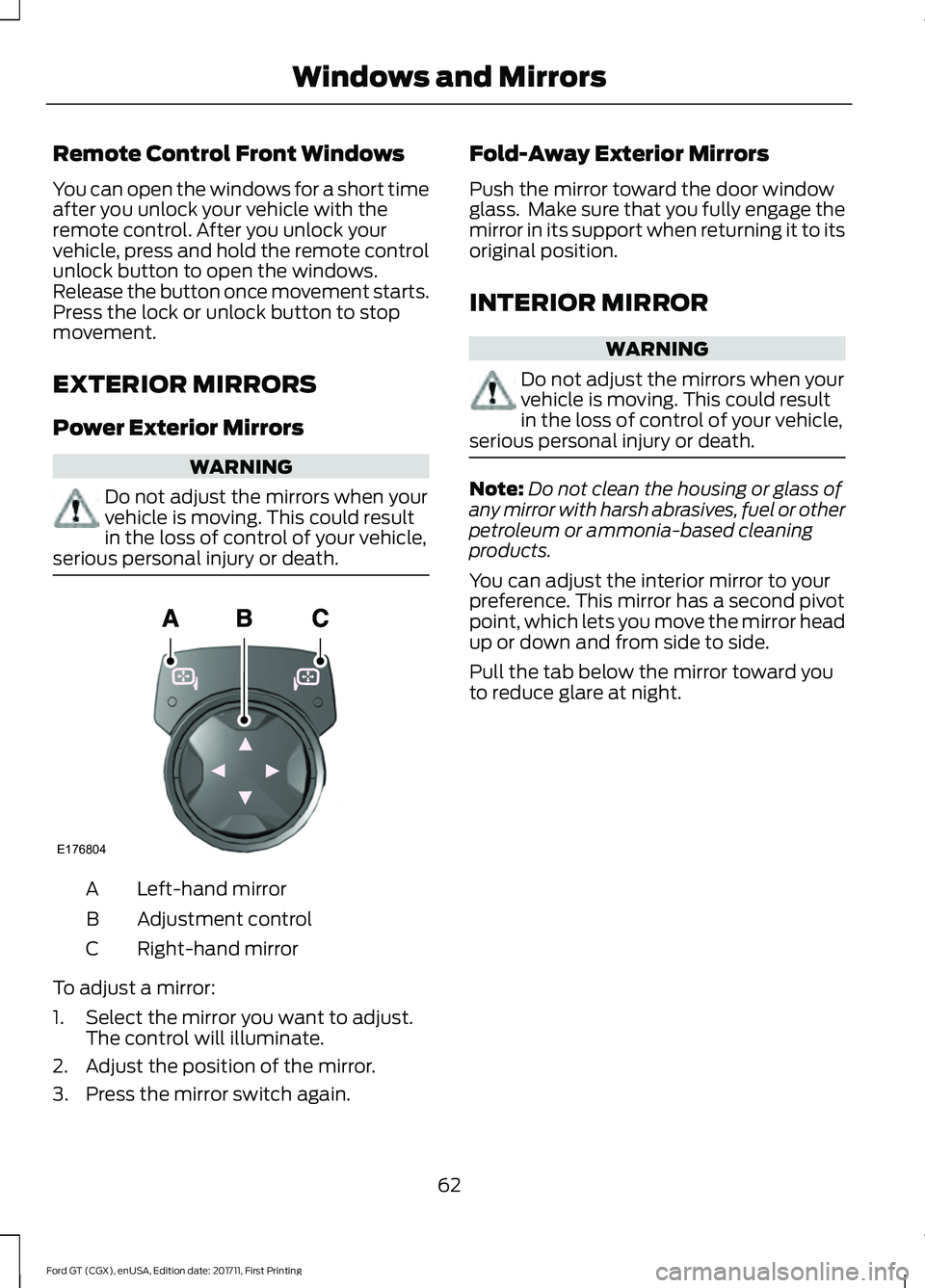
serious personal injury or death. Left-hand mirror
A
Adjustment control
B
Right-hand mirror
C
To adjust a mirror:
1. Select the mirror you want to adjust. The control will illuminate.
2. Adjust the position of the mirror.
3. Press the mirror switch again. Fold-Away Exterior Mirrors
Push the mirror toward the door window
glass. Make sure that you fully engage the
mirror in its support when returning it to its
original position.
INTERIOR MIRROR
WARNING
Do not adjust the mirrors when your
vehicle is moving. This could result
in the loss of control of your vehicle,
serious personal injury or death. Note:
Do not clean the housing or glass of
any mirror with harsh abrasives, fuel or other
petroleum or ammonia-based cleaning
products.
You can adjust the interior mirror to your
preference. This mirror has a second pivot
point, which lets you move the mirror head
up or down and from side to side.
Pull the tab below the mirror toward you
to reduce glare at night.
62
Ford GT (CGX), enUSA, Edition date: 201711, First Printing Windows and MirrorsE176804
Page 141 of 325
Jump Starting
1.
Start the engine of the booster vehicle
and rev the engine moderately, or press
the accelerator gently to keep your
engine speed between 2000 and 3000
RPM, as shown in your tachometer.
2. Start the engine of the disabled vehicle.
3. Once the disabled vehicle has been started, run both vehicle engines for an
additional three minutes before
disconnecting the jumper cables.
Removing the Jumper Cables
Remove the jumper cables in the reverse
order that they were connected.
1. Remove the jumper cable from the negative (-) terminal of the booster
vehicle battery.
2. Remove the jumper cable from the negative (A) post of the disabled
vehicle.
3. Remove the jumper cable from the positive (+) terminal of the booster
vehicle battery.
4. Remove the jumper cable from the positive (B) post of the disabled
vehicle.
5. Allow the engine to idle for at least one
minute.
POST-CRASH ALERT SYSTEM
The system flashes the direction indicators
and sounds the horn (intermittently) in the
event of a serious impact that deploys an
airbag (front and side) or the safety belt
pretensioners.
The horn and indicators will turn off when:
• You press the hazard control button.
• You press the panic button on the
remote entry transmitter (if equipped).
• Your vehicle runs out of power. TRANSPORTING THE VEHICLE
If you need to transport your vehicle,
please contact the Ford GT Concierge at
800-210-5795.
You can only transport your vehicle in an
enclosed trailer or on a roll back flatbed
truck. The ramp angle / angle of approach
on Ford GT is 9 degrees. Below are some
ramp lengths required to achieve this angle
depending on trailer / bed entrance height.
Ramp Length
Height
130 inches
20 inches
115 inches
18 inches
105 inches
16 inches
90 inches
14 inches
80 inches
12 inches
Your vehicle has a front end lift feature
that uses the electronically controlled
suspension hydraulics to lift the front of
the car. You can use this feature for
driveway approaches and speed bumps.
If there is power to this system, use it to lift
the front when loading the car onto a trailer
or a roll back. To operate the front lift, use
the switch in the console.
Note: The ground clearance on the car at
standard ride height is only 5 in (12 cm). Use
care when moving or loading the car to
make sure it does not bottom out.
Note: The vehicle doors swing both upward
and outward. At the full open position, the
top edge of the door is 67 in (170 cm) from
the ground and swings outward 26 in
(66 cm). Make sure you have the clearance
you need prior to opening the door.
The full undertrays of the vehicle are
carbon fiber, there are no tie down slots.
Use only over the tire straps to tie the car
down for transport.
138
Ford GT (CGX), enUSA, Edition date: 201711, First Printing Roadside Emergencies
Page 161 of 325
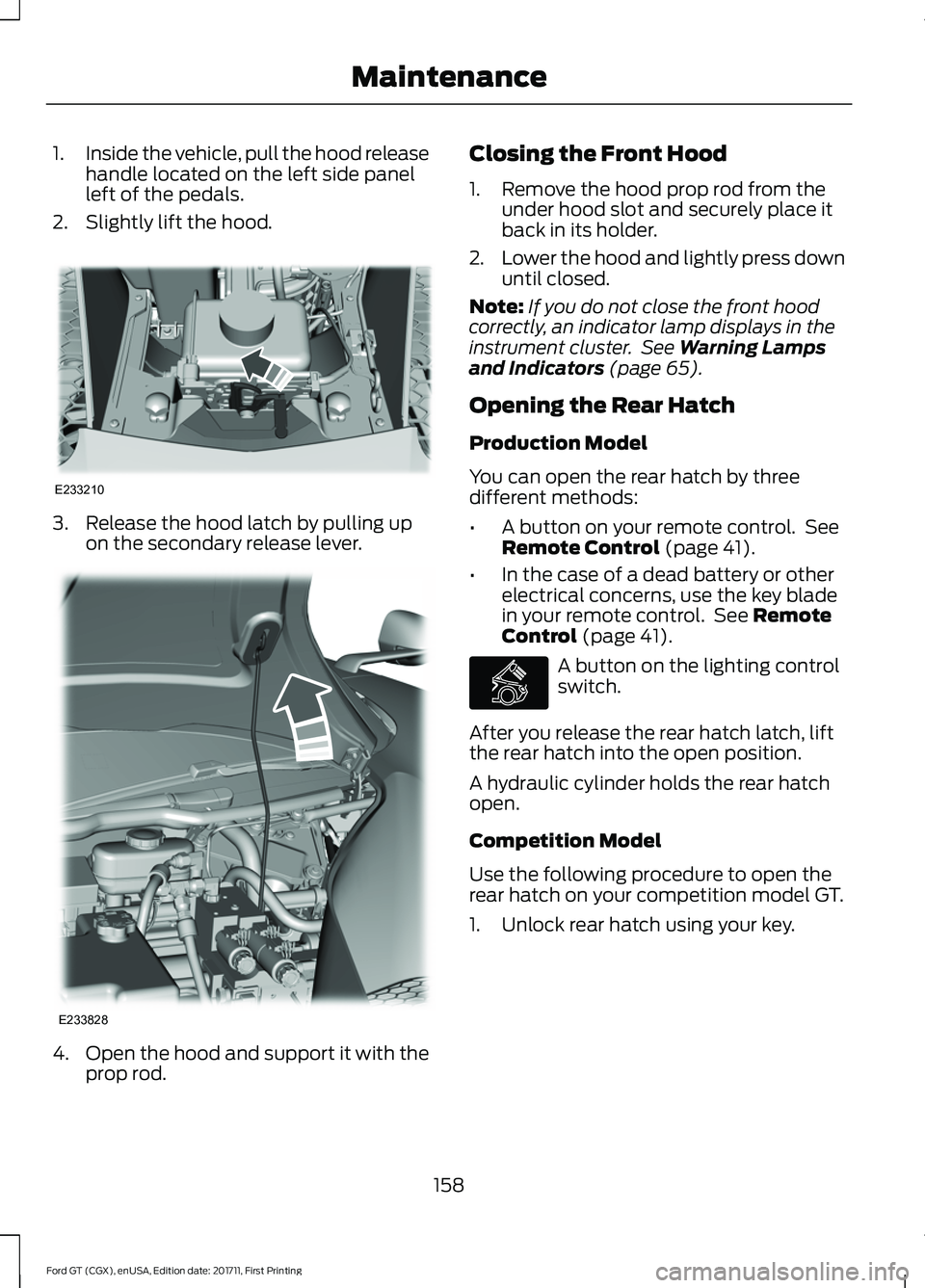
1.
Inside the vehicle, pull the hood release
handle located on the left side panel
left of the pedals.
2. Slightly lift the hood. 3. Release the hood latch by pulling up
on the secondary release lever. 4.
Open the hood and support it with the
prop rod. Closing the Front Hood
1. Remove the hood prop rod from the
under hood slot and securely place it
back in its holder.
2. Lower the hood and lightly press down
until closed.
Note: If you do not close the front hood
correctly, an indicator lamp displays in the
instrument cluster. See Warning Lamps
and Indicators (page 65).
Opening the Rear Hatch
Production Model
You can open the rear hatch by three
different methods:
• A button on your remote control. See
Remote Control
(page 41).
• In the case of a dead battery or other
electrical concerns, use the key blade
in your remote control. See
Remote
Control (page 41). A button on the lighting control
switch.
After you release the rear hatch latch, lift
the rear hatch into the open position.
A hydraulic cylinder holds the rear hatch
open.
Competition Model
Use the following procedure to open the
rear hatch on your competition model GT.
1. Unlock rear hatch using your key.
158
Ford GT (CGX), enUSA, Edition date: 201711, First Printing MaintenanceE233210 E233828 E268917
Page 199 of 325
WARNINGS
labels, then you should contact
your authorized dealer as soon as
possible. Use of any tire or wheel
not recommended by Ford can
affect the safety and performance
of your vehicle, which could result
in an increased risk of loss of
vehicle control, vehicle rollover,
personal injury and death. The use of
non-recommended tires and
wheels could cause steering,
suspension, axle, transfer case or
power transfer unit failure. If you
have questions regarding tire
replacement, contact your
authorized dealer as soon as
possible. To reduce the risk of serious
injury, when mounting
replacement tires and wheels, you
should not exceed the maximum
pressure indicated on the sidewall
of the tire to set the beads without
additional precautions listed
below. If the beads do not seat at
the maximum pressure indicated,
re-lubricate and try again. When inflating the tire for
mounting pressures up to
20 psi (1.38 bar) greater than the
maximum pressure on the tire
sidewall, the following
precautions must be taken to
protect the person mounting the
tire: •
Make sure that you have the
correct tire and wheel size.
• Lubricate the tire bead and
wheel bead seat area again.
• Stand at a minimum of
12 ft
(3.66 m) away from the wheel
and tire assembly.
• Use both eye and ear
protection. WARNINGS
For a mounting pressure
more than
20 psi (1.38 bar)
greater than the maximum
pressure, a Ford dealer or other
tire service professional should do
the mounting. Always inflate steel carcass
tires with a remote air fill with
the person inflating standing at a
minimum of
12 ft (3.66 m) away
from the wheel and tire assembly. Important: Remember to replace
the wheel valve stems when the
road tires are replaced on your
vehicle.
It is recommended that the two
front tires or two rear tires
generally be replaced as a pair.
The tire pressure sensors mounted
in the wheels (originally installed
on your vehicle) are not designed
to be used in aftermarket wheels.
196
Ford GT (CGX), enUSA, Edition date: 201711, First Printing Wheels and Tires
Page 320 of 325

Apps........................................................................\
233
Bluetooth Stereo or USB.................................. 231
Sources.................................................................. 230
Supported Media Players, Formats and Metadata Information................................. 233
USB Ports.............................................................. 233
Environment......................................................13
EPB See: Electric Parking Brake............................... 112
Event Data Recording See: Data Recording............................................... 7
Exterior Mirrors................................................62
Fold-Away Exterior Mirrors............................... 62
Power Exterior Mirrors........................................ 62
F
Fastening the Seatbelts..............................26 Seatbelt Locking Modes.................................... 27
Using Seatbelts During Pregnancy................27
Flat Tire Inflation See: Tire Sealant and Inflator Kit.................180
Floor Mats
........................................................135
Foot Pedals See: Adjusting the Pedals................................. 56
Ford Performance...........................................12
Front Passenger Sensing System............35
Fuel and Refueling
........................................94
Fuel Consumption.........................................98 Calculating Fuel Economy............................... 98
Filling the Fuel Tank............................................ 98
Fuel Filler Funnel Location.........................95
Fuel Filter.........................................................167
Fuel Quality
......................................................94
Choosing the Right Fuel.................................... 94
Fuel Shutoff
....................................................136
Fuses.................................................................146
Fuse Specification Chart...........................146 Front Power Distribution Box......................... 146
Passenger Compartment Fuse Panel..........151
Rear Power Distribution Box 1........................ 148
Rear Power Distribution Box 2....................... 150
G
Gauges...............................................................63 Engine Coolant Temperature Gauge............65
Engine Oil Pressure Gauge............................... 65Engine Oil Temperature Gauge.......................
65
Fuel Gauge............................................................. 64
Gauge Mode........................................................... 65
Information Display............................................. 63
Trip Computer....................................................... 64
Gearbox See: Transmission.............................................. 106
General Information on Radio Frequencies..................................................40
Intelligent Access................................................. 40
General Maintenance Information........274 Protecting Your Investment........................... 274
Road Course Maintenance............................. 274
Why Maintain Your Vehicle?.......................... 274
Why Maintain Your Vehicle at Your Certified Ford GT Service Dealership?..................... 274
Getting Assistance Outside the U.S. and Canada..........................................................143
Getting the Services You Need...............140 Away From Home.............................................. 140
Global Opening................................................61 Remote Control Front Windows.................... 62
H
Hazard Flashers
............................................136
Headlamp Adjusting See: Adjusting the Headlamps...................... 170
Heating See: Climate Control.......................................... 80
Hill Start Assist...............................................114 Using Hill Start Assist......................................... 114
Hints on Controlling the Interior Climate............................................................83
Defogging the Side Windows in Cold Weather.............................................................. 84
General Hints......................................................... 83
Quickly Heating the Interior.............................. 83
Recommended Settings for Cooling............84
Recommended Settings for Heating...........84
Hints on Driving With Anti-Lock Brakes...............................................................111
Home Screen.................................................223
Hood Lock See: Opening and Closing the Hood............157
317
Ford GT (CGX), enUSA, Edition date: 201711, First Printing Index