steering wheel FORD GT 2018 User Guide
[x] Cancel search | Manufacturer: FORD, Model Year: 2018, Model line: GT, Model: FORD GT 2018Pages: 325, PDF Size: 6.61 MB
Page 73 of 325
GENERAL INFORMATION
WARNING
Driving while distracted can result in
loss of vehicle control, crash and
injury. We strongly recommend that
you use extreme caution when using any
device that may take your focus off the
road. Your primary responsibility is the safe
operation of your vehicle. We recommend
against the use of any hand-held device
while driving and encourage the use of
voice-operated systems when possible.
Make sure you are aware of all applicable
local laws that may affect the use of
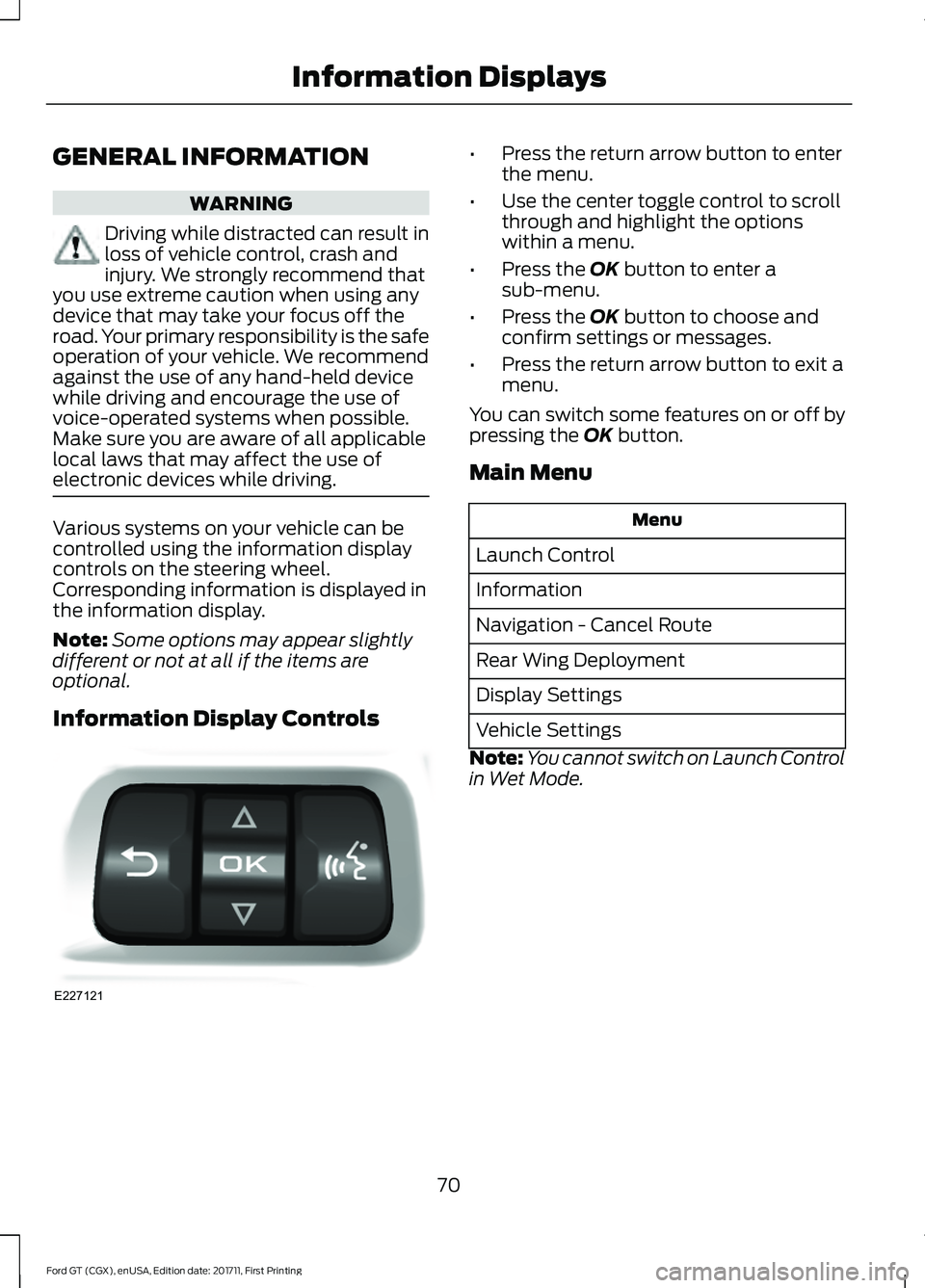
electronic devices while driving. Various systems on your vehicle can be
controlled using the information display
controls on the steering wheel.
Corresponding information is displayed in
the information display.
Note:
Some options may appear slightly
different or not at all if the items are
optional.
Information Display Controls •
Press the return arrow button to enter
the menu.
• Use the center toggle control to scroll
through and highlight the options
within a menu.
• Press the OK button to enter a
sub-menu.
• Press the
OK button to choose and
confirm settings or messages.
• Press the return arrow button to exit a
menu.
You can switch some features on or off by
pressing the
OK button.
Main Menu Menu
Launch Control
Information
Navigation - Cancel Route
Rear Wing Deployment
Display Settings
Vehicle Settings
Note: You cannot switch on Launch Control
in Wet Mode.
70
Ford GT (CGX), enUSA, Edition date: 201711, First Printing Information DisplaysE227121
Page 80 of 325
Action
Message
Displays if the electric park brake system detects a condition
that requires service. Some functionality may still be available. See an authorized dealer.
Park Brake Limited
Function Service Required
Displays if the electric parking brake system detects a condi-tion that requires service. See an authorized dealer.
Park Brake Malfunction
Service Now
Displays if the parking brake is set, the engine is running and
you drive the vehicle more than 3 mph (5 km/h). If the warning stays on after you release the parking brake, contact an authorized dealer.
Park Brake On
Remote Start Action
Message
A reminder to apply the brake and push the start button todrive your vehicle after a remote start.
To Drive: Press Brake
and Start Button
Starting System Action
Message
There is a problem with your vehicle ’s starting system. See
an authorized dealer for service.
Starting System Fault
Steering System Action
Message
The steering lock system has detected a condition thatrequires service. See an authorized dealer.
Steering Lock Malfunc-
tion Service Now
You need to turn your steering wheel when starting yourvehicle to unlock your steering column.
Steering Col. Lock Turn
Wheel while Starting vehicle
77
Ford GT (CGX), enUSA, Edition date: 201711, First Printing Information Displays
Page 89 of 325
SITTING IN THE CORRECT
POSITION
WARNINGS
Sitting improperly, out of position or
with the seatback reclined too far
can take weight off the seat cushion
and affect the decision of the passenger
sensing system, resulting in serious injury
or death in the event of a crash. Always sit
upright against your seat back, with your
feet on the floor. Do not place any objects on a folded
seat. Hard objects may become
projectiles in a crash or sudden stop,
which may increase the risk of serious
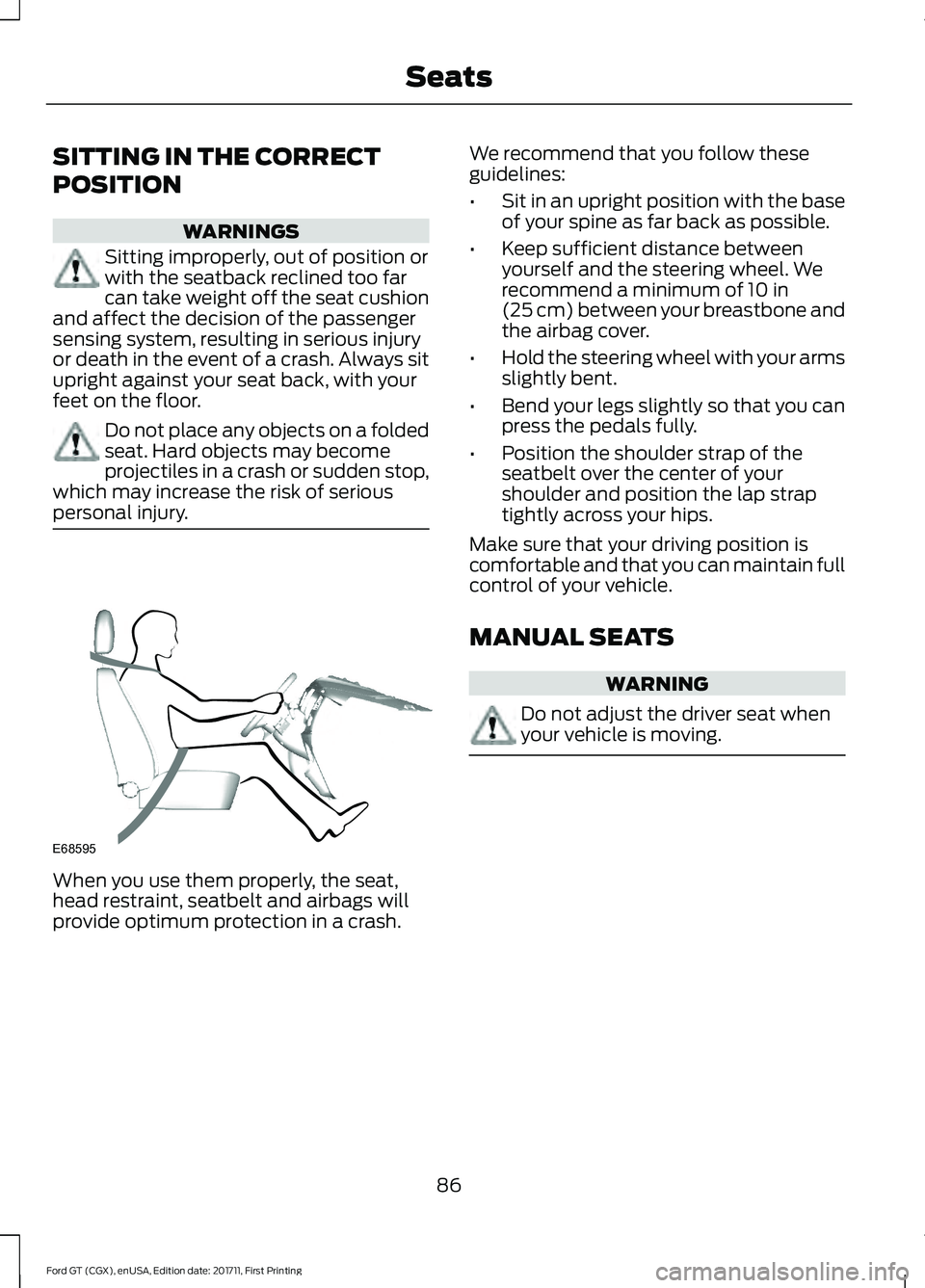
personal injury. When you use them properly, the seat,
head restraint, seatbelt and airbags will
provide optimum protection in a crash. We recommend that you follow these
guidelines:
•
Sit in an upright position with the base
of your spine as far back as possible.
• Keep sufficient distance between
yourself and the steering wheel. We
recommend a minimum of 10 in
(25 cm) between your breastbone and
the airbag cover.
• Hold the steering wheel with your arms
slightly bent.
• Bend your legs slightly so that you can
press the pedals fully.
• Position the shoulder strap of the
seatbelt over the center of your
shoulder and position the lap strap
tightly across your hips.
Make sure that your driving position is
comfortable and that you can maintain full
control of your vehicle.
MANUAL SEATS WARNING
Do not adjust the driver seat when
your vehicle is moving.
86
Ford GT (CGX), enUSA, Edition date: 201711, First Printing SeatsE68595
Page 94 of 325
STEERING WHEEL LOCK
The steering wheel locks automatically
when you leave your vehicle and take the
intelligent access key with you. The
steering wheel unlocks automatically when
you enter your vehicle with the intelligent
access key.
Note:
You may need to turn the steering
wheel left or right if the wheel does not
unlock completely. This may happen in
certain situations, such as parking your
vehicle on a steep grade.
STARTING THE ENGINE
When you start the engine, the idle speed
increases. This helps to warm up the
engine. If the engine idle speed does not
slow down automatically, have your
vehicle checked by an authorized dealer.
Note: You can crank the engine for a total
of 60 seconds, without the engine starting,
before the starting system temporarily
disables. The 60 seconds does not have to
be all at once. For example, you can crank
the engine three times for 20 seconds each,
without the engine starting, to reach the 60
second time limit. If you exceed the
cranking time, you cannot attempt to start
the engine for at least 15 minutes. After 15
minutes, you have a 15 second time limit to
crank the engine. You need to wait 60
minutes before you crank the engine again
for 60 seconds.
Before starting the engine, check the
following:
• Make sure all occupants fasten their
seatbelts.
• Make sure the headlamps and
electrical accessories are off.
• Make sure the parking brake is on.
• Move the transmission selector into
park (P). Note:
Do not touch the accelerator pedal.
Note: You must have your intelligent access
key in the vehicle in order to shift the
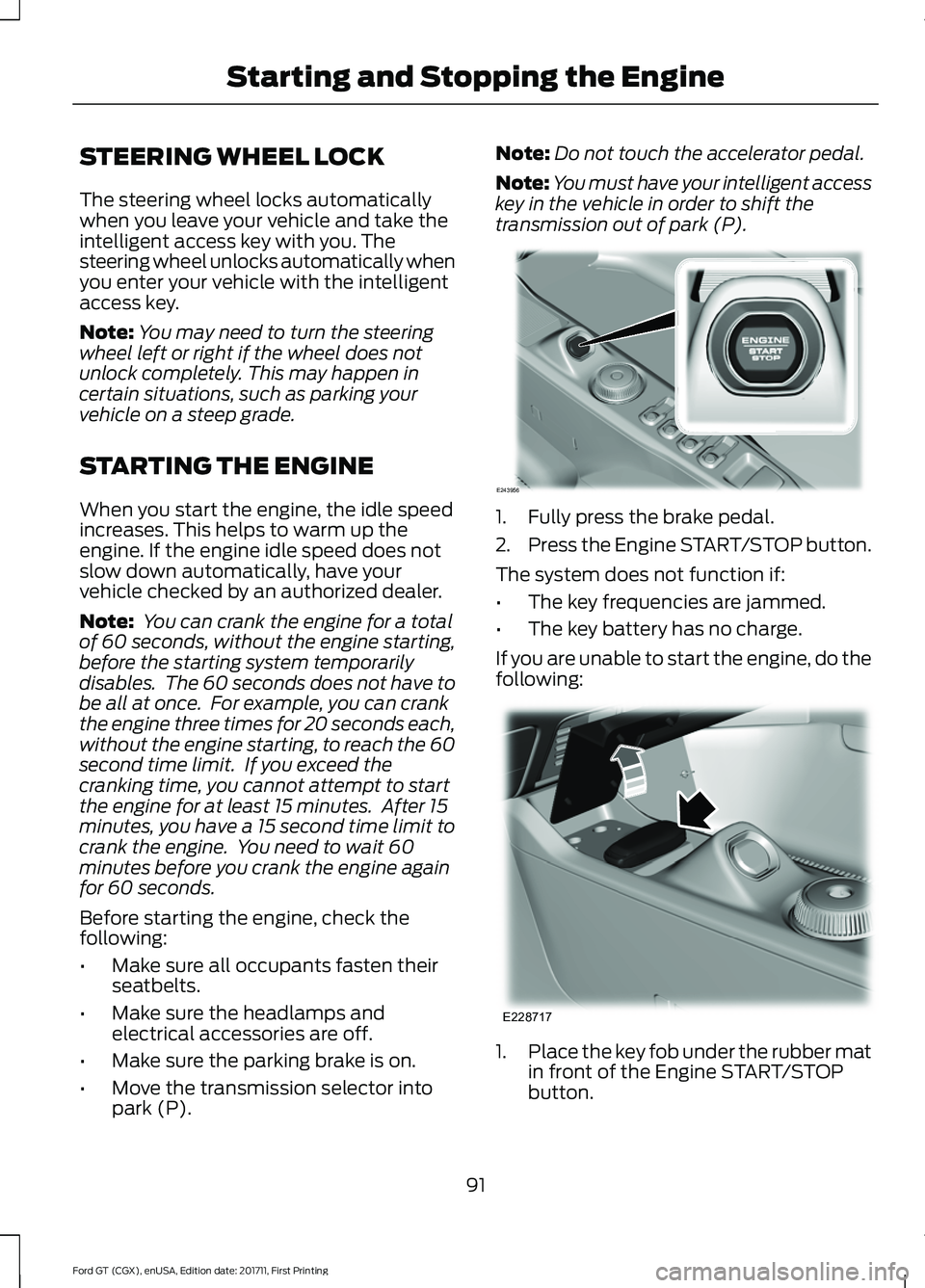
transmission out of park (P). 1. Fully press the brake pedal.
2.
Press the Engine START/STOP button.
The system does not function if:
• The key frequencies are jammed.
• The key battery has no charge.
If you are unable to start the engine, do the
following: 1.
Place the key fob under the rubber mat
in front of the Engine START/STOP
button.
91
Ford GT (CGX), enUSA, Edition date: 201711, First Printing Starting and Stopping the EngineE243956 E228717
Page 110 of 325
Neutral (N)
With the selector in neutral (N), your
vehicle can be started and is free to roll.
Hold the brake pedal down when in this
position.
Stay in Neutral Mode
Stay in Neutral mode allows your vehicle
to stay in neutral when you exit your
vehicle. Your vehicle must be stationary to
enter this mode.
To enter Stay in Neutral mode:
•
With the engine running.
• Release the parking brake if applied,
press down the brake pedal and press
the parking brake release switch on the
center console.
• Press down the brake pedal and move
the transmission selector to neutral
(N).
• A message appears in your display
screen.
• Press the manual (M) button to enter
Stay in Neutral mode.
• Another message appears in your
display screen confirming Neutral
mode is engaged.
• Stay in Neutral mode remains engaged
as long as the engine is running. If the
engine is turned off, a 30 minute timer
starts and appears in your display
screen.
To exit Stay in Neutral mode, press down
the brake pedal and select a different gear.
Drive (D)
Drive (D) is the normal driving position for
the best fuel economy. In the drive (D)
position, the transmission automatically
shifts through gears one through seven. Manual (M)
To select manual (M), place the
transmission selector in drive (D) and press
"M" button in the middle of the selector.
Once you select manual (M), you must use
the paddle shifters to upshift or downshift
the transmission.
To exit manual (M) and return to drive (D),
press the "M" button again.
SelectShift™ Automatic
Transmission
Your vehicle is equipped with a SelectShift
Automatic transmission, which gives you
the ability to change gears up or down as
desired.
In order to prevent the engine from running
at too low an RPM, which may cause it to
stall, SelectShift still automatically makes
some downshifts if it has determined that
you have not downshifted in time.
Although SelectShift makes some
downshifts for you, it still allows you to
downshift at any time as long as
SelectShift determines that no damage
occurs to the engine from over-revving.
Note:
Engine damage may occur if you
maintain excessive engine revving without
shifting.
SelectShift does not automatically upshift,
even if the engine is approaching the RPM
limit. It must be shifted manually by use of
the upshift (+) paddle. When using Manual
(M) shift mode, pay attention to the shift
indicator on the top rim of the steering
wheel and the RPM indicator in the
instrument cluster.
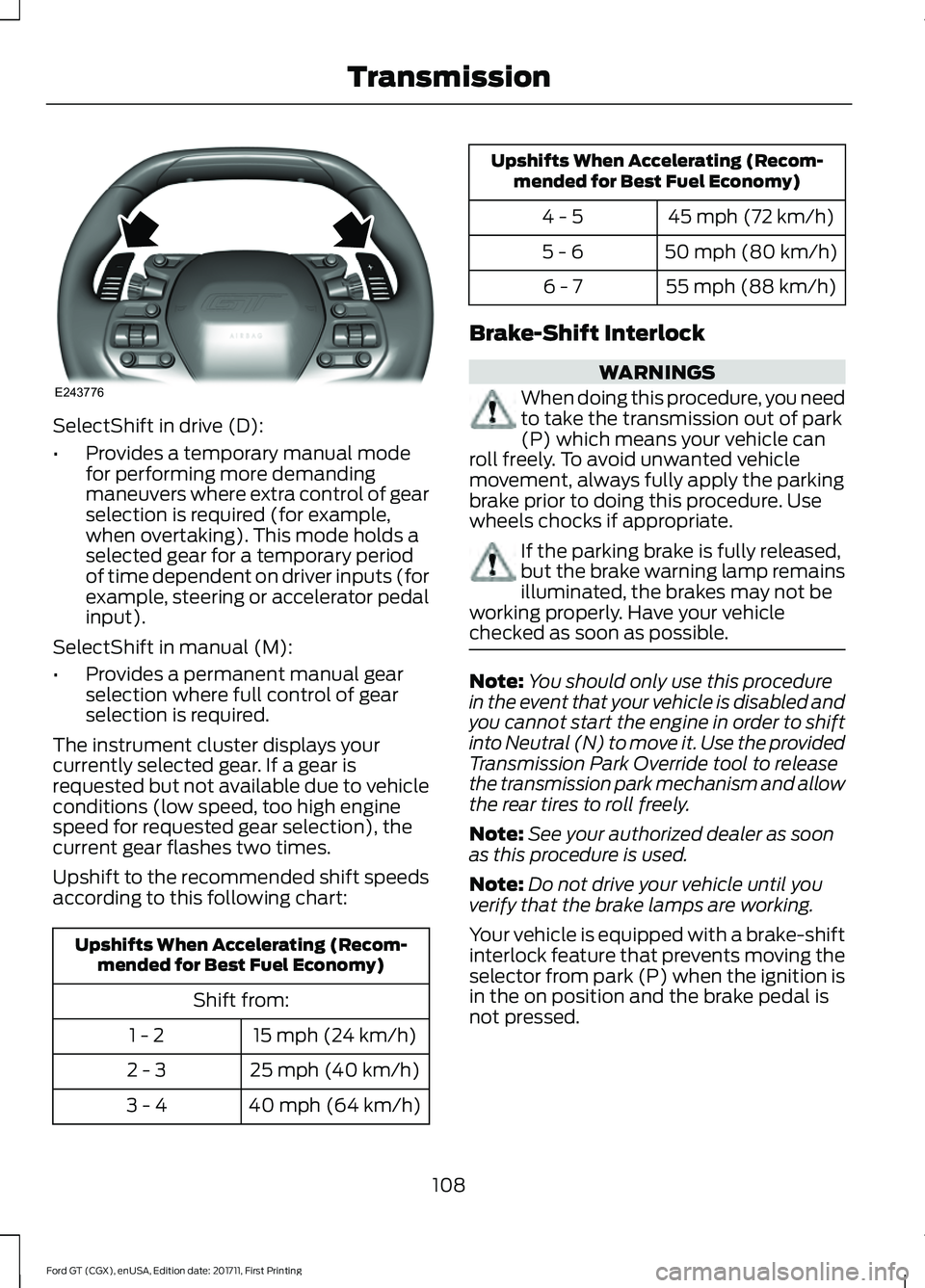
Use the paddles on the steering wheel
to shift.
• Pull the right paddle (+) to upshift.
• Pull the left paddle (–) to downshift.
107
Ford GT (CGX), enUSA, Edition date: 201711, First Printing Transmission
Page 111 of 325
SelectShift in drive (D):
•
Provides a temporary manual mode
for performing more demanding
maneuvers where extra control of gear
selection is required (for example,
when overtaking). This mode holds a
selected gear for a temporary period
of time dependent on driver inputs (for
example, steering or accelerator pedal
input).
SelectShift in manual (M):
• Provides a permanent manual gear
selection where full control of gear
selection is required.
The instrument cluster displays your
currently selected gear. If a gear is
requested but not available due to vehicle
conditions (low speed, too high engine
speed for requested gear selection), the
current gear flashes two times.
Upshift to the recommended shift speeds
according to this following chart: Upshifts When Accelerating (Recom-
mended for Best Fuel Economy)
Shift from:15 mph (24 km/h)
1 - 2
25 mph (40 km/h)
2 - 3
40 mph (64 km/h)
3 - 4 Upshifts When Accelerating (Recom-
mended for Best Fuel Economy)
45 mph (72 km/h)
4 - 5
50 mph (80 km/h)
5 - 6
55 mph (88 km/h)
6 - 7
Brake-Shift Interlock WARNINGS
When doing this procedure, you need
to take the transmission out of park
(P) which means your vehicle can
roll freely. To avoid unwanted vehicle
movement, always fully apply the parking
brake prior to doing this procedure. Use
wheels chocks if appropriate. If the parking brake is fully released,
but the brake warning lamp remains
illuminated, the brakes may not be
working properly. Have your vehicle
checked as soon as possible. Note:
You should only use this procedure
in the event that your vehicle is disabled and
you cannot start the engine in order to shift
into Neutral (N) to move it. Use the provided
Transmission Park Override tool to release
the transmission park mechanism and allow
the rear tires to roll freely.
Note: See your authorized dealer as soon
as this procedure is used.
Note: Do not drive your vehicle until you
verify that the brake lamps are working.
Your vehicle is equipped with a brake-shift
interlock feature that prevents moving the
selector from park (P) when the ignition is
in the on position and the brake pedal is
not pressed.
108
Ford GT (CGX), enUSA, Edition date: 201711, First Printing TransmissionE243776
Page 112 of 325
If you cannot move the selector out of park
(P) position with the ignition in the on
position and the brake pedal pressed, a
malfunction may have occurred. It is
possible that a fuse has blown or your
vehicle
’s brake lamps are not operating
properly. See Fuse Specification Chart
(page 146).
If the fuse is good and the brake lamps are
functioning, then there may be a fault in
the system. To roll the car or to allow the
vehicle to be transported for repair, use the
following procedure to place the
transmission into neutral (N) manually. To
place the transmission into neutral (N) in
the event of a battery failure, or other
electrical fault that prevents the shifter
from working, use this procedure.
Manually Placing the Transmission in
Park Override
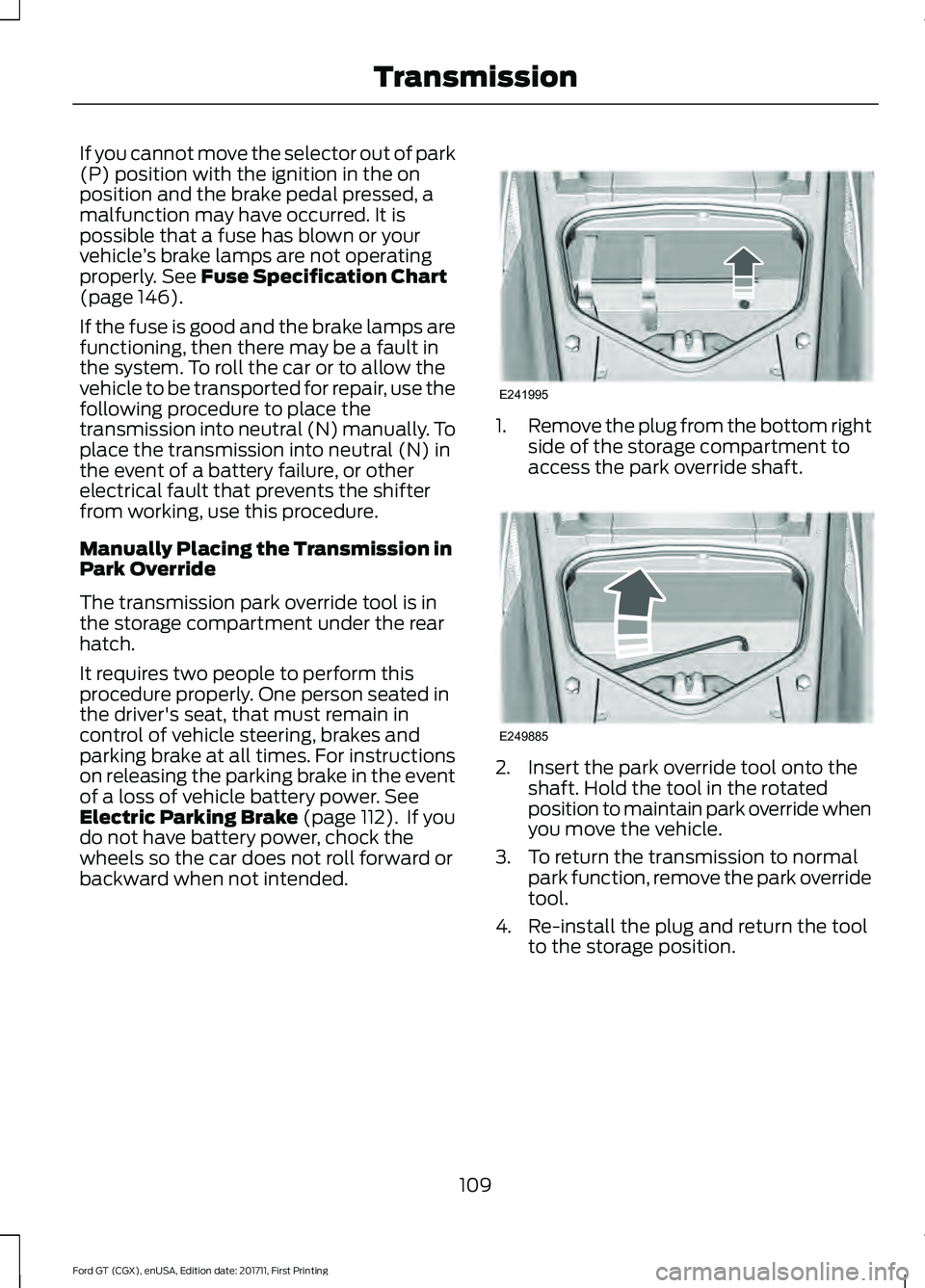
The transmission park override tool is in
the storage compartment under the rear
hatch.
It requires two people to perform this
procedure properly. One person seated in
the driver's seat, that must remain in
control of vehicle steering, brakes and
parking brake at all times. For instructions
on releasing the parking brake in the event
of a loss of vehicle battery power.
See
Electric Parking Brake (page 112). If you
do not have battery power, chock the
wheels so the car does not roll forward or
backward when not intended. 1.
Remove the plug from the bottom right
side of the storage compartment to
access the park override shaft. 2. Insert the park override tool onto the
shaft. Hold the tool in the rotated
position to maintain park override when
you move the vehicle.
3. To return the transmission to normal park function, remove the park override
tool.
4. Re-install the plug and return the tool to the storage position.
109
Ford GT (CGX), enUSA, Edition date: 201711, First Printing TransmissionE241995 E249885
Page 114 of 325
GENERAL INFORMATION
Note:
Occasional brake noise is normal. If
a metal-to-metal, continuous grinding or
continuous squeal sound is present, the
brake linings may be worn-out. Have the
system checked by an authorized dealer. If
your vehicle has continuous vibration or
shudder in the steering wheel while braking,
have it checked by an authorized dealer.
Note: Brake dust may accumulate on the
wheels, even under normal driving
conditions. Some dust is inevitable as the
brakes wear and does not contribute to
brake noise. See Cleaning the Wheels
(page 177). See
Warning Lamps and
Indicators (page 65).
Wet brakes result in reduced braking
efficiency. Gently press the brake pedal a
few times after washing the car.
Carbon Ceramic Brake Discs
Your vehicle has carbon ceramic brake
discs. When cleaning your wheels and tires,
use care not to get any wheel cleaner or
tire dressing on the brake discs. This lamp illuminates when your
brakes pads are worn and
require replacement. See an
authorized dealer for replacement.
Brake Over Accelerator
In the event the accelerator pedal
becomes stuck or entrapped, apply steady
and firm pressure to the brake pedal to
slow the vehicle and reduce engine power.
If you experience this condition, apply the
brakes and bring your vehicle to a safe stop. Move the transmission to park (P),
switch the engine off and apply the parking
brake. Inspect the accelerator pedal for
any interferences. If none are found and
the condition persists, have your vehicle
towed to the nearest authorized dealer.
Brake Assist
Brake assist detects when you brake
rapidly by measuring the rate at which you
press the brake pedal. It provides
maximum braking efficiency as long as you
press the pedal, and can reduce stopping
distances in critical situations.
Anti-lock Brake System
This system helps you maintain steering
control during emergency stops by keeping
the brakes from locking.
This lamp momentarily
illuminates when you switch the
ignition on. If the light does not
illuminate during start up, remains on or
flashes, the system may be disabled. Have
the system checked by an authorized
dealer. If the anti-lock brake system is
disabled, normal braking is still effective. If the brake warning lamp
remains illuminated after you
release the parking brake, have
the system checked by an authorized
dealer.
HINTS ON DRIVING WITH
ANTI-LOCK BRAKES
The anti-lock braking system does not
eliminate the risks when:
• You drive too closely to the vehicle in
front of you.
• Your vehicle is hydroplaning.
• You take corners too fast.
• The road surface is poor.
111
Ford GT (CGX), enUSA, Edition date: 201711, First Printing BrakesE138644 E269429 E269429
Page 118 of 325
PRINCIPLE OF OPERATION
WARNINGS
Vehicle modifications involving
braking system, aftermarket roof
racks, suspension, steering system,
tire construction and wheel and tire size
may change the handling characteristics
of your vehicle and may adversely affect
the performance of the electronic stability
control system. In addition, installing any
stereo loudspeakers may interfere with
and adversely affect the electronic stability
control system. Install any aftermarket
stereo loudspeaker as far as possible from
the front center console, the tunnel, and
the front seats in order to minimize the risk
of interfering with the electronic stability
control sensors. Reducing the
effectiveness of the electronic stability
control system could lead to an increased
risk of loss of vehicle control, vehicle
rollover, personal injury and death. Remember that even advanced
technology cannot defy the laws of
physics. It's always possible to lose
control of a vehicle due to inappropriate
driver input for the conditions. Aggressive
driving on any road condition can cause
you to lose control of your vehicle
increasing the risk of personal injury or
property damage. Activation of the
electronic stability control system is an
indication that at least some of the tires
have exceeded their ability to grip the road;
this could reduce the operator's ability to
control the vehicle potentially resulting in
a loss of vehicle control, vehicle rollover,
personal injury and death. If your electronic
stability control system activates, SLOW
DOWN. WARNINGS
The stability and traction control
light illuminates steadily if the
system detects a failure. Make sure
you did not manually disable the traction
control system using the information
display controls or the switch. If the
stability control and traction control light
is still illuminating steadily, have the
system serviced by an authorized dealer
immediately. Operating your vehicle with
the traction control disabled could lead to
an increased risk of loss of vehicle control,
vehicle rollover, personal injury and death. The stability and traction control systems
help you to avoid drive wheel spin and loss
of traction. The system automatically
turns on each time you switch the ignition
on.
If a fault occurs in either the stability
control or the traction control system, you
may experience the following conditions:
•
The stability and traction control light
illuminates steadily.
• The stability control and traction
control systems do not enhance your
vehicle's ability to maintain traction of
the wheels.
If a driving condition activates either the
stability control or the traction control
system you may experience the following
conditions:
• The stability and traction control light
flashes.
• Your vehicle slows down.
• Reduced engine power.
• A vibration in the brake pedal.
• The brake pedal is stiffer than usual.
• If the driving condition is severe and
your foot is not on the brake, the brake
pedal may move as the system applies
higher brake force.
115
Ford GT (CGX), enUSA, Edition date: 201711, First Printing Stability Control
Page 124 of 325
PRINCIPLE OF OPERATION
Cruise control lets you maintain a set
speed without keeping your foot on the
accelerator pedal. You can use cruise
control when your vehicle speed is greater
than 20 mph (30 km/h).
USING CRUISE CONTROL WARNINGS
Do not use cruise control on winding
roads, in heavy traffic or when the
road surface is slippery. This could
result in loss of vehicle control, serious
injury or death. When you are going downhill, your
vehicle speed could increase above
the set speed. The system does not
apply the brakes. Note:
Cruise control disengages if the
vehicle speed decreases more than 10 mph
(16 km/h) below the set speed when driving
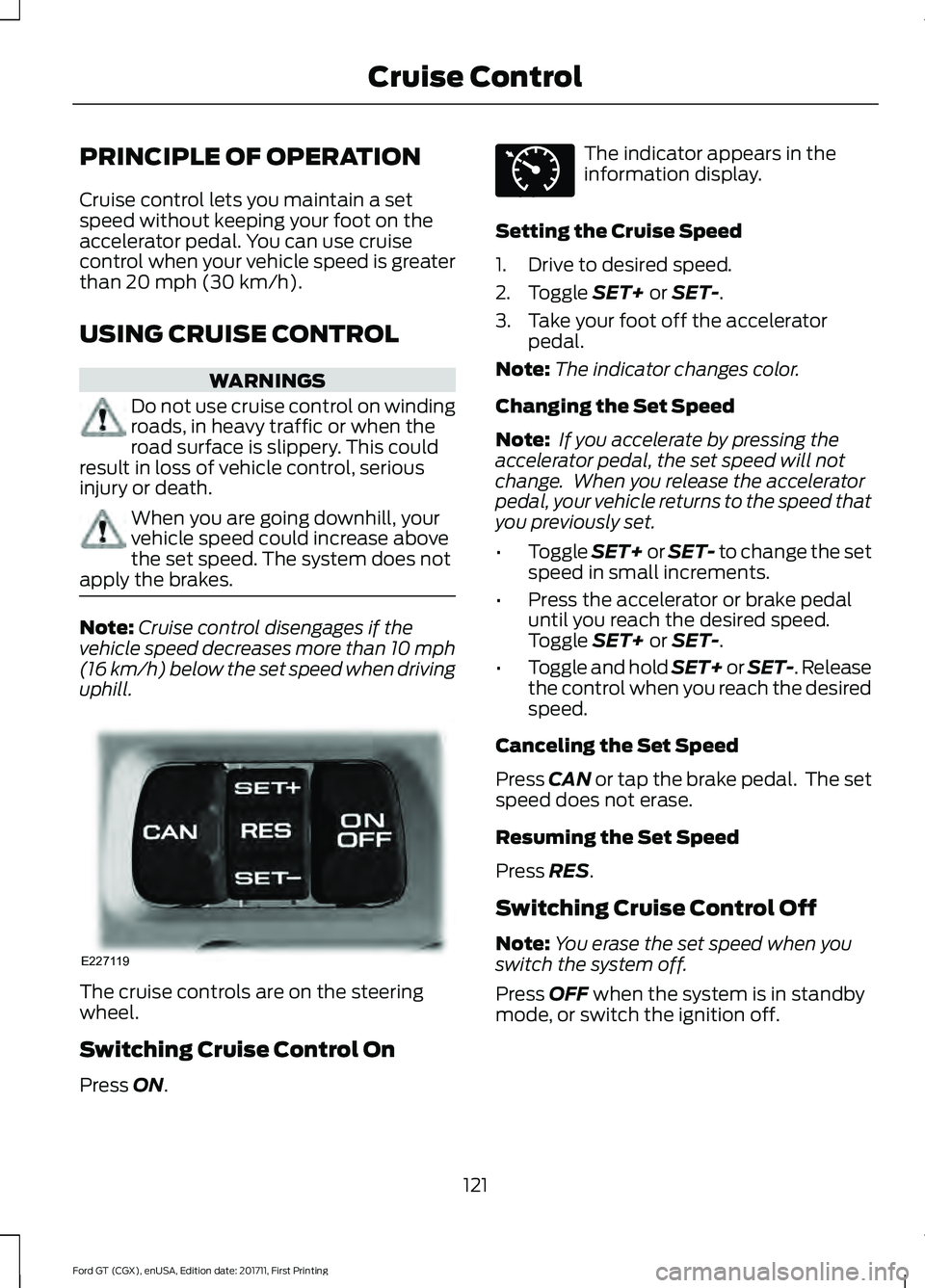
uphill. The cruise controls are on the steering
wheel.
Switching Cruise Control On
Press
ON. The indicator appears in the
information display.
Setting the Cruise Speed
1. Drive to desired speed.
2. Toggle
SET+ or SET-.
3. Take your foot off the accelerator pedal.
Note: The indicator changes color.
Changing the Set Speed
Note: If you accelerate by pressing the
accelerator pedal, the set speed will not
change. When you release the accelerator
pedal, your vehicle returns to the speed that
you previously set.
• Toggle
SET+ or SET- to change the set
speed in small increments.
• Press the accelerator or brake pedal
until you reach the desired speed.
Toggle
SET+ or SET-.
• Toggle and hold SET+ or SET-. Release
the control when you reach the desired
speed.
Canceling the Set Speed
Press
CAN or tap the brake pedal. The set
speed does not erase.
Resuming the Set Speed
Press
RES.
Switching Cruise Control Off
Note: You erase the set speed when you
switch the system off.
Press
OFF when the system is in standby
mode, or switch the ignition off.
121
Ford GT (CGX), enUSA, Edition date: 201711, First Printing Cruise ControlE227119 E71340