display FORD GT 2018 Owner's Guide
[x] Cancel search | Manufacturer: FORD, Model Year: 2018, Model line: GT, Model: FORD GT 2018Pages: 325, PDF Size: 6.61 MB
Page 118 of 325
PRINCIPLE OF OPERATION
WARNINGS
Vehicle modifications involving
braking system, aftermarket roof
racks, suspension, steering system,
tire construction and wheel and tire size
may change the handling characteristics
of your vehicle and may adversely affect
the performance of the electronic stability
control system. In addition, installing any
stereo loudspeakers may interfere with
and adversely affect the electronic stability
control system. Install any aftermarket
stereo loudspeaker as far as possible from
the front center console, the tunnel, and
the front seats in order to minimize the risk
of interfering with the electronic stability
control sensors. Reducing the
effectiveness of the electronic stability
control system could lead to an increased
risk of loss of vehicle control, vehicle
rollover, personal injury and death. Remember that even advanced
technology cannot defy the laws of
physics. It's always possible to lose
control of a vehicle due to inappropriate
driver input for the conditions. Aggressive
driving on any road condition can cause
you to lose control of your vehicle
increasing the risk of personal injury or
property damage. Activation of the
electronic stability control system is an
indication that at least some of the tires
have exceeded their ability to grip the road;
this could reduce the operator's ability to
control the vehicle potentially resulting in
a loss of vehicle control, vehicle rollover,
personal injury and death. If your electronic
stability control system activates, SLOW
DOWN. WARNINGS
The stability and traction control
light illuminates steadily if the
system detects a failure. Make sure
you did not manually disable the traction
control system using the information
display controls or the switch. If the
stability control and traction control light
is still illuminating steadily, have the
system serviced by an authorized dealer
immediately. Operating your vehicle with
the traction control disabled could lead to
an increased risk of loss of vehicle control,
vehicle rollover, personal injury and death. The stability and traction control systems
help you to avoid drive wheel spin and loss
of traction. The system automatically
turns on each time you switch the ignition
on.
If a fault occurs in either the stability
control or the traction control system, you
may experience the following conditions:
•
The stability and traction control light
illuminates steadily.
• The stability control and traction
control systems do not enhance your
vehicle's ability to maintain traction of
the wheels.
If a driving condition activates either the
stability control or the traction control
system you may experience the following
conditions:
• The stability and traction control light
flashes.
• Your vehicle slows down.
• Reduced engine power.
• A vibration in the brake pedal.
• The brake pedal is stiffer than usual.
• If the driving condition is severe and
your foot is not on the brake, the brake
pedal may move as the system applies
higher brake force.
115
Ford GT (CGX), enUSA, Edition date: 201711, First Printing Stability Control
Page 121 of 325
•
Transmission clutch fluid temperature
must be in the normal operating
temperature range.
• No powertrain or brake system warning
indicators are active.
Launch Control remains active until:
• You switch the feature off through the
display screen.
• Your vehicle no longer meets the
conditions required for launch control
to operate.
Using Launch Control
To use Launch Control:
• Activate the launch control feature
through the display screen. See
General Information (page 70).
• When activated, the LC icon appears
in white inside the information cluster.
• With your vehicle at a complete stop,
hold the brake pedal firmly and press
the accelerator pedal to wide open
throttle.
• When the engine reaches the required
RPM and your vehicle meets all other
system requirements, the LC icon turns
from white to green and the vehicle is
ready to launch.
• Quickly release the brake pedal and
carefully steer your vehicle when it
accelerates from a stop. The launch
control feature controls wheel spin as
you accelerate.
• After completing the run and stopping,
the LC icon returns to white.
• If any operating conditions are not
within specification, the LC icon turns
grey with a strikethrough.
• You can switch launch control off
through the display screen.
See
General Information (page 70).
118
Ford GT (CGX), enUSA, Edition date: 201711, First Printing Stability Control
Page 122 of 325
REAR VIEW CAMERA
WARNINGS
The rear view camera system is a
reverse aid supplement device that
still requires the driver to use it in
conjunction with the interior and exterior
mirrors for maximum coverage. Objects that are close to either
corner of the bumper or under the
bumper, might not be seen on the
screen due to the limited coverage of the
camera system. Use caution when turning camera
features on or off when the
transmission is not in park (P). Make
sure your vehicle is not moving. The rear view camera system provides a
video image of the area behind your
vehicle.
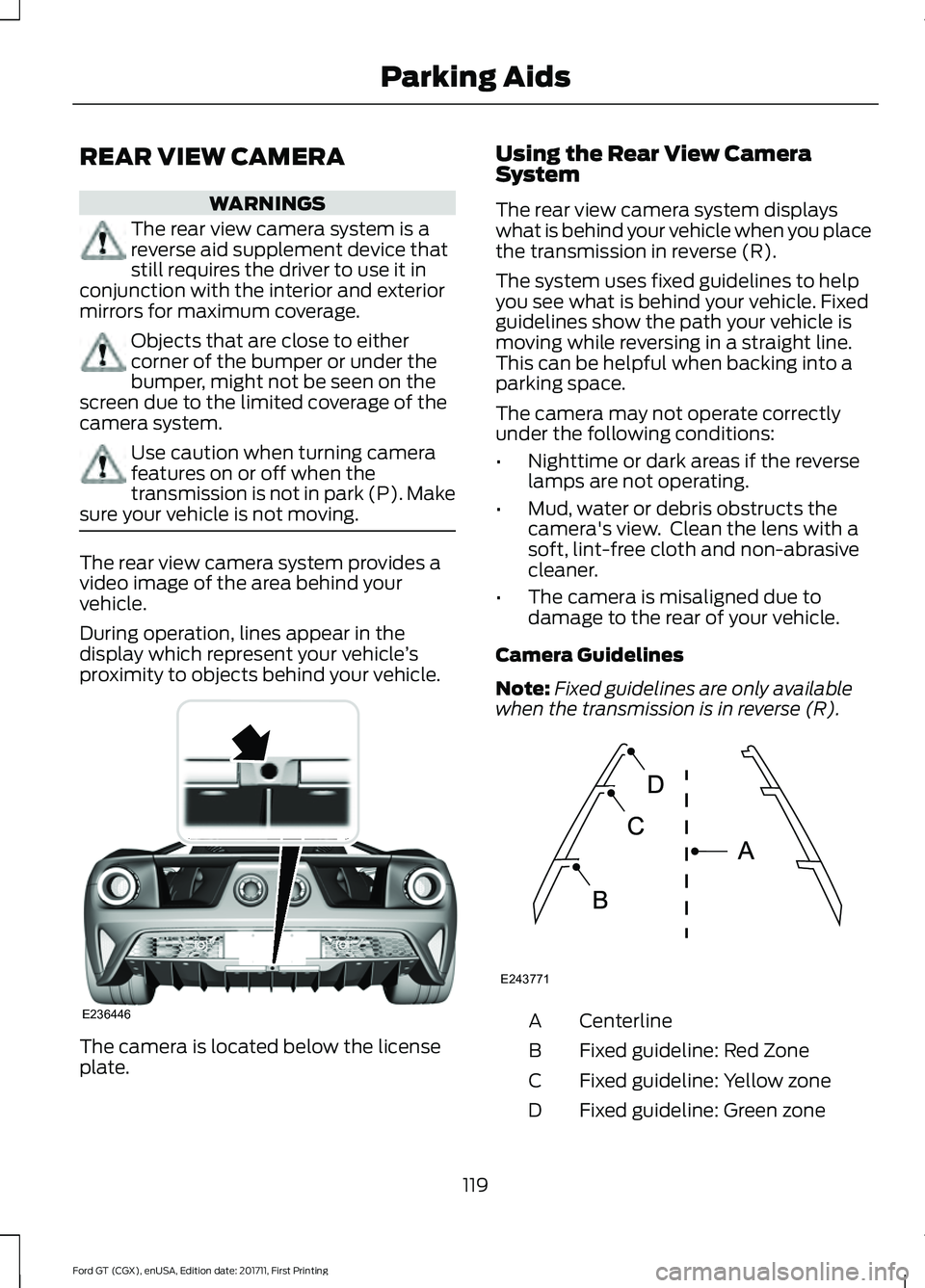
During operation, lines appear in the
display which represent your vehicle
’s
proximity to objects behind your vehicle. The camera is located below the license
plate. Using the Rear View Camera
System
The rear view camera system displays
what is behind your vehicle when you place
the transmission in reverse (R).
The system uses fixed guidelines to help
you see what is behind your vehicle. Fixed
guidelines show the path your vehicle is
moving while reversing in a straight line.
This can be helpful when backing into a
parking space.
The camera may not operate correctly
under the following conditions:
•
Nighttime or dark areas if the reverse
lamps are not operating.
• Mud, water or debris obstructs the
camera's view. Clean the lens with a
soft, lint-free cloth and non-abrasive
cleaner.
• The camera is misaligned due to
damage to the rear of your vehicle.
Camera Guidelines
Note: Fixed guidelines are only available
when the transmission is in reverse (R). Centerline
A
Fixed guideline: Red Zone
B
Fixed guideline: Yellow zone
C
Fixed guideline: Green zone
D
119
Ford GT (CGX), enUSA, Edition date: 201711, First Printing Parking AidsE236446 E243771
Page 123 of 325
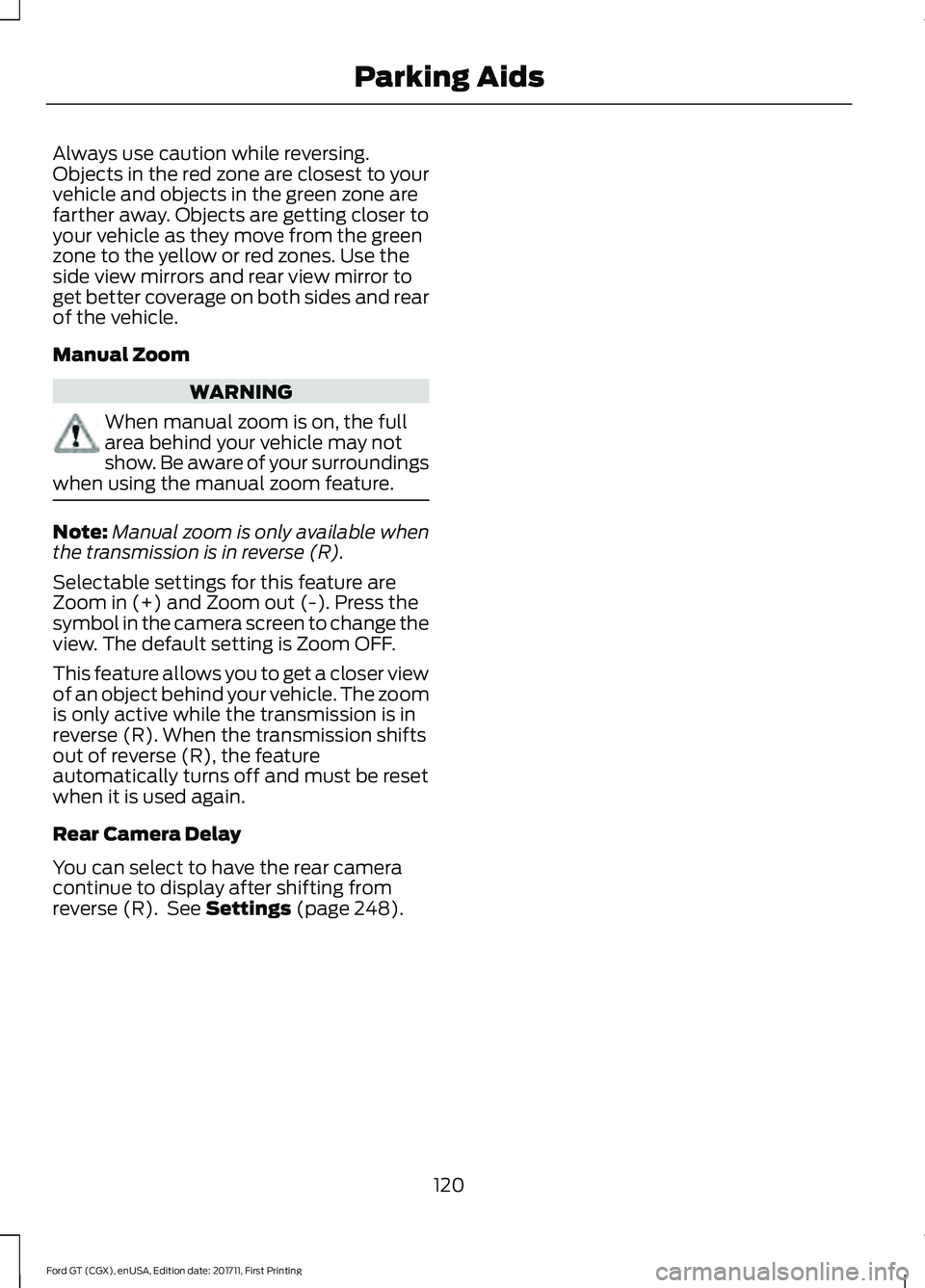
Always use caution while reversing.
Objects in the red zone are closest to your
vehicle and objects in the green zone are
farther away. Objects are getting closer to
your vehicle as they move from the green
zone to the yellow or red zones. Use the
side view mirrors and rear view mirror to
get better coverage on both sides and rear
of the vehicle.
Manual Zoom
WARNING
When manual zoom is on, the full
area behind your vehicle may not
show. Be aware of your surroundings
when using the manual zoom feature. Note:
Manual zoom is only available when
the transmission is in reverse (R).
Selectable settings for this feature are
Zoom in (+) and Zoom out (-). Press the
symbol in the camera screen to change the
view. The default setting is Zoom OFF.
This feature allows you to get a closer view
of an object behind your vehicle. The zoom
is only active while the transmission is in
reverse (R). When the transmission shifts
out of reverse (R), the feature
automatically turns off and must be reset
when it is used again.
Rear Camera Delay
You can select to have the rear camera
continue to display after shifting from
reverse (R). See Settings (page 248).
120
Ford GT (CGX), enUSA, Edition date: 201711, First Printing Parking Aids
Page 124 of 325
PRINCIPLE OF OPERATION
Cruise control lets you maintain a set
speed without keeping your foot on the
accelerator pedal. You can use cruise
control when your vehicle speed is greater
than 20 mph (30 km/h).
USING CRUISE CONTROL WARNINGS
Do not use cruise control on winding
roads, in heavy traffic or when the
road surface is slippery. This could
result in loss of vehicle control, serious
injury or death. When you are going downhill, your
vehicle speed could increase above
the set speed. The system does not
apply the brakes. Note:
Cruise control disengages if the
vehicle speed decreases more than 10 mph
(16 km/h) below the set speed when driving
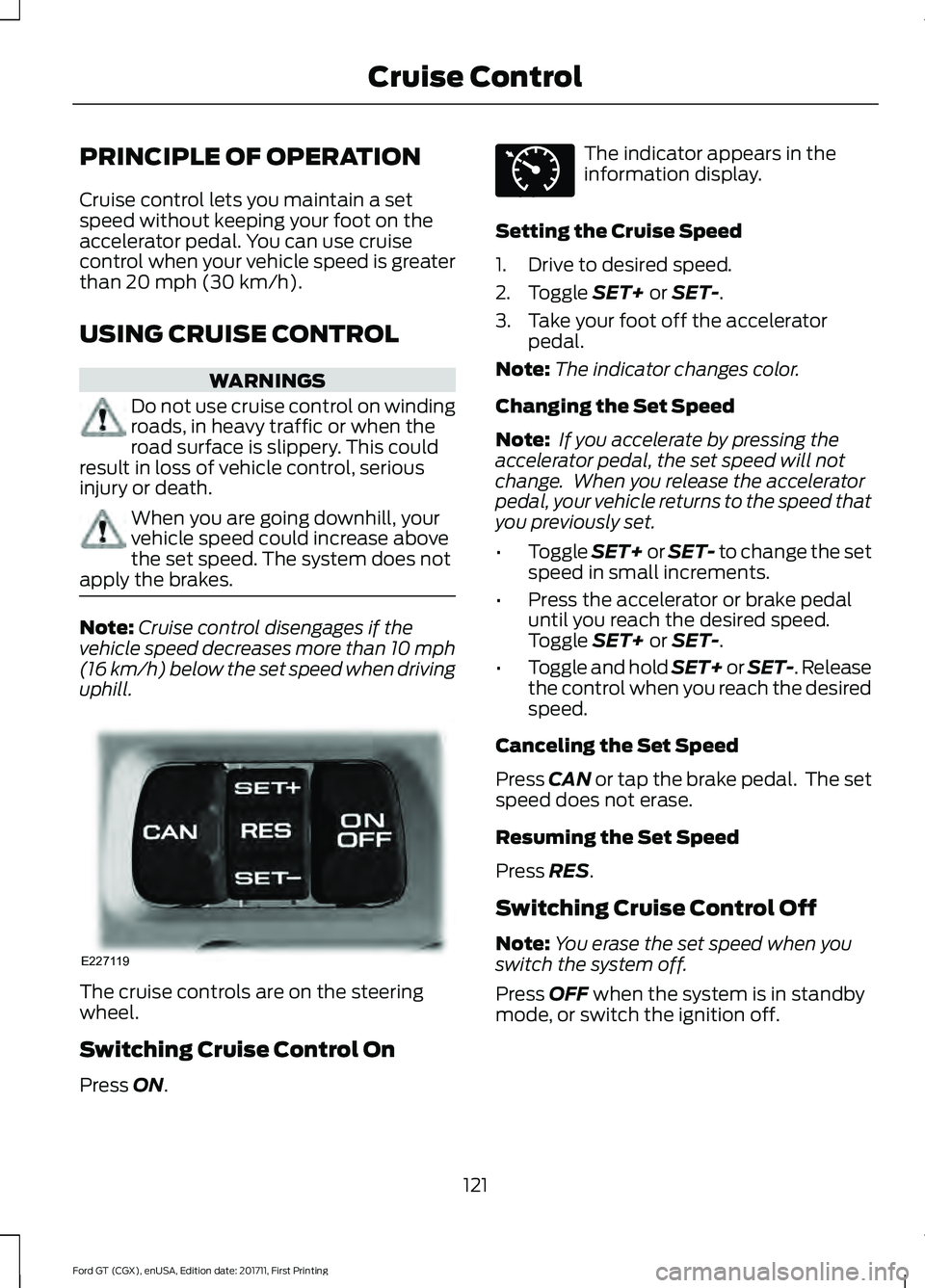
uphill. The cruise controls are on the steering
wheel.
Switching Cruise Control On
Press
ON. The indicator appears in the
information display.
Setting the Cruise Speed
1. Drive to desired speed.
2. Toggle
SET+ or SET-.
3. Take your foot off the accelerator pedal.
Note: The indicator changes color.
Changing the Set Speed
Note: If you accelerate by pressing the
accelerator pedal, the set speed will not
change. When you release the accelerator
pedal, your vehicle returns to the speed that
you previously set.
• Toggle
SET+ or SET- to change the set
speed in small increments.
• Press the accelerator or brake pedal
until you reach the desired speed.
Toggle
SET+ or SET-.
• Toggle and hold SET+ or SET-. Release
the control when you reach the desired
speed.
Canceling the Set Speed
Press
CAN or tap the brake pedal. The set
speed does not erase.
Resuming the Set Speed
Press
RES.
Switching Cruise Control Off
Note: You erase the set speed when you
switch the system off.
Press
OFF when the system is in standby
mode, or switch the ignition off.
121
Ford GT (CGX), enUSA, Edition date: 201711, First Printing Cruise ControlE227119 E71340
Page 127 of 325
•
Track (T) – Optimized settings for
track handling performance. The Track
drive mode should only be used in a
track environment, not on the street,
due to the low ride height. This setting
can only be selected while your vehicle
is in park (P) with the engine running,
and you need to confirm the selection.
•AdvanceTrac Stability Control is
active but can be adjusted by use
of the Stability Control button on
the console.
• Ride height is set to Low and
suspension damping is set to Track.
• Comfort damping cannot be
selected due to low ride height.
• Launch control is available.
• Transmission automatic shift
calibration is set to Sport.
• Turbocharger anti-lag calibration
is active.
• Rear wing deploys and remains
deployed while in Track mode.
When you change to another mode,
the wing lowers once you start to
drive your vehicle, not while it is
stopped.
• Air brake activates at speeds above
75 mph (121 km/h) when the brakes
are applied with moderate force. •
V-Max (V) – Optimized settings for
achieving maximum velocity (top
speed). The V-Max mode should only
be used in a controlled track
environment, not on the street, due to
the low ride height. This setting can
only be selected while your vehicle is
in park (P) with the engine running, and
you need to confirm the selection.
•AdvanceTrac Stability Control is
active and cannot be adjusted.
• Ride height is set to Low and
suspension damping is set to Track.
• Comfort damping cannot be
selected due to low ride height.
• Launch control is available.
• Transmission automatic shift
calibration is set to Sport.
• Rear wing does not deploy.
• Air brake activates at speeds above
75 mph (121 km/h) when the brakes
are applied with moderate force.
Note: When you shut down your vehicle in
V-Max or Track mode, the vehicle returns
to the Normal ride height. When you restart
your vehicle in V-Max or Track mode, you
need to re-acknowledge the drive mode
selection in the information display in order
for the drive mode to reactivate. If you do
not make a selection, the vehicle returns to
the previously selected drive mode.
124
Ford GT (CGX), enUSA, Edition date: 201711, First Printing Driving Aids
Page 129 of 325
Front Lift
WARNING
Before using front lift, make sure the
area around your vehicle is free from
obstruction. Failure to follow this
instruction could result in personal injury
or death. Your vehicle has a front lift system to
provide additional front end clearance
when approaching a speed bump,
driveway ramp or another similar surface
where front end clearance could be a
concern.
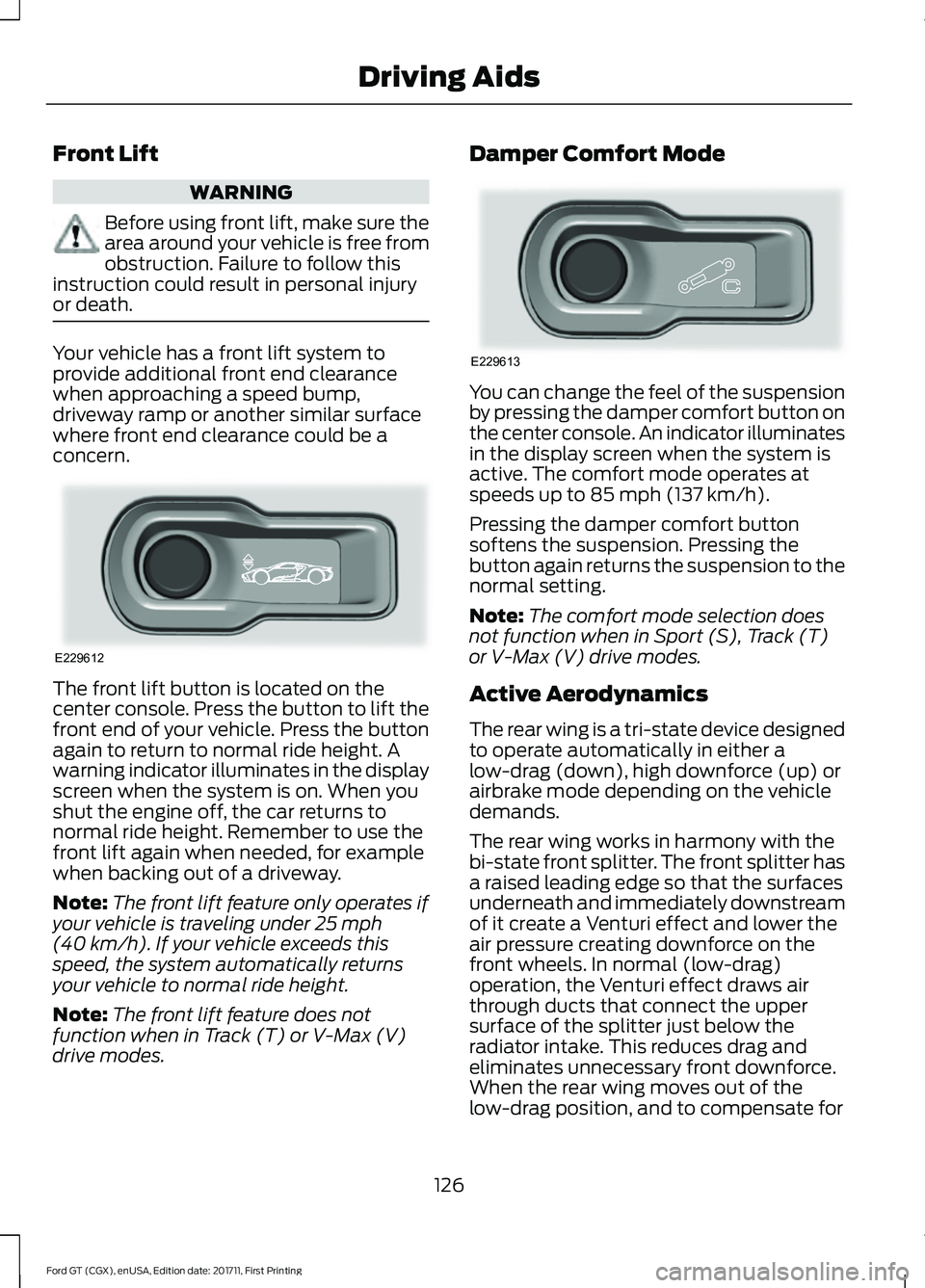
The front lift button is located on the
center console. Press the button to lift the
front end of your vehicle. Press the button
again to return to normal ride height. A
warning indicator illuminates in the display
screen when the system is on. When you
shut the engine off, the car returns to
normal ride height. Remember to use the
front lift again when needed, for example
when backing out of a driveway.
Note:
The front lift feature only operates if
your vehicle is traveling under 25 mph
(40 km/h). If your vehicle exceeds this
speed, the system automatically returns
your vehicle to normal ride height.
Note: The front lift feature does not
function when in Track (T) or V-Max (V)
drive modes. Damper Comfort Mode
You can change the feel of the suspension
by pressing the damper comfort button on
the center console. An indicator illuminates
in the display screen when the system is
active. The comfort mode operates at
speeds up to
85 mph (137 km/h).
Pressing the damper comfort button
softens the suspension. Pressing the
button again returns the suspension to the
normal setting.
Note: The comfort mode selection does
not function when in Sport (S), Track (T)
or V-Max (V) drive modes.
Active Aerodynamics
The rear wing is a tri-state device designed
to operate automatically in either a
low-drag (down), high downforce (up) or
airbrake mode depending on the vehicle
demands.
The rear wing works in harmony with the
bi-state front splitter. The front splitter has
a raised leading edge so that the surfaces
underneath and immediately downstream
of it create a Venturi effect and lower the
air pressure creating downforce on the
front wheels. In normal (low-drag)
operation, the Venturi effect draws air
through ducts that connect the upper
surface of the splitter just below the
radiator intake. This reduces drag and
eliminates unnecessary front downforce.
When the rear wing moves out of the
low-drag position, and to compensate for
126
Ford GT (CGX), enUSA, Edition date: 201711, First Printing Driving AidsE229612 E229613
Page 161 of 325
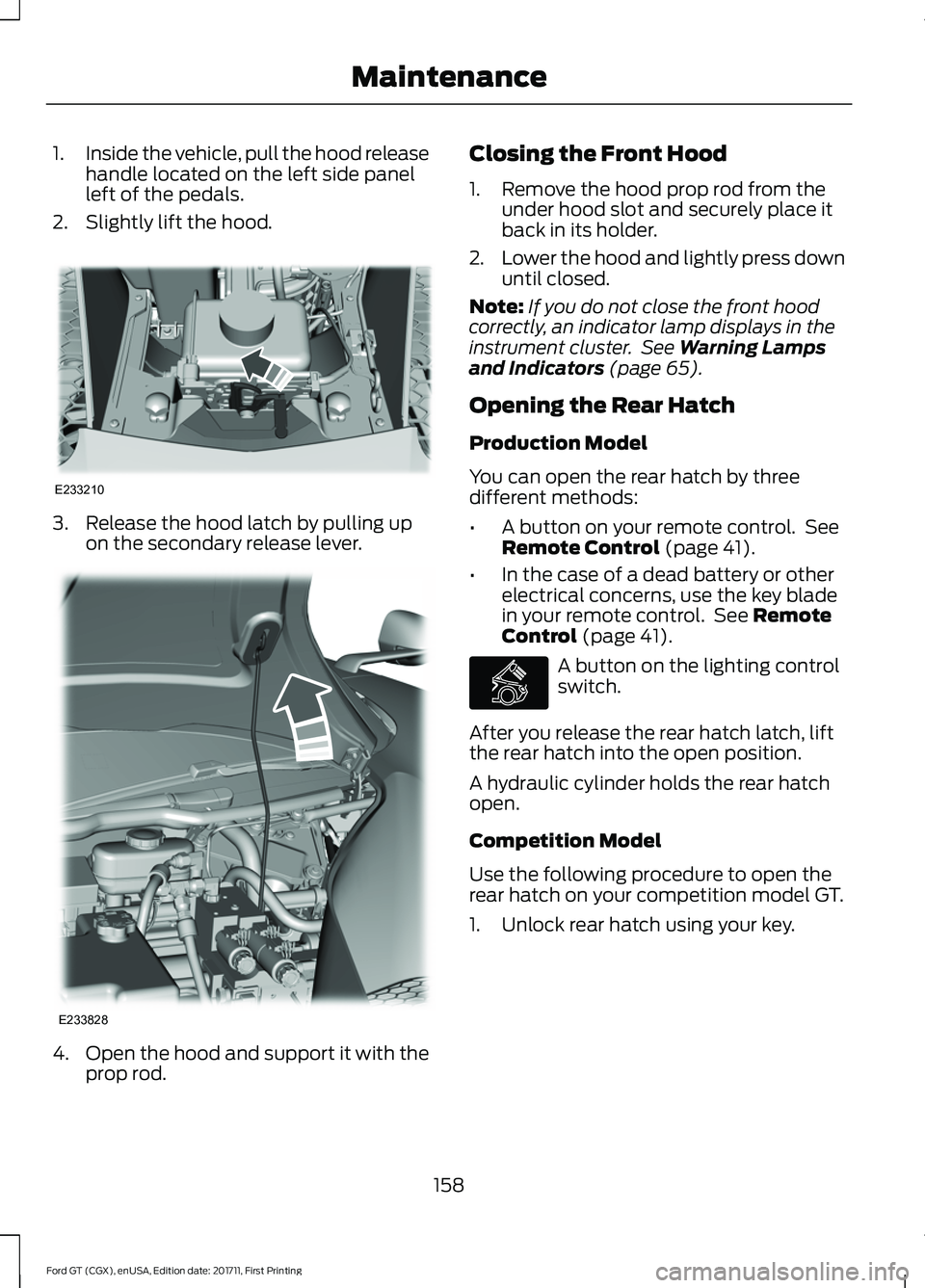
1.
Inside the vehicle, pull the hood release
handle located on the left side panel
left of the pedals.
2. Slightly lift the hood. 3. Release the hood latch by pulling up
on the secondary release lever. 4.
Open the hood and support it with the
prop rod. Closing the Front Hood
1. Remove the hood prop rod from the
under hood slot and securely place it
back in its holder.
2. Lower the hood and lightly press down
until closed.
Note: If you do not close the front hood
correctly, an indicator lamp displays in the
instrument cluster. See Warning Lamps
and Indicators (page 65).
Opening the Rear Hatch
Production Model
You can open the rear hatch by three
different methods:
• A button on your remote control. See
Remote Control
(page 41).
• In the case of a dead battery or other
electrical concerns, use the key blade
in your remote control. See
Remote
Control (page 41). A button on the lighting control
switch.
After you release the rear hatch latch, lift
the rear hatch into the open position.
A hydraulic cylinder holds the rear hatch
open.
Competition Model
Use the following procedure to open the
rear hatch on your competition model GT.
1. Unlock rear hatch using your key.
158
Ford GT (CGX), enUSA, Edition date: 201711, First Printing MaintenanceE233210 E233828 E268917
Page 167 of 325
Dispose of used engine coolant in an
appropriate manner. Follow your
community
’s regulations and standards
for recycling and disposing of automotive
fluids.
Severe Climates
If you drive in extremely cold climates:
• It may be necessary to increase the
coolant concentration above 50%.
• A coolant concentration of 60%
provides improved freeze point
protection. Coolant concentrations
above 60% decrease the overheat
protection characteristics of the
coolant and may cause engine
damage.
If you drive in extremely hot climates:
• It may be necessary to decrease the
coolant concentration to 40%.
• A coolant concentration of 40%
provides improved overheat protection.
Coolant concentrations below 40%
decrease the freeze and corrosion
protection characteristics of the
coolant and may cause engine
damage.
Vehicles driven year-round in non-extreme
climates should use prediluted coolant for
optimum cooling system and engine
protection.
Coolant Change
At specific mileage intervals, as listed in
the scheduled maintenance information,
the coolant should be changed. Add
prediluted coolant meeting the correct
specification. See Capacities and
Specifications (page 204). Fail-Safe Cooling
Fail-safe cooling allows you to temporarily
drive your vehicle before any incremental
component damage occurs. The fail-safe
distance depends on ambient
temperature, vehicle load and terrain.
How Fail-Safe Cooling Works
If the engine begins to overheat, the
coolant temperature gauge moves toward
the red zone:
A warning lamp illuminates and
a message may appear in the
information display.
If the engine reaches a preset
over-temperature condition, the engine
automatically switches to alternating
cylinder operation. Each disabled cylinder
acts as an air pump and cools the engine.
When this occurs, your vehicle still
operates, however:
• Engine power is limited.
• The air conditioning system turns off.
Continued operation increases the engine
temperature, causing the engine to
completely shut down. Your steering and
braking effort increases in this situation.
When the engine temperature cools, you
can re-start the engine. Have your vehicle
checked as soon as possible to minimize
engine damage.
When Fail-Safe Mode Is Activated WARNINGS
Fail-safe mode is for use during
emergencies only. Operate your
vehicle in fail-safe mode only as long
as necessary to bring your vehicle to rest
in a safe location and seek immediate
repairs. When in fail-safe mode, your
164
Ford GT (CGX), enUSA, Edition date: 201711, First Printing Maintenance
Page 168 of 325
WARNINGS
vehicle will have limited power, will not be
able to maintain high-speed operation, and
may completely shut down without
warning, potentially losing engine power,
power steering assist, and power brake
assist, which may increase the possibility
of a crash resulting in serious injury. Never remove the coolant reservoir
cap when the engine is running or
hot.
Your vehicle has limited engine power
when in the fail-safe mode, drive your
vehicle with caution. Your vehicle does not
maintain high-speed operation and the
engine may operate poorly.
Remember that the engine is capable of
automatically shutting down to prevent
engine damage. In this situation:
1. Pull off the road as soon as safely
possible and switch the engine off.
2. Contact the Ford GT Concierge to obtain assistance. See About This
Manual (page 5).
3. If this is not possible, wait a short period for the engine to cool.
4. Check the coolant level. If the coolant level is at or below the minimum mark,
add prediluted coolant immediately.
5. When the engine temperature cools, you can re-start the engine. Have your
vehicle checked as soon as possible to
minimize engine damage.
Note: Driving your vehicle without repair
increases the chance of engine damage. Engine Coolant Temperature
Management WARNING
To reduce the risk of crash and injury,
be prepared that the vehicle speed
may reduce and the vehicle may not
be able to accelerate with full power until
the coolant temperature reduces. At this time, you may notice the coolant
temperature gauge moves toward the red
zone and a message may appear in the
information display.
You may notice a reduction in vehicle
speed caused by reduced engine power in
order to manage the engine coolant
temperature. Your vehicle may enter this
mode if certain high-temperature and
high-load conditions take place. The
amount of speed reduction depends on
vehicle loading, grade and ambient
temperature. If this occurs, there is no need
to pull off the road. You can continue to
drive your vehicle.
The air conditioning may automatically
turn on and off during severe operating
conditions to protect the engine from
overheating. When the coolant
temperature decreases to the normal
operating temperature, the air conditioning
turns on.
If the coolant temperature gauge moves
fully into the red zone, or if the coolant
temperature warning or service engine
soon messages appear in your information
display, do the following:
1. Pull off the road as soon as safely
possible and shift the transmission into
park
(P).
165
Ford GT (CGX), enUSA, Edition date: 201711, First Printing Maintenance