audio FORD GT 2018 Owners Manual
[x] Cancel search | Manufacturer: FORD, Model Year: 2018, Model line: GT, Model: FORD GT 2018Pages: 325, PDF Size: 6.61 MB
Page 4 of 325
Introduction
About This Manual...........................................5
Symbols Glossary.............................................5
Data Recording..................................................7
California Proposition 65...............................9
Perchlorate..........................................................9
Replacement Parts Recommendation......................................10
Special Notices
................................................10
Mobile Communications Equipment......................................................11
Ford Performance...........................................12
Environment
Protecting the Environment
........................13
At a Glance
Instrument Panel Overview
........................14
Unique Features
..............................................15
Child Safety
General Information.......................................17
Installing Child Restraints
............................18
Booster Seats
..................................................22
Child Restraint Positioning.........................24
Seatbelts
Principle of Operation..................................26
Fastening the Seatbelts..............................26
Seatbelt Warning Lamp and Indicator Chime.............................................................28
Seatbelt Reminder
........................................29
Child Restraint and Seatbelt Maintenance
.................................................31
Seatbelt Extension.........................................31
Personal Safety System ™
Personal Safety System ™
..........................32Supplementary Restraints
System
Principle of Operation...................................33
Driver and Passenger Airbags...................34
Front Passenger Sensing System............35
Side Airbags......................................................37
Driver and Passenger Knee Airbags.........37
Crash Sensors and Airbag Indicator.......38
Airbag Disposal...............................................39
Keys and Remote Controls
General Information on Radio Frequencies.................................................40
Remote Control...............................................41
Replacing a Lost Key or Remote Control...........................................................45
Doors and Locks
Locking and Unlocking
................................46
Opening the Doors........................................48
Emergency Door Release............................49
Security
Passive Anti-Theft System
........................50
Anti-Theft Alarm
.............................................51
Steering Wheel
Adjusting the Steering Wheel
....................52
Audio Control
...................................................53
Voice Control....................................................53
Cruise Control
..................................................53
Information Display Control.......................54
Drive Mode Control.......................................54
Wiper and Washer Control.........................54
Lighting Control
..............................................54
Pedals
Adjusting the Pedals.....................................56
1
Ford GT (CGX), enUSA, Edition date: 201711, First Printing Table of Contents
Page 7 of 325
Cleaning the Exterior....................................172
Waxing..............................................................174
Cleaning the Engine.....................................174
Cleaning the Windows and Wiper
Blades...........................................................175
Cleaning the Interior.....................................175
Cleaning the Instrument Panel and Instrument Cluster Lens.........................176
Cleaning Leather Seats
..............................176
Repairing Minor Paint Damage
................177
Cleaning the Wheels
....................................177
Vehicle Storage
..............................................178
Wheels and Tires
Tire Sealant and Inflator Kit.....................180
Tire Care
..........................................................186
Using Summer Tires....................................198
Using Snow Chains
.....................................198
Tire Pressure Monitoring System...........198
Changing a Road Wheel
...........................202
Driving at High Speed................................202
Technical Specifications
...........................203
Capacities and Specific- ations
Engine Specifications................................204
Motorcraft Parts
..........................................205
Vehicle Dimensions
....................................206
Vehicle Identification Number
................207
Vehicle Certification Label.......................208
Transmission Code Designation............208
Capacities and Specifications...............209
Audio System
Audio Unit
........................................................212
USB Port...........................................................212
SYNC™ 3
General Information
....................................213
Home Screen.................................................223 Using Voice Recognition
...........................224
Entertainment..............................................230
Phone...............................................................234
Navigation......................................................239
Apps
..................................................................247
Settings...........................................................248
SYNC™ 3 Troubleshooting......................259
Accessories
Accessories.....................................................273
Scheduled Maintenance
General Maintenance Information
........274
Normal Scheduled Maintenance
...........275
Special Operating Conditions Scheduled Maintenance..............................................276
Scheduled Maintenance Record
............277
Appendices
End User License Agreement.................288
4
Ford GT (CGX), enUSA, Edition date: 201711, First Printing Table of Contents
Page 17 of 325
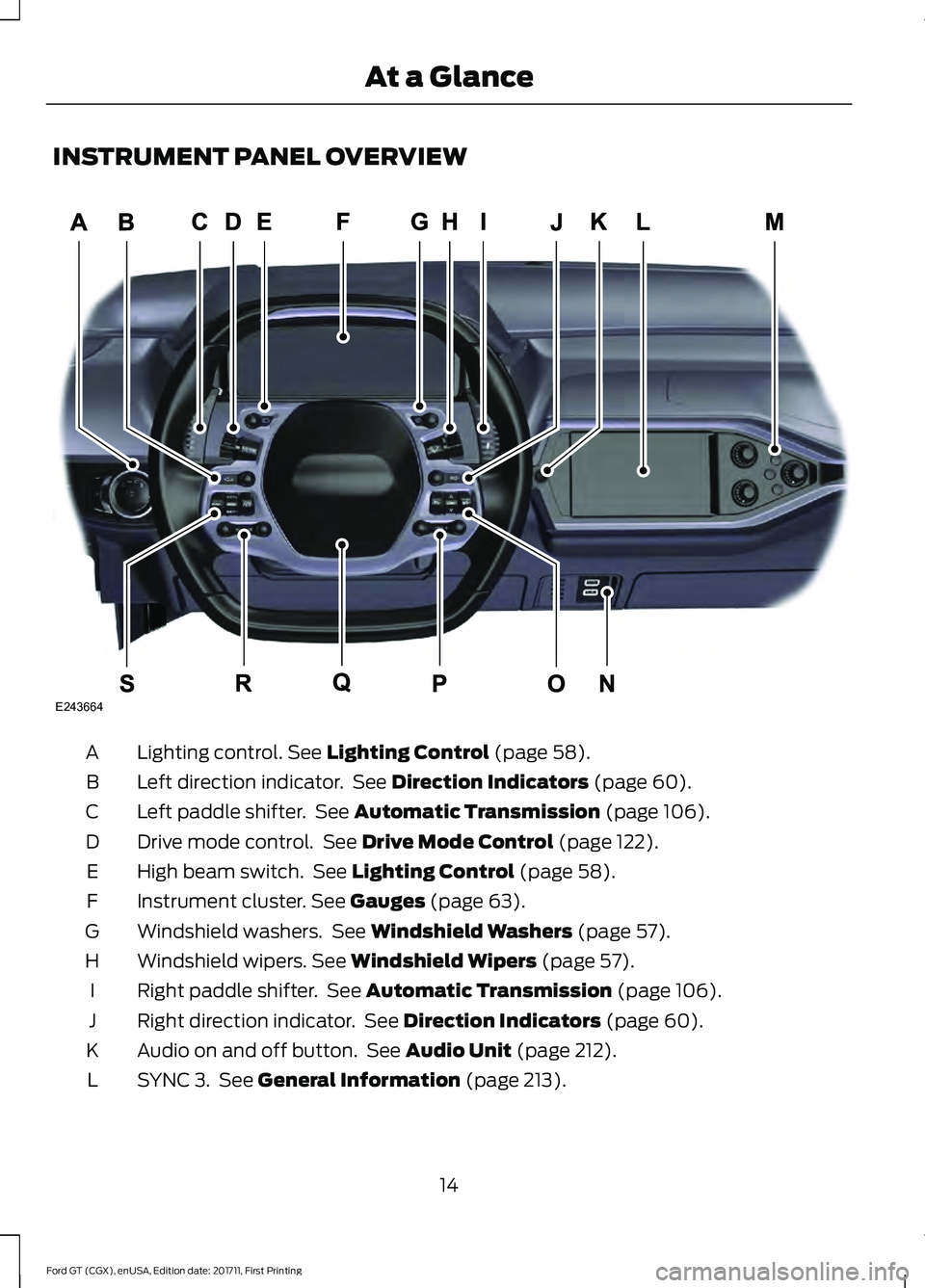
INSTRUMENT PANEL OVERVIEW
Lighting control. See Lighting Control (page 58).
A
Left direction indicator. See
Direction Indicators (page 60).
B
Left paddle shifter. See
Automatic Transmission (page 106).
C
Drive mode control. See
Drive Mode Control (page 122).
D
High beam switch. See
Lighting Control (page 58).
E
Instrument cluster.
See Gauges (page 63).
F
Windshield washers. See
Windshield Washers (page 57).
G
Windshield wipers.
See Windshield Wipers (page 57).
H
Right paddle shifter. See
Automatic Transmission (page 106).
I
Right direction indicator. See
Direction Indicators (page 60).
J
Audio on and off button. See
Audio Unit (page 212).
K
SYNC 3. See
General Information (page 213).
L
14
Ford GT (CGX), enUSA, Edition date: 201711, First Printing At a GlanceE243664
Page 18 of 325
Climate controls. See Automatic Climate Control (page 81). See Manual
Climate Control (page 80).
M
Media hub. See
USB Port (page 212).
N
Menu and voice control. See
Voice Control (page 53).
O
Audio control.
See Audio Control (page 53).
P
Horn.
Q
Audio control.
See Audio Control (page 53).
R
Cruise control. See
Using Cruise Control (page 121).
S
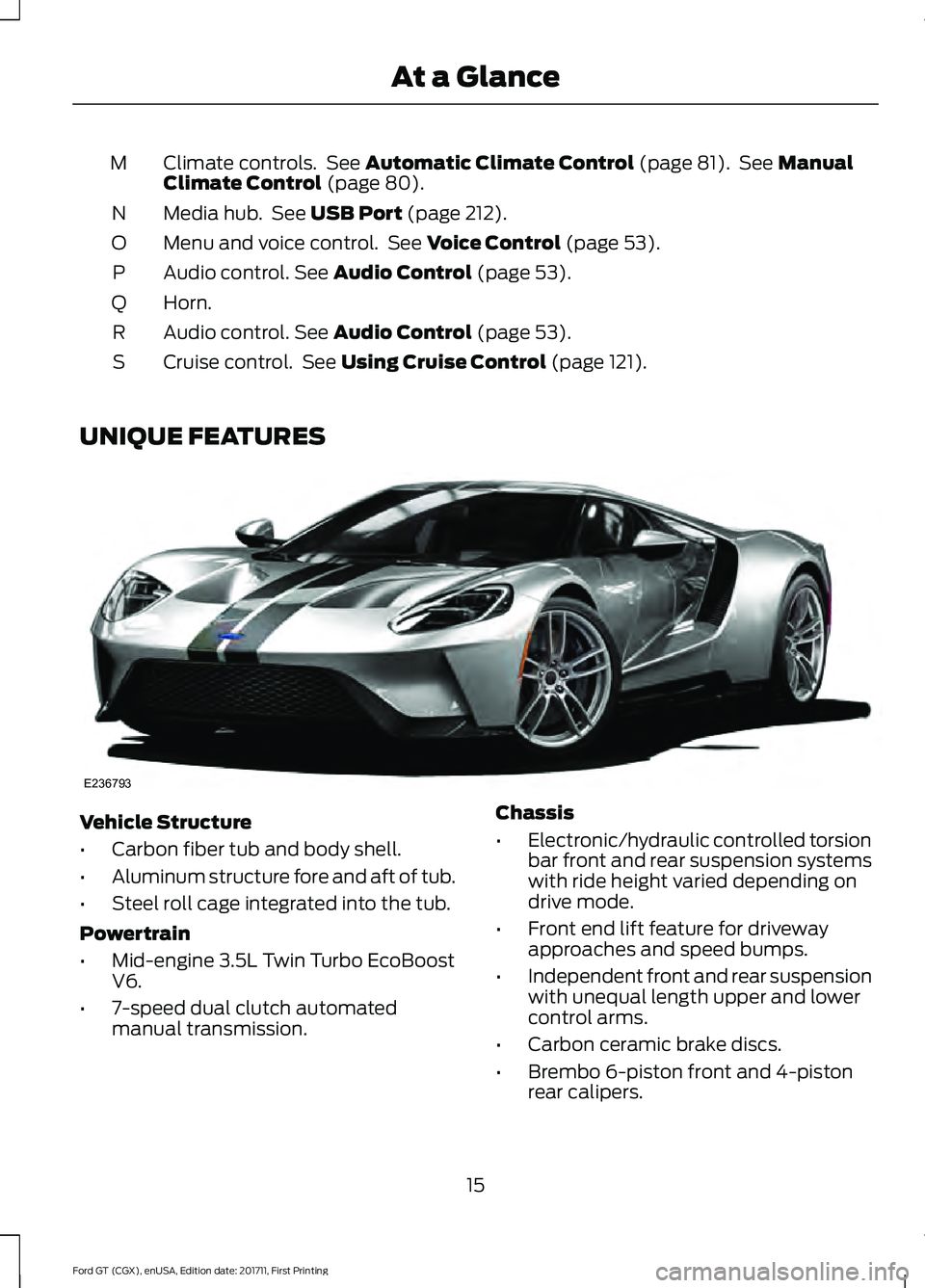
UNIQUE FEATURES Vehicle Structure
•
Carbon fiber tub and body shell.
• Aluminum structure fore and aft of tub.
• Steel roll cage integrated into the tub.
Powertrain
• Mid-engine 3.5L Twin Turbo EcoBoost
V6.
• 7-speed dual clutch automated
manual transmission. Chassis
•
Electronic/hydraulic controlled torsion
bar front and rear suspension systems
with ride height varied depending on
drive mode.
• Front end lift feature for driveway
approaches and speed bumps.
• Independent front and rear suspension
with unequal length upper and lower
control arms.
• Carbon ceramic brake discs.
• Brembo 6-piston front and 4-piston
rear calipers.
15
Ford GT (CGX), enUSA, Edition date: 201711, First Printing At a GlanceE236793
Page 56 of 325
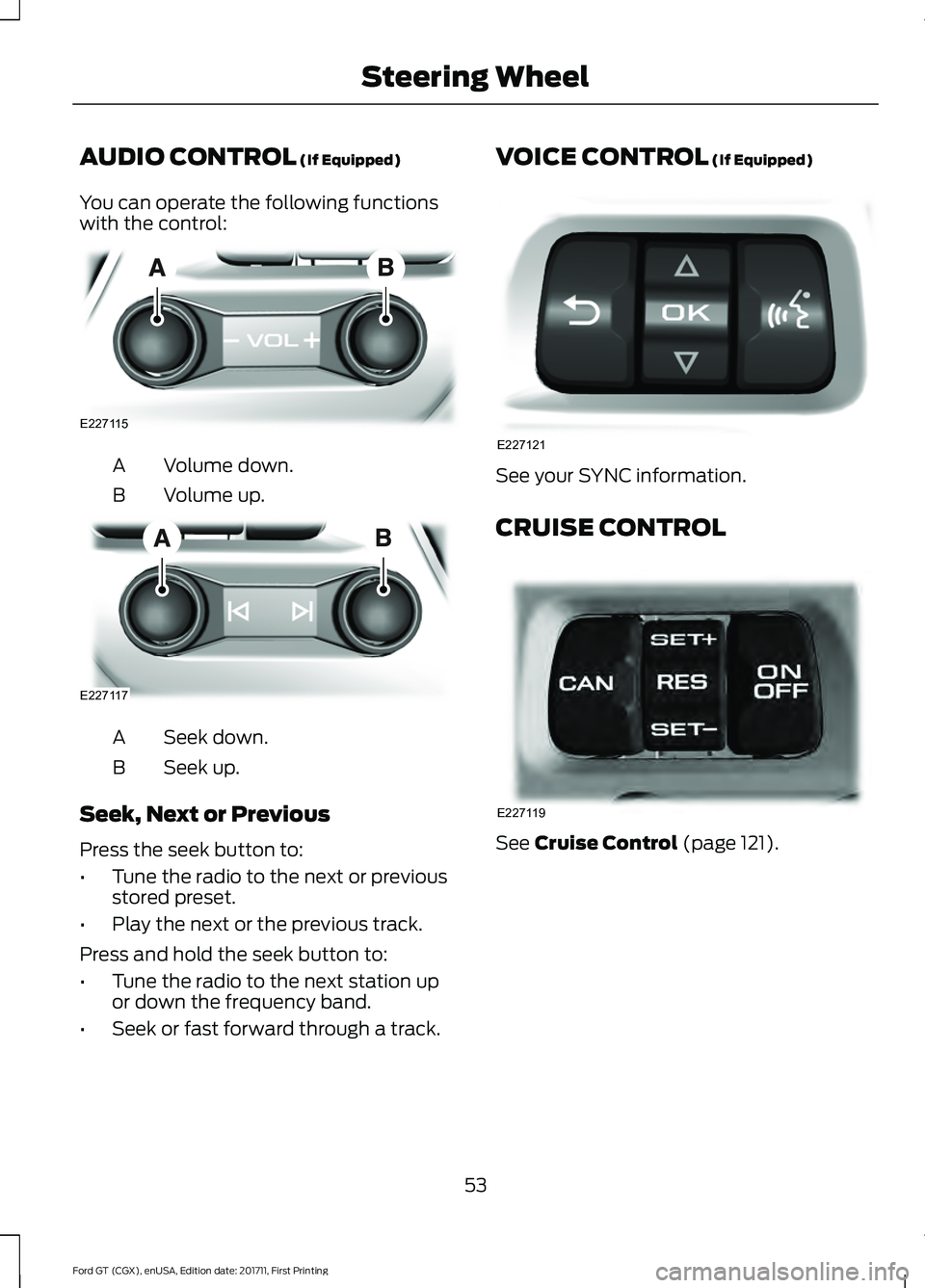
AUDIO CONTROL (If Equipped)
You can operate the following functions
with the control: Volume down.
A
Volume up.
B Seek down.
A
Seek up.
B
Seek, Next or Previous
Press the seek button to:
• Tune the radio to the next or previous
stored preset.
• Play the next or the previous track.
Press and hold the seek button to:
• Tune the radio to the next station up
or down the frequency band.
• Seek or fast forward through a track. VOICE CONTROL (If Equipped)
See your SYNC information.
CRUISE CONTROL
See
Cruise Control (page 121).
53
Ford GT (CGX), enUSA, Edition date: 201711, First Printing Steering WheelE227115 E227117 E227121 E227119
Page 157 of 325
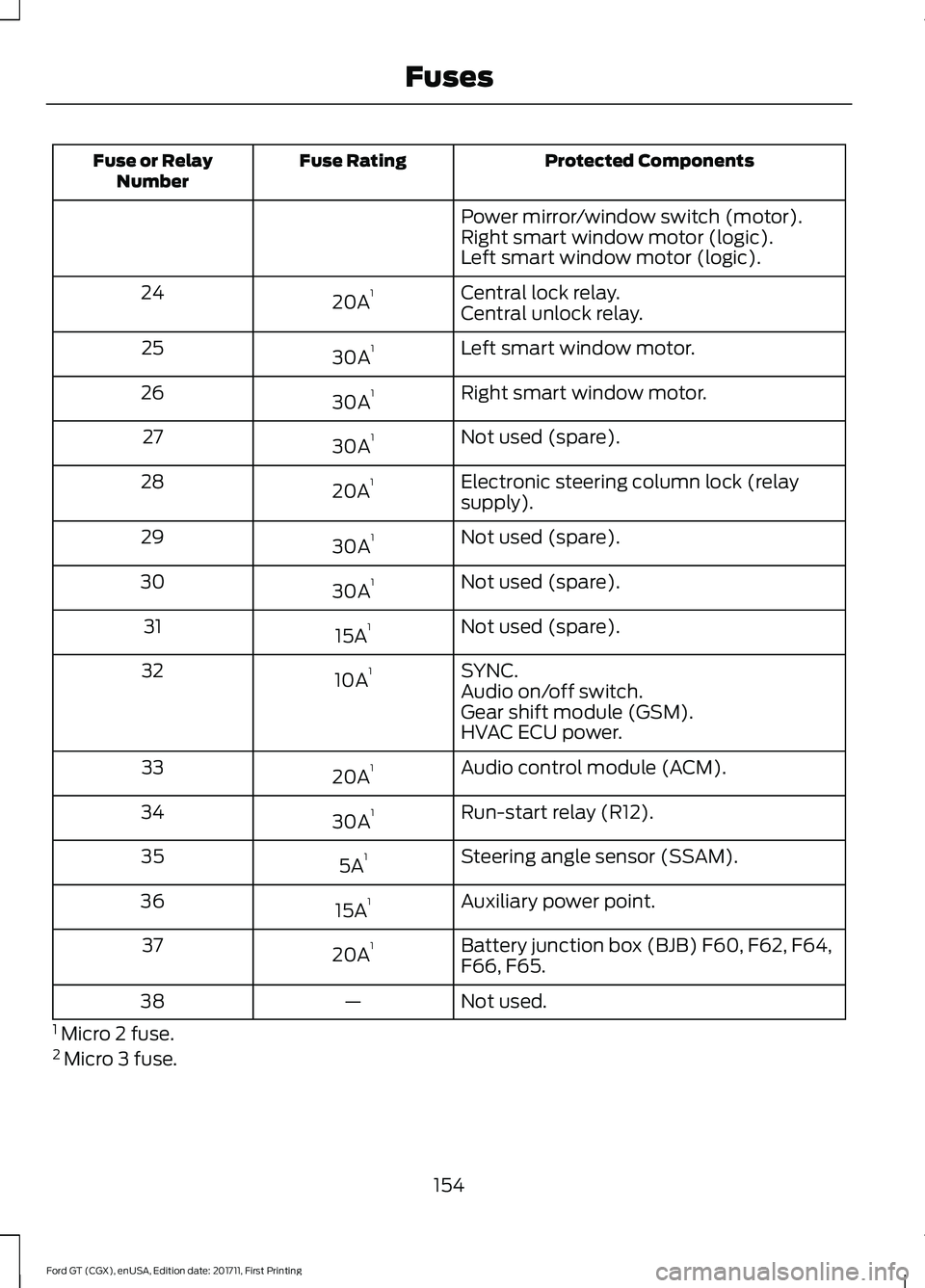
Protected Components
Fuse Rating
Fuse or Relay
Number
Power mirror/window switch (motor).
Right smart window motor (logic).
Left smart window motor (logic).
Central lock relay.
20A 1
24
Central unlock relay.
Left smart window motor.
30A 1
25
Right smart window motor.
30A 1
26
Not used (spare).
30A 1
27
Electronic steering column lock (relay
supply).
20A 1
28
Not used (spare).
30A 1
29
Not used (spare).
30A 1
30
Not used (spare).
15A 1
31
SYNC.
10A 1
32
Audio on/off switch.
Gear shift module (GSM).
HVAC ECU power.
Audio control module (ACM).
20A 1
33
Run-start relay (R12).
30A 1
34
Steering angle sensor (SSAM).
5A 1
35
Auxiliary power point.
15A 1
36
Battery junction box (BJB) F60, F62, F64,
F66, F65.
20A 1
37
Not used.
—
38
1 Micro 2 fuse.
2 Micro 3 fuse.
154
Ford GT (CGX), enUSA, Edition date: 201711, First Printing Fuses
Page 171 of 325
CHANGING THE 12V BATTERY
WARNING
Battery posts, terminals and related
accessories contain lead and lead
compounds. Wash hands after
handling. The Ford GT uses a lithium Ion battery.
The battery is located inside the right front
fender. For battery maintenance or
replacement, contact an authorized dealer.
When a battery replacement is required,
you must use a recommended
replacement battery that matches the
electrical requirements of the vehicle.
Note:
If you add electrical accessories or
components to the vehicle, it may adversely
affect the low voltage battery performance
and durability. This may also affect the
performance of other electrical systems in
the vehicle.
Because your vehicle ’s engine is
electronically controlled by a computer,
some control conditions are maintained
by power from the battery. When the
battery is disconnected or a new battery
is installed, the engine must relearn its idle
and fuel trim strategy for optimum
driveability and performance.
To restore the settings, do the following:
1. Apply the parking brake.
2. Shift into park (P) or neutral (N).
3. Switch off all accessories.
4. Press the brake pedal and start your vehicle. 5. Run the engine until it reaches normal
operating temperature. While the
engine is warming up, complete the
following: Reset the clock. See Audio
System (page 212). Reset the radio
station presets. See Audio System
(page 212).
6. Allow the engine to idle for at least one
minute.
7. Drive the vehicle at least 10 mi (16 km)
to completely relearn the idle trim and
fuel trim strategy.
Note: If you do not allow the engine to
relearn the idle and fuel trim strategy, the
idle quality of your vehicle may be adversely
affected until the engine computer
eventually relearns the idle trim and fuel
trim strategy.
Make sure that you dispose of old batteries
in an environmentally friendly way. Seek
advice from your local authority about
recycling old batteries.
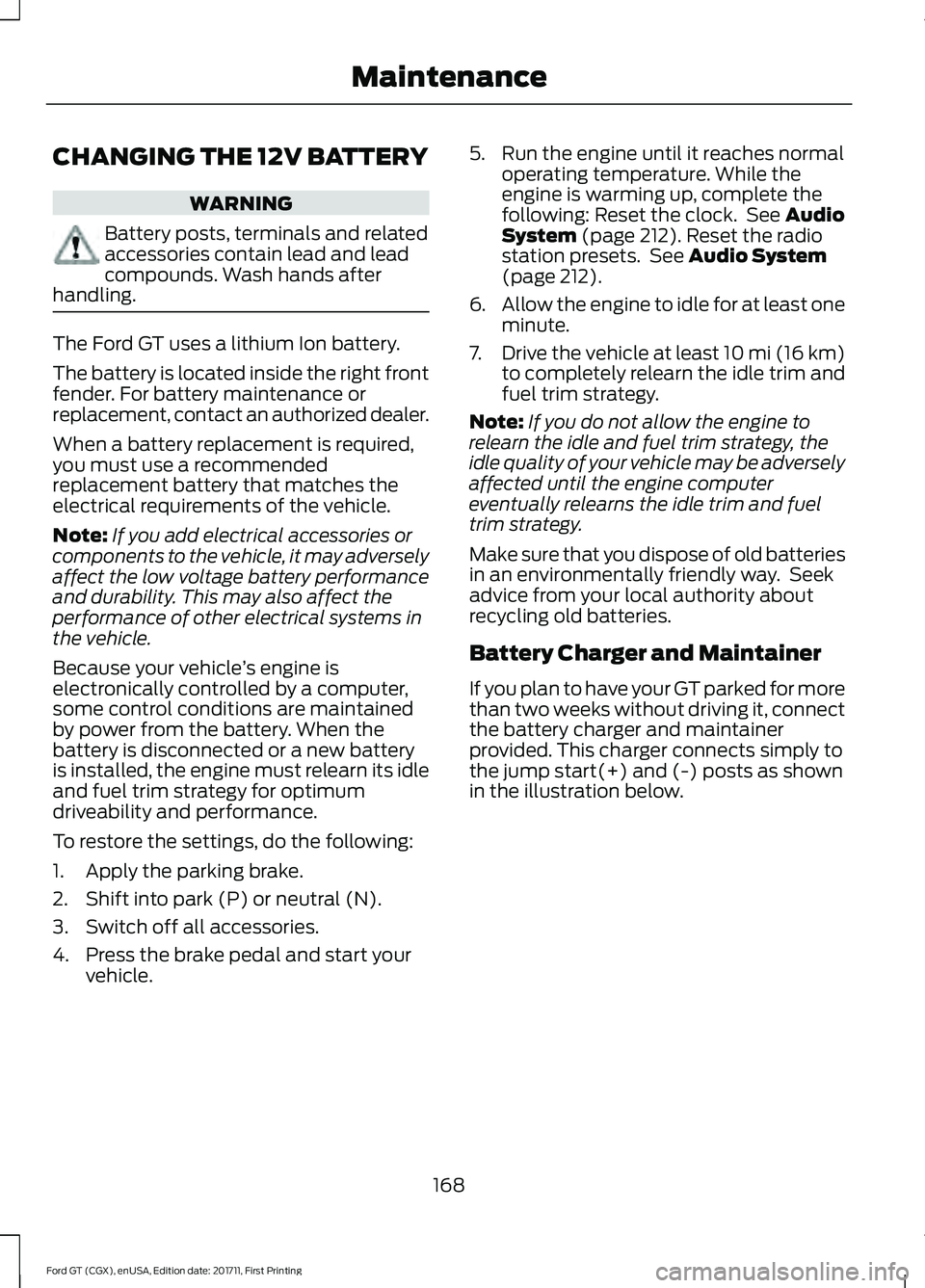
Battery Charger and Maintainer
If you plan to have your GT parked for more
than two weeks without driving it, connect
the battery charger and maintainer
provided. This charger connects simply to
the jump start(+) and (-) posts as shown
in the illustration below.
168
Ford GT (CGX), enUSA, Edition date: 201711, First Printing Maintenance
Page 215 of 325
AUDIO UNIT
WARNING
Driving while distracted can result in
loss of vehicle control, crash and
injury. We strongly recommend that
you use extreme caution when using any
device that may take your focus off the
road. Your primary responsibility is the safe
operation of your vehicle. We recommend
against the use of any hand-held device
while driving and encourage the use of
voice-operated systems when possible.
Make sure you are aware of all applicable
local laws that may affect the use of
electronic devices while driving. You can access your audio features with
the touchscreen and steering wheel
controls. See your SYNC information.
The power button is to the left of the
display screen.
USB PORT (If Equipped)
The USB port is on the bottom of the
instrument panel.
The USB port allows you to plug in media
playing devices, memory sticks and charge
devices (if supported). See your SYNC
information.
212
Ford GT (CGX), enUSA, Edition date: 201711, First Printing Audio System
Page 216 of 325
GENERAL INFORMATION
WARNING
Driving while distracted can result in
loss of vehicle control, crash and
injury. We strongly recommend that
you use extreme caution when using any
device that may take your focus off the
road. Your primary responsibility is the safe
operation of your vehicle. We recommend
against the use of any hand-held device
while driving and encourage the use of
voice-operated systems when possible.
Make sure you are aware of all applicable
local laws that may affect the use of
electronic devices while driving. Getting to Know Your System
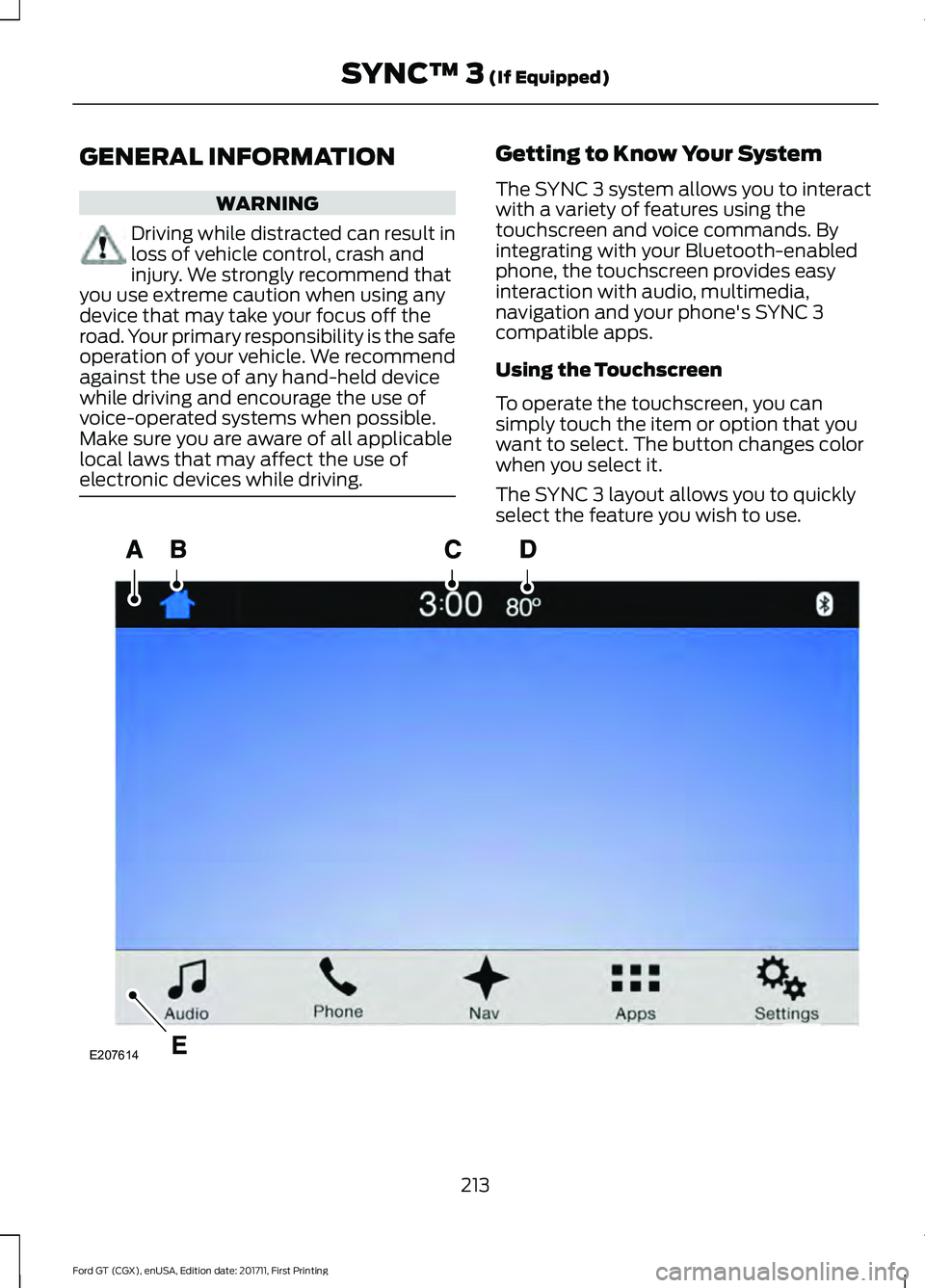
The SYNC 3 system allows you to interact
with a variety of features using the
touchscreen and voice commands. By
integrating with your Bluetooth-enabled
phone, the touchscreen provides easy
interaction with audio, multimedia,
navigation and your phone's SYNC 3
compatible apps.
Using the Touchscreen
To operate the touchscreen, you can
simply touch the item or option that you
want to select. The button changes color
when you select it.
The SYNC 3 layout allows you to quickly
select the feature you wish to use.
213
Ford GT (CGX), enUSA, Edition date: 201711, First Printing SYNC™ 3 (If Equipped)E207614
Page 217 of 325
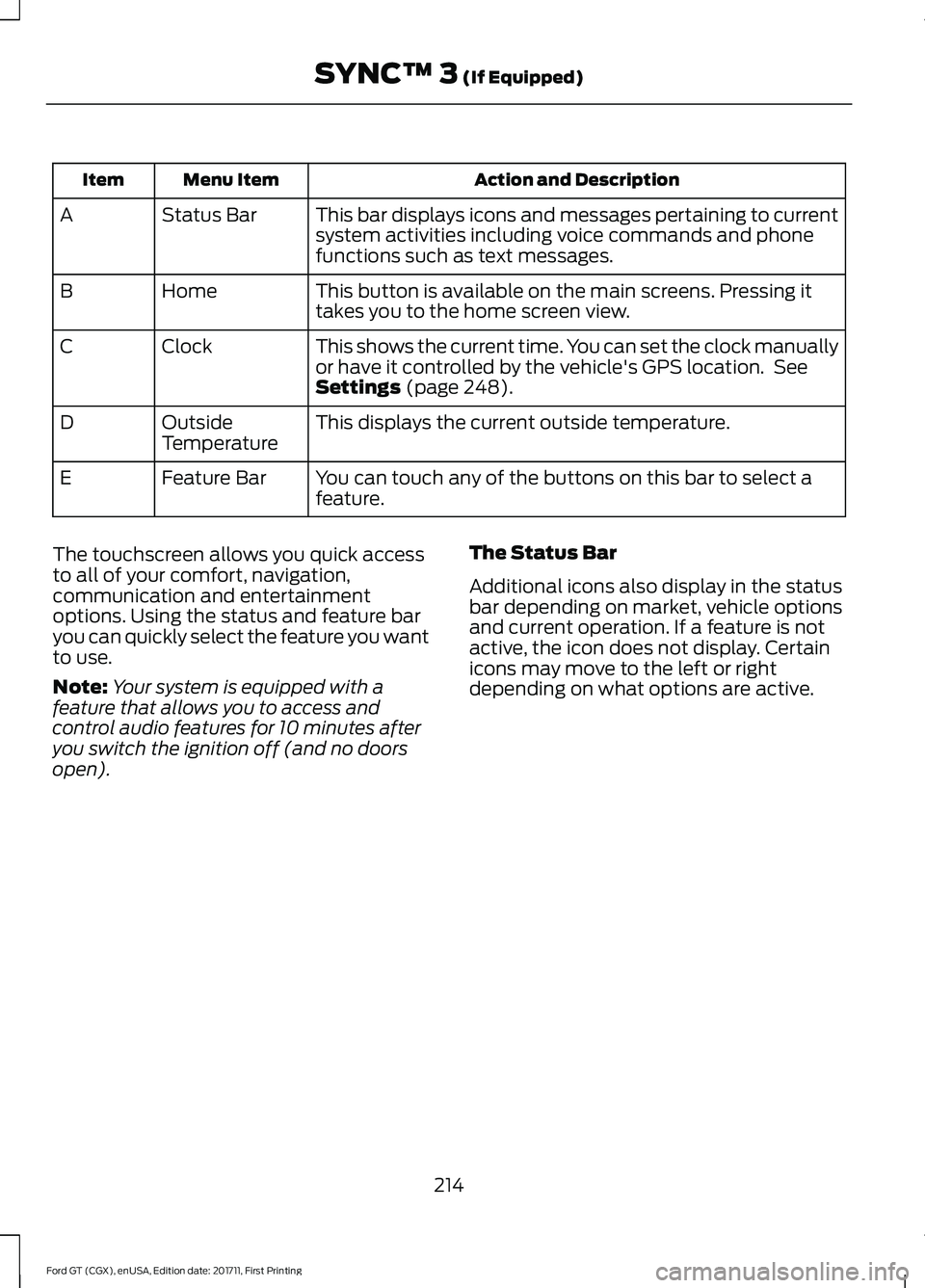
Action and Description
Menu Item
Item
This bar displays icons and messages pertaining to current
system activities including voice commands and phone
functions such as text messages.
Status Bar
A
This button is available on the main screens. Pressing it
takes you to the home screen view.
Home
B
This shows the current time. You can set the clock manually
or have it controlled by the vehicle's GPS location. See
Settings (page 248).
Clock
C
This displays the current outside temperature.
Outside
Temperature
D
You can touch any of the buttons on this bar to select a
feature.
Feature Bar
E
The touchscreen allows you quick access
to all of your comfort, navigation,
communication and entertainment
options. Using the status and feature bar
you can quickly select the feature you want
to use.
Note: Your system is equipped with a
feature that allows you to access and
control audio features for 10 minutes after
you switch the ignition off (and no doors
open). The Status Bar
Additional icons also display in the status
bar depending on market, vehicle options
and current operation. If a feature is not
active, the icon does not display. Certain
icons may move to the left or right
depending on what options are active.
214
Ford GT (CGX), enUSA, Edition date: 201711, First Printing SYNC™ 3
(If Equipped)