change time FORD GT 2018 Owners Manual
[x] Cancel search | Manufacturer: FORD, Model Year: 2018, Model line: GT, Model: FORD GT 2018Pages: 325, PDF Size: 6.61 MB
Page 2 of 325

The information contained in this publication was correct at the time of going to print. In the interest of
continuous development, we reserve the right to change specifications, design or equipment at any time
without notice or obligation. No part of this publication may be reproduced, transmitted, stored in a
retrieval system or translated into any language in any form by any means without our written permission.
Errors and omissions excepted.
© Ford Motor Company 2017
All rights reserved.
Part Number: 201711 20171113184048
Page 49 of 325
LOCKING AND UNLOCKING
You can use the power door lock control
or the remote control to lock and unlock
your vehicle.
Power Door Locks
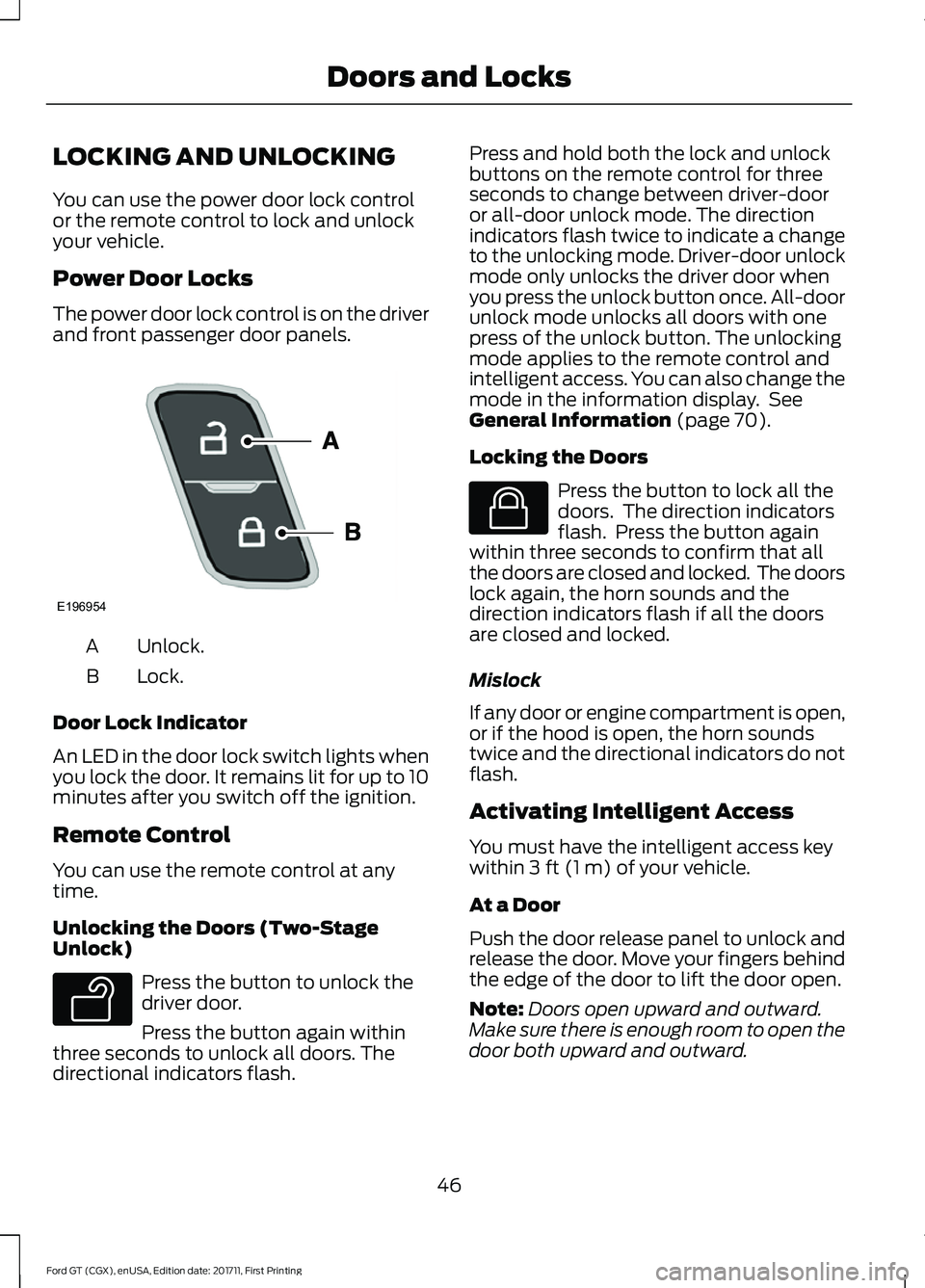
The power door lock control is on the driver
and front passenger door panels.
Unlock.
A
Lock.
B
Door Lock Indicator
An LED in the door lock switch lights when
you lock the door. It remains lit for up to 10
minutes after you switch off the ignition.
Remote Control
You can use the remote control at any
time.
Unlocking the Doors (Two-Stage
Unlock) Press the button to unlock the
driver door.
Press the button again within
three seconds to unlock all doors. The
directional indicators flash. Press and hold both the lock and unlock
buttons on the remote control for three
seconds to change between driver-door
or all-door unlock mode. The direction
indicators flash twice to indicate a change
to the unlocking mode. Driver-door unlock
mode only unlocks the driver door when
you press the unlock button once. All-door
unlock mode unlocks all doors with one
press of the unlock button. The unlocking
mode applies to the remote control and
intelligent access. You can also change the
mode in the information display. See
General Information (page 70).
Locking the Doors Press the button to lock all the
doors. The direction indicators
flash. Press the button again
within three seconds to confirm that all
the doors are closed and locked. The doors
lock again, the horn sounds and the
direction indicators flash if all the doors
are closed and locked.
Mislock
If any door or engine compartment is open,
or if the hood is open, the horn sounds
twice and the directional indicators do not
flash.
Activating Intelligent Access
You must have the intelligent access key
within
3 ft (1 m) of your vehicle.
At a Door
Push the door release panel to unlock and
release the door. Move your fingers behind
the edge of the door to lift the door open.
Note: Doors open upward and outward.
Make sure there is enough room to open the
door both upward and outward.
46
Ford GT (CGX), enUSA, Edition date: 201711, First Printing Doors and LocksE196954 E138629 E138623
Page 61 of 325
GENERAL INFORMATION
Condensation in the Exterior Front
Lamps and Rear Lamps
Exterior front lamps and rear lamps have
vents to accommodate normal changes
in air pressure.
Condensation can be a natural by-product
of this design. When moist air enters the
lamp assembly through the vents, there is
a possibility that condensation can occur
when the temperature is cold. When
normal condensation occurs, a fine mist
can form on the interior of the lens. The
fine mist eventually clears and exits
through the vents during normal operation.
Clearing time may take as long as 48 hours
under dry weather conditions.
Examples of acceptable condensation are:
•
The presence of a fine mist (no streaks,
drip marks or large droplets).
• A fine mist covers less than 50% of the
lens.
Examples of unacceptable condensation
are:
• A water puddle inside the lamp.
• Streaks, drip marks or large droplets
present on the interior of the lens.
If you see any unacceptable condensation,
have your vehicle checked by an authorized
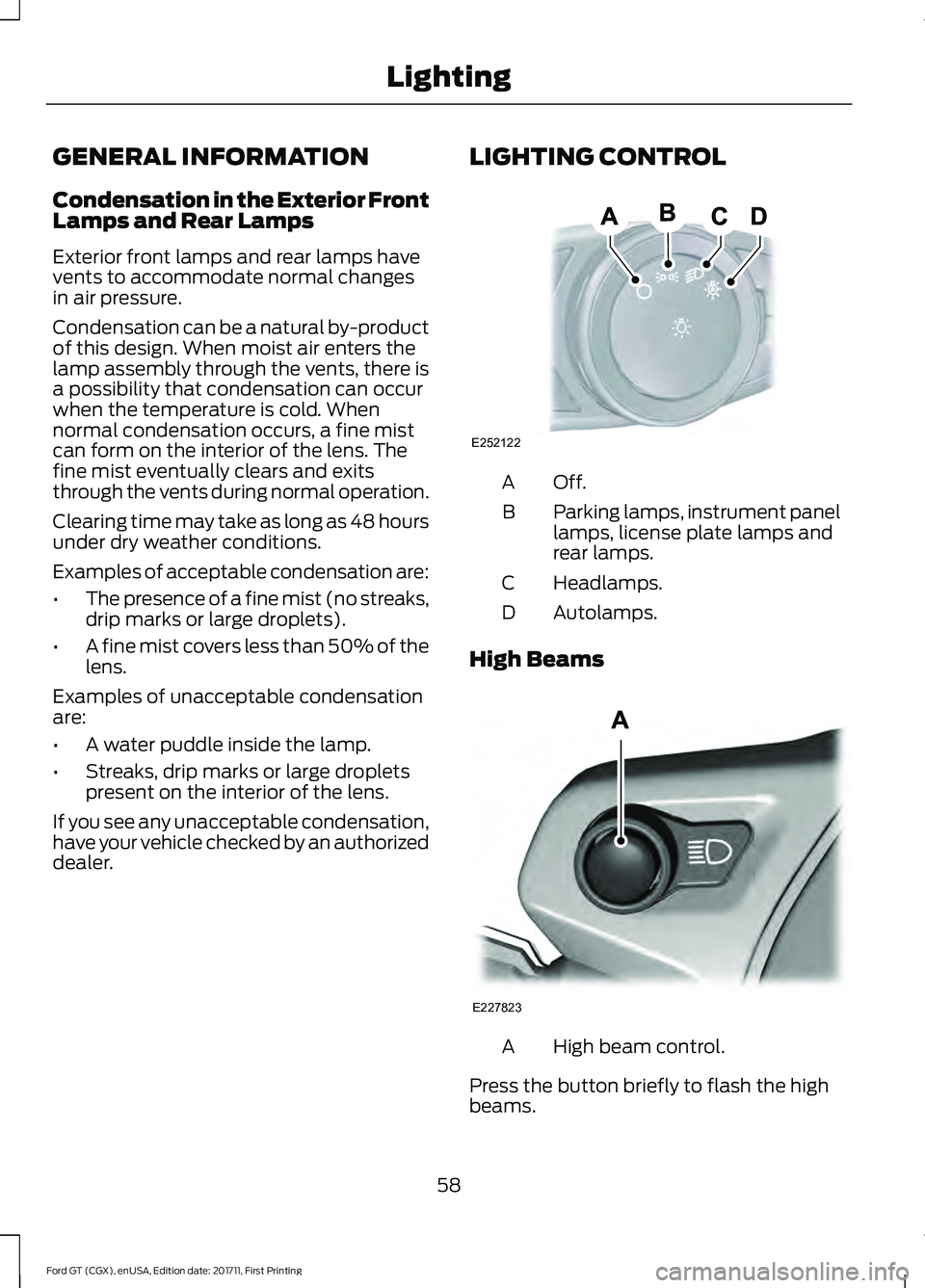
dealer. LIGHTING CONTROL Off.A
Parking lamps, instrument panel
lamps, license plate lamps and
rear lamps.
B
Headlamps.
C
Autolamps.
D
High Beams High beam control.
A
Press the button briefly to flash the high
beams.
58
Ford GT (CGX), enUSA, Edition date: 201711, First Printing LightingE252122 E227823
Page 76 of 325
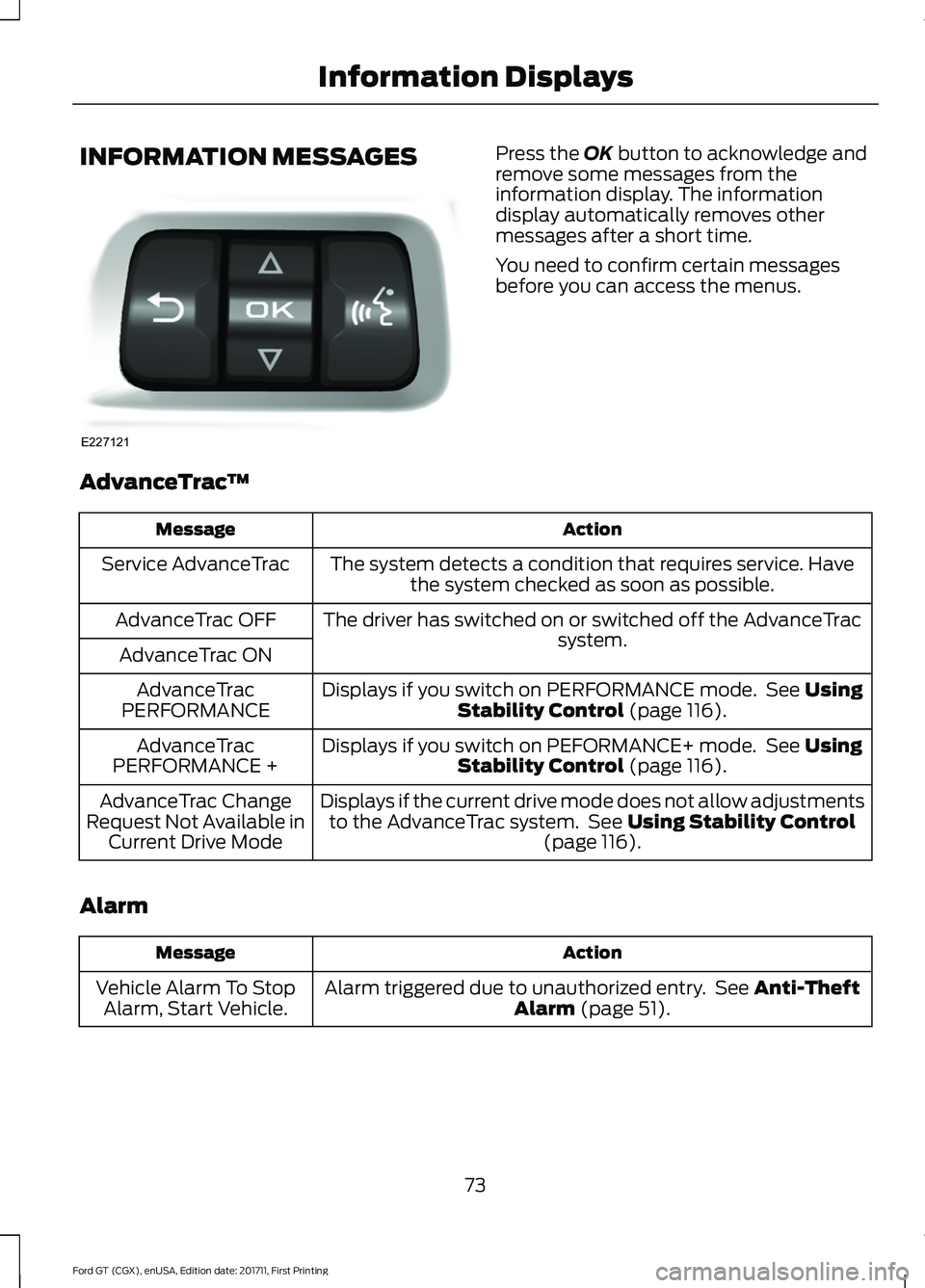
INFORMATION MESSAGES Press the OK button to acknowledge and
remove some messages from the
information display. The information
display automatically removes other
messages after a short time.
You need to confirm certain messages
before you can access the menus.
AdvanceTrac ™ Action
Message
The system detects a condition that requires service. Havethe system checked as soon as possible.
Service AdvanceTrac
The driver has switched on or switched off the AdvanceTrac system.
AdvanceTrac OFF
AdvanceTrac ON Displays if you switch on PERFORMANCE mode. See
Using
Stability Control (page 116).
AdvanceTrac
PERFORMANCE
Displays if you switch on PEFORMANCE+ mode. See
Using
Stability Control (page 116).
AdvanceTrac
PERFORMANCE +
Displays if the current drive mode does not allow adjustmentsto the AdvanceTrac system. See
Using Stability Control
(page 116).
AdvanceTrac Change
Request Not Available in Current Drive Mode
Alarm Action
Message
Alarm triggered due to unauthorized entry. See
Anti-Theft
Alarm (page 51).
Vehicle Alarm To Stop
Alarm, Start Vehicle.
73
Ford GT (CGX), enUSA, Edition date: 201711, First Printing Information DisplaysE227121
Page 103 of 325
An improperly operating or damaged
exhaust system may allow exhaust to
enter the vehicle. Have a damaged or
improperly operating exhaust system
inspected and repaired immediately.
Do not make any unauthorized changes to
your vehicle or engine. By law, vehicle
owners and anyone who manufactures,
repairs, services, sells, leases, trades
vehicles, or supervises a fleet of vehicles
are not permitted to intentionally remove
an emission control device or prevent it
from working. Information about your
vehicle
’s emission system is on the Vehicle
Emission Control Information Decal
located on or near the engine. This decal
also lists engine displacement.
Please consult your warranty information
for complete details.
On-Board Diagnostics (OBD-II)
Your vehicle has a computer known as the
on-board diagnostics system (OBD-II) that
monitors the engine ’s emission control
system. The system protects the
environment by making sure that your
vehicle continues to meet government
emission standards. The OBD-II system
also assists a service technician in properly
servicing your vehicle. When the service engine soon
indicator illuminates, the OBD-II
system has detected a
malfunction. Temporary malfunctions may
cause the service engine soon indicator to
illuminate. Examples are:
1. Your vehicle has run out of fuel —the
engine may misfire or run poorly.
2. Poor fuel quality or water in the fuel —the engine may misfire or run
poorly.
3. The fuel fill inlet may not have closed properly. See Refueling (page 96). 4. Driving through deep water
—the
electrical system may be wet.
You can correct these temporary
malfunctions by filling the fuel tank with
good quality fuel, properly closing the fuel
fill inlet or letting the electrical system dry
out. After three driving cycles without these
or any other temporary malfunctions
present, the service engine soon indicator
should stay off the next time you start the
engine. A driving cycle consists of a cold
engine startup followed by mixed city and
highway driving. No additional vehicle
service is required.
If the service engine soon indicator remains
on, have your vehicle serviced at the first
available opportunity. Although some
malfunctions detected by the OBD-II may
not have symptoms that are apparent,
continued driving with the service engine
soon indicator on can result in increased
emissions, lower fuel economy, reduced
engine and transmission smoothness and
lead to more costly repairs.
Readiness for Inspection and
Maintenance (I/M) Testing
Some state and provincial and local
governments may have
Inspection/Maintenance (I/M) programs
to inspect the emission control equipment
on your vehicle. Failure to pass this
inspection could prevent you from getting
a vehicle registration. If the service engine soon
indicator is on or the bulb does
not work, your vehicle may need
service. See On-Board Diagnostics.
100
Ford GT (CGX), enUSA, Edition date: 201711, First Printing Fuel and Refueling
Page 107 of 325
Illumination of the service engine soon
indicator, charging system warning light or
the temperature warning light, fluid leaks,
strange odors, smoke or loss of engine
power could indicate that the emission
control system is not working properly.
An improperly operating or damaged
exhaust system may allow exhaust to
enter the vehicle. Have a damaged or
improperly operating exhaust system
inspected and repaired immediately.
Do not make any unauthorized changes to
your vehicle or engine. By law, vehicle
owners and anyone who manufactures,
repairs, services, sells, leases, trades
vehicles, or supervises a fleet of vehicles
are not permitted to intentionally remove
an emission control device or prevent it
from working. Information about your
vehicle
’s emission system is on the Vehicle
Emission Control Information Decal
located on or near the engine. This decal
also lists engine displacement.
Please consult your warranty information
for complete details.
On-Board Diagnostics (OBD-II)
Your vehicle has a computer known as the
on-board diagnostics system (OBD-II) that
monitors the engine ’s emission control
system. The system protects the
environment by making sure that your
vehicle continues to meet government
emission standards. The OBD-II system
also assists a service technician in properly
servicing your vehicle. When the service engine soon
indicator illuminates, the OBD-II
system has detected a
malfunction. Temporary malfunctions may
cause the service engine soon indicator to
illuminate. Examples are: 1. Your vehicle has run out of fuel
—the
engine may misfire or run poorly.
2. Poor fuel quality or water in the fuel —the engine may misfire or run
poorly.
3. The fuel fill inlet may not have closed properly. See Refueling (page 96).
4. Driving through deep water —the
electrical system may be wet.
You can correct these temporary
malfunctions by filling the fuel tank with
good quality fuel, properly closing the fuel
fill inlet or letting the electrical system dry
out. After three driving cycles without these
or any other temporary malfunctions
present, the service engine soon indicator
should stay off the next time you start the
engine. A driving cycle consists of a cold
engine startup followed by mixed city and
highway driving. No additional vehicle
service is required.
If the service engine soon indicator remains
on, have your vehicle serviced at the first
available opportunity. Although some
malfunctions detected by the OBD-II may
not have symptoms that are apparent,
continued driving with the service engine
soon indicator on can result in increased
emissions, lower fuel economy, reduced
engine and transmission smoothness and
lead to more costly repairs.
Readiness for Inspection and
Maintenance (I/M) Testing
Some state and provincial and local
governments may have
Inspection/Maintenance (I/M) programs
to inspect the emission control equipment
on your vehicle. Failure to pass this
inspection could prevent you from getting
a vehicle registration. If the service engine soon
indicator is on or the bulb does
not work, your vehicle may need
service. See On-Board Diagnostics.
104
Ford GT (CGX), enUSA, Edition date: 201711, First Printing Engine Emission Control
Page 110 of 325
Neutral (N)
With the selector in neutral (N), your
vehicle can be started and is free to roll.
Hold the brake pedal down when in this
position.
Stay in Neutral Mode
Stay in Neutral mode allows your vehicle
to stay in neutral when you exit your
vehicle. Your vehicle must be stationary to
enter this mode.
To enter Stay in Neutral mode:
•
With the engine running.
• Release the parking brake if applied,
press down the brake pedal and press
the parking brake release switch on the
center console.
• Press down the brake pedal and move
the transmission selector to neutral
(N).
• A message appears in your display
screen.
• Press the manual (M) button to enter
Stay in Neutral mode.
• Another message appears in your
display screen confirming Neutral
mode is engaged.
• Stay in Neutral mode remains engaged
as long as the engine is running. If the
engine is turned off, a 30 minute timer
starts and appears in your display
screen.
To exit Stay in Neutral mode, press down
the brake pedal and select a different gear.
Drive (D)
Drive (D) is the normal driving position for
the best fuel economy. In the drive (D)
position, the transmission automatically
shifts through gears one through seven. Manual (M)
To select manual (M), place the
transmission selector in drive (D) and press
"M" button in the middle of the selector.
Once you select manual (M), you must use
the paddle shifters to upshift or downshift
the transmission.
To exit manual (M) and return to drive (D),
press the "M" button again.
SelectShift™ Automatic
Transmission
Your vehicle is equipped with a SelectShift
Automatic transmission, which gives you
the ability to change gears up or down as
desired.
In order to prevent the engine from running
at too low an RPM, which may cause it to
stall, SelectShift still automatically makes
some downshifts if it has determined that
you have not downshifted in time.
Although SelectShift makes some
downshifts for you, it still allows you to
downshift at any time as long as
SelectShift determines that no damage
occurs to the engine from over-revving.
Note:
Engine damage may occur if you
maintain excessive engine revving without
shifting.
SelectShift does not automatically upshift,
even if the engine is approaching the RPM
limit. It must be shifted manually by use of
the upshift (+) paddle. When using Manual
(M) shift mode, pay attention to the shift
indicator on the top rim of the steering
wheel and the RPM indicator in the
instrument cluster.
Use the paddles on the steering wheel
to shift.
• Pull the right paddle (+) to upshift.
• Pull the left paddle (–) to downshift.
107
Ford GT (CGX), enUSA, Edition date: 201711, First Printing Transmission
Page 118 of 325
PRINCIPLE OF OPERATION
WARNINGS
Vehicle modifications involving
braking system, aftermarket roof
racks, suspension, steering system,
tire construction and wheel and tire size
may change the handling characteristics
of your vehicle and may adversely affect
the performance of the electronic stability
control system. In addition, installing any
stereo loudspeakers may interfere with
and adversely affect the electronic stability
control system. Install any aftermarket
stereo loudspeaker as far as possible from
the front center console, the tunnel, and
the front seats in order to minimize the risk
of interfering with the electronic stability
control sensors. Reducing the
effectiveness of the electronic stability
control system could lead to an increased
risk of loss of vehicle control, vehicle
rollover, personal injury and death. Remember that even advanced
technology cannot defy the laws of
physics. It's always possible to lose
control of a vehicle due to inappropriate
driver input for the conditions. Aggressive
driving on any road condition can cause
you to lose control of your vehicle
increasing the risk of personal injury or
property damage. Activation of the
electronic stability control system is an
indication that at least some of the tires
have exceeded their ability to grip the road;
this could reduce the operator's ability to
control the vehicle potentially resulting in
a loss of vehicle control, vehicle rollover,
personal injury and death. If your electronic
stability control system activates, SLOW
DOWN. WARNINGS
The stability and traction control
light illuminates steadily if the
system detects a failure. Make sure
you did not manually disable the traction
control system using the information
display controls or the switch. If the
stability control and traction control light
is still illuminating steadily, have the
system serviced by an authorized dealer
immediately. Operating your vehicle with
the traction control disabled could lead to
an increased risk of loss of vehicle control,
vehicle rollover, personal injury and death. The stability and traction control systems
help you to avoid drive wheel spin and loss
of traction. The system automatically
turns on each time you switch the ignition
on.
If a fault occurs in either the stability
control or the traction control system, you
may experience the following conditions:
•
The stability and traction control light
illuminates steadily.
• The stability control and traction
control systems do not enhance your
vehicle's ability to maintain traction of
the wheels.
If a driving condition activates either the
stability control or the traction control
system you may experience the following
conditions:
• The stability and traction control light
flashes.
• Your vehicle slows down.
• Reduced engine power.
• A vibration in the brake pedal.
• The brake pedal is stiffer than usual.
• If the driving condition is severe and
your foot is not on the brake, the brake
pedal may move as the system applies
higher brake force.
115
Ford GT (CGX), enUSA, Edition date: 201711, First Printing Stability Control
Page 119 of 325
The stability and traction control systems
have several features built into it to help
you maintain control of your vehicle:
AdvanceTrac
™ Electronic
Stability Control
The system enhances your vehicle ’s ability
to prevent skids or lateral slides by
applying brakes to one or more of the
wheels individually and, if necessary,
reducing engine power.
Traction Control
The system enhances your vehicle ’s ability
to maintain traction of the wheels by
detecting and controlling wheel spin.
Traction control settings on your vehicle
are integrated into the AdvanceTrac
Stability Control system. USING STABILITY CONTROL
AdvanceTrac
™ Electronic
Stability Control
The system automatically turns on each
time you switch the ignition on. You can
also use the stability control button on the
center console to adjust the operation of
the AdvanceTrac stability control system.
AdvanceTrac electronic stability control is
disabled when the transmission is in
reverse (R).
The amount of change you can make to
the AdvanceTrac stability control system
depends on the Drive Mode you have
selected.
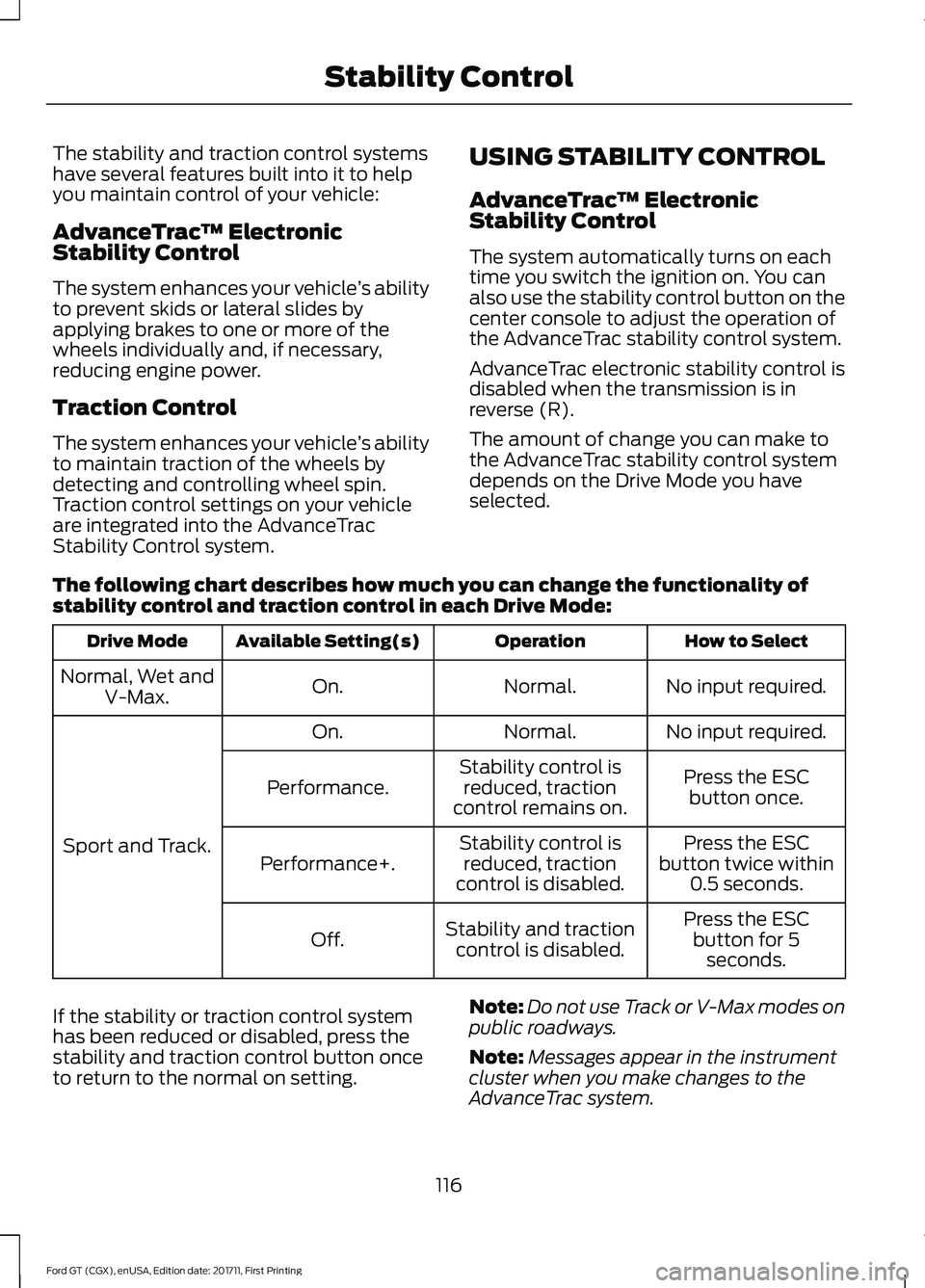
The following chart describes how much you can change the functionality of
stability control and traction control in each Drive Mode: How to Select
Operation
Available Setting(s)
Drive Mode
No input required.
Normal.
On.
Normal, Wet and
V-Max.
No input required.
Normal.
On.
Sport and Track. Press the ESC
button once.
Stability control is
reduced, traction
control remains on.
Performance.
Press the ESC
button twice within 0.5 seconds.
Stability control is
reduced, traction
control is disabled.
Performance+.
Press the ESCbutton for 5 seconds.
Stability and traction
control is disabled.
Off.
If the stability or traction control system
has been reduced or disabled, press the
stability and traction control button once
to return to the normal on setting. Note:
Do not use Track or V-Max modes on
public roadways.
Note: Messages appear in the instrument
cluster when you make changes to the
AdvanceTrac system.
116
Ford GT (CGX), enUSA, Edition date: 201711, First Printing Stability Control
Page 120 of 325
Note:
When you start your vehicle,
AdvanceTrac turns on for all drive modes.
It does not remember the previous setting.
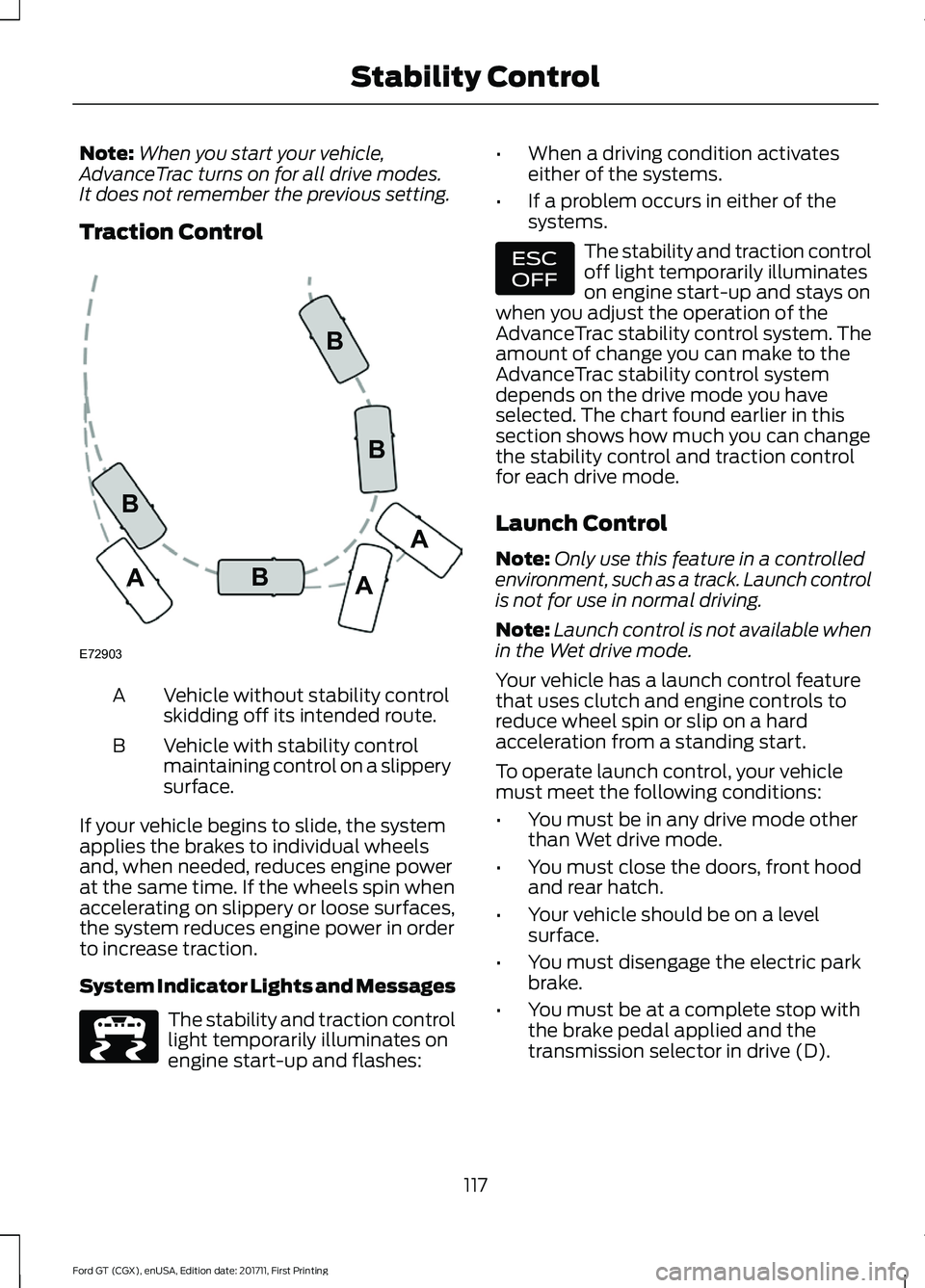
Traction Control Vehicle without stability control
skidding off its intended route.
A
Vehicle with stability control
maintaining control on a slippery
surface.
B
If your vehicle begins to slide, the system
applies the brakes to individual wheels
and, when needed, reduces engine power
at the same time. If the wheels spin when
accelerating on slippery or loose surfaces,
the system reduces engine power in order
to increase traction.
System Indicator Lights and Messages The stability and traction control
light temporarily illuminates on
engine start-up and flashes: •
When a driving condition activates
either of the systems.
• If a problem occurs in either of the
systems. The stability and traction control
off light temporarily illuminates
on engine start-up and stays on
when you adjust the operation of the
AdvanceTrac stability control system. The
amount of change you can make to the
AdvanceTrac stability control system
depends on the drive mode you have
selected. The chart found earlier in this
section shows how much you can change
the stability control and traction control
for each drive mode.
Launch Control
Note: Only use this feature in a controlled
environment, such as a track. Launch control
is not for use in normal driving.
Note: Launch control is not available when
in the Wet drive mode.
Your vehicle has a launch control feature
that uses clutch and engine controls to
reduce wheel spin or slip on a hard
acceleration from a standing start.
To operate launch control, your vehicle
must meet the following conditions:
• You must be in any drive mode other
than Wet drive mode.
• You must close the doors, front hood
and rear hatch.
• Your vehicle should be on a level
surface.
• You must disengage the electric park
brake.
• You must be at a complete stop with
the brake pedal applied and the
transmission selector in drive (D).
117
Ford GT (CGX), enUSA, Edition date: 201711, First Printing Stability ControlE72903A
AA
B
BB
B E236447 E236448