tire pressure FORD GT 2018 Owners Manual
[x] Cancel search | Manufacturer: FORD, Model Year: 2018, Model line: GT, Model: FORD GT 2018Pages: 325, PDF Size: 6.61 MB
Page 7 of 325
Cleaning the Exterior....................................172
Waxing..............................................................174
Cleaning the Engine.....................................174
Cleaning the Windows and Wiper
Blades...........................................................175
Cleaning the Interior.....................................175
Cleaning the Instrument Panel and Instrument Cluster Lens.........................176
Cleaning Leather Seats
..............................176
Repairing Minor Paint Damage
................177
Cleaning the Wheels
....................................177
Vehicle Storage
..............................................178
Wheels and Tires
Tire Sealant and Inflator Kit.....................180
Tire Care
..........................................................186
Using Summer Tires....................................198
Using Snow Chains
.....................................198
Tire Pressure Monitoring System...........198
Changing a Road Wheel
...........................202
Driving at High Speed................................202
Technical Specifications
...........................203
Capacities and Specific- ations
Engine Specifications................................204
Motorcraft Parts
..........................................205
Vehicle Dimensions
....................................206
Vehicle Identification Number
................207
Vehicle Certification Label.......................208
Transmission Code Designation............208
Capacities and Specifications...............209
Audio System
Audio Unit
........................................................212
USB Port...........................................................212
SYNC™ 3
General Information
....................................213
Home Screen.................................................223 Using Voice Recognition
...........................224
Entertainment..............................................230
Phone...............................................................234
Navigation......................................................239
Apps
..................................................................247
Settings...........................................................248
SYNC™ 3 Troubleshooting......................259
Accessories
Accessories.....................................................273
Scheduled Maintenance
General Maintenance Information
........274
Normal Scheduled Maintenance
...........275
Special Operating Conditions Scheduled Maintenance..............................................276
Scheduled Maintenance Record
............277
Appendices
End User License Agreement.................288
4
Ford GT (CGX), enUSA, Edition date: 201711, First Printing Table of Contents
Page 9 of 325
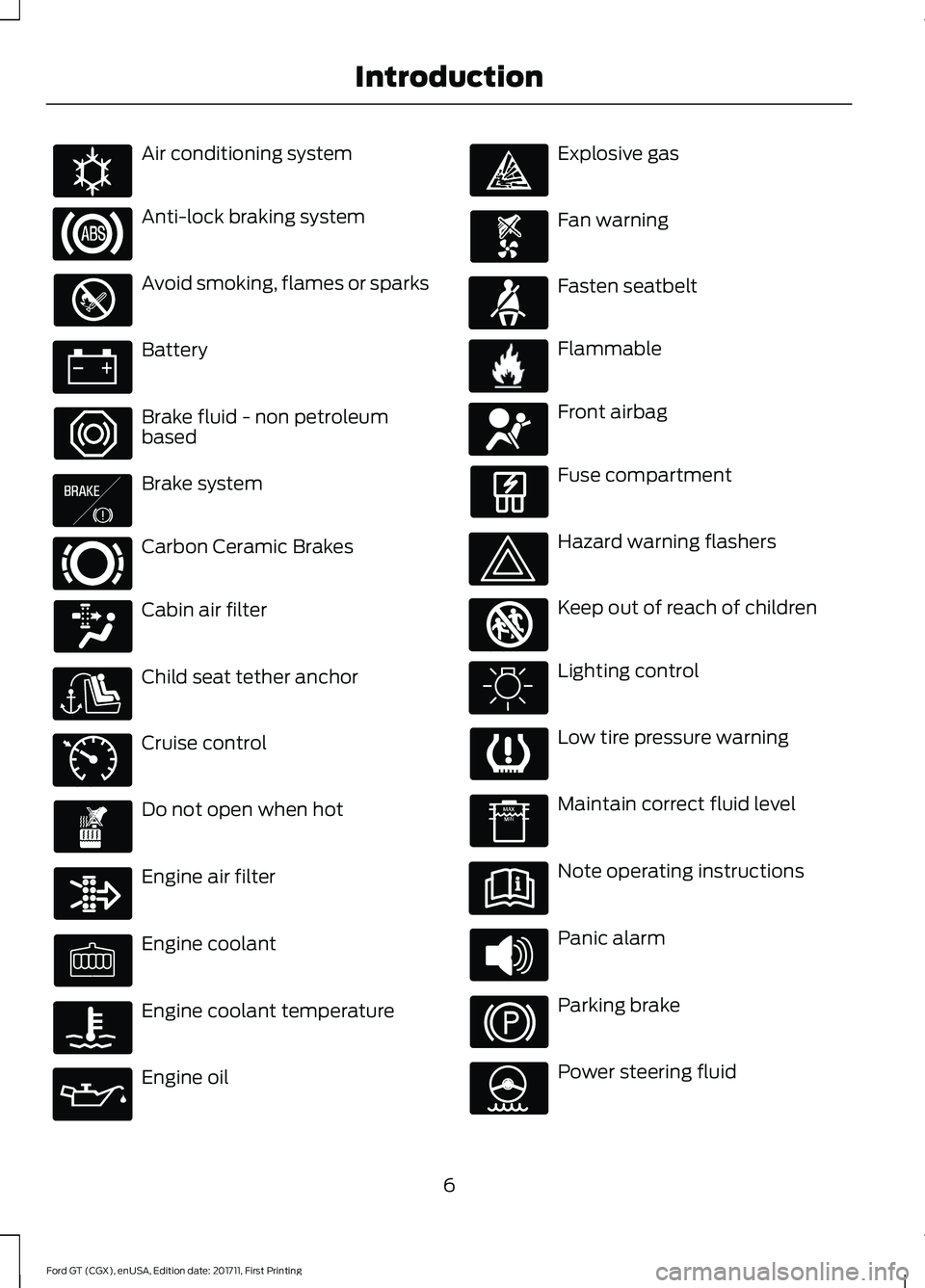
Air conditioning system
Anti-lock braking system
Avoid smoking, flames or sparks
Battery
Brake fluid - non petroleum
based
Brake system
Carbon Ceramic Brakes
Cabin air filter
Child seat tether anchor
Cruise control
Do not open when hot
Engine air filter
Engine coolant
Engine coolant temperature
Engine oil Explosive gas
Fan warning
Fasten seatbelt
Flammable
Front airbag
Fuse compartment
Hazard warning flashers
Keep out of reach of children
Lighting control
Low tire pressure warning
Maintain correct fluid level
Note operating instructions
Panic alarm
Parking brake
Power steering fluid
6
Ford GT (CGX), enUSA, Edition date: 201711, First Printing IntroductionE162384 E138644 E269429 E71340 E71880 E231160 E67017 E161353
Page 70 of 325
Note:
Do not resume your journey if it
illuminates despite the level being correct.
Have the system checked by your authorized
dealer immediately.
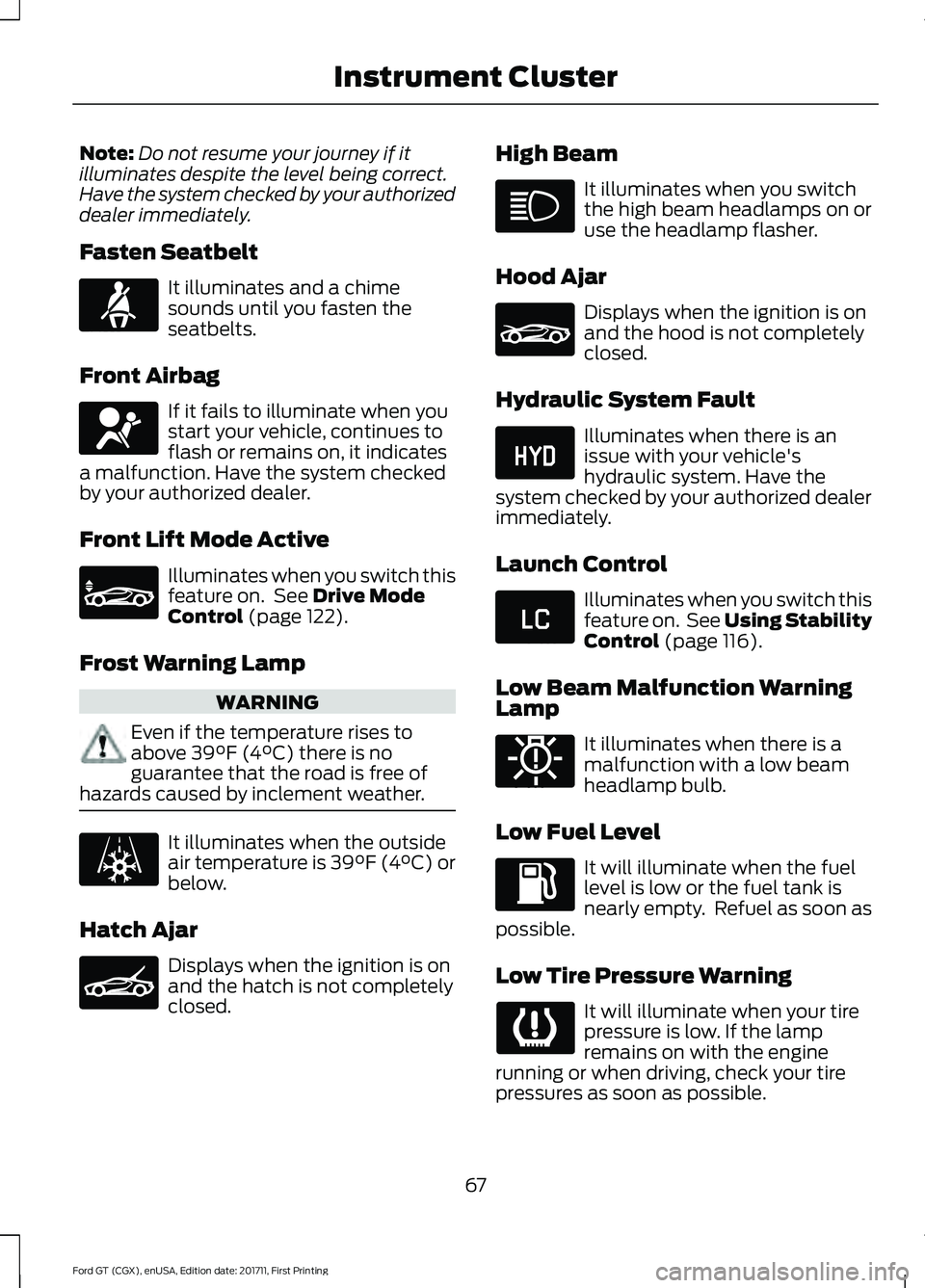
Fasten Seatbelt It illuminates and a chime
sounds until you fasten the
seatbelts.
Front Airbag If it fails to illuminate when you
start your vehicle, continues to
flash or remains on, it indicates
a malfunction. Have the system checked
by your authorized dealer.
Front Lift Mode Active Illuminates when you switch this
feature on. See Drive Mode
Control (page 122).
Frost Warning Lamp WARNING
Even if the temperature rises to
above
39°F (4°C) there is no
guarantee that the road is free of
hazards caused by inclement weather. It illuminates when the outside
air temperature is 39°F (4°C) or
below.
Hatch Ajar Displays when the ignition is on
and the hatch is not completely
closed. High Beam It illuminates when you switch
the high beam headlamps on or
use the headlamp flasher.
Hood Ajar Displays when the ignition is on
and the hood is not completely
closed.
Hydraulic System Fault Illuminates when there is an
issue with your vehicle's
hydraulic system. Have the
system checked by your authorized dealer
immediately.
Launch Control Illuminates when you switch this
feature on. See Using Stability
Control
(page 116).
Low Beam Malfunction Warning
Lamp It illuminates when there is a
malfunction with a low beam
headlamp bulb.
Low Fuel Level It will illuminate when the fuel
level is low or the fuel tank is
nearly empty. Refuel as soon as
possible.
Low Tire Pressure Warning It will illuminate when your tire
pressure is low. If the lamp
remains on with the engine
running or when driving, check your tire
pressures as soon as possible.
67
Ford GT (CGX), enUSA, Edition date: 201711, First Printing Instrument ClusterE71880 E67017 E234582 E236451 E236450 E234584 E234583 E181350
Page 74 of 325
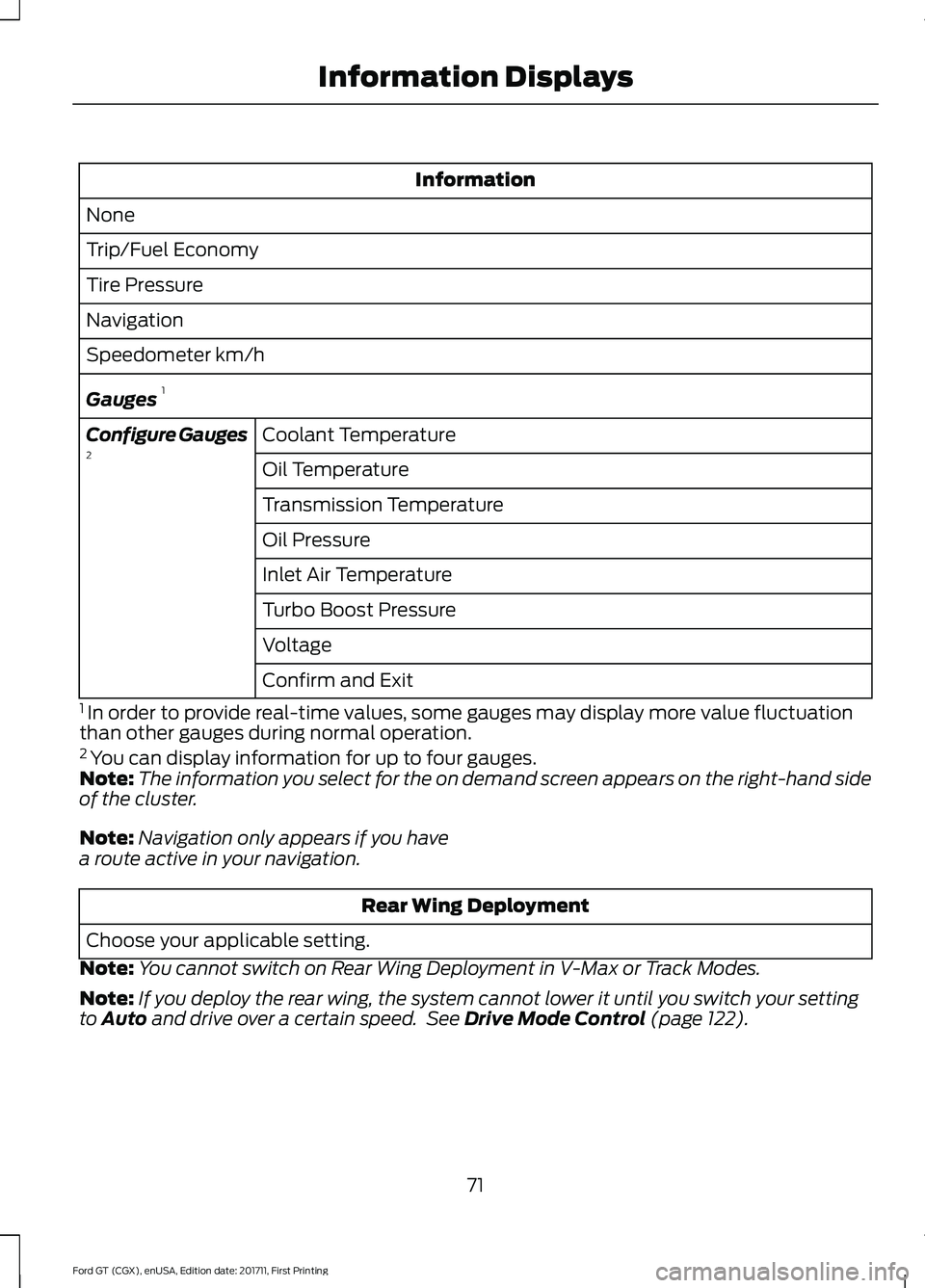
Information
None
Trip/Fuel Economy
Tire Pressure
Navigation
Speedometer km/h
Gauges 1
Coolant Temperature
Configure Gauges
2
Oil Temperature
Transmission Temperature
Oil Pressure
Inlet Air Temperature
Turbo Boost Pressure
Voltage
Confirm and Exit
1 In order to provide real-time values, some gauges may display more value fluctuation
than other gauges during normal operation.
2 You can display information for up to four gauges.
Note: The information you select for the on demand screen appears on the right-hand side
of the cluster.
Note: Navigation only appears if you have
a route active in your navigation. Rear Wing Deployment
Choose your applicable setting.
Note: You cannot switch on Rear Wing Deployment in V-Max or Track Modes.
Note: If you deploy the rear wing, the system cannot lower it until you switch your setting
to Auto and drive over a certain speed. See Drive Mode Control (page 122).
71
Ford GT (CGX), enUSA, Edition date: 201711, First Printing Information Displays
Page 75 of 325
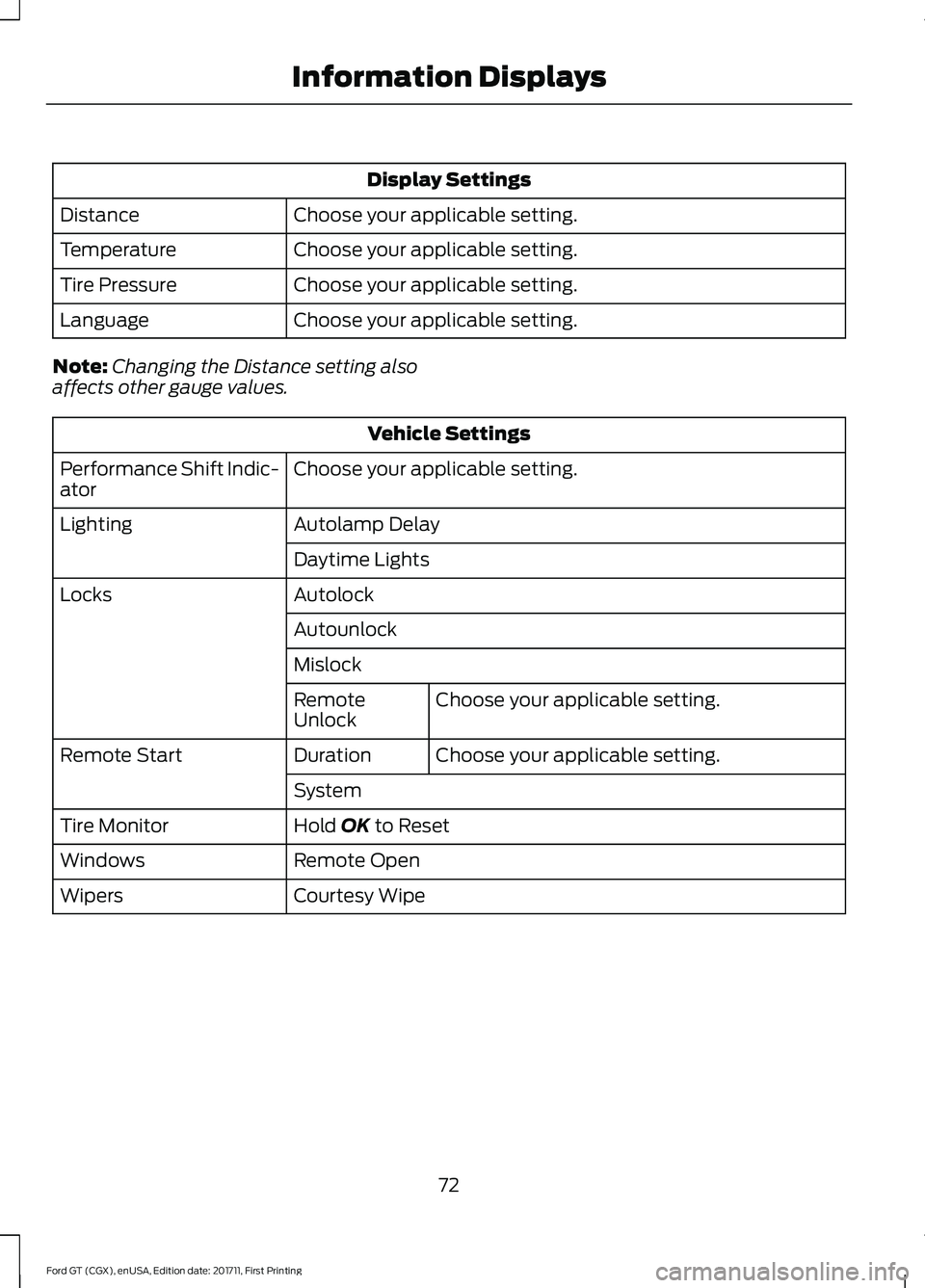
Display Settings
Choose your applicable setting.
Distance
Choose your applicable setting.
Temperature
Choose your applicable setting.
Tire Pressure
Choose your applicable setting.
Language
Note: Changing the Distance setting also
affects other gauge values. Vehicle Settings
Choose your applicable setting.
Performance Shift Indic-
ator
Autolamp Delay
Lighting
Daytime Lights
Autolock
Locks
Autounlock
MislockChoose your applicable setting.
Remote
Unlock
Choose your applicable setting.
Duration
Remote Start
System
Hold OK to Reset
Tire Monitor
Remote Open
Windows
Courtesy Wipe
Wipers
72
Ford GT (CGX), enUSA, Edition date: 201711, First Printing Information Displays
Page 81 of 325
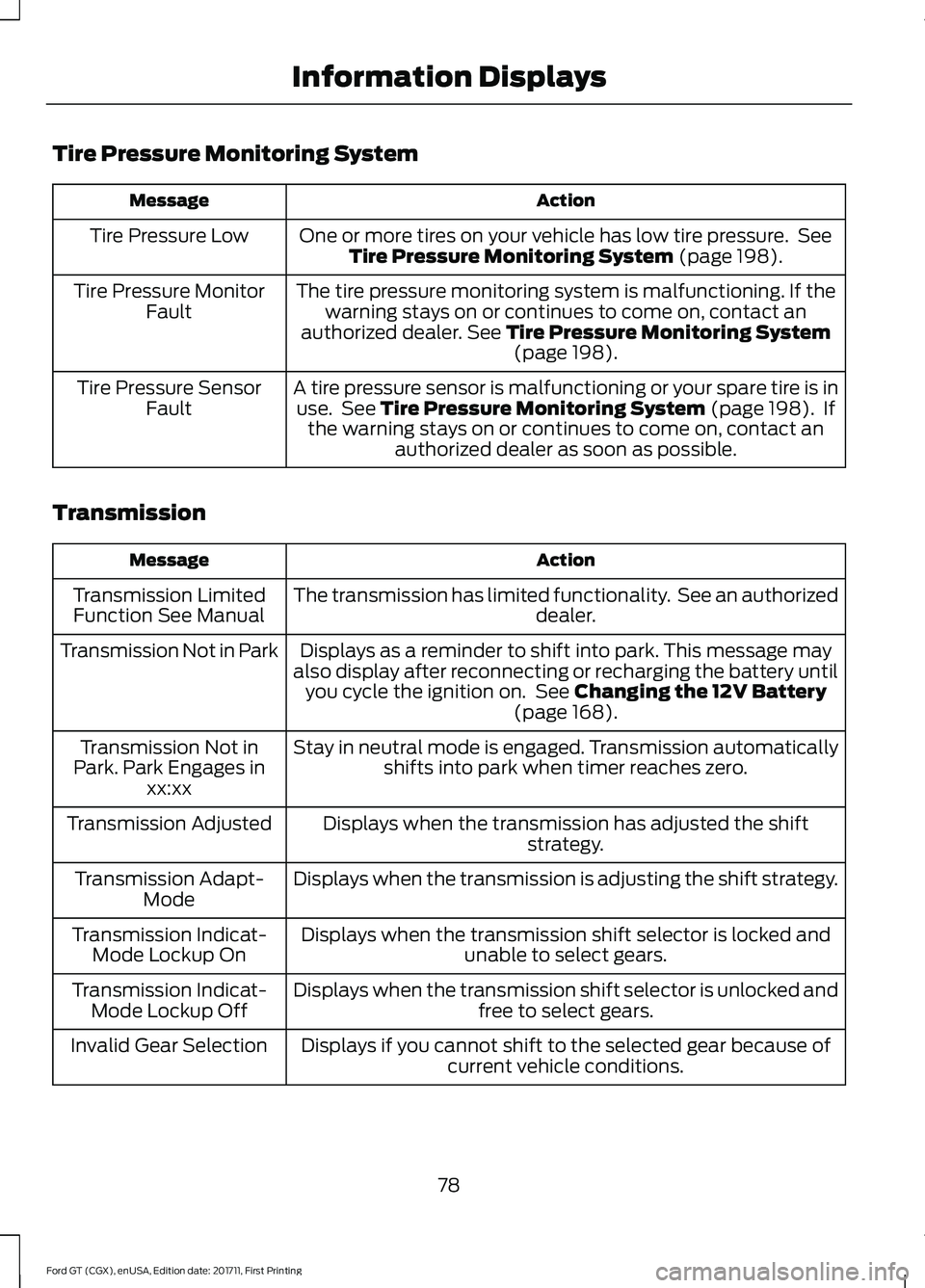
Tire Pressure Monitoring System
Action
Message
One or more tires on your vehicle has low tire pressure. SeeTire Pressure Monitoring System (page 198).
Tire Pressure Low
The tire pressure monitoring system is malfunctioning. If thewarning stays on or continues to come on, contact an
authorized dealer.
See Tire Pressure Monitoring System (page 198).
Tire Pressure Monitor
Fault
A tire pressure sensor is malfunctioning or your spare tire is inuse. See
Tire Pressure Monitoring System (page 198). If
the warning stays on or continues to come on, contact an authorized dealer as soon as possible.
Tire Pressure Sensor
Fault
Transmission Action
Message
The transmission has limited functionality. See an authorized dealer.
Transmission Limited
Function See Manual
Displays as a reminder to shift into park. This message may
also display after reconnecting or recharging the battery until you cycle the ignition on. See
Changing the 12V Battery
(page 168).
Transmission Not in Park
Stay in neutral mode is engaged. Transmission automaticallyshifts into park when timer reaches zero.
Transmission Not in
Park. Park Engages in xx:xx
Displays when the transmission has adjusted the shift strategy.
Transmission Adjusted
Displays when the transmission is adjusting the shift strategy.
Transmission Adapt-
Mode
Displays when the transmission shift selector is locked and unable to select gears.
Transmission Indicat-
Mode Lockup On
Displays when the transmission shift selector is unlocked andfree to select gears.
Transmission Indicat-
Mode Lockup Off
Displays if you cannot shift to the selected gear because ofcurrent vehicle conditions.
Invalid Gear Selection
78
Ford GT (CGX), enUSA, Edition date: 201711, First Printing Information Displays
Page 114 of 325
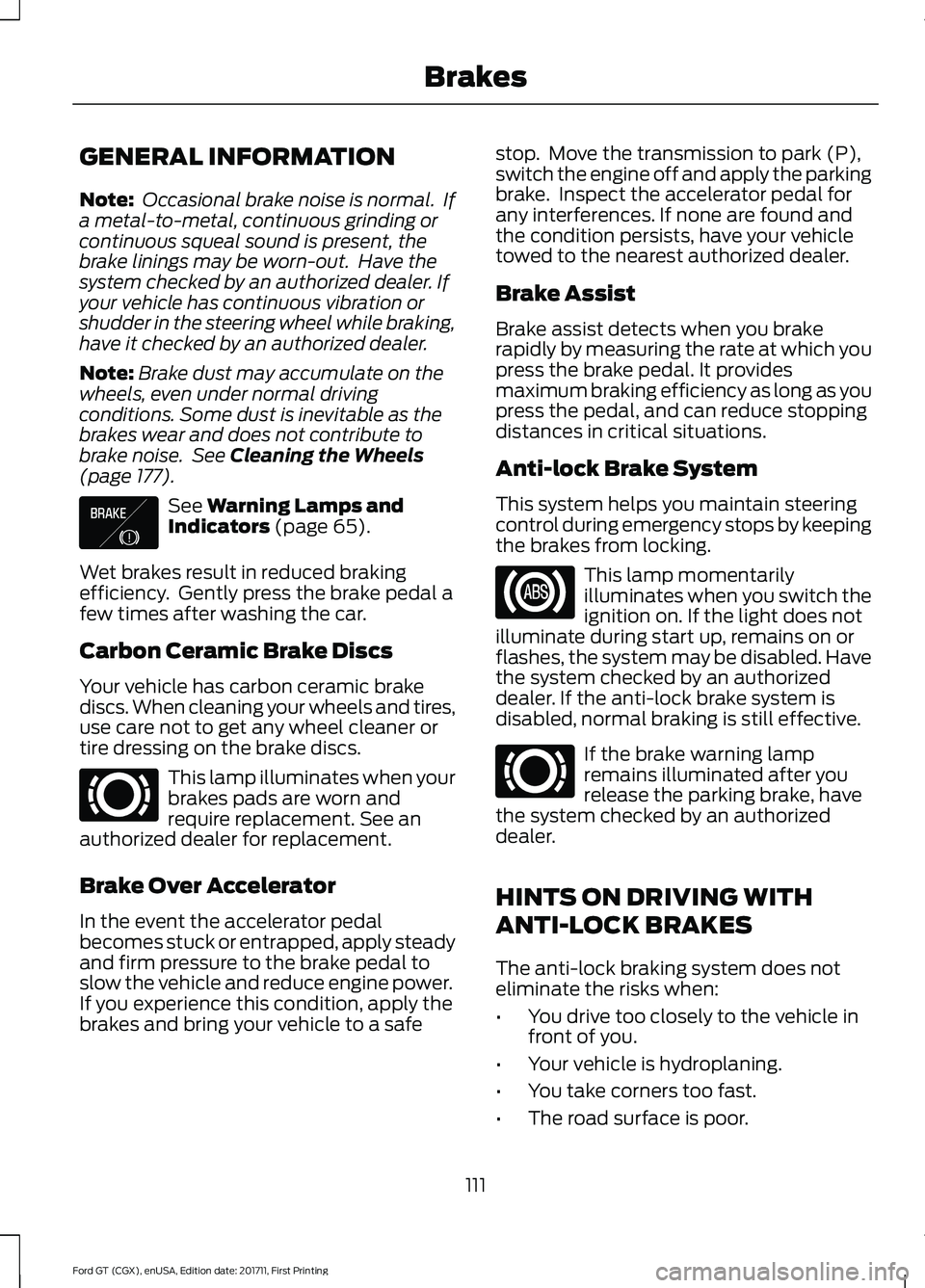
GENERAL INFORMATION
Note:
Occasional brake noise is normal. If
a metal-to-metal, continuous grinding or
continuous squeal sound is present, the
brake linings may be worn-out. Have the
system checked by an authorized dealer. If
your vehicle has continuous vibration or
shudder in the steering wheel while braking,
have it checked by an authorized dealer.
Note: Brake dust may accumulate on the
wheels, even under normal driving
conditions. Some dust is inevitable as the
brakes wear and does not contribute to
brake noise. See Cleaning the Wheels
(page 177). See
Warning Lamps and
Indicators (page 65).
Wet brakes result in reduced braking
efficiency. Gently press the brake pedal a
few times after washing the car.
Carbon Ceramic Brake Discs
Your vehicle has carbon ceramic brake
discs. When cleaning your wheels and tires,
use care not to get any wheel cleaner or
tire dressing on the brake discs. This lamp illuminates when your
brakes pads are worn and
require replacement. See an
authorized dealer for replacement.
Brake Over Accelerator
In the event the accelerator pedal
becomes stuck or entrapped, apply steady
and firm pressure to the brake pedal to
slow the vehicle and reduce engine power.
If you experience this condition, apply the
brakes and bring your vehicle to a safe stop. Move the transmission to park (P),
switch the engine off and apply the parking
brake. Inspect the accelerator pedal for
any interferences. If none are found and
the condition persists, have your vehicle
towed to the nearest authorized dealer.
Brake Assist
Brake assist detects when you brake
rapidly by measuring the rate at which you
press the brake pedal. It provides
maximum braking efficiency as long as you
press the pedal, and can reduce stopping
distances in critical situations.
Anti-lock Brake System
This system helps you maintain steering
control during emergency stops by keeping
the brakes from locking.
This lamp momentarily
illuminates when you switch the
ignition on. If the light does not
illuminate during start up, remains on or
flashes, the system may be disabled. Have
the system checked by an authorized
dealer. If the anti-lock brake system is
disabled, normal braking is still effective. If the brake warning lamp
remains illuminated after you
release the parking brake, have
the system checked by an authorized
dealer.
HINTS ON DRIVING WITH
ANTI-LOCK BRAKES
The anti-lock braking system does not
eliminate the risks when:
• You drive too closely to the vehicle in
front of you.
• Your vehicle is hydroplaning.
• You take corners too fast.
• The road surface is poor.
111
Ford GT (CGX), enUSA, Edition date: 201711, First Printing BrakesE138644 E269429 E269429
Page 175 of 325
GENERAL INFORMATION
Your authorized dealer has many quality
products available to clean your vehicle
and protect its finishes.
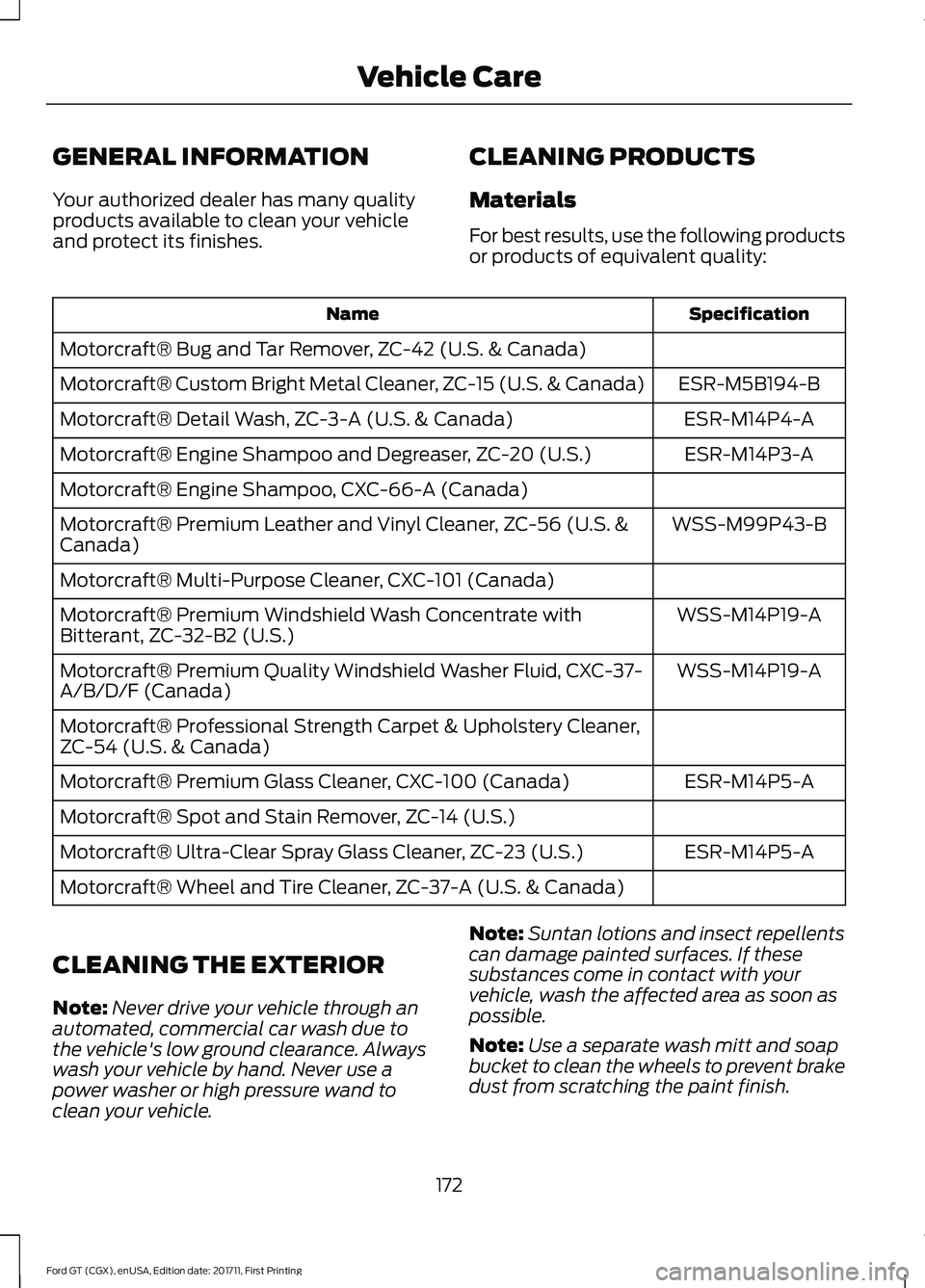
CLEANING PRODUCTS
Materials
For best results, use the following products
or products of equivalent quality: Specification
Name
Motorcraft® Bug and Tar Remover, ZC-42 (U.S. & Canada) ESR-M5B194-B
Motorcraft® Custom Bright Metal Cleaner, ZC-15 (U.S. & Canada)
ESR-M14P4-A
Motorcraft® Detail Wash, ZC-3-A (U.S. & Canada)
ESR-M14P3-A
Motorcraft® Engine Shampoo and Degreaser, ZC-20 (U.S.)
Motorcraft® Engine Shampoo, CXC-66-A (Canada)
WSS-M99P43-B
Motorcraft® Premium Leather and Vinyl Cleaner, ZC-56 (U.S. &
Canada)
Motorcraft® Multi-Purpose Cleaner, CXC-101 (Canada)
WSS-M14P19-A
Motorcraft® Premium Windshield Wash Concentrate with
Bitterant, ZC-32-B2 (U.S.)
WSS-M14P19-A
Motorcraft® Premium Quality Windshield Washer Fluid, CXC-37-
A/B/D/F (Canada)
Motorcraft® Professional Strength Carpet & Upholstery Cleaner,
ZC-54 (U.S. & Canada)
ESR-M14P5-A
Motorcraft® Premium Glass Cleaner, CXC-100 (Canada)
Motorcraft® Spot and Stain Remover, ZC-14 (U.S.)
ESR-M14P5-A
Motorcraft® Ultra-Clear Spray Glass Cleaner, ZC-23 (U.S.)
Motorcraft® Wheel and Tire Cleaner, ZC-37-A (U.S. & Canada)
CLEANING THE EXTERIOR
Note: Never drive your vehicle through an
automated, commercial car wash due to
the vehicle's low ground clearance. Always
wash your vehicle by hand. Never use a
power washer or high pressure wand to
clean your vehicle. Note:
Suntan lotions and insect repellents
can damage painted surfaces. If these
substances come in contact with your
vehicle, wash the affected area as soon as
possible.
Note: Use a separate wash mitt and soap
bucket to clean the wheels to prevent brake
dust from scratching the paint finish.
172
Ford GT (CGX), enUSA, Edition date: 201711, First Printing Vehicle Care
Page 177 of 325
Raising the Rear Wing
For routine cleaning, raise the wing.
Using the information display select the
following:
1. Rear wing deployment.
2. Select Raised.
After you have cleaned your vehicle, to
return the wing to the lowered position you
must drive the car at 15 mph (25 km/h) or
above. The wing will return to the lowered
position.
Note:
You cannot lower the wing when your
vehicle is stationary.
Exterior Plastic Parts
For routine cleaning we recommend
Motorcraft® Detail Wash. If tar or grease
spots are present, we recommend
Motorcraft® Bug and Tar Remover.
Under Hood
For removing black rubber marks from
under the hood we recommend
Motorcraft® Wheel and Tire Cleaner or
Motorcraft® Bug and Tar Remover.
WAXING
Note: If your vehicle has a matte paint
finish, do not wax your vehicle.
Regular waxing is necessary to protect your
car's paint from the elements. We
recommend that you wash and wax the
painted surface once or twice a year.
When washing and waxing, park your
vehicle in a shaded area out of direct
sunlight. Always wash your vehicle before
applying wax.
• Use a quality wax that does not contain
abrasives.
• Follow the manufacturer ’s instructions
to apply and remove the wax. •
Apply a small amount of wax in a
back-and-forth motion, not in circles.
• Do not allow wax to come in contact
with any non-body (low-gloss black)
colored trim. The wax will discolor or
stain the parts over time.
• Do not apply wax to glass areas.
• After waxing, your car's paint should
feel smooth, and be free of streaks and
smudges.
CLEANING THE ENGINE
Engines are more efficient when they are
clean because grease and dirt buildup keep
the engine warmer than normal.
When washing:
• Do not spray a hot engine with cold
water to avoid cracking the engine
block or other engine components.
• Spray Motorcraft® Engine Shampoo
and Degreaser on all parts that require
cleaning and pressure rinse clean. In
Canada, use Motorcraft Engine
Shampoo.
• Never wash or rinse the engine while it
is hot or running; water in the running
engine may cause internal damage.
• Never wash or rinse any ignition coil,
spark plug wire or spark plug well, or
the area in and around these locations.
• Never spray water on electrical
components such as modules,
connectors and fuse boxes. Cover all
electrical components before cleaning
to prevent water damage.
174
Ford GT (CGX), enUSA, Edition date: 201711, First Printing Vehicle Care
Page 182 of 325
Brakes
•
Make sure the brakes and parking brake
release fully.
Tires
• To minimize flat spots on the tires,
inflate all four tires to the
recommended cold pressures listed on
the Safety Compliance Certification
label or Tire Label. When the vehicle is
taken out of storage, reset the tire
pressures as necessary to the
recommended levels listed on the
Safety Compliance Certification label
or Tire Label affixed to your vehicle.
Note: If you store your vehicle in a location
with low ambient temperatures, follow the
instructions for care of summer tires. See
Using Summer Tires (page 198).
Miscellaneous
• Move vehicles at least
25 ft (7.5 m)
every 15 days to lubricate working parts
and prevent flat spots in the tires.
Removing Vehicle From Storage
When your vehicle is ready to come out of
storage, do the following:
• Wash your vehicle to remove any dirt
or grease film build-up on window
surfaces.
• Check windshield wipers for any
deterioration.
• Check under the hood and engine cover
for any foreign material that may have
collected during storage such as mice
or squirrel nests.
• Check the exhaust for any foreign
material that may have collected
during storage.
• Check tire pressures and set tire
inflation per the Tire Label. •
Check brake pedal operation. Drive
your vehicle
15 ft (4.5 m) back and
forth with the brake lightly applied.
• Check fluid levels (including coolant,
oil and gas) to make sure there are no
leaks, and fluids are at recommended
levels.
See an authorized dealer if you have any
concerns or issues.
179
Ford GT (CGX), enUSA, Edition date: 201711, First Printing Vehicle Care