wing FORD GT 2019 User Guide
[x] Cancel search | Manufacturer: FORD, Model Year: 2019, Model line: GT, Model: FORD GT 2019Pages: 321, PDF Size: 5.24 MB
Page 39 of 321
The front passenger sensing system is
designed to enable (may inflate) the front
passenger frontal airbag anytime the
system senses that a person of adult size
is sitting properly in the front passenger
seat.
•
When the front passenger sensing
system enables the front passenger
frontal airbag (may inflate), the
indicator lamp will be unlit and stays
unlit. If a person of adult size is sitting in the front
passenger seat, but the airbag off indicator
lamp is lit, it is possible that the person is
not sitting properly in the seat. If this
happens:
•
Switch the vehicle off and ask the
person to place the seatback in the full
upright position.
• Have the person sit upright in the seat,
centered on the seat cushion, with the
person ’s legs comfortably extended.
• Restart the vehicle and have the person
remain in this position for about two
minutes. This allows the system to
detect that person and enable the
passenger front airbag. Passenger Airbag
Passenger Airbag OFF Indic-
ator
Occupant
Disabled
Lit
Empty
Disabled
Lit
Child
Enabled
Unlit
Adult
Note: When the passenger airbag off light
illuminates, the passenger side airbag (near
the B-pillar) may be disabled to avoid the
risk of airbag deployment injuries.
After all occupants put on seatbelts, it is
very important that they continue to sit
properly. A properly seated occupant sits
upright, leaning against the seatback, and
centered on the seat cushion, with their
feet comfortably extended on the floor.
Sitting improperly can increase the chance
of injury in a crash event. For example, if
an occupant slouches, lies down, turns
sideways, sits forward, leans forward or
sideways, or puts one or both feet up, the
chance of injury during a crash greatly
increases. If you think that the status of the passenger
airbag off indicator lamp is incorrect, check
for the following:
•
Objects between the seat cushion and
the center console.
• Objects hanging off the seatback.
• Objects placed on the occupant's lap.
• Cargo interference with the seat.
The conditions listed above may cause the
weight of a properly seated occupant to
be incorrectly interpreted by the front
passenger sensing system. The person in
the front passenger seat may appear
heavier or lighter due to the conditions
described in the list above. Make sure the front passenger
sensing system is operating
properly. See Crash Sensors
and Airbag Indicator (page 38).
36
Ford GT (CGX) Canada/United States of America, enUSA, Edition date: 201810, First-Printing Supplementary Restraints SystemE67017
Page 40 of 321
If the airbag readiness light is lit, do the
following:
The driver and adult passenger should
check for objects interfering with the seat.
If there are objects interfering with the seat,
take the following steps to remove the
obstruction:
•
Pull the vehicle over.
• Switch the ignition off.
• Driver and adult passenger should
check for any objects interfering with
the seat.
• Remove the obstruction(s) (if found).
• Restart the vehicle.
• Wait at least two minutes and verify
that the airbag readiness light is no
longer illuminated.
• If the airbag readiness light remains
illuminated, this may or may not be a
problem due to the front passenger
sensing system.
Do not attempt to repair or service the
system. Take your vehicle immediately to
an authorized dealer.
If it is necessary to modify an advanced
front airbag system to accommodate a
person with disabilities, contact the Ford
GT Concierge.
SIDE AIRBAGS WARNING: To reduce risk of injury,
do not obstruct or place objects in the
deployment path of the airbag. WARNING:
Do not lean your head
on the door. The side airbag could injure
you as it deploys from the B-pillar. WARNING:
Do not attempt to
service, repair, or modify the airbag
supplemental restraint systems or its
fuses on a vehicle containing air bags as
you could be seriously injured or killed.
Contact your authorized dealer as soon
as possible. WARNING:
If the side airbag has
deployed, the airbag will not function
again. The side airbag system (including
the seat) must be inspected as soon as
possible. If the airbag is not replaced, the
unrepaired area will increase the risk of
injury in a crash.
The side airbags are near the B-pillar. In
certain sideways crashes, the airbag on the
side affected by the crash will be inflated.
The airbag was designed to inflate
between the door panel and occupant to
further enhance the protection provided
occupants in side impact crashes.
The system consists of the following:
• An embossed side panel indicating that
side airbags are on your vehicle.
• Side airbags near the B-pillar.
• Front passenger sensing system. ·Crash sensors and monitoring
system with readiness indicator.
See Crash Sensors and Airbag
Indicator
(page 38).
Note: The passenger sensing system will
deactivate the passenger side airbag (near
the B-pillar) if it detects an empty,
unbuckled passenger seat.
37
Ford GT (CGX) Canada/United States of America, enUSA, Edition date: 201810, First-Printing Supplementary Restraints SystemE67017
Page 41 of 321
The design and development of the side
airbag system included recommended
testing procedures that were developed
by a group of automotive safety experts
known as the Side Airbag Technical
Working Group. These recommended
testing procedures help reduce the risk of
injuries related to the deployment of side
airbags.
DRIVER AND PASSENGER
KNEE AIRBAGS
WARNING: To reduce risk of injury,
do not obstruct or place objects in the
deployment path of the knee airbag.
The knee airbags are under or within the
instrument panel. During a crash, the
restraints control module may activate the
driver and passenger knee airbags based
on crash severity and occupant conditions.
Under certain crash and occupant
conditions, the driver and passenger knee
airbag may deploy, but the driver front
airbag may not activate. As with front and
side airbags, it is important to be properly
seated and restrained to reduce the risk of
death or serious injury. Make sure the knee airbags are
operating properly. See
Crash
Sensors and Airbag Indicator
(page
38). CRASH SENSORS AND
AIRBAG INDICATOR WARNING:
Modifying or adding
equipment to the front end of your
vehicle (including hood, bumper system,
frame, front end body structure, tow
hooks and hood pins) may affect the
performance of the airbag system,
increasing the risk of injury. Do not
modify or add equipment to the front
end of your vehicle.
Your vehicle has a collection of crash and
occupant sensors which provide
information to the restraints control
module. The restraints control module
deploys (activates) the front seatbelt
pretensioners, driver airbag, passenger
airbag, knee airbag(s) and side airbags.
Based on the type of crash, the restraints
control module deploys the appropriate
safety devices.
The restraints control module monitors
the readiness of the safety devices and the
crash and occupant sensors. The readiness
of the safety system is indicated by a
warning indicator light in the instrument
cluster or by a backup tone if the warning
light is not working. Routine maintenance
of the airbag is not required.
A difficulty with the system is indicated by
one or more of the following: The readiness light does not
illuminate immediately after you
switch the ignition on.
• The readiness light either flashes or
stays lit.
• The system has five tones that repeat
periodically until the problem, the light
or both are repaired.
38
Ford GT (CGX) Canada/United States of America, enUSA, Edition date: 201810, First-Printing Supplementary Restraints SystemE67017 E67017
Page 43 of 321
GENERAL INFORMATION ON
RADIO FREQUENCIES
This device complies with Part 15 of the
FCC Rules and with Industry Canada
license-exempt RSS standard(s).
Operation is subject to the following two
conditions: (1) This device may not cause
harmful interference, and (2) This device
must accept any interference received,
including interference that may cause
undesired operation.
Note:
Changes or modifications not
expressively approved by the party
responsible for compliance could void the
user's authority to operate the equipment.
The term IC before the radio certification
number only signifies that Industry Canada
technical specifications were met.
The typical operating range for your
transmitter is approximately
33 ft (10 m).
One of the following could cause a
decrease in operating range:
• weather conditions
• nearby radio towers
• structures around the vehicle
• other vehicles parked next to your
vehicle
Other short-distance radio transmitters,
such as amateur radios, medical
equipment, wireless headphones, remote
controls and alarm systems may operate
on the same frequency as your remote
control. If other transmitters are operating
on those frequencies, you may not be able
to use your remote control. Using your
remote control near some types of
electronic equipment, such as USB devices,
computers or cell phones can interfere with
remote operation. Operating your remote
control near metal or metallic-finished
purses, bags or clothing can interfere with
remote operation. Note:
Make sure to lock your vehicle before
leaving it unattended.
Note: If you are in range, the remote control
will operate if you press any button
unintentionally.
Intelligent Access
The system uses a radio frequency signal
to communicate with your vehicle and
authorize your vehicle to unlock when one
of the following conditions are met:
• You push the exterior door release
panel within
3 ft (1 m) proximity of an
intelligent access key.
• You press a button on the transmitter.
If excessive radio frequency interference
is present in the area or if the transmitter
battery is low, you may need to
mechanically unlock your door. You can
use the mechanical key blade in your
intelligent access key to open the engine
cover to access a pull strap to manually
unlock the driver door in this situation. See
Remote Control
(page 41).
40
Ford GT (CGX) Canada/United States of America, enUSA, Edition date: 201810, First-Printing Keys and Remote Controls
Page 53 of 321
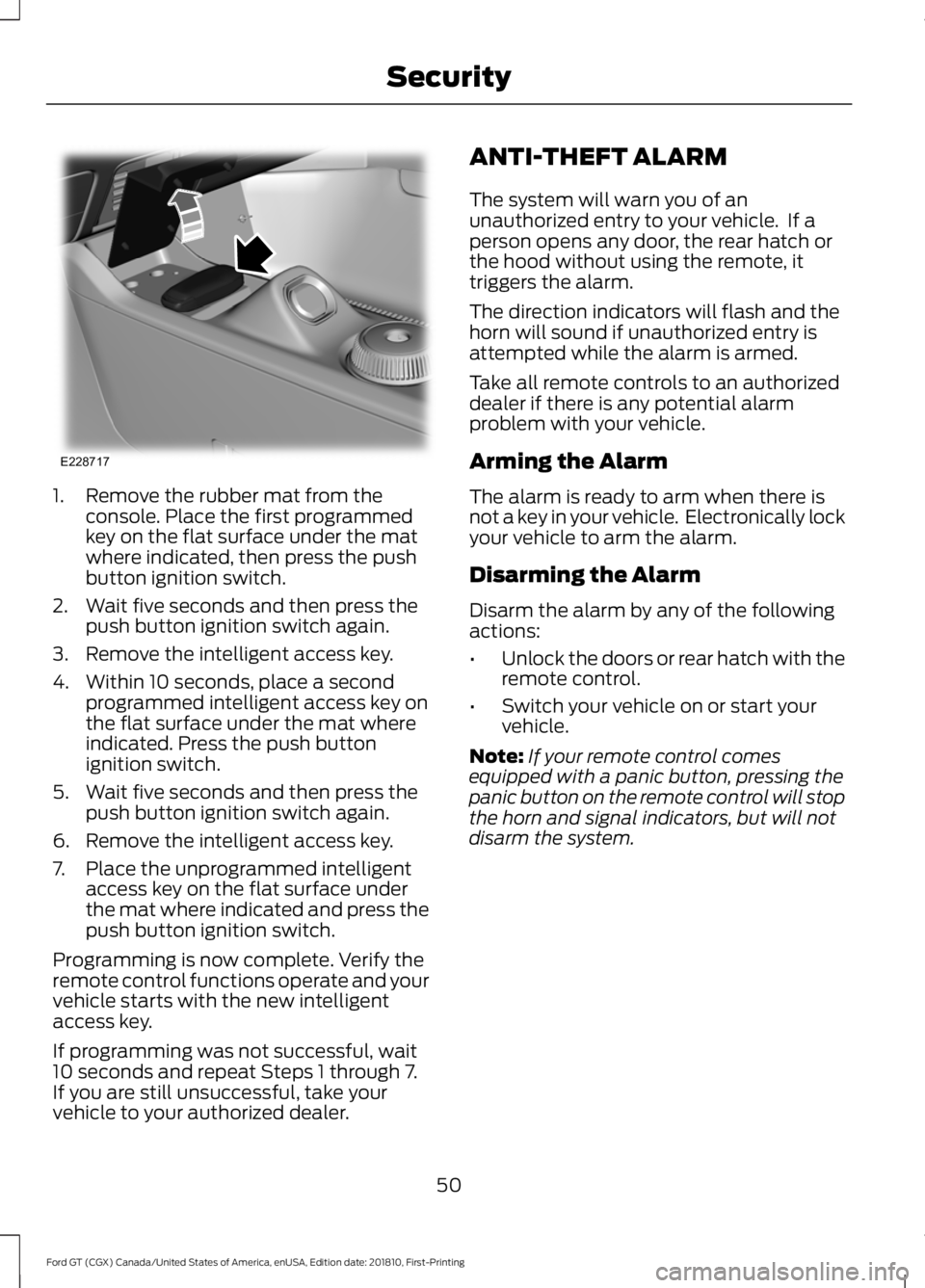
1. Remove the rubber mat from the
console. Place the first programmed
key on the flat surface under the mat
where indicated, then press the push
button ignition switch.
2. Wait five seconds and then press the push button ignition switch again.
3. Remove the intelligent access key.
4. Within 10 seconds, place a second programmed intelligent access key on
the flat surface under the mat where
indicated. Press the push button
ignition switch.
5. Wait five seconds and then press the push button ignition switch again.
6. Remove the intelligent access key.
7. Place the unprogrammed intelligent access key on the flat surface under
the mat where indicated and press the
push button ignition switch.
Programming is now complete. Verify the
remote control functions operate and your
vehicle starts with the new intelligent
access key.
If programming was not successful, wait
10 seconds and repeat Steps 1 through 7.
If you are still unsuccessful, take your
vehicle to your authorized dealer. ANTI-THEFT ALARM
The system will warn you of an
unauthorized entry to your vehicle. If a
person opens any door, the rear hatch or
the hood without using the remote, it
triggers the alarm.
The direction indicators will flash and the
horn will sound if unauthorized entry is
attempted while the alarm is armed.
Take all remote controls to an authorized
dealer if there is any potential alarm
problem with your vehicle.
Arming the Alarm
The alarm is ready to arm when there is
not a key in your vehicle. Electronically lock
your vehicle to arm the alarm.
Disarming the Alarm
Disarm the alarm by any of the following
actions:
•
Unlock the doors or rear hatch with the
remote control.
• Switch your vehicle on or start your
vehicle.
Note: If your remote control comes
equipped with a panic button, pressing the
panic button on the remote control will stop
the horn and signal indicators, but will not
disarm the system.
50
Ford GT (CGX) Canada/United States of America, enUSA, Edition date: 201810, First-Printing SecurityE228717
Page 55 of 321
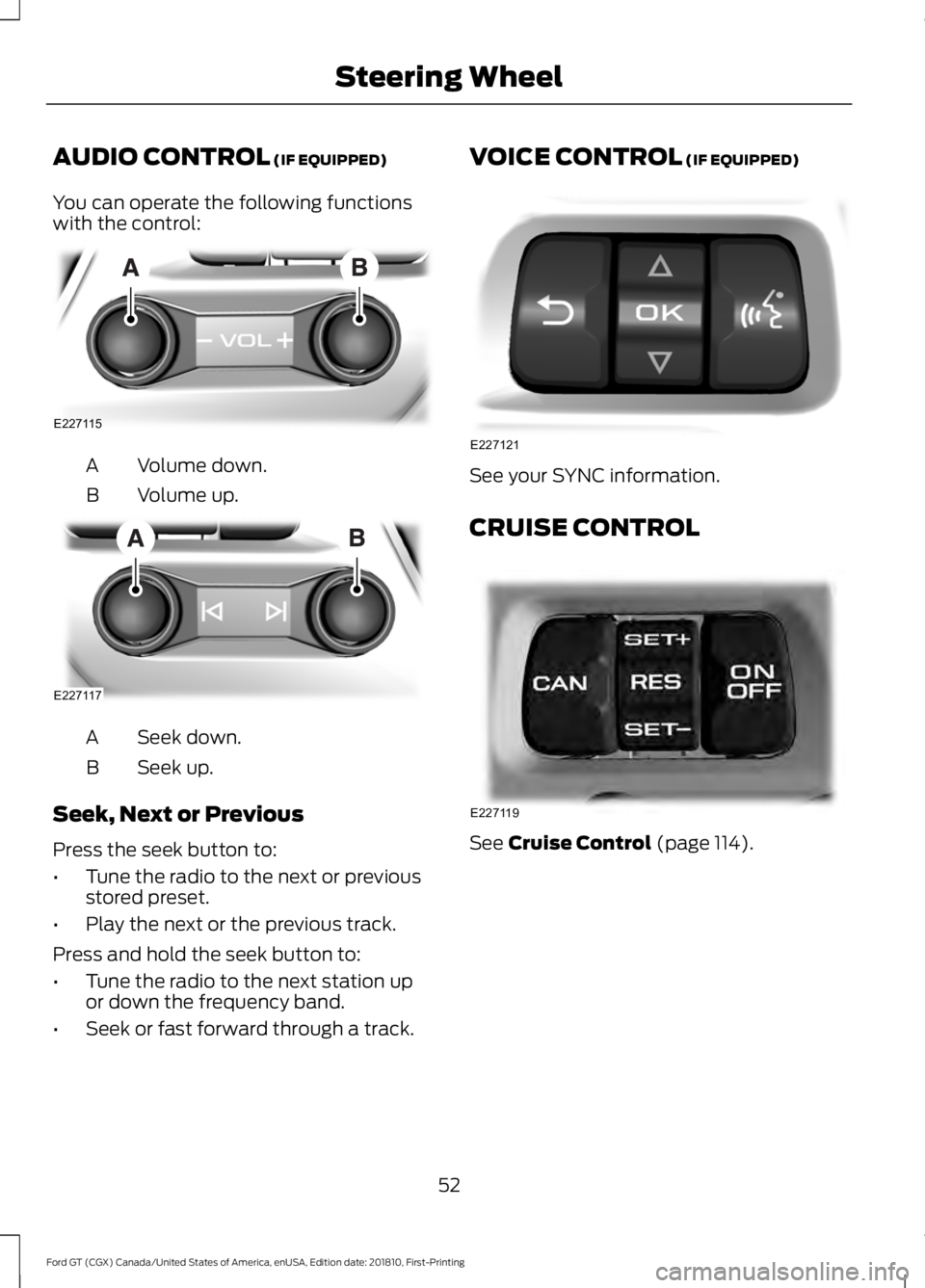
AUDIO CONTROL (IF EQUIPPED)
You can operate the following functions
with the control: Volume down.
A
Volume up.
B Seek down.
A
Seek up.
B
Seek, Next or Previous
Press the seek button to:
• Tune the radio to the next or previous
stored preset.
• Play the next or the previous track.
Press and hold the seek button to:
• Tune the radio to the next station up
or down the frequency band.
• Seek or fast forward through a track. VOICE CONTROL (IF EQUIPPED)
See your SYNC information.
CRUISE CONTROL
See
Cruise Control (page 114).
52
Ford GT (CGX) Canada/United States of America, enUSA, Edition date: 201810, First-Printing Steering WheelE227115 E227117 E227121 E227119
Page 62 of 321
To switch the system on:
•
For vehicles sold in the United States,
the lighting control must be in the
autolamps position. The lamps turn on
in daylight and turn the headlamps on
when ambient light is low. You can
enable this feature in the information
display. See Information Displays
(page 69).
• For vehicles sold in Canada, daytime
running lamps turn on in both off and
autolamps position. You cannot
disable this feature.
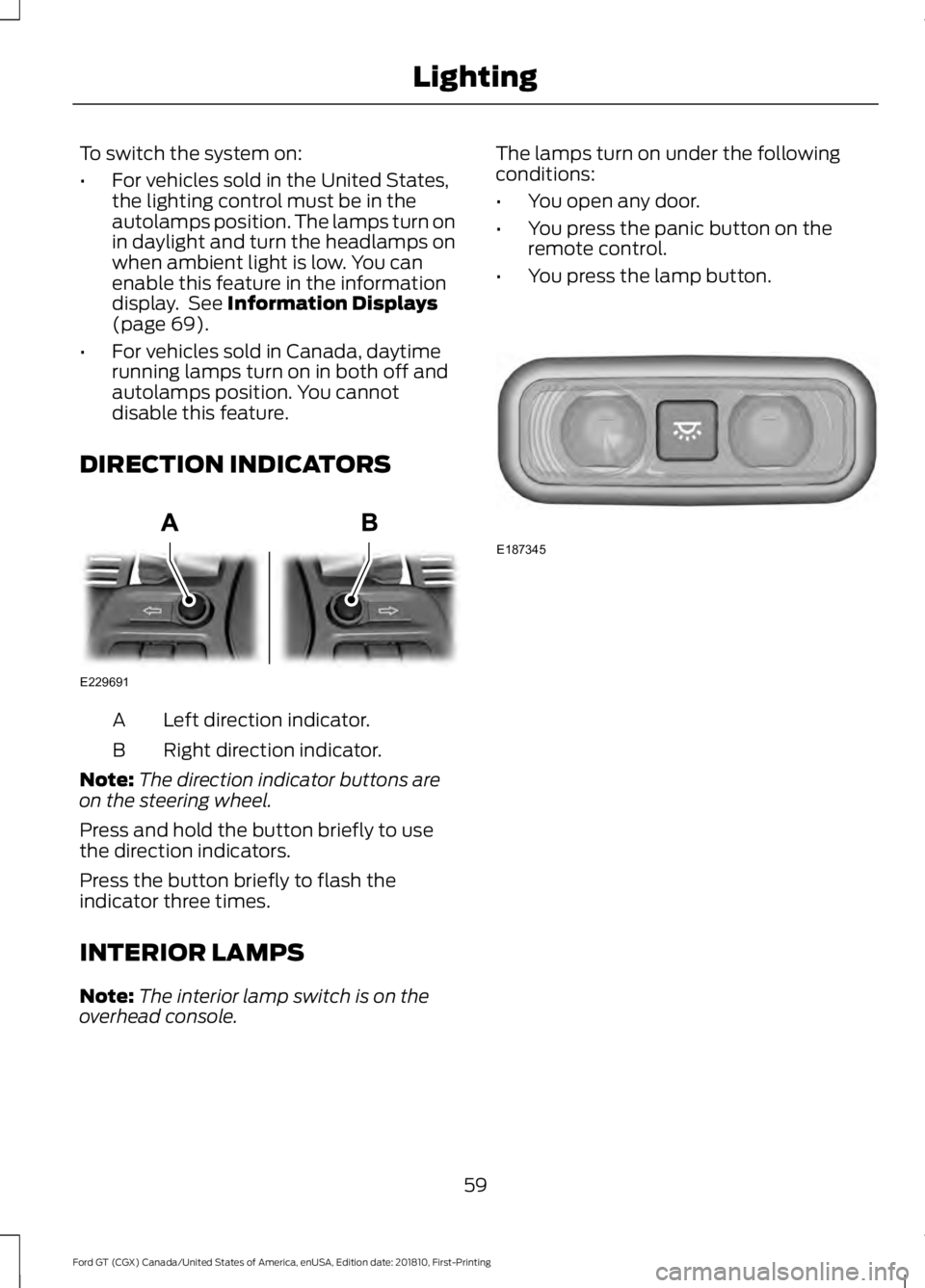
DIRECTION INDICATORS Left direction indicator.
A
Right direction indicator.
B
Note: The direction indicator buttons are
on the steering wheel.
Press and hold the button briefly to use
the direction indicators.
Press the button briefly to flash the
indicator three times.
INTERIOR LAMPS
Note: The interior lamp switch is on the
overhead console. The lamps turn on under the following
conditions:
•
You open any door.
• You press the panic button on the
remote control.
• You press the lamp button. 59
Ford GT (CGX) Canada/United States of America, enUSA, Edition date: 201810, First-Printing LightingE229691 E187345
Page 67 of 321
Fuel Gauge Position
Distance to Empty
Driving Type (Fuel Economy
Conditions)
1/8 tank.
50 mi (80 km)
Highway driving.
1/4 tank.
50 mi (80 km)
Performance driving or
extended idle.
Engine Coolant Temperature
Gauge WARNING: Do not remove the
coolant reservoir cap when the engine is
on or the cooling system is hot. Wait 10
minutes for the cooling system to cool
down. Cover the coolant reservoir cap
with a thick cloth to prevent the
possibility of scalding and slowly remove
the cap. Failure to follow this instruction
could result in personal injury.
At normal operating temperature, the
engine coolant temperature will be in the
middle range of the gauge. If the engine
coolant temperature exceeds the normal
range, the gauge will be highlighted. Stop
your vehicle as soon as safely possible,
switch off the engine and let it cool.
Engine Oil Temperature Gauge
If the engine oil temperature exceeds the
normal range, the engine is overheating.
Reduce engine speed as soon as safely
possible to allow the engine to cool. If you
continue to operate the engine at high
engine speeds, the engine speed reduces
automatically to prevent engine damage.
Engine Oil Pressure Gauge
Oil pressure varies with engine speed. The
pressure rises as engine speed rises and
drops as engine speed drops. If the pressure drops below the normal
range of the gauge, a warning lamp
illuminates and a message appears in the
information display. Stop your vehicle as
soon as it is safe to do so and switch the
engine off. Check the engine oil level.
Gauge Mode
On the right side of the instrument cluster,
you can configure which gauges are
displayed.
WARNING LAMPS AND
INDICATORS
The following warning lamps and
indicators alert you to a vehicle condition
that may become serious. Some lamps
illuminate when you start your vehicle to
make sure they work. If any lamps remain
on after starting your vehicle, refer to the
respective system warning lamp for further
information.
Note:
Some warning indicators appear in
the information display and operate the
same as a warning lamp but do not
illuminate when you start your vehicle.
Anti-Lock Braking System If it illuminates when you are
driving, this indicates a
malfunction. You will continue
to have the normal braking system
(without ABS) unless the brake system
warning lamp is also illuminated. Have the
system checked by your authorized dealer.
64
Ford GT (CGX) Canada/United States of America, enUSA, Edition date: 201810, First-Printing Instrument Cluster
Page 72 of 321
GENERAL INFORMATION
WARNING: Driving while
distracted can result in loss of vehicle
control, crash and injury. We strongly
recommend that you use extreme
caution when using any device that may
take your focus off the road. Your
primary responsibility is the safe
operation of your vehicle. We
recommend against the use of any
hand-held device while driving and
encourage the use of voice-operated
systems when possible. Make sure you
are aware of all applicable local laws
that may affect the use of electronic
devices while driving.
Various systems on your vehicle can be
controlled using the information display
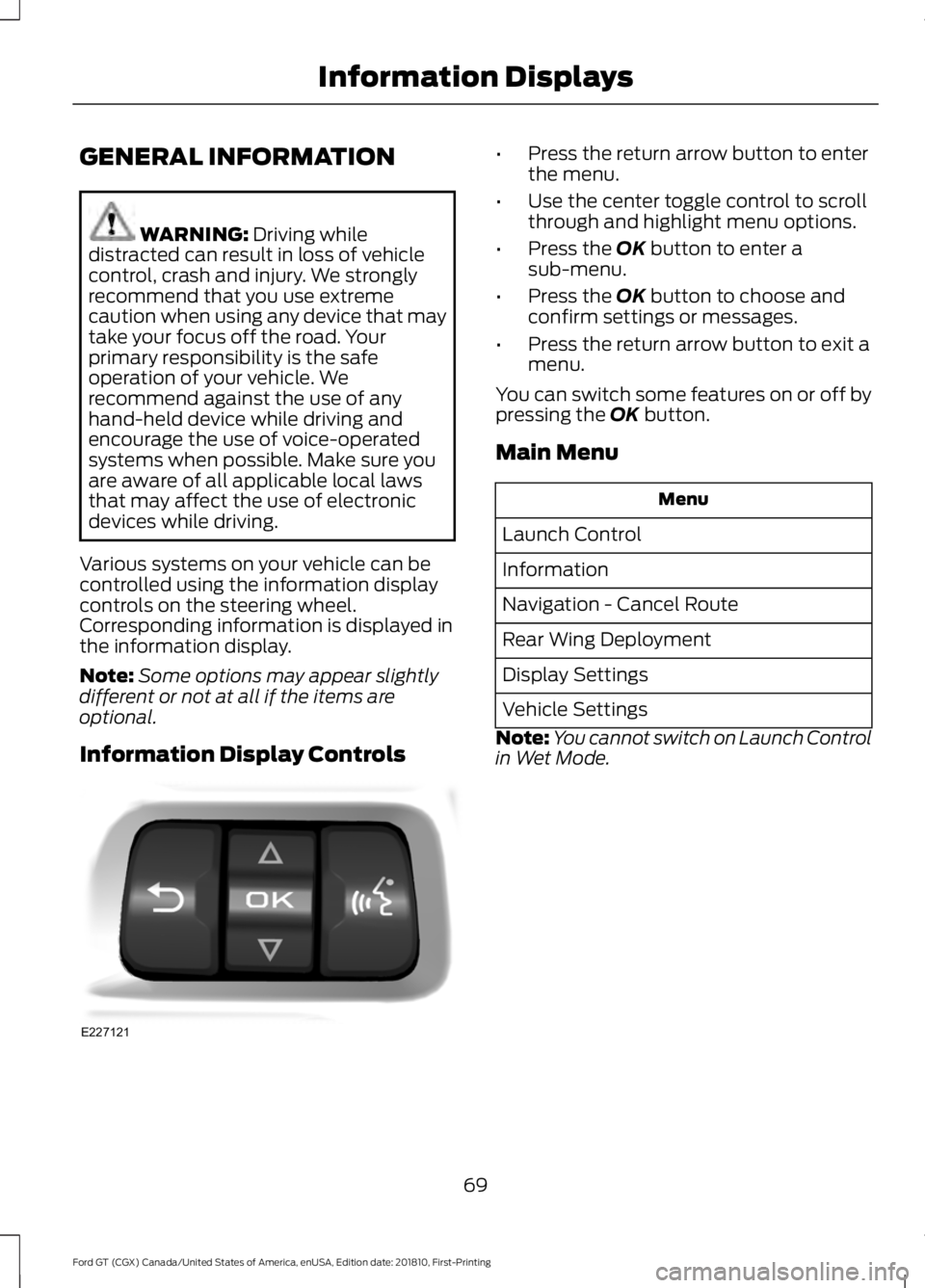
controls on the steering wheel.
Corresponding information is displayed in
the information display.
Note: Some options may appear slightly
different or not at all if the items are
optional.
Information Display Controls •
Press the return arrow button to enter
the menu.
• Use the center toggle control to scroll
through and highlight menu options.
• Press the OK button to enter a
sub-menu.
• Press the
OK button to choose and
confirm settings or messages.
• Press the return arrow button to exit a
menu.
You can switch some features on or off by
pressing the
OK button.
Main Menu Menu
Launch Control
Information
Navigation - Cancel Route
Rear Wing Deployment
Display Settings
Vehicle Settings
Note: You cannot switch on Launch Control
in Wet Mode.
69
Ford GT (CGX) Canada/United States of America, enUSA, Edition date: 201810, First-Printing Information DisplaysE227121
Page 73 of 321
Information
No Content
Trip/Fuel Economy
Tire Pressure
Navigation
Speedometer km/h
Gauges 1
Coolant Temperature
Configure Gauges 2
Oil Temperature
Transmission Temperature
Oil Pressure
Inlet Air Temperature
Turbo Boost Pressure
Voltage
Confirm and Exit
1 In order to provide real-time values, some gauges may display more value fluctuation
than other gauges during normal operation.
2 You can display information for up to four gauges.
Note: The information you select for the on demand screen appears on the right-hand side
of the cluster.
Note: Navigation only appears if you have
a route active in your navigation. Rear Wing Deployment
Choose your applicable setting.
Note: You cannot switch on Rear Wing Deployment in V-Max or Track Modes.
Note: If you deploy the rear wing, the system cannot lower it until you switch your setting
to Auto and drive over a certain speed. See Drive Mode Control (page 115).
70
Ford GT (CGX) Canada/United States of America, enUSA, Edition date: 201810, First-Printing Information Displays