lock FORD GT 2020 Owner's Manual
[x] Cancel search | Manufacturer: FORD, Model Year: 2020, Model line: GT, Model: FORD GT 2020Pages: 316, PDF Size: 6.25 MB
Page 79 of 316
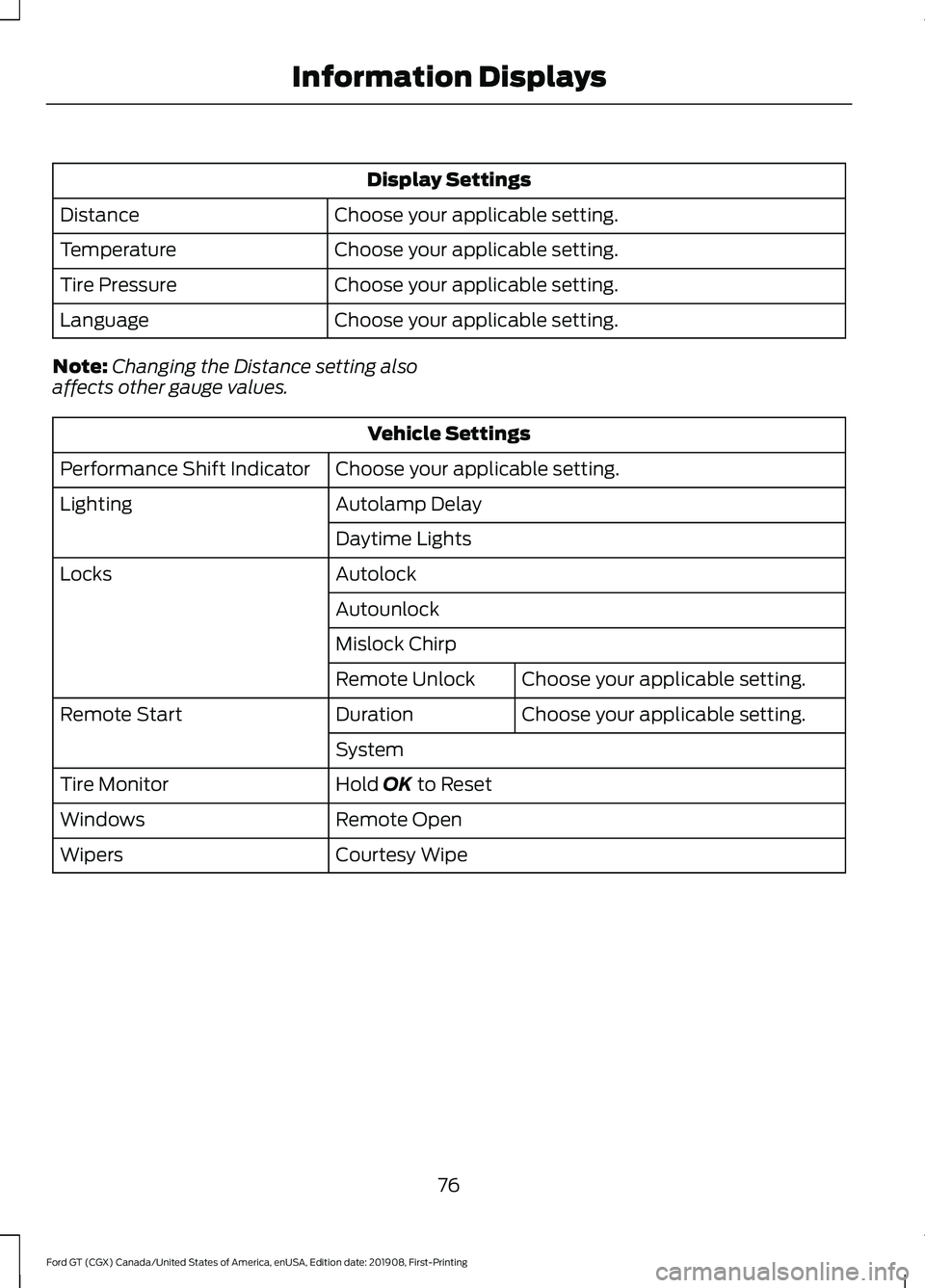
Display Settings
Choose your applicable setting.
Distance
Choose your applicable setting.
Temperature
Choose your applicable setting.
Tire Pressure
Choose your applicable setting.
Language
Note: Changing the Distance setting also
affects other gauge values. Vehicle Settings
Choose your applicable setting.
Performance Shift Indicator
Autolamp Delay
Lighting
Daytime Lights
Autolock
Locks
Autounlock
Mislock ChirpChoose your applicable setting.
Remote Unlock
Choose your applicable setting.
Duration
Remote Start
System
Hold OK to Reset
Tire Monitor
Remote Open
Windows
Courtesy Wipe
Wipers
76
Ford GT (CGX) Canada/United States of America, enUSA, Edition date: 201908, First-Printing Information Displays
Page 81 of 316
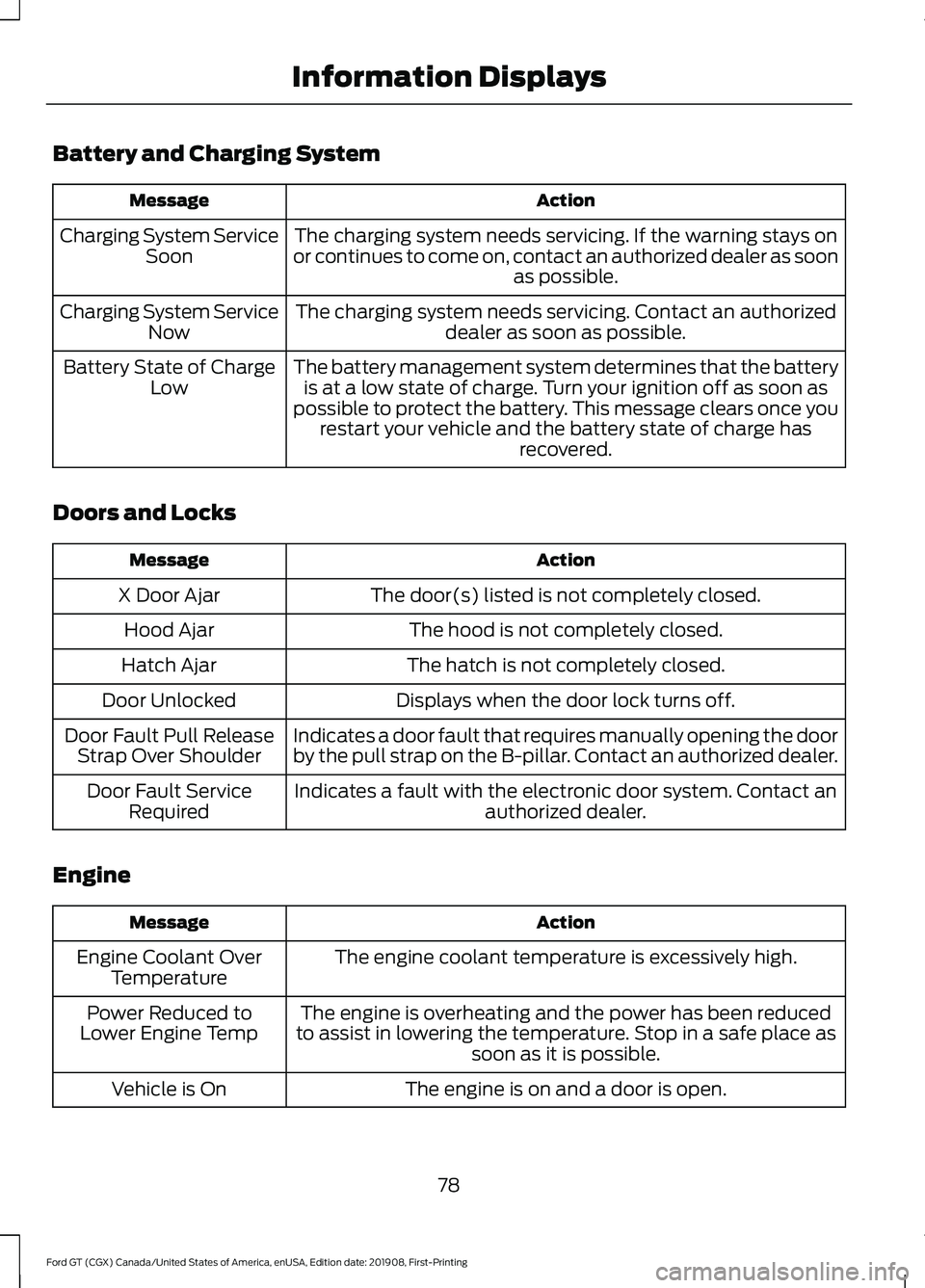
Battery and Charging System
Action
Message
The charging system needs servicing. If the warning stays on
or continues to come on, contact an authorized dealer as soon as possible.
Charging System Service
Soon
The charging system needs servicing. Contact an authorized dealer as soon as possible.
Charging System Service
Now
The battery management system determines that the batteryis at a low state of charge. Turn your ignition off as soon as
possible to protect the battery. This message clears once you restart your vehicle and the battery state of charge has recovered.
Battery State of Charge
Low
Doors and Locks Action
Message
The door(s) listed is not completely closed.
X Door Ajar
The hood is not completely closed.
Hood Ajar
The hatch is not completely closed.
Hatch Ajar
Displays when the door lock turns off.
Door Unlocked
Indicates a door fault that requires manually opening the door
by the pull strap on the B-pillar. Contact an authorized dealer.
Door Fault Pull Release
Strap Over Shoulder
Indicates a fault with the electronic door system. Contact anauthorized dealer.
Door Fault Service
Required
Engine Action
Message
The engine coolant temperature is excessively high.
Engine Coolant Over
Temperature
The engine is overheating and the power has been reduced
to assist in lowering the temperature. Stop in a safe place as soon as it is possible.
Power Reduced to
Lower Engine Temp
The engine is on and a door is open.
Vehicle is On
78
Ford GT (CGX) Canada/United States of America, enUSA, Edition date: 201908, First-Printing Information Displays
Page 85 of 316
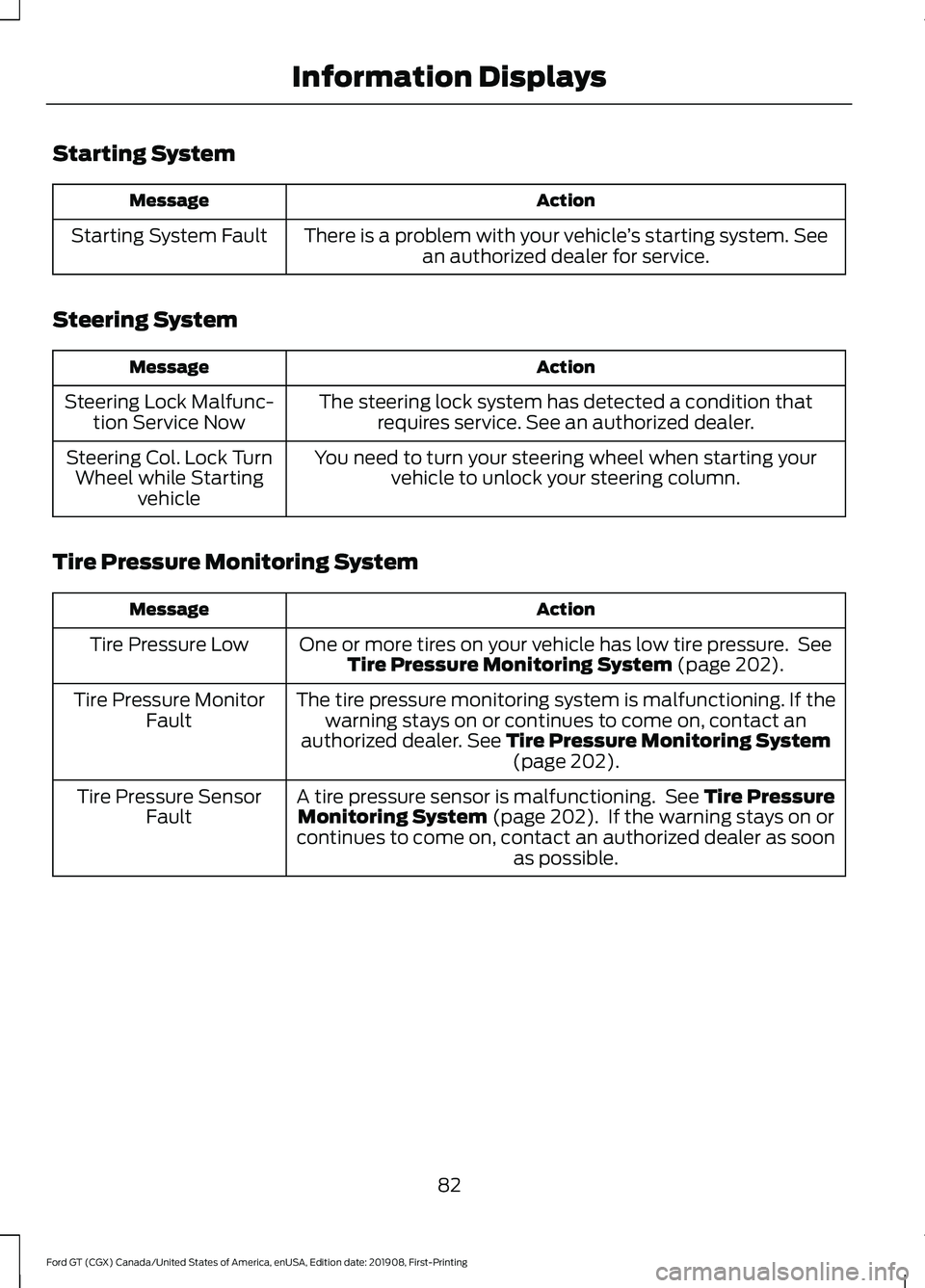
Starting System
Action
Message
There is a problem with your vehicle ’s starting system. See
an authorized dealer for service.
Starting System Fault
Steering System Action
Message
The steering lock system has detected a condition thatrequires service. See an authorized dealer.
Steering Lock Malfunc-
tion Service Now
You need to turn your steering wheel when starting yourvehicle to unlock your steering column.
Steering Col. Lock Turn
Wheel while Starting vehicle
Tire Pressure Monitoring System Action
Message
One or more tires on your vehicle has low tire pressure. SeeTire Pressure Monitoring System (page 202).
Tire Pressure Low
The tire pressure monitoring system is malfunctioning. If thewarning stays on or continues to come on, contact an
authorized dealer.
See Tire Pressure Monitoring System (page 202).
Tire Pressure Monitor
Fault
A tire pressure sensor is malfunctioning. See
Tire Pressure
Monitoring System (page 202). If the warning stays on or
continues to come on, contact an authorized dealer as soon as possible.
Tire Pressure Sensor
Fault
82
Ford GT (CGX) Canada/United States of America, enUSA, Edition date: 201908, First-Printing Information Displays
Page 86 of 316
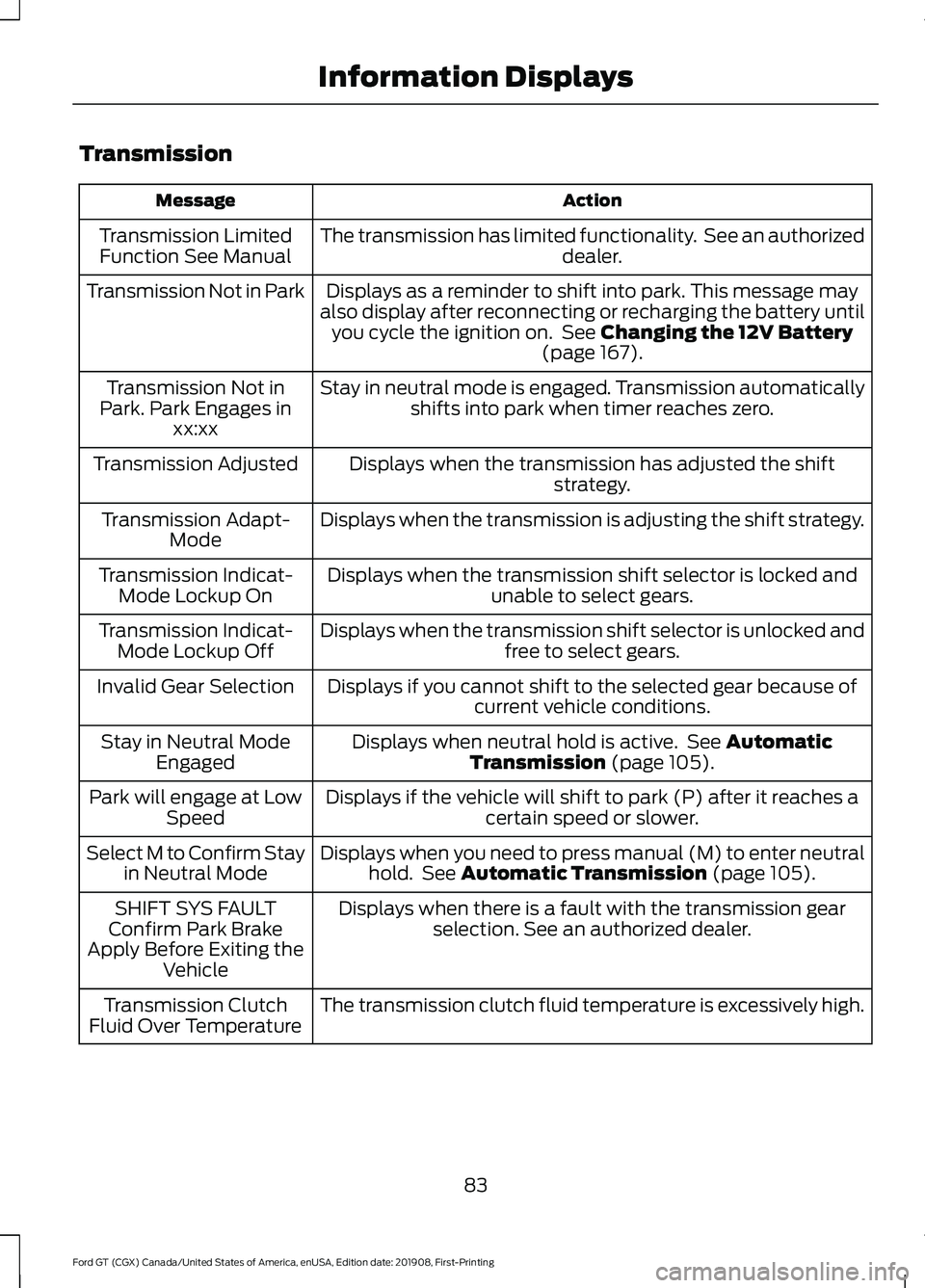
Transmission
Action
Message
The transmission has limited functionality. See an authorized dealer.
Transmission Limited
Function See Manual
Displays as a reminder to shift into park. This message may
also display after reconnecting or recharging the battery until you cycle the ignition on. See Changing the 12V Battery
(page 167).
Transmission Not in Park
Stay in neutral mode is engaged. Transmission automaticallyshifts into park when timer reaches zero.
Transmission Not in
Park. Park Engages in xx:xx
Displays when the transmission has adjusted the shift strategy.
Transmission Adjusted
Displays when the transmission is adjusting the shift strategy.
Transmission Adapt-
Mode
Displays when the transmission shift selector is locked and unable to select gears.
Transmission Indicat-
Mode Lockup On
Displays when the transmission shift selector is unlocked andfree to select gears.
Transmission Indicat-
Mode Lockup Off
Displays if you cannot shift to the selected gear because ofcurrent vehicle conditions.
Invalid Gear Selection
Displays when neutral hold is active. See
Automatic
Transmission (page 105).
Stay in Neutral Mode
Engaged
Displays if the vehicle will shift to park (P) after it reaches acertain speed or slower.
Park will engage at Low
Speed
Displays when you need to press manual (M) to enter neutralhold. See
Automatic Transmission (page 105).
Select M to Confirm Stay
in Neutral Mode
Displays when there is a fault with the transmission gearselection. See an authorized dealer.
SHIFT SYS FAULT
Confirm Park Brake
Apply Before Exiting the Vehicle
The transmission clutch fluid temperature is excessively high.
Transmission Clutch
Fluid Over Temperature
83
Ford GT (CGX) Canada/United States of America, enUSA, Edition date: 201908, First-Printing Information Displays
Page 91 of 316
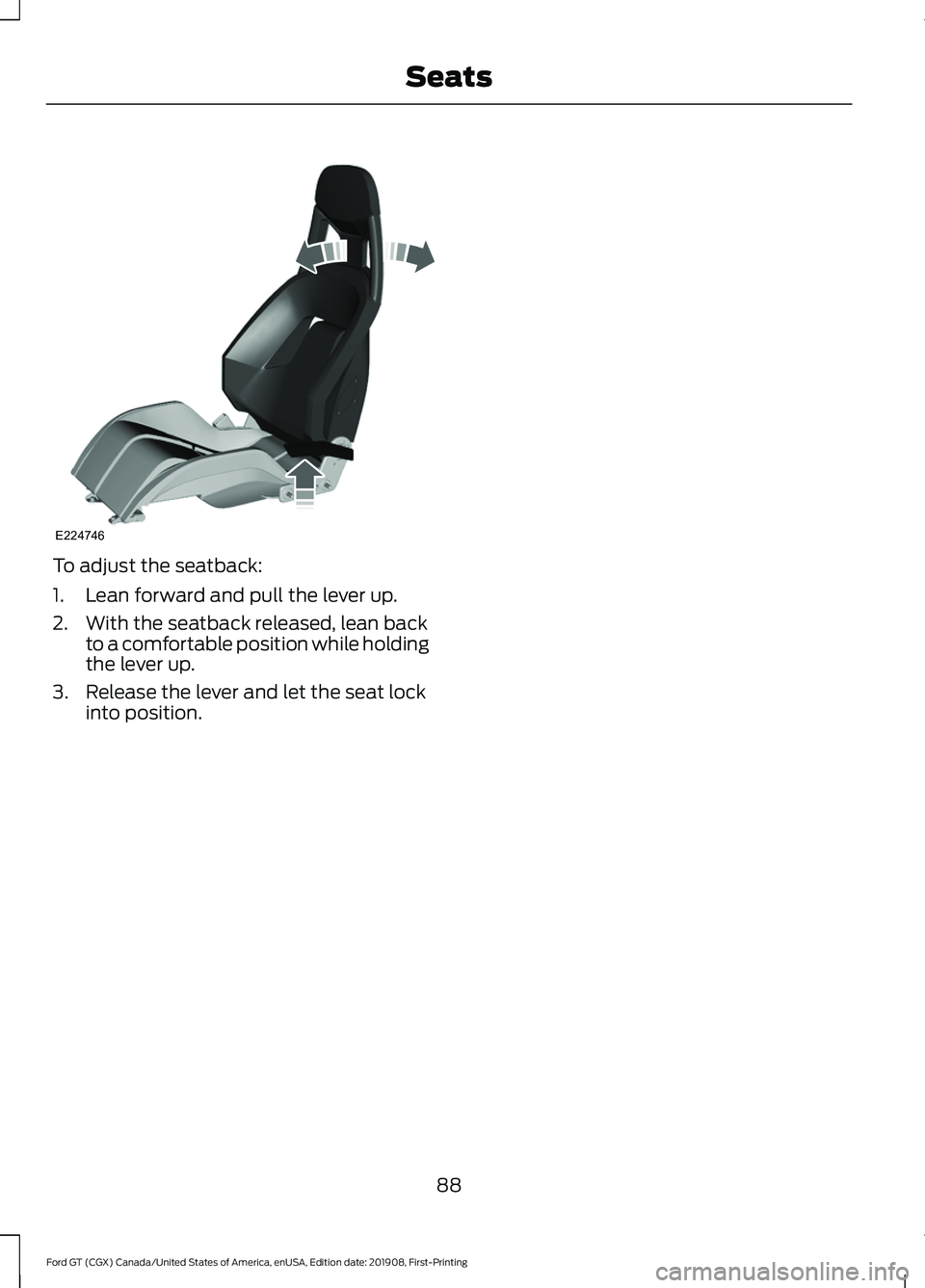
To adjust the seatback:
1. Lean forward and pull the lever up.
2. With the seatback released, lean back
to a comfortable position while holding
the lever up.
3. Release the lever and let the seat lock into position.
88
Ford GT (CGX) Canada/United States of America, enUSA, Edition date: 201908, First-Printing SeatsE224746
Page 95 of 316
•
Press the brake pedal and then press
the button for any length of time.
STEERING WHEEL LOCK
The steering wheel locks automatically
when you leave your vehicle and take the
intelligent access key with you. The
steering wheel unlocks automatically when
you enter your vehicle with the intelligent
access key.
Note: You may need to turn the steering
wheel left or right if the wheel does not
unlock completely. This may happen in
certain situations, such as parking your
vehicle on a steep grade.
STARTING THE ENGINE
When you start the engine, the idle speed
increases. This helps to warm up the
engine. If the engine idle speed does not
slow down automatically, have your
vehicle checked by an authorized dealer.
Note: You can crank the engine for a total
of 60 seconds, without the engine starting,
before the starting system temporarily
disables. The 60 seconds does not have to
be all at once. For example, you can crank
the engine three times for 20 seconds each,
without the engine starting, to reach the 60
second time limit. If you exceed the
cranking time, you cannot attempt to start
the engine for at least 15 minutes. After 15
minutes, you have a 15 second time limit to
crank the engine. You need to wait 60
minutes before you crank the engine again
for 60 seconds.
Before starting the engine, check the
following:
• Make sure all occupants fasten their
seatbelts.
• Make sure the headlamps and
electrical accessories are off. •
Make sure the parking brake is on.
• Move the transmission selector into
park (P).
Note: Do not touch the accelerator pedal.
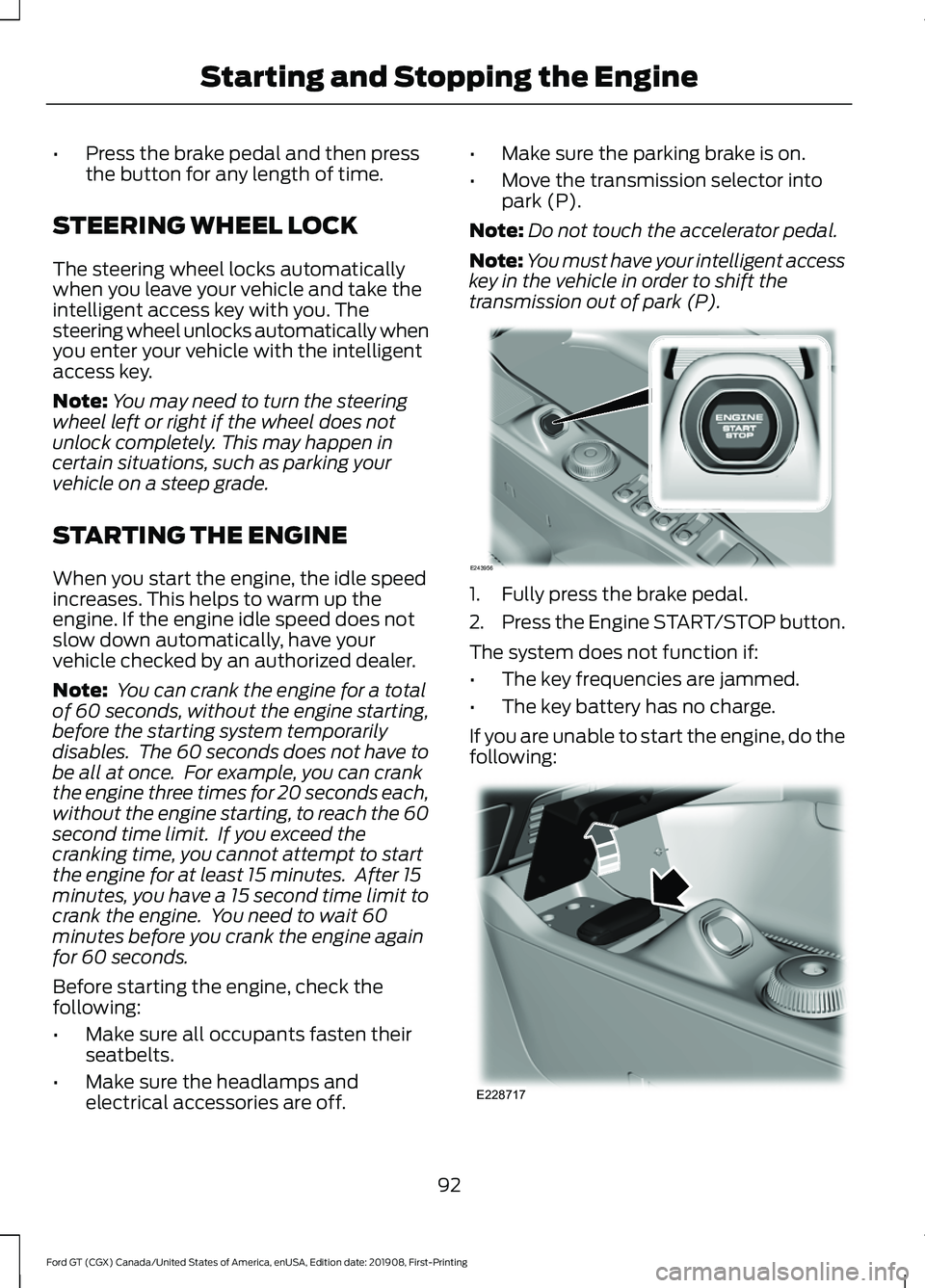
Note: You must have your intelligent access
key in the vehicle in order to shift the
transmission out of park (P). 1. Fully press the brake pedal.
2.
Press the Engine START/STOP button.
The system does not function if:
• The key frequencies are jammed.
• The key battery has no charge.
If you are unable to start the engine, do the
following: 92
Ford GT (CGX) Canada/United States of America, enUSA, Edition date: 201908, First-Printing Starting and Stopping the EngineE243956 E228717
Page 96 of 316
1.
Place the key fob under the rubber mat
in front of the Engine START/STOP
button.
2. With the key in this position, press the brake pedal and then the Engine
START/STOP button to switch the
ignition on and start your vehicle.
Note: If the vehicle fails to start, replace
the key fob battery.
Fast Restart
The fast restart feature allows you to
restart the engine within 20 seconds of
switching it off, even if a valid key is not
present.
Within 20 seconds of switching the engine
off, press the brake pedal and press the
START/STOP button. After 20 seconds
have expired, you can no longer restart the
engine without the key present inside your
vehicle.
Once the engine has started, it remains
running until you press the START/STOP
button, even if the system does not detect
a valid key. If you open and close a door
while the engine is running, the system
searches for a valid key. You cannot restart
the engine if the system does not detect a
valid key within 20 seconds.
Failure to Start
If you cannot start the engine after three
attempts, wait 10 seconds and follow this
procedure:
1. Fully press the brake pedal.
2. Move the transmission selector to the park (P) position.
3. Fully press the accelerator pedal and hold it there.
4. Press the START/STOP button once. Stopping the Engine When Your
Vehicle is Stationary
1. Move the transmission selector to the
park (P) position.
2. Press the START/STOP button once.
3. Apply the parking brake.
Note: This switches off the ignition, all
electrical circuits, warning lamps and
indicators.
Stopping the Engine When Your
Vehicle is Moving WARNING: Switching off the
engine when your vehicle is still moving
results in a significant decrease in
braking assistance. Higher effort is
required to apply the brakes and to stop
your vehicle. A significant decrease in
steering assistance could also occur. The
steering does not lock, but higher effort
could be required to steer your vehicle.
When you switch the ignition off, some
electrical circuits, for example airbags,
also turn off. If you unintentionally switch
the ignition off, shift into neutral (N) and
restart the engine.
1. Move the transmission selector to the neutral position and use the brakes to
bring your vehicle to a safe stop.
2. When your vehicle has stopped, park (P) will engage automatically.
3. Press and hold the START/STOP button for one second, or press it three
times within two seconds.
4. Apply the parking brake.
93
Ford GT (CGX) Canada/United States of America, enUSA, Edition date: 201908, First-Printing Starting and Stopping the Engine
Page 101 of 316
Note:
Extra funnels can be purchased from
an authorized dealer if you choose to
dispose of the funnel.
REFUELING WARNING: Do not overfill the
fuel tank. The pressure in an overfilled
tank may cause leakage and lead to fuel
spray and fire. WARNING:
Do not try to pry
open or push open the capless fuel
system with foreign objects. This could
damage the fuel system and its seal and
cause injury to you or others. WARNING:
Do not remove the
fuel pump nozzle from its fully inserted
position when refueling. WARNING:
When refueling
always shut the engine off and never
allow sparks or open flames near the fuel
tank filler valve. Never smoke or use a
cell phone while refueling. Fuel vapor is
extremely hazardous under certain
conditions. Avoid inhaling excess fumes. WARNING:
Wait at least 10
seconds before removing the fuel pump
nozzle to allow any residual fuel to drain
into the fuel tank. WARNING:
Stop refueling when
the fuel pump nozzle automatically
shuts off for the first time. Failure to
follow this will fill the expansion space
in the fuel tank and could lead to fuel
overflowing.
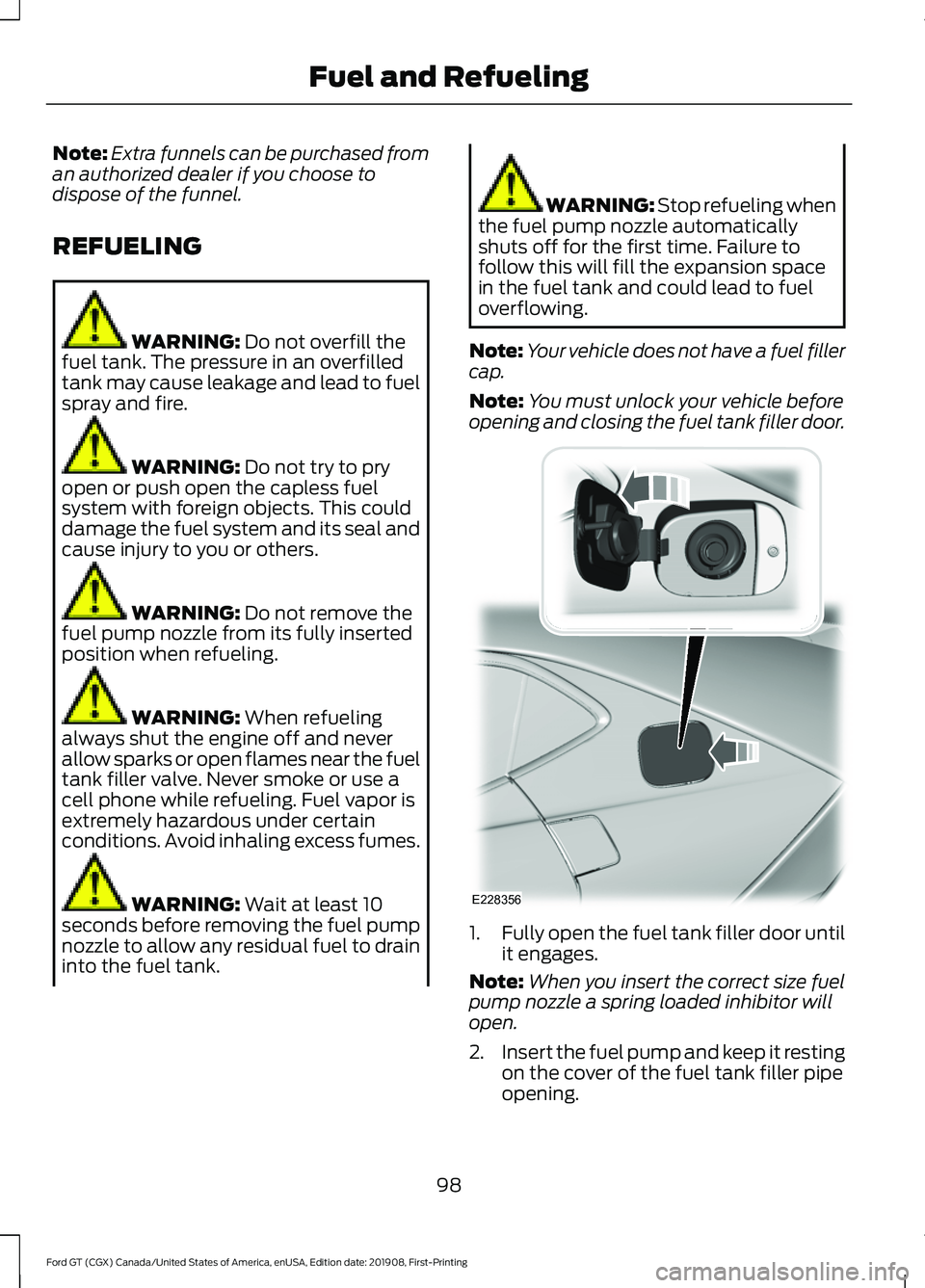
Note: Your vehicle does not have a fuel filler
cap.
Note: You must unlock your vehicle before
opening and closing the fuel tank filler door. 1.
Fully open the fuel tank filler door until
it engages.
Note: When you insert the correct size fuel
pump nozzle a spring loaded inhibitor will
open.
2. Insert the fuel pump and keep it resting
on the cover of the fuel tank filler pipe
opening.
98
Ford GT (CGX) Canada/United States of America, enUSA, Edition date: 201908, First-Printing Fuel and RefuelingE228356
Page 108 of 316
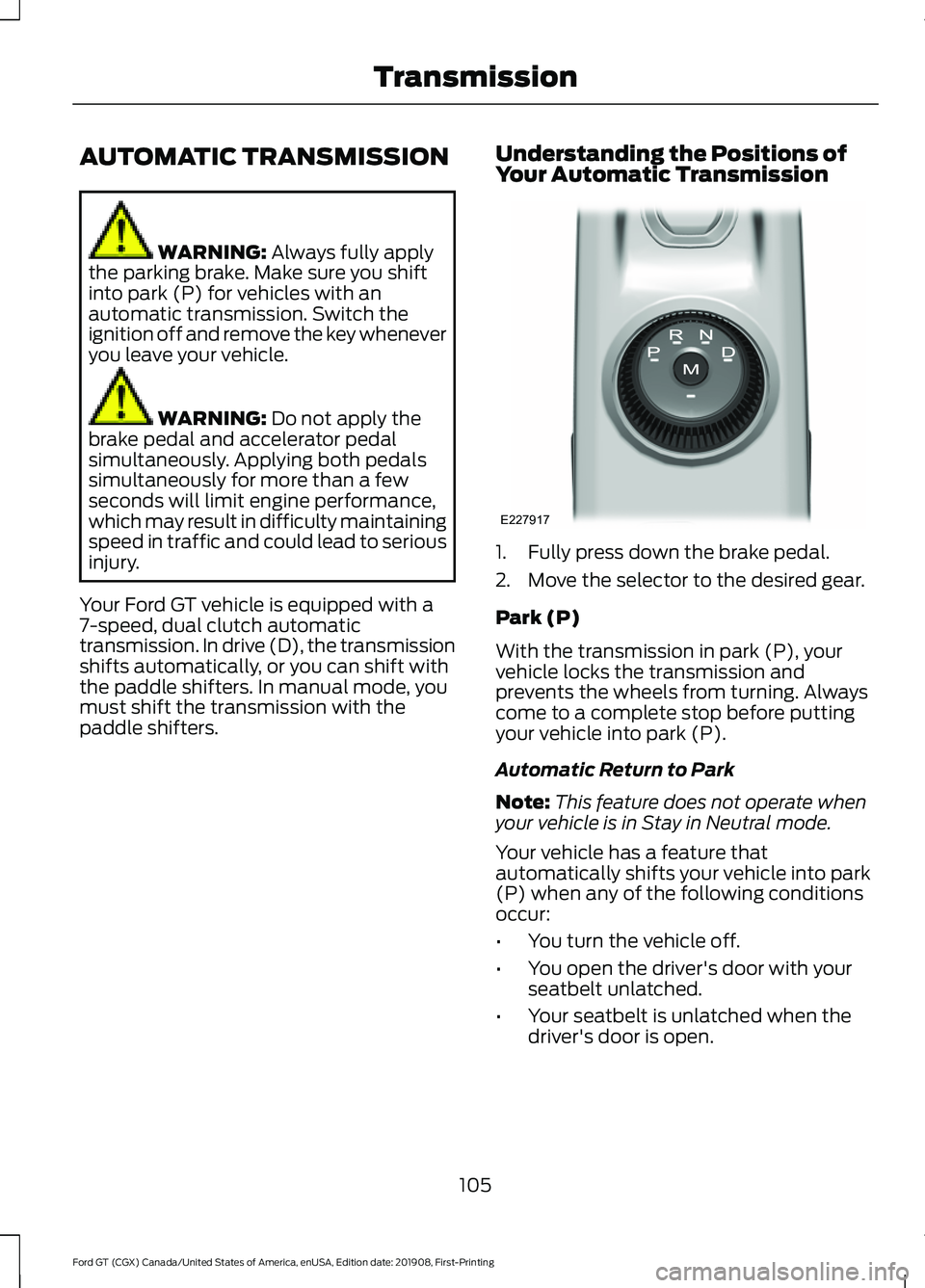
AUTOMATIC TRANSMISSION
WARNING: Always fully apply
the parking brake. Make sure you shift
into park (P) for vehicles with an
automatic transmission. Switch the
ignition off and remove the key whenever
you leave your vehicle. WARNING:
Do not apply the
brake pedal and accelerator pedal
simultaneously. Applying both pedals
simultaneously for more than a few
seconds will limit engine performance,
which may result in difficulty maintaining
speed in traffic and could lead to serious
injury.
Your Ford GT vehicle is equipped with a
7-speed, dual clutch automatic
transmission. In drive (D), the transmission
shifts automatically, or you can shift with
the paddle shifters. In manual mode, you
must shift the transmission with the
paddle shifters. Understanding the Positions of
Your Automatic Transmission 1. Fully press down the brake pedal.
2. Move the selector to the desired gear.
Park (P)
With the transmission in park (P), your
vehicle locks the transmission and
prevents the wheels from turning. Always
come to a complete stop before putting
your vehicle into park (P).
Automatic Return to Park
Note:
This feature does not operate when
your vehicle is in Stay in Neutral mode.
Your vehicle has a feature that
automatically shifts your vehicle into park
(P) when any of the following conditions
occur:
• You turn the vehicle off.
• You open the driver's door with your
seatbelt unlatched.
• Your seatbelt is unlatched when the
driver's door is open.
105
Ford GT (CGX) Canada/United States of America, enUSA, Edition date: 201908, First-Printing TransmissionE227917
Page 111 of 316
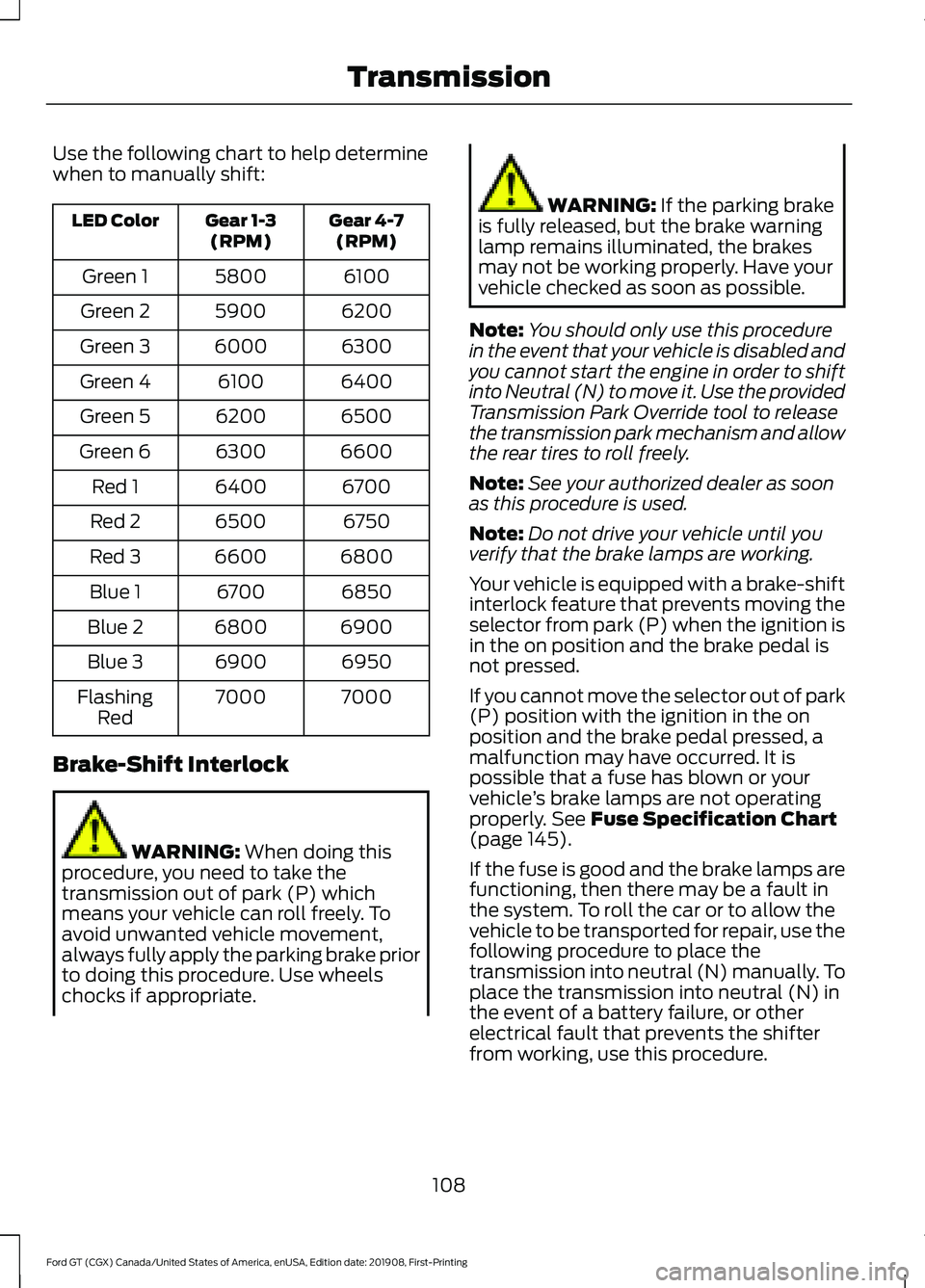
Use the following chart to help determine
when to manually shift:
Gear 4-7
(RPM)
Gear 1-3
(RPM)
LED Color
6100
5800
Green 1
6200
5900
Green 2
6300
6000
Green 3
6400
6100
Green 4
6500
6200
Green 5
6600
6300
Green 6
6700
6400
Red 1
6750
6500
Red 2
6800
6600
Red 3
6850
6700
Blue 1
6900
6800
Blue 2
6950
6900
Blue 3
7000
7000
Flashing
Red
Brake-Shift Interlock WARNING: When doing this
procedure, you need to take the
transmission out of park (P) which
means your vehicle can roll freely. To
avoid unwanted vehicle movement,
always fully apply the parking brake prior
to doing this procedure. Use wheels
chocks if appropriate. WARNING:
If the parking brake
is fully released, but the brake warning
lamp remains illuminated, the brakes
may not be working properly. Have your
vehicle checked as soon as possible.
Note: You should only use this procedure
in the event that your vehicle is disabled and
you cannot start the engine in order to shift
into Neutral (N) to move it. Use the provided
Transmission Park Override tool to release
the transmission park mechanism and allow
the rear tires to roll freely.
Note: See your authorized dealer as soon
as this procedure is used.
Note: Do not drive your vehicle until you
verify that the brake lamps are working.
Your vehicle is equipped with a brake-shift
interlock feature that prevents moving the
selector from park (P) when the ignition is
in the on position and the brake pedal is
not pressed.
If you cannot move the selector out of park
(P) position with the ignition in the on
position and the brake pedal pressed, a
malfunction may have occurred. It is
possible that a fuse has blown or your
vehicle ’s brake lamps are not operating
properly.
See Fuse Specification Chart
(page 145).
If the fuse is good and the brake lamps are
functioning, then there may be a fault in
the system. To roll the car or to allow the
vehicle to be transported for repair, use the
following procedure to place the
transmission into neutral (N) manually. To
place the transmission into neutral (N) in
the event of a battery failure, or other
electrical fault that prevents the shifter
from working, use this procedure.
108
Ford GT (CGX) Canada/United States of America, enUSA, Edition date: 201908, First-Printing Transmission