battery FORD GT 2021 User Guide
[x] Cancel search | Manufacturer: FORD, Model Year: 2021, Model line: GT, Model: FORD GT 2021Pages: 321, PDF Size: 5.78 MB
Page 56 of 321
Opening the Doors from Inside
Press the door release button
located on the arm rest to
release the door. Push the door
out and up to open the door. The hydraulic
lift cylinder assists in the door movement
once you start to open the door.
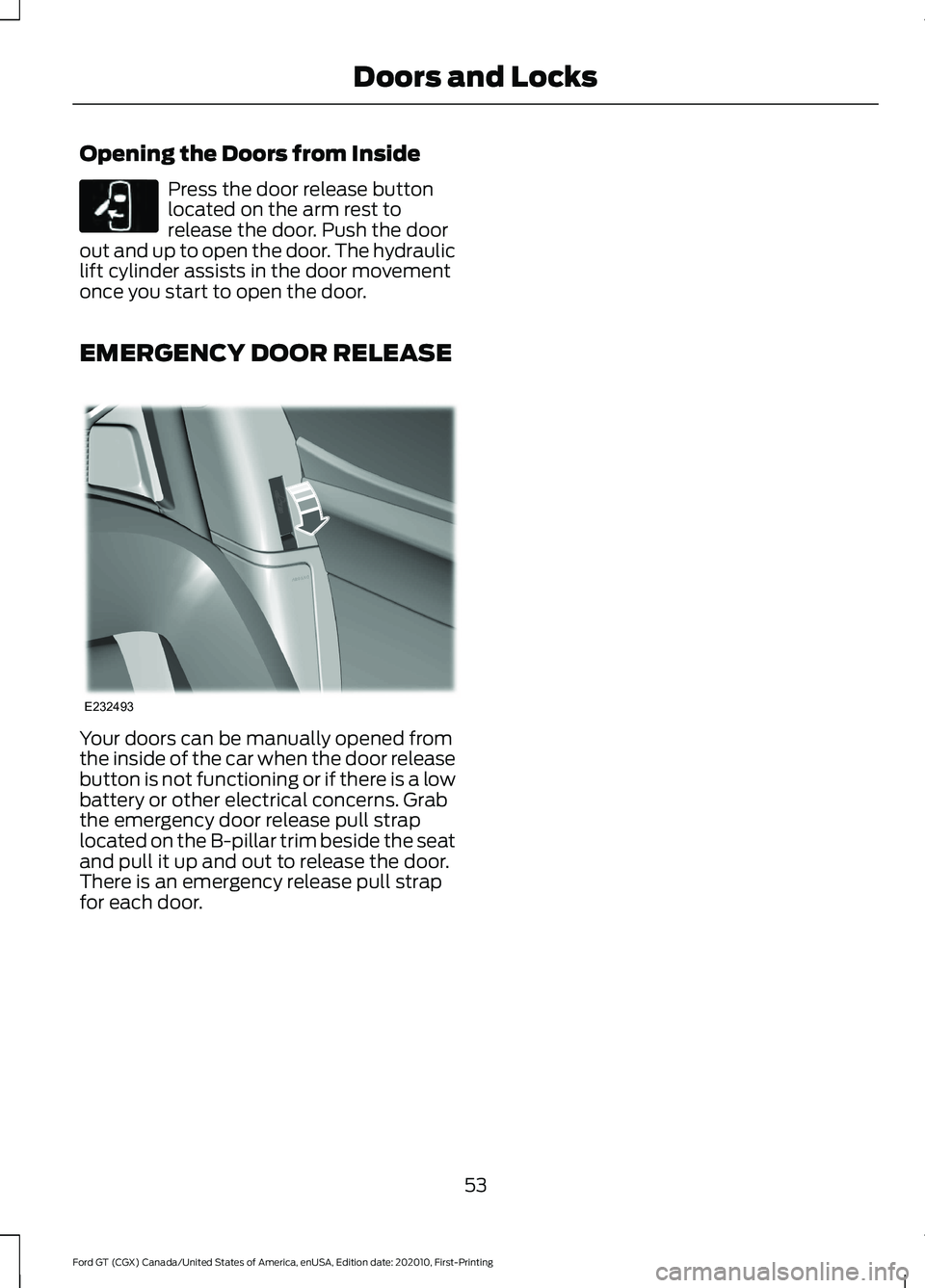
EMERGENCY DOOR RELEASE Your doors can be manually opened from
the inside of the car when the door release
button is not functioning or if there is a low
battery or other electrical concerns. Grab
the emergency door release pull strap
located on the B-pillar trim beside the seat
and pull it up and out to release the door.
There is an emergency release pull strap
for each door.
53
Ford GT (CGX) Canada/United States of America, enUSA, Edition date: 202010, First-Printing Doors and LocksE232417 E232493
Page 66 of 321
Press and hold to switch the high beams
on.
Press and hold again to switch the high
beams off.
AUTOLAMPS
WARNING: The system does not
relieve you of your responsibility to drive
with due care and attention. You may
need to override the system if it does not
turn the headlamps on in low visibility
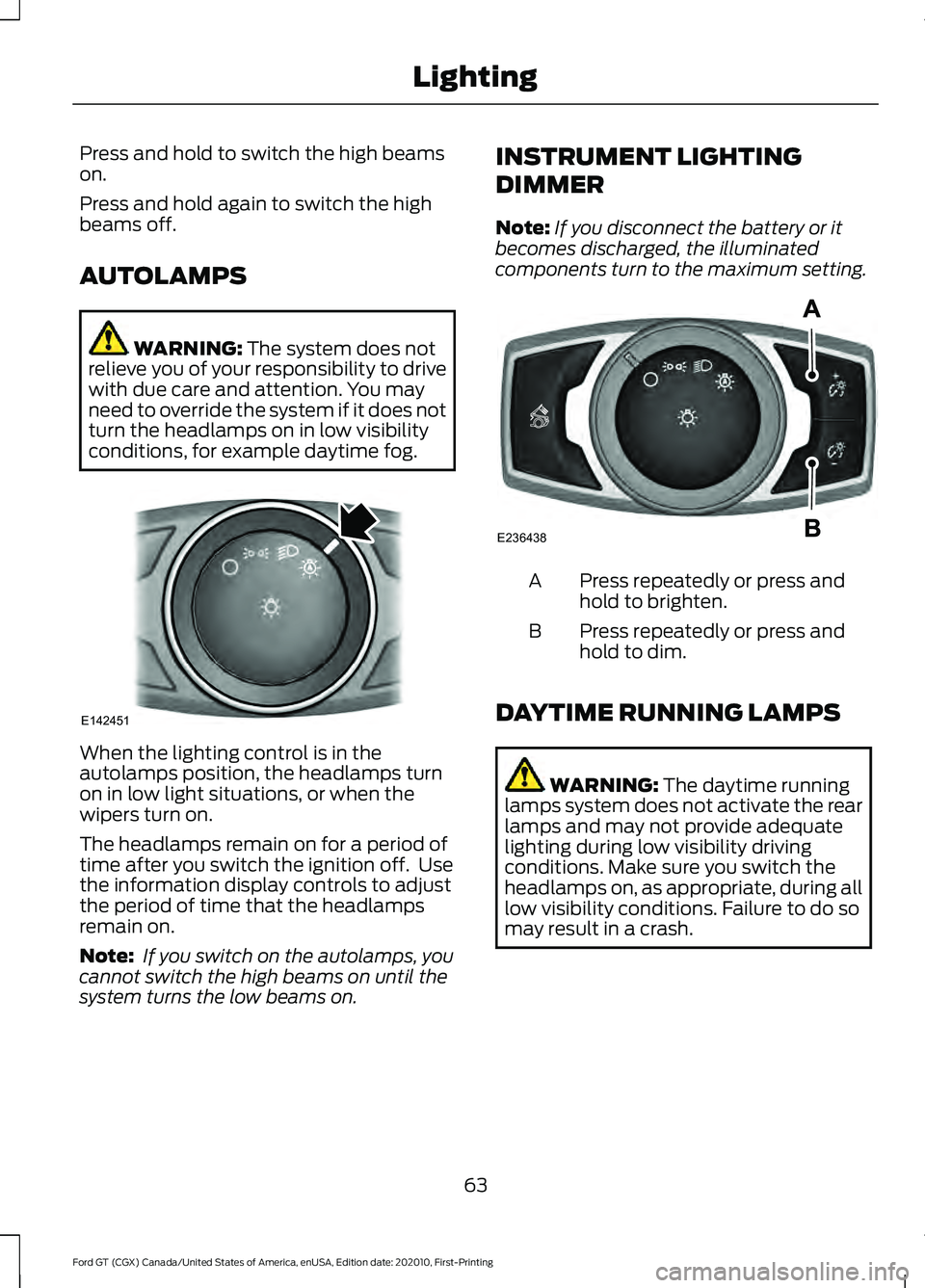
conditions, for example daytime fog. When the lighting control is in the
autolamps position, the headlamps turn
on in low light situations, or when the
wipers turn on.
The headlamps remain on for a period of
time after you switch the ignition off. Use
the information display controls to adjust
the period of time that the headlamps
remain on.
Note:
If you switch on the autolamps, you
cannot switch the high beams on until the
system turns the low beams on. INSTRUMENT LIGHTING
DIMMER
Note:
If you disconnect the battery or it
becomes discharged, the illuminated
components turn to the maximum setting. Press repeatedly or press and
hold to brighten.
A
Press repeatedly or press and
hold to dim.
B
DAYTIME RUNNING LAMPS WARNING:
The daytime running
lamps system does not activate the rear
lamps and may not provide adequate
lighting during low visibility driving
conditions. Make sure you switch the
headlamps on, as appropriate, during all
low visibility conditions. Failure to do so
may result in a crash.
63
Ford GT (CGX) Canada/United States of America, enUSA, Edition date: 202010, First-Printing LightingE142451 E236438
Page 73 of 321
Battery
If it illuminates while driving, it
indicates a malfunction. Switch
off all unnecessary electrical
equipment and have the system checked
by your authorized dealer immediately.
Brake System WARNING: Driving your vehicle
with the warning lamp on is dangerous.
A significant decrease in braking
performance may occur. It may take you
longer to stop your vehicle. Have your
vehicle checked as soon as possible.
Driving extended distances with the
parking brake engaged can cause brake
failure and the risk of personal injury. It will illuminate when you
engage the parking brake with
the ignition on.
If it illuminates when you are driving, check
that the parking brake is not engaged. If
the parking brake is not engaged, this
indicates low brake fluid level or a brake
system malfunction. Have the system
checked immediately by your authorized
dealer.
Carbon Ceramic Brakes It illuminates when the brake
pads are worn and require
replacement.
Cruise Control It illuminates when you switch
the system on.
See
Using Cruise Control
(page 118). Damper Comfort Mode It illuminates when you switch
this feature on. See Drive Mode
Control
(page 119).
Direction Indicator Illuminates when the left or right
turn signal or the hazard warning
flasher is turned on. If the
indicators stay on or flash faster, check for
an inoperative bulb. See
Maintenance
(page 154).
Door Ajar Displays when the ignition is on
and any door is not completely
closed.
Electric Park Brake It illuminates or flashes when the
electric parking brake has a
malfunction. See
Electric
Parking Brake (page 109).
Engine Coolant Temperature Illuminates when the engine
coolant temperature is high.
Stop the vehicle as soon as
possible, switch off the engine and let cool.
See
Engine Coolant Check (page 158).
Engine Oil If it illuminates with the engine
running or when you are driving,
this indicates a malfunction.
Stop your vehicle as soon as it is safe to
do so and switch the engine off. Check the
engine oil level.
See
Engine Oil Check (page 157).
70
Ford GT (CGX) Canada/United States of America, enUSA, Edition date: 202010, First-Printing Instrument Cluster E138644 E269429 E71340 E234586 E236449 E146190
Page 80 of 321
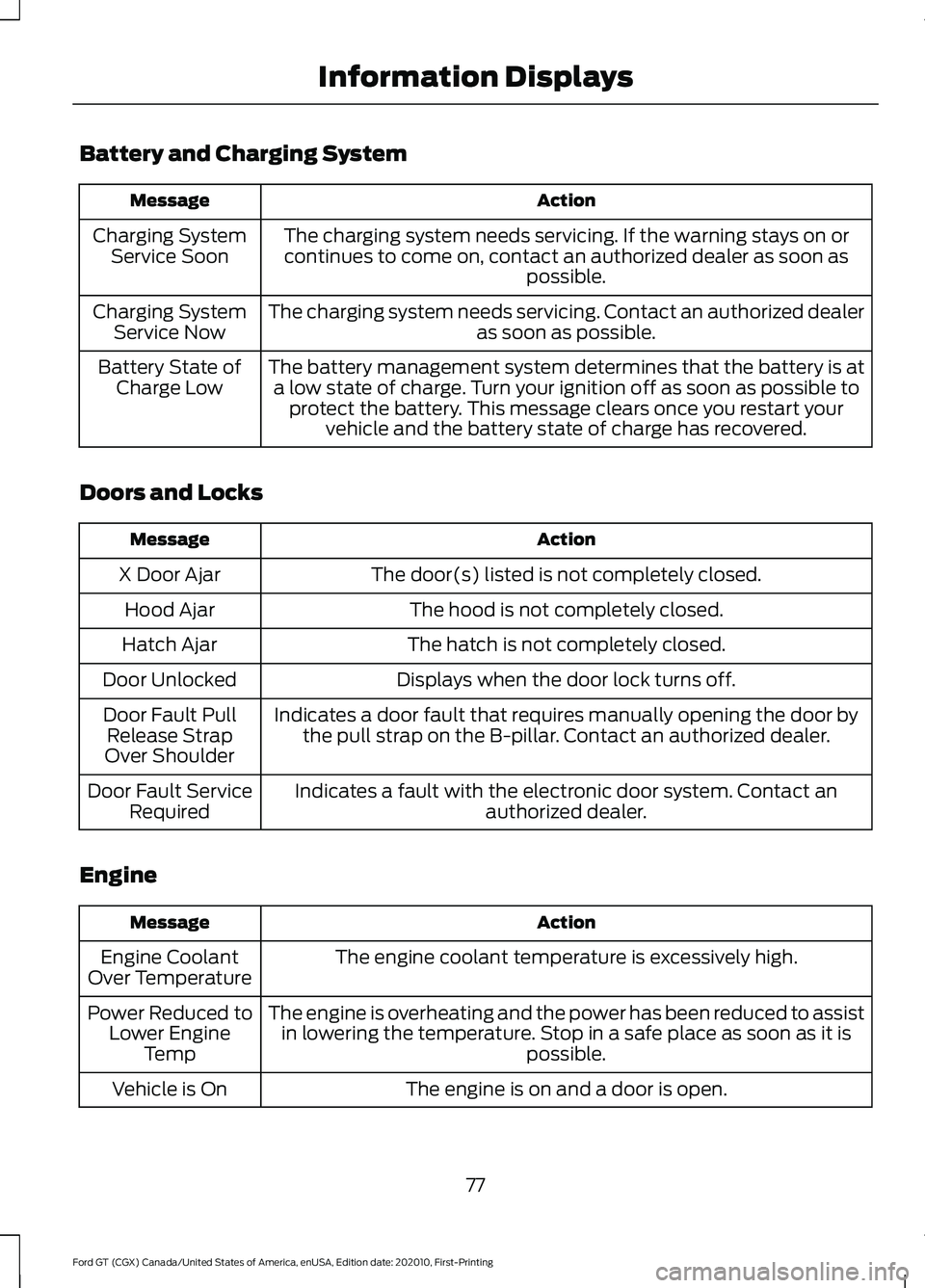
Battery and Charging System
Action
Message
The charging system needs servicing. If the warning stays on orcontinues to come on, contact an authorized dealer as soon as possible.
Charging System
Service Soon
The charging system needs servicing. Contact an authorized dealer as soon as possible.
Charging System
Service Now
The battery management system determines that the battery is ata low state of charge. Turn your ignition off as soon as possible to protect the battery. This message clears once you restart your vehicle and the battery state of charge has recovered.
Battery State of
Charge Low
Doors and Locks Action
Message
The door(s) listed is not completely closed.
X Door Ajar
The hood is not completely closed.
Hood Ajar
The hatch is not completely closed.
Hatch Ajar
Displays when the door lock turns off.
Door Unlocked
Indicates a door fault that requires manually opening the door bythe pull strap on the B-pillar. Contact an authorized dealer.
Door Fault Pull
Release Strap
Over Shoulder
Indicates a fault with the electronic door system. Contact an authorized dealer.
Door Fault Service
Required
Engine Action
Message
The engine coolant temperature is excessively high.
Engine Coolant
Over Temperature
The engine is overheating and the power has been reduced to assistin lowering the temperature. Stop in a safe place as soon as it is possible.
Power Reduced to
Lower Engine Temp
The engine is on and a door is open.
Vehicle is On
77
Ford GT (CGX) Canada/United States of America, enUSA, Edition date: 202010, First-Printing Information Displays
Page 82 of 321
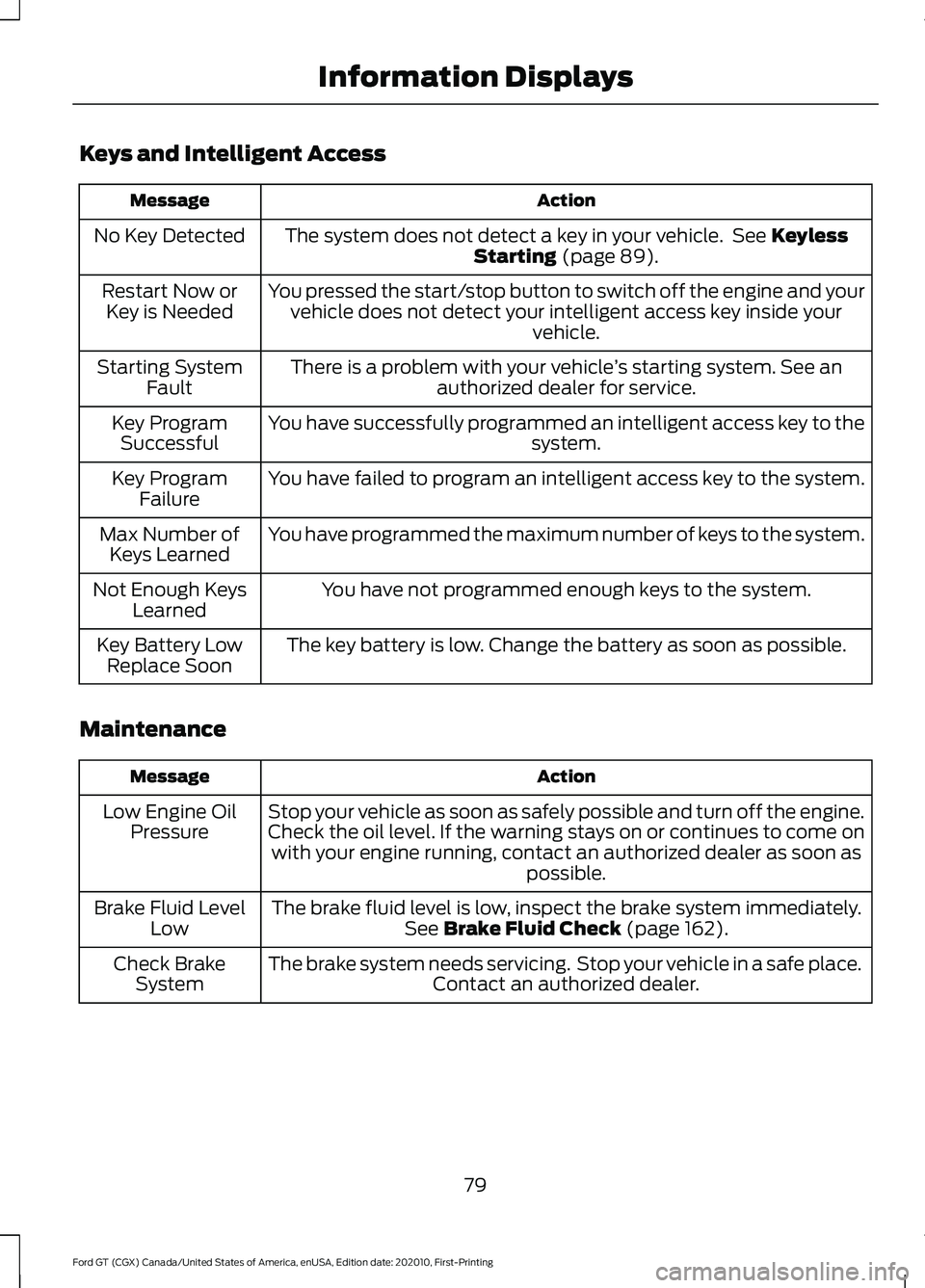
Keys and Intelligent Access
Action
Message
The system does not detect a key in your vehicle. See Keyless
Starting (page 89).
No Key Detected
You pressed the start/stop button to switch off the engine and yourvehicle does not detect your intelligent access key inside your vehicle.
Restart Now or
Key is Needed
There is a problem with your vehicle ’s starting system. See an
authorized dealer for service.
Starting System
Fault
You have successfully programmed an intelligent access key to the system.
Key Program
Successful
You have failed to program an intelligent access key to the system.
Key Program
Failure
You have programmed the maximum number of keys to the system.
Max Number of
Keys Learned
You have not programmed enough keys to the system.
Not Enough Keys
Learned
The key battery is low. Change the battery as soon as possible.
Key Battery Low
Replace Soon
Maintenance Action
Message
Stop your vehicle as soon as safely possible and turn off the engine.
Check the oil level. If the warning stays on or continues to come onwith your engine running, contact an authorized dealer as soon as possible.
Low Engine Oil
Pressure
The brake fluid level is low, inspect the brake system immediately.See
Brake Fluid Check (page 162).
Brake Fluid Level
Low
The brake system needs servicing. Stop your vehicle in a safe place. Contact an authorized dealer.
Check Brake
System
79
Ford GT (CGX) Canada/United States of America, enUSA, Edition date: 202010, First-Printing Information Displays
Page 85 of 321
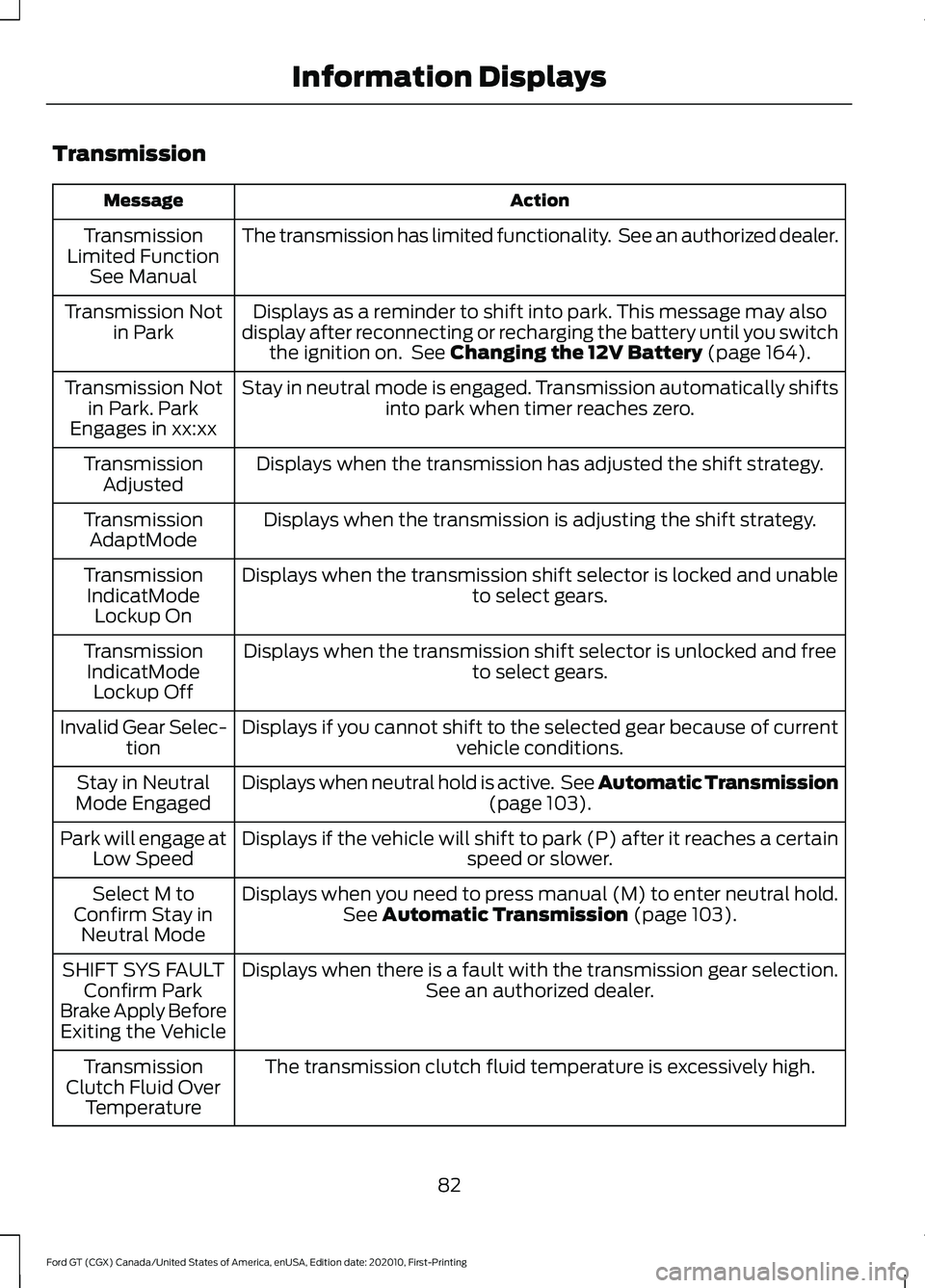
Transmission
Action
Message
The transmission has limited functionality. See an authorized dealer.
Transmission
Limited Function See Manual
Displays as a reminder to shift into park. This message may also
display after reconnecting or recharging the battery until you switch the ignition on. See Changing the 12V Battery (page 164).
Transmission Not
in Park
Stay in neutral mode is engaged. Transmission automatically shifts into park when timer reaches zero.
Transmission Not
in Park. Park
Engages in xx:xx
Displays when the transmission has adjusted the shift strategy.
Transmission
Adjusted
Displays when the transmission is adjusting the shift strategy.
Transmission
AdaptMode
Displays when the transmission shift selector is locked and unable to select gears.
Transmission
IndicatMode Lockup On
Displays when the transmission shift selector is unlocked and free to select gears.
Transmission
IndicatMode Lockup Off
Displays if you cannot shift to the selected gear because of current vehicle conditions.
Invalid Gear Selec-
tion
Displays when neutral hold is active. See Automatic Transmission (page
103).
Stay in Neutral
Mode Engaged
Displays if the vehicle will shift to park (P) after it reaches a certain speed or slower.
Park will engage at
Low Speed
Displays when you need to press manual (M) to enter neutral hold.See
Automatic Transmission (page 103).
Select M to
Confirm Stay in Neutral Mode
Displays when there is a fault with the transmission gear selection. See an authorized dealer.
SHIFT SYS FAULT
Confirm Park
Brake Apply Before Exiting the Vehicle
The transmission clutch fluid temperature is excessively high.
Transmission
Clutch Fluid Over Temperature
82
Ford GT (CGX) Canada/United States of America, enUSA, Edition date: 202010, First-Printing Information Displays
Page 90 of 321
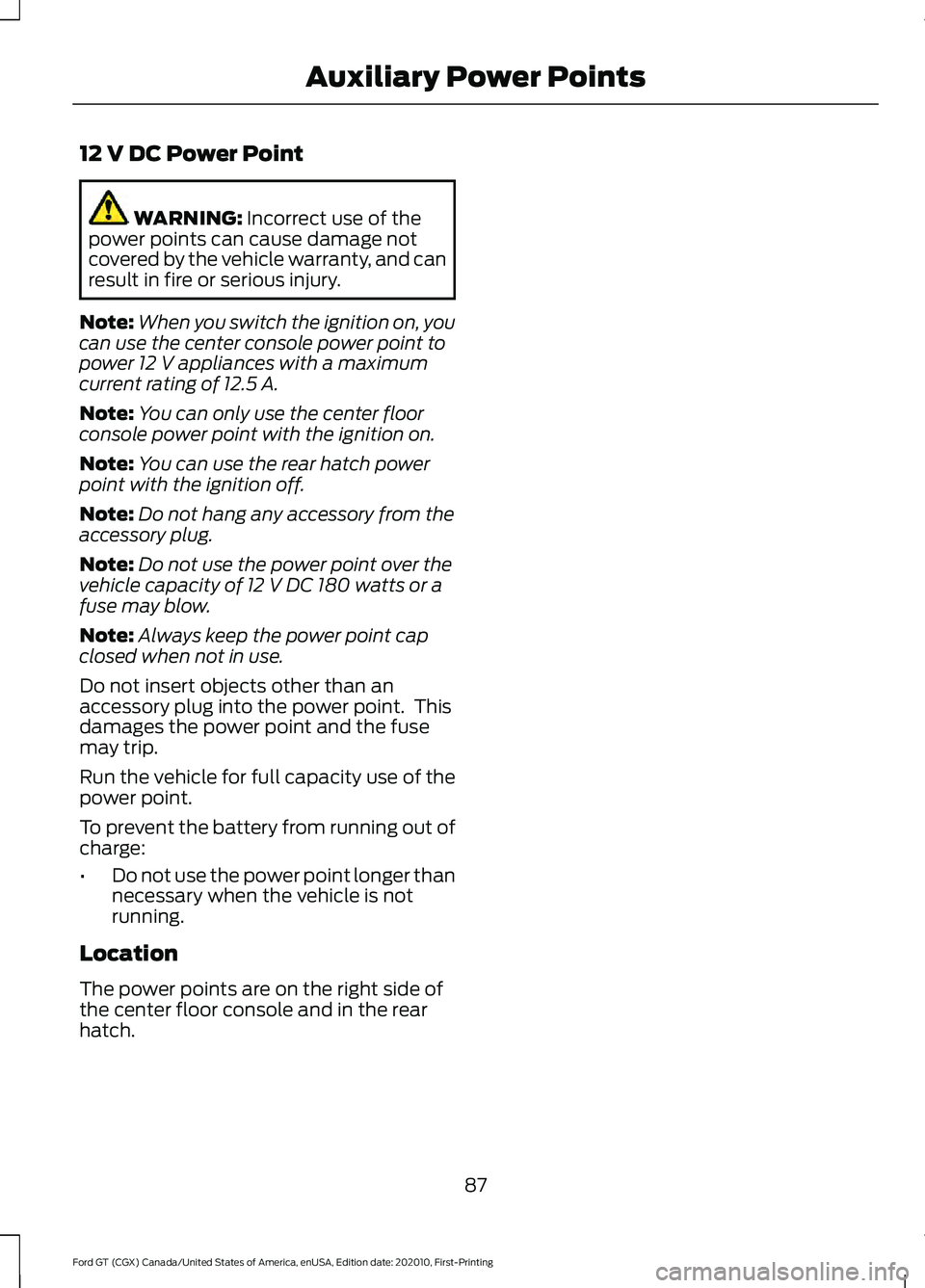
12 V DC Power Point
WARNING: Incorrect use of the
power points can cause damage not
covered by the vehicle warranty, and can
result in fire or serious injury.
Note: When you switch the ignition on, you
can use the center console power point to
power
12 V appliances with a maximum
current rating of 12.5 A.
Note: You can only use the center floor
console power point with the ignition on.
Note: You can use the rear hatch power
point with the ignition off.
Note: Do not hang any accessory from the
accessory plug.
Note: Do not use the power point over the
vehicle capacity of
12 V DC 180 watts or a
fuse may blow.
Note: Always keep the power point cap
closed when not in use.
Do not insert objects other than an
accessory plug into the power point. This
damages the power point and the fuse
may trip.
Run the vehicle for full capacity use of the
power point.
To prevent the battery from running out of
charge:
• Do not use the power point longer than
necessary when the vehicle is not
running.
Location
The power points are on the right side of
the center floor console and in the rear
hatch.
87
Ford GT (CGX) Canada/United States of America, enUSA, Edition date: 202010, First-Printing Auxiliary Power Points
Page 92 of 321
GENERAL INFORMATION
WARNING: Extended idling at high
engine speeds can produce very high
temperatures in the engine and exhaust
system, creating the risk of fire or other
damage. WARNING:
Do not park, idle or
drive your vehicle on dry grass or other
dry ground cover. The emission system
heats up the engine compartment and
exhaust system, creating the risk of fire. WARNING: Do not start the engine
in a closed garage or in other enclosed
areas. Exhaust fumes can be toxic.
Always open the garage door before you
start the engine. WARNING:
Exhaust leaks may
result in entry of harmful and potentially
lethal fumes into the passenger
compartment. If you smell exhaust
fumes inside your vehicle, have your
vehicle inspected immediately. Do not
drive if you smell exhaust fumes.
If you disconnect the battery, your vehicle
may exhibit some unusual driving
characteristics for approximately
5 mi
(8 km) after you reconnect it. This is
because the engine management system
must realign itself with the engine. You
can disregard any unusual driving
characteristics during this period.
The powertrain control system meets all
Canadian interference-causing equipment
standard requirements regulating the
impulse electrical field or radio noise.
When you start the engine, avoid pressing
the accelerator pedal before and during
operation. Only use the accelerator pedal
when you have difficulty starting the
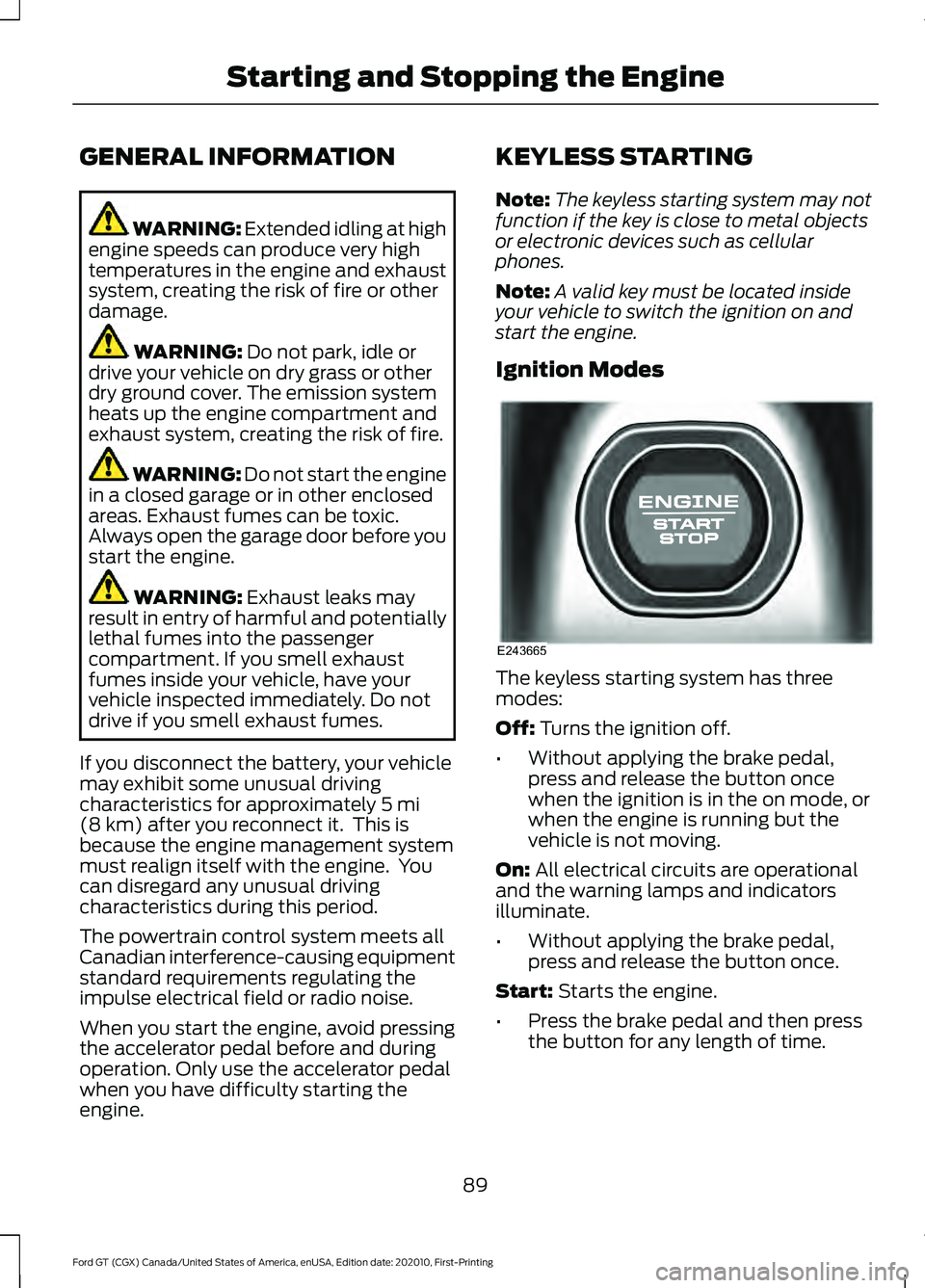
engine. KEYLESS STARTING
Note:
The keyless starting system may not
function if the key is close to metal objects
or electronic devices such as cellular
phones.
Note: A valid key must be located inside
your vehicle to switch the ignition on and
start the engine.
Ignition Modes The keyless starting system has three
modes:
Off:
Turns the ignition off.
• Without applying the brake pedal,
press and release the button once
when the ignition is in the on mode, or
when the engine is running but the
vehicle is not moving.
On:
All electrical circuits are operational
and the warning lamps and indicators
illuminate.
• Without applying the brake pedal,
press and release the button once.
Start:
Starts the engine.
• Press the brake pedal and then press
the button for any length of time.
89
Ford GT (CGX) Canada/United States of America, enUSA, Edition date: 202010, First-Printing Starting and Stopping the EngineE243665
Page 93 of 321
STEERING WHEEL LOCK
The steering wheel locks automatically
when you leave your vehicle and take the
intelligent access key with you. The
steering wheel unlocks automatically when
you enter your vehicle with the intelligent
access key.
Note:
You may need to turn the steering
wheel left or right if the wheel does not
unlock completely. This may happen in
certain situations, such as parking your
vehicle on a steep grade.
STARTING THE ENGINE
When you start the engine, the idle speed
increases. This helps to warm up the
engine. If the engine idle speed does not
slow down automatically, have your
vehicle checked by an authorized dealer.
Note: You can crank the engine for a total
of 60 seconds, without the engine starting,
before the starting system temporarily
disables. The 60 seconds does not have to
be all at once. For example, you can crank
the engine three times for 20 seconds each,
without the engine starting, to reach the 60
second time limit. If you exceed the
cranking time, you cannot attempt to start
the engine for at least 15 minutes. After 15
minutes, you have a 15 second time limit to
crank the engine. You need to wait 60
minutes before you crank the engine again
for 60 seconds.
Before starting the engine, check the
following:
• Make sure all occupants fasten their
seatbelts.
• Make sure the headlamps and
electrical accessories are off.
• Make sure the parking brake is on.
• Move the transmission selector into
park (P). Note:
Do not touch the accelerator pedal.
Note: You must have your intelligent access
key in the vehicle in order to shift the
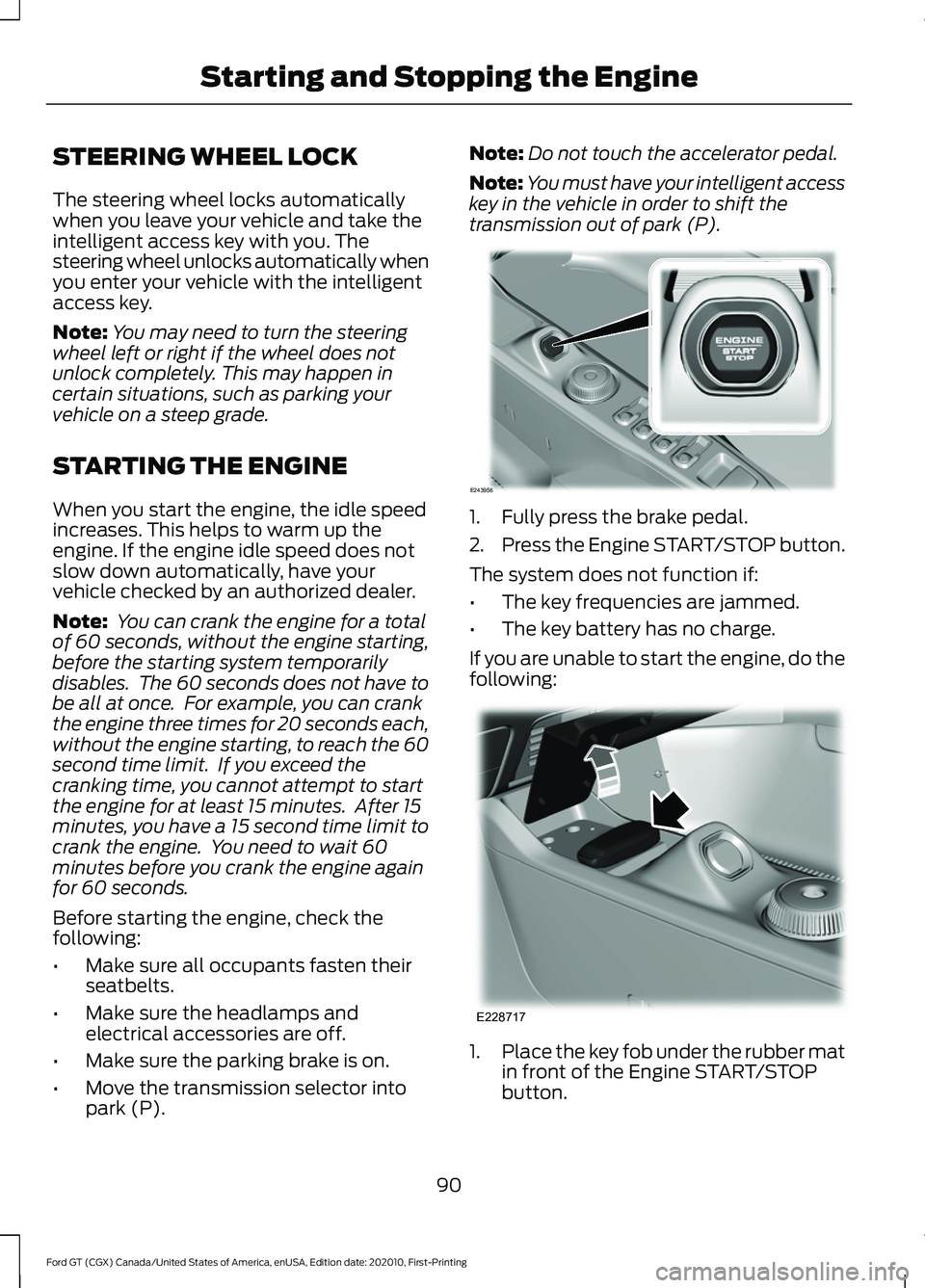
transmission out of park (P). 1. Fully press the brake pedal.
2.
Press the Engine START/STOP button.
The system does not function if:
• The key frequencies are jammed.
• The key battery has no charge.
If you are unable to start the engine, do the
following: 1.
Place the key fob under the rubber mat
in front of the Engine START/STOP
button.
90
Ford GT (CGX) Canada/United States of America, enUSA, Edition date: 202010, First-Printing Starting and Stopping the EngineE243956 E228717
Page 94 of 321
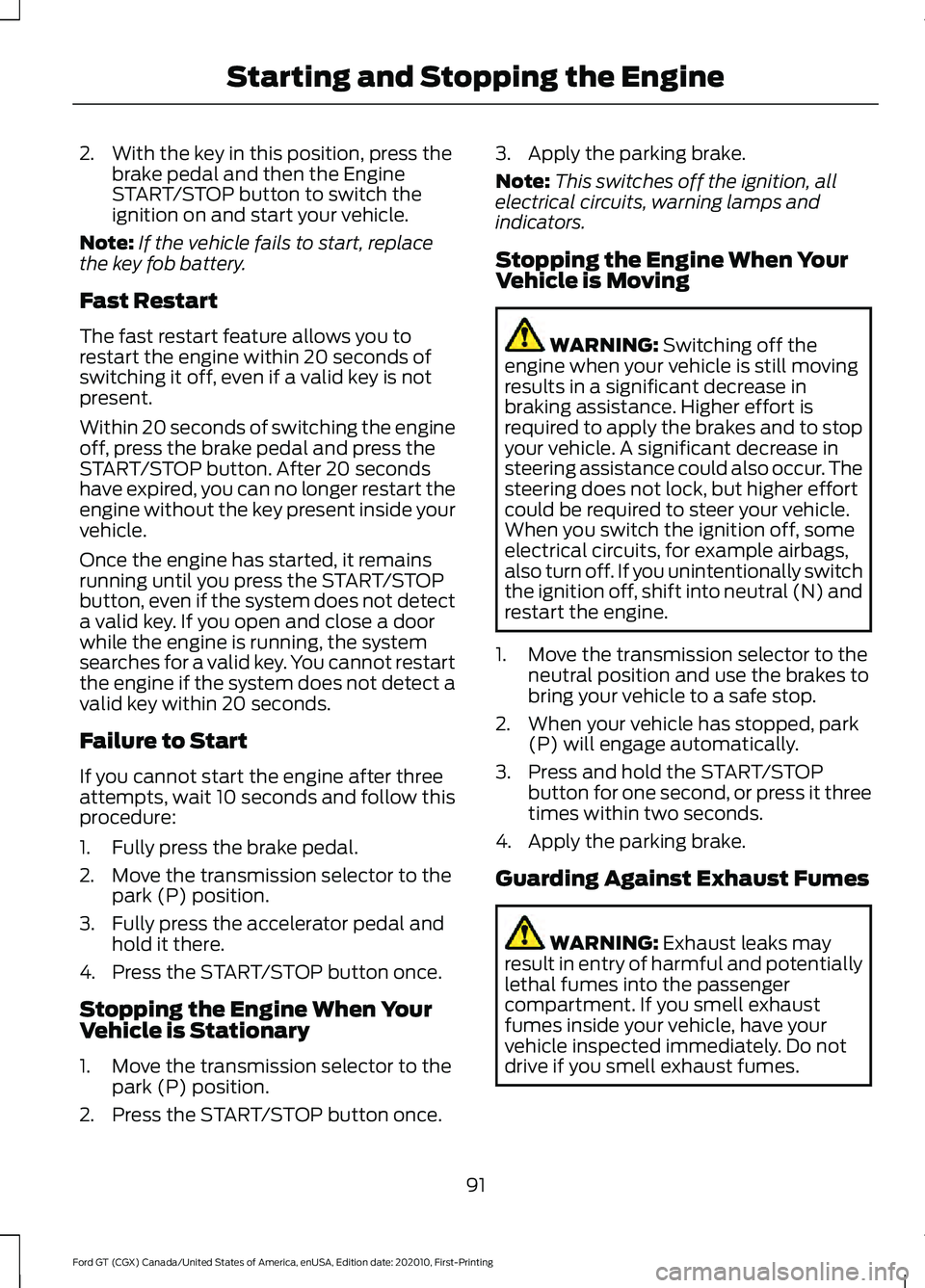
2. With the key in this position, press the
brake pedal and then the Engine
START/STOP button to switch the
ignition on and start your vehicle.
Note: If the vehicle fails to start, replace
the key fob battery.
Fast Restart
The fast restart feature allows you to
restart the engine within 20 seconds of
switching it off, even if a valid key is not
present.
Within 20 seconds of switching the engine
off, press the brake pedal and press the
START/STOP button. After 20 seconds
have expired, you can no longer restart the
engine without the key present inside your
vehicle.
Once the engine has started, it remains
running until you press the START/STOP
button, even if the system does not detect
a valid key. If you open and close a door
while the engine is running, the system
searches for a valid key. You cannot restart
the engine if the system does not detect a
valid key within 20 seconds.
Failure to Start
If you cannot start the engine after three
attempts, wait 10 seconds and follow this
procedure:
1. Fully press the brake pedal.
2. Move the transmission selector to the park (P) position.
3. Fully press the accelerator pedal and hold it there.
4. Press the START/STOP button once.
Stopping the Engine When Your
Vehicle is Stationary
1. Move the transmission selector to the park (P) position.
2. Press the START/STOP button once. 3. Apply the parking brake.
Note:
This switches off the ignition, all
electrical circuits, warning lamps and
indicators.
Stopping the Engine When Your
Vehicle is Moving WARNING: Switching off the
engine when your vehicle is still moving
results in a significant decrease in
braking assistance. Higher effort is
required to apply the brakes and to stop
your vehicle. A significant decrease in
steering assistance could also occur. The
steering does not lock, but higher effort
could be required to steer your vehicle.
When you switch the ignition off, some
electrical circuits, for example airbags,
also turn off. If you unintentionally switch
the ignition off, shift into neutral (N) and
restart the engine.
1. Move the transmission selector to the neutral position and use the brakes to
bring your vehicle to a safe stop.
2. When your vehicle has stopped, park (P) will engage automatically.
3. Press and hold the START/STOP button for one second, or press it three
times within two seconds.
4. Apply the parking brake.
Guarding Against Exhaust Fumes WARNING:
Exhaust leaks may
result in entry of harmful and potentially
lethal fumes into the passenger
compartment. If you smell exhaust
fumes inside your vehicle, have your
vehicle inspected immediately. Do not
drive if you smell exhaust fumes.
91
Ford GT (CGX) Canada/United States of America, enUSA, Edition date: 202010, First-Printing Starting and Stopping the Engine