lock FORD GT 2021 User Guide
[x] Cancel search | Manufacturer: FORD, Model Year: 2021, Model line: GT, Model: FORD GT 2021Pages: 321, PDF Size: 5.78 MB
Page 54 of 321
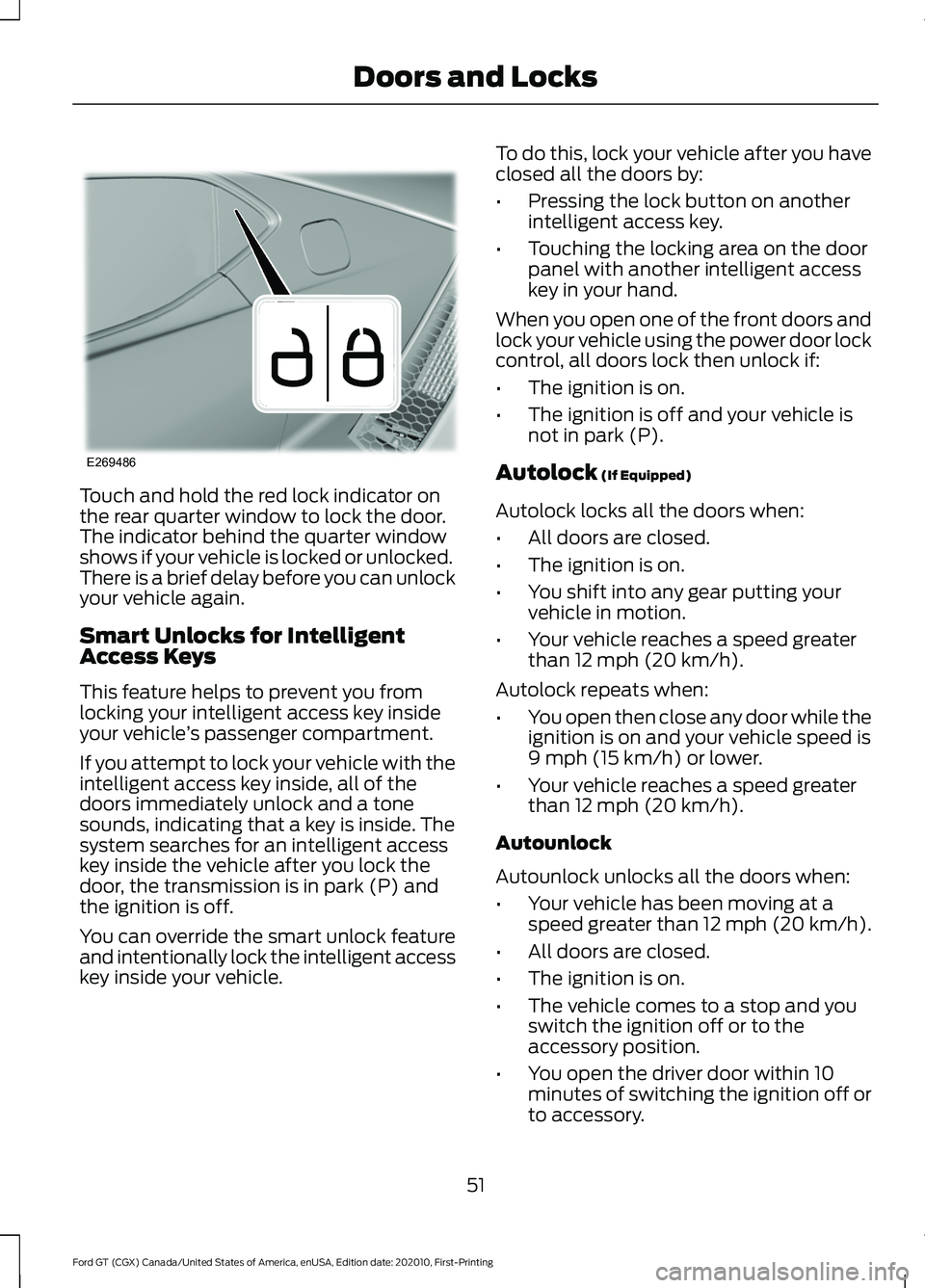
Touch and hold the red lock indicator on
the rear quarter window to lock the door.
The indicator behind the quarter window
shows if your vehicle is locked or unlocked.
There is a brief delay before you can unlock
your vehicle again.
Smart Unlocks for Intelligent
Access Keys
This feature helps to prevent you from
locking your intelligent access key inside
your vehicle
’s passenger compartment.
If you attempt to lock your vehicle with the
intelligent access key inside, all of the
doors immediately unlock and a tone
sounds, indicating that a key is inside. The
system searches for an intelligent access
key inside the vehicle after you lock the
door, the transmission is in park (P) and
the ignition is off.
You can override the smart unlock feature
and intentionally lock the intelligent access
key inside your vehicle. To do this, lock your vehicle after you have
closed all the doors by:
•
Pressing the lock button on another
intelligent access key.
• Touching the locking area on the door
panel with another intelligent access
key in your hand.
When you open one of the front doors and
lock your vehicle using the power door lock
control, all doors lock then unlock if:
• The ignition is on.
• The ignition is off and your vehicle is
not in park (P).
Autolock (If Equipped)
Autolock locks all the doors when:
• All doors are closed.
• The ignition is on.
• You shift into any gear putting your
vehicle in motion.
• Your vehicle reaches a speed greater
than
12 mph (20 km/h).
Autolock repeats when:
• You open then close any door while the
ignition is on and your vehicle speed is
9 mph (15 km/h)
or lower.
• Your vehicle reaches a speed greater
than
12 mph (20 km/h).
Autounlock
Autounlock unlocks all the doors when:
• Your vehicle has been moving at a
speed greater than 12 mph (20 km/h).
• All doors are closed.
• The ignition is on.
• The vehicle comes to a stop and you
switch the ignition off or to the
accessory position.
• You open the driver door within 10
minutes of switching the ignition off or
to accessory.
51
Ford GT (CGX) Canada/United States of America, enUSA, Edition date: 202010, First-Printing Doors and LocksE269486
Page 55 of 321
Note:
The doors will not autounlock if you
electronically lock your vehicle after you
switch the ignition off and before you open
the driver door.
Enabling or Disabling Autolock and
Autounlock
Autolock is not configurable in all markets.
If the autolock settings are not available
in your information display, then the
system is not configurable. See General
Information (page 73).
Note: You can switch autounlock and
autolock on or off independently of each
other.
Opening the Rear Hatch
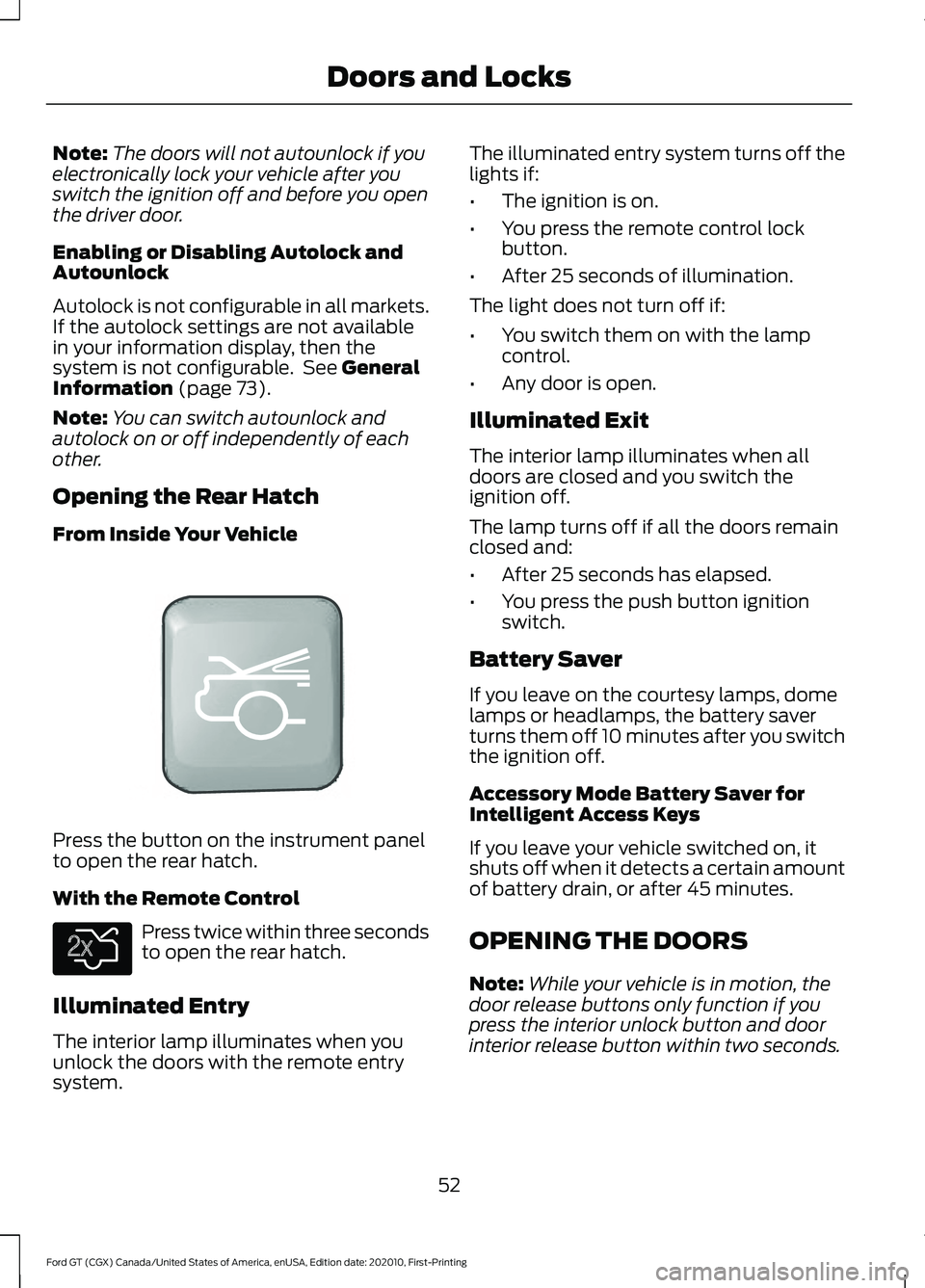
From Inside Your Vehicle Press the button on the instrument panel
to open the rear hatch.
With the Remote Control
Press twice within three seconds
to open the rear hatch.
Illuminated Entry
The interior lamp illuminates when you
unlock the doors with the remote entry
system. The illuminated entry system turns off the
lights if:
•
The ignition is on.
• You press the remote control lock
button.
• After 25 seconds of illumination.
The light does not turn off if:
• You switch them on with the lamp
control.
• Any door is open.
Illuminated Exit
The interior lamp illuminates when all
doors are closed and you switch the
ignition off.
The lamp turns off if all the doors remain
closed and:
• After 25 seconds has elapsed.
• You press the push button ignition
switch.
Battery Saver
If you leave on the courtesy lamps, dome
lamps or headlamps, the battery saver
turns them off 10 minutes after you switch
the ignition off.
Accessory Mode Battery Saver for
Intelligent Access Keys
If you leave your vehicle switched on, it
shuts off when it detects a certain amount
of battery drain, or after 45 minutes.
OPENING THE DOORS
Note: While your vehicle is in motion, the
door release buttons only function if you
press the interior unlock button and door
interior release button within two seconds.
52
Ford GT (CGX) Canada/United States of America, enUSA, Edition date: 202010, First-Printing Doors and LocksE342820 E138630
Page 56 of 321
Opening the Doors from Inside
Press the door release button
located on the arm rest to
release the door. Push the door
out and up to open the door. The hydraulic
lift cylinder assists in the door movement
once you start to open the door.
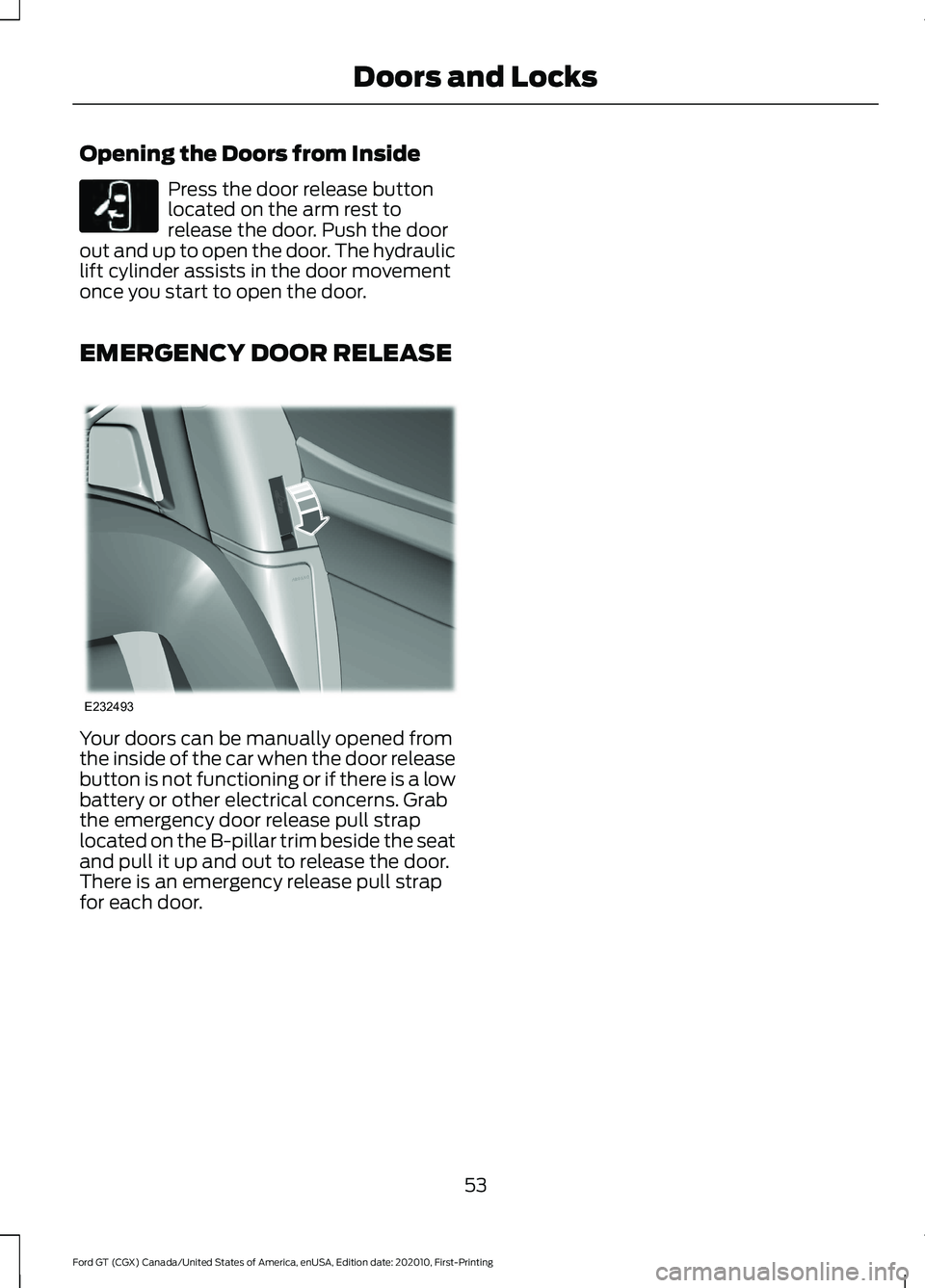
EMERGENCY DOOR RELEASE Your doors can be manually opened from
the inside of the car when the door release
button is not functioning or if there is a low
battery or other electrical concerns. Grab
the emergency door release pull strap
located on the B-pillar trim beside the seat
and pull it up and out to release the door.
There is an emergency release pull strap
for each door.
53
Ford GT (CGX) Canada/United States of America, enUSA, Edition date: 202010, First-Printing Doors and LocksE232417 E232493
Page 57 of 321
PASSIVE ANTI-THEFT
SYSTEM
Note:
The system is not compatible with
non-Ford aftermarket remote start systems.
Use of these systems may result in vehicle
starting problems and a loss of security
protection.
Note: Metallic objects, electronic devices
or a second coded key on the same key
chain may cause vehicle starting problems
if they are too close to the key when starting
your vehicle. Prevent these objects from
touching the coded key while starting your
vehicle. Switch the ignition off, move all
objects on the key chain away from the
coded key and restart your vehicle if a
problem occurs.
Note: Do not leave a duplicate coded key
in your vehicle. Always take your keys and
lock all doors when leaving your vehicle.
SecuriLock
The system helps prevent your vehicle
from starting unless you use a coded key
programmed to your vehicle. Using the
wrong key may prevent your vehicle from
starting. A message may appear in the
information display.
If you are unable to start your vehicle with
a correctly coded key, it is not operating
properly. A message may appear in the
information display.
Automatic Arming
Your vehicle arms immediately after
switching the ignition off.
Automatic Disarming
Switching the ignition on with a coded key
disarms your vehicle. Replacement Keys
Note:
Your vehicle comes equipped with
two intelligent access keys.
The intelligent access key functions as a
programmed key that operates the driver
door lock and activates the intelligent
access with push button start system, as
well as a remote control.
If your programmed transmitters are lost
or stolen and you do not have an extra
coded key, contact the Ford GT concierge
to have your Ford GT transported to your
Certified Ford GT Service Dealership to
erase the key codes from your vehicle and
program new coded keys. See About This
Manual (page 5).
Store an extra programmed key away from
your vehicle in a safe place to help prevent
any inconveniences. See your authorized
dealer to purchase additional spare or
replacement keys.
Programming a Spare Intelligent
Access Key
Note: You can program a maximum of four
intelligent access keys to your vehicle.
You must have two previously
programmed intelligent access keys inside
your vehicle and the new unprogrammed
intelligent access keys readily accessible.
See an authorized dealer to have the spare
key programmed if two previously
programmed keys are not available.
Make sure that your vehicle is off before
beginning this procedure. Make sure that
you close all the doors before beginning
and that they remain closed throughout
the procedure. Perform all steps within 30
seconds of starting the sequence. Stop
and wait for at least one minute before
starting again if you perform any steps out
of sequence.
Read and understand the entire procedure
before you begin.
54
Ford GT (CGX) Canada/United States of America, enUSA, Edition date: 202010, First-Printing Security
Page 58 of 321
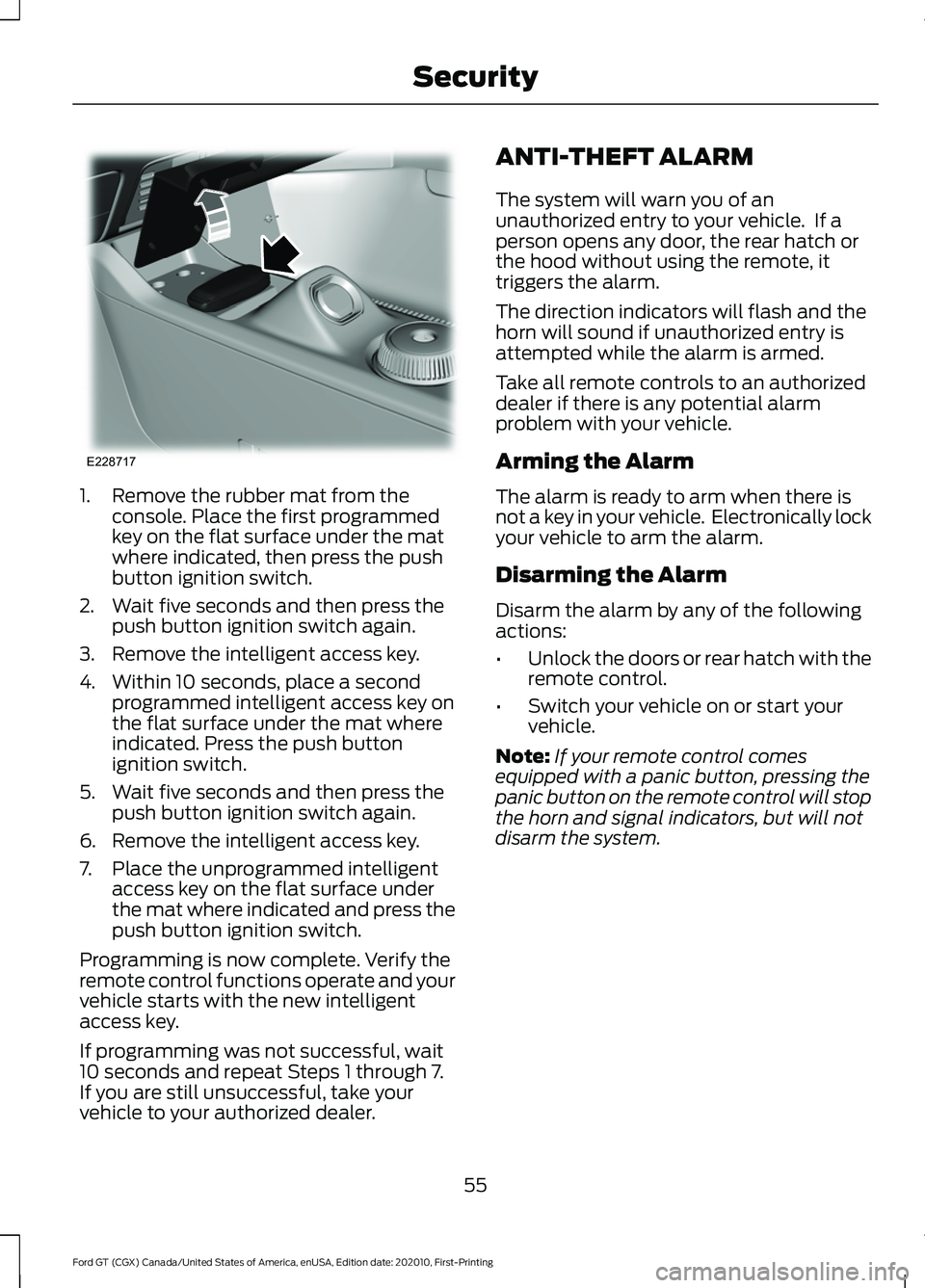
1. Remove the rubber mat from the
console. Place the first programmed
key on the flat surface under the mat
where indicated, then press the push
button ignition switch.
2. Wait five seconds and then press the push button ignition switch again.
3. Remove the intelligent access key.
4. Within 10 seconds, place a second programmed intelligent access key on
the flat surface under the mat where
indicated. Press the push button
ignition switch.
5. Wait five seconds and then press the push button ignition switch again.
6. Remove the intelligent access key.
7. Place the unprogrammed intelligent access key on the flat surface under
the mat where indicated and press the
push button ignition switch.
Programming is now complete. Verify the
remote control functions operate and your
vehicle starts with the new intelligent
access key.
If programming was not successful, wait
10 seconds and repeat Steps 1 through 7.
If you are still unsuccessful, take your
vehicle to your authorized dealer. ANTI-THEFT ALARM
The system will warn you of an
unauthorized entry to your vehicle. If a
person opens any door, the rear hatch or
the hood without using the remote, it
triggers the alarm.
The direction indicators will flash and the
horn will sound if unauthorized entry is
attempted while the alarm is armed.
Take all remote controls to an authorized
dealer if there is any potential alarm
problem with your vehicle.
Arming the Alarm
The alarm is ready to arm when there is
not a key in your vehicle. Electronically lock
your vehicle to arm the alarm.
Disarming the Alarm
Disarm the alarm by any of the following
actions:
•
Unlock the doors or rear hatch with the
remote control.
• Switch your vehicle on or start your
vehicle.
Note: If your remote control comes
equipped with a panic button, pressing the
panic button on the remote control will stop
the horn and signal indicators, but will not
disarm the system.
55
Ford GT (CGX) Canada/United States of America, enUSA, Edition date: 202010, First-Printing SecurityE228717
Page 59 of 321
ADJUSTING THE STEERING
WHEEL
WARNING: Do not adjust the
steering wheel when your vehicle is
moving.
Note: Make sure that you are sitting in the
correct position. See Sitting in the Correct
Position
(page 86).
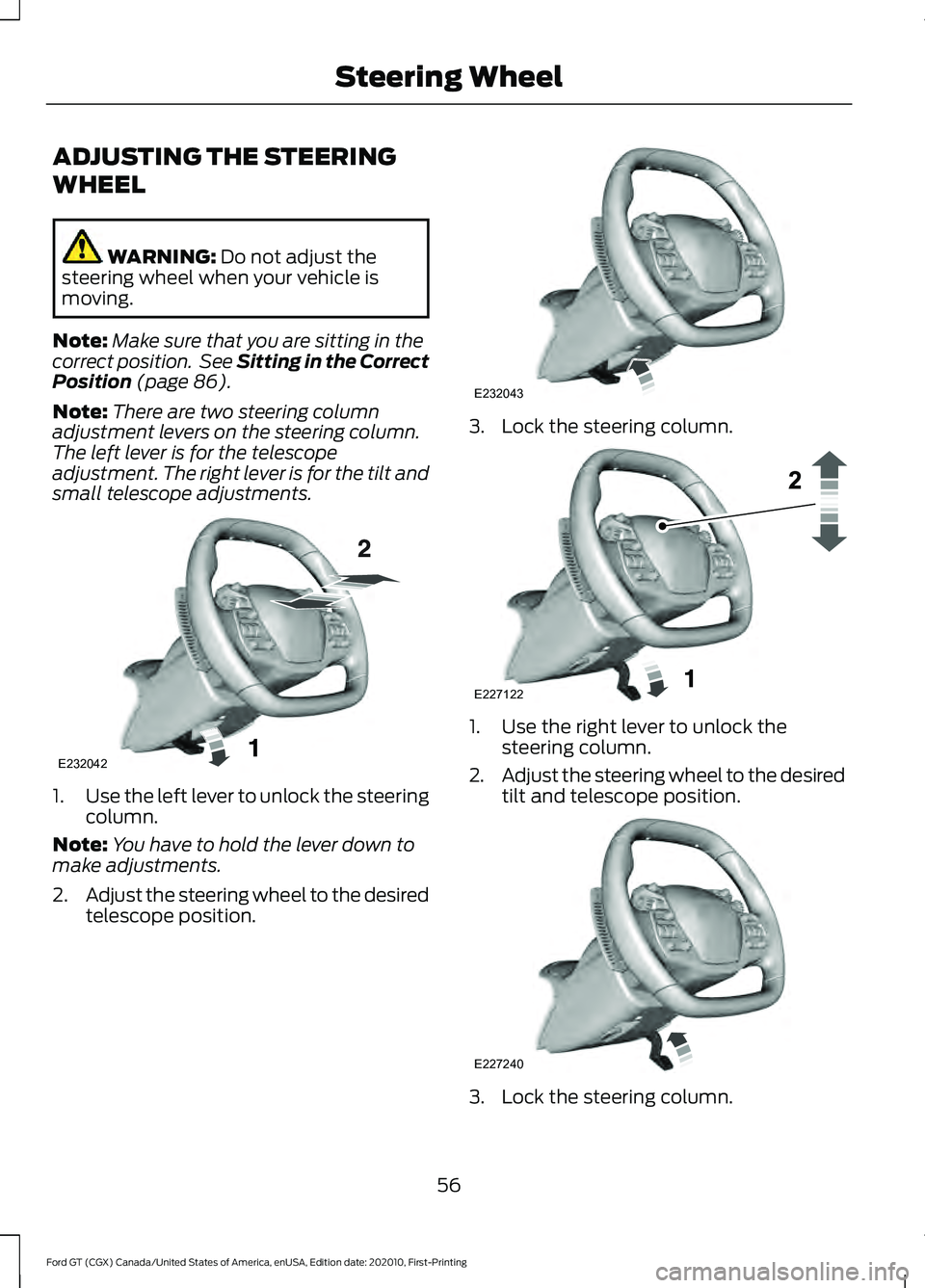
Note: There are two steering column
adjustment levers on the steering column.
The left lever is for the telescope
adjustment. The right lever is for the tilt and
small telescope adjustments. 1.
Use the left lever to unlock the steering
column.
Note: You have to hold the lever down to
make adjustments.
2. Adjust the steering wheel to the desired
telescope position. 3. Lock the steering column.
1. Use the right lever to unlock the
steering column.
2. Adjust the steering wheel to the desired
tilt and telescope position. 3. Lock the steering column.
56
Ford GT (CGX) Canada/United States of America, enUSA, Edition date: 202010, First-Printing Steering WheelE232042 E232043 E227122 E227240
Page 63 of 321
ADJUSTING THE PEDALS
WARNING: Never use the pedal
adjustment controls when your feet are
on the accelerator or brake pedal when
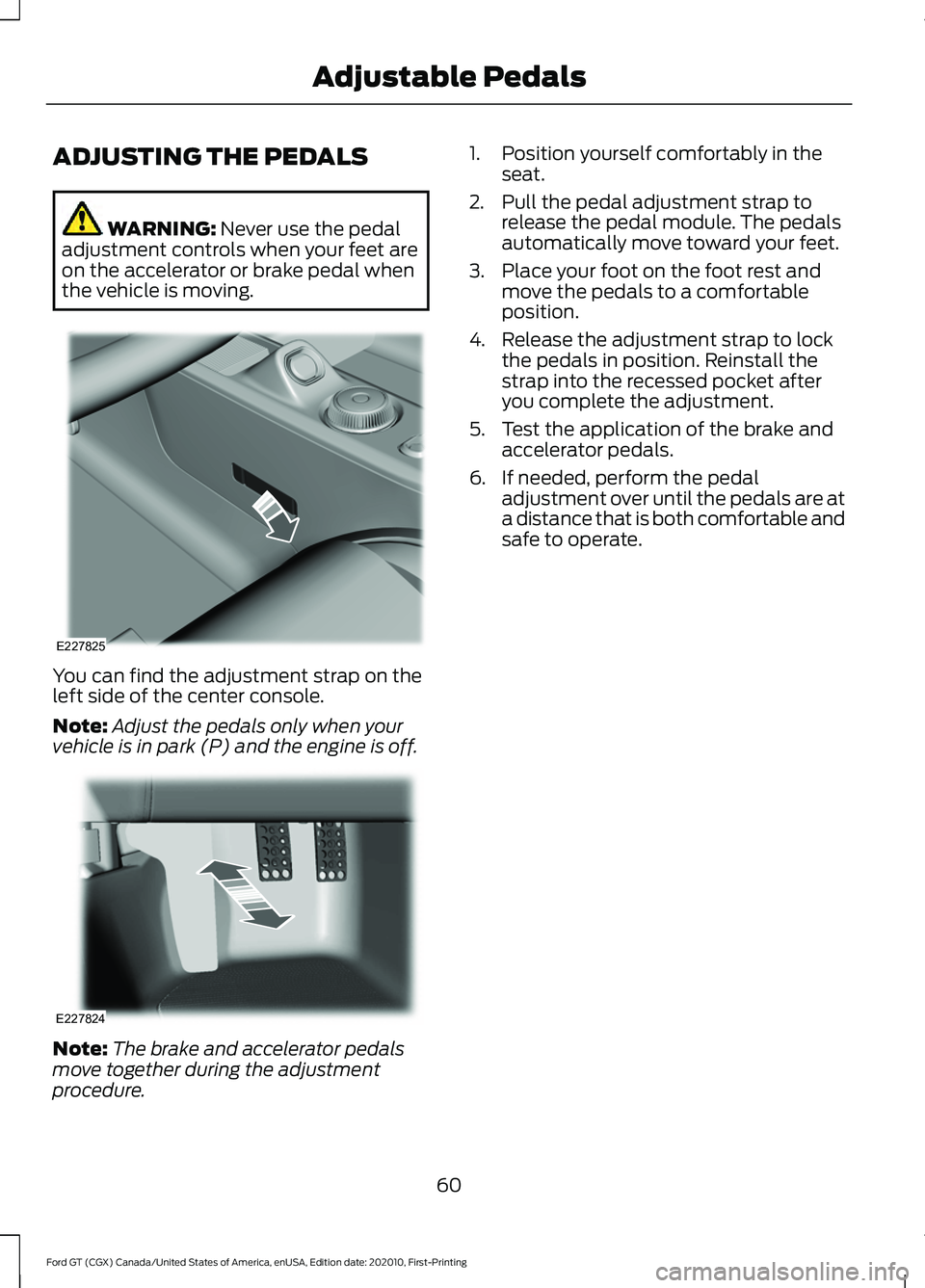
the vehicle is moving. You can find the adjustment strap on the
left side of the center console.
Note:
Adjust the pedals only when your
vehicle is in park (P) and the engine is off. Note:
The brake and accelerator pedals
move together during the adjustment
procedure. 1. Position yourself comfortably in the
seat.
2. Pull the pedal adjustment strap to release the pedal module. The pedals
automatically move toward your feet.
3. Place your foot on the foot rest and move the pedals to a comfortable
position.
4. Release the adjustment strap to lock the pedals in position. Reinstall the
strap into the recessed pocket after
you complete the adjustment.
5. Test the application of the brake and accelerator pedals.
6. If needed, perform the pedal adjustment over until the pedals are at
a distance that is both comfortable and
safe to operate.
60
Ford GT (CGX) Canada/United States of America, enUSA, Edition date: 202010, First-Printing Adjustable PedalsE227825 E227824
Page 69 of 321
Remote Control Front Windows
You can open the windows for a short time
after you unlock your vehicle with the
remote control. After you unlock your
vehicle, press and hold the remote control
unlock button to open the windows.
Release the button once movement starts.
Press the lock or unlock button to stop
movement.
EXTERIOR MIRRORS
Power Exterior Mirrors
WARNING: Do not adjust the
mirrors when your vehicle is moving. This
could result in the loss of control of your
vehicle, serious personal injury or death.
Note: Do not clean the housing or glass of
any mirror with harsh abrasives, fuel or other
petroleum or ammonia-based cleaning
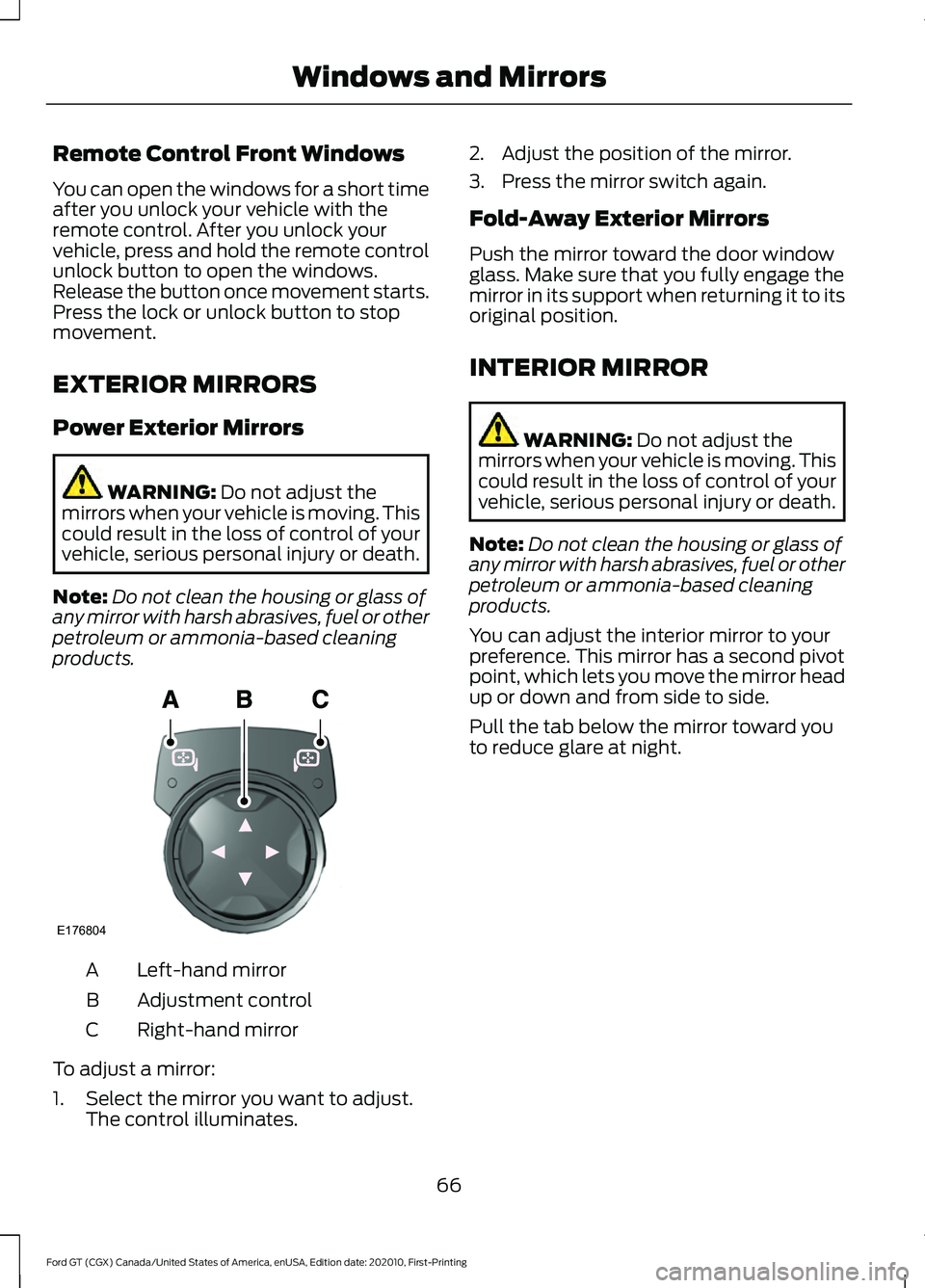
products. Left-hand mirror
A
Adjustment control
B
Right-hand mirror
C
To adjust a mirror:
1. Select the mirror you want to adjust. The control illuminates. 2. Adjust the position of the mirror.
3. Press the mirror switch again.
Fold-Away Exterior Mirrors
Push the mirror toward the door window
glass. Make sure that you fully engage the
mirror in its support when returning it to its
original position.
INTERIOR MIRROR
WARNING:
Do not adjust the
mirrors when your vehicle is moving. This
could result in the loss of control of your
vehicle, serious personal injury or death.
Note: Do not clean the housing or glass of
any mirror with harsh abrasives, fuel or other
petroleum or ammonia-based cleaning
products.
You can adjust the interior mirror to your
preference. This mirror has a second pivot
point, which lets you move the mirror head
up or down and from side to side.
Pull the tab below the mirror toward you
to reduce glare at night.
66
Ford GT (CGX) Canada/United States of America, enUSA, Edition date: 202010, First-Printing Windows and MirrorsE176804
Page 72 of 321
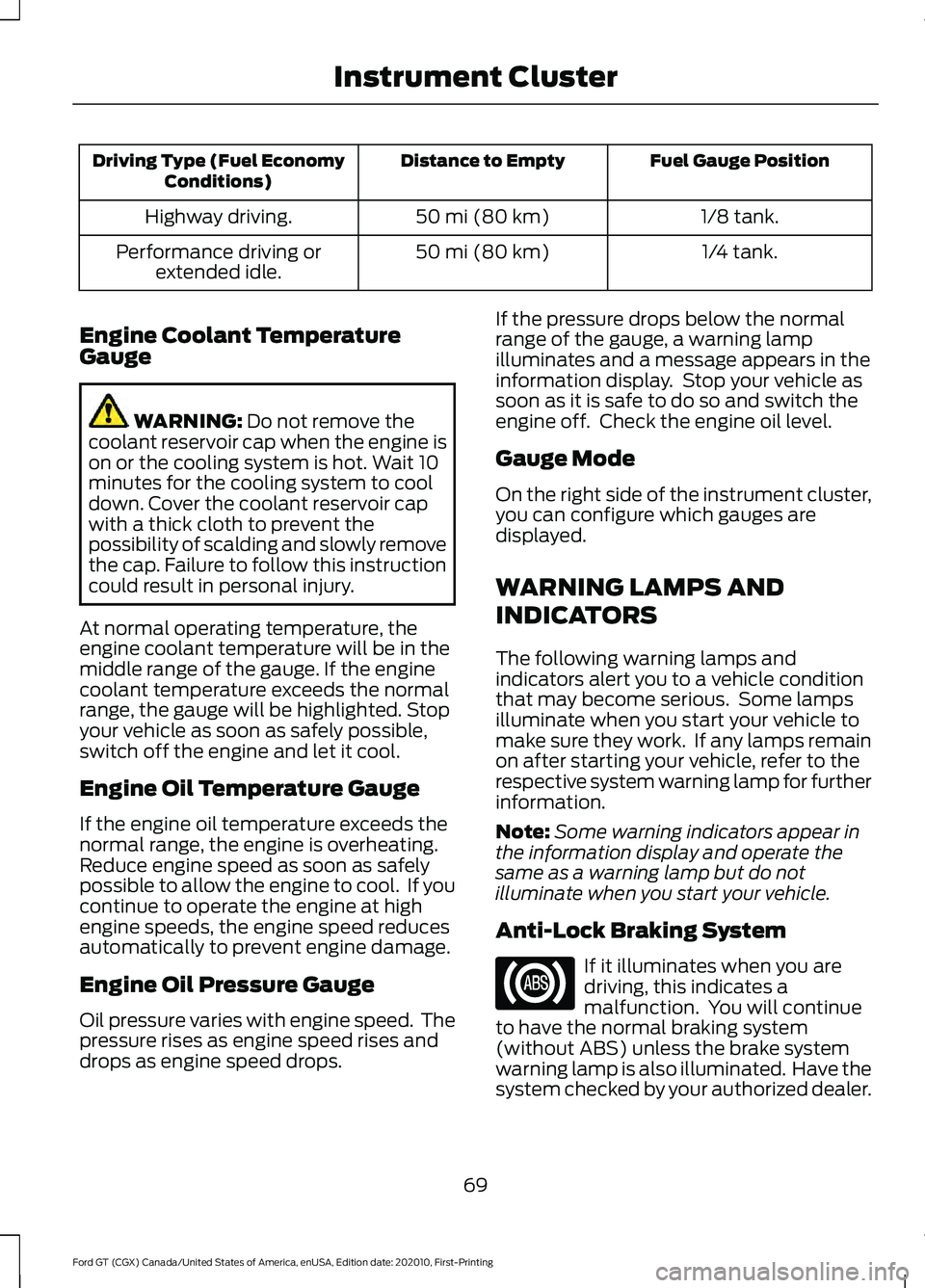
Fuel Gauge Position
Distance to Empty
Driving Type (Fuel Economy
Conditions)
1/8 tank.
50 mi (80 km)
Highway driving.
1/4 tank.
50 mi (80 km)
Performance driving or
extended idle.
Engine Coolant Temperature
Gauge WARNING: Do not remove the
coolant reservoir cap when the engine is
on or the cooling system is hot. Wait 10
minutes for the cooling system to cool
down. Cover the coolant reservoir cap
with a thick cloth to prevent the
possibility of scalding and slowly remove
the cap. Failure to follow this instruction
could result in personal injury.
At normal operating temperature, the
engine coolant temperature will be in the
middle range of the gauge. If the engine
coolant temperature exceeds the normal
range, the gauge will be highlighted. Stop
your vehicle as soon as safely possible,
switch off the engine and let it cool.
Engine Oil Temperature Gauge
If the engine oil temperature exceeds the
normal range, the engine is overheating.
Reduce engine speed as soon as safely
possible to allow the engine to cool. If you
continue to operate the engine at high
engine speeds, the engine speed reduces
automatically to prevent engine damage.
Engine Oil Pressure Gauge
Oil pressure varies with engine speed. The
pressure rises as engine speed rises and
drops as engine speed drops. If the pressure drops below the normal
range of the gauge, a warning lamp
illuminates and a message appears in the
information display. Stop your vehicle as
soon as it is safe to do so and switch the
engine off. Check the engine oil level.
Gauge Mode
On the right side of the instrument cluster,
you can configure which gauges are
displayed.
WARNING LAMPS AND
INDICATORS
The following warning lamps and
indicators alert you to a vehicle condition
that may become serious. Some lamps
illuminate when you start your vehicle to
make sure they work. If any lamps remain
on after starting your vehicle, refer to the
respective system warning lamp for further
information.
Note:
Some warning indicators appear in
the information display and operate the
same as a warning lamp but do not
illuminate when you start your vehicle.
Anti-Lock Braking System If it illuminates when you are
driving, this indicates a
malfunction. You will continue
to have the normal braking system
(without ABS) unless the brake system
warning lamp is also illuminated. Have the
system checked by your authorized dealer.
69
Ford GT (CGX) Canada/United States of America, enUSA, Edition date: 202010, First-Printing Instrument Cluster
Page 75 of 321
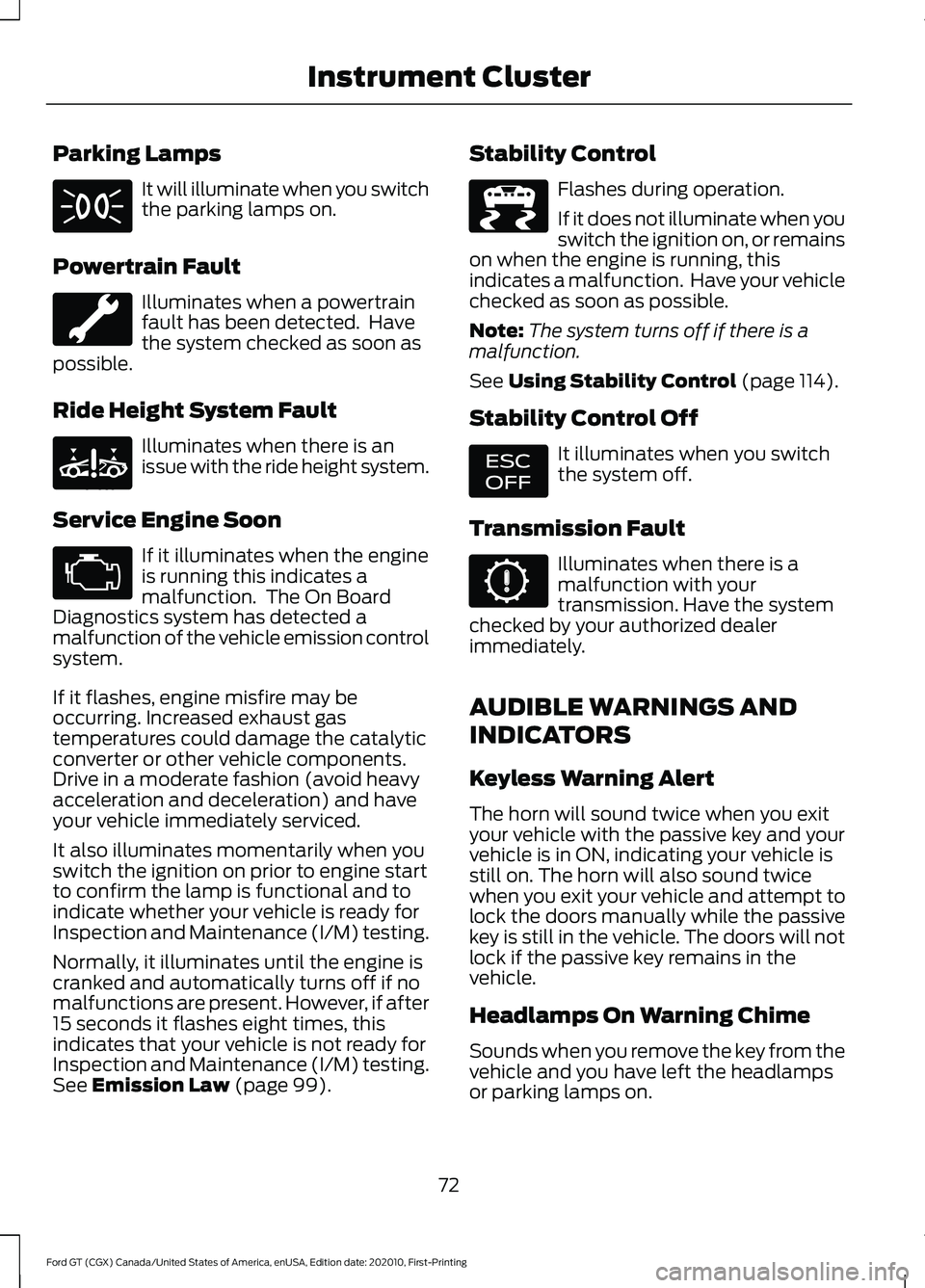
Parking Lamps
It will illuminate when you switch
the parking lamps on.
Powertrain Fault Illuminates when a powertrain
fault has been detected. Have
the system checked as soon as
possible.
Ride Height System Fault Illuminates when there is an
issue with the ride height system.
Service Engine Soon If it illuminates when the engine
is running this indicates a
malfunction. The On Board
Diagnostics system has detected a
malfunction of the vehicle emission control
system.
If it flashes, engine misfire may be
occurring. Increased exhaust gas
temperatures could damage the catalytic
converter or other vehicle components.
Drive in a moderate fashion (avoid heavy
acceleration and deceleration) and have
your vehicle immediately serviced.
It also illuminates momentarily when you
switch the ignition on prior to engine start
to confirm the lamp is functional and to
indicate whether your vehicle is ready for
Inspection and Maintenance (I/M) testing.
Normally, it illuminates until the engine is
cranked and automatically turns off if no
malfunctions are present. However, if after
15 seconds it flashes eight times, this
indicates that your vehicle is not ready for
Inspection and Maintenance (I/M) testing.
See Emission Law (page 99). Stability Control Flashes during operation.
If it does not illuminate when you
switch the ignition on, or remains
on when the engine is running, this
indicates a malfunction. Have your vehicle
checked as soon as possible.
Note: The system turns off if there is a
malfunction.
See
Using Stability Control (page 114).
Stability Control Off It illuminates when you switch
the system off.
Transmission Fault Illuminates when there is a
malfunction with your
transmission. Have the system
checked by your authorized dealer
immediately.
AUDIBLE WARNINGS AND
INDICATORS
Keyless Warning Alert
The horn will sound twice when you exit
your vehicle with the passive key and your
vehicle is in ON, indicating your vehicle is
still on. The horn will also sound twice
when you exit your vehicle and attempt to
lock the doors manually while the passive
key is still in the vehicle. The doors will not
lock if the passive key remains in the
vehicle.
Headlamps On Warning Chime
Sounds when you remove the key from the
vehicle and you have left the headlamps
or parking lamps on.
72
Ford GT (CGX) Canada/United States of America, enUSA, Edition date: 202010, First-Printing Instrument Cluster E234585 E236447 E236448