steering FORD GT 2021 Service Manual
[x] Cancel search | Manufacturer: FORD, Model Year: 2021, Model line: GT, Model: FORD GT 2021Pages: 321, PDF Size: 5.78 MB
Page 244 of 321
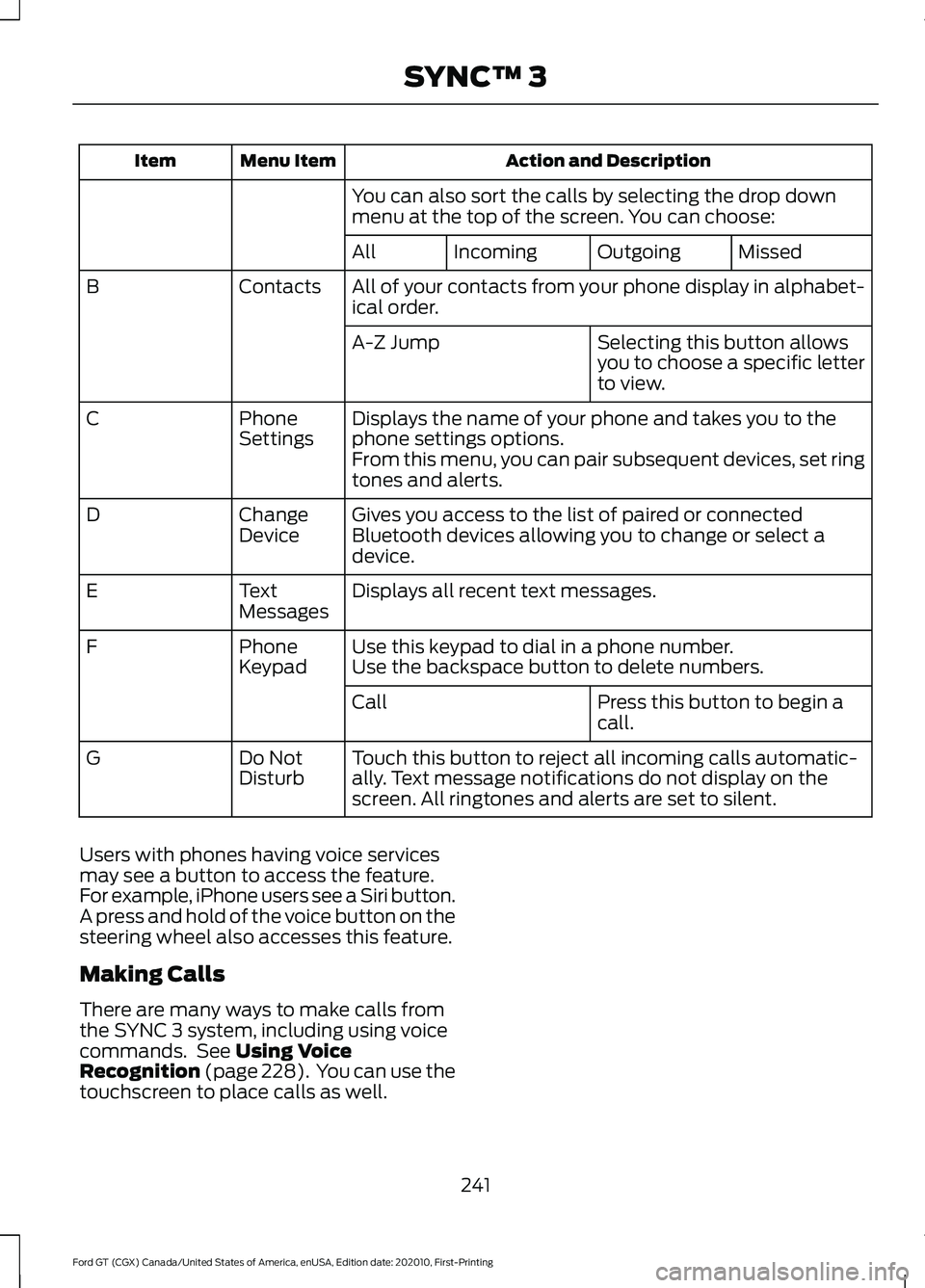
Action and Description
Menu Item
Item
You can also sort the calls by selecting the drop down
menu at the top of the screen. You can choose: Missed
Outgoing
Incoming
All
All of your contacts from your phone display in alphabet-
ical order.
Contacts
B
Selecting this button allows
you to choose a specific letter
to view.
A-Z Jump
Displays the name of your phone and takes you to the
phone settings options.
Phone
Settings
C
From this menu, you can pair subsequent devices, set ring
tones and alerts.
Gives you access to the list of paired or connected
Bluetooth devices allowing you to change or select a
device.
Change
Device
D
Displays all recent text messages.
Text
Messages
E
Use this keypad to dial in a phone number.
Phone
Keypad
F
Use the backspace button to delete numbers.
Press this button to begin a
call.
Call
Touch this button to reject all incoming calls automatic-
ally. Text message notifications do not display on the
screen. All ringtones and alerts are set to silent.
Do Not
Disturb
G
Users with phones having voice services
may see a button to access the feature.
For example, iPhone users see a Siri button.
A press and hold of the voice button on the
steering wheel also accesses this feature.
Making Calls
There are many ways to make calls from
the SYNC 3 system, including using voice
commands. See Using Voice
Recognition (page 228). You can use the
touchscreen to place calls as well.
241
Ford GT (CGX) Canada/United States of America, enUSA, Edition date: 202010, First-Printing SYNC™ 3
Page 245 of 321
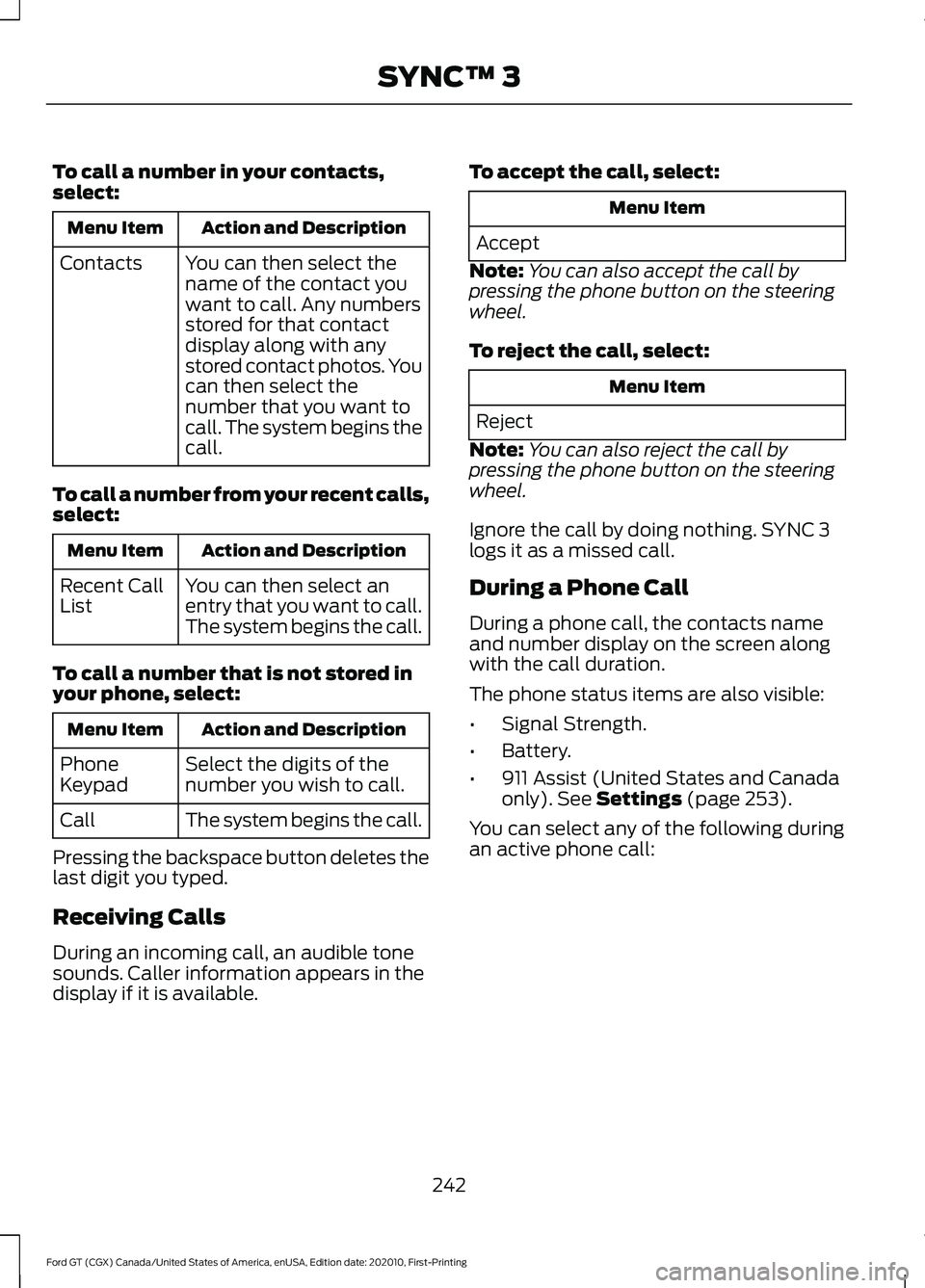
To call a number in your contacts,
select:
Action and Description
Menu Item
You can then select the
name of the contact you
want to call. Any numbers
stored for that contact
display along with any
stored contact photos. You
can then select the
number that you want to
call. The system begins the
call.
Contacts
To call a number from your recent calls,
select: Action and Description
Menu Item
You can then select an
entry that you want to call.
The system begins the call.
Recent Call
List
To call a number that is not stored in
your phone, select: Action and Description
Menu Item
Select the digits of the
number you wish to call.
Phone
Keypad
The system begins the call.
Call
Pressing the backspace button deletes the
last digit you typed.
Receiving Calls
During an incoming call, an audible tone
sounds. Caller information appears in the
display if it is available. To accept the call, select: Menu Item
Accept
Note: You can also accept the call by
pressing the phone button on the steering
wheel.
To reject the call, select: Menu Item
Reject
Note: You can also reject the call by
pressing the phone button on the steering
wheel.
Ignore the call by doing nothing. SYNC 3
logs it as a missed call.
During a Phone Call
During a phone call, the contacts name
and number display on the screen along
with the call duration.
The phone status items are also visible:
• Signal Strength.
• Battery.
• 911 Assist (United States and Canada
only). See Settings (page 253).
You can select any of the following during
an active phone call:
242
Ford GT (CGX) Canada/United States of America, enUSA, Edition date: 202010, First-Printing SYNC™ 3
Page 246 of 321
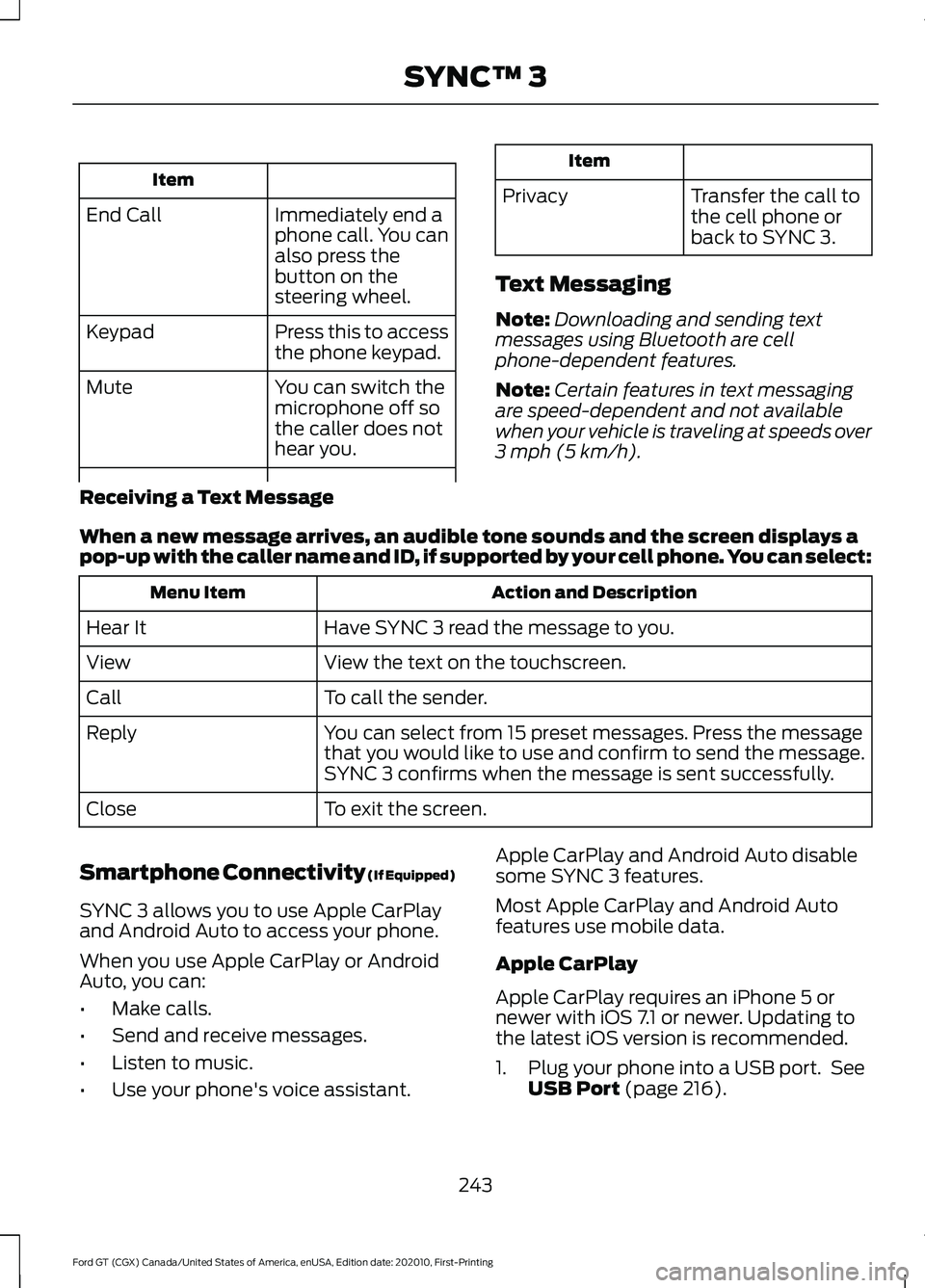
Item
Immediately end a
phone call. You can
also press the
button on the
steering wheel.
End Call
Press this to access
the phone keypad.
Keypad
You can switch the
microphone off so
the caller does not
hear you.
Mute Item
Privacy Transfer the call to
the cell phone or
back to SYNC 3.
Text Messaging
Note: Downloading and sending text
messages using Bluetooth are cell
phone-dependent features.
Note: Certain features in text messaging
are speed-dependent and not available
when your vehicle is traveling at speeds over
3 mph (5 km/h).
Receiving a Text Message
When a new message arrives, an audible tone sounds and the screen displays a
pop-up with the caller name and ID, if supported by your cell phone. You can select: Action and Description
Menu Item
Have SYNC 3 read the message to you.
Hear It
View the text on the touchscreen.
View
To call the sender.
Call
You can select from 15 preset messages. Press the message
that you would like to use and confirm to send the message.
SYNC 3 confirms when the message is sent successfully.
Reply
To exit the screen.
Close
Smartphone Connectivity (If Equipped)
SYNC 3 allows you to use Apple CarPlay
and Android Auto to access your phone.
When you use Apple CarPlay or Android
Auto, you can:
• Make calls.
• Send and receive messages.
• Listen to music.
• Use your phone's voice assistant. Apple CarPlay and Android Auto disable
some SYNC 3 features.
Most Apple CarPlay and Android Auto
features use mobile data.
Apple CarPlay
Apple CarPlay requires an iPhone 5 or
newer with iOS 7.1 or newer. Updating to
the latest iOS version is recommended.
1. Plug your phone into a USB port. See
USB Port
(page 216).
243
Ford GT (CGX) Canada/United States of America, enUSA, Edition date: 202010, First-Printing SYNC™ 3
Page 255 of 321
APPS
The system enables voice, steering wheel,
and touch screen control of SYNC 3
AppLink enabled smartphone apps. Once
an app is running through AppLink, you can
control main features of the app through
voice commands and steering wheel
controls.
Note:
Available AppLink enabled apps will
vary by market.
Note: You must pair and connect your
smartphone via Bluetooth to SYNC 3 to
access AppLink.
Note: iPhone users need to connect the
phone to the USB port.
Note: For information on available apps,
supported smartphone devices and
troubleshooting tips please visit: Websites
owner.ford.com
www.syncmyride.ca
www.syncmaroute.ca
Note: Make sure you have an active account
for the app that you have downloaded.
Some apps will work automatically with no
setup. Other apps will want you to configure
your personal settings and personalize your
experience by creating stations or favorites.
We recommend you do this at home or
outside of your vehicle.
Note: We encourage you to review the
smartphone app ’s terms of service and
privacy policies because Ford is not
responsible for your app or its use of data. Note:
AppLink is a native SYNC system
feature. Accessing mobile apps through
AppLink is only possible when Android Auto
or Apple CarPlay are disabled. Some apps
may only be accessible in the car through
Applink and others only through Android
Auto or Apple CarPlay. Please refer to the
Smartphone Connectivity information to
disable Android Auto or Apple CarPlay.
Note: In order to use an app with SYNC 3,
the App needs to be running in the
background of your phone. If you shut down
the app on your phone, it shuts down the
app on SYNC 3 as well.
Note: If a SYNC 3 AppLink compatible app
is not shown in the Apps Domain, make sure
the required app is running on the mobile
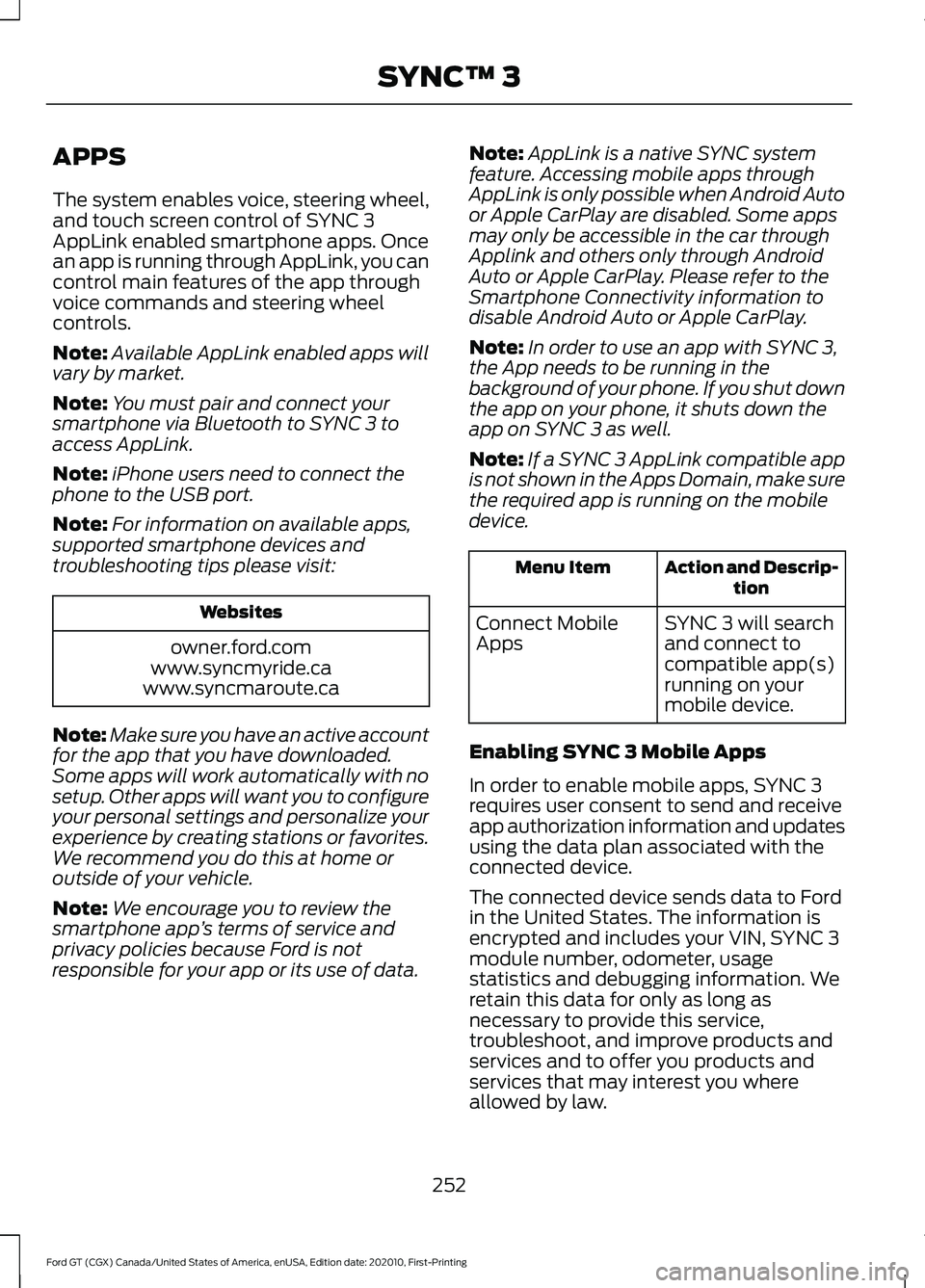
device. Action and Descrip-
tion
Menu Item
SYNC 3 will search
and connect to
compatible app(s)
running on your
mobile device.
Connect Mobile
Apps
Enabling SYNC 3 Mobile Apps
In order to enable mobile apps, SYNC 3
requires user consent to send and receive
app authorization information and updates
using the data plan associated with the
connected device.
The connected device sends data to Ford
in the United States. The information is
encrypted and includes your VIN, SYNC 3
module number, odometer, usage
statistics and debugging information. We
retain this data for only as long as
necessary to provide this service,
troubleshoot, and improve products and
services and to offer you products and
services that may interest you where
allowed by law.
252
Ford GT (CGX) Canada/United States of America, enUSA, Edition date: 202010, First-Printing SYNC™ 3
Page 283 of 321
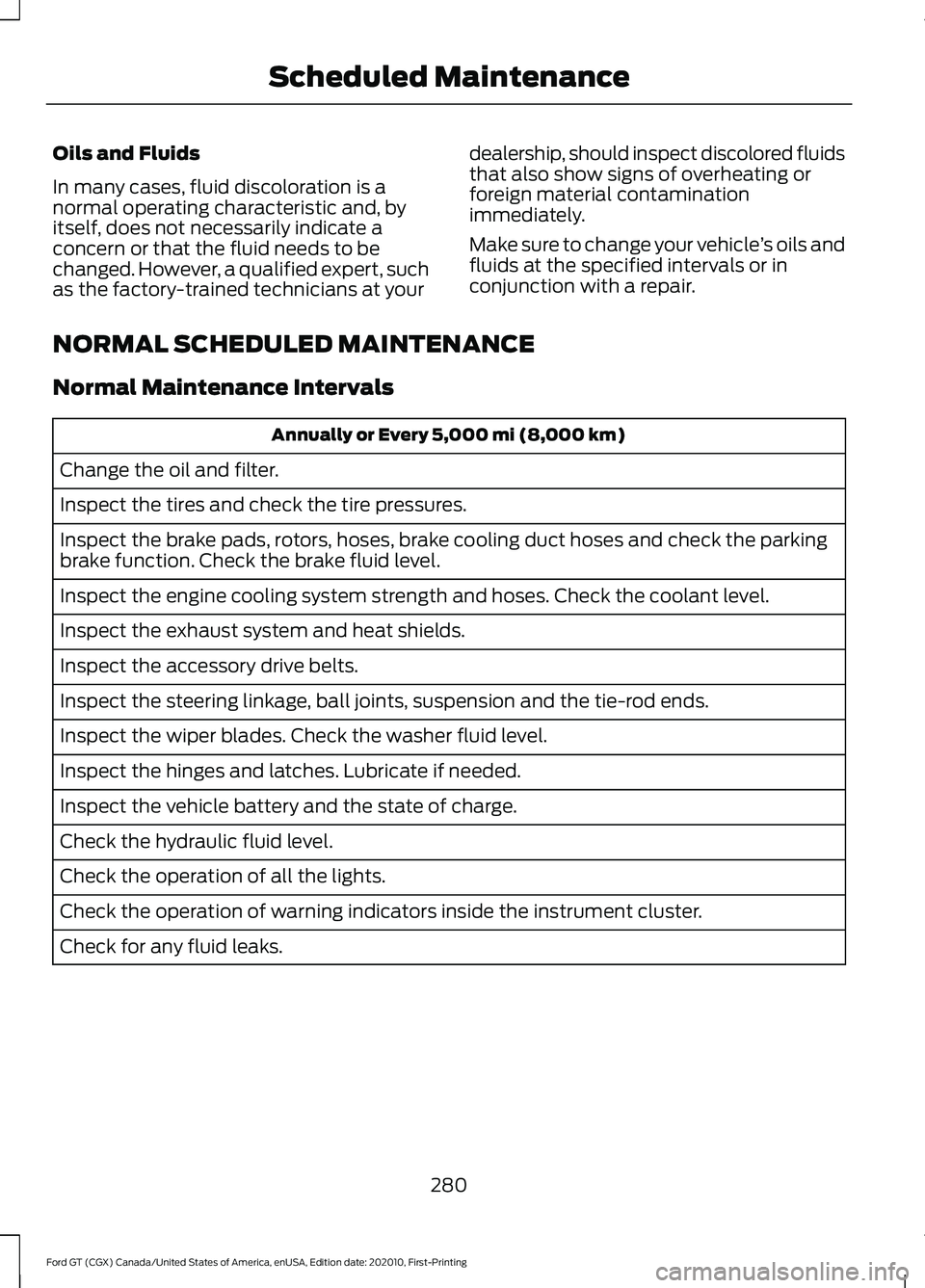
Oils and Fluids
In many cases, fluid discoloration is a
normal operating characteristic and, by
itself, does not necessarily indicate a
concern or that the fluid needs to be
changed. However, a qualified expert, such
as the factory-trained technicians at your
dealership, should inspect discolored fluids
that also show signs of overheating or
foreign material contamination
immediately.
Make sure to change your vehicle
’s oils and
fluids at the specified intervals or in
conjunction with a repair.
NORMAL SCHEDULED MAINTENANCE
Normal Maintenance Intervals Annually or Every 5,000 mi (8,000 km)
Change the oil and filter.
Inspect the tires and check the tire pressures.
Inspect the brake pads, rotors, hoses, brake cooling duct hoses and check the parking
brake function. Check the brake fluid level.
Inspect the engine cooling system strength and hoses. Check the coolant level.
Inspect the exhaust system and heat shields.
Inspect the accessory drive belts.
Inspect the steering linkage, ball joints, suspension and the tie-rod ends.
Inspect the wiper blades. Check the washer fluid level.
Inspect the hinges and latches. Lubricate if needed.
Inspect the vehicle battery and the state of charge.
Check the hydraulic fluid level.
Check the operation of all the lights.
Check the operation of warning indicators inside the instrument cluster.
Check for any fluid leaks.
280
Ford GT (CGX) Canada/United States of America, enUSA, Edition date: 202010, First-Printing Scheduled Maintenance
Page 314 of 321
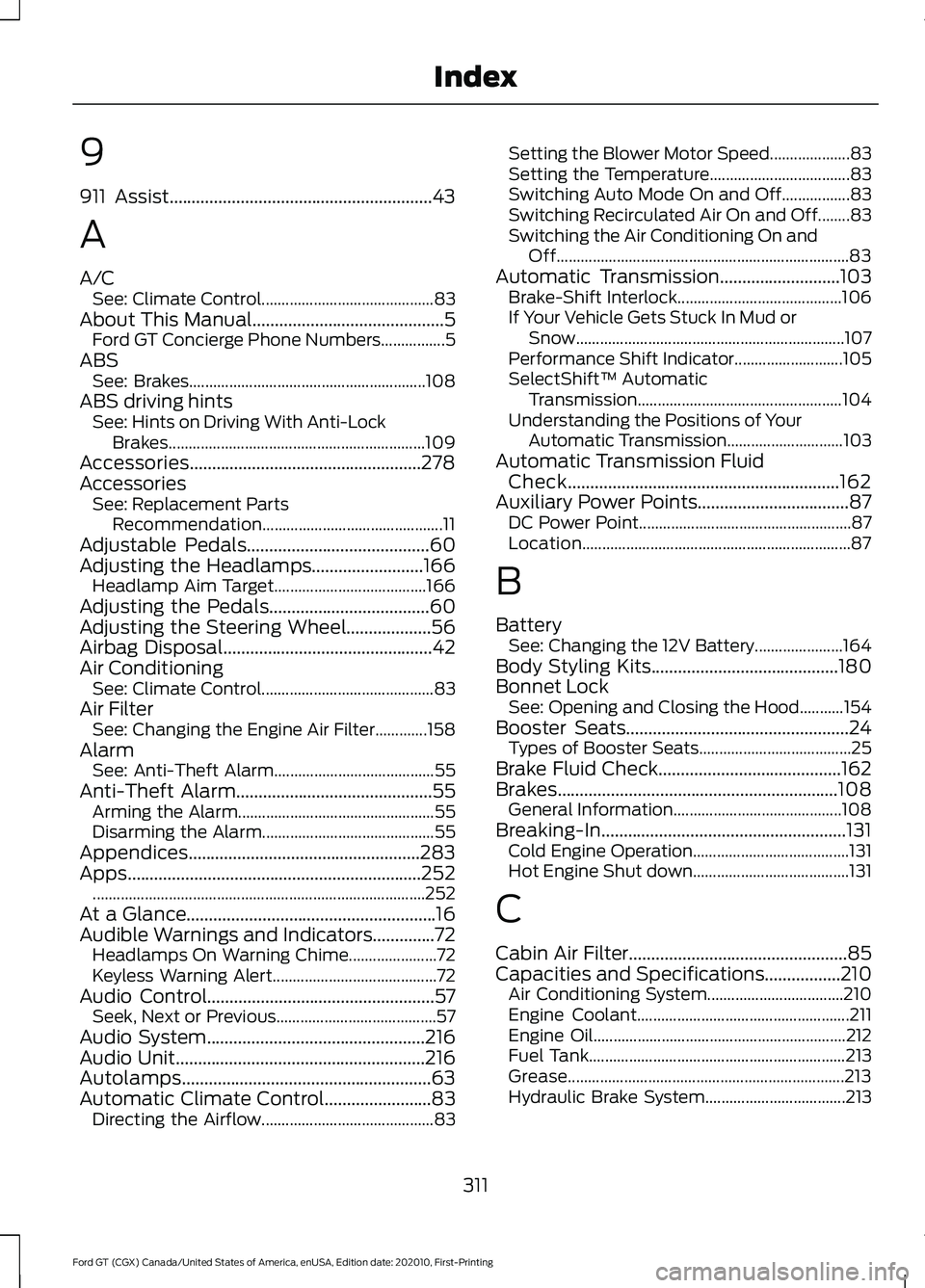
9
911 Assist...........................................................43
A
A/C
See: Climate Control........................................... 83
About This Manual...........................................5 Ford GT Concierge Phone Numbers................5
ABS See: Brakes........................................................... 108
ABS driving hints See: Hints on Driving With Anti-Lock
Brakes................................................................ 109
Accessories....................................................278
Accessories See: Replacement Parts
Recommendation............................................. 11
Adjustable Pedals.........................................60
Adjusting the Headlamps.........................166 Headlamp Aim Target...................................... 166
Adjusting the Pedals....................................60
Adjusting the Steering Wheel...................56
Airbag Disposal...............................................42
Air Conditioning See: Climate Control........................................... 83
Air Filter See: Changing the Engine Air Filter.............158
Alarm See: Anti-Theft Alarm........................................ 55
Anti-Theft Alarm
............................................55
Arming the Alarm................................................. 55
Disarming the Alarm........................................... 55
Appendices....................................................283
Apps..................................................................252 ........................................................................\
...........252
At a Glance........................................................16
Audible Warnings and Indicators..............72 Headlamps On Warning Chime...................... 72
Keyless Warning Alert......................................... 72
Audio Control
...................................................57
Seek, Next or Previous........................................ 57
Audio System
.................................................216
Audio Unit........................................................216
Autolamps........................................................63
Automatic Climate Control
........................83
Directing the Airflow........................................... 83Setting the Blower Motor Speed....................
83
Setting the Temperature................................... 83
Switching Auto Mode On and Off.................83
Switching Recirculated Air On and Off........83
Switching the Air Conditioning On and Off........................................................................\
. 83
Automatic Transmission
...........................103
Brake-Shift Interlock......................................... 106
If Your Vehicle Gets Stuck In Mud or Snow................................................................... 107
Performance Shift Indicator........................... 105
SelectShift™ Automatic Transmission................................................... 104
Understanding the Positions of Your Automatic Transmission............................. 103
Automatic Transmission Fluid Check.............................................................162
Auxiliary Power Points..................................87 DC Power Point..................................................... 87
Location................................................................... 87
B
Battery See: Changing the 12V Battery...................... 164
Body Styling Kits..........................................180
Bonnet Lock See: Opening and Closing the Hood...........154
Booster Seats..................................................24 Types of Booster Seats...................................... 25
Brake Fluid Check.........................................162
Brakes...............................................................108 General Information.......................................... 108
Breaking-In.......................................................131 Cold Engine Operation....................................... 131
Hot Engine Shut down....................................... 131
C
Cabin Air Filter.................................................85
Capacities and Specifications.................210 Air Conditioning System.................................. 210
Engine Coolant..................................................... 211
Engine Oil............................................................... 212
Fuel Tank................................................................ 213
Grease..................................................................... 213
Hydraulic Brake System................................... 213
311
Ford GT (CGX) Canada/United States of America, enUSA, Edition date: 202010, First-Printing Index
Page 315 of 321
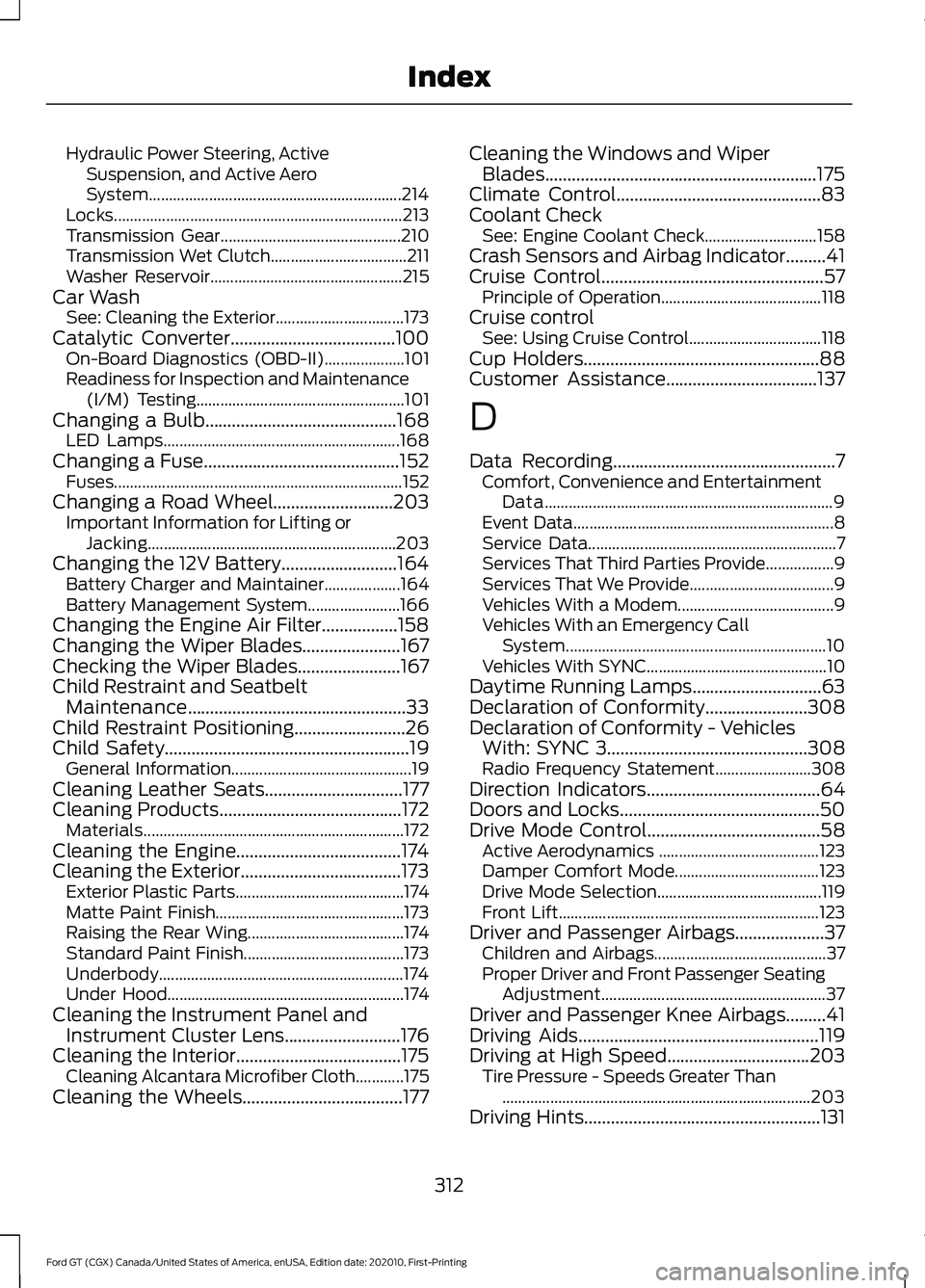
Hydraulic Power Steering, Active
Suspension, and Active Aero
System............................................................... 214
Locks........................................................................\
213
Transmission Gear............................................. 210
Transmission Wet Clutch.................................. 211
Washer Reservoir................................................ 215
Car Wash See: Cleaning the Exterior................................ 173
Catalytic Converter.....................................100
On-Board Diagnostics (OBD-II).................... 101
Readiness for Inspection and Maintenance (I/M) Testing.................................................... 101
Changing a Bulb
...........................................168
LED Lamps........................................................... 168
Changing a Fuse............................................152 Fuses........................................................................\
152
Changing a Road Wheel...........................203 Important Information for Lifting or
Jacking.............................................................. 203
Changing the 12V Battery
..........................164
Battery Charger and Maintainer................... 164
Battery Management System....................... 166
Changing the Engine Air Filter.................158
Changing the Wiper Blades......................167
Checking the Wiper Blades.......................167
Child Restraint and Seatbelt Maintenance.................................................33
Child Restraint Positioning
.........................26
Child Safety.......................................................19
General Information............................................. 19
Cleaning Leather Seats...............................177
Cleaning Products
.........................................172
Materials................................................................. 172
Cleaning the Engine.....................................174
Cleaning the Exterior....................................173 Exterior Plastic Parts.......................................... 174
Matte Paint Finish............................................... 173
Raising the Rear Wing....................................... 174
Standard Paint Finish........................................ 173
Underbody............................................................. 174
Under Hood........................................................... 174
Cleaning the Instrument Panel and Instrument Cluster Lens..........................176
Cleaning the Interior.....................................175 Cleaning Alcantara Microfiber Cloth............175
Cleaning the Wheels....................................177 Cleaning the Windows and Wiper
Blades
.............................................................175
Climate Control..............................................83
Coolant Check See: Engine Coolant Check............................ 158
Crash Sensors and Airbag Indicator
.........41
Cruise Control..................................................57
Principle of Operation........................................ 118
Cruise control See: Using Cruise Control................................. 118
Cup Holders
.....................................................88
Customer Assistance..................................137
D
Data Recording
..................................................7
Comfort, Convenience and Entertainment
Data........................................................................\
9
Event Data................................................................. 8
Service Data.............................................................. 7
Services That Third Parties Provide.................9
Services That We Provide.................................... 9
Vehicles With a Modem....................................... 9
Vehicles With an Emergency Call System................................................................. 10
Vehicles With SYNC............................................. 10
Daytime Running Lamps.............................63
Declaration of Conformity.......................308
Declaration of Conformity - Vehicles With: SYNC 3.............................................308
Radio Frequency Statement........................ 308
Direction Indicators
.......................................64
Doors and Locks.............................................50
Drive Mode Control.......................................58 Active Aerodynamics ........................................ 123
Damper Comfort Mode.................................... 123
Drive Mode Selection......................................... 119
Front Lift................................................................. 123
Driver and Passenger Airbags....................37 Children and Airbags........................................... 37
Proper Driver and Front Passenger Seating Adjustment........................................................ 37
Driver and Passenger Knee Airbags
.........41
Driving Aids......................................................119
Driving at High Speed................................203
Tire Pressure - Speeds Greater Than
........................................................................\
..... 203
Driving Hints
.....................................................131
312
Ford GT (CGX) Canada/United States of America, enUSA, Edition date: 202010, First-Printing Index
Page 317 of 321
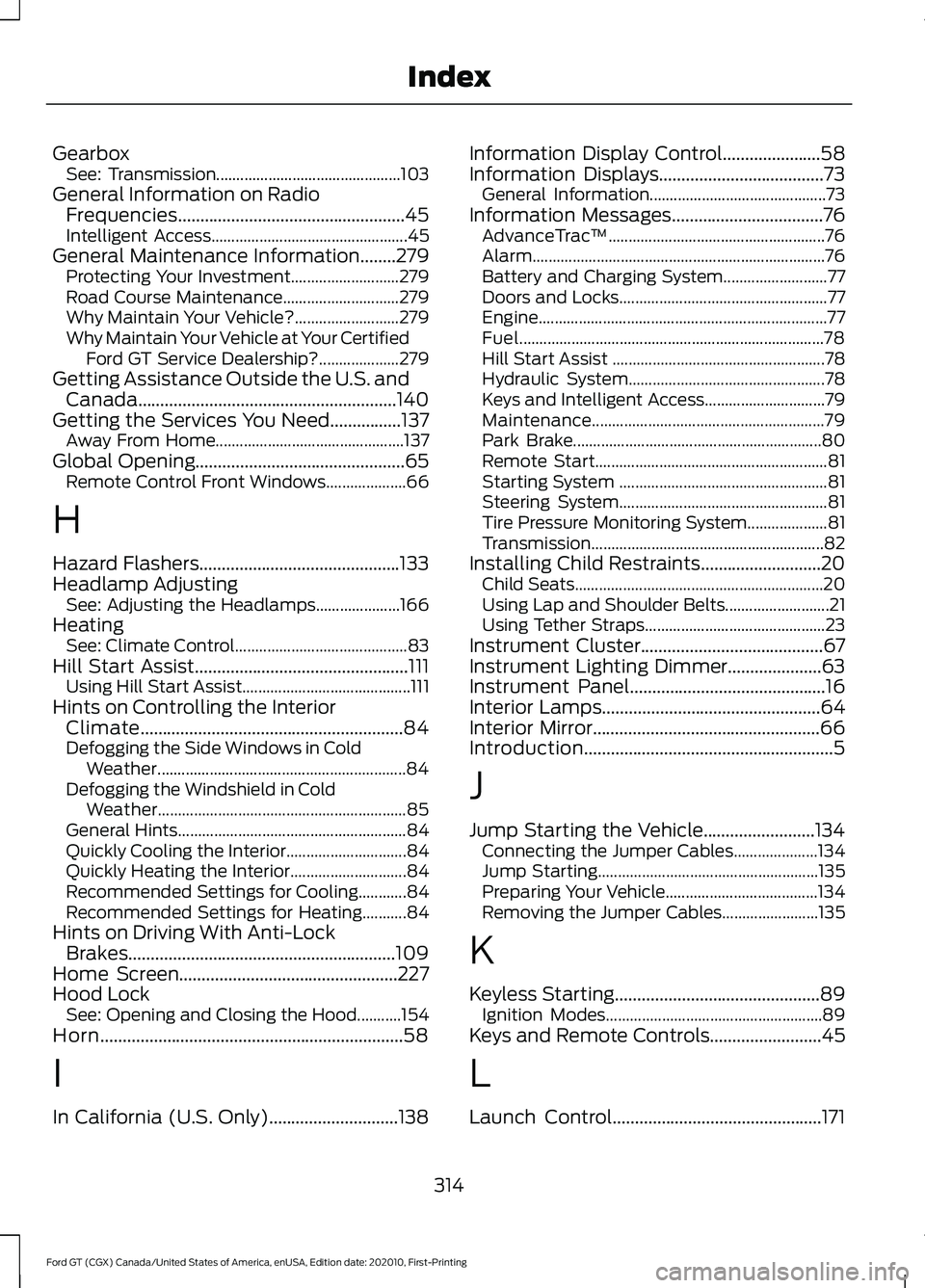
Gearbox
See: Transmission.............................................. 103
General Information on Radio Frequencies...................................................45
Intelligent Access................................................. 45
General Maintenance Information........279 Protecting Your Investment........................... 279
Road Course Maintenance............................. 279
Why Maintain Your Vehicle?.......................... 279
Why Maintain Your Vehicle at Your Certified Ford GT Service Dealership?.................... 279
Getting Assistance Outside the U.S. and Canada..........................................................140
Getting the Services You Need................137 Away From Home............................................... 137
Global Opening...............................................65 Remote Control Front Windows.................... 66
H
Hazard Flashers.............................................133
Headlamp Adjusting See: Adjusting the Headlamps..................... 166
Heating See: Climate Control........................................... 83
Hill Start Assist................................................111 Using Hill Start Assist.......................................... 111
Hints on Controlling the Interior Climate...........................................................84
Defogging the Side Windows in Cold Weather.............................................................. 84
Defogging the Windshield in Cold Weather.............................................................. 85
General Hints......................................................... 84
Quickly Cooling the Interior.............................. 84
Quickly Heating the Interior............................. 84
Recommended Settings for Cooling............84
Recommended Settings for Heating...........84
Hints on Driving With Anti-Lock Brakes............................................................109
Home Screen.................................................227
Hood Lock See: Opening and Closing the Hood...........154
Horn....................................................................58
I
In California (U.S. Only).............................138 Information Display Control......................58
Information Displays.....................................73
General Information............................................ 73
Information Messages..................................76 AdvanceTrac ™...................................................... 76
Alarm........................................................................\
. 76
Battery and Charging System.......................... 77
Doors and Locks.................................................... 77
Engine........................................................................\
77
Fuel........................................................................\
.... 78
Hill Start Assist ..................................................... 78
Hydraulic System................................................. 78
Keys and Intelligent Access.............................. 79
Maintenance.......................................................... 79
Park Brake.............................................................. 80
Remote Start.......................................................... 81
Starting System .................................................... 81
Steering System.................................................... 81
Tire Pressure Monitoring System.................... 81
Transmission.......................................................... 82
Installing Child Restraints...........................20 Child Seats.............................................................. 20
Using Lap and Shoulder Belts.......................... 21
Using Tether Straps............................................. 23
Instrument Cluster.........................................67
Instrument Lighting Dimmer.....................63
Instrument Panel
............................................16
Interior Lamps.................................................64
Interior Mirror...................................................66
Introduction........................................................5
J
Jump Starting the Vehicle.........................134 Connecting the Jumper Cables..................... 134
Jump Starting....................................................... 135
Preparing Your Vehicle...................................... 134
Removing the Jumper Cables........................ 135
K
Keyless Starting..............................................89 Ignition Modes...................................................... 89
Keys and Remote Controls.........................45
L
Launch Control
...............................................171
314
Ford GT (CGX) Canada/United States of America, enUSA, Edition date: 202010, First-Printing Index
Page 318 of 321
Lighting Control..............................................58
High Beams............................................................ 62
Performance Shift Indicator............................ 59
Lighting..............................................................62 General Information............................................ 62
Load Carrying.................................................125
Load Limit........................................................125 Vehicle Loading - with and without a
Trailer.................................................................. 125
Locking and Unlocking................................50 Activating Intelligent Access .......................... 50
Autolock.................................................................... 51
Battery Saver......................................................... 52
Illuminated Entry.................................................. 52
Illuminated Exit..................................................... 52
Opening the Rear Hatch.................................... 52
Power Door Locks................................................ 50
Remote Control.................................................... 50
Smart Unlocks for Intelligent Access Keys....................................................................... 51
Lug Nuts See: Changing a Road Wheel....................... 203
M
Maintenance..................................................154 General Information.......................................... 154
Manual Seats
..................................................86
Map Pockets....................................................88
Message Center See: Information Displays................................. 73
Mirrors See: Windows and Mirrors................................ 65
Mobile Communications Equipment
.......12
Motorcraft Parts...........................................207
N
Navigation......................................................244 cityseeker............................................................... 251
Destination Mode.............................................. 246
Map Mode............................................................. 245
Navigation Map Updates................................. 251
Navigation Menu................................................ 249
Waypoints............................................................ 250
Normal Scheduled Maintenance..........280 Normal Maintenance Intervals.................... 280O
Oil Check
See: Engine Oil Check........................................ 157
Opening and Closing the Hood...............154 Closing the Front Hood.................................... 155
Closing the Rear Hatch..................................... 155
Opening the Front Hood.................................. 154
Opening the Rear Hatch.................................. 155
Opening the Doors
.........................................52
Opening the Doors from Inside....................... 53
Ordering Additional Owner's Literature........................................................141
P
Parking Aids
.....................................................116
Passive Anti-Theft System.........................54 SecuriLock.............................................................. 54
PATS See: Passive Anti-Theft System..................... 54
Perchlorate........................................................10
Personal Safety System ™
..........................35
How Does the Personal Safety System
Work?.................................................................. 35
Phone...............................................................239 During a Phone Call.......................................... 242
Making Calls......................................................... 241
Pairing Your Cell Phone for the First Time................................................................... 239
Phone Menu........................................................ 240
Receiving Calls.................................................... 242
Smartphone Connectivity.............................. 243
Text Messaging................................................... 243
Post-Crash Alert System...........................135
Power Door Locks See: Locking and Unlocking............................. 50
Power Steering Fluid Check
......................163
Power Windows.............................................65
Accessory Delay.................................................... 65
Bounce-Back......................................................... 65
One-Touch Down................................................. 65
One-Touch Up....................................................... 65
Protecting the Environment........................15
Puncture See: Changing a Road Wheel....................... 203
315
Ford GT (CGX) Canada/United States of America, enUSA, Edition date: 202010, First-Printing Index
Page 320 of 321
Stability Control.............................................113
Principle of Operation........................................ 113
Starting and Stopping the Engine...........89 General Information........................................... 89
Starting the Engine.......................................90 Failure to Start........................................................ 91
Fast Restart............................................................. 91
Guarding Against Exhaust Fumes.................. 91
Important Ventilating Information................92
Stopping the Engine When Your Vehicle is Moving.................................................................. 91
Stopping the Engine When Your Vehicle is Stationary........................................................... 91
Steering.............................................................119
Steering Wheel Lock
....................................90
Steering Wheel...............................................56
Storage Compartments..............................88
Supplementary Restraints System.........36 Principle of Operation........................................ 36
Symbols Glossary
.............................................6
SYNC™ 3..........................................................217
General Information........................................... 217
SYNC™ 3 Troubleshooting......................264
T
Technical Specifications See: Capacities and Specifications............205
The Better Business Bureau (BBB) Auto Line Program (U.S. Only)........................138
Tire Care
...........................................................187
Glossary of Tire Terminology......................... 189
Information About Uniform Tire Quality Grading.............................................................. 187
Information Contained on the Tire Sidewall............................................................ 190
Temperature A B C............................................. 188
Traction AA A B C............................................... 188
Treadwear............................................................. 188
Tire Inflation When Punctured See: Tire Sealant and Inflator Kit.................. 181
Tire Pressure Monitoring System...........199 Changing Tires With a Tire Pressure
Monitoring System........................................ 201
Understanding Your Tire Pressure Monitoring System ....................................... 201
Tire Repair Kit See: Tire Sealant and Inflator Kit.................. 181Tire Sealant and Inflator Kit......................181
First Stage: Inflating the Tire with Sealing
Compound and Air........................................ 183
General Information.......................................... 182
Second Stage: Checking Tire Pressure............................................................ 185
Tips for Use of the Kit....................................... 182
What to Do After the Tire has Been Sealed................................................................ 185
What to do When a Tire Is Punctured........183
Tires See: Wheels and Tires....................................... 181
Towing a Trailer.............................................130
Towing Points
................................................136
Installing the Recovery Hook......................... 136
Recovery Hook Location.................................. 136
Towing the Vehicle on Four Wheels..........................................................130
Emergency Towing............................................. 130
Towing..............................................................130
Track Use.........................................................169 Operating at High Speeds and on Track
Days.................................................................... 169
Road Course Vehicle Preparation.................170
Transmission Code Designation............209
Transmission..................................................103
Transporting the Vehicle
............................135
Getting the Transmission in Neutral...........136
U
Under Hood Overview................................156
Under Seat Storage......................................88
Unique Features...............................................17
USB Port
..........................................................216
Using Cruise Control.....................................118
Switching Cruise Control Off.......................... 118
Switching Cruise Control On........................... 118
Using Launch Control
...................................171
Using Snow Chains......................................199
Using Stability Control.................................114 AdvanceTrac ™ Electronic Stability Control
........................................................................\
....... 114
Stability Control................................................... 115
Using Summer Tires....................................199
Using Voice Recognition
...........................228
Audio Voice Commands................................. 228
Climate Voice Commands............................. 230
317
Ford GT (CGX) Canada/United States of America, enUSA, Edition date: 202010, First-Printing Index