battery location FORD GT 2021 Owners Manual
[x] Cancel search | Manufacturer: FORD, Model Year: 2021, Model line: GT, Model: FORD GT 2021Pages: 321, PDF Size: 5.78 MB
Page 90 of 321
12 V DC Power Point
WARNING: Incorrect use of the
power points can cause damage not
covered by the vehicle warranty, and can
result in fire or serious injury.
Note: When you switch the ignition on, you
can use the center console power point to
power
12 V appliances with a maximum
current rating of 12.5 A.
Note: You can only use the center floor
console power point with the ignition on.
Note: You can use the rear hatch power
point with the ignition off.
Note: Do not hang any accessory from the
accessory plug.
Note: Do not use the power point over the
vehicle capacity of
12 V DC 180 watts or a
fuse may blow.
Note: Always keep the power point cap
closed when not in use.
Do not insert objects other than an
accessory plug into the power point. This
damages the power point and the fuse
may trip.
Run the vehicle for full capacity use of the
power point.
To prevent the battery from running out of
charge:
• Do not use the power point longer than
necessary when the vehicle is not
running.
Location
The power points are on the right side of
the center floor console and in the rear
hatch.
87
Ford GT (CGX) Canada/United States of America, enUSA, Edition date: 202010, First-Printing Auxiliary Power Points
Page 137 of 321
Should your vehicle shut off after a crash,
you may restart your vehicle.
1. Press START/STOP to switch off your
vehicle.
2. Press the brake pedal and START/STOP
to switch on your
vehicle.
3. Remove your foot from the brake pedal
and press
START/STOP to switch off
your vehicle.
4. You can attempt to start the vehicle by pressing the brake pedal and
START/STOP
, or press START/STOP
without pressing the brake pedal.
Note: Both methods re-enable the fuel
system.
JUMP STARTING THE VEHICLE WARNING:
Do not use fuel lines,
engine valve covers, windshield wiper
arms, the intake manifold, or hood latch
as ground points. WARNING:
Use only adequately
sized cables with insulated clamps.
Preparing Your Vehicle
Note: Attempting to push-start a vehicle
with an automatic transmission may cause
transmission damage.
Note: Use only a 12-volt supply to start your
vehicle.
Note: Do not disconnect the battery of the
disabled vehicle as this could damage the
vehicle's electrical system.
Park the booster vehicle close to the hood
of the disabled vehicle, making sure the
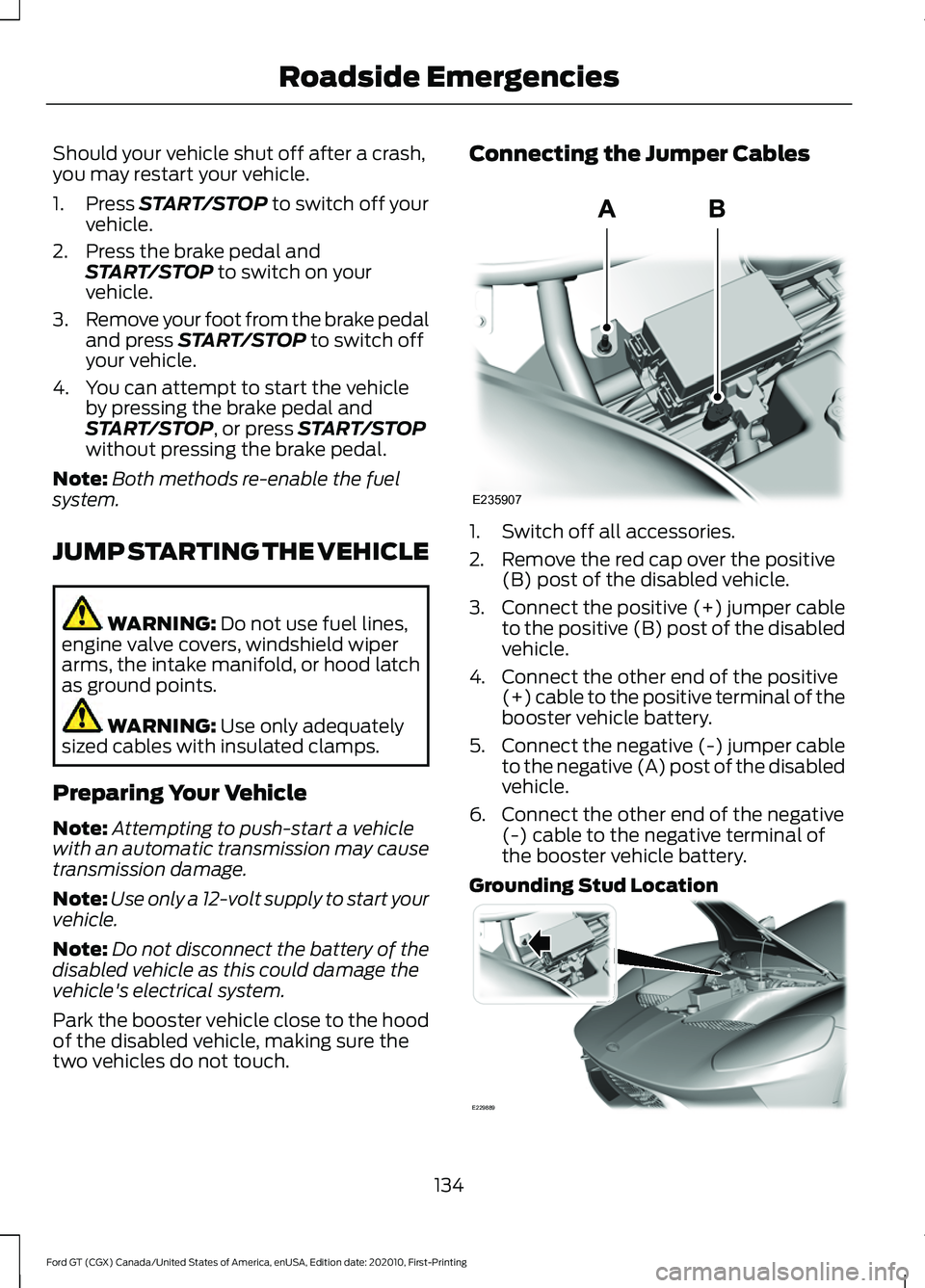
two vehicles do not touch. Connecting the Jumper Cables
1. Switch off all accessories.
2. Remove the red cap over the positive
(B) post of the disabled vehicle.
3. Connect the positive (+) jumper cable
to the positive (B) post of the disabled
vehicle.
4. Connect the other end of the positive (+) cable to the positive terminal of the
booster vehicle battery.
5. Connect the negative (-) jumper cable
to the negative (A) post of the disabled
vehicle.
6. Connect the other end of the negative (-) cable to the negative terminal of
the booster vehicle battery.
Grounding Stud Location 134
Ford GT (CGX) Canada/United States of America, enUSA, Edition date: 202010, First-Printing Roadside EmergenciesE235907 E229889
Page 139 of 321
The full undertrays of the vehicle are
carbon fiber, there are no tie down slots.
Use only over the tire straps to tie the car
down for transport.
Getting the Transmission in
Neutral
If the battery loses charge, the
transmission moves to park (P). You can
use the transmission tool to place the car
into Neutral (N). See Automatic
Transmission (page 103).
Note: If your battery loses charge with the
electric park brake on, you cannot transport
your vehicle until you restore power to your
vehicle to turn off the electric park brake.
TOWING POINTS
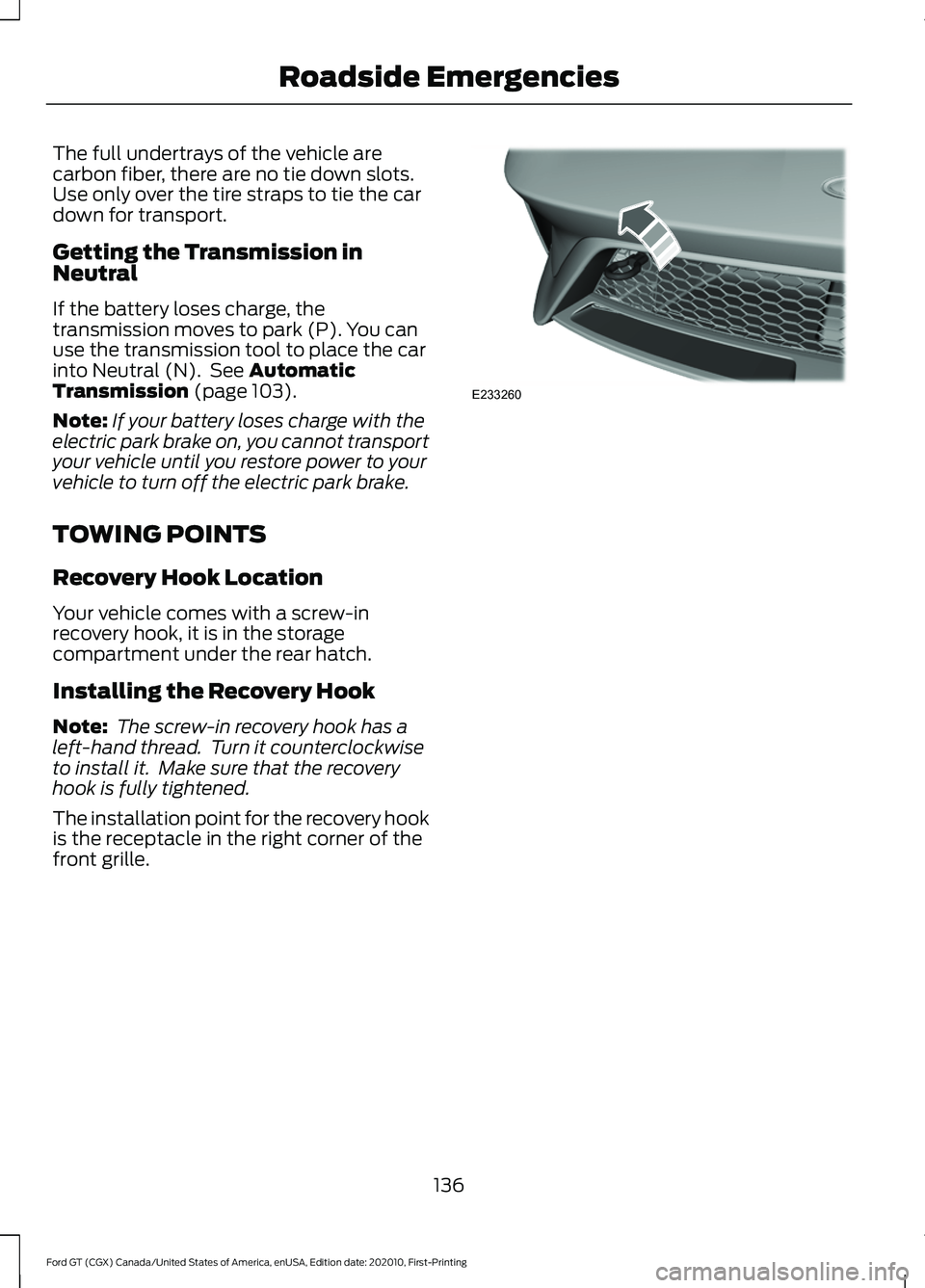
Recovery Hook Location
Your vehicle comes with a screw-in
recovery hook, it is in the storage
compartment under the rear hatch.
Installing the Recovery Hook
Note: The screw-in recovery hook has a
left-hand thread. Turn it counterclockwise
to install it. Make sure that the recovery
hook is fully tightened.
The installation point for the recovery hook
is the receptacle in the right corner of the
front grille. 136
Ford GT (CGX) Canada/United States of America, enUSA, Edition date: 202010, First-Printing Roadside EmergenciesE233260
Page 182 of 321
•
With your foot on the brake, shift
through all the gears while the engine
is running.
• If your vehicle is stored for more than
a few months, we recommend that you
change the engine oil before you use
your vehicle again.
Fuel system
• Fill the fuel tank with high-quality fuel
until the first automatic shutoff of the
fuel pump nozzle and add
commercially available fuel stabilizer.
Run the engine for a minimum of one
minute to ensure that treated fuel has
circulated through the system.
Cooling system
• Protect against freezing temperatures.
• When removing your vehicle from
storage, check coolant fluid level.
Confirm that there are no cooling
system leaks and that fluid is at the
recommended level.
Battery
• Connect your vehicle to the battery
charger/maintainer provided with your
vehicle whenever you store your vehicle
for more than 2 weeks.
• Connect the wires as shown in the
illustration. See Changing the 12V
Battery (page 164).
Brakes
• Make sure the brakes and parking brake
release fully. Tires
•
To minimize flat spots on the tires,
inflate all four tires to the
recommended cold pressures listed on
the Safety Compliance Certification
label or Tire Label. When the vehicle is
taken out of storage, reset the tire
pressures as necessary to the
recommended levels listed on the
Safety Compliance Certification label
or Tire Label affixed to your vehicle.
Note: If you store your vehicle in a location
with low ambient temperatures, follow the
instructions for care of summer tires. See
Using Summer Tires
(page 199).
Miscellaneous
• Move vehicles at least
25 ft (7.5 m)
every 15 days to lubricate working parts
and prevent flat spots in the tires.
Removing Vehicle From Storage
When your vehicle is ready to come out of
storage, do the following:
• Wash your vehicle to remove any dirt
or grease film build-up on window
surfaces.
• Check windshield wipers for any
deterioration.
• Check under the hood and engine cover
for any foreign material that may have
collected during storage such as mice
or squirrel nests.
• Check the exhaust for any foreign
material that may have collected
during storage.
• Check tire pressures and set tire
inflation per the Tire Label.
179
Ford GT (CGX) Canada/United States of America, enUSA, Edition date: 202010, First-Printing Vehicle Care
Page 185 of 321
General Information
WARNING: Failure to follow these
guidelines could result in an increased
risk of loss of vehicle control, injury or
death.
Note: Do not use the kit if you have severely
damaged a tire. Only seal punctures located
within the tire tread with the kit.
Do not attempt to repair punctures larger
than
0.2362 in (6 mm) or damage to the
tire's sidewall. The tire may not completely
seal.
Loss of air pressure may adversely affect
tire performance. For this reason:
Note: Do not drive the vehicle above
50 mph (80 km/h)
.
Note: Do not drive further than
120 mi
(200 km). Drive only to the closest
authorized Ford dealer or tire repair shop to
have your tire inspected.
• Drive carefully and avoid abrupt
steering maneuvers.
• Periodically monitor tire inflation
pressure in the affected tire; if the tire
is losing pressure, have the vehicle
towed on a flat bed.
• Read the information in the Tips for
Use of the Kit section to make sure safe
operation of the kit and your vehicle.
Tips for Use of the Kit
To ensure safe operation of the kit:
• Read all instructions and cautions fully.
• Before operating the kit, make sure
your vehicle is safely off the road and
away from moving traffic. Switch on
the hazard lights.
• Always set the parking brake to ensure
the vehicle does not move
unexpectedly. •
Do not remove any foreign objects,
such as nails or screws, from the tire.
• When using the kit, leave the engine
running (only if the vehicle is outdoors
or in a well-ventilated area) so the
compressor does not drain the
vehicle's battery.
• Do not allow the compressor to
operate continuously for more than 15
minutes. This will help prevent the
compressor from overheating.
• Never leave the kit unattended during
operation.
• Sealant compound contains latex.
Those with latex sensitivities should
use appropriate precautions to avoid
an allergic reaction.
• Keep the kit away from children.
• Only use the kit when the ambient
temperature is between -22°F (-30°C)
and 158°F (70°C).
• Only use the sealing compound before
the use-by date. The use-by date is on
a label on the sealant canister, which
you can see through the rectangular
viewing window on the bottom of the
compressor. Check the use-by date
regularly and replace the canister after
four years of non-use.
• Do not store the kit unsecured inside
the passenger compartment of the
vehicle as it may cause injury during a
sudden stop or crash. Always store the
kit in its original location.
• After sealant use, an authorized Ford
dealer must replace the tire pressure
monitoring system sensor and valve
stem on the wheel.
• Operating the kit could cause an
electrical disturbance in radio
operation.
182
Ford GT (CGX) Canada/United States of America, enUSA, Edition date: 202010, First-Printing Wheels and Tires
Page 210 of 321
MOTORCRAFT PARTS
Part Number
Component
FA-1912-A1
Air filter element.
KG7Z-10655-D2
Battery.
FP-701
Cabin air filter.
HG7Z-6731-A2
Oil filter.
SP-5831
Spark plugs.
HG7Z-17528-A (right-hand side)
Windshield wipers. 2
HG7Z-17528-B (left-hand side)
1 Motorcraft® part number.
2 Ford part number.
We recommend Motorcraft parts that are
available at your authorized dealer or at
www.fordparts.com. We engineer these
parts for your vehicle to meet or exceed
our specifications. Use of other parts could
impact vehicle performance, emissions
and durability. Your warranty could be void
for any damage related to use of other
parts.
For spark plug replacement, contact your
authorized dealer. Replace the spark plugs
at the appropriate intervals.
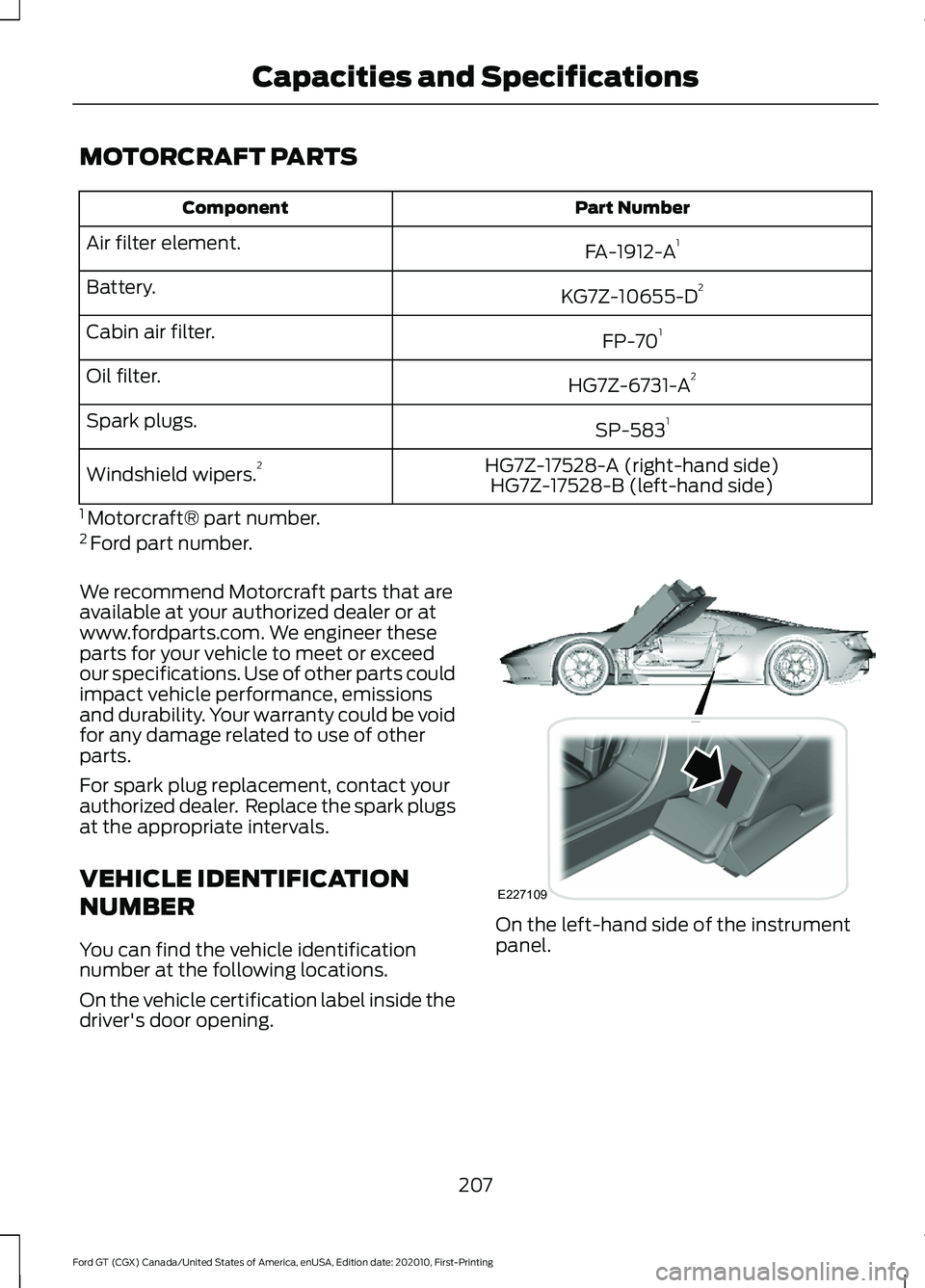
VEHICLE IDENTIFICATION
NUMBER
You can find the vehicle identification
number at the following locations.
On the vehicle certification label inside the
driver's door opening. On the left-hand side of the instrument
panel.
207
Ford GT (CGX) Canada/United States of America, enUSA, Edition date: 202010, First-Printing Capacities and SpecificationsE227109
Page 226 of 321
If you do not cancel the call, and SYNC
makes a successful call, a pre-recorded
message plays for the 911 operator, and
then the occupant(s) in your vehicle is able
to talk with the operator. Be prepared to
provide your name, phone number and
location immediately, because not all 911
systems are capable of receiving this
information electronically.
911 Assist May Not Work If
•
Your cellular phone or 911 Assist
hardware sustains damage in a crash.
• The vehicle's battery or the SYNC
system has no power.
• The phone(s) thrown from your vehicle
are the ones paired and connected to
the system.
911 Assist Privacy Notice
When you switch on 911 Assist, it may
disclose to emergency services that your
vehicle has been in a crash involving the
deployment of an airbag or activation of
the fuel pump shut-off. Certain versions or
updates to 911 Assist may also be capable
of electronically or verbally disclosing to
911 operators your vehicle location or other
details about your vehicle or crash to assist
911 operators to provide the most
appropriate emergency services. If you do
not want to disclose this information, do
not switch the feature on.
Safety Information WARNING: Driving while distracted
can result in loss of vehicle control, crash
and injury. We strongly recommend that
you use extreme caution when using any
device that may take your focus off the
road. Your primary responsibility is the
safe operation of your vehicle. We
recommend against the use of any hand-held device while driving and
encourage the use of voice-operated
systems when possible. Make sure you
are aware of all applicable local laws
that may affect the use of electronic
devices while driving.
• Do not attempt to service or repair the
system. Have an authorized dealer
check your vehicle.
• Do not operate playing devices if the
power cords or cables are broken, split
or damaged. Place cords and cables
out of the way, so they do not interfere
with the operation of pedals, seats,
compartments or safe driving abilities.
• Do not leave playing devices in your
vehicle during extreme conditions as it
could cause them damage. See your
device's user guide for further
information.
• For your safety, some SYNC 3 functions
are speed-dependent. Their use is
limited to when your vehicle is traveling
at speeds under 3 mph (5 km/h). Make
sure that you review your device's
manual before using it with SYNC 3.
Speed-restricted Features
Some features of this system may be too
difficult to use while your vehicle is moving
so they are restricted from use unless your
vehicle is stationary.
• Screens crowded with information,
such as Point of Interest reviews and
ratings, movie times or ski conditions.
• Any action that requires you to use a
keyboard is restricted, such as entering
a navigation destination or editing
information.
• All lists are limited so the user can view
fewer entries (such as phone contacts
or recent phone call entries).
223
Ford GT (CGX) Canada/United States of America, enUSA, Edition date: 202010, First-Printing SYNC™ 3
Page 230 of 321
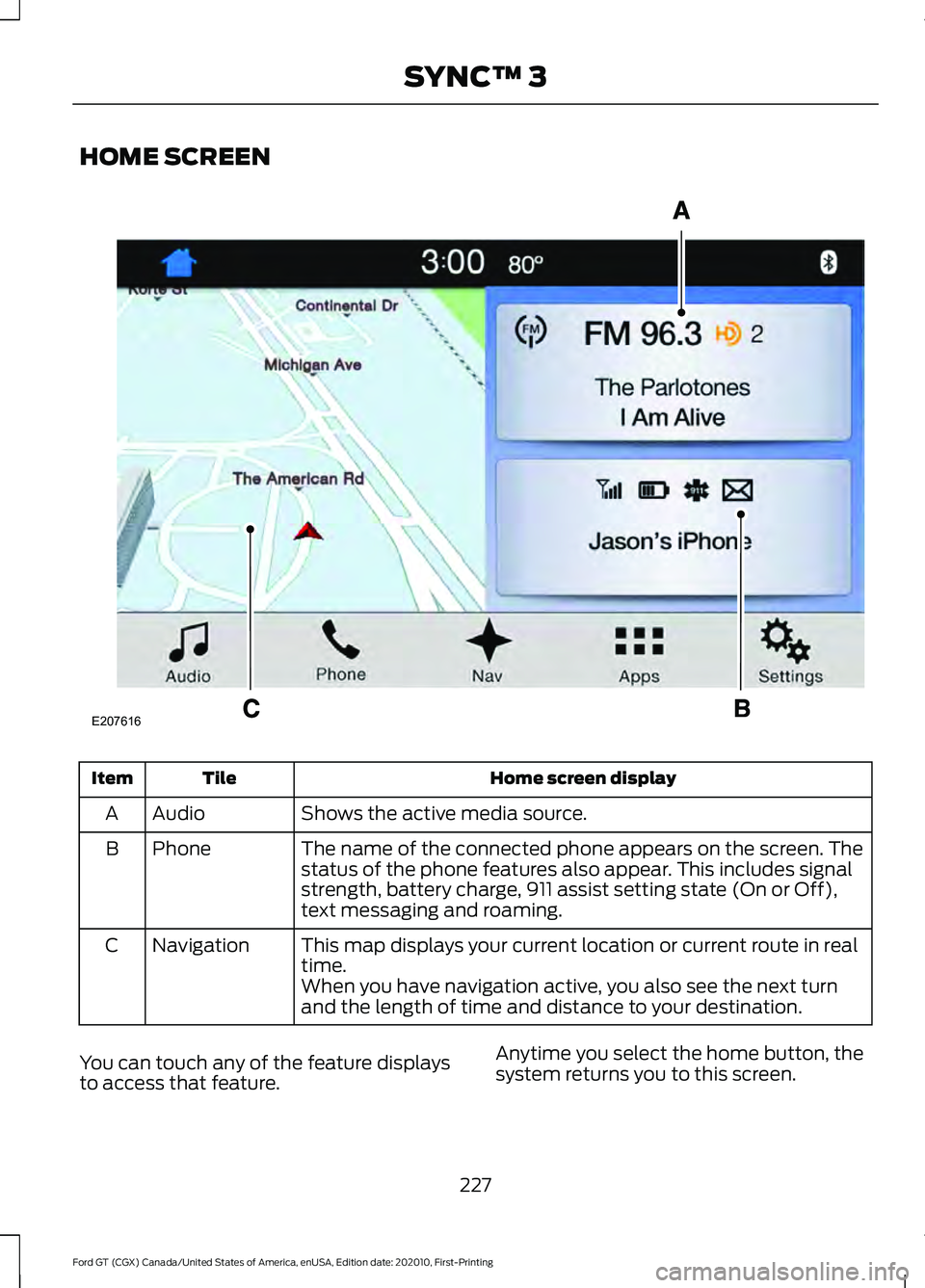
HOME SCREEN
Home screen display
Tile
Item
Shows the active media source.
Audio
A
The name of the connected phone appears on the screen. The
status of the phone features also appear. This includes signal
strength, battery charge, 911 assist setting state (On or Off),
text messaging and roaming.
Phone
B
This map displays your current location or current route in real
time.
Navigation
C
When you have navigation active, you also see the next turn
and the length of time and distance to your destination.
You can touch any of the feature displays
to access that feature. Anytime you select the home button, the
system returns you to this screen.
227
Ford GT (CGX) Canada/United States of America, enUSA, Edition date: 202010, First-Printing SYNC™ 3E207616
Page 261 of 321
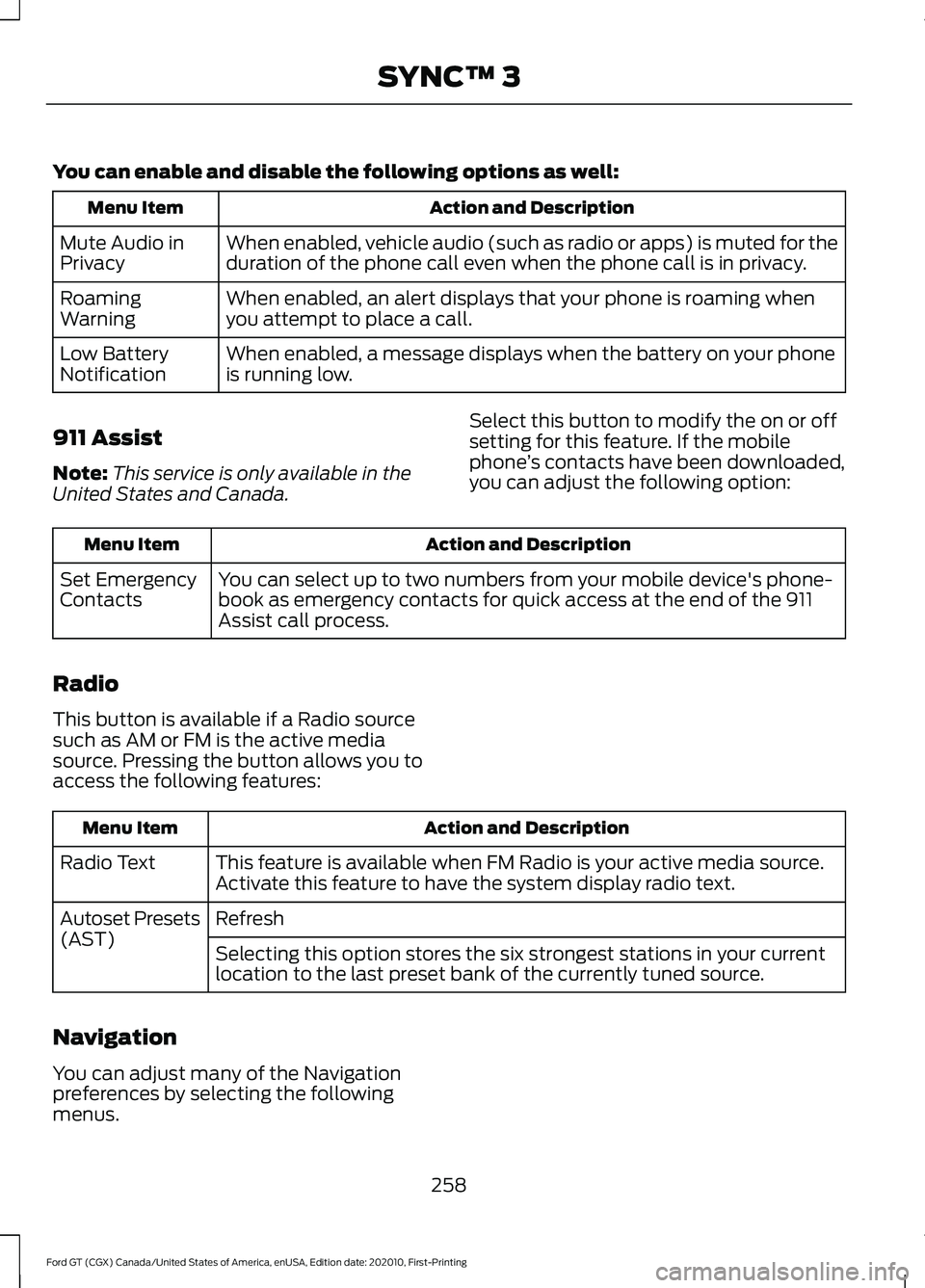
You can enable and disable the following options as well:
Action and Description
Menu Item
When enabled, vehicle audio (such as radio or apps) is muted for the
duration of the phone call even when the phone call is in privacy.
Mute Audio in
Privacy
When enabled, an alert displays that your phone is roaming when
you attempt to place a call.
Roaming
Warning
When enabled, a message displays when the battery on your phone
is running low.
Low Battery
Notification
911 Assist
Note: This service is only available in the
United States and Canada. Select this button to modify the on or off
setting for this feature. If the mobile
phone
’s contacts have been downloaded,
you can adjust the following option: Action and Description
Menu Item
You can select up to two numbers from your mobile device's phone-
book as emergency contacts for quick access at the end of the 911
Assist call process.
Set Emergency
Contacts
Radio
This button is available if a Radio source
such as AM or FM is the active media
source. Pressing the button allows you to
access the following features: Action and Description
Menu Item
This feature is available when FM Radio is your active media source.
Activate this feature to have the system display radio text.
Radio Text
Refresh
Autoset Presets
(AST)
Selecting this option stores the six strongest stations in your current
location to the last preset bank of the currently tuned source.
Navigation
You can adjust many of the Navigation
preferences by selecting the following
menus.
258
Ford GT (CGX) Canada/United States of America, enUSA, Edition date: 202010, First-Printing SYNC™ 3
Page 314 of 321
9
911 Assist...........................................................43
A
A/C
See: Climate Control........................................... 83
About This Manual...........................................5 Ford GT Concierge Phone Numbers................5
ABS See: Brakes........................................................... 108
ABS driving hints See: Hints on Driving With Anti-Lock
Brakes................................................................ 109
Accessories....................................................278
Accessories See: Replacement Parts
Recommendation............................................. 11
Adjustable Pedals.........................................60
Adjusting the Headlamps.........................166 Headlamp Aim Target...................................... 166
Adjusting the Pedals....................................60
Adjusting the Steering Wheel...................56
Airbag Disposal...............................................42
Air Conditioning See: Climate Control........................................... 83
Air Filter See: Changing the Engine Air Filter.............158
Alarm See: Anti-Theft Alarm........................................ 55
Anti-Theft Alarm
............................................55
Arming the Alarm................................................. 55
Disarming the Alarm........................................... 55
Appendices....................................................283
Apps..................................................................252 ........................................................................\
...........252
At a Glance........................................................16
Audible Warnings and Indicators..............72 Headlamps On Warning Chime...................... 72
Keyless Warning Alert......................................... 72
Audio Control
...................................................57
Seek, Next or Previous........................................ 57
Audio System
.................................................216
Audio Unit........................................................216
Autolamps........................................................63
Automatic Climate Control
........................83
Directing the Airflow........................................... 83Setting the Blower Motor Speed....................
83
Setting the Temperature................................... 83
Switching Auto Mode On and Off.................83
Switching Recirculated Air On and Off........83
Switching the Air Conditioning On and Off........................................................................\
. 83
Automatic Transmission
...........................103
Brake-Shift Interlock......................................... 106
If Your Vehicle Gets Stuck In Mud or Snow................................................................... 107
Performance Shift Indicator........................... 105
SelectShift™ Automatic Transmission................................................... 104
Understanding the Positions of Your Automatic Transmission............................. 103
Automatic Transmission Fluid Check.............................................................162
Auxiliary Power Points..................................87 DC Power Point..................................................... 87
Location................................................................... 87
B
Battery See: Changing the 12V Battery...................... 164
Body Styling Kits..........................................180
Bonnet Lock See: Opening and Closing the Hood...........154
Booster Seats..................................................24 Types of Booster Seats...................................... 25
Brake Fluid Check.........................................162
Brakes...............................................................108 General Information.......................................... 108
Breaking-In.......................................................131 Cold Engine Operation....................................... 131
Hot Engine Shut down....................................... 131
C
Cabin Air Filter.................................................85
Capacities and Specifications.................210 Air Conditioning System.................................. 210
Engine Coolant..................................................... 211
Engine Oil............................................................... 212
Fuel Tank................................................................ 213
Grease..................................................................... 213
Hydraulic Brake System................................... 213
311
Ford GT (CGX) Canada/United States of America, enUSA, Edition date: 202010, First-Printing Index