6 Speed FORD KUGA 2010 1.G User Guide
[x] Cancel search | Manufacturer: FORD, Model Year: 2010, Model line: KUGA, Model: FORD KUGA 2010 1.GPages: 226, PDF Size: 8.07 MB
Page 75 of 226
1. Use the rotary control to enter the
main menu.
2. Highlight Setupand press the
SET/RESET button.
3. Highlight Display and press the
SET/RESET button.
4. Highlight Language and press the
SET/RESET button.
5. Highlight the desired setting and press
the SET/RESET button to confirm
the setting.
6. Highlight Backand repeatedly press
the SET/RESET button to return to
the main menu.
Units of measure
To select metric or imperial units:
Toggling the units of measure using this
display will affect the following displays:
• Distance to empty.
• Average fuel consumption.
• Instantaneous fuel consumption.
• Average speed.
• Outside air temperature.
• The temperature display in the
automatic climate control.
Note:The units of measure for outside
air temperature and the automatic climate control can be toggled independent ofthe other displays. When showing theoutside air temperature, press and hold
the SET/RESET button for a short time.
1. Use the rotary control to enter the
main menu.
2. Highlight Setupand press the
SET/RESET button.
3. Highlight Display and press the
SET/RESET button.
4. Highlight Measure Unit and press
the SET/RESET button. 5.
Highlight the desired setting and press
the SET/RESET button to confirm
the setting.
6. Highlight Backand repeatedly press
the SET/RESET button to return to
the main menu.
Chime deactivation
The following chimes can be deactivated:
• Low fuel warning.
• General warning messages.
• General information messages.
1. Use the rotary control to enter the main menu.
2. Highlight Setupand press the
SET/RESET button.
3. Highlight Chimes and press the
SET/RESET button.
4. Highlight the desired setting and press
the SET/RESET button to confirm
the setting.
5. Highlight Backand repeatedly press
the SET/RESET button to return to
the main menu.
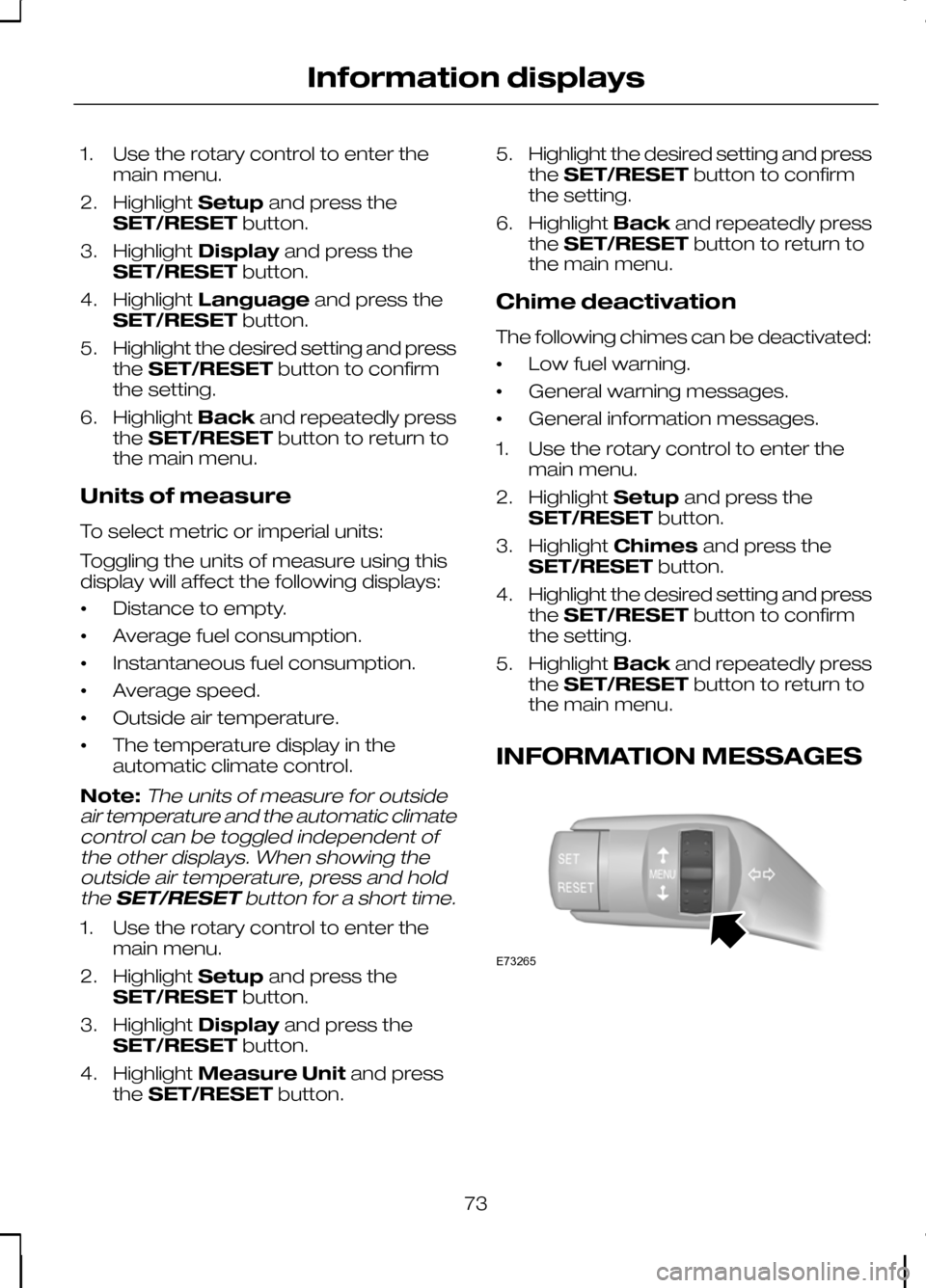
INFORMATION MESSAGES 73
Information displaysE73265
Page 79 of 226
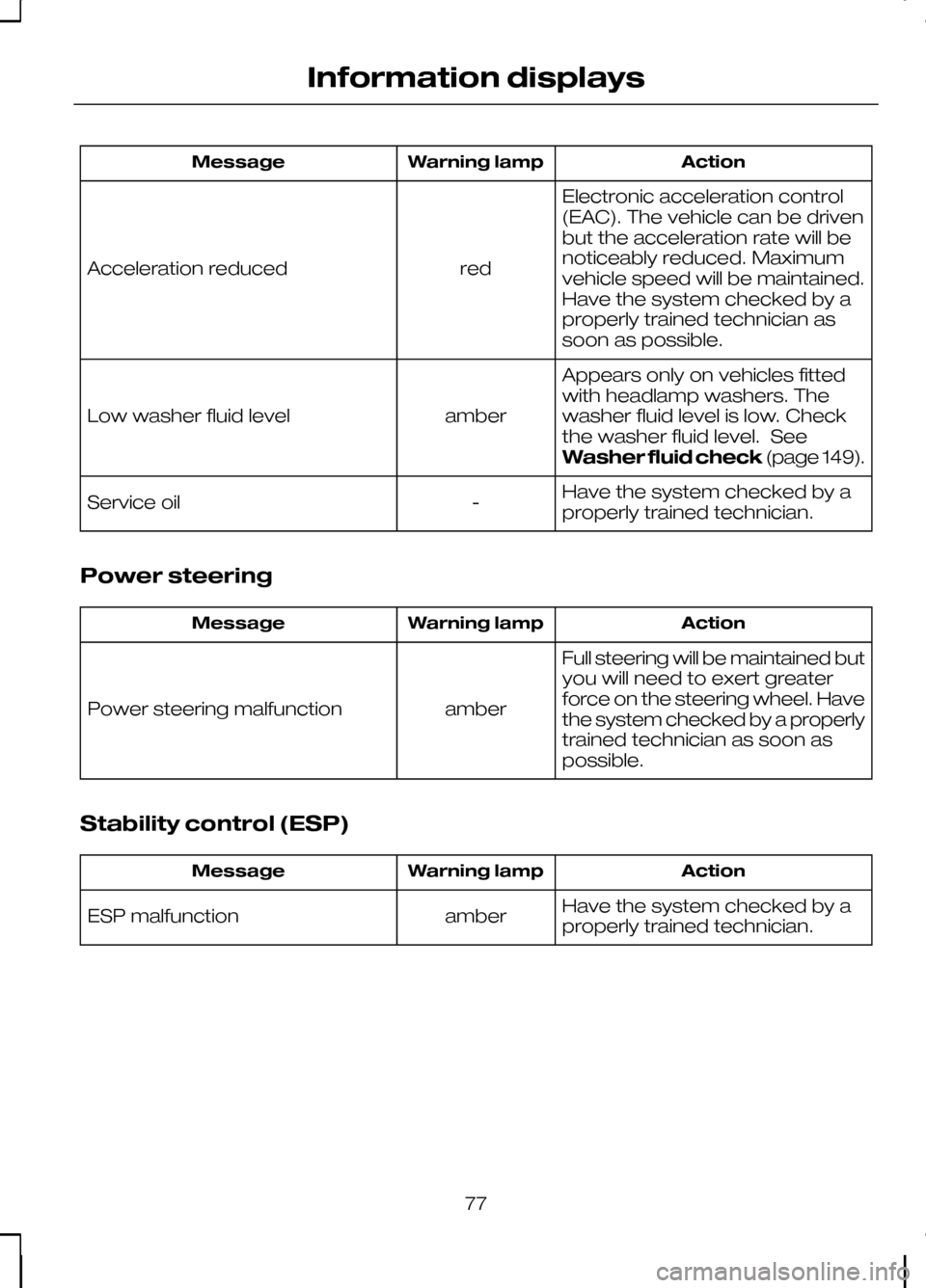
Action
Warning lamp
Message
Electronic acceleration control
(EAC). The vehicle can be driven
but the acceleration rate will be
noticeably reduced. Maximum
vehicle speed will be maintained.
Have the system checked by a
properly trained technician as
soon as possible.
red
Acceleration reduced
Appears only on vehicles fitted
with headlamp washers. The
washer fluid level is low. Check
the washer fluid level. See
Washer fluid check(page 149).
amber
Low washer fluid level
Have the system checked by a
properly trained technician.
-
Service oil
Power steering Action
Warning lamp
Message
Full steering will be maintained but
you will need to exert greater
force on the steering wheel. Have
the system checked by a properly
trained technician as soon as
possible.
amber
Power steering malfunction
Stability control (ESP) Action
Warning lamp
Message
Have the system checked by a
properly trained technician.
amber
ESP malfunction
77
Information displays
Page 86 of 226
Note:For information on the automatic
climate control, on vehicles fitted with a combined Navigation and automaticclimate control system, see separatehandbook.
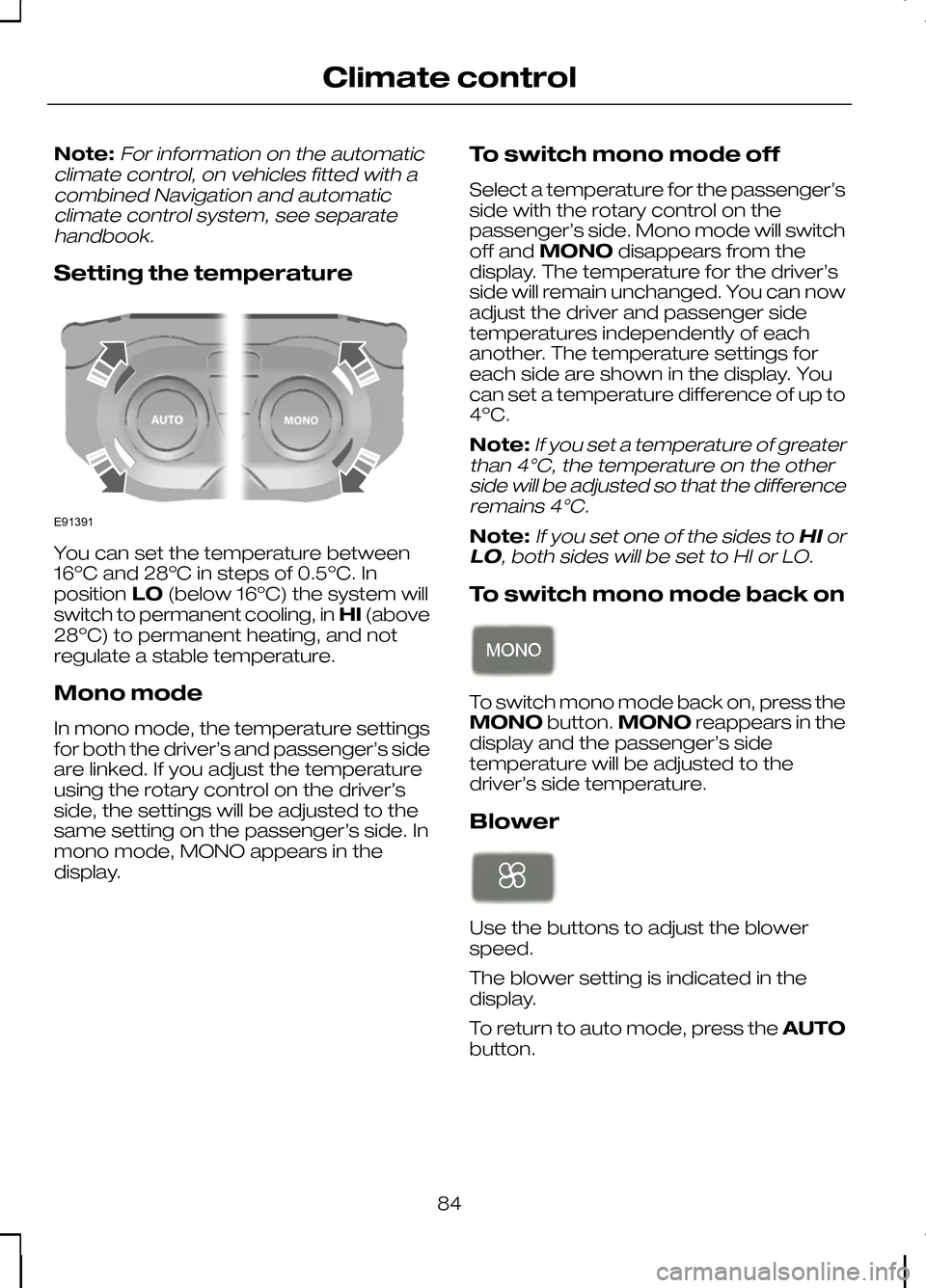
Setting the temperature You can set the temperature between
16ºC and 28ºC in steps of 0.5ºC. In
position
LO(below 16ºC) the system will
switch to permanent cooling, in HI(above
28ºC) to permanent heating, and not
regulate a stable temperature.
Mono mode
In mono mode, the temperature settings
for both the driver’s and passenger’s side
are linked. If you adjust the temperature
using the rotary control on the driver’s
side, the settings will be adjusted to the
same setting on the passenger’s side. In
mono mode, MONO appears in the
display. To switch mono mode off
Select a temperature for the passenger’s
side with the rotary control on the
passenger’s side. Mono mode will switch
off and
MONO disappears from the
display. The temperature for the driver’s
side will remain unchanged. You can now
adjust the driver and passenger side
temperatures independently of each
another. The temperature settings for
each side are shown in the display. You
can set a temperature difference of up to
4ºC.
Note:
If you set a temperature of greater
than 4°C, the temperature on the other side will be adjusted so that the differenceremains 4°C.
Note:If you set one of the sides to HIor
LO, both sides will be set to HI or LO.
To switch mono mode back on To switch mono mode back on, press the
MONO
button.MONO reappears in the
display and the passenger’s side
temperature will be adjusted to the
driver’s side temperature.
Blower Use the buttons to adjust the blower
speed.
The blower setting is indicated in the
display.
To return to auto mode, press the
AUTO
button.
84
Climate controlE91391
Page 87 of 226
Air distribution
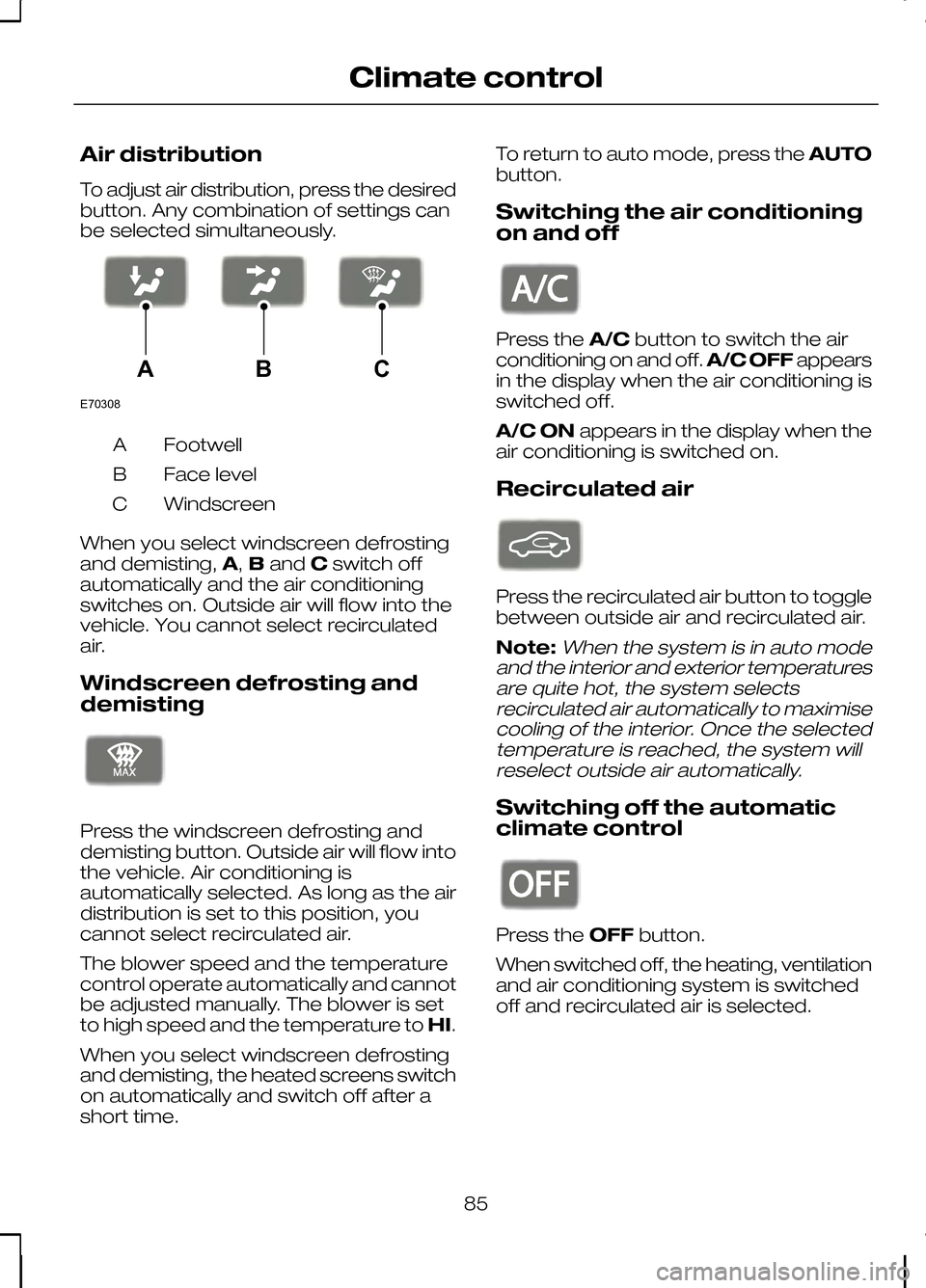
To adjust air distribution, press the desired
button. Any combination of settings can
be selected simultaneously.
Footwell
A
Face level
B
Windscreen
C
When you select windscreen defrosting
and demisting, A,Band Cswitch off
automatically and the air conditioning
switches on. Outside air will flow into the
vehicle. You cannot select recirculated
air.
Windscreen defrosting and
demisting Press the windscreen defrosting and
demisting button. Outside air will flow into
the vehicle. Air conditioning is
automatically selected. As long as the air
distribution is set to this position, you
cannot select recirculated air.
The blower speed and the temperature
control operate automatically and cannot
be adjusted manually. The blower is set
to high speed and the temperature to
HI.
When you select windscreen defrosting
and demisting, the heated screens switch
on automatically and switch off after a
short time. To return to auto mode, press the
AUTO
button.
Switching the air conditioning
on and off Press the
A/Cbutton to switch the air
conditioning on and off. A/C OFFappears
in the display when the air conditioning is
switched off.
A/C ON appears in the display when the
air conditioning is switched on.
Recirculated air Press the recirculated air button to toggle
between outside air and recirculated air.
Note:When the system is in auto mode
and the interior and exterior temperatures are quite hot, the system selectsrecirculated air automatically to maximisecooling of the interior. Once the selectedtemperature is reached, the system willreselect outside air automatically.
Switching off the automatic
climate control Press the
OFFbutton.
When switched off, the heating, ventilation
and air conditioning system is switched
off and recirculated air is selected.
85
Climate controlE70308ABC E91392 E91393 E91394
Page 105 of 226
Regeneration
WARNING
Do not park or idle your vehicle over
dry leaves, dry grass or other
combustible materials. The DPF
regeneration process creates very high
exhaust gas temperatures and the
exhaust will radiate a considerable
amount of heat during and after DPF
regeneration, and after you have switched
the engine off. This is a potential fire
hazard. CAUTION
Avoid running out of fuel.
Note:After you have switched your
engine off the fans may continue to run for a short period of time.
Unlike a normal filter which requires
periodic replacement, the DPF has been
designed to regenerate, or clean itself to
maintain operating efficiency. The
regeneration process takes place
automatically. However, some driving
conditions mean that you may need to
support the regeneration process.
If you drive only short distances or your
journeys contain frequent stopping and
starting, where there is increased
acceleration and deceleration, occasional
trips with the following conditions could
assist the regeneration process:
• Drive your vehicle at a constant speed,
preferably on a main road or
motorway, for up to 20 minutes.
• Avoid prolonged idling and always
observe speed limits and road
conditions. •
Do not switch off the ignition.
• Use a lower gear than normal to
maintain a higher engine speed during
this journey, where appropriate.
SWITCHING OFF THE
ENGINE
Vehicles with a turbocharger CAUTION
Do not switch the engine off when it
is running at high speed. If you do,
the turbocharger will continue
running after the engine oil pressure has
dropped to zero. This will lead to
premature turbocharger bearing wear. Release the accelerator pedal. Wait until
the engine has reached idle speed and
then switch it off.
103
Starting the engine
Page 108 of 226
CAUTIONS
Do not push-start or tow-start your
vehicle. Use booster cables. See
Using booster cables
(page 154).Do not switch the ignition off when
driving.
REFUELLING
CAUTION
Do not attempt to start the engine if
you have filled the fuel tank with the
incorrect fuel. This could damage the
engine. Have the system checked by a
properly trained technician immediately. FUEL CONSUMPTION
The CO2 and fuel consumption figures
are derived from laboratory tests
according to EEC Directive 80/1268/EEC
and subsequent amendments and are
carried out by all vehicle manufacturers.
They are intended as a comparison
between makes and models of vehicles.
They are not intended to represent the
real world fuel consumption you may get
from your vehicle. Real world fuel
consumption is governed by many factors
including; driving style, high speed driving,
stop/start driving, air conditioning usage,
the accessories fitted and towing etc.
Your Ford dealer can give you advice on
improving your fuel consumption.
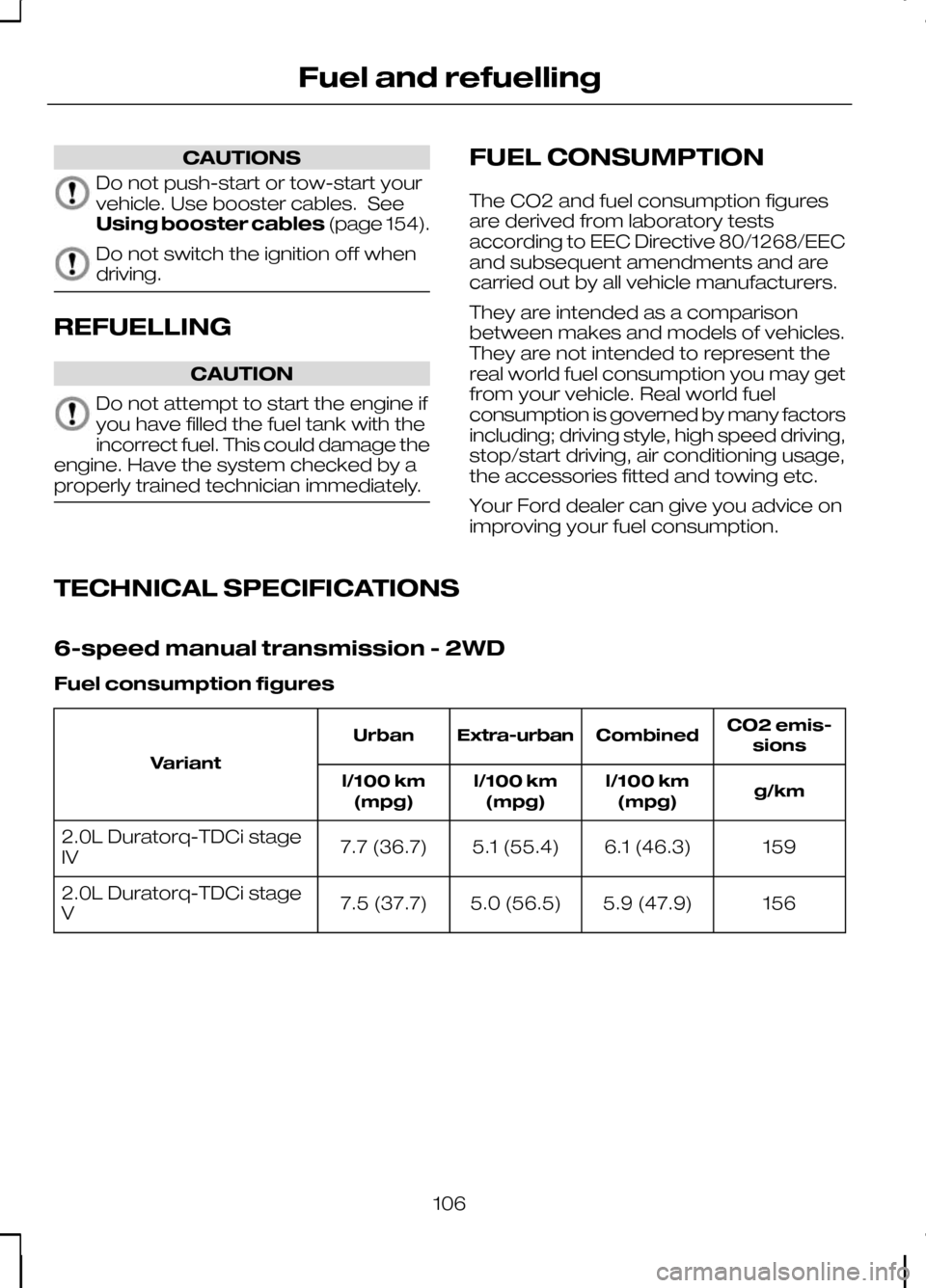
TECHNICAL SPECIFICATIONS
6-speed manual transmission - 2WD
Fuel consumption figures CO2 emis-
sions
Combined
Extra-urban
Urban
Variant g/km
l/100 km
(mpg)
l/100 km
(mpg)
l/100 km
(mpg)
159
6.1 (46.3)
5.1 (55.4)
7.7 (36.7)
2.0L Duratorq-TDCi stage
IV
156
5.9 (47.9)
5.0 (56.5)
7.5 (37.7)
2.0L Duratorq-TDCi stage
V
106
Fuel and refuelling
Page 109 of 226
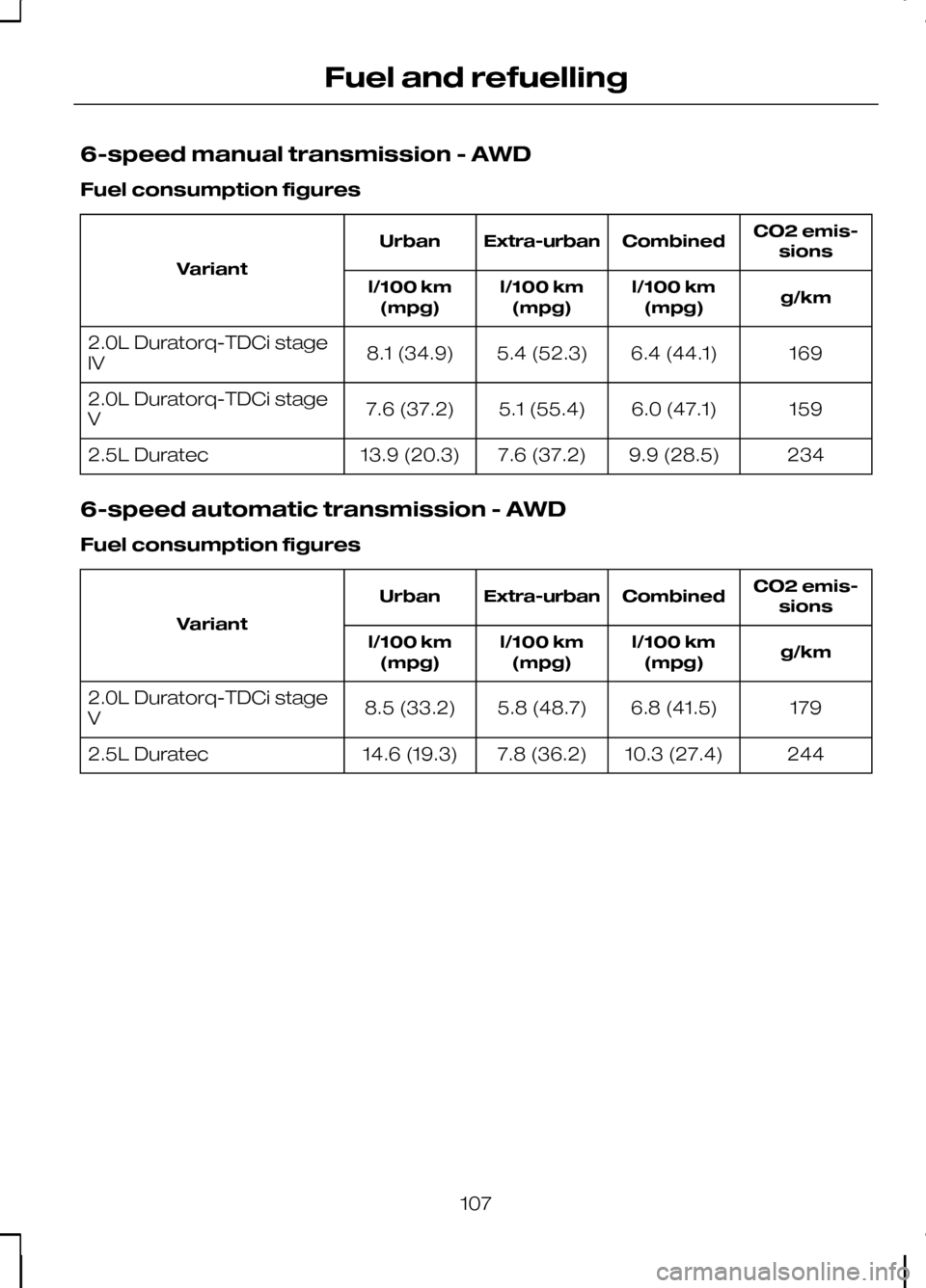
6-speed manual transmission - AWD
Fuel consumption figures
CO2 emis-
sions
Combined
Extra-urban
Urban
Variant g/km
l/100 km
(mpg)
l/100 km
(mpg)
l/100 km
(mpg)
169
6.4 (44.1)
5.4 (52.3)
8.1 (34.9)
2.0L Duratorq-TDCi stage
IV
159
6.0 (47.1)
5.1 (55.4)
7.6 (37.2)
2.0L Duratorq-TDCi stage
V
234
9.9 (28.5)
7.6 (37.2)
13.9 (20.3)
2.5L Duratec
6-speed automatic transmission - AWD
Fuel consumption figures CO2 emis-
sions
Combined
Extra-urban
Urban
Variant g/km
l/100 km
(mpg)
l/100 km
(mpg)
l/100 km
(mpg)
179
6.8 (41.5)
5.8 (48.7)
8.5 (33.2)
2.0L Duratorq-TDCi stage
V
244
10.3 (27.4)
7.8 (36.2)
14.6 (19.3)
2.5L Duratec
107
Fuel and refuelling
Page 110 of 226
MANUAL TRANSMISSION
CAUTION
Do not engage reverse gear when
the vehicle is moving. This can cause
damage to the transmission.
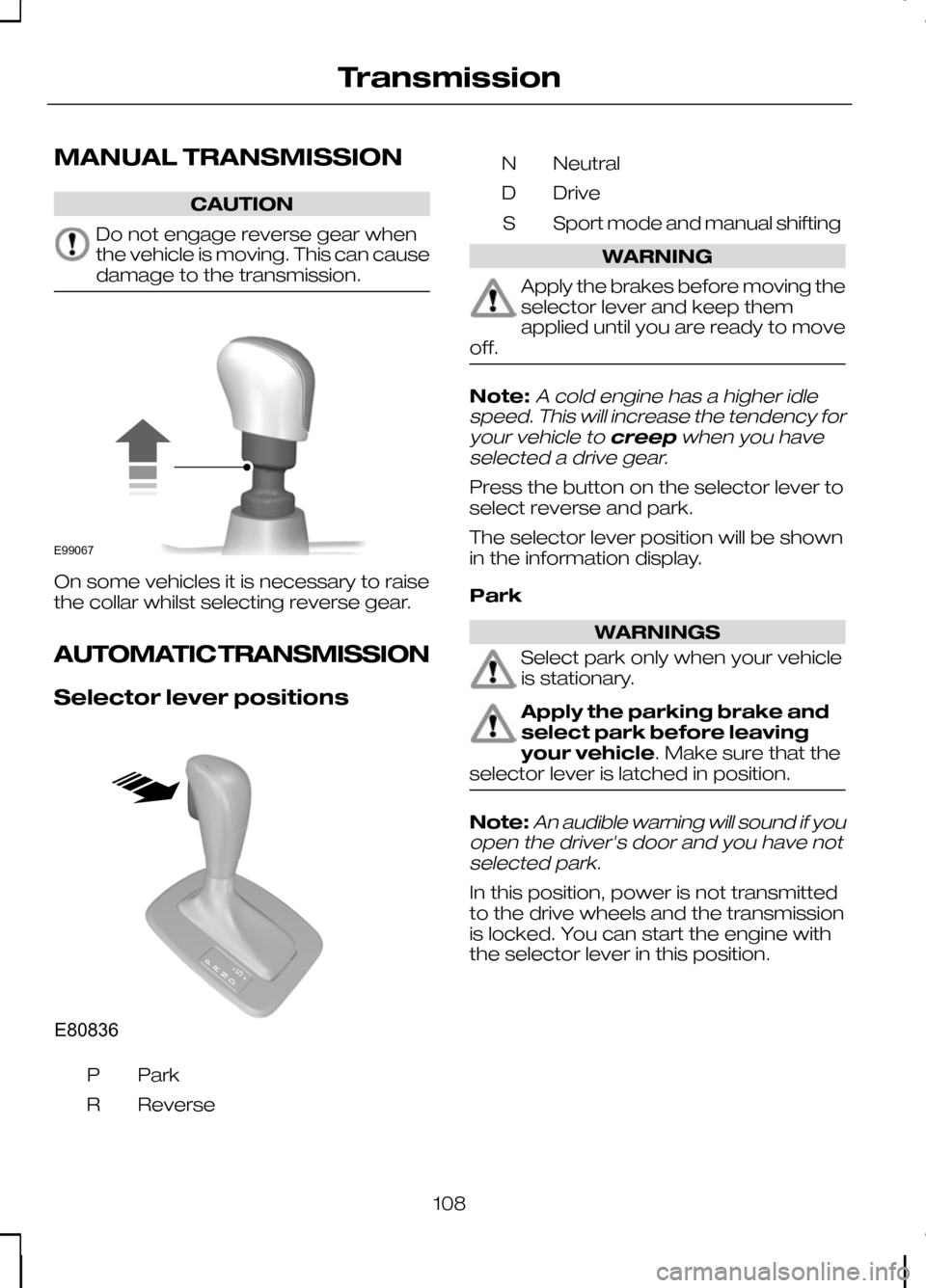
On some vehicles it is necessary to raise
the collar whilst selecting reverse gear.
AUTOMATIC TRANSMISSION
Selector lever positions
ParkP
Reverse
R Neutral
N
Drive
D
Sport mode and manual shifting
S WARNING
Apply the brakes before moving the
selector lever and keep them
applied until you are ready to move
off. Note:A cold engine has a higher idle
speed. This will increase the tendency for
your vehicle to creepwhen you have
selected a drive gear.
Press the button on the selector lever to
select reverse and park.
The selector lever position will be shown
in the information display.
Park WARNINGS
Select park only when your vehicle
is stationary.
Apply the parking brake and
select park before leaving
your vehicle. Make sure that the
selector lever is latched in position. Note:
An audible warning will sound if you
open the driver's door and you have not selected park.
In this position, power is not transmitted
to the drive wheels and the transmission
is locked. You can start the engine with
the selector lever in this position.
108
TransmissionE99067 E80836S
Page 111 of 226
Reverse
WARNING
Select reverse only when your
vehicle is stationary and the engine
is at idle speed.
Neutral
In this position, power is not transmitted
to the drive wheels but the transmission
is not locked. You can start the engine
with the selector lever in this position.
Drive
Select drive to shift automatically through
the forward gears.
The transmission will select the
appropriate gear for optimum
performance based on ambient
temperature, road gradient, vehicle load
and driver input.
Manual shifting - Vehicles with
a 5 speed transmission
WARNING
Do not hold the selector lever
permanently in – or +.
CAUTION
The transmission will automatically
downshift when the engine speed is
too low and upshift when too high.
Note:A shift will occur only when the
vehicle speed and the engine speed are appropriate.
Note:In Select mode the current gear
(1, 2, 3, 4 or 5) will be displayed on the instrument panel.
Move the selector lever to position S.
Push the selector lever forwards to shift
down and pull it backwards to shift up. Gears may be skipped by moving the
selector lever repeatedly at short intervals.
Manual mode also provides a kickdown
function. See
Kickdown.
Sport mode and manual shifting
- Vehicles with a 6 speed
transmission
Note:
A shift will occur only when the
vehicle speed and the engine speed are appropriate.
Note:In Sport mode the transmission
operates as normal but gears are selected more quickly and at higherengine speeds.
Note:In Sport modeSwill be displayed
on the instrument panel.
Sport Mode
Activate Sportmode by moving the
selector lever to position S.Sport mode
will remain active until either you shift
manually up or down the gears or return
the selector lever to position D.
Manual shifting WARNING
Do not hold the selector lever
permanently in – or +.
CAUTION
The transmission will automatically
downshift when the engine speed is
too low and upshift when too high.
Push the selector lever forwards to shift
down and pull it backwards to shift up.
Gears may be skipped by moving the
selector lever repeatedly at short intervals.
Manual mode also provides a kickdown
function. See
Kickdown.
109
Transmission
Page 121 of 226
Amber - 2 metres (79 inches)
D
Amber - centre line of the
projected vehicle path
E
Note:When reversing with a trailer, the
lines on the screen show the vehicle direction and not the trailer.
Deactivating the rear view
camera
Note:
Disengage reverse gear. The
display will stay on for a short period before switching off.
The system will automatically switch off
once the vehicle speed has reached
approximately 15 km/h (9 mph).
Vehicles with parking aid
The display will additionally show a
coloured distance bar. This guide
indicates the distance from the rear
bumper to the detected obstacle.
These are colour coded as follows:
• Green - 0.8 to 1.5 metres (31 to 59
inches).
• Amber - 0.3 to 0.8 metre (12 to 31
inches).
• Red - 0.3 metre (12 inches) or less.
119
Rear view camera