Phone FORD KUGA 2010 1.G User Guide
[x] Cancel search | Manufacturer: FORD, Model Year: 2010, Model line: KUGA, Model: FORD KUGA 2010 1.GPages: 226, PDF Size: 8.07 MB
Page 183 of 226
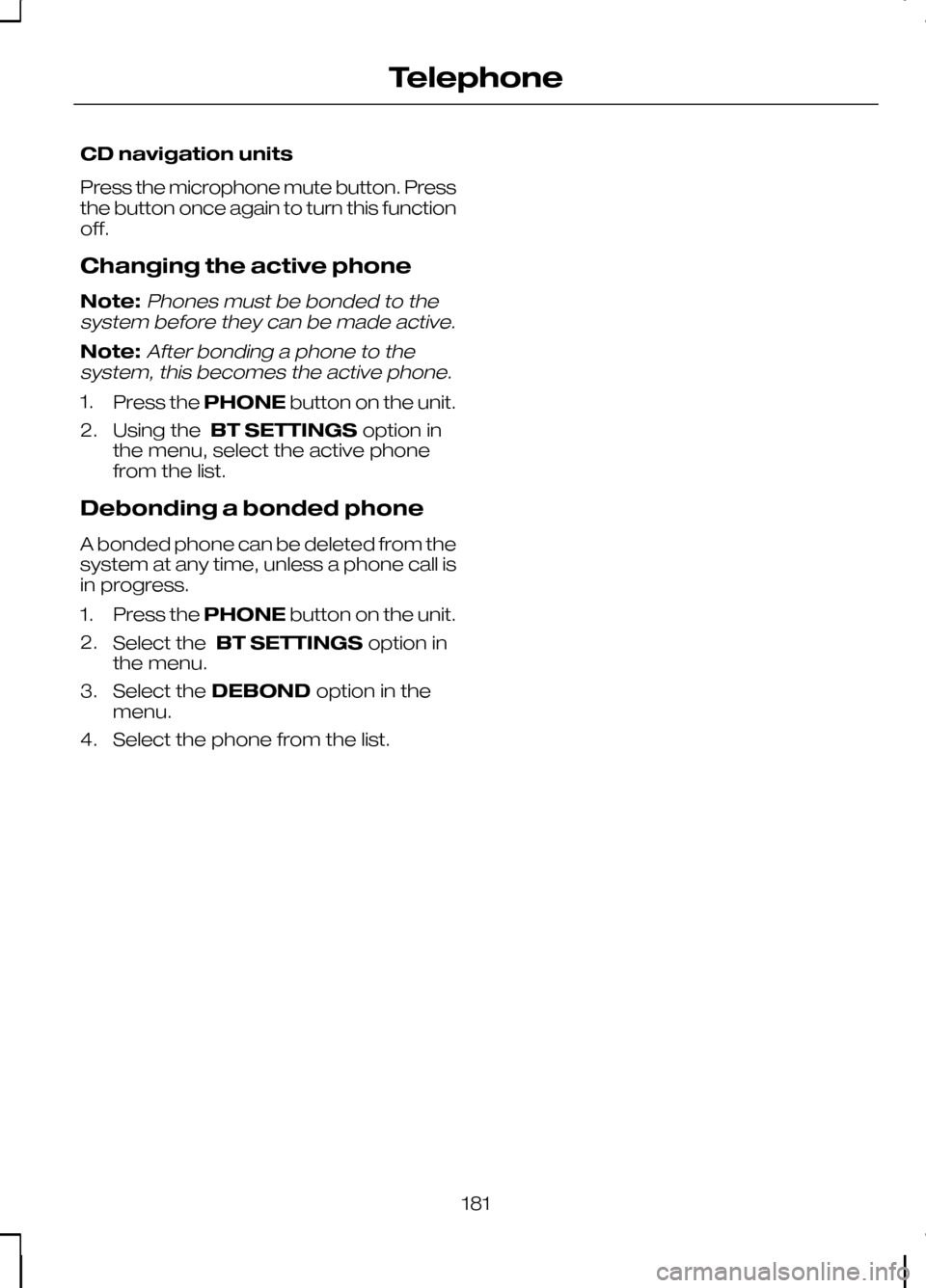
CD navigation units
Press the microphone mute button. Press
the button once again to turn this function
off.
Changing the active phone
Note:Phones must be bonded to the
system before they can be made active.
Note:After bonding a phone to the
system, this becomes the active phone.
1. Press the PHONEbutton on the unit.
2. Using the BT SETTINGS option in
the menu, select the active phone
from the list.
Debonding a bonded phone
A bonded phone can be deleted from the
system at any time, unless a phone call is
in progress.
1. Press the PHONEbutton on the unit.
2. Select the BT SETTINGS option in
the menu.
3. Select the DEBOND option in the
menu.
4. Select the phone from the list.
181
Telephone
Page 184 of 226
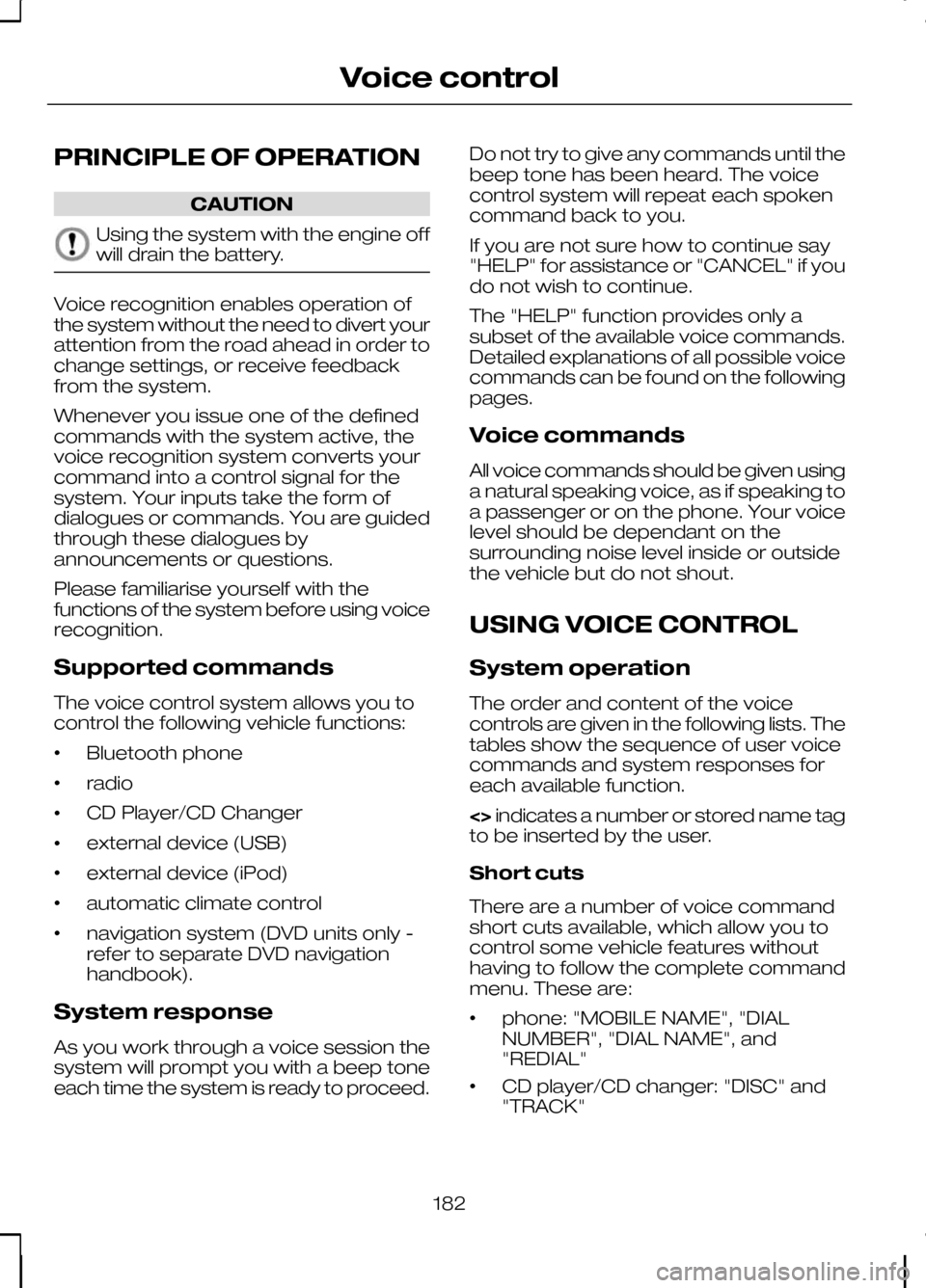
PRINCIPLE OF OPERATION
CAUTION
Using the system with the engine off
will drain the battery.
Voice recognition enables operation of
the system without the need to divert your
attention from the road ahead in order to
change settings, or receive feedback
from the system.
Whenever you issue one of the defined
commands with the system active, the
voice recognition system converts your
command into a control signal for the
system. Your inputs take the form of
dialogues or commands. You are guided
through these dialogues by
announcements or questions.
Please familiarise yourself with the
functions of the system before using voice
recognition.
Supported commands
The voice control system allows you to
control the following vehicle functions:
•
Bluetooth phone
• radio
• CD Player/CD Changer
• external device (USB)
• external device (iPod)
• automatic climate control
• navigation system (DVD units only -
refer to separate DVD navigation
handbook).
System response
As you work through a voice session the
system will prompt you with a beep tone
each time the system is ready to proceed. Do not try to give any commands until the
beep tone has been heard. The voice
control system will repeat each spoken
command back to you.
If you are not sure how to continue say
"HELP" for assistance or "CANCEL" if you
do not wish to continue.
The "HELP" function provides only a
subset of the available voice commands.
Detailed explanations of all possible voice
commands can be found on the following
pages.
Voice commands
All voice commands should be given using
a natural speaking voice, as if speaking to
a passenger or on the phone. Your voice
level should be dependant on the
surrounding noise level inside or outside
the vehicle but do not shout.
USING VOICE CONTROL
System operation
The order and content of the voice
controls are given in the following lists. The
tables show the sequence of user voice
commands and system responses for
each available function.
<>
indicates a number or stored name tag
to be inserted by the user.
Short cuts
There are a number of voice command
short cuts available, which allow you to
control some vehicle features without
having to follow the complete command
menu. These are:
• phone: "MOBILE NAME", "DIAL
NUMBER", "DIAL NAME", and
"REDIAL"
• CD player/CD changer: "DISC" and
"TRACK"
182
Voice control
Page 185 of 226
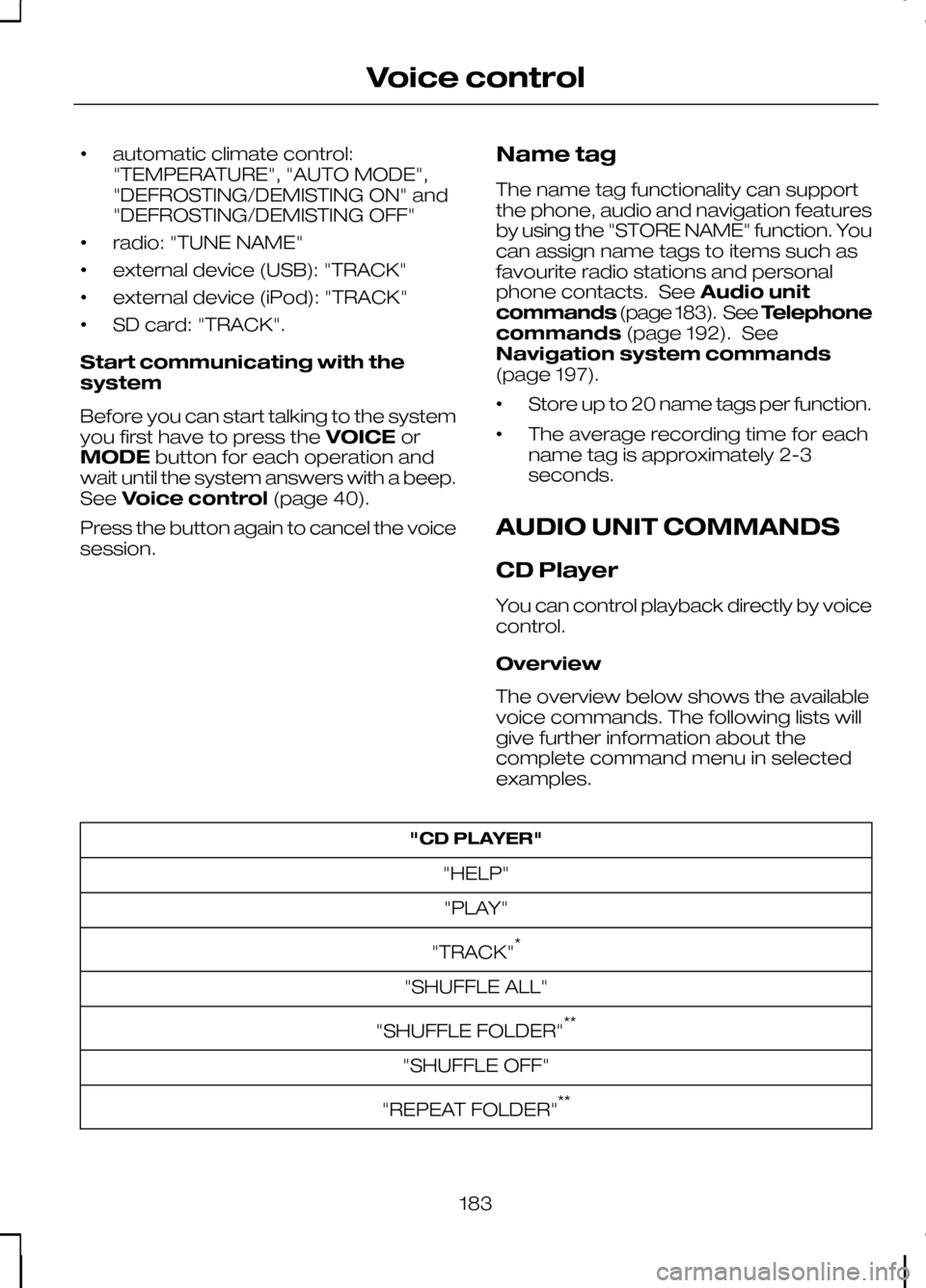
•
automatic climate control:
"TEMPERATURE", "AUTO MODE",
"DEFROSTING/DEMISTING ON" and
"DEFROSTING/DEMISTING OFF"
• radio: "TUNE NAME"
• external device (USB): "TRACK"
• external device (iPod): "TRACK"
• SD card: "TRACK".
Start communicating with the
system
Before you can start talking to the system
you first have to press the VOICEor
MODE button for each operation and
wait until the system answers with a beep.
See Voice control (page 40).
Press the button again to cancel the voice
session. Name tag
The name tag functionality can support
the phone, audio and navigation features
by using the "STORE NAME" function. You
can assign name tags to items such as
favourite radio stations and personal
phone contacts. See
Audio unit
commands (page 183). See Telephone
commands (page 192). See
Navigation system commands
(page 197).
• Store up to 20 name tags per function.
• The average recording time for each
name tag is approximately 2-3
seconds.
AUDIO UNIT COMMANDS
CD Player
You can control playback directly by voice
control.
Overview
The overview below shows the available
voice commands. The following lists will
give further information about the
complete command menu in selected
examples. "CD PLAYER"
"HELP""PLAY"
"TRACK" *
"SHUFFLE ALL"
"SHUFFLE FOLDER" **
"SHUFFLE OFF"
"REPEAT FOLDER" **
183
Voice control
Page 194 of 226
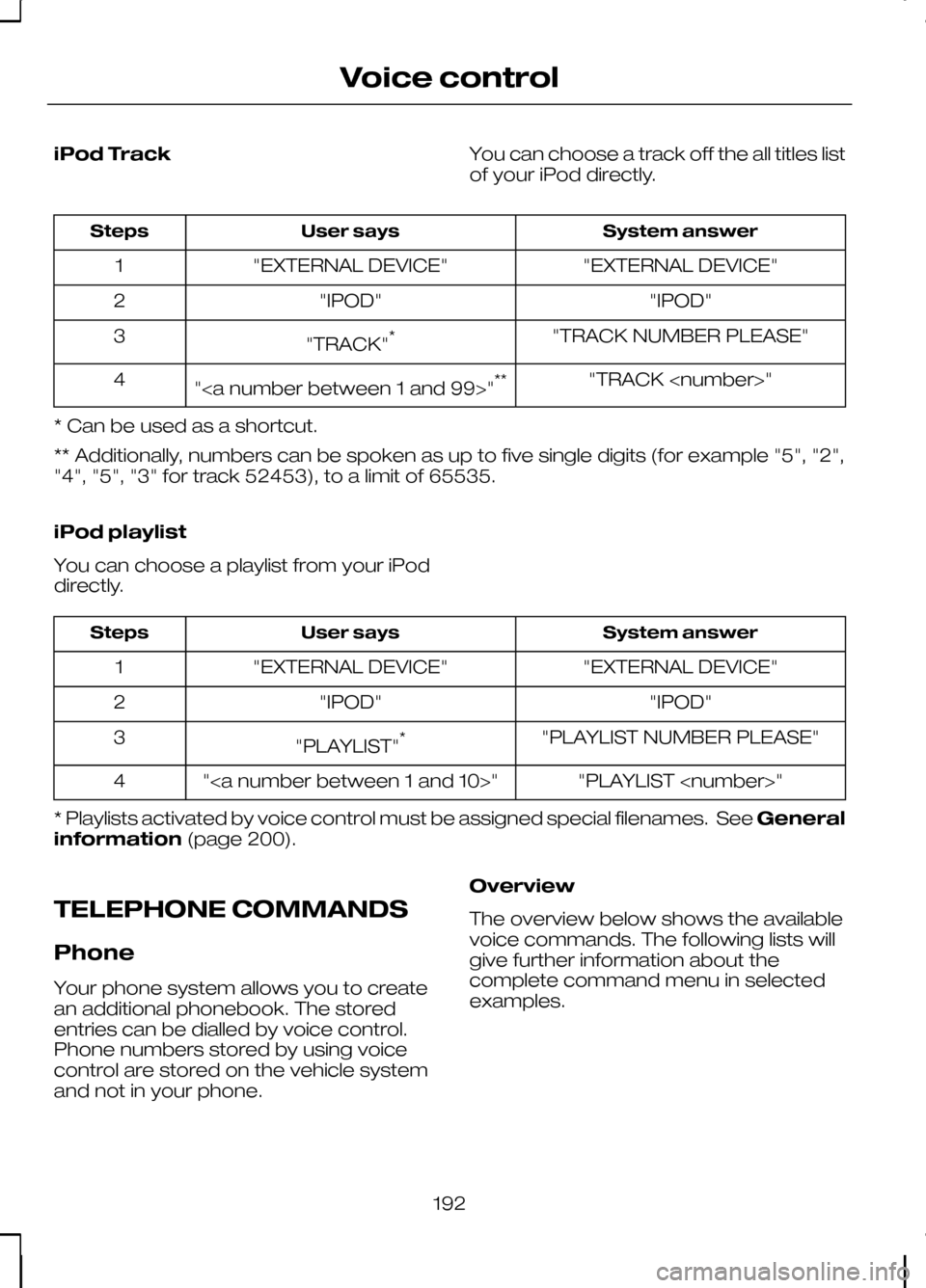
iPod Track
You can choose a track off the all titles list
of your iPod directly. System answer
User says
Steps
"EXTERNAL DEVICE"
"EXTERNAL DEVICE"
1
"IPOD"
"IPOD"
2
"TRACK NUMBER PLEASE"
"TRACK" *
3
"TRACK
"" **
4
* Can be used as a shortcut.
** Additionally, numbers can be spoken as up to five single digits (for example "5", "2",
"4", "5", "3" for track 52453), to a limit of 65535.
iPod playlist
You can choose a playlist from your iPod
directly. System answer
User says
Steps
"EXTERNAL DEVICE"
"EXTERNAL DEVICE"
1
"IPOD"
"IPOD"
2
"PLAYLIST NUMBER PLEASE"
"PLAYLIST" *
3
"PLAYLIST
""
4
* Playlists activated by voice control must be assigned special filenames. See General
information (page 200).
TELEPHONE COMMANDS
Phone
Your phone system allows you to create
an additional phonebook. The stored
entries can be dialled by voice control.
Phone numbers stored by using voice
control are stored on the vehicle system
and not in your phone. Overview
The overview below shows the available
voice commands. The following lists will
give further information about the
complete command menu in selected
examples.
192
Voice control
Page 195 of 226
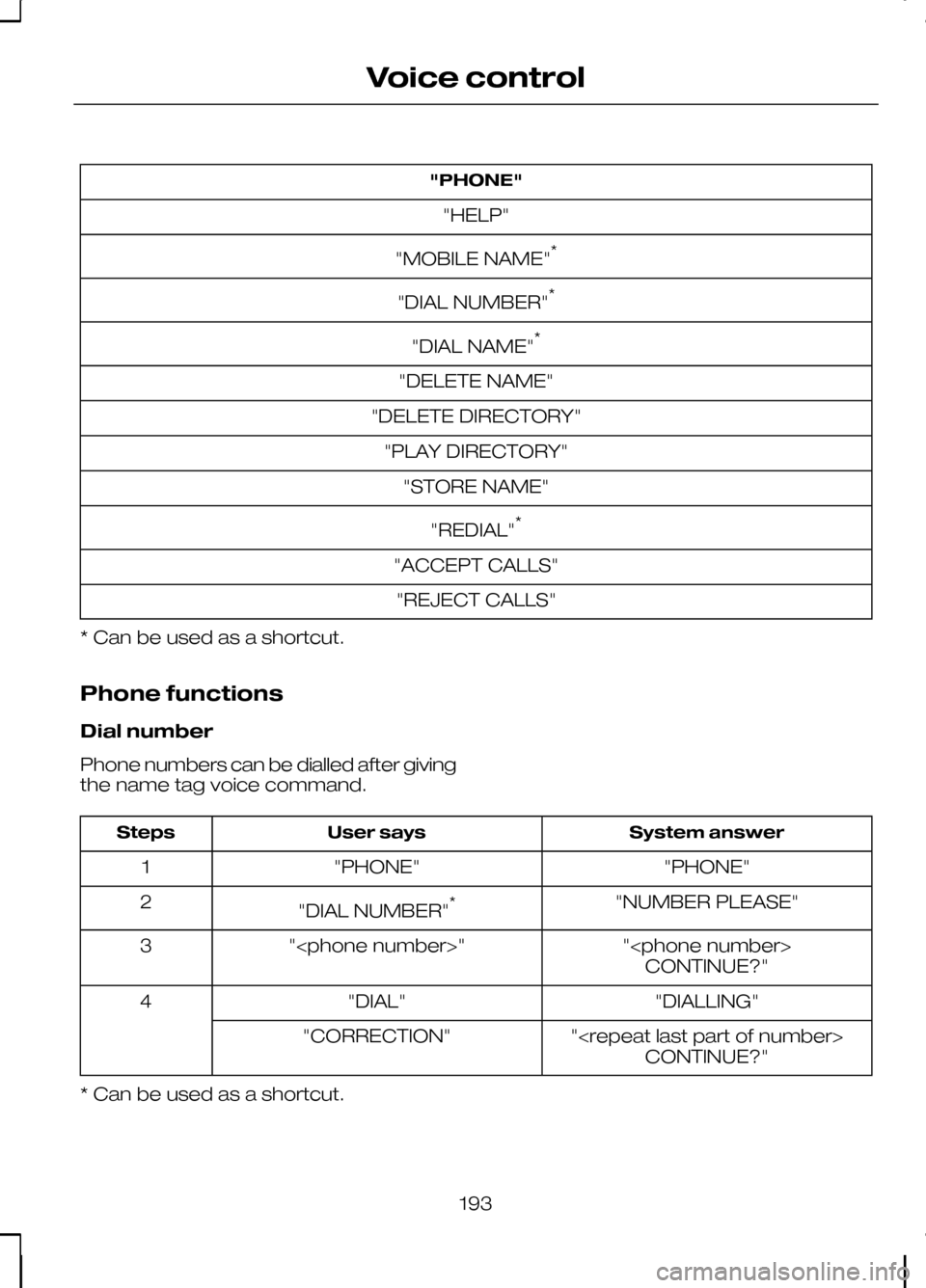
"PHONE"
"HELP"
"MOBILE NAME" *
"DIAL NUMBER" *
"DIAL NAME" *
"DELETE NAME"
"DELETE DIRECTORY" "PLAY DIRECTORY" "STORE NAME"
"REDIAL" *
"ACCEPT CALLS" "REJECT CALLS"
* Can be used as a shortcut.
Phone functions
Dial number
Phone numbers can be dialled after giving
the name tag voice command. System answer
User says
Steps
"PHONE"
"PHONE"
1
"NUMBER PLEASE"
"DIAL NUMBER" *
2
"
"
3
CONTINUE?"
"DIALLING"
"DIAL"
4
"
"CORRECTION"
CONTINUE?"
* Can be used as a shortcut.
193
Voice control
Page 196 of 226
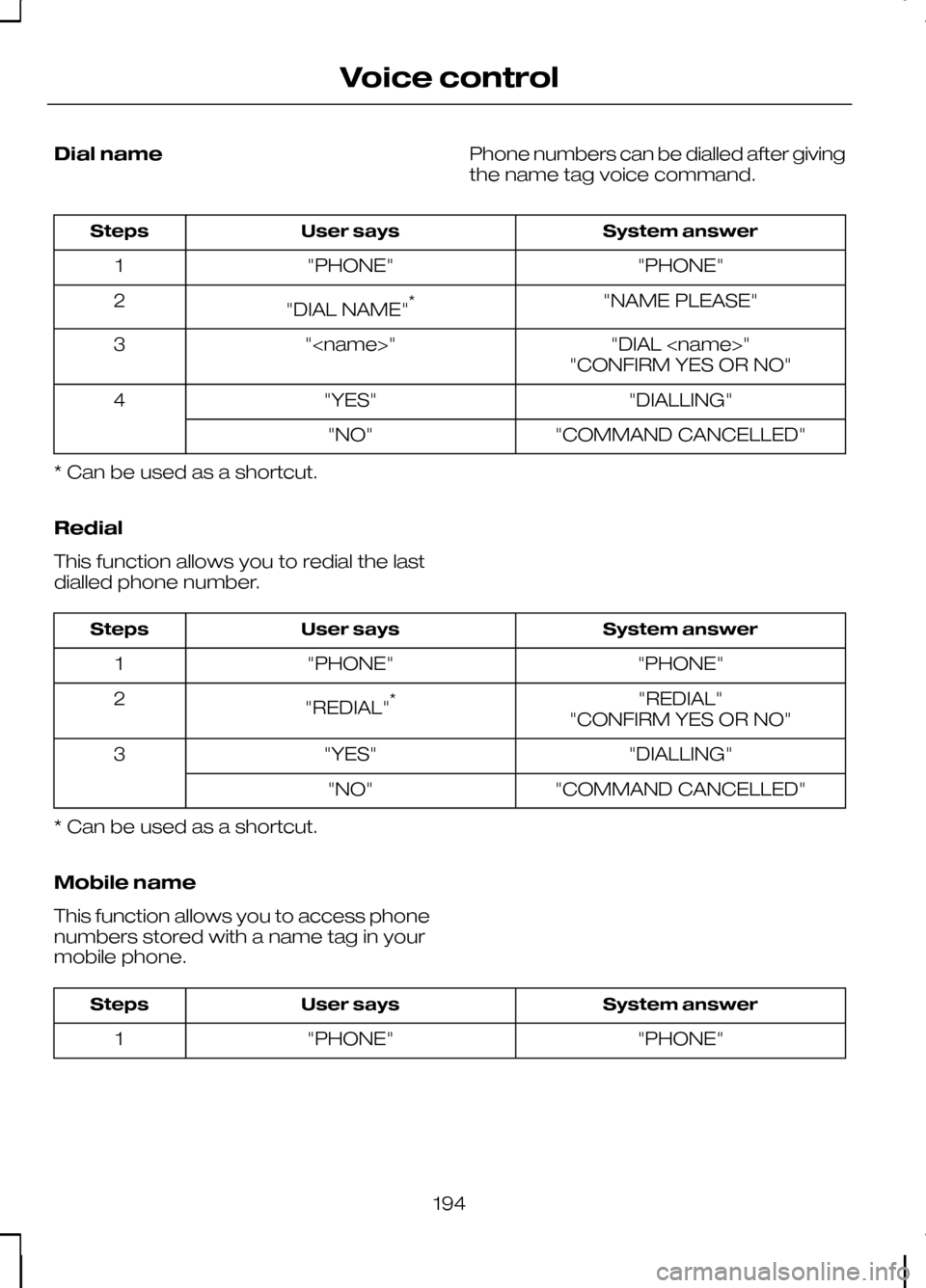
Dial name
Phone numbers can be dialled after giving
the name tag voice command. System answer
User says
Steps
"PHONE"
"PHONE"
1
"NAME PLEASE"
"DIAL NAME" *
2
"DIAL
"
3
"CONFIRM YES OR NO"
"DIALLING"
"YES"
4
"COMMAND CANCELLED"
"NO"
* Can be used as a shortcut.
Redial
This function allows you to redial the last
dialled phone number. System answer
User says
Steps
"PHONE"
"PHONE"
1
"REDIAL"
"REDIAL" *
2
"CONFIRM YES OR NO"
"DIALLING"
"YES"
3
"COMMAND CANCELLED"
"NO"
* Can be used as a shortcut.
Mobile name
This function allows you to access phone
numbers stored with a name tag in your
mobile phone. System answer
User says
Steps
"PHONE"
"PHONE"
1
194
Voice control
Page 197 of 226
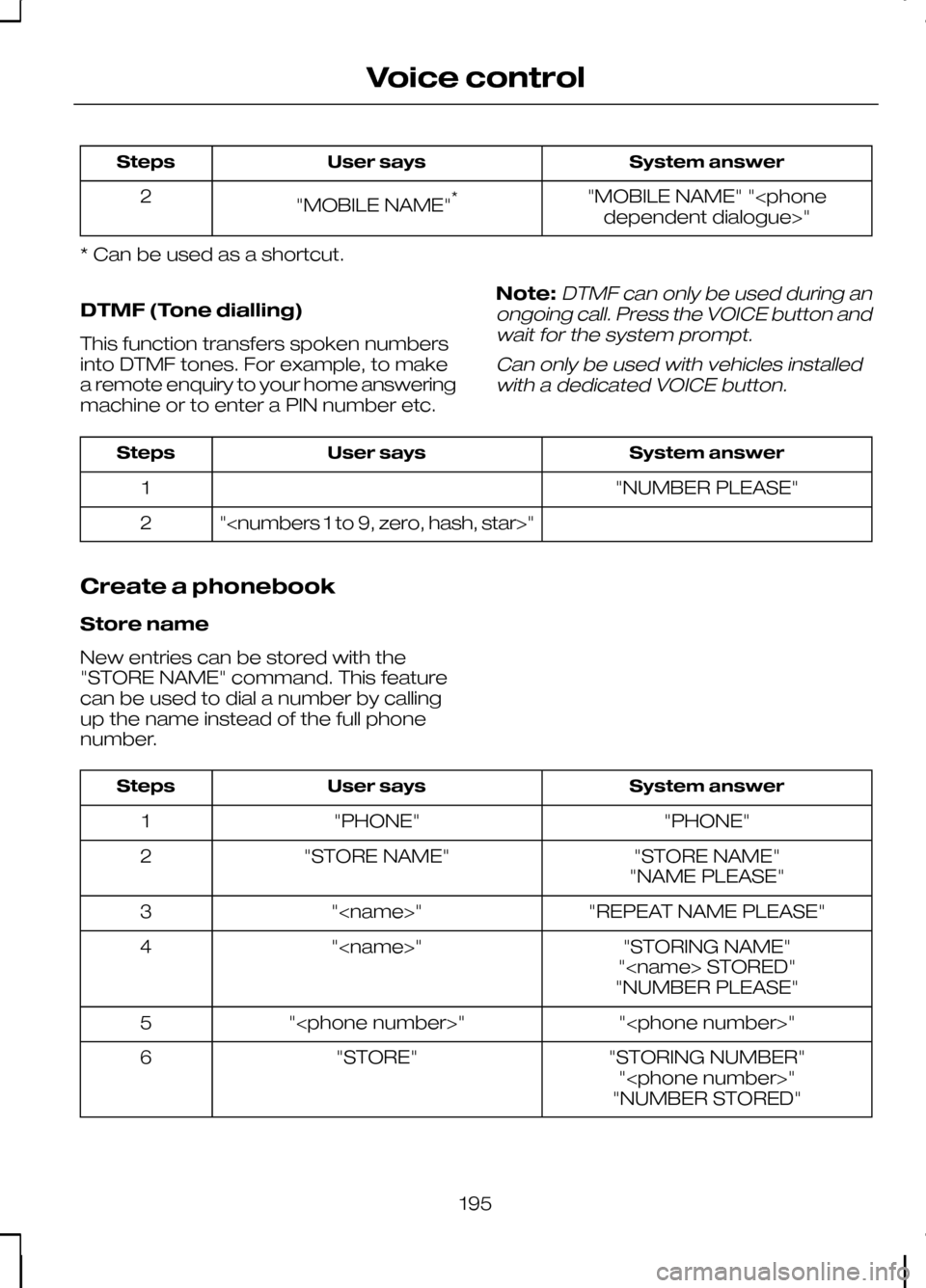
System answer
User says
Steps
"MOBILE NAME" "
"MOBILE NAME"
*
2
* Can be used as a shortcut.
DTMF (Tone dialling)
This function transfers spoken numbers
into DTMF tones. For example, to make
a remote enquiry to your home answering
machine or to enter a PIN number etc. Note:DTMF can only be used during an
ongoing call. Press the VOICE button and wait for the system prompt.
Can only be used with vehicles installedwith a dedicated VOICE button. System answer
User says
Steps
"NUMBER PLEASE"
1
"
2
Create a phonebook
Store name
New entries can be stored with the
"STORE NAME" command. This feature
can be used to dial a number by calling
up the name instead of the full phone
number. System answer
User says
Steps
"PHONE"
"PHONE"
1
"STORE NAME"
"STORE NAME"
2
"NAME PLEASE"
"REPEAT NAME PLEASE"
"
3
"STORING NAME"
"
4
"
"NUMBER PLEASE"
"
"
5
"STORING NUMBER"
"STORE"
6
"
"NUMBER STORED"
195
Voice control
Page 198 of 226
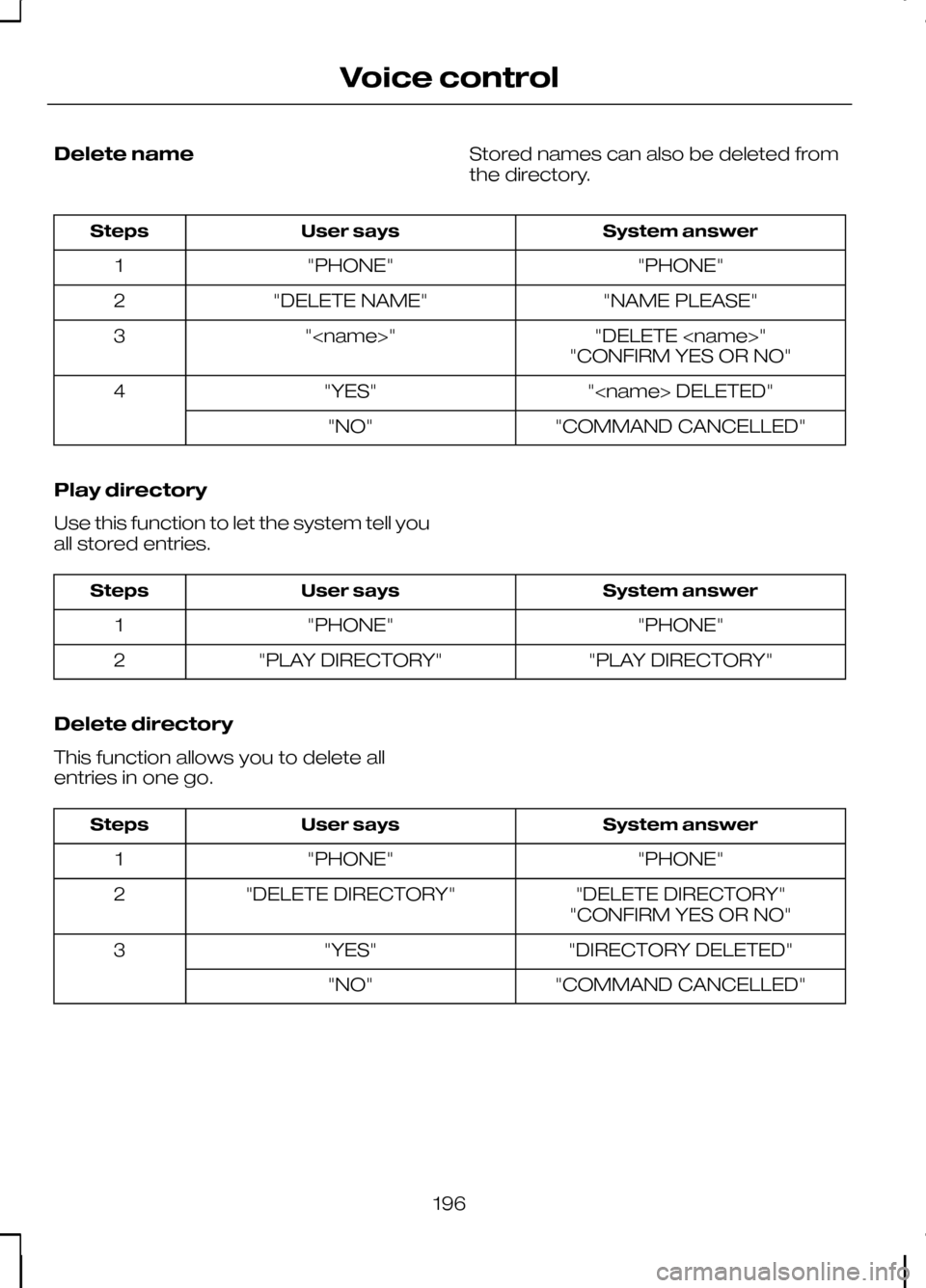
Delete name
Stored names can also be deleted from
the directory. System answer
User says
Steps
"PHONE"
"PHONE"
1
"NAME PLEASE"
"DELETE NAME"
2
"DELETE
"
3
"CONFIRM YES OR NO"
"
"YES"
4
"COMMAND CANCELLED"
"NO"
Play directory
Use this function to let the system tell you
all stored entries. System answer
User says
Steps
"PHONE"
"PHONE"
1
"PLAY DIRECTORY"
"PLAY DIRECTORY"
2
Delete directory
This function allows you to delete all
entries in one go. System answer
User says
Steps
"PHONE"
"PHONE"
1
"DELETE DIRECTORY"
"DELETE DIRECTORY"
2
"CONFIRM YES OR NO"
"DIRECTORY DELETED"
"YES"
3
"COMMAND CANCELLED"
"NO"
196
Voice control
Page 199 of 226
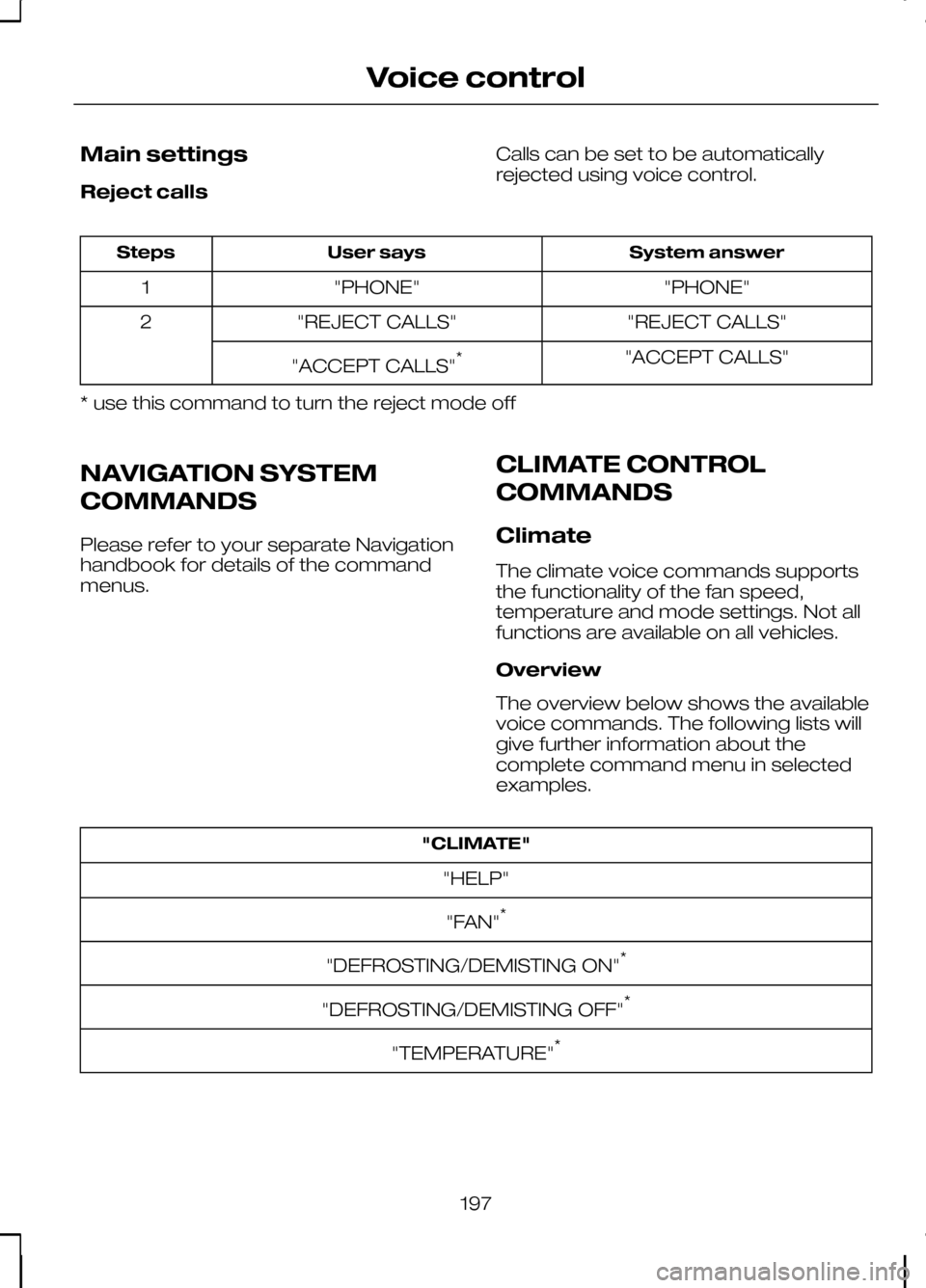
Main settings
Reject calls
Calls can be set to be automatically
rejected using voice control. System answer
User says
Steps
"PHONE"
"PHONE"
1
"REJECT CALLS"
"REJECT CALLS"
2
"ACCEPT CALLS"
"ACCEPT CALLS" *
* use this command to turn the reject mode off
NAVIGATION SYSTEM
COMMANDS
Please refer to your separate Navigation
handbook for details of the command
menus. CLIMATE CONTROL
COMMANDS
Climate
The climate voice commands supports
the functionality of the fan speed,
temperature and mode settings. Not all
functions are available on all vehicles.
Overview
The overview below shows the available
voice commands. The following lists will
give further information about the
complete command menu in selected
examples."CLIMATE"
"HELP"
"FAN" *
"DEFROSTING/DEMISTING ON" *
"DEFROSTING/DEMISTING OFF" *
"TEMPERATURE" *
197
Voice control
Page 203 of 226
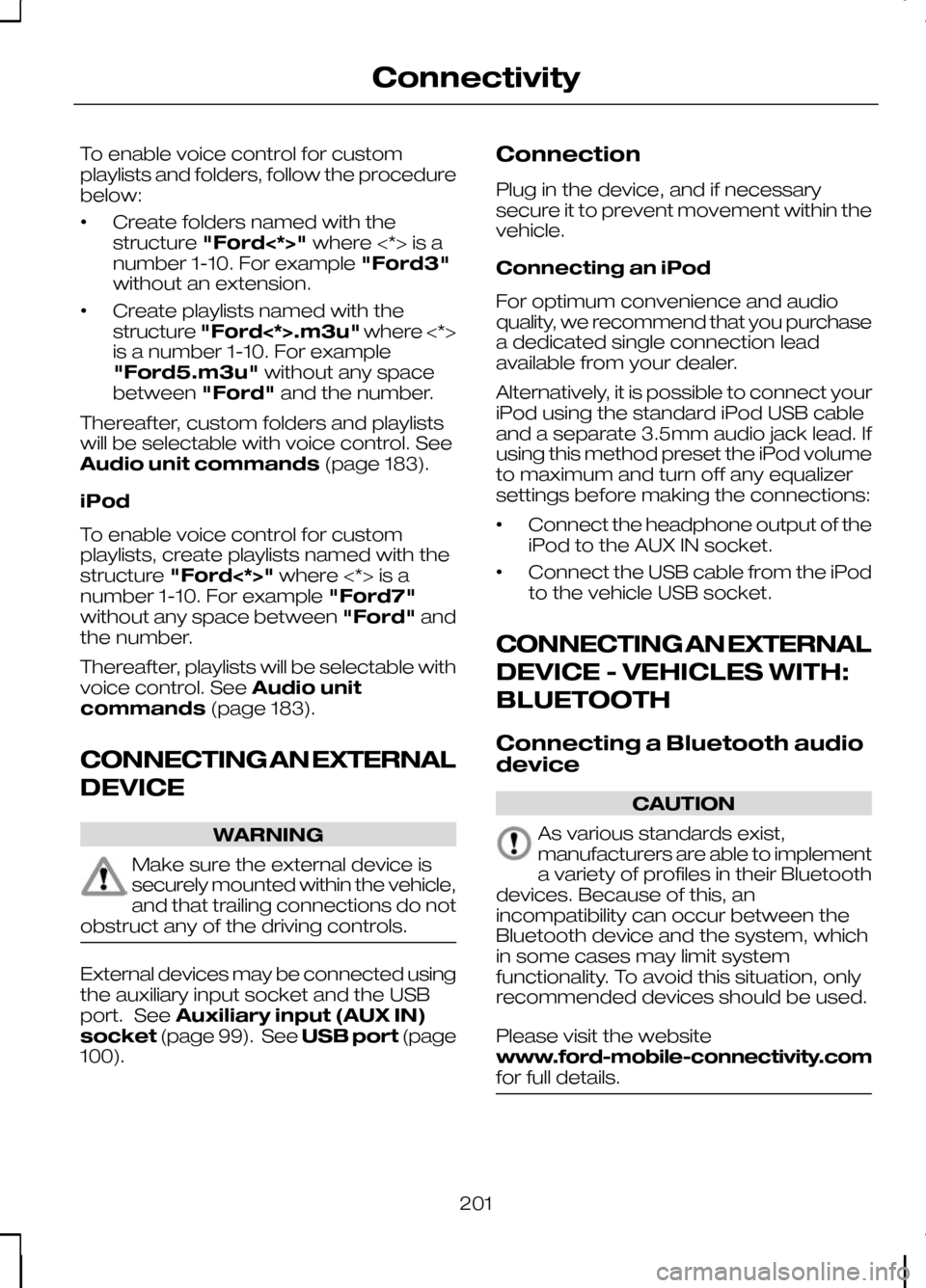
To enable voice control for custom
playlists and folders, follow the procedure
below:
•
Create folders named with the
structure
"Ford<*>" where <*> is a
number 1-10. For example "Ford3"
without an extension.
• Create playlists named with the
structure
"Ford<*>.m3u" where <*>
is a number 1-10. For example
"Ford5.m3u" without any space
between "Ford"and the number.
Thereafter, custom folders and playlists
will be selectable with voice control. See
Audio unit commands (page 183).
iPod
To enable voice control for custom
playlists, create playlists named with the
structure "Ford<*>" where <*> is a
number 1-10. For example "Ford7"
without any space between "Ford"and
the number.
Thereafter, playlists will be selectable with
voice control. See Audio unit
commands (page 183).
CONNECTING AN EXTERNAL
DEVICE WARNING
Make sure the external device is
securely mounted within the vehicle,
and that trailing connections do not
obstruct any of the driving controls. External devices may be connected using
the auxiliary input socket and the USB
port. See
Auxiliary input (AUX IN)
socket (page 99). See USB port(page
100). Connection
Plug in the device, and if necessary
secure it to prevent movement within the
vehicle.
Connecting an iPod
For optimum convenience and audio
quality, we recommend that you purchase
a dedicated single connection lead
available from your dealer.
Alternatively, it is possible to connect your
iPod using the standard iPod USB cable
and a separate 3.5mm audio jack lead. If
using this method preset the iPod volume
to maximum and turn off any equalizer
settings before making the connections:
•
Connect the headphone output of the
iPod to the AUX IN socket.
• Connect the USB cable from the iPod
to the vehicle USB socket.
CONNECTING AN EXTERNAL
DEVICE - VEHICLES WITH:
BLUETOOTH
Connecting a Bluetooth audio
device CAUTION
As various standards exist,
manufacturers are able to implement
a variety of profiles in their Bluetooth
devices. Because of this, an
incompatibility can occur between the
Bluetooth device and the system, which
in some cases may limit system
functionality. To avoid this situation, only
recommended devices should be used.
Please visit the website
www.ford-mobile-connectivity.com
for full details. 201
Connectivity