climate control FORD KUGA 2010 1.G User Guide
[x] Cancel search | Manufacturer: FORD, Model Year: 2010, Model line: KUGA, Model: FORD KUGA 2010 1.GPages: 226, PDF Size: 8.07 MB
Page 86 of 226
Note:For information on the automatic
climate control, on vehicles fitted with a combined Navigation and automaticclimate control system, see separatehandbook.
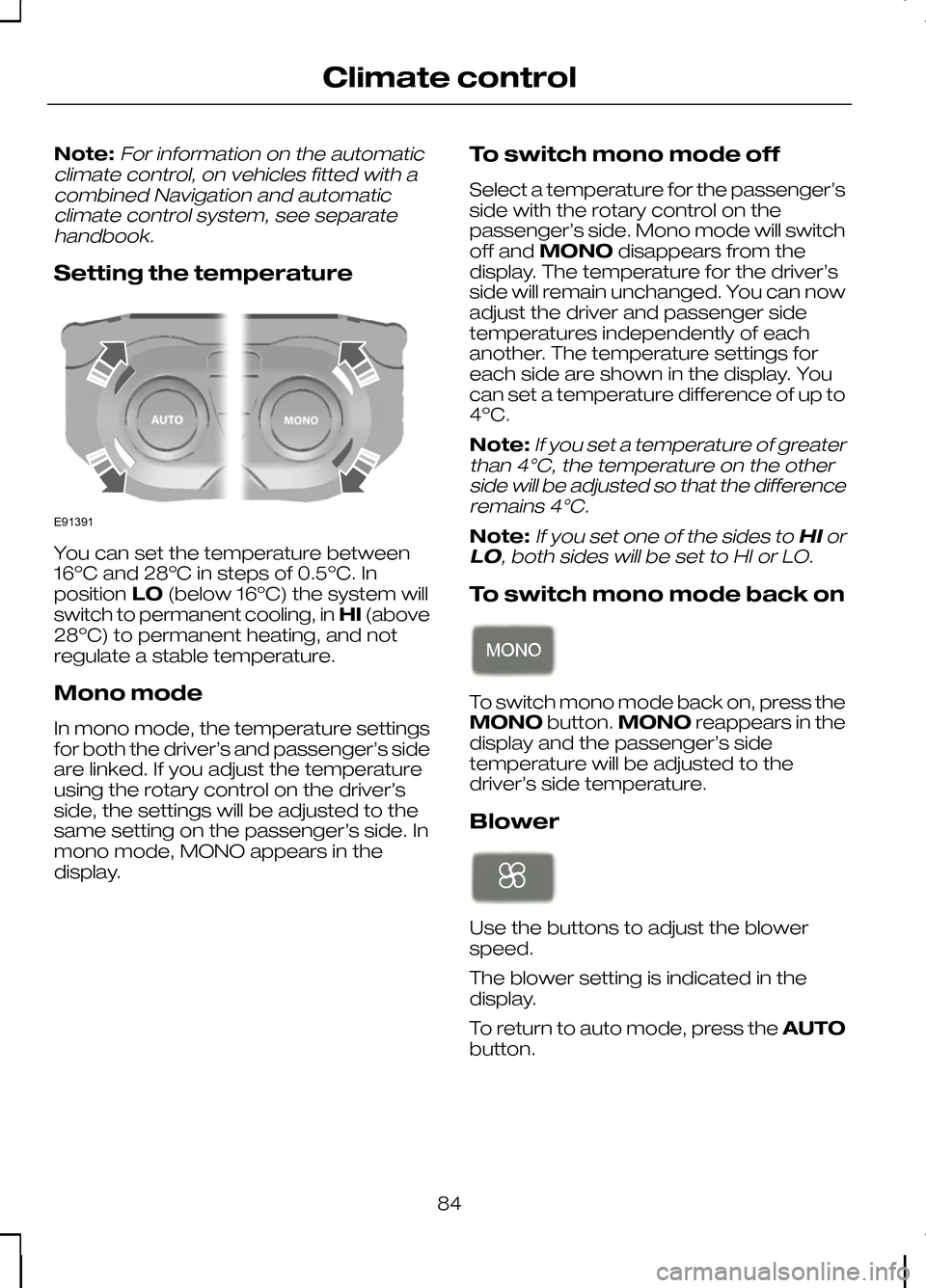
Setting the temperature You can set the temperature between
16ºC and 28ºC in steps of 0.5ºC. In
position
LO(below 16ºC) the system will
switch to permanent cooling, in HI(above
28ºC) to permanent heating, and not
regulate a stable temperature.
Mono mode
In mono mode, the temperature settings
for both the driver’s and passenger’s side
are linked. If you adjust the temperature
using the rotary control on the driver’s
side, the settings will be adjusted to the
same setting on the passenger’s side. In
mono mode, MONO appears in the
display. To switch mono mode off
Select a temperature for the passenger’s
side with the rotary control on the
passenger’s side. Mono mode will switch
off and
MONO disappears from the
display. The temperature for the driver’s
side will remain unchanged. You can now
adjust the driver and passenger side
temperatures independently of each
another. The temperature settings for
each side are shown in the display. You
can set a temperature difference of up to
4ºC.
Note:
If you set a temperature of greater
than 4°C, the temperature on the other side will be adjusted so that the differenceremains 4°C.
Note:If you set one of the sides to HIor
LO, both sides will be set to HI or LO.
To switch mono mode back on To switch mono mode back on, press the
MONO
button.MONO reappears in the
display and the passenger’s side
temperature will be adjusted to the
driver’s side temperature.
Blower Use the buttons to adjust the blower
speed.
The blower setting is indicated in the
display.
To return to auto mode, press the
AUTO
button.
84
Climate controlE91391
Page 87 of 226
Air distribution
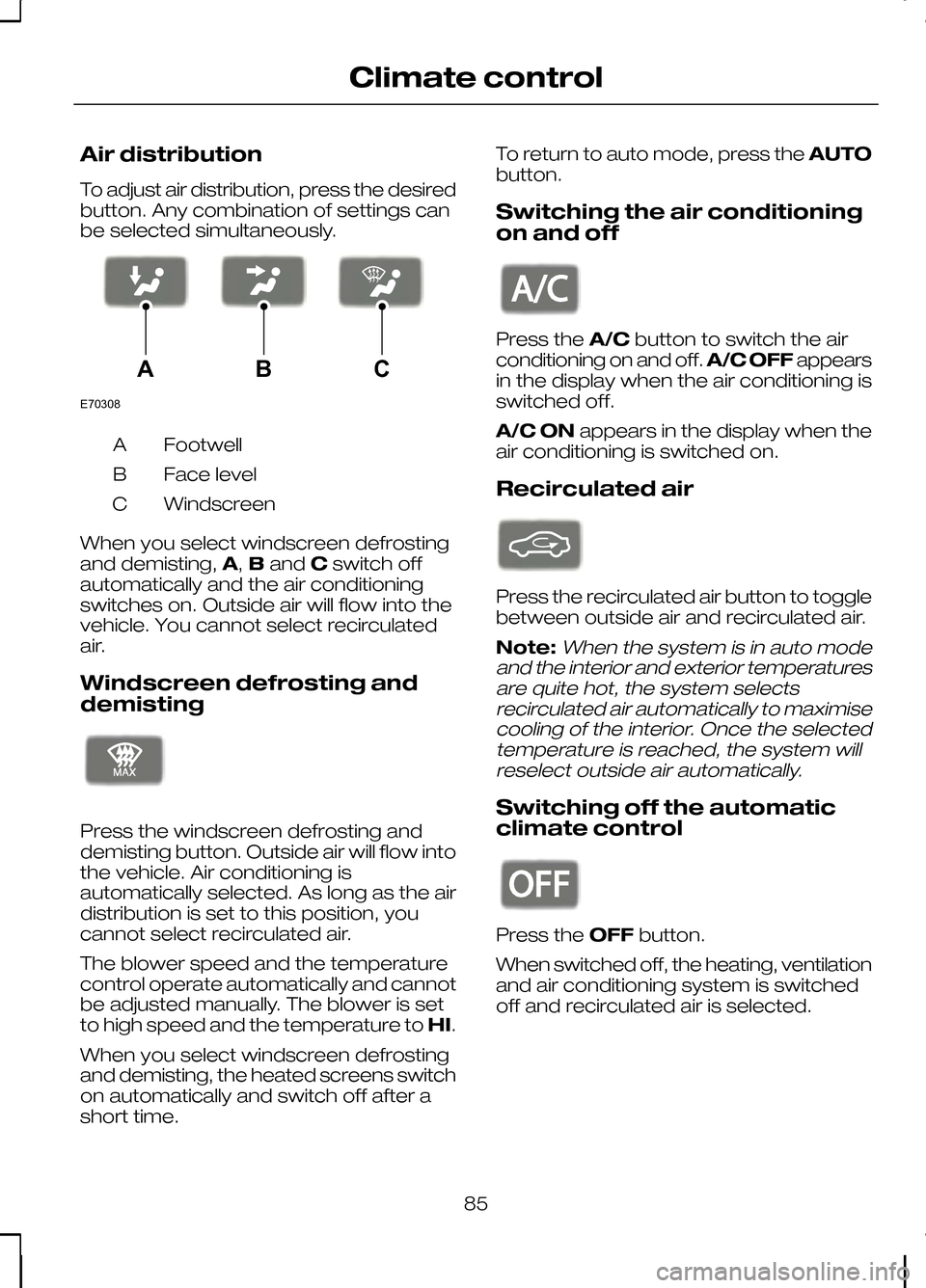
To adjust air distribution, press the desired
button. Any combination of settings can
be selected simultaneously.
Footwell
A
Face level
B
Windscreen
C
When you select windscreen defrosting
and demisting, A,Band Cswitch off
automatically and the air conditioning
switches on. Outside air will flow into the
vehicle. You cannot select recirculated
air.
Windscreen defrosting and
demisting Press the windscreen defrosting and
demisting button. Outside air will flow into
the vehicle. Air conditioning is
automatically selected. As long as the air
distribution is set to this position, you
cannot select recirculated air.
The blower speed and the temperature
control operate automatically and cannot
be adjusted manually. The blower is set
to high speed and the temperature to
HI.
When you select windscreen defrosting
and demisting, the heated screens switch
on automatically and switch off after a
short time. To return to auto mode, press the
AUTO
button.
Switching the air conditioning
on and off Press the
A/Cbutton to switch the air
conditioning on and off. A/C OFFappears
in the display when the air conditioning is
switched off.
A/C ON appears in the display when the
air conditioning is switched on.
Recirculated air Press the recirculated air button to toggle
between outside air and recirculated air.
Note:When the system is in auto mode
and the interior and exterior temperatures are quite hot, the system selectsrecirculated air automatically to maximisecooling of the interior. Once the selectedtemperature is reached, the system willreselect outside air automatically.
Switching off the automatic
climate control Press the
OFFbutton.
When switched off, the heating, ventilation
and air conditioning system is switched
off and recirculated air is selected.
85
Climate controlE70308ABC E91392 E91393 E91394
Page 88 of 226
HEATED WINDOWS AND
MIRRORS
Heated windows
Use the heated windows to defrost or
demist the windscreen or rear window.
Note:The heated windows operate only
when the engine is running.
Heated windscreen Heated rear window
Heated exterior mirrors
Electric exterior mirrors are fitted with a
heating element that will defrost or demist
the mirror glass. They will switch on
automatically when you switch the heated
rear window on.
AUXILIARY HEATER
Parking heater
WARNINGS
The parking heater must not be
operated at filling stations, near
sources of combustible vapours or
dust or in enclosed spaces. The parking heater should be
switched on for approximately 10
minutes at least once a month all
year round. This prevents the water pump
and heater motor from seizing. Note:
The parking heater will only
operate if there is at least 7.5 litres (1.6 gallons) of fuel in the fuel tank and theambient temperature is below 15°C(59°F). The heater will not operate if thebattery is low.
Note:The heating depends on the
outside air temperature.
Note:When the parking heater is
activated, exhaust fumes may come from under the sides of the vehicle. This isnormal.
Note:On vehicles with manual climate
control the heating of the vehicle interior is dependent on the temperature, airdistribution and blower control settings.
The parking heater operates
independently of the vehicle heater by
heating the engine’s coolant circuit. It is
fed from the vehicle fuel tank. You can
also use it while the vehicle is in motion to
help the vehicle heater warm up the
interior more quickly.
Used properly, the parking heater
provides the following benefits:
• It preheats the interior of the vehicle.
• It keeps the windows clear of ice in
the event of frost and prevents
condensation.
• It avoids cold starts and allows the
engine to reach operating
temperature sooner.
To prevent the battery from discharging:
• Once the parking heater has
performed one heating cycle, the next
programmed heating cycle will only
be carried out if you have started the
vehicle’s engine in between.
• After a heating cycle, drive the vehicle
for at least the period of the heating
cycle.
86
Climate controlE72506 E72507
Page 89 of 226
Programming the parking heater
Note:The programmed time is the time
at which you wish the vehicle to be warm and ready to drive, not the time at whichthe heater switches on.
Note:You must programme the times
at least 70 minutes in advance of the time you wish to set.
Note:You must set the time and date
correctly.
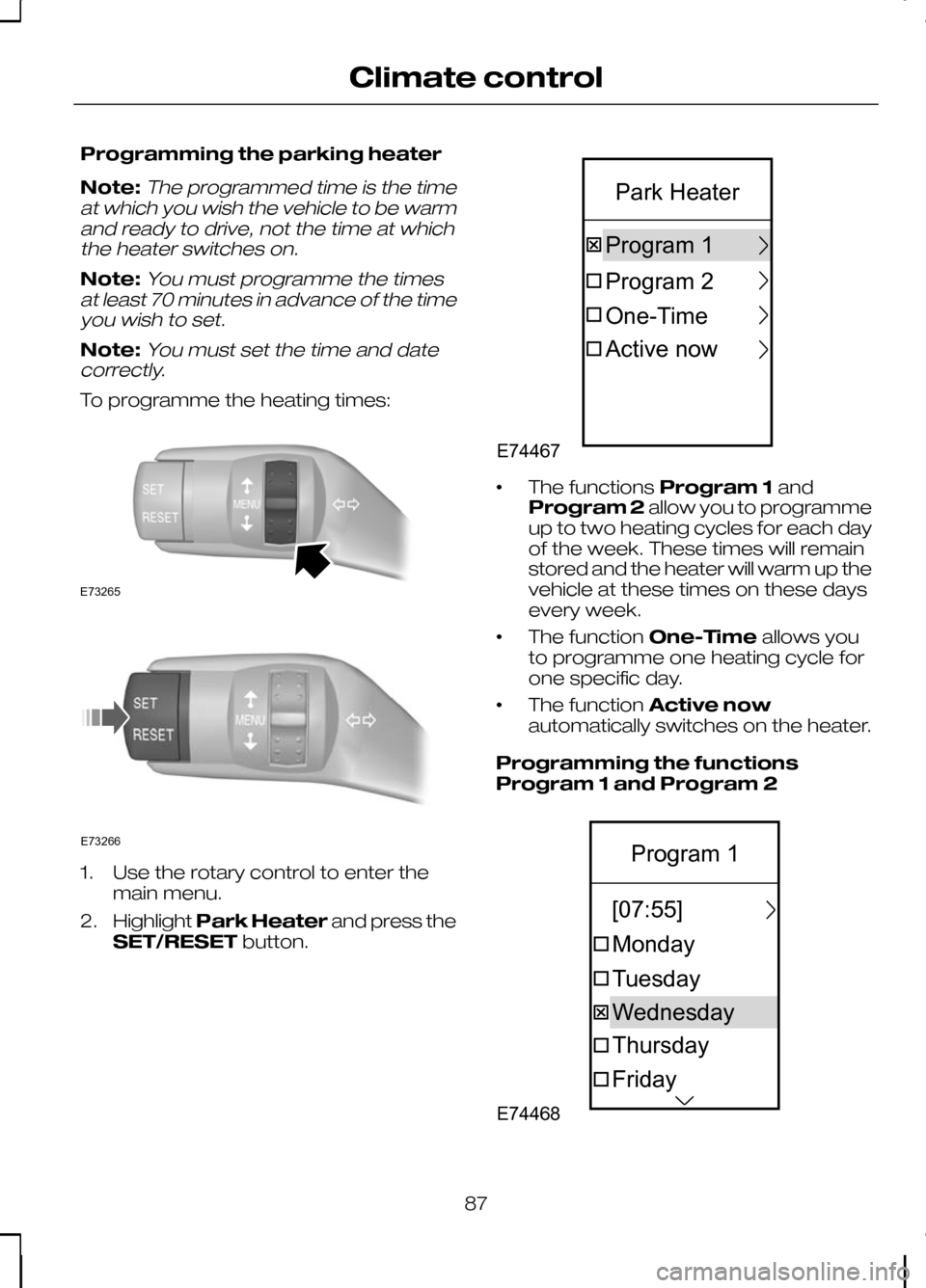
To programme the heating times: 1. Use the rotary control to enter the
main menu.
2. Highlight Park Heater and press the
SET/RESET button. •
The functions
Program 1and
Program 2 allow you to programme
up to two heating cycles for each day
of the week. These times will remain
stored and the heater will warm up the
vehicle at these times on these days
every week.
• The function
One-Timeallows you
to programme one heating cycle for
one specific day.
• The function
Active now
automatically switches on the heater.
Programming the functions
Program 1 and Program 2 87
Climate controlE73265 E73266 E74467One-TimeProgram1Program2ActivenowParkHeater E74468FridayThursdayTuesdayMondayWednesday[07:55]Program1
Page 90 of 226
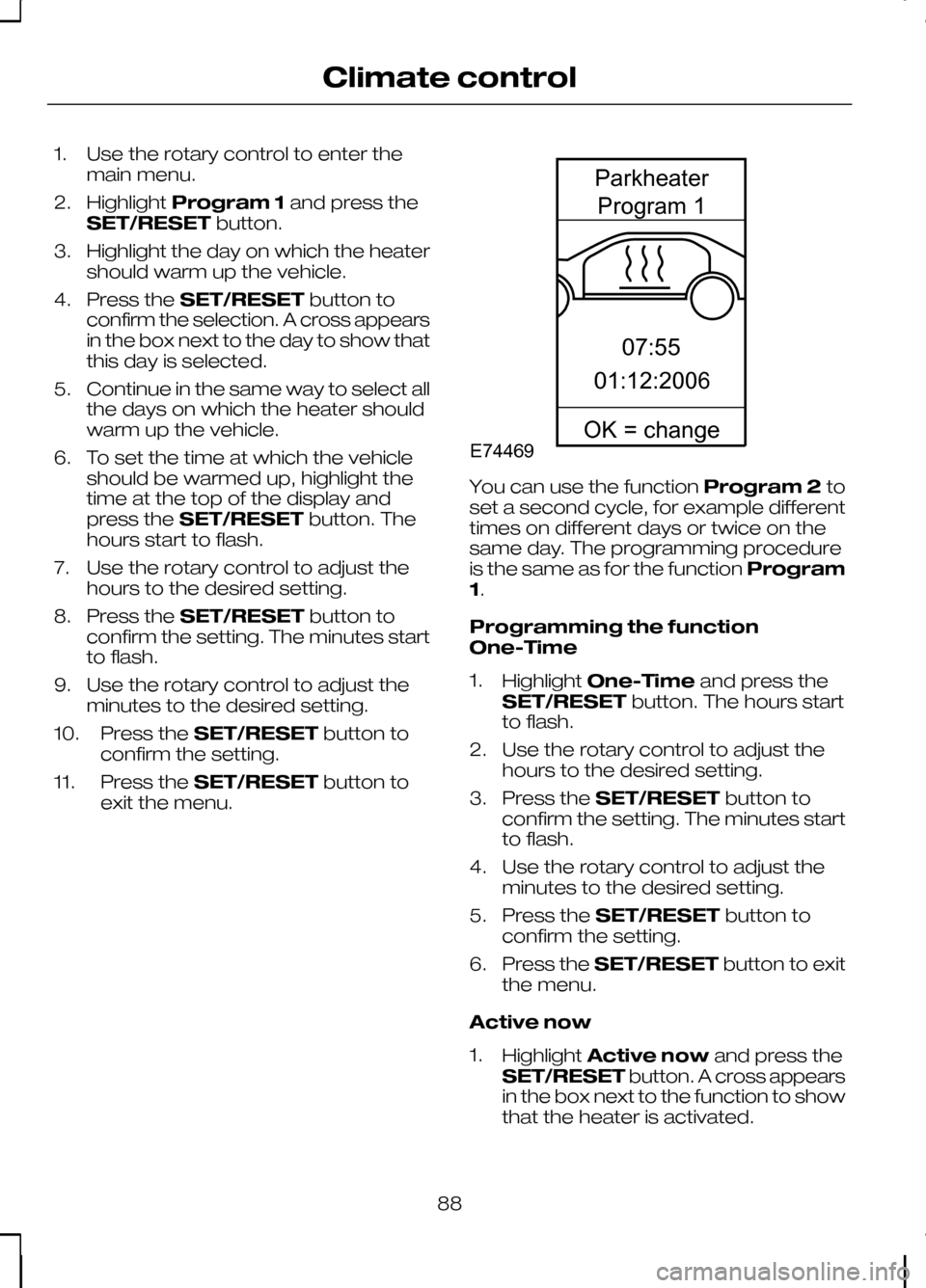
1. Use the rotary control to enter the
main menu.
2. Highlight Program 1 and press the
SET/RESET button.
3. Highlight the day on which the heater should warm up the vehicle.
4. Press the SET/RESET button to
confirm the selection. A cross appears
in the box next to the day to show that
this day is selected.
5. Continue in the same way to select all the days on which the heater should
warm up the vehicle.
6. To set the time at which the vehicle should be warmed up, highlight the
time at the top of the display and
press the SET/RESET button. The
hours start to flash.
7. Use the rotary control to adjust the hours to the desired setting.
8. Press the SET/RESET button to
confirm the setting. The minutes start
to flash.
9. Use the rotary control to adjust the minutes to the desired setting.
10. Press the SET/RESET button to
confirm the setting.
11. Press the SET/RESET button to
exit the menu. You can use the function
Program 2to
set a second cycle, for example different
times on different days or twice on the
same day. The programming procedure
is the same as for the function Program
1.
Programming the function
One-Time
1. Highlight One-Time and press the
SET/RESET button. The hours start
to flash.
2. Use the rotary control to adjust the hours to the desired setting.
3. Press the SET/RESET button to
confirm the setting. The minutes start
to flash.
4. Use the rotary control to adjust the minutes to the desired setting.
5. Press the SET/RESET button to
confirm the setting.
6. Press the SET/RESET button to exit
the menu.
Active now
1. Highlight Active now and press the
SET/RESET button. A cross appears
in the box next to the function to show
that the heater is activated.
88
Climate controlE7446907:5501:12:2006ParkheaterProgram1OK=change
Page 91 of 226
To deactivate the heater, highlight
Active
now and press the SET/RESETbutton
again.
Diesel auxiliary heater
(depending on country)
The diesel auxiliary heater (PTC electrical
heater) aids in warming the engine and
the vehicle interior on vehicles with a
diesel engine. It is switched on or off
automatically depending on the outside
air temperature, the coolant temperature
and the alternator load.
Fuel operated heater
(depending on country)
The fuel operated heater aids in warming
the engine and the vehicle interior on
vehicles with a petrol or diesel engine. It
is switched on or off automatically
depending on the outside air temperature
and the coolant temperature, unless you
have deactivated it. When the fuel
operated heater is operating, a message
appears in the information display. See
Information displays (page 68).
To deactivate the fuel operated heater:
1. Use the rotary control to enter the main menu.
2. Highlight Setupand press the
SET/RESET button.
3. Highlight Aux. Heater and press the
SET/RESET button. A cross appears
in the box when the heater is
activated.
4. Press the SET/RESET button to exit
the menu.
89
Climate control
Page 137 of 226
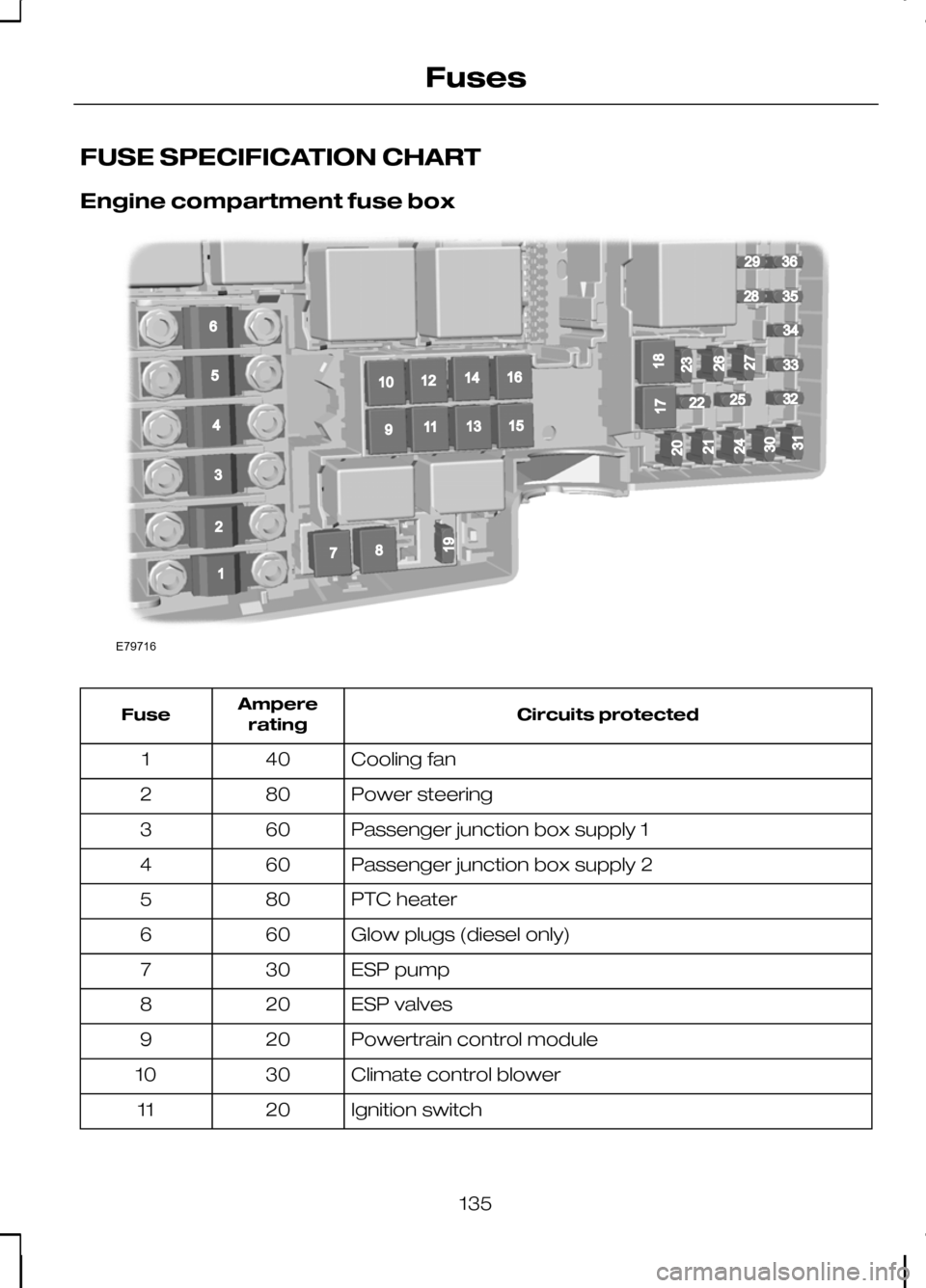
FUSE SPECIFICATION CHART
Engine compartment fuse box
Circuits protected
Ampere
rating
Fuse
Cooling fan
40
1
Power steering
80
2
Passenger junction box supply 1
60
3
Passenger junction box supply 2
60
4
PTC heater
80
5
Glow plugs (diesel only)
60
6
ESP pump
30
7
ESP valves
20
8
Powertrain control module
20
9
Climate control blower
30
10
Ignition switch
20
11
135
FusesE79716196781091211141316152936283435332225325432120171824213031232627
Page 138 of 226
Circuits protected
Ampere
rating
Fuse
Ignition relay 15l
40
12
Starter solenoid
20
13
Heated windscreen, right-hand side
40
14
Not used
-
15
Heated windscreen, left-hand side
40
16
Not used
-
17
Power converter
30
18
ESP module
10
19
Horn
15
20
Auxiliary heater
20
21
Power steering module
10
22
Headlamp washer
30
23
Diesel fuel heater
15
24
Ignition, relays
10
25
Automatic transmission
15
26
Air conditioning clutch
10
27
Glow plug monitoring (diesel only)
10
28
Dual zone climate control
10
29
Powertrain control module
3
30
Battery sensor smart charging
10
31
Injectors (petrol only)
10
32
Heated oxygen sensors (petrol only)
10
33
Ignition coils, valves
10
34
Powertrain control module, valves, solenoids
10
35
Powertrain control module
10
36
136
Fuses
Page 184 of 226
PRINCIPLE OF OPERATION
CAUTION
Using the system with the engine off
will drain the battery.
Voice recognition enables operation of
the system without the need to divert your
attention from the road ahead in order to
change settings, or receive feedback
from the system.
Whenever you issue one of the defined
commands with the system active, the
voice recognition system converts your
command into a control signal for the
system. Your inputs take the form of
dialogues or commands. You are guided
through these dialogues by
announcements or questions.
Please familiarise yourself with the
functions of the system before using voice
recognition.
Supported commands
The voice control system allows you to
control the following vehicle functions:
•
Bluetooth phone
• radio
• CD Player/CD Changer
• external device (USB)
• external device (iPod)
• automatic climate control
• navigation system (DVD units only -
refer to separate DVD navigation
handbook).
System response
As you work through a voice session the
system will prompt you with a beep tone
each time the system is ready to proceed. Do not try to give any commands until the
beep tone has been heard. The voice
control system will repeat each spoken
command back to you.
If you are not sure how to continue say
"HELP" for assistance or "CANCEL" if you
do not wish to continue.
The "HELP" function provides only a
subset of the available voice commands.
Detailed explanations of all possible voice
commands can be found on the following
pages.
Voice commands
All voice commands should be given using
a natural speaking voice, as if speaking to
a passenger or on the phone. Your voice
level should be dependant on the
surrounding noise level inside or outside
the vehicle but do not shout.
USING VOICE CONTROL
System operation
The order and content of the voice
controls are given in the following lists. The
tables show the sequence of user voice
commands and system responses for
each available function.
<>
indicates a number or stored name tag
to be inserted by the user.
Short cuts
There are a number of voice command
short cuts available, which allow you to
control some vehicle features without
having to follow the complete command
menu. These are:
• phone: "MOBILE NAME", "DIAL
NUMBER", "DIAL NAME", and
"REDIAL"
• CD player/CD changer: "DISC" and
"TRACK"
182
Voice control
Page 185 of 226
•
automatic climate control:
"TEMPERATURE", "AUTO MODE",
"DEFROSTING/DEMISTING ON" and
"DEFROSTING/DEMISTING OFF"
• radio: "TUNE NAME"
• external device (USB): "TRACK"
• external device (iPod): "TRACK"
• SD card: "TRACK".
Start communicating with the
system
Before you can start talking to the system
you first have to press the VOICEor
MODE button for each operation and
wait until the system answers with a beep.
See Voice control (page 40).
Press the button again to cancel the voice
session. Name tag
The name tag functionality can support
the phone, audio and navigation features
by using the "STORE NAME" function. You
can assign name tags to items such as
favourite radio stations and personal
phone contacts. See
Audio unit
commands (page 183). See Telephone
commands (page 192). See
Navigation system commands
(page 197).
• Store up to 20 name tags per function.
• The average recording time for each
name tag is approximately 2-3
seconds.
AUDIO UNIT COMMANDS
CD Player
You can control playback directly by voice
control.
Overview
The overview below shows the available
voice commands. The following lists will
give further information about the
complete command menu in selected
examples. "CD PLAYER"
"HELP""PLAY"
"TRACK" *
"SHUFFLE ALL"
"SHUFFLE FOLDER" **
"SHUFFLE OFF"
"REPEAT FOLDER" **
183
Voice control