steering FORD KUGA 2010 1.G User Guide
[x] Cancel search | Manufacturer: FORD, Model Year: 2010, Model line: KUGA, Model: FORD KUGA 2010 1.GPages: 226, PDF Size: 8.07 MB
Page 45 of 226
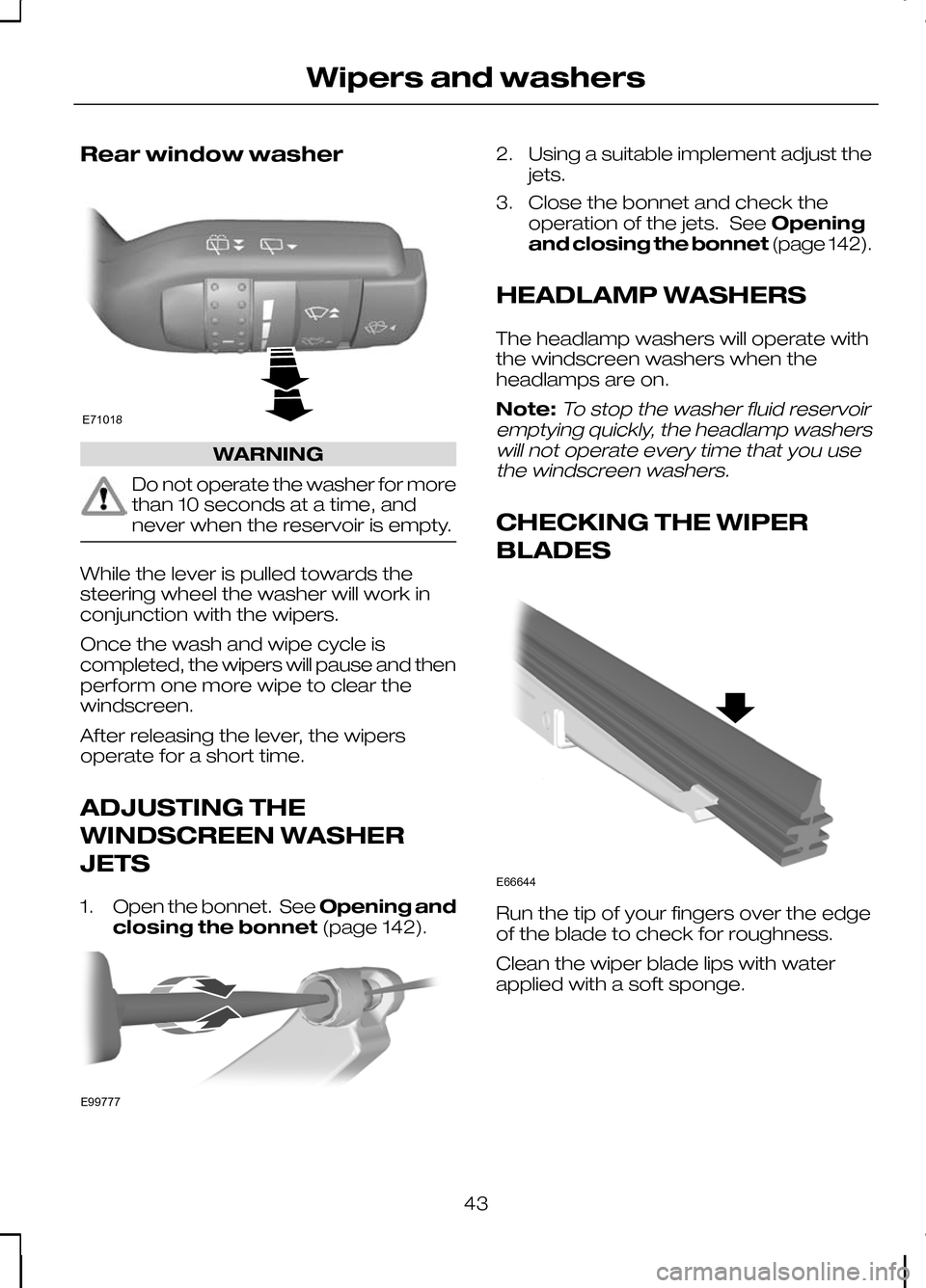
Rear window washer
WARNING
Do not operate the washer for more
than 10 seconds at a time, and
never when the reservoir is empty.
While the lever is pulled towards the
steering wheel the washer will work in
conjunction with the wipers.
Once the wash and wipe cycle is
completed, the wipers will pause and then
perform one more wipe to clear the
windscreen.
After releasing the lever, the wipers
operate for a short time.
ADJUSTING THE
WINDSCREEN WASHER
JETS
1.
Open the bonnet. See Opening and
closing the bonnet (page 142). 2. Using a suitable implement adjust the
jets.
3. Close the bonnet and check the operation of the jets. See Opening
and closing the bonnet (page 142).
HEADLAMP WASHERS
The headlamp washers will operate with
the windscreen washers when the
headlamps are on.
Note:To stop the washer fluid reservoir
emptying quickly, the headlamp washers will not operate every time that you usethe windscreen washers.
CHECKING THE WIPER
BLADES Run the tip of your fingers over the edge
of the blade to check for roughness.
Clean the wiper blade lips with water
applied with a soft sponge.
43
Wipers and washersE71018 E99777 E66644
Page 48 of 226
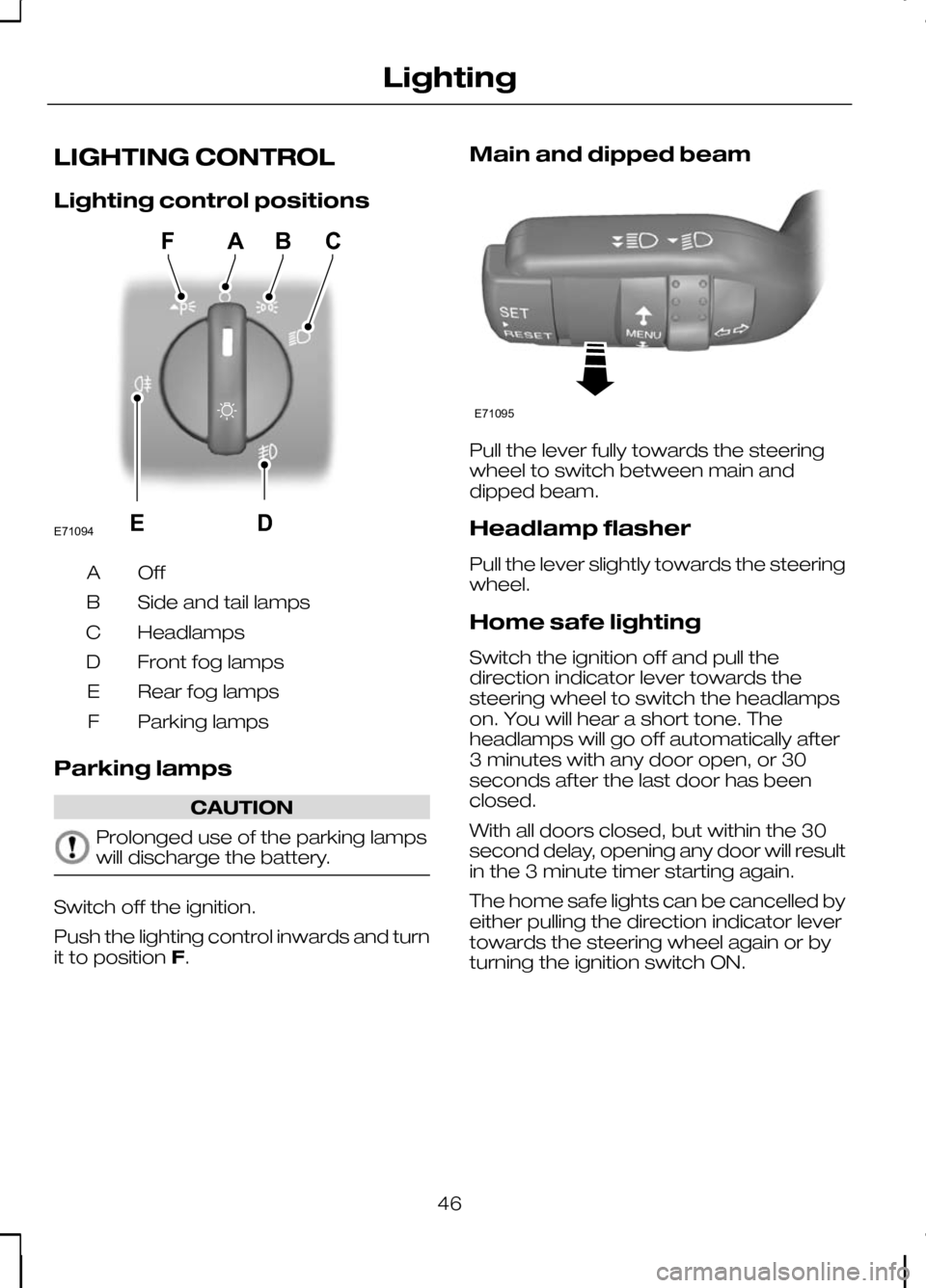
LIGHTING CONTROL
Lighting control positions
OffA
Side and tail lamps
B
Headlamps
C
Front fog lamps
D
Rear fog lamps
E
Parking lamps
F
Parking lamps CAUTION
Prolonged use of the parking lamps
will discharge the battery.
Switch off the ignition.
Push the lighting control inwards and turn
it to position
F. Main and dipped beam
Pull the lever fully towards the steering
wheel to switch between main and
dipped beam.
Headlamp flasher
Pull the lever slightly towards the steering
wheel.
Home safe lighting
Switch the ignition off and pull the
direction indicator lever towards the
steering wheel to switch the headlamps
on. You will hear a short tone. The
headlamps will go off automatically after
3 minutes with any door open, or 30
seconds after the last door has been
closed.
With all doors closed, but within the 30
second delay, opening any door will result
in the 3 minute timer starting again.
The home safe lights can be cancelled by
either pulling the direction indicator lever
towards the steering wheel again or by
turning the ignition switch ON.
46
LightingE71094DBCAFE E71095
Page 51 of 226
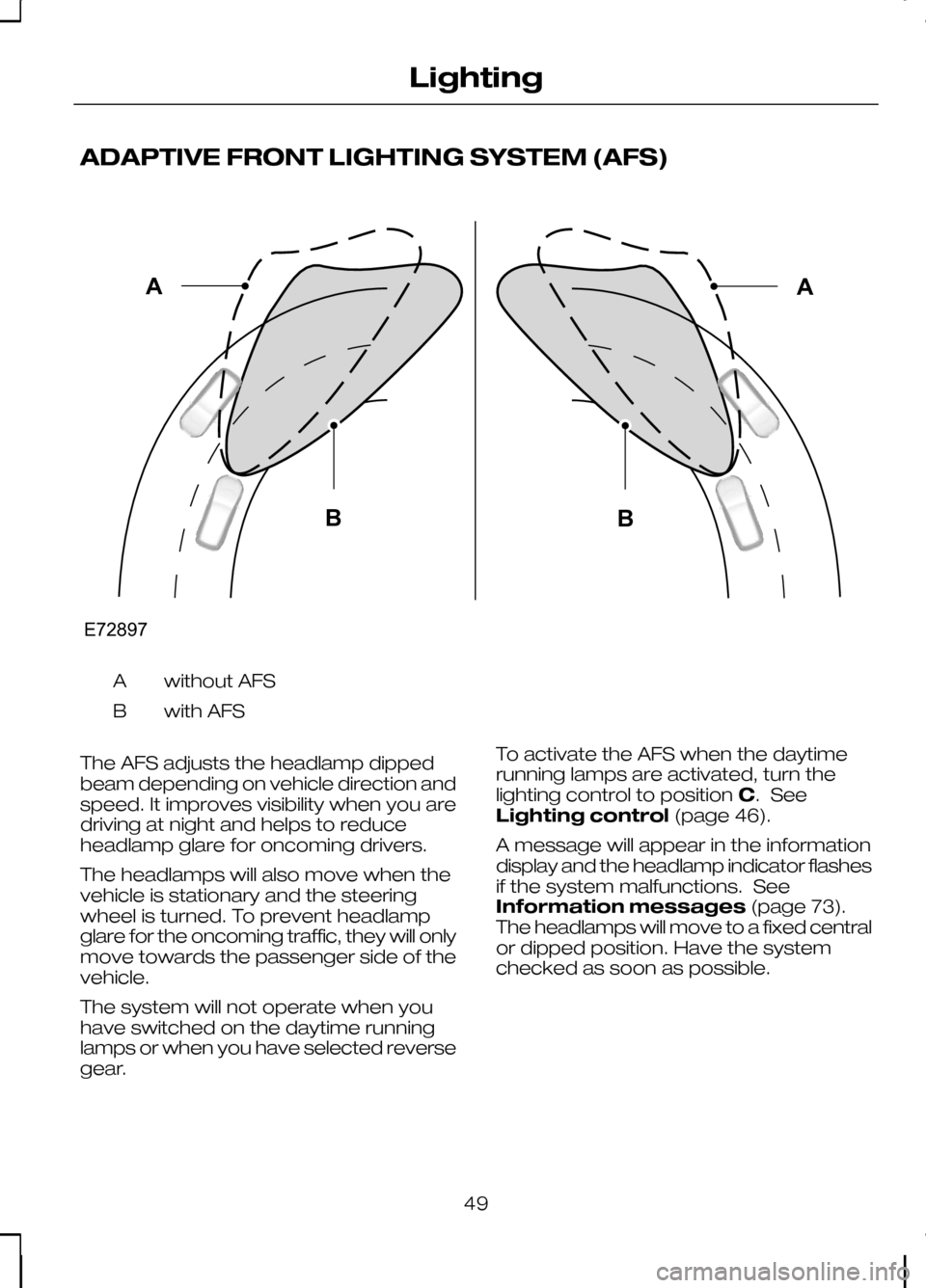
ADAPTIVE FRONT LIGHTING SYSTEM (AFS)
without AFS
A
with AFS
B
The AFS adjusts the headlamp dipped
beam depending on vehicle direction and
speed. It improves visibility when you are
driving at night and helps to reduce
headlamp glare for oncoming drivers.
The headlamps will also move when the
vehicle is stationary and the steering
wheel is turned. To prevent headlamp
glare for the oncoming traffic, they will only
move towards the passenger side of the
vehicle.
The system will not operate when you
have switched on the daytime running
lamps or when you have selected reverse
gear. To activate the AFS when the daytime
running lamps are activated, turn the
lighting control to position
C. See
Lighting control (page 46).
A message will appear in the information
display and the headlamp indicator flashes
if the system malfunctions. See
Information messages (page 73).
The headlamps will move to a fixed central
or dipped position. Have the system
checked as soon as possible.
49
LightingE72897ABAB
Page 66 of 226
If the needle enters the red section, the
engine is overheating. Stop the engine,
switch the ignition off and determine the
cause
once the engine has cooled
down. See Engine coolant check
(page 148).
Fuel gauge
The arrow adjacent to the fuel pump
symbol indicates on which side of the
vehicle the fuel filler cap is located.
WARNING LAMPS AND
INDICATORS
The following warning lamps and
indicators illuminate when the ignition is
switched on:
• Airbag
• Oil pressure
• ABS
• Stability control (ESP)
• Engine
• Doors open
• Brake system
• Frost
• Power steering
• Ignition
If a warning or indicator lamp does not
illuminate when the ignition is switched
on, it indicates a malfunction. Have the
system checked by properly trained
technician.
ABS warning lamp If it illuminates when you are
driving, this indicates a
malfunction. You will continue
to have normal braking (without ABS).
Have the system checked by a properly
trained technician as soon as possible. Airbag warning lamp If it illuminates when you are
driving, this indicates a
malfunction. Have the system
checked by a properly trained technician.
Brake system lamp It illuminates when the parking
brake is engaged.
WARNING
Reduce your speed gradually and
stop your vehicle as soon as it is
safe to do so. Use your brakes with
care. If it illuminates when you are driving, check
that the parking brake is not engaged. If
the parking brake is not engaged, this
indicates a malfunction. Have the system
checked by a properly trained technician
immediately.
Cruise control indicator
It will illuminate when you have
set a speed using the cruise
control system. See
Using
cruise control (page 120).
Direction indicators Flashes during operation. A
sudden increase in the rate of
flashing warns of a failed
indicator bulb. See Changing a bulb
(page 52).
Doors open warning lamp Illuminates when the ignition is
switched on and remains on if
any door, the bonnet or the
luggage compartment is not closed
properly.
64
Instruments E71340
Page 68 of 226
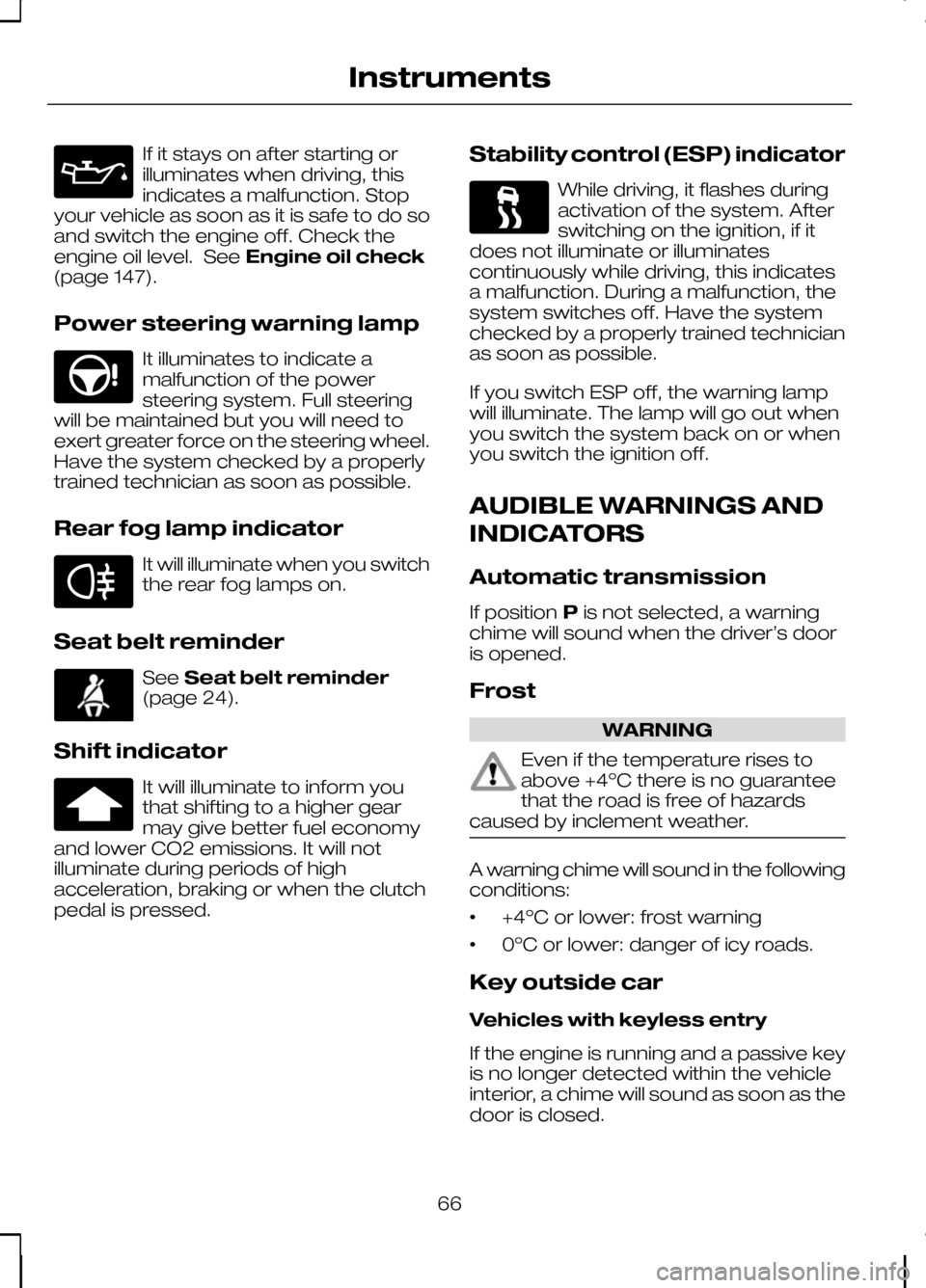
If it stays on after starting or
illuminates when driving, this
indicates a malfunction. Stop
your vehicle as soon as it is safe to do so
and switch the engine off. Check the
engine oil level. See Engine oil check
(page 147).
Power steering warning lamp It illuminates to indicate a
malfunction of the power
steering system. Full steering
will be maintained but you will need to
exert greater force on the steering wheel.
Have the system checked by a properly
trained technician as soon as possible.
Rear fog lamp indicator It will illuminate when you switch
the rear fog lamps on.
Seat belt reminder See
Seat belt reminder
(page 24).
Shift indicator It will illuminate to inform you
that shifting to a higher gear
may give better fuel economy
and lower CO2 emissions. It will not
illuminate during periods of high
acceleration, braking or when the clutch
pedal is pressed. Stability control (ESP) indicator While driving, it flashes during
activation of the system. After
switching on the ignition, if it
does not illuminate or illuminates
continuously while driving, this indicates
a malfunction. During a malfunction, the
system switches off. Have the system
checked by a properly trained technician
as soon as possible.
If you switch ESP off, the warning lamp
will illuminate. The lamp will go out when
you switch the system back on or when
you switch the ignition off.
AUDIBLE WARNINGS AND
INDICATORS
Automatic transmission
If position Pis not selected, a warning
chime will sound when the driver’s door
is opened.
Frost WARNING
Even if the temperature rises to
above +4ºC there is no guarantee
that the road is free of hazards
caused by inclement weather. A warning chime will sound in the following
conditions:
•
+4ºC or lower: frost warning
• 0ºC or lower: danger of icy roads.
Key outside car
Vehicles with keyless entry
If the engine is running and a passive key
is no longer detected within the vehicle
interior, a chime will sound as soon as the
door is closed.
66
Instruments
Page 70 of 226
GENERAL INFORMATION
WARNING
Do not operate the information
display controls when the vehicle is
moving.
Note:The information display will remain
on for several minutes after you switch off the ignition.
Various systems on your vehicle can be
controlled using the multi-function lever
on the steering column. Corresponding
information is displayed in the information
display.
For detailed instructions on navigation,
refer to the appropriate manual.
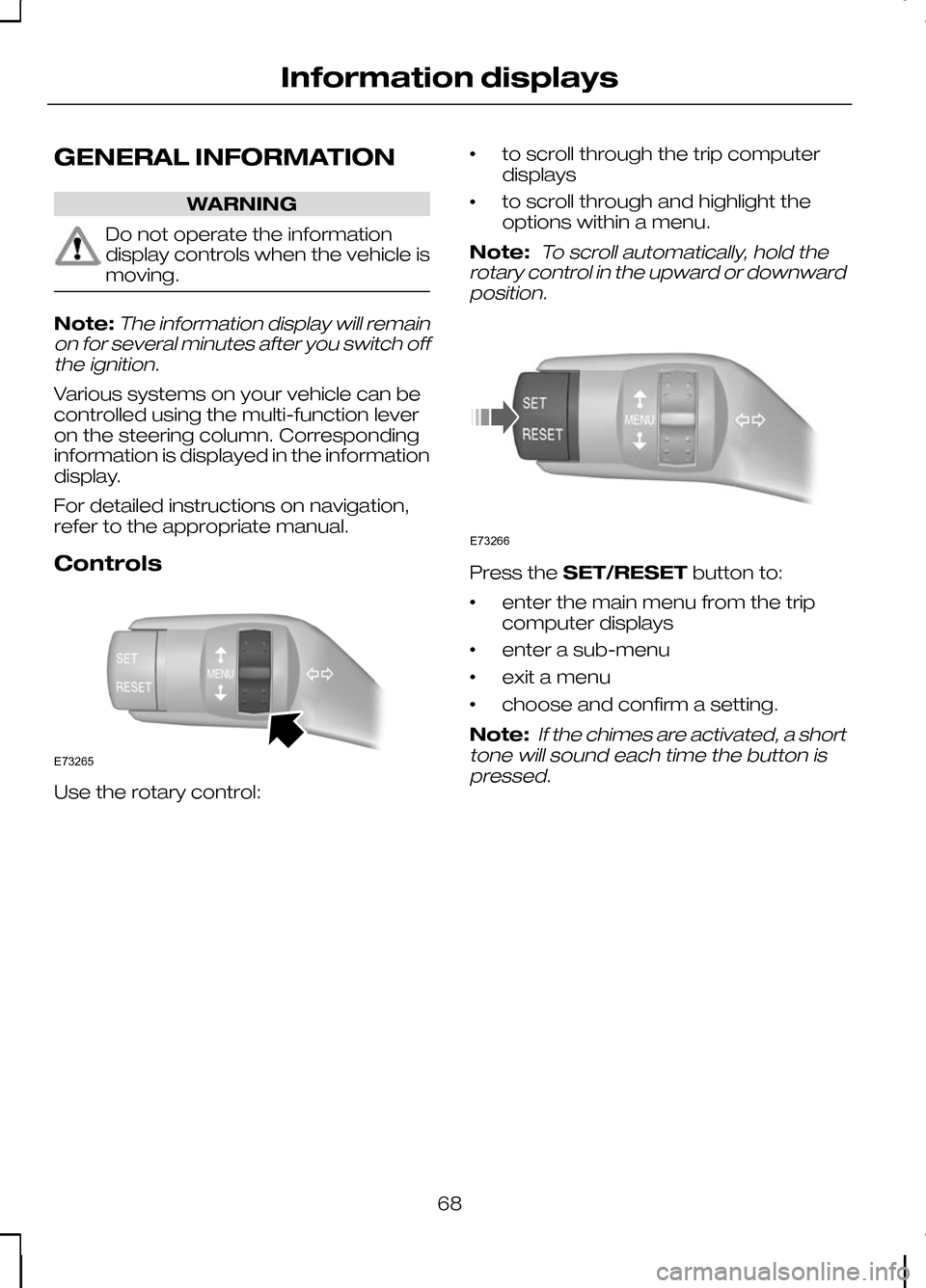
Controls Use the rotary control: •
to scroll through the trip computer
displays
• to scroll through and highlight the
options within a menu.
Note:
To scroll automatically, hold the
rotary control in the upward or downward position. Press the
SET/RESET button to:
• enter the main menu from the trip
computer displays
• enter a sub-menu
• exit a menu
• choose and confirm a setting.
Note:
If the chimes are activated, a short
tone will sound each time the button is pressed.
68
Information displaysE73265 E73266
Page 71 of 226
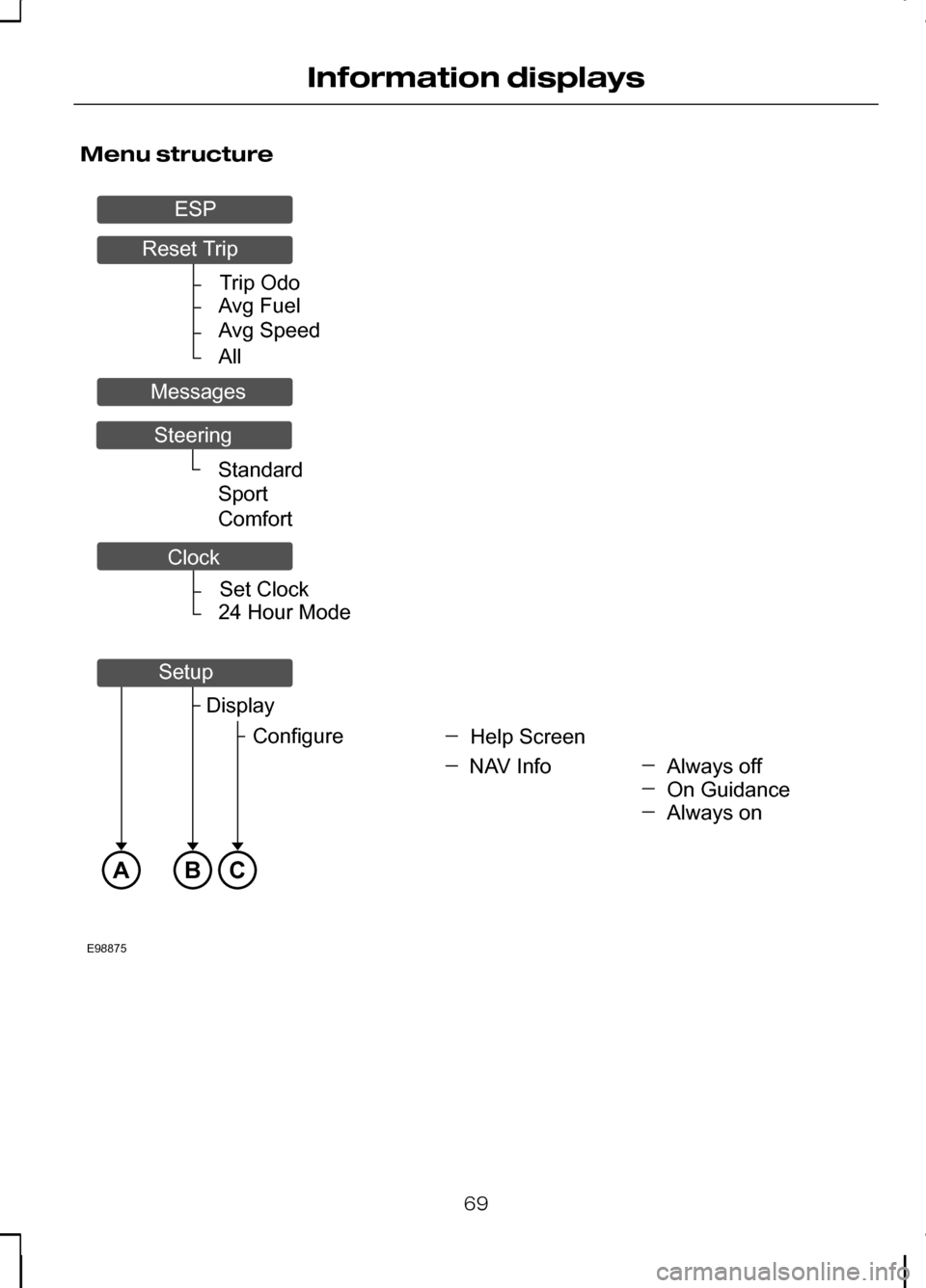
Menu structure
69
Information displaysTripOdoAvgFuelAvgSpeedAllSetClock24HourModeABCE98875StandardSportComfortAlwaysoffHelpScreenDisplayConfigureNAVInfoOnGuidanceAlwaysonResetTripMessagesSteeringESPClockSetup
Page 73 of 226
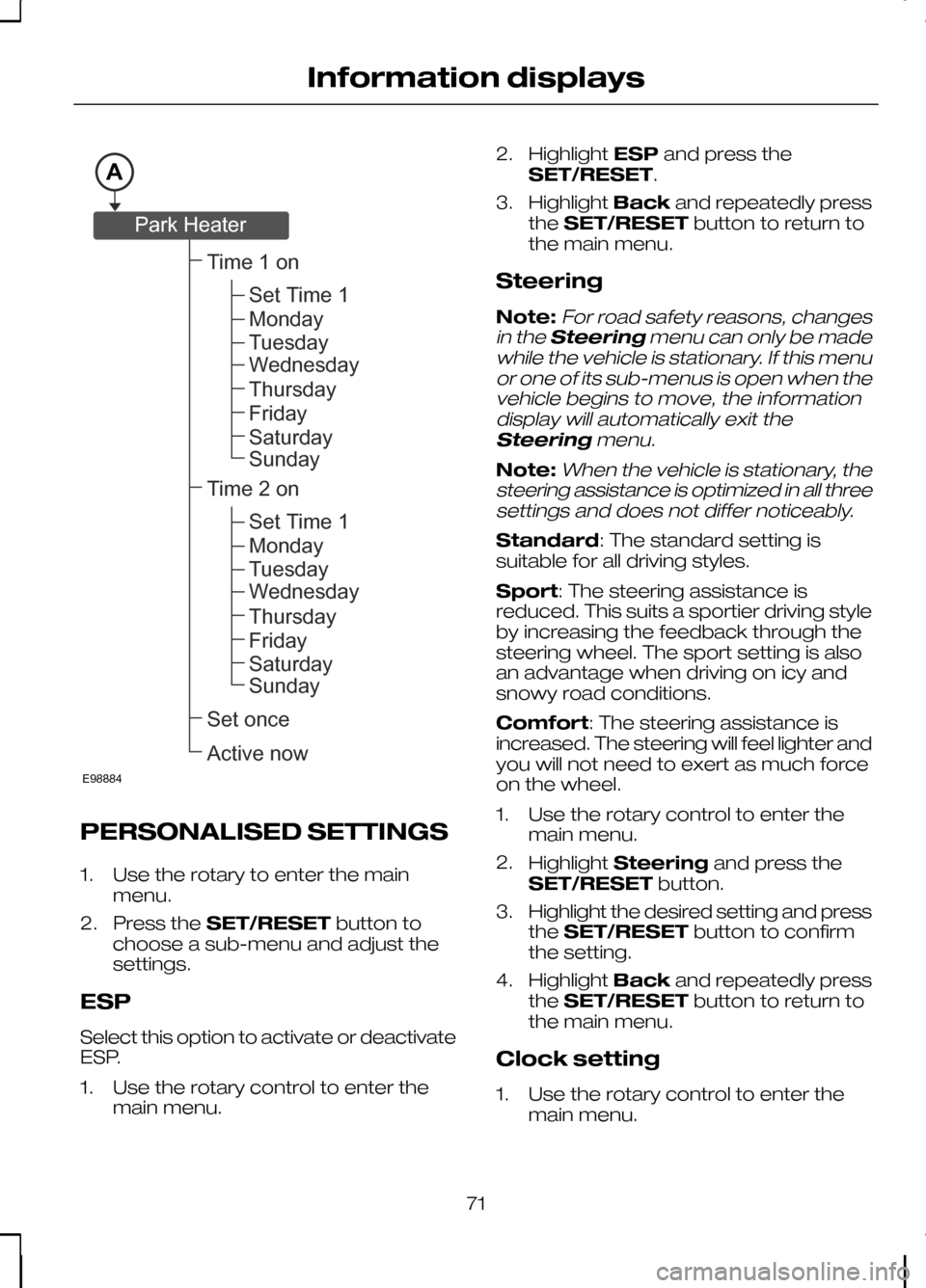
PERSONALISED SETTINGS
1. Use the rotary to enter the main
menu.
2. Press the SET/RESET button to
choose a sub-menu and adjust the
settings.
ESP
Select this option to activate or deactivate
ESP.
1. Use the rotary control to enter the main menu. 2.
Highlight ESPand press the
SET/RESET.
3. Highlight Backand repeatedly press
the SET/RESET button to return to
the main menu.
Steering
Note:For road safety reasons, changes
in the Steering menu can only be made
while the vehicle is stationary. If this menu or one of its sub-menus is open when thevehicle begins to move, the informationdisplay will automatically exit the
Steering menu.
Note:When the vehicle is stationary, the
steering assistance is optimized in all three settings and does not differ noticeably.
Standard: The standard setting is
suitable for all driving styles.
Sport: The steering assistance is
reduced. This suits a sportier driving style
by increasing the feedback through the
steering wheel. The sport setting is also
an advantage when driving on icy and
snowy road conditions.
Comfort: The steering assistance is
increased. The steering will feel lighter and
you will not need to exert as much force
on the wheel.
1. Use the rotary control to enter the main menu.
2. Highlight Steering and press the
SET/RESET button.
3. Highlight the desired setting and press
the SET/RESET button to confirm
the setting.
4. Highlight Backand repeatedly press
the SET/RESET button to return to
the main menu.
Clock setting
1. Use the rotary control to enter the main menu.
71
Information displaysAE98884Time1onSetonceActivenowSetTime1MondayTuesdayWednesdayThursdayFridaySaturdaySundayTime2onSetTime1MondayTuesdayWednesdayThursdayFridaySaturdaySundayParkHeater
Page 77 of 226
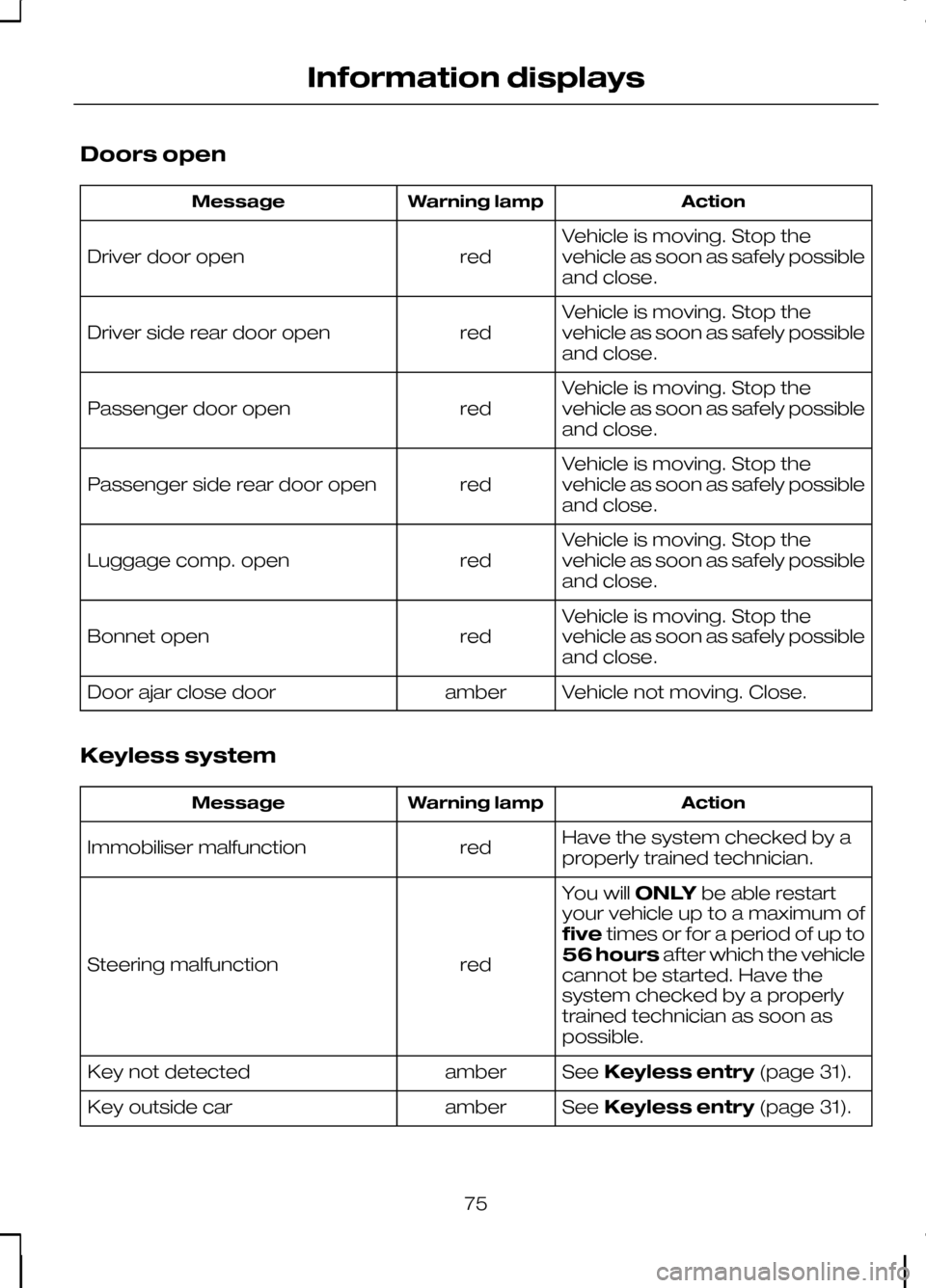
Doors open
Action
Warning lamp
Message
Vehicle is moving. Stop the
vehicle as soon as safely possible
and close.
red
Driver door open
Vehicle is moving. Stop the
vehicle as soon as safely possible
and close.
red
Driver side rear door open
Vehicle is moving. Stop the
vehicle as soon as safely possible
and close.
red
Passenger door open
Vehicle is moving. Stop the
vehicle as soon as safely possible
and close.
red
Passenger side rear door open
Vehicle is moving. Stop the
vehicle as soon as safely possible
and close.
red
Luggage comp. open
Vehicle is moving. Stop the
vehicle as soon as safely possible
and close.
red
Bonnet open
Vehicle not moving. Close.
amber
Door ajar close door
Keyless system Action
Warning lamp
Message
Have the system checked by a
properly trained technician.
red
Immobiliser malfunction
You willONLYbe able restart
your vehicle up to a maximum of
five times or for a period of up to
56 hours after which the vehicle
cannot be started. Have the
system checked by a properly
trained technician as soon as
possible.
red
Steering malfunction
SeeKeyless entry (page 31).
amber
Key not detected
SeeKeyless entry (page 31).
amber
Key outside car
75
Information displays
Page 78 of 226
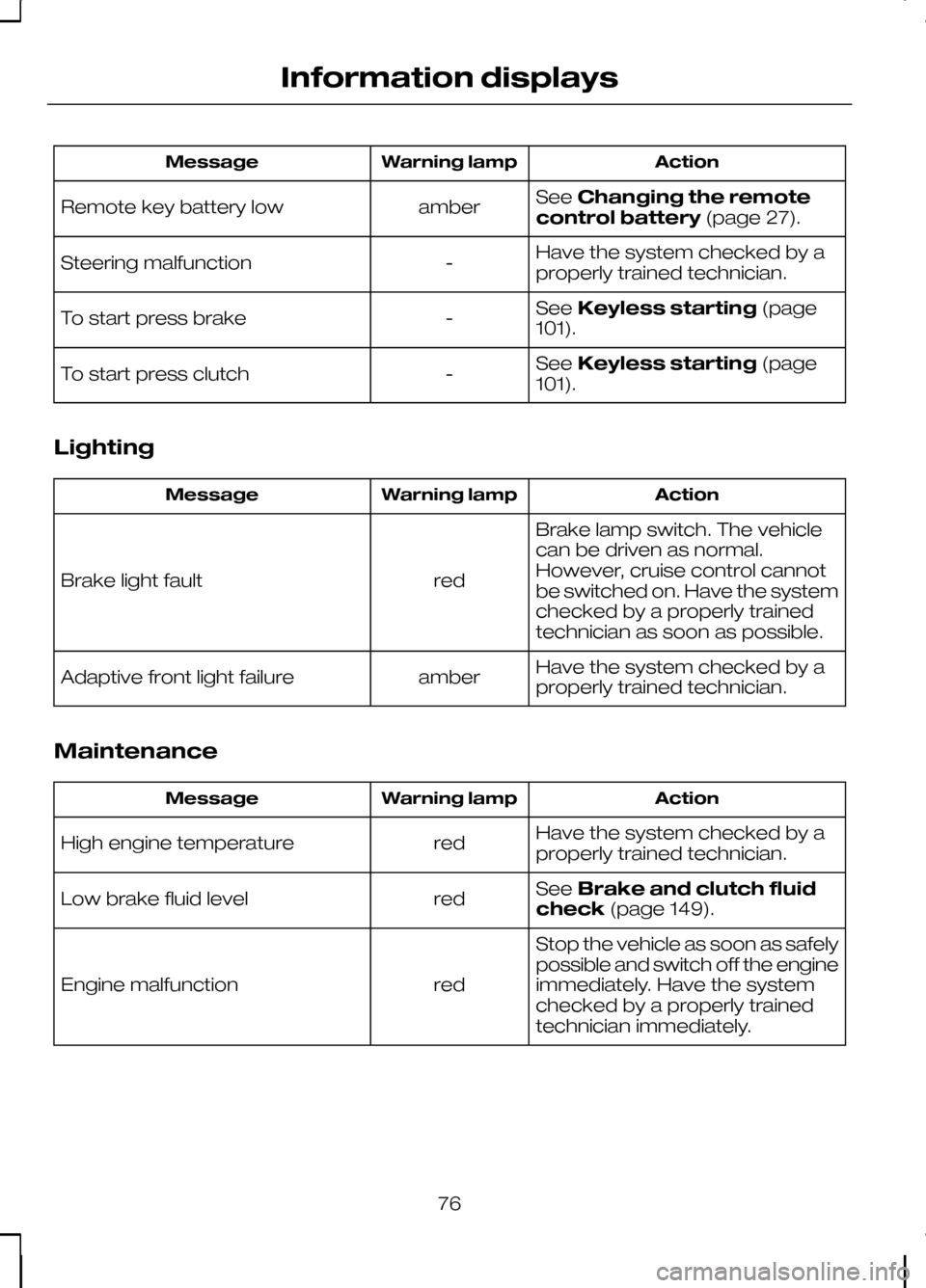
Action
Warning lamp
Message
SeeChanging the remote
control battery (page 27).
amber
Remote key battery low
Have the system checked by a
properly trained technician.
-
Steering malfunction
SeeKeyless starting (page
101).
-
To start press brake
SeeKeyless starting (page
101).
-
To start press clutch
Lighting Action
Warning lamp
Message
Brake lamp switch. The vehicle
can be driven as normal.
However, cruise control cannot
be switched on. Have the system
checked by a properly trained
technician as soon as possible.
red
Brake light fault
Have the system checked by a
properly trained technician.
amber
Adaptive front light failure
Maintenance Action
Warning lamp
Message
Have the system checked by a
properly trained technician.
red
High engine temperature
SeeBrake and clutch fluid
check (page 149).
red
Low brake fluid level
Stop the vehicle as soon as safely
possible and switch off the engine
immediately. Have the system
checked by a properly trained
technician immediately.
red
Engine malfunction
76
Information displays