lock FORD MONDEO 2014 4.G Owners Manual
[x] Cancel search | Manufacturer: FORD, Model Year: 2014, Model line: MONDEO, Model: FORD MONDEO 2014 4.GPages: 446, PDF Size: 29.09 MB
Page 270 of 446
Downloaded from www.Manualslib.com manuals search engine CHANGING A ROAD WHEEL
Lug Nuts
You can obtain a replacement locking lugnut key and replacement locking lug nutsfrom your dealer using the referencenumber certificate.
Vehicles with a Spare Wheel
If the spare wheel is exactly the same typeand size as the other fitted road wheels,you can replace the existing road wheelwith the spare wheel and continue to drivein the normal manner.
If the spare wheel is different to the otherroad wheels, it will carry a yellow label withthe appropriate speed limit.
Refer to the following information beforechanging the road wheel.
WARNINGS
Drive the shortest possible distances.
Do not fit more than one spare wheelon your vehicle at any one time.
Do not carry out any tire repairs on aspare wheel.
Do not drive through an automaticcar wash.
If you are unsure what type of sparewheel you have do not exceed 80km/h (50 mph).
Only fit snow chains to specifiedtires. See Using Snow Chains(page 264).
The ground clearance of your vehiclemay be reduced. Take care whenparking next to a curb.
Note:Your vehicle may exhibit someunusual driving characteristics.
Vehicle Jack
WARNINGS
The vehicle jack supplied with yourvehicle should only be used whenchanging a wheel in emergencysituations.
Before using the vehicle jack, checkthat it is not damaged or deformedand that the thread is lubricated andfree from foreign matter.
Never place anything between thejack and the ground, or the jack andyour vehicle.
Note:Vehicles with a temporary mobilitykit do not have a vehicle jack or a lug nutwrench
It is recommended to use a workshop typehydraulic jack for changing betweensummer and winter tires.
Note:Use a jack with a minimum liftingcapacity of 1.5 tonnes and a lifting plate witha minimum diameter of 3.1 inches (80millimeters).
Vehicles without a Temporary MobilityKit
Your vehicle jack, lug nut wrench andscrew-in towing eye are located in thespare wheel well or behind the rear seatwith the fuel funnel.
Jacking and Lifting Points
WARNING
Use only the specified jacking points.If you use other positions, you maydamage the body, steering,suspension, engine, braking system or thefuel lines.
268Mondeo (CNG) Vehicles Built From: 08-09-2014 Vehicles Built Up To: 19-04-2015, CG3633en enGBR, Edition date: 10/2014, First PrintingWheels and Tires
Page 272 of 446
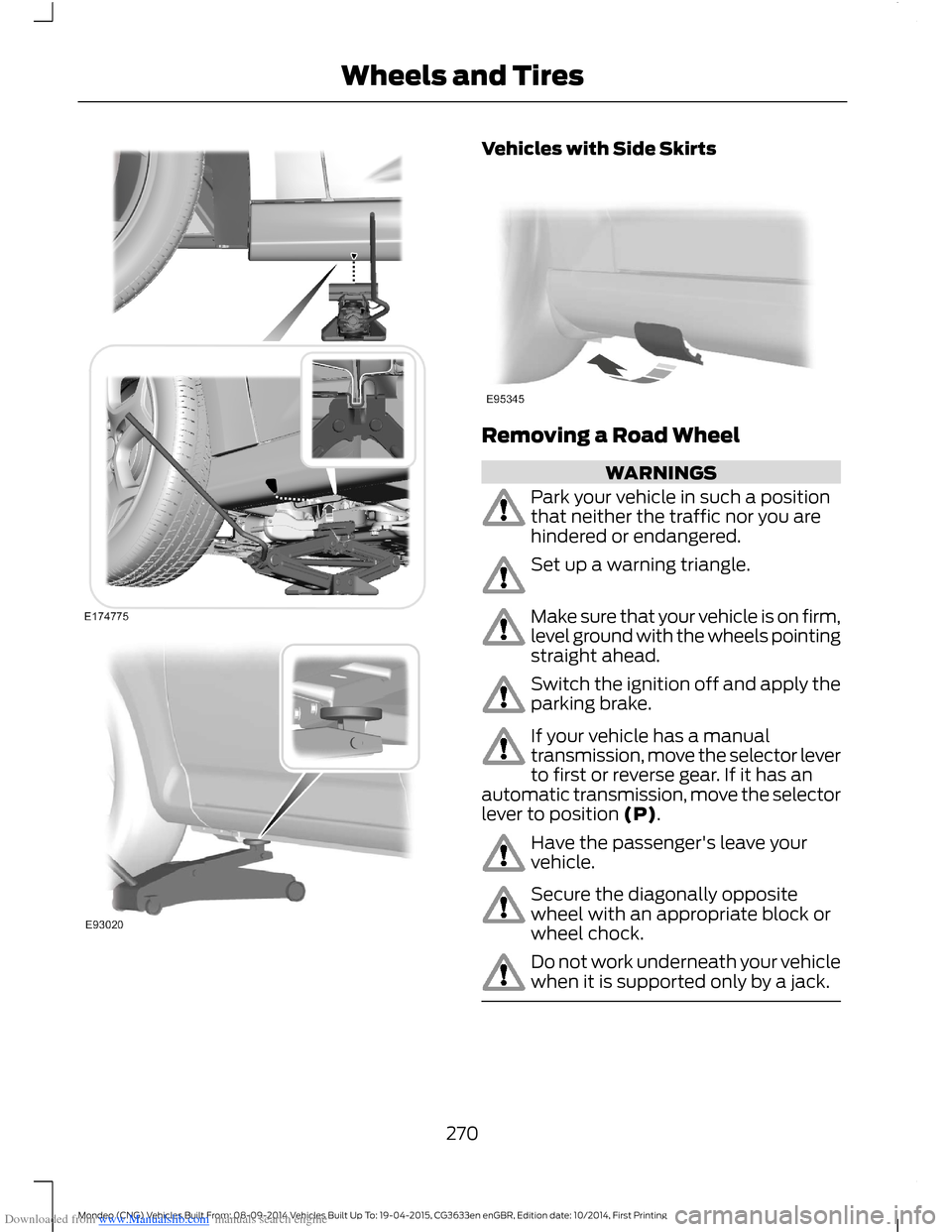
Downloaded from www.Manualslib.com manuals search engine Vehicles with Side Skirts
Removing a Road Wheel
WARNINGS
Park your vehicle in such a positionthat neither the traffic nor you arehindered or endangered.
Set up a warning triangle.
Make sure that your vehicle is on firm,level ground with the wheels pointingstraight ahead.
Switch the ignition off and apply theparking brake.
If your vehicle has a manualtransmission, move the selector leverto first or reverse gear. If it has anautomatic transmission, move the selectorlever to position (P).
Have the passenger's leave yourvehicle.
Secure the diagonally oppositewheel with an appropriate block orwheel chock.
Do not work underneath your vehiclewhen it is supported only by a jack.
270Mondeo (CNG) Vehicles Built From: 08-09-2014 Vehicles Built Up To: 19-04-2015, CG3633en enGBR, Edition date: 10/2014, First PrintingWheels and Tires
Page 273 of 446
Downloaded from www.Manualslib.com manuals search engine WARNINGS
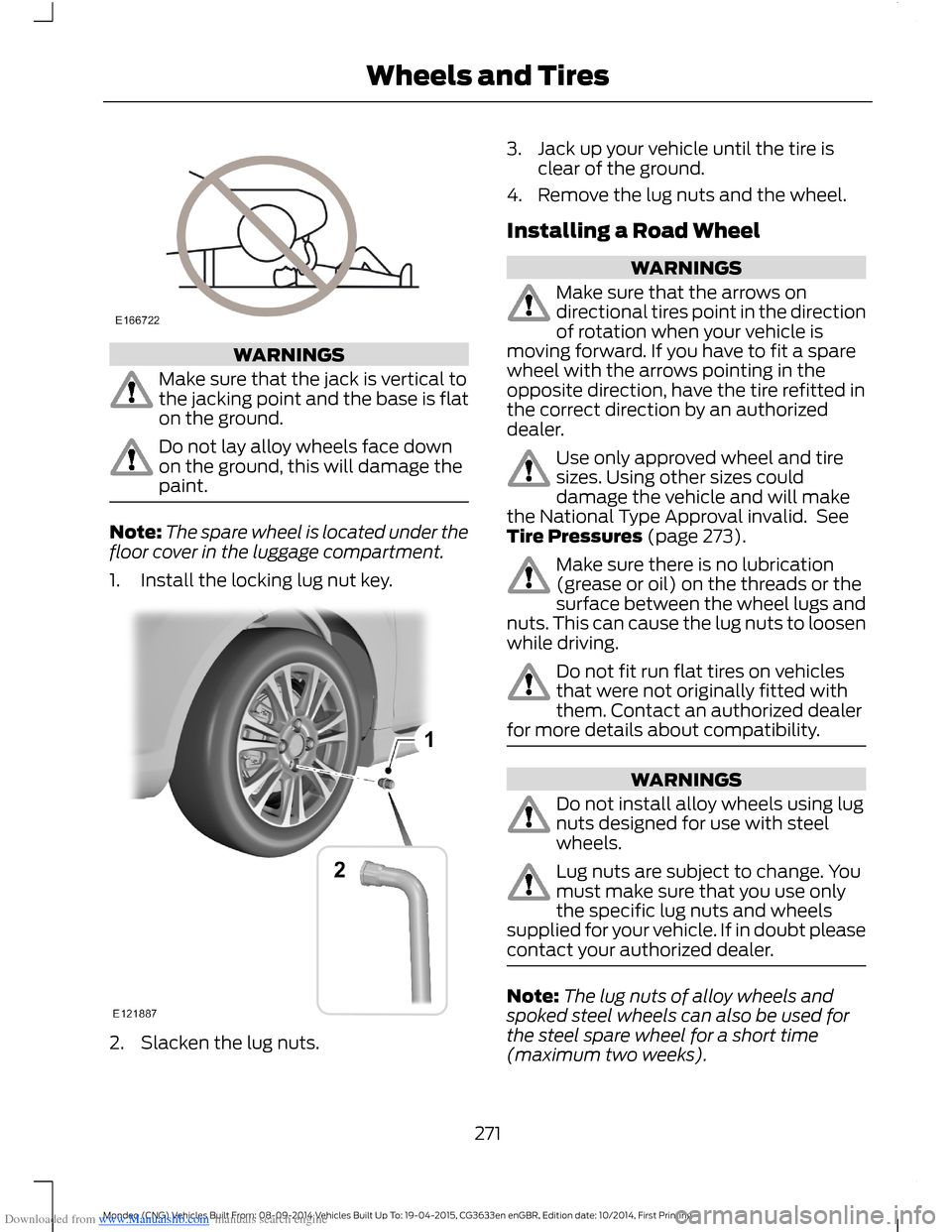
Make sure that the jack is vertical tothe jacking point and the base is flaton the ground.
Do not lay alloy wheels face downon the ground, this will damage thepaint.
Note:The spare wheel is located under thefloor cover in the luggage compartment.
1.Install the locking lug nut key.
2.Slacken the lug nuts.
3.Jack up your vehicle until the tire isclear of the ground.
4.Remove the lug nuts and the wheel.
Installing a Road Wheel
WARNINGS
Make sure that the arrows ondirectional tires point in the directionof rotation when your vehicle ismoving forward. If you have to fit a sparewheel with the arrows pointing in theopposite direction, have the tire refitted inthe correct direction by an authorizeddealer.
Use only approved wheel and tiresizes. Using other sizes coulddamage the vehicle and will makethe National Type Approval invalid. SeeTire Pressures (page 273).
Make sure there is no lubrication(grease or oil) on the threads or thesurface between the wheel lugs andnuts. This can cause the lug nuts to loosenwhile driving.
Do not fit run flat tires on vehiclesthat were not originally fitted withthem. Contact an authorized dealerfor more details about compatibility.
WARNINGS
Do not install alloy wheels using lugnuts designed for use with steelwheels.
Lug nuts are subject to change. Youmust make sure that you use onlythe specific lug nuts and wheelssupplied for your vehicle. If in doubt pleasecontact your authorized dealer.
Note:The lug nuts of alloy wheels andspoked steel wheels can also be used forthe steel spare wheel for a short time(maximum two weeks).
271Mondeo (CNG) Vehicles Built From: 08-09-2014 Vehicles Built Up To: 19-04-2015, CG3633en enGBR, Edition date: 10/2014, First PrintingWheels and Tires
Page 274 of 446
Downloaded from www.Manualslib.com manuals search engine Note:Make sure the wheel and hub contactsurfaces are free from foreign matter.
Note:Make sure that the cones on the lugnuts are against the wheel.
1.Install the wheel.
2.Install the lug nuts finger tight.
3.Install the locking lug nut key.
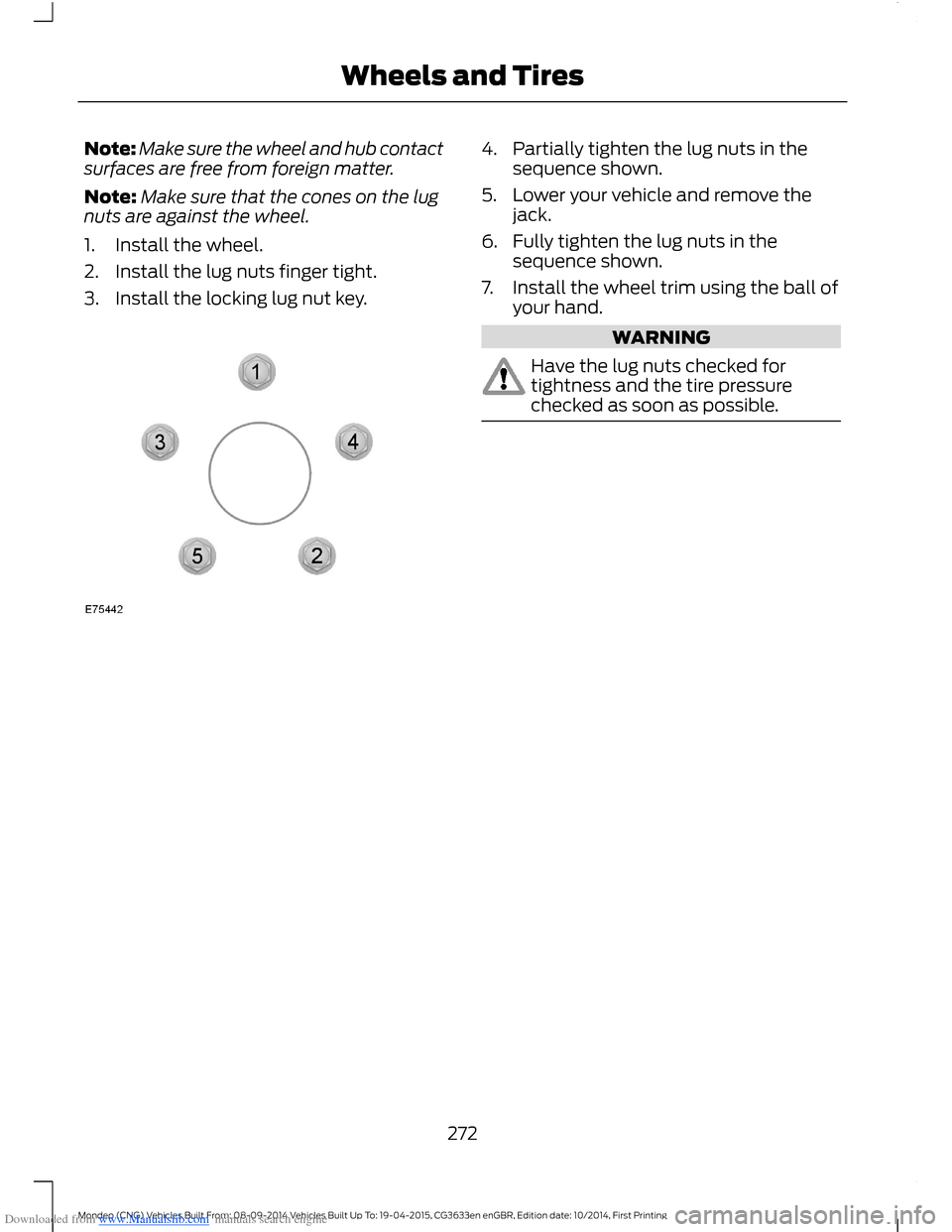
4.Partially tighten the lug nuts in thesequence shown.
5.Lower your vehicle and remove thejack.
6.Fully tighten the lug nuts in thesequence shown.
7.Install the wheel trim using the ball ofyour hand.
WARNING
Have the lug nuts checked fortightness and the tire pressurechecked as soon as possible.
272Mondeo (CNG) Vehicles Built From: 08-09-2014 Vehicles Built Up To: 19-04-2015, CG3633en enGBR, Edition date: 10/2014, First PrintingWheels and Tires
Page 282 of 446
Downloaded from www.Manualslib.com manuals search engine Maximum Permissible Nose Weight
lb (kg)
198.4 lb (90 kg)
VEHICLE IDENTIFICATION
PLATE
Note:Your vehicle identification platedesign may vary to that shown.
Note:The information shown on yourvehicle identification plate is dependentupon market requirements.
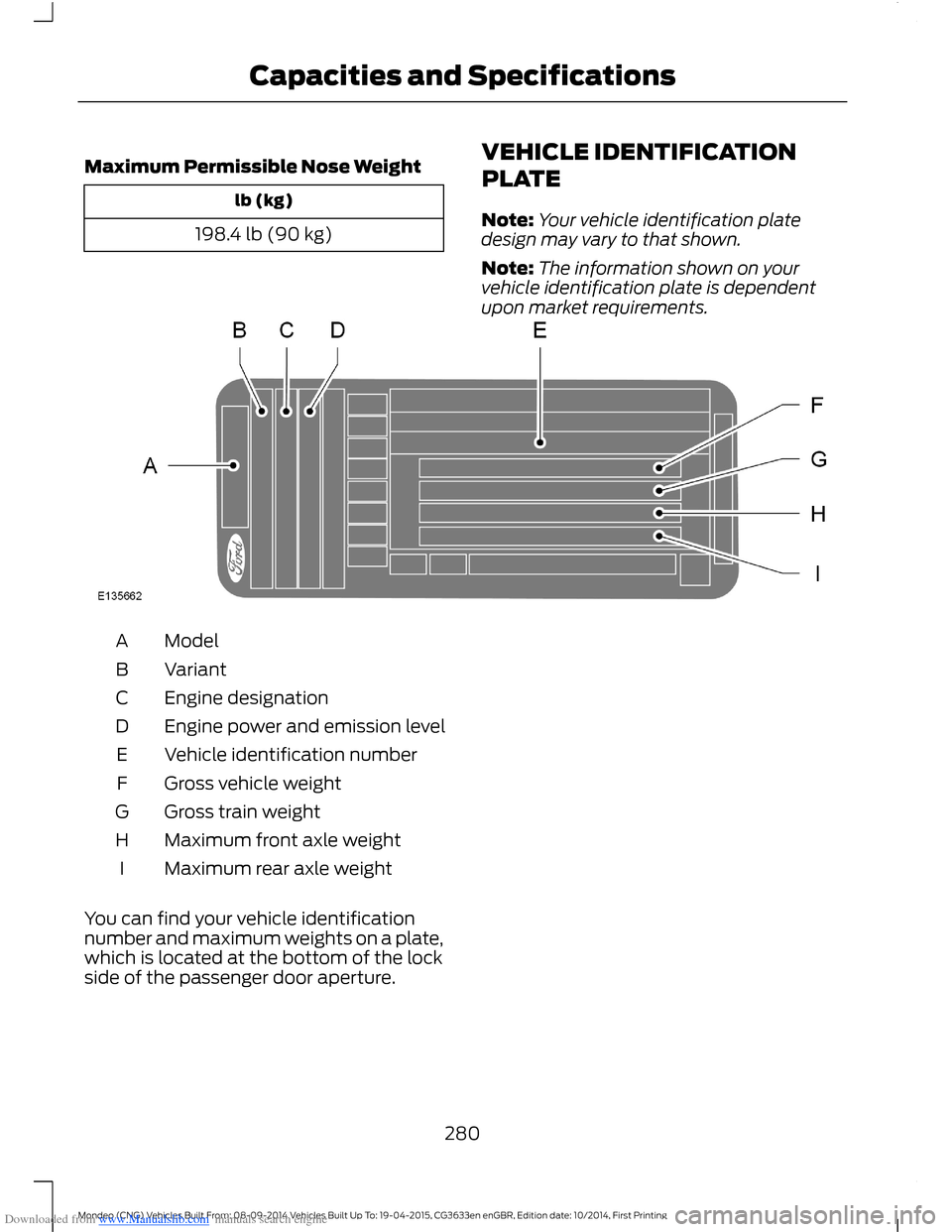
ModelA
VariantB
Engine designationC
Engine power and emission levelD
Vehicle identification numberE
Gross vehicle weightF
Gross train weightG
Maximum front axle weightH
Maximum rear axle weightI
You can find your vehicle identificationnumber and maximum weights on a plate,which is located at the bottom of the lockside of the passenger door aperture.
280Mondeo (CNG) Vehicles Built From: 08-09-2014 Vehicles Built Up To: 19-04-2015, CG3633en enGBR, Edition date: 10/2014, First PrintingCapacities and Specifications
Page 296 of 446
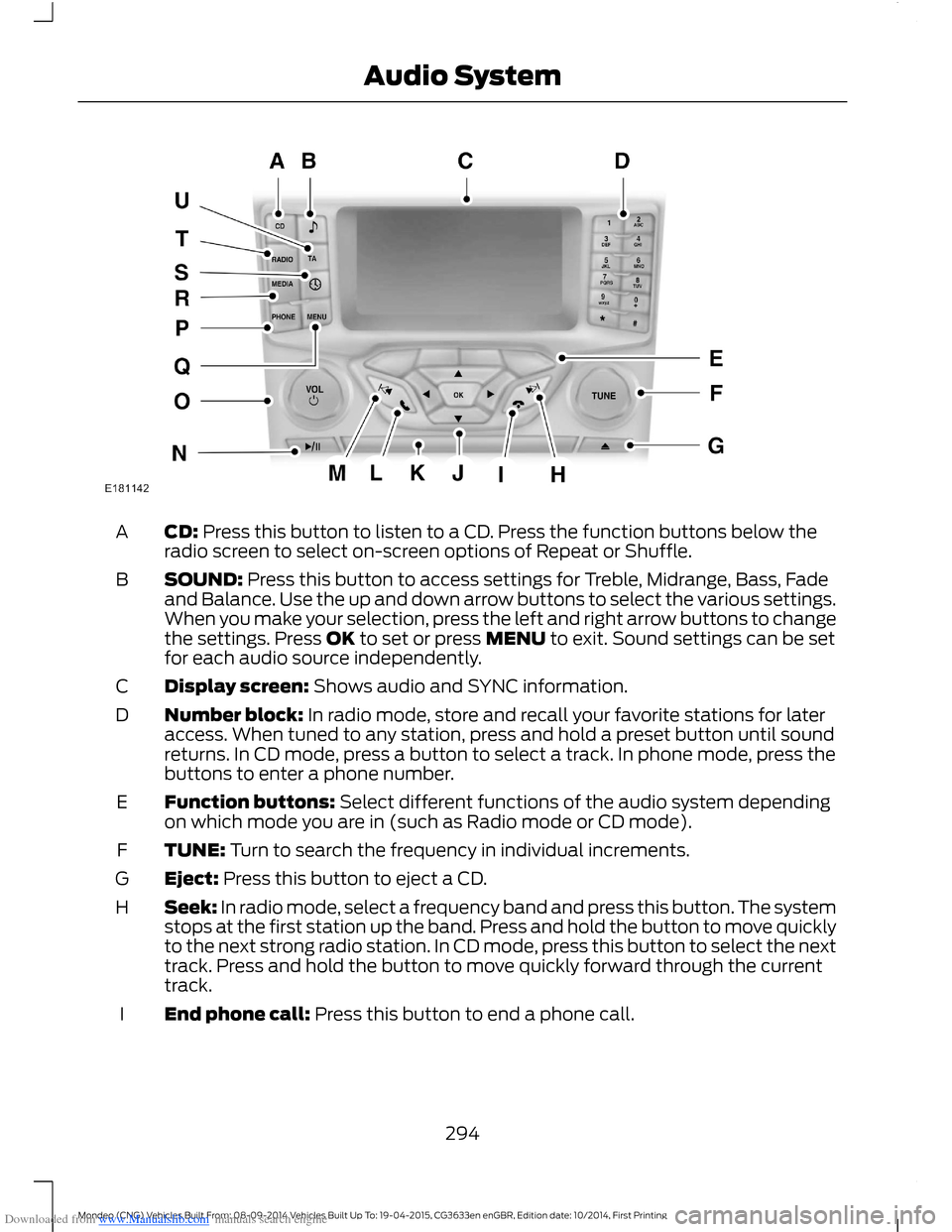
Downloaded from www.Manualslib.com manuals search engine CD: Press this button to listen to a CD. Press the function buttons below theradio screen to select on-screen options of Repeat or Shuffle.A
SOUND: Press this button to access settings for Treble, Midrange, Bass, Fadeand Balance. Use the up and down arrow buttons to select the various settings.When you make your selection, press the left and right arrow buttons to changethe settings. Press OK to set or press MENU to exit. Sound settings can be setfor each audio source independently.
B
Display screen: Shows audio and SYNC information.C
Number block: In radio mode, store and recall your favorite stations for lateraccess. When tuned to any station, press and hold a preset button until soundreturns. In CD mode, press a button to select a track. In phone mode, press thebuttons to enter a phone number.
D
Function buttons: Select different functions of the audio system dependingon which mode you are in (such as Radio mode or CD mode).E
TUNE: Turn to search the frequency in individual increments.F
Eject: Press this button to eject a CD.G
Seek: In radio mode, select a frequency band and press this button. The systemstops at the first station up the band. Press and hold the button to move quicklyto the next strong radio station. In CD mode, press this button to select the nexttrack. Press and hold the button to move quickly forward through the currenttrack.
H
End phone call: Press this button to end a phone call.I
294Mondeo (CNG) Vehicles Built From: 08-09-2014 Vehicles Built Up To: 19-04-2015, CG3633en enGBR, Edition date: 10/2014, First PrintingAudio System
Page 297 of 446
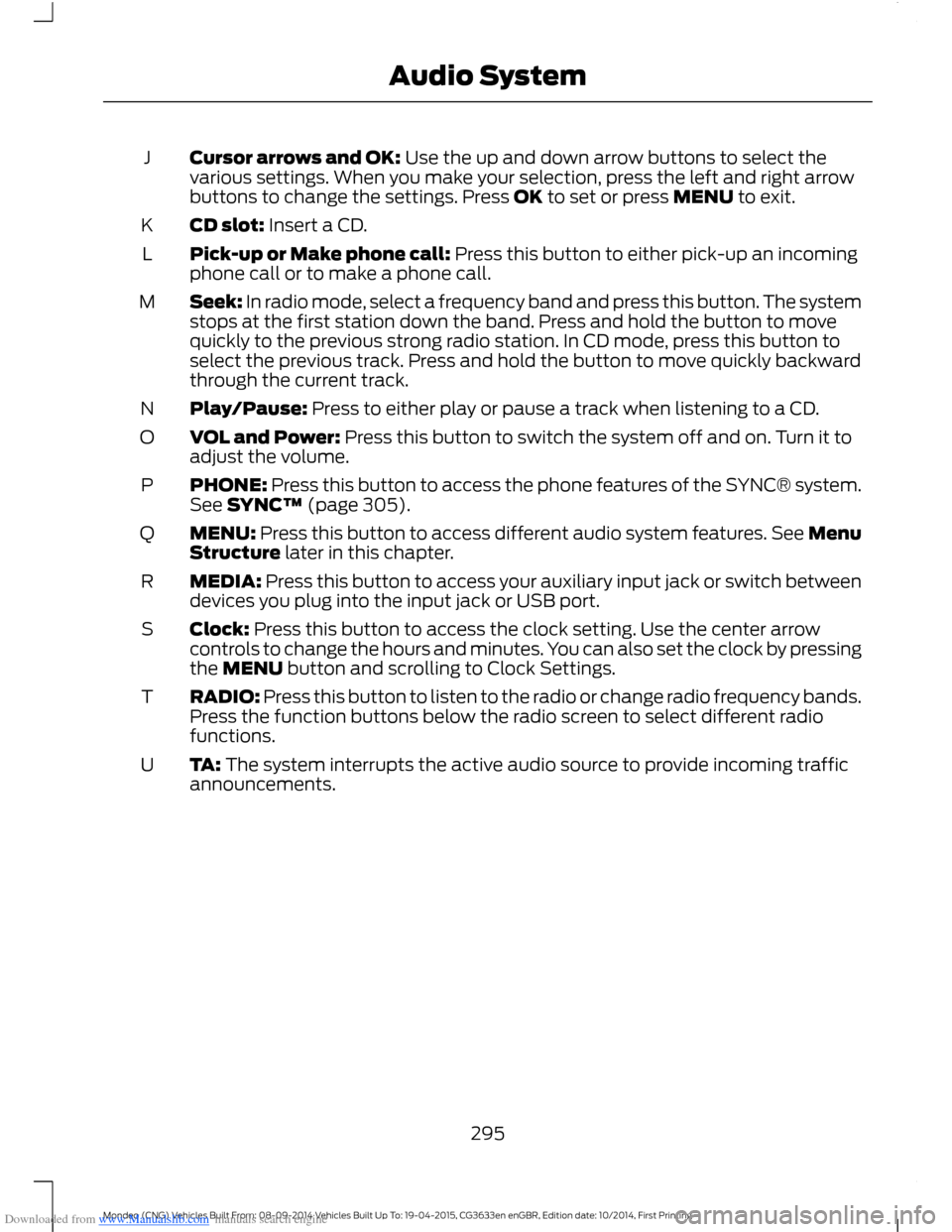
Downloaded from www.Manualslib.com manuals search engine Cursor arrows and OK: Use the up and down arrow buttons to select thevarious settings. When you make your selection, press the left and right arrowbuttons to change the settings. Press OK to set or press MENU to exit.
J
CD slot: Insert a CD.K
Pick-up or Make phone call: Press this button to either pick-up an incomingphone call or to make a phone call.L
Seek: In radio mode, select a frequency band and press this button. The systemstops at the first station down the band. Press and hold the button to movequickly to the previous strong radio station. In CD mode, press this button toselect the previous track. Press and hold the button to move quickly backwardthrough the current track.
M
Play/Pause: Press to either play or pause a track when listening to a CD.N
VOL and Power: Press this button to switch the system off and on. Turn it toadjust the volume.O
PHONE: Press this button to access the phone features of the SYNC® system.See SYNC™ (page 305).P
MENU: Press this button to access different audio system features. See MenuStructure later in this chapter.Q
MEDIA: Press this button to access your auxiliary input jack or switch betweendevices you plug into the input jack or USB port.R
Clock: Press this button to access the clock setting. Use the center arrowcontrols to change the hours and minutes. You can also set the clock by pressingthe MENU button and scrolling to Clock Settings.
S
RADIO: Press this button to listen to the radio or change radio frequency bands.Press the function buttons below the radio screen to select different radiofunctions.
T
TA: The system interrupts the active audio source to provide incoming trafficannouncements.U
295Mondeo (CNG) Vehicles Built From: 08-09-2014 Vehicles Built Up To: 19-04-2015, CG3633en enGBR, Edition date: 10/2014, First PrintingAudio System
Page 302 of 446
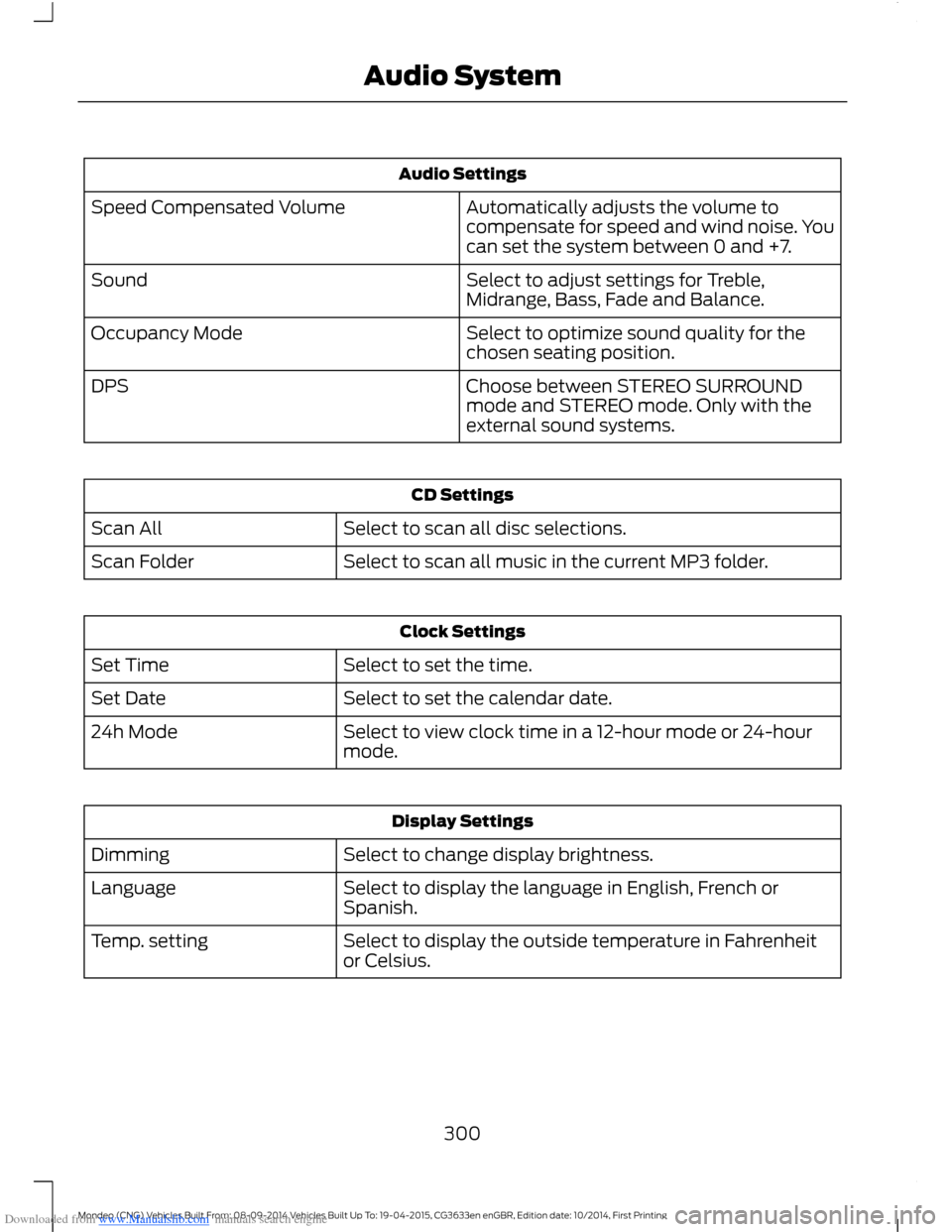
Downloaded from www.Manualslib.com manuals search engine Audio Settings
Automatically adjusts the volume tocompensate for speed and wind noise. Youcan set the system between 0 and +7.
Speed Compensated Volume
Select to adjust settings for Treble,Midrange, Bass, Fade and Balance.Sound
Select to optimize sound quality for thechosen seating position.Occupancy Mode
Choose between STEREO SURROUNDmode and STEREO mode. Only with theexternal sound systems.
DPS
CD Settings
Select to scan all disc selections.Scan All
Select to scan all music in the current MP3 folder.Scan Folder
Clock Settings
Select to set the time.Set Time
Select to set the calendar date.Set Date
Select to view clock time in a 12-hour mode or 24-hourmode.24h Mode
Display Settings
Select to change display brightness.Dimming
Select to display the language in English, French orSpanish.Language
Select to display the outside temperature in Fahrenheitor Celsius.Temp. setting
300Mondeo (CNG) Vehicles Built From: 08-09-2014 Vehicles Built Up To: 19-04-2015, CG3633en enGBR, Edition date: 10/2014, First PrintingAudio System
Page 337 of 446
Downloaded from www.Manualslib.com manuals search engine Cell phone issues
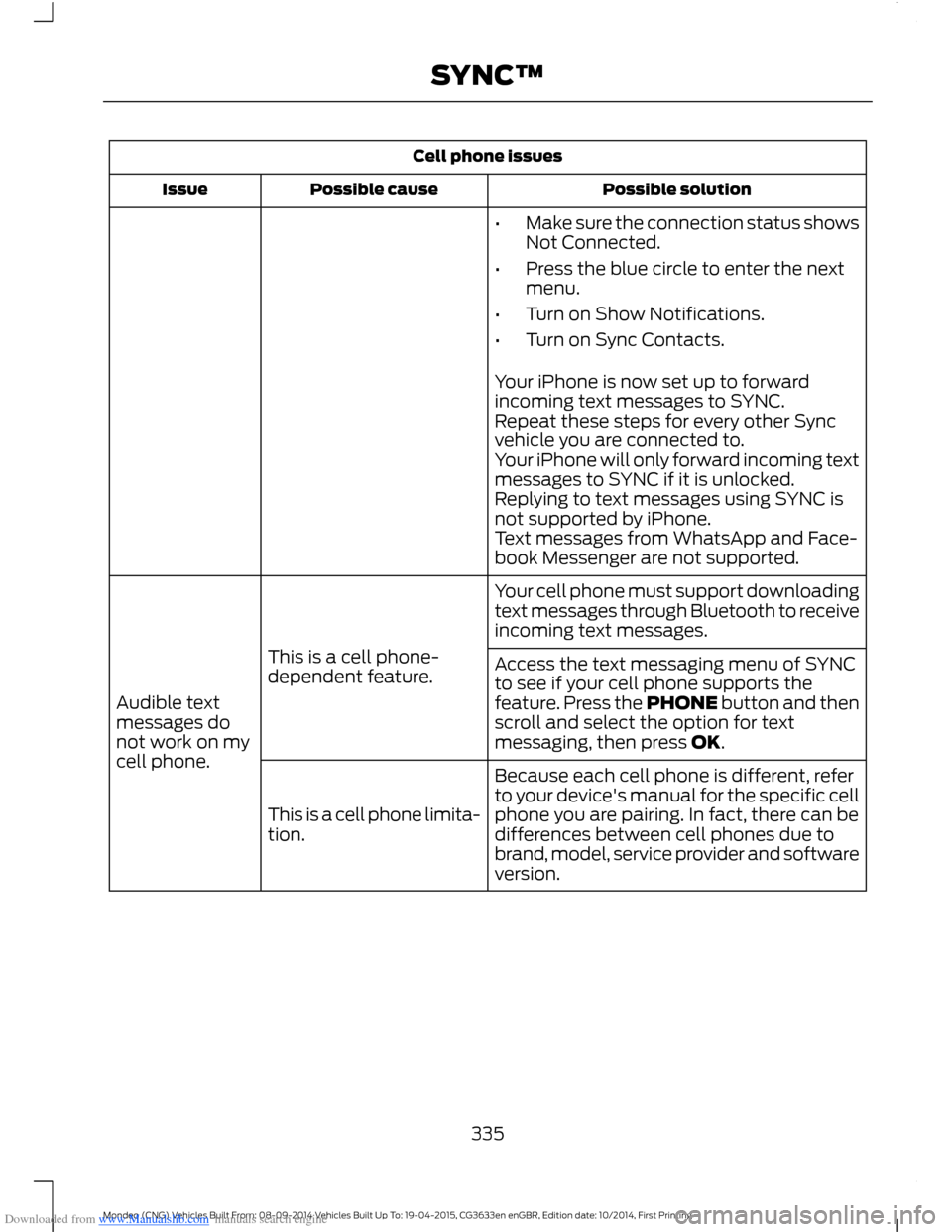
Possible solutionPossible causeIssue
•Make sure the connection status showsNot Connected.
•Press the blue circle to enter the nextmenu.
•Turn on Show Notifications.
•Turn on Sync Contacts.
Your iPhone is now set up to forwardincoming text messages to SYNC.Repeat these steps for every other Syncvehicle you are connected to.Your iPhone will only forward incoming textmessages to SYNC if it is unlocked.Replying to text messages using SYNC isnot supported by iPhone.Text messages from WhatsApp and Face-book Messenger are not supported.
Your cell phone must support downloadingtext messages through Bluetooth to receiveincoming text messages.
This is a cell phone-dependent feature.
Audible textmessages donot work on mycell phone.
Access the text messaging menu of SYNCto see if your cell phone supports thefeature. Press the PHONE button and thenscroll and select the option for textmessaging, then press OK.
Because each cell phone is different, referto your device's manual for the specific cellphone you are pairing. In fact, there can bedifferences between cell phones due tobrand, model, service provider and softwareversion.
This is a cell phone limita-tion.
335Mondeo (CNG) Vehicles Built From: 08-09-2014 Vehicles Built Up To: 19-04-2015, CG3633en enGBR, Edition date: 10/2014, First PrintingSYNC™
Page 346 of 446
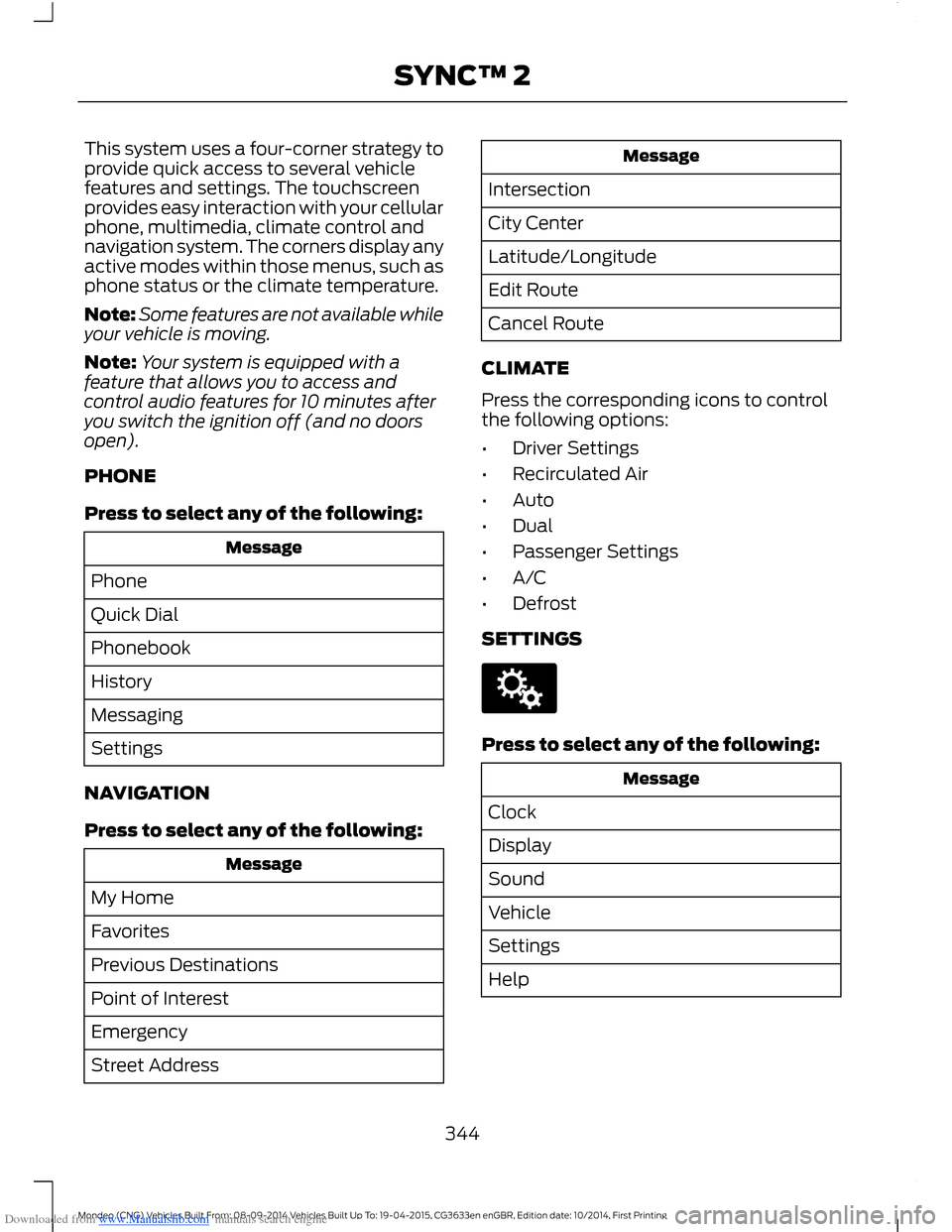
Downloaded from www.Manualslib.com manuals search engine This system uses a four-corner strategy toprovide quick access to several vehiclefeatures and settings. The touchscreenprovides easy interaction with your cellularphone, multimedia, climate control andnavigation system. The corners display anyactive modes within those menus, such asphone status or the climate temperature.
Note:Some features are not available whileyour vehicle is moving.
Note:Your system is equipped with afeature that allows you to access andcontrol audio features for 10 minutes afteryou switch the ignition off (and no doorsopen).
PHONE
Press to select any of the following:
Message
Phone
Quick Dial
Phonebook
History
Messaging
Settings
NAVIGATION
Press to select any of the following:
Message
My Home
Favorites
Previous Destinations
Point of Interest
Emergency
Street Address
Message
Intersection
City Center
Latitude/Longitude
Edit Route
Cancel Route
CLIMATE
Press the corresponding icons to controlthe following options:
•Driver Settings
•Recirculated Air
•Auto
•Dual
•Passenger Settings
•A/C
•Defrost
SETTINGS
Press to select any of the following:
Message
Clock
Display
Sound
Vehicle
Settings
Help
344Mondeo (CNG) Vehicles Built From: 08-09-2014 Vehicles Built Up To: 19-04-2015, CG3633en enGBR, Edition date: 10/2014, First PrintingSYNC™ 2