bluetooth FORD MONDEO 2014 4.G User Guide
[x] Cancel search | Manufacturer: FORD, Model Year: 2014, Model line: MONDEO, Model: FORD MONDEO 2014 4.GPages: 446, PDF Size: 29.09 MB
Page 325 of 446
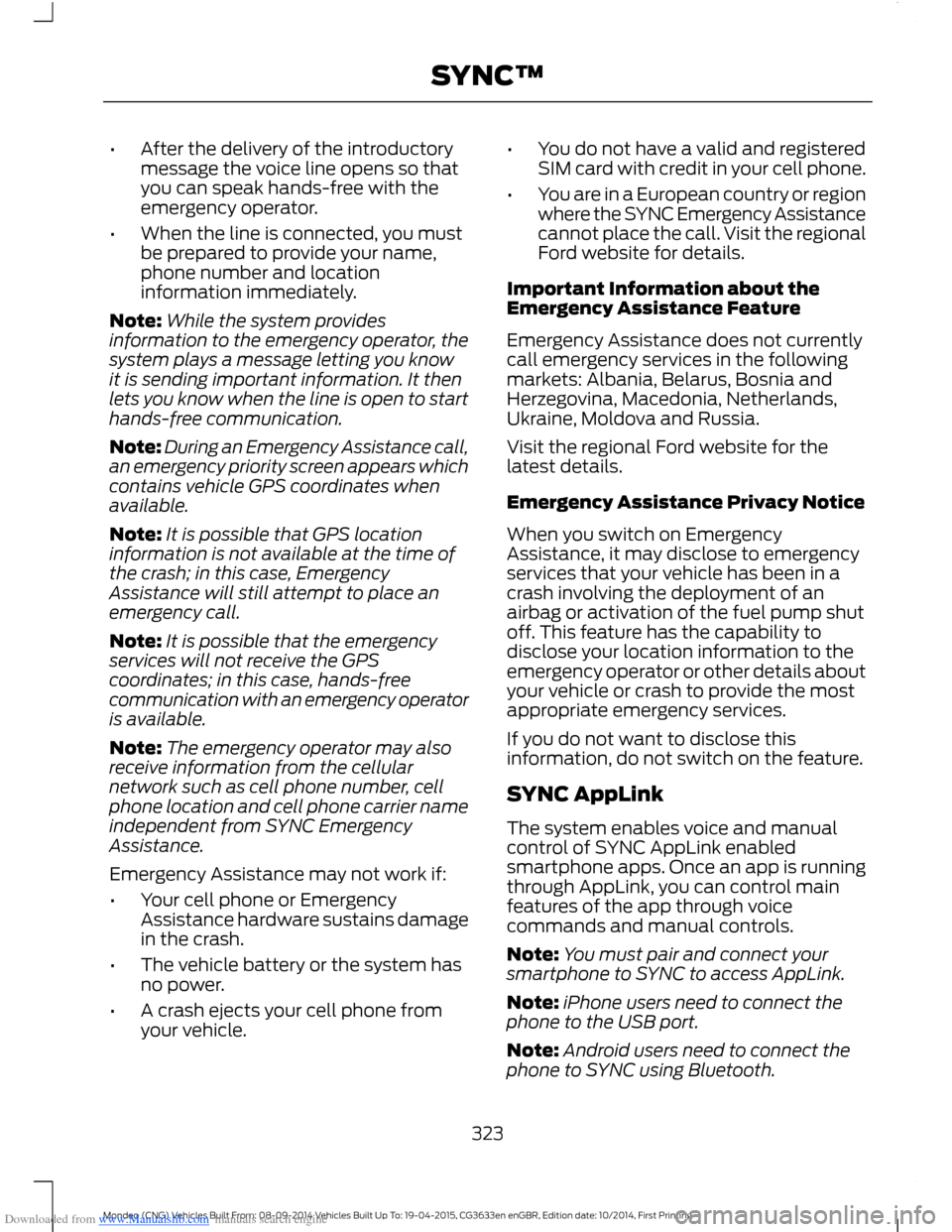
Downloaded from www.Manualslib.com manuals search engine •After the delivery of the introductorymessage the voice line opens so thatyou can speak hands-free with theemergency operator.
•When the line is connected, you mustbe prepared to provide your name,phone number and locationinformation immediately.
Note:While the system providesinformation to the emergency operator, thesystem plays a message letting you knowit is sending important information. It thenlets you know when the line is open to starthands-free communication.
Note:During an Emergency Assistance call,an emergency priority screen appears whichcontains vehicle GPS coordinates whenavailable.
Note:It is possible that GPS locationinformation is not available at the time ofthe crash; in this case, EmergencyAssistance will still attempt to place anemergency call.
Note:It is possible that the emergencyservices will not receive the GPScoordinates; in this case, hands-freecommunication with an emergency operatoris available.
Note:The emergency operator may alsoreceive information from the cellularnetwork such as cell phone number, cellphone location and cell phone carrier nameindependent from SYNC EmergencyAssistance.
Emergency Assistance may not work if:
•Your cell phone or EmergencyAssistance hardware sustains damagein the crash.
•The vehicle battery or the system hasno power.
•A crash ejects your cell phone fromyour vehicle.
•You do not have a valid and registeredSIM card with credit in your cell phone.
•You are in a European country or regionwhere the SYNC Emergency Assistancecannot place the call. Visit the regionalFord website for details.
Important Information about theEmergency Assistance Feature
Emergency Assistance does not currentlycall emergency services in the followingmarkets: Albania, Belarus, Bosnia andHerzegovina, Macedonia, Netherlands,Ukraine, Moldova and Russia.
Visit the regional Ford website for thelatest details.
Emergency Assistance Privacy Notice
When you switch on EmergencyAssistance, it may disclose to emergencyservices that your vehicle has been in acrash involving the deployment of anairbag or activation of the fuel pump shutoff. This feature has the capability todisclose your location information to theemergency operator or other details aboutyour vehicle or crash to provide the mostappropriate emergency services.
If you do not want to disclose thisinformation, do not switch on the feature.
SYNC AppLink
The system enables voice and manualcontrol of SYNC AppLink enabledsmartphone apps. Once an app is runningthrough AppLink, you can control mainfeatures of the app through voicecommands and manual controls.
Note:You must pair and connect yoursmartphone to SYNC to access AppLink.
Note:iPhone users need to connect thephone to the USB port.
Note:Android users need to connect thephone to SYNC using Bluetooth.
323Mondeo (CNG) Vehicles Built From: 08-09-2014 Vehicles Built Up To: 19-04-2015, CG3633en enGBR, Edition date: 10/2014, First PrintingSYNC™
Page 332 of 446
![FORD MONDEO 2014 4.G User Guide Downloaded from www.Manualslib.com manuals search engine Voice Command
[play] (similar music | more like this)
((whos | who is) this | who plays this | (whats | what is) playing [now] | (what | whic](/img/11/5483/w960_5483-331.png "FORD MONDEO 2014 4.G User Guide Downloaded from www.Manualslib.com manuals search engine Voice Command
[play] (similar music | more like this)
((whos | who is) this | who plays this | (whats | what is) playing [now] | (what | whic")
Downloaded from www.Manualslib.com manuals search engine Voice Command
[play] (similar music | more like this)
((who's | who is) this | who plays this | (what's | what is) playing [now] | (what | which)(song | track | artist) is this | (who's | who is) playing | (what's | what is) this)
* This voice command is not available until indexing is complete.
Voice Command Guide
Description and ActionVoice Command
The system searches all the data from your indexed musicand if available, begins to play the chosen type of music.(browse | search | show)genre
The system compiles a playlist and then plays similar musicto what is currently playing from the USB port using indexedmetadata information.
[play] (similar music |more like this)
The system searches for a specific artist, track or album fromthe music indexed through the USB port.(browse | search | show)artist
The system searches for a specific artist, track or album fromthe music indexed through the USB port.(browse | search | show)album
The system is also capable of playingmusic from your cell phone throughBluetooth.
To switch the Bluetooth audio on, use theMEDIA button (next to the audio display)or Source button, or press the voice buttonand when prompted say:
Description and ActionVoice Command
Bluetooth audio
Then any of the following:
Description and ActionVoice Command
pause
play
[play] next track
[play] previous track
330Mondeo (CNG) Vehicles Built From: 08-09-2014 Vehicles Built Up To: 19-04-2015, CG3633en enGBR, Edition date: 10/2014, First PrintingSYNC™
Page 335 of 446
Downloaded from www.Manualslib.com manuals search engine Description and ActionMessage
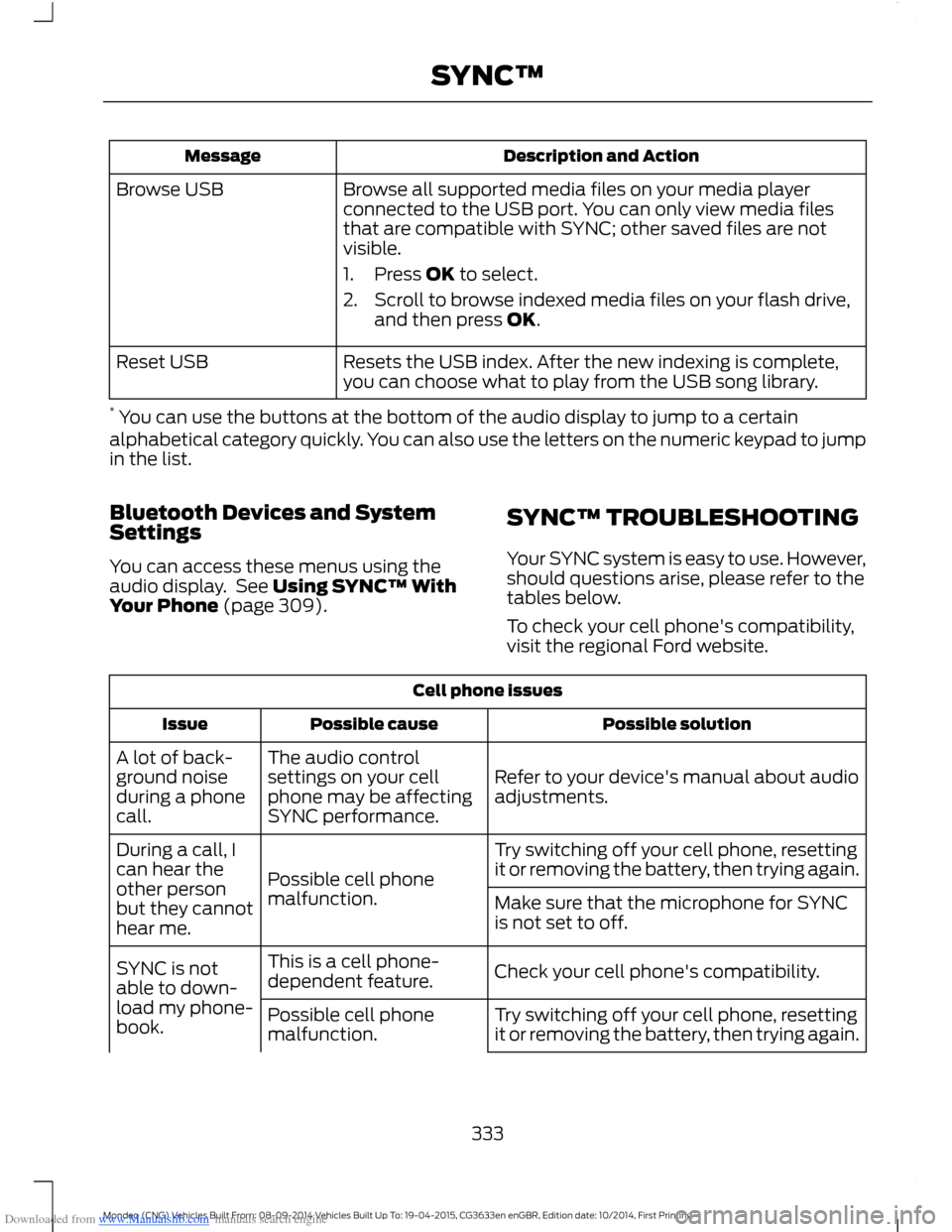
Browse all supported media files on your media playerconnected to the USB port. You can only view media filesthat are compatible with SYNC; other saved files are notvisible.
1.Press OK to select.
2.Scroll to browse indexed media files on your flash drive,and then press OK.
Browse USB
Resets the USB index. After the new indexing is complete,you can choose what to play from the USB song library.Reset USB
* You can use the buttons at the bottom of the audio display to jump to a certainalphabetical category quickly. You can also use the letters on the numeric keypad to jumpin the list.
Bluetooth Devices and SystemSettings
You can access these menus using theaudio display. See Using SYNC™ WithYour Phone (page 309).
SYNC™ TROUBLESHOOTING
Your SYNC system is easy to use. However,should questions arise, please refer to thetables below.
To check your cell phone's compatibility,visit the regional Ford website.
Cell phone issues
Possible solutionPossible causeIssue
Refer to your device's manual about audioadjustments.
The audio controlsettings on your cellphone may be affectingSYNC performance.
A lot of back-ground noiseduring a phonecall.
Try switching off your cell phone, resettingit or removing the battery, then trying again.Possible cell phonemalfunction.
During a call, Ican hear theother personbut they cannothear me.
Make sure that the microphone for SYNCis not set to off.
Check your cell phone's compatibility.This is a cell phone-dependent feature.SYNC is notable to down-load my phone-book.Try switching off your cell phone, resettingit or removing the battery, then trying again.Possible cell phonemalfunction.
333Mondeo (CNG) Vehicles Built From: 08-09-2014 Vehicles Built Up To: 19-04-2015, CG3633en enGBR, Edition date: 10/2014, First PrintingSYNC™
Page 336 of 446
Downloaded from www.Manualslib.com manuals search engine Cell phone issues
Possible solutionPossible causeIssue
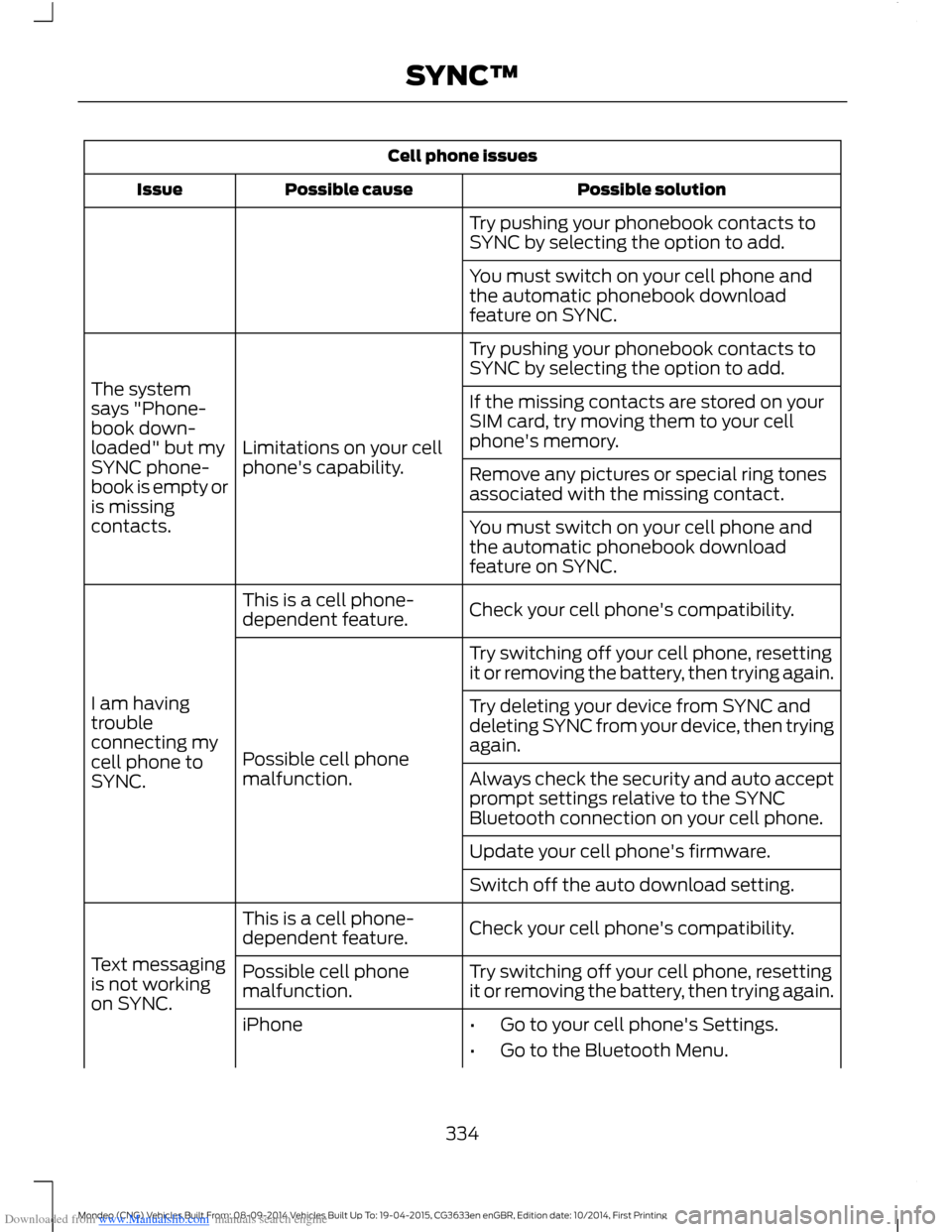
Try pushing your phonebook contacts toSYNC by selecting the option to add.
You must switch on your cell phone andthe automatic phonebook downloadfeature on SYNC.
Try pushing your phonebook contacts toSYNC by selecting the option to add.
Limitations on your cellphone's capability.
The systemsays "Phone-book down-loaded" but mySYNC phone-book is empty oris missingcontacts.
If the missing contacts are stored on yourSIM card, try moving them to your cellphone's memory.
Remove any pictures or special ring tonesassociated with the missing contact.
You must switch on your cell phone andthe automatic phonebook downloadfeature on SYNC.
Check your cell phone's compatibility.This is a cell phone-dependent feature.
I am havingtroubleconnecting mycell phone toSYNC.
Try switching off your cell phone, resettingit or removing the battery, then trying again.
Possible cell phonemalfunction.
Try deleting your device from SYNC anddeleting SYNC from your device, then tryingagain.
Always check the security and auto acceptprompt settings relative to the SYNCBluetooth connection on your cell phone.
Update your cell phone's firmware.
Switch off the auto download setting.
Check your cell phone's compatibility.This is a cell phone-dependent feature.
Text messagingis not workingon SYNC.
Try switching off your cell phone, resettingit or removing the battery, then trying again.Possible cell phonemalfunction.
iPhone•Go to your cell phone's Settings.
•Go to the Bluetooth Menu.
334Mondeo (CNG) Vehicles Built From: 08-09-2014 Vehicles Built Up To: 19-04-2015, CG3633en enGBR, Edition date: 10/2014, First PrintingSYNC™
Page 337 of 446
Downloaded from www.Manualslib.com manuals search engine Cell phone issues
Possible solutionPossible causeIssue
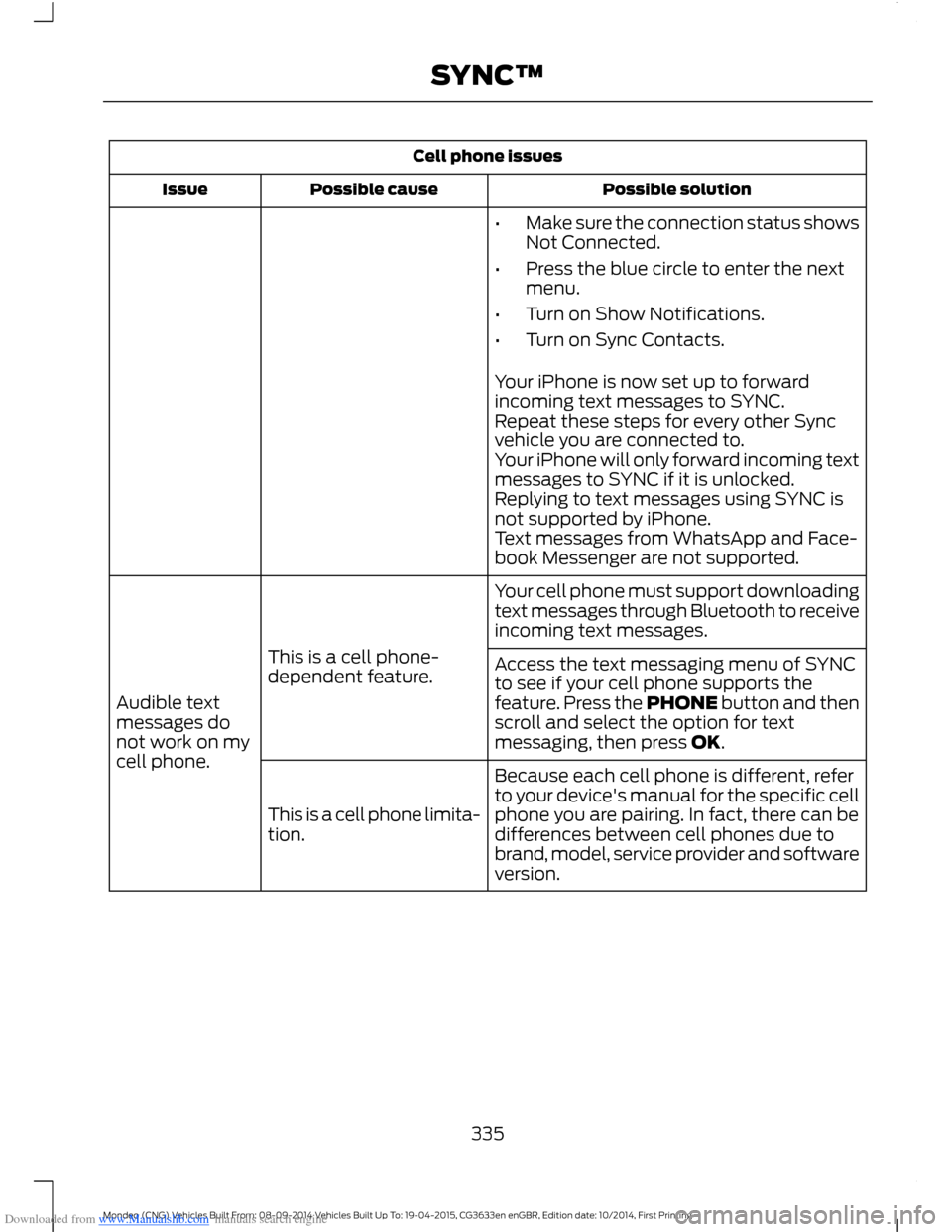
•Make sure the connection status showsNot Connected.
•Press the blue circle to enter the nextmenu.
•Turn on Show Notifications.
•Turn on Sync Contacts.
Your iPhone is now set up to forwardincoming text messages to SYNC.Repeat these steps for every other Syncvehicle you are connected to.Your iPhone will only forward incoming textmessages to SYNC if it is unlocked.Replying to text messages using SYNC isnot supported by iPhone.Text messages from WhatsApp and Face-book Messenger are not supported.
Your cell phone must support downloadingtext messages through Bluetooth to receiveincoming text messages.
This is a cell phone-dependent feature.
Audible textmessages donot work on mycell phone.
Access the text messaging menu of SYNCto see if your cell phone supports thefeature. Press the PHONE button and thenscroll and select the option for textmessaging, then press OK.
Because each cell phone is different, referto your device's manual for the specific cellphone you are pairing. In fact, there can bedifferences between cell phones due tobrand, model, service provider and softwareversion.
This is a cell phone limita-tion.
335Mondeo (CNG) Vehicles Built From: 08-09-2014 Vehicles Built Up To: 19-04-2015, CG3633en enGBR, Edition date: 10/2014, First PrintingSYNC™
Page 338 of 446
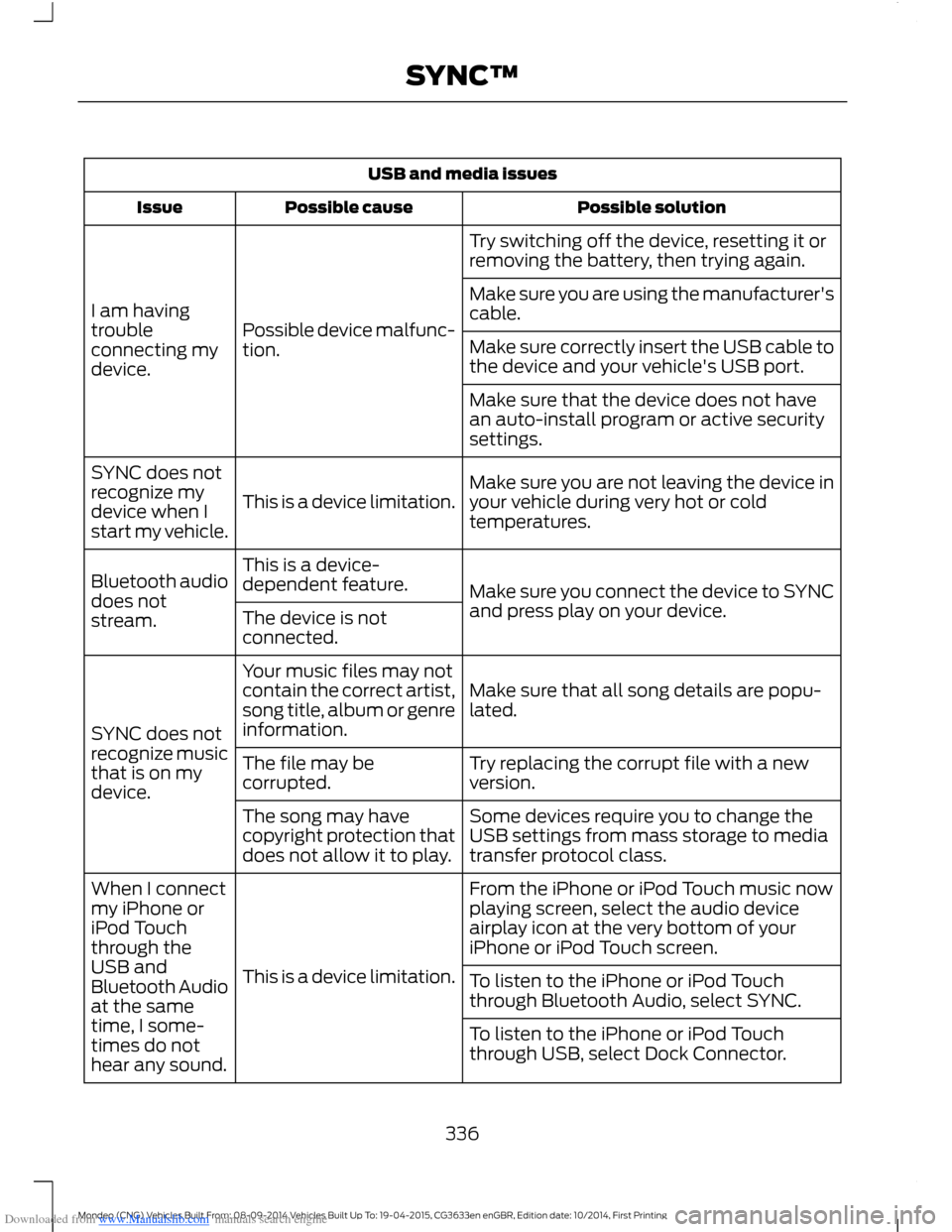
Downloaded from www.Manualslib.com manuals search engine USB and media issues
Possible solutionPossible causeIssue
Try switching off the device, resetting it orremoving the battery, then trying again.
Possible device malfunc-tion.
I am havingtroubleconnecting mydevice.
Make sure you are using the manufacturer'scable.
Make sure correctly insert the USB cable tothe device and your vehicle's USB port.
Make sure that the device does not havean auto-install program or active securitysettings.
Make sure you are not leaving the device inyour vehicle during very hot or coldtemperatures.This is a device limitation.
SYNC does notrecognize mydevice when Istart my vehicle.
Make sure you connect the device to SYNCand press play on your device.
This is a device-dependent feature.Bluetooth audiodoes notstream.The device is notconnected.
Make sure that all song details are popu-lated.
Your music files may notcontain the correct artist,song title, album or genreinformation.SYNC does notrecognize musicthat is on mydevice.
Try replacing the corrupt file with a newversion.The file may becorrupted.
Some devices require you to change theUSB settings from mass storage to mediatransfer protocol class.
The song may havecopyright protection thatdoes not allow it to play.
From the iPhone or iPod Touch music nowplaying screen, select the audio deviceairplay icon at the very bottom of youriPhone or iPod Touch screen.
This is a device limitation.
When I connectmy iPhone oriPod Touchthrough theUSB andBluetooth Audioat the sametime, I some-times do nothear any sound.
To listen to the iPhone or iPod Touchthrough Bluetooth Audio, select SYNC.
To listen to the iPhone or iPod Touchthrough USB, select Dock Connector.
336Mondeo (CNG) Vehicles Built From: 08-09-2014 Vehicles Built Up To: 19-04-2015, CG3633en enGBR, Edition date: 10/2014, First PrintingSYNC™
Page 341 of 446
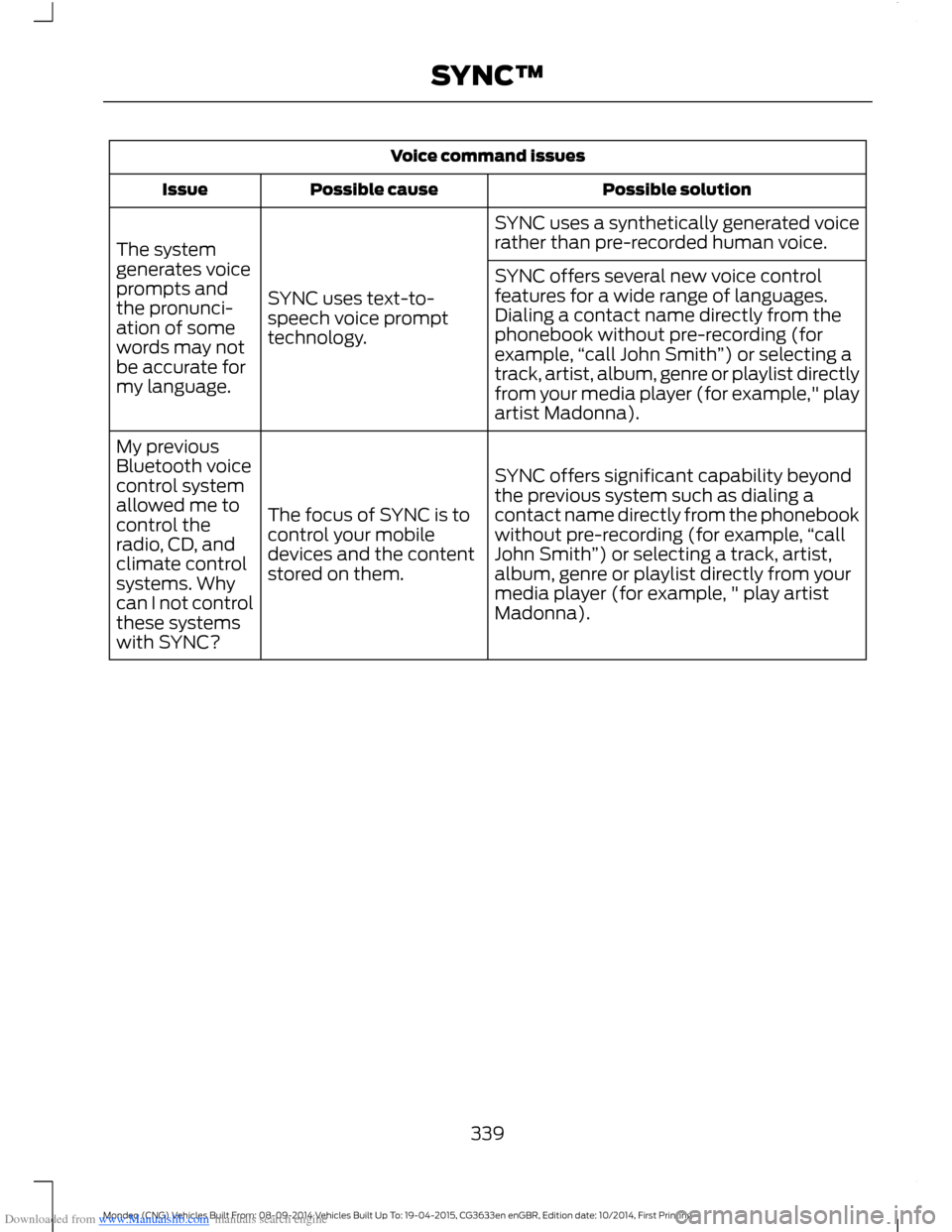
Downloaded from www.Manualslib.com manuals search engine Voice command issues
Possible solutionPossible causeIssue
SYNC uses a synthetically generated voicerather than pre-recorded human voice.
SYNC uses text-to-speech voice prompttechnology.
The systemgenerates voiceprompts andthe pronunci-ation of somewords may notbe accurate formy language.
SYNC offers several new voice controlfeatures for a wide range of languages.Dialing a contact name directly from thephonebook without pre-recording (forexample,“call John Smith”) or selecting atrack, artist, album, genre or playlist directlyfrom your media player (for example," playartist Madonna).
SYNC offers significant capability beyondthe previous system such as dialing acontact name directly from the phonebookwithout pre-recording (for example,“callJohn Smith”) or selecting a track, artist,album, genre or playlist directly from yourmedia player (for example, " play artistMadonna).
The focus of SYNC is tocontrol your mobiledevices and the contentstored on them.
My previousBluetooth voicecontrol systemallowed me tocontrol theradio, CD, andclimate controlsystems. Whycan I not controlthese systemswith SYNC?
339Mondeo (CNG) Vehicles Built From: 08-09-2014 Vehicles Built Up To: 19-04-2015, CG3633en enGBR, Edition date: 10/2014, First PrintingSYNC™
Page 342 of 446
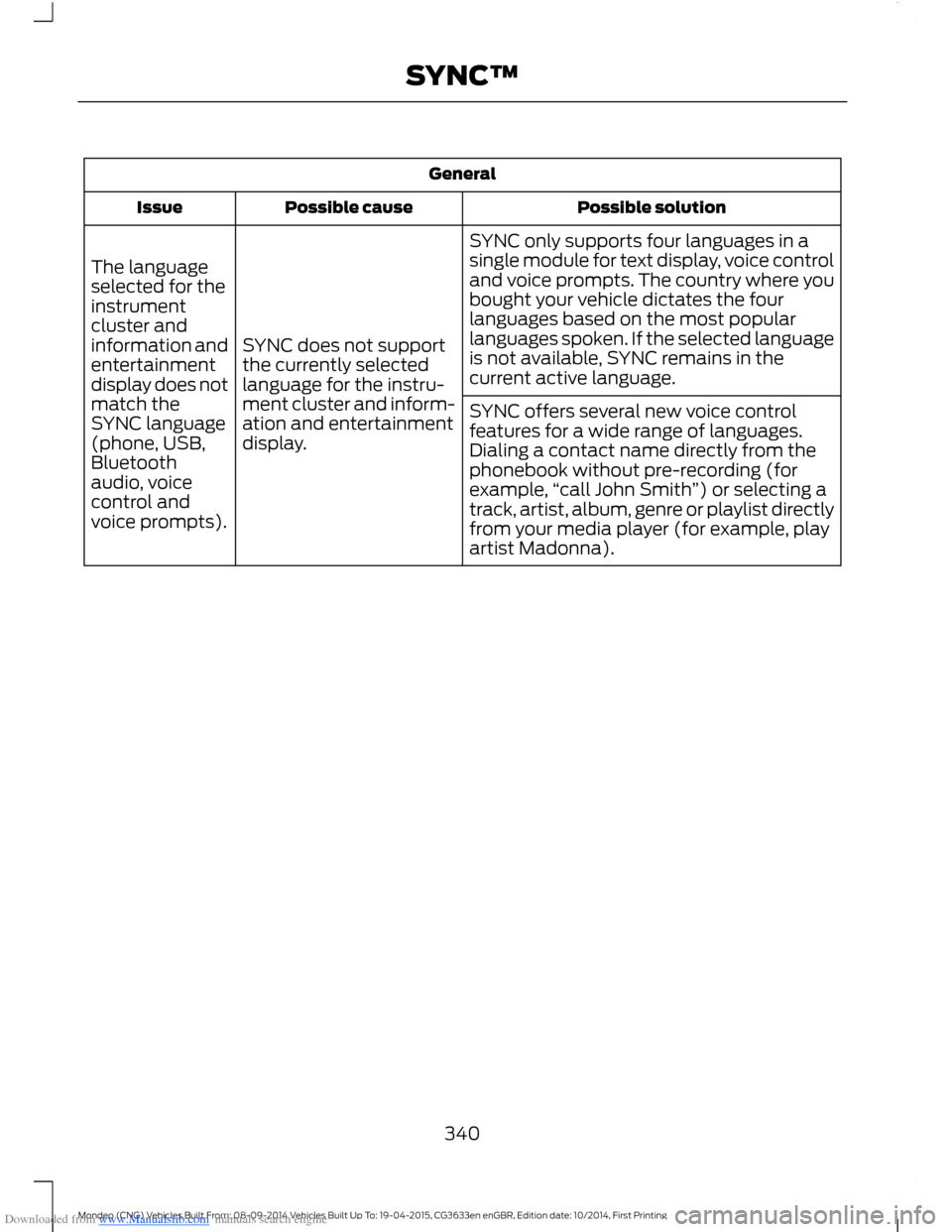
Downloaded from www.Manualslib.com manuals search engine General
Possible solutionPossible causeIssue
SYNC only supports four languages in asingle module for text display, voice controland voice prompts. The country where youbought your vehicle dictates the fourlanguages based on the most popularlanguages spoken. If the selected languageis not available, SYNC remains in thecurrent active language.
SYNC does not supportthe currently selectedlanguage for the instru-ment cluster and inform-ation and entertainmentdisplay.
The languageselected for theinstrumentcluster andinformation andentertainmentdisplay does notmatch theSYNC language(phone, USB,Bluetoothaudio, voicecontrol andvoice prompts).
SYNC offers several new voice controlfeatures for a wide range of languages.Dialing a contact name directly from thephonebook without pre-recording (forexample,“call John Smith”) or selecting atrack, artist, album, genre or playlist directlyfrom your media player (for example, playartist Madonna).
340Mondeo (CNG) Vehicles Built From: 08-09-2014 Vehicles Built Up To: 19-04-2015, CG3633en enGBR, Edition date: 10/2014, First PrintingSYNC™
Page 344 of 446
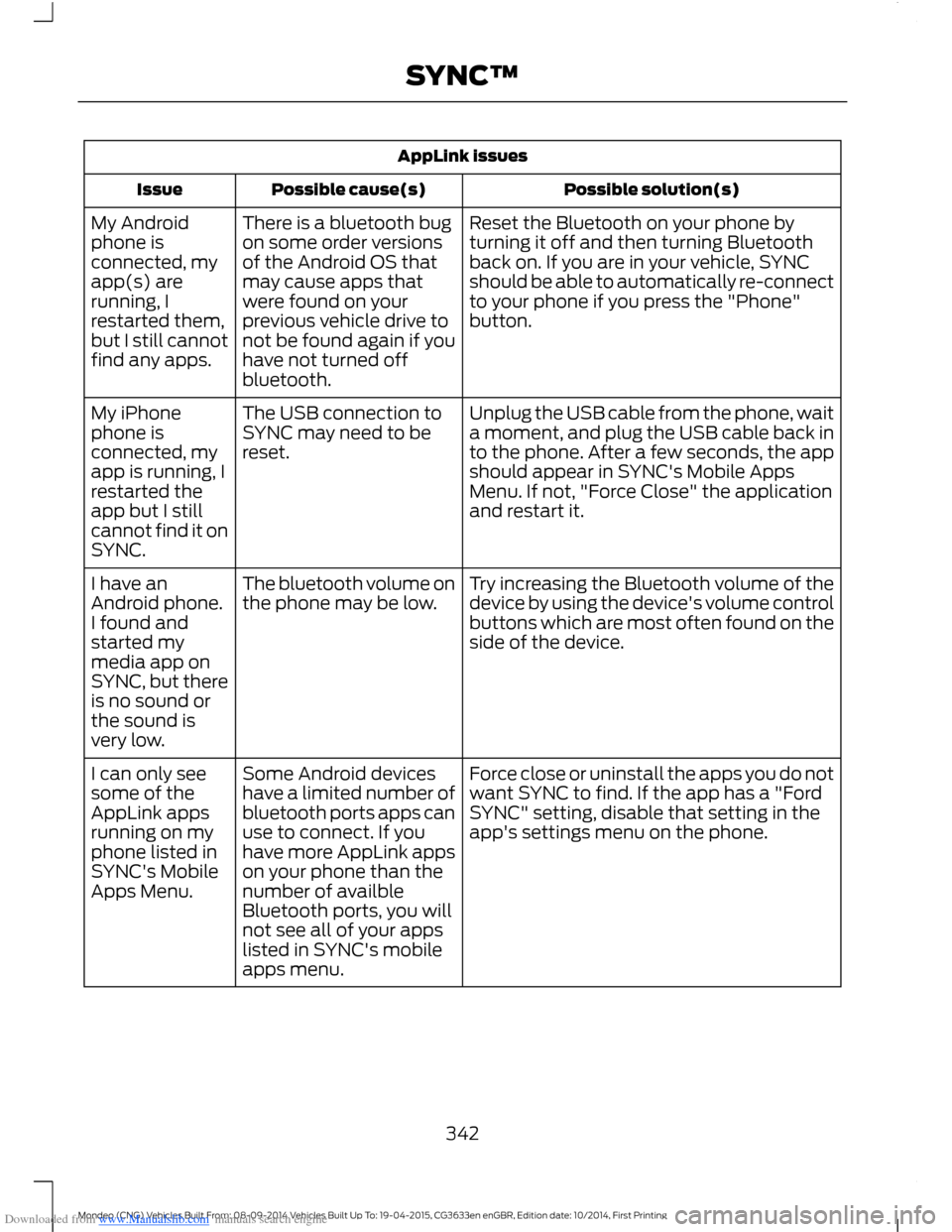
Downloaded from www.Manualslib.com manuals search engine AppLink issues
Possible solution(s)Possible cause(s)Issue
Reset the Bluetooth on your phone byturning it off and then turning Bluetoothback on. If you are in your vehicle, SYNCshould be able to automatically re-connectto your phone if you press the "Phone"button.
There is a bluetooth bugon some order versionsof the Android OS thatmay cause apps thatwere found on yourprevious vehicle drive tonot be found again if youhave not turned offbluetooth.
My Androidphone isconnected, myapp(s) arerunning, Irestarted them,but I still cannotfind any apps.
Unplug the USB cable from the phone, waita moment, and plug the USB cable back into the phone. After a few seconds, the appshould appear in SYNC's Mobile AppsMenu. If not, "Force Close" the applicationand restart it.
The USB connection toSYNC may need to bereset.
My iPhonephone isconnected, myapp is running, Irestarted theapp but I stillcannot find it onSYNC.
Try increasing the Bluetooth volume of thedevice by using the device's volume controlbuttons which are most often found on theside of the device.
The bluetooth volume onthe phone may be low.I have anAndroid phone.I found andstarted mymedia app onSYNC, but thereis no sound orthe sound isvery low.
Force close or uninstall the apps you do notwant SYNC to find. If the app has a "FordSYNC" setting, disable that setting in theapp's settings menu on the phone.
Some Android deviceshave a limited number ofbluetooth ports apps canuse to connect. If youhave more AppLink appson your phone than thenumber of availbleBluetooth ports, you willnot see all of your appslisted in SYNC's mobileapps menu.
I can only seesome of theAppLink appsrunning on myphone listed inSYNC's MobileApps Menu.
342Mondeo (CNG) Vehicles Built From: 08-09-2014 Vehicles Built Up To: 19-04-2015, CG3633en enGBR, Edition date: 10/2014, First PrintingSYNC™
Page 361 of 446
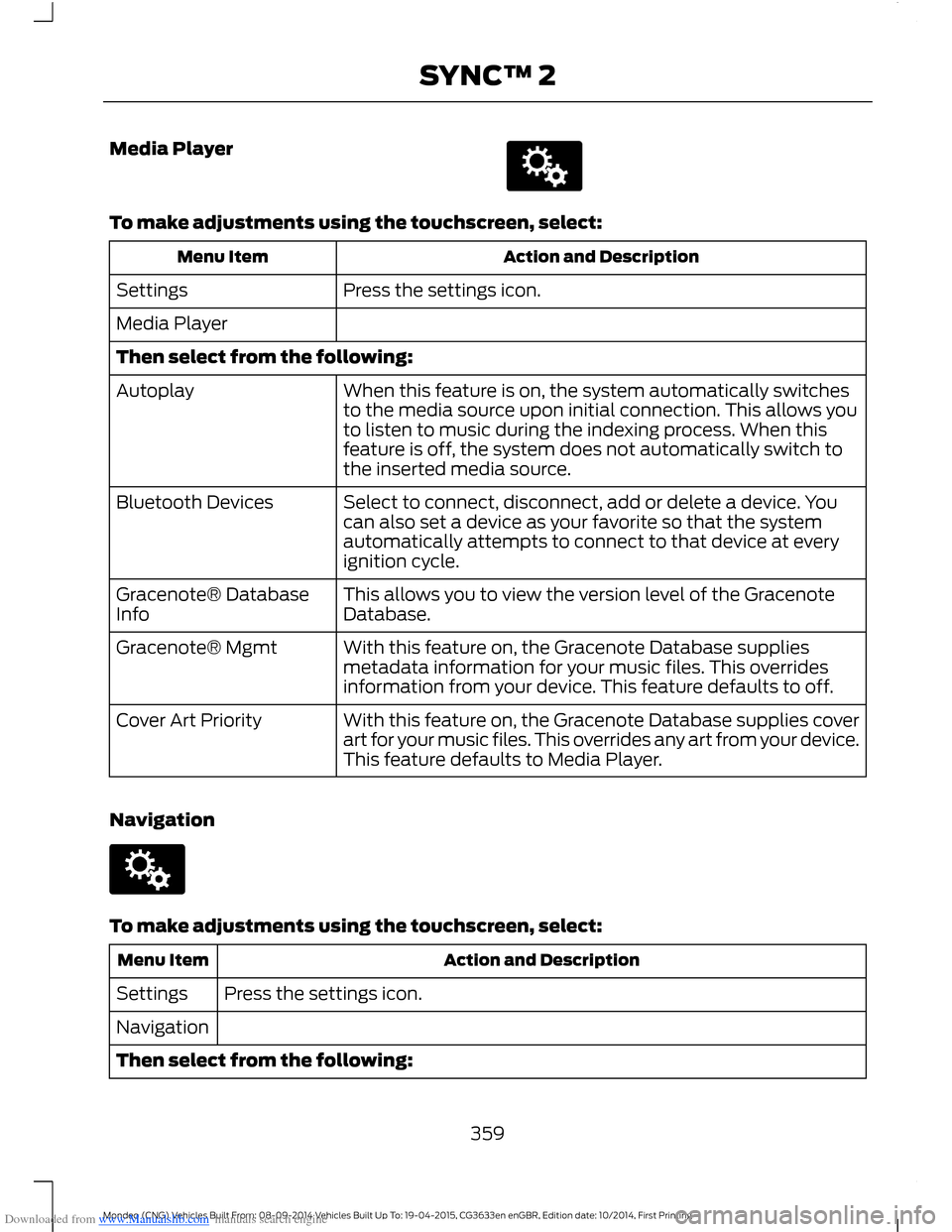
Downloaded from www.Manualslib.com manuals search engine Media Player
To make adjustments using the touchscreen, select:
Action and DescriptionMenu Item
Press the settings icon.Settings
Media Player
Then select from the following:
When this feature is on, the system automatically switchesto the media source upon initial connection. This allows youto listen to music during the indexing process. When thisfeature is off, the system does not automatically switch tothe inserted media source.
Autoplay
Select to connect, disconnect, add or delete a device. Youcan also set a device as your favorite so that the systemautomatically attempts to connect to that device at everyignition cycle.
Bluetooth Devices
This allows you to view the version level of the GracenoteDatabase.Gracenote® DatabaseInfo
With this feature on, the Gracenote Database suppliesmetadata information for your music files. This overridesinformation from your device. This feature defaults to off.
Gracenote® Mgmt
With this feature on, the Gracenote Database supplies coverart for your music files. This overrides any art from your device.This feature defaults to Media Player.
Cover Art Priority
Navigation
To make adjustments using the touchscreen, select:
Action and DescriptionMenu Item
Press the settings icon.Settings
Navigation
Then select from the following:
359Mondeo (CNG) Vehicles Built From: 08-09-2014 Vehicles Built Up To: 19-04-2015, CG3633en enGBR, Edition date: 10/2014, First PrintingSYNC™ 2