window FORD MONDEO 2014 4.G User Guide
[x] Cancel search | Manufacturer: FORD, Model Year: 2014, Model line: MONDEO, Model: FORD MONDEO 2014 4.GPages: 446, PDF Size: 29.09 MB
Page 46 of 446
Downloaded from www.Manualslib.com manuals search engine LOCKING AND UNLOCKING
Note:Check your vehicle is locked beforeleaving it unattended.
Note:Do not leave your keys in your vehicle.
Power Door Locks
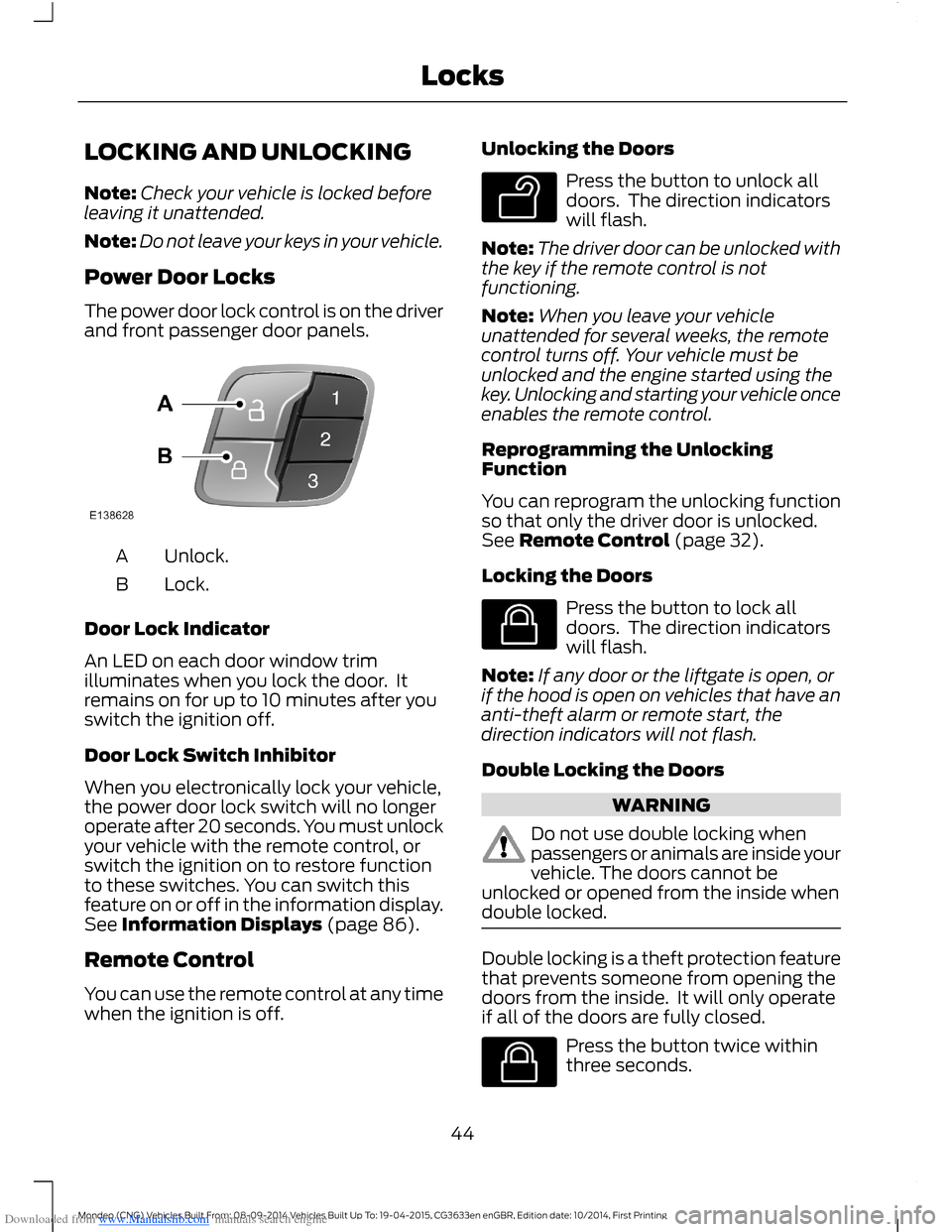
The power door lock control is on the driverand front passenger door panels.
Unlock.A
Lock.B
Door Lock Indicator
An LED on each door window trimilluminates when you lock the door. Itremains on for up to 10 minutes after youswitch the ignition off.
Door Lock Switch Inhibitor
When you electronically lock your vehicle,the power door lock switch will no longeroperate after 20 seconds. You must unlockyour vehicle with the remote control, orswitch the ignition on to restore functionto these switches. You can switch thisfeature on or off in the information display.See Information Displays (page 86).
Remote Control
You can use the remote control at any timewhen the ignition is off.
Unlocking the Doors
Press the button to unlock alldoors. The direction indicatorswill flash.
Note:The driver door can be unlocked withthe key if the remote control is notfunctioning.
Note:When you leave your vehicleunattended for several weeks, the remotecontrol turns off. Your vehicle must beunlocked and the engine started using thekey. Unlocking and starting your vehicle onceenables the remote control.
Reprogramming the UnlockingFunction
You can reprogram the unlocking functionso that only the driver door is unlocked.See Remote Control (page 32).
Locking the Doors
Press the button to lock alldoors. The direction indicatorswill flash.
Note:If any door or the liftgate is open, orif the hood is open on vehicles that have ananti-theft alarm or remote start, thedirection indicators will not flash.
Double Locking the Doors
WARNING
Do not use double locking whenpassengers or animals are inside yourvehicle. The doors cannot beunlocked or opened from the inside whendouble locked.
Double locking is a theft protection featurethat prevents someone from opening thedoors from the inside. It will only operateif all of the doors are fully closed.
Press the button twice withinthree seconds.
44Mondeo (CNG) Vehicles Built From: 08-09-2014 Vehicles Built Up To: 19-04-2015, CG3633en enGBR, Edition date: 10/2014, First PrintingLocks
Page 48 of 446
Downloaded from www.Manualslib.com manuals search engine MANUAL LIFTGATE
WARNINGS
It is extremely dangerous to ride in acargo area, inside or outside of avehicle. In a crash, people riding inthese areas are more likely to be seriouslyinjured or killed. Do not allow people to ridein any area of your vehicle that is notequipped with seats and safety belts. Makesure everyone in your vehicle is in a seatand properly using a safety belt. Failure tofollow this warning could result in seriouspersonal injury or death.
Make sure to close and latch theliftgate to prevent drawing exhaustfumes into your vehicle. This will alsoprevent passengers and cargo from fallingout. If you must drive with the liftgate open,keep the vents or windows open so outsideair comes into your vehicle. Failure tofollow this warning could result in seriouspersonal injury.
Note:Be careful when opening or closingthe liftgate in a garage or other enclosedarea to avoid damaging the liftgate.
Note:Do not hang anything, for example abike rack, from the glass or liftgate. Thiscould damage the liftgate and itscomponents.
Note: Do not leave the liftgate open whiledriving. This could damage the liftgate andits components.
Opening the Liftgate
Manually
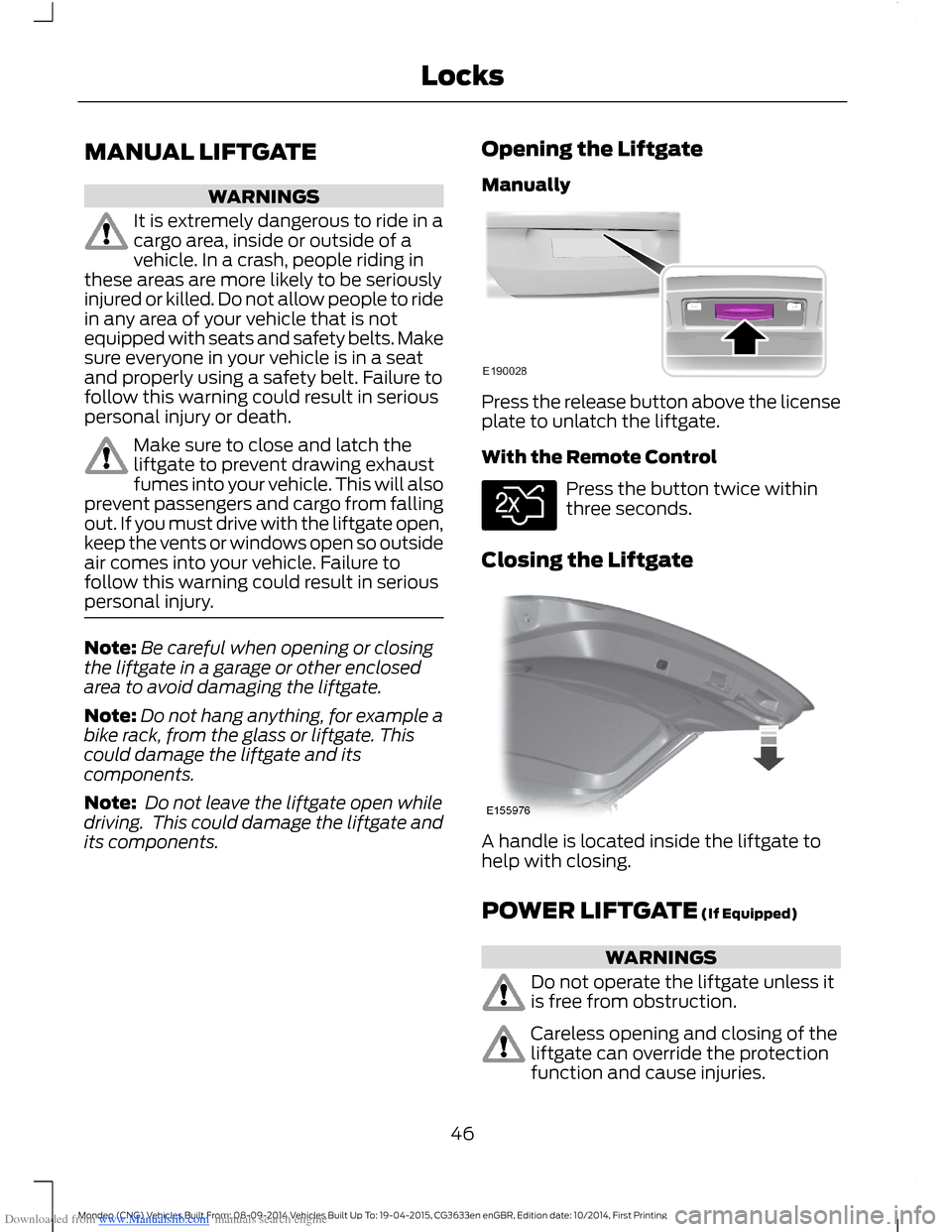
Press the release button above the licenseplate to unlatch the liftgate.
With the Remote Control
Press the button twice withinthree seconds.
Closing the Liftgate
A handle is located inside the liftgate tohelp with closing.
POWER LIFTGATE (If Equipped)
WARNINGS
Do not operate the liftgate unless itis free from obstruction.
Careless opening and closing of theliftgate can override the protectionfunction and cause injuries.
46Mondeo (CNG) Vehicles Built From: 08-09-2014 Vehicles Built Up To: 19-04-2015, CG3633en enGBR, Edition date: 10/2014, First PrintingLocks
Page 64 of 446
Downloaded from www.Manualslib.com manuals search engine A wipe will occur a few seconds afterwashing to clear any remaining washerfluid. This feature can be switched on oroff in the information display. See GeneralInformation (page 86).
REAR WINDOW WIPER AND
WASHERS
Rear Window Wiper
Note:Make sure you switch the rearwindow wiper and ignition off before usingan automatic car wash.
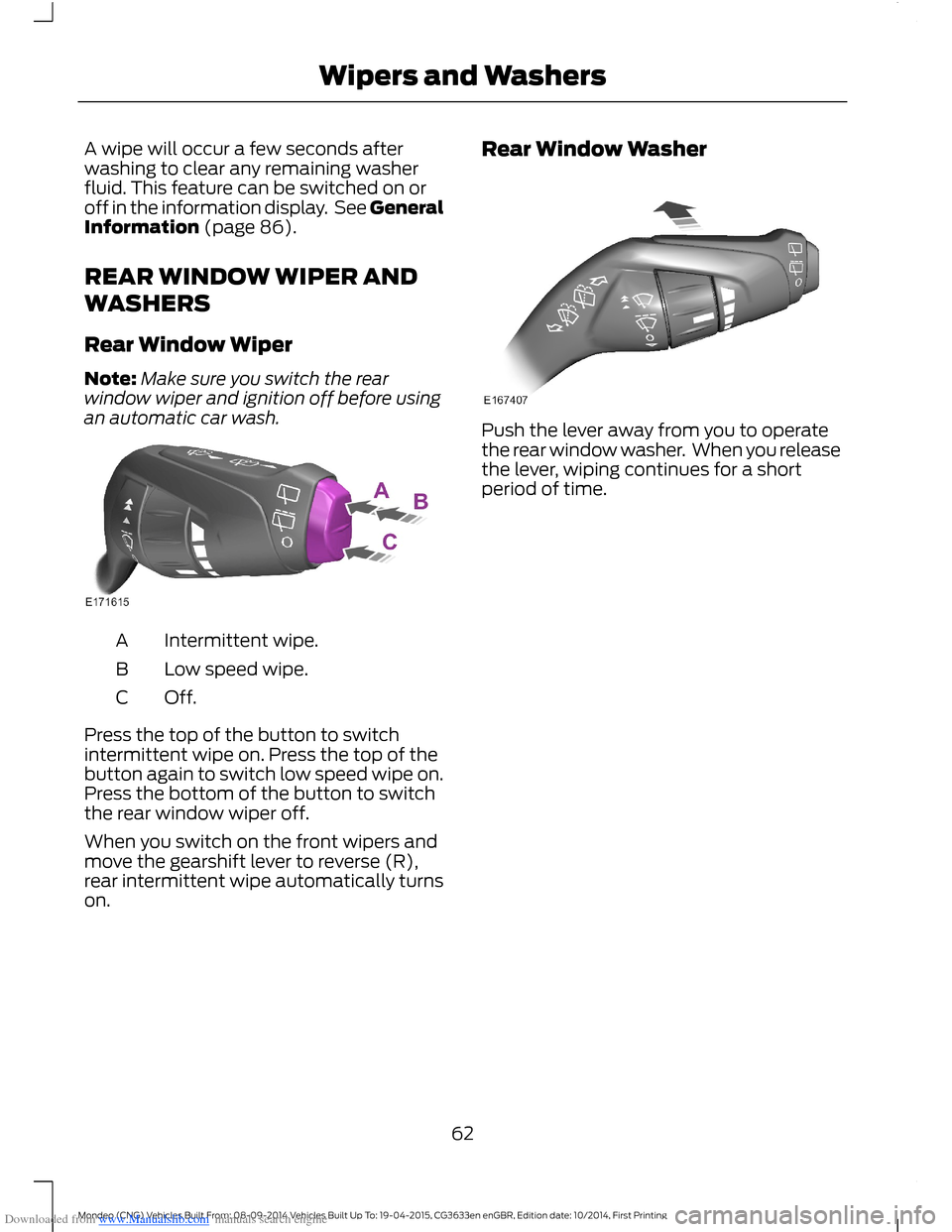
Intermittent wipe.A
Low speed wipe.B
Off.C
Press the top of the button to switchintermittent wipe on. Press the top of thebutton again to switch low speed wipe on.Press the bottom of the button to switchthe rear window wiper off.
When you switch on the front wipers andmove the gearshift lever to reverse (R),rear intermittent wipe automatically turnson.
Rear Window Washer
Push the lever away from you to operatethe rear window washer. When you releasethe lever, wiping continues for a shortperiod of time.
62Mondeo (CNG) Vehicles Built From: 08-09-2014 Vehicles Built Up To: 19-04-2015, CG3633en enGBR, Edition date: 10/2014, First PrintingWipers and Washers
Page 72 of 446
Downloaded from www.Manualslib.com manuals search engine Note:Tap the lever up or down to make thedirection indicators flash three times toindicate a lane change.
INTERIOR LAMPS
The lamps will turn on when you have metone of the following conditions:
•You open any door.
•You press a remote control button.
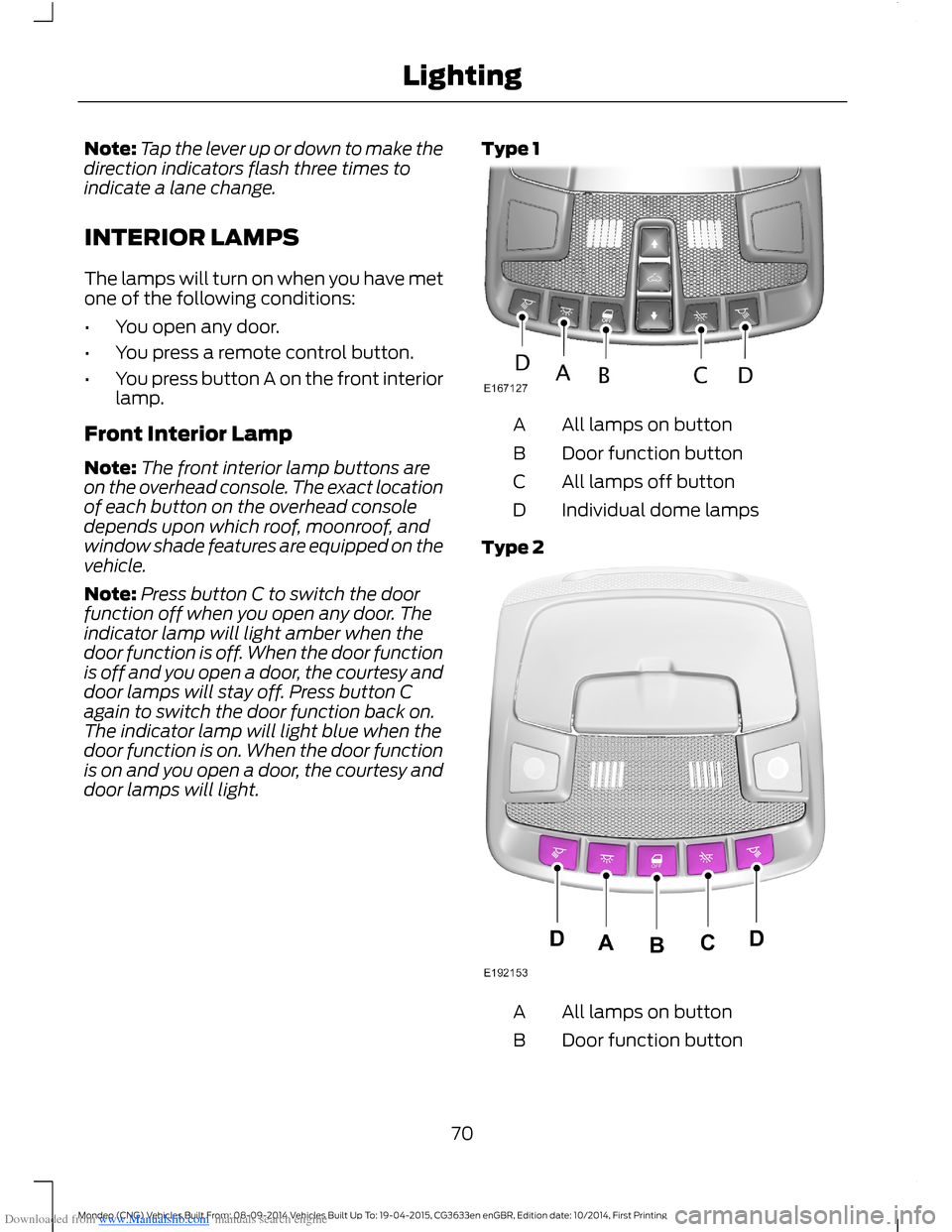
•You press button A on the front interiorlamp.
Front Interior Lamp
Note:The front interior lamp buttons areon the overhead console. The exact locationof each button on the overhead consoledepends upon which roof, moonroof, andwindow shade features are equipped on thevehicle.
Note:Press button C to switch the doorfunction off when you open any door. Theindicator lamp will light amber when thedoor function is off. When the door functionis off and you open a door, the courtesy anddoor lamps will stay off. Press button Cagain to switch the door function back on.The indicator lamp will light blue when thedoor function is on. When the door functionis on and you open a door, the courtesy anddoor lamps will light.
Type 1
All lamps on buttonA
Door function buttonB
All lamps off buttonC
Individual dome lampsD
Type 2
All lamps on buttonA
Door function buttonB
70Mondeo (CNG) Vehicles Built From: 08-09-2014 Vehicles Built Up To: 19-04-2015, CG3633en enGBR, Edition date: 10/2014, First PrintingLighting
Page 74 of 446
Downloaded from www.Manualslib.com manuals search engine POWER WINDOWS
WARNINGS
Do not leave children unattended inyour vehicle and do not let them playwith the power windows. They mayseriously injure themselves.
When closing the power windows,you should verify they are free ofobstructions and make sure thatchildren and pets are not in the proximityof the window openings.
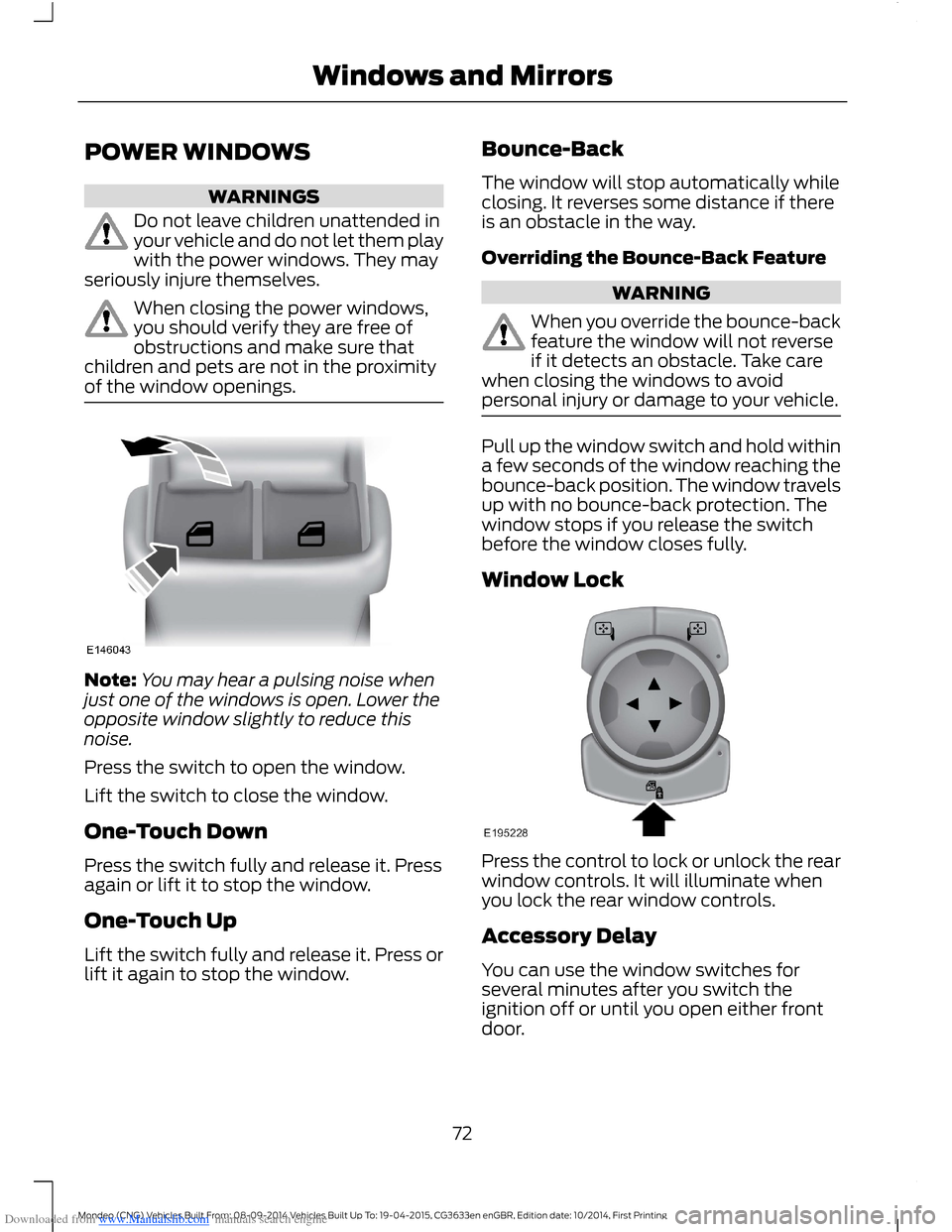
Note:You may hear a pulsing noise whenjust one of the windows is open. Lower theopposite window slightly to reduce thisnoise.
Press the switch to open the window.
Lift the switch to close the window.
One-Touch Down
Press the switch fully and release it. Pressagain or lift it to stop the window.
One-Touch Up
Lift the switch fully and release it. Press orlift it again to stop the window.
Bounce-Back
The window will stop automatically whileclosing. It reverses some distance if thereis an obstacle in the way.
Overriding the Bounce-Back Feature
WARNING
When you override the bounce-backfeature the window will not reverseif it detects an obstacle. Take carewhen closing the windows to avoidpersonal injury or damage to your vehicle.
Pull up the window switch and hold withina few seconds of the window reaching thebounce-back position. The window travelsup with no bounce-back protection. Thewindow stops if you release the switchbefore the window closes fully.
Window Lock
Press the control to lock or unlock the rearwindow controls. It will illuminate whenyou lock the rear window controls.
Accessory Delay
You can use the window switches forseveral minutes after you switch theignition off or until you open either frontdoor.
72Mondeo (CNG) Vehicles Built From: 08-09-2014 Vehicles Built Up To: 19-04-2015, CG3633en enGBR, Edition date: 10/2014, First PrintingWindows and Mirrors
Page 75 of 446
Downloaded from www.Manualslib.com manuals search engine GLOBAL OPENING AND
CLOSING
You can use the remote control to operatethe windows with the ignition off.
Note:You can enable or disable this featurein the information display or see anauthorized dealer. See (page 86).
Note:To operate this feature, accessorydelay must not be active.
Opening the Windows
You can only open the windows for a shorttime after you unlock your vehicle with theremote control. After you unlock yourvehicle, press and hold the remote controlunlock button to open the windows andvent the moonroof. Release the buttononce movement starts. Press the lock orunlock button to stop movement.
Closing the Windows
WARNING
When closing the windows andmoonroof, you should verify they arefree of obstructions and make surethat children and pets are not in theproximity of the window openings.
To close the windows and moonroof, pressand hold the remote control lock button.Release the button once movement starts.Press the lock or unlock button to stopmovement.
EXTERIOR MIRRORS
Power Exterior Mirrors
WARNING
Do not adjust the mirrors when yourvehicle is moving.
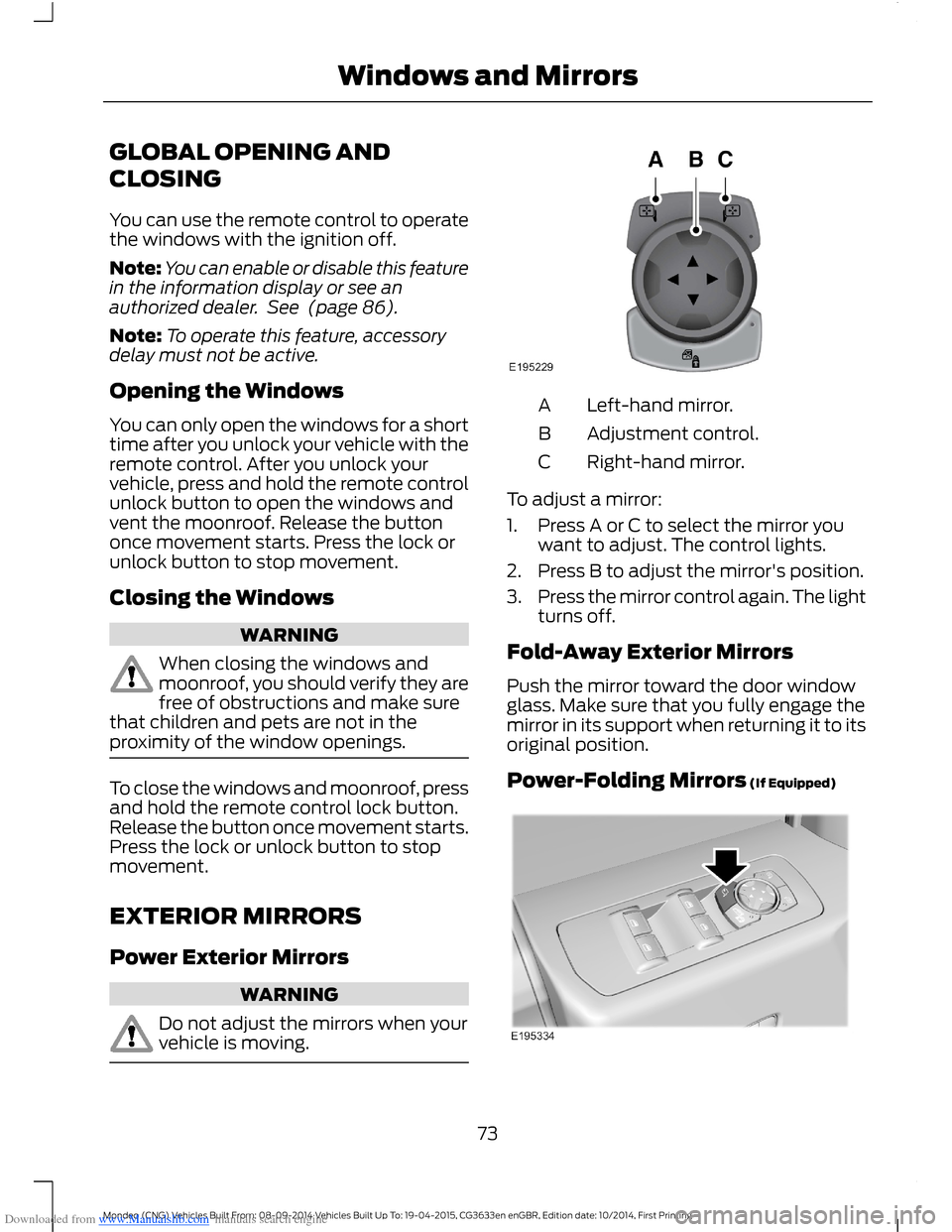
Left-hand mirror.A
Adjustment control.B
Right-hand mirror.C
To adjust a mirror:
1.Press A or C to select the mirror youwant to adjust. The control lights.
2.Press B to adjust the mirror's position.
3.Press the mirror control again. The lightturns off.
Fold-Away Exterior Mirrors
Push the mirror toward the door windowglass. Make sure that you fully engage themirror in its support when returning it to itsoriginal position.
Power-Folding Mirrors (If Equipped)
73Mondeo (CNG) Vehicles Built From: 08-09-2014 Vehicles Built Up To: 19-04-2015, CG3633en enGBR, Edition date: 10/2014, First PrintingWindows and Mirrors
Page 76 of 446
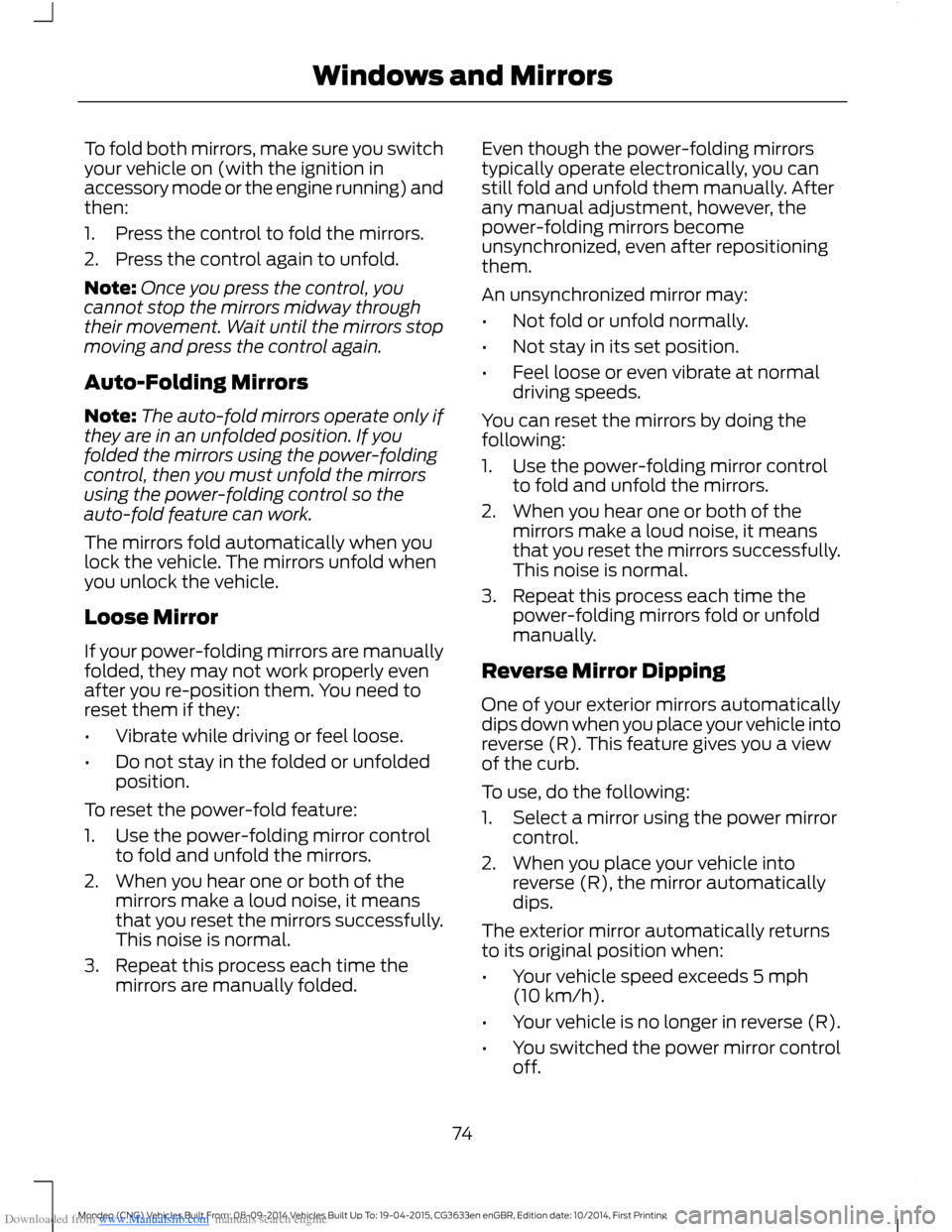
Downloaded from www.Manualslib.com manuals search engine To fold both mirrors, make sure you switchyour vehicle on (with the ignition inaccessory mode or the engine running) andthen:
1.Press the control to fold the mirrors.
2.Press the control again to unfold.
Note:Once you press the control, youcannot stop the mirrors midway throughtheir movement. Wait until the mirrors stopmoving and press the control again.
Auto-Folding Mirrors
Note:The auto-fold mirrors operate only ifthey are in an unfolded position. If youfolded the mirrors using the power-foldingcontrol, then you must unfold the mirrorsusing the power-folding control so theauto-fold feature can work.
The mirrors fold automatically when youlock the vehicle. The mirrors unfold whenyou unlock the vehicle.
Loose Mirror
If your power-folding mirrors are manuallyfolded, they may not work properly evenafter you re-position them. You need toreset them if they:
•Vibrate while driving or feel loose.
•Do not stay in the folded or unfoldedposition.
To reset the power-fold feature:
1.Use the power-folding mirror controlto fold and unfold the mirrors.
2.When you hear one or both of themirrors make a loud noise, it meansthat you reset the mirrors successfully.This noise is normal.
3.Repeat this process each time themirrors are manually folded.
Even though the power-folding mirrorstypically operate electronically, you canstill fold and unfold them manually. Afterany manual adjustment, however, thepower-folding mirrors becomeunsynchronized, even after repositioningthem.
An unsynchronized mirror may:
•Not fold or unfold normally.
•Not stay in its set position.
•Feel loose or even vibrate at normaldriving speeds.
You can reset the mirrors by doing thefollowing:
1.Use the power-folding mirror controlto fold and unfold the mirrors.
2.When you hear one or both of themirrors make a loud noise, it meansthat you reset the mirrors successfully.This noise is normal.
3.Repeat this process each time thepower-folding mirrors fold or unfoldmanually.
Reverse Mirror Dipping
One of your exterior mirrors automaticallydips down when you place your vehicle intoreverse (R). This feature gives you a viewof the curb.
To use, do the following:
1.Select a mirror using the power mirrorcontrol.
2.When you place your vehicle intoreverse (R), the mirror automaticallydips.
The exterior mirror automatically returnsto its original position when:
•Your vehicle speed exceeds 5 mph(10 km/h).
•Your vehicle is no longer in reverse (R).
•You switched the power mirror controloff.
74Mondeo (CNG) Vehicles Built From: 08-09-2014 Vehicles Built Up To: 19-04-2015, CG3633en enGBR, Edition date: 10/2014, First PrintingWindows and Mirrors
Page 77 of 446
Downloaded from www.Manualslib.com manuals search engine The mirror automatically adjusts to a setposition, but you can change the positionby doing the following:
1.Switch the ignition on.
2.Select the mirror you want tore-position.
3.Put your vehicle into reverse (R) andlet the mirror automatically dip to itsset position.
4.When the mirror is in its dipped positionand is no longer moving, re-position itto your preference.
5.Put your vehicle into park (P).
6.Use the memory preset control to savethe position. See Memory Function(page 131).
Heated Exterior Mirrors (If Equipped)
See Heated Windows and Mirrors (page121).
Memory Mirrors (If Equipped)
You can save and recall the mirrorpositions through the memory function.See Memory Function (page 131).
Auto-Dimming Feature (If Equipped)
The driver exterior mirror automaticallydims when the interior auto-dimmingmirror turns on.
Direction Indicator Mirrors (If Equipped)
The outer portion of the appropriate mirrorhousing blinks when you switch on thedirection indicator.
Blind Spot Monitor (If Equipped)
See Blind Spot Information System(page 194).
INTERIOR MIRROR
WARNING
Do not adjust the mirror when yourvehicle is moving.
Note:Do not clean the housing or glass ofany mirror with harsh abrasives, fuel or otherpetroleum or ammonia-based cleaningproducts.
You can adjust the interior mirror to yourpreference. Some mirrors also have asecond pivot point. This lets you move themirror head up or down and from side toside.
Pull the tab below the mirror toward youto reduce glare at night.
Auto-Dimming Mirror (If Equipped)
Note:Do not block the sensors on the frontand back of the mirror. Mirror performancemay be affected. A rear center passenger orraised rear center head restraint may alsoblock light from reaching the sensor.
The mirror will dim automatically to reduceglare when bright lights are detected frombehind your vehicle. It will automaticallyreturn to normal reflection when you selectreverse gear to make sure you have a clearview when backing up.
75Mondeo (CNG) Vehicles Built From: 08-09-2014 Vehicles Built Up To: 19-04-2015, CG3633en enGBR, Edition date: 10/2014, First PrintingWindows and Mirrors
Page 78 of 446
Downloaded from www.Manualslib.com manuals search engine SUN VISORS
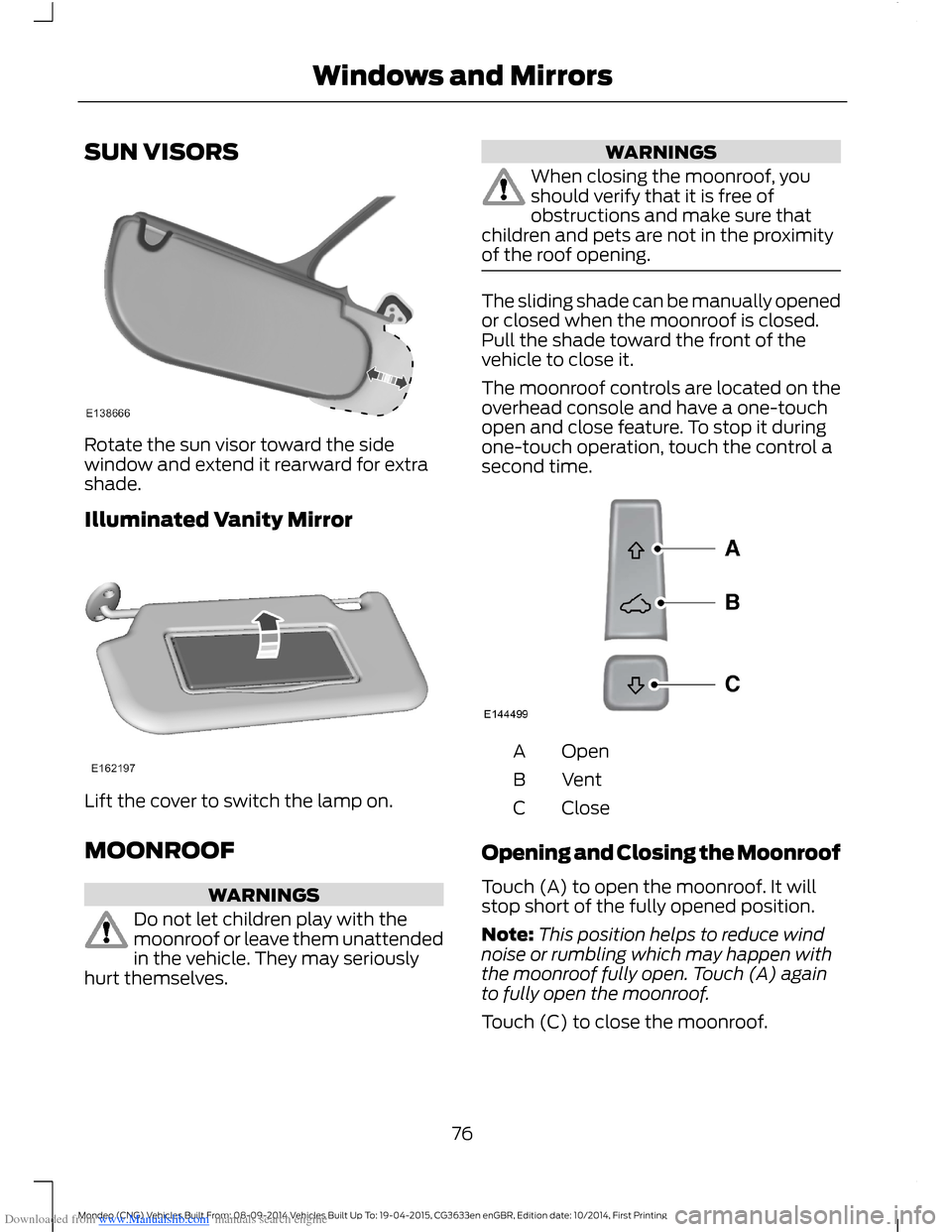
Rotate the sun visor toward the sidewindow and extend it rearward for extrashade.
Illuminated Vanity Mirror
Lift the cover to switch the lamp on.
MOONROOF
WARNINGS
Do not let children play with themoonroof or leave them unattendedin the vehicle. They may seriouslyhurt themselves.
WARNINGS
When closing the moonroof, youshould verify that it is free ofobstructions and make sure thatchildren and pets are not in the proximityof the roof opening.
The sliding shade can be manually openedor closed when the moonroof is closed.Pull the shade toward the front of thevehicle to close it.
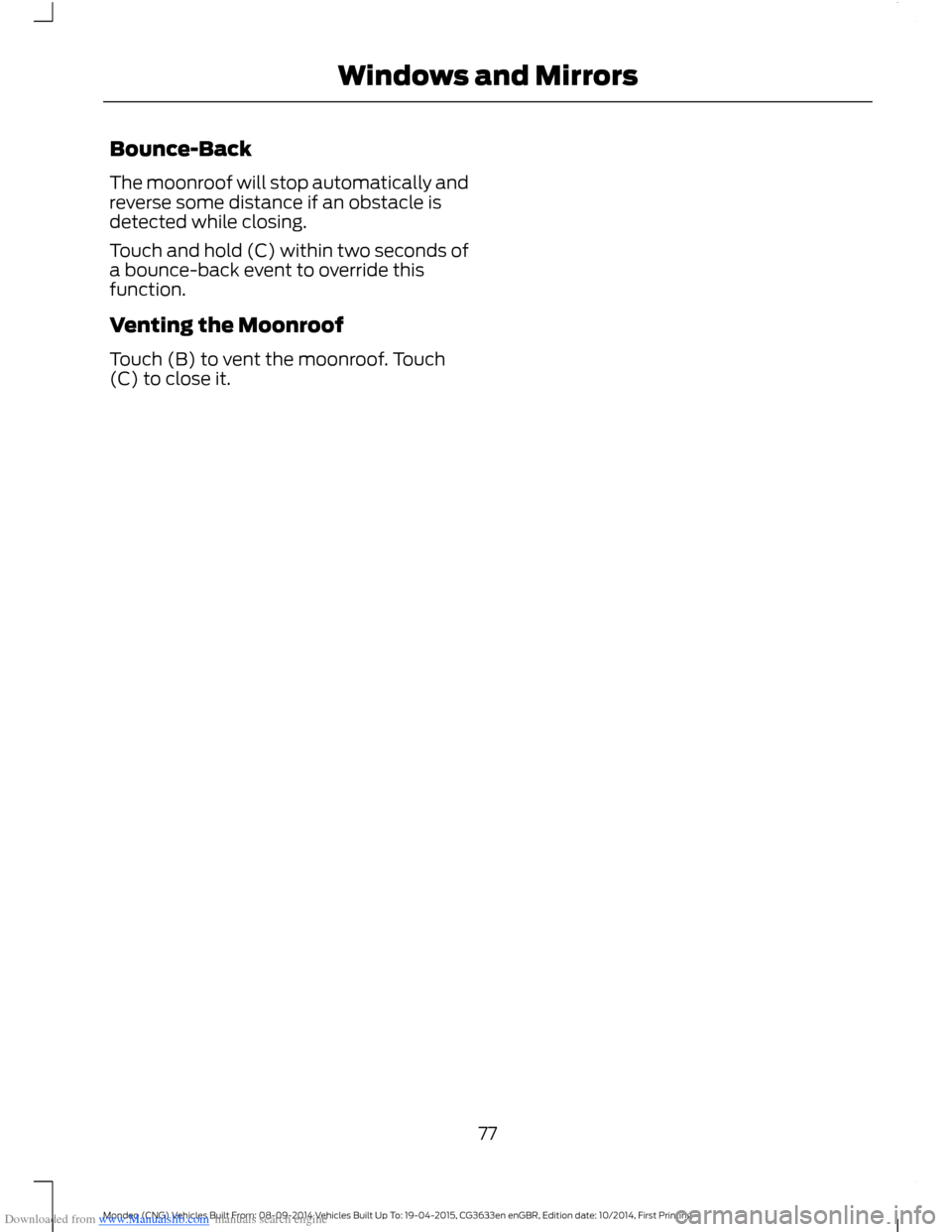
The moonroof controls are located on theoverhead console and have a one-touchopen and close feature. To stop it duringone-touch operation, touch the control asecond time.
OpenA
VentB
CloseC
Opening and Closing the Moonroof
Touch (A) to open the moonroof. It willstop short of the fully opened position.
Note:This position helps to reduce windnoise or rumbling which may happen withthe moonroof fully open. Touch (A) againto fully open the moonroof.
Touch (C) to close the moonroof.
76Mondeo (CNG) Vehicles Built From: 08-09-2014 Vehicles Built Up To: 19-04-2015, CG3633en enGBR, Edition date: 10/2014, First PrintingWindows and Mirrors
Page 79 of 446
Downloaded from www.Manualslib.com manuals search engine Bounce-Back
The moonroof will stop automatically andreverse some distance if an obstacle isdetected while closing.
Touch and hold (C) within two seconds ofa bounce-back event to override thisfunction.
Venting the Moonroof
Touch (B) to vent the moonroof. Touch(C) to close it.
77Mondeo (CNG) Vehicles Built From: 08-09-2014 Vehicles Built Up To: 19-04-2015, CG3633en enGBR, Edition date: 10/2014, First PrintingWindows and Mirrors