navigation system FORD MONDEO 2014 4.G Owner's Manual
[x] Cancel search | Manufacturer: FORD, Model Year: 2014, Model line: MONDEO, Model: FORD MONDEO 2014 4.GPages: 446, PDF Size: 29.09 MB
Page 393 of 446
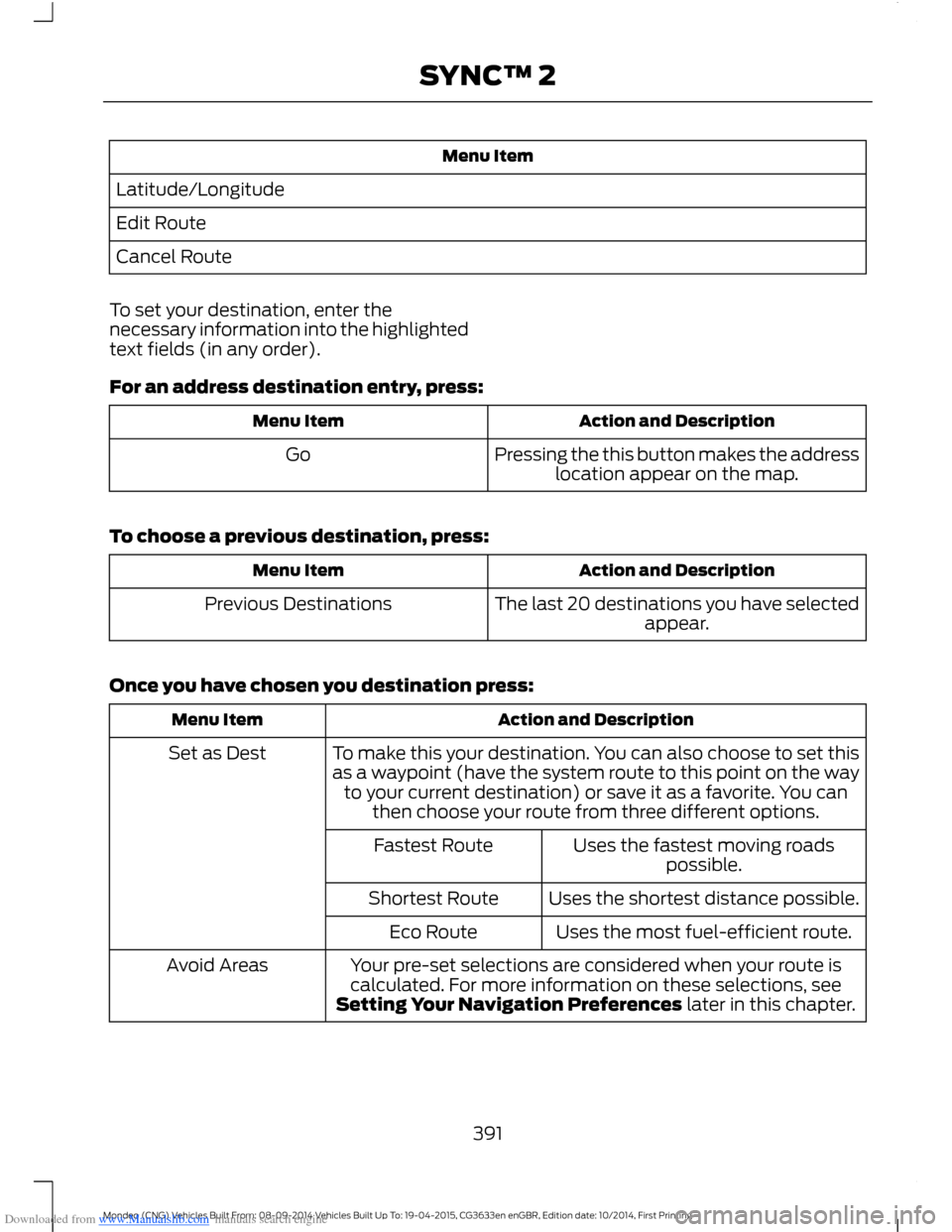
Downloaded from www.Manualslib.com manuals search engine Menu Item
Latitude/Longitude
Edit Route
Cancel Route
To set your destination, enter thenecessary information into the highlightedtext fields (in any order).
For an address destination entry, press:
Action and DescriptionMenu Item
Pressing the this button makes the addresslocation appear on the map.Go
To choose a previous destination, press:
Action and DescriptionMenu Item
The last 20 destinations you have selectedappear.Previous Destinations
Once you have chosen you destination press:
Action and DescriptionMenu Item
To make this your destination. You can also choose to set thisas a waypoint (have the system route to this point on the wayto your current destination) or save it as a favorite. You canthen choose your route from three different options.
Set as Dest
Uses the fastest moving roadspossible.Fastest Route
Uses the shortest distance possible.Shortest Route
Uses the most fuel-efficient route.Eco Route
Your pre-set selections are considered when your route iscalculated. For more information on these selections, seeSetting Your Navigation Preferences later in this chapter.
Avoid Areas
391Mondeo (CNG) Vehicles Built From: 08-09-2014 Vehicles Built Up To: 19-04-2015, CG3633en enGBR, Edition date: 10/2014, First PrintingSYNC™ 2
Page 394 of 446
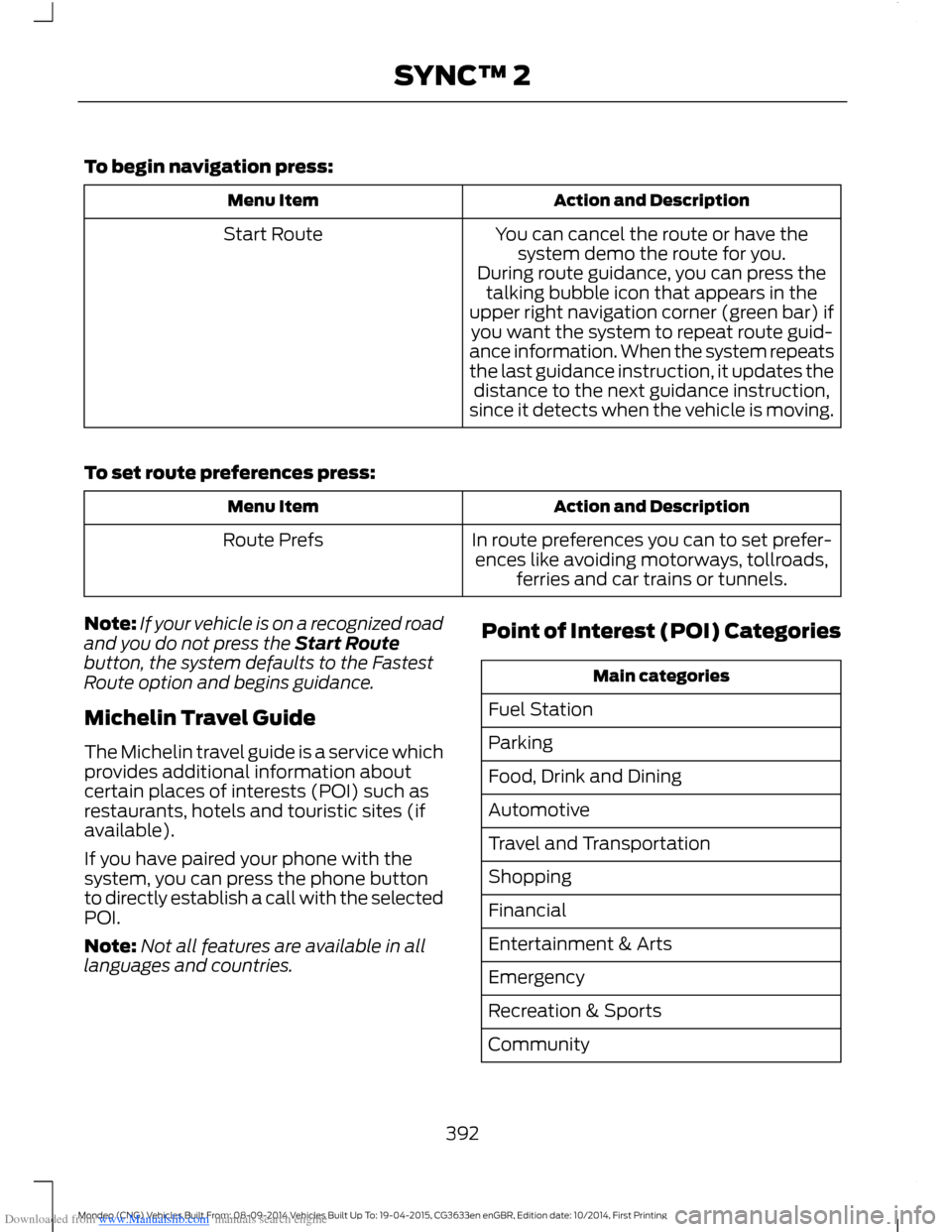
Downloaded from www.Manualslib.com manuals search engine To begin navigation press:
Action and DescriptionMenu Item
You can cancel the route or have thesystem demo the route for you.Start Route
During route guidance, you can press thetalking bubble icon that appears in theupper right navigation corner (green bar) ifyou want the system to repeat route guid-ance information. When the system repeatsthe last guidance instruction, it updates thedistance to the next guidance instruction,since it detects when the vehicle is moving.
To set route preferences press:
Action and DescriptionMenu Item
In route preferences you can to set prefer-ences like avoiding motorways, tollroads,ferries and car trains or tunnels.
Route Prefs
Note:If your vehicle is on a recognized roadand you do not press the Start Routebutton, the system defaults to the FastestRoute option and begins guidance.
Michelin Travel Guide
The Michelin travel guide is a service whichprovides additional information aboutcertain places of interests (POI) such asrestaurants, hotels and touristic sites (ifavailable).
If you have paired your phone with thesystem, you can press the phone buttonto directly establish a call with the selectedPOI.
Note:Not all features are available in alllanguages and countries.
Point of Interest (POI) Categories
Main categories
Fuel Station
Parking
Food, Drink and Dining
Automotive
Travel and Transportation
Shopping
Financial
Entertainment & Arts
Emergency
Recreation & Sports
Community
392Mondeo (CNG) Vehicles Built From: 08-09-2014 Vehicles Built Up To: 19-04-2015, CG3633en enGBR, Edition date: 10/2014, First PrintingSYNC™ 2
Page 395 of 446
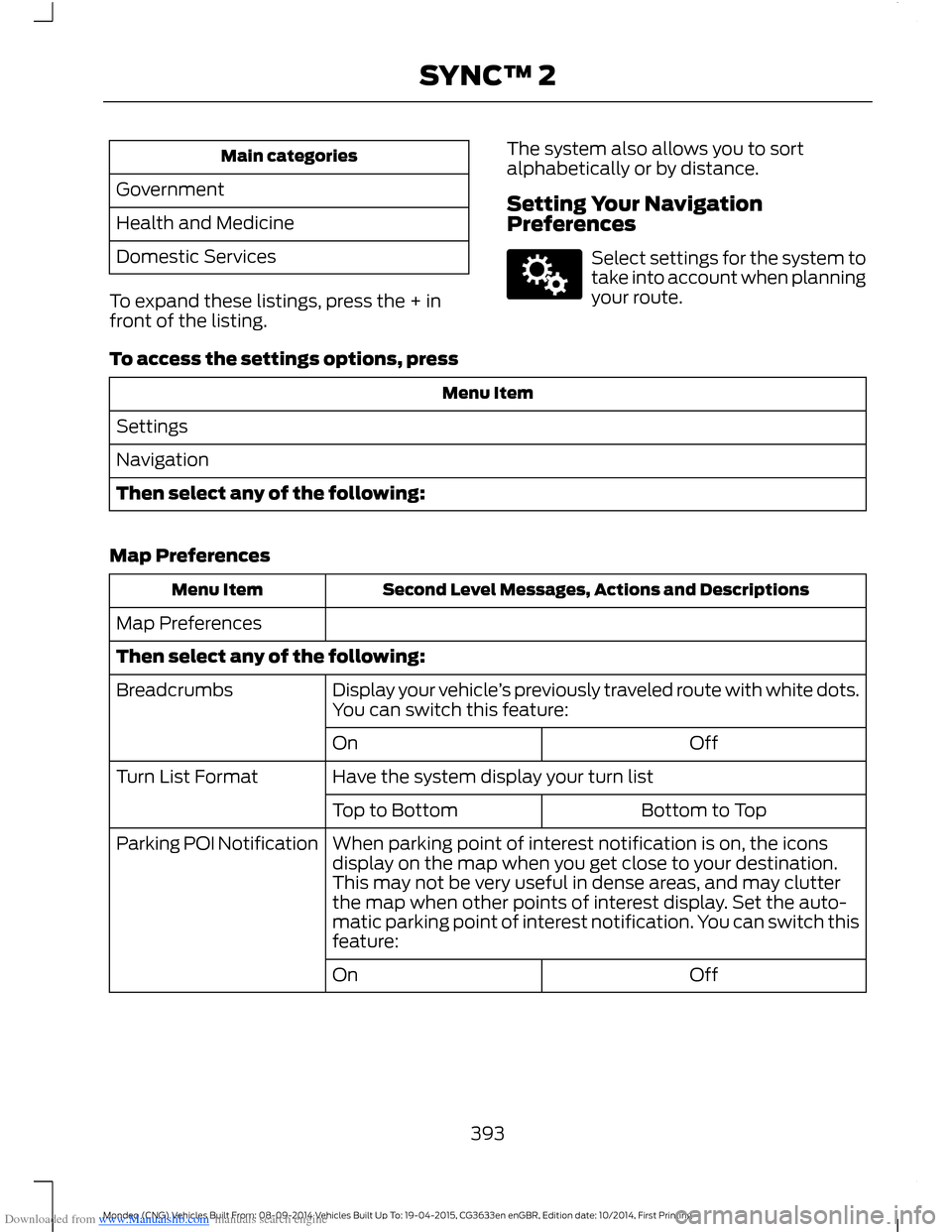
Downloaded from www.Manualslib.com manuals search engine Main categories
Government
Health and Medicine
Domestic Services
To expand these listings, press the + infront of the listing.
The system also allows you to sortalphabetically or by distance.
Setting Your NavigationPreferences
Select settings for the system totake into account when planningyour route.
To access the settings options, press
Menu Item
Settings
Navigation
Then select any of the following:
Map Preferences
Second Level Messages, Actions and DescriptionsMenu Item
Map Preferences
Then select any of the following:
Display your vehicle’s previously traveled route with white dots.You can switch this feature:Breadcrumbs
OffOn
Have the system display your turn listTurn List Format
Bottom to TopTop to Bottom
When parking point of interest notification is on, the iconsdisplay on the map when you get close to your destination.This may not be very useful in dense areas, and may clutterthe map when other points of interest display. Set the auto-matic parking point of interest notification. You can switch thisfeature:
Parking POI Notification
OffOn
393Mondeo (CNG) Vehicles Built From: 08-09-2014 Vehicles Built Up To: 19-04-2015, CG3633en enGBR, Edition date: 10/2014, First PrintingSYNC™ 2
Page 396 of 446
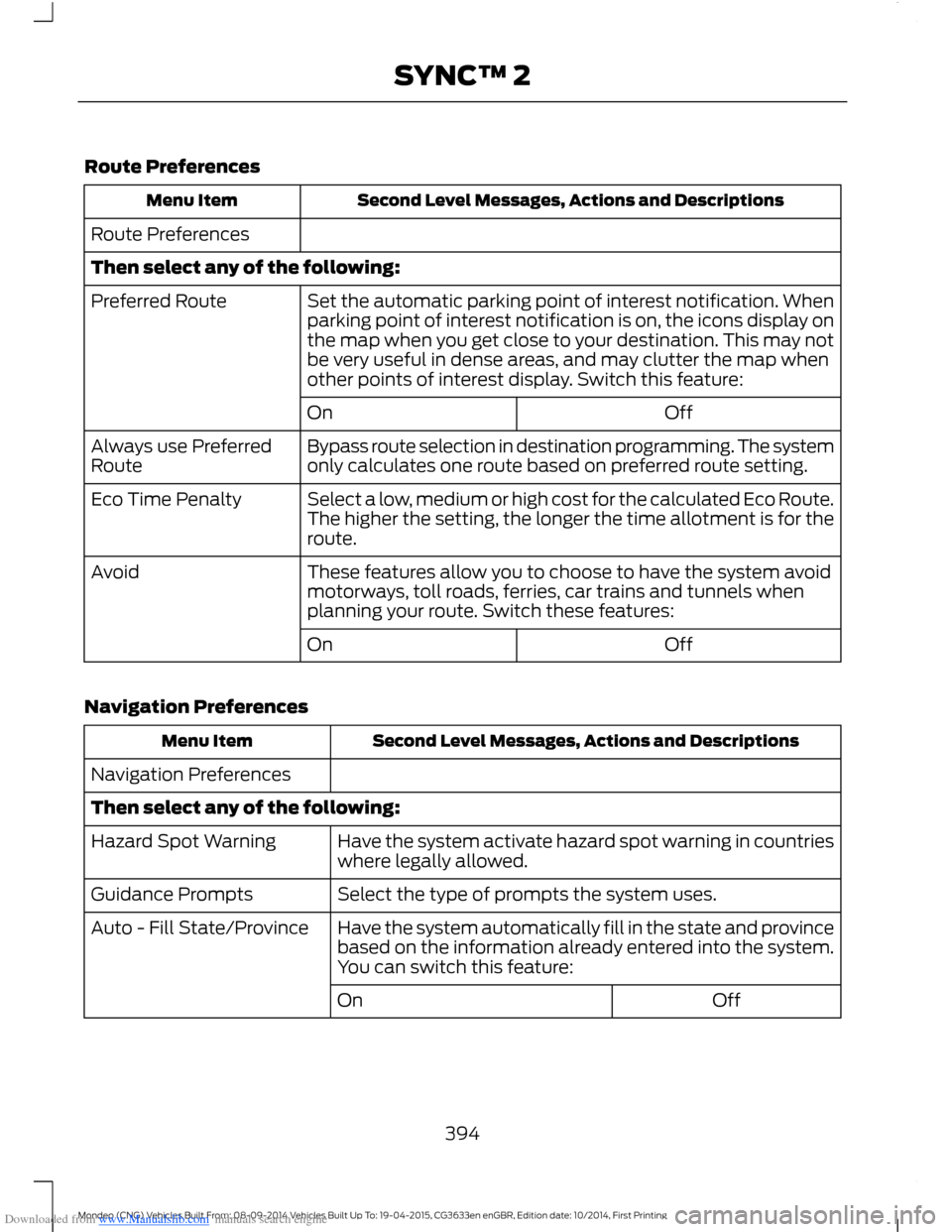
Downloaded from www.Manualslib.com manuals search engine Route Preferences
Second Level Messages, Actions and DescriptionsMenu Item
Route Preferences
Then select any of the following:
Set the automatic parking point of interest notification. Whenparking point of interest notification is on, the icons display onthe map when you get close to your destination. This may notbe very useful in dense areas, and may clutter the map whenother points of interest display. Switch this feature:
Preferred Route
OffOn
Bypass route selection in destination programming. The systemonly calculates one route based on preferred route setting.Always use PreferredRoute
Select a low, medium or high cost for the calculated Eco Route.The higher the setting, the longer the time allotment is for theroute.
Eco Time Penalty
These features allow you to choose to have the system avoidmotorways, toll roads, ferries, car trains and tunnels whenplanning your route. Switch these features:
Avoid
OffOn
Navigation Preferences
Second Level Messages, Actions and DescriptionsMenu Item
Navigation Preferences
Then select any of the following:
Have the system activate hazard spot warning in countrieswhere legally allowed.Hazard Spot Warning
Select the type of prompts the system uses.Guidance Prompts
Have the system automatically fill in the state and provincebased on the information already entered into the system.You can switch this feature:
Auto - Fill State/Province
OffOn
394Mondeo (CNG) Vehicles Built From: 08-09-2014 Vehicles Built Up To: 19-04-2015, CG3633en enGBR, Edition date: 10/2014, First PrintingSYNC™ 2
Page 417 of 446
Downloaded from www.Manualslib.com manuals search engine Volume Setting: Do not raise the volumeexcessively. Keep the volume at a levelwhere you can still hear outside traffic andemergency signals while driving. Drivingwhile unable to hear these sounds couldcause an accident.
Use of Speech Recognition Functions:Speech recognition software is inherentlya statistical process which is subject toerrors. It is your responsibility to monitorany speech recognition functions includedin the system and address any errors.
Navigation Features: Any navigationfeatures included in the system areintended to provide turn by turninstructions to get you to a desireddestination. Please make certain allpersons using this system carefully readand follow instructions and safetyinformation fully.
Distraction Hazard: Any navigationfeatures may require manual (non-verbal)setup. Attempting to perform such set-upor insert data while driving can seriouslydistract your attention and could cause anaccident or other serious consequences.Stop the vehicle in a safe and legal mannerbefore attempting these operations.
Let Your Judgment Prevail: Anynavigation features are provided only asan aid. Make your driving decisions basedon your observations of local conditionsand existing traffic regulations. Any suchfeature is not a substitute for your personaljudgment. Any route suggestions made bythis system should never replace any localtraffic regulations or your personaljudgment or knowledge of safe drivingpractices.
Route Safety: Do not follow the routesuggestions if doing so would result in anunsafe or illegal maneuver, if you would beplaced in an unsafe situation, or if youwould be directed into an area that youconsider unsafe. The driver is ultimatelyresponsible for the safe operation of thevehicle and therefore, must evaluatewhether it is safe to follow the suggesteddirections.
Potential Map Inaccuracy: Maps usedby this system may be inaccurate becauseof changes in roads, traffic controls ordriving conditions. Always use goodjudgment and common sense whenfollowing the suggested routes.
Emergency Services: Do not rely on anynavigation features included in the systemto route you to emergency services. Asklocal authorities or an emergency servicesoperator for these locations. Not allemergency services such as police, firestations, hospitals and clinics are likely tobe contained in the map database for suchnavigation features.
Telenav Software End User LicenseAgreement
Please read these terms and conditionscarefully before you use the TelenavSoftware. Your use of the TelenavSoftware indicates that you accept theseterms and conditions. If you do not acceptthese terms and conditions, do not breakthe seal of the package, launch, orotherwise use the Telenav Software.
These terms and conditions represent theagreement (“Agreement”) between youand Telenav, Inc. (“Telenav”) with respectto the Telenav Software (includingupgrades, modifications, or additionsthereto) (collectively “Telenav Software”).All references herein to “you” and “your”means you, your employees, agents, andcontractors, and any other entity on whosebehalf you accept these terms and
415Mondeo (CNG) Vehicles Built From: 08-09-2014 Vehicles Built Up To: 19-04-2015, CG3633en enGBR, Edition date: 10/2014, First PrintingAppendices
Page 422 of 446
Downloaded from www.Manualslib.com manuals search engine 9.2 End User Terms Required by NAV2(Shanghai) Co., Ltd
The data (“Data”) is provided for yourpersonal, internal use only and not forresale. It is protected by copyright, and issubject to the following terms andconditions which are agreed to by you, onthe one hand, and NAV2 (Shanghai) Co.,Ltd (“NAV2”) and its licensors (includingtheir licensors and suppliers) on the otherhand.
© 20xx. All rights reserved.
Permitted Use.
You agree to use this Data together withthe Telenav Software solely for the internalbusiness and personal purposes for whichyou were licensed, and not for servicebureau, time-sharing or other similarpurposes. Accordingly, but subject to therestrictions set forth in the followingparagraphs, you agree not to otherwisereproduce, copy, modify, decompile,disassemble, create any derivative worksof, or reverse engineer any portion of thisData, and may not transfer or distribute itin any form, for any purpose, except to theextent permitted by mandatory laws.
Restrictions.
Except where you have been specificallylicensed to do so by Telenav, and withoutlimiting the preceding paragraph, you maynot use this Data (a) with any products,systems, or applications installed orotherwise connected to or incommunication with vehicles, capable ofvehicle navigation, positioning, dispatch,real time route guidance, fleetmanagement or similar applications; or (b)with or in communication with any
positioning devices or any mobile orwireless-connected electronic or computerdevices, including without limitationcellular phones, palmtop and handheldcomputers, pagers, and personal digitalassistants or PDAs.
Warning.
The Data may contain inaccurate orincomplete information due to the passageof time, changing circumstances, sourcesused and the nature of collectingcomprehensive geographic data, any ofwhich may lead to incorrect results.
No Warranty.
This Data is provided to you “as is,” andyou agree to use it at your own risk. Telenavand its licensors (and their licensors andsuppliers) make no guarantees,representations or warranties of any kind,express or implied, arising by law orotherwise, including but not limited to,content, quality, accuracy, completeness,effectiveness, reliability, fitness for aparticular purpose, usefulness, use orresults to be obtained from this Data, orthat the Data or server will beuninterrupted or error-free.
Disclaimer of Warranty:
TELENAV AND ITS LICENSORS(INCLUDING THEIR LICENSORS ANDSUPPLIERS) DISCLAIM ANYWARRANTIES, EXPRESS OR IMPLIED, OFQUALITY, PERFORMANCE,MERCHANTABILITY, FITNESS FOR APARTICULAR PURPOSE ORNON-INFRINGEMENT. Some States,Territories and Countries do not allowcertain warranty exclusions, so to thatextent the above exclusion may not applyto you.
420Mondeo (CNG) Vehicles Built From: 08-09-2014 Vehicles Built Up To: 19-04-2015, CG3633en enGBR, Edition date: 10/2014, First PrintingAppendices
Page 429 of 446
Downloaded from www.Manualslib.com manuals search engine Product incorporates data which is ©20XX Telstra Corporation Limited, GMHolden Limited, Intelematics AustraliaPty Ltd and Continental Pty Ltd.
B. Third Party Notices for Australia. Inaddition to the foregoing, the End-UserTerms for any Application containingRDS-TMC Traffic Codes for Australiashall contain the following notice:“Product incorporates traffic locationcodes which is © 20XX Telstra Corpora-tion Limited and its licensors.”
VII. China Territory
Personal Use Only
You agree to use this Data together with[insert name of Client Application] for thesolely personal, non-commercial purposesfor which you were licensed, and not forservice bureau, time-sharing or othersimilar purposes. Accordingly, but subjectto the restrictions set forth in the followingparagraphs, you may copy this Data onlyas necessary for your personal use to (i)view it, and (ii) save it, provided that youdo not remove any copyright notices thatappear and do not modify the Data in anyway. You agree not to otherwise reproduce,copy, modify, decompile, disassemble orreverse engineer any portion of this Data,and may not transfer or distribute it in anyform, for any purpose, except to the extentpermitted by mandatory laws.
Restrictions
Except where you have been specificallylicensed to do so by NAV2 , and withoutlimiting the preceding paragraph, you maynot (a) use this Data with any products,systems, or applications installed orotherwise connected to or incommunication with vehicles, capable ofvehicle navigation, positioning, dispatch,real time route guidance, fleetmanagement or similar applications; or (b)
with or in communication with anypositioning devices or any mobile orwireless-connected electronic or computerdevices, including without limitationcellular phones, palmtop and handheldcomputers, pagers, and personal digitalassistants or PDAs. You agree to ceaseusing this Data if you fail to comply withthese terms and conditions.
Limited Warranty
NAV2 warrants that (a) the Data willperform substantially in accordance withthe accompanying written materials for aperiod of ninety (90) days from the dateof receipt, and (b) any support servicesprovided by NAV2 shall be substantially asdescribed in applicable written materialsprovided to you by NAV2, and NAV2’ssupport engineers will make commerciallyreasonable efforts to solve any problemissues.
rigCustomer Remedies
NAV2 and its suppliers’ entire liability andyour exclusive remedy shall be, at NAV2’ssole discretion, either (a) return of the pricepaid, if any, or (b) repair or replacement ofthe Data that do not meet NAV2’s LimitedWarranty and that are returned to NAV2with a copy of your receipt. This LimitedWarranty is void if failure of the Data hasresulted from accident, abuse, ormisapplication. Any replacement Data willbe warranted for the remainder of theoriginal warranty period or thirty (30) days,whichever is longer. Neither these remediesnor any product support services offeredby NAV2 are available without proof ofpurchase from an authorized internationalsource.
427Mondeo (CNG) Vehicles Built From: 08-09-2014 Vehicles Built Up To: 19-04-2015, CG3633en enGBR, Edition date: 10/2014, First PrintingAppendices
Page 439 of 446
Downloaded from www.Manualslib.com manuals search engine Locking and Unlocking.................................44Locking and Unlocking the Doors FromInside....................................................................45Locking and Unlocking the DoorsIndividually with the Key Blade..................45Locking and Unlocking the Doors with theKey Blade............................................................45Power Door Locks................................................44Remote Control....................................................44Locks...................................................................44Luggage Anchor Points.............................2074-door and 5-door............................................207Hybrid....................................................................208Wagon....................................................................207Luggage Covers............................................209Stowing the luggage cover - Estate withoutfull size spare wheel.....................................210Lug NutsSee: Changing a Road Wheel.......................268Lug Nuts..........................................................276
M
Maintenance..................................................237General Information..........................................237Manual Climate Control..............................112Manual Liftgate..............................................46Closing the Liftgate.............................................46Opening the Liftgate...........................................46Manual Seats.................................................128Manual Transmission..................................155Selecting Reverse Gear....................................155Media Hub......................................................304Memory Function...........................................131Easy Entry and Exit Function..........................132Linking a PreSet Position to Your RemoteControl or Intelligent Access Key.............132Saving a PreSet Position..................................132Message CenterSee: Information Displays.................................86MirrorsSee: Heated Windows and Mirrors................121See: Windows and Mirrors.................................72Mobile CommunicationsEquipment......................................................10
Moonroof...........................................................76Bounce-Back..........................................................77Opening and Closing the Moonroof..............76Venting the Moonroof.........................................77MyKey Troubleshooting...............................42MyKey™.............................................................38Principle of Operation........................................38
N
Navigation......................................................390Destination Mode..............................................390Map Mode............................................................396Michelin Travel Guide.......................................392Navigation Map Updates...............................399Navigation Voice Commands.......................399Point of Interest (POI) Categories...............392Quick-touch Buttons.......................................398Setting Your Navigation Preferences.........393
O
Oil CheckSee: Engine Oil Check......................................246Opening and Closing the Hood...............237Closing the Hood...............................................238Opening the Hood..............................................237Overhead Console........................................137
P
Parking Aids....................................................167Principle of Operation.......................................167Passenger Airbag...........................................28.....................................................................................28Switching the Passenger Airbag Off.............28Switching the Passenger Airbag On.............29Passive Anti-Theft System..........................51Arming the Engine Immobilizer........................51Coded Keys..............................................................51Disarming the Engine Immobilizer..................51Principle of Operation..........................................51PATSSee: Passive Anti-Theft System......................51
437Mondeo (CNG) Vehicles Built From: 08-09-2014 Vehicles Built Up To: 19-04-2015, CG3633en enGBR, Edition date: 10/2014, First PrintingIndex