ECU FORD MONDEO 2014 4.G Owner's Guide
[x] Cancel search | Manufacturer: FORD, Model Year: 2014, Model line: MONDEO, Model: FORD MONDEO 2014 4.GPages: 446, PDF Size: 29.09 MB
Page 253 of 446
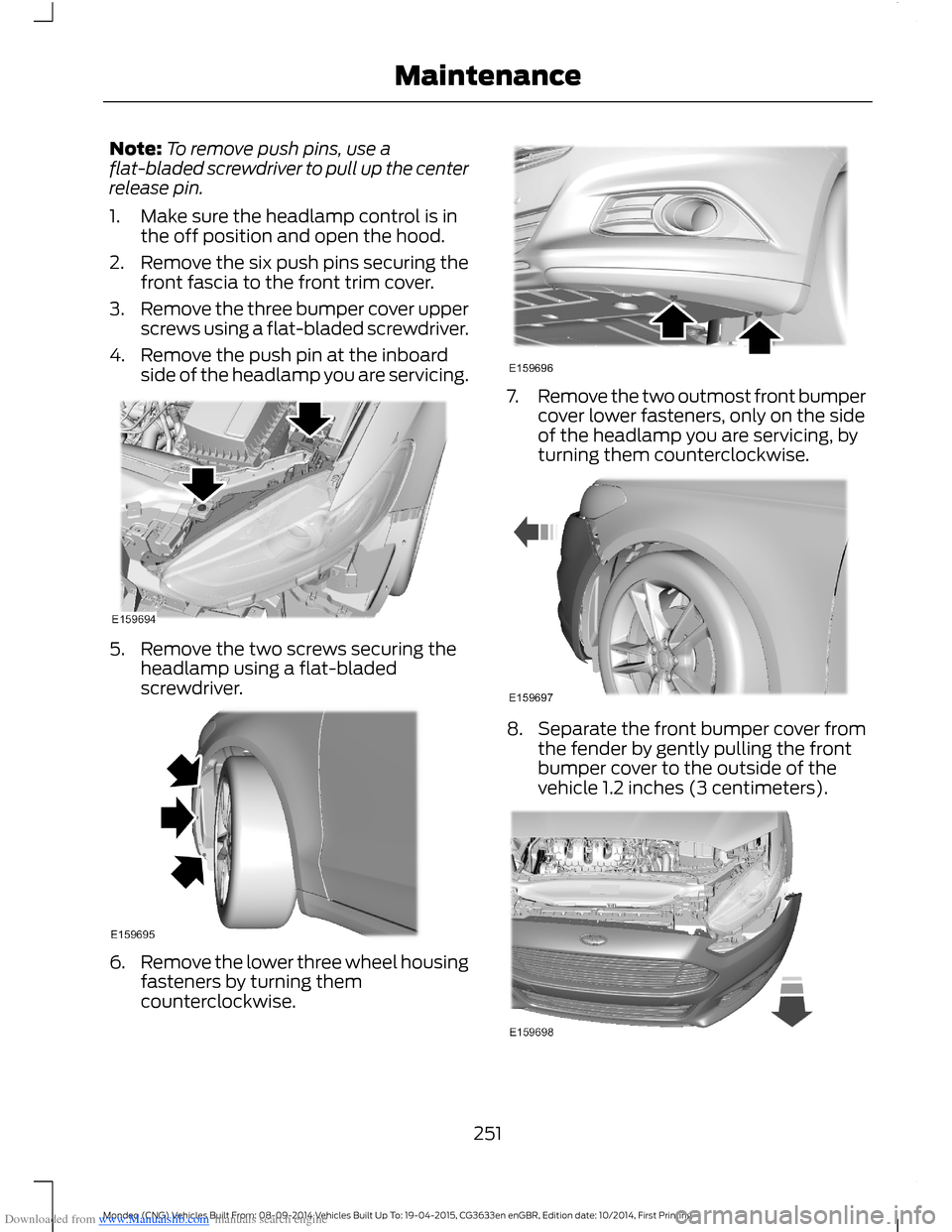
Downloaded from www.Manualslib.com manuals search engine Note:To remove push pins, use aflat-bladed screwdriver to pull up the centerrelease pin.
1.Make sure the headlamp control is inthe off position and open the hood.
2.Remove the six push pins securing thefront fascia to the front trim cover.
3.Remove the three bumper cover upperscrews using a flat-bladed screwdriver.
4.Remove the push pin at the inboardside of the headlamp you are servicing.
5.Remove the two screws securing theheadlamp using a flat-bladedscrewdriver.
6.Remove the lower three wheel housingfasteners by turning themcounterclockwise.
7.Remove the two outmost front bumpercover lower fasteners, only on the sideof the headlamp you are servicing, byturning them counterclockwise.
8.Separate the front bumper cover fromthe fender by gently pulling the frontbumper cover to the outside of thevehicle 1.2 inches (3 centimeters).
251Mondeo (CNG) Vehicles Built From: 08-09-2014 Vehicles Built Up To: 19-04-2015, CG3633en enGBR, Edition date: 10/2014, First PrintingMaintenance
Page 272 of 446
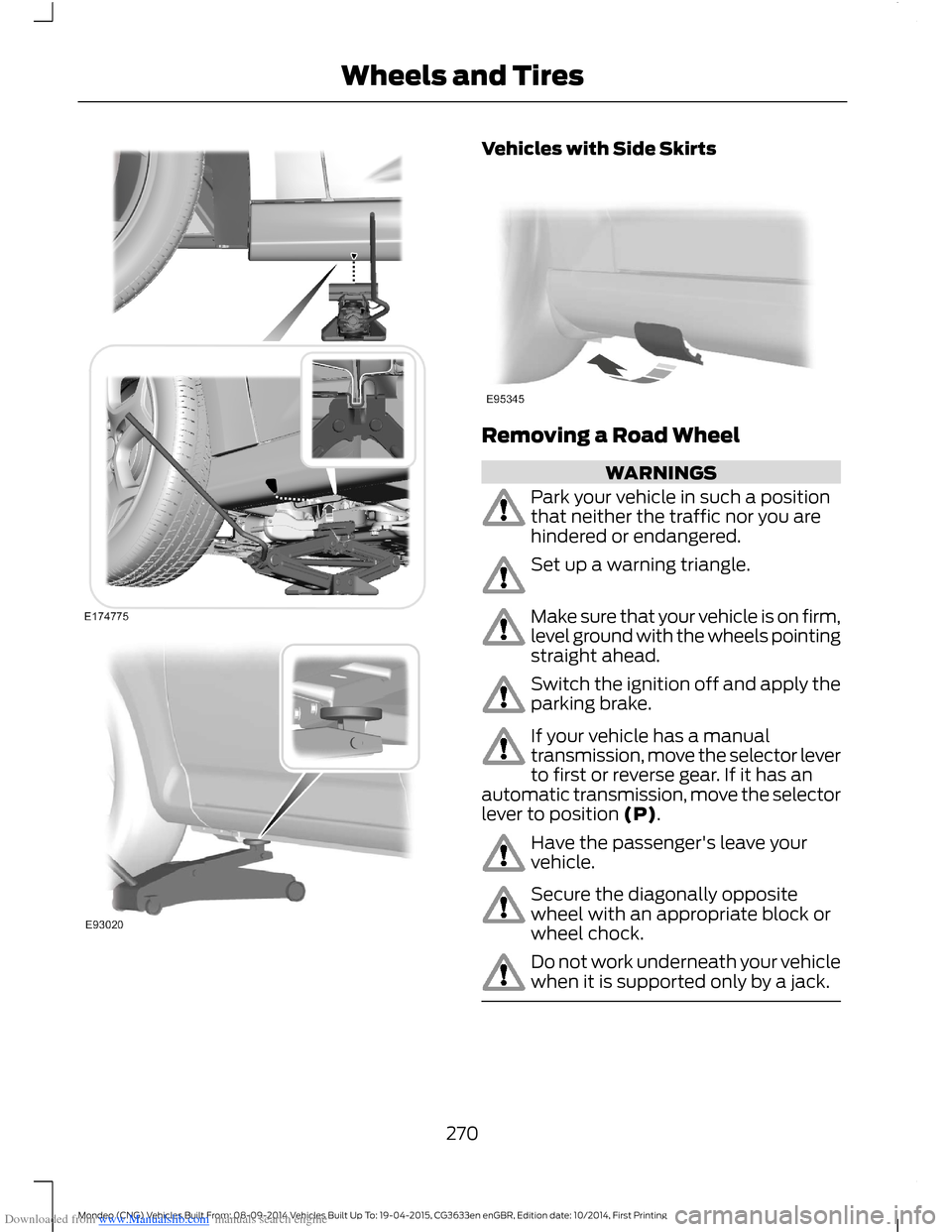
Downloaded from www.Manualslib.com manuals search engine Vehicles with Side Skirts
Removing a Road Wheel
WARNINGS
Park your vehicle in such a positionthat neither the traffic nor you arehindered or endangered.
Set up a warning triangle.
Make sure that your vehicle is on firm,level ground with the wheels pointingstraight ahead.
Switch the ignition off and apply theparking brake.
If your vehicle has a manualtransmission, move the selector leverto first or reverse gear. If it has anautomatic transmission, move the selectorlever to position (P).
Have the passenger's leave yourvehicle.
Secure the diagonally oppositewheel with an appropriate block orwheel chock.
Do not work underneath your vehiclewhen it is supported only by a jack.
270Mondeo (CNG) Vehicles Built From: 08-09-2014 Vehicles Built Up To: 19-04-2015, CG3633en enGBR, Edition date: 10/2014, First PrintingWheels and Tires
Page 305 of 446
Downloaded from www.Manualslib.com manuals search engine 2.Press and hold one of the presetbuttons. A message appears when theradio station has been stored. Thesystem mutes momentarily asconfirmation.
Once stored, press a preset button at anytime to select a favorite radio station.
Note:Radio stations stored on the presetbuttons may not always be available if youhave left the coverage area. The system willmute when this happens.
Radio Text
You can display extra information. Forexample; artist name. To switch this optionon select Options > Radio Text On.
Note:Extra information may not always beavailable.
AUDIO INPUT JACK
WARNINGS
Driving while distracted can result inloss of vehicle control, crash andinjury. We strongly recommend thatyou use extreme caution when using anydevice that may take your focus off theroad. Your primary responsibility is the safeoperation of your vehicle. We recommendagainst the use of any hand-held devicewhile driving and encourage the use ofvoice-operated systems when possible.Make sure you are aware of all applicablelocal laws that may affect the use ofelectronic devices while driving.
For safety reasons, do not connector adjust the settings on yourportable music player while yourvehicle is moving.
WARNINGS
Store the portable music player in asecure location, such as the centerconsole or the glove box, when yourvehicle is moving. Hard objects maybecome projectiles in a collision or suddenstop, which may increase the risk of seriousinjury. The audio extension cable must belong enough to allow the portable musicplayer to be safely stored while yourvehicle is moving.
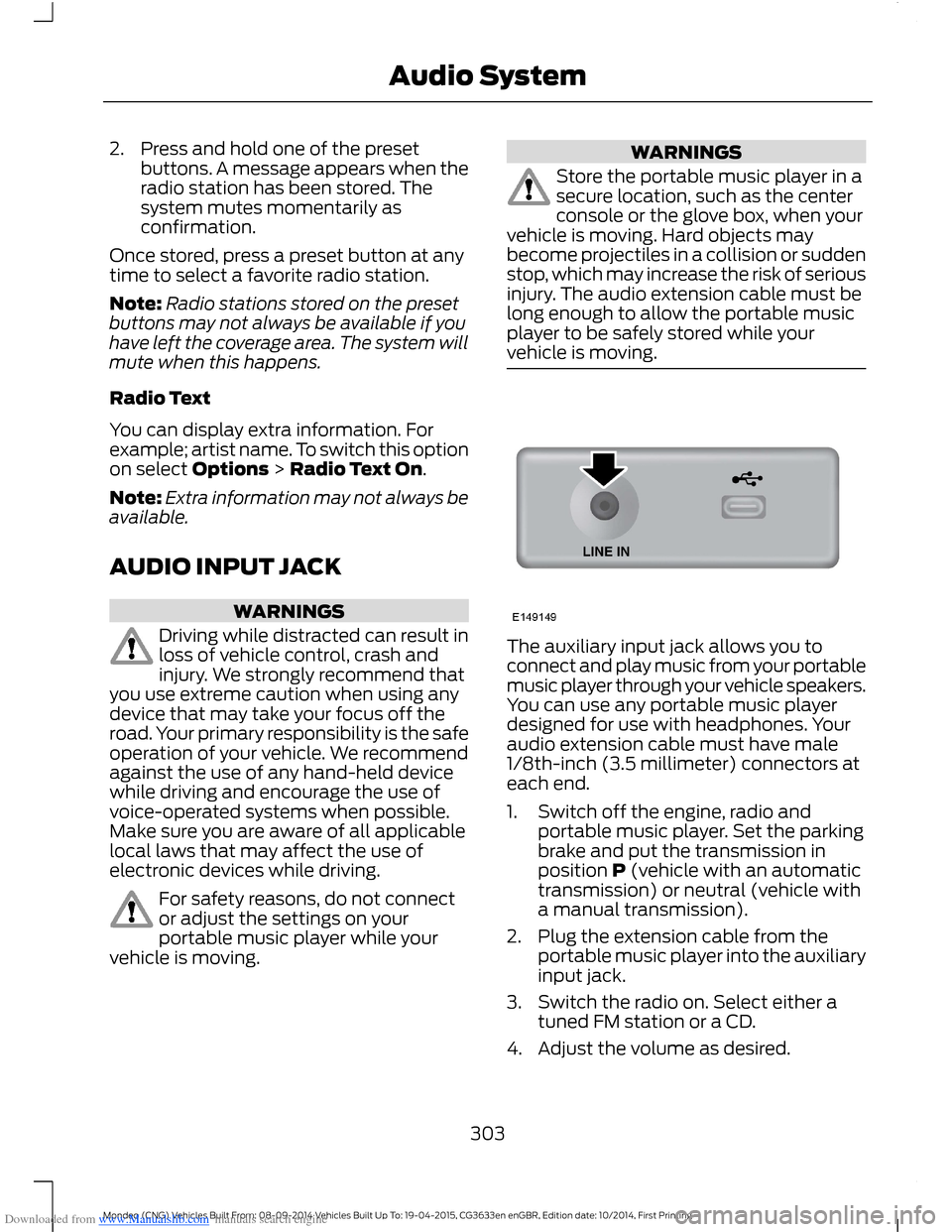
The auxiliary input jack allows you toconnect and play music from your portablemusic player through your vehicle speakers.You can use any portable music playerdesigned for use with headphones. Youraudio extension cable must have male1/8th-inch (3.5 millimeter) connectors ateach end.
1.Switch off the engine, radio andportable music player. Set the parkingbrake and put the transmission inposition P (vehicle with an automatictransmission) or neutral (vehicle witha manual transmission).
2.Plug the extension cable from theportable music player into the auxiliaryinput jack.
3.Switch the radio on. Select either atuned FM station or a CD.
4.Adjust the volume as desired.
303Mondeo (CNG) Vehicles Built From: 08-09-2014 Vehicles Built Up To: 19-04-2015, CG3633en enGBR, Edition date: 10/2014, First PrintingAudio System
Page 311 of 446
Downloaded from www.Manualslib.com manuals search engine Changing the Voice Settings
You can change the voice settings using
the information and entertainment display.
Press the MENU button.
MessageAction
SYNC-Settings1
Voice settings2
USING SYNC™ WITH YOUR
PHONE
Hands-free calling is one of the mainfeatures of SYNC. While the systemsupports a variety of features, many aredependent on your cell phone'sfunctionality.
At a minimum, most cell phones withBluetooth wireless technology support thefollowing functions:
•Answering an incoming call.
•Ending a call.
•Using privacy mode.
•Dialing a number.
•Redialing.
•Call waiting notification.
•Caller ID.
Other features such as text messagingusing Bluetooth and automatic phonebookdownload are cell phone dependentfeatures. To check your cell phone'scompatibility, refer to your device's manualor visit the regional Ford website.
Pairing a Cell Phone For the FirstTime
Wirelessly pairing your cell phone with thesystem allows you to make and receivehands-free calls.
Note:You must switch the ignition andradio on.
Note:To scroll through the menus, pressthe up or down arrows on your audio system.
1.Make sure the Bluetooth feature onyour cell phone is switched on beforestarting the search. Refer to yourdevice's manual if necessary.
2.Press the PHONE button. When theaudio display indicates that no phonesare paired, select the option to add.
3.When a message to begin pairingappears in the audio display, search forSYNC on your cell phone to start thepairing process.
4.Select SYNC on your cell phone.
5.Wait until the PIN appears on thephone display. Compare the PIN on thephone with the PIN shown in the audiodisplay and accept the request on thephone and the vehicle display. Thedisplay indicates when the pairing issuccessful.
Note:In some cases the phone will requestto enter a PIN. Enter the six-digit PINprovided by the system in the audio display.The display indicates when the pairing issuccessful.
Depending on your cell phone's capabilityand your market, the system may promptyou with questions such as setting thecurrent cell phone as the primary cellphone (the cell phone the systemautomatically tries to connect with firstwhen you switch the ignition on) ordownloading your phonebook.
309Mondeo (CNG) Vehicles Built From: 08-09-2014 Vehicles Built Up To: 19-04-2015, CG3633en enGBR, Edition date: 10/2014, First PrintingSYNC™
Page 323 of 446
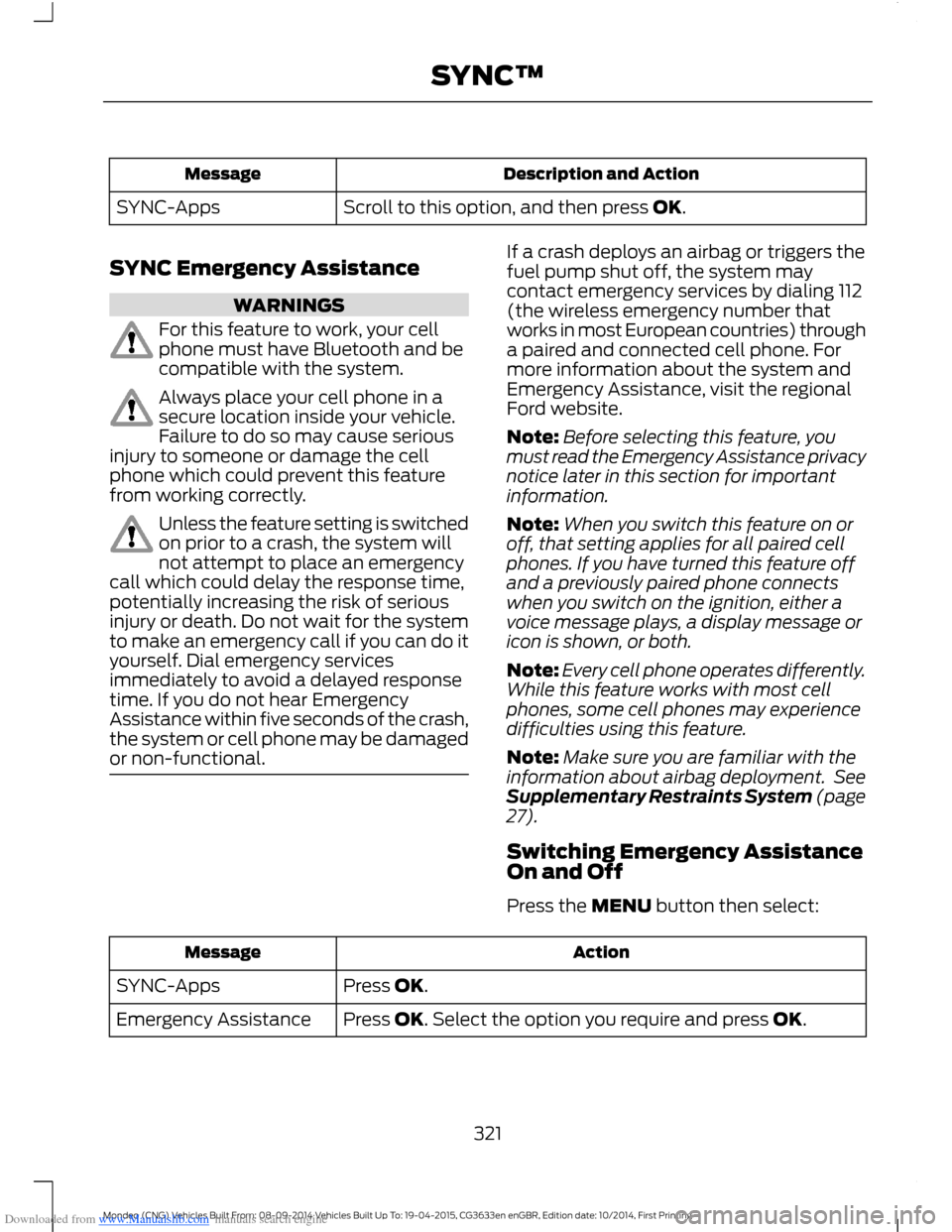
Downloaded from www.Manualslib.com manuals search engine Description and ActionMessage
Scroll to this option, and then press OK.SYNC-Apps
SYNC Emergency Assistance
WARNINGS
For this feature to work, your cellphone must have Bluetooth and becompatible with the system.
Always place your cell phone in asecure location inside your vehicle.Failure to do so may cause seriousinjury to someone or damage the cellphone which could prevent this featurefrom working correctly.
Unless the feature setting is switchedon prior to a crash, the system willnot attempt to place an emergencycall which could delay the response time,potentially increasing the risk of seriousinjury or death. Do not wait for the systemto make an emergency call if you can do ityourself. Dial emergency servicesimmediately to avoid a delayed responsetime. If you do not hear EmergencyAssistance within five seconds of the crash,the system or cell phone may be damagedor non-functional.
If a crash deploys an airbag or triggers thefuel pump shut off, the system maycontact emergency services by dialing 112(the wireless emergency number thatworks in most European countries) througha paired and connected cell phone. Formore information about the system andEmergency Assistance, visit the regionalFord website.
Note:Before selecting this feature, youmust read the Emergency Assistance privacynotice later in this section for importantinformation.
Note:When you switch this feature on oroff, that setting applies for all paired cellphones. If you have turned this feature offand a previously paired phone connectswhen you switch on the ignition, either avoice message plays, a display message oricon is shown, or both.
Note:Every cell phone operates differently.While this feature works with most cellphones, some cell phones may experiencedifficulties using this feature.
Note:Make sure you are familiar with theinformation about airbag deployment. SeeSupplementary Restraints System (page27).
Switching Emergency AssistanceOn and Off
Press the MENU button then select:
ActionMessage
Press OK.SYNC-Apps
Press OK. Select the option you require and press OK.Emergency Assistance
321Mondeo (CNG) Vehicles Built From: 08-09-2014 Vehicles Built Up To: 19-04-2015, CG3633en enGBR, Edition date: 10/2014, First PrintingSYNC™
Page 336 of 446
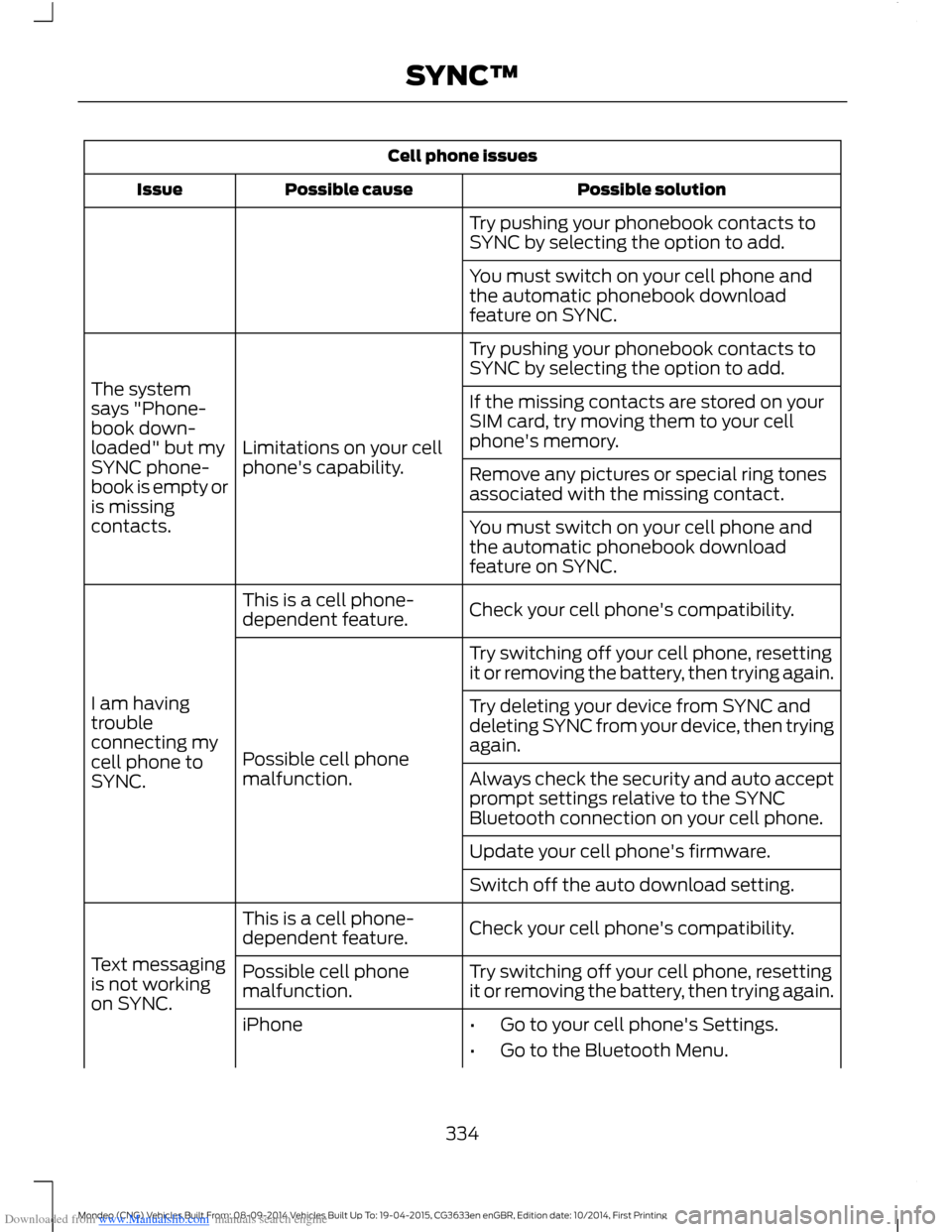
Downloaded from www.Manualslib.com manuals search engine Cell phone issues
Possible solutionPossible causeIssue
Try pushing your phonebook contacts toSYNC by selecting the option to add.
You must switch on your cell phone andthe automatic phonebook downloadfeature on SYNC.
Try pushing your phonebook contacts toSYNC by selecting the option to add.
Limitations on your cellphone's capability.
The systemsays "Phone-book down-loaded" but mySYNC phone-book is empty oris missingcontacts.
If the missing contacts are stored on yourSIM card, try moving them to your cellphone's memory.
Remove any pictures or special ring tonesassociated with the missing contact.
You must switch on your cell phone andthe automatic phonebook downloadfeature on SYNC.
Check your cell phone's compatibility.This is a cell phone-dependent feature.
I am havingtroubleconnecting mycell phone toSYNC.
Try switching off your cell phone, resettingit or removing the battery, then trying again.
Possible cell phonemalfunction.
Try deleting your device from SYNC anddeleting SYNC from your device, then tryingagain.
Always check the security and auto acceptprompt settings relative to the SYNCBluetooth connection on your cell phone.
Update your cell phone's firmware.
Switch off the auto download setting.
Check your cell phone's compatibility.This is a cell phone-dependent feature.
Text messagingis not workingon SYNC.
Try switching off your cell phone, resettingit or removing the battery, then trying again.Possible cell phonemalfunction.
iPhone•Go to your cell phone's Settings.
•Go to the Bluetooth Menu.
334Mondeo (CNG) Vehicles Built From: 08-09-2014 Vehicles Built Up To: 19-04-2015, CG3633en enGBR, Edition date: 10/2014, First PrintingSYNC™
Page 338 of 446
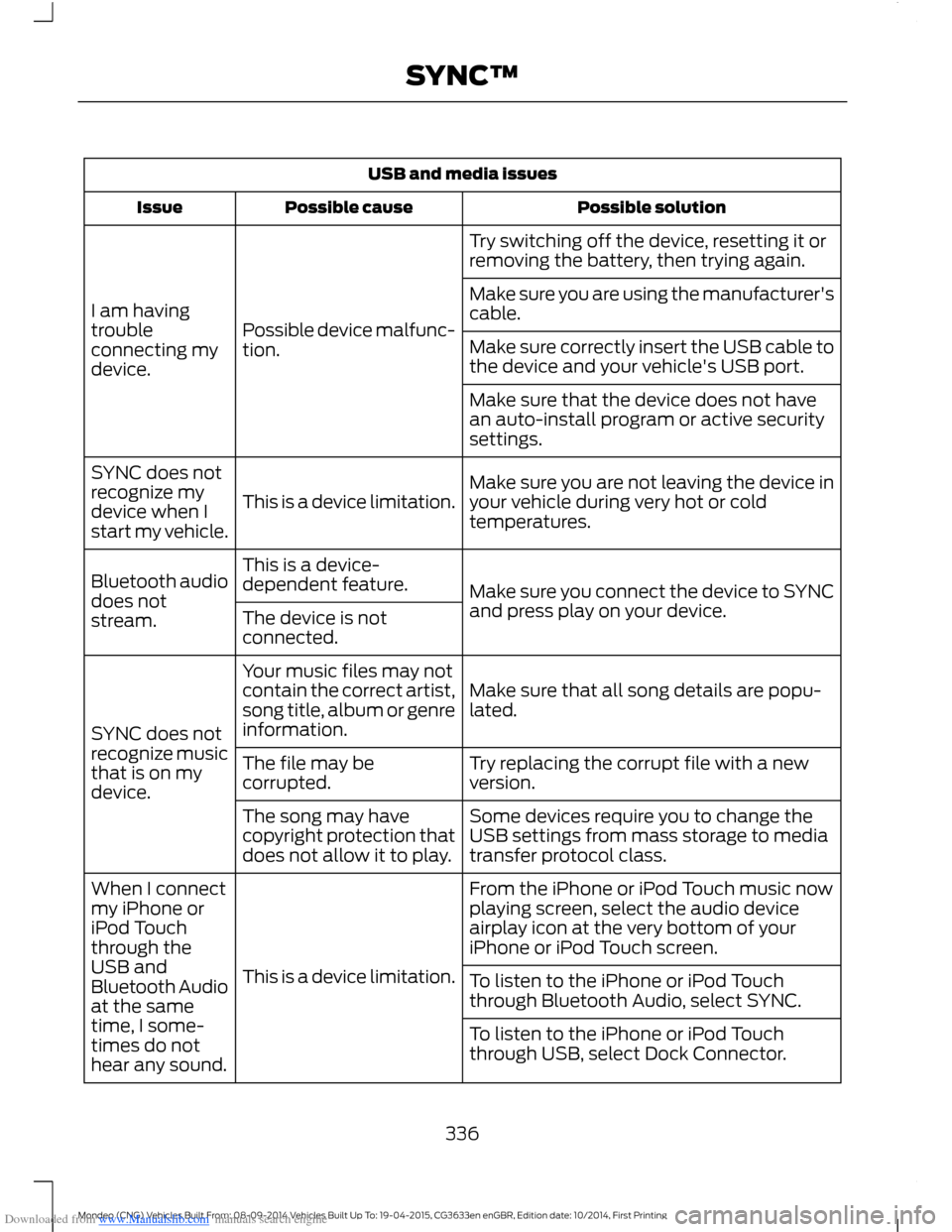
Downloaded from www.Manualslib.com manuals search engine USB and media issues
Possible solutionPossible causeIssue
Try switching off the device, resetting it orremoving the battery, then trying again.
Possible device malfunc-tion.
I am havingtroubleconnecting mydevice.
Make sure you are using the manufacturer'scable.
Make sure correctly insert the USB cable tothe device and your vehicle's USB port.
Make sure that the device does not havean auto-install program or active securitysettings.
Make sure you are not leaving the device inyour vehicle during very hot or coldtemperatures.This is a device limitation.
SYNC does notrecognize mydevice when Istart my vehicle.
Make sure you connect the device to SYNCand press play on your device.
This is a device-dependent feature.Bluetooth audiodoes notstream.The device is notconnected.
Make sure that all song details are popu-lated.
Your music files may notcontain the correct artist,song title, album or genreinformation.SYNC does notrecognize musicthat is on mydevice.
Try replacing the corrupt file with a newversion.The file may becorrupted.
Some devices require you to change theUSB settings from mass storage to mediatransfer protocol class.
The song may havecopyright protection thatdoes not allow it to play.
From the iPhone or iPod Touch music nowplaying screen, select the audio deviceairplay icon at the very bottom of youriPhone or iPod Touch screen.
This is a device limitation.
When I connectmy iPhone oriPod Touchthrough theUSB andBluetooth Audioat the sametime, I some-times do nothear any sound.
To listen to the iPhone or iPod Touchthrough Bluetooth Audio, select SYNC.
To listen to the iPhone or iPod Touchthrough USB, select Dock Connector.
336Mondeo (CNG) Vehicles Built From: 08-09-2014 Vehicles Built Up To: 19-04-2015, CG3633en enGBR, Edition date: 10/2014, First PrintingSYNC™
Page 340 of 446
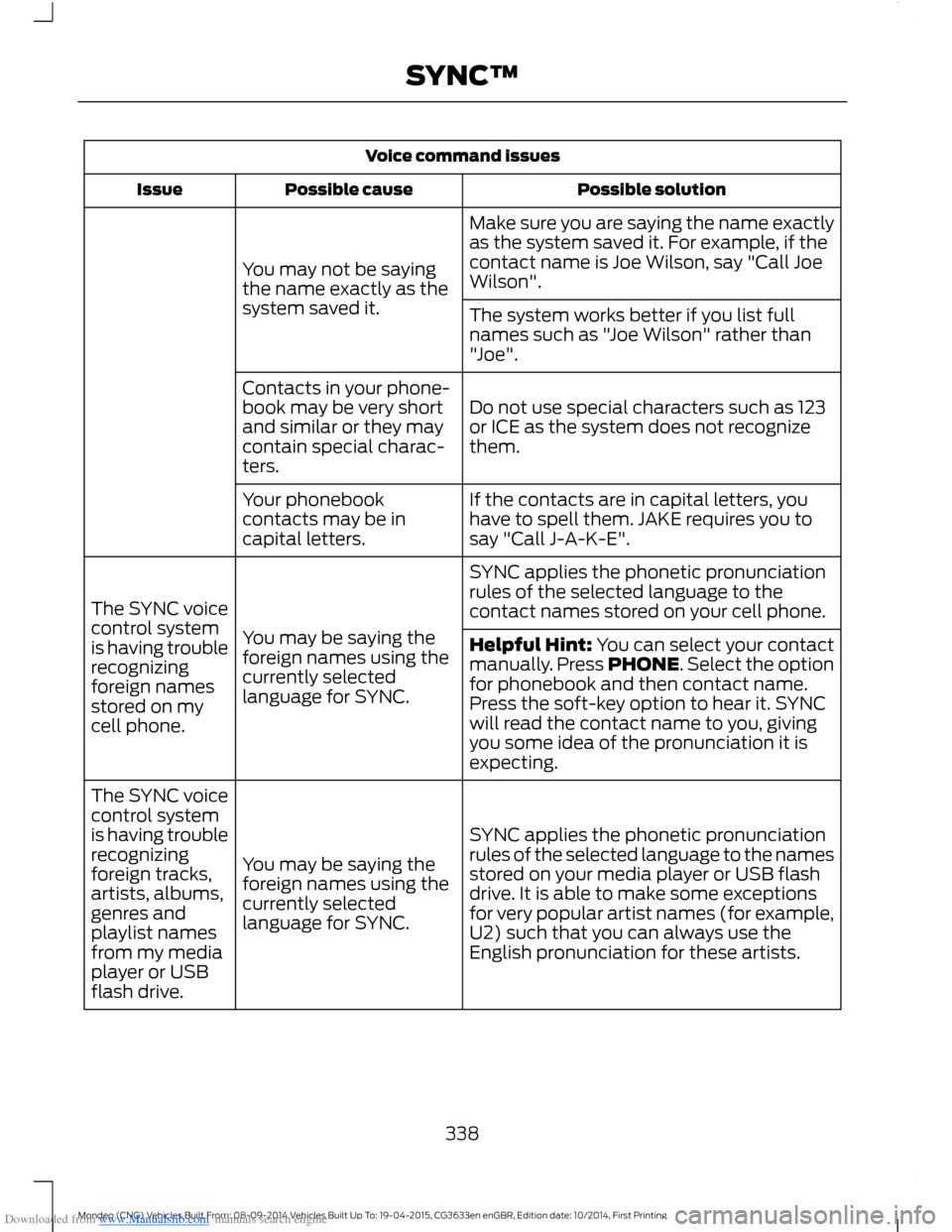
Downloaded from www.Manualslib.com manuals search engine Voice command issues
Possible solutionPossible causeIssue
Make sure you are saying the name exactlyas the system saved it. For example, if thecontact name is Joe Wilson, say "Call JoeWilson".You may not be sayingthe name exactly as thesystem saved it.The system works better if you list fullnames such as "Joe Wilson" rather than"Joe".
Do not use special characters such as 123or ICE as the system does not recognizethem.
Contacts in your phone-book may be very shortand similar or they maycontain special charac-ters.
If the contacts are in capital letters, youhave to spell them. JAKE requires you tosay "Call J-A-K-E".
Your phonebookcontacts may be incapital letters.
SYNC applies the phonetic pronunciationrules of the selected language to thecontact names stored on your cell phone.
You may be saying theforeign names using thecurrently selectedlanguage for SYNC.
The SYNC voicecontrol systemis having troublerecognizingforeign namesstored on mycell phone.
Helpful Hint: You can select your contactmanually. Press PHONE. Select the optionfor phonebook and then contact name.Press the soft-key option to hear it. SYNCwill read the contact name to you, givingyou some idea of the pronunciation it isexpecting.
SYNC applies the phonetic pronunciationrules of the selected language to the namesstored on your media player or USB flashdrive. It is able to make some exceptionsfor very popular artist names (for example,U2) such that you can always use theEnglish pronunciation for these artists.
You may be saying theforeign names using thecurrently selectedlanguage for SYNC.
The SYNC voicecontrol systemis having troublerecognizingforeign tracks,artists, albums,genres andplaylist namesfrom my mediaplayer or USBflash drive.
338Mondeo (CNG) Vehicles Built From: 08-09-2014 Vehicles Built Up To: 19-04-2015, CG3633en enGBR, Edition date: 10/2014, First PrintingSYNC™
Page 342 of 446
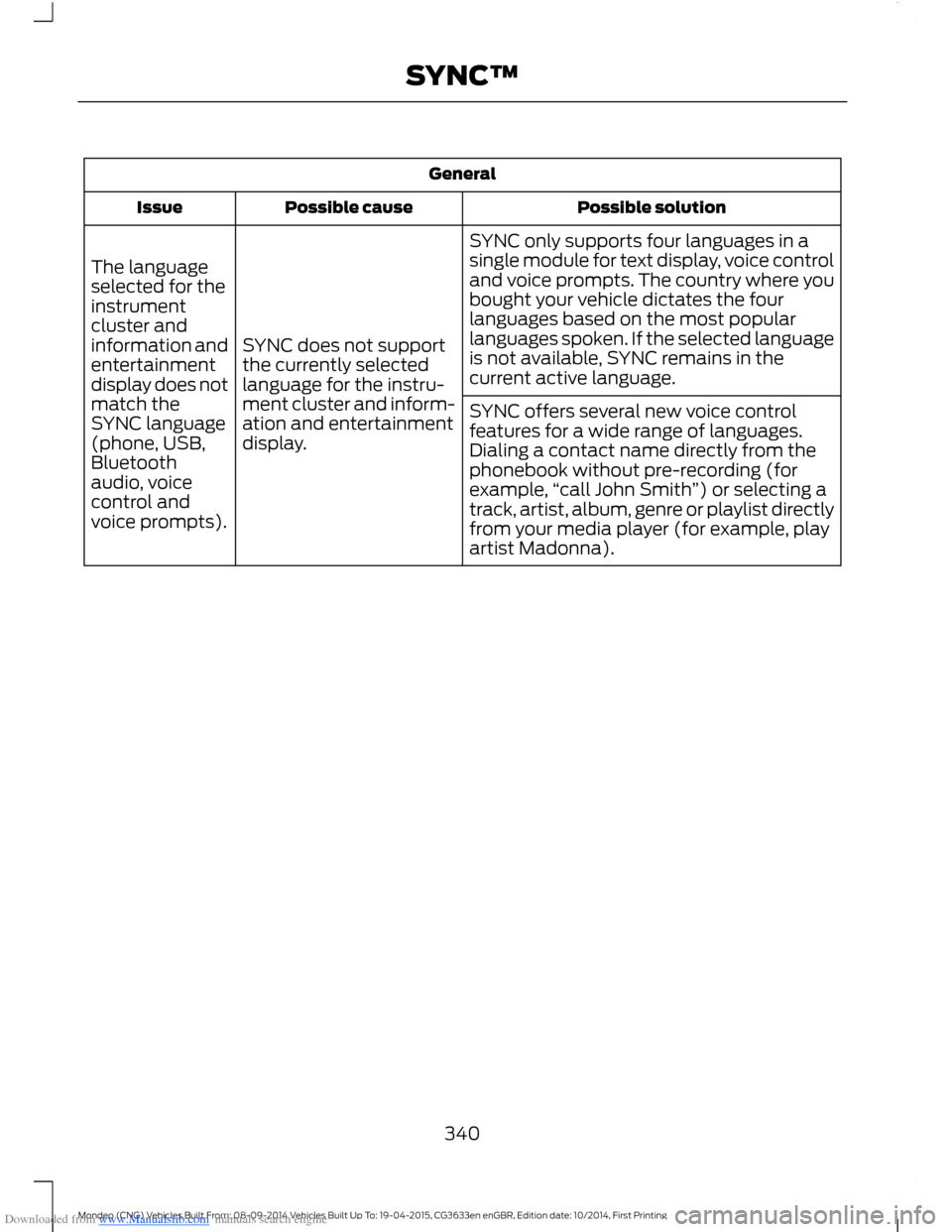
Downloaded from www.Manualslib.com manuals search engine General
Possible solutionPossible causeIssue
SYNC only supports four languages in asingle module for text display, voice controland voice prompts. The country where youbought your vehicle dictates the fourlanguages based on the most popularlanguages spoken. If the selected languageis not available, SYNC remains in thecurrent active language.
SYNC does not supportthe currently selectedlanguage for the instru-ment cluster and inform-ation and entertainmentdisplay.
The languageselected for theinstrumentcluster andinformation andentertainmentdisplay does notmatch theSYNC language(phone, USB,Bluetoothaudio, voicecontrol andvoice prompts).
SYNC offers several new voice controlfeatures for a wide range of languages.Dialing a contact name directly from thephonebook without pre-recording (forexample,“call John Smith”) or selecting atrack, artist, album, genre or playlist directlyfrom your media player (for example, playartist Madonna).
340Mondeo (CNG) Vehicles Built From: 08-09-2014 Vehicles Built Up To: 19-04-2015, CG3633en enGBR, Edition date: 10/2014, First PrintingSYNC™
Page 374 of 446
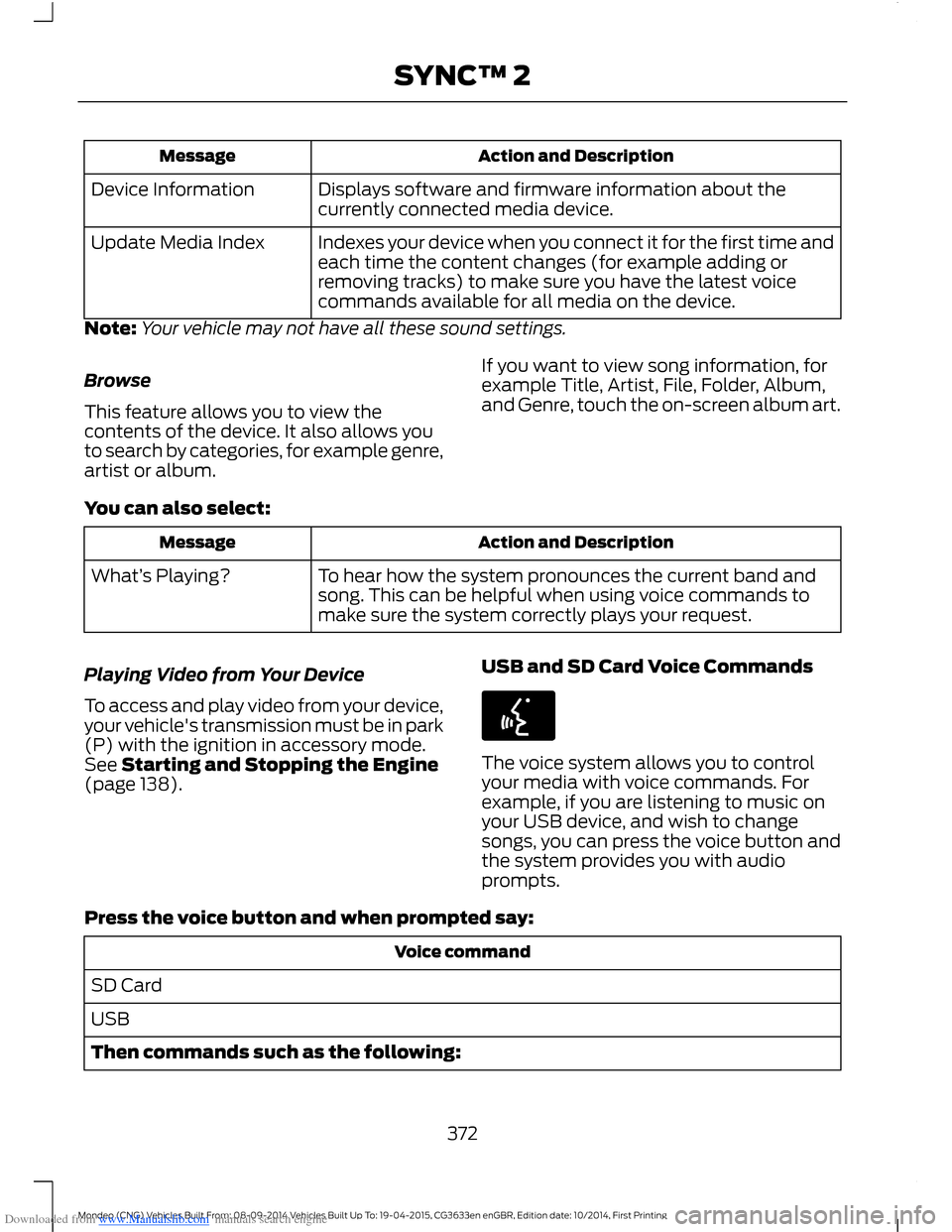
Downloaded from www.Manualslib.com manuals search engine Action and DescriptionMessage
Displays software and firmware information about thecurrently connected media device.Device Information
Indexes your device when you connect it for the first time andeach time the content changes (for example adding orremoving tracks) to make sure you have the latest voicecommands available for all media on the device.
Update Media Index
Note:Your vehicle may not have all these sound settings.
Browse
This feature allows you to view thecontents of the device. It also allows youto search by categories, for example genre,artist or album.
If you want to view song information, forexample Title, Artist, File, Folder, Album,and Genre, touch the on-screen album art.
You can also select:
Action and DescriptionMessage
To hear how the system pronounces the current band andsong. This can be helpful when using voice commands tomake sure the system correctly plays your request.
What’s Playing?
Playing Video from Your Device
To access and play video from your device,your vehicle's transmission must be in park(P) with the ignition in accessory mode.See Starting and Stopping the Engine(page 138).
USB and SD Card Voice Commands
The voice system allows you to controlyour media with voice commands. Forexample, if you are listening to music onyour USB device, and wish to changesongs, you can press the voice button andthe system provides you with audioprompts.
Press the voice button and when prompted say:
Voice command
SD Card
USB
Then commands such as the following:
372Mondeo (CNG) Vehicles Built From: 08-09-2014 Vehicles Built Up To: 19-04-2015, CG3633en enGBR, Edition date: 10/2014, First PrintingSYNC™ 2