ESP FORD MONDEO 2014 4.G Repair Manual
[x] Cancel search | Manufacturer: FORD, Model Year: 2014, Model line: MONDEO, Model: FORD MONDEO 2014 4.GPages: 446, PDF Size: 29.09 MB
Page 321 of 446
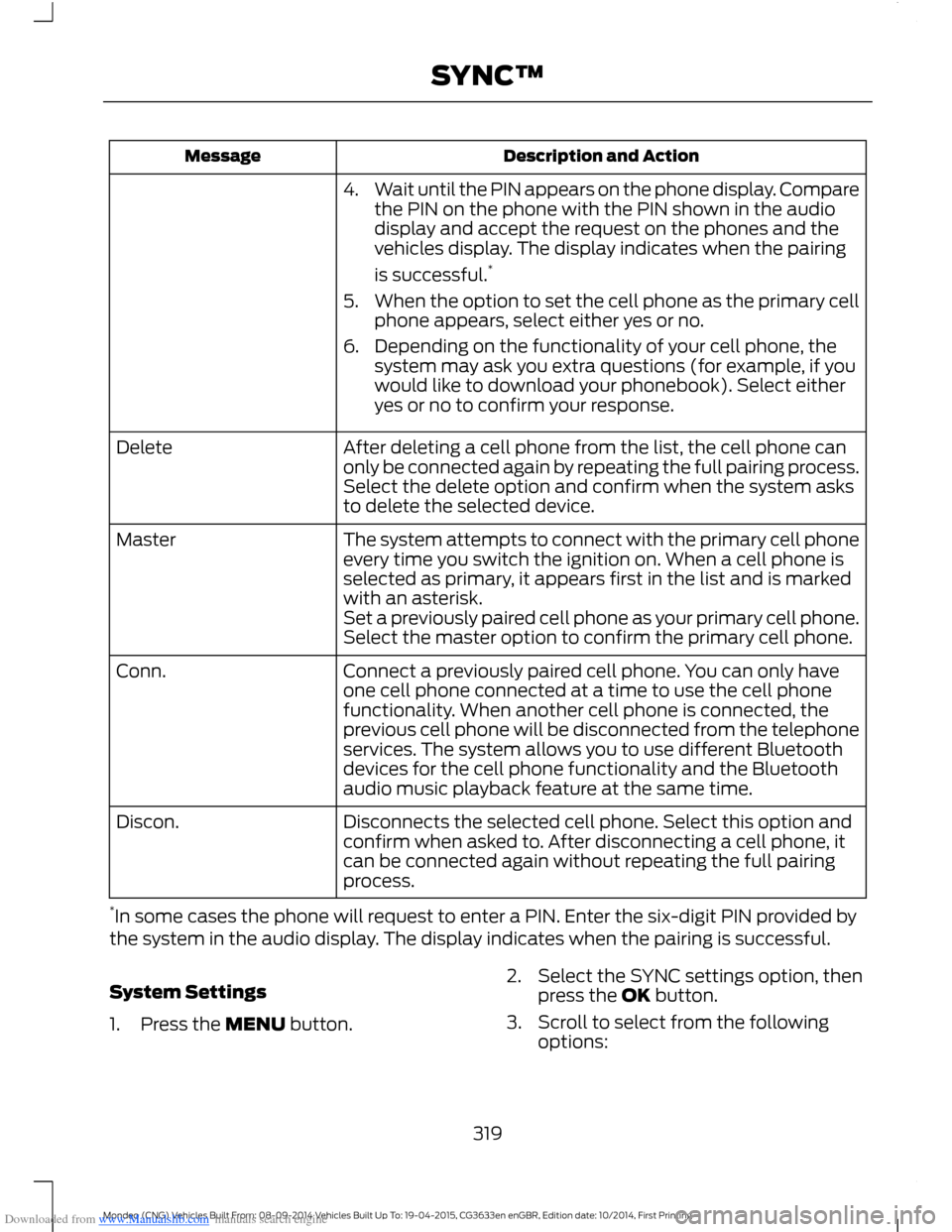
Downloaded from www.Manualslib.com manuals search engine Description and ActionMessage
4.Wait until the PIN appears on the phone display. Comparethe PIN on the phone with the PIN shown in the audiodisplay and accept the request on the phones and thevehicles display. The display indicates when the pairing
is successful.*
5.When the option to set the cell phone as the primary cellphone appears, select either yes or no.
6.Depending on the functionality of your cell phone, thesystem may ask you extra questions (for example, if youwould like to download your phonebook). Select eitheryes or no to confirm your response.
After deleting a cell phone from the list, the cell phone canonly be connected again by repeating the full pairing process.Select the delete option and confirm when the system asksto delete the selected device.
Delete
The system attempts to connect with the primary cell phoneevery time you switch the ignition on. When a cell phone isselected as primary, it appears first in the list and is markedwith an asterisk.
Master
Set a previously paired cell phone as your primary cell phone.Select the master option to confirm the primary cell phone.
Connect a previously paired cell phone. You can only haveone cell phone connected at a time to use the cell phonefunctionality. When another cell phone is connected, theprevious cell phone will be disconnected from the telephoneservices. The system allows you to use different Bluetoothdevices for the cell phone functionality and the Bluetoothaudio music playback feature at the same time.
Conn.
Disconnects the selected cell phone. Select this option andconfirm when asked to. After disconnecting a cell phone, itcan be connected again without repeating the full pairingprocess.
Discon.
*In some cases the phone will request to enter a PIN. Enter the six-digit PIN provided bythe system in the audio display. The display indicates when the pairing is successful.
System Settings
1.Press the MENU button.
2.Select the SYNC settings option, thenpress the OK button.
3.Scroll to select from the followingoptions:
319Mondeo (CNG) Vehicles Built From: 08-09-2014 Vehicles Built Up To: 19-04-2015, CG3633en enGBR, Edition date: 10/2014, First PrintingSYNC™
Page 323 of 446
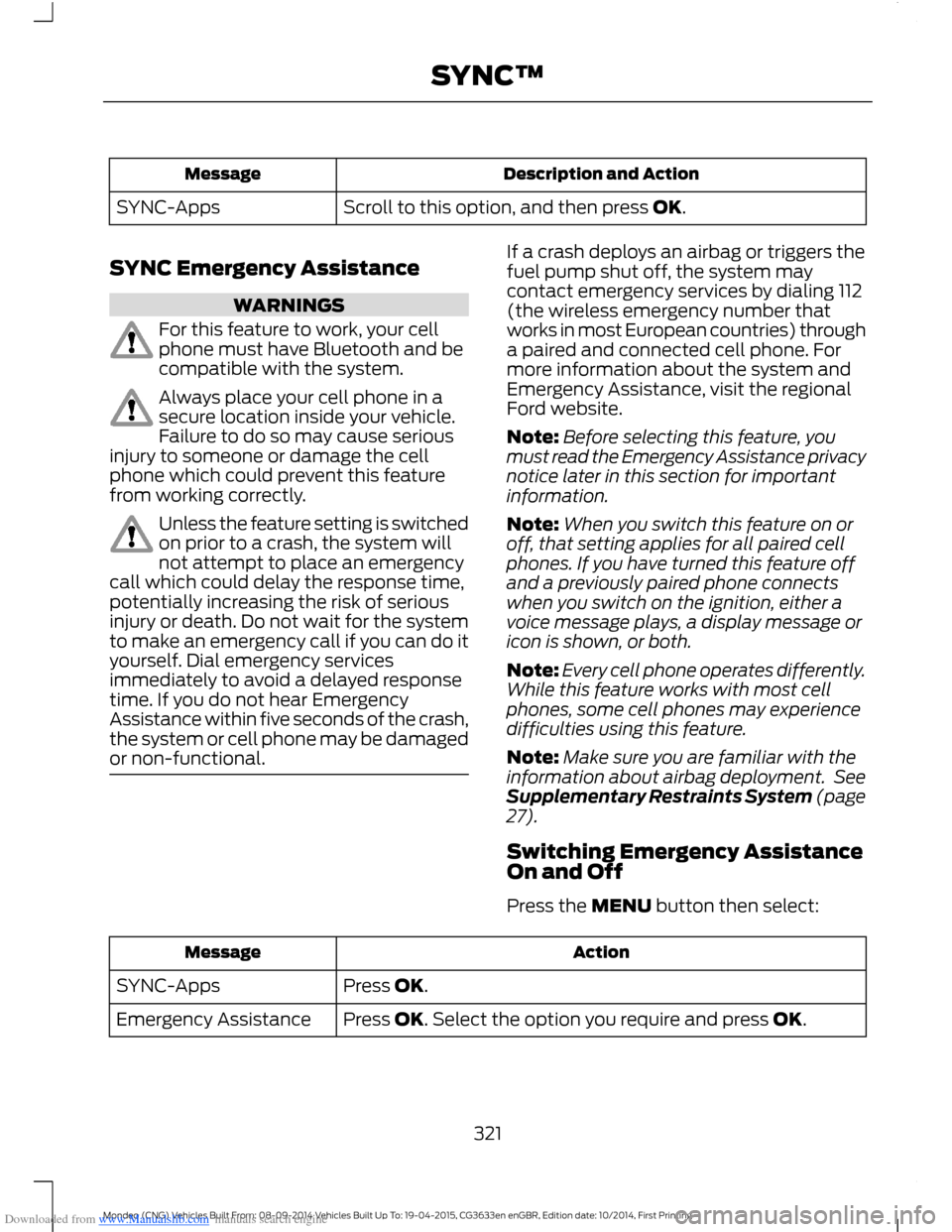
Downloaded from www.Manualslib.com manuals search engine Description and ActionMessage
Scroll to this option, and then press OK.SYNC-Apps
SYNC Emergency Assistance
WARNINGS
For this feature to work, your cellphone must have Bluetooth and becompatible with the system.
Always place your cell phone in asecure location inside your vehicle.Failure to do so may cause seriousinjury to someone or damage the cellphone which could prevent this featurefrom working correctly.
Unless the feature setting is switchedon prior to a crash, the system willnot attempt to place an emergencycall which could delay the response time,potentially increasing the risk of seriousinjury or death. Do not wait for the systemto make an emergency call if you can do ityourself. Dial emergency servicesimmediately to avoid a delayed responsetime. If you do not hear EmergencyAssistance within five seconds of the crash,the system or cell phone may be damagedor non-functional.
If a crash deploys an airbag or triggers thefuel pump shut off, the system maycontact emergency services by dialing 112(the wireless emergency number thatworks in most European countries) througha paired and connected cell phone. Formore information about the system andEmergency Assistance, visit the regionalFord website.
Note:Before selecting this feature, youmust read the Emergency Assistance privacynotice later in this section for importantinformation.
Note:When you switch this feature on oroff, that setting applies for all paired cellphones. If you have turned this feature offand a previously paired phone connectswhen you switch on the ignition, either avoice message plays, a display message oricon is shown, or both.
Note:Every cell phone operates differently.While this feature works with most cellphones, some cell phones may experiencedifficulties using this feature.
Note:Make sure you are familiar with theinformation about airbag deployment. SeeSupplementary Restraints System (page27).
Switching Emergency AssistanceOn and Off
Press the MENU button then select:
ActionMessage
Press OK.SYNC-Apps
Press OK. Select the option you require and press OK.Emergency Assistance
321Mondeo (CNG) Vehicles Built From: 08-09-2014 Vehicles Built Up To: 19-04-2015, CG3633en enGBR, Edition date: 10/2014, First PrintingSYNC™
Page 327 of 446
![FORD MONDEO 2014 4.G Repair Manual Downloaded from www.Manualslib.com manuals search engine Description and ActionCommand
The system will search your connected mobile device forSYNC compatible apps.find [new] [mobile](apps | applicatio](/img/11/5483/w960_5483-326.png "FORD MONDEO 2014 4.G Repair Manual Downloaded from www.Manualslib.com manuals search engine Description and ActionCommand
The system will search your connected mobile device forSYNC compatible apps.find [new] [mobile](apps | applicatio")
Downloaded from www.Manualslib.com manuals search engine Description and ActionCommand
The system will search your connected mobile device forSYNC compatible apps.find [new] [mobile](apps | applications)
Say the name of an app to start it on SYNC.
The system will list the available voice commands for therequested app.
Use this command followed by the name of the app.(quit | exit | close)
Enabling and Disabling PushNotifications
Some apps can send push notifications. Apush notification is an alert from an apprunning in the background and is deliveredby voice, pop up or both. This may beparticularly useful for news or locationbased apps.
Press the MENU button then select:
Description and ActionMessage
SYNC-Apps
Mobile Apps
Settings
If push notifications are supported, this setting will be listed.Select to enable or disable the feature as required.All Apps
Enabling SYNC Mobile Apps
To use the system you must consent tosend and receive app authorizationinformation and updates, using the dataplan associated with the connected device.
Data is sent to Ford in the United Statesthrough the connected device. Theinformation is encrypted and includes yourVIN, SYNC module number, anonymoususage statistics and debugginginformation. Updates may take placeautomatically.
Note:You must enable mobile apps foreach connected device the first time youselect a mobile app using the system.
Note:Standard data rates will apply. Fordis not responsible for any additional chargesyou may receive from your service provider,when your vehicle sends or receives datathrough the connected device. This includesany additional charges incurred due todriving in areas when roaming out of a homenetwork.
325Mondeo (CNG) Vehicles Built From: 08-09-2014 Vehicles Built Up To: 19-04-2015, CG3633en enGBR, Edition date: 10/2014, First PrintingSYNC™
Page 329 of 446
Downloaded from www.Manualslib.com manuals search engine •To allow your vehicle to providelocation information, including: GPSand speed.
•To allow the app to send pushnotifications using the vehicle displayand voice capabilities while running ina background state.
Note:You will only need to grantpermissions the first time you use an appwith SYNC.
Note:We are not responsible or liable forany damages or loss of privacy relating tousage of an app, or dissemination of anyvehicle data that you approve us to provideto an app.
USING SYNC™ WITH YOUR
MEDIA PLAYER
You can access and play music from yourmedia player through your vehicle'sspeaker system using the system's mediamenu or voice commands. You can alsosort and play your music by specificcategories, for example artist or albums.
SYNC is capable of hosting nearly anymedia player including: iPod, Zune, Playsfrom device players, and most USB drives.SYNC also supports audio formats, forexample MP3, WMA, WAV and ACC.
Confirm that the USB device has beenformatted correctly and has the followingspecifications:
•USB 2.0.
•File format must be FAT16/32.
Note:NTFS file format is not supported.
The format of the audio files on the USBdevice must be:
•MP3.
•Non DRM protected WMA.
•WAV.
•AAC.
Connecting Your Media Player tothe USB Port
Note:If your media player has a powerswitch, make sure you switch on the device.
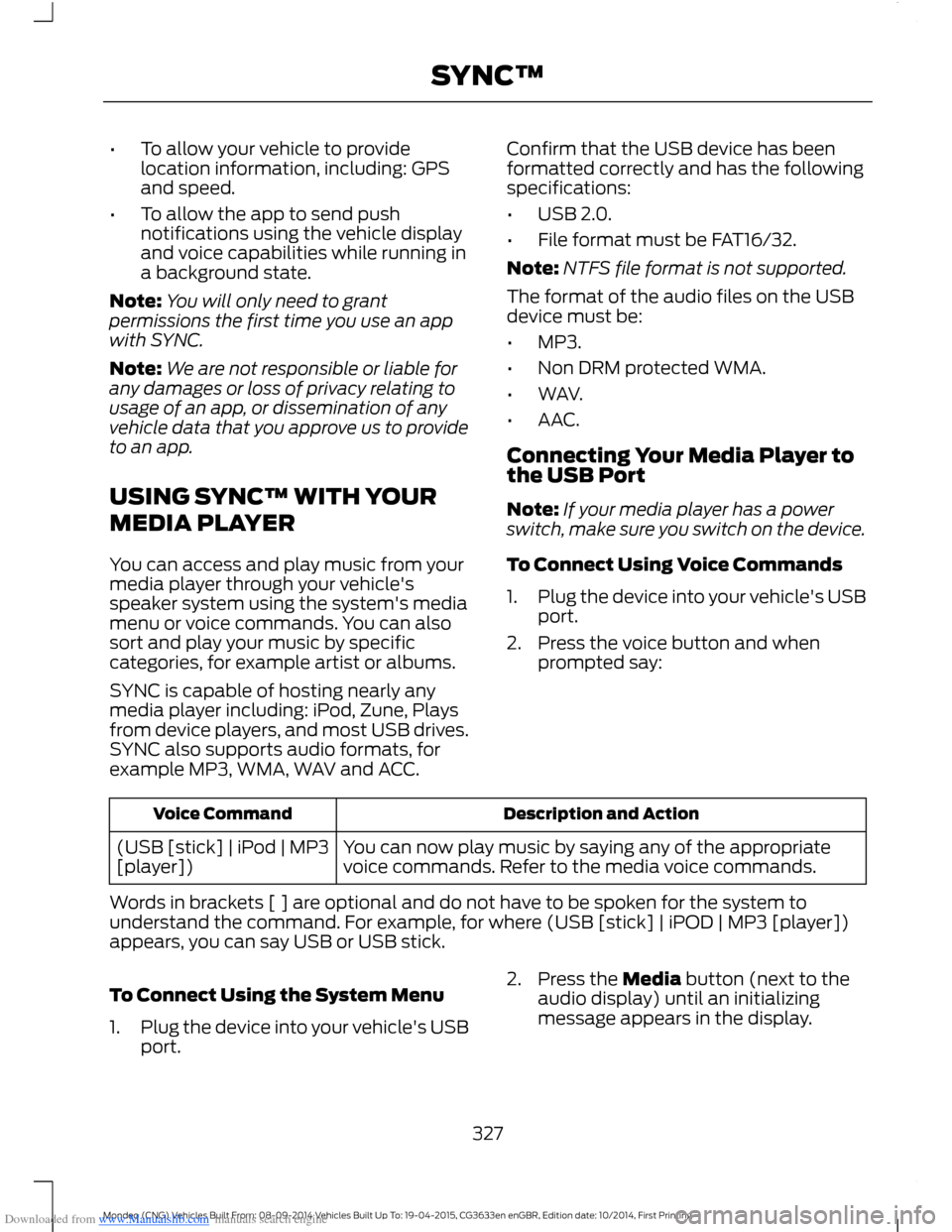
To Connect Using Voice Commands
1.Plug the device into your vehicle's USBport.
2.Press the voice button and whenprompted say:
Description and ActionVoice Command
You can now play music by saying any of the appropriatevoice commands. Refer to the media voice commands.(USB [stick] | iPod | MP3[player])
Words in brackets [ ] are optional and do not have to be spoken for the system tounderstand the command. For example, for where (USB [stick] | iPOD | MP3 [player])appears, you can say USB or USB stick.
To Connect Using the System Menu
1.Plug the device into your vehicle's USBport.
2.Press the Media button (next to theaudio display) until an initializingmessage appears in the display.
327Mondeo (CNG) Vehicles Built From: 08-09-2014 Vehicles Built Up To: 19-04-2015, CG3633en enGBR, Edition date: 10/2014, First PrintingSYNC™
Page 339 of 446
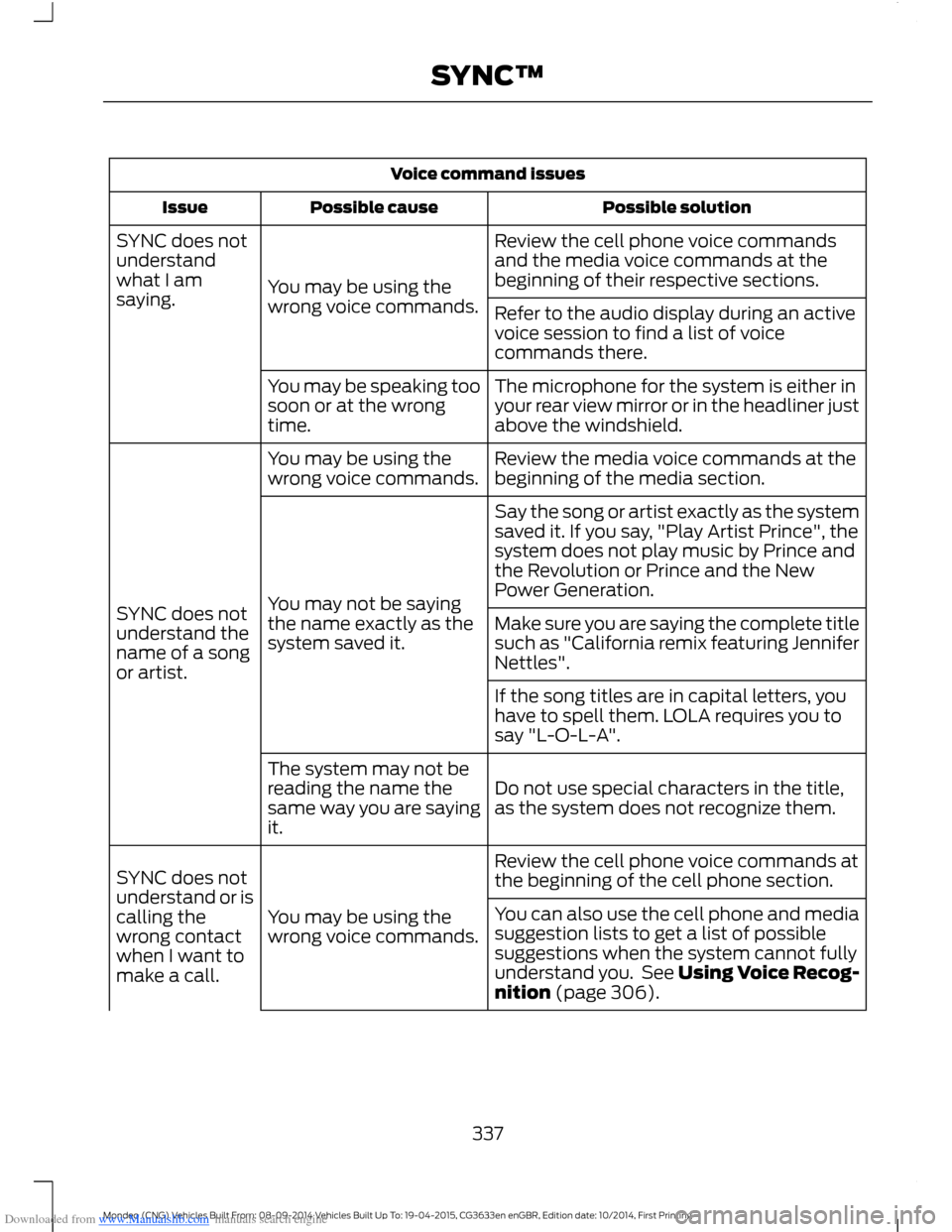
Downloaded from www.Manualslib.com manuals search engine Voice command issues
Possible solutionPossible causeIssue
Review the cell phone voice commandsand the media voice commands at thebeginning of their respective sections.You may be using thewrong voice commands.
SYNC does notunderstandwhat I amsaying.Refer to the audio display during an activevoice session to find a list of voicecommands there.
The microphone for the system is either inyour rear view mirror or in the headliner justabove the windshield.
You may be speaking toosoon or at the wrongtime.
Review the media voice commands at thebeginning of the media section.You may be using thewrong voice commands.
SYNC does notunderstand thename of a songor artist.
Say the song or artist exactly as the systemsaved it. If you say, "Play Artist Prince", thesystem does not play music by Prince andthe Revolution or Prince and the NewPower Generation.You may not be sayingthe name exactly as thesystem saved it.Make sure you are saying the complete titlesuch as "California remix featuring JenniferNettles".
If the song titles are in capital letters, youhave to spell them. LOLA requires you tosay "L-O-L-A".
Do not use special characters in the title,as the system does not recognize them.
The system may not bereading the name thesame way you are sayingit.
Review the cell phone voice commands atthe beginning of the cell phone section.
You may be using thewrong voice commands.
SYNC does notunderstand or iscalling thewrong contactwhen I want tomake a call.
You can also use the cell phone and mediasuggestion lists to get a list of possiblesuggestions when the system cannot fullyunderstand you. See Using Voice Recog-nition (page 306).
337Mondeo (CNG) Vehicles Built From: 08-09-2014 Vehicles Built Up To: 19-04-2015, CG3633en enGBR, Edition date: 10/2014, First PrintingSYNC™
Page 345 of 446
Downloaded from www.Manualslib.com manuals search engine GENERAL INFORMATIONWARNING
Driving while distracted can result inloss of vehicle control, crash andinjury. We strongly recommend thatyou use extreme caution when using anydevice that may take your focus off theroad. Your primary responsibility is the safeoperation of your vehicle. We recommendagainst the use of any hand-held devicewhile driving and encourage the use ofvoice-operated systems when possible.Make sure you are aware of all applicablelocal laws that may affect the use ofelectronic devices while driving.
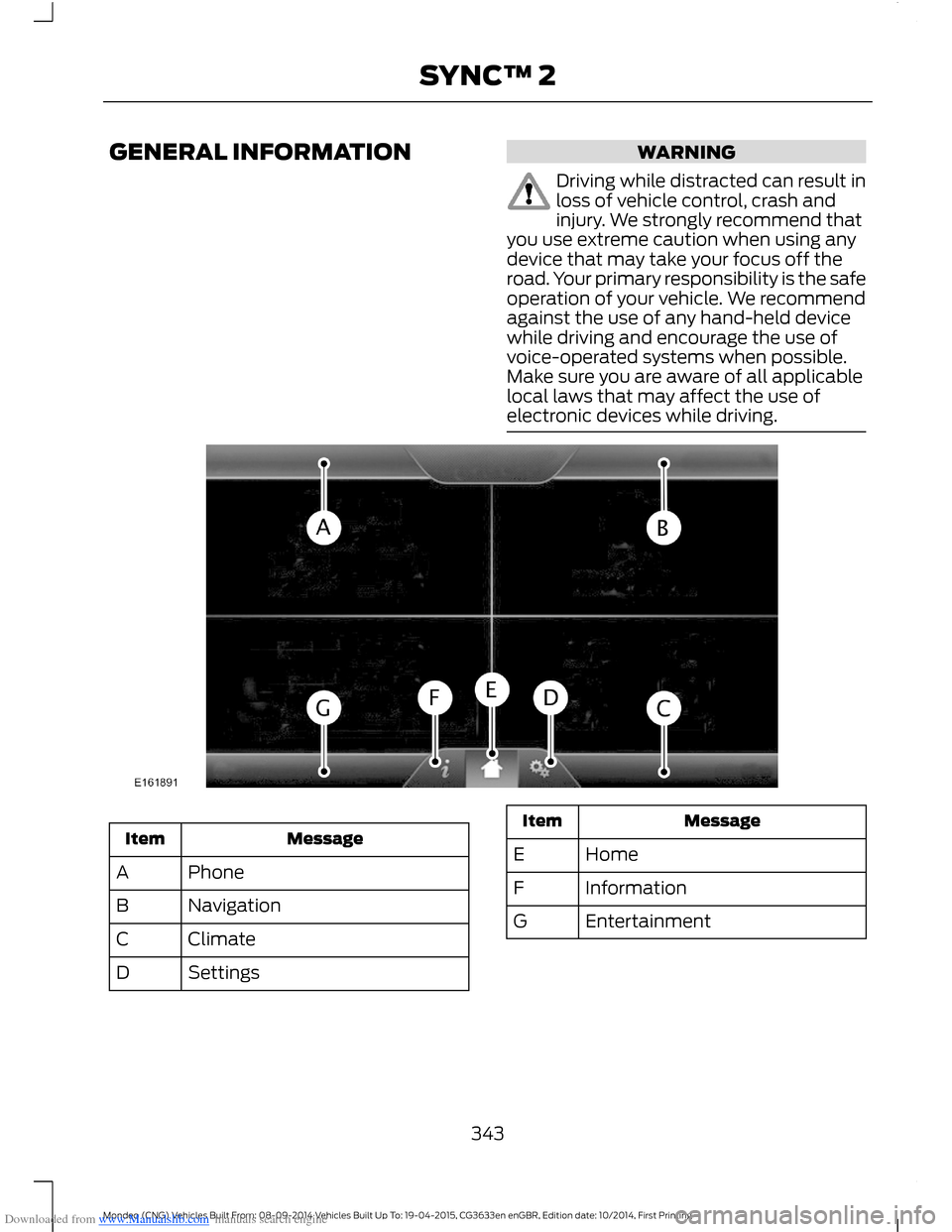
MessageItem
PhoneA
NavigationB
ClimateC
SettingsD
MessageItem
HomeE
InformationF
EntertainmentG
343Mondeo (CNG) Vehicles Built From: 08-09-2014 Vehicles Built Up To: 19-04-2015, CG3633en enGBR, Edition date: 10/2014, First PrintingSYNC™ 2
Page 346 of 446
Downloaded from www.Manualslib.com manuals search engine This system uses a four-corner strategy toprovide quick access to several vehiclefeatures and settings. The touchscreenprovides easy interaction with your cellularphone, multimedia, climate control andnavigation system. The corners display anyactive modes within those menus, such asphone status or the climate temperature.
Note:Some features are not available whileyour vehicle is moving.
Note:Your system is equipped with afeature that allows you to access andcontrol audio features for 10 minutes afteryou switch the ignition off (and no doorsopen).
PHONE
Press to select any of the following:
Message
Phone
Quick Dial
Phonebook
History
Messaging
Settings
NAVIGATION
Press to select any of the following:
Message
My Home
Favorites
Previous Destinations
Point of Interest
Emergency
Street Address
Message
Intersection
City Center
Latitude/Longitude
Edit Route
Cancel Route
CLIMATE
Press the corresponding icons to controlthe following options:
•Driver Settings
•Recirculated Air
•Auto
•Dual
•Passenger Settings
•A/C
•Defrost
SETTINGS
Press to select any of the following:
Message
Clock
Display
Sound
Vehicle
Settings
Help
344Mondeo (CNG) Vehicles Built From: 08-09-2014 Vehicles Built Up To: 19-04-2015, CG3633en enGBR, Edition date: 10/2014, First PrintingSYNC™ 2
Page 349 of 446
Downloaded from www.Manualslib.com manuals search engine Safety Information
WARNING
Driving while distracted can result inloss of vehicle control, crash andinjury. We strongly recommend thatyou use extreme caution when using anydevice that may take your focus off theroad. Your primary responsibility is the safeoperation of your vehicle. We recommendagainst the use of any hand-held devicewhile driving and encourage the use ofvoice-operated systems when possible.Make sure you are aware of all applicablelocal laws that may affect the use ofelectronic devices while driving.
•Do not attempt to service or repair thesystem. Have an authorized dealercheck your vehicle.
•Do not operate playing devices if thepower cords or cables are broken, splitor damaged. Place cords and cablesout of the way, so they do not interferewith the operation of pedals, seats,compartments or safe driving abilities.
•Do not leave playing devices in yourvehicle during extreme conditions as itcould cause them damage. See yourdevice's user guide for furtherinformation.
•For your safety, some SYNC functionsare speed-dependent. Their use islimited to when your vehicle is travelingat speeds under 5 mph (8 km/h).
Make sure that you review your device'smanual before using it with SYNC.
Speed-restricted Features
Some features of this system may be toodifficult to use while your vehicle is movingso they are restricted from use unless yourvehicle is stationary.
See the following chart for more specificexamples.
Restricted features
Editing settings while the rear view camera or active parkassist are active.System Functionality
Playing video.Videos, Photos and Graphics
Composing text messages.Text Messages
Editing preset text messages.
Demo navigation route.Navigation
347Mondeo (CNG) Vehicles Built From: 08-09-2014 Vehicles Built Up To: 19-04-2015, CG3633en enGBR, Edition date: 10/2014, First PrintingSYNC™ 2
Page 352 of 446
Downloaded from www.Manualslib.com manuals search engine The selection menu expands and differentoptions appear.
•Press the up and down arrows to scrollthrough the modes.
•Press the right arrow to enter the mode.
•Press the left or right arrows to makeadjustments within the chosen mode.
•Press OK to confirm your selection.
Note:If your vehicle is not equipped withNavigation, Compass appears in the displayinstead of Navigation. If you press the rightarrow to go into the Compass menu, youcan see the compass graphic. The compassdisplays the direction in which the vehicleis traveling, not true direction (for example,if the vehicle is traveling west, the middleof the compass graphic displays west; northdisplays to the left of west though its truedirection is to the right of west).
Using Voice Recognition
This system helps you control manyfeatures using voice commands. Thisallows you to keep your hands on thewheel and focus on what is in front of you.The system provides feedback throughaudible tones, prompts, questions andspoken confirmations depending on thesituation and the chosen level ofinteraction (voice settings).
The system also asks short questions(confirmation prompts) when it is not sureof your request or when there are multiplepossible responses to your request.
When using voice commands, words andicons may appear in the lower left statusbar indicating the status of the voicecommand session.
How to Use Voice Commands
The following are some of thevoice commands that you cansay at any time during a voicecommand session.
Press the voice button and whenprompted say:
Voice command
Main Menu
What Can I Say
Previous Page
Go Back
Help
Helpful Hints
•Make sure the interior of your vehicle isas quiet as possible. Wind noise fromopen windows and road vibrations mayprevent the system from correctlyrecognizing spoken voice commands.
•After pressing the voice command icon,wait until after the tone sounds and amessage appears before saying a voicecommand. Any voice command spokenprior to this does not register with thesystem.
•Speak naturally, without long pausesbetween words.
•At any time, you can interrupt thesystem while it is speaking by pressingthe voice command icon.
Accessing a List of Available VoiceCommands
To access a list of available voicecommands you can do either of thefollowing.
Using the touchscreen, press:
Menu Item
Settings
Help
Voice Command List
350Mondeo (CNG) Vehicles Built From: 08-09-2014 Vehicles Built Up To: 19-04-2015, CG3633en enGBR, Edition date: 10/2014, First PrintingSYNC™ 2
Page 369 of 446
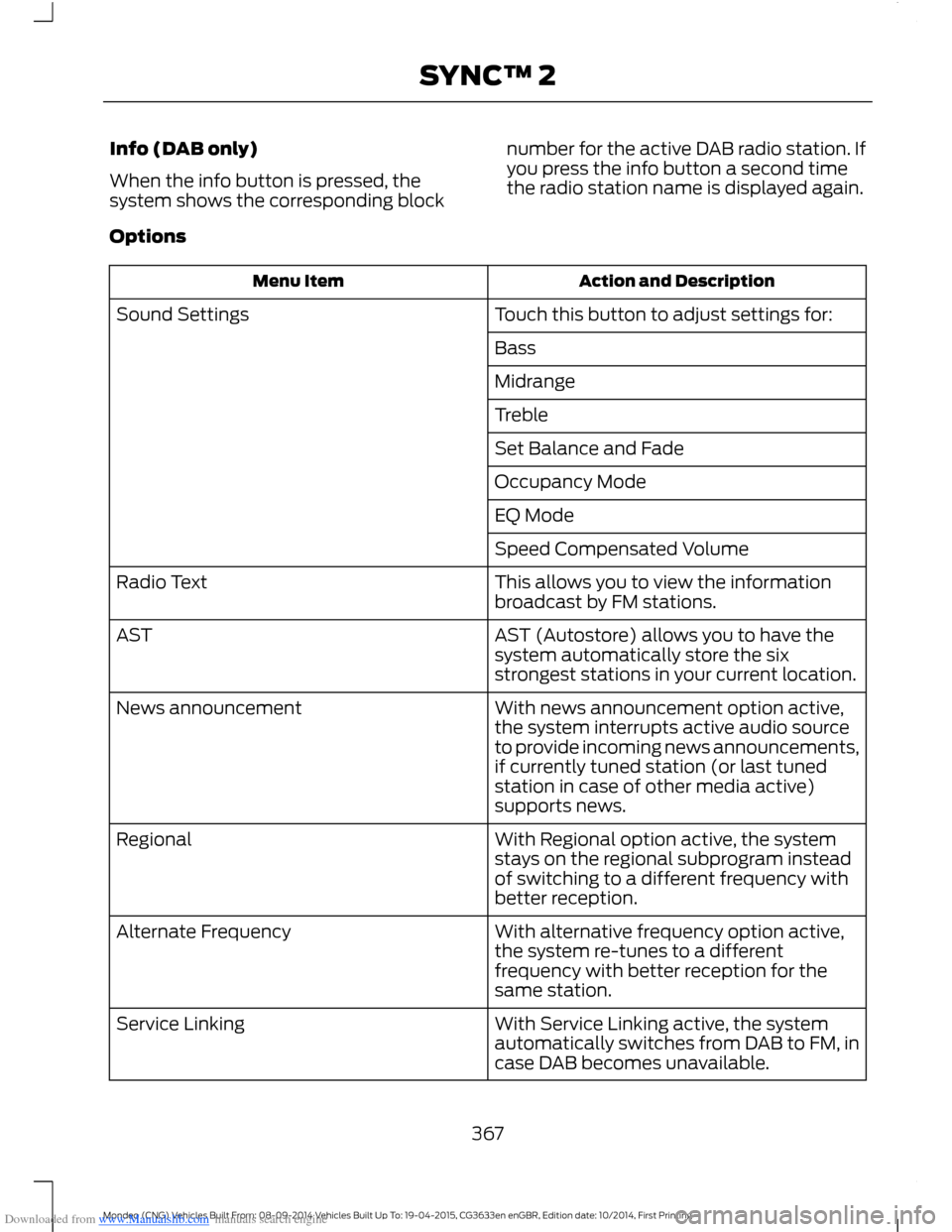
Downloaded from www.Manualslib.com manuals search engine Info (DAB only)
When the info button is pressed, thesystem shows the corresponding block
number for the active DAB radio station. Ifyou press the info button a second timethe radio station name is displayed again.
Options
Action and DescriptionMenu Item
Touch this button to adjust settings for:Sound Settings
Bass
Midrange
Treble
Set Balance and Fade
Occupancy Mode
EQ Mode
Speed Compensated Volume
This allows you to view the informationbroadcast by FM stations.Radio Text
AST (Autostore) allows you to have thesystem automatically store the sixstrongest stations in your current location.
AST
With news announcement option active,the system interrupts active audio sourceto provide incoming news announcements,if currently tuned station (or last tunedstation in case of other media active)supports news.
News announcement
With Regional option active, the systemstays on the regional subprogram insteadof switching to a different frequency withbetter reception.
Regional
With alternative frequency option active,the system re-tunes to a differentfrequency with better reception for thesame station.
Alternate Frequency
With Service Linking active, the systemautomatically switches from DAB to FM, incase DAB becomes unavailable.
Service Linking
367Mondeo (CNG) Vehicles Built From: 08-09-2014 Vehicles Built Up To: 19-04-2015, CG3633en enGBR, Edition date: 10/2014, First PrintingSYNC™ 2