displays FORD MONDEO 2014 4.G Repair Manual
[x] Cancel search | Manufacturer: FORD, Model Year: 2014, Model line: MONDEO, Model: FORD MONDEO 2014 4.GPages: 446, PDF Size: 29.09 MB
Page 308 of 446
Downloaded from www.Manualslib.com manuals search engine Safety Information
WARNING
Driving while distracted can result inloss of vehicle control, crash andinjury. We strongly recommend thatyou use extreme caution when using anydevice that may take your focus off theroad. Your primary responsibility is the safeoperation of your vehicle. We recommendagainst the use of any hand-held devicewhile driving and encourage the use ofvoice-operated systems when possible.Make sure you are aware of all applicablelocal laws that may affect the use ofelectronic devices while driving.
When using SYNC:
•Do not operate playing devices if thepower cords or cables are broken, splitor damaged. Carefully place cords andcables where you cannot step on themor they do not interfere with theoperation of pedals, seats,compartments or safe driving abilities.
•Do not leave playing devices in yourvehicle during extreme conditions as itcould cause them damage. Refer toyour device's manual for furtherinformation.
•Do not attempt to service or repair thesystem. See an authorized dealer.
Privacy Information
When a cell phone is connected to SYNC,the system creates a profile that is linkedto that cell phone. The system creates theprofile to offer you more mobile featuresand to operate more efficiently. Amongother things, this profile may contain dataabout your phonebook, text messages(read and unread) and call history. Thiswill include the history of calls when yourcell phone was not connected to thesystem. If you connect a media player, thesystem creates and retains an index of
supported media content. The system alsorecords a short development log ofapproximately 10 minutes of all recentsystem activity. The log profile and othersystem data may be used to improve thesystem and help diagnose any problemsthat may occur.
The cell phone profile, media player indexand development log will remain in thesystem unless deleted. They are generallyaccessible in your vehicle only when youconnect your cell phone or media player.If you no longer plan to use the system oryour vehicle, we recommend you completea master reset to erase all storedinformation. See Information Displays(page 86).
Special equipment is required to accesssystem data. Access to your vehicle'sSYNC module is also required. We will notaccess the system data for any purposeother than as described without consent.Examples where system data can beaccessed are for a court order, whererequired by law enforcement, othergovernment authorities or other thirdparties acting with lawful authority. Otherparties may seek to access the informationindependently of us. Further privacyinformation is available. See SYNC™Applications and Services (page 320).
USING VOICE RECOGNITION
This system helps you control manyfeatures using voice commands. Thisallows you to keep your hands on thesteering wheel and focus on what is aroundyou.
Helpful Hints
Make sure the interior of your vehicle is asquiet as possible. Wind noise from openwindows and road vibrations may preventthe system from correctly recognizingspoken commands.
306Mondeo (CNG) Vehicles Built From: 08-09-2014 Vehicles Built Up To: 19-04-2015, CG3633en enGBR, Edition date: 10/2014, First PrintingSYNC™
Page 350 of 446
Downloaded from www.Manualslib.com manuals search engine Privacy Information
When a cell phone connects to SYNC, thesystem creates a profile that links to thatcell phone. The system creates the profileto offer you more mobile features and tooperate more efficiently. Among otherthings, this profile may contain data aboutyour phonebook, text messages (read andunread) and call history. This includes thehistory of calls when your cell phone wasnot connected to the system. If youconnect a media player, the systemcreates and retains an index of supportedmedia content. The system also records ashort development log of approximately10 minutes of all recent system activity.Use the log profile and other system datato improve the system and help diagnoseany problems that may occur.
The cell phone profile, media player indexand development log remain in the systemunless deleted. They are generallyaccessible in your vehicle only when youconnect your cell phone or media player.If you no longer plan to use the system oryour vehicle, we recommend you completea master reset to erase all storedinformation. See Information Displays(page 86).
Special equipment is required to accesssystem data. Access to your vehicle'sSYNC module is also required. We will notaccess the system data for any purposeother than as described without consent.Examples where we can access systemdata are for a court order, where requiredby law enforcement, other governmentauthorities or other third parties acting withlawful authority. Other parties may seekto access the information independentlyof us. Further privacy information isavailable.
348Mondeo (CNG) Vehicles Built From: 08-09-2014 Vehicles Built Up To: 19-04-2015, CG3633en enGBR, Edition date: 10/2014, First PrintingSYNC™ 2
Page 352 of 446
Downloaded from www.Manualslib.com manuals search engine The selection menu expands and differentoptions appear.
•Press the up and down arrows to scrollthrough the modes.
•Press the right arrow to enter the mode.
•Press the left or right arrows to makeadjustments within the chosen mode.
•Press OK to confirm your selection.
Note:If your vehicle is not equipped withNavigation, Compass appears in the displayinstead of Navigation. If you press the rightarrow to go into the Compass menu, youcan see the compass graphic. The compassdisplays the direction in which the vehicleis traveling, not true direction (for example,if the vehicle is traveling west, the middleof the compass graphic displays west; northdisplays to the left of west though its truedirection is to the right of west).
Using Voice Recognition
This system helps you control manyfeatures using voice commands. Thisallows you to keep your hands on thewheel and focus on what is in front of you.The system provides feedback throughaudible tones, prompts, questions andspoken confirmations depending on thesituation and the chosen level ofinteraction (voice settings).
The system also asks short questions(confirmation prompts) when it is not sureof your request or when there are multiplepossible responses to your request.
When using voice commands, words andicons may appear in the lower left statusbar indicating the status of the voicecommand session.
How to Use Voice Commands
The following are some of thevoice commands that you cansay at any time during a voicecommand session.
Press the voice button and whenprompted say:
Voice command
Main Menu
What Can I Say
Previous Page
Go Back
Help
Helpful Hints
•Make sure the interior of your vehicle isas quiet as possible. Wind noise fromopen windows and road vibrations mayprevent the system from correctlyrecognizing spoken voice commands.
•After pressing the voice command icon,wait until after the tone sounds and amessage appears before saying a voicecommand. Any voice command spokenprior to this does not register with thesystem.
•Speak naturally, without long pausesbetween words.
•At any time, you can interrupt thesystem while it is speaking by pressingthe voice command icon.
Accessing a List of Available VoiceCommands
To access a list of available voicecommands you can do either of thefollowing.
Using the touchscreen, press:
Menu Item
Settings
Help
Voice Command List
350Mondeo (CNG) Vehicles Built From: 08-09-2014 Vehicles Built Up To: 19-04-2015, CG3633en enGBR, Edition date: 10/2014, First PrintingSYNC™ 2
Page 354 of 446
Downloaded from www.Manualslib.com manuals search engine Using Voice Commands with theTouchscreen Options
The voice command system has a dualmode feature which allows you to switchbetween using voice commands andmaking on-screen selections. This is
available only when the system displays alist of candidates generated during a voicecommand session. For example, this canbe used when entering a street address ortrying to call a contact from a cell phonepaired to the system.
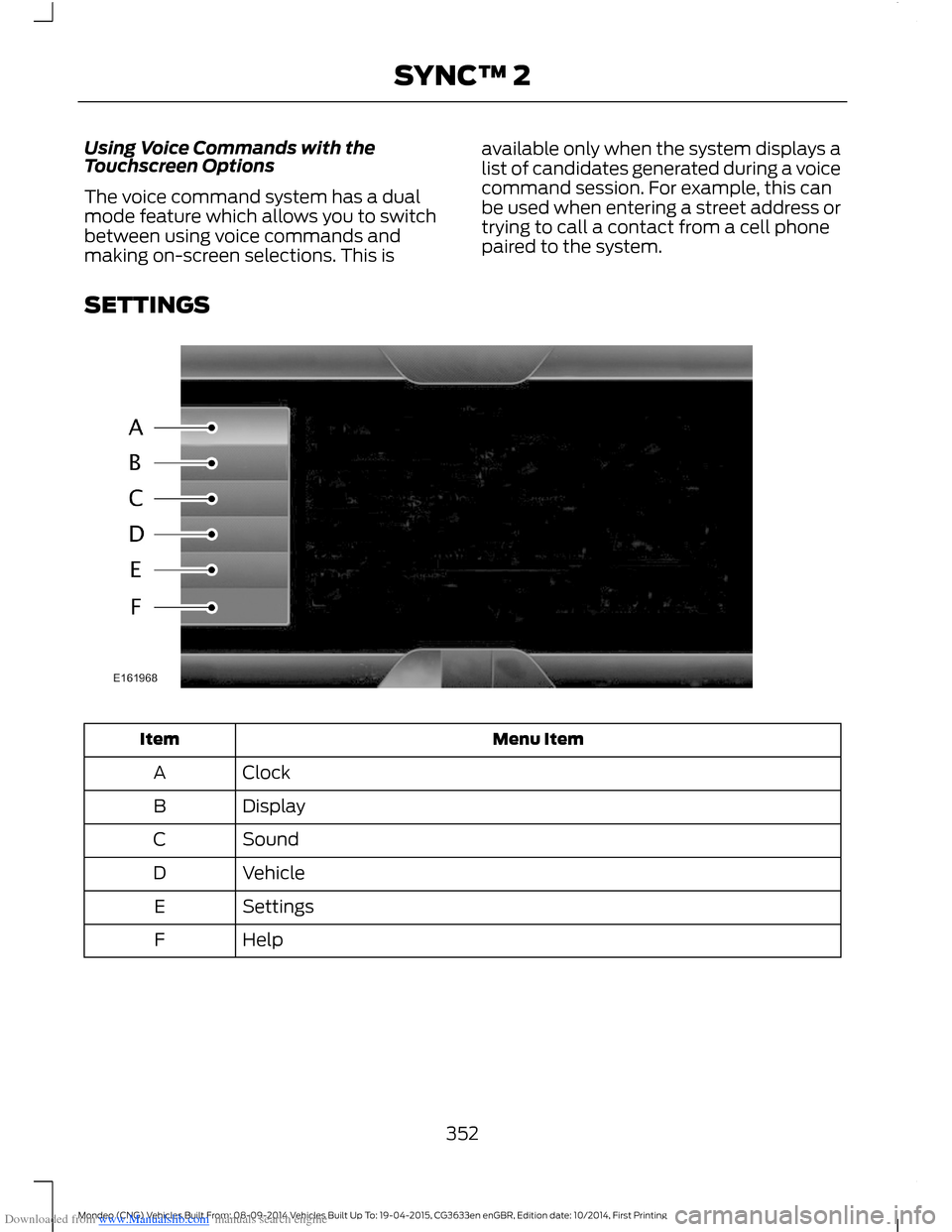
SETTINGS
Menu ItemItem
ClockA
DisplayB
SoundC
VehicleD
SettingsE
HelpF
352Mondeo (CNG) Vehicles Built From: 08-09-2014 Vehicles Built Up To: 19-04-2015, CG3633en enGBR, Edition date: 10/2014, First PrintingSYNC™ 2
Page 362 of 446
Downloaded from www.Manualslib.com manuals search engine Action and DescriptionMenu Item
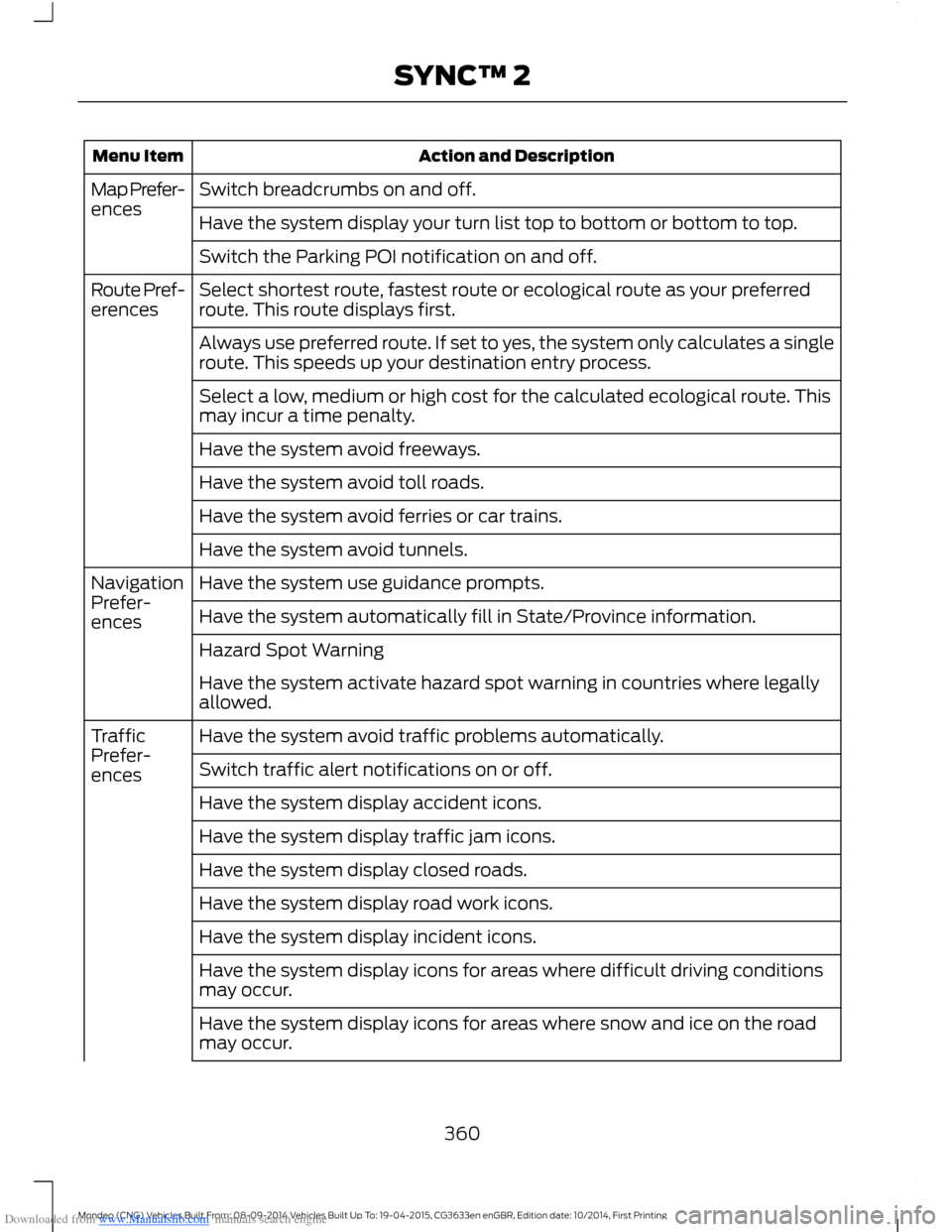
Switch breadcrumbs on and off.Map Prefer-encesHave the system display your turn list top to bottom or bottom to top.
Switch the Parking POI notification on and off.
Select shortest route, fastest route or ecological route as your preferredroute. This route displays first.Route Pref-erences
Always use preferred route. If set to yes, the system only calculates a singleroute. This speeds up your destination entry process.
Select a low, medium or high cost for the calculated ecological route. Thismay incur a time penalty.
Have the system avoid freeways.
Have the system avoid toll roads.
Have the system avoid ferries or car trains.
Have the system avoid tunnels.
Have the system use guidance prompts.NavigationPrefer-encesHave the system automatically fill in State/Province information.
Hazard Spot Warning
Have the system activate hazard spot warning in countries where legallyallowed.
Have the system avoid traffic problems automatically.TrafficPrefer-encesSwitch traffic alert notifications on or off.
Have the system display accident icons.
Have the system display traffic jam icons.
Have the system display closed roads.
Have the system display road work icons.
Have the system display incident icons.
Have the system display icons for areas where difficult driving conditionsmay occur.
Have the system display icons for areas where snow and ice on the roadmay occur.
360Mondeo (CNG) Vehicles Built From: 08-09-2014 Vehicles Built Up To: 19-04-2015, CG3633en enGBR, Edition date: 10/2014, First PrintingSYNC™ 2
Page 374 of 446
Downloaded from www.Manualslib.com manuals search engine Action and DescriptionMessage
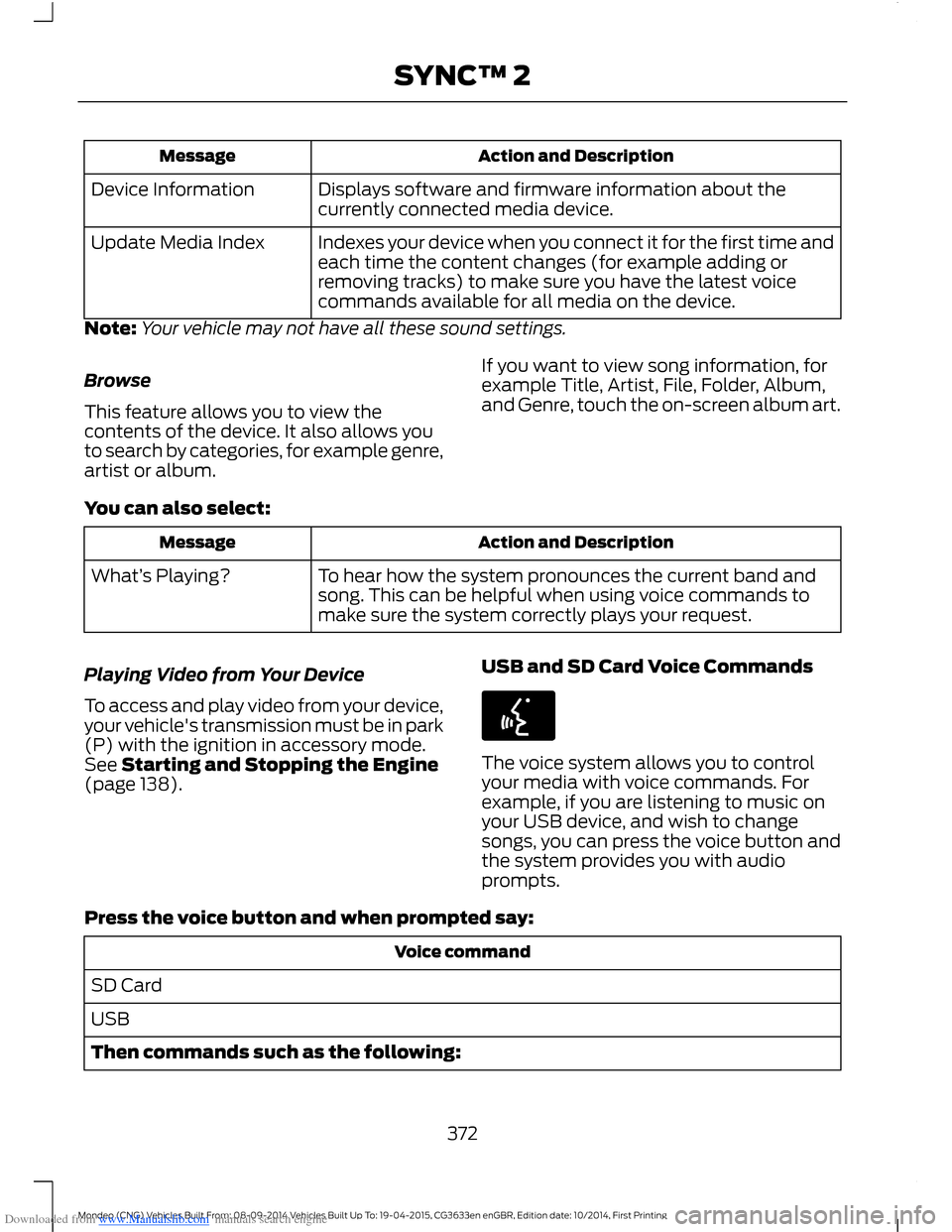
Displays software and firmware information about thecurrently connected media device.Device Information
Indexes your device when you connect it for the first time andeach time the content changes (for example adding orremoving tracks) to make sure you have the latest voicecommands available for all media on the device.
Update Media Index
Note:Your vehicle may not have all these sound settings.
Browse
This feature allows you to view thecontents of the device. It also allows youto search by categories, for example genre,artist or album.
If you want to view song information, forexample Title, Artist, File, Folder, Album,and Genre, touch the on-screen album art.
You can also select:
Action and DescriptionMessage
To hear how the system pronounces the current band andsong. This can be helpful when using voice commands tomake sure the system correctly plays your request.
What’s Playing?
Playing Video from Your Device
To access and play video from your device,your vehicle's transmission must be in park(P) with the ignition in accessory mode.See Starting and Stopping the Engine(page 138).
USB and SD Card Voice Commands
The voice system allows you to controlyour media with voice commands. Forexample, if you are listening to music onyour USB device, and wish to changesongs, you can press the voice button andthe system provides you with audioprompts.
Press the voice button and when prompted say:
Voice command
SD Card
USB
Then commands such as the following:
372Mondeo (CNG) Vehicles Built From: 08-09-2014 Vehicles Built Up To: 19-04-2015, CG3633en enGBR, Edition date: 10/2014, First PrintingSYNC™ 2
Page 383 of 446
Downloaded from www.Manualslib.com manuals search engine Receiving a Text Message
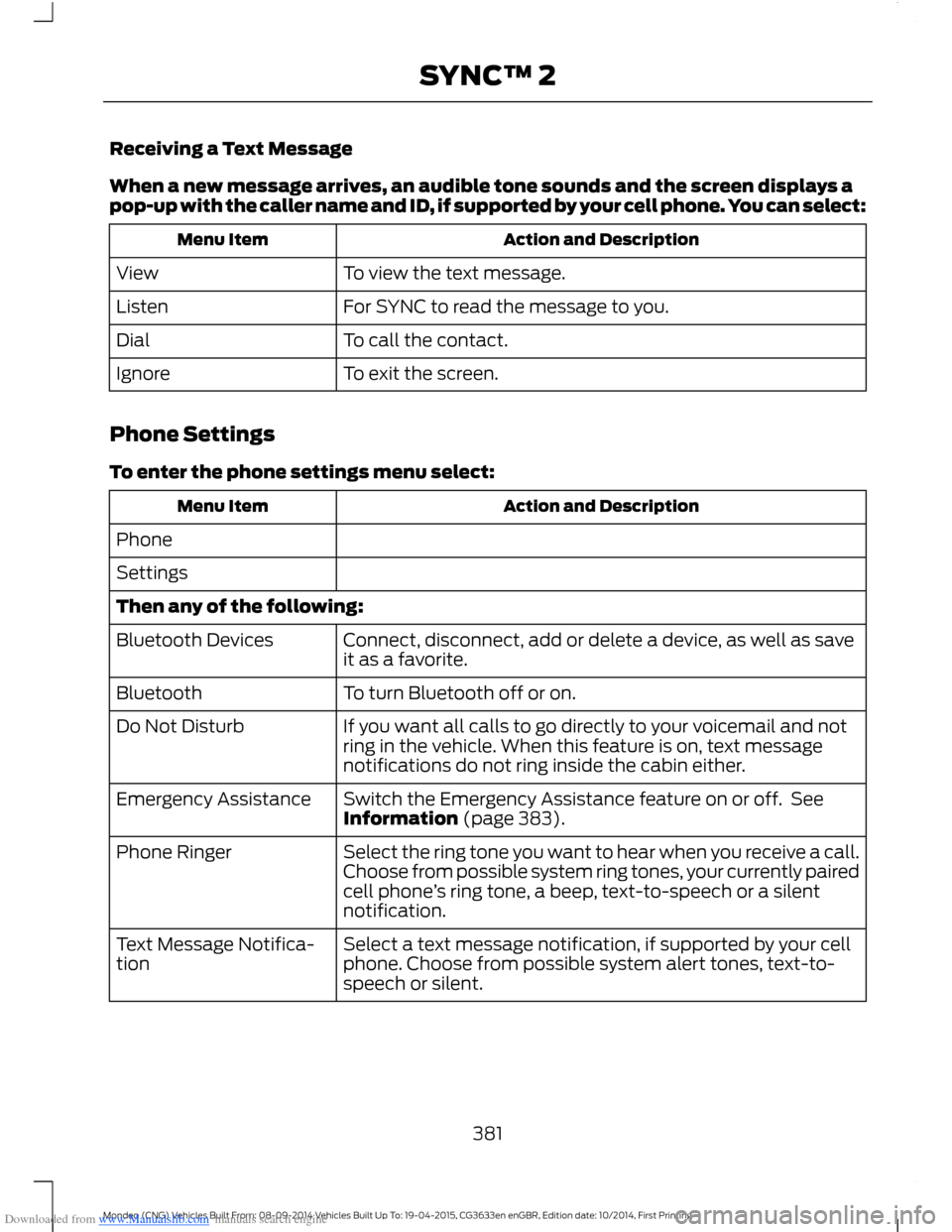
When a new message arrives, an audible tone sounds and the screen displays apop-up with the caller name and ID, if supported by your cell phone. You can select:
Action and DescriptionMenu Item
To view the text message.View
For SYNC to read the message to you.Listen
To call the contact.Dial
To exit the screen.Ignore
Phone Settings
To enter the phone settings menu select:
Action and DescriptionMenu Item
Phone
Settings
Then any of the following:
Connect, disconnect, add or delete a device, as well as saveit as a favorite.Bluetooth Devices
To turn Bluetooth off or on.Bluetooth
If you want all calls to go directly to your voicemail and notring in the vehicle. When this feature is on, text messagenotifications do not ring inside the cabin either.
Do Not Disturb
Switch the Emergency Assistance feature on or off. SeeInformation (page 383).Emergency Assistance
Select the ring tone you want to hear when you receive a call.Choose from possible system ring tones, your currently pairedcell phone’s ring tone, a beep, text-to-speech or a silentnotification.
Phone Ringer
Select a text message notification, if supported by your cellphone. Choose from possible system alert tones, text-to-speech or silent.
Text Message Notifica-tion
381Mondeo (CNG) Vehicles Built From: 08-09-2014 Vehicles Built Up To: 19-04-2015, CG3633en enGBR, Edition date: 10/2014, First PrintingSYNC™ 2
Page 386 of 446
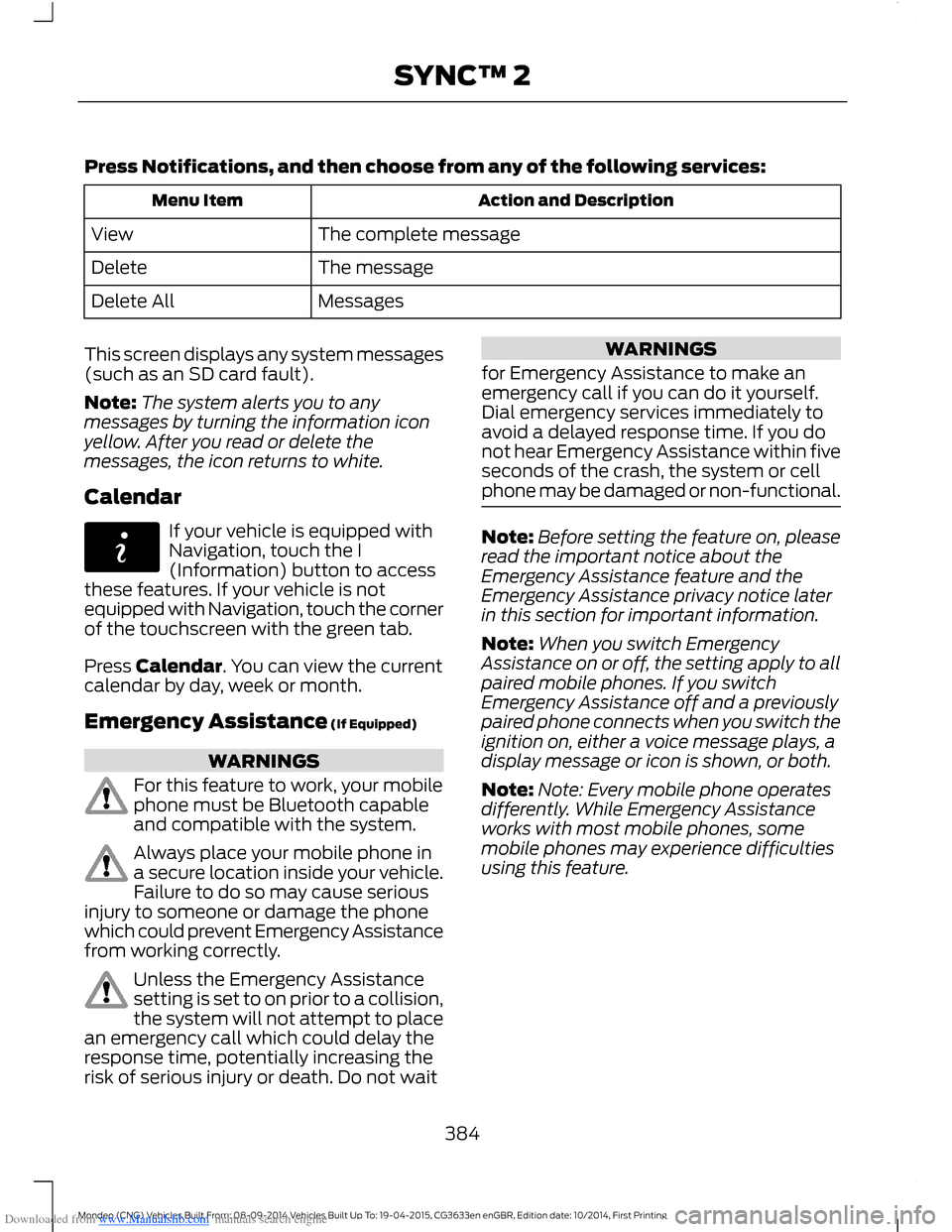
Downloaded from www.Manualslib.com manuals search engine Press Notifications, and then choose from any of the following services:
Action and DescriptionMenu Item
The complete messageView
The messageDelete
MessagesDelete All
This screen displays any system messages(such as an SD card fault).
Note:The system alerts you to anymessages by turning the information iconyellow. After you read or delete themessages, the icon returns to white.
Calendar
If your vehicle is equipped withNavigation, touch the I(Information) button to accessthese features. If your vehicle is notequipped with Navigation, touch the cornerof the touchscreen with the green tab.
Press Calendar. You can view the currentcalendar by day, week or month.
Emergency Assistance (If Equipped)
WARNINGS
For this feature to work, your mobilephone must be Bluetooth capableand compatible with the system.
Always place your mobile phone ina secure location inside your vehicle.Failure to do so may cause seriousinjury to someone or damage the phonewhich could prevent Emergency Assistancefrom working correctly.
Unless the Emergency Assistancesetting is set to on prior to a collision,the system will not attempt to placean emergency call which could delay theresponse time, potentially increasing therisk of serious injury or death. Do not wait
WARNINGS
for Emergency Assistance to make anemergency call if you can do it yourself.Dial emergency services immediately toavoid a delayed response time. If you donot hear Emergency Assistance within fiveseconds of the crash, the system or cellphone may be damaged or non-functional.
Note:Before setting the feature on, pleaseread the important notice about theEmergency Assistance feature and theEmergency Assistance privacy notice laterin this section for important information.
Note:When you switch EmergencyAssistance on or off, the setting apply to allpaired mobile phones. If you switchEmergency Assistance off and a previouslypaired phone connects when you switch theignition on, either a voice message plays, adisplay message or icon is shown, or both.
Note:Note: Every mobile phone operatesdifferently. While Emergency Assistanceworks with most mobile phones, somemobile phones may experience difficultiesusing this feature.
384Mondeo (CNG) Vehicles Built From: 08-09-2014 Vehicles Built Up To: 19-04-2015, CG3633en enGBR, Edition date: 10/2014, First PrintingSYNC™ 2
Page 399 of 446
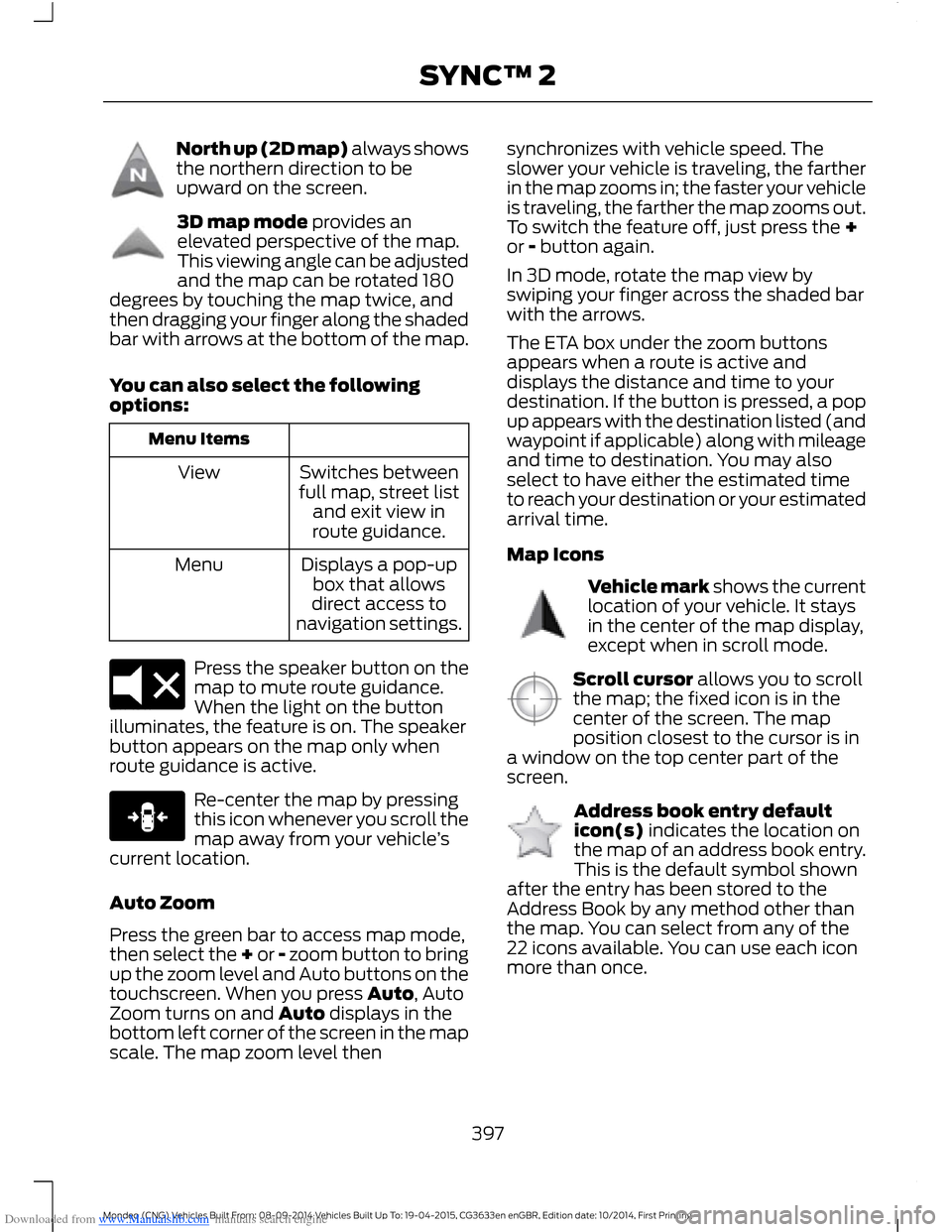
Downloaded from www.Manualslib.com manuals search engine North up (2D map) always showsthe northern direction to beupward on the screen.
3D map mode provides anelevated perspective of the map.This viewing angle can be adjustedand the map can be rotated 180degrees by touching the map twice, andthen dragging your finger along the shadedbar with arrows at the bottom of the map.
You can also select the followingoptions:
Menu Items
Switches betweenfull map, street listand exit view inroute guidance.
View
Displays a pop-upbox that allowsdirect access tonavigation settings.
Menu
Press the speaker button on themap to mute route guidance.When the light on the buttonilluminates, the feature is on. The speakerbutton appears on the map only whenroute guidance is active.
Re-center the map by pressingthis icon whenever you scroll themap away from your vehicle’scurrent location.
Auto Zoom
Press the green bar to access map mode,then select the + or - zoom button to bringup the zoom level and Auto buttons on thetouchscreen. When you press Auto, AutoZoom turns on and Auto displays in thebottom left corner of the screen in the mapscale. The map zoom level then
synchronizes with vehicle speed. Theslower your vehicle is traveling, the fartherin the map zooms in; the faster your vehicleis traveling, the farther the map zooms out.To switch the feature off, just press the +or - button again.
In 3D mode, rotate the map view byswiping your finger across the shaded barwith the arrows.
The ETA box under the zoom buttonsappears when a route is active anddisplays the distance and time to yourdestination. If the button is pressed, a popup appears with the destination listed (andwaypoint if applicable) along with mileageand time to destination. You may alsoselect to have either the estimated timeto reach your destination or your estimatedarrival time.
Map Icons
Vehicle mark shows the currentlocation of your vehicle. It staysin the center of the map display,except when in scroll mode.
Scroll cursor allows you to scrollthe map; the fixed icon is in thecenter of the screen. The mapposition closest to the cursor is ina window on the top center part of thescreen.
Address book entry defaulticon(s) indicates the location onthe map of an address book entry.This is the default symbol shownafter the entry has been stored to theAddress Book by any method other thanthe map. You can select from any of the22 icons available. You can use each iconmore than once.
397Mondeo (CNG) Vehicles Built From: 08-09-2014 Vehicles Built Up To: 19-04-2015, CG3633en enGBR, Edition date: 10/2014, First PrintingSYNC™ 2
Page 402 of 446
Downloaded from www.Manualslib.com manuals search engine One-shot Destination Street Address
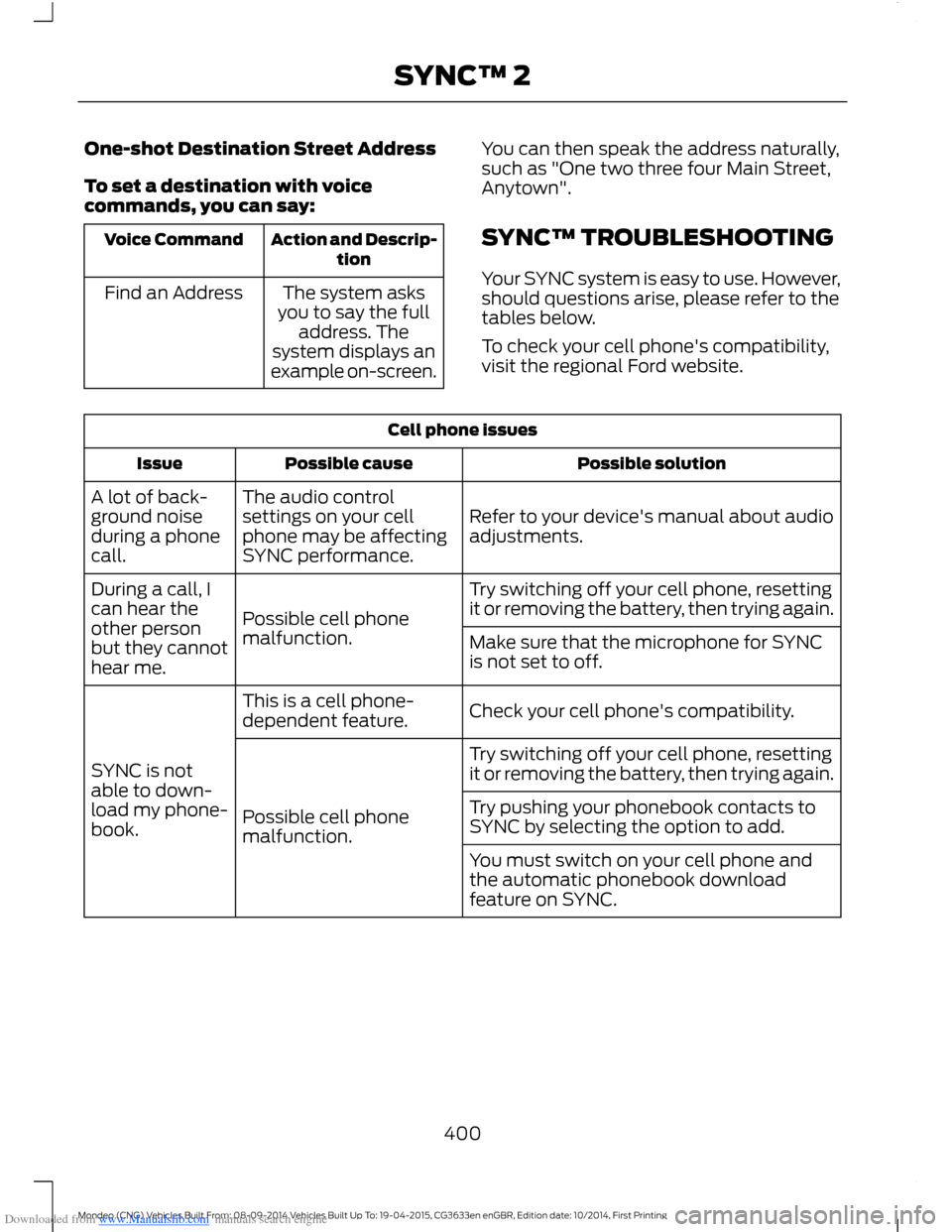
To set a destination with voicecommands, you can say:
Action and Descrip-tionVoice Command
The system asksyou to say the fulladdress. Thesystem displays anexample on-screen.
Find an Address
You can then speak the address naturally,such as "One two three four Main Street,Anytown".
SYNC™ TROUBLESHOOTING
Your SYNC system is easy to use. However,should questions arise, please refer to thetables below.
To check your cell phone's compatibility,visit the regional Ford website.
Cell phone issues
Possible solutionPossible causeIssue
Refer to your device's manual about audioadjustments.
The audio controlsettings on your cellphone may be affectingSYNC performance.
A lot of back-ground noiseduring a phonecall.
Try switching off your cell phone, resettingit or removing the battery, then trying again.Possible cell phonemalfunction.
During a call, Ican hear theother personbut they cannothear me.
Make sure that the microphone for SYNCis not set to off.
Check your cell phone's compatibility.This is a cell phone-dependent feature.
SYNC is notable to down-load my phone-book.
Try switching off your cell phone, resettingit or removing the battery, then trying again.
Possible cell phonemalfunction.
Try pushing your phonebook contacts toSYNC by selecting the option to add.
You must switch on your cell phone andthe automatic phonebook downloadfeature on SYNC.
400Mondeo (CNG) Vehicles Built From: 08-09-2014 Vehicles Built Up To: 19-04-2015, CG3633en enGBR, Edition date: 10/2014, First PrintingSYNC™ 2