center console FORD MONDEO 2014 4.G Owners Manual
[x] Cancel search | Manufacturer: FORD, Model Year: 2014, Model line: MONDEO, Model: FORD MONDEO 2014 4.GPages: 446, PDF Size: 29.09 MB
Page 4 of 446
Downloaded from www.Manualslib.com manuals search engine Wipers and Washers
Windshield Wipers........................................60
Autowipers.......................................................60
Windshield Washers......................................61
Rear Window Wiper and Washers...........62
Lighting
General Information......................................63
Lighting Control..............................................63
Autolamps........................................................64
Instrument Lighting Dimmer.....................65
Headlamp Exit Delay....................................65
Daytime Running Lamps............................65
Automatic High Beam Control.................65
Front Fog Lamps............................................67
Rear Fog Lamps..............................................67
Headlamp Leveling........................................67
Adaptive Headlamps...................................68
Cornering Lamps...........................................69
Direction Indicators.......................................69
Interior Lamps.................................................70
Ambient Lighting.............................................71
Windows and Mirrors
Power Windows..............................................72
Global Opening and Closing......................73
Exterior Mirrors.................................................73
Interior Mirror....................................................75
Sun Visors.........................................................76
Moonroof...........................................................76
Instrument Cluster
Gauges...............................................................78
Warning Lamps and Indicators..................81
Audible Warnings and Indicators.............85
Information Displays
General Information.....................................86
Information Messages.................................96
Climate Control
Principle of Operation...................................111
Air Vents.............................................................111
Manual Climate Control..............................112
Automatic Climate Control - VehiclesWith: Heated Windshield.......................114
Automatic Climate Control - VehiclesWithout: Heated Windshield................116
Automatic Climate Control - VehiclesWith: Sony Audio System.......................117
Hints on Controlling the InteriorClimate..........................................................119
Heated Windows and Mirrors....................121
Heated Windshield.......................................122
Auxiliary Heater.............................................122
Seats
Sitting in the Correct Position..................126
Head Restraints.............................................126
Manual Seats.................................................128
Power Seats - Vehicles Without:Multi-Contour Seats................................128
Power Seats - Vehicles With:Multi-Contour Seats................................129
Memory Function...........................................131
Heated Seats..................................................133
Climate Controlled Seats..........................133
Rear Seat Armrest........................................134
Auxiliary Power Points
Auxiliary Power Points................................135
Cigar Lighter...................................................136
Storage Compartments
Cup Holders.....................................................137
Center Console...............................................137
Overhead Console........................................137
Ashtray..............................................................137
2Mondeo (CNG) Vehicles Built From: 08-09-2014 Vehicles Built Up To: 19-04-2015, CG3633en enGBR, Edition date: 10/2014, First PrintingTable of Contents
Page 31 of 446
Downloaded from www.Manualslib.com manuals search engine Note:The key switch is located on the endof the instrument panel on the passengerside with the airbag deactivation warninglamp in the center console.
Switching the Passenger AirbagOn
WARNING
You must switch the passengerairbag on when you are not using arearward child seat on the frontpassenger seat. Failure to adhere to thiswarning could result in serious personalinjury or death.
Turn the switch to position B.
When you switch the ignition on, check thatthe airbag deactivation warning lamp doesnot illuminate.
SIDE AIRBAGS
WARNING
Use seat covers designed for seatswith side airbags. Have these fittedby an authorized dealer.
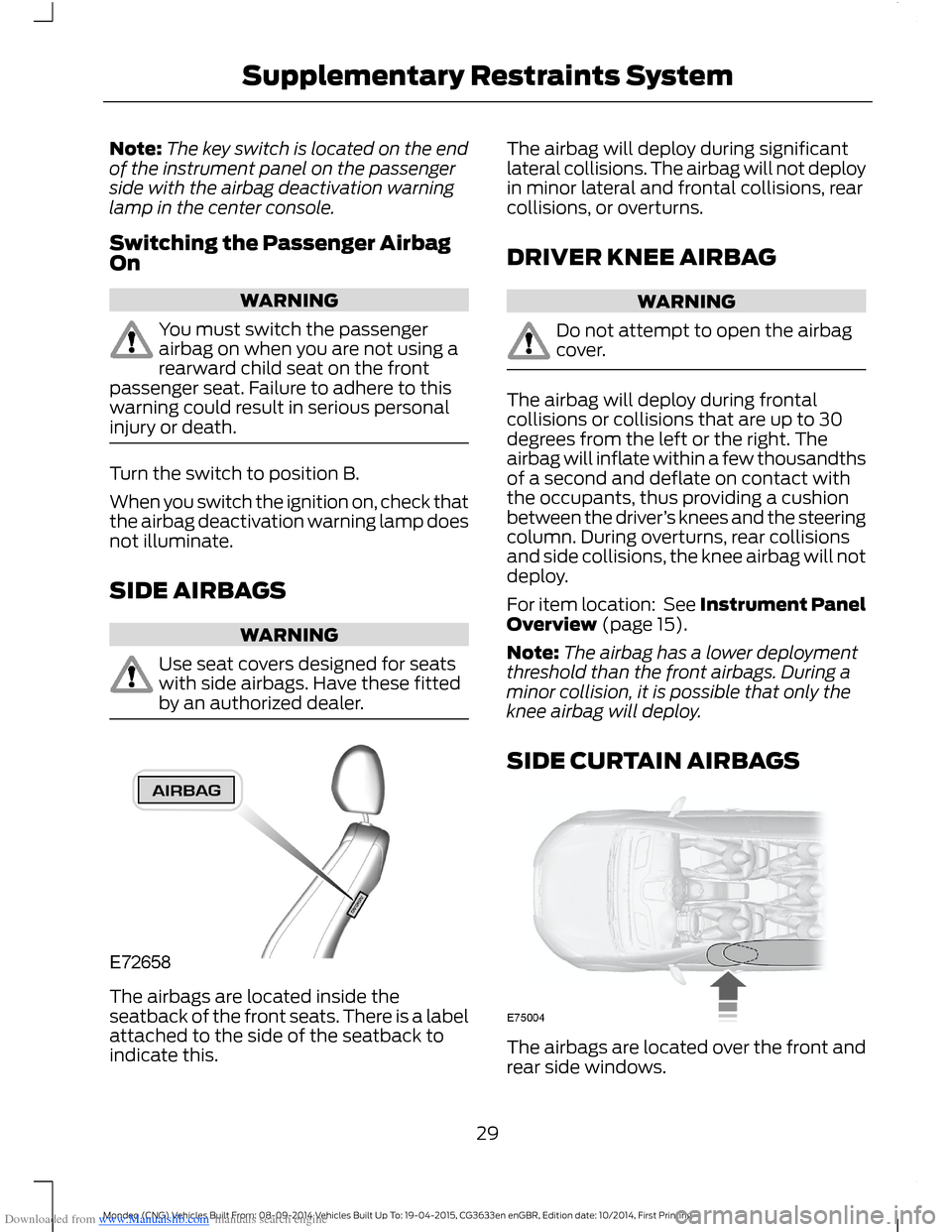
The airbags are located inside theseatback of the front seats. There is a labelattached to the side of the seatback toindicate this.
The airbag will deploy during significantlateral collisions. The airbag will not deployin minor lateral and frontal collisions, rearcollisions, or overturns.
DRIVER KNEE AIRBAG
WARNING
Do not attempt to open the airbagcover.
The airbag will deploy during frontalcollisions or collisions that are up to 30degrees from the left or the right. Theairbag will inflate within a few thousandthsof a second and deflate on contact withthe occupants, thus providing a cushionbetween the driver’s knees and the steeringcolumn. During overturns, rear collisionsand side collisions, the knee airbag will notdeploy.
For item location: See Instrument PanelOverview (page 15).
Note:The airbag has a lower deploymentthreshold than the front airbags. During aminor collision, it is possible that only theknee airbag will deploy.
SIDE CURTAIN AIRBAGS
The airbags are located over the front andrear side windows.
29Mondeo (CNG) Vehicles Built From: 08-09-2014 Vehicles Built Up To: 19-04-2015, CG3633en enGBR, Edition date: 10/2014, First PrintingSupplementary Restraints System
Page 44 of 446
Downloaded from www.Manualslib.com manuals search engine USING MYKEY WITH REMOTE
START SYSTEMS
MyKey is not compatible with non
Ford-approved, aftermarket remote startsystems. If you choose to install a remotestart system, see an authorized dealer fora Ford-approved remote start system.
MYKEY TROUBLESHOOTING
Potential CausesCondition
I cannot create a MyKey.•The key or transmitter used to start thevehicle does not have admin privileges.
•The key or transmitter used to start thevehicle is the only admin key (there alwayshas to be at least one admin key).
•Vehicles with keyless start: The keylessstart transmitter is not placed in the backupslot, located in the center console. SeeGeneral Information (page 138).
•SecuriLock passive anti-theft system isdisabled or in unlimited mode.
•The key or transmitter used to start yourvehicle does not have admin privileges.
•No MyKeys are created. See Creating aMyKey (page 38).
I cannot program the configurablesettings.
•The key or transmitter used to start yourvehicle does not have admin privileges.
•No MyKeys are created. See Creating aMyKey (page 38).
I cannot clear the MyKeys.
Purchase a new key from an authorized dealer.I lost the only admin key.
42Mondeo (CNG) Vehicles Built From: 08-09-2014 Vehicles Built Up To: 19-04-2015, CG3633en enGBR, Edition date: 10/2014, First PrintingMyKey™
Page 49 of 446
Downloaded from www.Manualslib.com manuals search engine WARNINGS
Do not place objects on the liftgate.
Make sure you fully close the liftgateafter operation.
Operate the liftgate only when yourvehicle is stationary.
You can operate the liftgate using theremote control, the center console switch,the liftgate switch or the liftgate releasehandle.
Note:Make sure there is enough headroomto open the liftgate.
Note:If your vehicle has an automatictransmission, make sure the transmissionselector lever is in park.
Note:In extreme weather conditions,automatic opening and closing will not workwith the liftgate frozen to the seal.
Note:The liftgate will stop automaticallywhile opening and reverse some distance ifthere is an obstacle in the way.
Note:The liftgate will stop automaticallywhile closing and fully open if there is anobstacle in the way.
Note:You can manually operate theliftgate.
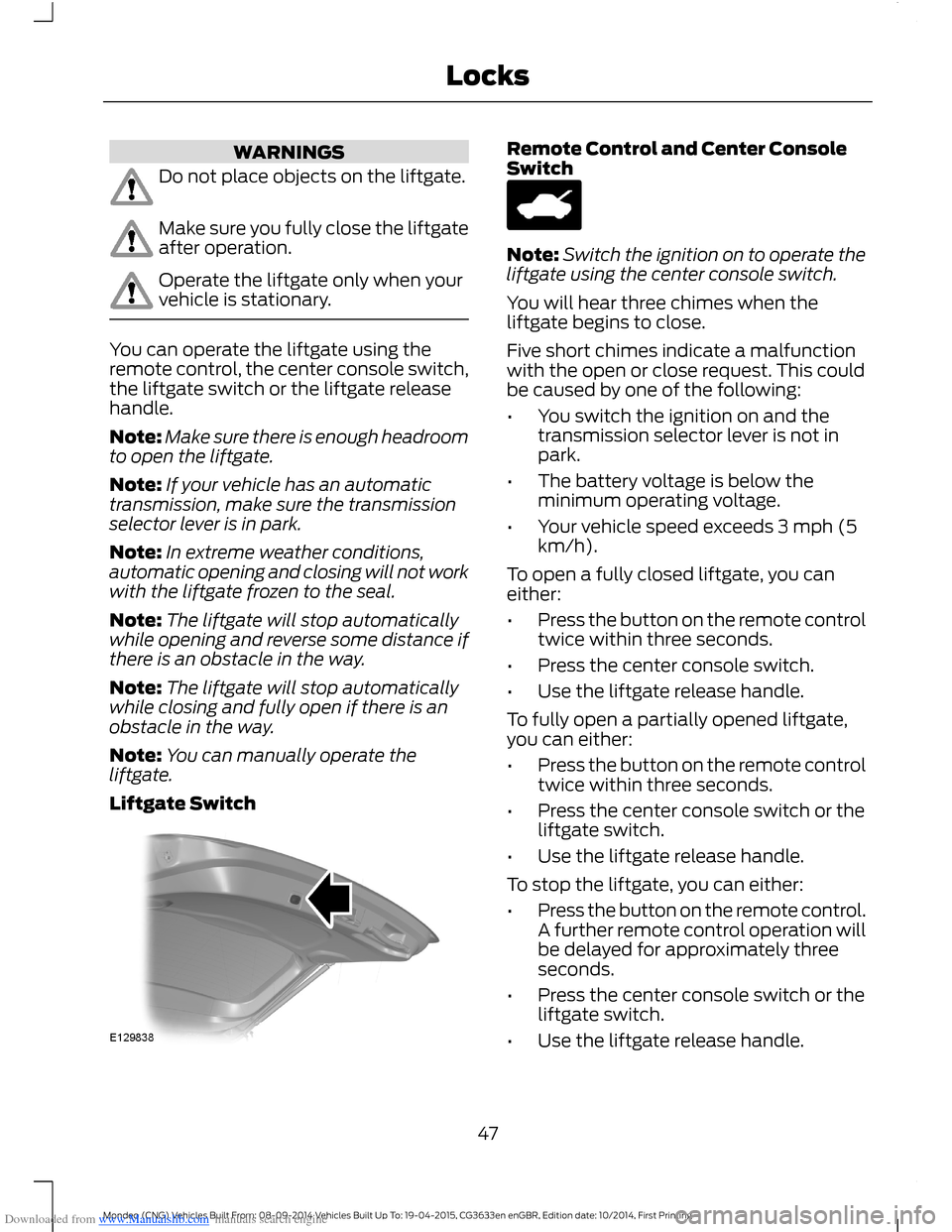
Liftgate Switch
Remote Control and Center ConsoleSwitch
Note:Switch the ignition on to operate theliftgate using the center console switch.
You will hear three chimes when theliftgate begins to close.
Five short chimes indicate a malfunctionwith the open or close request. This couldbe caused by one of the following:
•You switch the ignition on and thetransmission selector lever is not inpark.
•The battery voltage is below theminimum operating voltage.
•Your vehicle speed exceeds 3 mph (5km/h).
To open a fully closed liftgate, you caneither:
•Press the button on the remote controltwice within three seconds.
•Press the center console switch.
•Use the liftgate release handle.
To fully open a partially opened liftgate,you can either:
•Press the button on the remote controltwice within three seconds.
•Press the center console switch or theliftgate switch.
•Use the liftgate release handle.
To stop the liftgate, you can either:
•Press the button on the remote control.A further remote control operation willbe delayed for approximately threeseconds.
•Press the center console switch or theliftgate switch.
•Use the liftgate release handle.
47Mondeo (CNG) Vehicles Built From: 08-09-2014 Vehicles Built Up To: 19-04-2015, CG3633en enGBR, Edition date: 10/2014, First PrintingLocks
Page 50 of 446
Downloaded from www.Manualslib.com manuals search engine Closing the Liftgate
WARNING
The bounce-back feature will notwork and it will not detect obstacleswhen the liftgate is in contact withthe vehicle body.
Note:Do not leave a passive key in yourvehicle when closing the liftgate. A messagewill be shown in the display. SeeInformation Messages (page 96).
Note:A recessed grip is located inside theliftgate to help with closing.
You can either:
•Press the button on the remote controltwice within three seconds.
•Press the center console switch or theliftgate switch.
•Use the liftgate release handle.
•Manually close the liftgate
The liftgate will close automatically whenit comes into contact with the vehicle body.
Programming the Liftgate
1.Open the liftgate.
2.Manually move the liftgate to the newrequired position.
3.Press and hold the liftgate switch forat least three seconds. You will hear achime.
KEYLESS ENTRY
General Information
The system will not function if:
•Your vehicle battery has no charge.
•The passive key frequencies arejammed.
•The passive key battery has no charge.
Note:If the system does not function, youwill need to use the key blade to lock andunlock your vehicle.
The system allows you to operate yourvehicle without the use of a key or remotecontrol.
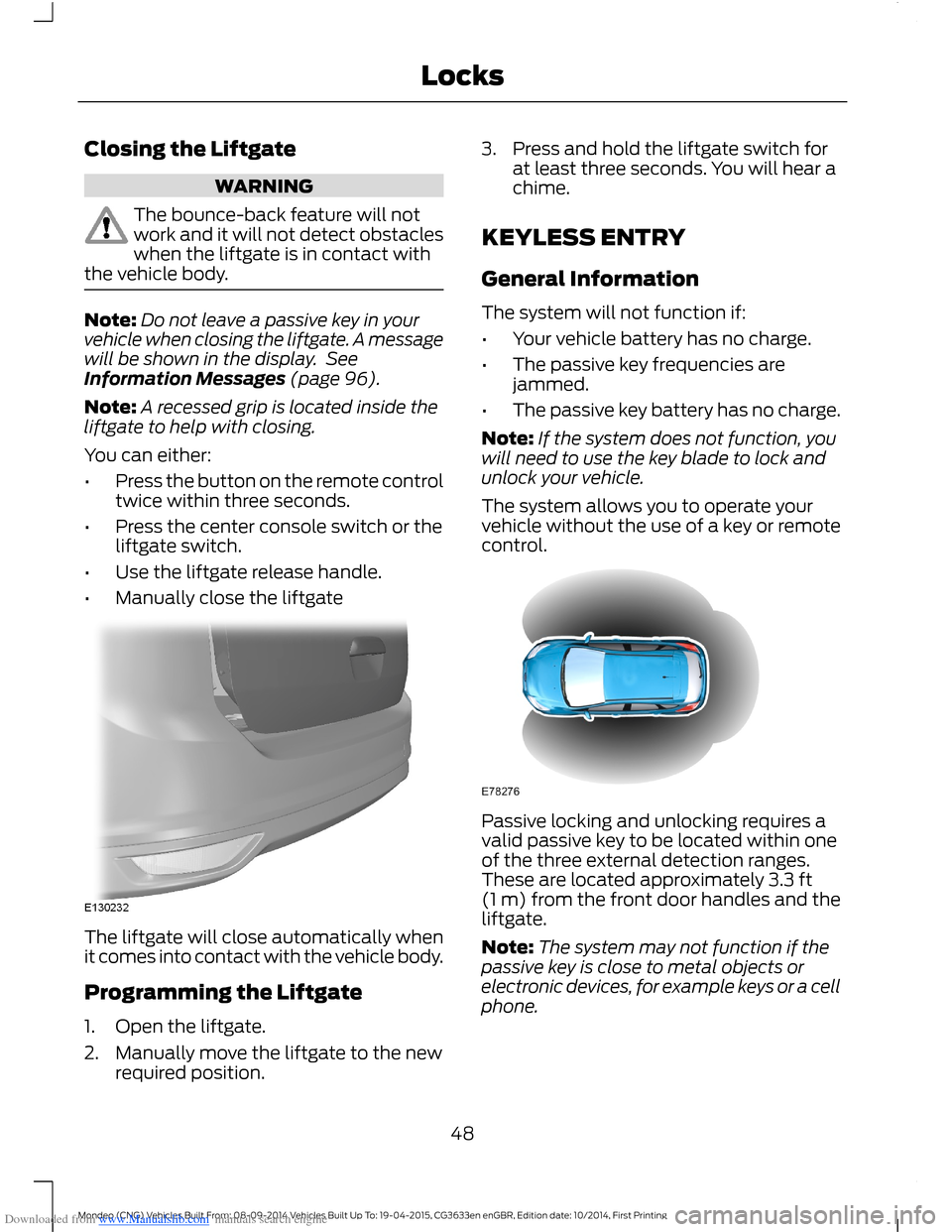
Passive locking and unlocking requires avalid passive key to be located within oneof the three external detection ranges.These are located approximately 3.3 ft(1 m) from the front door handles and theliftgate.
Note:The system may not function if thepassive key is close to metal objects orelectronic devices, for example keys or a cellphone.
48Mondeo (CNG) Vehicles Built From: 08-09-2014 Vehicles Built Up To: 19-04-2015, CG3633en enGBR, Edition date: 10/2014, First PrintingLocks
Page 137 of 446
Downloaded from www.Manualslib.com manuals search engine 12 Volt DC Power Point
WARNING
Do not plug electrical accessoriesinto the cigar lighter socket. Incorrectuse of the lighter can cause damagenot covered by your warranty, and canresult in fire or serious injury.
Note:When you switch the ignition on, youcan use the socket to power 12 voltappliances with a maximum current ratingof 15 amps. After you switch the ignition off,the power supply works only for a maximumof 30 minutes.
Note:Do not insert objects other than anaccessory plug into the power point. Thisdamages the outlet and blows the fuse.
Note:Do not hang any type of accessory oraccessory bracket from the plug.
Note:Do not use the power point over thevehicle capacity of 12 volt DC 180 watt or afuse may blow.
Note:Do not use the power point foroperating a cigar lighter element.
Note:Incorrect use of the power point cancause damage not covered by yourwarranty.
Note:Always keep the power point capsclosed when not in use.
Run the engine for full capacity use of thepower point.
To prevent your vehicle battery fromrunning out of charge:
•Do not use the power point longer thannecessary when your engine is notrunning.
•Do not leave devices plugged inovernight or when your vehicle is in park(P) for extended periods.
Location
Power points may be found:
•On the center console.
•Inside the center console.
•On the rear of the console.
•In the cargo area (Wagon Only).
230 Volt Power Point (If Equipped)
WARNING
Do not keep electrical devicesplugged in the power point wheneverthe device is not in use. Do not useany extension cord with the 230 volt powerpoint, since it will defeat the safetyprotection design. Doing so may cause thepower point to overload. Powering multipledevices can reach beyond the 150 wattload limit and could result in fire or seriousinjury.
Note:Keep the vehicle running to use thepower point.
You can use the power point for poweringelectrical devices that require up to 150watts. It is on the rear of the centerconsole.
The power point indicator light, located onthe power point, shows when the powerpoint is ready for use.
When the power point indicator light is:
•On — the power point is ready to supplypower.
•Off — the power point power supply isoff and so is the ignition.
•Flashing — the power point is in faultmode.
The power point temporarily turns off itspower if the electrical load exceeds the150 watt limit. The power point can alsoswitch to a fault mode if it detectsoverloading, overheating or shortingconditions.
135Mondeo (CNG) Vehicles Built From: 08-09-2014 Vehicles Built Up To: 19-04-2015, CG3633en enGBR, Edition date: 10/2014, First PrintingAuxiliary Power Points
Page 139 of 446
Downloaded from www.Manualslib.com manuals search engine CUP HOLDERS
WARNINGS
Do not place hot drinks in the cupholders when your vehicle is moving.
Make sure that cups placed in theholders do not obstruct your visionwhile driving.
CENTER CONSOLE
Stow items in the cupholder carefully asitems may become loose during hardbraking, acceleration or collisions, includinghot drinks which may spill.
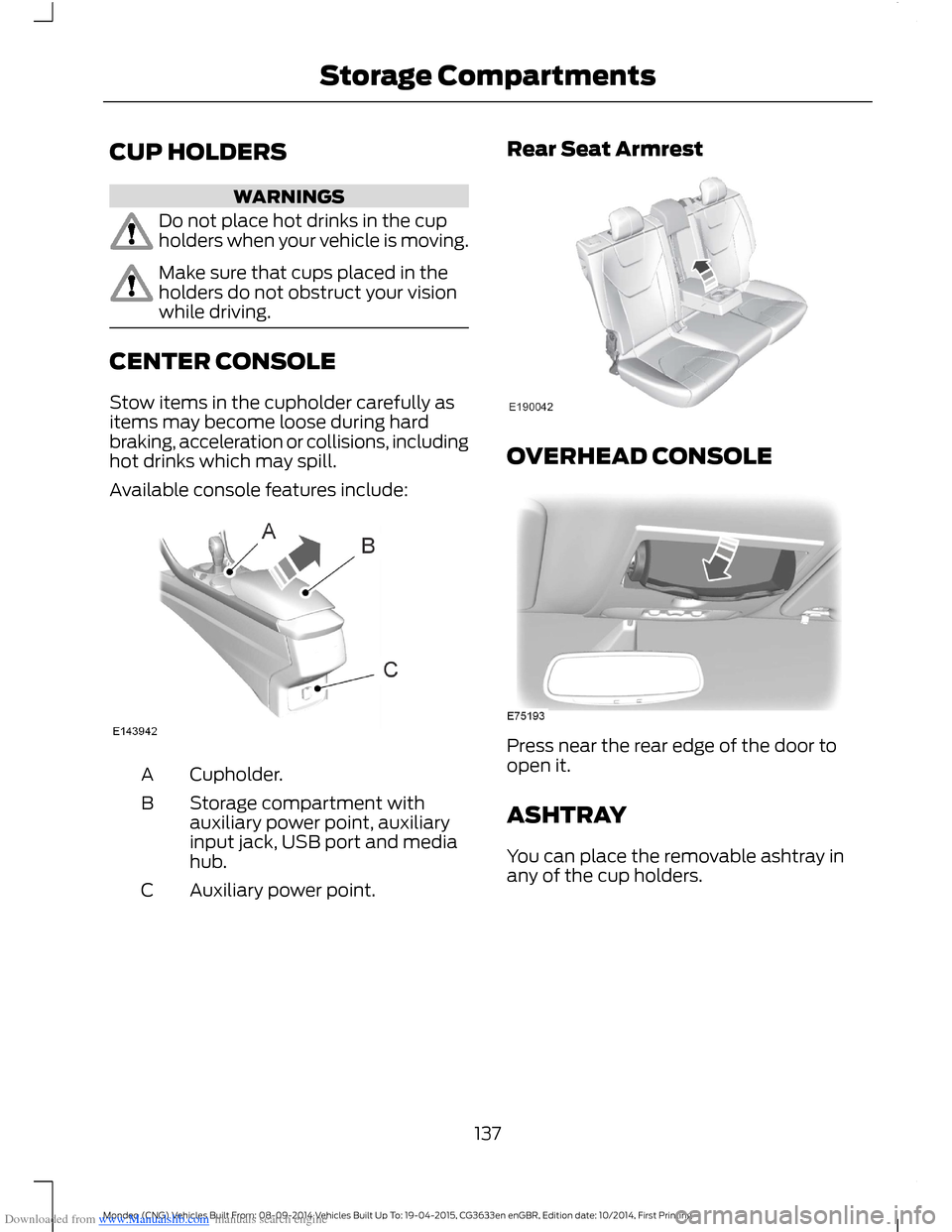
Available console features include:
Cupholder.A
Storage compartment withauxiliary power point, auxiliaryinput jack, USB port and mediahub.
B
Auxiliary power point.C
Rear Seat Armrest
OVERHEAD CONSOLE
Press near the rear edge of the door toopen it.
ASHTRAY
You can place the removable ashtray inany of the cup holders.
137Mondeo (CNG) Vehicles Built From: 08-09-2014 Vehicles Built Up To: 19-04-2015, CG3633en enGBR, Edition date: 10/2014, First PrintingStorage Compartments
Page 143 of 446
Downloaded from www.Manualslib.com manuals search engine Note:On hybrid vehicles, the green readyindicator illuminates letting you know thatthe vehicle is ready for driving. Since yourvehicle is equipped with a silent key start,the engine may not start at the time of thevehicle start.
The system does not function if:
•The key frequencies are jammed.
•The key battery has no charge.
If you are unable to start the vehicle, dothe following:
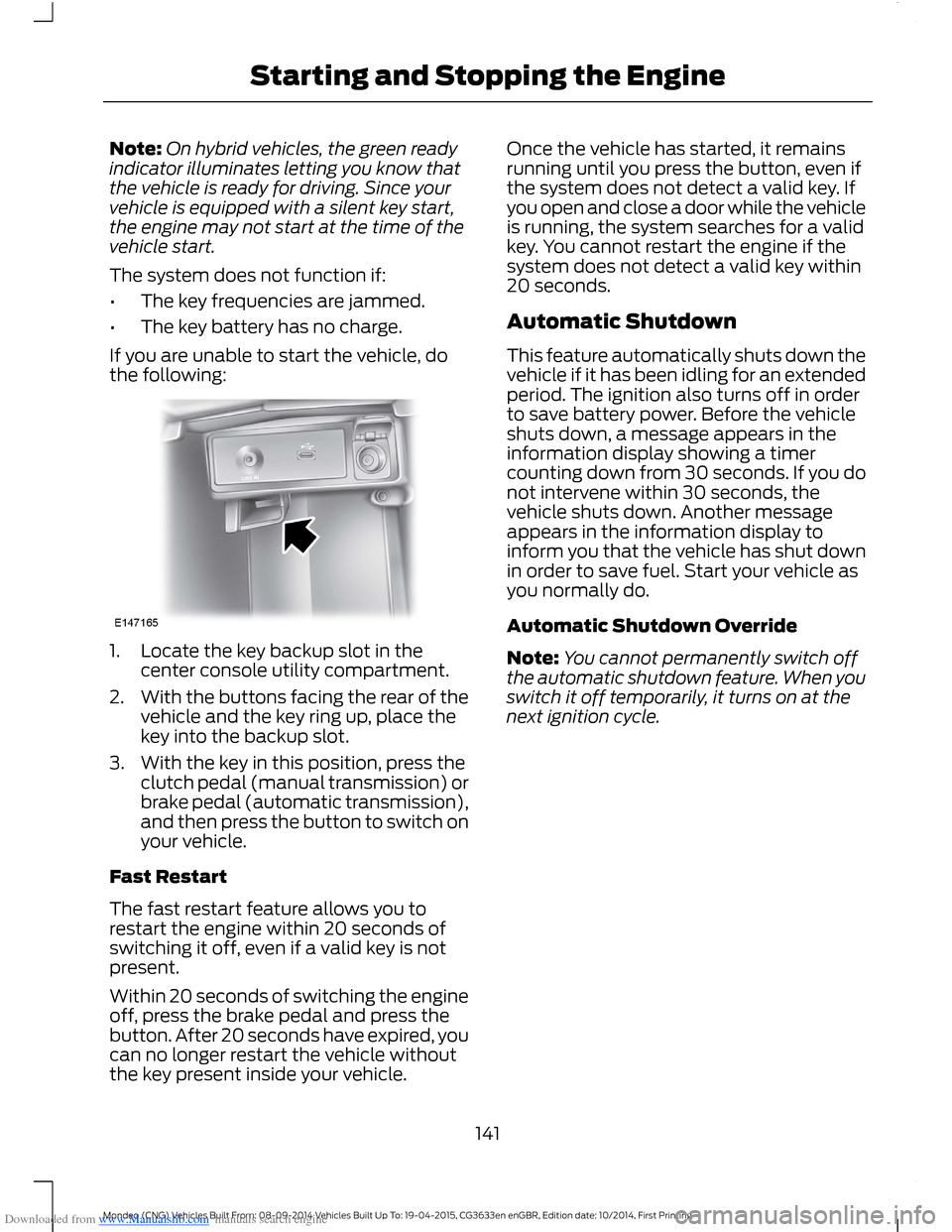
1.Locate the key backup slot in thecenter console utility compartment.
2.With the buttons facing the rear of thevehicle and the key ring up, place thekey into the backup slot.
3.With the key in this position, press theclutch pedal (manual transmission) orbrake pedal (automatic transmission),and then press the button to switch onyour vehicle.
Fast Restart
The fast restart feature allows you torestart the engine within 20 seconds ofswitching it off, even if a valid key is notpresent.
Within 20 seconds of switching the engineoff, press the brake pedal and press thebutton. After 20 seconds have expired, youcan no longer restart the vehicle withoutthe key present inside your vehicle.
Once the vehicle has started, it remainsrunning until you press the button, even ifthe system does not detect a valid key. Ifyou open and close a door while the vehicleis running, the system searches for a validkey. You cannot restart the engine if thesystem does not detect a valid key within20 seconds.
Automatic Shutdown
This feature automatically shuts down thevehicle if it has been idling for an extendedperiod. The ignition also turns off in orderto save battery power. Before the vehicleshuts down, a message appears in theinformation display showing a timercounting down from 30 seconds. If you donot intervene within 30 seconds, thevehicle shuts down. Another messageappears in the information display toinform you that the vehicle has shut downin order to save fuel. Start your vehicle asyou normally do.
Automatic Shutdown Override
Note:You cannot permanently switch offthe automatic shutdown feature. When youswitch it off temporarily, it turns on at thenext ignition cycle.
141Mondeo (CNG) Vehicles Built From: 08-09-2014 Vehicles Built Up To: 19-04-2015, CG3633en enGBR, Edition date: 10/2014, First PrintingStarting and Stopping the Engine
Page 162 of 446
Downloaded from www.Manualslib.com manuals search engine GENERAL INFORMATION
WARNING
Driving while distracted can result inloss of vehicle control, crash andinjury. We strongly recommend thatyou use extreme caution when using anydevice that may take your focus off theroad. Your primary responsibility is the safeoperation of your vehicle. We recommendagainst the use of any handheld devicewhile driving and encourage the use ofvoice-operated systems when possible.Make sure you are aware of all applicablelocal laws that may affect the use ofelectronic devices while driving.
Note:Occasional brake noise is normal. Ifa metal-to-metal, continuous grinding orcontinuous squeal sound is present, thebrake linings may be worn-out. If yourvehicle has continuous vibration or shudderin the steering wheel while braking, haveyour vehicle checked by an authorizeddealer.
Note:Brake dust may accumulate on thewheels, even under normal drivingconditions. Some dust is inevitable as thebrakes wear. See Cleaning the AlloyWheels (page 258).
Note:Depending on applicable laws andregulations in the country for which yourvehicle was originally built, the brake lampsmay flash during heavy braking. Followingthis the hazard warning flashers may alsoflash when your vehicle comes to a stop.
Wet brakes result in reduced brakingefficiency. Gently press the brake pedal afew times when driving from a car wash orstanding water to dry the brakes.
Brake Assist
Brake assist detects when you brakeheavily by measuring the rate at which youpress the brake pedal. It providesmaximum braking efficiency as long as youpress the pedal. Brake assist can reducestopping distances in critical situations.
Anti-lock Brake System
This system helps you maintain steeringcontrol and vehicle stability duringemergency stops by keeping the brakesfrom locking.
HINTS ON DRIVING WITH
ANTI-LOCK BRAKES
Note:When the system is operating, thebrake pedal will pulse and may travelfurther. Maintain pressure on the brakepedal. You may also hear a noise from thesystem. This is normal.
The anti-lock braking system will noteliminate the risks when:
•You drive too closely to the vehicle infront of you.
•Your vehicle is hydroplaning.
•You take corners too fast.
•The road surface is poor.
ELECTRIC PARKING BRAKE
The electric parking brake replaces theconventional handbrake. The operatingswitch is located in the center console.
WARNING
Always set the parking brake andleave your vehicle with thetransmission in park (P) (automatictransmission) or in first gear (1) or reverse(R) (manual transmission).
160Mondeo (CNG) Vehicles Built From: 08-09-2014 Vehicles Built Up To: 19-04-2015, CG3633en enGBR, Edition date: 10/2014, First PrintingBrakes
Page 174 of 446
Downloaded from www.Manualslib.com manuals search engine ACTIVE PARK ASSIST
Parallel Parking, PerpendicularParking, Park Out Assist
WARNINGS
You must remain in your vehiclewhen the system turns on. At alltimes, you are responsible forcontrolling your vehicle, supervising thesystem and intervening if required. Failureto take care may result in the loss ofcontrol of your vehicle, serious personalinjury or death.
The sensors may not detect objectsin heavy rain or other conditions thatcause disruptive reflections.
The system scans the area adjacent toboth sides of your vehicle to locate asuitable parking space.
The system informs you when it locates asuitable parking space. When you stopyour vehicle, the system takes control ofthe steering to guide your vehicle into theparking space.
Park Out Assist automatically steers yourvehicle out of a parallel parking space(hands-free) while you control theaccelerator, gearshift and brakes. Thesystem visually and audibly instructs youto enter traffic.
The system may not correctly operate inany of the following conditions:
•a spare tire or a significantly worn tiremore than the other tires is used
•you use a tire size not recommendedby us
•you try to park on a tight curve
•if the edge of the neighboring parkedvehicle is high off the ground (forexample, a bus, tow truck or flatbedtruck)
•the weather conditions are poor (heavyrain, snow, fog, etc).
Note:Keep the sensors, located on thebumper or fascia, free from snow, ice andlarge accumulations of dirt. Covered sensorscan affect the system's accuracy. Do notclean the sensors with sharp objects.
Do not use the system if:
•You have attached a foreign object(bike rack or trailer) to the front or rearof your vehicle or close to the sensors.
•You have attached an overhangingobject (surfboard) to the roof.
•A foreign object damages or obstructsthe front or rear bumper or sidesensors.
•The correct tire size is not in use on yourvehicle (for example, a mini-spare tire).
Using Active Park Assist - ParallelParking
Press the button located on thecenter console near the gearshiftlever once.
When driving at a speed less than 19 mph(30 km/h) the system automatically scansboth sides of your vehicle for an availableparking space. The system displays amessage and a corresponding graphic toindicate it is searching for a parking space.Use the direction indicator to selectsearching either to the left-hand side orright-hand side of your vehicle.
Note:If you do not make a selection thesystem will default to the passenger's side.
172Mondeo (CNG) Vehicles Built From: 08-09-2014 Vehicles Built Up To: 19-04-2015, CG3633en enGBR, Edition date: 10/2014, First PrintingParking Aids