length FORD MONDEO 2014 4.G Owners Manual
[x] Cancel search | Manufacturer: FORD, Model Year: 2014, Model line: MONDEO, Model: FORD MONDEO 2014 4.GPages: 446, PDF Size: 29.09 MB
Page 68 of 446
Downloaded from www.Manualslib.com manuals search engine WARNINGS
Check and replace wiper bladesregularly to ensure the camerasensor has a clear view through thewindscreen. Replacement wiper bladesmust be the correct length.
Note:Keep the windscreen free fromobstructions such as bird droppings, insectsand snow or ice.
Note:Reflective road signs may bedetected as oncoming traffic and theheadlamps will be switched to low beam.
Note:Always fit Ford Original Parts whenreplacing headlamp bulbs. Other bulbs mayreduce system performance.
The system will automatically switch onhigh beams if it is dark enough and no othertraffic is present. If it detects anapproaching vehicle’s headlamps or taillamps, or street lighting ahead the systemwill switch off high beam before it candistract other road users. Low beam willremain on.
A camera sensor is centrally mountedbehind the windshield of your vehicle. Thismonitors conditions continuously to decidewhen to switch the high beams on and off.
Once the system is active the high beamwill switch on if:
•It is dark enough to require the use ofhigh beams and
•there is no traffic or street lightingahead and
•vehicle speed is greater than 25 mph(40 km/h).
The high beam will switch off if:
•The ambient light is high enough thathigh beam is not required.
•An approaching vehicle's headlampsor tail lamps are detected.
•Street lighting is detected.
•Vehicle speed falls below 19 mph(30 km/h).
•The camera sensor is too hot orbecomes blocked.
Activating the System
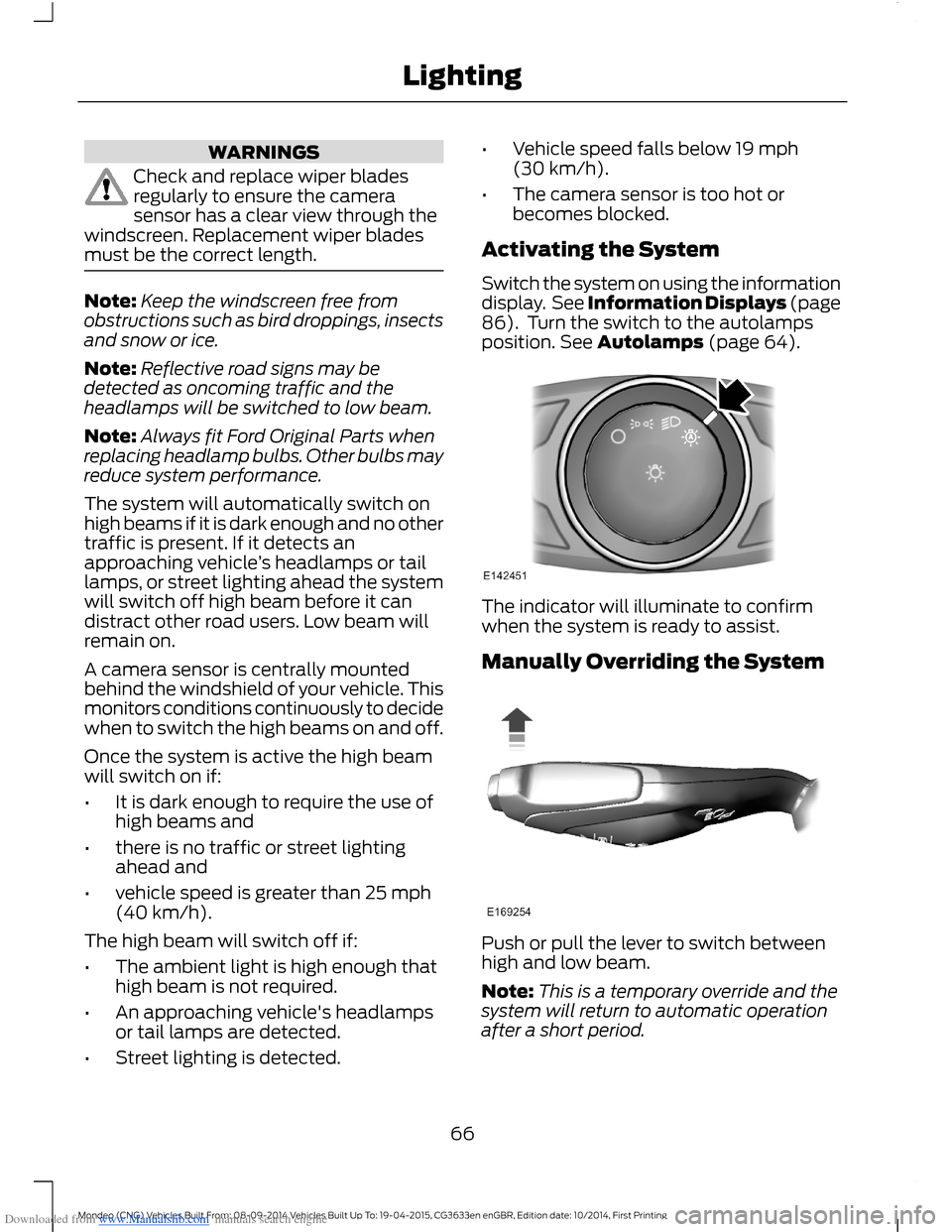
Switch the system on using the informationdisplay. See Information Displays (page86). Turn the switch to the autolampsposition. See Autolamps (page 64).
The indicator will illuminate to confirmwhen the system is ready to assist.
Manually Overriding the System
Push or pull the lever to switch betweenhigh and low beam.
Note:This is a temporary override and thesystem will return to automatic operationafter a short period.
66Mondeo (CNG) Vehicles Built From: 08-09-2014 Vehicles Built Up To: 19-04-2015, CG3633en enGBR, Edition date: 10/2014, First PrintingLighting
Page 173 of 446
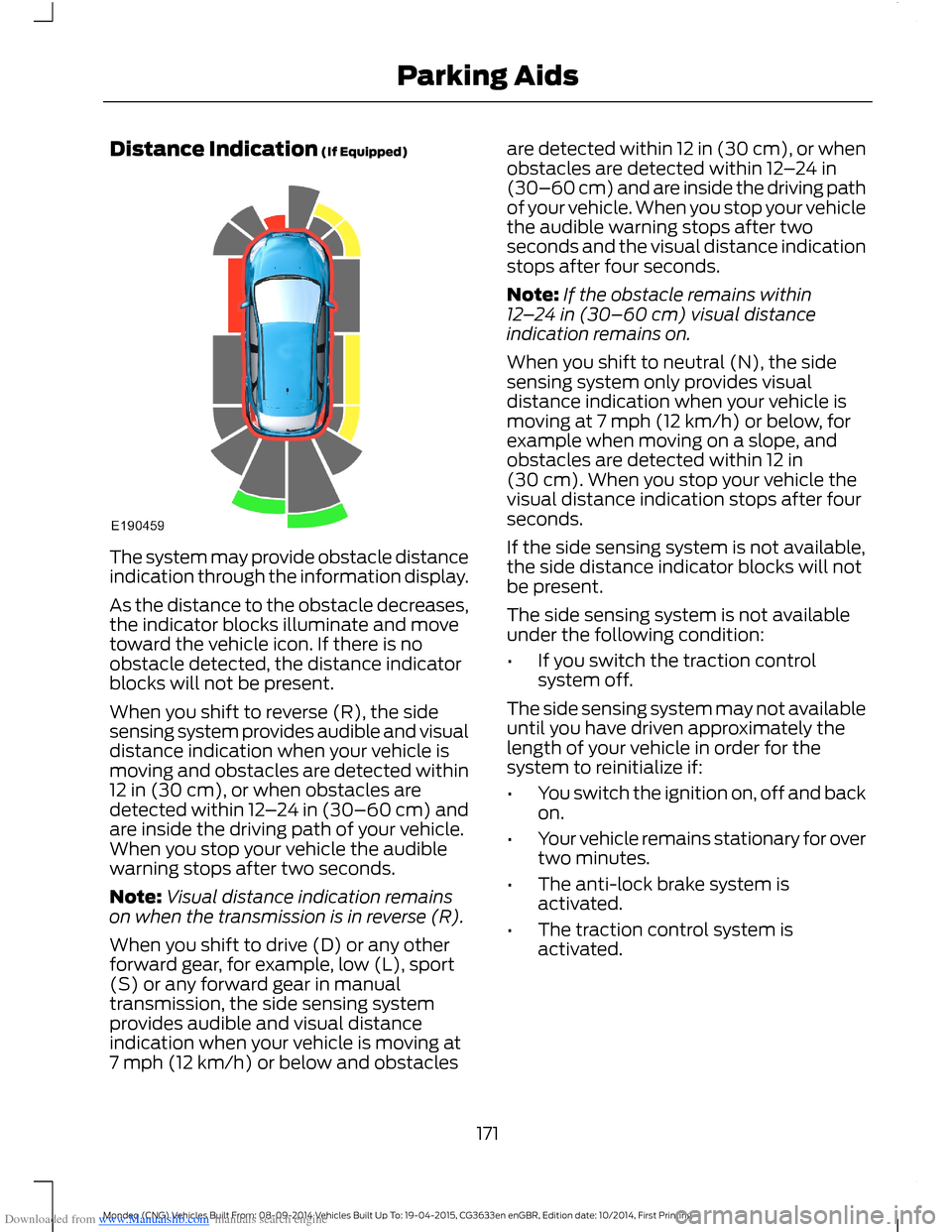
Downloaded from www.Manualslib.com manuals search engine Distance Indication (If Equipped)
The system may provide obstacle distanceindication through the information display.
As the distance to the obstacle decreases,the indicator blocks illuminate and movetoward the vehicle icon. If there is noobstacle detected, the distance indicatorblocks will not be present.
When you shift to reverse (R), the sidesensing system provides audible and visualdistance indication when your vehicle ismoving and obstacles are detected within12 in (30 cm), or when obstacles aredetected within 12–24 in (30–60 cm) andare inside the driving path of your vehicle.When you stop your vehicle the audiblewarning stops after two seconds.
Note:Visual distance indication remainson when the transmission is in reverse (R).
When you shift to drive (D) or any otherforward gear, for example, low (L), sport(S) or any forward gear in manualtransmission, the side sensing systemprovides audible and visual distanceindication when your vehicle is moving at7 mph (12 km/h) or below and obstacles
are detected within 12 in (30 cm), or whenobstacles are detected within 12–24 in(30–60 cm) and are inside the driving pathof your vehicle. When you stop your vehiclethe audible warning stops after twoseconds and the visual distance indicationstops after four seconds.
Note:If the obstacle remains within12–24 in (30–60 cm) visual distanceindication remains on.
When you shift to neutral (N), the sidesensing system only provides visualdistance indication when your vehicle ismoving at 7 mph (12 km/h) or below, forexample when moving on a slope, andobstacles are detected within 12 in(30 cm). When you stop your vehicle thevisual distance indication stops after fourseconds.
If the side sensing system is not available,the side distance indicator blocks will notbe present.
The side sensing system is not availableunder the following condition:
•If you switch the traction controlsystem off.
The side sensing system may not availableuntil you have driven approximately thelength of your vehicle in order for thesystem to reinitialize if:
•You switch the ignition on, off and backon.
•Your vehicle remains stationary for overtwo minutes.
•The anti-lock brake system isactivated.
•The traction control system isactivated.
171Mondeo (CNG) Vehicles Built From: 08-09-2014 Vehicles Built Up To: 19-04-2015, CG3633en enGBR, Edition date: 10/2014, First PrintingParking Aids
Page 179 of 446
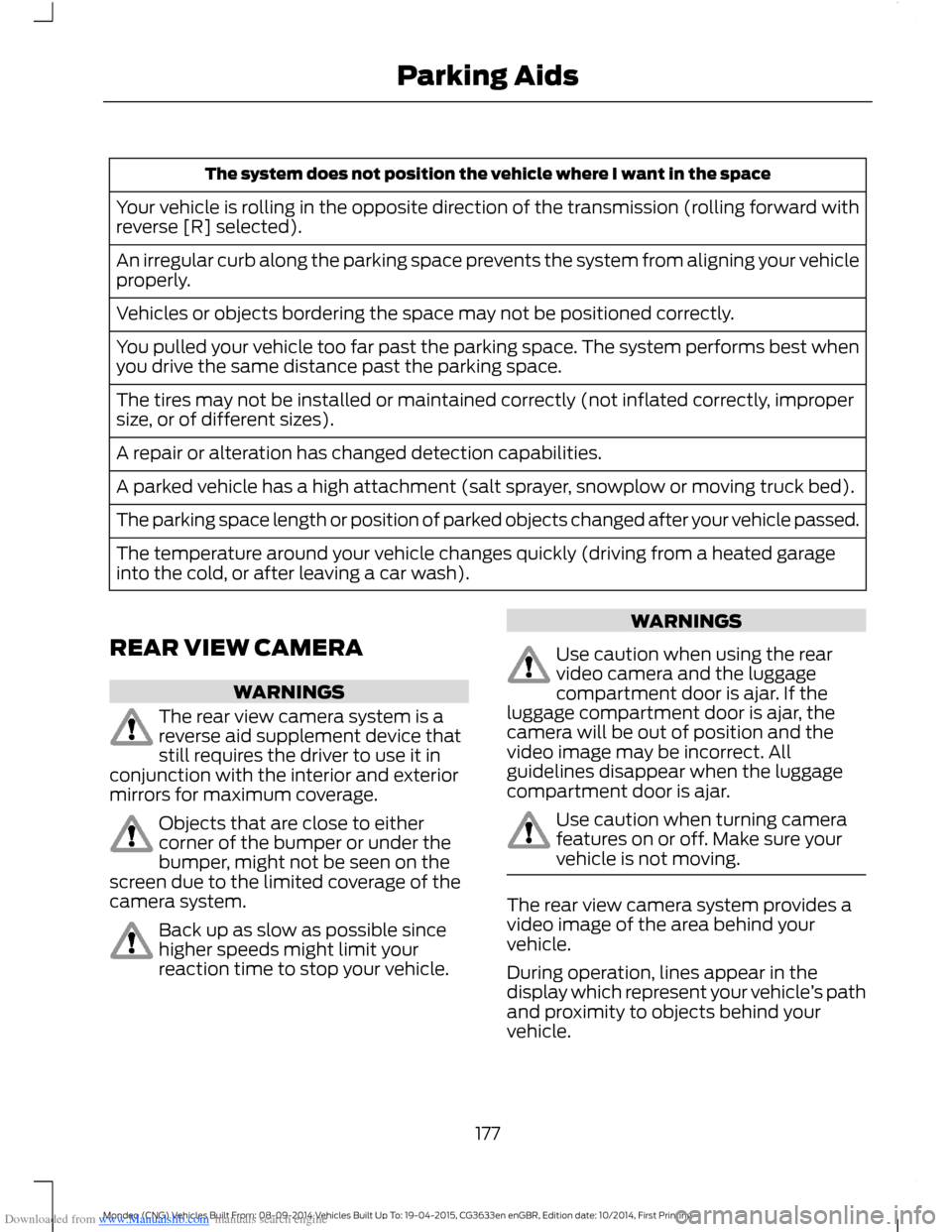
Downloaded from www.Manualslib.com manuals search engine The system does not position the vehicle where I want in the space
Your vehicle is rolling in the opposite direction of the transmission (rolling forward withreverse [R] selected).
An irregular curb along the parking space prevents the system from aligning your vehicleproperly.
Vehicles or objects bordering the space may not be positioned correctly.
You pulled your vehicle too far past the parking space. The system performs best whenyou drive the same distance past the parking space.
The tires may not be installed or maintained correctly (not inflated correctly, impropersize, or of different sizes).
A repair or alteration has changed detection capabilities.
A parked vehicle has a high attachment (salt sprayer, snowplow or moving truck bed).
The parking space length or position of parked objects changed after your vehicle passed.
The temperature around your vehicle changes quickly (driving from a heated garageinto the cold, or after leaving a car wash).
REAR VIEW CAMERA
WARNINGS
The rear view camera system is areverse aid supplement device thatstill requires the driver to use it inconjunction with the interior and exteriormirrors for maximum coverage.
Objects that are close to eithercorner of the bumper or under thebumper, might not be seen on thescreen due to the limited coverage of thecamera system.
Back up as slow as possible sincehigher speeds might limit yourreaction time to stop your vehicle.
WARNINGS
Use caution when using the rearvideo camera and the luggagecompartment door is ajar. If theluggage compartment door is ajar, thecamera will be out of position and thevideo image may be incorrect. Allguidelines disappear when the luggagecompartment door is ajar.
Use caution when turning camerafeatures on or off. Make sure yourvehicle is not moving.
The rear view camera system provides avideo image of the area behind yourvehicle.
During operation, lines appear in thedisplay which represent your vehicle’s pathand proximity to objects behind yourvehicle.
177Mondeo (CNG) Vehicles Built From: 08-09-2014 Vehicles Built Up To: 19-04-2015, CG3633en enGBR, Edition date: 10/2014, First PrintingParking Aids
Page 279 of 446
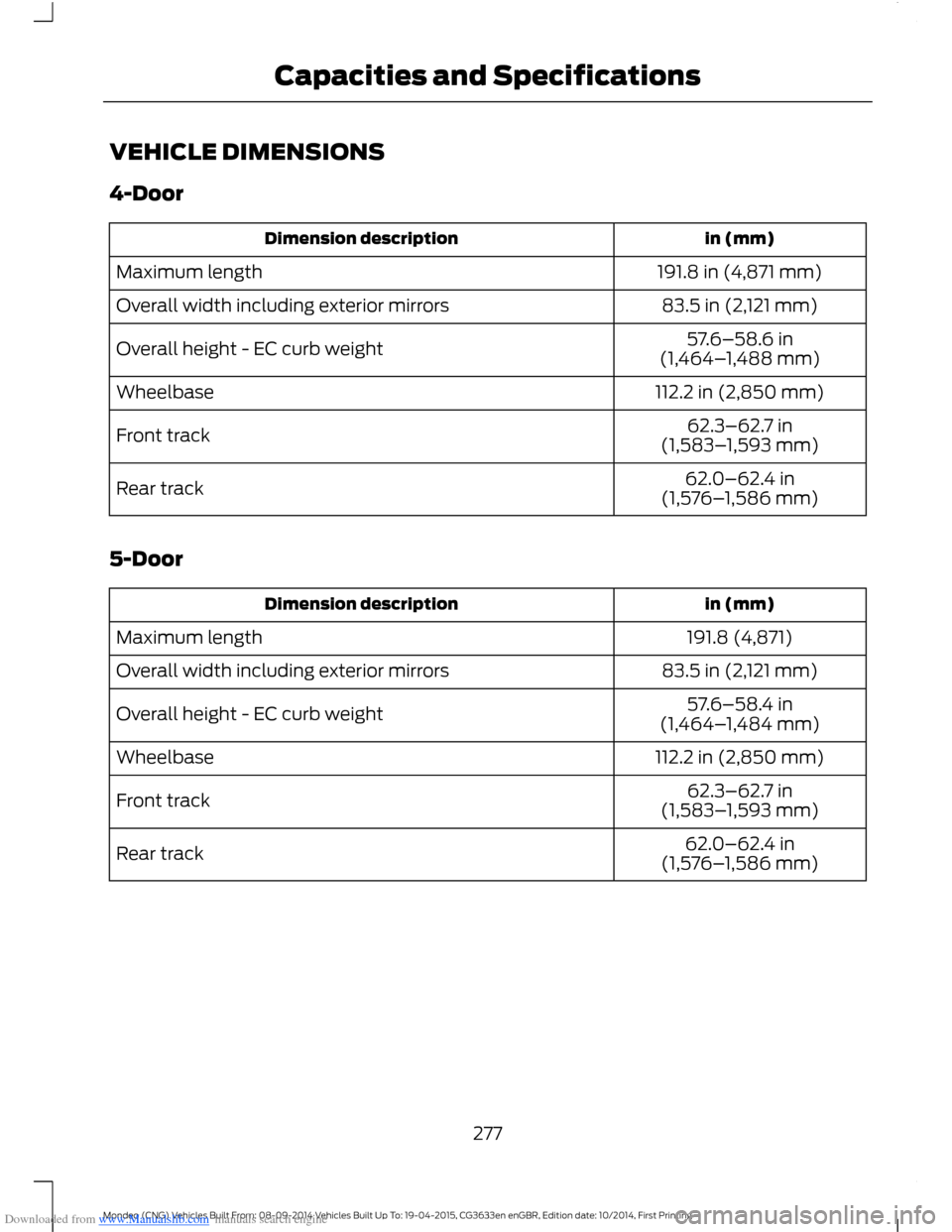
Downloaded from www.Manualslib.com manuals search engine VEHICLE DIMENSIONS
4-Door
in (mm)Dimension description
191.8 in (4,871 mm)Maximum length
83.5 in (2,121 mm)Overall width including exterior mirrors
57.6–58.6 in(1,464–1,488 mm)Overall height - EC curb weight
112.2 in (2,850 mm)Wheelbase
62.3–62.7 in(1,583–1,593 mm)Front track
62.0–62.4 in(1,576–1,586 mm)Rear track
5-Door
in (mm)Dimension description
191.8 (4,871)Maximum length
83.5 in (2,121 mm)Overall width including exterior mirrors
57.6–58.4 in(1,464–1,484 mm)Overall height - EC curb weight
112.2 in (2,850 mm)Wheelbase
62.3–62.7 in(1,583–1,593 mm)Front track
62.0–62.4 in(1,576–1,586 mm)Rear track
277Mondeo (CNG) Vehicles Built From: 08-09-2014 Vehicles Built Up To: 19-04-2015, CG3633en enGBR, Edition date: 10/2014, First PrintingCapacities and Specifications
Page 280 of 446
Downloaded from www.Manualslib.com manuals search engine Wagon
in (mm)Dimension description
191.6 (4,867)Maximum length
83.5 in (2,121 mm)Overall width including exterior mirrors
58.2–59.0 in(1,479–1,499 mm)Overall height - EC curb weight
112.2 in (2,850 mm)Wheelbase
62.3–62.7 in(1,583–1,593 mm)Front track
62.0–62.4 in(1,576–1,586 mm)Rear track
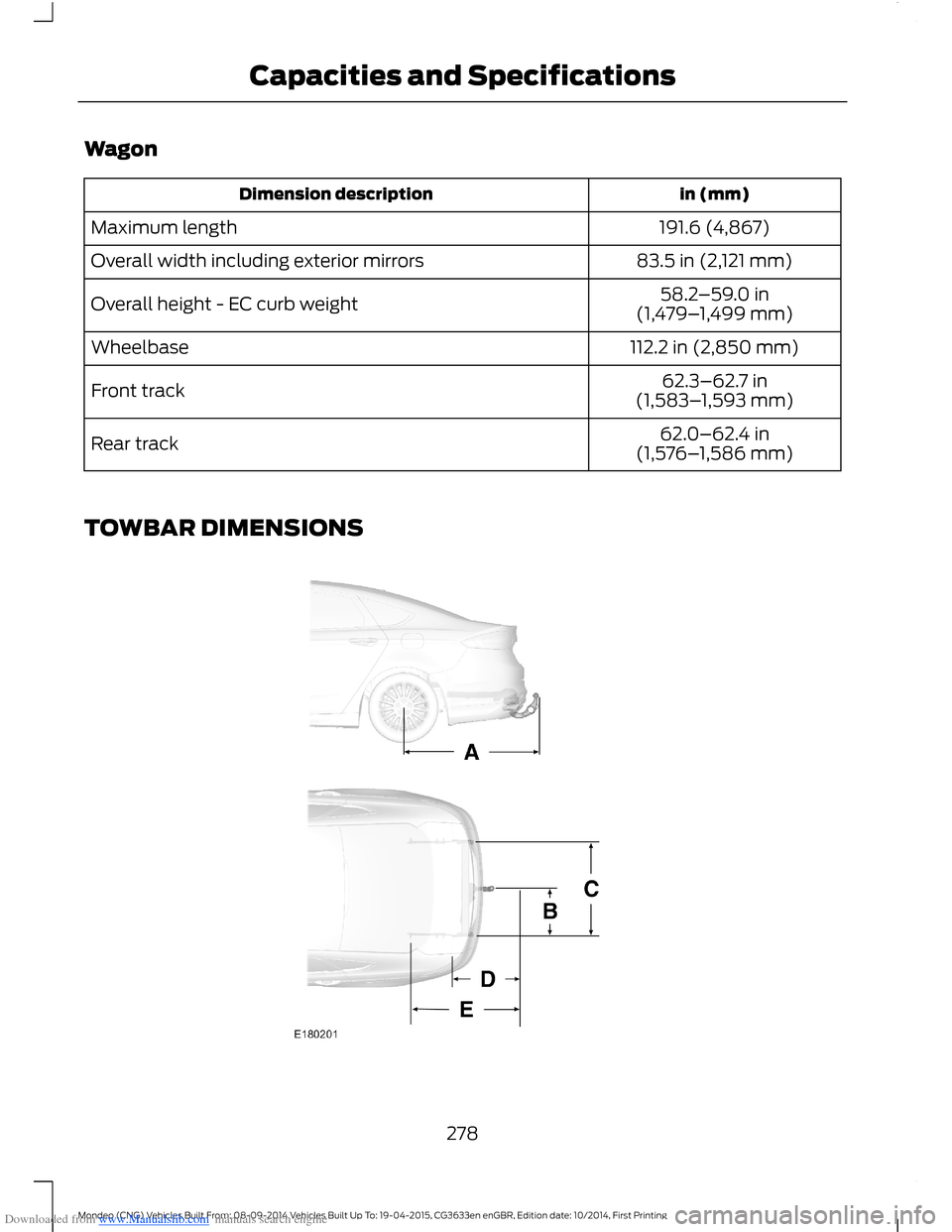
TOWBAR DIMENSIONS
278Mondeo (CNG) Vehicles Built From: 08-09-2014 Vehicles Built Up To: 19-04-2015, CG3633en enGBR, Edition date: 10/2014, First PrintingCapacities and Specifications
Page 328 of 446
Downloaded from www.Manualslib.com manuals search engine App Status
You can view the current status of an app
in the settings menu. There are threepossible statuses:
Description and ActionMessage
The system has detected a new app requiring authorizationor a general permissions update is required.Update needed
No update is required.Up-to-date
The system is trying to receive an update.Updating...
Options in the settings menu:
Description and ActionMessage
If an update is required and you want to manually requestthe update, for example when you are in a Wi-Fi hotspot.Request Update
Select this option to disable automatic updates.Disable Updates
App Permissions
Permissions are divided by groups. You cangrant these group permissions individually.You can change a permission group statusany time when not driving, by using thesettings menu.
When you launch an app using SYNC, thesystem may ask you to grant certainpermissions, for example:
•To allow your vehicle to provide vehicleinformation to the app including, butnot limited to: Fuel level, fuelconsumption, engine speed, batteryvoltage, odometer, VIN, externaltemperature, gear position, tirepressure, ambient temperature, dateand time.
•To allow your vehicle to provide drivingcharacteristic information, including,but not limited to: MyKey, seat beltstatus, engine speeds, braking events,brake pedal switch, acceleration,accelerator pedal position, clutch pedalswitch, trip length, trip time, trip cost,percent engine on time, and percent oftime at speed.
326Mondeo (CNG) Vehicles Built From: 08-09-2014 Vehicles Built Up To: 19-04-2015, CG3633en enGBR, Edition date: 10/2014, First PrintingSYNC™