start stop button FORD MONDEO 2014 4.G Owners Manual
[x] Cancel search | Manufacturer: FORD, Model Year: 2014, Model line: MONDEO, Model: FORD MONDEO 2014 4.GPages: 446, PDF Size: 29.09 MB
Page 5 of 446
Downloaded from www.Manualslib.com manuals search engine Starting and Stopping theEngine
General Information....................................138
Ignition Switch...............................................138
Keyless Starting............................................138
Steering Wheel Lock - Vehicles Without:Keyless Entry and Push ButtonStart...............................................................139
Steering Wheel Lock - Vehicles With:Keyless Entry and Push ButtonStart...............................................................139
Starting a Gasoline Engine.......................140
Starting a Diesel Engine.............................143
Diesel Particulate Filter..............................143
Switching Off the Engine...........................144
Engine Block Heater....................................144
Unique Driving Character-istics
Auto-Start-Stop...........................................146
Fuel and Refueling
Safety Precautions......................................148
Fuel Quality - Gasoline...............................149
Fuel Quality - Diesel....................................149
Fuel Filler Funnel Location........................150
Running Out of Fuel....................................150
Catalytic Converter......................................152
Refueling..........................................................152
Fuel Consumption........................................154
Transmission
Manual Transmission..................................155
Automatic Transmission............................155
Brakes
General Information....................................160
Hints on Driving With Anti-LockBrakes...........................................................160
Electric Parking Brake.................................160
Hill Start Assist..............................................163
Traction Control
Principle of Operation.................................165
Using Traction Control................................165
Stability Control
Principle of Operation................................166
Using Stability Control...............................166
Parking Aids
Principle of Operation.................................167
Rear Parking Aid............................................167
Front Parking Aid..........................................168
Side Sensing System...................................170
Active Park Assist..........................................172
Rear View Camera........................................177
Cruise Control
Principle of Operation..................................181
Using Cruise Control.....................................181
Using Adaptive Cruise Control................182
Driving Aids
Speed Limiter................................................189
Driver Alert......................................................189
Lane Keeping System..................................191
Blind Spot Information System..............194
Traffic Sign Recognition............................198
Active City Stop...........................................200
Collision Warning System.........................201
Drive Control.................................................205
Load Carrying
General Information...................................207
Luggage Anchor Points.............................207
Rear Under Floor Storage........................208
Cargo Nets.....................................................208
Luggage Covers............................................209
3Mondeo (CNG) Vehicles Built From: 08-09-2014 Vehicles Built Up To: 19-04-2015, CG3633en enGBR, Edition date: 10/2014, First PrintingTable of Contents
Page 38 of 446
Downloaded from www.Manualslib.com manuals search engine Many states and provinces haverestrictions for the use of remote start.Check your local and state or provinciallaws for specific requirements regardingremote start systems.
The remote start system will not work if:
•The ignition is on.
•The alarm system triggered.
•You disable the feature.
•The hood is open.
•The transmission is not in park (P).
•The vehicle battery voltage is too low.
•The service engine soon light is on.
Remote Starting the Vehicle
Note:You must press each button withinthree seconds of each other. Your vehiclewill not remote start if you do not follow thissequence.
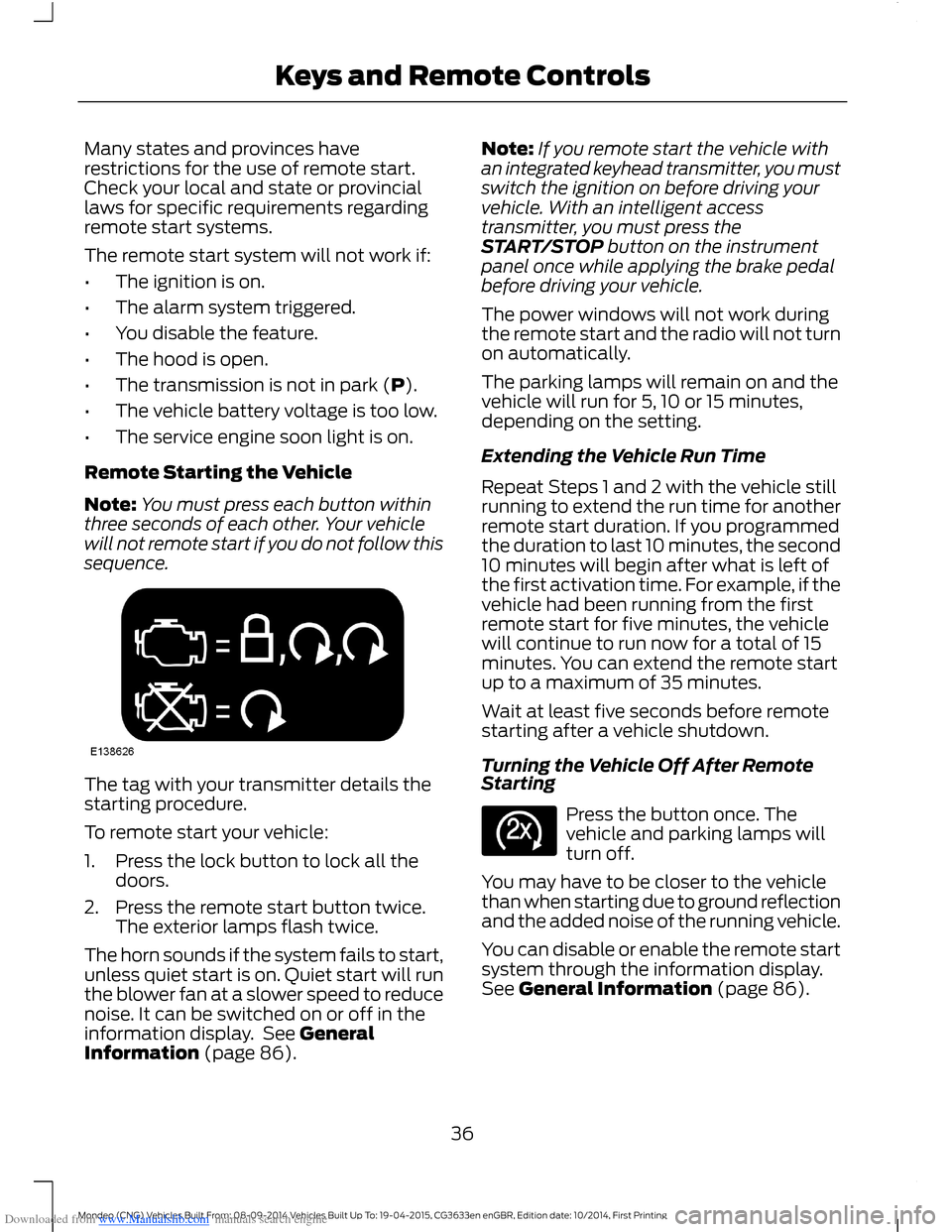
The tag with your transmitter details thestarting procedure.
To remote start your vehicle:
1.Press the lock button to lock all thedoors.
2.Press the remote start button twice.The exterior lamps flash twice.
The horn sounds if the system fails to start,unless quiet start is on. Quiet start will runthe blower fan at a slower speed to reducenoise. It can be switched on or off in theinformation display. See GeneralInformation (page 86).
Note:If you remote start the vehicle withan integrated keyhead transmitter, you mustswitch the ignition on before driving yourvehicle. With an intelligent accesstransmitter, you must press theSTART/STOP button on the instrumentpanel once while applying the brake pedalbefore driving your vehicle.
The power windows will not work duringthe remote start and the radio will not turnon automatically.
The parking lamps will remain on and thevehicle will run for 5, 10 or 15 minutes,depending on the setting.
Extending the Vehicle Run Time
Repeat Steps 1 and 2 with the vehicle stillrunning to extend the run time for anotherremote start duration. If you programmedthe duration to last 10 minutes, the second10 minutes will begin after what is left ofthe first activation time. For example, if thevehicle had been running from the firstremote start for five minutes, the vehiclewill continue to run now for a total of 15minutes. You can extend the remote startup to a maximum of 35 minutes.
Wait at least five seconds before remotestarting after a vehicle shutdown.
Turning the Vehicle Off After RemoteStarting
Press the button once. Thevehicle and parking lamps willturn off.
You may have to be closer to the vehiclethan when starting due to ground reflectionand the added noise of the running vehicle.
You can disable or enable the remote startsystem through the information display.See General Information (page 86).
36Mondeo (CNG) Vehicles Built From: 08-09-2014 Vehicles Built Up To: 19-04-2015, CG3633en enGBR, Edition date: 10/2014, First PrintingKeys and Remote Controls
Page 41 of 446
Downloaded from www.Manualslib.com manuals search engine 1. Insert the key you want to program intothe ignition. If your vehicle is equipped witha push-button start, place the intelligentaccess key fob into the backup slot. Thelocation of your backup slot is in anotherchapter. See Starting and Stopping theEngine (page 138).
2. Switch the ignition on.
3. Access the main menu on theinformation display controls, and selectSettings then MyKey by pressing OK orthe > button.
4. Press OK or the > button to selectCreate MyKey.
5. When prompted, hold the OK buttonuntil you see a message informing you tolabel this key as a MyKey. The key will berestricted at the next start.
MyKey is successfully created. Make sureyou label it so you can distinguish it fromthe admin keys.
You can also program configurablesettings for the key(s). SeeProgramming/Changing ConfigurableSettings.
Programming/ChangingConfigurable Settings
Use the information display to access yourconfigurable MyKey settings.
1.Switch the ignition on using an adminkey or fob.
2.Access the main menu on theinformation display controls, and selectSettings, then MyKey by pressing OKor > button.
3.Use the arrow buttons to get to afeature.
4.Press OK or > to make a selection.
Note:You can clear or change your MyKeysettings at any time during the same keycycle as you created the MyKey. Once youhave switched the vehicle off, however, youwill need an admin key to change or clearyour MyKey settings.
CLEARING ALL MYKEYS
You can clear or change your MyKeysettings using the information displaycontrol on the steering wheel. SeeInformation Displays (page 86).
Switch the ignition on using an admin keyor fob.
To clear all MyKeys of all MyKey settings, press the left arrow button to accessthe main menu and scroll to:
Action and DescriptionMessage
Press the OK button.Settings
Press the OK button.MyKey
Press and hold the OK button until the following messagedisplays.Clear MyKey
39Mondeo (CNG) Vehicles Built From: 08-09-2014 Vehicles Built Up To: 19-04-2015, CG3633en enGBR, Edition date: 10/2014, First PrintingMyKey™
Page 75 of 446
Downloaded from www.Manualslib.com manuals search engine GLOBAL OPENING AND
CLOSING
You can use the remote control to operatethe windows with the ignition off.
Note:You can enable or disable this featurein the information display or see anauthorized dealer. See (page 86).
Note:To operate this feature, accessorydelay must not be active.
Opening the Windows
You can only open the windows for a shorttime after you unlock your vehicle with theremote control. After you unlock yourvehicle, press and hold the remote controlunlock button to open the windows andvent the moonroof. Release the buttononce movement starts. Press the lock orunlock button to stop movement.
Closing the Windows
WARNING
When closing the windows andmoonroof, you should verify they arefree of obstructions and make surethat children and pets are not in theproximity of the window openings.
To close the windows and moonroof, pressand hold the remote control lock button.Release the button once movement starts.Press the lock or unlock button to stopmovement.
EXTERIOR MIRRORS
Power Exterior Mirrors
WARNING
Do not adjust the mirrors when yourvehicle is moving.
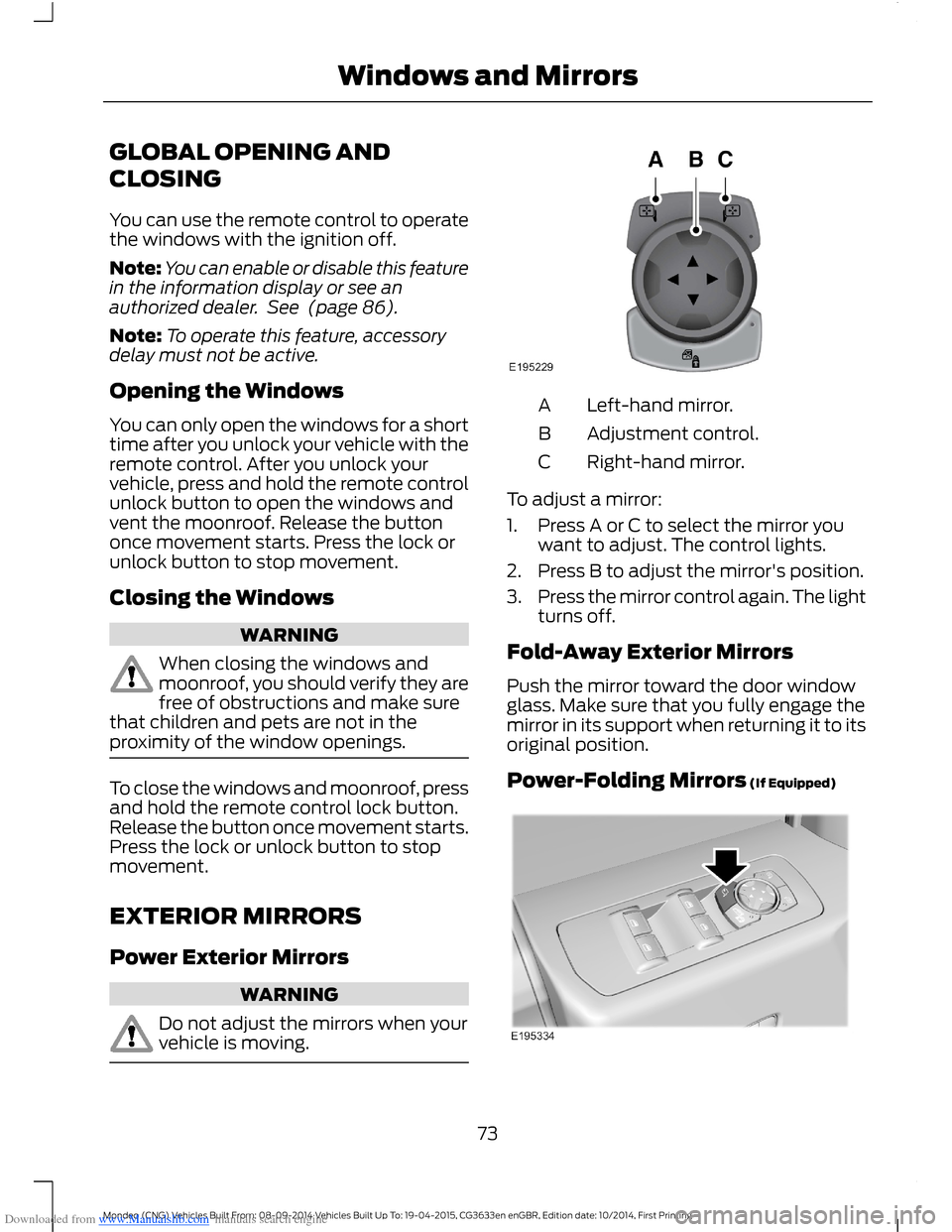
Left-hand mirror.A
Adjustment control.B
Right-hand mirror.C
To adjust a mirror:
1.Press A or C to select the mirror youwant to adjust. The control lights.
2.Press B to adjust the mirror's position.
3.Press the mirror control again. The lightturns off.
Fold-Away Exterior Mirrors
Push the mirror toward the door windowglass. Make sure that you fully engage themirror in its support when returning it to itsoriginal position.
Power-Folding Mirrors (If Equipped)
73Mondeo (CNG) Vehicles Built From: 08-09-2014 Vehicles Built Up To: 19-04-2015, CG3633en enGBR, Edition date: 10/2014, First PrintingWindows and Mirrors
Page 90 of 446
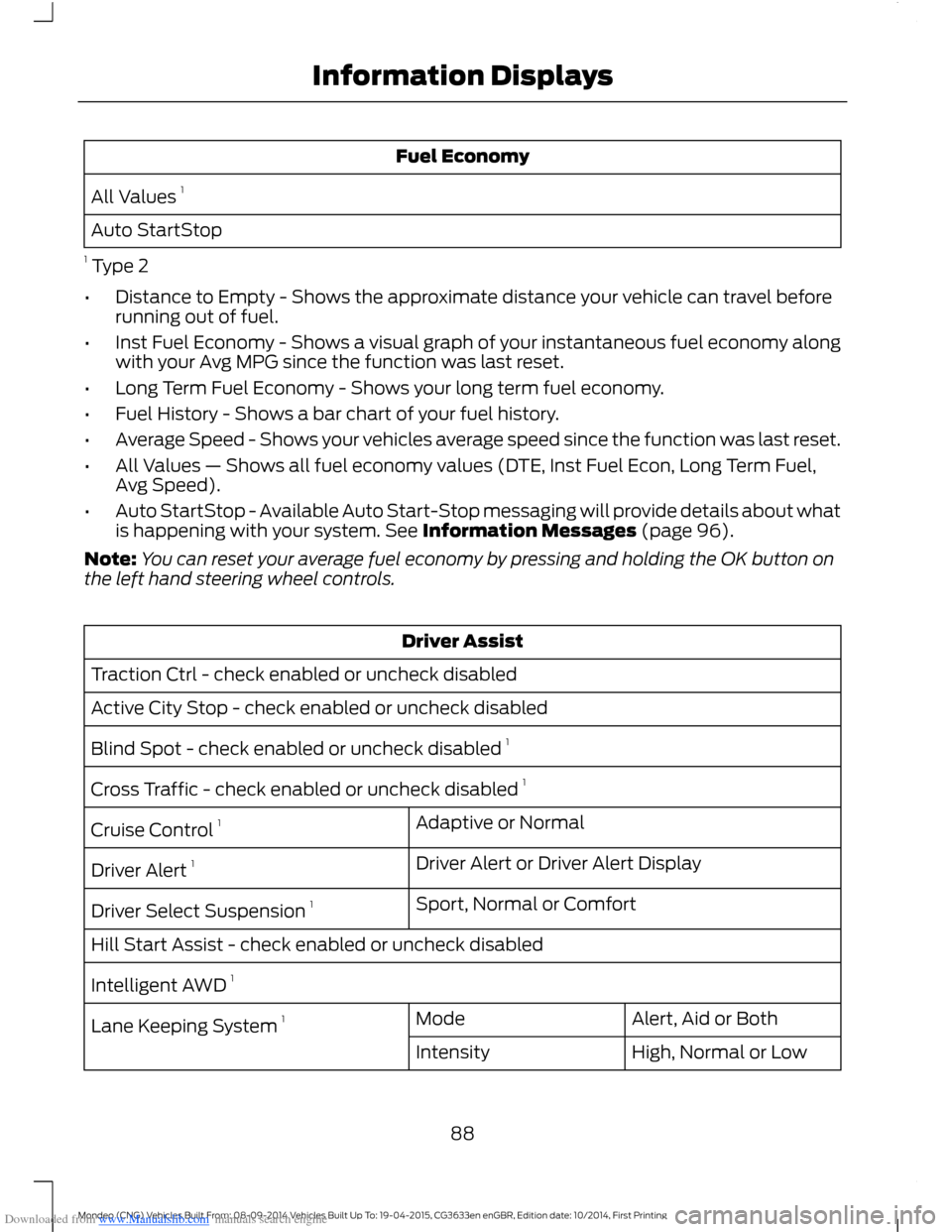
Downloaded from www.Manualslib.com manuals search engine Fuel Economy
All Values 1
Auto StartStop
1 Type 2
•Distance to Empty - Shows the approximate distance your vehicle can travel beforerunning out of fuel.
•Inst Fuel Economy - Shows a visual graph of your instantaneous fuel economy alongwith your Avg MPG since the function was last reset.
•Long Term Fuel Economy - Shows your long term fuel economy.
•Fuel History - Shows a bar chart of your fuel history.
•Average Speed - Shows your vehicles average speed since the function was last reset.
•All Values — Shows all fuel economy values (DTE, Inst Fuel Econ, Long Term Fuel,Avg Speed).
•Auto StartStop - Available Auto Start-Stop messaging will provide details about whatis happening with your system. See Information Messages (page 96).
Note:You can reset your average fuel economy by pressing and holding the OK button onthe left hand steering wheel controls.
Driver Assist
Traction Ctrl - check enabled or uncheck disabled
Active City Stop - check enabled or uncheck disabled
Blind Spot - check enabled or uncheck disabled 1
Cross Traffic - check enabled or uncheck disabled 1
Adaptive or NormalCruise Control 1
Driver Alert or Driver Alert DisplayDriver Alert 1
Sport, Normal or ComfortDriver Select Suspension 1
Hill Start Assist - check enabled or uncheck disabled
Intelligent AWD 1
Alert, Aid or BothModeLane Keeping System 1
High, Normal or LowIntensity
88Mondeo (CNG) Vehicles Built From: 08-09-2014 Vehicles Built Up To: 19-04-2015, CG3633en enGBR, Edition date: 10/2014, First PrintingInformation Displays
Page 94 of 446
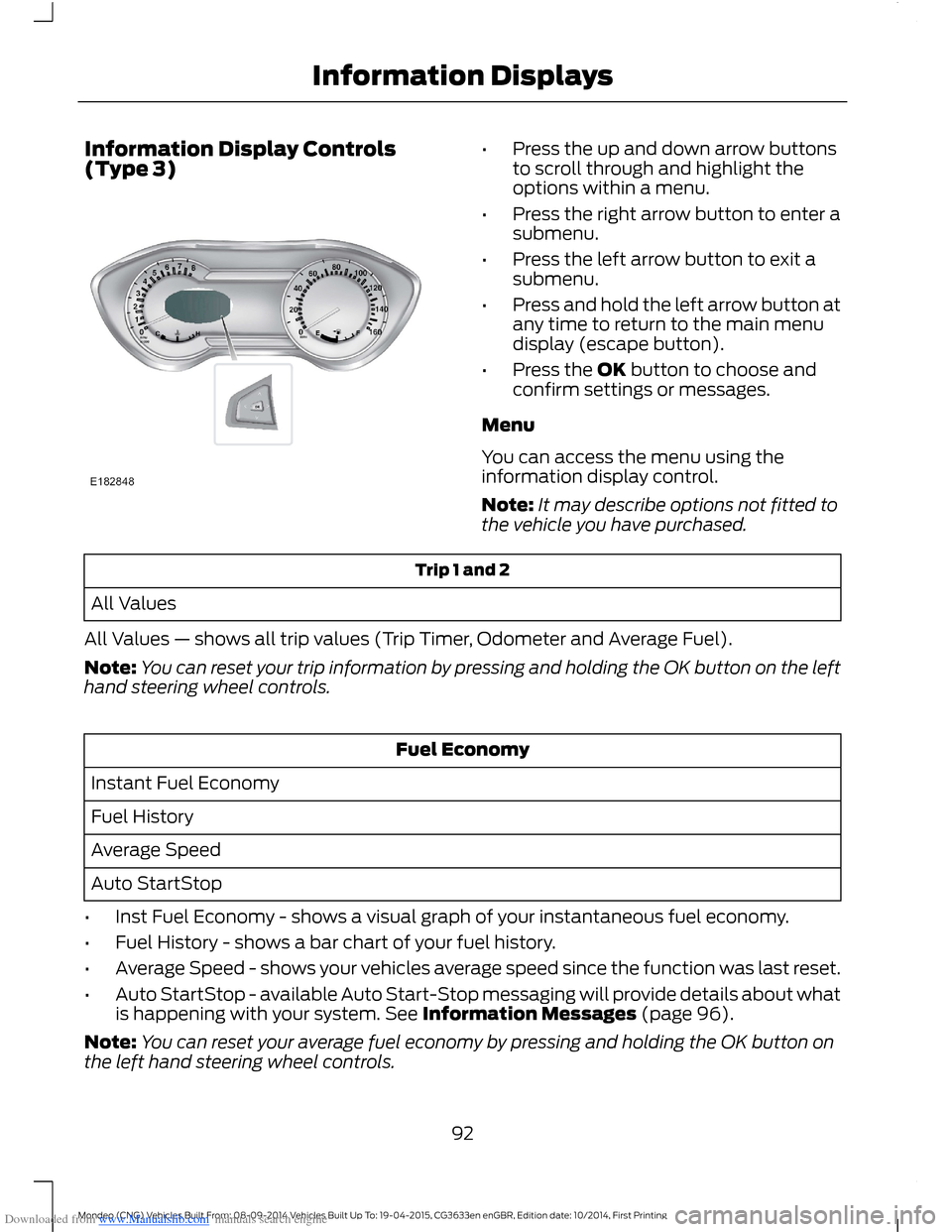
Downloaded from www.Manualslib.com manuals search engine Information Display Controls(Type 3)•Press the up and down arrow buttonsto scroll through and highlight theoptions within a menu.
•Press the right arrow button to enter asubmenu.
•Press the left arrow button to exit asubmenu.
•Press and hold the left arrow button atany time to return to the main menudisplay (escape button).
•Press the OK button to choose andconfirm settings or messages.
Menu
You can access the menu using theinformation display control.
Note:It may describe options not fitted tothe vehicle you have purchased.
Trip 1 and 2
All Values
All Values — shows all trip values (Trip Timer, Odometer and Average Fuel).
Note:You can reset your trip information by pressing and holding the OK button on the lefthand steering wheel controls.
Fuel Economy
Instant Fuel Economy
Fuel History
Average Speed
Auto StartStop
•Inst Fuel Economy - shows a visual graph of your instantaneous fuel economy.
•Fuel History - shows a bar chart of your fuel history.
•Average Speed - shows your vehicles average speed since the function was last reset.
•Auto StartStop - available Auto Start-Stop messaging will provide details about whatis happening with your system. See Information Messages (page 96).
Note:You can reset your average fuel economy by pressing and holding the OK button onthe left hand steering wheel controls.
92Mondeo (CNG) Vehicles Built From: 08-09-2014 Vehicles Built Up To: 19-04-2015, CG3633en enGBR, Edition date: 10/2014, First PrintingInformation Displays
Page 100 of 446
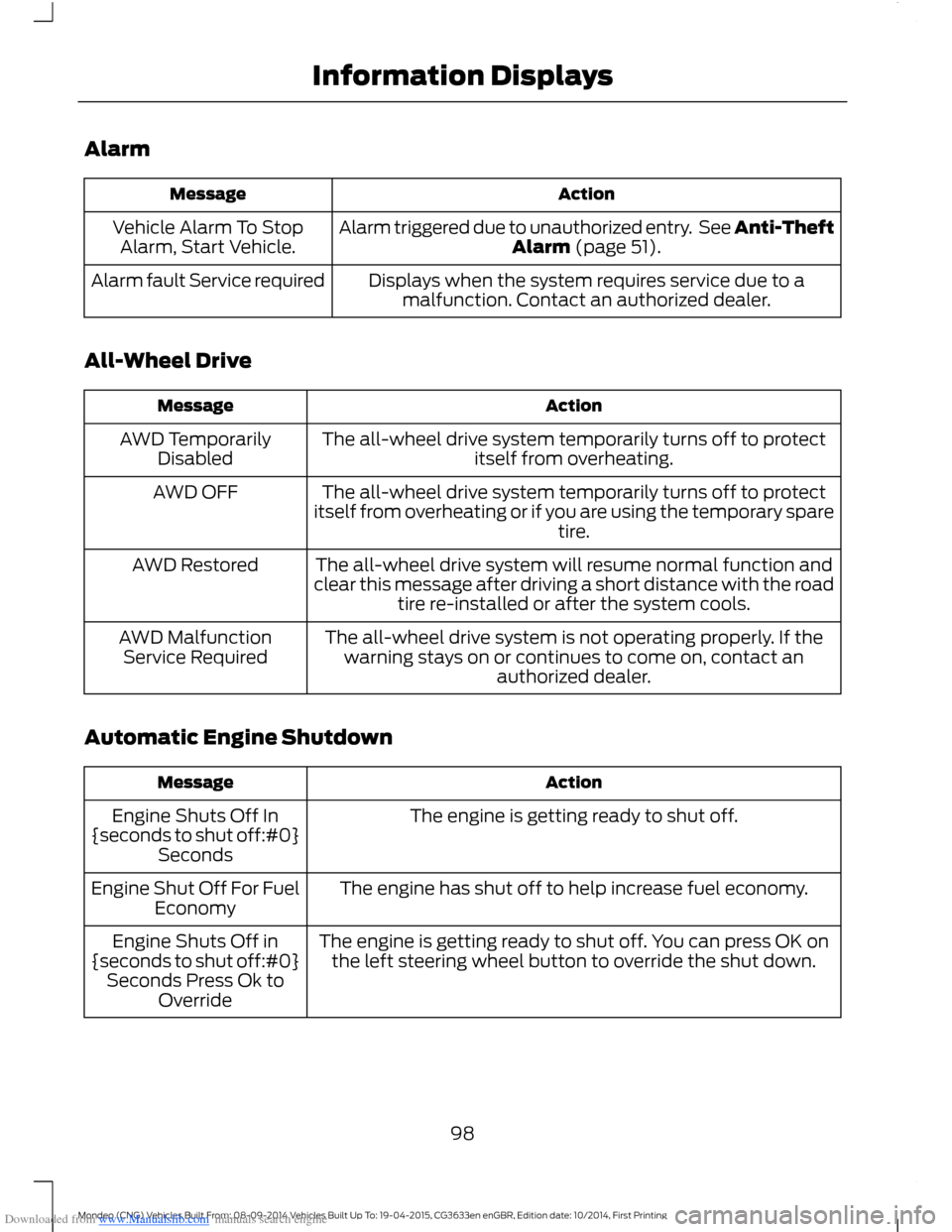
Downloaded from www.Manualslib.com manuals search engine Alarm
ActionMessage
Alarm triggered due to unauthorized entry. See Anti-TheftAlarm (page 51).Vehicle Alarm To StopAlarm, Start Vehicle.
Displays when the system requires service due to amalfunction. Contact an authorized dealer.Alarm fault Service required
All-Wheel Drive
ActionMessage
The all-wheel drive system temporarily turns off to protectitself from overheating.AWD TemporarilyDisabled
The all-wheel drive system temporarily turns off to protectitself from overheating or if you are using the temporary sparetire.
AWD OFF
The all-wheel drive system will resume normal function andclear this message after driving a short distance with the roadtire re-installed or after the system cools.
AWD Restored
The all-wheel drive system is not operating properly. If thewarning stays on or continues to come on, contact anauthorized dealer.
AWD MalfunctionService Required
Automatic Engine Shutdown
ActionMessage
The engine is getting ready to shut off.Engine Shuts Off In{seconds to shut off:#0}Seconds
The engine has shut off to help increase fuel economy.Engine Shut Off For FuelEconomy
The engine is getting ready to shut off. You can press OK onthe left steering wheel button to override the shut down.Engine Shuts Off in{seconds to shut off:#0}Seconds Press Ok toOverride
98Mondeo (CNG) Vehicles Built From: 08-09-2014 Vehicles Built Up To: 19-04-2015, CG3633en enGBR, Edition date: 10/2014, First PrintingInformation Displays
Page 105 of 446
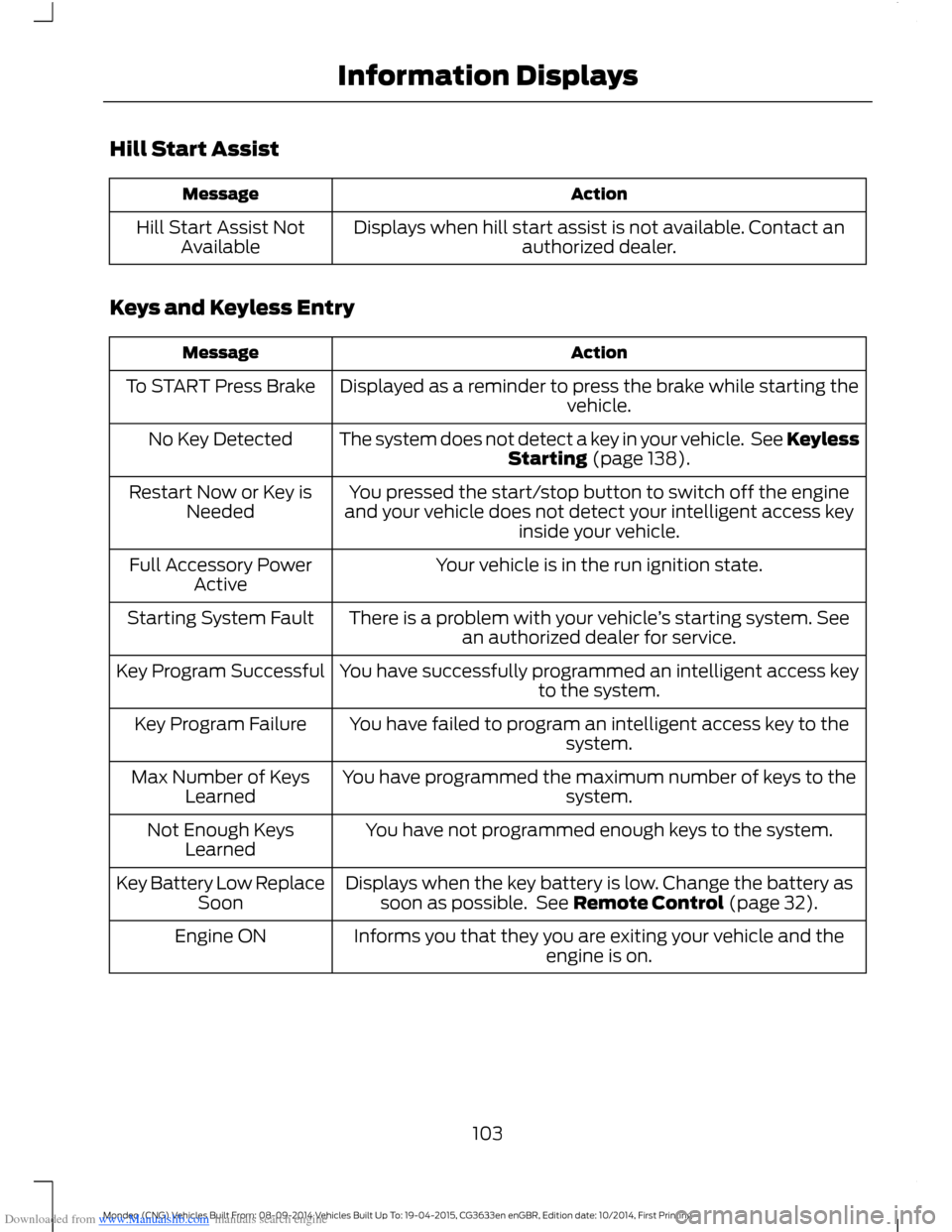
Downloaded from www.Manualslib.com manuals search engine Hill Start Assist
ActionMessage
Displays when hill start assist is not available. Contact anauthorized dealer.Hill Start Assist NotAvailable
Keys and Keyless Entry
ActionMessage
Displayed as a reminder to press the brake while starting thevehicle.To START Press Brake
The system does not detect a key in your vehicle. See KeylessStarting (page 138).No Key Detected
You pressed the start/stop button to switch off the engineand your vehicle does not detect your intelligent access keyinside your vehicle.
Restart Now or Key isNeeded
Your vehicle is in the run ignition state.Full Accessory PowerActive
There is a problem with your vehicle’s starting system. Seean authorized dealer for service.Starting System Fault
You have successfully programmed an intelligent access keyto the system.Key Program Successful
You have failed to program an intelligent access key to thesystem.Key Program Failure
You have programmed the maximum number of keys to thesystem.Max Number of KeysLearned
You have not programmed enough keys to the system.Not Enough KeysLearned
Displays when the key battery is low. Change the battery assoon as possible. See Remote Control (page 32).Key Battery Low ReplaceSoon
Informs you that they you are exiting your vehicle and theengine is on.Engine ON
103Mondeo (CNG) Vehicles Built From: 08-09-2014 Vehicles Built Up To: 19-04-2015, CG3633en enGBR, Edition date: 10/2014, First PrintingInformation Displays
Page 134 of 446
Downloaded from www.Manualslib.com manuals search engine Saving a PreSet Position
1.Switch the ignition on.
2.Adjust the seat, exterior mirrors andsteering column to your desiredposition.
3.Press and hold the desired presetbutton until you hear a single tone.
You can save up to three preset memorypositions. You can save a memory presetat any time.
Recalling a PreSet Position
Press and release the preset buttonassociated with your desired drivingposition. The seat, mirrors and steeringcolumn move to the position stored forthat preset.
Note:You can only recall a preset memoryposition when the ignition is off, or when thetransmission is in park (P) or neutral (N)(and your vehicle is not moving) if theignition is on.
You can recall a preset memory positionby pressing the unlock button on yourremote control or intelligent access key ifit is linked to a preset position.
Linking a PreSet Position to YourRemote Control or IntelligentAccess Key
Your vehicle can save the preset memorypositions for up to three remote controlsor intelligent access keys.
1.With the ignition on, move the memorypositions to the desired positions.
2.Press and hold the desired presetbutton for about five seconds. A tonesounds after about two seconds.Continue holding until a second toneis heard.
3.Within three seconds, press the lockbutton on the remote control you arelinking.
To unlink a remote control, follow thesame procedure – except in step 3, pressthe unlock button on the remote control.
Note:Pressing any active memory featureadjustment control - power seat, mirror, oroptional steering column switch or anymemory button – during a memory recallcancels the operation.
A seat recall movement will also stop ifyou drive your vehicle.
Note:If more than one linked remotecontrol or intelligent access key is in range,the memory function moves to the settingsof the first key stored.
Easy Entry and Exit Function
If you enable the easy entry and exitfeature, it automatically moves the driverseat position rearward up to fivecentimeters when the transmission is inpark (P) and you remove the key or turnoff the keyless start ignition.
The driver seat returns to the previousposition when you put the key in theignition or you activate the keyless startignition.
You can switch off the easy entry and exitfeature by using the driver informationdisplay.
132Mondeo (CNG) Vehicles Built From: 08-09-2014 Vehicles Built Up To: 19-04-2015, CG3633en enGBR, Edition date: 10/2014, First PrintingSeats
Page 141 of 446
Downloaded from www.Manualslib.com manuals search engine Switching the Ignition On
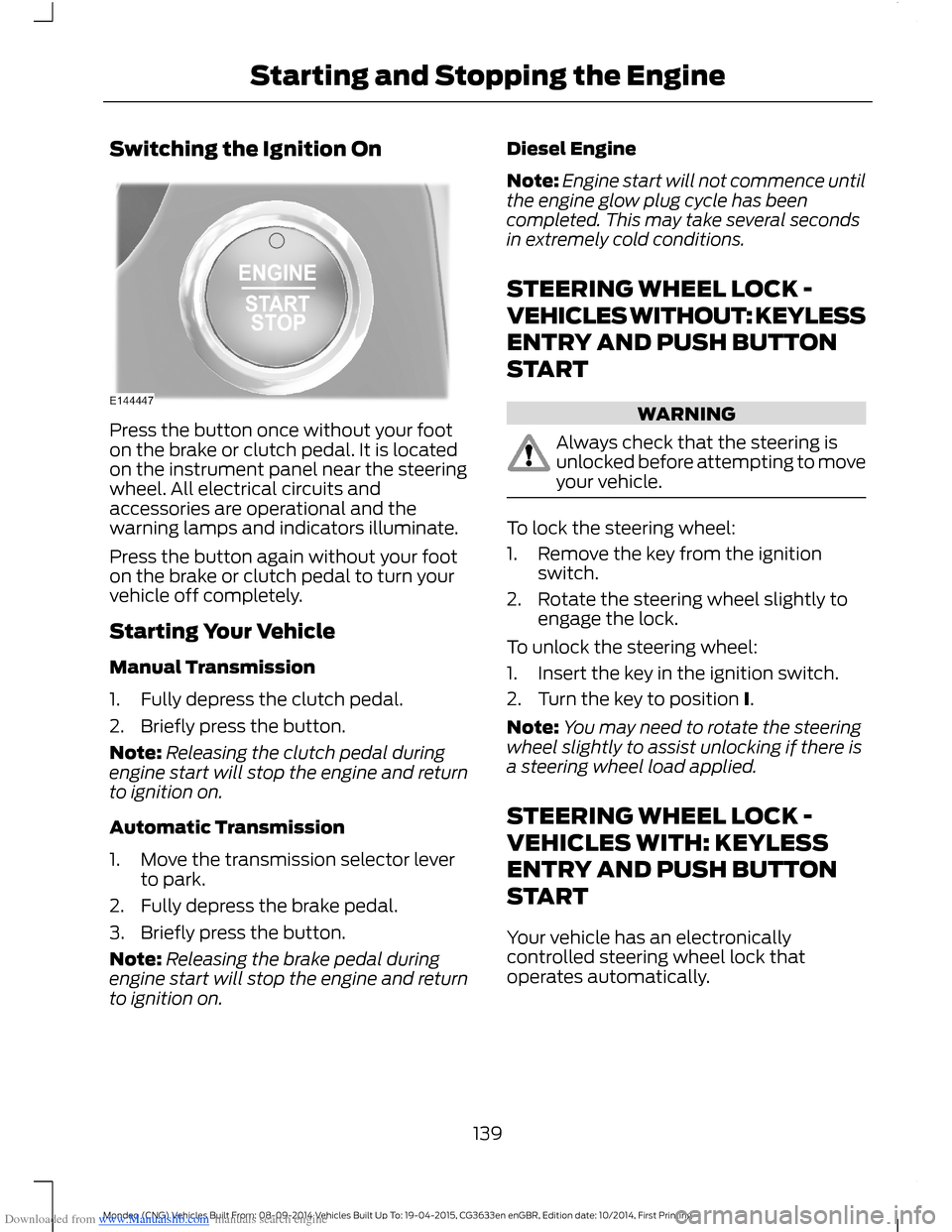
Press the button once without your footon the brake or clutch pedal. It is locatedon the instrument panel near the steeringwheel. All electrical circuits andaccessories are operational and thewarning lamps and indicators illuminate.
Press the button again without your footon the brake or clutch pedal to turn yourvehicle off completely.
Starting Your Vehicle
Manual Transmission
1.Fully depress the clutch pedal.
2.Briefly press the button.
Note:Releasing the clutch pedal duringengine start will stop the engine and returnto ignition on.
Automatic Transmission
1.Move the transmission selector leverto park.
2.Fully depress the brake pedal.
3.Briefly press the button.
Note:Releasing the brake pedal duringengine start will stop the engine and returnto ignition on.
Diesel Engine
Note:Engine start will not commence untilthe engine glow plug cycle has beencompleted. This may take several secondsin extremely cold conditions.
STEERING WHEEL LOCK -
VEHICLES WITHOUT: KEYLESS
ENTRY AND PUSH BUTTON
START
WARNING
Always check that the steering isunlocked before attempting to moveyour vehicle.
To lock the steering wheel:
1.Remove the key from the ignitionswitch.
2.Rotate the steering wheel slightly toengage the lock.
To unlock the steering wheel:
1.Insert the key in the ignition switch.
2.Turn the key to position I.
Note:You may need to rotate the steeringwheel slightly to assist unlocking if there isa steering wheel load applied.
STEERING WHEEL LOCK -
VEHICLES WITH: KEYLESS
ENTRY AND PUSH BUTTON
START
Your vehicle has an electronicallycontrolled steering wheel lock thatoperates automatically.
139Mondeo (CNG) Vehicles Built From: 08-09-2014 Vehicles Built Up To: 19-04-2015, CG3633en enGBR, Edition date: 10/2014, First PrintingStarting and Stopping the Engine