AUX FORD POLICE INTERCEPTOR 2019 User Guide
[x] Cancel search | Manufacturer: FORD, Model Year: 2019, Model line: POLICE INTERCEPTOR, Model: FORD POLICE INTERCEPTOR 2019Pages: 370, PDF Size: 4.5 MB
Page 285 of 370
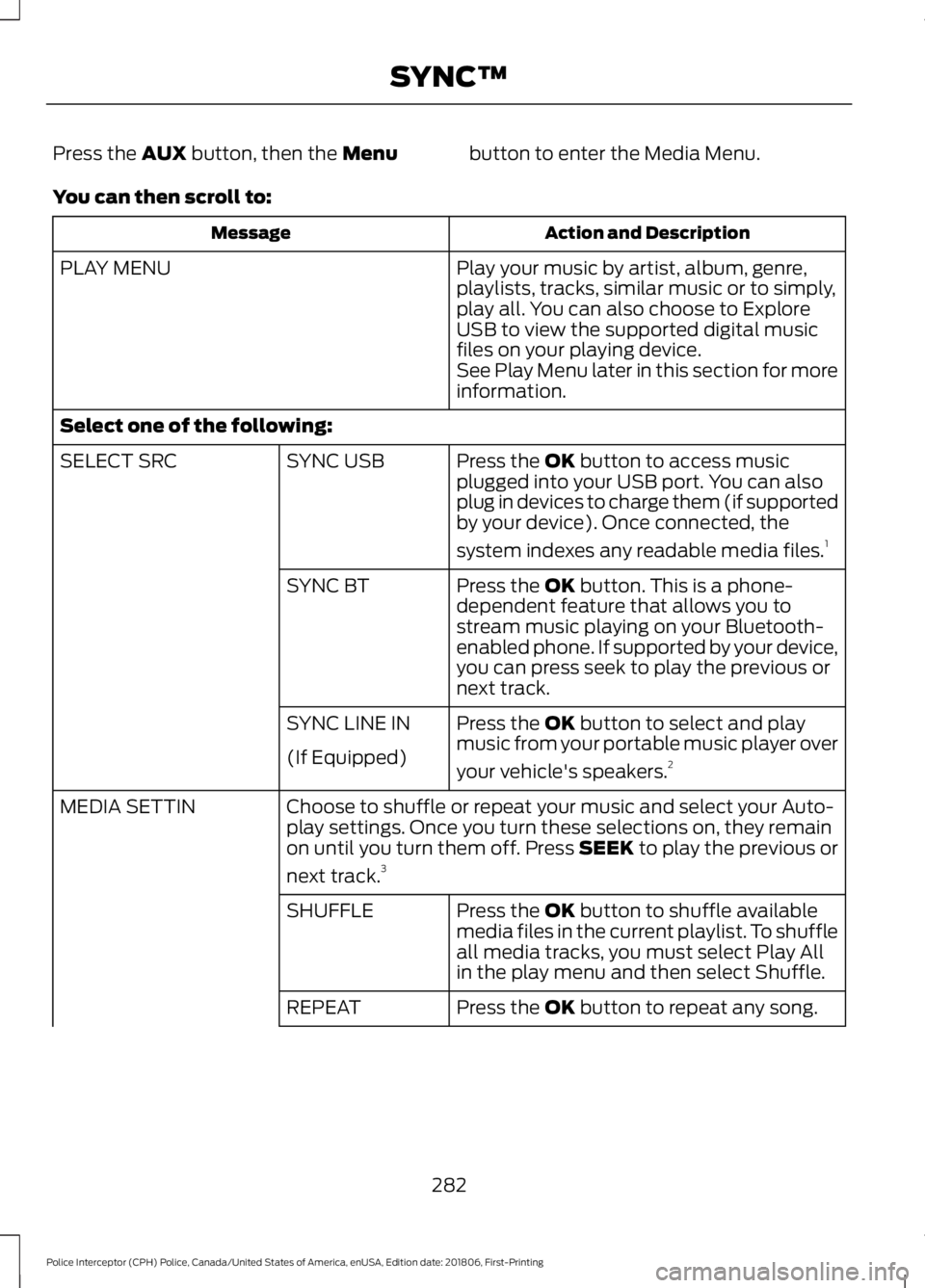
Press the AUX button, then the Menu
button to enter the Media Menu.
You can then scroll to: Action and Description
Message
Play your music by artist, album, genre,
playlists, tracks, similar music or to simply,
play all. You can also choose to Explore
USB to view the supported digital music
files on your playing device.
PLAY MENU
See Play Menu later in this section for more
information.
Select one of the following: Press the
OK button to access music
plugged into your USB port. You can also
plug in devices to charge them (if supported
by your device). Once connected, the
system indexes any readable media files. 1
SYNC USB
SELECT SRC
Press the
OK button. This is a phone-
dependent feature that allows you to
stream music playing on your Bluetooth-
enabled phone. If supported by your device,
you can press seek to play the previous or
next track.
SYNC BT
Press the
OK button to select and play
music from your portable music player over
your vehicle's speakers. 2
SYNC LINE IN
(If Equipped)
Choose to shuffle or repeat your music and select your Auto-
play settings. Once you turn these selections on, they remain
on until you turn them off. Press SEEK to play the previous or
next track.
3
MEDIA SETTIN
Press the
OK button to shuffle available
media files in the current playlist. To shuffle
all media tracks, you must select Play All
in the play menu and then select Shuffle.
SHUFFLE
Press the
OK button to repeat any song.
REPEAT
282
Police Interceptor (CPH) Police, Canada/United States of America, enUSA, Edition date: 201806, First-Printing SYNC™
Page 286 of 370
Action and Description
Message
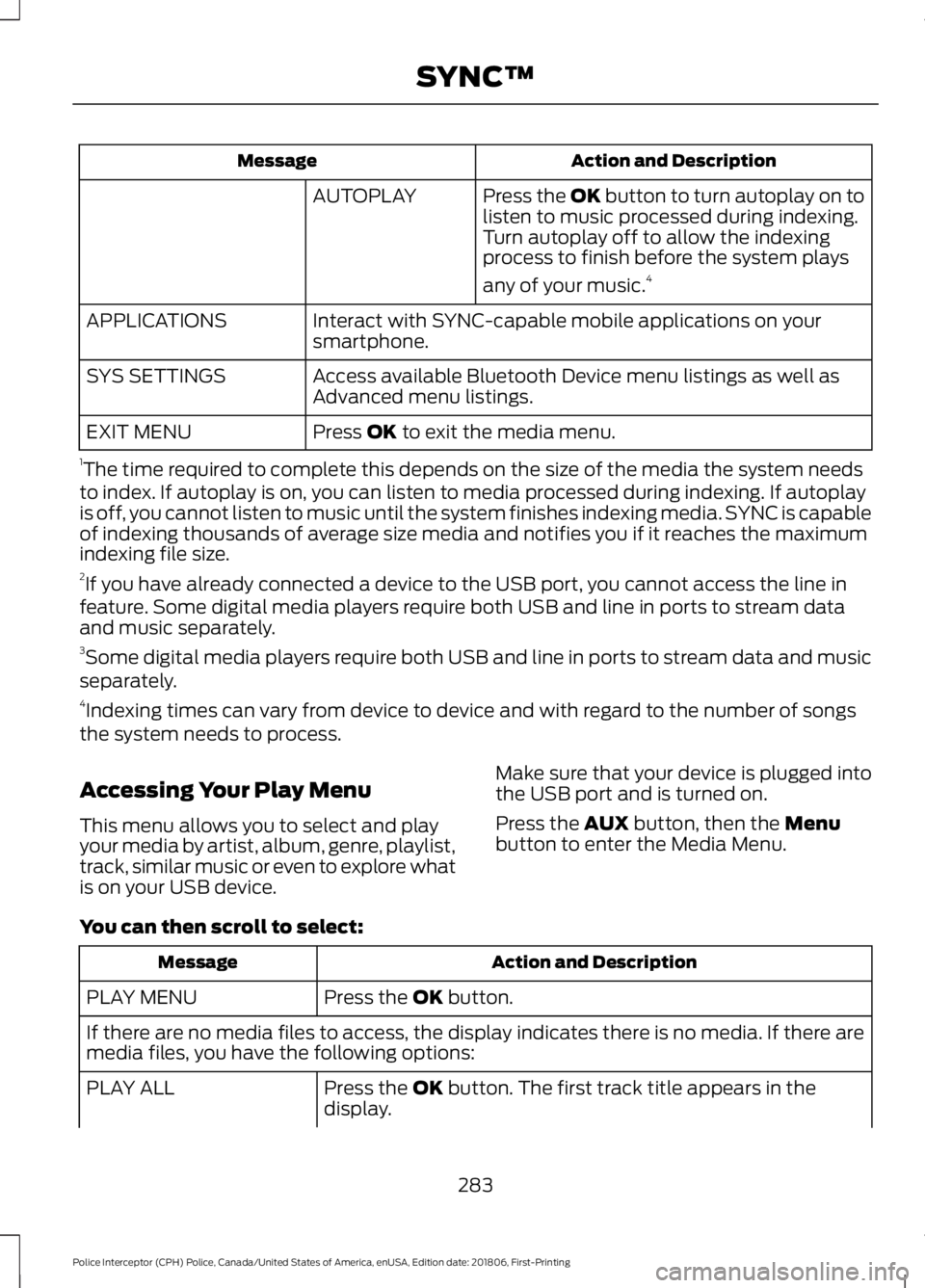
Press the OK button to turn autoplay on to
listen to music processed during indexing.
Turn autoplay off to allow the indexing
process to finish before the system plays
any of your music.4
AUTOPLAY
Interact with SYNC-capable mobile applications on your
smartphone.
APPLICATIONS
Access available Bluetooth Device menu listings as well as
Advanced menu listings.
SYS SETTINGS
Press OK to exit the media menu.
EXIT MENU
1 The time required to complete this depends on the size of the media the system needs
to index. If autoplay is on, you can listen to media processed during indexing. If autoplay
is off, you cannot listen to music until the system finishes indexing media. SYNC is capable
of indexing thousands of average size media and notifies you if it reaches the maximum
indexing file size.
2 If you have already connected a device to the USB port, you cannot access the line in
feature. Some digital media players require both USB and line in ports to stream data
and music separately.
3 Some digital media players require both USB and line in ports to stream data and music
separately.
4 Indexing times can vary from device to device and with regard to the number of songs
the system needs to process.
Accessing Your Play Menu
This menu allows you to select and play
your media by artist, album, genre, playlist,
track, similar music or even to explore what
is on your USB device. Make sure that your device is plugged into
the USB port and is turned on.
Press the
AUX button, then the Menu
button to enter the Media Menu.
You can then scroll to select: Action and Description
Message
Press the
OK button.
PLAY MENU
If there are no media files to access, the display indicates there is no media. If there are
media files, you have the following options:
Press the
OK button. The first track title appears in the
display.
PLAY ALL
283
Police Interceptor (CPH) Police, Canada/United States of America, enUSA, Edition date: 201806, First-Printing SYNC™
Page 288 of 370
Action and Description
Message
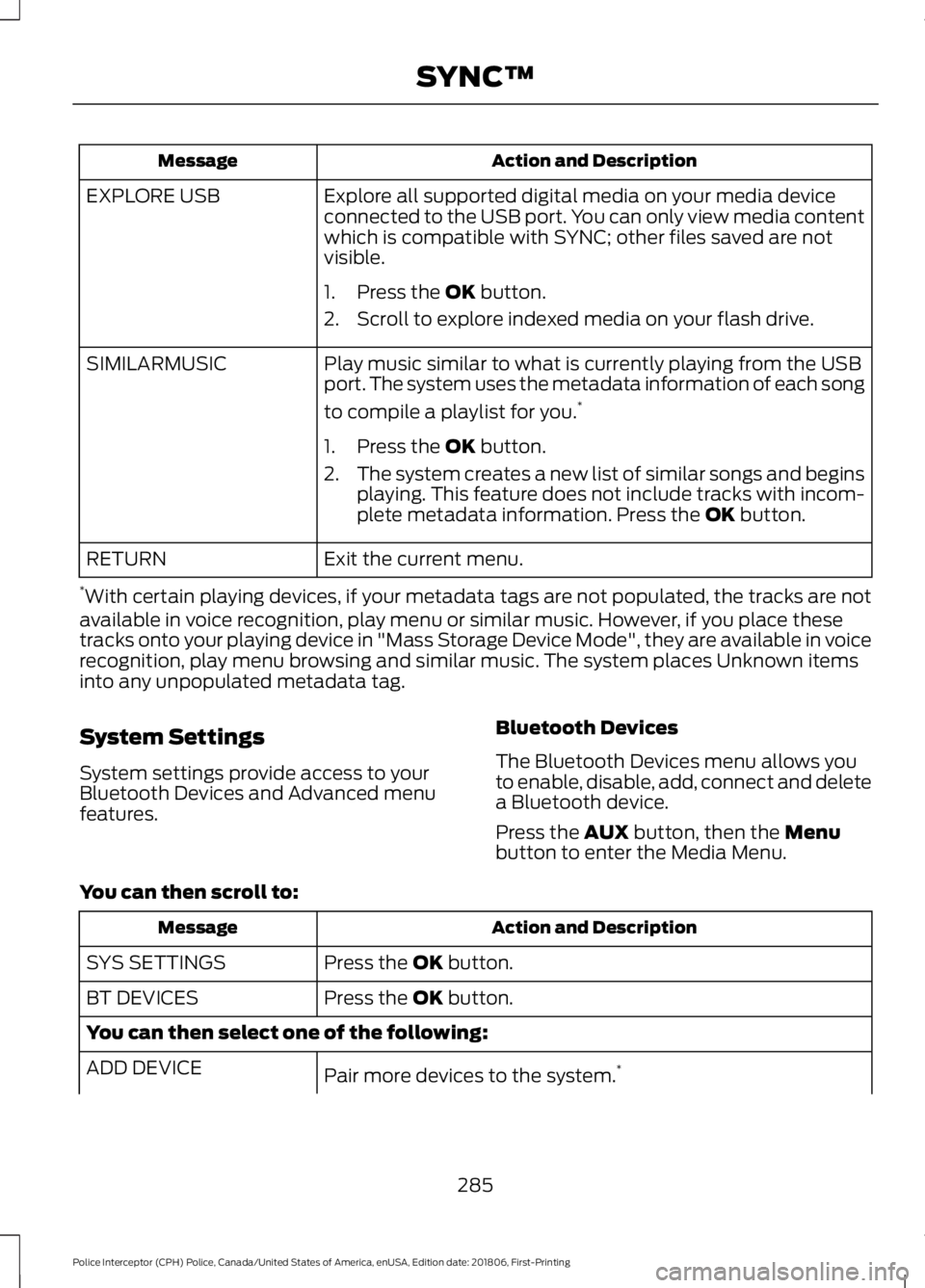
Explore all supported digital media on your media device
connected to the USB port. You can only view media content
which is compatible with SYNC; other files saved are not
visible.
EXPLORE USB
1. Press the OK button.
2. Scroll to explore indexed media on your flash drive.
Play music similar to what is currently playing from the USB
port. The system uses the metadata information of each song
to compile a playlist for you. *
SIMILARMUSIC
1. Press the
OK button.
2. The system creates a new list of similar songs and begins
playing. This feature does not include tracks with incom-
plete metadata information. Press the
OK button.
Exit the current menu.
RETURN
* With certain playing devices, if your metadata tags are not populated, the tracks are not
available in voice recognition, play menu or similar music. However, if you place these
tracks onto your playing device in "Mass Storage Device Mode", they are available in voice
recognition, play menu browsing and similar music. The system places Unknown items
into any unpopulated metadata tag.
System Settings
System settings provide access to your
Bluetooth Devices and Advanced menu
features. Bluetooth Devices
The Bluetooth Devices menu allows you
to enable, disable, add, connect and delete
a Bluetooth device.
Press the
AUX button, then the Menu
button to enter the Media Menu.
You can then scroll to: Action and Description
Message
Press the
OK button.
SYS SETTINGS
Press the
OK button.
BT DEVICES
You can then select one of the following:
Pair more devices to the system. *
ADD DEVICE
285
Police Interceptor (CPH) Police, Canada/United States of America, enUSA, Edition date: 201806, First-Printing SYNC™
Page 289 of 370
Action and Description
Message
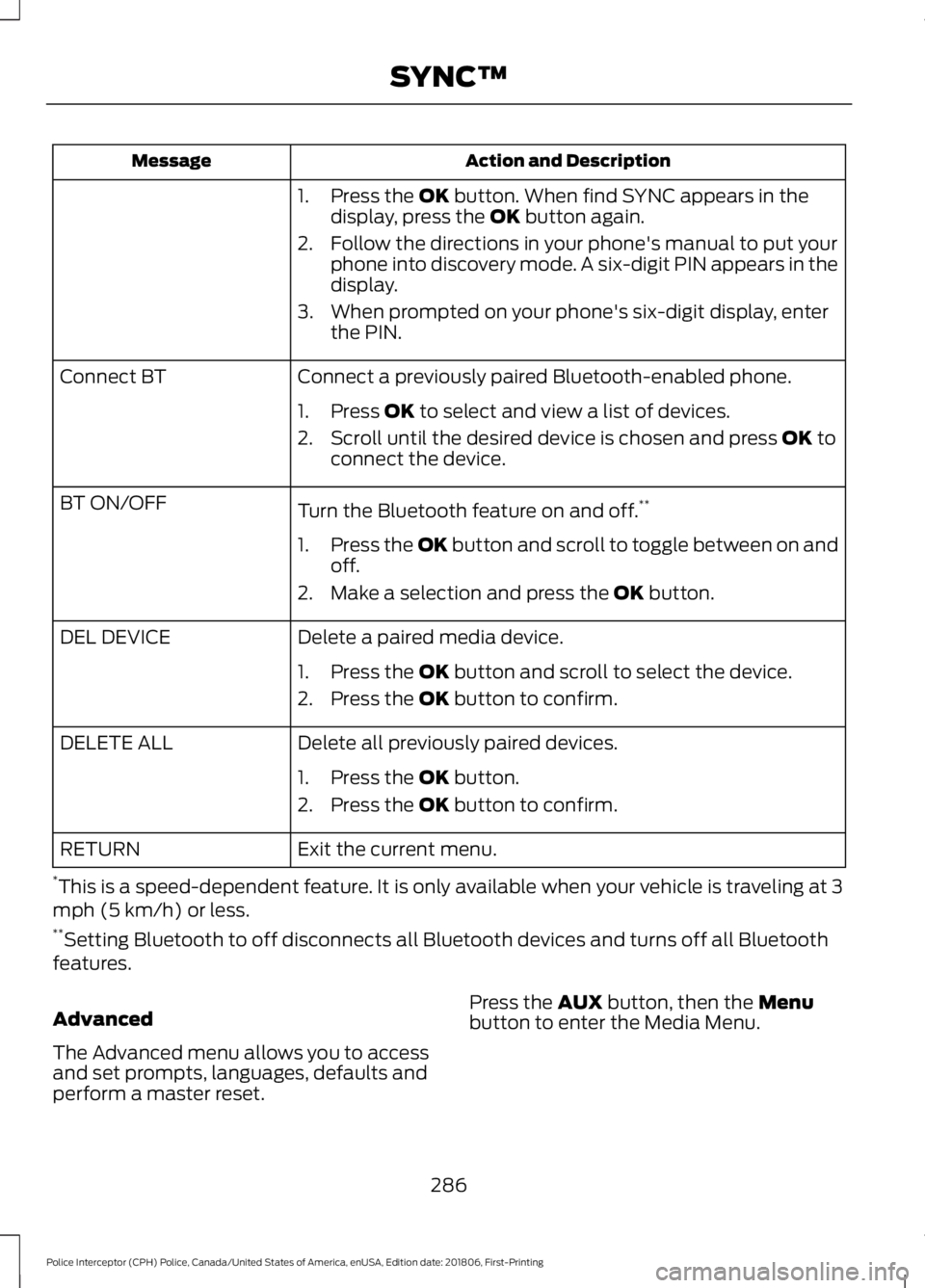
1. Press the OK button. When find SYNC appears in the
display, press the OK button again.
2. Follow the directions in your phone's manual to put your phone into discovery mode. A six-digit PIN appears in the
display.
3. When prompted on your phone's six-digit display, enter the PIN.
Connect a previously paired Bluetooth-enabled phone.
Connect BT
1. Press
OK to select and view a list of devices.
2. Scroll until the desired device is chosen and press
OK to
connect the device.
Turn the Bluetooth feature on and off. **
BT ON/OFF
1.Press the OK button and scroll to toggle between on and
off.
2. Make a selection and press the
OK button.
Delete a paired media device.
DEL DEVICE
1. Press the
OK button and scroll to select the device.
2. Press the
OK button to confirm.
Delete all previously paired devices.
DELETE ALL
1. Press the
OK button.
2. Press the
OK button to confirm.
Exit the current menu.
RETURN
* This is a speed-dependent feature. It is only available when your vehicle is traveling at 3
mph (5 km/h) or less.
** Setting Bluetooth to off disconnects all Bluetooth devices and turns off all Bluetooth
features.
Advanced
The Advanced menu allows you to access
and set prompts, languages, defaults and
perform a master reset. Press the
AUX button, then the Menu
button to enter the Media Menu.
286
Police Interceptor (CPH) Police, Canada/United States of America, enUSA, Edition date: 201806, First-Printing SYNC™
Page 362 of 370
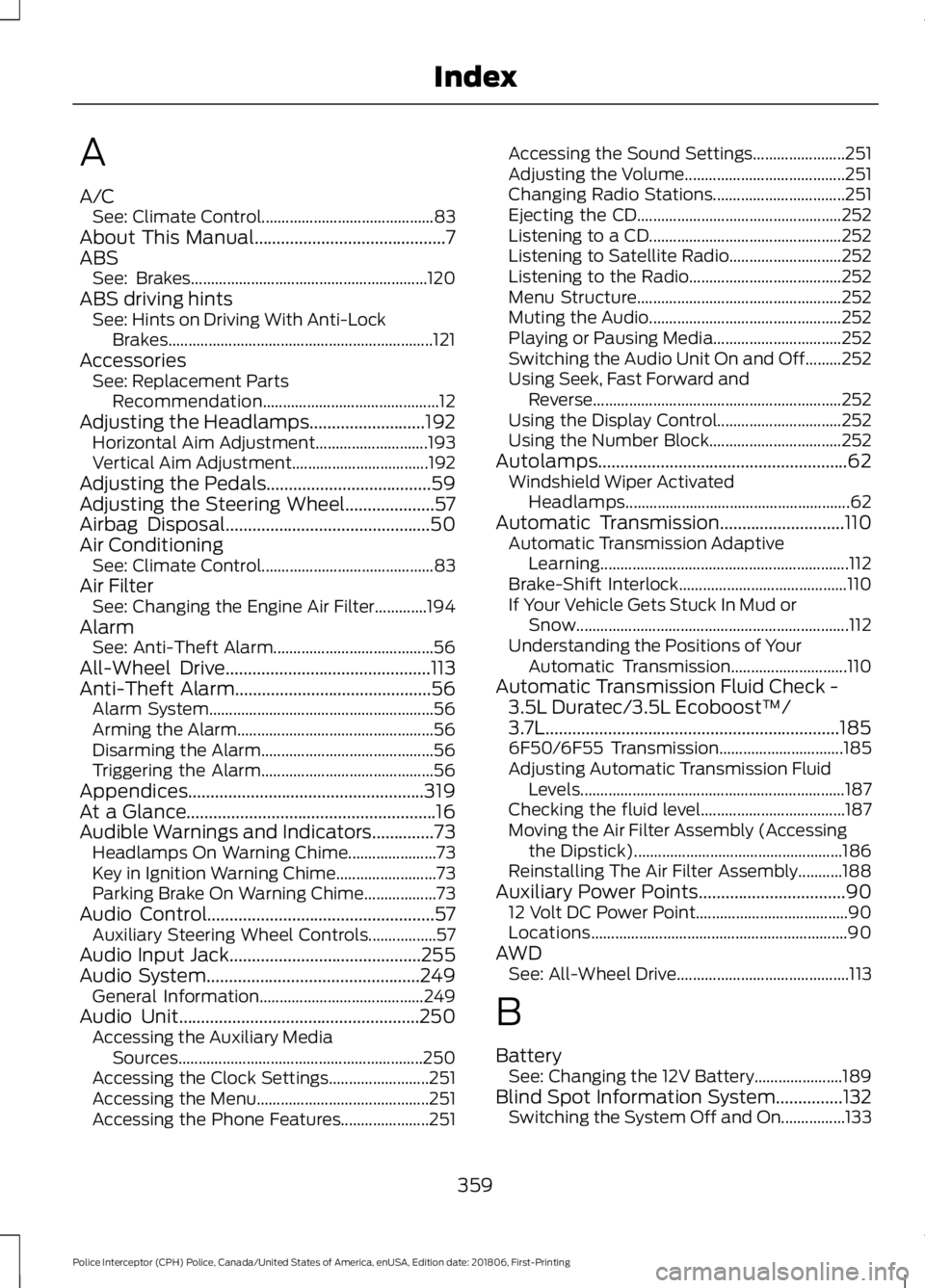
A
A/C
See: Climate Control........................................... 83
About This Manual...........................................7
ABS See: Brakes........................................................... 120
ABS driving hints See: Hints on Driving With Anti-Lock
Brakes.................................................................. 121
Accessories See: Replacement Parts
Recommendation............................................ 12
Adjusting the Headlamps..........................192 Horizontal Aim Adjustment............................ 193
Vertical Aim Adjustment.................................. 192
Adjusting the Pedals
.....................................59
Adjusting the Steering Wheel....................57
Airbag Disposal..............................................50
Air Conditioning See: Climate Control........................................... 83
Air Filter See: Changing the Engine Air Filter.............194
Alarm See: Anti-Theft Alarm........................................ 56
All-Wheel Drive
..............................................113
Anti-Theft Alarm............................................56
Alarm System........................................................ 56
Arming the Alarm................................................. 56
Disarming the Alarm........................................... 56
Triggering the Alarm........................................... 56
Appendices.....................................................319
At a Glance........................................................16
Audible Warnings and Indicators..............73 Headlamps On Warning Chime...................... 73
Key in Ignition Warning Chime......................... 73
Parking Brake On Warning Chime.................. 73
Audio Control
...................................................57
Auxiliary Steering Wheel Controls.................57
Audio Input Jack...........................................255
Audio System
................................................249
General Information......................................... 249
Audio Unit......................................................250 Accessing the Auxiliary Media
Sources............................................................. 250
Accessing the Clock Settings......................... 251
Accessing the Menu........................................... 251
Accessing the Phone Features...................... 251Accessing the Sound Settings.......................
251
Adjusting the Volume........................................ 251
Changing Radio Stations................................. 251
Ejecting the CD................................................... 252
Listening to a CD................................................ 252
Listening to Satellite Radio............................ 252
Listening to the Radio...................................... 252
Menu Structure................................................... 252
Muting the Audio................................................ 252
Playing or Pausing Media................................ 252
Switching the Audio Unit On and Off.........252
Using Seek, Fast Forward and Reverse.............................................................. 252
Using the Display Control............................... 252
Using the Number Block................................. 252
Autolamps........................................................62 Windshield Wiper Activated
Headlamps........................................................ 62
Automatic Transmission............................110 Automatic Transmission Adaptive
Learning.............................................................. 112
Brake-Shift Interlock.......................................... 110
If Your Vehicle Gets Stuck In Mud or Snow.................................................................... 112
Understanding the Positions of Your Automatic Transmission............................. 110
Automatic Transmission Fluid Check - 3.5L Duratec/3.5L Ecoboost™/
3.7L..................................................................185
6F50/6F55 Transmission............................... 185
Adjusting Automatic Transmission Fluid Levels.................................................................. 187
Checking the fluid level.................................... 187
Moving the Air Filter Assembly (Accessing the Dipstick).................................................... 186
Reinstalling The Air Filter Assembly...........188
Auxiliary Power Points.................................90 12 Volt DC Power Point...................................... 90
Locations................................................................ 90
AWD See: All-Wheel Drive........................................... 113
B
Battery See: Changing the 12V Battery...................... 189
Blind Spot Information System...............132 Switching the System Off and On................133
359
Police Interceptor (CPH) Police, Canada/United States of America, enUSA, Edition date: 201806, First-Printing Index