change wheel FORD POLICE INTERCEPTOR 2020 Owner's Manual
[x] Cancel search | Manufacturer: FORD, Model Year: 2020, Model line: POLICE INTERCEPTOR, Model: FORD POLICE INTERCEPTOR 2020Pages: 395, PDF Size: 5.62 MB
Page 274 of 395
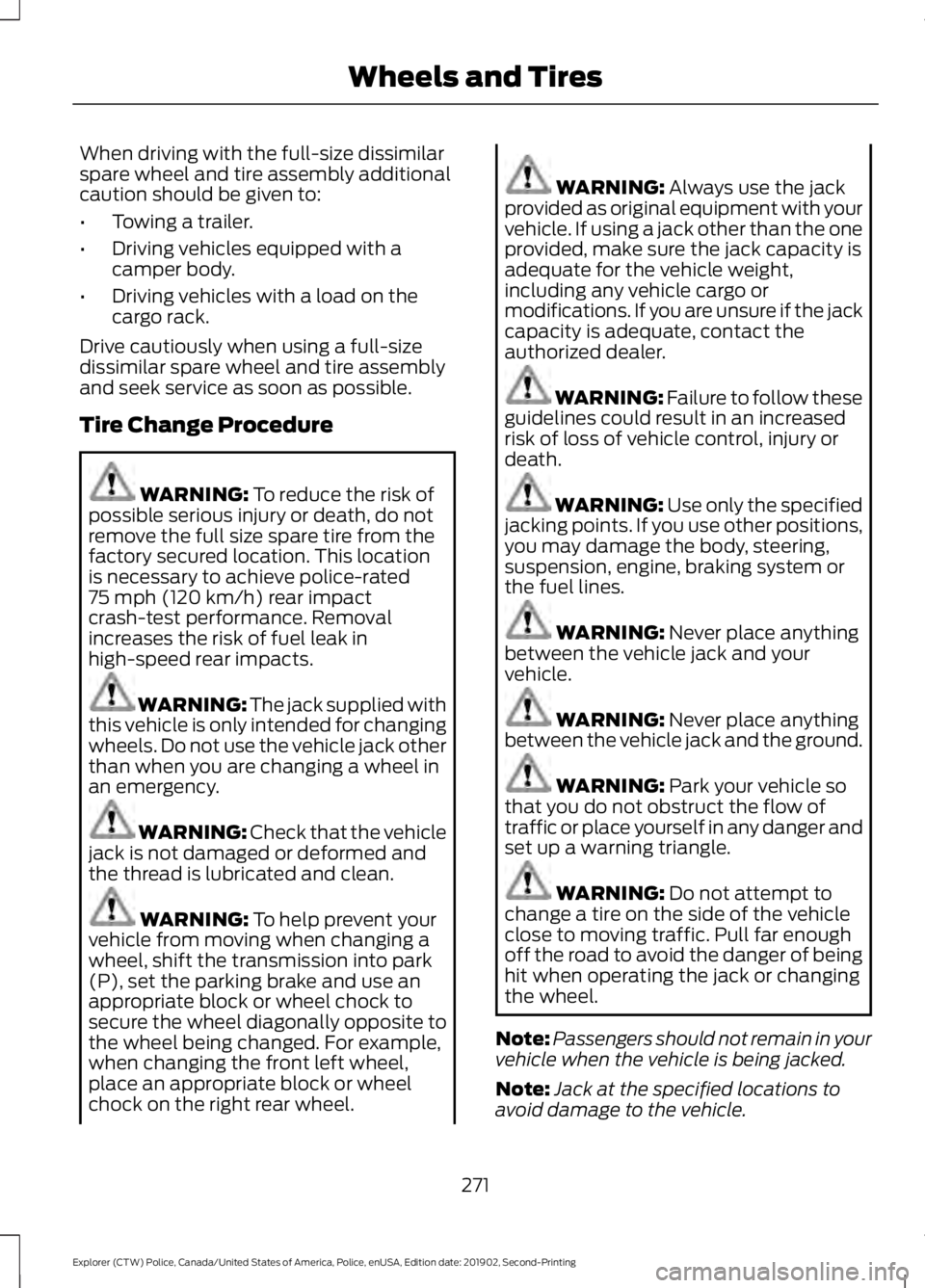
When driving with the full-size dissimilar
spare wheel and tire assembly additional
caution should be given to:
•
Towing a trailer.
• Driving vehicles equipped with a
camper body.
• Driving vehicles with a load on the
cargo rack.
Drive cautiously when using a full-size
dissimilar spare wheel and tire assembly
and seek service as soon as possible.
Tire Change Procedure WARNING: To reduce the risk of
possible serious injury or death, do not
remove the full size spare tire from the
factory secured location. This location
is necessary to achieve police-rated
75 mph (120 km/h)
rear impact
crash-test performance. Removal
increases the risk of fuel leak in
high-speed rear impacts. WARNING: The jack supplied with
this vehicle is only intended for changing
wheels. Do not use the vehicle jack other
than when you are changing a wheel in
an emergency. WARNING:
Check that the vehicle
jack is not damaged or deformed and
the thread is lubricated and clean. WARNING:
To help prevent your
vehicle from moving when changing a
wheel, shift the transmission into park
(P), set the parking brake and use an
appropriate block or wheel chock to
secure the wheel diagonally opposite to
the wheel being changed. For example,
when changing the front left wheel,
place an appropriate block or wheel
chock on the right rear wheel. WARNING:
Always use the jack
provided as original equipment with your
vehicle. If using a jack other than the one
provided, make sure the jack capacity is
adequate for the vehicle weight,
including any vehicle cargo or
modifications. If you are unsure if the jack
capacity is adequate, contact the
authorized dealer. WARNING:
Failure to follow these
guidelines could result in an increased
risk of loss of vehicle control, injury or
death. WARNING:
Use only the specified
jacking points. If you use other positions,
you may damage the body, steering,
suspension, engine, braking system or
the fuel lines. WARNING:
Never place anything
between the vehicle jack and your
vehicle. WARNING:
Never place anything
between the vehicle jack and the ground. WARNING:
Park your vehicle so
that you do not obstruct the flow of
traffic or place yourself in any danger and
set up a warning triangle. WARNING:
Do not attempt to
change a tire on the side of the vehicle
close to moving traffic. Pull far enough
off the road to avoid the danger of being
hit when operating the jack or changing
the wheel.
Note: Passengers should not remain in your
vehicle when the vehicle is being jacked.
Note: Jack at the specified locations to
avoid damage to the vehicle.
271
Explorer (CTW) Police, Canada/United States of America, Police, enUSA, Edition date: 201902, Second-Printing Wheels and Tires
Page 321 of 395
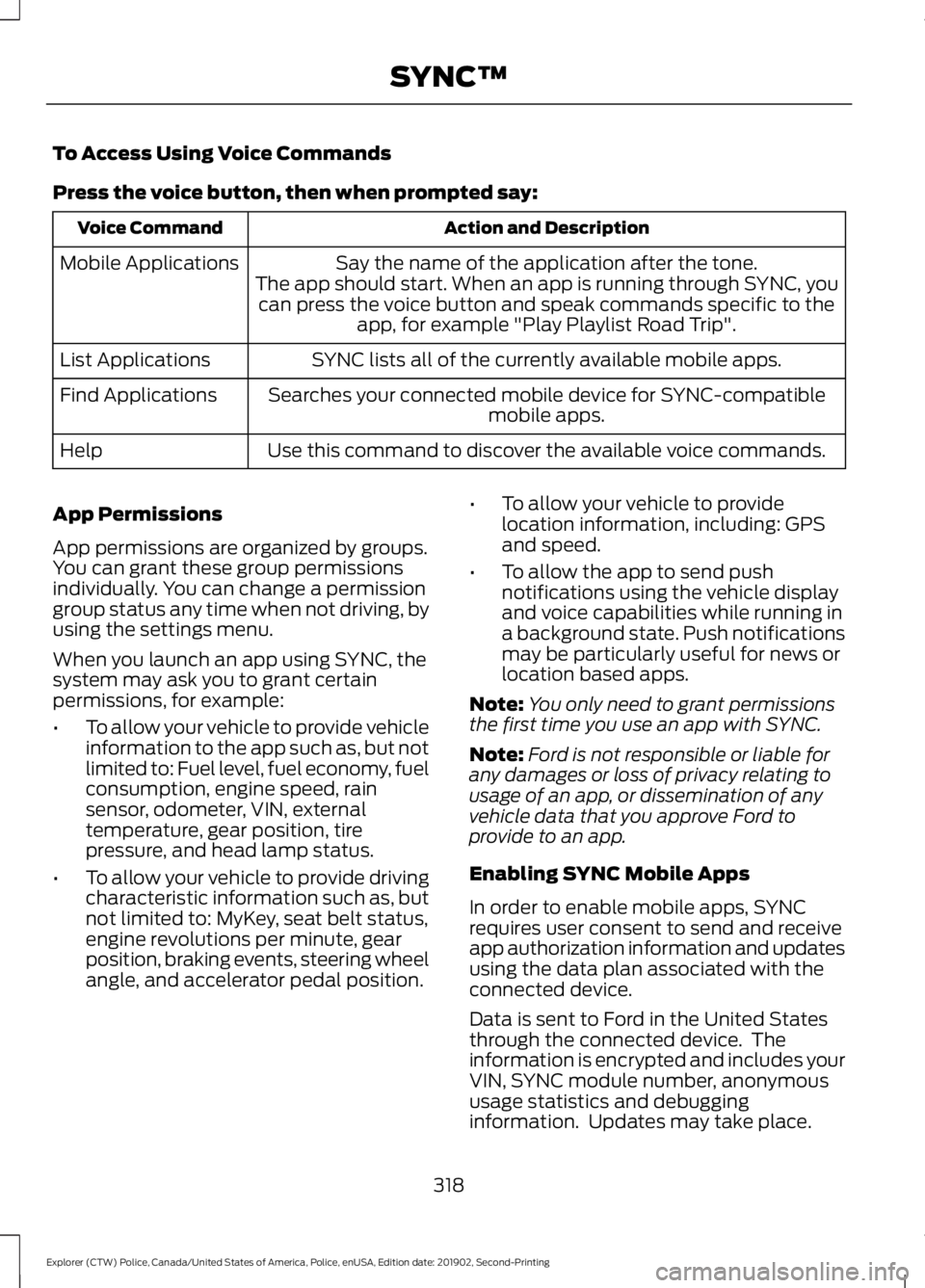
To Access Using Voice Commands
Press the voice button, then when prompted say:
Action and Description
Voice Command
Say the name of the application after the tone.
The app should start. When an app is running through SYNC, you can press the voice button and speak commands specific to the app, for example "Play Playlist Road Trip".
Mobile Applications
SYNC lists all of the currently available mobile apps.
List Applications
Searches your connected mobile device for SYNC-compatible mobile apps.
Find Applications
Use this command to discover the available voice commands.
Help
App Permissions
App permissions are organized by groups.
You can grant these group permissions
individually. You can change a permission
group status any time when not driving, by
using the settings menu.
When you launch an app using SYNC, the
system may ask you to grant certain
permissions, for example:
• To allow your vehicle to provide vehicle
information to the app such as, but not
limited to: Fuel level, fuel economy, fuel
consumption, engine speed, rain
sensor, odometer, VIN, external
temperature, gear position, tire
pressure, and head lamp status.
• To allow your vehicle to provide driving
characteristic information such as, but
not limited to: MyKey, seat belt status,
engine revolutions per minute, gear
position, braking events, steering wheel
angle, and accelerator pedal position. •
To allow your vehicle to provide
location information, including: GPS
and speed.
• To allow the app to send push
notifications using the vehicle display
and voice capabilities while running in
a background state. Push notifications
may be particularly useful for news or
location based apps.
Note: You only need to grant permissions
the first time you use an app with SYNC.
Note: Ford is not responsible or liable for
any damages or loss of privacy relating to
usage of an app, or dissemination of any
vehicle data that you approve Ford to
provide to an app.
Enabling SYNC Mobile Apps
In order to enable mobile apps, SYNC
requires user consent to send and receive
app authorization information and updates
using the data plan associated with the
connected device.
Data is sent to Ford in the United States
through the connected device. The
information is encrypted and includes your
VIN, SYNC module number, anonymous
usage statistics and debugging
information. Updates may take place.
318
Explorer (CTW) Police, Canada/United States of America, Police, enUSA, Edition date: 201902, Second-Printing SYNC™
Page 338 of 395
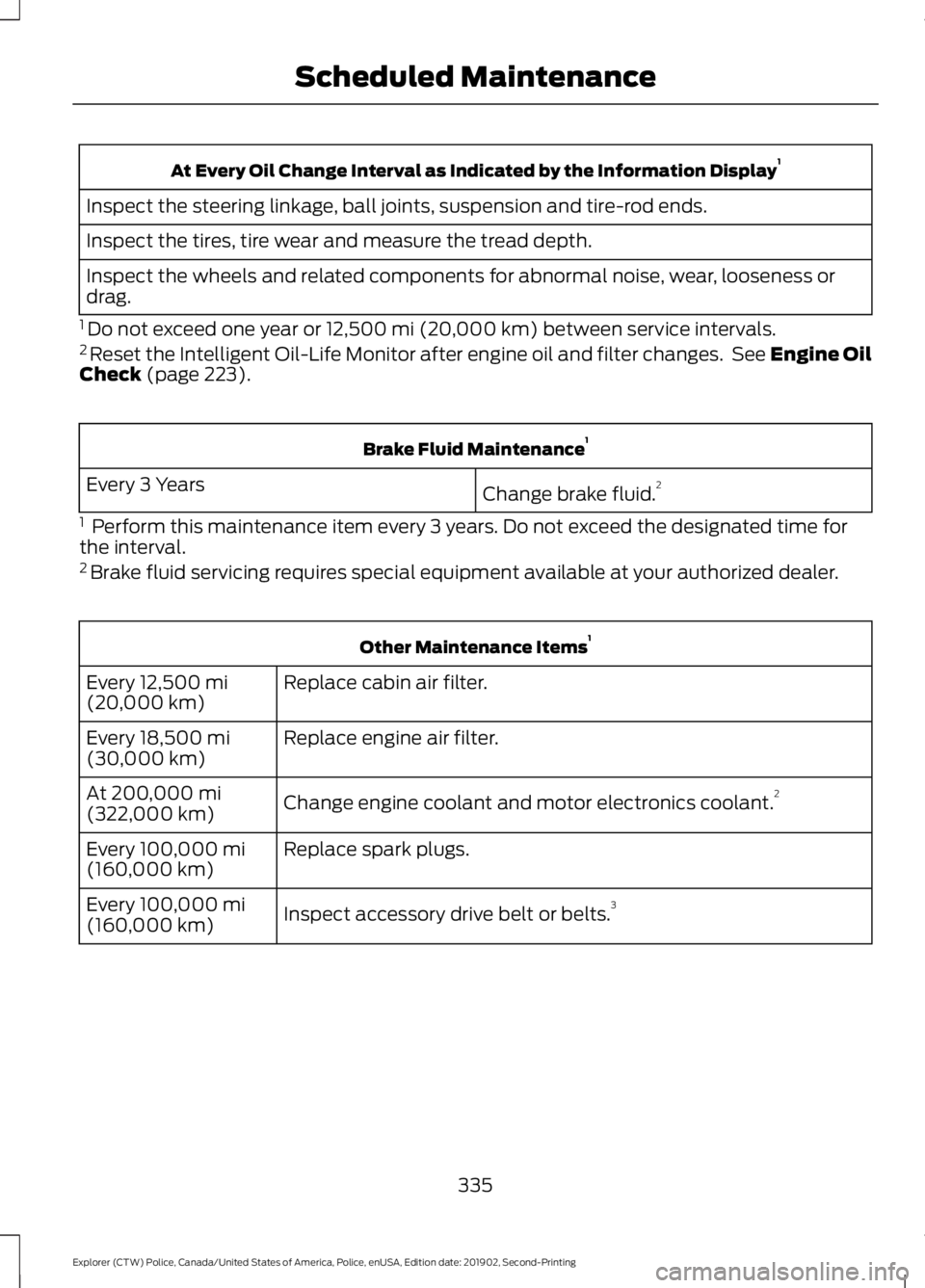
At Every Oil Change Interval as Indicated by the Information Display
1
Inspect the steering linkage, ball joints, suspension and tire-rod ends.
Inspect the tires, tire wear and measure the tread depth.
Inspect the wheels and related components for abnormal noise, wear, looseness or
drag.
1 Do not exceed one year or 12,500 mi (20,000 km) between service intervals.
2 Reset the Intelligent Oil-Life Monitor after engine oil and filter changes. See Engine Oil
Check
(page 223). Brake Fluid Maintenance
1
Change brake fluid. 2
Every 3 Years
1 Perform this maintenance item every 3 years. Do not exceed the designated time for
the interval.
2 Brake fluid servicing requires special equipment available at your authorized dealer. Other Maintenance Items
1
Replace cabin air filter.
Every
12,500 mi
(20,000 km)
Replace engine air filter.
Every
18,500 mi
(30,000 km)
Change engine coolant and motor electronics coolant. 2
At
200,000 mi
(322,000 km)
Replace spark plugs.
Every
100,000 mi
(160,000 km)
Inspect accessory drive belt or belts. 3
Every
100,000 mi
(160,000 km)
335
Explorer (CTW) Police, Canada/United States of America, Police, enUSA, Edition date: 201902, Second-Printing Scheduled Maintenance
Page 340 of 395
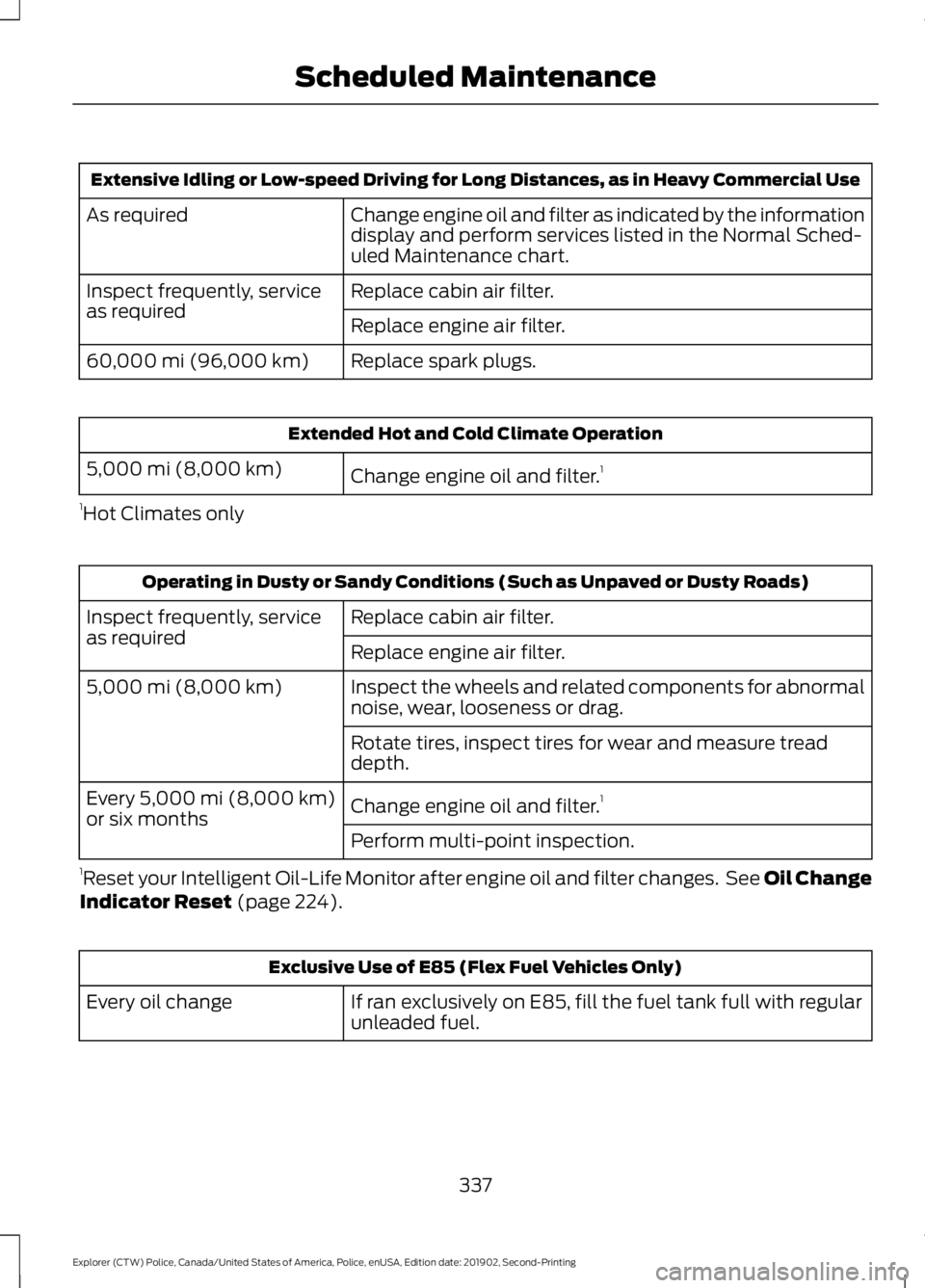
Extensive Idling or Low-speed Driving for Long Distances, as in Heavy Commercial Use
Change engine oil and filter as indicated by the information
display and perform services listed in the Normal Sched-
uled Maintenance chart.
As required
Replace cabin air filter.
Inspect frequently, service
as required
Replace engine air filter.
Replace spark plugs.
60,000 mi (96,000 km) Extended Hot and Cold Climate Operation
Change engine oil and filter. 1
5,000 mi (8,000 km)
1 Hot Climates only Operating in Dusty or Sandy Conditions (Such as Unpaved or Dusty Roads)
Replace cabin air filter.
Inspect frequently, service
as required
Replace engine air filter.
Inspect the wheels and related components for abnormal
noise, wear, looseness or drag.
5,000 mi (8,000 km)
Rotate tires, inspect tires for wear and measure tread
depth.
Change engine oil and filter.1
Every 5,000 mi (8,000 km)
or six months
Perform multi-point inspection.
1 Reset your Intelligent Oil-Life Monitor after engine oil and filter changes. See Oil Change
Indicator Reset
(page 224). Exclusive Use of E85 (Flex Fuel Vehicles Only)
If ran exclusively on E85, fill the fuel tank full with regular
unleaded fuel.
Every oil change
337
Explorer (CTW) Police, Canada/United States of America, Police, enUSA, Edition date: 201902, Second-Printing Scheduled Maintenance
Page 341 of 395
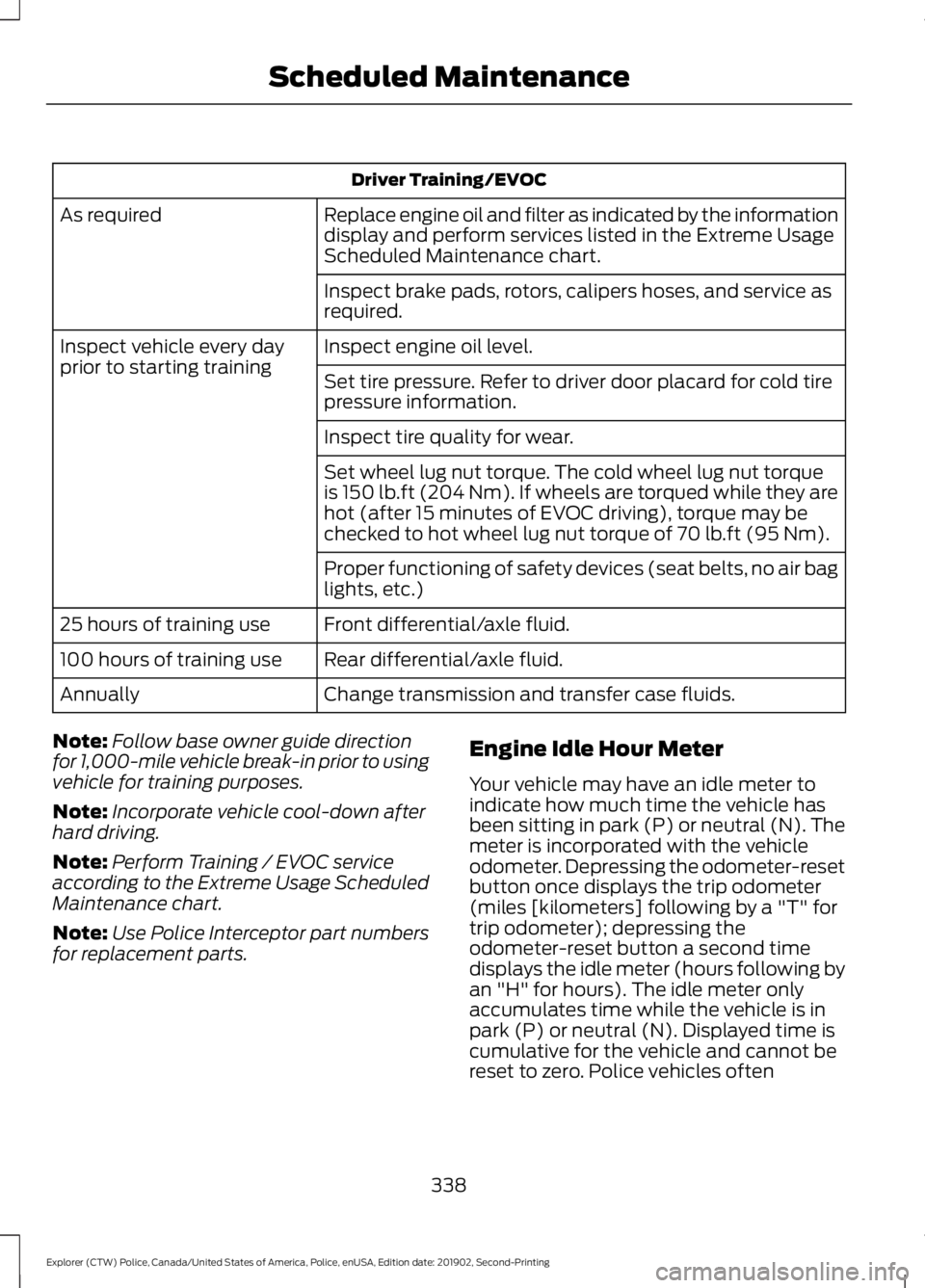
Driver Training/EVOC
Replace engine oil and filter as indicated by the information
display and perform services listed in the Extreme Usage
Scheduled Maintenance chart.
As required
Inspect brake pads, rotors, calipers hoses, and service as
required.
Inspect engine oil level.
Inspect vehicle every day
prior to starting training
Set tire pressure. Refer to driver door placard for cold tire
pressure information.
Inspect tire quality for wear.
Set wheel lug nut torque. The cold wheel lug nut torque
is 150 lb.ft (204 Nm). If wheels are torqued while they are
hot (after 15 minutes of EVOC driving), torque may be
checked to hot wheel lug nut torque of
70 lb.ft (95 Nm).
Proper functioning of safety devices (seat belts, no air bag
lights, etc.)
Front differential/axle fluid.
25 hours of training use
Rear differential/axle fluid.
100 hours of training use
Change transmission and transfer case fluids.
Annually
Note: Follow base owner guide direction
for 1,000-mile vehicle break-in prior to using
vehicle for training purposes.
Note: Incorporate vehicle cool-down after
hard driving.
Note: Perform Training / EVOC service
according to the Extreme Usage Scheduled
Maintenance chart.
Note: Use Police Interceptor part numbers
for replacement parts. Engine Idle Hour Meter
Your vehicle may have an idle meter to
indicate how much time the vehicle has
been sitting in park (P) or neutral (N). The
meter is incorporated with the vehicle
odometer. Depressing the odometer-reset
button once displays the trip odometer
(miles [kilometers] following by a "T" for
trip odometer); depressing the
odometer-reset button a second time
displays the idle meter (hours following by
an "H" for hours). The idle meter only
accumulates time while the vehicle is in
park (P) or neutral (N). Displayed time is
cumulative for the vehicle and cannot be
reset to zero. Police vehicles often
338
Explorer (CTW) Police, Canada/United States of America, Police, enUSA, Edition date: 201902, Second-Printing Scheduled Maintenance
Page 360 of 395
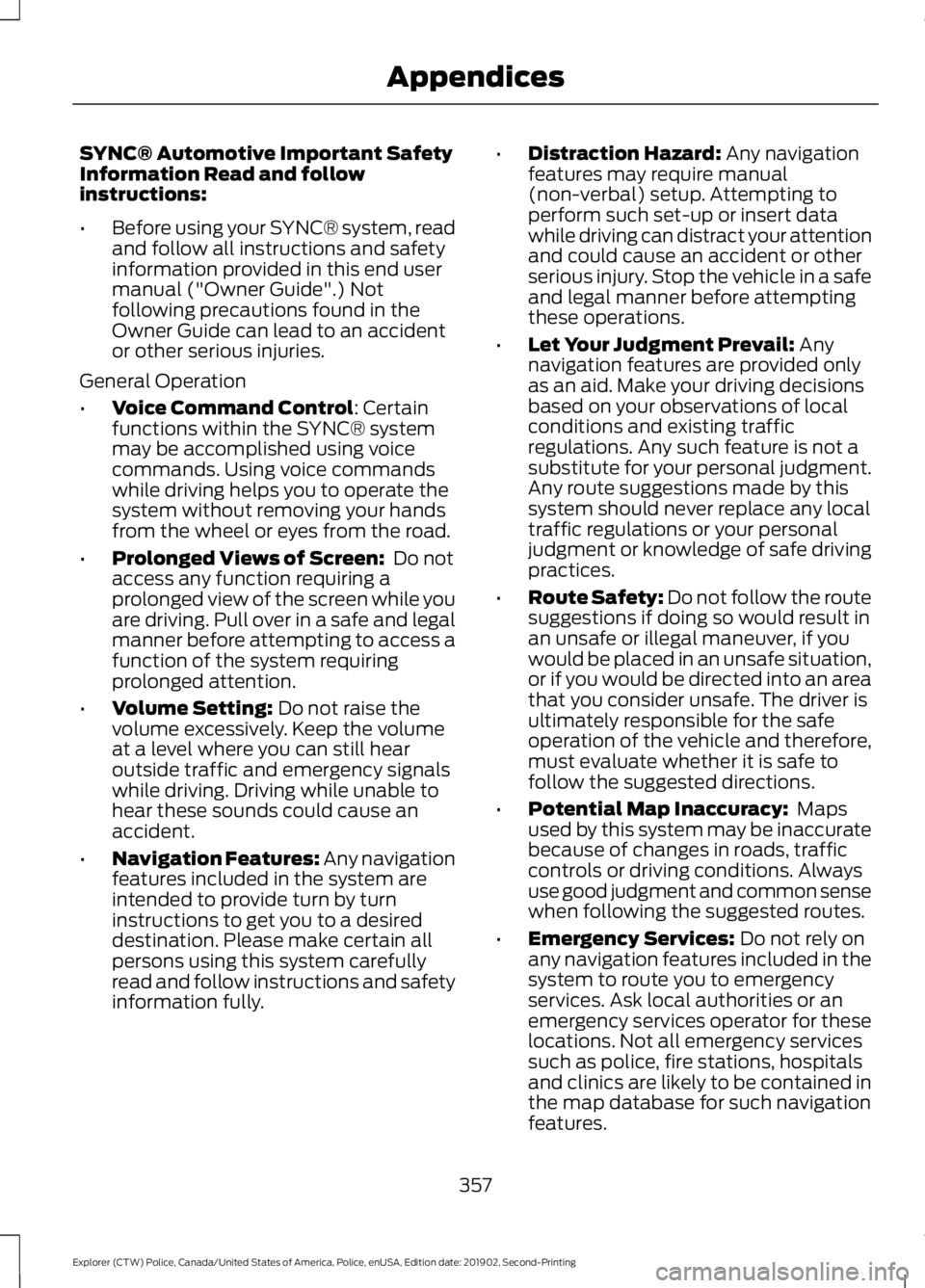
SYNC® Automotive Important Safety
Information Read and follow
instructions:
•
Before using your SYNC® system, read
and follow all instructions and safety
information provided in this end user
manual ("Owner Guide".) Not
following precautions found in the
Owner Guide can lead to an accident
or other serious injuries.
General Operation
• Voice Command Control: Certain
functions within the SYNC® system
may be accomplished using voice
commands. Using voice commands
while driving helps you to operate the
system without removing your hands
from the wheel or eyes from the road.
• Prolonged Views of Screen:
Do not
access any function requiring a
prolonged view of the screen while you
are driving. Pull over in a safe and legal
manner before attempting to access a
function of the system requiring
prolonged attention.
• Volume Setting:
Do not raise the
volume excessively. Keep the volume
at a level where you can still hear
outside traffic and emergency signals
while driving. Driving while unable to
hear these sounds could cause an
accident.
• Navigation Features:
Any navigation
features included in the system are
intended to provide turn by turn
instructions to get you to a desired
destination. Please make certain all
persons using this system carefully
read and follow instructions and safety
information fully. •
Distraction Hazard:
Any navigation
features may require manual
(non-verbal) setup. Attempting to
perform such set-up or insert data
while driving can distract your attention
and could cause an accident or other
serious injury. Stop the vehicle in a safe
and legal manner before attempting
these operations.
• Let Your Judgment Prevail:
Any
navigation features are provided only
as an aid. Make your driving decisions
based on your observations of local
conditions and existing traffic
regulations. Any such feature is not a
substitute for your personal judgment.
Any route suggestions made by this
system should never replace any local
traffic regulations or your personal
judgment or knowledge of safe driving
practices.
• Route Safety: Do not follow the route
suggestions if doing so would result in
an unsafe or illegal maneuver, if you
would be placed in an unsafe situation,
or if you would be directed into an area
that you consider unsafe. The driver is
ultimately responsible for the safe
operation of the vehicle and therefore,
must evaluate whether it is safe to
follow the suggested directions.
• Potential Map Inaccuracy:
Maps
used by this system may be inaccurate
because of changes in roads, traffic
controls or driving conditions. Always
use good judgment and common sense
when following the suggested routes.
• Emergency Services:
Do not rely on
any navigation features included in the
system to route you to emergency
services. Ask local authorities or an
emergency services operator for these
locations. Not all emergency services
such as police, fire stations, hospitals
and clinics are likely to be contained in
the map database for such navigation
features.
357
Explorer (CTW) Police, Canada/United States of America, Police, enUSA, Edition date: 201902, Second-Printing Appendices
Page 386 of 395
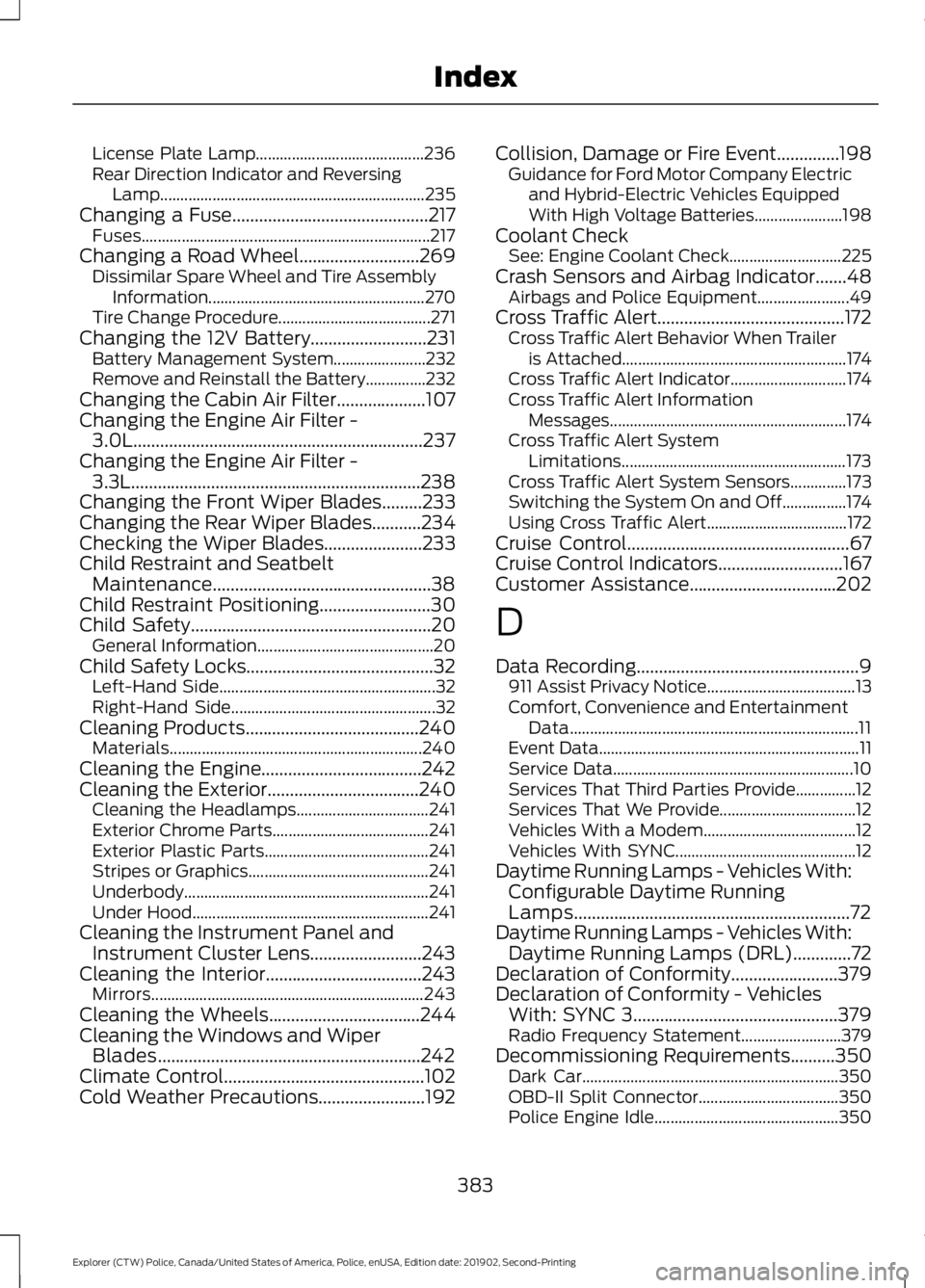
License Plate Lamp..........................................
236
Rear Direction Indicator and Reversing Lamp.................................................................. 235
Changing a Fuse............................................217 Fuses........................................................................\
217
Changing a Road Wheel...........................269 Dissimilar Spare Wheel and Tire Assembly
Information...................................................... 270
Tire Change Procedure...................................... 271
Changing the 12V Battery
..........................231
Battery Management System....................... 232
Remove and Reinstall the Battery...............232
Changing the Cabin Air Filter....................107
Changing the Engine Air Filter - 3.0L.................................................................237
Changing the Engine Air Filter - 3.3L.................................................................238
Changing the Front Wiper Blades.........233
Changing the Rear Wiper Blades...........234
Checking the Wiper Blades
......................233
Child Restraint and Seatbelt Maintenance.................................................38
Child Restraint Positioning
.........................30
Child Safety......................................................20 General Information............................................ 20
Child Safety Locks..........................................32 Left-Hand Side...................................................... 32
Right-Hand Side................................................... 32
Cleaning Products
.......................................240
Materials............................................................... 240
Cleaning the Engine....................................242
Cleaning the Exterior
..................................240
Cleaning the Headlamps................................. 241
Exterior Chrome Parts....................................... 241
Exterior Plastic Parts......................................... 241
Stripes or Graphics............................................. 241
Underbody............................................................. 241
Under Hood........................................................... 241
Cleaning the Instrument Panel and Instrument Cluster Lens.........................243
Cleaning the Interior...................................243 Mirrors.................................................................... 243
Cleaning the Wheels
..................................244
Cleaning the Windows and Wiper Blades...........................................................242
Climate Control
.............................................102
Cold Weather Precautions........................192 Collision, Damage or Fire Event..............198
Guidance for Ford Motor Company Electric
and Hybrid-Electric Vehicles Equipped
With High Voltage Batteries...................... 198
Coolant Check See: Engine Coolant Check............................ 225
Crash Sensors and Airbag Indicator.......48 Airbags and Police Equipment....................... 49
Cross Traffic Alert..........................................172 Cross Traffic Alert Behavior When Trailer
is Attached........................................................ 174
Cross Traffic Alert Indicator............................. 174
Cross Traffic Alert Information Messages........................................................... 174
Cross Traffic Alert System Limitations........................................................ 173
Cross Traffic Alert System Sensors..............173
Switching the System On and Off................174
Using Cross Traffic Alert................................... 172
Cruise Control..................................................67
Cruise Control Indicators
............................167
Customer Assistance.................................202
D
Data Recording
..................................................9
911 Assist Privacy Notice..................................... 13
Comfort, Convenience and Entertainment Data........................................................................\
11
Event Data................................................................. 11
Service Data............................................................ 10
Services That Third Parties Provide...............12
Services That We Provide.................................. 12
Vehicles With a Modem...................................... 12
Vehicles With SYNC............................................. 12
Daytime Running Lamps - Vehicles With: Configurable Daytime Running
Lamps..............................................................72
Daytime Running Lamps - Vehicles With: Daytime Running Lamps (DRL).............72
Declaration of Conformity........................379
Declaration of Conformity - Vehicles With: SYNC 3
..............................................379
Radio Frequency Statement......................... 379
Decommissioning Requirements
..........350
Dark Car................................................................ 350
OBD-II Split Connector................................... 350
Police Engine Idle.............................................. 350
383
Explorer (CTW) Police, Canada/United States of America, Police, enUSA, Edition date: 201902, Second-Printing Index
Page 390 of 395
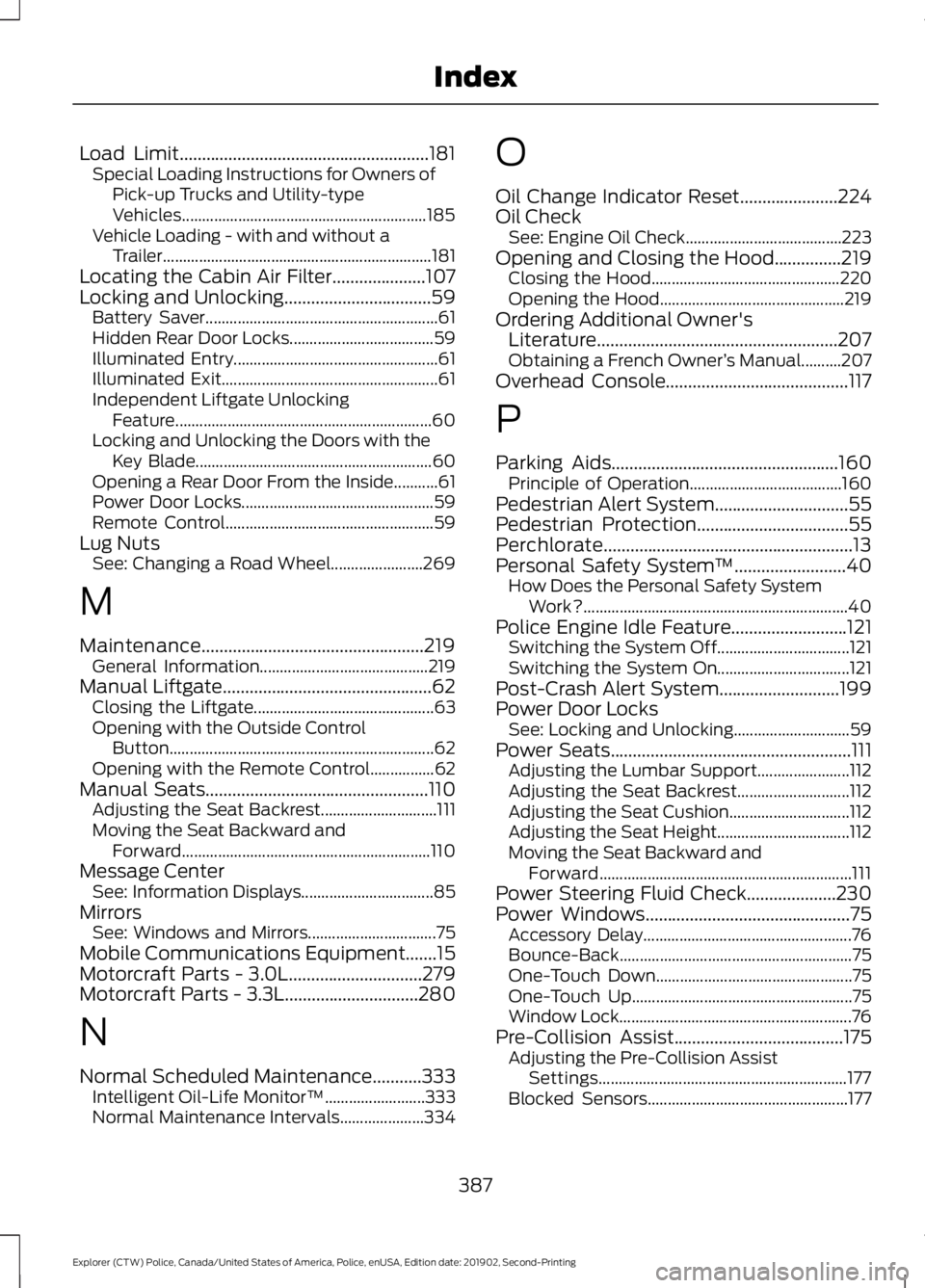
Load Limit........................................................181
Special Loading Instructions for Owners of
Pick-up Trucks and Utility-type
Vehicles............................................................. 185
Vehicle Loading - with and without a Trailer................................................................... 181
Locating the Cabin Air Filter.....................107
Locking and Unlocking.................................59 Battery Saver.......................................................... 61
Hidden Rear Door Locks.................................... 59
Illuminated Entry................................................... 61
Illuminated Exit...................................................... 61
Independent Liftgate Unlocking Feature................................................................ 60
Locking and Unlocking the Doors with the Key Blade........................................................... 60
Opening a Rear Door From the Inside...........61
Power Door Locks................................................ 59
Remote Control.................................................... 59
Lug Nuts See: Changing a Road Wheel....................... 269
M
Maintenance..................................................219 General Information.......................................... 219
Manual Liftgate...............................................62
Closing the Liftgate............................................. 63
Opening with the Outside Control Button.................................................................. 62
Opening with the Remote Control................62
Manual Seats
..................................................110
Adjusting the Seat Backrest............................. 111
Moving the Seat Backward and Forward.............................................................. 110
Message Center See: Information Displays................................. 85
Mirrors See: Windows and Mirrors................................ 75
Mobile Communications Equipment.......15
Motorcraft Parts - 3.0L..............................279
Motorcraft Parts - 3.3L
..............................280
N
Normal Scheduled Maintenance...........333 Intelligent Oil-Life Monitor™......................... 333
Normal Maintenance Intervals..................... 334O
Oil Change Indicator Reset......................224
Oil Check
See: Engine Oil Check....................................... 223
Opening and Closing the Hood...............219 Closing the Hood............................................... 220
Opening the Hood.............................................. 219
Ordering Additional Owner's Literature
......................................................207
Obtaining a French Owner ’s Manual..........207
Overhead Console.........................................117
P
Parking Aids
...................................................160
Principle of Operation...................................... 160
Pedestrian Alert System
..............................55
Pedestrian Protection..................................55
Perchlorate........................................................13
Personal Safety System ™
.........................40
How Does the Personal Safety System
Work?.................................................................. 40
Police Engine Idle Feature..........................121 Switching the System Off................................. 121
Switching the System On................................. 121
Post-Crash Alert System...........................199
Power Door Locks See: Locking and Unlocking............................. 59
Power Seats
......................................................111
Adjusting the Lumbar Support....................... 112
Adjusting the Seat Backrest............................ 112
Adjusting the Seat Cushion.............................. 112
Adjusting the Seat Height................................. 112
Moving the Seat Backward and Forward............................................................... 111
Power Steering Fluid Check....................230
Power Windows
..............................................75
Accessory Delay.................................................... 76
Bounce-Back.......................................................... 75
One-Touch Down................................................. 75
One-Touch Up....................................................... 75
Window Lock.......................................................... 76
Pre-Collision Assist......................................175 Adjusting the Pre-Collision Assist
Settings.............................................................. 177
Blocked Sensors.................................................. 177
387
Explorer (CTW) Police, Canada/United States of America, Police, enUSA, Edition date: 201902, Second-Printing Index