instrument panel FORD POLICE INTERCEPTOR 2020 Owner's Manual
[x] Cancel search | Manufacturer: FORD, Model Year: 2020, Model line: POLICE INTERCEPTOR, Model: FORD POLICE INTERCEPTOR 2020Pages: 395, PDF Size: 5.62 MB
Page 219 of 395
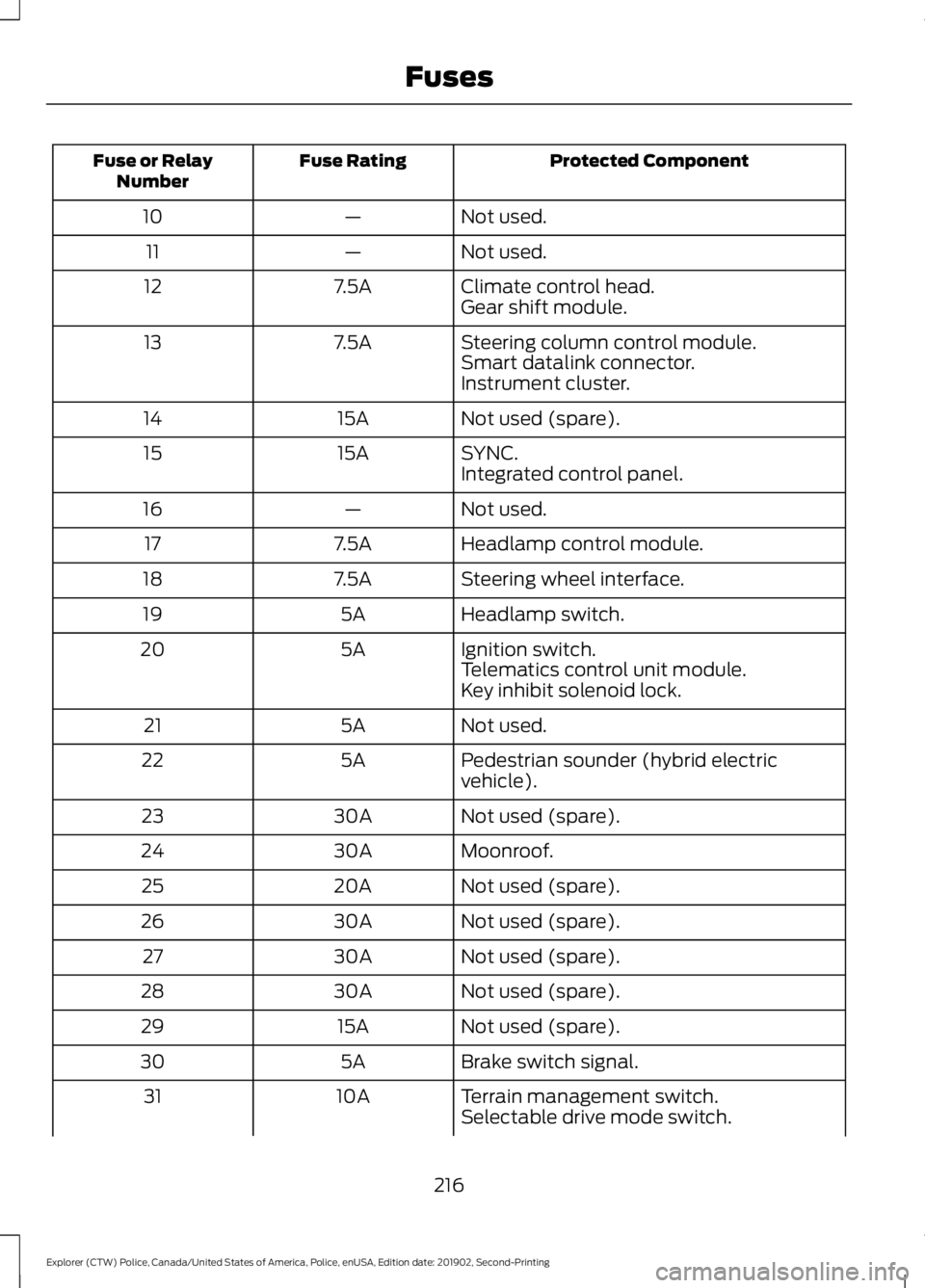
Protected Component
Fuse Rating
Fuse or Relay
Number
Not used.
—
10
Not used.
—
11
Climate control head.
7.5A
12
Gear shift module.
Steering column control module.
7.5A
13
Smart datalink connector.
Instrument cluster.
Not used (spare).
15A
14
SYNC.
15A
15
Integrated control panel.
Not used.
—
16
Headlamp control module.
7.5A
17
Steering wheel interface.
7.5A
18
Headlamp switch.
5A
19
Ignition switch.
5A
20
Telematics control unit module.
Key inhibit solenoid lock.
Not used.
5A
21
Pedestrian sounder (hybrid electric
vehicle).
5A
22
Not used (spare).
30A
23
Moonroof.
30A
24
Not used (spare).
20A
25
Not used (spare).
30A
26
Not used (spare).
30A
27
Not used (spare).
30A
28
Not used (spare).
15A
29
Brake switch signal.
5A
30
Terrain management switch.
10A
31
Selectable drive mode switch.
216
Explorer (CTW) Police, Canada/United States of America, Police, enUSA, Edition date: 201902, Second-Printing Fuses
Page 246 of 395
To clean the windshield and wiper blades:
•
Clean the windshield with a
non-abrasive glass cleaner. When
cleaning the interior of the windshield,
avoid getting any glass cleaner on the
instrument panel or door panels. Wipe
any glass cleaner off these surfaces
immediately.
• For windshields contaminated with
tree sap, chemicals, wax or bugs, clean
the entire windshield using steel wool
(no greater than 0000 grade) in a
circular motion and rinse with water.
• Clean the wiper blades with isopropyl
rubbing alcohol or windshield washer
concentrate.
Note: Do not use razor blades or other
sharp objects to clean or remove decals
from the inside of the heated rear window.
The vehicle warranty does not cover
damage caused to the heated rear window
grid lines.
CLEANING THE INTERIOR WARNING: Do not use cleaning
solvents, bleach or dye on the vehicle's
seatbelts, as these actions may weaken
the belt webbing. WARNING:
On vehicles equipped
with seat-mounted airbags, do not use
chemical solvents or strong detergents.
Such products could contaminate the
side airbag system and affect
performance of the side airbag in a crash. For fabric, carpets, cloth seats and seats
equipped with side airbags:
•
Remove dust and loose dirt with a
vacuum cleaner.
• Remove light stains and soil with
Motorcraft Professional Strength
Carpet & Upholstery Cleaner.
• If grease or tar is present on the
material, spot-clean the area first with
Motorcraft Spot and Stain Remover. In
Canada, use Motorcraft Multi-Purpose
Cleaner.
• If a ring forms on the fabric after spot
cleaning, clean the entire area
immediately (but do not oversaturate)
or the ring will set.
• Do not use household cleaning
products or glass cleaners, which can
stain and discolor the fabric and affect
the flame retardant abilities of the seat
materials.
Mirrors
Do not clean the housing or glass of any
mirror with harsh abrasives, fuel or other
petroleum or ammonia-based cleaning
products.
CLEANING THE INSTRUMENT
PANEL AND INSTRUMENT
CLUSTER LENS WARNING:
Do not use chemical
solvents or strong detergents when
cleaning the steering wheel or
instrument panel to avoid contamination
of the airbag system.
Note: Follow the same procedure as
cleaning leather seats for cleaning leather
instrument panels and leather interior trim
surfaces.
243
Explorer (CTW) Police, Canada/United States of America, Police, enUSA, Edition date: 201902, Second-Printing Vehicle Care
Page 247 of 395
Clean the instrument panel and cluster
lens with a clean, damp and soft cloth,
then use a clean, dry and soft cloth to dry
these areas.
•
Avoid cleaners or polishes that increase
the gloss of the upper portion of the
instrument panel. The dull finish in this
area helps protect you from
undesirable windshield reflection.
• Do not use any household cleaning
products or glass cleaners as these
may damage the finish of the
instrument panel, interior trim and
cluster lens.
• Wash or wipe your hands clean if you
have been in contact with certain
products such as insect repellent and
suntan lotion to avoid possible damage
to the interior painted surfaces.
• Do not allow air fresheners and hand
sanitizers to spill onto interior surfaces.
If a spill occurs, wipe off immediately.
Your warranty may not cover these
damages.
If a staining liquid like coffee or juice has
been spilled on the instrument panel or on
interior trim surfaces:
1. Wipe up spilled liquid using a clean, soft cloth as quickly as possible.
2. Use Motorcraft Premium Leather and Vinyl Cleaner or a commercially
available leather cleaning product for
automotive interiors. Test any cleaner
or stain remover on an inconspicuous
area.
3. Alternatively, wipe the surface with a clean, soft cloth and a mild soap and
water solution. Dry the area with a
clean, soft cloth.
4. If necessary, apply more soap and water solution or cleaning product to
a clean, soft cloth and press it onto the
soiled area. Allow this to set at room
temperature for 30 minutes. 5. Remove the soaked cloth, then with a
clean, damp cloth, use a rubbing
motion for 60 seconds on the soiled
area.
6. Dry the area with a clean, soft cloth.
REPAIRING MINOR PAINT
DAMAGE
Authorized dealers have touch-up paint to
match your vehicle ’s color. Your vehicle
color code is printed on a sticker on the
front, left-hand side door jamb. Take your
color code to your authorized dealer to
make sure you get the correct color.
Before repairing minor paint damage, use
a cleaner such as Motorcraft Bug and Tar
Remover to remove particles such as bird
droppings, tree sap, insect deposits, tar
spots, road salt and industrial fallout.
Always read the instructions before using
cleaning products.
CLEANING THE WHEELS
1. Regularly clean them with a wheel cleaner. We recommend that you use
Ford approved wheel cleaner if
available.
2. Remove dirt and brake dust with a sponge.
3. Remove tar and grease with a bug and
tar remover. We recommend that you
use Ford approved bug and tar remover
if available.
4. Thoroughly rinse the wheels with water
after cleaning.
If you intend on parking your vehicle for an
extended period after cleaning the wheels
with a wheel cleaner, drive your vehicle for
a few minutes before doing so. This
reduces the risk of corrosion of the brake
discs, brake pads and linings.
244
Explorer (CTW) Police, Canada/United States of America, Police, enUSA, Edition date: 201902, Second-Printing Vehicle Care
Page 284 of 395
VEHICLE IDENTIFICATION
NUMBER
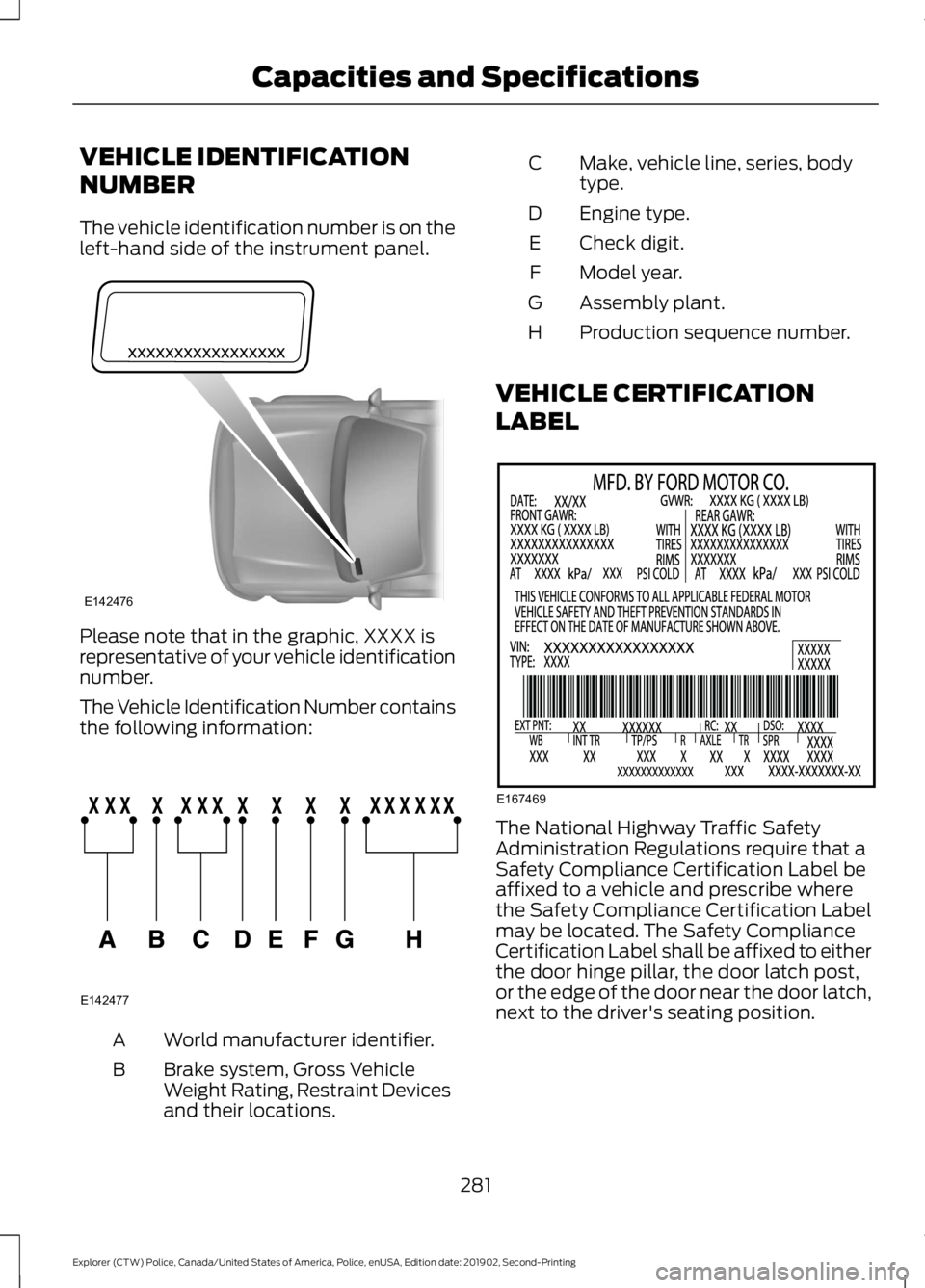
The vehicle identification number is on the
left-hand side of the instrument panel.
Please note that in the graphic, XXXX is
representative of your vehicle identification
number.
The Vehicle Identification Number contains
the following information:
World manufacturer identifier.
A
Brake system, Gross Vehicle
Weight Rating, Restraint Devices
and their locations.
B Make, vehicle line, series, body
type.
C
Engine type.
D
Check digit.
E
Model year.
F
Assembly plant.
G
Production sequence number.
H
VEHICLE CERTIFICATION
LABEL The National Highway Traffic Safety
Administration Regulations require that a
Safety Compliance Certification Label be
affixed to a vehicle and prescribe where
the Safety Compliance Certification Label
may be located. The Safety Compliance
Certification Label shall be affixed to either
the door hinge pillar, the door latch post,
or the edge of the door near the door latch,
next to the driver's seating position.
281
Explorer (CTW) Police, Canada/United States of America, Police, enUSA, Edition date: 201902, Second-Printing Capacities and SpecificationsE142476 E142477 E167469
Page 313 of 395
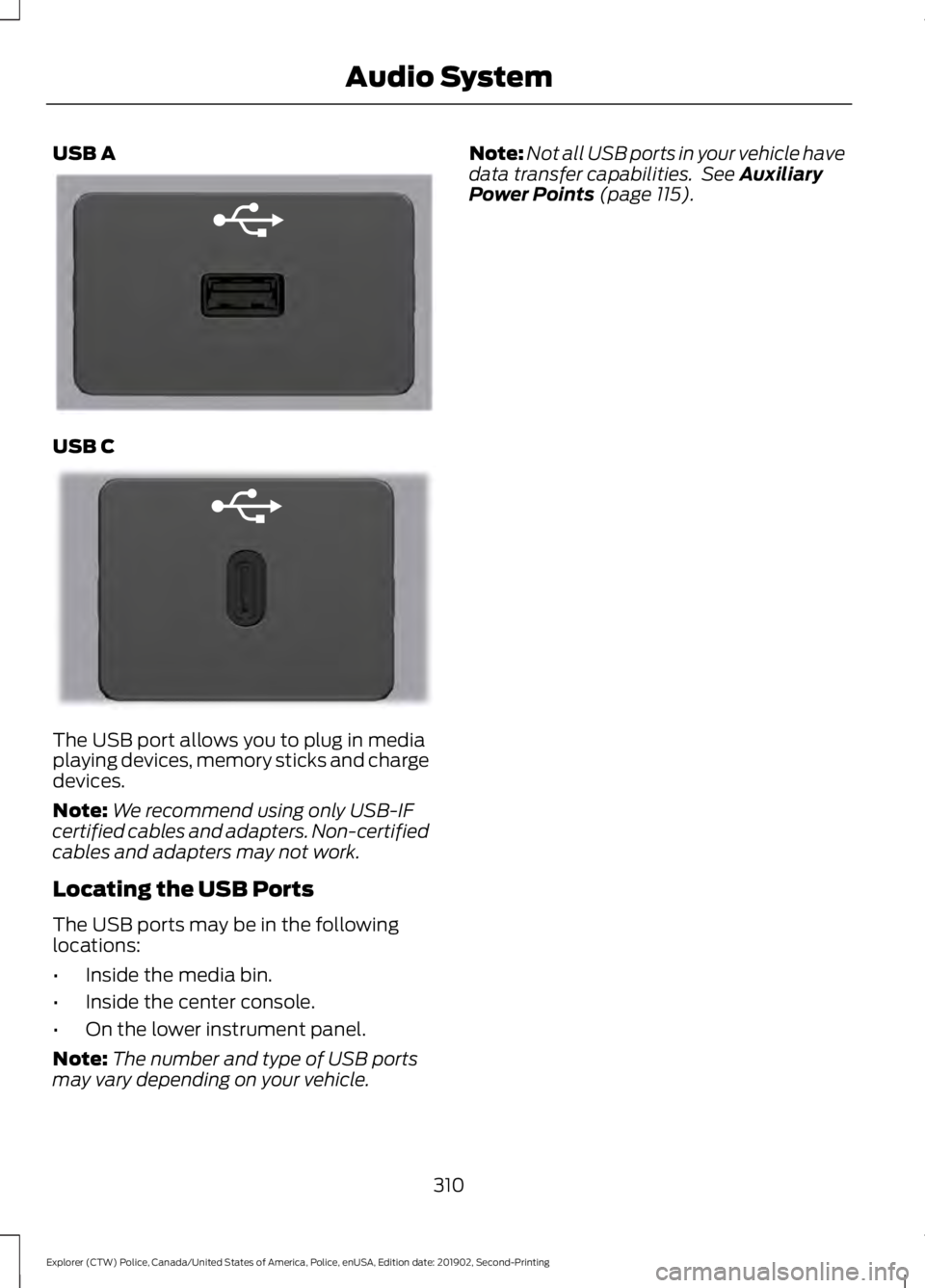
USB A
USB C
The USB port allows you to plug in media
playing devices, memory sticks and charge
devices.
Note:
We recommend using only USB-IF
certified cables and adapters. Non-certified
cables and adapters may not work.
Locating the USB Ports
The USB ports may be in the following
locations:
• Inside the media bin.
• Inside the center console.
• On the lower instrument panel.
Note: The number and type of USB ports
may vary depending on your vehicle. Note:
Not all USB ports in your vehicle have
data transfer capabilities. See Auxiliary
Power Points (page 115).
310
Explorer (CTW) Police, Canada/United States of America, Police, enUSA, Edition date: 201902, Second-Printing Audio SystemE201595 E301114
Page 386 of 395
License Plate Lamp..........................................
236
Rear Direction Indicator and Reversing Lamp.................................................................. 235
Changing a Fuse............................................217 Fuses........................................................................\
217
Changing a Road Wheel...........................269 Dissimilar Spare Wheel and Tire Assembly
Information...................................................... 270
Tire Change Procedure...................................... 271
Changing the 12V Battery
..........................231
Battery Management System....................... 232
Remove and Reinstall the Battery...............232
Changing the Cabin Air Filter....................107
Changing the Engine Air Filter - 3.0L.................................................................237
Changing the Engine Air Filter - 3.3L.................................................................238
Changing the Front Wiper Blades.........233
Changing the Rear Wiper Blades...........234
Checking the Wiper Blades
......................233
Child Restraint and Seatbelt Maintenance.................................................38
Child Restraint Positioning
.........................30
Child Safety......................................................20 General Information............................................ 20
Child Safety Locks..........................................32 Left-Hand Side...................................................... 32
Right-Hand Side................................................... 32
Cleaning Products
.......................................240
Materials............................................................... 240
Cleaning the Engine....................................242
Cleaning the Exterior
..................................240
Cleaning the Headlamps................................. 241
Exterior Chrome Parts....................................... 241
Exterior Plastic Parts......................................... 241
Stripes or Graphics............................................. 241
Underbody............................................................. 241
Under Hood........................................................... 241
Cleaning the Instrument Panel and Instrument Cluster Lens.........................243
Cleaning the Interior...................................243 Mirrors.................................................................... 243
Cleaning the Wheels
..................................244
Cleaning the Windows and Wiper Blades...........................................................242
Climate Control
.............................................102
Cold Weather Precautions........................192 Collision, Damage or Fire Event..............198
Guidance for Ford Motor Company Electric
and Hybrid-Electric Vehicles Equipped
With High Voltage Batteries...................... 198
Coolant Check See: Engine Coolant Check............................ 225
Crash Sensors and Airbag Indicator.......48 Airbags and Police Equipment....................... 49
Cross Traffic Alert..........................................172 Cross Traffic Alert Behavior When Trailer
is Attached........................................................ 174
Cross Traffic Alert Indicator............................. 174
Cross Traffic Alert Information Messages........................................................... 174
Cross Traffic Alert System Limitations........................................................ 173
Cross Traffic Alert System Sensors..............173
Switching the System On and Off................174
Using Cross Traffic Alert................................... 172
Cruise Control..................................................67
Cruise Control Indicators
............................167
Customer Assistance.................................202
D
Data Recording
..................................................9
911 Assist Privacy Notice..................................... 13
Comfort, Convenience and Entertainment Data........................................................................\
11
Event Data................................................................. 11
Service Data............................................................ 10
Services That Third Parties Provide...............12
Services That We Provide.................................. 12
Vehicles With a Modem...................................... 12
Vehicles With SYNC............................................. 12
Daytime Running Lamps - Vehicles With: Configurable Daytime Running
Lamps..............................................................72
Daytime Running Lamps - Vehicles With: Daytime Running Lamps (DRL).............72
Declaration of Conformity........................379
Declaration of Conformity - Vehicles With: SYNC 3
..............................................379
Radio Frequency Statement......................... 379
Decommissioning Requirements
..........350
Dark Car................................................................ 350
OBD-II Split Connector................................... 350
Police Engine Idle.............................................. 350
383
Explorer (CTW) Police, Canada/United States of America, Police, enUSA, Edition date: 201902, Second-Printing Index
Page 389 of 395
Quickly Cooling the Interior............................
105
Quickly Heating the Interior............................ 105
Recommended Settings for Cooling..........105
Recommended Settings for Heating..........105
Hints on Driving With Anti-Lock Brakes.............................................................153
Hood Lock See: Opening and Closing the Hood...........219
Horn.....................................................................67
Hybrid Vehicle Frequently Asked Questions......................................................124
Hybrid Vehicle Operation...........................122 Battery..................................................................... 122
Braking.................................................................... 123
Driving...................................................................... 122
Driving to Optimize Fuel Economy...............123
Starting................................................................... 122
Stopping................................................................. 122
Transmission Operation................................... 122
I
Ignition Switch................................................118
In California (U.S. Only)
............................203
Information Display Control.......................67
Information Displays.....................................85 General Information............................................ 85
Information Messages.................................88 AdvanceTrac ™ and Traction Control...........89
Alarm........................................................................\
89
AWD........................................................................\
.. 88
Battery and Charging System (12 volt)...................................................................... 90
Blind Spot Information and Cross Traffic Alert System..................................................... 90
Doors and Locks.................................................... 91
Fuel........................................................................\
.... 92
Hill Start Assist...................................................... 92
Keys and Intelligent Access.............................. 93
Lane Keeping System......................................... 94
Maintenance.......................................................... 94
Park Aid.................................................................... 95
Park Brake............................................................... 96
Police Engine Idle feature.................................. 97
Power Steering...................................................... 97
Pre-Collision Assist.............................................. 97
Seats........................................................................\
. 98
Starting System.................................................... 98Tire Pressure Monitoring System...................
98
Trailer........................................................................\
99
Transmission......................................................... 99
Installing Child Restraints...........................22 Child Seats.............................................................. 22
Using Lap and Shoulder Belts......................... 22
Using Lower Anchors and Tethers for CHildren (LATCH)............................................ 25
Using Tether Straps............................................. 26
Instrument Cluster
.........................................79
Instrument Lighting Dimmer......................72
Instrument Panel
............................................18
Interior Air Quality.........................................107
Interior Lamps..................................................73
Dome Task Lamp.................................................. 74
Front Interior Lamp.............................................. 73
Rear Interior Lamps............................................. 74
Interior Mirror
....................................................78
Automatic Dimming Mirror............................... 78
Manual Dimming Mirror..................................... 78
Introduction.........................................................7
J
Jump Starting the Vehicle.........................196 Connecting the Jumper Cables..................... 196
Jump Starting....................................................... 197
Locating the Jump Starting Connection Points................................................................. 196
Preparing Your Vehicle..................................... 196
Removing the Jumper Cables........................ 197
K
Keys and Remote Controls.........................56
L
Liftgate...............................................................62
Lighting Control..............................................70 Flashing High Beam Headlamps..................... 71
Lighting Control Selections.............................. 70
Switching High Beam Headlamps On and Off........................................................................\
... 71
Lighting..............................................................70 General Information............................................ 70
Load Carrying
..................................................181
386
Explorer (CTW) Police, Canada/United States of America, Police, enUSA, Edition date: 201902, Second-Printing Index