phone FORD POLICE INTERCEPTOR 2020 Owner's Guide
[x] Cancel search | Manufacturer: FORD, Model Year: 2020, Model line: POLICE INTERCEPTOR, Model: FORD POLICE INTERCEPTOR 2020Pages: 395, PDF Size: 5.62 MB
Page 330 of 395
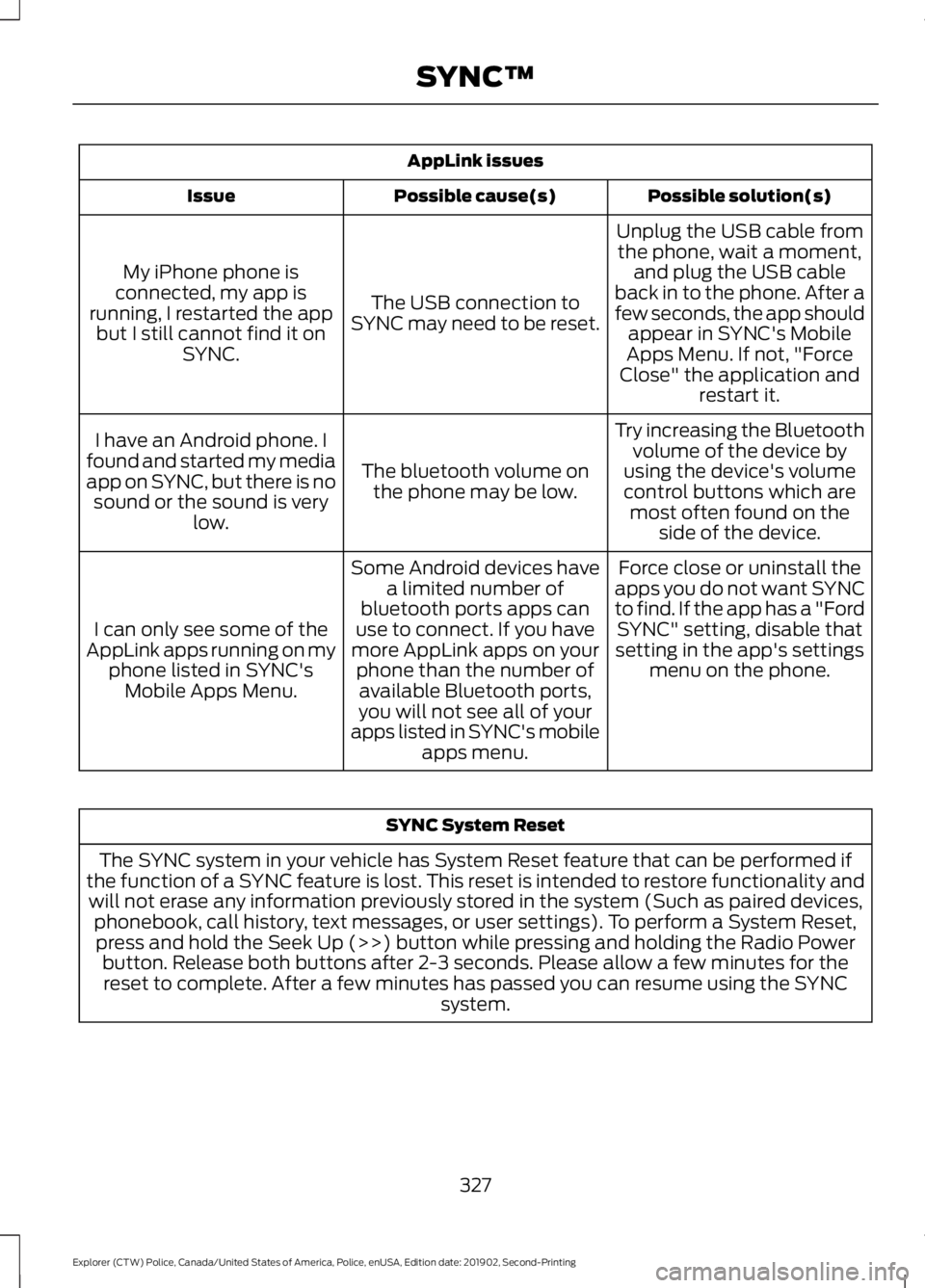
AppLink issues
Possible solution(s)
Possible cause(s)
Issue
Unplug the USB cable fromthe phone, wait a moment, and plug the USB cable
back in to the phone. After a
few seconds, the app should appear in SYNC's Mobile
Apps Menu. If not, "Force
Close" the application and restart it.
The USB connection to
SYNC may need to be reset.
My iPhone phone is
connected, my app is
running, I restarted the app but I still cannot find it on SYNC.
Try increasing the Bluetoothvolume of the device by
using the device's volume control buttons which are most often found on the side of the device.
The bluetooth volume on
the phone may be low.
I have an Android phone. I
found and started my media
app on SYNC, but there is no sound or the sound is very low.
Force close or uninstall the
apps you do not want SYNC
to find. If the app has a "Ford SYNC" setting, disable that
setting in the app's settings menu on the phone.
Some Android devices have
a limited number of
bluetooth ports apps can
use to connect. If you have
more AppLink apps on your phone than the number ofavailable Bluetooth ports,
you will not see all of your
apps listed in SYNC's mobile apps menu.
I can only see some of the
AppLink apps running on my phone listed in SYNC'sMobile Apps Menu. SYNC System Reset
The SYNC system in your vehicle has System Reset feature that can be performed if
the function of a SYNC feature is lost. This reset is intended to restore functionality and will not erase any information previously stored in the system (Such as paired devices, phonebook, call history, text messages, or user settings). To perform a System Reset,press and hold the Seek Up (>>) button while pressing and holding the Radio Power button. Release both buttons after 2-3 seconds. Please allow a few minutes for thereset to complete. After a few minutes has passed you can resume using the SYNC system.
327
Explorer (CTW) Police, Canada/United States of America, Police, enUSA, Edition date: 201902, Second-Printing SYNC™
Page 354 of 395
ELECTROMAGNETIC
COMPATIBILITY
WARNING: Do not place objects
or mount equipment on or near the
airbag cover, on the side of the seatbacks
(of the front seats), or in front seat areas
that may come into contact with a
deploying airbag. Failure to follow these
instructions may increase the risk of
personal injury in the event of a crash. WARNING:
Do not fasten antenna
cables to original vehicle wiring, fuel
pipes and brake pipes. WARNING:
Keep antenna and
power cables at least 4 in (10 cm) from
any electronic modules and airbags.
Note: We test and certify your vehicle to
meet electromagnetic compatibility
legislation (UNECE Regulation 10 or other
applicable local requirements). It is your
responsibility to make sure that any
equipment an authorized dealer installs on
your vehicle complies with applicable local
legislation and other requirements.
Note: Any radio frequency transmitter
equipment in your vehicle (such as cellular
telephones and amateur radio transmitters)
must keep to the parameters in the
following table. We do not provide special
provisions or conditions for installations or
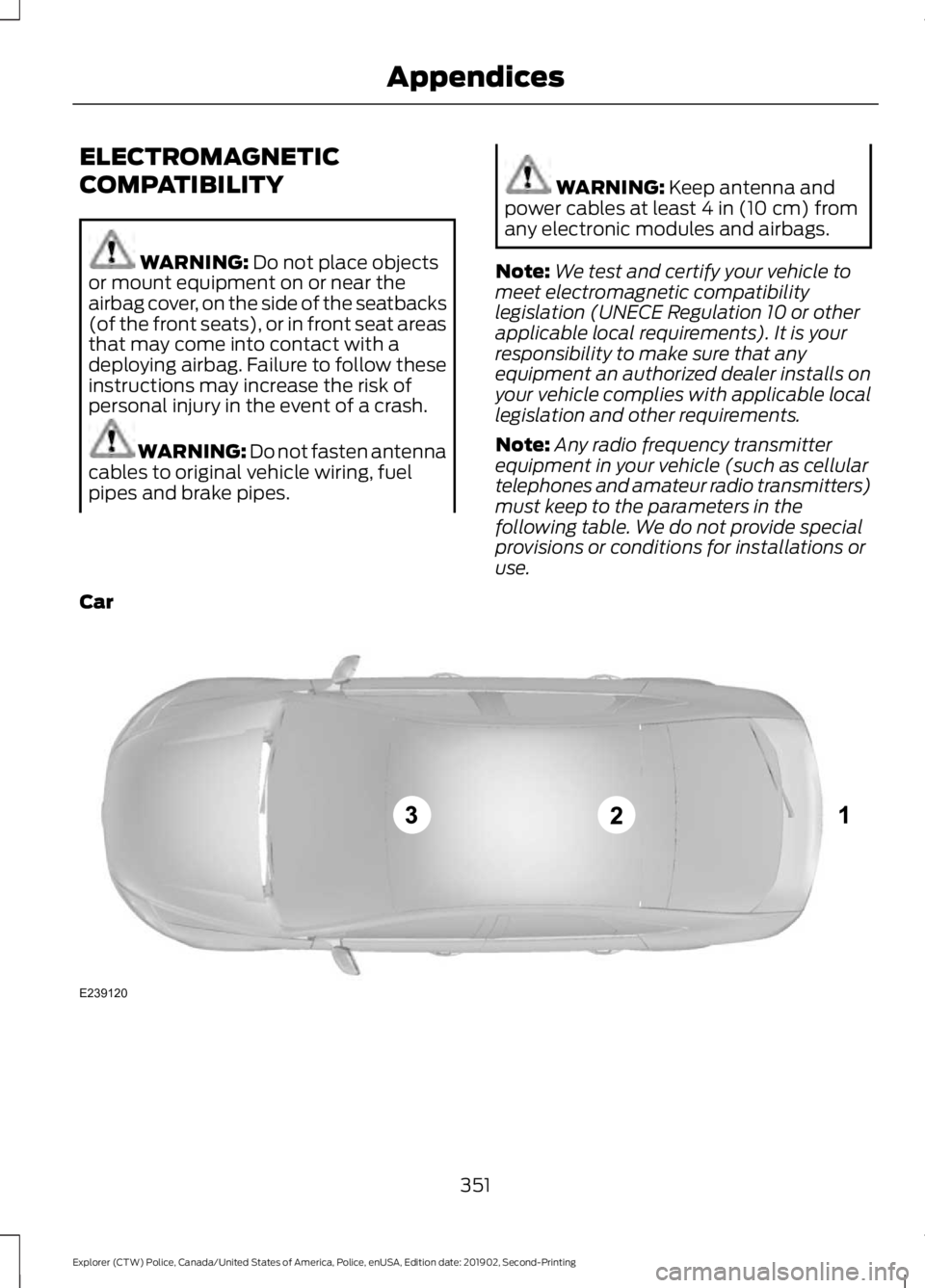
use.
Car 351
Explorer (CTW) Police, Canada/United States of America, Police, enUSA, Edition date: 201902, Second-Printing AppendicesE239120
Page 369 of 395
Restrictions. Except where you have been
specifically licensed to do so by Telenav,
and without limiting the preceding
paragraph, you may not use this Data (a)
with any products, systems, or applications
installed or otherwise connected to or in
communication with vehicles, capable of
vehicle navigation, positioning, dispatch,
real time route guidance, fleet
management or similar applications; or (b)
with or in communication with any
positioning devices or any mobile or
wireless-connected electronic or computer
devices, including without limitation
cellular phones, palmtop and handheld
computers, pagers, and personal digital
assistants or PDAs.
Warning. The Data may contain
inaccurate or incomplete information due
to the passage of time, changing
circumstances, sources used and the
nature of collecting comprehensive
geographic data, any of which may lead to
incorrect results.
No Warranty.
This Data is provided to you
“ as is, ” and you agree to use it at your own
risk. Telenav and its licensors (and their
licensors and suppliers) make no
guarantees, representations or warranties
of any kind, express or implied, arising by
law or otherwise, including but not limited
to, content, quality, accuracy,
completeness, effectiveness, reliability,
fitness for a particular purpose, usefulness,
use or results to be obtained from this
Data, or that the Data or server will be
uninterrupted or error-free.
Disclaimer of Warranty:
TELENAV AND
ITS LICENSORS (INCLUDING THEIR
LICENSORS AND SUPPLIERS) DISCLAIM
ANY WARRANTIES, EXPRESS OR IMPLIED,
OF QUALITY, PERFORMANCE,
MERCHANTABILITY, FITNESS FOR A PARTICULAR PURPOSE OR
NON-INFRINGEMENT. Some States,
Territories and Countries do not allow
certain warranty exclusions, so to that
extent the above exclusion may not apply
to you.
Disclaimer of Liability:
TELENAV AND
ITS LICENSORS (INCLUDING THEIR
LICENSORS AND SUPPLIERS) SHALL NOT
BE LIABLE TO YOU: IN RESPECT OF ANY
CLAIM, DEMAND OR ACTION,
IRRESPECTIVE OF THE NATURE OF THE
CAUSE OF THE CLAIM, DEMAND OR
ACTION ALLEGING ANY LOSS, INJURY OR
DAMAGES, DIRECT OR INDIRECT, WHICH
MAY RESULT FROM THE USE OR
POSSESSION OF THE INFORMATION; OR
FOR ANY LOSS OF PROFIT, REVENUE,
CONTRACTS OR SAVINGS, OR ANY
OTHER DIRECT, INDIRECT, INCIDENTAL,
SPECIAL OR CONSEQUENTIAL DAMAGES
ARISING OUT OF YOUR USE OF OR
INABILITY TO USE THIS INFORMATION,
ANY DEFECT IN THE INFORMATION, OR
THE BREACH OF THESE TERMS OR
CONDITIONS, WHETHER IN AN ACTION
IN CONTRACT OR TORT OR BASED ON A
WARRANTY, EVEN IF TELENAV OR ITS
LICENSORS HAVE BEEN ADVISED OF THE
POSSIBILITY OF SUCH DAMAGES. Some
States, Territories and Countries do not
allow certain liability exclusions or
damages limitations, so to that extent the
above may not apply to you.
Export Control.
You shall not export from
anywhere any part of the Data or any direct
product thereof except in compliance with,
and with all licenses and approvals
required under, applicable export laws,
rules and regulations, including but not
limited to the laws, rules and regulations
administered by the Office of Foreign
Assets Control of the U.S. Department of
Commerce and the Bureau of Industry and
Security of the U.S. Department of
Commerce. To the extent that any such
366
Explorer (CTW) Police, Canada/United States of America, Police, enUSA, Edition date: 201902, Second-Printing Appendices
Page 377 of 395
view it, and (ii) save it, provided that you
do not remove any copyright notices that
appear and do not modify the Data in any
way. You agree not to otherwise reproduce,
copy, modify, decompile, disassemble or
reverse engineer any portion of this Data,
and may not transfer or distribute it in any
form, for any purpose, except to the extent
permitted by mandatory laws.
Restrictions
Except where you have been specifically
licensed to do so by NAV2 , and without
limiting the preceding paragraph, you may
not (a) use this Data with any products,
systems, or applications installed or
otherwise connected to or in
communication with vehicles, capable of
vehicle navigation, positioning, dispatch,
real time route guidance, fleet
management or similar applications; or (b)
with or in communication with any
positioning devices or any mobile or
wireless-connected electronic or computer
devices, including without limitation
cellular phones, palmtop and handheld
computers, pagers, and personal digital
assistants or PDAs. You agree to cease
using this Data if you fail to comply with
these terms and conditions.
Limited Warranty
NAV2 warrants that (a) the Data will
perform substantially in accordance with
the accompanying written materials for a
period of ninety (90) days from the date
of receipt, and (b) any support services
provided by NAV2 shall be substantially as
described in applicable written materials
provided to you by NAV2, and NAV2’
s
support engineers will make commercially
reasonable efforts to solve any problem
issues. rigCustomer Remedies
NAV2 and its suppliers’
entire liability and
your exclusive remedy shall be, at NAV2’ s
sole discretion, either (a) return of the price
paid, if any, or (b) repair or replacement of
the Data that do not meet NAV2’ s Limited
Warranty and that are returned to NAV2
with a copy of your receipt. This Limited
Warranty is void if failure of the Data has
resulted from accident, abuse, or
misapplication. Any replacement Data will
be warranted for the remainder of the
original warranty period or thirty (30) days,
whichever is longer. Neither these remedies
nor any product support services offered
by NAV2 are available without proof of
purchase from an authorized international
source.
No Other Warranty:
EXCEPT FOR THE LMITED WARRANTY
SET FORTH ABOVE AND TO THE EXTENT
PERMITTED BY APPLICABLE LAW, NAV2
AND ITS LICENSORS (INCLUDING THEIR
LICENSORS AND SUPPLIERS) DISCLAIM
ANY WARRANTIES, EXPRESS OR IMPLIED,
OF QUALITY, PERFORMANCE,
MERCHANTABILITY, FITNESS FOR A
PARTICULAR PURPOSE, OWNERSHIP OR
NON-INFRINGEMENT. Certain warranty
exclusions may not be permitted under
applicable law, so to that extent the above
exclusion may not apply to you.
Limited Liability:
TO THE EXTENT PERMITTED BY
APPLICABLE LAW, NAV2 AND ITS
LICENSORS (INCLUDING THEIR
LICENSORS AND SUPPLIERS) SHALL NOT
BE LIABLE TO YOU: IN RESPECT OF ANY
CLAIM, DEMAND OR ACTION,
IRRESPECTIVE OF THE NATURE OF THE
CAUSE OF THE CLAIM, DEMAND OR
ACTION ALLEGING ANY LOSS, INJURY OR
DAMAGES, DIRECT OR INDIRECT, WHICH
MAY RESULT FROM THE USE OR
POSSESSION OF THE INFORMATION; OR
374
Explorer (CTW) Police, Canada/United States of America, Police, enUSA, Edition date: 201902, Second-Printing Appendices
Page 384 of 395
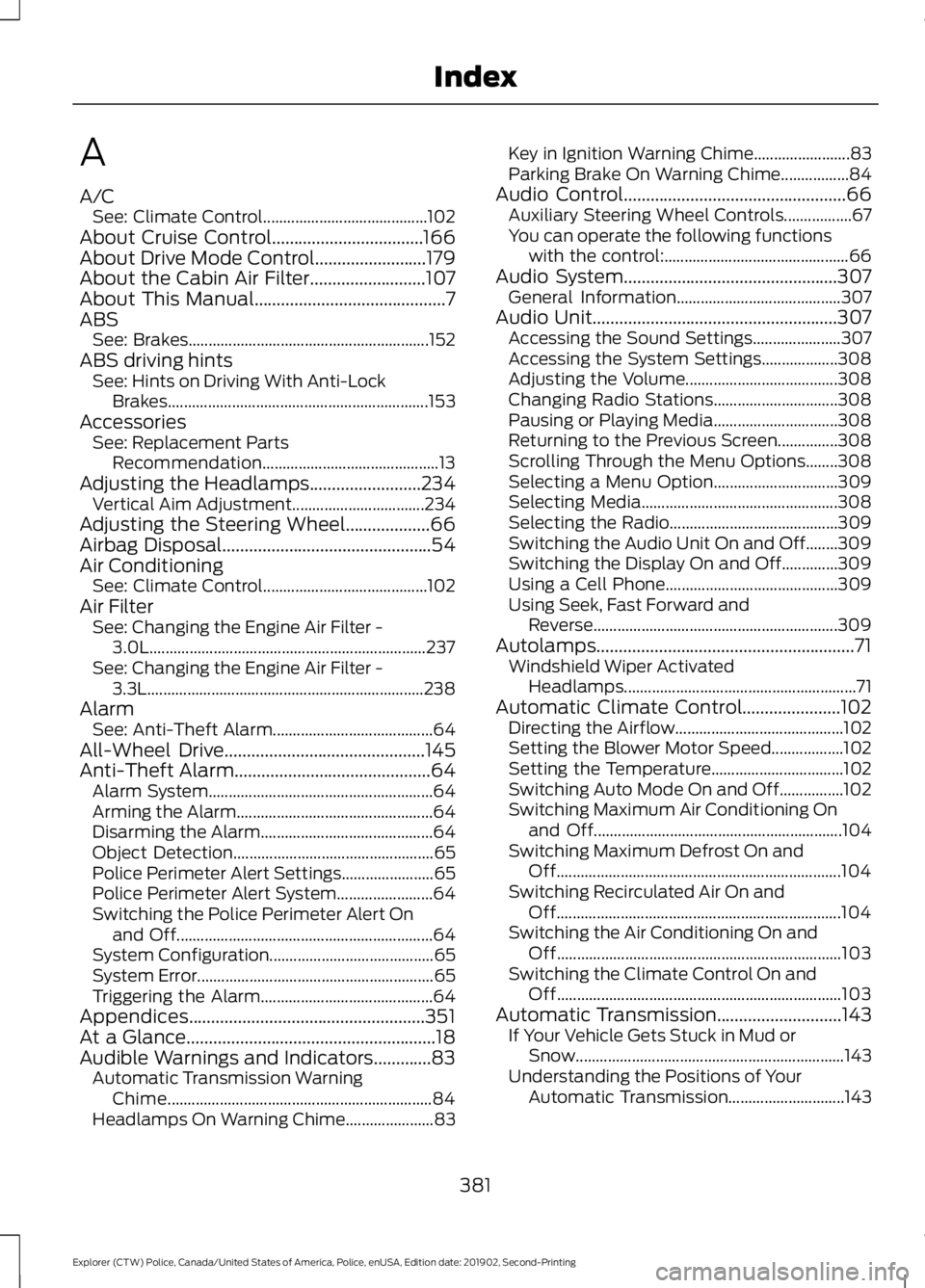
A
A/C
See: Climate Control......................................... 102
About Cruise Control..................................166
About Drive Mode Control.........................179
About the Cabin Air Filter..........................107
About This Manual...........................................7
ABS See: Brakes............................................................ 152
ABS driving hints See: Hints on Driving With Anti-Lock
Brakes................................................................. 153
Accessories See: Replacement Parts
Recommendation............................................ 13
Adjusting the Headlamps.........................234 Vertical Aim Adjustment................................. 234
Adjusting the Steering Wheel...................66
Airbag Disposal...............................................54
Air Conditioning See: Climate Control......................................... 102
Air Filter See: Changing the Engine Air Filter -
3.0L..................................................................... 237
See: Changing the Engine Air Filter - 3.3L..................................................................... 238
Alarm See: Anti-Theft Alarm........................................ 64
All-Wheel Drive
.............................................145
Anti-Theft Alarm............................................64
Alarm System........................................................ 64
Arming the Alarm................................................. 64
Disarming the Alarm........................................... 64
Object Detection.................................................. 65
Police Perimeter Alert Settings....................... 65
Police Perimeter Alert System........................ 64
Switching the Police Perimeter Alert On and Off................................................................ 64
System Configuration......................................... 65
System Error........................................................... 65
Triggering the Alarm........................................... 64
Appendices.....................................................351
At a Glance........................................................18
Audible Warnings and Indicators.............83 Automatic Transmission Warning
Chime.................................................................. 84
Headlamps On Warning Chime...................... 83Key in Ignition Warning Chime........................
83
Parking Brake On Warning Chime.................84
Audio Control
..................................................66
Auxiliary Steering Wheel Controls.................67
You can operate the following functions
with the control:.............................................. 66
Audio System
................................................307
General Information......................................... 307
Audio Unit
.......................................................307
Accessing the Sound Settings...................... 307
Accessing the System Settings................... 308
Adjusting the Volume...................................... 308
Changing Radio Stations............................... 308
Pausing or Playing Media............................... 308
Returning to the Previous Screen...............308
Scrolling Through the Menu Options........308
Selecting a Menu Option............................... 309
Selecting Media................................................. 308
Selecting the Radio.......................................... 309
Switching the Audio Unit On and Off........309
Switching the Display On and Off..............309
Using a Cell Phone........................................... 309
Using Seek, Fast Forward and Reverse............................................................. 309
Autolamps..........................................................71 Windshield Wiper Activated
Headlamps.......................................................... 71
Automatic Climate Control......................102 Directing the Airflow.......................................... 102
Setting the Blower Motor Speed.................. 102
Setting the Temperature................................. 102
Switching Auto Mode On and Off................102
Switching Maximum Air Conditioning On and Off.............................................................. 104
Switching Maximum Defrost On and Off....................................................................... 104
Switching Recirculated Air On and Off....................................................................... 104
Switching the Air Conditioning On and Off....................................................................... 103
Switching the Climate Control On and Off....................................................................... 103
Automatic Transmission............................143 If Your Vehicle Gets Stuck in Mud or
Snow................................................................... 143
Understanding the Positions of Your Automatic Transmission............................. 143
381
Explorer (CTW) Police, Canada/United States of America, Police, enUSA, Edition date: 201902, Second-Printing Index
Page 393 of 395
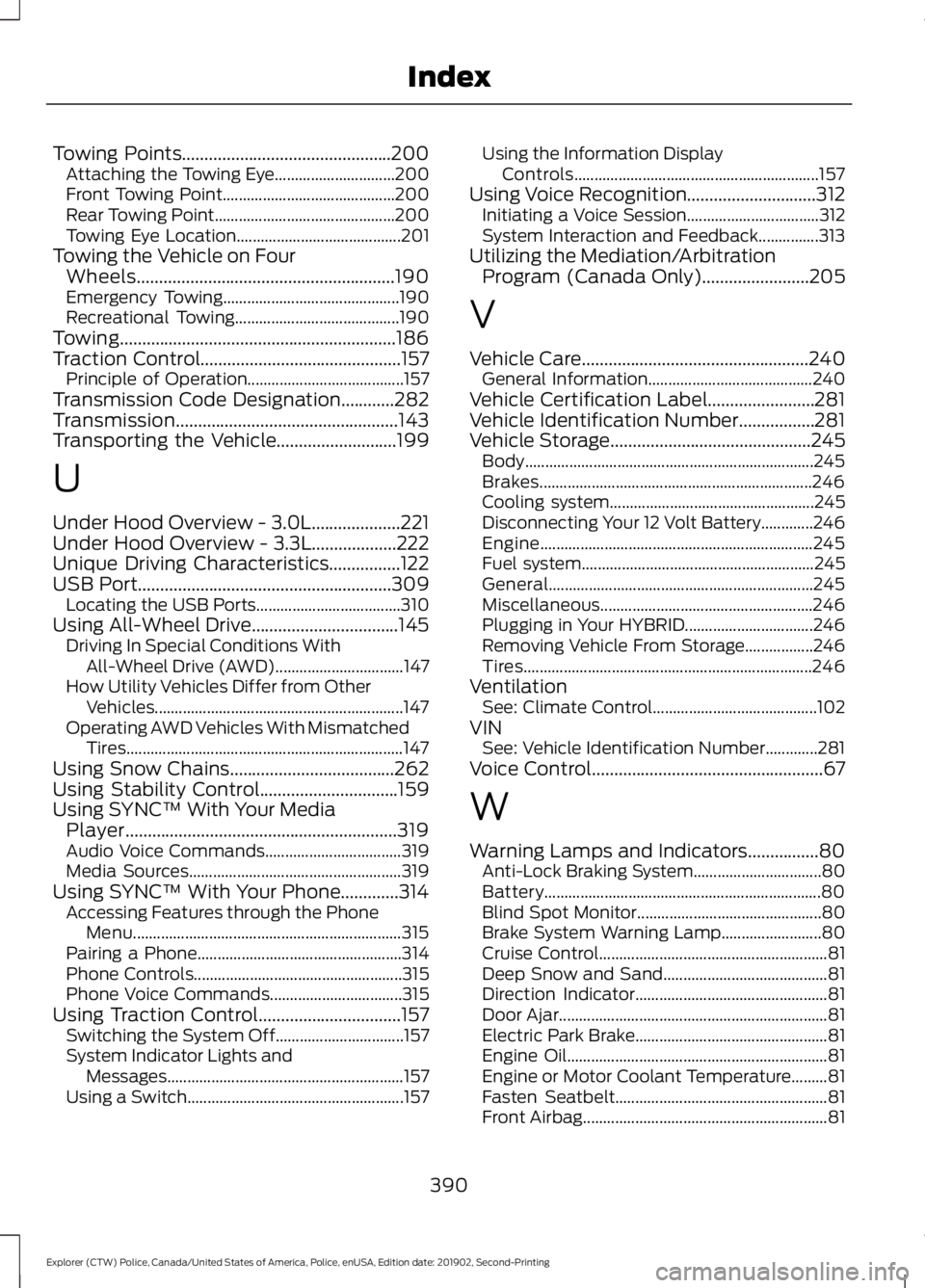
Towing Points...............................................200
Attaching the Towing Eye.............................. 200
Front Towing Point........................................... 200
Rear Towing Point............................................. 200
Towing Eye Location......................................... 201
Towing the Vehicle on Four Wheels..........................................................190
Emergency Towing............................................ 190
Recreational Towing......................................... 190
Towing..............................................................186
Traction Control.............................................157 Principle of Operation....................................... 157
Transmission Code Designation............282
Transmission..................................................143
Transporting the Vehicle...........................199
U
Under Hood Overview - 3.0L....................221
Under Hood Overview - 3.3L...................222
Unique Driving Characteristics................122
USB Port.........................................................309 Locating the USB Ports.................................... 310
Using All-Wheel Drive.................................145 Driving In Special Conditions With
All-Wheel Drive (AWD)................................ 147
How Utility Vehicles Differ from Other Vehicles.............................................................. 147
Operating AWD Vehicles With Mismatched Tires..................................................................... 147
Using Snow Chains.....................................262
Using Stability Control...............................159
Using SYNC™ With Your Media Player
.............................................................319
Audio Voice Commands.................................. 319
Media Sources..................................................... 319
Using SYNC™ With Your Phone.............314 Accessing Features through the Phone
Menu................................................................... 315
Pairing a Phone................................................... 314
Phone Controls.................................................... 315
Phone Voice Commands................................. 315
Using Traction Control................................157 Switching the System Off................................ 157
System Indicator Lights and Messages........................................................... 157
Using a Switch...................................................... 157Using the Information Display
Controls............................................................. 157
Using Voice Recognition.............................312 Initiating a Voice Session................................. 312
System Interaction and Feedback...............313
Utilizing the Mediation/Arbitration Program (Canada Only)........................205
V
Vehicle Care
...................................................240
General Information......................................... 240
Vehicle Certification Label........................281
Vehicle Identification Number.................281
Vehicle Storage
.............................................245
Body........................................................................\
245
Brakes.................................................................... 246
Cooling system................................................... 245
Disconnecting Your 12 Volt Battery.............246
Engine.................................................................... 245
Fuel system.......................................................... 245
General.................................................................. 245
Miscellaneous..................................................... 246
Plugging in Your HYBRID................................ 246
Removing Vehicle From Storage.................246
Tires........................................................................\
246
Ventilation See: Climate Control......................................... 102
VIN See: Vehicle Identification Number.............281
Voice Control
....................................................67
W
Warning Lamps and Indicators................80 Anti-Lock Braking System................................ 80
Battery..................................................................... 80
Blind Spot Monitor.............................................. 80
Brake System Warning Lamp......................... 80
Cruise Control......................................................... 81
Deep Snow and Sand......................................... 81
Direction Indicator................................................ 81
Door Ajar................................................................... 81
Electric Park Brake................................................ 81
Engine Oil................................................................. 81
Engine or Motor Coolant Temperature.........81
Fasten Seatbelt..................................................... 81
Front Airbag............................................................. 81
390
Explorer (CTW) Police, Canada/United States of America, Police, enUSA, Edition date: 201902, Second-Printing Index