steering FORD POLICE INTERCEPTOR 2020 Workshop Manual
[x] Cancel search | Manufacturer: FORD, Model Year: 2020, Model line: POLICE INTERCEPTOR, Model: FORD POLICE INTERCEPTOR 2020Pages: 395, PDF Size: 5.62 MB
Page 320 of 395
Before making the call:
•
SYNC provides a short window of time
(about 10 seconds) to cancel the call.
If you fail to cancel the call, SYNC
attempts to dial 911.
• SYNC says the following, or a similar
message: "SYNC will attempt to call
911, to cancel the call, press Cancel on
your screen or press and hold the
phone button on your steering wheel".
If you do not cancel the call, and SYNC
makes a successful call, a pre-recorded
message plays for the 911 operator, and
then the occupant(s) in your vehicle are
able to talk with the operator. Be prepared
to provide your name, phone number and
location immediately, because not all 911
systems are capable of receiving this
information electronically.
911 Assist May Not Work If
• Your cellular phone or 911 Assist
hardware sustains damage in a crash.
• The vehicle's battery or the SYNC
system has no power.
• The phone(s) thrown from your vehicle
are the ones paired and connected to
the system.
911 Assist Privacy Notice
When you switch on 911 Assist, it may
disclose to emergency services that your
vehicle has been in a crash involving the
deployment of an airbag or activation of
the fuel pump shut-off. Certain versions or
updates to 911 Assist may also be capable
of electronically or verbally disclosing to
911 operators your vehicle location or other
details about your vehicle or crash to assist
911 operators to provide the most
appropriate emergency services. If you do
not want to disclose this information, do
not switch the feature on. SYNC Mobile Apps
The system enables voice and steering
wheel control of SYNC AppLink enabled
smartphone apps. When an app is running
through AppLink, you can control main
features of the app through voice
commands and steering wheel controls.
Note:
You must pair and connect your
smartphone to SYNC to access AppLink.
Note: Android users need to connect the
phone to SYNC using Bluetooth.
Note: For information on available apps,
supported smartphone devices and
troubleshooting tips please visit the Ford
website
Note: Availability of SYNC AppLink enabled
Apps will vary by region.
Note: Make sure you have an active account
for the app that you have downloaded.
Some apps work automatically with no
setup. Other apps want you to configure
your personal settings and personalize your
experience by creating stations or favorites.
We recommend you do this at home or
outside of your vehicle.
To Access Using the SYNC Menu
Press the Mobile Apps button to access
the menu on-screen. Then select: Action and Description
Menu
Item
Scroll through the list of
available applications and
select a particular app.
Find
Mobile
Apps
Note: If you cannot find a compatible SYNC
AppLink app, make sure the required app is
running on the mobile device.
317
Explorer (CTW) Police, Canada/United States of America, Police, enUSA, Edition date: 201902, Second-Printing SYNC™
Page 321 of 395
To Access Using Voice Commands
Press the voice button, then when prompted say:
Action and Description
Voice Command
Say the name of the application after the tone.
The app should start. When an app is running through SYNC, you can press the voice button and speak commands specific to the app, for example "Play Playlist Road Trip".
Mobile Applications
SYNC lists all of the currently available mobile apps.
List Applications
Searches your connected mobile device for SYNC-compatible mobile apps.
Find Applications
Use this command to discover the available voice commands.
Help
App Permissions
App permissions are organized by groups.
You can grant these group permissions
individually. You can change a permission
group status any time when not driving, by
using the settings menu.
When you launch an app using SYNC, the
system may ask you to grant certain
permissions, for example:
• To allow your vehicle to provide vehicle
information to the app such as, but not
limited to: Fuel level, fuel economy, fuel
consumption, engine speed, rain
sensor, odometer, VIN, external
temperature, gear position, tire
pressure, and head lamp status.
• To allow your vehicle to provide driving
characteristic information such as, but
not limited to: MyKey, seat belt status,
engine revolutions per minute, gear
position, braking events, steering wheel
angle, and accelerator pedal position. •
To allow your vehicle to provide
location information, including: GPS
and speed.
• To allow the app to send push
notifications using the vehicle display
and voice capabilities while running in
a background state. Push notifications
may be particularly useful for news or
location based apps.
Note: You only need to grant permissions
the first time you use an app with SYNC.
Note: Ford is not responsible or liable for
any damages or loss of privacy relating to
usage of an app, or dissemination of any
vehicle data that you approve Ford to
provide to an app.
Enabling SYNC Mobile Apps
In order to enable mobile apps, SYNC
requires user consent to send and receive
app authorization information and updates
using the data plan associated with the
connected device.
Data is sent to Ford in the United States
through the connected device. The
information is encrypted and includes your
VIN, SYNC module number, anonymous
usage statistics and debugging
information. Updates may take place.
318
Explorer (CTW) Police, Canada/United States of America, Police, enUSA, Edition date: 201902, Second-Printing SYNC™
Page 322 of 395
Note:
You must enable mobile apps for
each connected device the first time you
select a mobile app using the system.
Note: Standard data rates apply. Ford is
not responsible for any additional charges
you may receive from your service provider,
when your vehicle sends or receives data
through the connected device. This includes
any additional charges incurred due to
driving in areas when roaming out of a home
network.
USING SYNC™ WITH YOUR
MEDIA PLAYER
SYNC supports digital media sources
including: iPod, Bluetooth devices, and
most USB drives. SYNC also supports
audio formats, such as MP3, WMA, WAV
and ACC.
Media Sources
The AUX or MEDIA button allows you to
view and select available media sources.
Press the
AUX or MEDIA button to view
your sources. Use the directional arrows
and OK button to select your source. You
can also use the steering wheel audio
controls.
Audio Voice Commands Press the voice button. You can
do things like play a specific song
or album, skip to the next song,
or tune to a radio station. When prompted,
say a command. See the following table
for example commands. Not all
commands may be available on your
vehicle. Command
___ List of Commands Help
Pause Play
Next Track
Previous Track AM ___FM ___
CD Player
Sirius Channel ___ USB
Bluetooth Audio
__ is a dynamic listing, meaning that it
could be the name of anything, such as an
artist, station, or media source.
SYNC™ TROUBLESHOOTING
Your SYNC system is easy to use. However,
should questions arise, see the tables
below.
Use your regional Ford website at any time
to check your phone's compatibility,
register your account and set preferences
as well as access a customer
representative via an online chat (during
certain hours). Website(s)
Market
www.SYNCMyRide.com
North America
www.SYNCMyRide.cawww.sync-
maroute.ca
319
Explorer (CTW) Police, Canada/United States of America, Police, enUSA, Edition date: 201902, Second-Printing SYNC™E142599
Page 336 of 395
Multi-Point Inspection
Hazard warning system operation
Accessory drive belt(s)
Horn operation
Battery performance
Radiator, cooler, heater and air conditioninghoses
Engine air filter
Suspension components for leaks ordamage
Exhaust system
Steering and linkage
Exterior lamps operation
Tires (including spare) for wear and properpressure2
Fluid levels 1
; fill if necessary
Windshield for cracks, chips or pits
For oil and fluid leaks
Washer spray and wiper operation
Half-shaft dust boots
1 Brake, coolant recovery reservoir, automatic transmission and window washer
2 If your vehicle is equipped with a temporary mobility kit, check the tire sealant expiration
Use By date on the canister. Replace as needed.
Be sure to ask your dealership service
advisor or technician about the multi-point
vehicle inspection. It is a comprehensive
way to perform a thorough inspection of
your vehicle. Your checklist gives you
immediate feedback on the overall
condition of your vehicle.
NORMAL SCHEDULED
MAINTENANCE
Intelligent Oil-Life Monitor™
Your vehicle has an Intelligent Oil-Life
Monitor that determines when you should
change the engine oil based on how your
vehicle is used. By using several important
factors in its calculations, the monitor
helps reduce the cost of owning your
vehicle and reduces environmental waste
at the same time. This means you do not have to remember
to change the oil on a mileage-based
schedule. Your vehicle lets you know when
an oil change is due by displaying a
message in the information display.
The following table provides examples of
vehicle use and its impact on oil change
intervals. It is a guideline only. Actual oil
change intervals depend on several factors
and generally decrease with severity of
use.
333
Explorer (CTW) Police, Canada/United States of America, Police, enUSA, Edition date: 201902, Second-Printing Scheduled Maintenance
Page 338 of 395
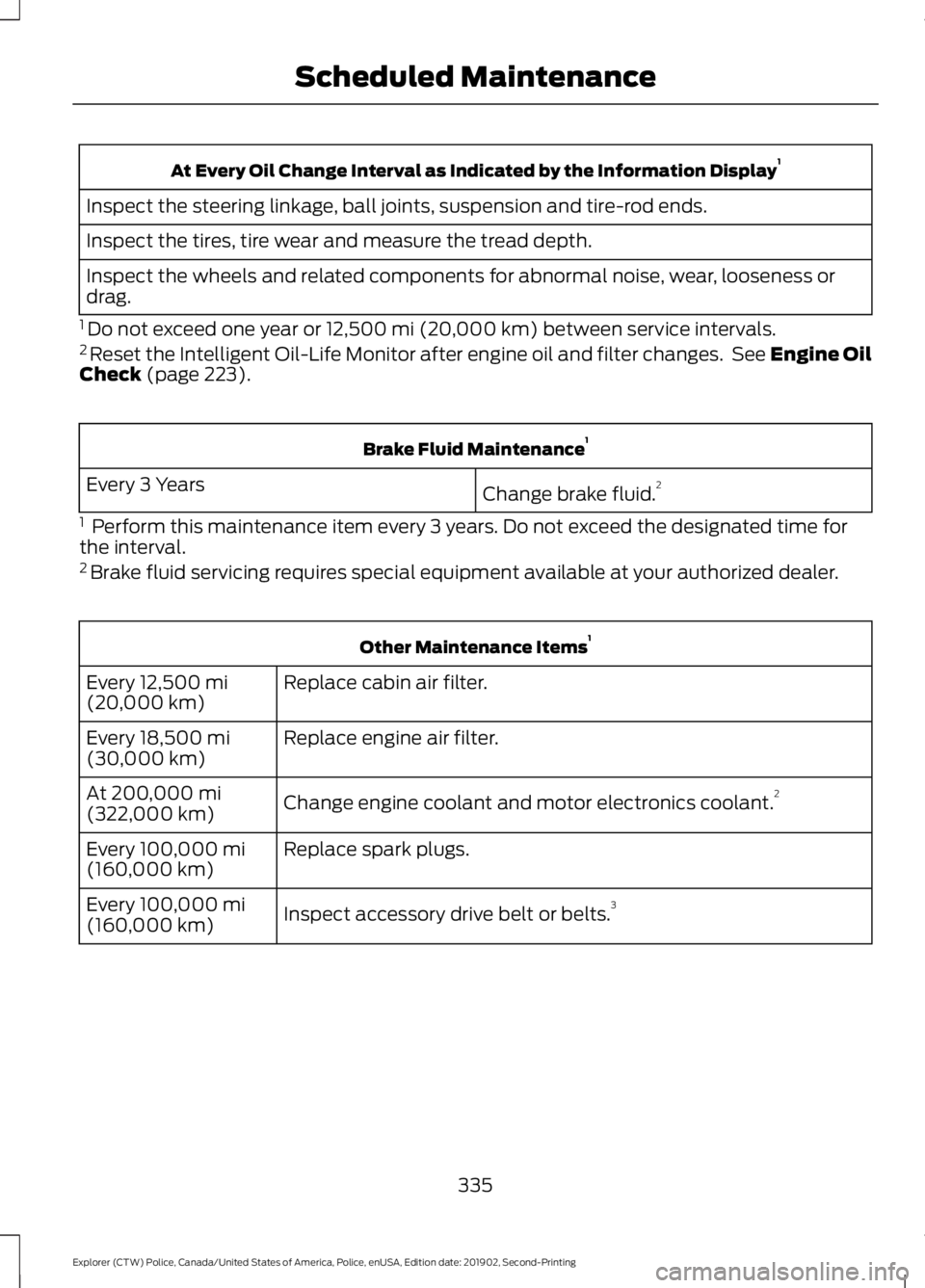
At Every Oil Change Interval as Indicated by the Information Display
1
Inspect the steering linkage, ball joints, suspension and tire-rod ends.
Inspect the tires, tire wear and measure the tread depth.
Inspect the wheels and related components for abnormal noise, wear, looseness or
drag.
1 Do not exceed one year or 12,500 mi (20,000 km) between service intervals.
2 Reset the Intelligent Oil-Life Monitor after engine oil and filter changes. See Engine Oil
Check
(page 223). Brake Fluid Maintenance
1
Change brake fluid. 2
Every 3 Years
1 Perform this maintenance item every 3 years. Do not exceed the designated time for
the interval.
2 Brake fluid servicing requires special equipment available at your authorized dealer. Other Maintenance Items
1
Replace cabin air filter.
Every
12,500 mi
(20,000 km)
Replace engine air filter.
Every
18,500 mi
(30,000 km)
Change engine coolant and motor electronics coolant. 2
At
200,000 mi
(322,000 km)
Replace spark plugs.
Every
100,000 mi
(160,000 km)
Inspect accessory drive belt or belts. 3
Every
100,000 mi
(160,000 km)
335
Explorer (CTW) Police, Canada/United States of America, Police, enUSA, Edition date: 201902, Second-Printing Scheduled Maintenance
Page 384 of 395
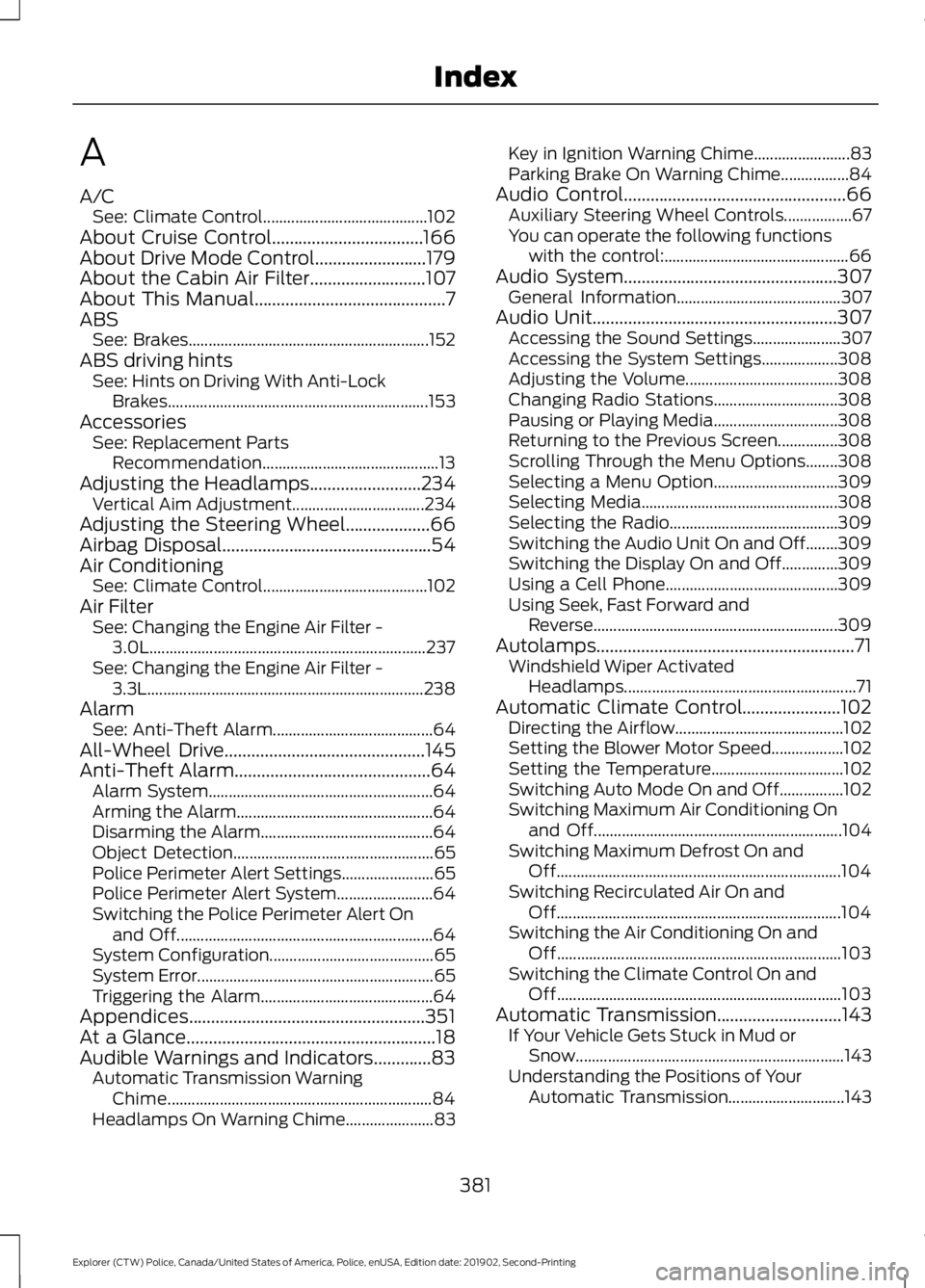
A
A/C
See: Climate Control......................................... 102
About Cruise Control..................................166
About Drive Mode Control.........................179
About the Cabin Air Filter..........................107
About This Manual...........................................7
ABS See: Brakes............................................................ 152
ABS driving hints See: Hints on Driving With Anti-Lock
Brakes................................................................. 153
Accessories See: Replacement Parts
Recommendation............................................ 13
Adjusting the Headlamps.........................234 Vertical Aim Adjustment................................. 234
Adjusting the Steering Wheel...................66
Airbag Disposal...............................................54
Air Conditioning See: Climate Control......................................... 102
Air Filter See: Changing the Engine Air Filter -
3.0L..................................................................... 237
See: Changing the Engine Air Filter - 3.3L..................................................................... 238
Alarm See: Anti-Theft Alarm........................................ 64
All-Wheel Drive
.............................................145
Anti-Theft Alarm............................................64
Alarm System........................................................ 64
Arming the Alarm................................................. 64
Disarming the Alarm........................................... 64
Object Detection.................................................. 65
Police Perimeter Alert Settings....................... 65
Police Perimeter Alert System........................ 64
Switching the Police Perimeter Alert On and Off................................................................ 64
System Configuration......................................... 65
System Error........................................................... 65
Triggering the Alarm........................................... 64
Appendices.....................................................351
At a Glance........................................................18
Audible Warnings and Indicators.............83 Automatic Transmission Warning
Chime.................................................................. 84
Headlamps On Warning Chime...................... 83Key in Ignition Warning Chime........................
83
Parking Brake On Warning Chime.................84
Audio Control
..................................................66
Auxiliary Steering Wheel Controls.................67
You can operate the following functions
with the control:.............................................. 66
Audio System
................................................307
General Information......................................... 307
Audio Unit
.......................................................307
Accessing the Sound Settings...................... 307
Accessing the System Settings................... 308
Adjusting the Volume...................................... 308
Changing Radio Stations............................... 308
Pausing or Playing Media............................... 308
Returning to the Previous Screen...............308
Scrolling Through the Menu Options........308
Selecting a Menu Option............................... 309
Selecting Media................................................. 308
Selecting the Radio.......................................... 309
Switching the Audio Unit On and Off........309
Switching the Display On and Off..............309
Using a Cell Phone........................................... 309
Using Seek, Fast Forward and Reverse............................................................. 309
Autolamps..........................................................71 Windshield Wiper Activated
Headlamps.......................................................... 71
Automatic Climate Control......................102 Directing the Airflow.......................................... 102
Setting the Blower Motor Speed.................. 102
Setting the Temperature................................. 102
Switching Auto Mode On and Off................102
Switching Maximum Air Conditioning On and Off.............................................................. 104
Switching Maximum Defrost On and Off....................................................................... 104
Switching Recirculated Air On and Off....................................................................... 104
Switching the Air Conditioning On and Off....................................................................... 103
Switching the Climate Control On and Off....................................................................... 103
Automatic Transmission............................143 If Your Vehicle Gets Stuck in Mud or
Snow................................................................... 143
Understanding the Positions of Your Automatic Transmission............................. 143
381
Explorer (CTW) Police, Canada/United States of America, Police, enUSA, Edition date: 201902, Second-Printing Index
Page 389 of 395
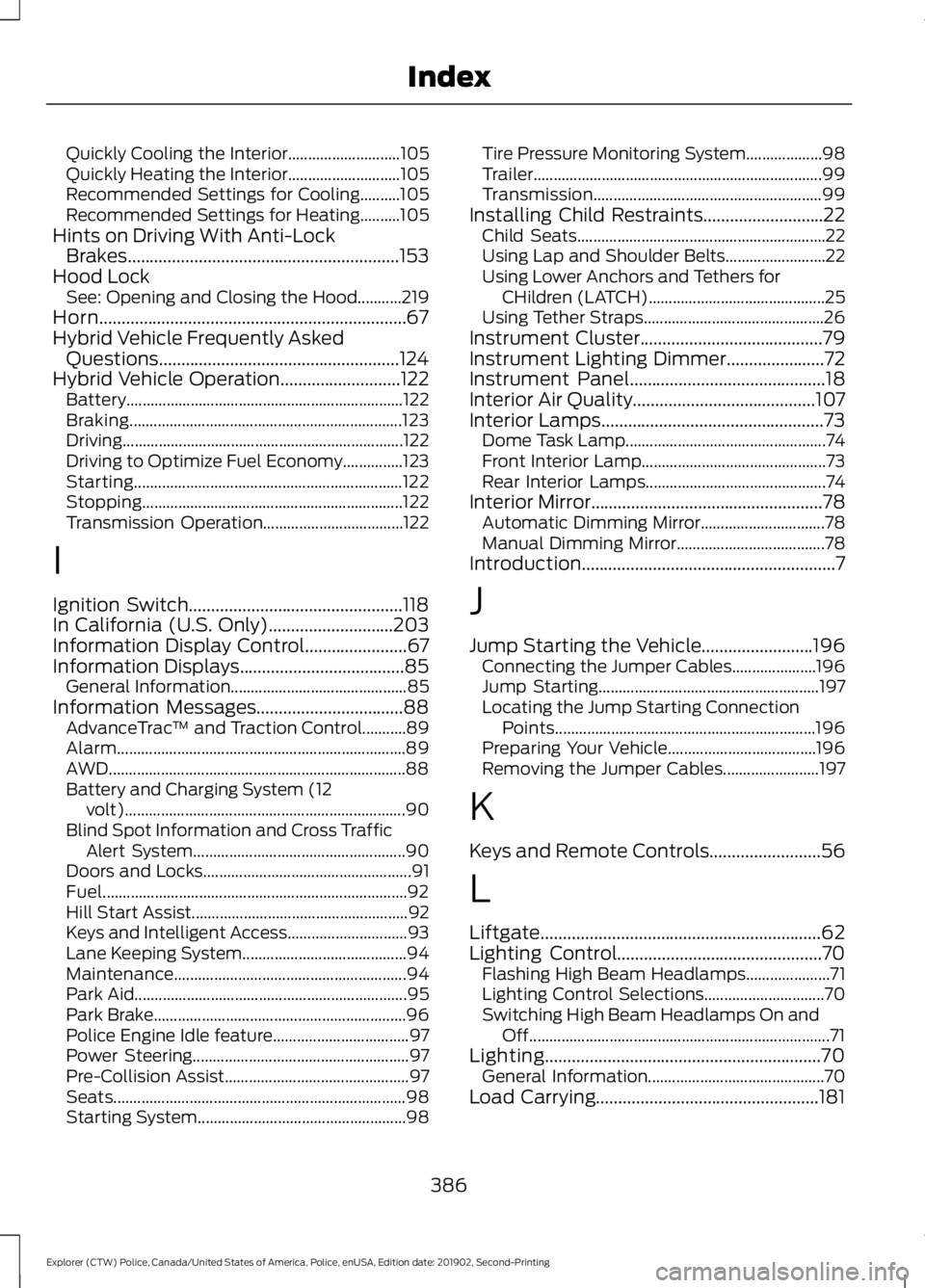
Quickly Cooling the Interior............................
105
Quickly Heating the Interior............................ 105
Recommended Settings for Cooling..........105
Recommended Settings for Heating..........105
Hints on Driving With Anti-Lock Brakes.............................................................153
Hood Lock See: Opening and Closing the Hood...........219
Horn.....................................................................67
Hybrid Vehicle Frequently Asked Questions......................................................124
Hybrid Vehicle Operation...........................122 Battery..................................................................... 122
Braking.................................................................... 123
Driving...................................................................... 122
Driving to Optimize Fuel Economy...............123
Starting................................................................... 122
Stopping................................................................. 122
Transmission Operation................................... 122
I
Ignition Switch................................................118
In California (U.S. Only)
............................203
Information Display Control.......................67
Information Displays.....................................85 General Information............................................ 85
Information Messages.................................88 AdvanceTrac ™ and Traction Control...........89
Alarm........................................................................\
89
AWD........................................................................\
.. 88
Battery and Charging System (12 volt)...................................................................... 90
Blind Spot Information and Cross Traffic Alert System..................................................... 90
Doors and Locks.................................................... 91
Fuel........................................................................\
.... 92
Hill Start Assist...................................................... 92
Keys and Intelligent Access.............................. 93
Lane Keeping System......................................... 94
Maintenance.......................................................... 94
Park Aid.................................................................... 95
Park Brake............................................................... 96
Police Engine Idle feature.................................. 97
Power Steering...................................................... 97
Pre-Collision Assist.............................................. 97
Seats........................................................................\
. 98
Starting System.................................................... 98Tire Pressure Monitoring System...................
98
Trailer........................................................................\
99
Transmission......................................................... 99
Installing Child Restraints...........................22 Child Seats.............................................................. 22
Using Lap and Shoulder Belts......................... 22
Using Lower Anchors and Tethers for CHildren (LATCH)............................................ 25
Using Tether Straps............................................. 26
Instrument Cluster
.........................................79
Instrument Lighting Dimmer......................72
Instrument Panel
............................................18
Interior Air Quality.........................................107
Interior Lamps..................................................73
Dome Task Lamp.................................................. 74
Front Interior Lamp.............................................. 73
Rear Interior Lamps............................................. 74
Interior Mirror
....................................................78
Automatic Dimming Mirror............................... 78
Manual Dimming Mirror..................................... 78
Introduction.........................................................7
J
Jump Starting the Vehicle.........................196 Connecting the Jumper Cables..................... 196
Jump Starting....................................................... 197
Locating the Jump Starting Connection Points................................................................. 196
Preparing Your Vehicle..................................... 196
Removing the Jumper Cables........................ 197
K
Keys and Remote Controls.........................56
L
Liftgate...............................................................62
Lighting Control..............................................70 Flashing High Beam Headlamps..................... 71
Lighting Control Selections.............................. 70
Switching High Beam Headlamps On and Off........................................................................\
... 71
Lighting..............................................................70 General Information............................................ 70
Load Carrying
..................................................181
386
Explorer (CTW) Police, Canada/United States of America, Police, enUSA, Edition date: 201902, Second-Printing Index
Page 390 of 395
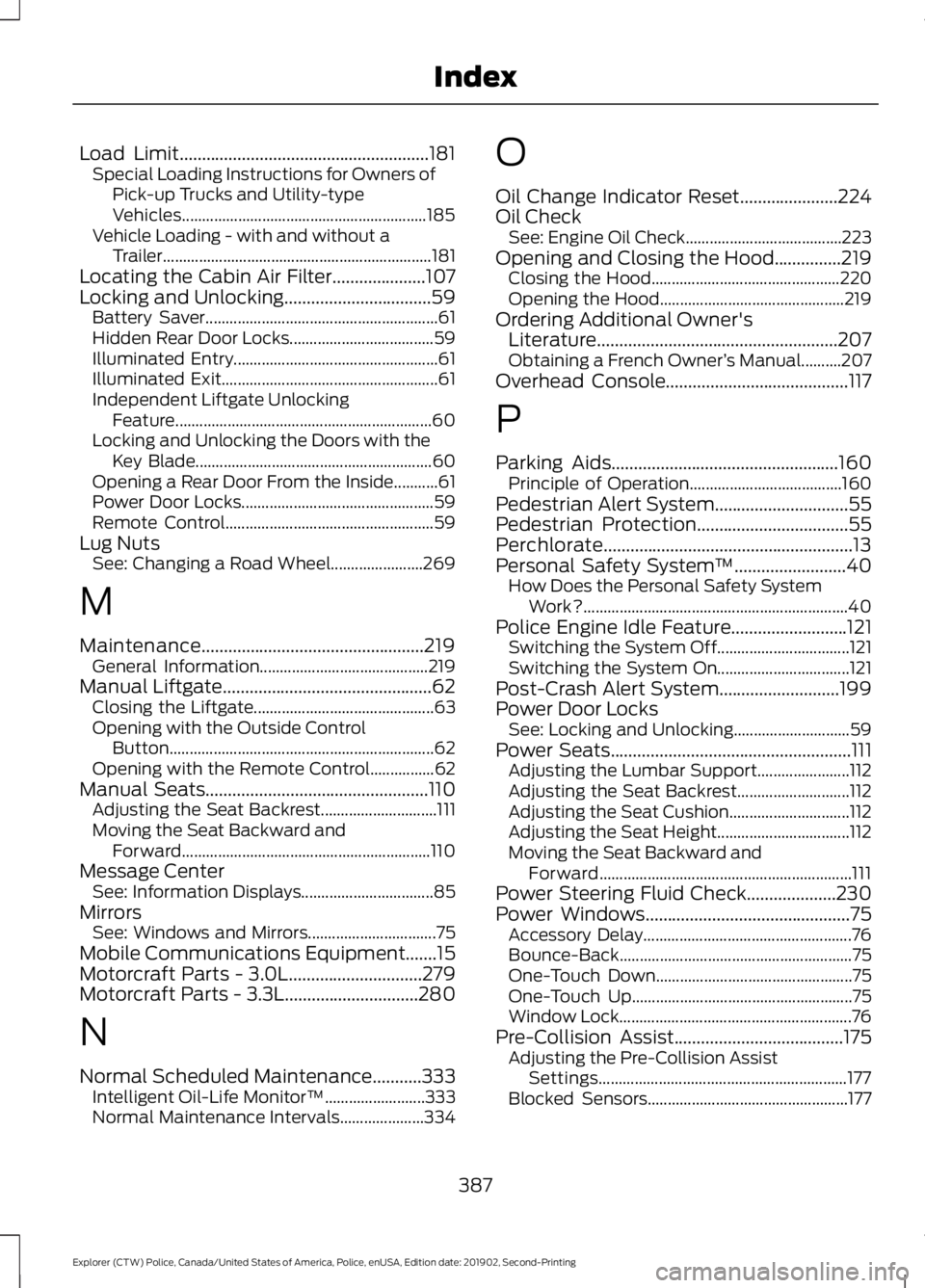
Load Limit........................................................181
Special Loading Instructions for Owners of
Pick-up Trucks and Utility-type
Vehicles............................................................. 185
Vehicle Loading - with and without a Trailer................................................................... 181
Locating the Cabin Air Filter.....................107
Locking and Unlocking.................................59 Battery Saver.......................................................... 61
Hidden Rear Door Locks.................................... 59
Illuminated Entry................................................... 61
Illuminated Exit...................................................... 61
Independent Liftgate Unlocking Feature................................................................ 60
Locking and Unlocking the Doors with the Key Blade........................................................... 60
Opening a Rear Door From the Inside...........61
Power Door Locks................................................ 59
Remote Control.................................................... 59
Lug Nuts See: Changing a Road Wheel....................... 269
M
Maintenance..................................................219 General Information.......................................... 219
Manual Liftgate...............................................62
Closing the Liftgate............................................. 63
Opening with the Outside Control Button.................................................................. 62
Opening with the Remote Control................62
Manual Seats
..................................................110
Adjusting the Seat Backrest............................. 111
Moving the Seat Backward and Forward.............................................................. 110
Message Center See: Information Displays................................. 85
Mirrors See: Windows and Mirrors................................ 75
Mobile Communications Equipment.......15
Motorcraft Parts - 3.0L..............................279
Motorcraft Parts - 3.3L
..............................280
N
Normal Scheduled Maintenance...........333 Intelligent Oil-Life Monitor™......................... 333
Normal Maintenance Intervals..................... 334O
Oil Change Indicator Reset......................224
Oil Check
See: Engine Oil Check....................................... 223
Opening and Closing the Hood...............219 Closing the Hood............................................... 220
Opening the Hood.............................................. 219
Ordering Additional Owner's Literature
......................................................207
Obtaining a French Owner ’s Manual..........207
Overhead Console.........................................117
P
Parking Aids
...................................................160
Principle of Operation...................................... 160
Pedestrian Alert System
..............................55
Pedestrian Protection..................................55
Perchlorate........................................................13
Personal Safety System ™
.........................40
How Does the Personal Safety System
Work?.................................................................. 40
Police Engine Idle Feature..........................121 Switching the System Off................................. 121
Switching the System On................................. 121
Post-Crash Alert System...........................199
Power Door Locks See: Locking and Unlocking............................. 59
Power Seats
......................................................111
Adjusting the Lumbar Support....................... 112
Adjusting the Seat Backrest............................ 112
Adjusting the Seat Cushion.............................. 112
Adjusting the Seat Height................................. 112
Moving the Seat Backward and Forward............................................................... 111
Power Steering Fluid Check....................230
Power Windows
..............................................75
Accessory Delay.................................................... 76
Bounce-Back.......................................................... 75
One-Touch Down................................................. 75
One-Touch Up....................................................... 75
Window Lock.......................................................... 76
Pre-Collision Assist......................................175 Adjusting the Pre-Collision Assist
Settings.............................................................. 177
Blocked Sensors.................................................. 177
387
Explorer (CTW) Police, Canada/United States of America, Police, enUSA, Edition date: 201902, Second-Printing Index
Page 392 of 395
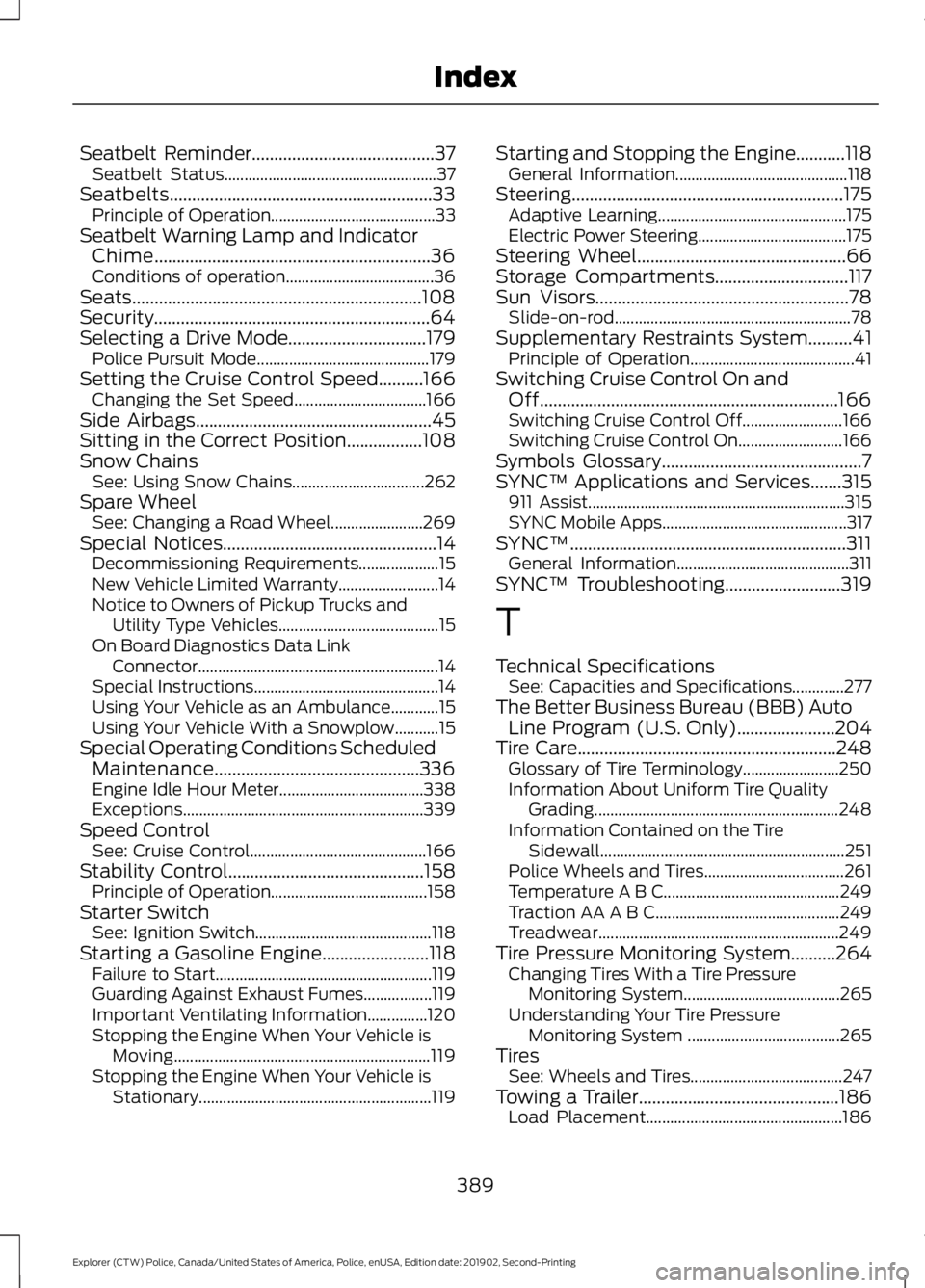
Seatbelt Reminder.........................................37
Seatbelt Status..................................................... 37
Seatbelts...........................................................33 Principle of Operation......................................... 33
Seatbelt Warning Lamp and Indicator Chime..............................................................36
Conditions of operation..................................... 36
Seats.................................................................108
Security..............................................................64
Selecting a Drive Mode
...............................179
Police Pursuit Mode........................................... 179
Setting the Cruise Control Speed..........166 Changing the Set Speed................................. 166
Side Airbags
.....................................................45
Sitting in the Correct Position.................108
Snow Chains See: Using Snow Chains................................. 262
Spare Wheel See: Changing a Road Wheel....................... 269
Special Notices
................................................14
Decommissioning Requirements.................... 15
New Vehicle Limited Warranty......................... 14
Notice to Owners of Pickup Trucks and Utility Type Vehicles........................................ 15
On Board Diagnostics Data Link Connector ............................................................ 14
Special Instructions.............................................. 14
Using Your Vehicle as an Ambulance............15
Using Your Vehicle With a Snowplow...........15
Special Operating Conditions Scheduled Maintenance..............................................336
Engine Idle Hour Meter.................................... 338
Exceptions............................................................ 339
Speed Control See: Cruise Control............................................ 166
Stability Control
............................................158
Principle of Operation....................................... 158
Starter Switch See: Ignition Switch............................................ 118
Starting a Gasoline Engine........................118 Failure to Start...................................................... 119
Guarding Against Exhaust Fumes.................119
Important Ventilating Information...............120
Stopping the Engine When Your Vehicle is Moving................................................................ 119
Stopping the Engine When Your Vehicle is Stationary.......................................................... 119Starting and Stopping the Engine...........118
General Information........................................... 118
Steering.............................................................175 Adaptive Learning............................................... 175
Electric Power Steering..................................... 175
Steering Wheel...............................................66
Storage Compartments
..............................117
Sun Visors.........................................................78
Slide-on-rod........................................................... 78
Supplementary Restraints System..........41 Principle of Operation......................................... 41
Switching Cruise Control On and Off...................................................................166
Switching Cruise Control Off......................... 166
Switching Cruise Control On.......................... 166
Symbols Glossary
.............................................7
SYNC™ Applications and Services.......315
911 Assist................................................................ 315
SYNC Mobile Apps.............................................. 317
SYNC™..............................................................311 General Information........................................... 311
SYNC™ Troubleshooting
..........................319
T
Technical Specifications See: Capacities and Specifications.............277
The Better Business Bureau (BBB) Auto Line Program (U.S. Only)......................204
Tire Care
..........................................................248
Glossary of Tire Terminology........................ 250
Information About Uniform Tire Quality Grading............................................................. 248
Information Contained on the Tire Sidewall............................................................. 251
Police Wheels and Tires................................... 261
Temperature A B C............................................ 249
Traction AA A B C.............................................. 249
Treadwear............................................................ 249
Tire Pressure Monitoring System..........264 Changing Tires With a Tire Pressure
Monitoring System....................................... 265
Understanding Your Tire Pressure Monitoring System ...................................... 265
Tires See: Wheels and Tires...................................... 247
Towing a Trailer.............................................186 Load Placement................................................. 186
389
Explorer (CTW) Police, Canada/United States of America, Police, enUSA, Edition date: 201902, Second-Printing Index