ECU FORD POLICE INTERCEPTOR 2021 User Guide
[x] Cancel search | Manufacturer: FORD, Model Year: 2021, Model line: POLICE INTERCEPTOR, Model: FORD POLICE INTERCEPTOR 2021Pages: 412, PDF Size: 7.51 MB
Page 34 of 412
WARNING: Properly secure child
restraints or booster seats when they are
not in use. They could become projectiles
in a sudden stop or crash. Failure to
follow this instruction could result in
personal injury or death. WARNING: Do not put the shoulder
section of the seatbelt or allow the child
to put the shoulder section of the
seatbelt under their arm or behind their
back. Failure to follow this instruction
could reduce the effectiveness of the
seatbelt and increase the risk of injury or
death in a crash. WARNING:
Do not leave children
or pets unattended in your vehicle.
Failure to follow this instruction could
result in personal injury or death.
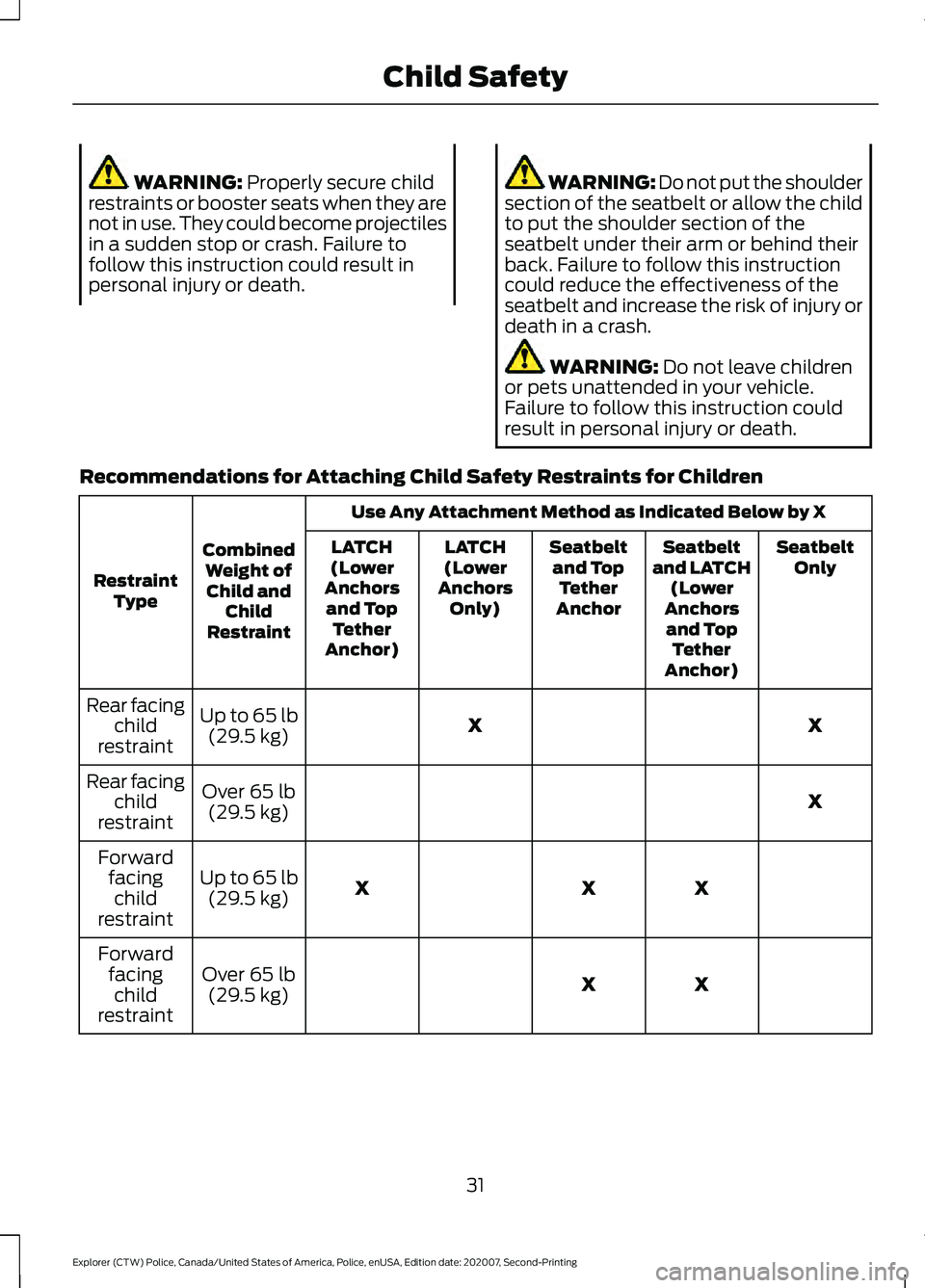
Recommendations for Attaching Child Safety Restraints for Children Use Any Attachment Method as Indicated Below by X
Combined Weight ofChild and Child
Restraint
Restraint
Type Seatbelt
Only
Seatbelt
and LATCH (Lower
Anchors and Top Tether
Anchor)
Seatbelt
and Top Tether
Anchor
LATCH
(Lower
Anchors Only)
LATCH
(Lower
Anchors and Top Tether
Anchor)
X
X
Up to
65 lb
(29.5 kg)
Rear facing
child
restraint
X
Over
65 lb
(29.5 kg)
Rear facing
child
restraint
X
X
X
Up to
65 lb
(29.5 kg)
Forward
facingchild
restraint
X
X
Over
65 lb
(29.5 kg)
Forward
facingchild
restraint
31
Explorer (CTW) Police, Canada/United States of America, Police, enUSA, Edition date: 202007, Second-Printing Child Safety
Page 37 of 412
•
Crash sensors and monitoring system
with readiness indicator.
The seatbelt pretensioners are designed
to tighten the seatbelts when activated. In
frontal and near-frontal crashes, the
seatbelt pretensioners may be activated
alone or, if the crash is of sufficient severity,
together with the front airbags. The
pretensioners may also activate when a
Safety Canopy airbag deploys.
FASTENING THE SEATBELTS
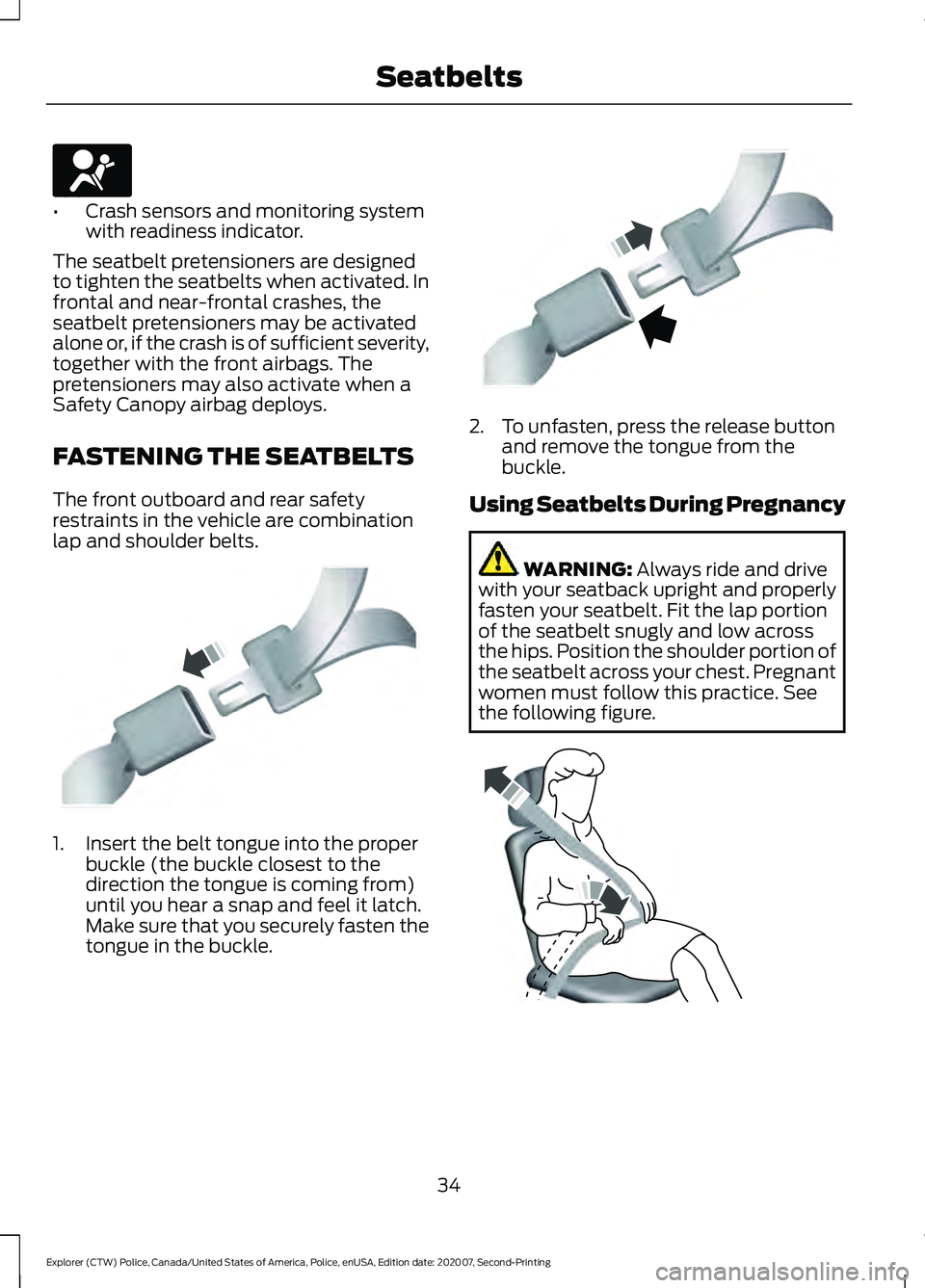
The front outboard and rear safety
restraints in the vehicle are combination
lap and shoulder belts. 1. Insert the belt tongue into the proper
buckle (the buckle closest to the
direction the tongue is coming from)
until you hear a snap and feel it latch.
Make sure that you securely fasten the
tongue in the buckle. 2. To unfasten, press the release button
and remove the tongue from the
buckle.
Using Seatbelts During Pregnancy WARNING: Always ride and drive
with your seatback upright and properly
fasten your seatbelt. Fit the lap portion
of the seatbelt snugly and low across
the hips. Position the shoulder portion of
the seatbelt across your chest. Pregnant
women must follow this practice. See
the following figure. 34
Explorer (CTW) Police, Canada/United States of America, Police, enUSA, Edition date: 202007, Second-Printing SeatbeltsE67017 E142587 E142588 E142590
Page 66 of 412
ANTI-THEFT ALARM
Alarm System
The perimeter alarm is a deterrent against
unauthorized access to your vehicle
through the doors, luggage compartment
and the hood.
Triggering the Alarm
Once armed, the alarm is triggered in any
of the following ways:
•
If someone opens a door, cargo area
or the hood without a valid key or
remote control.
If the alarm is triggered, the horn will sound
for 30 seconds and the hazard warning
flasher will flash for five minutes.
Any further attempts to perform one of the
above will trigger the alarm again.
Arming the Alarm
To arm the alarm, lock your vehicle. See
Doors and Locks (page 58).
Disarming the Alarm
Disarm and silence the alarm by unlocking
the doors with the key and switching the
ignition on within 12 seconds, or by
unlocking the doors or the cargo area with
the remote control.
Police Perimeter Alert System
(If
Equipped)
Note: The Police Perimeter Alert System is
primarily intended to monitor moving
pedestrians but also detects objects like
vehicles and bikes. Fast vehicles, stationary
objects and small objects like birds may also
be ignored.
Note: The Police Perimeter Alert System
feature does not function outside of Park
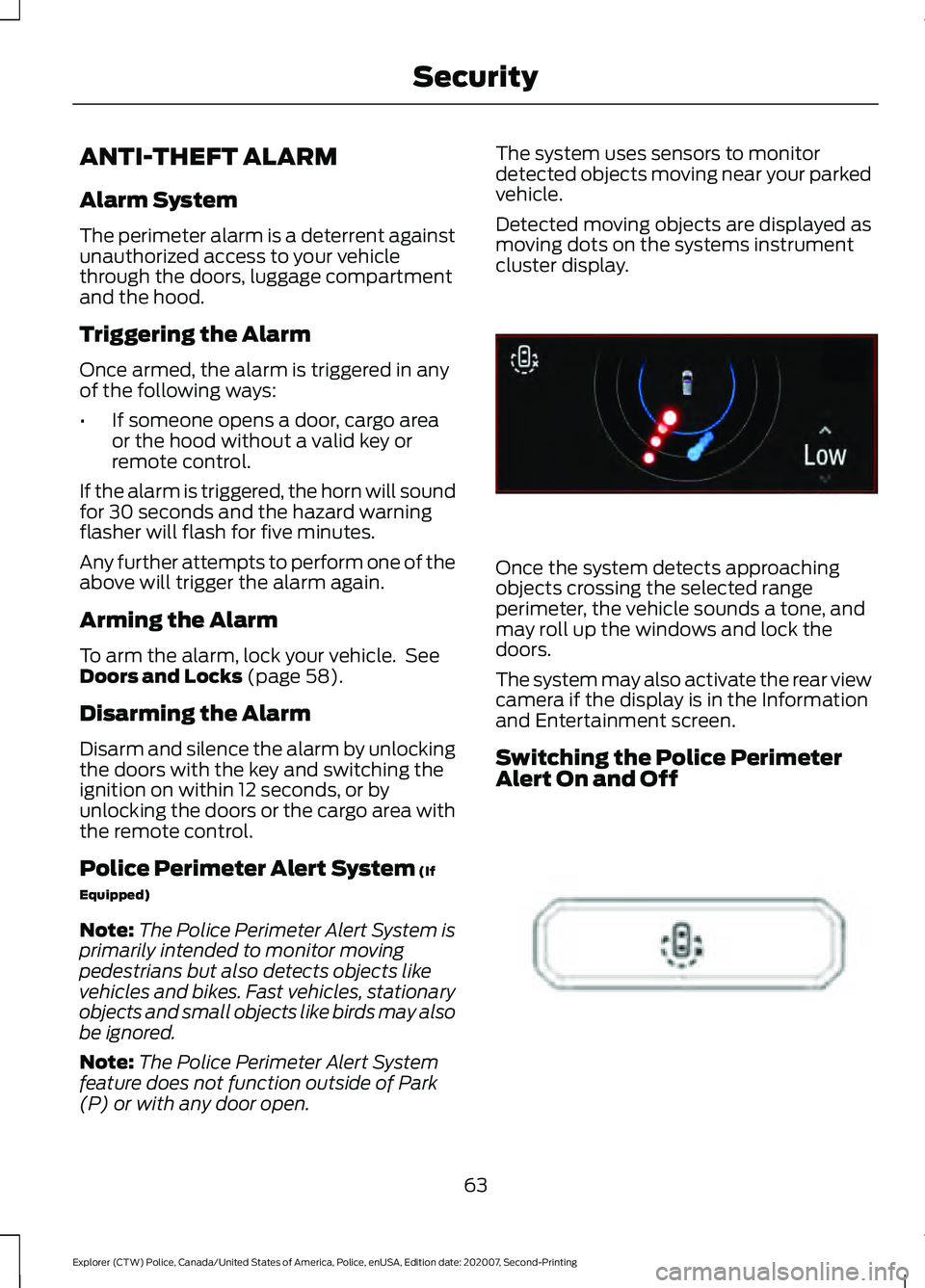
(P) or with any door open. The system uses sensors to monitor
detected objects moving near your parked
vehicle.
Detected moving objects are displayed as
moving dots on the systems instrument
cluster display.
Once the system detects approaching
objects crossing the selected range
perimeter, the vehicle sounds a tone, and
may roll up the windows and lock the
doors.
The system may also activate the rear view
camera if the display is in the Information
and Entertainment screen.
Switching the Police Perimeter
Alert On and Off
63
Explorer (CTW) Police, Canada/United States of America, Police, enUSA, Edition date: 202007, Second-Printing SecurityE298029 E298031
Page 67 of 412
While the vehicle is running and in Park (P),
press and release the button located on
the center of the instrument panel.
Activating the feature will turn on the
Police Perimeter Alert System display in
the instrument cluster.
Note:
When the feature is active an icon
will display on the instrument cluster.
Police Perimeter Alert Settings
Note: When the Police Idle feature is active,
windows will not automatically roll up.
Note: When window or door locking is
active, corresponding icons will display in
the instrument cluster.
Note: When Low mode is active, window
or door locking setting is not available.
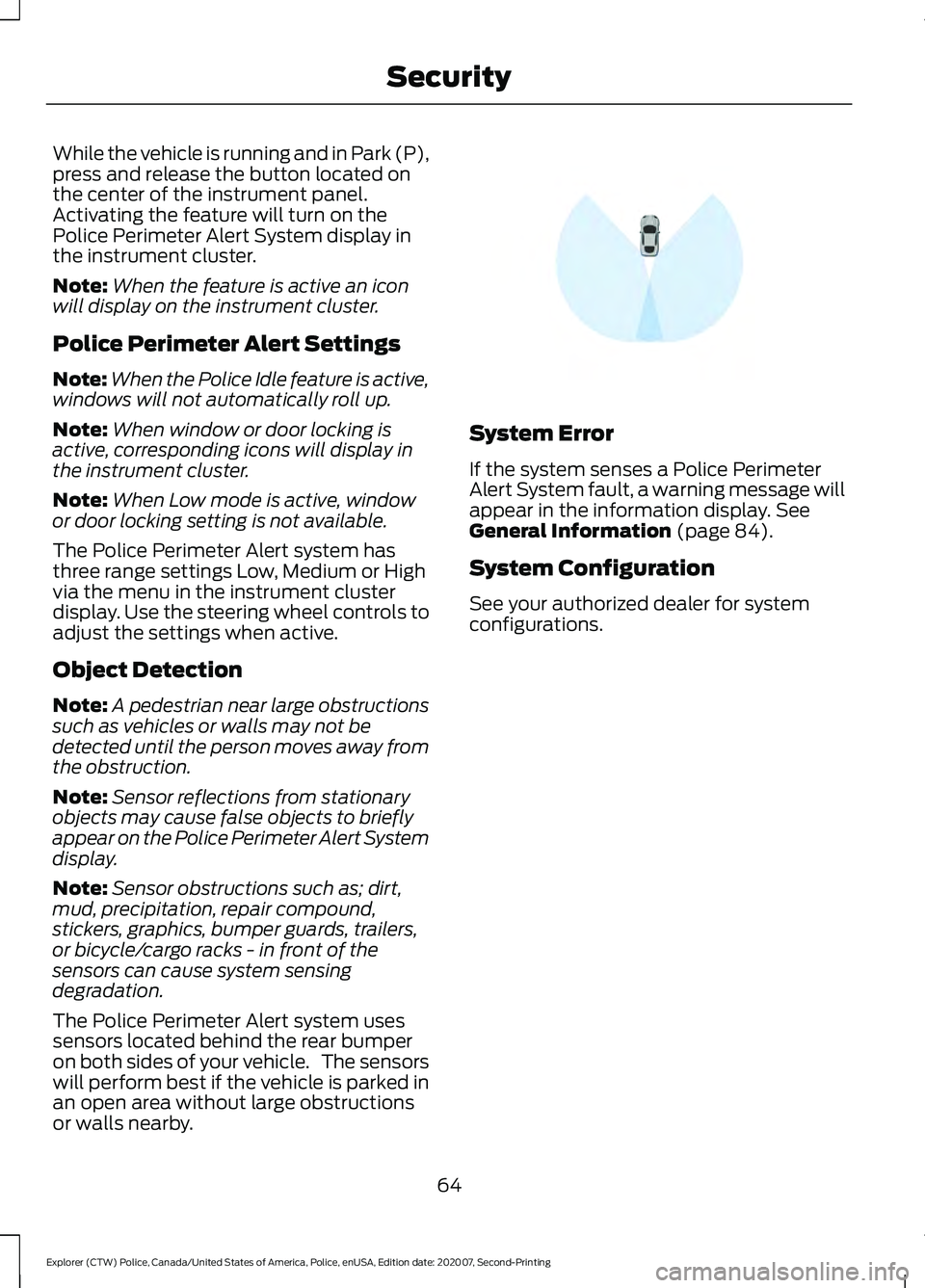
The Police Perimeter Alert system has
three range settings Low, Medium or High
via the menu in the instrument cluster
display. Use the steering wheel controls to
adjust the settings when active.
Object Detection
Note: A pedestrian near large obstructions
such as vehicles or walls may not be
detected until the person moves away from
the obstruction.
Note: Sensor reflections from stationary
objects may cause false objects to briefly
appear on the Police Perimeter Alert System
display.
Note: Sensor obstructions such as; dirt,
mud, precipitation, repair compound,
stickers, graphics, bumper guards, trailers,
or bicycle/cargo racks - in front of the
sensors can cause system sensing
degradation.
The Police Perimeter Alert system uses
sensors located behind the rear bumper
on both sides of your vehicle. The sensors
will perform best if the vehicle is parked in
an open area without large obstructions
or walls nearby. System Error
If the system senses a Police Perimeter
Alert System fault, a warning message will
appear in the information display. See
General Information (page 84).
System Configuration
See your authorized dealer for system
configurations.
64
Explorer (CTW) Police, Canada/United States of America, Police, enUSA, Edition date: 202007, Second-Printing SecurityE298030
Page 84 of 412
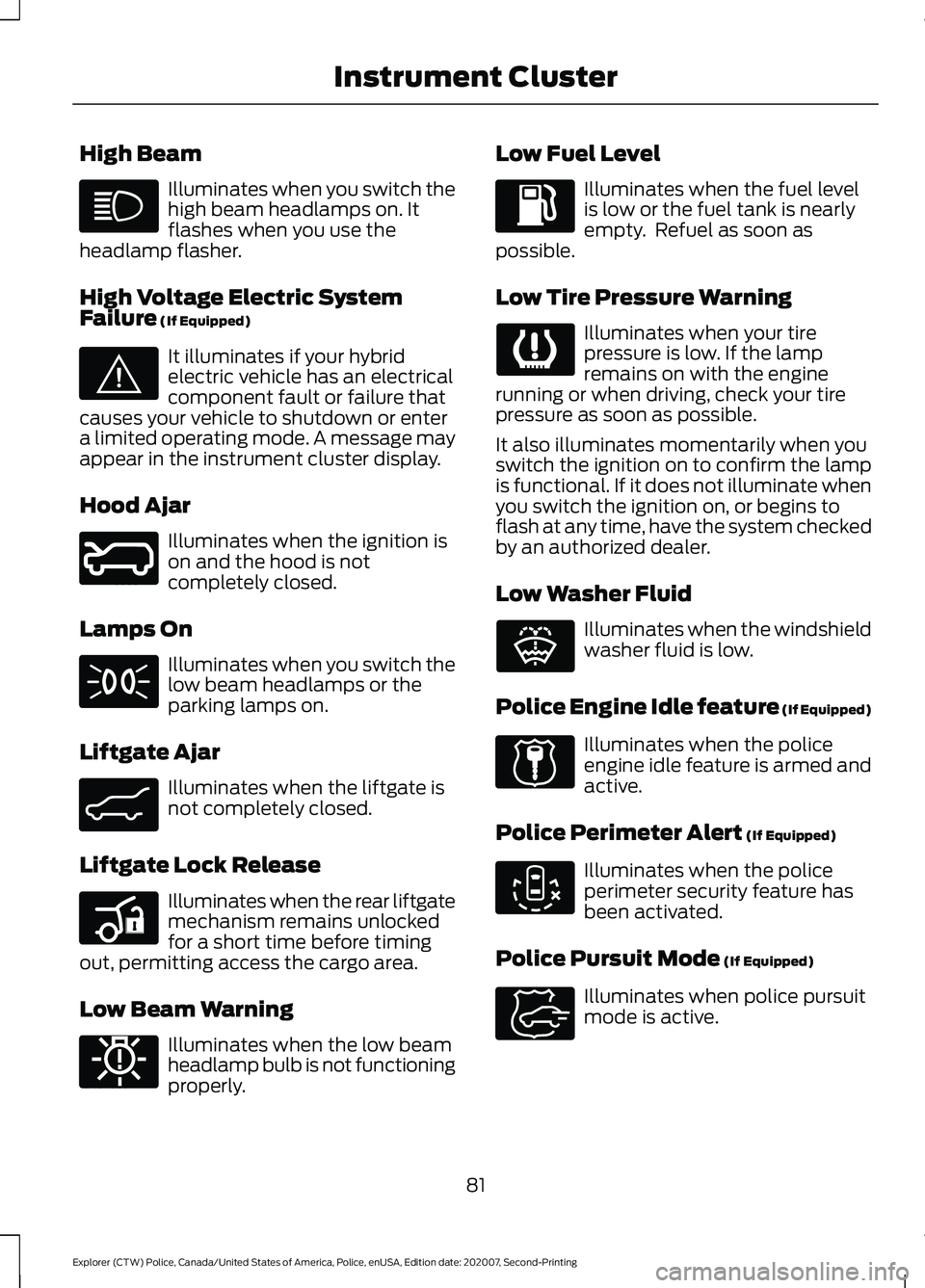
High Beam
Illuminates when you switch the
high beam headlamps on. It
flashes when you use the
headlamp flasher.
High Voltage Electric System
Failure (If Equipped) It illuminates if your hybrid
electric vehicle has an electrical
component fault or failure that
causes your vehicle to shutdown or enter
a limited operating mode. A message may
appear in the instrument cluster display.
Hood Ajar Illuminates when the ignition is
on and the hood is not
completely closed.
Lamps On Illuminates when you switch the
low beam headlamps or the
parking lamps on.
Liftgate Ajar Illuminates when the liftgate is
not completely closed.
Liftgate Lock Release Illuminates when the rear liftgate
mechanism remains unlocked
for a short time before timing
out, permitting access the cargo area.
Low Beam Warning Illuminates when the low beam
headlamp bulb is not functioning
properly. Low Fuel Level Illuminates when the fuel level
is low or the fuel tank is nearly
empty. Refuel as soon as
possible.
Low Tire Pressure Warning Illuminates when your tire
pressure is low. If the lamp
remains on with the engine
running or when driving, check your tire
pressure as soon as possible.
It also illuminates momentarily when you
switch the ignition on to confirm the lamp
is functional. If it does not illuminate when
you switch the ignition on, or begins to
flash at any time, have the system checked
by an authorized dealer.
Low Washer Fluid Illuminates when the windshield
washer fluid is low.
Police Engine Idle feature
(If Equipped) Illuminates when the police
engine idle feature is armed and
active.
Police Perimeter Alert
(If Equipped) Illuminates when the police
perimeter security feature has
been activated.
Police Pursuit Mode
(If Equipped) Illuminates when police pursuit
mode is active.
81
Explorer (CTW) Police, Canada/United States of America, Police, enUSA, Edition date: 202007, Second-Printing Instrument Cluster E144693 E246598 E162453 E206359 E181350 E132353 E224045 E288083 E271854
Page 93 of 412
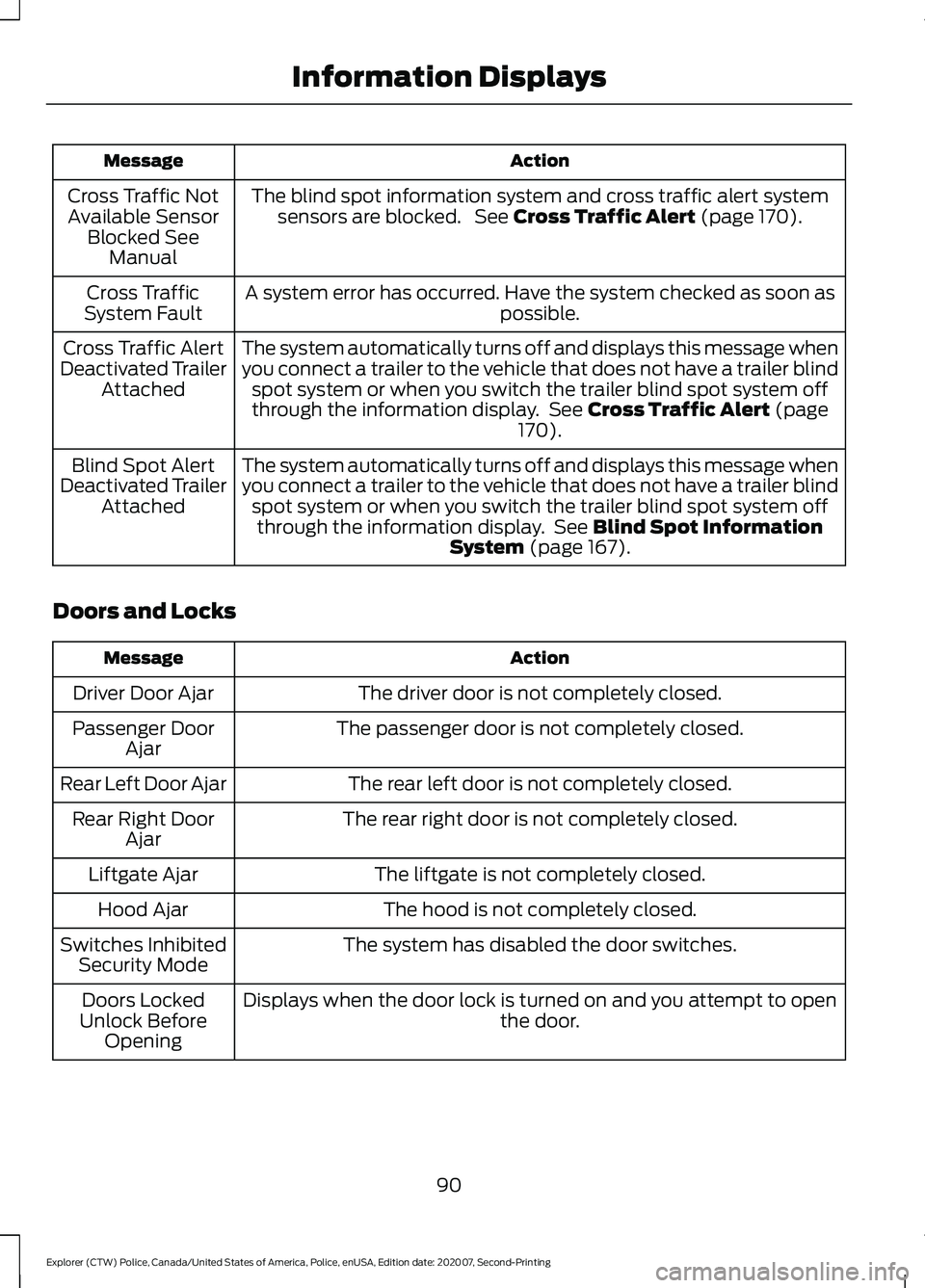
Action
Message
The blind spot information system and cross traffic alert systemsensors are blocked. See Cross Traffic Alert (page 170).
Cross Traffic Not
Available Sensor Blocked See Manual
A system error has occurred. Have the system checked as soon as possible.
Cross Traffic
System Fault
The system automatically turns off and displays this message when
you connect a trailer to the vehicle that does not have a trailer blindspot system or when you switch the trailer blind spot system off
through the information display. See
Cross Traffic Alert (page
170).
Cross Traffic Alert
Deactivated Trailer Attached
The system automatically turns off and displays this message when
you connect a trailer to the vehicle that does not have a trailer blindspot system or when you switch the trailer blind spot system offthrough the information display. See
Blind Spot Information
System (page 167).
Blind Spot Alert
Deactivated Trailer Attached
Doors and Locks Action
Message
The driver door is not completely closed.
Driver Door Ajar
The passenger door is not completely closed.
Passenger Door
Ajar
The rear left door is not completely closed.
Rear Left Door Ajar
The rear right door is not completely closed.
Rear Right Door
Ajar
The liftgate is not completely closed.
Liftgate Ajar
The hood is not completely closed.
Hood Ajar
The system has disabled the door switches.
Switches Inhibited
Security Mode
Displays when the door lock is turned on and you attempt to open the door.
Doors Locked
Unlock Before Opening
90
Explorer (CTW) Police, Canada/United States of America, Police, enUSA, Edition date: 202007, Second-Printing Information Displays
Page 112 of 412
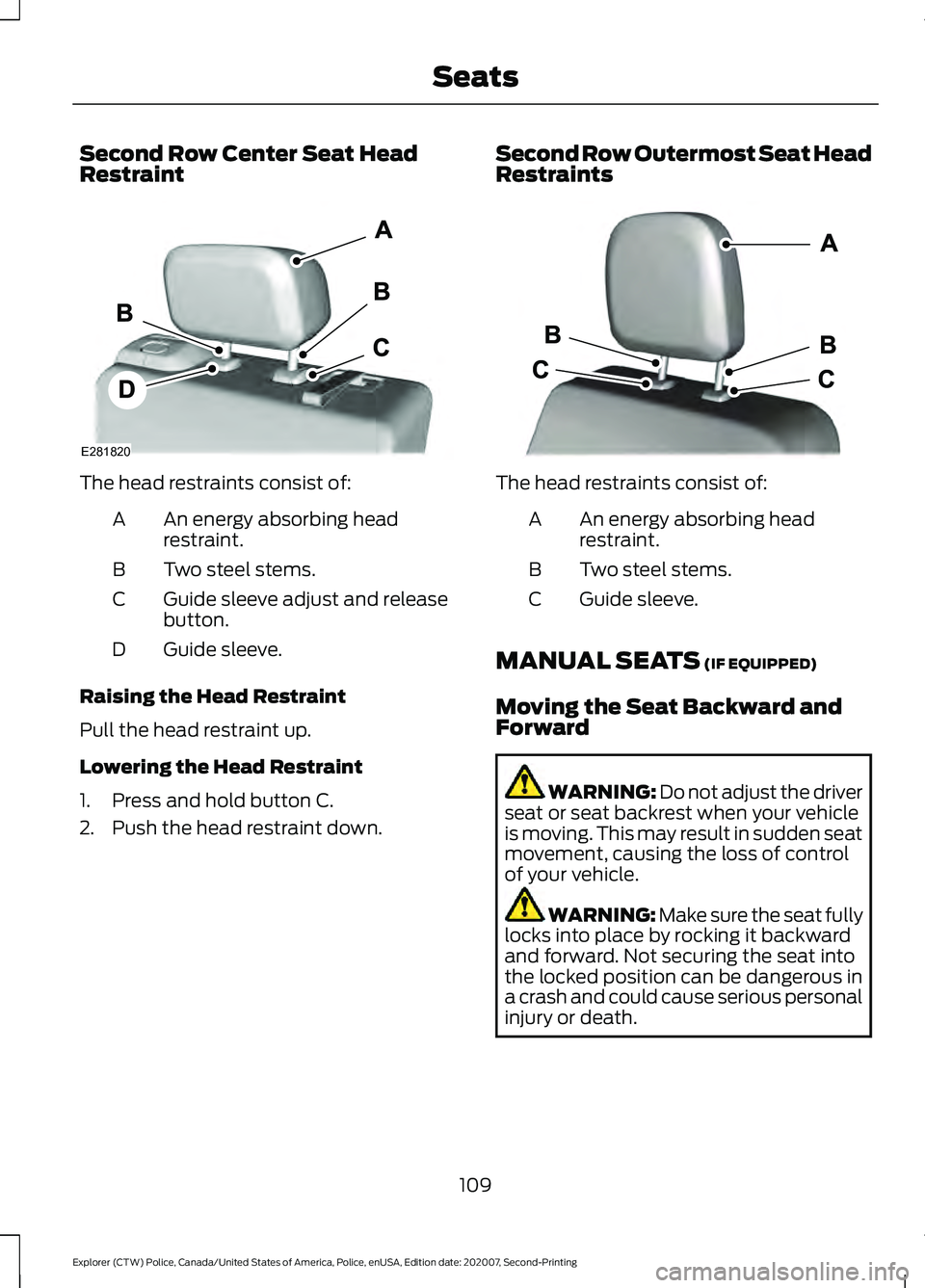
Second Row Center Seat Head
Restraint
The head restraints consist of:
An energy absorbing head
restraint.
A
Two steel stems.
B
Guide sleeve adjust and release
button.
C
Guide sleeve.
D
Raising the Head Restraint
Pull the head restraint up.
Lowering the Head Restraint
1. Press and hold button C.
2. Push the head restraint down. Second Row Outermost Seat Head
Restraints The head restraints consist of:
An energy absorbing head
restraint.
A
Two steel stems.
B
Guide sleeve.
C
MANUAL SEATS (IF EQUIPPED)
Moving the Seat Backward and
Forward WARNING: Do not adjust the driver
seat or seat backrest when your vehicle
is moving. This may result in sudden seat
movement, causing the loss of control
of your vehicle. WARNING: Make sure the seat fully
locks into place by rocking it backward
and forward. Not securing the seat into
the locked position can be dangerous in
a crash and could cause serious personal
injury or death.
109
Explorer (CTW) Police, Canada/United States of America, Police, enUSA, Edition date: 202007, Second-Printing SeatsE281820 E333253
Page 145 of 412
AUTOMATIC TRANSMISSION
WARNING: Apply the parking
brake, shift into park (P), switch the
ignition off and remove the key before
you leave your vehicle. Failure to follow
this instruction could result in personal
injury or death. WARNING:
Do not apply the brake
pedal and accelerator pedal
simultaneously. Applying both pedals
simultaneously for more than a few
seconds will limit engine performance,
which may result in difficulty maintaining
speed in traffic and could lead to serious
injury.
Understanding the Positions of
Your Automatic Transmission
Putting your vehicle in or out of gear:
1. Fully press down the brake pedal.
2. Move the gearshift lever into the desired gear.
3. Come to a complete stop.
4. Move the gearshift lever and securely latch it in park (P). Park (P)
This position locks the transmission and
prevents the wheels from turning.
Reverse (R)
With the gearshift lever in reverse (R), your
vehicle moves backward. Always come to
a complete stop before shifting into and
out of reverse (R).
Neutral (N)
With the gearshift lever in neutral (N), you
can start your vehicle and it is free to roll.
Hold the brake pedal down while in this
position.
Drive (D)
Drive (D) is the normal driving position for
the best fuel economy. The overdrive
function allows automatic upshifts and
downshifts through gears 1 through 10.
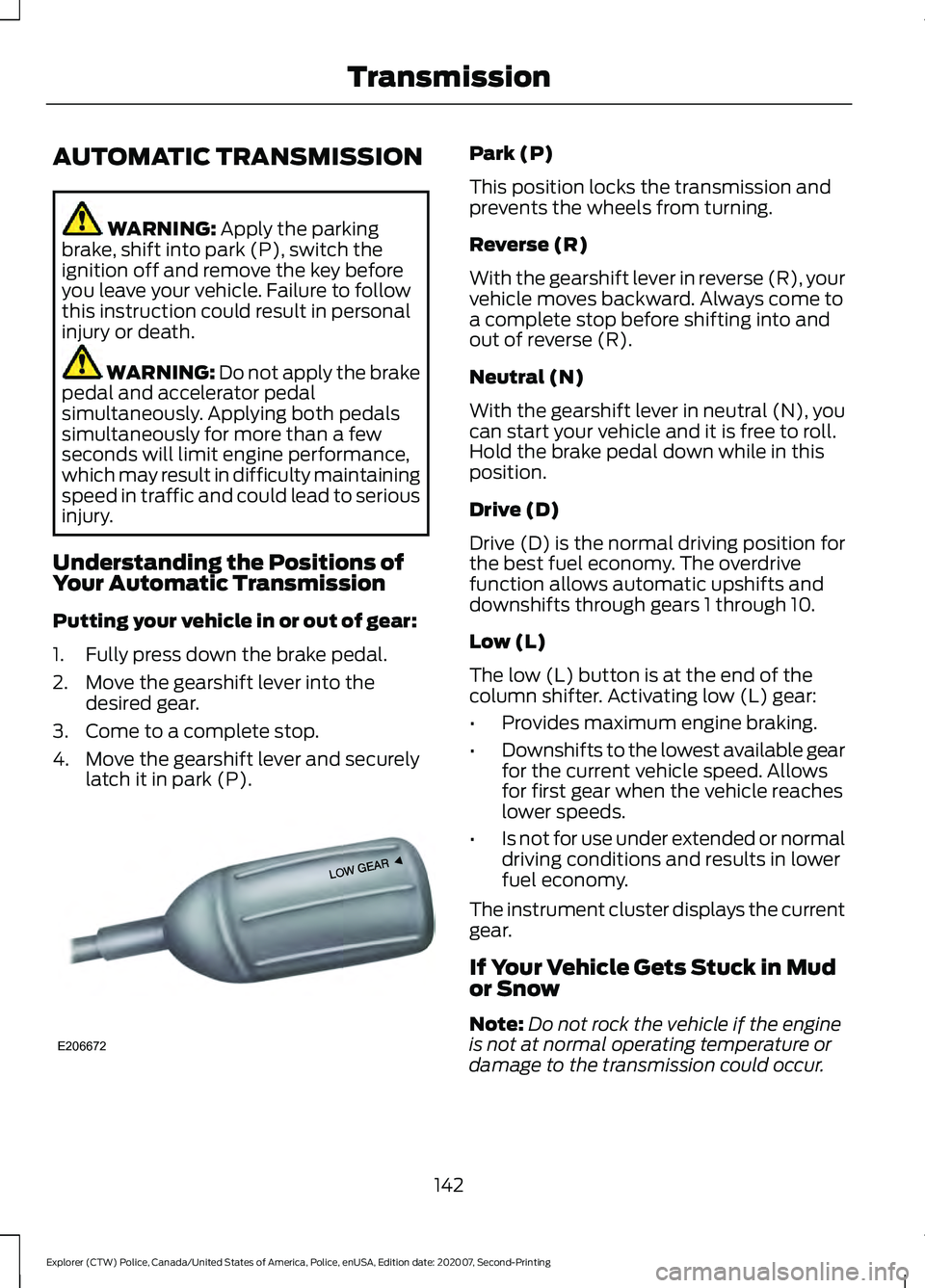
Low (L)
The low (L) button is at the end of the
column shifter. Activating low (L) gear:
•
Provides maximum engine braking.
• Downshifts to the lowest available gear
for the current vehicle speed. Allows
for first gear when the vehicle reaches
lower speeds.
• Is not for use under extended or normal
driving conditions and results in lower
fuel economy.
The instrument cluster displays the current
gear.
If Your Vehicle Gets Stuck in Mud
or Snow
Note: Do not rock the vehicle if the engine
is not at normal operating temperature or
damage to the transmission could occur.
142
Explorer (CTW) Police, Canada/United States of America, Police, enUSA, Edition date: 202007, Second-Printing TransmissionE206672
Page 196 of 412
When driving through standing water, drive
very slowly and do not stop your vehicle.
Your brake performance and traction may
be limited. After driving through water and
as soon as it is safe to do so:
•
Lightly press the brake pedal to dry the
brakes and to check that they work.
• Check that the horn works.
• Check that the exterior lights work.
• Turn the steering wheel to check that
the steering power assist works.
FLOOR MATS WARNING: Use a floor mat
designed to fit the footwell of your
vehicle that does not obstruct the pedal
area. Failure to follow this instruction
could result in the loss of control of your
vehicle, personal injury or death. WARNING:
Pedals that cannot
move freely can cause loss of vehicle
control and increase the risk of serious
personal injury. WARNING:
Secure the floor mat
to both retention devices so that it
cannot slip out of position and interfere
with the pedals. Failure to follow this
instruction could result in the loss of
control of your vehicle, personal injury or
death. WARNING: Do not place additional
floor mats or any other covering on top
of the original floor mats. This could
result in the floor mat interfering with the
operation of the pedals. Failure to follow
this instruction could result in the loss of
control of your vehicle, personal injury or
death. WARNING:
Always make sure that
objects cannot fall into the driver foot
well while your vehicle is moving. Objects
that are loose can become trapped
under the pedals causing a loss of
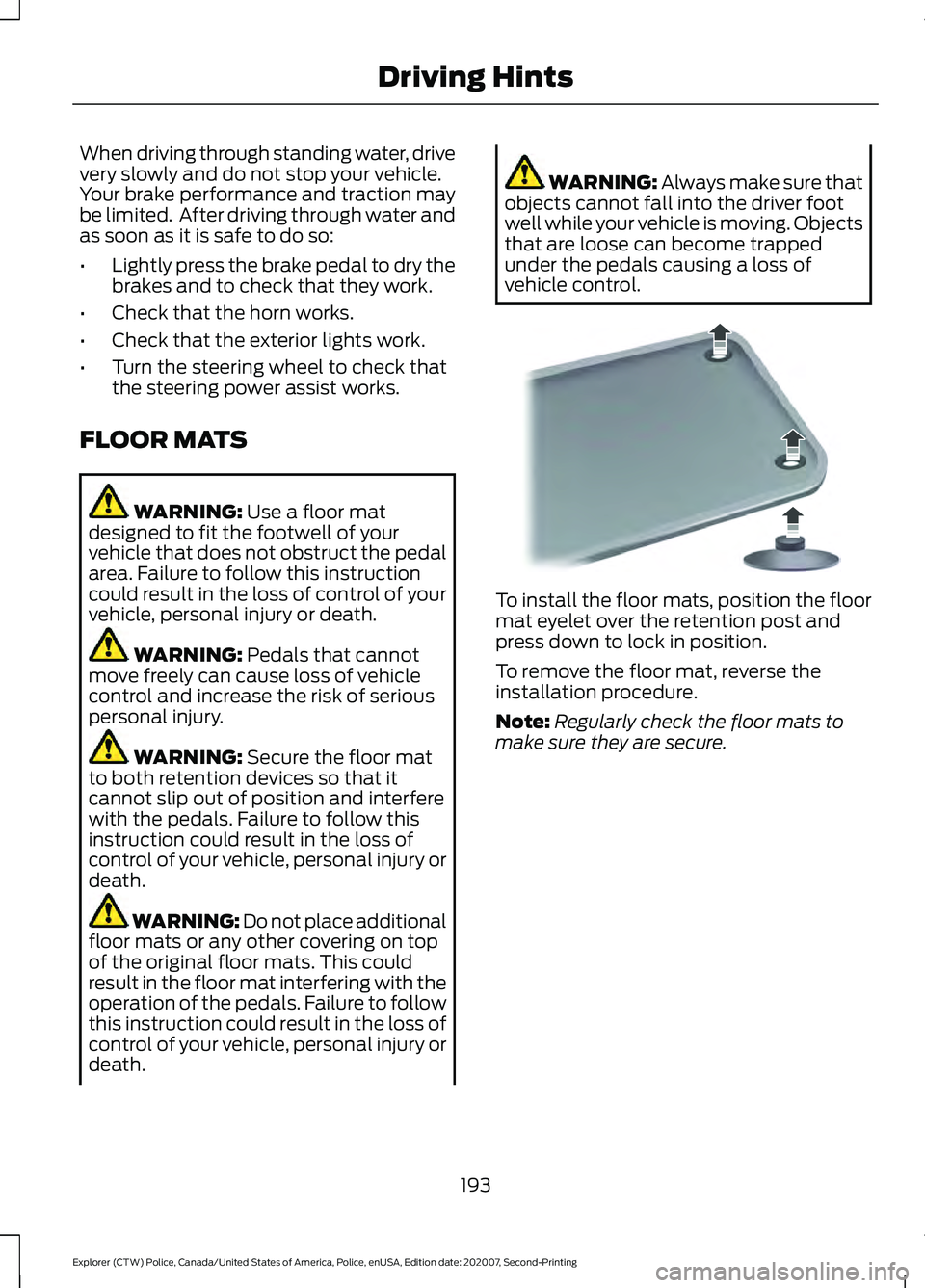
vehicle control. To install the floor mats, position the floor
mat eyelet over the retention post and
press down to lock in position.
To remove the floor mat, reverse the
installation procedure.
Note:
Regularly check the floor mats to
make sure they are secure.
193
Explorer (CTW) Police, Canada/United States of America, Police, enUSA, Edition date: 202007, Second-Printing Driving HintsE142666
Page 205 of 412
Additional Assistance
If you have questions or concerns, or are
unsatisfied with the service you are
receiving, follow these steps:
1. Contact your Sales Representative or
Service Advisor at your selling or
servicing authorized dealer.
2. If your inquiry or concern remains unresolved, contact the Sales Manager,
Service Manager or Customer Relations
Manager.
3. If you require assistance or clarification
on Ford Motor Company policies,
please contact the Ford Customer
Relationship Center.
In order to help us serve you better, please
have the following information available
when contacting a Customer Relationship
Center:
• Vehicle Identification Number.
• Your telephone number (home and
business).
• The name of the authorized dealer and
city where located.
• The vehicle ’s current odometer reading.
In some states within the United States,
you must directly notify Ford in writing
before pursuing remedies under your
state's warranty laws, and Ford is also
allowed a final repair attempt.
Additionally, in some states within the
United States, a consumer has the option
of submitting a warranty dispute to the
BBB Auto Line before taking action under
the Magnuson-Moss Warranty Act, or to
the extent allowed by state law, before
pursuing replacement or repurchase
remedies provided by certain state laws.
This dispute handling procedure is not
required prior to enforcing state created
rights or other rights which are independent
of the Magnuson-Moss Warranty Act or
state replacement or repurchase laws. IN CALIFORNIA (U.S. ONLY)
California Civil Code Section 1793.2(d)
requires that, if a manufacturer or its
representative is unable to repair a motor
vehicle to conform to the vehicle
’s
applicable express warranty after a
reasonable number of attempts, the
manufacturer shall be required to either
replace the vehicle with one substantially
identical or repurchase the vehicle and
reimburse the buyer in an amount equal to
the actual price paid or payable by the
consumer (less a reasonable allowance
for consumer use). The consumer has the
right to choose whether to receive a refund
or replacement vehicle.
California Civil Code Section 1793.22(b)
presumes that the manufacturer has had
a reasonable number of attempts to
conform the vehicle to its applicable
express warranties if, within the first 18
months of ownership of a new vehicle or
the first 18,000 mi (29,000 km), whichever
occurs first:
1. Two or more repair attempts are made
on the same non-conformity likely to
cause death or serious bodily injury OR
2. Four or more repair attempts are made
on the same nonconformity (a defect
or condition that substantially impairs
the use, value or safety of the vehicle)
OR
3. The vehicle is out of service for repair of nonconformities for a total of more
than 30 calendar days (not necessarily
all at one time).
In the case of 1 or 2 above, the consumer
must also notify the manufacturer of the
need for the repair of the nonconformity
at the following address:
Ford Motor Company
16800 Executive Plaza Drive
Mail Drop 3NE-B
Dearborn, MI 48126
202
Explorer (CTW) Police, Canada/United States of America, Police, enUSA, Edition date: 202007, Second-Printing Customer Assistance