ignition FORD POLICE INTERCEPTOR 2021 Owner's Manual
[x] Cancel search | Manufacturer: FORD, Model Year: 2021, Model line: POLICE INTERCEPTOR, Model: FORD POLICE INTERCEPTOR 2021Pages: 412, PDF Size: 7.51 MB
Page 95 of 412
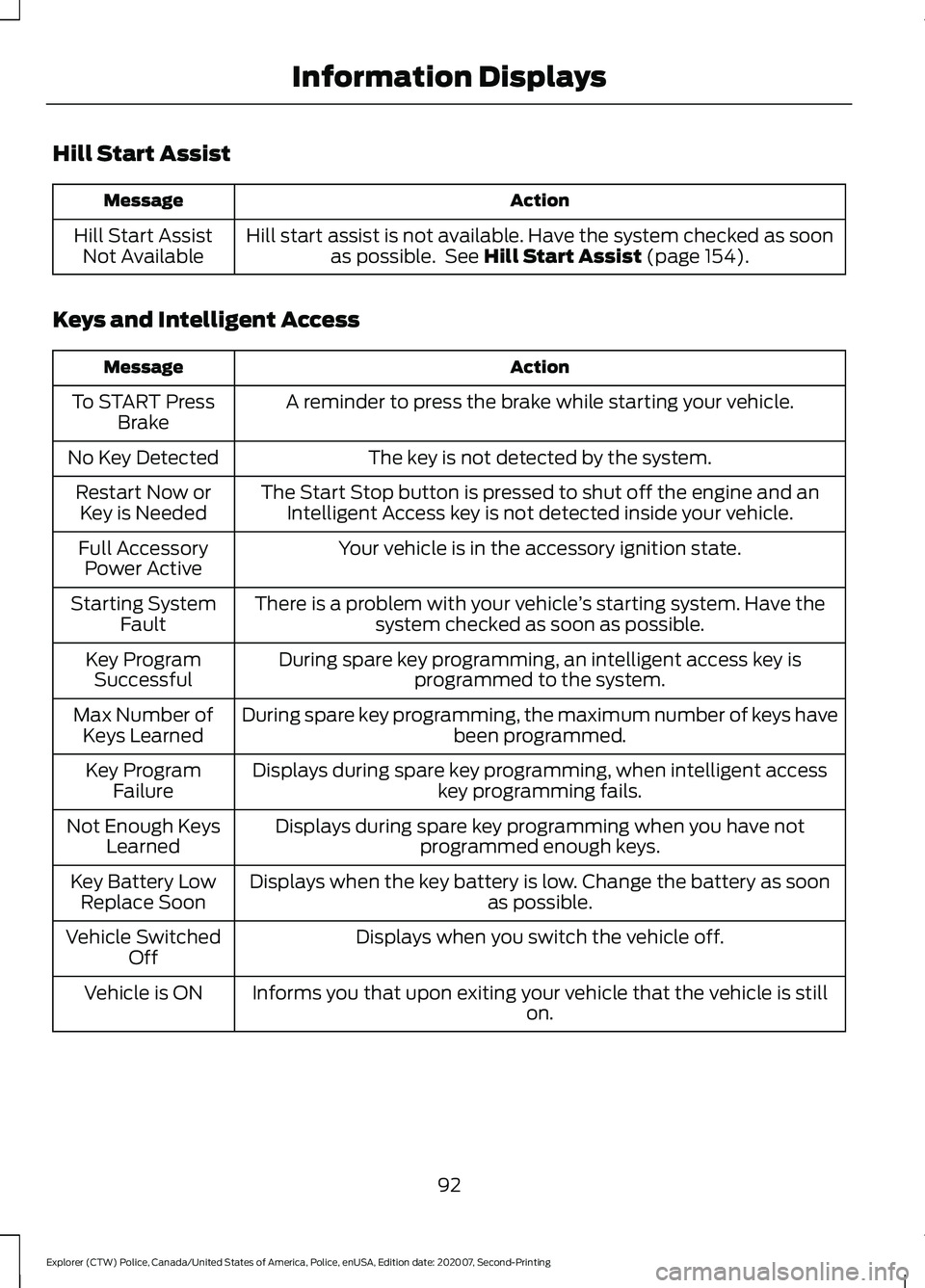
Hill Start Assist
Action
Message
Hill start assist is not available. Have the system checked as soonas possible. See Hill Start Assist (page 154).
Hill Start Assist
Not Available
Keys and Intelligent Access Action
Message
A reminder to press the brake while starting your vehicle.
To START Press
Brake
The key is not detected by the system.
No Key Detected
The Start Stop button is pressed to shut off the engine and anIntelligent Access key is not detected inside your vehicle.
Restart Now or
Key is Needed
Your vehicle is in the accessory ignition state.
Full Accessory
Power Active
There is a problem with your vehicle ’s starting system. Have the
system checked as soon as possible.
Starting System
Fault
During spare key programming, an intelligent access key isprogrammed to the system.
Key Program
Successful
During spare key programming, the maximum number of keys have been programmed.
Max Number of
Keys Learned
Displays during spare key programming, when intelligent access key programming fails.
Key Program
Failure
Displays during spare key programming when you have notprogrammed enough keys.
Not Enough Keys
Learned
Displays when the key battery is low. Change the battery as soon as possible.
Key Battery Low
Replace Soon
Displays when you switch the vehicle off.
Vehicle Switched
Off
Informs you that upon exiting your vehicle that the vehicle is still on.
Vehicle is ON
92
Explorer (CTW) Police, Canada/United States of America, Police, enUSA, Edition date: 202007, Second-Printing Information Displays
Page 101 of 412
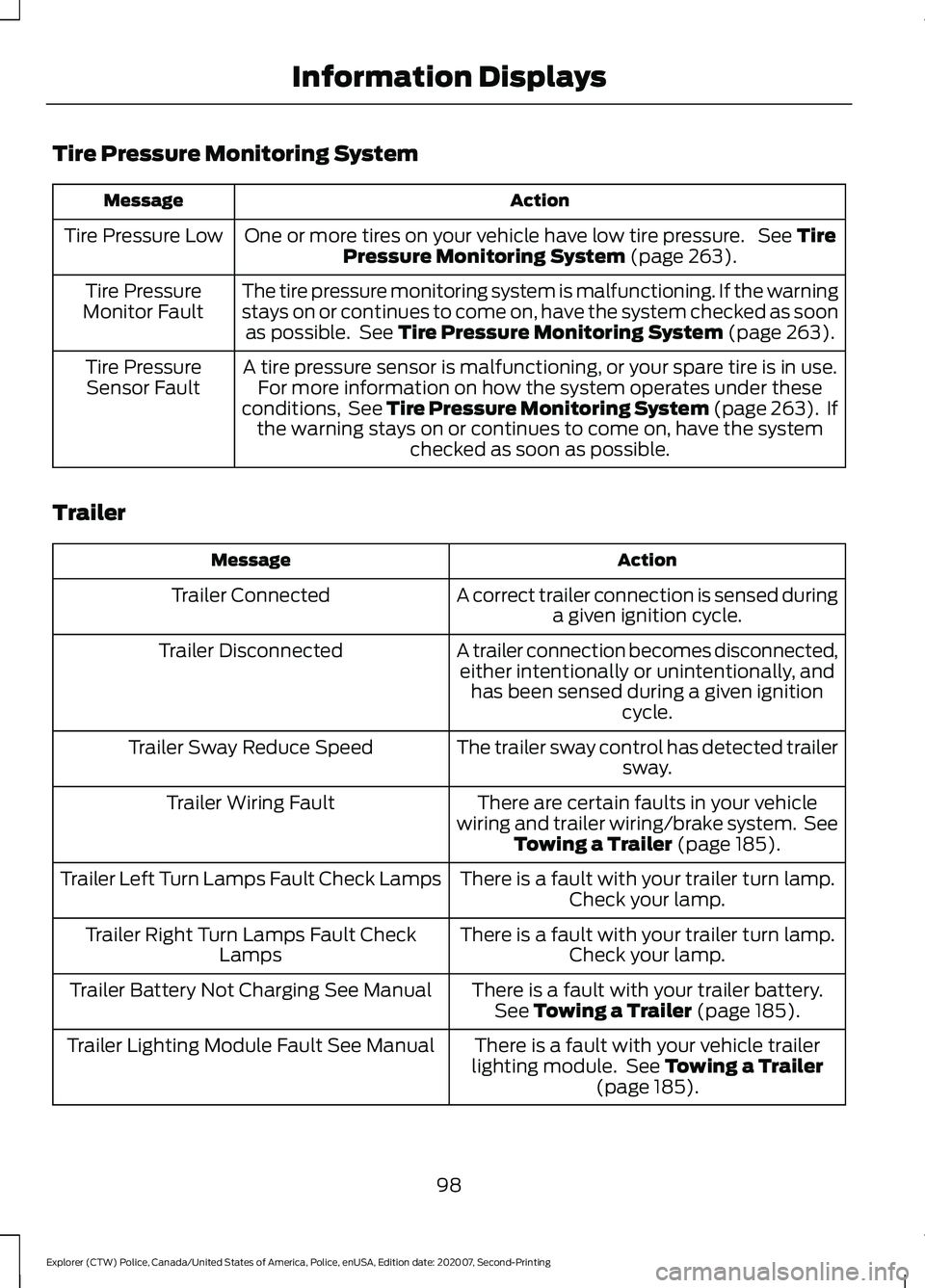
Tire Pressure Monitoring System
Action
Message
One or more tires on your vehicle have low tire pressure. See Tire
Pressure Monitoring System (page 263).
Tire Pressure Low
The tire pressure monitoring system is malfunctioning. If the warning
stays on or continues to come on, have the system checked as soonas possible. See
Tire Pressure Monitoring System (page 263).
Tire Pressure
Monitor Fault
A tire pressure sensor is malfunctioning, or your spare tire is in use.For more information on how the system operates under these
conditions, See Tire Pressure Monitoring System (page 263). If the warning stays on or continues to come on, have the system checked as soon as possible.
Tire Pressure
Sensor Fault
Trailer Action
Message
A correct trailer connection is sensed duringa given ignition cycle.
Trailer Connected
A trailer connection becomes disconnected,either intentionally or unintentionally, and has been sensed during a given ignition cycle.
Trailer Disconnected
The trailer sway control has detected trailersway.
Trailer Sway Reduce Speed
There are certain faults in your vehicle
wiring and trailer wiring/brake system. See Towing a Trailer
(page 185).
Trailer Wiring Fault
There is a fault with your trailer turn lamp.Check your lamp.
Trailer Left Turn Lamps Fault Check Lamps
There is a fault with your trailer turn lamp.Check your lamp.
Trailer Right Turn Lamps Fault Check
Lamps
There is a fault with your trailer battery.See
Towing a Trailer (page 185).
Trailer Battery Not Charging See Manual
There is a fault with your vehicle trailer
lighting module. See
Towing a Trailer
(page 185).
Trailer Lighting Module Fault See Manual
98
Explorer (CTW) Police, Canada/United States of America, Police, enUSA, Edition date: 202007, Second-Printing Information Displays
Page 102 of 412
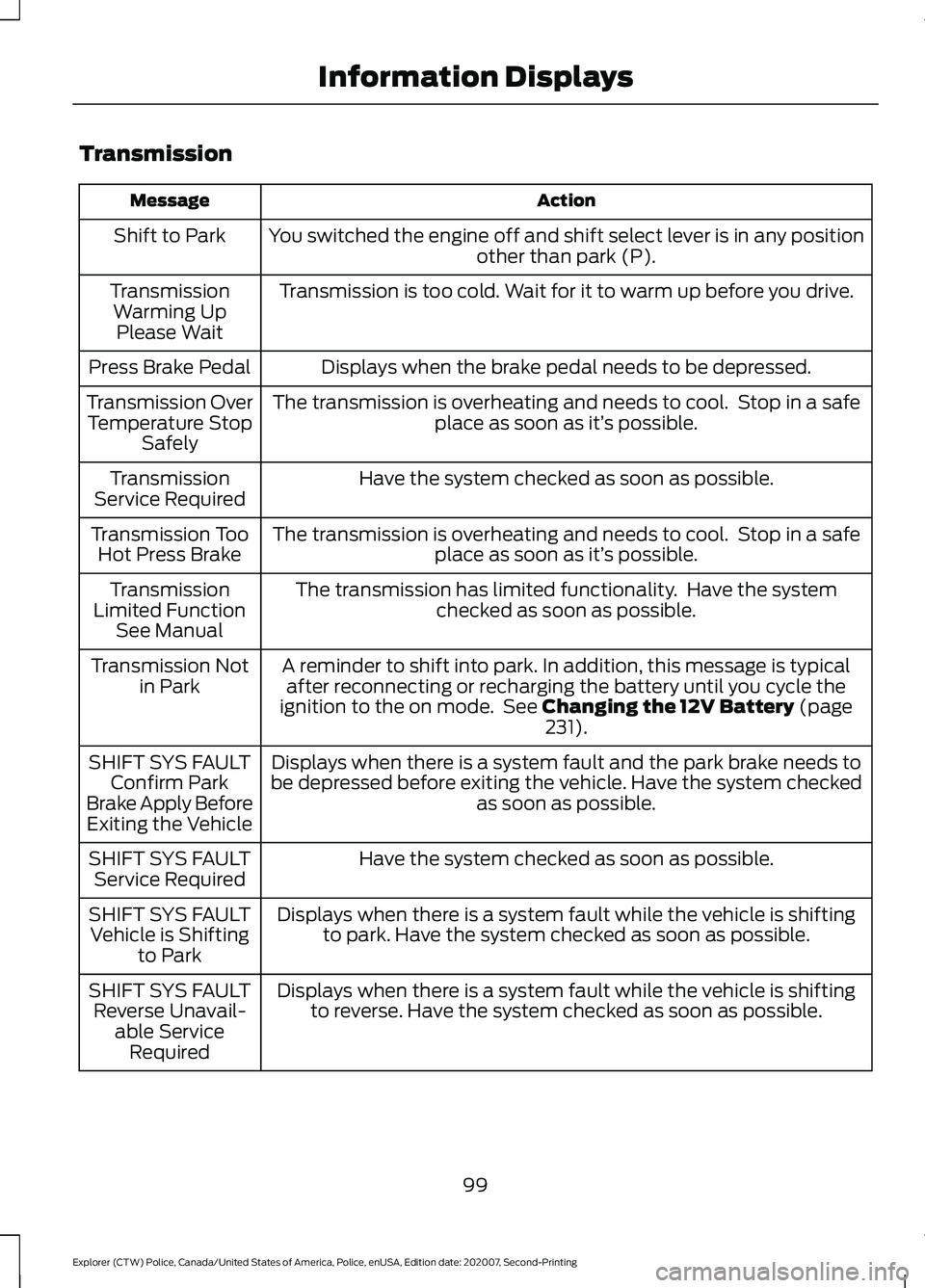
Transmission
Action
Message
You switched the engine off and shift select lever is in any position other than park (P).
Shift to Park
Transmission is too cold. Wait for it to warm up before you drive.
Transmission
Warming UpPlease Wait
Displays when the brake pedal needs to be depressed.
Press Brake Pedal
The transmission is overheating and needs to cool. Stop in a safeplace as soon as it’ s possible.
Transmission Over
Temperature Stop Safely
Have the system checked as soon as possible.
Transmission
Service Required
The transmission is overheating and needs to cool. Stop in a safeplace as soon as it’ s possible.
Transmission Too
Hot Press Brake
The transmission has limited functionality. Have the systemchecked as soon as possible.
Transmission
Limited Function See Manual
A reminder to shift into park. In addition, this message is typicalafter reconnecting or recharging the battery until you cycle the
ignition to the on mode. See Changing the 12V Battery (page
231).
Transmission Not
in Park
Displays when there is a system fault and the park brake needs to
be depressed before exiting the vehicle. Have the system checked as soon as possible.
SHIFT SYS FAULT
Confirm Park
Brake Apply Before Exiting the Vehicle
Have the system checked as soon as possible.
SHIFT SYS FAULT
Service Required
Displays when there is a system fault while the vehicle is shiftingto park. Have the system checked as soon as possible.
SHIFT SYS FAULT
Vehicle is Shifting to Park
Displays when there is a system fault while the vehicle is shiftingto reverse. Have the system checked as soon as possible.
SHIFT SYS FAULT
Reverse Unavail- able ServiceRequired
99
Explorer (CTW) Police, Canada/United States of America, Police, enUSA, Edition date: 202007, Second-Printing Information Displays
Page 103 of 412
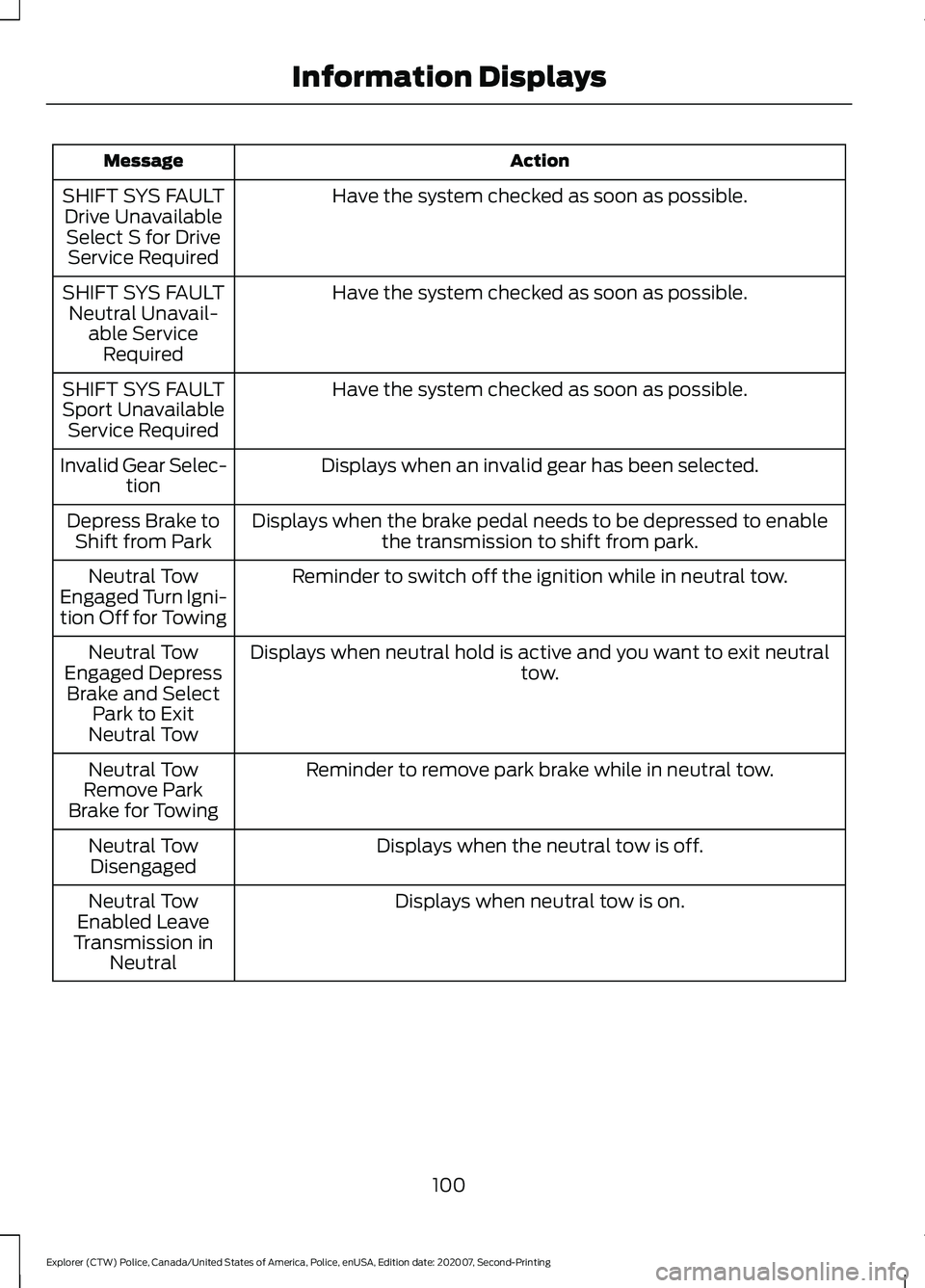
Action
Message
Have the system checked as soon as possible.
SHIFT SYS FAULT
Drive UnavailableSelect S for Drive Service Required
Have the system checked as soon as possible.
SHIFT SYS FAULT
Neutral Unavail- able ServiceRequired
Have the system checked as soon as possible.
SHIFT SYS FAULT
Sport Unavailable Service Required
Displays when an invalid gear has been selected.
Invalid Gear Selec-
tion
Displays when the brake pedal needs to be depressed to enable the transmission to shift from park.
Depress Brake to
Shift from Park
Reminder to switch off the ignition while in neutral tow.
Neutral Tow
Engaged Turn Igni-
tion Off for Towing
Displays when neutral hold is active and you want to exit neutral tow.
Neutral Tow
Engaged Depress Brake and Select Park to Exit
Neutral Tow
Reminder to remove park brake while in neutral tow.
Neutral Tow
Remove Park
Brake for Towing
Displays when the neutral tow is off.
Neutral Tow
Disengaged
Displays when neutral tow is on.
Neutral Tow
Enabled Leave
Transmission in Neutral
100
Explorer (CTW) Police, Canada/United States of America, Police, enUSA, Edition date: 202007, Second-Printing Information Displays
Page 117 of 412
WHAT IS THE REAR
OCCUPANT ALERT SYSTEM
The rear occupant alert system monitors
vehicle conditions and notifies you to check
for rear seat occupants when you switch
the ignition off.
HOW DOES THE REAR
OCCUPANT ALERT SYSTEM
WORK
The system monitors when rear doors have
been opened and closed to indicate the
potential presence of an occupant in the
rear seat.
A message displays in the information and
entertainment display screen and an
audible warning sounds when you switch
the ignition off after any of the following
conditions have been met:
•
A rear door is opened or closed while
the ignition is on.
• You switch the ignition on within 15
minutes of a rear door opening and
closing.
• You switch the ignition on within 15
minutes of the alert having displayed
or sounded.
REAR OCCUPANT ALERT
SYSTEM PRECAUTIONS WARNING: On hot days, the
temperature inside the vehicle can rise
very quickly. Exposure of people or
animals to these high temperatures for
even a short time can cause death or
serious heat related injuries, including
brain damage. Small children are
particularly at risk. WARNING:
Do not leave children
or pets unattended in your vehicle.
Failure to follow this instruction could
result in personal injury or death.
REAR OCCUPANT ALERT
SYSTEM LIMITATIONS
The system does not detect the presence
of objects or passengers in the rear seat.
It monitors when rear doors are opened
and closed.
Note: It is possible to receive an alert when
there is no rear seat occupant, but alert
conditions are met.
Note: It is possible to receive no alert when
there is an occupant in the rear seat, if alert
conditions are not met. For example, if a rear
seat occupant does not enter the vehicle
through a rear door.
Note: The audible warning does not sound
when the front door is opened before you
switch the ignition off.
SWITCHING REAR OCCUPANT
ALERT SYSTEM ON AND OFF Press the button on the audio
unit.
1. Using the controls on the audio unit, select
Settings.
2. Switch Rear Occupant Alert on or off.
Semiannual Reminder
(If Equipped)
When you switch the system off, a
message appears every six months as a
reminder that the system is off. You can
switch the system back on or leave it off.
114
Explorer (CTW) Police, Canada/United States of America, Police, enUSA, Edition date: 202007, Second-Printing Rear Occupant Alert System
(If Equipped)
Page 119 of 412
12 Volt DC Power Point
WARNING: Do not plug optional
electrical accessories into the cigar
lighter socket. Incorrect use of the cigar
lighter can cause damage not covered
by the vehicle warranty, and can result
in fire or serious injury.
Note: When you switch the ignition on, you
can use the socket to power 12 volt
appliances with a maximum current rating
of 15 amps.
Note: If the power supply does not work
after you switch the ignition off, switch the
ignition on.
Note: Do not hang any accessory from the
accessory plug.
Note: Do not use the power point over the
vehicle capacity of 12 volt DC 180 watts or
a fuse may blow.
Note: Always keep the power point caps
closed when not in use.
Do not insert objects other than an
accessory plug into the power point. This
damages the power point and may blow
the fuse.
Run the vehicle for full capacity use of the
power point.
To prevent the battery from running out of
charge:
• Do not use the power point longer than
necessary when the vehicle is not
running.
• Do not leave devices plugged in
overnight or when you park your vehicle
for extended periods. USB Port and Power Point
Locations
USB Ports and Power Points may be in the
following locations:
•
On the lower instrument panel.
• Inside the center console.
• On the front of the center console.
• On the rear of the center console.
• In the cargo area.
• On the passenger side floor panel.
• 3rd row on the quarter trim panels.
Note: Some of the USB ports may not have
data transfer capabilities.
Note: Incorrect use of the USB ports can
cause damage not covered by the vehicle
warranty.
110 Volt AC Power Point
(If Equipped) WARNING:
Do not keep electrical
devices plugged in the power point
whenever the device is not in use. Do not
use any extension cord with the 110 volt
AC power point, since it will defeat the
safety protection design. Doing so may
cause the power point to overload due
to powering multiple devices that can
reach beyond the 150 watt load limit and
could result in fire or serious injury.
Note: The power point turns off when you
switch off the ignition, when the vehicle is
not in accessory mode or when the battery
voltage drops below 11 volts.
You can use the power point for electric
devices that require up to 150 watts. It is
on the rear of the center console.
116
Explorer (CTW) Police, Canada/United States of America, Police, enUSA, Edition date: 202007, Second-Printing Auxiliary Power Points
Page 120 of 412
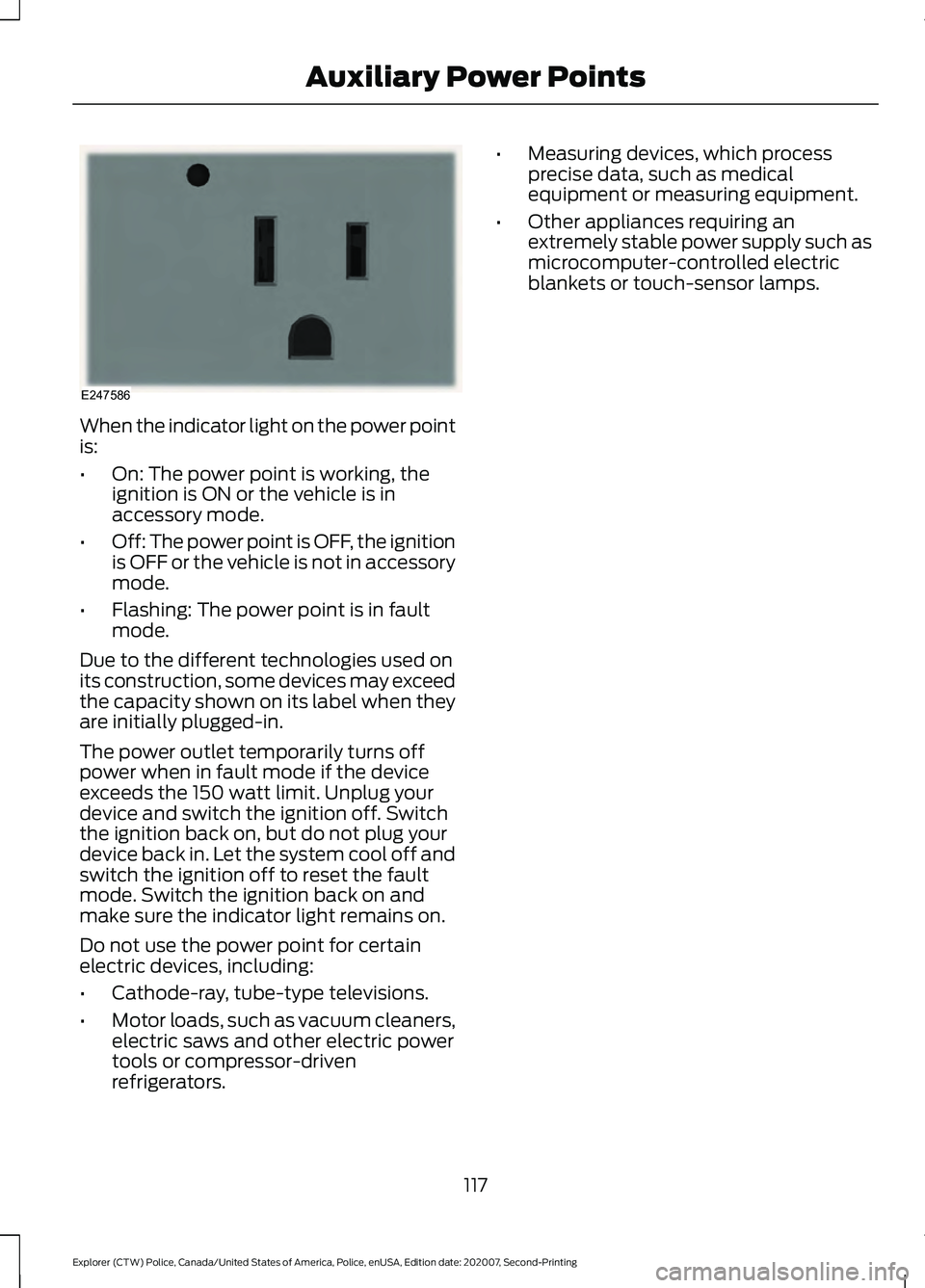
When the indicator light on the power point
is:
•
On: The power point is working, the
ignition is ON or the vehicle is in
accessory mode.
• Off: The power point is OFF, the ignition
is OFF or the vehicle is not in accessory
mode.
• Flashing: The power point is in fault
mode.
Due to the different technologies used on
its construction, some devices may exceed
the capacity shown on its label when they
are initially plugged-in.
The power outlet temporarily turns off
power when in fault mode if the device
exceeds the 150 watt limit. Unplug your
device and switch the ignition off. Switch
the ignition back on, but do not plug your
device back in. Let the system cool off and
switch the ignition off to reset the fault
mode. Switch the ignition back on and
make sure the indicator light remains on.
Do not use the power point for certain
electric devices, including:
• Cathode-ray, tube-type televisions.
• Motor loads, such as vacuum cleaners,
electric saws and other electric power
tools or compressor-driven
refrigerators. •
Measuring devices, which process
precise data, such as medical
equipment or measuring equipment.
• Other appliances requiring an
extremely stable power supply such as
microcomputer-controlled electric
blankets or touch-sensor lamps.
117
Explorer (CTW) Police, Canada/United States of America, Police, enUSA, Edition date: 202007, Second-Printing Auxiliary Power PointsE247586
Page 121 of 412
GENERAL INFORMATION
WARNING: Extended idling at high
engine speeds can produce very high
temperatures in the engine and exhaust
system, creating the risk of fire or other
damage. WARNING:
Do not park, idle or
drive your vehicle on dry grass or other
dry ground cover. The emission system
heats up the engine compartment and
exhaust system, creating the risk of fire. WARNING: Do not start the engine
in a closed garage or in other enclosed
areas. Exhaust fumes can be toxic.
Always open the garage door before you
start the engine. WARNING:
Exhaust leaks may
result in entry of harmful and potentially
lethal fumes into the passenger
compartment. If you smell exhaust
fumes inside your vehicle, have your
vehicle inspected immediately. Do not
drive if you smell exhaust fumes.
If you disconnect the battery, your vehicle
may exhibit some unusual driving
characteristics for approximately
5 mi
(8 km) after you reconnect it. This is
because the engine management system
must realign itself with the engine. You
can disregard any unusual driving
characteristics during this period.
The powertrain control system meets all
Canadian interference-causing equipment
standard requirements regulating the
impulse electrical field or radio noise.
When you start the engine, avoid pressing
the accelerator pedal before and during
operation. Only use the accelerator pedal
when you have difficulty starting the
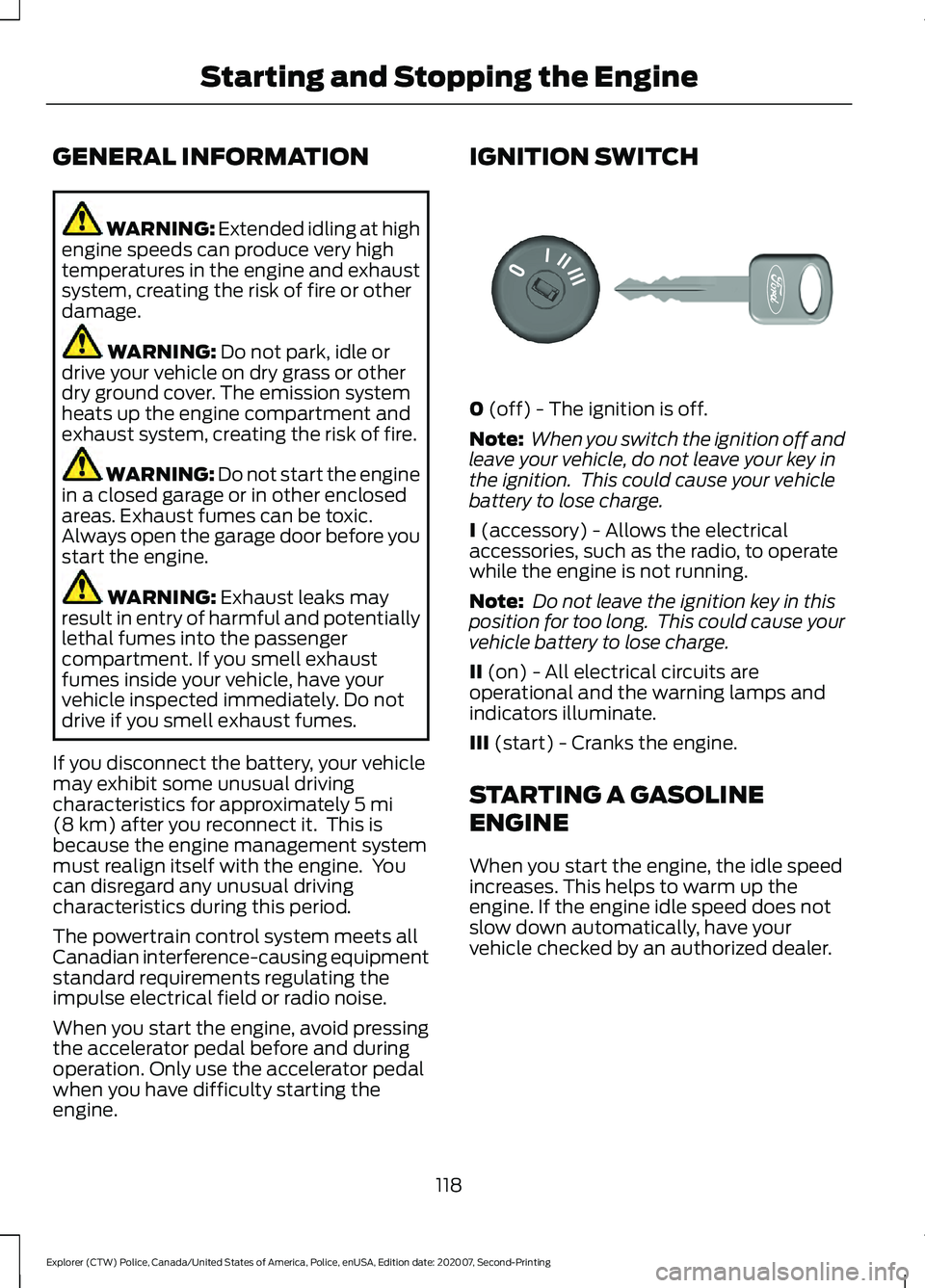
engine. IGNITION SWITCH
0
(off) - The ignition is off.
Note: When you switch the ignition off and
leave your vehicle, do not leave your key in
the ignition. This could cause your vehicle
battery to lose charge.
I
(accessory) - Allows the electrical
accessories, such as the radio, to operate
while the engine is not running.
Note: Do not leave the ignition key in this
position for too long. This could cause your
vehicle battery to lose charge.
II
(on) - All electrical circuits are
operational and the warning lamps and
indicators illuminate.
III
(start) - Cranks the engine.
STARTING A GASOLINE
ENGINE
When you start the engine, the idle speed
increases. This helps to warm up the
engine. If the engine idle speed does not
slow down automatically, have your
vehicle checked by an authorized dealer.
118
Explorer (CTW) Police, Canada/United States of America, Police, enUSA, Edition date: 202007, Second-Printing Starting and Stopping the Engine E300927
Page 122 of 412
Note:
You can crank the engine for a total
of 60 seconds without the engine starting
before the starting system temporarily
disables. The 60 seconds does not have to
be all at once. For example, if you crank the
engine three times for 20 seconds each
time, without the engine starting, you
reached the 60-second time limit. A
message appears in the information display
alerting you that you exceeded the cranking
time. You cannot attempt to start the
engine for at least 15 minutes. After 15
minutes, you are limited to a 15-second
engine cranking time. You need to wait 60
minutes before you can crank the engine for
60 seconds again.
Before starting your vehicle, check the
following:
• Make sure all occupants have fastened
their safety belts.
• Make sure the headlamps and
electrical accessories are off.
• Make sure the parking brake is on.
• Make sure the transmission is in park
(P).
• Switch the ignition key to position II.
Note: Do not touch the accelerator pedal.
1. Fully depress the brake pedal.
2. Turn the key to position
III to start the
engine.
Note: The engine may continue cranking
for up to 15 seconds or until it starts.
Note: If you cannot start the engine on the
first try, wait for a short period and try again.
Failure to Start
If you cannot start the engine after three
attempts, wait 10 seconds and follow this
procedure:
1. Fully depress the brake pedal.
2. Shift into park (P). 3.
Fully depress the accelerator pedal and
hold it there.
4. Start the engine.
Stopping the Engine When Your
Vehicle is Stationary
1. Shift into park (P).
2. Turn the key to position
0.
3. Apply the parking brake.
Stopping the Engine When Your
Vehicle is Moving WARNING:
Switching off the
engine when the vehicle is still moving
will result in a loss of brake and steering
assistance. The steering will not lock, but
higher effort will be required. When the
ignition is switched off, some electrical
circuits, including air bags, warning lamps
and indicators may also be off. If the
ignition was turned off accidentally, you
can shift into neutral (N) and re-start the
engine.
1. Shift into neutral and use the brakes to
bring your vehicle to a safe stop.
2. When your vehicle has stopped, shift into park (P) and turn the key to
position
0.
3. Apply the parking brake.
Guarding Against Exhaust Fumes WARNING:
If you smell exhaust
fumes inside your vehicle, have your
vehicle checked by your authorized
dealer immediately. Do not drive your
vehicle if you smell exhaust fumes.
Carbon monoxide is present in exhaust
fumes. Take precautions to avoid its
dangerous effects.
119
Explorer (CTW) Police, Canada/United States of America, Police, enUSA, Edition date: 202007, Second-Printing Starting and Stopping the Engine
Page 125 of 412
Using the Engine Block Heater
Make sure the receptacle terminals are
clean and dry prior to use. Clean them with
a dry cloth if necessary.
The heater uses 0.4 to 1.0 kilowatt-hours
of energy per hour of use. The system does
not have a thermostat. It achieves
maximum temperature after
approximately three hours of operation.
Using the heater longer than three hours
does not improve system performance and
unnecessarily uses electricity.
POLICE ENGINE IDLE FEATURE
(IF EQUIPPED)
The system allows you to leave the engine
running and prevents your vehicle from
unauthorized use when you are outside of
your vehicle. When you remove the key
from the ignition, the engine remains idling.
Switching the System On
1. With your vehicle running and the
transmission in park (P), press the
button on the instrument panel. See
Instrument Panel (page 18). A
warning lamp illuminates to confirm
the system is on. See Warning Lamps
and Indicators
(page 79). 2.
Switch the ignition off and remove the
key.
When the system is on:
• The power window switches turn off
and the windows remain in their current
state.
• The luggage compartment or liftgate
unlock switch turns off.
Note: When the system is on, you can use
the key blade or the remote control to lock
and unlock your vehicle.
Switching the System Off
• Turn the key to the run position.
• Press the button on the instrument
panel.
Note: If you switch the system off before
switching the ignition to the run position,
your vehicle shuts down.
122
Explorer (CTW) Police, Canada/United States of America, Police, enUSA, Edition date: 202007, Second-Printing Starting and Stopping the EngineE227967