key FORD POLICE INTERCEPTOR 2021 Owners Manual
[x] Cancel search | Manufacturer: FORD, Model Year: 2021, Model line: POLICE INTERCEPTOR, Model: FORD POLICE INTERCEPTOR 2021Pages: 412, PDF Size: 7.51 MB
Page 4 of 412
Introduction
About This Manual
..........................................7
Symbols Glossary ............................................
7
Perchlorate .........................................................
9
Ford Credit ..........................................................
9
Replacement Parts Recommendation ........................................................................\
...
10
Special Notices ...............................................
10
Mobile Communications Equipment ........................................................................\
.....
11
Export Unique Options .................................
12
Data Privacy
Data Privacy .....................................................
13
Service Data .....................................................
14
Event Data ........................................................
14
Settings Data ...................................................
15
Mobile Device Data ........................................
15
Emergency Call System Data ....................
16
Environment
Protecting the Environment .......................
17
At a Glance
Instrument Panel ...........................................
18
Child Safety
General Information .....................................
20
Installing Child Restraints ..........................
22
Booster Seats .................................................
28
Child Restraint Positioning ........................
30
Child Safety Locks .........................................
32
Seatbelts
Principle of Operation ..................................
33
Fastening the Seatbelts .............................
34
Seatbelt Height Adjustment .....................
36
Seatbelt Warning Lamp and Indicator Chime ............................................................
36
Seatbelt Reminder ........................................
37Child Restraint and Seatbelt
Maintenance ...............................................
38
Seatbelt Extensions .....................................
39
Personal Safety System ™
Personal Safety System ™........................
40
Supplementary Restraints System
Principle of Operation ..................................
41
Driver and Passenger Airbags ...................
42
Front Passenger Sensing System ...........
43
Side Airbags ....................................................
45
Driver and Passenger Knee Airbags .......
46
Safety Canopy ™...........................................
46
Crash Sensors and Airbag Indicator .......
47
Airbag Disposal ..............................................
53
Pedestrian Protection - Hybrid Electric Vehicle (HEV)
Pedestrian Alert System ............................
54
Keys and Remote Controls
General Information on Radio Frequencies .................................................
55
Remote Control .............................................
55
Replacing a Lost Key or Remote Control ........................................................................\
...
57
Doors and Locks
Locking and Unlocking ................................
58
Liftgate
Manual Liftgate ...............................................
61
Security
Anti-Theft Alarm ...........................................
63
Steering Wheel
Adjusting the Steering Wheel ..................
65
1
Explorer (CTW) Police, Canada/United States of America, Police, enUSA, Edition date: 202007, Second-Printing Table of Contents
Page 35 of 412
Note:
The child restraint must rest tightly
against the vehicle seat upon which it is
installed. It may be necessary to lift or
remove the head restraint. See Seats (page
107).
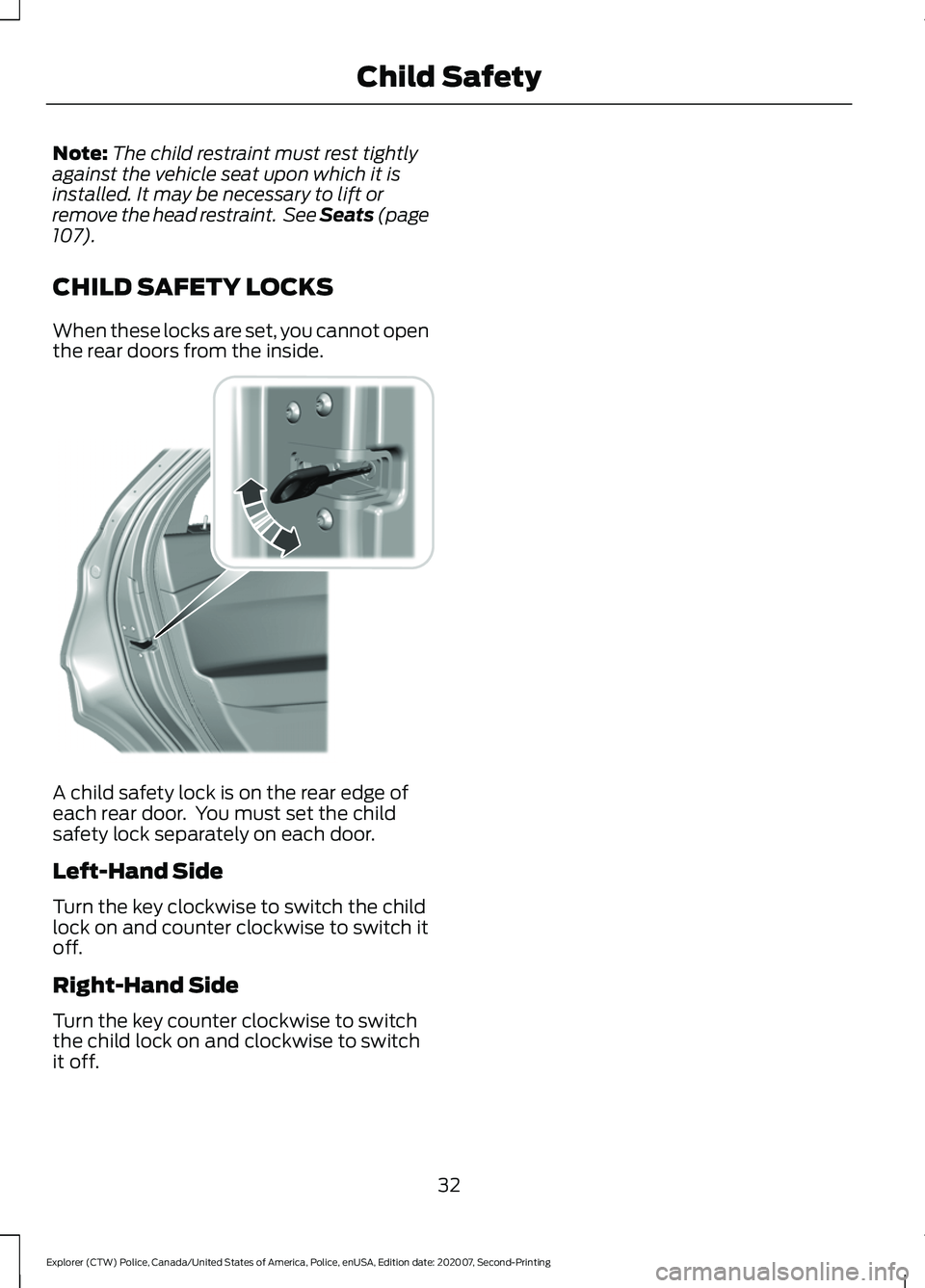
CHILD SAFETY LOCKS
When these locks are set, you cannot open
the rear doors from the inside. A child safety lock is on the rear edge of
each rear door. You must set the child
safety lock separately on each door.
Left-Hand Side
Turn the key clockwise to switch the child
lock on and counter clockwise to switch it
off.
Right-Hand Side
Turn the key counter clockwise to switch
the child lock on and clockwise to switch
it off.
32
Explorer (CTW) Police, Canada/United States of America, Police, enUSA, Edition date: 202007, Second-Printing Child SafetyE300933
Page 58 of 412
GENERAL INFORMATION ON
RADIO FREQUENCIES
This device complies with Part 15 of the
FCC Rules and with Licence exempt RSS
Standards of Industry Canada. Operation
is subject to the following two conditions:
•
This device may not cause harmful
interference, and
• This device must accept any
interference received, including
interference that may cause undesired
operation. WARNING: Changes or
modifications not expressively approved
by the party responsible for compliance
could void the user's authority to operate
the equipment. The term "IC:" before the
radio certification number only signifies
that Industry Canada technical
specifications were met.
The typical operating range for your
transmitter is approximately
33 ft (10 m).
Vehicles with the remote start feature will
have a greater range. One of the following
could cause a decrease in operating range:
• Weather conditions.
• Nearby radio towers.
• Structures around the vehicle.
• Other vehicles parked next to your
vehicle.
Other short distance radio transmissions,
for example amateur radios, medical
equipment, wireless headphones, remote
controls and alarm systems can also use
the radio frequency used by your remote
control. If the frequencies are jammed, you
will not be able to use your remote control.
You can lock and unlock the doors with the
key.
Note: Make sure to lock your vehicle before
leaving it unattended. Note:
If you are in range, the remote control
will operate if you press any button
unintentionally.
Note: The remote control contains sensitive
electrical components. Exposure to moisture
or impact may cause permanent damage.
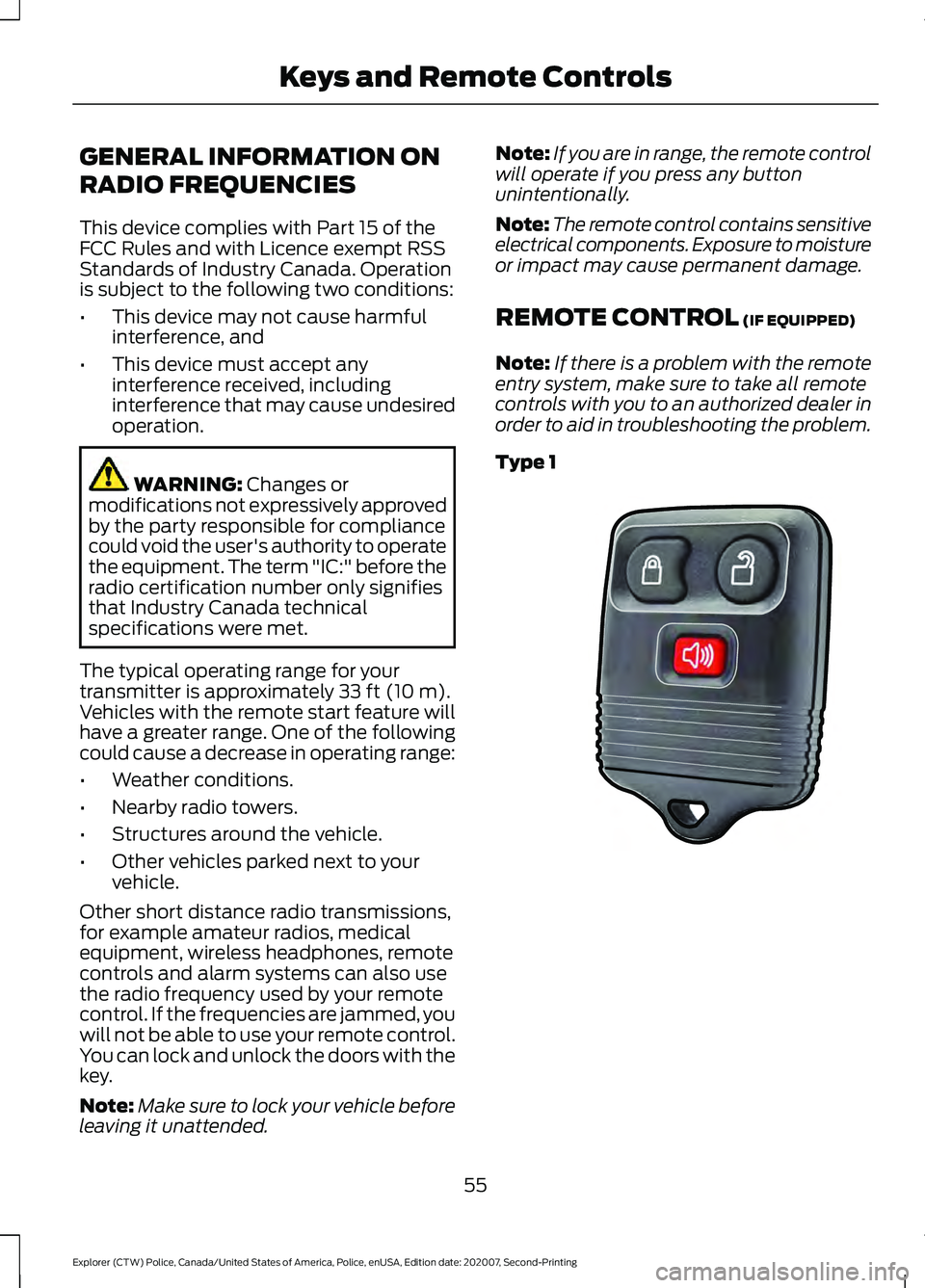
REMOTE CONTROL
(IF EQUIPPED)
Note: If there is a problem with the remote
entry system, make sure to take all remote
controls with you to an authorized dealer in
order to aid in troubleshooting the problem.
Type 1 55
Explorer (CTW) Police, Canada/United States of America, Police, enUSA, Edition date: 202007, Second-Printing Keys and Remote ControlsE203600
Page 59 of 412
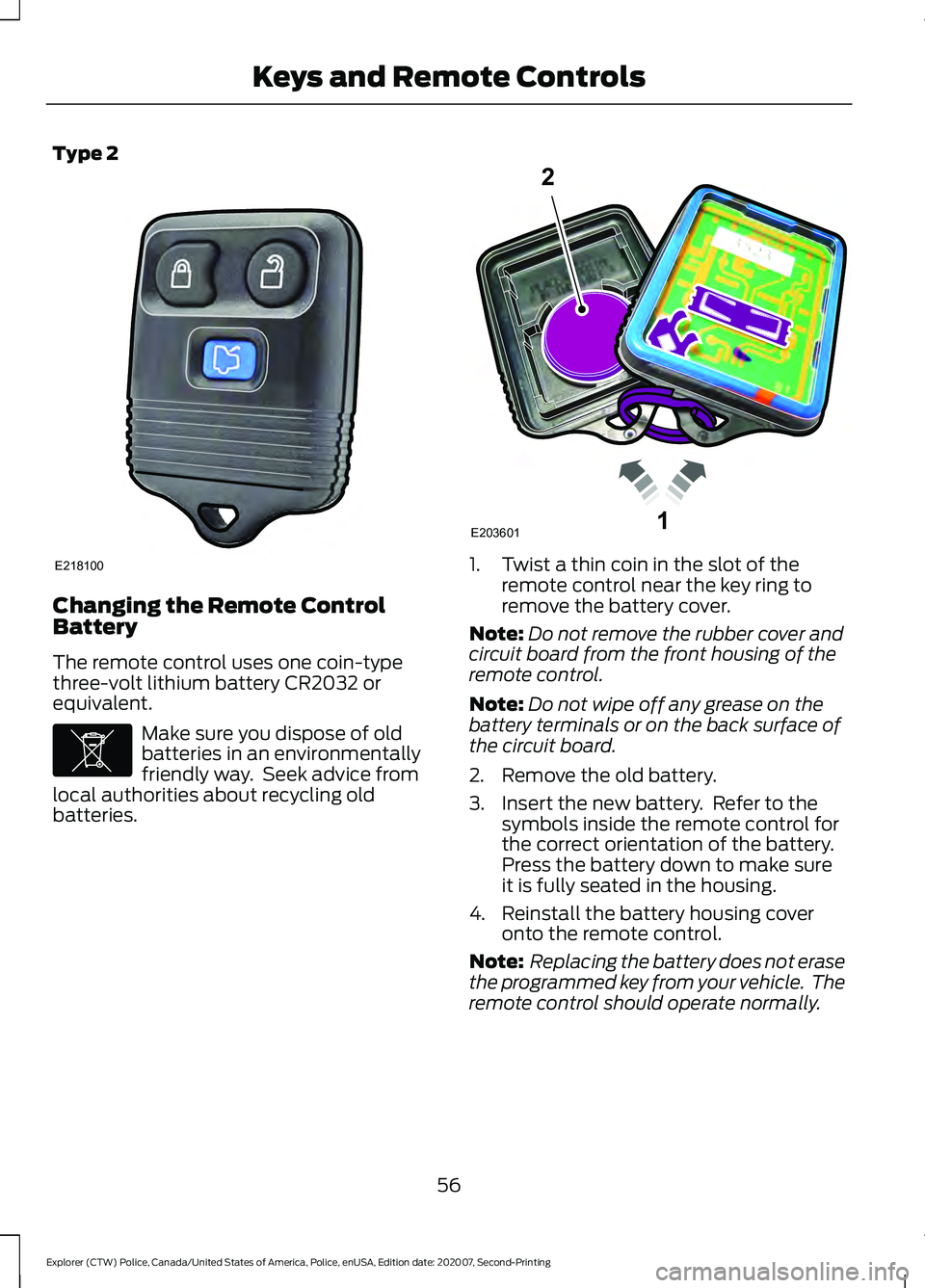
Type 2
Changing the Remote Control
Battery
The remote control uses one coin-type
three-volt lithium battery CR2032 or
equivalent.
Make sure you dispose of old
batteries in an environmentally
friendly way. Seek advice from
local authorities about recycling old
batteries. 1. Twist a thin coin in the slot of the
remote control near the key ring to
remove the battery cover.
Note: Do not remove the rubber cover and
circuit board from the front housing of the
remote control.
Note: Do not wipe off any grease on the
battery terminals or on the back surface of
the circuit board.
2. Remove the old battery.
3. Insert the new battery. Refer to the symbols inside the remote control for
the correct orientation of the battery.
Press the battery down to make sure
it is fully seated in the housing.
4. Reinstall the battery housing cover onto the remote control.
Note: Replacing the battery does not erase
the programmed key from your vehicle. The
remote control should operate normally.
56
Explorer (CTW) Police, Canada/United States of America, Police, enUSA, Edition date: 202007, Second-Printing Keys and Remote ControlsE218100 E107998 1E203601
2
Page 60 of 412
Sounding the Panic Alarm (If Equipped)
On Type 1, press the button to
sound the panic alarm. Press the
button again or switch the
ignition on to turn it off.
Note: The panic alarm operates regardless
of the ignition position.
Opening the Liftgate With the
Liftgate Button (If Equipped) On Type 2, press the button to
unlock the liftgate. The liftgate
unlocks for 45 seconds, during
which time you can open the liftgate using
the exterior liftgate release button. See
Manual Liftgate
(page 61).
Note: Only the liftgate unlocks. All other
passenger doors remain in the previous
locking state.
Note: If you do not open the liftgate within
45 seconds of unlocking it, the liftgate locks
again. Press the button on the remote
control or use the key blade inserted into
the liftgate lock cylinder to unlock the
liftgate again.
Note: The liftgate does not unlock when
you unlock all the doors using the remote
control or power door lock control, unless
you use the global unlock feature which,
overrides the 45-second timer.
REPLACING A LOST KEY OR
REMOTE CONTROL
Replacement keys or remote controls can
be purchased from an authorized dealer.
Authorized dealers can program remote
controls for your vehicle.
57
Explorer (CTW) Police, Canada/United States of America, Police, enUSA, Edition date: 202007, Second-Printing Keys and Remote ControlsE138624
Page 61 of 412
LOCKING AND UNLOCKING
Use the key blade, power door lock control
or the remote control to lock and unlock
your vehicle.
Note:
Do not use the door latch assembly
to attach any accessory, such as handles or
steps, as this can cause damage to your
vehicle.
Locking and Unlocking the Doors
with the Key Blade
Locking with the Key
Turn the top of the key toward the front of
your vehicle.
Unlocking with the Key
Turn the top of the key toward the rear of
your vehicle.
Power Door Locks (If Equipped)
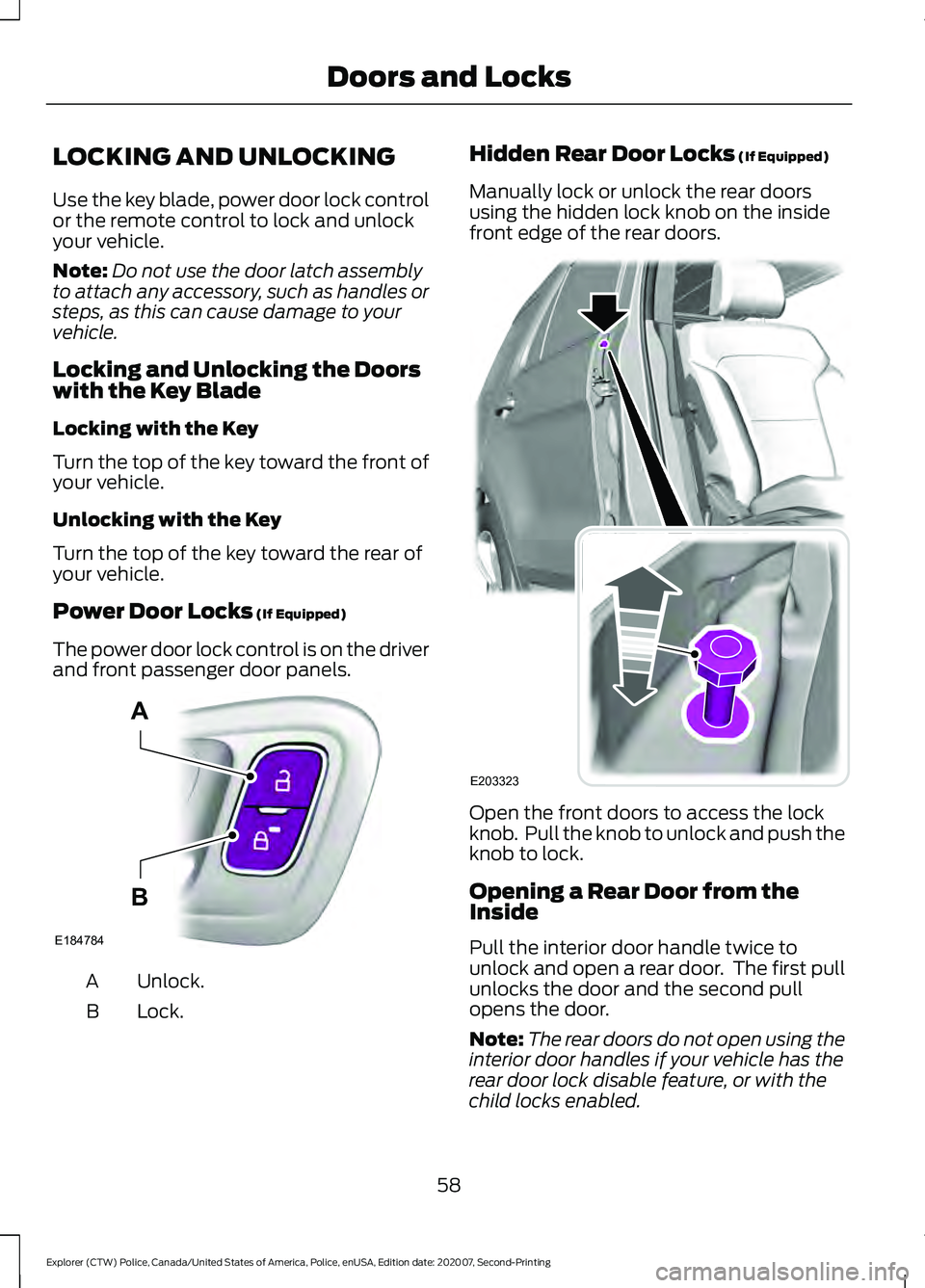
The power door lock control is on the driver
and front passenger door panels. Unlock.
A
Lock.
B Hidden Rear Door Locks
(If Equipped)
Manually lock or unlock the rear doors
using the hidden lock knob on the inside
front edge of the rear doors. Open the front doors to access the lock
knob. Pull the knob to unlock and push the
knob to lock.
Opening a Rear Door from the
Inside
Pull the interior door handle twice to
unlock and open a rear door. The first pull
unlocks the door and the second pull
opens the door.
Note:
The rear doors do not open using the
interior door handles if your vehicle has the
rear door lock disable feature, or with the
child locks enabled.
58
Explorer (CTW) Police, Canada/United States of America, Police, enUSA, Edition date: 202007, Second-Printing Doors and LocksE184784
A
B E203323
Page 62 of 412
Remote Control (If Equipped)
You can use the remote control at any
time.
Unlocking the Doors Press the button to unlock the
driver door.
Press the button again within three
seconds to unlock all doors.
Press and hold both the lock and unlock
buttons on the remote control for three
seconds to change between driver door or
all doors unlock mode. Driver door mode
only unlocks the driver door when you
press the unlock button once. The
unlocking mode applies to the remote
control.
Locking the Doors Press the button to lock all
doors.
Independent Liftgate Unlocking
Feature
(If Equipped)
This feature allows you to unlock the
liftgate independent of the other doors.
Unlocking
The liftgate unlocks when you press the
liftgate release button on the overhead
console with the ignition on.
Liftgate Timed Release (If Equipped)
Switch the ignition to the run, start or
accessory position. Press the liftgate release button
on the overhead console.
Note: Only the liftgate unlocks. All other
passenger doors remain in the previous
locking state. A warning lamp illuminates in the
instrument cluster for 45 seconds.
See
Warning Lamps and Indicators (page
79). You can then open the liftgate using
the exterior liftgate release button.
Once the 45 second timer expires, the
lamp turns off and the liftgate no longer
opens. Press the liftgate release button on
the overhead console again to restart the
timer.
Note: The liftgate does not unlock when
you electronically unlock all the doors using
the remote control or power door lock
control, if your vehicle has this feature.
Note: You can also unlock the liftgate by
inserting the key blade into the liftgate lock
cylinder, or by pressing the liftgate release
button on the remote control, if your vehicle
has this feature.
Locking
The liftgate locks when any of the
following occur:
• You open and close the liftgate after
you press the liftgate release button
on the overhead console.
• The 45 second timer expires.
Global Lock and Unlock
Global lock and unlock coordinates the
liftgate lock state with the four doors.
When switching the doors to an unlock
state, open the liftgate using the exterior
liftgate release button. When you switch
the doors to the locked state, this locks the
liftgate.
Note: You can also unlock the liftgate by
inserting the key blade into the liftgate lock
cylinder.
Illuminated Entry
(If Equipped)
The interior lamps and some exterior
lamps illuminate when you unlock the
doors with the remote control.
59
Explorer (CTW) Police, Canada/United States of America, Police, enUSA, Edition date: 202007, Second-Printing Doors and LocksE138629 E138623
Page 66 of 412
ANTI-THEFT ALARM
Alarm System
The perimeter alarm is a deterrent against
unauthorized access to your vehicle
through the doors, luggage compartment
and the hood.
Triggering the Alarm
Once armed, the alarm is triggered in any
of the following ways:
•
If someone opens a door, cargo area
or the hood without a valid key or
remote control.
If the alarm is triggered, the horn will sound
for 30 seconds and the hazard warning
flasher will flash for five minutes.
Any further attempts to perform one of the
above will trigger the alarm again.
Arming the Alarm
To arm the alarm, lock your vehicle. See
Doors and Locks (page 58).
Disarming the Alarm
Disarm and silence the alarm by unlocking
the doors with the key and switching the
ignition on within 12 seconds, or by
unlocking the doors or the cargo area with
the remote control.
Police Perimeter Alert System
(If
Equipped)
Note: The Police Perimeter Alert System is
primarily intended to monitor moving
pedestrians but also detects objects like
vehicles and bikes. Fast vehicles, stationary
objects and small objects like birds may also
be ignored.
Note: The Police Perimeter Alert System
feature does not function outside of Park
(P) or with any door open. The system uses sensors to monitor
detected objects moving near your parked
vehicle.
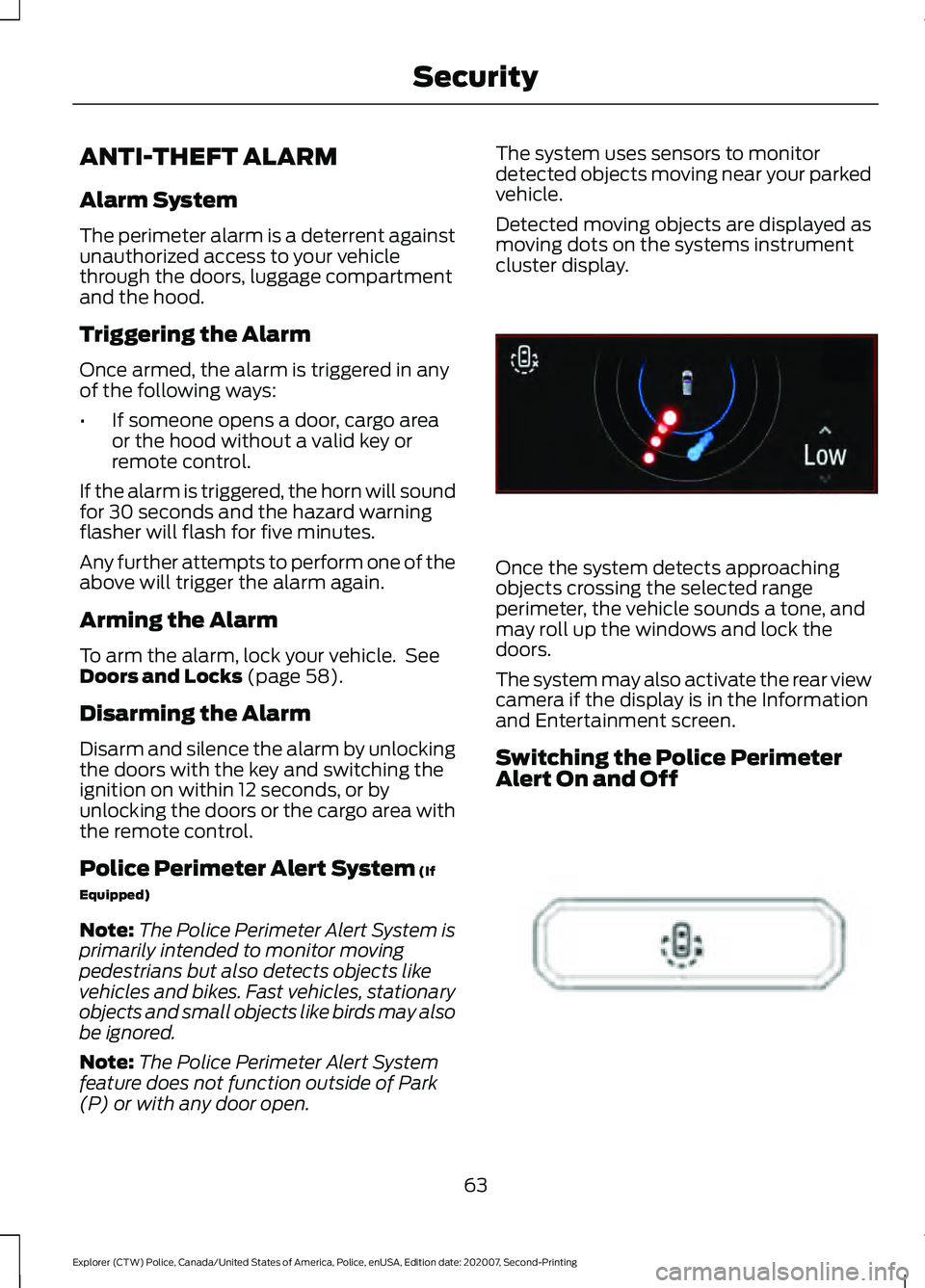
Detected moving objects are displayed as
moving dots on the systems instrument
cluster display.
Once the system detects approaching
objects crossing the selected range
perimeter, the vehicle sounds a tone, and
may roll up the windows and lock the
doors.
The system may also activate the rear view
camera if the display is in the Information
and Entertainment screen.
Switching the Police Perimeter
Alert On and Off
63
Explorer (CTW) Police, Canada/United States of America, Police, enUSA, Edition date: 202007, Second-Printing SecurityE298029 E298031
Page 81 of 412
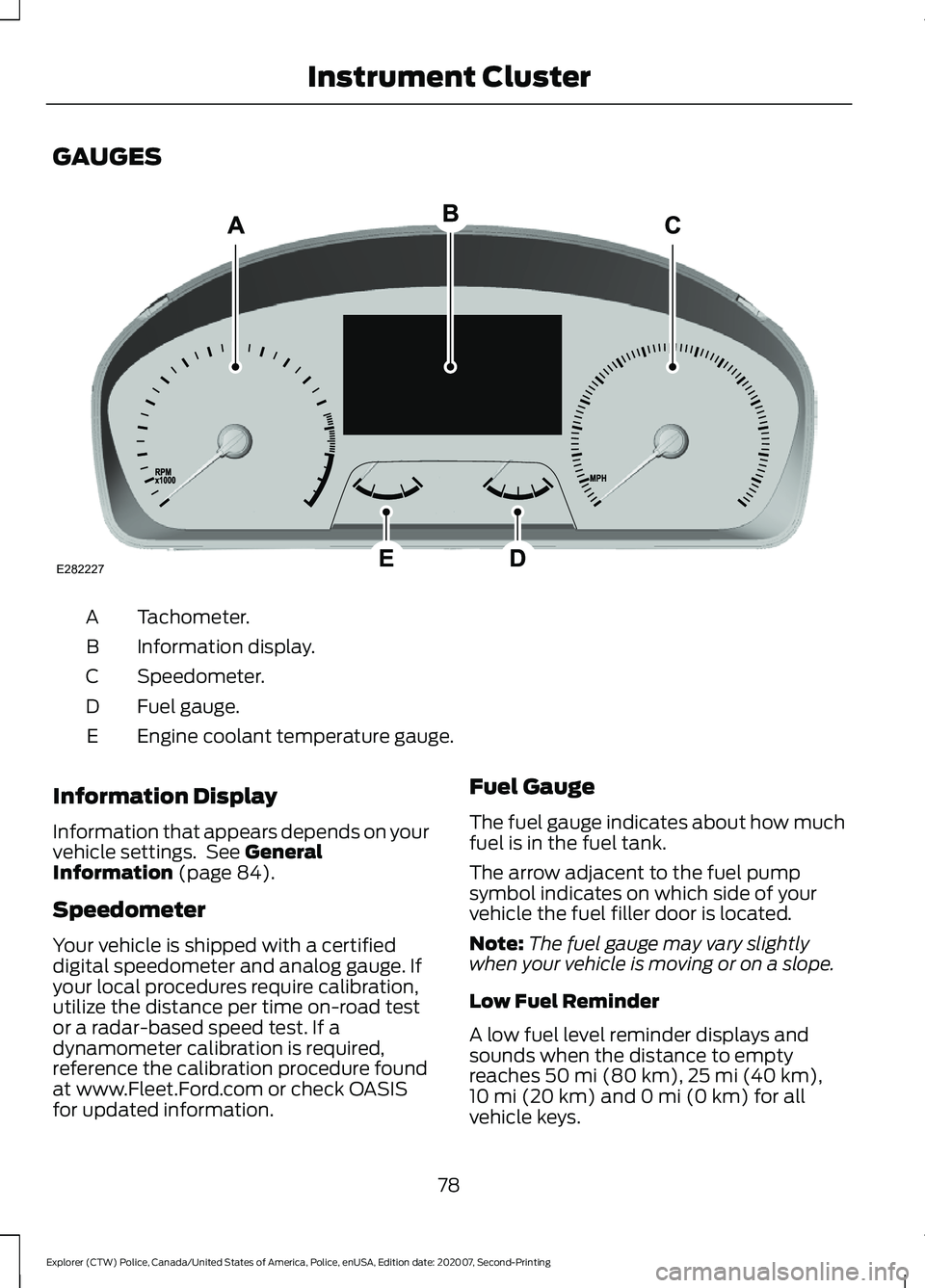
GAUGES
Tachometer.
A
Information display.
B
Speedometer.
C
Fuel gauge.
D
Engine coolant temperature gauge.
E
Information Display
Information that appears depends on your
vehicle settings. See General
Information (page 84).
Speedometer
Your vehicle is shipped with a certified
digital speedometer and analog gauge. If
your local procedures require calibration,
utilize the distance per time on-road test
or a radar-based speed test. If a
dynamometer calibration is required,
reference the calibration procedure found
at www.Fleet.Ford.com or check OASIS
for updated information. Fuel Gauge
The fuel gauge indicates about how much
fuel is in the fuel tank.
The arrow adjacent to the fuel pump
symbol indicates on which side of your
vehicle the fuel filler door is located.
Note:
The fuel gauge may vary slightly
when your vehicle is moving or on a slope.
Low Fuel Reminder
A low fuel level reminder displays and
sounds when the distance to empty
reaches
50 mi (80 km), 25 mi (40 km),
10 mi (20 km) and 0 mi (0 km) for all
vehicle keys.
78
Explorer (CTW) Police, Canada/United States of America, Police, enUSA, Edition date: 202007, Second-Printing Instrument ClusterE282227
Page 85 of 412
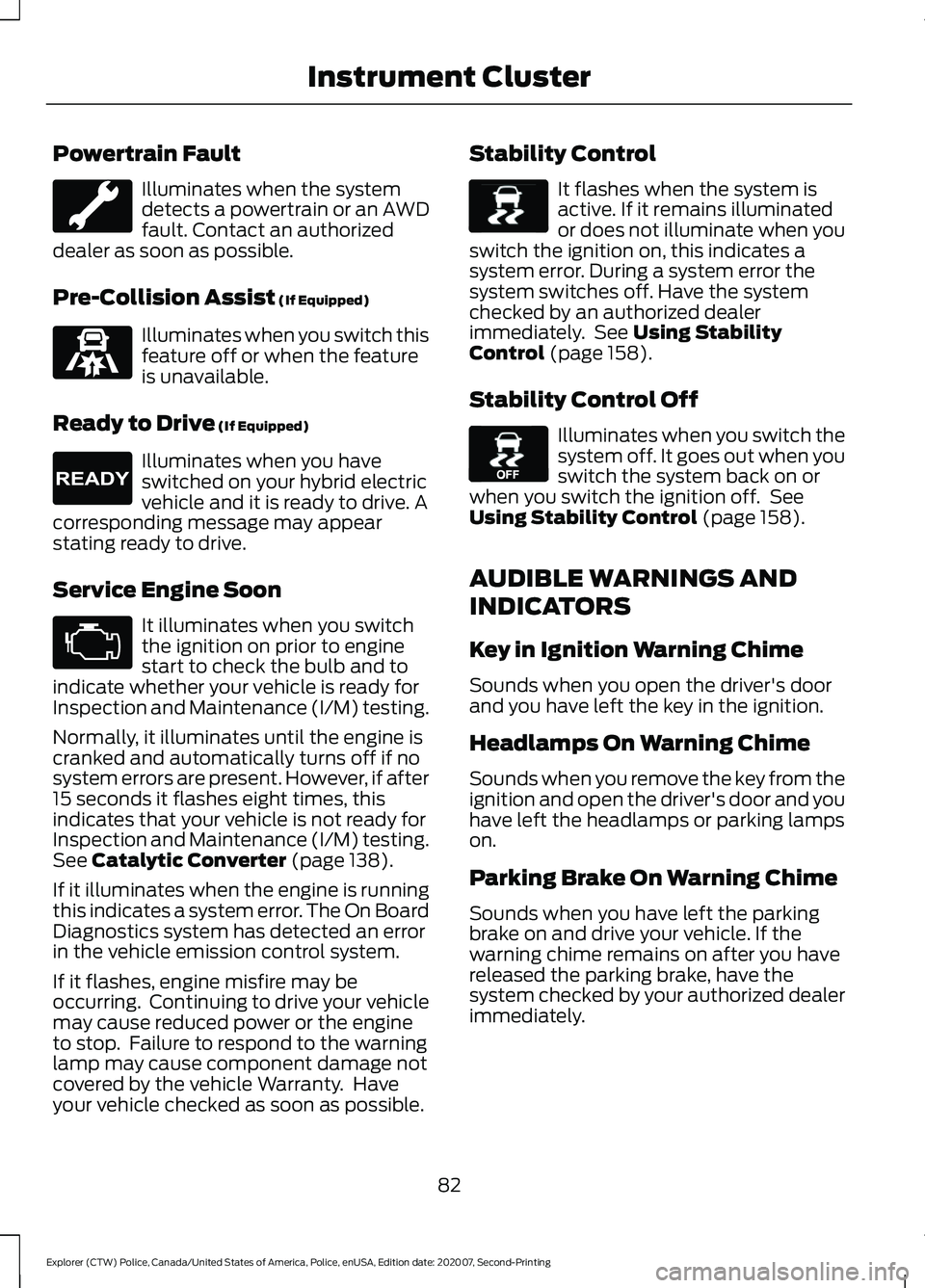
Powertrain Fault
Illuminates when the system
detects a powertrain or an AWD
fault. Contact an authorized
dealer as soon as possible.
Pre-Collision Assist (If Equipped) Illuminates when you switch this
feature off or when the feature
is unavailable.
Ready to Drive
(If Equipped) Illuminates when you have
switched on your hybrid electric
vehicle and it is ready to drive. A
corresponding message may appear
stating ready to drive.
Service Engine Soon It illuminates when you switch
the ignition on prior to engine
start to check the bulb and to
indicate whether your vehicle is ready for
Inspection and Maintenance (I/M) testing.
Normally, it illuminates until the engine is
cranked and automatically turns off if no
system errors are present. However, if after
15 seconds it flashes eight times, this
indicates that your vehicle is not ready for
Inspection and Maintenance (I/M) testing.
See
Catalytic Converter (page 138).
If it illuminates when the engine is running
this indicates a system error. The On Board
Diagnostics system has detected an error
in the vehicle emission control system.
If it flashes, engine misfire may be
occurring. Continuing to drive your vehicle
may cause reduced power or the engine
to stop. Failure to respond to the warning
lamp may cause component damage not
covered by the vehicle Warranty. Have
your vehicle checked as soon as possible. Stability Control It flashes when the system is
active. If it remains illuminated
or does not illuminate when you
switch the ignition on, this indicates a
system error. During a system error the
system switches off. Have the system
checked by an authorized dealer
immediately. See
Using Stability
Control (page 158).
Stability Control Off Illuminates when you switch the
system off. It goes out when you
switch the system back on or
when you switch the ignition off. See
Using Stability Control
(page 158).
AUDIBLE WARNINGS AND
INDICATORS
Key in Ignition Warning Chime
Sounds when you open the driver's door
and you have left the key in the ignition.
Headlamps On Warning Chime
Sounds when you remove the key from the
ignition and open the driver's door and you
have left the headlamps or parking lamps
on.
Parking Brake On Warning Chime
Sounds when you have left the parking
brake on and drive your vehicle. If the
warning chime remains on after you have
released the parking brake, have the
system checked by your authorized dealer
immediately.
82
Explorer (CTW) Police, Canada/United States of America, Police, enUSA, Edition date: 202007, Second-Printing Instrument Cluster E297318 E224090 E138639 E130458