key FORD POLICE INTERCEPTOR SEDAN 2016 1.G Owners Manual
[x] Cancel search | Manufacturer: FORD, Model Year: 2016, Model line: POLICE INTERCEPTOR SEDAN, Model: FORD POLICE INTERCEPTOR SEDAN 2016 1.GPages: 358, PDF Size: 3.55 MB
Page 4 of 358
Introduction
About This Manual...........................................7
Symbols Glossary
.............................................7
Data Recording
..................................................9
California Proposition 65..............................11
Perchlorate.........................................................11
Ford Credit
..........................................................11
Replacement Parts Recommendation
........................................11
Special Notices................................................12
Mobile Communications Equipment.....................................................13
Export Unique Options..................................13
Environment
Protecting the Environment........................14
Child Safety
General Information
.......................................15
Installing Child Restraints
............................16
Booster Seats
..................................................22
Child Restraint Positioning.........................24
Seatbelts
Principle of Operation..................................26
Fastening the Seatbelts...............................27
Seatbelt Warning Lamp and Indicator Chime.............................................................29
Seatbelt Reminder
........................................30
Child Restraint and Seatbelt Maintenance................................................32
Personal Safety System ™
Personal Safety System ™
..........................33
Supplementary Restraints System
Principle of Operation..................................34
Driver and Passenger Airbags....................35
Front Passenger Sensing System............36 Side Airbags
.....................................................38
Safety Canopy ™
............................................39
Crash Sensors and Airbag Indicator
.........41
Airbag Disposal...............................................45
Keys and Remote Controls
General Information on Radio Frequencies.................................................46
Remote Control
..............................................46
Replacing a Lost Key or Remote Control............................................................47
Locks
Locking and Unlocking
................................48
Interior Luggage Compartment Release..........................................................50
Security
Anti-Theft Alarm
............................................52
Steering Wheel
Adjusting the Steering Wheel....................53
Audio Control
...................................................53
Voice Control....................................................53
Cruise Control
..................................................54
Information Display Control.......................54
Pedals
Adjusting the Pedals
.....................................55
Wipers and Washers
Windshield Wipers
........................................56
Windshield Washers.....................................56
Lighting
General Information......................................57
Lighting Control...............................................57
Instrument Lighting Dimmer
.....................58
Daytime Running Lamps............................58
Direction Indicators
.......................................59
1
Police Interceptor (CPH), enUSA, Edition date: 10/2015, First Printing Table of Contents
Page 49 of 358
GENERAL INFORMATION ON
RADIO FREQUENCIES
This device complies with Part 15 of the
FCC Rules and with Industry Canada
license-exempt RSS standard(s).
Operation is subject to the following two
conditions: (1) This device may not cause
harmful interference, and (2) This device
must accept any interference received,
including interference that may cause
undesired operation.
Note:
Changes or modifications not
expressively approved by the party
responsible for compliance could void the
user's authority to operate the equipment.
The term IC before the radio certification
number only signifies that Industry Canada
technical specifications were met.
The typical operating range for your
transmitter is approximately 33 feet (10
meters). Vehicles with the remote start
feature will have a greater range. One of
the following could cause a decrease in
operating range:
• weather conditions
• nearby radio towers
• structures around the vehicle
• other vehicles parked next to your
vehicle
The radio frequency used by your remote
control can also be used by other short
distance radio transmissions, for example
amateur radios, medical equipment,
wireless headphones, remote controls and
alarm systems. If the frequencies are
jammed, you will not be able to use your
remote control. You can lock and unlock
the doors with the key.
Note: Make sure to lock your vehicle before
leaving it unattended.
Note: If you are in range, the remote control
will operate if you press any button
unintentionally. Note:
The remote control contains sensitive
electrical components. Exposure to moisture
or impact may cause permanent damage.
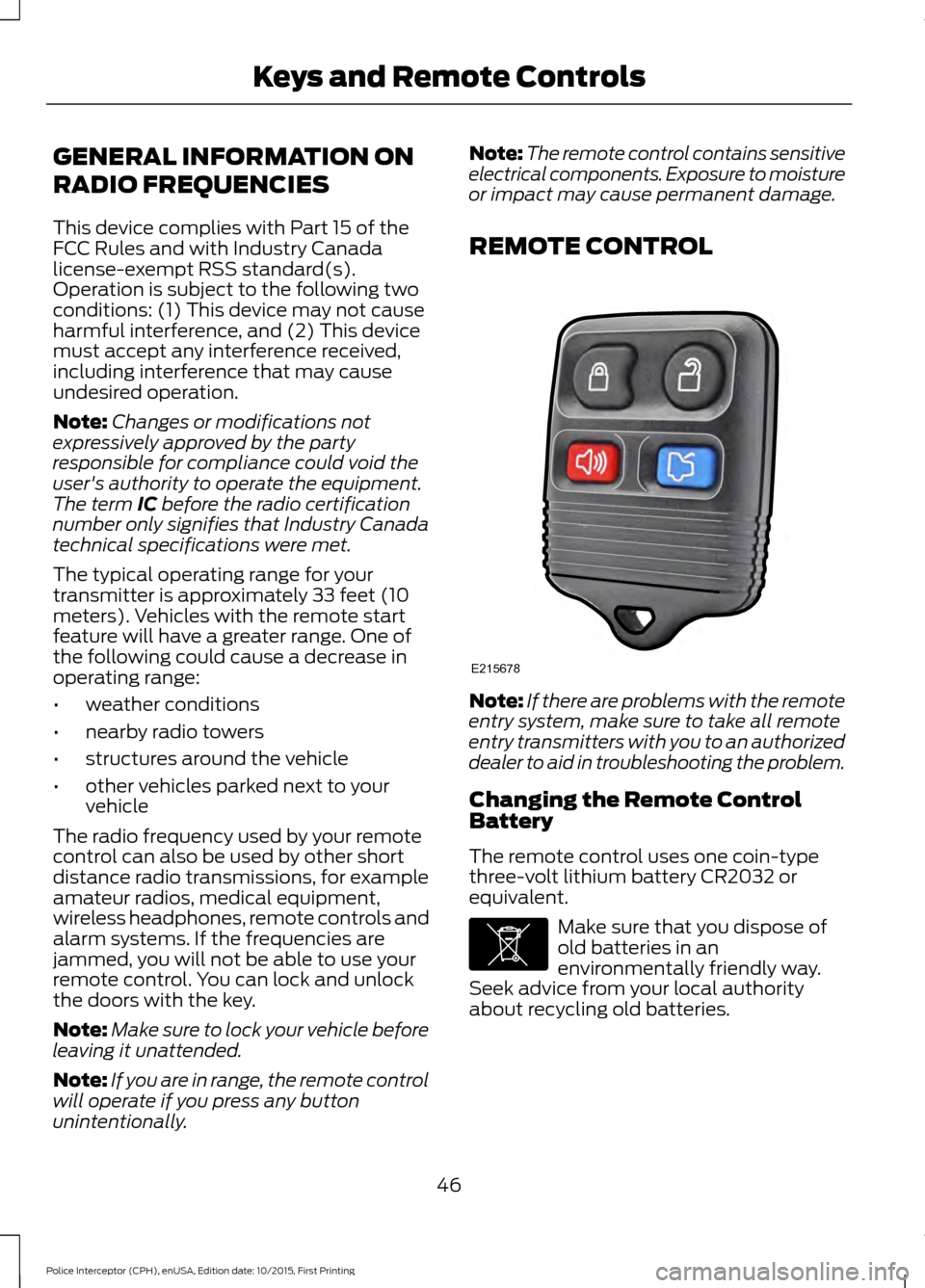
REMOTE CONTROL Note:
If there are problems with the remote
entry system, make sure to take all remote
entry transmitters with you to an authorized
dealer to aid in troubleshooting the problem.
Changing the Remote Control
Battery
The remote control uses one coin-type
three-volt lithium battery CR2032 or
equivalent. Make sure that you dispose of
old batteries in an
environmentally friendly way.
Seek advice from your local authority
about recycling old batteries.
46
Police Interceptor (CPH), enUSA, Edition date: 10/2015, First Printing Keys and Remote ControlsE215678 E107998
Page 50 of 358
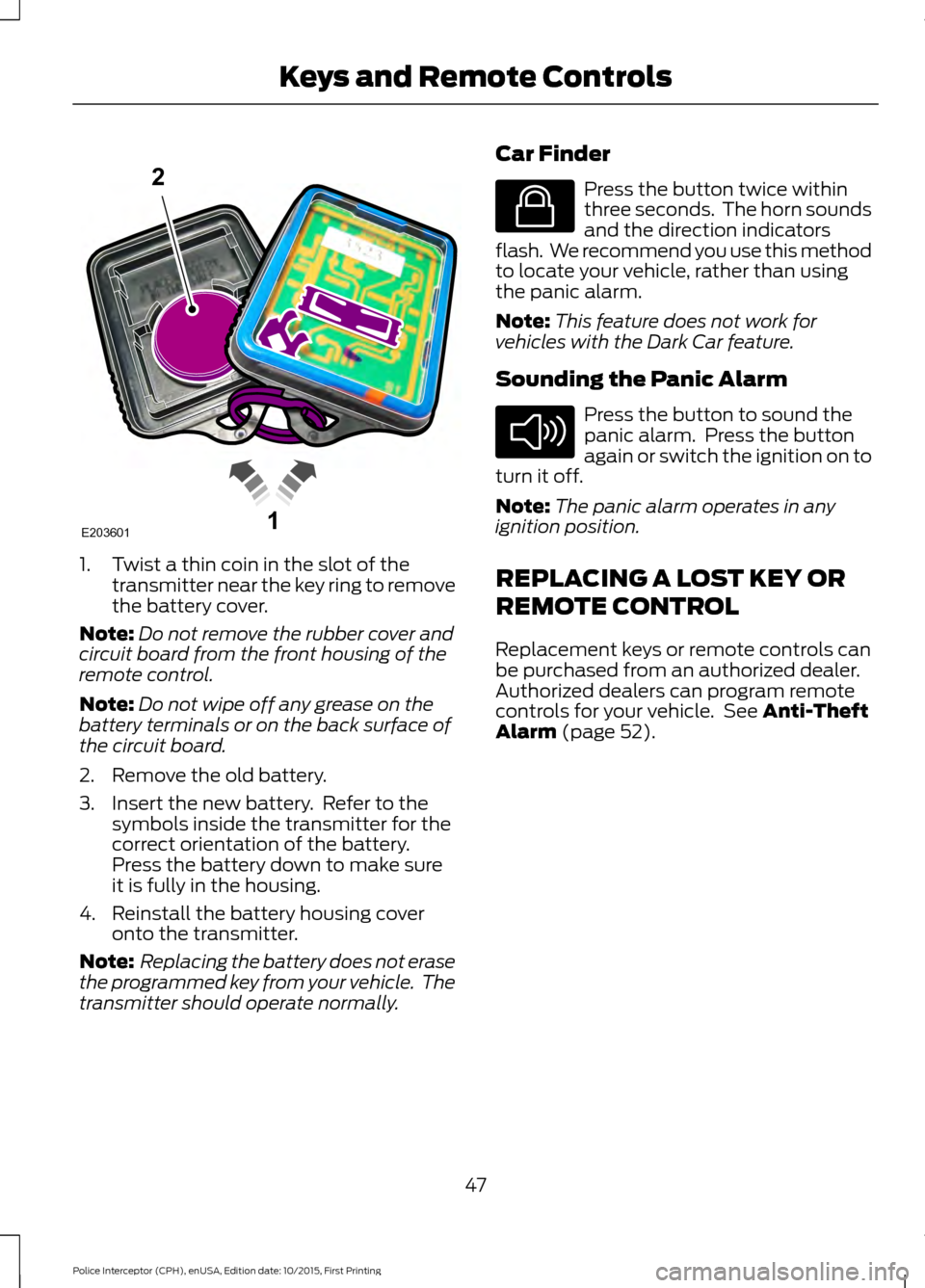
1. Twist a thin coin in the slot of the
transmitter near the key ring to remove
the battery cover.
Note: Do not remove the rubber cover and
circuit board from the front housing of the
remote control.
Note: Do not wipe off any grease on the
battery terminals or on the back surface of
the circuit board.
2. Remove the old battery.
3. Insert the new battery. Refer to the symbols inside the transmitter for the
correct orientation of the battery.
Press the battery down to make sure
it is fully in the housing.
4. Reinstall the battery housing cover onto the transmitter.
Note: Replacing the battery does not erase
the programmed key from your vehicle. The
transmitter should operate normally. Car Finder Press the button twice within
three seconds. The horn sounds
and the direction indicators
flash. We recommend you use this method
to locate your vehicle, rather than using
the panic alarm.
Note: This feature does not work for
vehicles with the Dark Car feature.
Sounding the Panic Alarm Press the button to sound the
panic alarm. Press the button
again or switch the ignition on to
turn it off.
Note: The panic alarm operates in any
ignition position.
REPLACING A LOST KEY OR
REMOTE CONTROL
Replacement keys or remote controls can
be purchased from an authorized dealer.
Authorized dealers can program remote
controls for your vehicle. See Anti-Theft
Alarm (page 52).
47
Police Interceptor (CPH), enUSA, Edition date: 10/2015, First Printing Keys and Remote Controls1E203601
2 E138623 E138624
Page 52 of 358
Press and hold both the lock and unlock
buttons on the remote control for three
seconds to change between driver door or
all doors unlock mode. The direction
indicators will flash twice to indicate a
change to the unlocking mode. Driver door
mode only unlocks the driver door when
you press the unlock button once. All door
mode unlocks all doors when you press
the unlock button once. The unlocking
mode applies to the remote control.
Locking the Doors
Press the button to lock all
doors. The direction indicators
will flash. Press the button again
within three seconds to confirm that all
the doors are closed.
The doors will lock again, the horn will
sound and the direction indicators will
flash if all the doors and the luggage
compartment are closed.
Note: If any door or the luggage
compartment is open, or if the hood is open
on vehicles with an anti-theft alarm or
remote start, the horn will sound twice and
the direction indicators will not flash.
Locking and Unlocking the Doors
with the Key Blade
Locking the Doors
Turn the top of the key toward the front of
your vehicle.
Unlocking the Doors
Turn the top of the key toward the rear of
your vehicle.
Note: If the child safety locks are on and
you pull the interior handle, you only switch
off the emergency locking, not the child
safety lock. You can only open the doors
using the external door handle. Opening a Rear Door From the
Inside
Pull the interior door handle twice to
unlock and open a rear door. The first pull
unlocks the door and the second pull
opens the door.
Illuminated Entry (If Equipped)
The interior lamps and some exterior
lamps illuminate when you unlock the
doors with the remote control.
The lamps turn off if:
• The ignition is on.
• You press the remote control lock
button.
• 25 seconds have elapsed.
The lamps do not turn off if:
• You switch them on with the lighting
control.
• Any door is open.
Illuminated Exit
(If Equipped)
The interior lamps and some exterior
lamps illuminate when all doors are closed
and you switch the ignition off.
The lamps will turn off if all the doors
remain closed and:
• 25 seconds have elapsed.
• You lock your vehicle from the outside.
Battery Saver
If you leave the courtesy lamps, interior
lamps or headlamps on, the battery saver
shuts them off 10 minutes after you switch
the ignition off.
49
Police Interceptor (CPH), enUSA, Edition date: 10/2015, First Printing LocksE138623
Page 53 of 358
Opening the Luggage
Compartment
With the Remote Control
Press the button twice within
three seconds.
From the Instrument Panel or Overhead
Console Press the button on the
instrument panel or pull the
switch down on the overhead
console.
Note: The luggage compartment release
switch in standard configuration operates
when the ignition is in the run or start
position. An optional configuration is
available so that the switch operates when
the ignition is in any position. Contact an
authorized dealer to change these settings.
Note: The luggage compartment release
switch on both the instrument panel and
overhead console function the same.
INTERIOR LUGGAGE
COMPARTMENT RELEASE WARNINGS
Keep vehicle doors and luggage
compartment locked and keep keys
and remote transmitters out of a
child ’s reach. Unsupervised children could
lock themselves in the trunk and risk injury.
Children should be taught not to play in
vehicles. WARNINGS
Do not leave children or animals
unattended in the vehicle. On hot
days, the temperature in the trunk or
vehicle interior can rise very quickly.
Exposure of people or animals to these
high temperatures for even a short time
can cause death or serious heat-related
injuries, including brain damage. Small
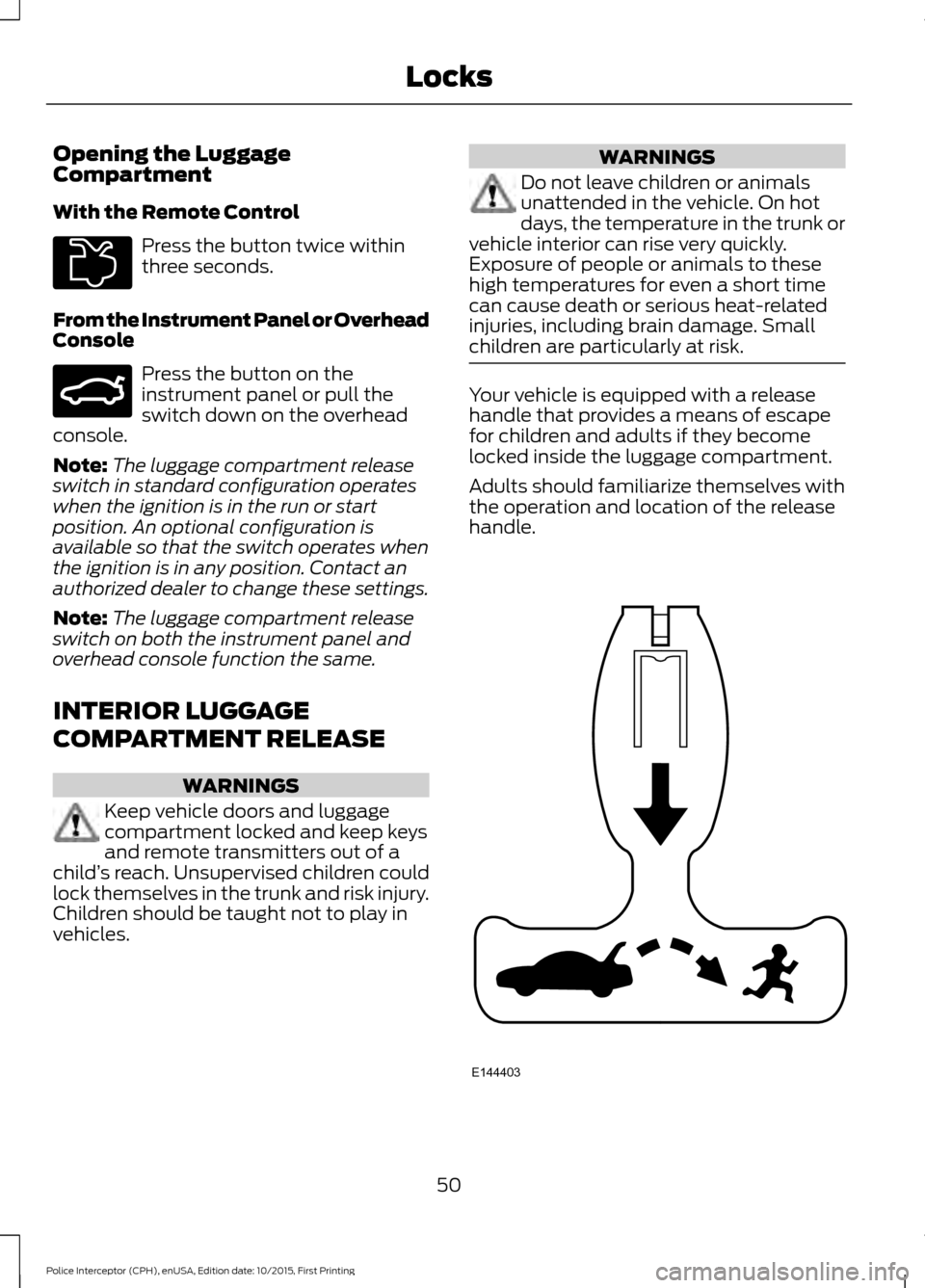
children are particularly at risk. Your vehicle is equipped with a release
handle that provides a means of escape
for children and adults if they become
locked inside the luggage compartment.
Adults should familiarize themselves with
the operation and location of the release
handle.
50
Police Interceptor (CPH), enUSA, Edition date: 10/2015, First Printing LocksE211694 E159323 E144403
Page 55 of 358
ANTI-THEFT ALARM (If Equipped)
Alarm System
The perimeter alarm is a deterrent against
unauthorized access to your vehicle
through the doors, luggage compartment
and the hood.
Triggering the Alarm
Once armed, the alarm is triggered in any
of the following ways:
• If someone opens a door, cargo area
or the hood without a valid key or
remote control.
• If you switch the ignition on without a
valid key.
If the alarm is triggered, the horn will sound
for 30 seconds and the hazard warning
flasher will flash for five minutes.
Any further attempts to perform one of the
above will trigger the alarm again.
Arming the Alarm
To arm the alarm, lock your vehicle. See
Locks
(page 48).
Disarming the Alarm
Disarm and silence the alarm by unlocking
the doors with the key and switching the
ignition on within 12 seconds, or by
unlocking the doors or the cargo area with
the remote control.
52
Police Interceptor (CPH), enUSA, Edition date: 10/2015, First Printing Security
Page 72 of 358
Stability Control Off
It illuminates when you switch
the system off. It goes out when
you switch the system back on
or when you switch the ignition off. See
Using Stability Control (page 116).
AUDIBLE WARNINGS AND
INDICATORS
Key in Ignition Warning Chime
Sounds when the key is left in the ignition
and the driver ’s door is opened.
Headlamps On Warning Chime
Sounds when the headlamps or parking
lamps are on, the ignition is off (the key is
not in the ignition) and the driver ’s door is
opened.
Parking Brake On Warning Chime
Sounds when you have left the parking
brake on and drive your vehicle. If the
warning chime remains on after you have
released the parking brake, have the
system checked by your authorized dealer
immediately.
69
Police Interceptor (CPH), enUSA, Edition date: 10/2015, First Printing Instrument Cluster
Page 76 of 358
INFORMATION MESSAGES
Note:
Depending on the vehicle options
equipped with your vehicle, not all of the
messages will display or be available.
Certain messages may display abbreviated
or shortened depending upon which cluster
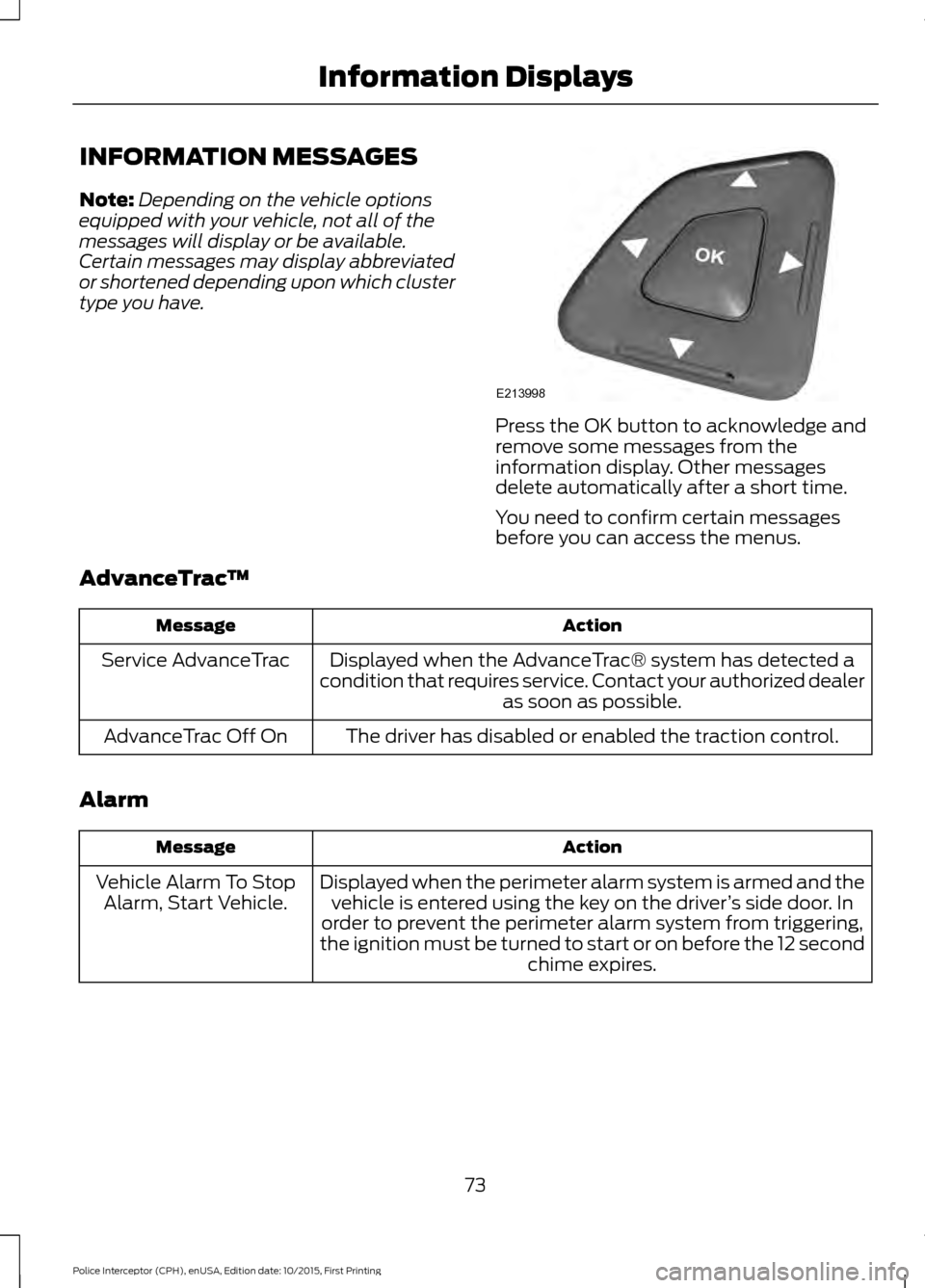
type you have. Press the OK button to acknowledge and
remove some messages from the
information display. Other messages
delete automatically after a short time.
You need to confirm certain messages
before you can access the menus.
AdvanceTrac ™ Action
Message
Displayed when the AdvanceTrac® system has detected a
condition that requires service. Contact your authorized dealer as soon as possible.
Service AdvanceTrac
The driver has disabled or enabled the traction control.
AdvanceTrac Off On
Alarm Action
Message
Displayed when the perimeter alarm system is armed and thevehicle is entered using the key on the driver ’s side door. In
order to prevent the perimeter alarm system from triggering,
the ignition must be turned to start or on before the 12 second chime expires.
Vehicle Alarm To Stop
Alarm, Start Vehicle.
73
Police Interceptor (CPH), enUSA, Edition date: 10/2015, First Printing Information DisplaysE213998
Page 80 of 358
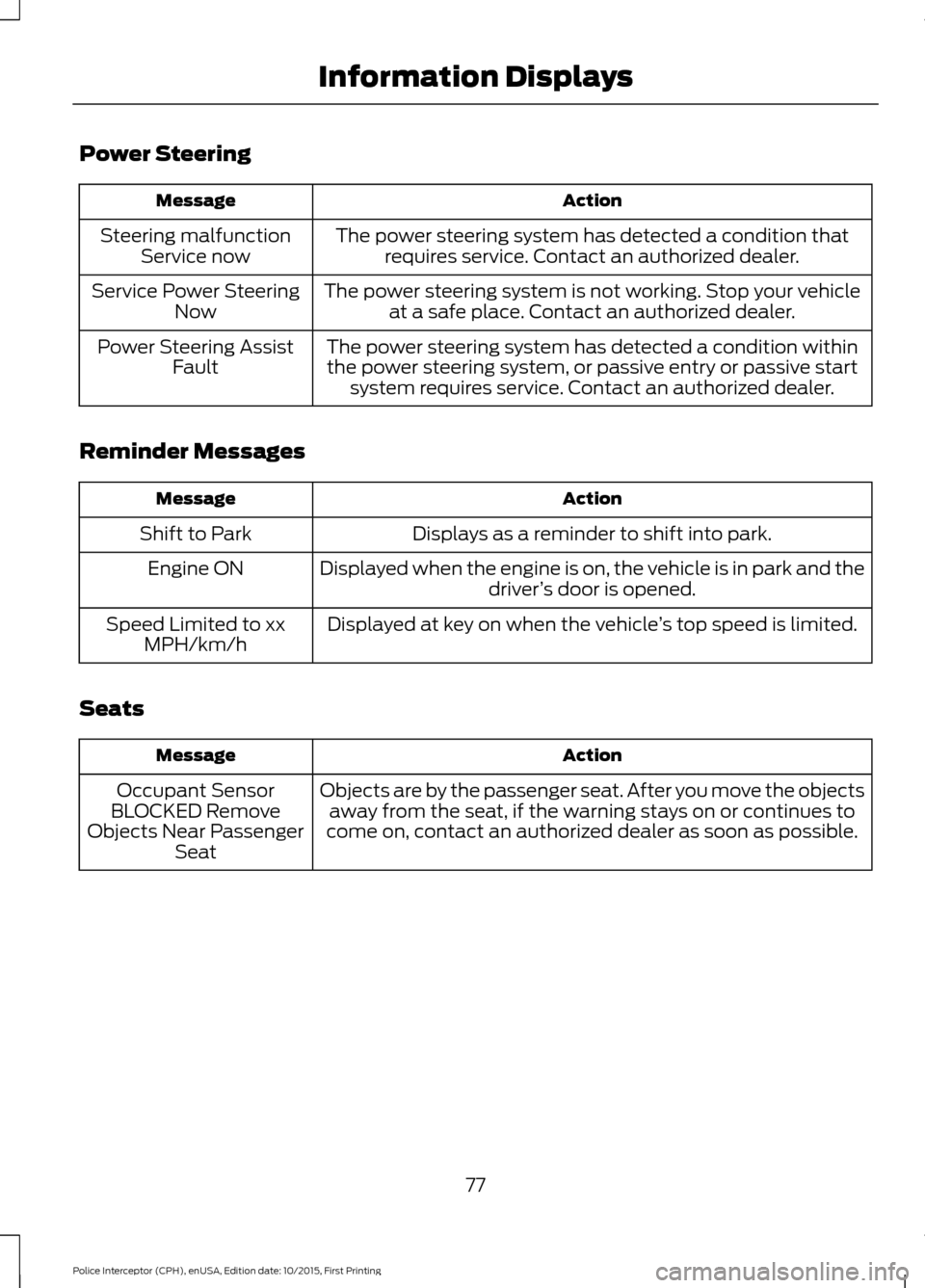
Power Steering
Action
Message
The power steering system has detected a condition thatrequires service. Contact an authorized dealer.
Steering malfunction
Service now
The power steering system is not working. Stop your vehicleat a safe place. Contact an authorized dealer.
Service Power Steering
Now
The power steering system has detected a condition withinthe power steering system, or passive entry or passive start system requires service. Contact an authorized dealer.
Power Steering Assist
Fault
Reminder Messages Action
Message
Displays as a reminder to shift into park.
Shift to Park
Displayed when the engine is on, the vehicle is in park and thedriver’s door is opened.
Engine ON
Displayed at key on when the vehicle ’s top speed is limited.
Speed Limited to xx
MPH/km/h
Seats Action
Message
Objects are by the passenger seat. After you move the objectsaway from the seat, if the warning stays on or continues to
come on, contact an authorized dealer as soon as possible.
Occupant Sensor
BLOCKED Remove
Objects Near Passenger Seat
77
Police Interceptor (CPH), enUSA, Edition date: 10/2015, First Printing Information Displays
Page 92 of 358
GENERAL INFORMATION
WARNINGS
Extended idling at high engine
speeds can produce very high
temperatures in the engine and
exhaust system, creating the risk of fire or
other damage. Do not park, idle or drive your vehicle
on dry grass or other dry ground
cover. The emission system heats up
the engine compartment and exhaust
system, creating the risk of fire. Do not start the engine in a closed
garage or in other enclosed areas.
Exhaust fumes can be toxic. Always
open the garage door before you start the
engine. If you smell exhaust fumes inside
your vehicle, have your vehicle
checked by an authorized dealer
immediately. Do not drive your vehicle if
you smell exhaust fumes. If you disconnect the battery, your vehicle
may exhibit some unusual driving
characteristics for approximately 5 miles
(8 kilometers) after you reconnect it. This
is because the engine management system
must realign itself with the engine. You can
disregard any unusual driving
characteristics during this period.
The powertrain control system meets all
Canadian interference-causing equipment
standard requirements regulating the
impulse electrical field or radio noise.
When you start the engine, avoid pressing
the accelerator pedal before and during
operation. Only use the accelerator pedal
when you have difficulty starting the
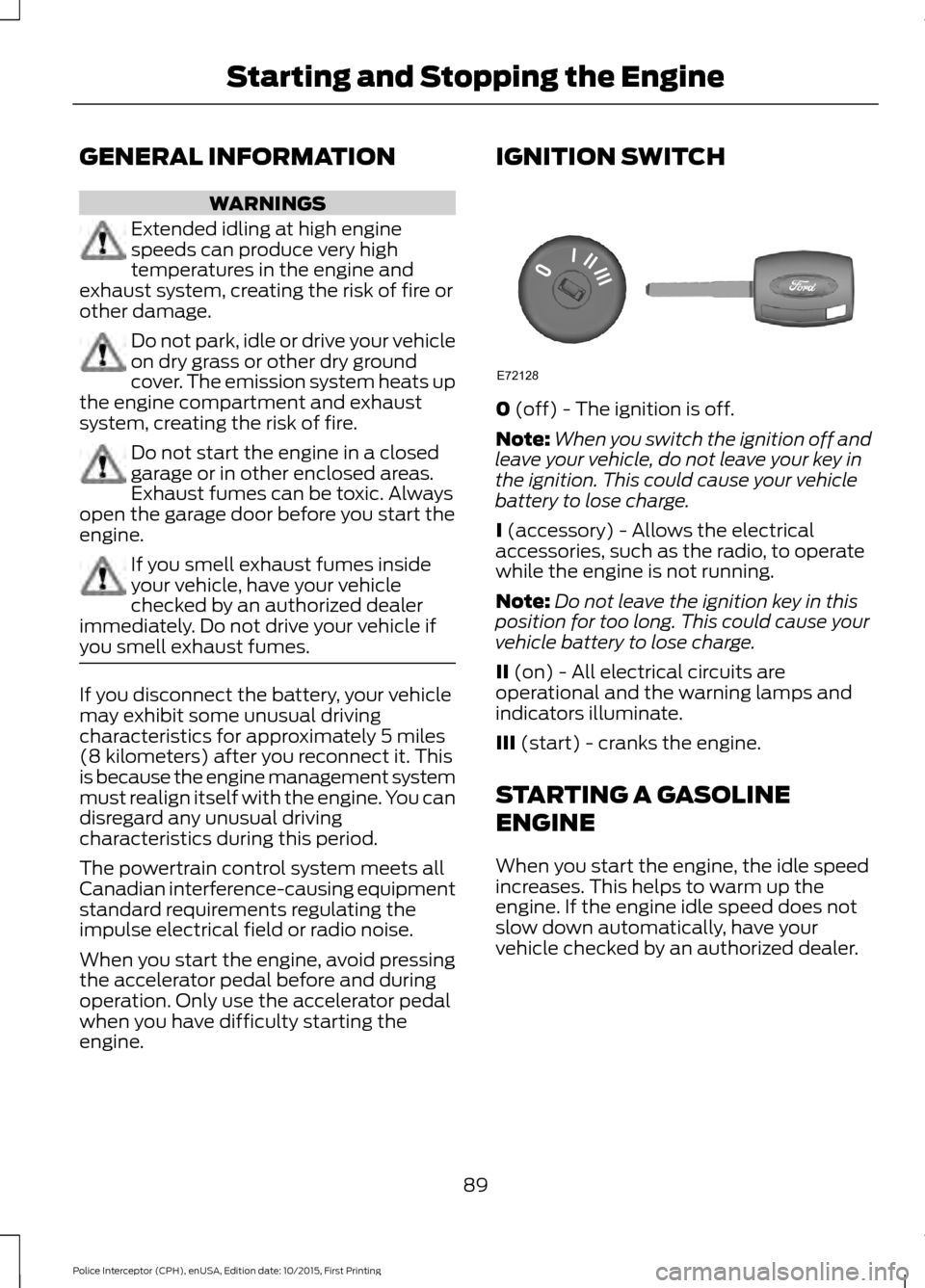
engine. IGNITION SWITCH
0 (off) - The ignition is off.
Note: When you switch the ignition off and
leave your vehicle, do not leave your key in
the ignition. This could cause your vehicle
battery to lose charge.
I
(accessory) - Allows the electrical
accessories, such as the radio, to operate
while the engine is not running.
Note: Do not leave the ignition key in this
position for too long. This could cause your
vehicle battery to lose charge.
II
(on) - All electrical circuits are
operational and the warning lamps and
indicators illuminate.
III
(start) - cranks the engine.
STARTING A GASOLINE
ENGINE
When you start the engine, the idle speed
increases. This helps to warm up the
engine. If the engine idle speed does not
slow down automatically, have your
vehicle checked by an authorized dealer.
89
Police Interceptor (CPH), enUSA, Edition date: 10/2015, First Printing Starting and Stopping the EngineE72128