instrument cluster FORD POLICE INTERCEPTOR UTILITY 2016 1.G User Guide
[x] Cancel search | Manufacturer: FORD, Model Year: 2016, Model line: POLICE INTERCEPTOR UTILITY, Model: FORD POLICE INTERCEPTOR UTILITY 2016 1.GPages: 350, PDF Size: 3.58 MB
Page 75 of 350
Automatic Transmission Warning
Chime
Sounds when you have not moved the
transmission selector lever to position P.
A message will be shown in the display.
72
Explorer (TUB), enUSA, Edition date: 03/2015, First Printing Instrument Cluster
Page 108 of 350
WARNINGS
Do not remove the fuel pump nozzle
from its fully inserted position when
refueling.
Use the following guidelines to avoid
electrostatic charge build-up, which can
produce a spark, when filling an
ungrounded fuel container:
•
Place approved fuel container on the
ground.
• Do not fill a fuel container while it is in
the vehicle (including the cargo area).
• Keep the fuel pump nozzle in contact
with the fuel container while filling.
• Do not use a device that would hold
the fuel pump handle in the fill position.
Easy Fuel ™ Capless Fuel System WARNING
The fuel system may be under
pressure. If you hear a hissing sound
near the fuel filler door, do not refuel
until the sound stops. Otherwise, fuel may
spray out, which could cause serious
personal injury. When fueling your vehicle:
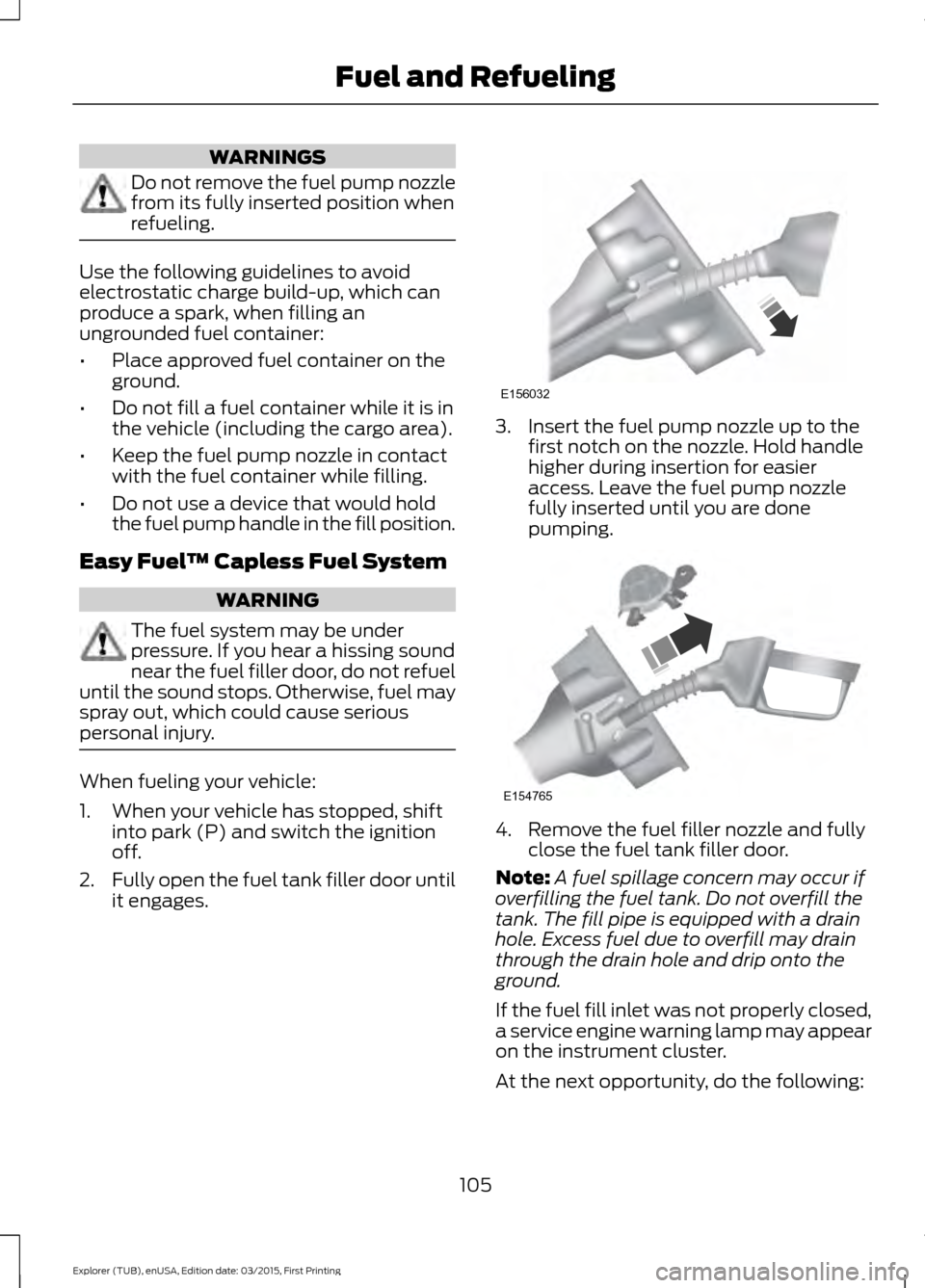
1. When your vehicle has stopped, shift
into park (P) and switch the ignition
off.
2. Fully open the fuel tank filler door until
it engages. 3. Insert the fuel pump nozzle up to the
first notch on the nozzle. Hold handle
higher during insertion for easier
access. Leave the fuel pump nozzle
fully inserted until you are done
pumping. 4. Remove the fuel filler nozzle and fully
close the fuel tank filler door.
Note: A fuel spillage concern may occur if
overfilling the fuel tank. Do not overfill the
tank. The fill pipe is equipped with a drain
hole. Excess fuel due to overfill may drain
through the drain hole and drip onto the
ground.
If the fuel fill inlet was not properly closed,
a service engine warning lamp may appear
on the instrument cluster.
At the next opportunity, do the following:
105
Explorer (TUB), enUSA, Edition date: 03/2015, First Printing Fuel and RefuelingE156032 E154765
Page 123 of 350
PARKING BRAKE
WARNING
Always set the parking brake fully
and make sure the transmission is
locked in park (P). Failure to set the
parking brake and engage park could result
in vehicle roll-away, property damage or
bodily injury. To set the parking brake, press the parking
brake pedal down to its fullest extent. The
brake warning lamp in the instrument
cluster will illuminate and remains
illuminated until the parking brake is
released.
To release the parking brake, press the
parking brake pedal down again.
If you are parking your vehicle on a grade
or with a trailer, press and hold the brake
pedal down, then set the parking brake.
There may be a little vehicle movement as
the parking brake sets to hold the vehicle's
weight. This is normal and should be no
reason for concern. If needed, press and
hold the service brake pedal down, then
try reapplying the parking brake. Chock the
wheels if required. If the parking brake
cannot hold the weight of the vehicle, the
parking brake may need to be serviced or
the vehicle may be overloaded.
120
Explorer (TUB), enUSA, Edition date: 03/2015, First Printing Brakes
Page 132 of 350
PRINCIPLE OF OPERATION
Cruise control lets you maintain a set
speed without keeping your foot on the
accelerator pedal. You can use cruise
control when your vehicle speed is greater
than 20 mph (30 km/h).
USING CRUISE CONTROL WARNINGS
Do not use cruise control on winding
roads, in heavy traffic or when the
road surface is slippery. This could
result in loss of vehicle control, serious
injury or death. When you are going downhill, your
vehicle speed may increase above
the set speed. The system will not
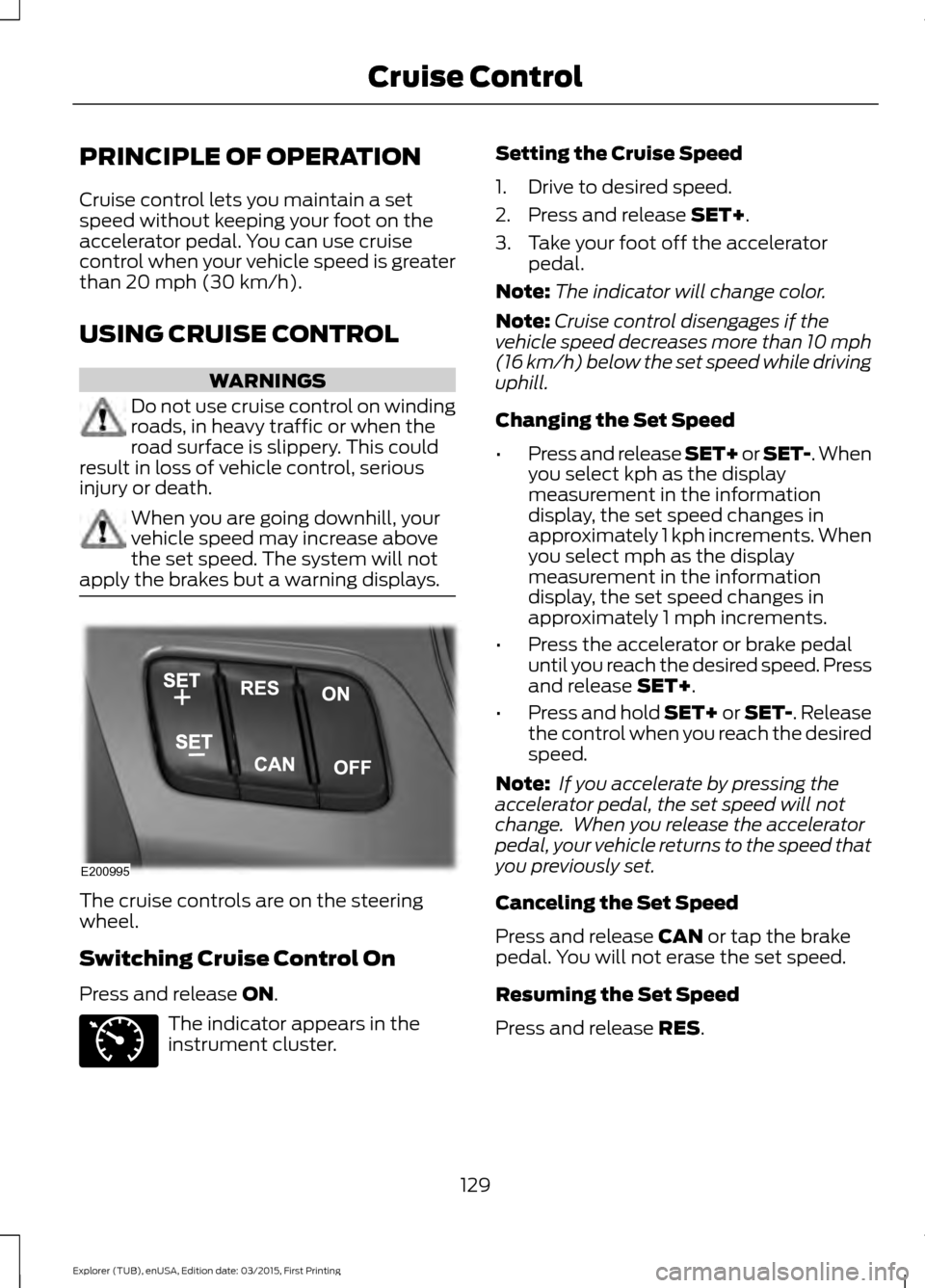
apply the brakes but a warning displays. The cruise controls are on the steering
wheel.
Switching Cruise Control On
Press and release
ON.
The indicator appears in the
instrument cluster. Setting the Cruise Speed
1. Drive to desired speed.
2. Press and release
SET+.
3. Take your foot off the accelerator pedal.
Note: The indicator will change color.
Note: Cruise control disengages if the
vehicle speed decreases more than 10 mph
(16 km/h) below the set speed while driving
uphill.
Changing the Set Speed
• Press and release SET+ or SET-. When
you select kph as the display
measurement in the information
display, the set speed changes in
approximately 1 kph increments. When
you select mph as the display
measurement in the information
display, the set speed changes in
approximately 1 mph increments.
• Press the accelerator or brake pedal
until you reach the desired speed. Press
and release
SET+.
• Press and hold SET+ or SET-. Release
the control when you reach the desired
speed.
Note: If you accelerate by pressing the
accelerator pedal, the set speed will not
change. When you release the accelerator
pedal, your vehicle returns to the speed that
you previously set.
Canceling the Set Speed
Press and release
CAN or tap the brake
pedal. You will not erase the set speed.
Resuming the Set Speed
Press and release
RES.
129
Explorer (TUB), enUSA, Edition date: 03/2015, First Printing Cruise ControlE200995 E71340
Page 176 of 350
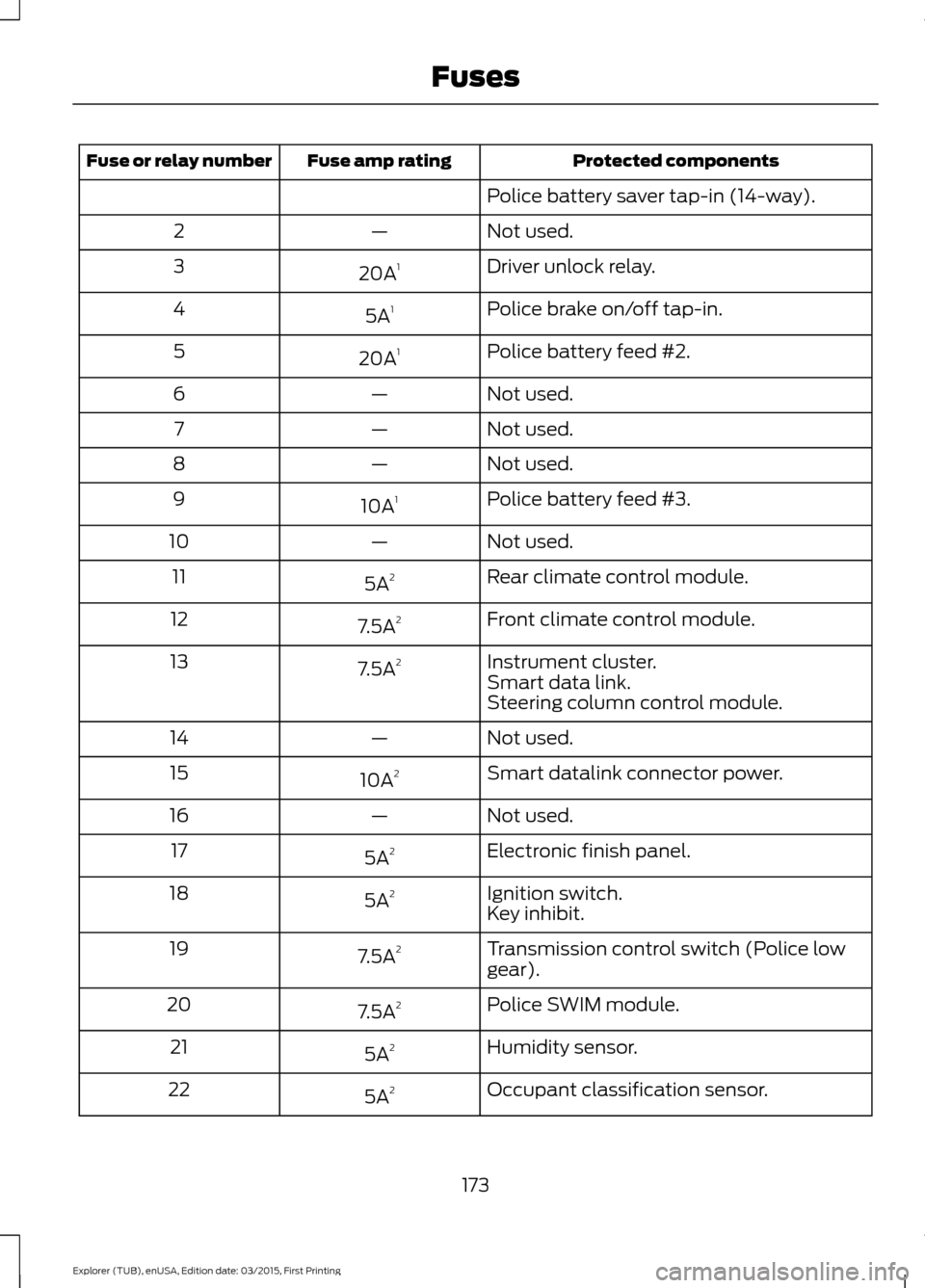
Protected components
Fuse amp rating
Fuse or relay number
Police battery saver tap-in (14-way).
Not used.
—
2
Driver unlock relay.
20A 1
3
Police brake on/off tap-in.
5A 1
4
Police battery feed #2.
20A 1
5
Not used.
—
6
Not used.
—
7
Not used.
—
8
Police battery feed #3.
10A 1
9
Not used.
—
10
Rear climate control module.
5A 2
11
Front climate control module.
7.5A 2
12
Instrument cluster.
7.5A 2
13
Smart data link.
Steering column control module.
Not used.
—
14
Smart datalink connector power.
10A 2
15
Not used.
—
16
Electronic finish panel.
5A 2
17
Ignition switch.
5A 2
18
Key inhibit.
Transmission control switch (Police low
gear).
7.5A
2
19
Police SWIM module.
7.5A 2
20
Humidity sensor.
5A 2
21
Occupant classification sensor.
5A 2
22
173
Explorer (TUB), enUSA, Edition date: 03/2015, First Printing Fuses
Page 184 of 350
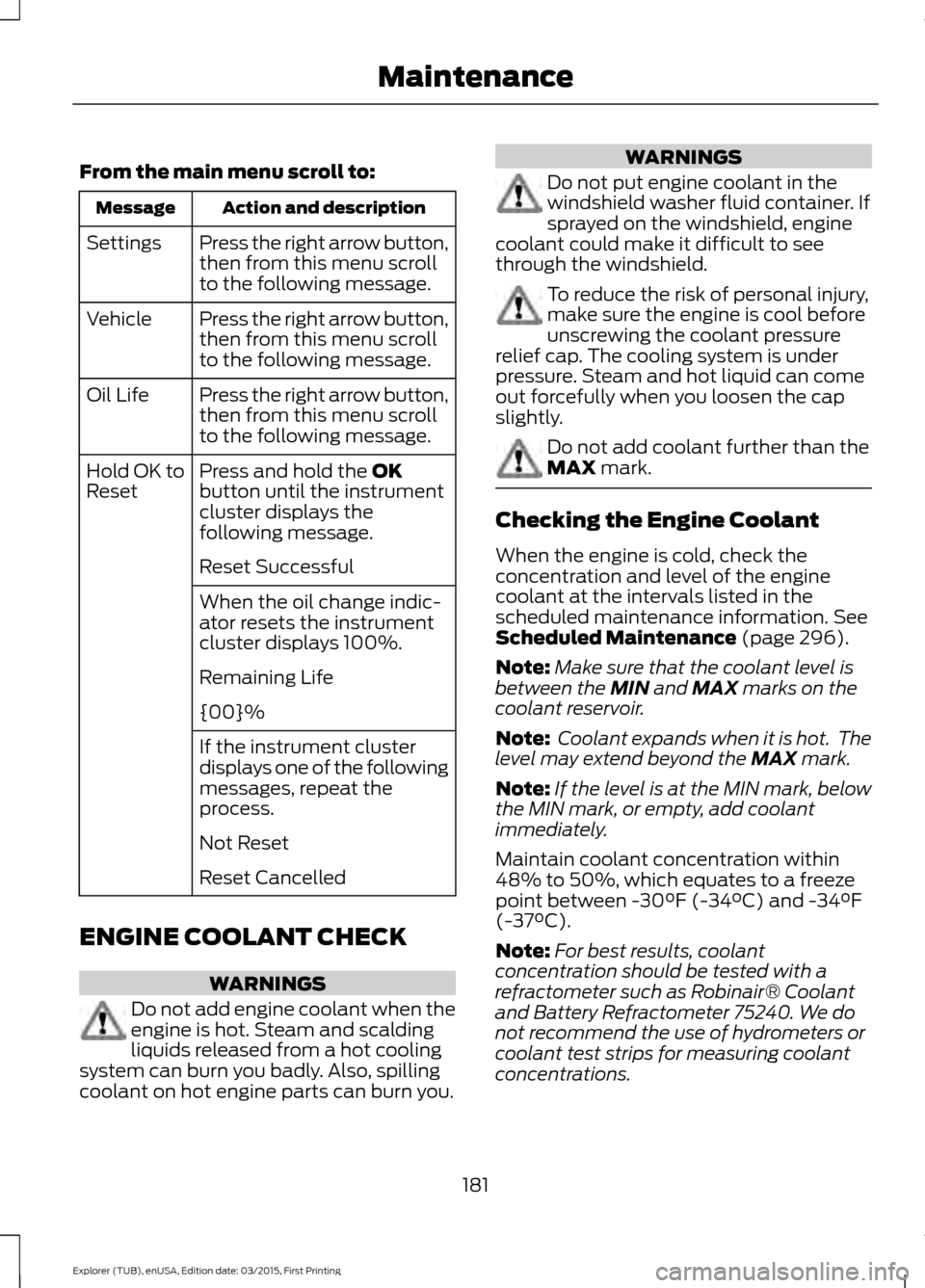
From the main menu scroll to:
Action and description
Message
Press the right arrow button,
then from this menu scroll
to the following message.
Settings
Press the right arrow button,
then from this menu scroll
to the following message.
Vehicle
Press the right arrow button,
then from this menu scroll
to the following message.
Oil Life
Press and hold the OK
button until the instrument
cluster displays the
following message.
Hold OK to
Reset
Reset Successful
When the oil change indic-
ator resets the instrument
cluster displays 100%.
Remaining Life
{00}%
If the instrument cluster
displays one of the following
messages, repeat the
process.
Not Reset
Reset Cancelled
ENGINE COOLANT CHECK WARNINGS
Do not add engine coolant when the
engine is hot. Steam and scalding
liquids released from a hot cooling
system can burn you badly. Also, spilling
coolant on hot engine parts can burn you. WARNINGS
Do not put engine coolant in the
windshield washer fluid container. If
sprayed on the windshield, engine
coolant could make it difficult to see
through the windshield. To reduce the risk of personal injury,
make sure the engine is cool before
unscrewing the coolant pressure
relief cap. The cooling system is under
pressure. Steam and hot liquid can come
out forcefully when you loosen the cap
slightly. Do not add coolant further than the
MAX mark.
Checking the Engine Coolant
When the engine is cold, check the
concentration and level of the engine
coolant at the intervals listed in the
scheduled maintenance information.
See
Scheduled Maintenance (page 296).
Note: Make sure that the coolant level is
between the
MIN and MAX marks on the
coolant reservoir.
Note: Coolant expands when it is hot. The
level may extend beyond the
MAX mark.
Note: If the level is at the MIN mark, below
the MIN mark, or empty, add coolant
immediately.
Maintain coolant concentration within
48% to 50%, which equates to a freeze
point between -30°F (-34°C) and -34°F
(-37°C).
Note: For best results, coolant
concentration should be tested with a
refractometer such as Robinair® Coolant
and Battery Refractometer 75240. We do
not recommend the use of hydrometers or
coolant test strips for measuring coolant
concentrations.
181
Explorer (TUB), enUSA, Edition date: 03/2015, First Printing Maintenance
Page 204 of 350
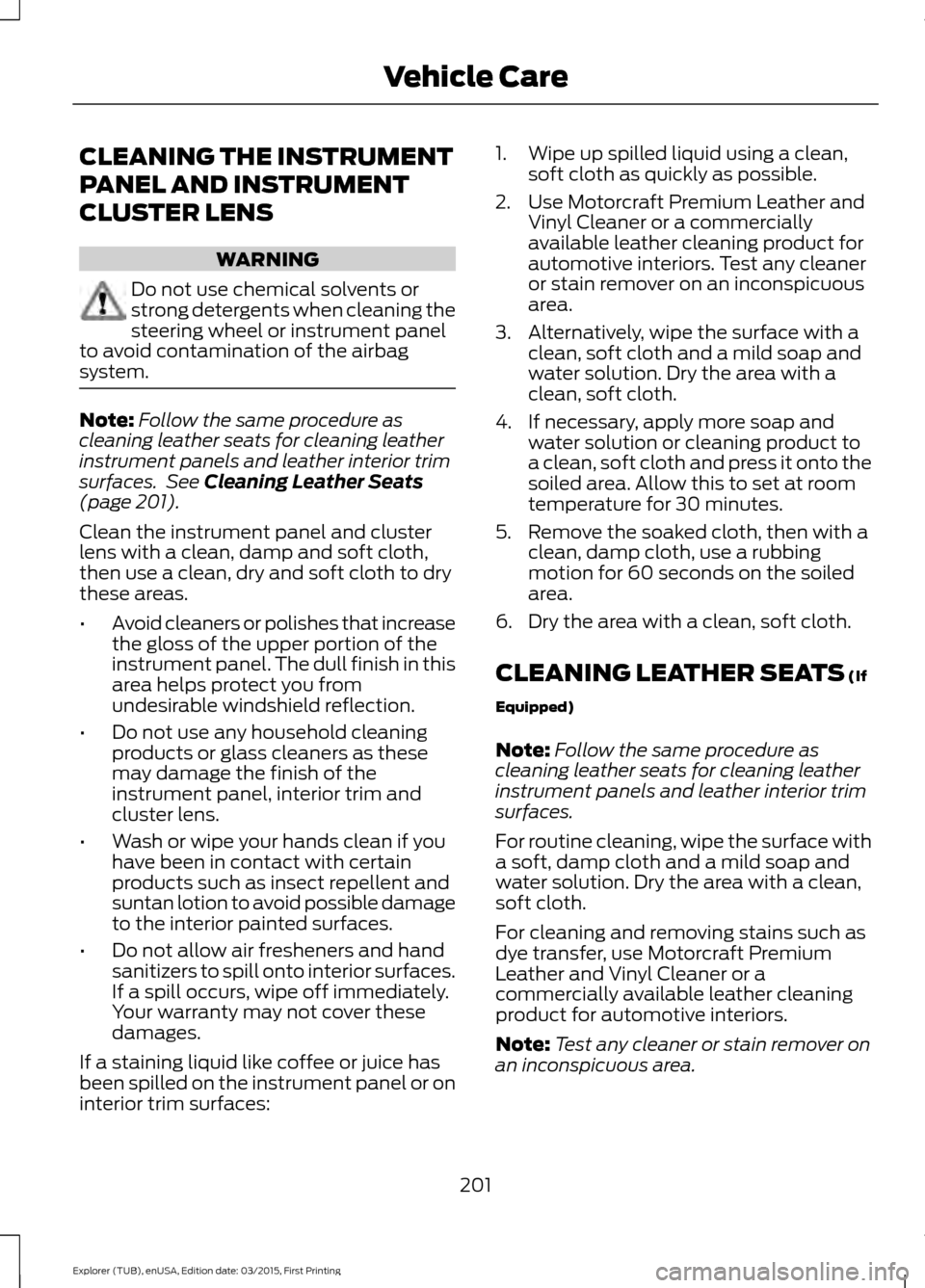
CLEANING THE INSTRUMENT
PANEL AND INSTRUMENT
CLUSTER LENS
WARNING
Do not use chemical solvents or
strong detergents when cleaning the
steering wheel or instrument panel
to avoid contamination of the airbag
system. Note:
Follow the same procedure as
cleaning leather seats for cleaning leather
instrument panels and leather interior trim
surfaces. See Cleaning Leather Seats
(page 201).
Clean the instrument panel and cluster
lens with a clean, damp and soft cloth,
then use a clean, dry and soft cloth to dry
these areas.
• Avoid cleaners or polishes that increase
the gloss of the upper portion of the
instrument panel. The dull finish in this
area helps protect you from
undesirable windshield reflection.
• Do not use any household cleaning
products or glass cleaners as these
may damage the finish of the
instrument panel, interior trim and
cluster lens.
• Wash or wipe your hands clean if you
have been in contact with certain
products such as insect repellent and
suntan lotion to avoid possible damage
to the interior painted surfaces.
• Do not allow air fresheners and hand
sanitizers to spill onto interior surfaces.
If a spill occurs, wipe off immediately.
Your warranty may not cover these
damages.
If a staining liquid like coffee or juice has
been spilled on the instrument panel or on
interior trim surfaces: 1. Wipe up spilled liquid using a clean,
soft cloth as quickly as possible.
2. Use Motorcraft Premium Leather and Vinyl Cleaner or a commercially
available leather cleaning product for
automotive interiors. Test any cleaner
or stain remover on an inconspicuous
area.
3. Alternatively, wipe the surface with a clean, soft cloth and a mild soap and
water solution. Dry the area with a
clean, soft cloth.
4. If necessary, apply more soap and water solution or cleaning product to
a clean, soft cloth and press it onto the
soiled area. Allow this to set at room
temperature for 30 minutes.
5. Remove the soaked cloth, then with a clean, damp cloth, use a rubbing
motion for 60 seconds on the soiled
area.
6. Dry the area with a clean, soft cloth.
CLEANING LEATHER SEATS
(If
Equipped)
Note: Follow the same procedure as
cleaning leather seats for cleaning leather
instrument panels and leather interior trim
surfaces.
For routine cleaning, wipe the surface with
a soft, damp cloth and a mild soap and
water solution. Dry the area with a clean,
soft cloth.
For cleaning and removing stains such as
dye transfer, use Motorcraft Premium
Leather and Vinyl Cleaner or a
commercially available leather cleaning
product for automotive interiors.
Note: Test any cleaner or stain remover on
an inconspicuous area.
201
Explorer (TUB), enUSA, Edition date: 03/2015, First Printing Vehicle Care
Page 343 of 350
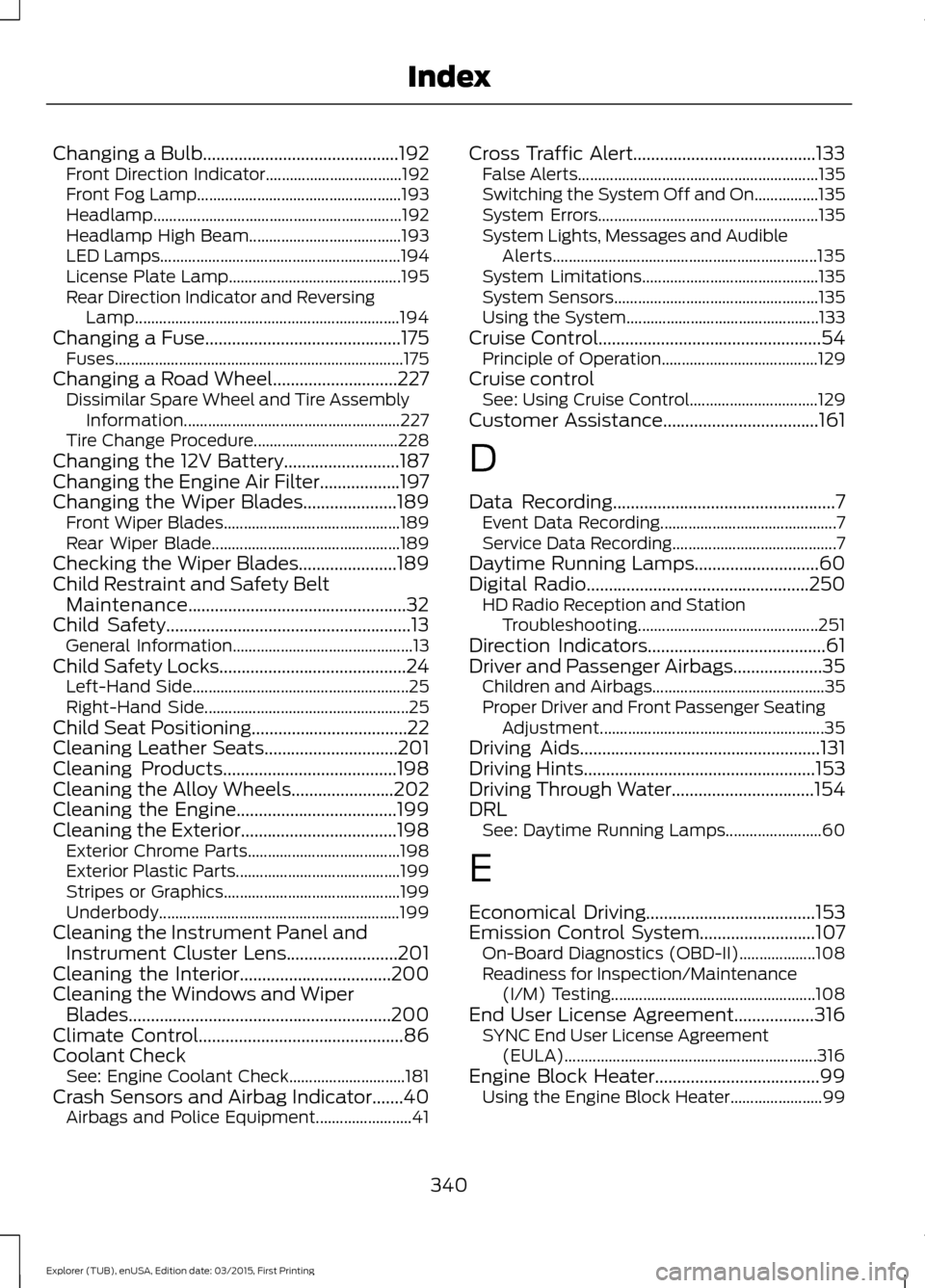
Changing a Bulb............................................192
Front Direction Indicator.................................. 192
Front Fog Lamp................................................... 193
Headlamp.............................................................. 192
Headlamp High Beam...................................... 193
LED Lamps............................................................ 194
License Plate Lamp........................................... 195
Rear Direction Indicator and Reversing Lamp.................................................................. 194
Changing a Fuse............................................175
Fuses........................................................................\
175
Changing a Road Wheel............................227 Dissimilar Spare Wheel and Tire Assembly
Information...................................................... 227
Tire Change Procedure.................................... 228
Changing the 12V Battery..........................187
Changing the Engine Air Filter..................197
Changing the Wiper Blades
.....................189
Front Wiper Blades............................................ 189
Rear Wiper Blade............................................... 189
Checking the Wiper Blades
......................189
Child Restraint and Safety Belt Maintenance.................................................32
Child Safety
.......................................................13
General Information............................................. 13
Child Safety Locks
..........................................24
Left-Hand Side...................................................... 25
Right-Hand Side................................................... 25
Child Seat Positioning...................................22
Cleaning Leather Seats..............................201
Cleaning Products
.......................................198
Cleaning the Alloy Wheels.......................202
Cleaning the Engine
....................................199
Cleaning the Exterior...................................198 Exterior Chrome Parts...................................... 198
Exterior Plastic Parts......................................... 199
Stripes or Graphics............................................ 199
Underbody............................................................ 199
Cleaning the Instrument Panel and Instrument Cluster Lens.........................201
Cleaning the Interior
..................................200
Cleaning the Windows and Wiper Blades...........................................................200
Climate Control
..............................................86
Coolant Check See: Engine Coolant Check............................. 181
Crash Sensors and Airbag Indicator.......40 Airbags and Police Equipment........................ 41Cross Traffic Alert.........................................133
False Alerts............................................................ 135
Switching the System Off and On................135
System Errors....................................................... 135
System Lights, Messages and Audible Alerts.................................................................. 135
System Limitations............................................ 135
System Sensors................................................... 135
Using the System................................................ 133
Cruise Control
..................................................54
Principle of Operation....................................... 129
Cruise control See: Using Cruise Control................................ 129
Customer Assistance
...................................161
D
Data Recording
..................................................7
Event Data Recording............................................ 7
Service Data Recording......................................... 7
Daytime Running Lamps............................60
Digital Radio
..................................................250
HD Radio Reception and Station
Troubleshooting............................................. 251
Direction Indicators
........................................61
Driver and Passenger Airbags....................35 Children and Airbags........................................... 35
Proper Driver and Front Passenger Seating Adjustment........................................................ 35
Driving Aids
......................................................131
Driving Hints....................................................153
Driving Through Water................................154
DRL See: Daytime Running Lamps........................ 60
E
Economical Driving
......................................153
Emission Control System..........................107 On-Board Diagnostics (OBD-II)................... 108
Readiness for Inspection/Maintenance (I/M) Testing................................................... 108
End User License Agreement..................316 SYNC End User License Agreement
(EULA)............................................................... 316
Engine Block Heater.....................................99 Using the Engine Block Heater....................... 99
340
Explorer (TUB), enUSA, Edition date: 03/2015, First Printing Index
Page 345 of 350
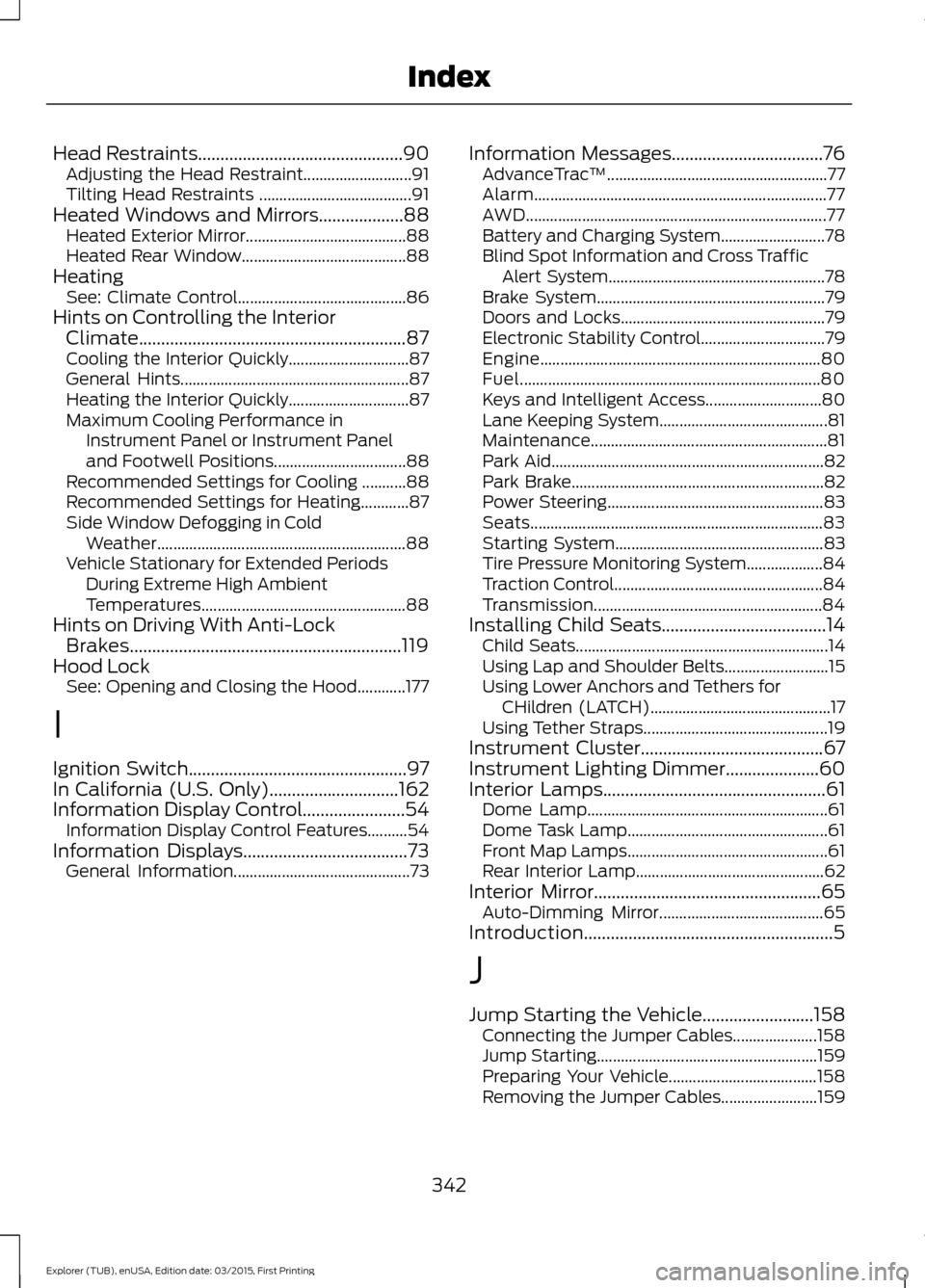
Head Restraints..............................................90
Adjusting the Head Restraint........................... 91
Tilting Head Restraints ...................................... 91
Heated Windows and Mirrors...................88 Heated Exterior Mirror........................................ 88
Heated Rear Window......................................... 88
Heating See: Climate Control.......................................... 86
Hints on Controlling the Interior Climate
............................................................87
Cooling the Interior Quickly.............................. 87
General Hints......................................................... 87
Heating the Interior Quickly.............................. 87
Maximum Cooling Performance in Instrument Panel or Instrument Panel
and Footwell Positions................................. 88
Recommended Settings for Cooling ...........88
Recommended Settings for Heating............87
Side Window Defogging in Cold Weather.............................................................. 88
Vehicle Stationary for Extended Periods During Extreme High Ambient
Temperatures................................................... 88
Hints on Driving With Anti-Lock Brakes.............................................................119
Hood Lock See: Opening and Closing the Hood............177
I
Ignition Switch
.................................................97
In California (U.S. Only).............................162
Information Display Control.......................54 Information Display Control Features..........54
Information Displays.....................................73 General Information............................................ 73Information Messages..................................76
AdvanceTrac ™....................................................... 77
Alarm........................................................................\
. 77
AWD........................................................................\
... 77
Battery and Charging System.......................... 78
Blind Spot Information and Cross Traffic Alert System...................................................... 78
Brake System......................................................... 79
Doors and Locks................................................... 79
Electronic Stability Control............................... 79
Engine...................................................................... 80
Fuel........................................................................\
... 80
Keys and Intelligent Access............................. 80
Lane Keeping System.......................................... 81
Maintenance........................................................... 81
Park Aid.................................................................... 82
Park Brake............................................................... 82
Power Steering...................................................... 83
Seats........................................................................\
. 83
Starting System.................................................... 83
Tire Pressure Monitoring System................... 84
Traction Control.................................................... 84
Transmission......................................................... 84
Installing Child Seats.....................................14 Child Seats............................................................... 14
Using Lap and Shoulder Belts.......................... 15
Using Lower Anchors and Tethers for CHildren (LATCH)............................................. 17
Using Tether Straps.............................................. 19
Instrument Cluster.........................................67
Instrument Lighting Dimmer.....................60
Interior Lamps..................................................61 Dome Lamp............................................................ 61
Dome Task Lamp.................................................. 61
Front Map Lamps.................................................. 61
Rear Interior Lamp............................................... 62
Interior Mirror
...................................................65
Auto-Dimming Mirror......................................... 65
Introduction........................................................5
J
Jump Starting the Vehicle
.........................158
Connecting the Jumper Cables..................... 158
Jump Starting....................................................... 159
Preparing Your Vehicle..................................... 158
Removing the Jumper Cables........................ 159
342
Explorer (TUB), enUSA, Edition date: 03/2015, First Printing Index