ECU FORD POLICE INTERCEPTOR UTILITY 2016 1.G Owner's Manual
[x] Cancel search | Manufacturer: FORD, Model Year: 2016, Model line: POLICE INTERCEPTOR UTILITY, Model: FORD POLICE INTERCEPTOR UTILITY 2016 1.GPages: 350, PDF Size: 3.58 MB
Page 197 of 350
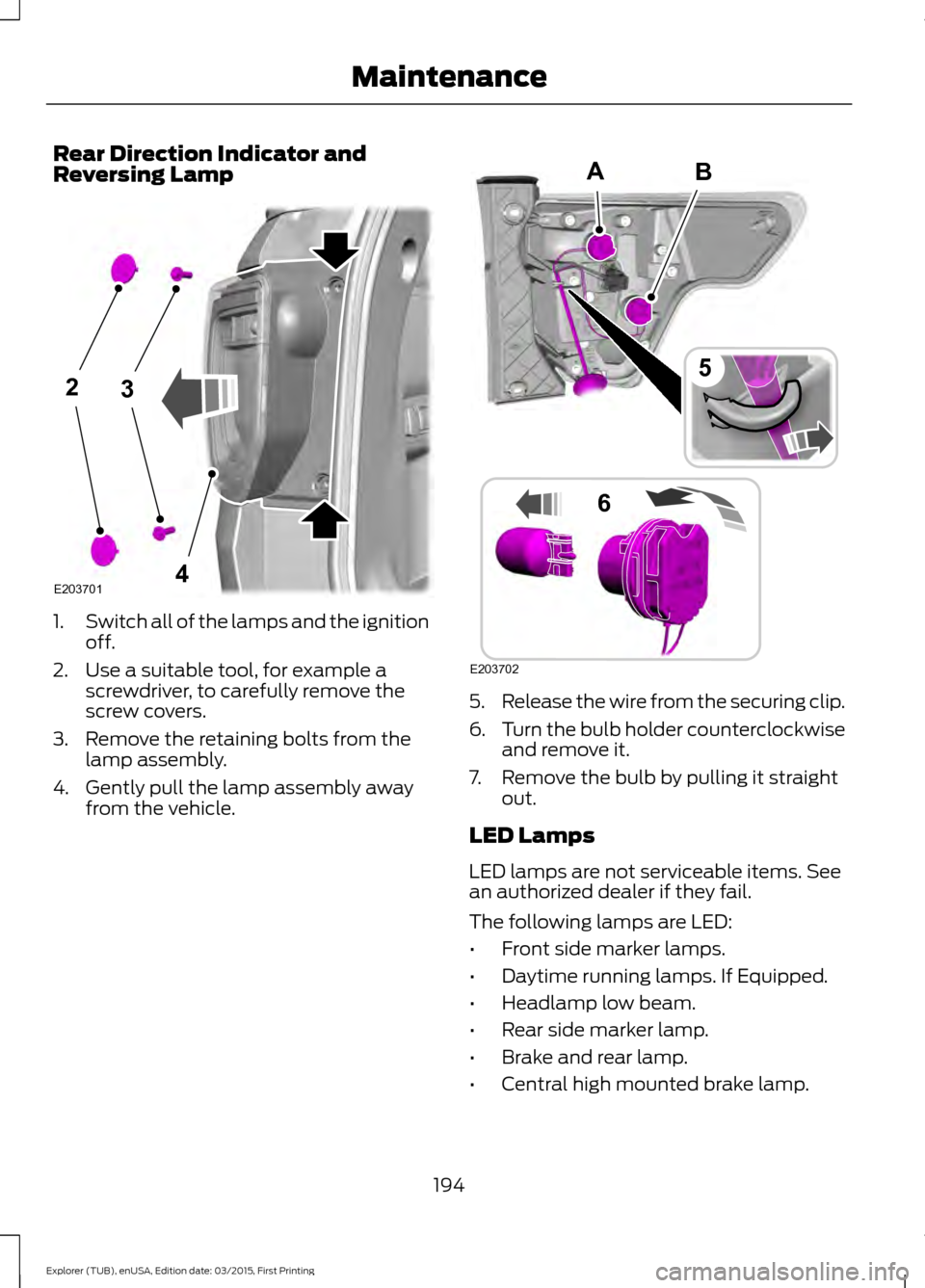
Rear Direction Indicator and
Reversing Lamp
1.
Switch all of the lamps and the ignition
off.
2. Use a suitable tool, for example a screwdriver, to carefully remove the
screw covers.
3. Remove the retaining bolts from the lamp assembly.
4. Gently pull the lamp assembly away from the vehicle. 5.
Release the wire from the securing clip.
6. Turn the bulb holder counterclockwise
and remove it.
7. Remove the bulb by pulling it straight out.
LED Lamps
LED lamps are not serviceable items. See
an authorized dealer if they fail.
The following lamps are LED:
• Front side marker lamps.
• Daytime running lamps. If Equipped.
• Headlamp low beam.
• Rear side marker lamp.
• Brake and rear lamp.
• Central high mounted brake lamp.
194
Explorer (TUB), enUSA, Edition date: 03/2015, First Printing Maintenance23
4E203701 B
E203702
5
6
A
Page 200 of 350
CHANGING THE ENGINE AIR
FILTER
WARNING
To reduce the risk of vehicle damage
and personal burn injuries, do not
start your engine with the air cleaner
removed and do not remove it while the
engine is running. When changing the engine air filter, do not
allow debris or foreign material to enter
the air induction system. Engine
components are susceptible to damage
not covered by the vehicle Warranty.
Change the air filter element at the correct
interval. See Scheduled Maintenance
(page 296).
Incorrect component use can cause
damage not covered by the vehicle
Warranty. See
Capacities and
Specifications (page 238).
To replace the air filter element do the
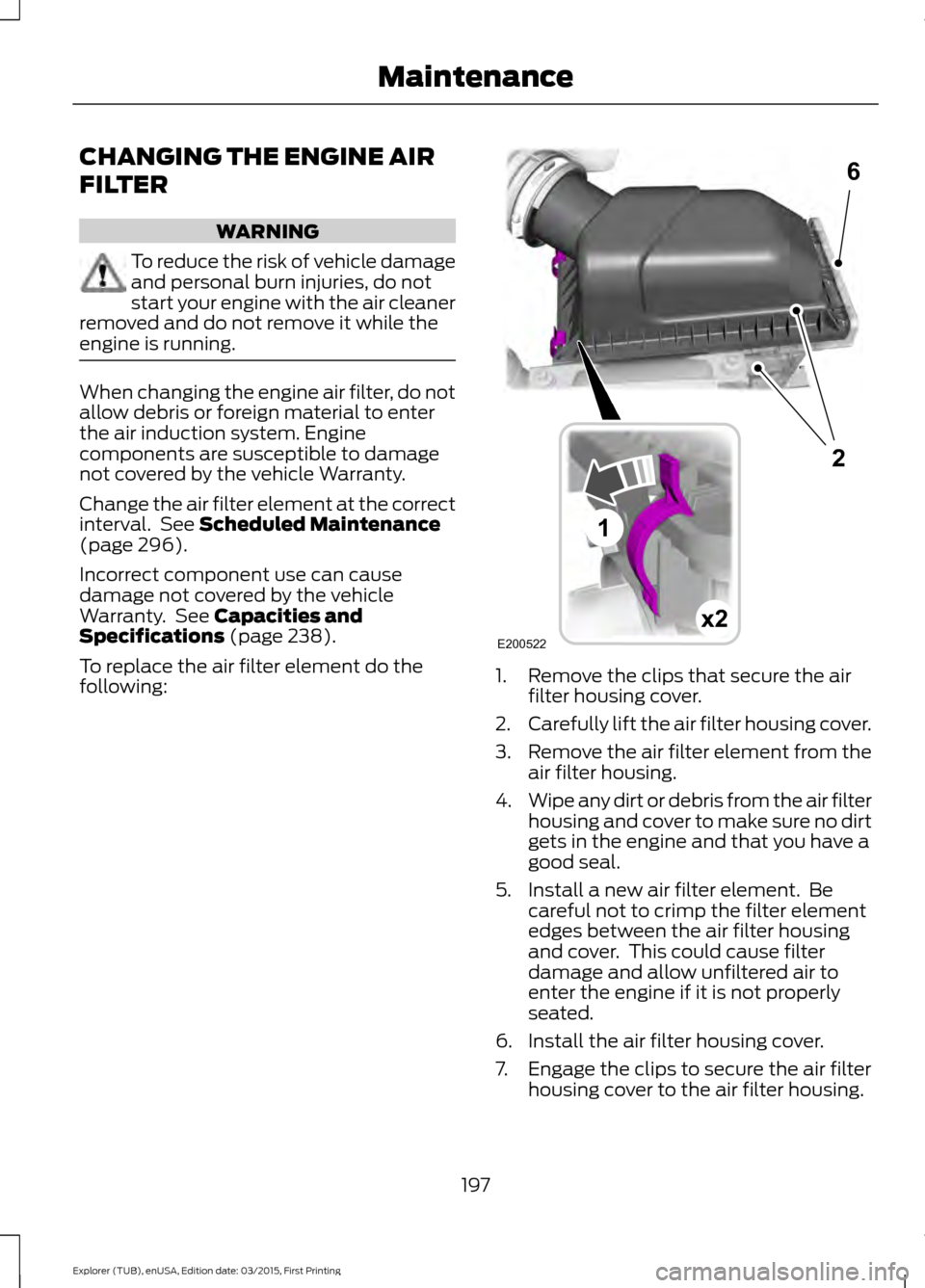
following: 1. Remove the clips that secure the air
filter housing cover.
2. Carefully lift the air filter housing cover.
3. Remove the air filter element from the
air filter housing.
4. Wipe any dirt or debris from the air filter
housing and cover to make sure no dirt
gets in the engine and that you have a
good seal.
5. Install a new air filter element. Be careful not to crimp the filter element
edges between the air filter housing
and cover. This could cause filter
damage and allow unfiltered air to
enter the engine if it is not properly
seated.
6. Install the air filter housing cover.
7. Engage the clips to secure the air filter housing cover to the air filter housing.
197
Explorer (TUB), enUSA, Edition date: 03/2015, First Printing MaintenanceE200522x2
6
1
2
Page 232 of 350
WARNINGS
Never get underneath a vehicle that
is supported only by a jack. If the
vehicle slips off the jack, you or
someone else could be seriously injured. Do not attempt to change a tire on
the side of the vehicle close to
moving traffic. Pull far enough off the
road to avoid the danger of being hit when
operating the jack or changing the wheel. Always use the jack provided as
original equipment with your vehicle.
If using a jack other than the one
provided as original equipment with your
vehicle, make sure the jack capacity is
adequate for the vehicle weight, including
any vehicle cargo or modifications. To reduce the risk of possible serious
injury or death, do not remove the full
size spare tire from the factory
secured location. This location is necessary
to achieve police-rated 75 mph rear impact
crash-test performance. Removal
increases the risk of fuel leak in high-speed
rear impacts. Note:
Passengers should not remain in your
vehicle when the vehicle is being jacked.
Note: Jack at the specified locations to
avoid damage to the vehicle.
1. Park on a level surface, set the parking
brake and activate the hazard flashers.
2. Place the transmission in park (P) and
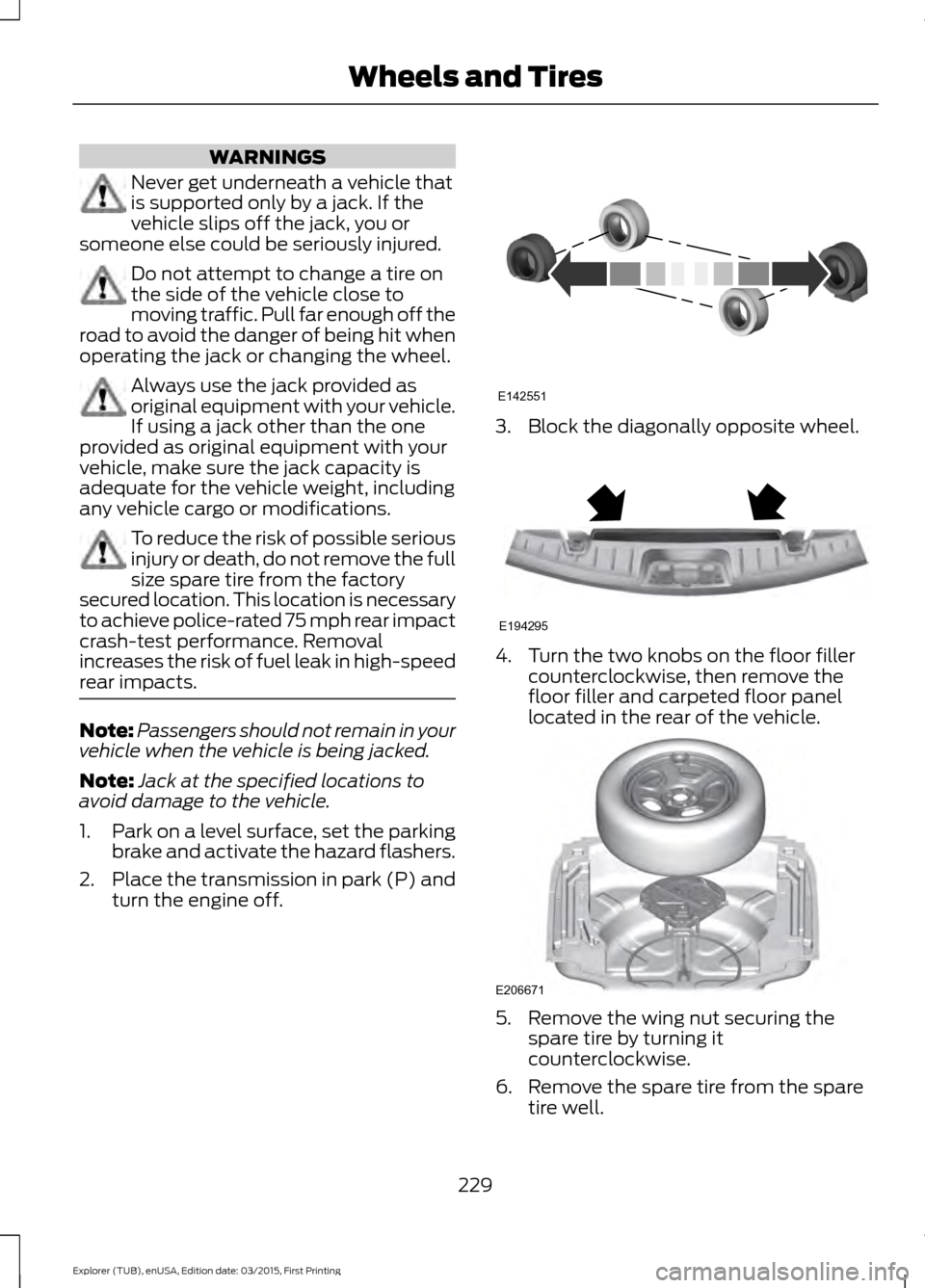
turn the engine off. 3. Block the diagonally opposite wheel.
4. Turn the two knobs on the floor filler
counterclockwise, then remove the
floor filler and carpeted floor panel
located in the rear of the vehicle. 5. Remove the wing nut securing the
spare tire by turning it
counterclockwise.
6. Remove the spare tire from the spare tire well.
229
Explorer (TUB), enUSA, Edition date: 03/2015, First Printing Wheels and TiresE142551 E194295 E206671
Page 233 of 350
7.
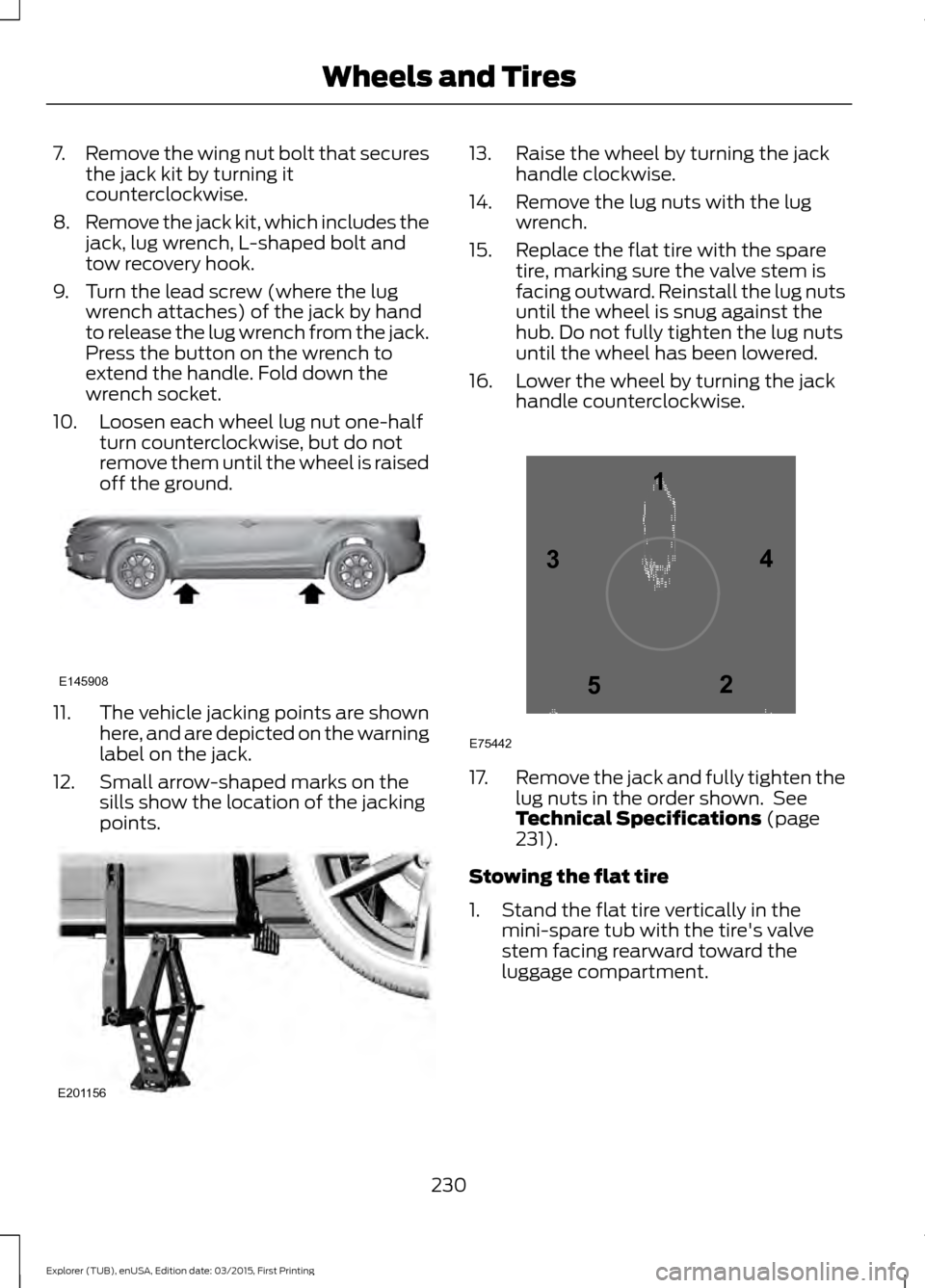
Remove the wing nut bolt that secures
the jack kit by turning it
counterclockwise.
8. Remove the jack kit, which includes the
jack, lug wrench, L-shaped bolt and
tow recovery hook.
9. Turn the lead screw (where the lug wrench attaches) of the jack by hand
to release the lug wrench from the jack.
Press the button on the wrench to
extend the handle. Fold down the
wrench socket.
10. Loosen each wheel lug nut one-half turn counterclockwise, but do not
remove them until the wheel is raised
off the ground.11.
The vehicle jacking points are shown
here, and are depicted on the warning
label on the jack.
12. Small arrow-shaped marks on the sills show the location of the jacking
points. 13. Raise the wheel by turning the jack
handle clockwise.
14. Remove the lug nuts with the lug wrench.
15. Replace the flat tire with the spare tire, marking sure the valve stem is
facing outward. Reinstall the lug nuts
until the wheel is snug against the
hub. Do not fully tighten the lug nuts
until the wheel has been lowered.
16. Lower the wheel by turning the jack handle counterclockwise. 17.
Remove the jack and fully tighten the
lug nuts in the order shown. See
Technical Specifications (page
231).
Stowing the flat tire
1. Stand the flat tire vertically in the mini-spare tub with the tire's valve
stem facing rearward toward the
luggage compartment.
230
Explorer (TUB), enUSA, Edition date: 03/2015, First Printing Wheels and TiresE145908 E201156 12
3
4
5
E75442
Page 234 of 350
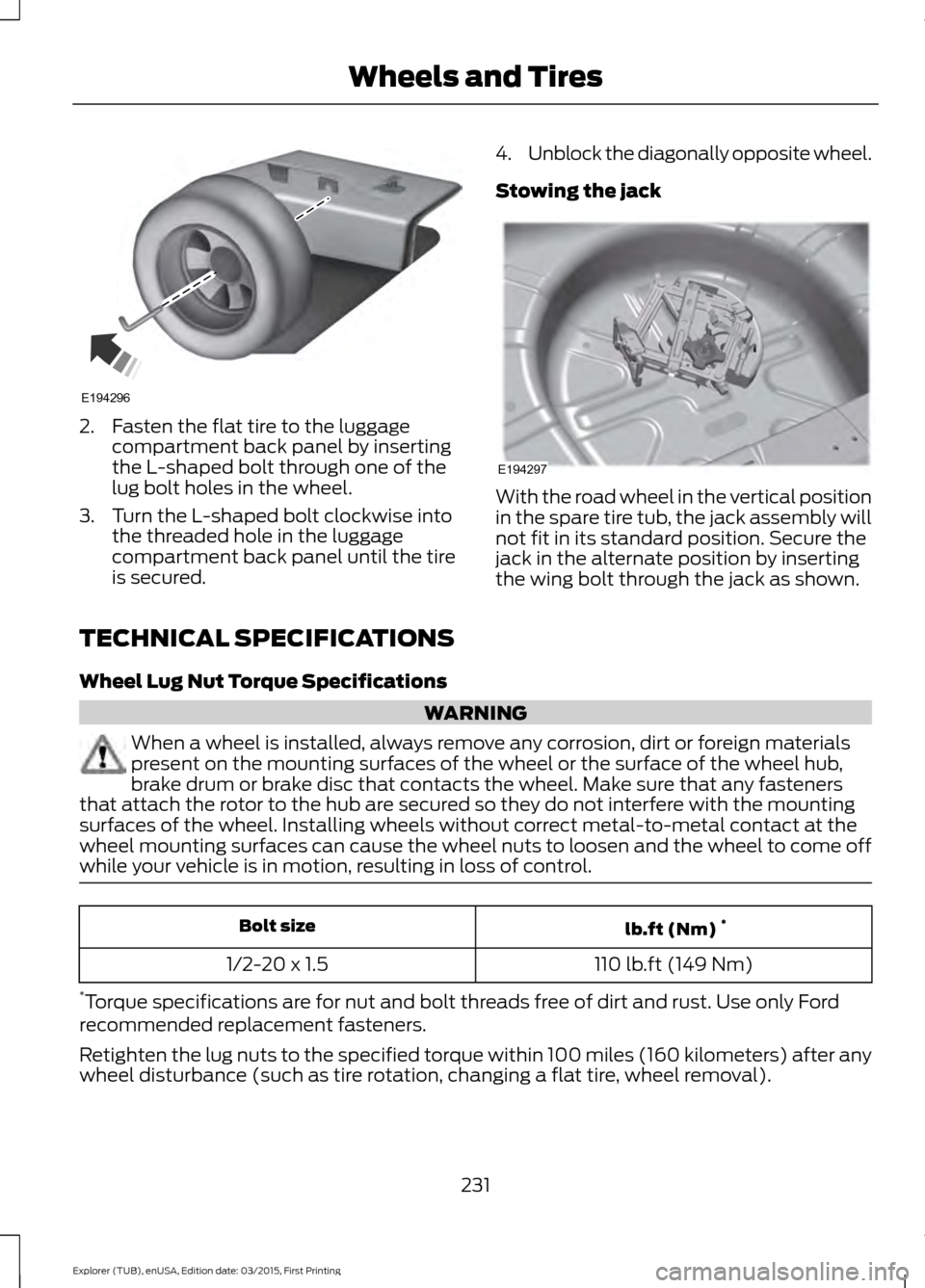
2. Fasten the flat tire to the luggage
compartment back panel by inserting
the L-shaped bolt through one of the
lug bolt holes in the wheel.
3. Turn the L-shaped bolt clockwise into the threaded hole in the luggage
compartment back panel until the tire
is secured. 4.
Unblock the diagonally opposite wheel.
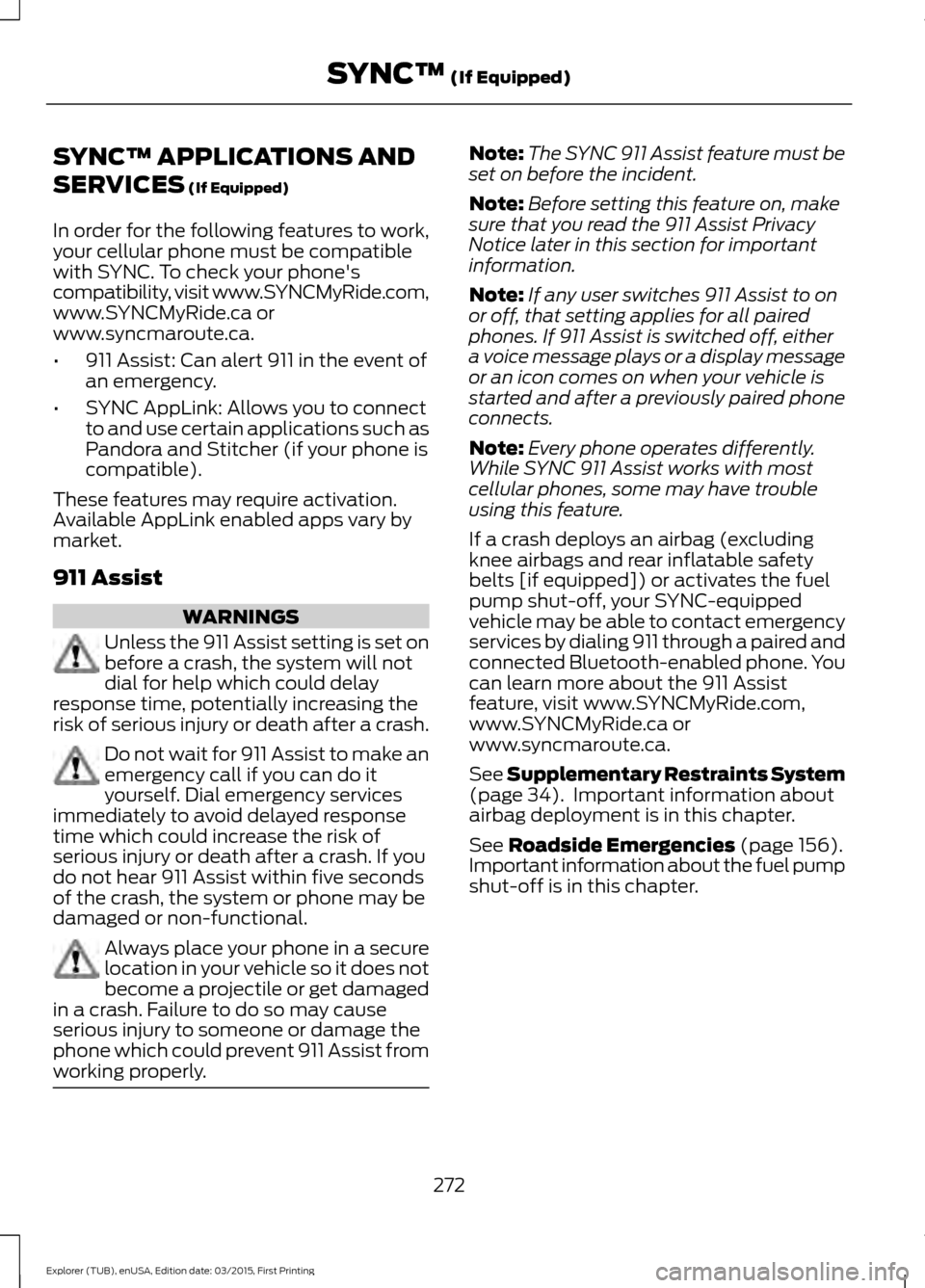
Stowing the jack With the road wheel in the vertical position
in the spare tire tub, the jack assembly will
not fit in its standard position. Secure the
jack in the alternate position by inserting
the wing bolt through the jack as shown.
TECHNICAL SPECIFICATIONS
Wheel Lug Nut Torque Specifications WARNING
When a wheel is installed, always remove any corrosion, dirt or foreign materials
present on the mounting surfaces of the wheel or the surface of the wheel hub,
brake drum or brake disc that contacts the wheel. Make sure that any fasteners
that attach the rotor to the hub are secured so they do not interfere with the mounting
surfaces of the wheel. Installing wheels without correct metal-to-metal contact at the
wheel mounting surfaces can cause the wheel nuts to loosen and the wheel to come off
while your vehicle is in motion, resulting in loss of control. lb.ft (Nm)
*
Bolt size
110 lb.ft (149 Nm)
1/2-20 x 1.5
* Torque specifications are for nut and bolt threads free of dirt and rust. Use only Ford
recommended replacement fasteners.
Retighten the lug nuts to the specified torque within 100 miles (160 kilometers) after any
wheel disturbance (such as tire rotation, changing a flat tire, wheel removal).
231
Explorer (TUB), enUSA, Edition date: 03/2015, First Printing Wheels and TiresE194296 E194297
Page 275 of 350
SYNC™ APPLICATIONS AND
SERVICES (If Equipped)
In order for the following features to work,
your cellular phone must be compatible
with SYNC. To check your phone's
compatibility, visit www.SYNCMyRide.com,
www.SYNCMyRide.ca or
www.syncmaroute.ca.
• 911 Assist: Can alert 911 in the event of
an emergency.
• SYNC AppLink: Allows you to connect
to and use certain applications such as
Pandora and Stitcher (if your phone is
compatible).
These features may require activation.
Available AppLink enabled apps vary by
market.
911 Assist WARNINGS
Unless the 911 Assist setting is set on
before a crash, the system will not
dial for help which could delay
response time, potentially increasing the
risk of serious injury or death after a crash. Do not wait for 911 Assist to make an
emergency call if you can do it
yourself. Dial emergency services
immediately to avoid delayed response
time which could increase the risk of
serious injury or death after a crash. If you
do not hear 911 Assist within five seconds
of the crash, the system or phone may be
damaged or non-functional. Always place your phone in a secure
location in your vehicle so it does not
become a projectile or get damaged
in a crash. Failure to do so may cause
serious injury to someone or damage the
phone which could prevent 911 Assist from
working properly. Note:
The SYNC 911 Assist feature must be
set on before the incident.
Note: Before setting this feature on, make
sure that you read the 911 Assist Privacy
Notice later in this section for important
information.
Note: If any user switches 911 Assist to on
or off, that setting applies for all paired
phones. If 911 Assist is switched off, either
a voice message plays or a display message
or an icon comes on when your vehicle is
started and after a previously paired phone
connects.
Note: Every phone operates differently.
While SYNC 911 Assist works with most
cellular phones, some may have trouble
using this feature.
If a crash deploys an airbag (excluding
knee airbags and rear inflatable safety
belts [if equipped]) or activates the fuel
pump shut-off, your SYNC-equipped
vehicle may be able to contact emergency
services by dialing 911 through a paired and
connected Bluetooth-enabled phone. You
can learn more about the 911 Assist
feature, visit www.SYNCMyRide.com,
www.SYNCMyRide.ca or
www.syncmaroute.ca.
See
Supplementary Restraints System
(page 34). Important information about
airbag deployment is in this chapter.
See
Roadside Emergencies (page 156).
Important information about the fuel pump
shut-off is in this chapter.
272
Explorer (TUB), enUSA, Edition date: 03/2015, First Printing SYNC™
(If Equipped)
Page 290 of 350
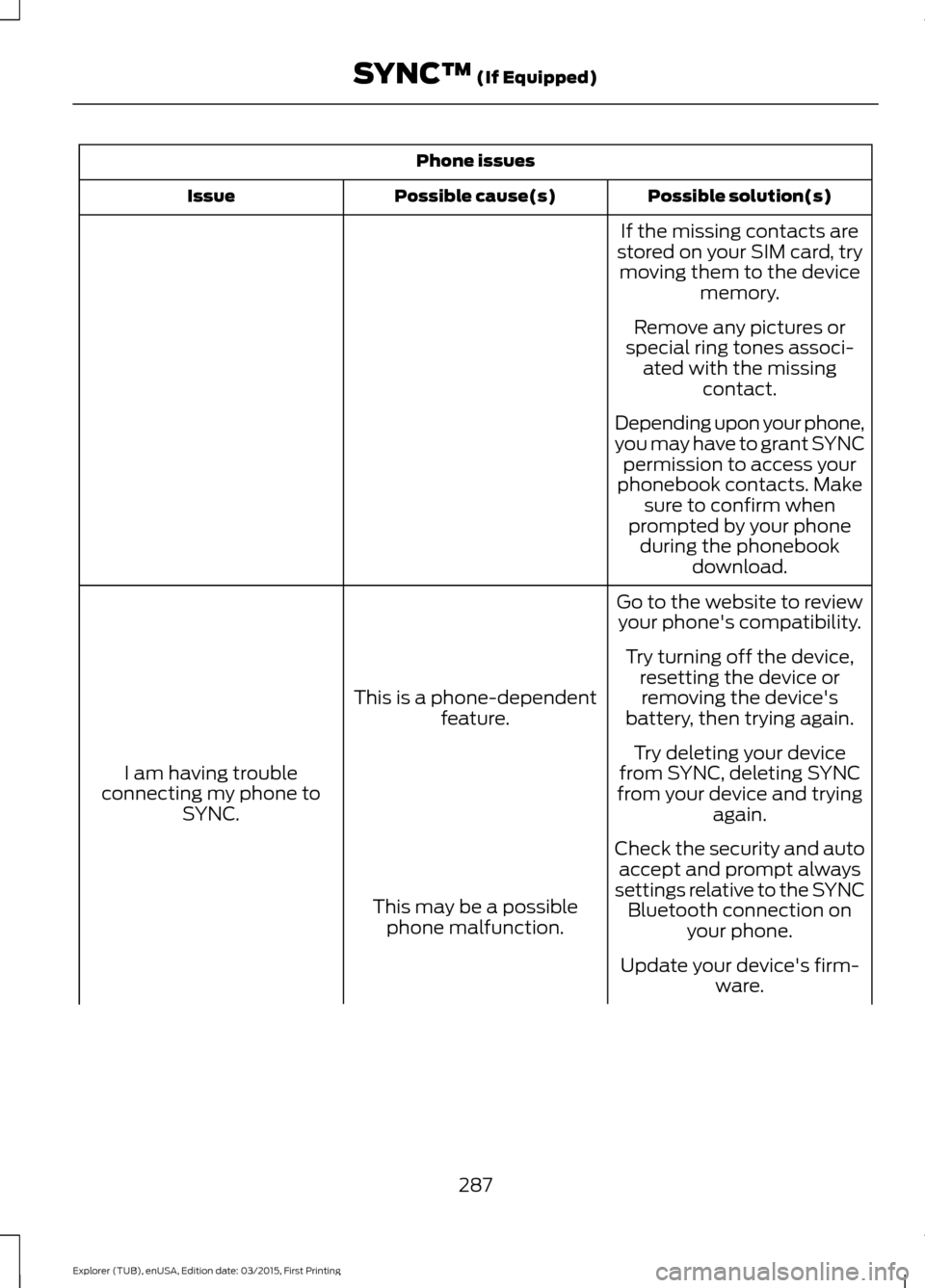
Phone issues
Possible solution(s)
Possible cause(s)
Issue
If the missing contacts are
stored on your SIM card, try moving them to the device memory.
Remove any pictures or
special ring tones associ- ated with the missing contact.
Depending upon your phone,
you may have to grant SYNC permission to access your
phonebook contacts. Make sure to confirm when
prompted by your phone during the phonebook download.
Go to the website to review your phone's compatibility.
This is a phone-dependent feature.
I am having trouble
connecting my phone to SYNC. Try turning off the device,
resetting the device orremoving the device's
battery, then trying again.
Try deleting your device
from SYNC, deleting SYNC
from your device and trying again.
Check the security and auto accept and prompt always
settings relative to the SYNC Bluetooth connection on your phone.
This may be a possible
phone malfunction.
Update your device's firm-ware.
287
Explorer (TUB), enUSA, Edition date: 03/2015, First Printing SYNC™ (If Equipped)
Page 291 of 350
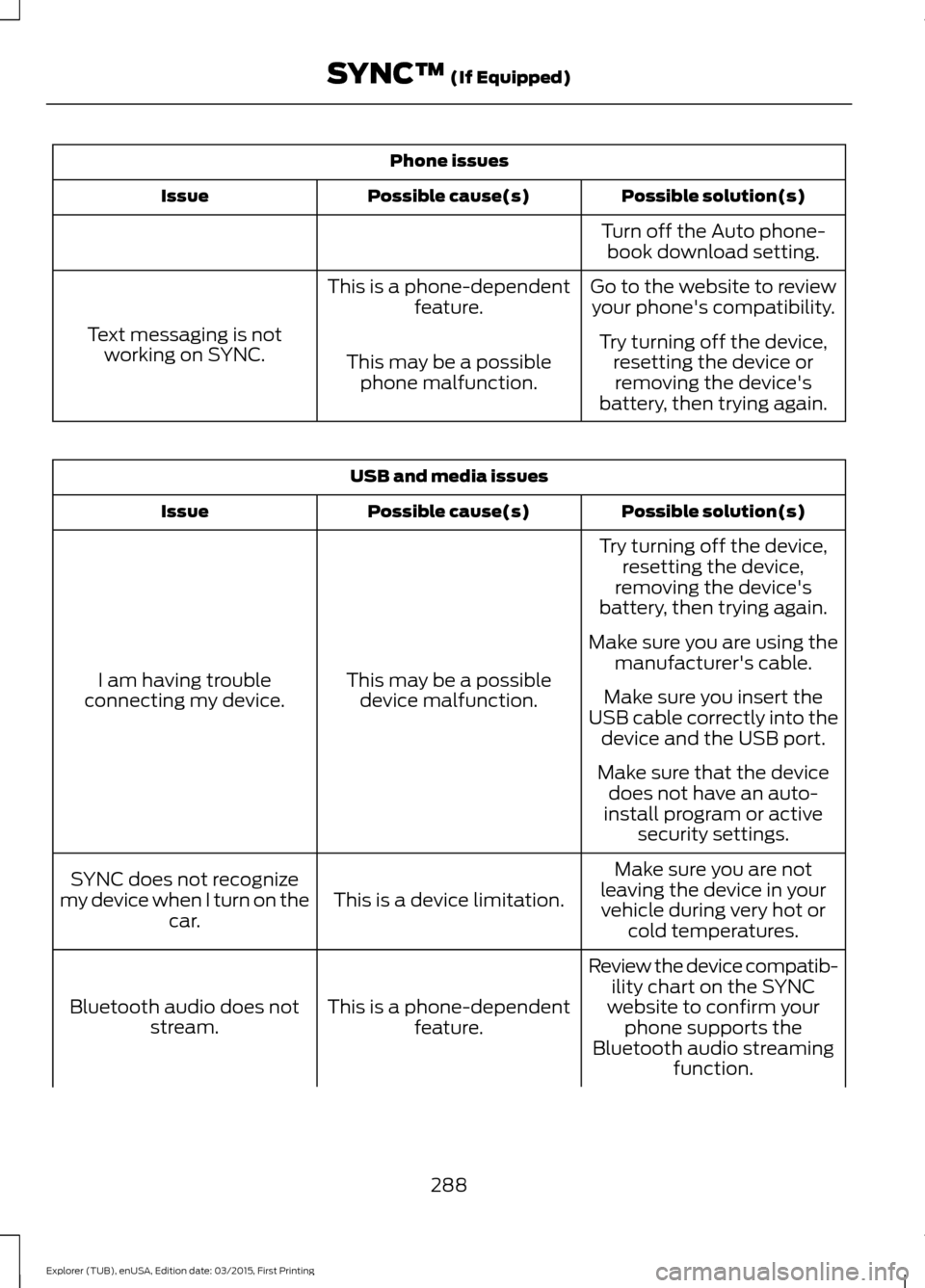
Phone issues
Possible solution(s)
Possible cause(s)
Issue
Turn off the Auto phone-book download setting.
Go to the website to review your phone's compatibility.
This is a phone-dependent
feature.
Text messaging is not working on SYNC. Try turning off the device,
resetting the device orremoving the device's
battery, then trying again.
This may be a possible
phone malfunction. USB and media issues
Possible solution(s)
Possible cause(s)
Issue
Try turning off the device,resetting the device,
removing the device's
battery, then trying again.
This may be a possible device malfunction.
I am having trouble
connecting my device. Make sure you are using the
manufacturer's cable.
Make sure you insert the
USB cable correctly into the device and the USB port.
Make sure that the device does not have an auto-
install program or active security settings.
Make sure you are not
leaving the device in your vehicle during very hot or cold temperatures.
This is a device limitation.
SYNC does not recognize
my device when I turn on the car.
Review the device compatib-ility chart on the SYNC
website to confirm your phone supports the
Bluetooth audio streaming function.
This is a phone-dependent
feature.
Bluetooth audio does not
stream.
288
Explorer (TUB), enUSA, Edition date: 03/2015, First Printing SYNC™ (If Equipped)
Page 298 of 350
Avoid the Rising Cost of Properly
Maintaining Your Vehicle!
Ford Extended Service Plan also offers a
Premium Maintenance Plan that covers all
scheduled maintenance, and selected
wear items. The coverage is prepaid, so
you never have to worry about affording
your vehicle
’s maintenance. It covers
regular checkups, routine inspections,
preventive care and replacement of select
items that require periodic attention for
normal wear:
• Windshield wiper blades.
• Spark plugs.
• The clutch disc.
• Brake pads and linings.
• Shock absorbers.
• Struts.
• Engine Belts.
• Engine coolant hoses, clamps and
o-rings.
• Diesel exhaust fluid replenishment.
Interest Free Finance Options
Available
Take advantage of our interest free
installment payment plan. Just a 10%
down payment will provide you with an
affordable, no interest, no fee payment
program allowing you all the security and
benefits Ford ESP has to offer while paying
over time. You are pre-approved with no
credit checks, no hassles! To learn more,
call our Ford ESP specialists at
800-367-3377.
Ford ESP
P.O. Box 321067
Detroit, MI 48232 SERVICE PLANS (CANADA ONLY)
You can get more protection for your
vehicle by purchasing a Ford Extended
Service Plan. Ford Extended Service Plan
is the only service contract backed by Ford
Motor Company of Canada, Limited.
Depending on the plan you purchase, Ford
Extended Service Plan provides benefits
such as:
•
Rental reimbursement.
• Coverage for certain maintenance and
wear items.
• Protection against repair costs after
your New Vehicle Limited Warranty
Coverage expires.
• Roadside Assistance benefits.
There are several Ford Extended Service
Plans available in various time, distance
and deductible combinations. Each plan
is tailored to fit your own driving needs,
including reimbursement for towing and
rental. When you purchase Ford Extended
Service Plan, you receive added
peace-of-mind protection throughout
Canada, the United States and Mexico,
provided by a network of participating
authorized Ford Motor Company dealers.
Note: Repairs performed outside of
Canada, the United States and Mexico are
not eligible for Ford Extended Service Plan
coverage.
This information is subject to change. For
more information, visit your local Ford of
Canada dealer or www.ford.ca to find the
Ford Extended Service Plan that is right for
you.
295
Explorer (TUB), enUSA, Edition date: 03/2015, First Printing Extended Service Plan (ESP)
Page 320 of 350
Description of Other Rights and
Limitations
•
Speech Recognition: If the
SOFTWARE includes speech
recognition component(s), you should
understand that speech recognition is
an inherently statistical process and
that recognition errors are inherent in
the process. Neither FORD MOTOR
COMPANY nor its suppliers shall be
liable for any damages arising out of
errors in the speech recognition
process.
• Limitations on Reverse Engineering,
Decompilation and Disassembly:
You may not reverse engineer,
decompile, or disassemble nor permit
others to reverse engineer, decompile
or disassemble the SOFTWARE, except
and only to the extent that such activity
is expressly permitted by applicable
law notwithstanding this limitation.
• Limitations on Distributing,
Copying, Modifying and Creating
Derivative Works:
You may not
distribute, copy, make modifications
to or create derivative works based on
the SOFTWARE, except and only to the
extent that such activity is expressly
permitted by applicable law
notwithstanding this limitation.
• Single EULA:
The end user
documentation for the DEVICE and
related systems and services may
contain multiple EULAs, such as
multiple translations and/or multiple
media versions (e.g., in the user
documentation and in the software).
Even if you receive multiple EULAs, you
are licensed to use only one (1) copy of
the SOFTWARE. •
SOFTWARE Transfer:
You may
permanently transfer your rights under
this EULA only as part of a sale or
transfer of the DEVICE, provided you
retain no copies, you transfer all of the
SOFTWARE (including all component
parts, the media and printed materials,
any upgrades, and, if applicable, the
Certificate(s) of Authenticity), and the
recipient agrees to the terms of this
EULA. If the SOFTWARE is an upgrade,
any transfer must include all prior
versions of the SOFTWARE.
• Termination: Without prejudice to any
other rights, FORD MOTOR COMPANY
or MS may terminate this EULA if you
fail to comply with the terms and
conditions of this EULA.
• Security Updates/Digital Rights
Management:
Content owners use
the WMDRM technology included in
your DEVICE to protect their
intellectual property, included
copyrighted content. Portions of the
SOFTWARE on your DEVICE use
WMDRM software to access
WMDRM-protected content. If the
WMDRM software fails to protect the
content, content owners may ask
Microsoft to revoke the SOFTWARE's
ability to use WMDRM to play or copy
protected content. This action does
not affect unprotected content. When
your DEVICE downloads licenses for
protected content, you agree that
Microsoft may include a revocation list
with the licenses. Content owners may
require you to upgrade the SOFTWARE
on your DEVICE to access their content.
If you decline an upgrade, you will not
be able to access content that requires
the upgrade.
317
Explorer (TUB), enUSA, Edition date: 03/2015, First Printing Appendices